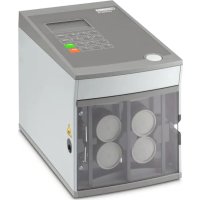
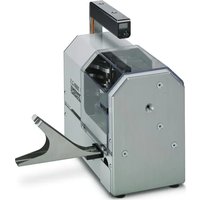
USER MANUAL CUTFOX 10 Phoenix Contact
natural_image
Exterior view of a modern stainless steel industrial machine (no visible text or symbols)
CUTFOX 10
UM DE CUTFOX 10 - 2888479
EN Original operating instructions
FR Instructions de service originales
natural_image
Line drawing of a computer tower with labeled ports A and B, showing internal wiring and ventilation (no text or symbols beyond labels)
natural_image
Technical line drawing of an electrical connector assembly with a pull-up arrow (no text or symbols)
natural_image
Technical line drawing of a mechanical device with gears and a handle, showing internal components without any text or symbols.
natural_image
Technical line drawing of a mechanical assembly with rollers and levers (no text or symbols)
natural_image
Technical line drawing of a mechanical assembly with rollers and a handle (no text or symbols)
natural_image
Technical line drawing of mechanical assembly with mounting brackets and a bracket (no text or symbols)
(OJ L157, 9 June 2006)
2011/65/EU
(OJ L 174, 1 July 2011)
2014/30/EU
(OJ L 96, 29 March 2014)
Original operating instructions
Operation of the Automatic Cutting Device CUTFOX 10
UM EN CUTFOX 10, Revision 06
2024-08-29
This manual is valid for:
Designation From this Serial No. onwards Item No.
CUTFOX 10 231000 1206829
Table of contents
1 For your safety ....5
1.1 Identification of warning notes....5
1.2 Qualification of users ....5
1.3 Field of application of the product....6
1.3.1 Intended use 6
1.3.2 Product changes ......6
2 Operating CUTFOX 10 ....7
2.1 Scope of delivery and overview 7
2.2 Setting up the CUTFOX 10....8
2.3 Connecting and inserting the cable 9
2.4 Automatic cable cutting....10
2.5 Planning cutting jobs with a PC.... 11
2.6 Manual cable cutting....12
2.7 Exiting from cutting....13
3 Troubleshooting 14
3.1 Error messages on the Display 14
3.2 The length cut is wrong....15
3.3 Adjusting the cable conveyor speed....15
3.4 CUTFOX 10 will not switch on.... 16
3.5 Adjusting or replacing the rollers....17
3.6 Replacing the cutters 18
A Appendix 19
A 1 Ordering data.... 19
A 2 Technical data....19
A 4 UK Declaration of Conformity .... 20
1 For your safety
Read this manual carefully and keep it for future reference.
1.1 Identification of warning notes

This symbol indicates hazards that could lead to personal injury.
There are three signal words indicating the severity of a potential injury.
DANGER
Indicates a hazard with a high risk level. If this hazardous situation is not avoided, it will result in death or serious injury.
WARNING
Indicates a hazard with a medium risk level. If this hazardous situation is not avoided, it could result in death or serious injury.
CAUTION
Indicates a hazard with a low risk level. If this hazardous situation is not avoided, it could result in minor or moderate injury.

This symbol together with the NOTE signal word warns the reader of actions that might cause property damage or a malfunction.

Here you will find additional information or detailed sources of information.
1.2 Qualification of users
The use of products described in this manual is oriented exclusively to electrically skilled persons or persons instructed by them. The users must be familiar with the relevant safety concepts of automation technology as well as applicable standards and other regulations.
All persons responsible for startup, operation, and maintenance of the CUTFOX 10 must be appropriately qualified and have read this user manual. In particular, they must be able to recognize dangers.
1.3 Field of application of the product
1.3.1 Intended use
The CUTFOX 10 automatic cutting device cuts cables, litz wires, shrink sleeves, and similar profiles and is particularly suitable for series production.
The CUTFOX 10 is exclusively intended for cutting cables, litz wires, shrink sleeves, and similar profiles up to 8 mm.
Flexible copper litz wires up to 10 mm^2 are suitable and solid copper cables up to 2.5 mm^2 , maximum. Steel wires or similar must never be used, as these could destroy the cutter.
Willful modifications to the CUTFOX 10 are prohibited for safety reasons.
You can either enter the desired length and number of conductors directly on the CUTFOX 10 via the keyboard or document it on the PC via the supplied software and load it into the CUTFOX 10.
Safety symbol
To ensure that the user is alerted to potential hazards, never remove, damage, or cover the safety symbol (6 in Figure 2-1).
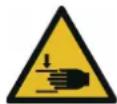
WARNING: Dangers of cutting and crushing
Never stick your finger into the outlet slot. Do not tamper with the outlet slot.
1.3.2 Product changes
The front door is installed for the safety of the operator. You must not modify, remove, or bridge it by conversions under any circumstances.
The CUTFOX 10 may be operated only when the front door is closed.
Disconnect the mains plug before beginning maintenance work.
Make sure that there are no foreign objects inside the housing.
Only use original replacement parts from Phoenix Contact.
Modifications to hardware and firmware of the device are not permitted.
Incorrect operation or modifications to the device can endanger your safety or damage the device. Do not repair the device yourself. If the device is defective, please contact Phoenix Contact.
2 Operating CUTFOX 10
2.1 Scope of delivery and overview
Figure 2-1 Scope of delivery and overview of the operating components
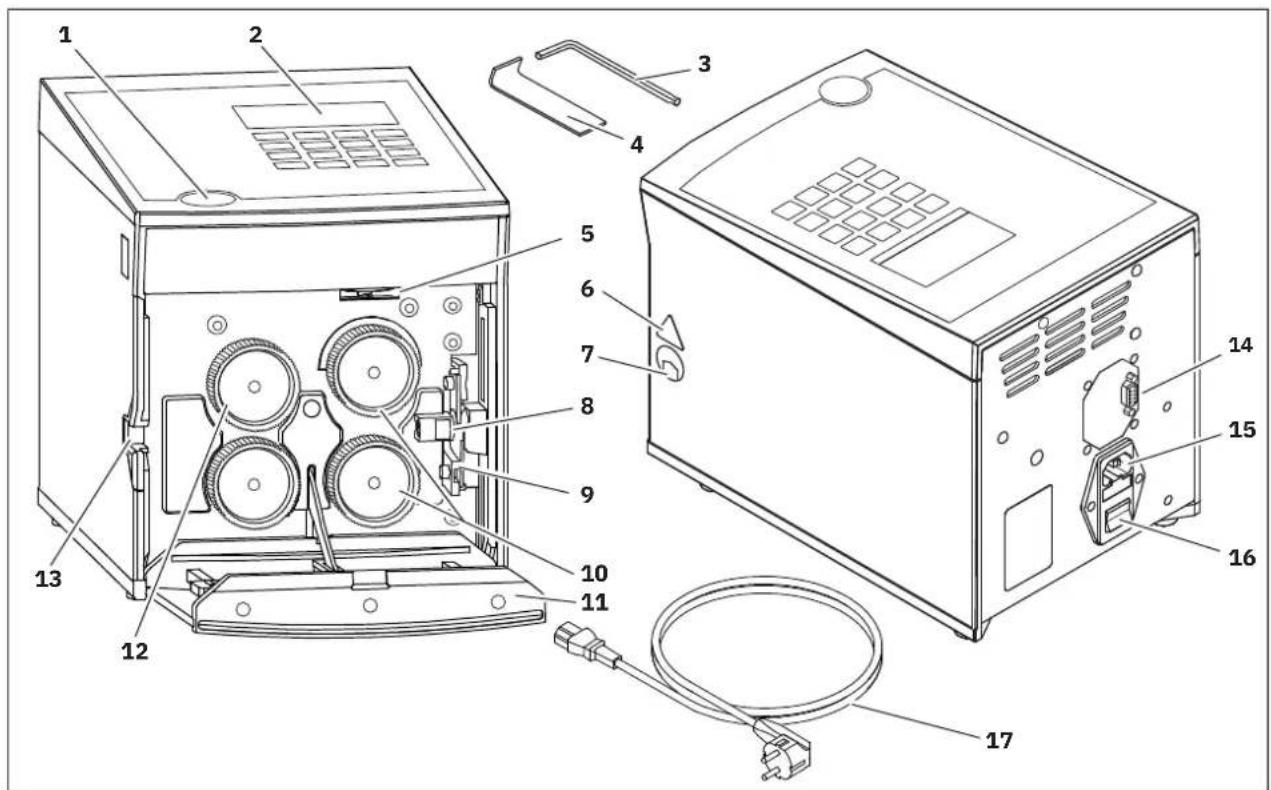
1 Door opener
2 Display and keyboard
3 Allen key, size 3
4 Removal hook
5 Adjusting screw
6 Safety symbol
7 Outlet slot
8 Cable guide
9 Cutter
10 Drive rollers
11 Front door
12 Metering roller
13 Insertion slot
14 RS-232 interface
15 Mains connection with mains fuses
16 On/Off switch
17 Power cable
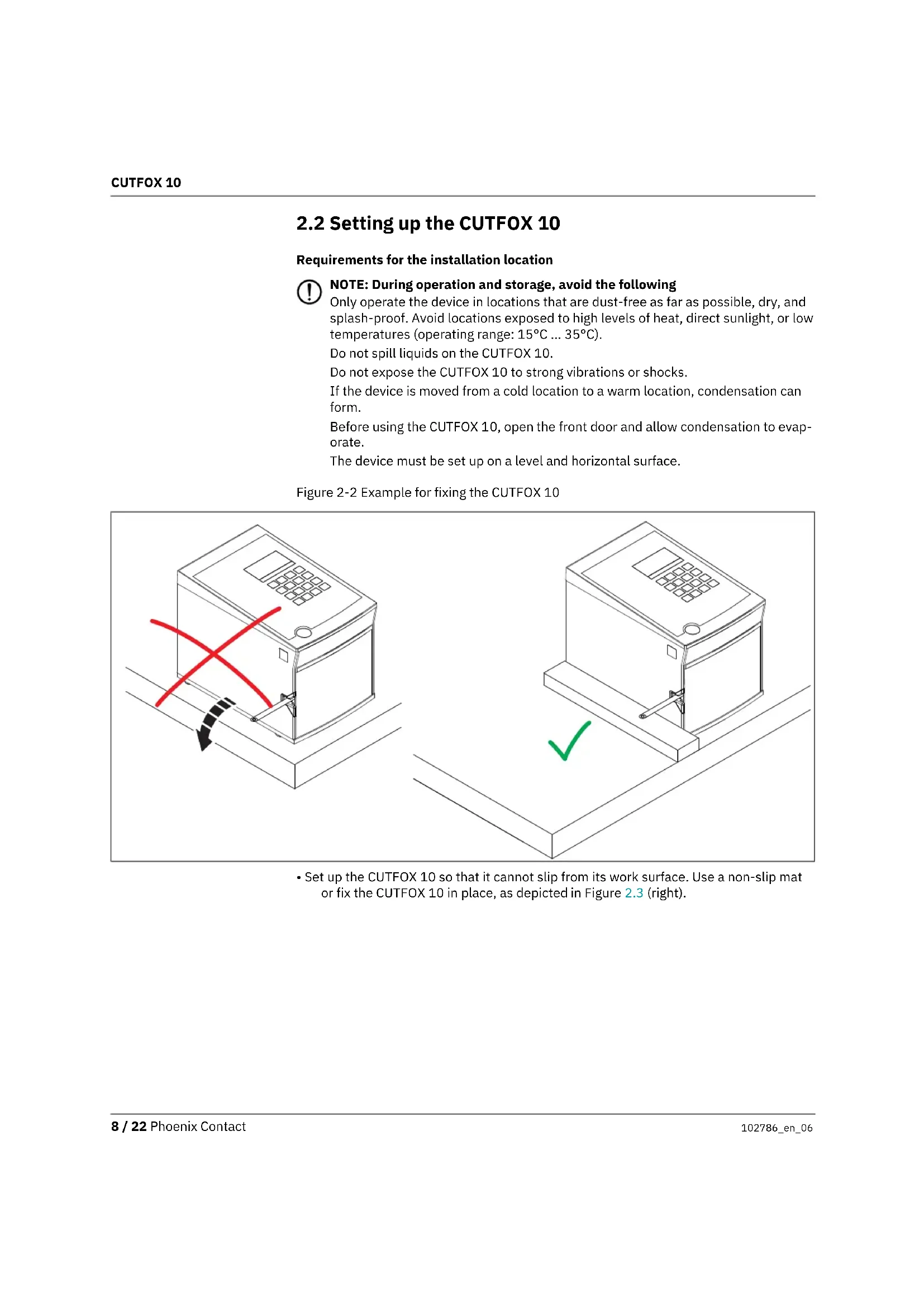
2.2 Setting up the CUTFOX 10
Requirements for the installation location
NOTE: During operation and storage, avoid the following
Only operate the device in locations that are dust-free as far as possible, dry, and splash-proof. Avoid locations exposed to high levels of heat, direct sunlight, or low temperatures (operating range: 15°C ... 35°C).
Do not spill liquids on the CUTFOX 10.
Do not expose the CUTFOX 10 to strong vibrations or shocks.
If the device is moved from a cold location to a warm location, condensation can form.
Before using the CUTFOX 10, open the front door and allow condensation to evaporate.
The device must be set up on a level and horizontal surface.
Figure 2-2 Example for fixing the CUTFOX 10
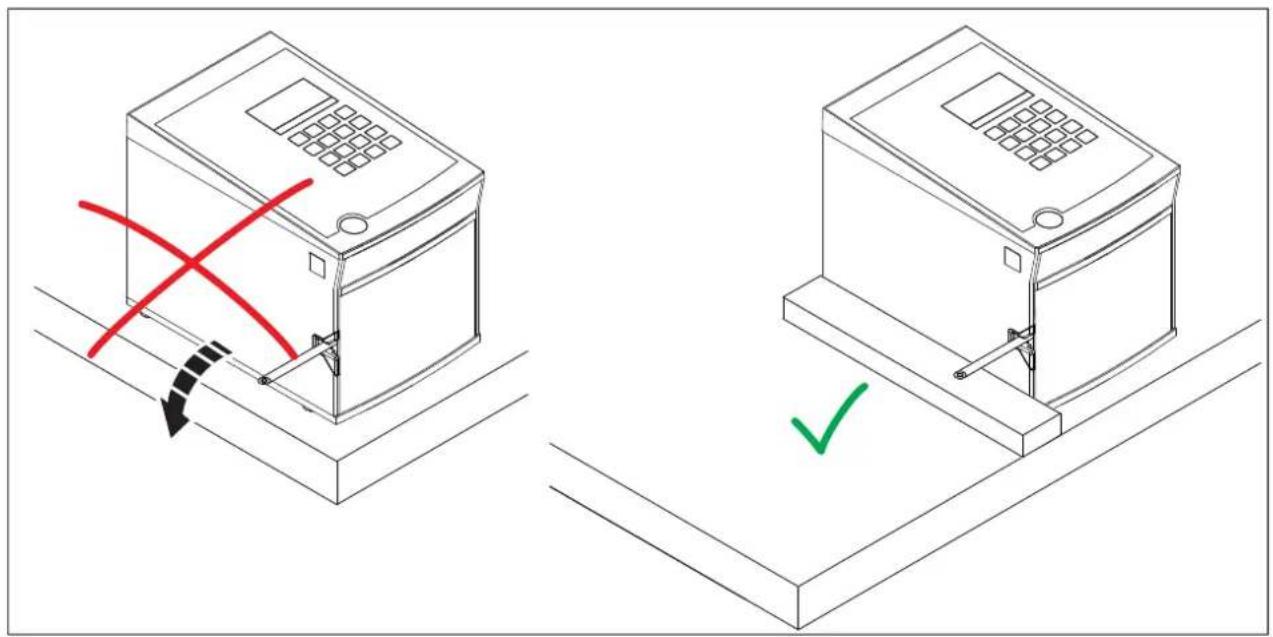
- Set up the CUTFOX 10 so that it cannot slip from its work surface. Use a non-slip mat or fix the CUTFOX 10 in place, as depicted in Figure 2.3 (right).
2.3 Connecting and inserting the cable
natural_image
Line drawing of a computer tower with labeled ports A and B, showing internal wiring and ventilation (no text or symbols beyond labels)
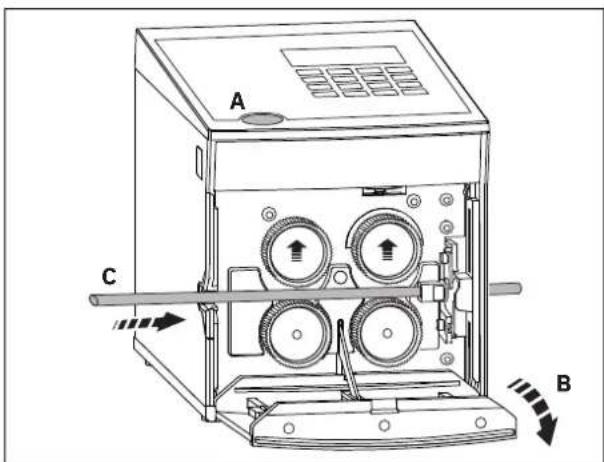
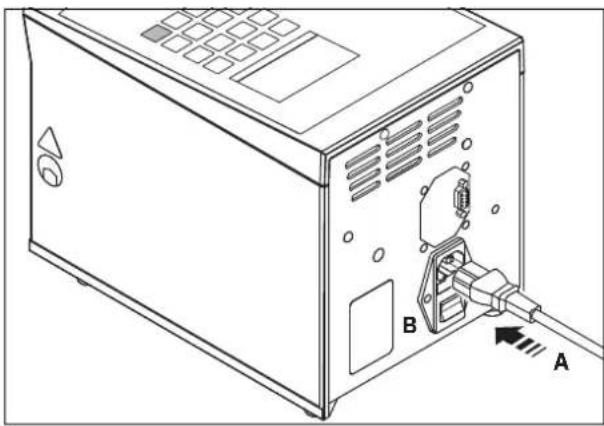
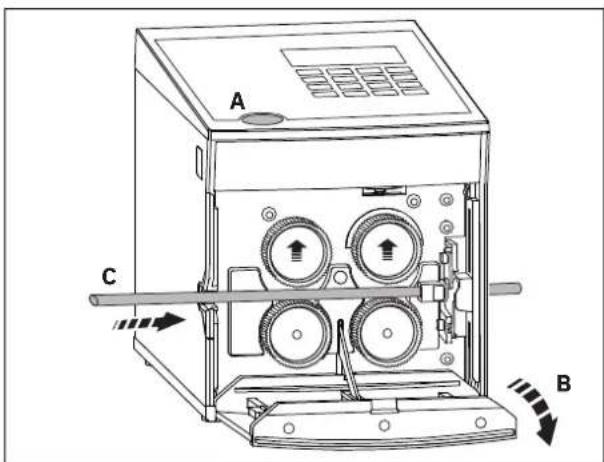
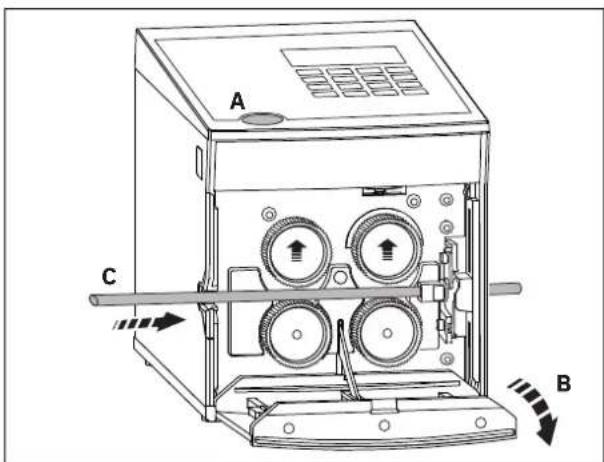
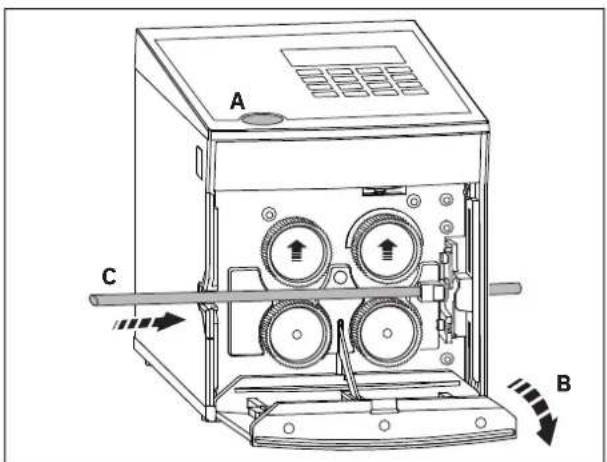
Connecting to mains
- Connect the power cable (A).
- Switch on the CUTFOX 10 with the mains switch (B) (press I).
The display and the red "stop" LED light up.
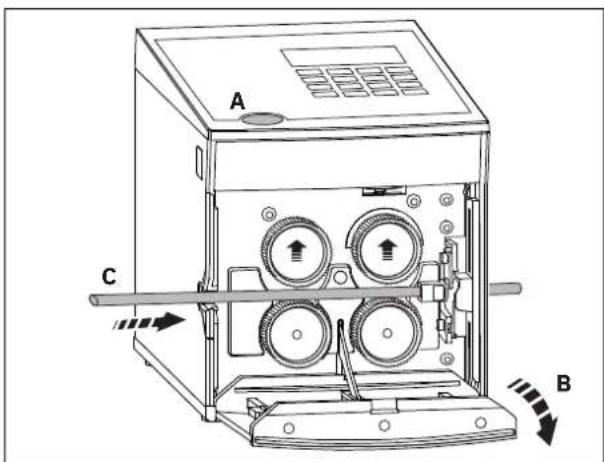
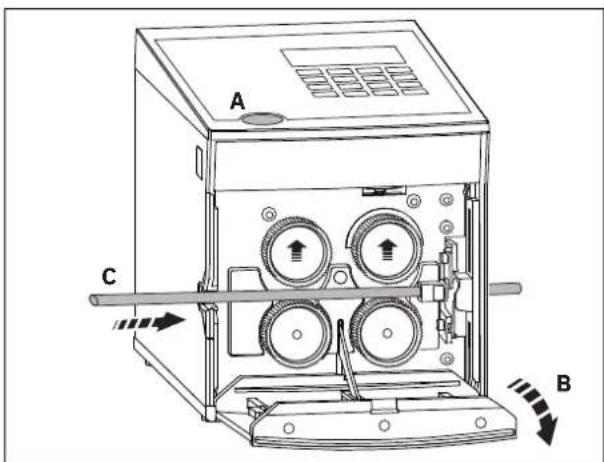
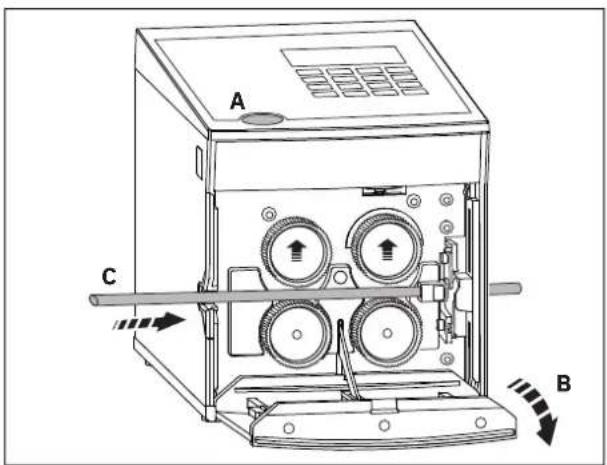
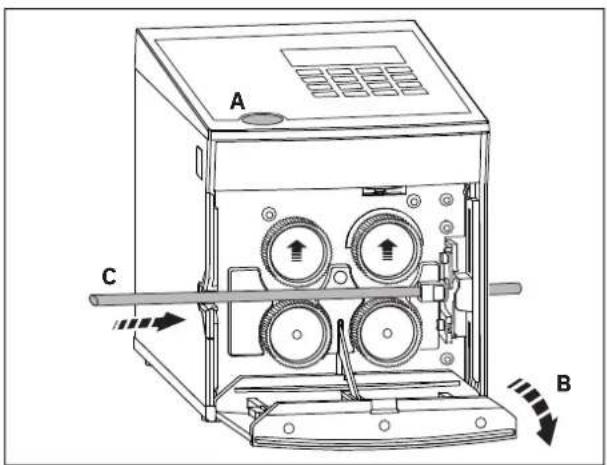
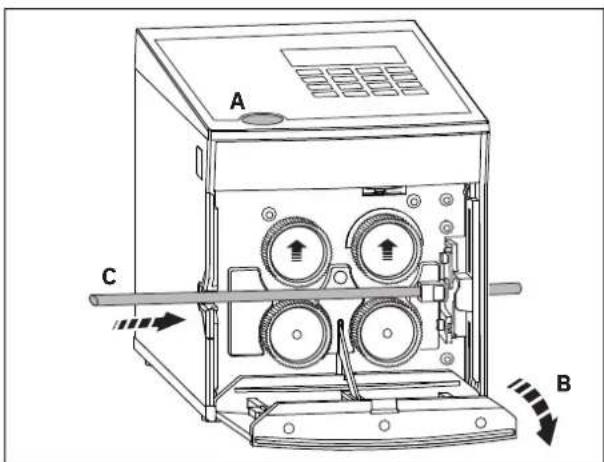
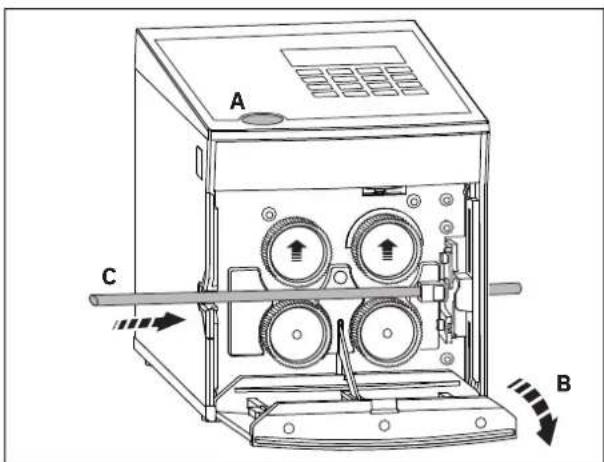
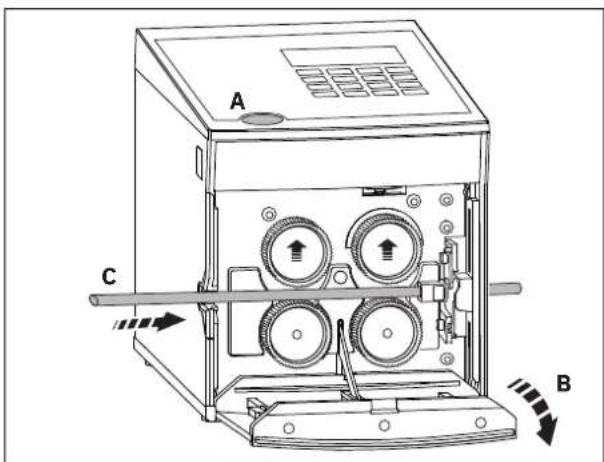
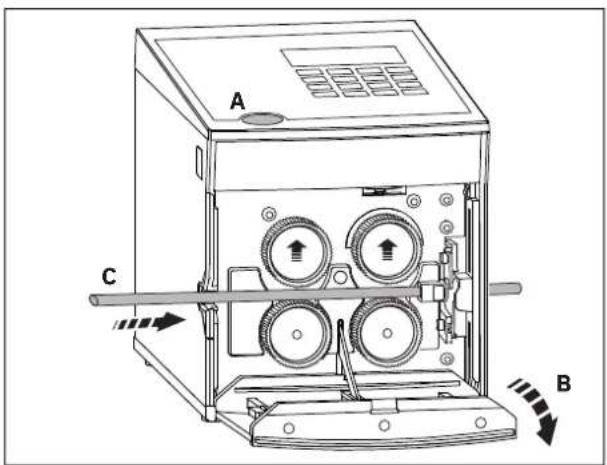
Inserting the cable
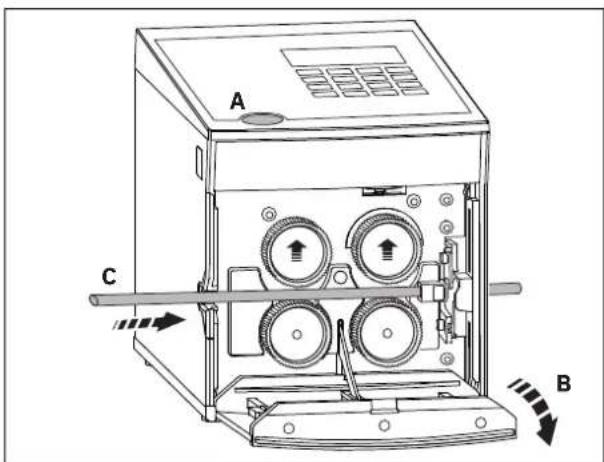
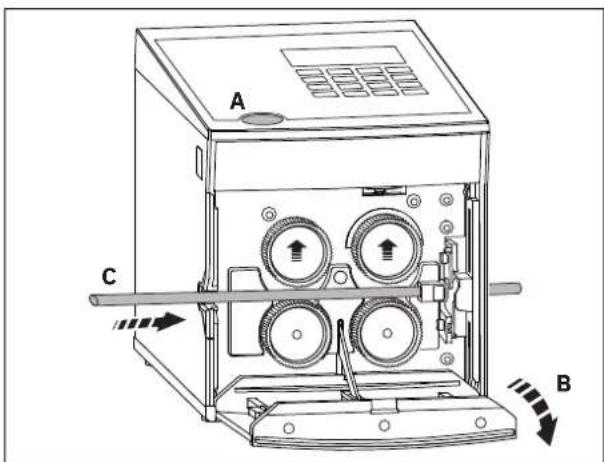
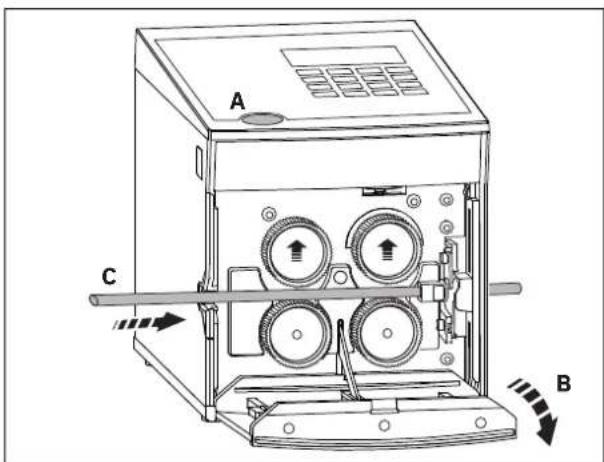
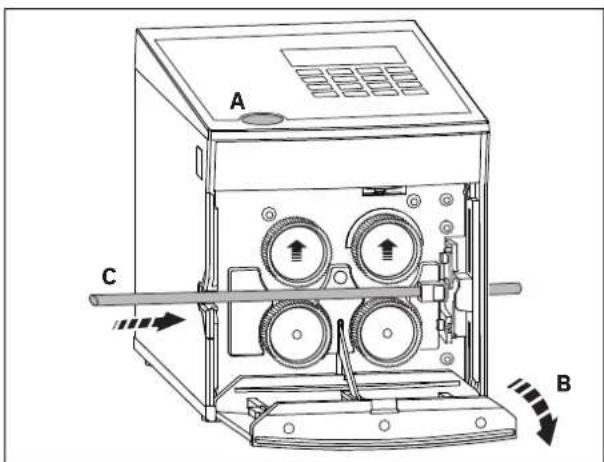
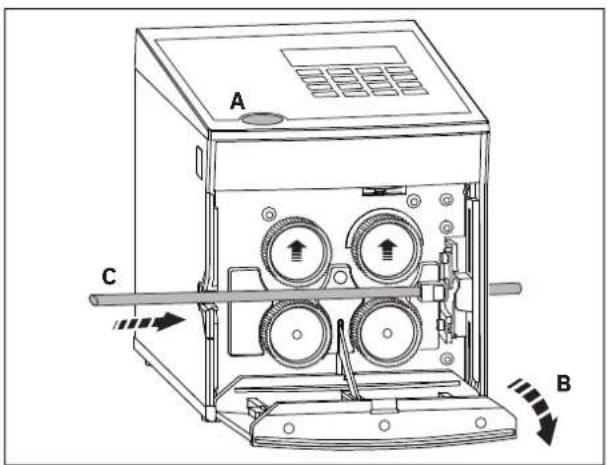
- Press the door opener (A) and fold down the front door (B)
The rollers are raised.
- Insert the cable between the rollers and pull it through the cable guide and out through the outlet slot (C).
- Fold up the front door.
The rollers clamp the cable firmly.
If you cut very soft or hard material, it is advisable to change the clamping pressure of the drive rollers (see page 17).
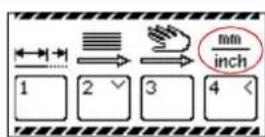
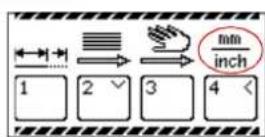
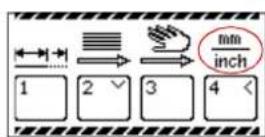
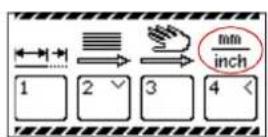
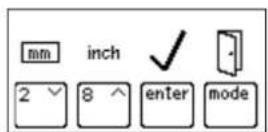
Adjusting the measuring unit between millimeter and inch
The default is millimeter
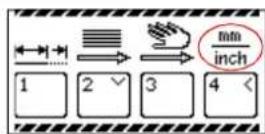
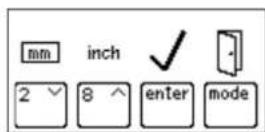
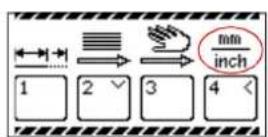
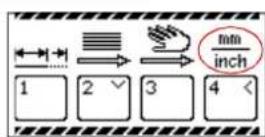
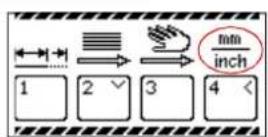
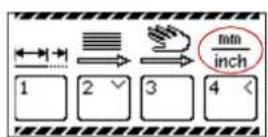
- Press and hold the "mode" button for approx. six seconds, until this display appears.
- Press the "4" key for mm/inch adjustment.
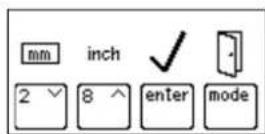
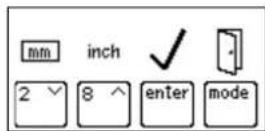
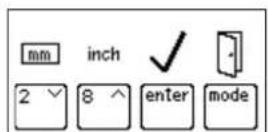
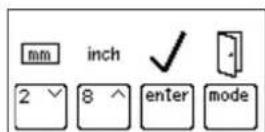
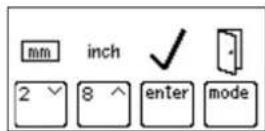
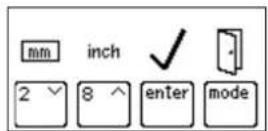
The measuring unit currently in use is framed (here, it is mm).
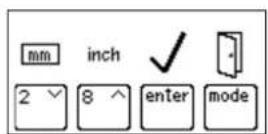
- The "2" key sets the measuring unit to millimeters. The "8" key sets the measuring unit to inch.
- Press the "enter" key to save the value and return to mode selection.
With the "mode" button, you can return to mode selection without saving.
2.4 Automatic cable cutting

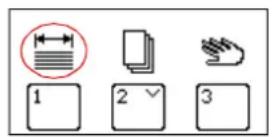
The CUTFOX 10 cuts the amount entered automatically to a specified length. This is the default mode and is active when the machine is switched on.
- Switch on the CUTFOX 10.
- Insert the cable as described (see page 9).
- To switch into this mode, press the "mode" button and then the "1" key.
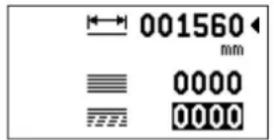
Length (mm or inch, see page 9)
Number of cuts
To go (Number of cuts remaining)
Entering the parameters • Enter the length and number of cuts with the keys "0" to "9".
- You can overwrite the values or delete them with the "C" key.
- For entries in inches, decimal places can be used.
- Switch to the next line with the "enter" key.
Cutting the cable • Press the "start" button. The green LED lights up.
The cable is then cut automatically.
Pausing or stopping the cable
- Cutting can be interrupted. To do this, press the "stop" button. The red "stop" LED flashes.
- Press the "start" button to continue cutting.
- If you would like to stop cutting, press and hold the "stop" button for at least two seconds. The remaining display is set to "0000".
Cutting finished
When the cutting is completed, the To go display reads "0000" and a checkmark is shown.
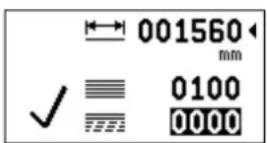
The length and number can be re-entered.
Changing modes • To return to the mode selection, press the “mode” key.
2.5 Planning cutting jobs with a PC

You can use the CUTSOFT software to create cutting jobs at a PC. The data records contain information about the desired number and length as well as a description of the cable. These data records are then processed sequentially from the CUTFOX 10. You can store and process up to 20 projects (lists) with a maximum of 100 data records (cutting jobs).
The CUTSOFT software is available for download at: phoenixcontact.com/product/1206829
• Install the CUTSOFT software on a PC.
- Switch off the CUTFOX 10 and the PC before connecting them.
- Connect the CUTFOX 10 to the PC using a RS-232 cable. The RS-232 interface is on the back side of the CUTFOX 10. A compatible adapter cable can be ordered as an accessory.
- Switch the CUTFOX 10 and the PC back on.
- Create the cutting jobs at the PC using the CUTSOFT software.
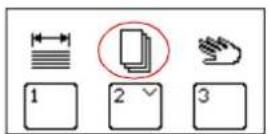
- Switch into the appropriate mode.
To do so, press the "mode" button and then the "2" key.
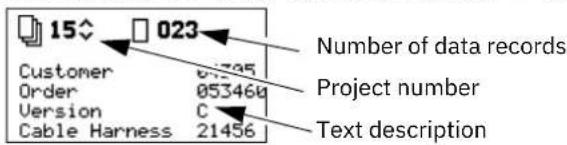
Loading a project to the CUTFOX 10
- Load the desired project to the CUTFOX 10 with help of the software.
While the project is being loaded to the CUTFOX 10, a display appears on the screen. When it has finished loading, a display for project selection appears.
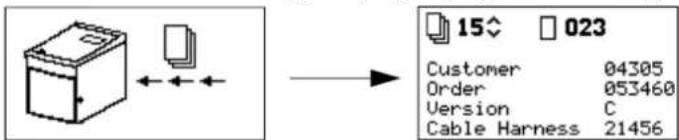
Project selection • Select the project number.
The "2" key lowers this number.
The "8" key raises this number.
- Press the "enter" key to confirm the selection.
Then the settings for the selected project are displayed.
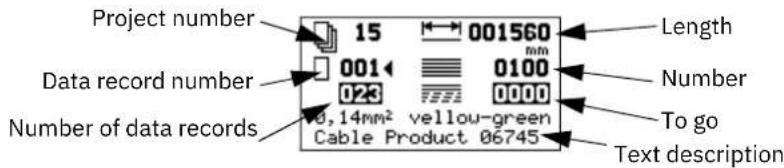
Deleting a project
- If you would like to delete the current project, press and hold the “stop” button for at least two seconds. This display appears.
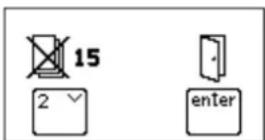
- To delete the project and return to project selection, press the "2" key.
- To return to project selection without deleting, press the "enter" key.
Changing settings
The values for length and number shown in project selection can be edited. The changes remain until the project is switched or closed. Permanent changes must be configured on the PC and loaded into the CUTFOX 10.
Example: In a data record, more cables are to be cut than you currently require. Decrease the number via the keyboard. But the next time this data record is accessed, the higher number, which is saved, will be used.
- Select a data record with the keys "0" to "9".
- You can overwrite the values or delete them with the "C" key.
- Switch to the next line with the "enter" key.
- Enter the length and number of cuts with the keys "0" to "9".
- For entries in inches, decimal places can be used.
Cutting the cable
- Insert the cable as described (see page 9).
- Press the "start" button. The green LED lights up.
The CUTFOX 10 processes the displayed data record.
Pausing or stopping the cable
- Cutting can be interrupted. To do this, press the "stop" button. The red "stop" LED flashes and this display appears.
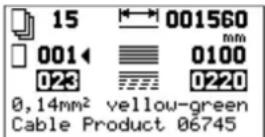
- Press the "start" button to continue cutting.
- To stop cutting, press the “mode” button to switch to another data record or close the project.
Project end The cutting is finished when this display appears.
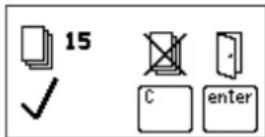
- To return to project selection, press the “enter” key.
- To delete the completed project and return to project selection, press the "C" key.
2.6 Manual cable cutting

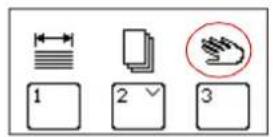
The cable can be moved and cut using button commands.
- Insert the cable as described (see page 9).
- Switch on the CUTFOX 10.
- To switch into this mode, press the "mode" button and then the "3" key.
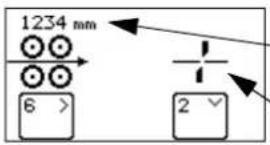
Length moved (mm or inch, see page 9)
Cutting
Cutting cable
- Press and hold the "6" key until the cable has been moved the desired length.
- Press the "2" key to cut the cable.
Deleting the length • Press the "C" key to delete the set length.
Changing modes • To return to the mode selection, press the "mode" key.
2.7 Exiting from cutting
- When no more cable is to be cut, switch off the mains switch (press 0).
- Open the front door and remove the cable.
3 Troubleshooting
3.1 Error messages on the Display
Table 3-1 Error messages and remedies
| Display Cause Remedy | |
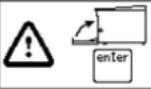 | Front door is open. • Close front door. | |
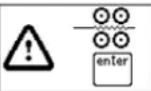 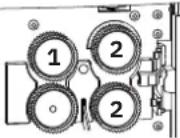 The error is triggered when the motor receives current but the metering rollers are not turning. The error is triggered when the motor receives current but the metering rollers are not turning. | The metering roller (1) does not detect a cable. | • Insert a new cable. |
| While conveying the cable, it jammed or made a knot. The drive rollers (2) slip. | • Check if there is a jam or knot. |
| The force required to unwind the cable is too large. The drive rollers (2) slip. | • Check if the force required to unwind the cable is too large. |
| The rollers do not convey the cable properly. The drive rollers slip. | • Adjust the clamping pressure of the drive rollers (see page 17).• Replace the drive rollers (see page 17).• Use drive rollers that suited to the cable (see page 19). |
| The metering roller (1) slips past the cable. | • Check if the metering roller is worn.• Use a metering roller that suits the cable (see page 19). |
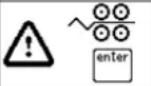 The error is triggered when the motor current increases too fast. The error is triggered when the motor current increases too fast. | While conveying the cable, it jammed or made a knot. The drive rollers (2) are locked or are about to lock. | • Check if there is a jam or knot. |
| The force required to unwind the cable is too large. The drive rollers (2) are locked or are about to lock. | • Check if the force required to unwind the cable is too large. |
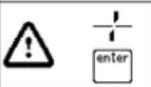 | Maximum cutting force exceeded • Check if the cable cross-section is too large or if the cable is not suitable for some other reason.• Switch the cutter (see page 18). |

Press the "enter" key to delete the error message.
3.2 The length cut is wrong
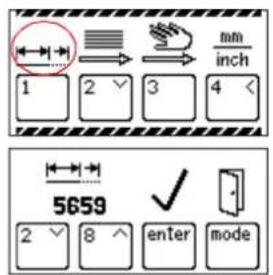
- Check if the drive or metering rollers are worn and replace them.
- Adjust the clamping pressure of the drive rollers (see page 17).
- If the cable insulation is very hard, the metering roller can be exchanged with a PU roller or a steel roller (see page 17).
If the actual length cut is not consistent with the length set, the CUTFOX 10 has to be re-adjusted.
- Press and hold the "mode" button for approx. six seconds until this display appears.
- Press the "1" key to adjust the length.
A value for length adjustment is displayed (here: 5659). This value indicates the number of pulses per meter.
- The "2" key lowers this value and with it the length conveyed.
The "8" key raises this value and with it the length conveyed.
- Press the "enter" key to save the value and return to mode selection.
With the "mode" button, you can return to mode selection without saving.
3.3 Adjusting the cable conveyor speed
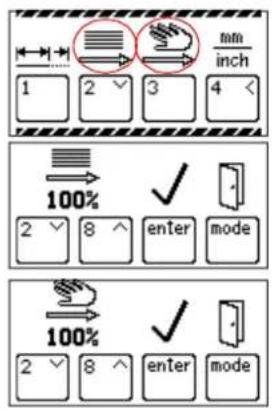
The speed with which the cable is moved can be adjusted. This speed can be adjusted separately for automatic and manual modes.
- Press and hold the "mode" button for approx. six seconds until this display appears.
- Press the "2" key to change the speed in automatic mode and the "3" key for manual mode.
- The speed is preset to 100% and can be lowered.
The "2" key lowers this value and thus the speed.
The "8" key raises this value and thus the speed.
- Press the "enter" key to save the value and return to mode selection.
With the "mode" button, you can return to mode selection without saving.
3.4 CUTFOX 10 will not switch on
No mains connection
- Check whether the mains plug is connected to the CUTFOX 10 mains connection and the shock-proof plug is connected to the mains socket.
- Make sure that the power supply at the mains socket is OK.
natural_image
Technical line drawing of an electrical connector assembly with a black arrow indicating direction (no text or symbols)
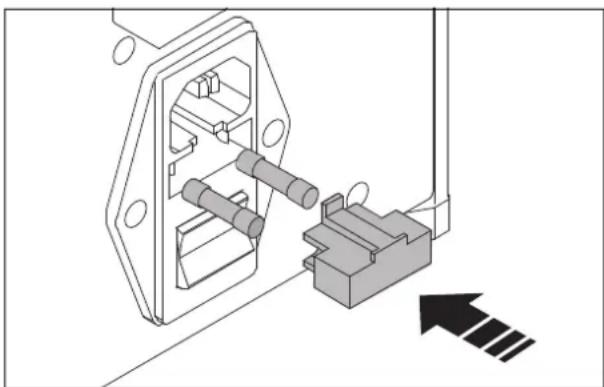
Mains fuse blown

WARNING: Risk of injury
Switch off the CUTFOX 10 and disconnect the mains plug.
- Remove the fuse holder.
- Check the mains fuses.
- Replace the blown mains fuse (for ordering data see page 19).
- Push the fuse holder back in.

NOTE:
The fuse holder must snap into place.
3.5 Adjusting or replacing the rollers
natural_image
Technical line drawing of a mechanical device with gears and a shaft (no text or symbols)

natural_image
Technical line drawing of a mechanical assembly with rollers and levers (no text or symbols)
Adjusting the clamping pressure of the drive rollers
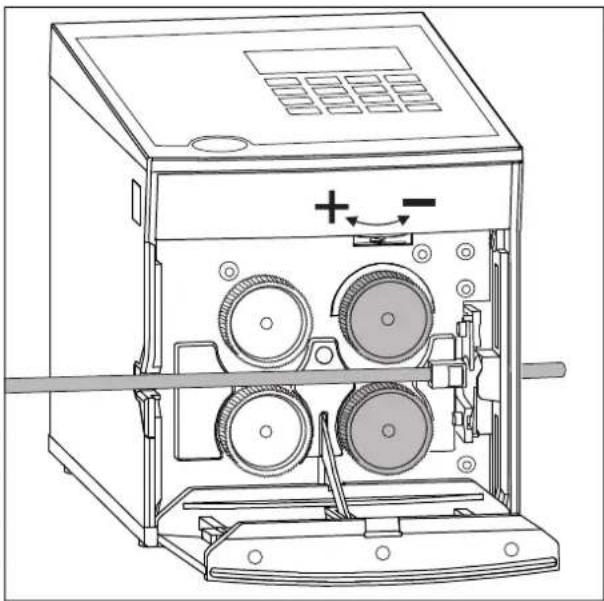
The clamping pressure must suit the cable. For standard cable, it does not need to be changed.
The following generally applies:
– Hard and thick material: more pressure
- Soft and thin material: less pressure
- Press the door opener and fold down the front door.
- Set the clamping pressure with the adjusting screw.
Rotate left → more pressure
Rotate right → less pressure
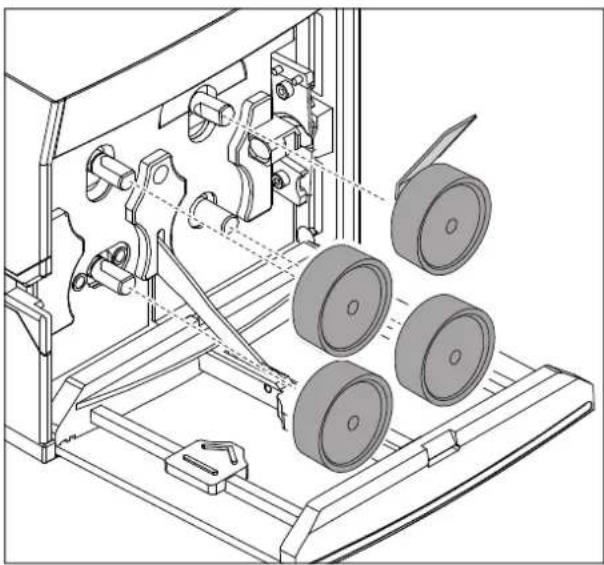
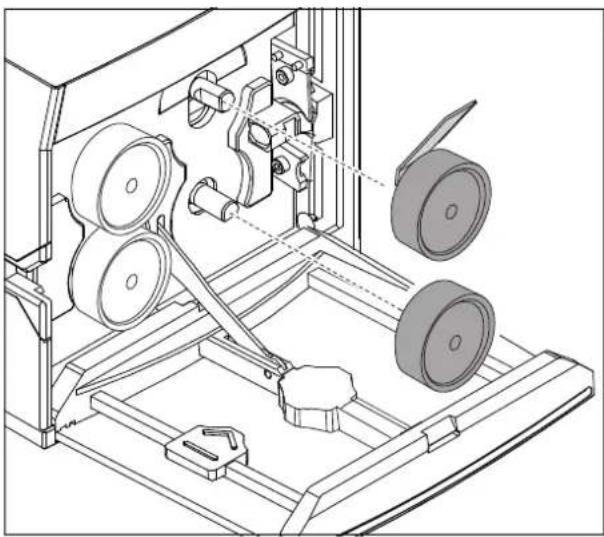
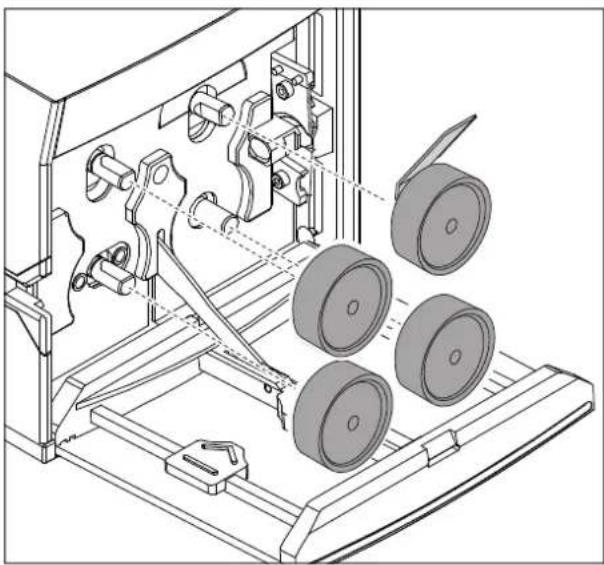
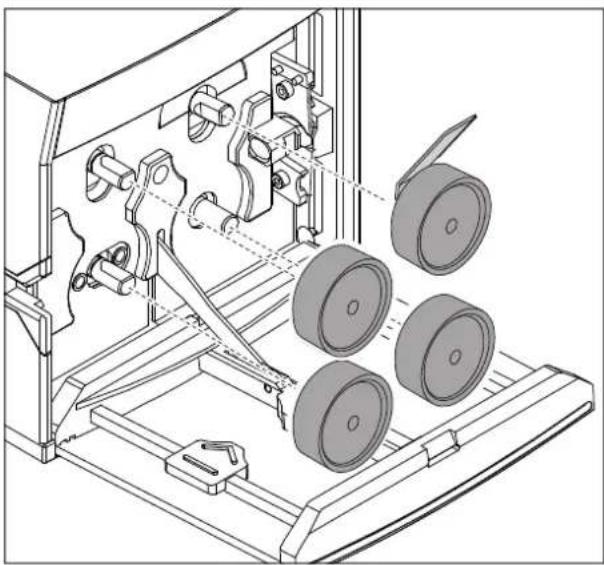
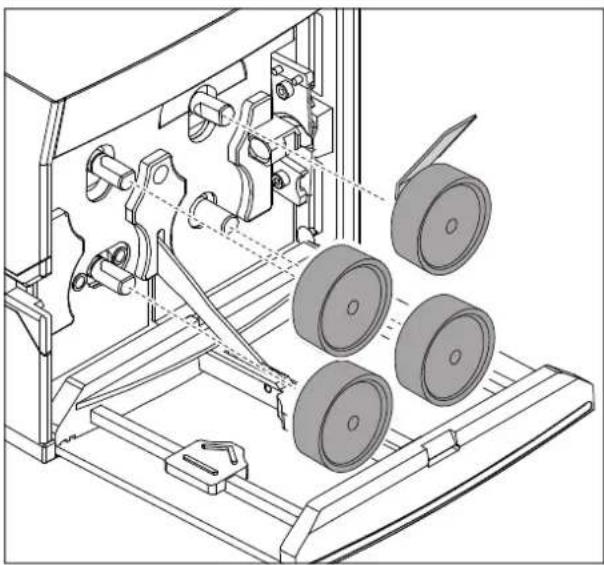
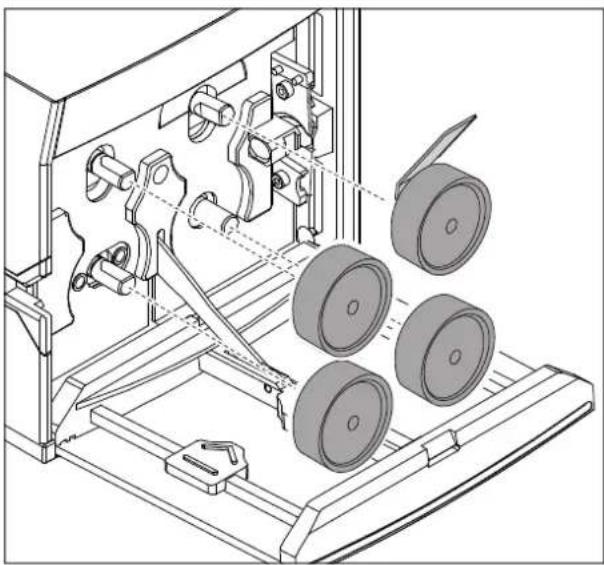
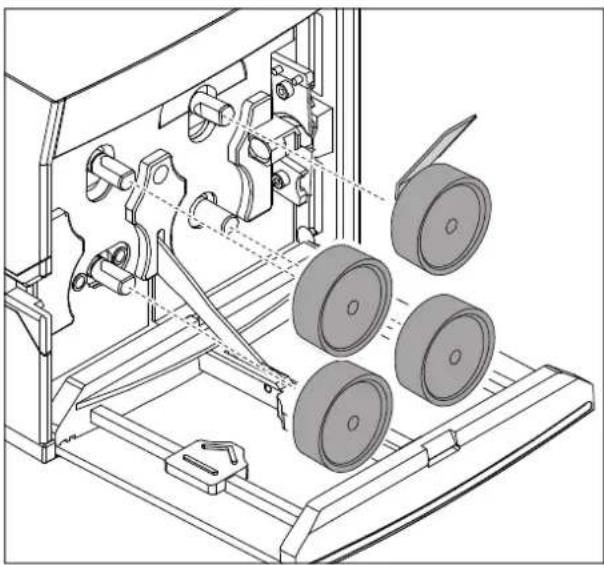
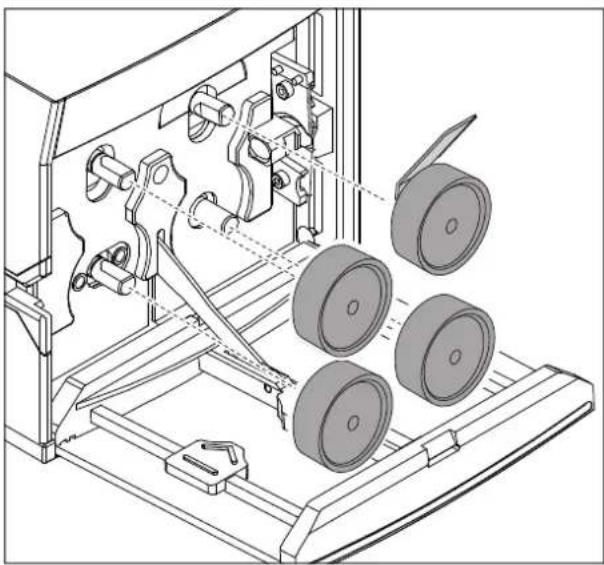
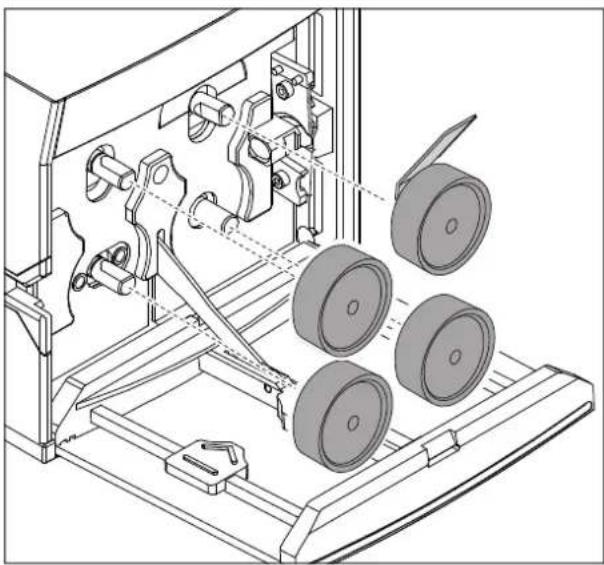
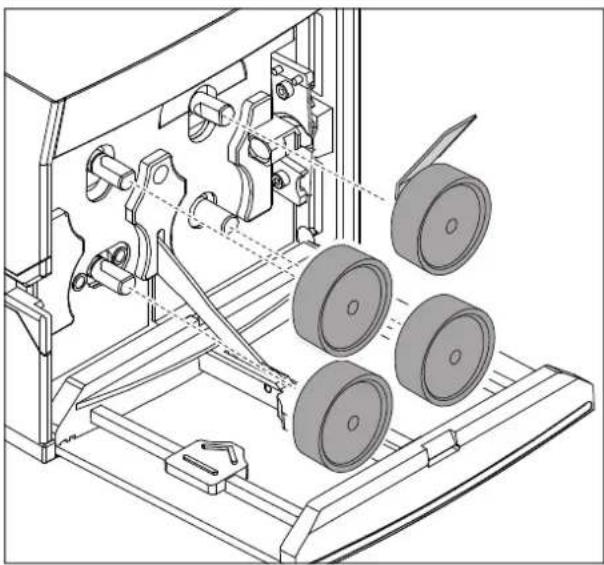
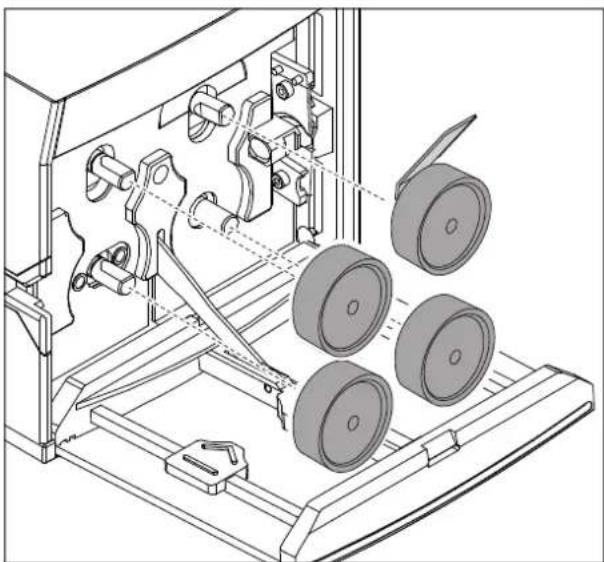
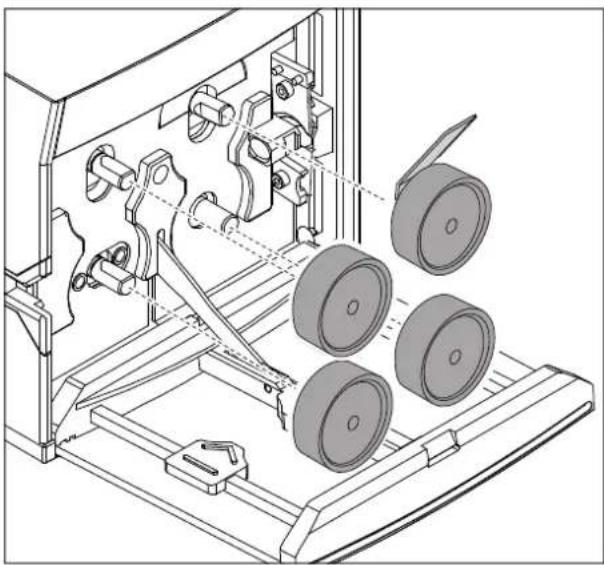
Replacing drive or metering rollers

WARNING: Risk of injury
Switch off the CUTFOX 10 and disconnect the mains plug.
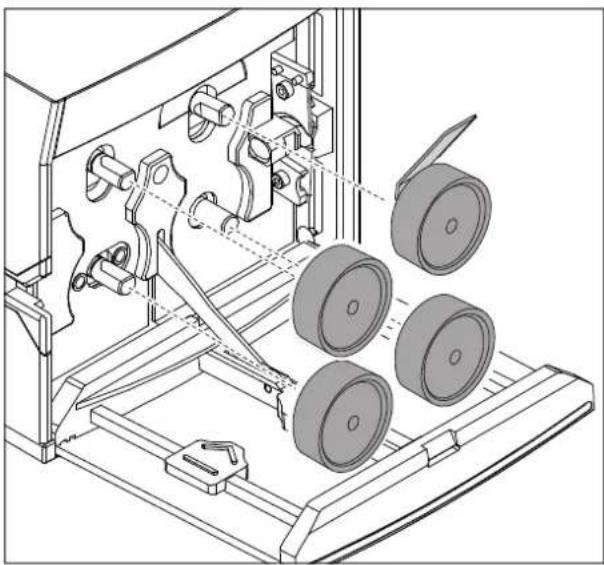
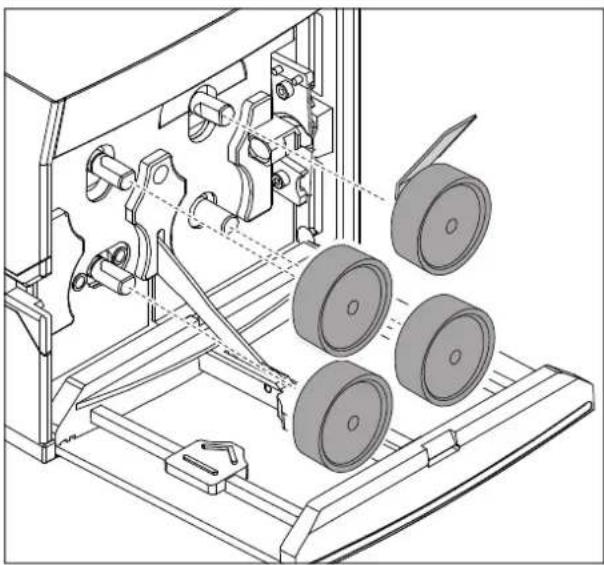
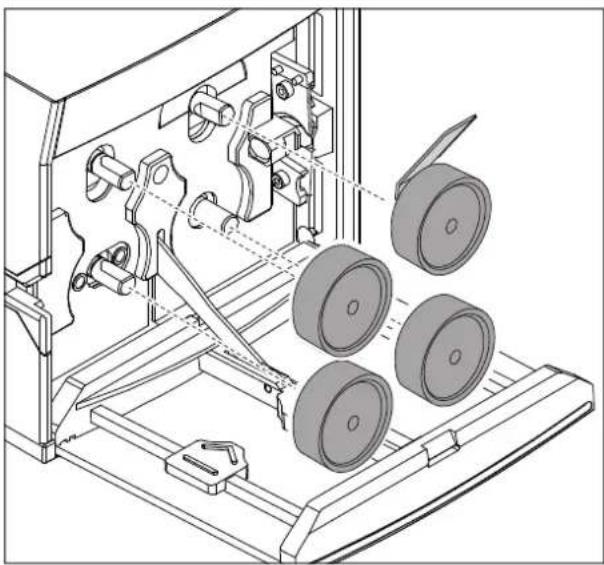
- Press the door opener and fold down the front door.
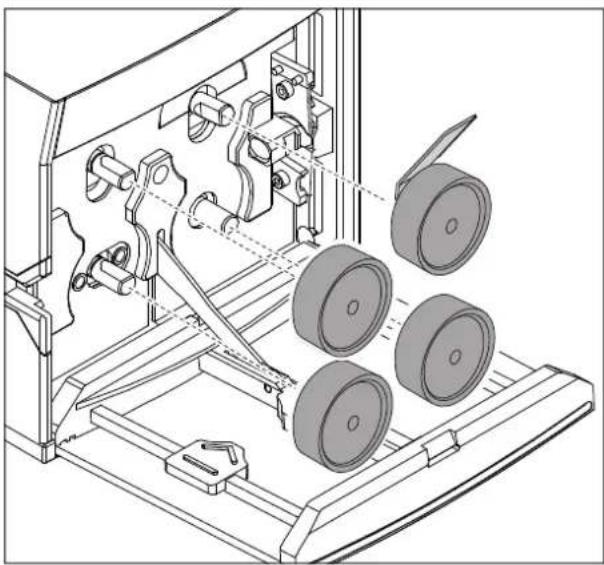
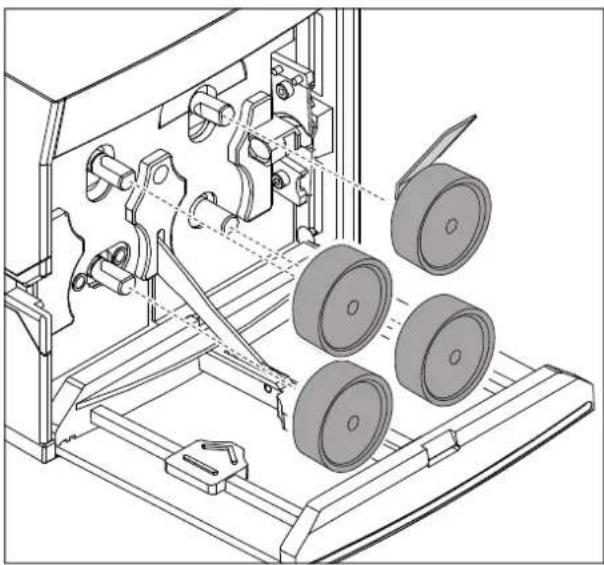
- Insert the supplied removal hook behind the rollers and push off the rollers.

NOTE:
Replace the drive rollers in pairs only.
- Pay attention to the flat guiding surface when mounting.
- Replace the rollers (for ordering data see page 19).
- Fold up the front door.
- Plug in the mains plug again.
3.6 Replacing the cutters
natural_image
Technical line drawing of a mechanical assembly with rollers and a handle (no text or symbols)
natural_image
Technical line drawing of mechanical components with no visible text or symbols
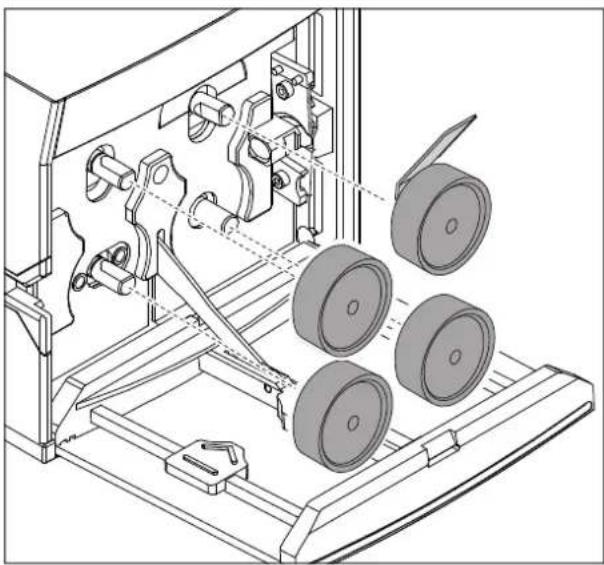
Removing the drive rollers

WARNING: Risk of injury
Switch off the CUTFOX 10 and disconnect the mains plug.
- Press the door opener and fold down the front door.
- Insert the supplied removal hook behind the drive rollers and push off the rollers.
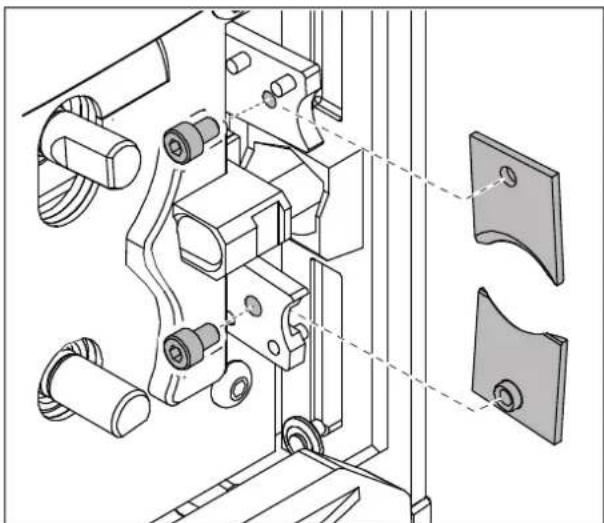
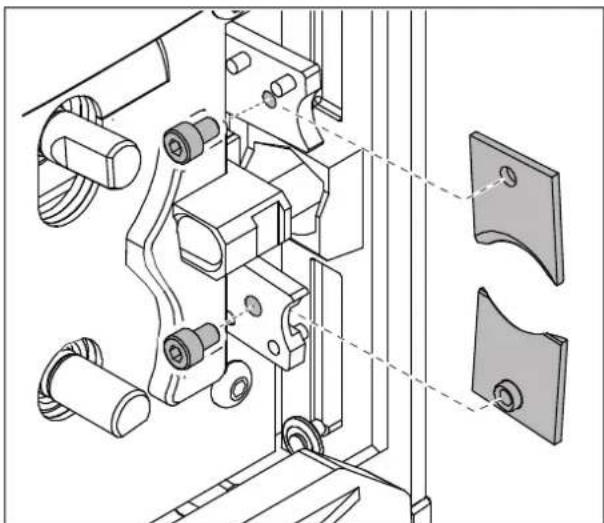
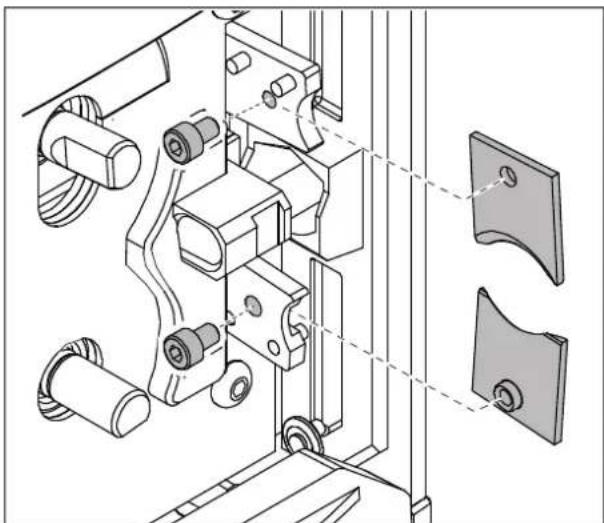
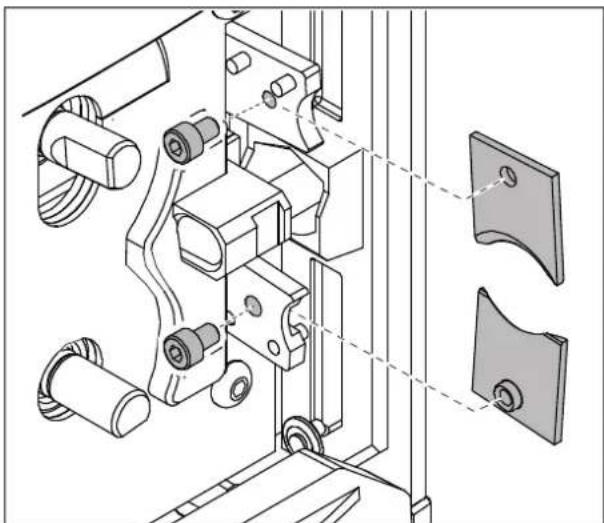
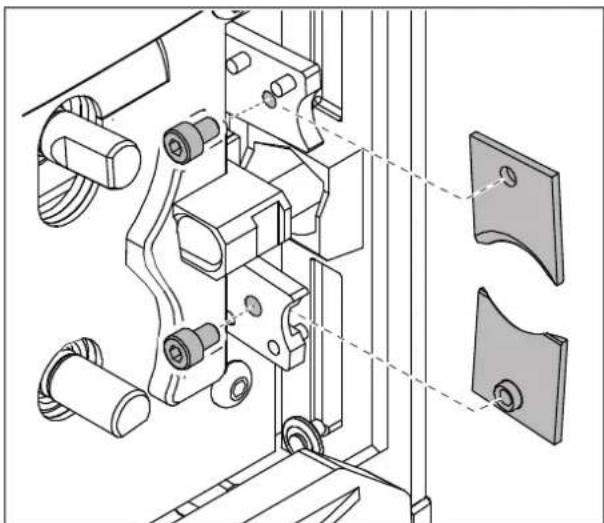
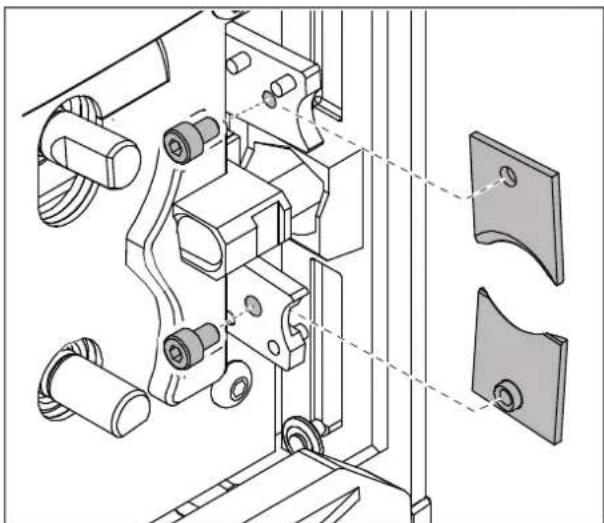
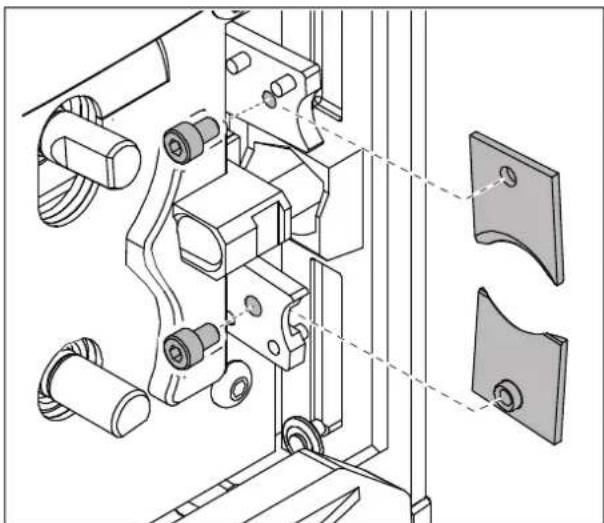
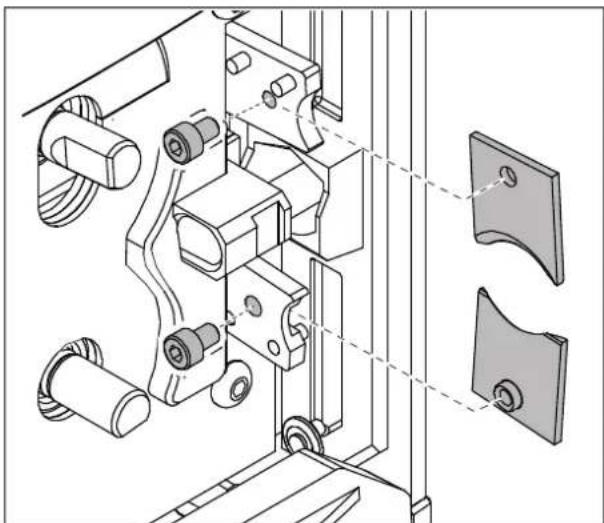
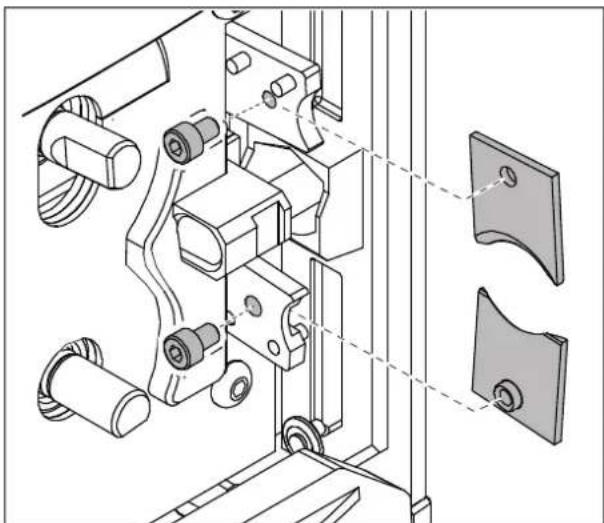
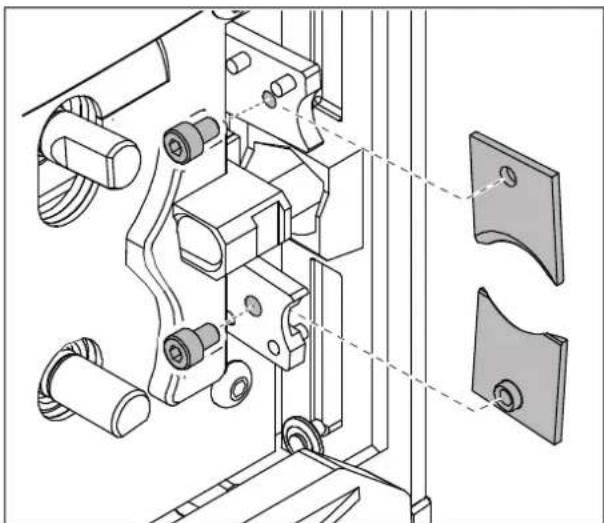
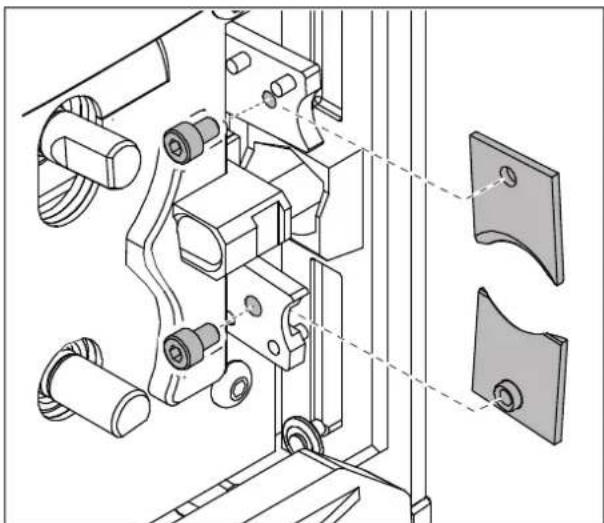
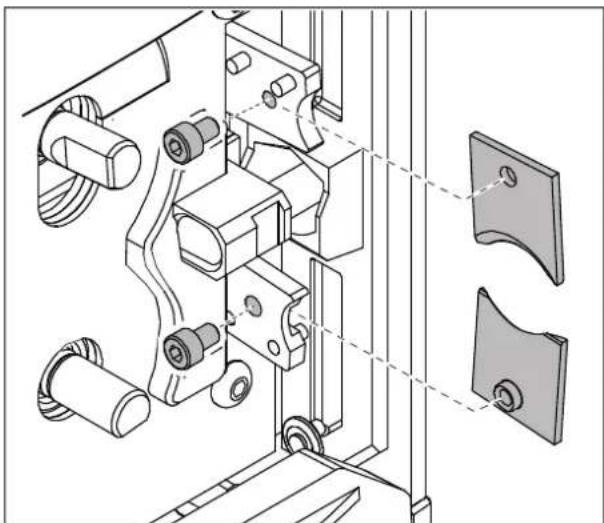
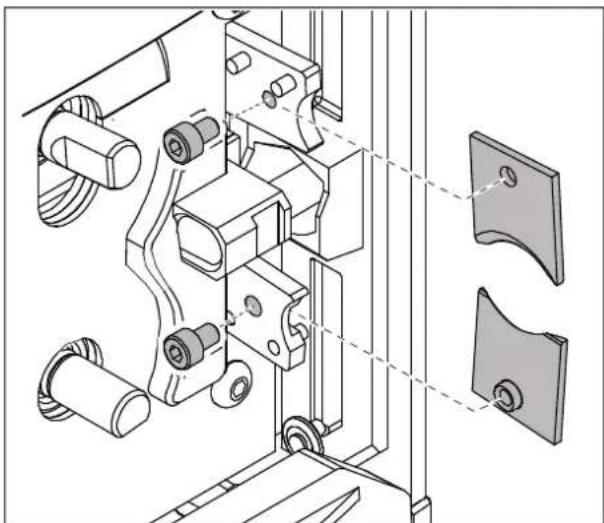
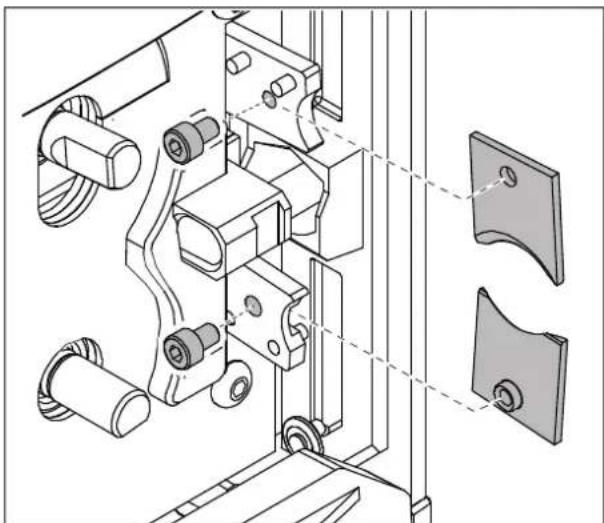
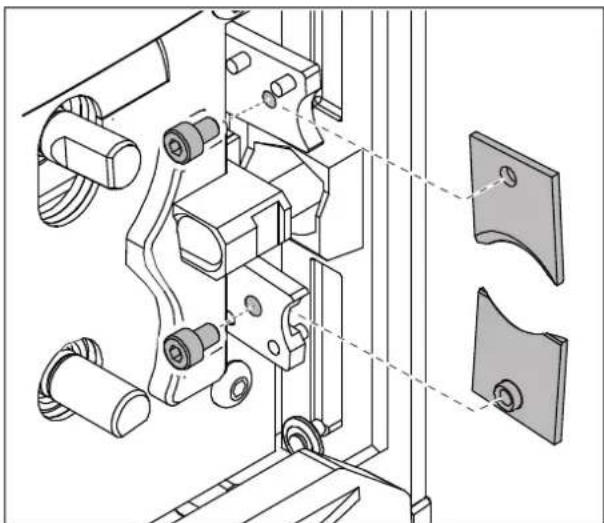
Removing the cutters
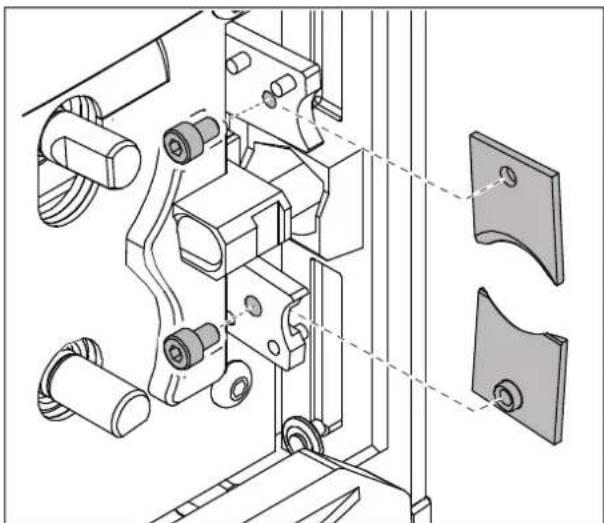
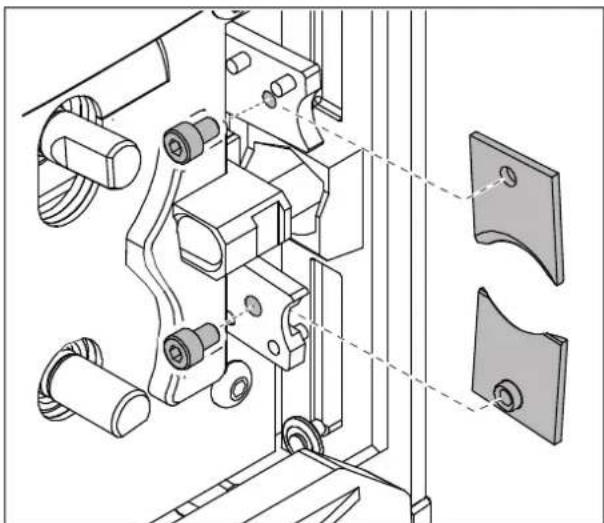
- Loosen the screws with the supplied Allen key.
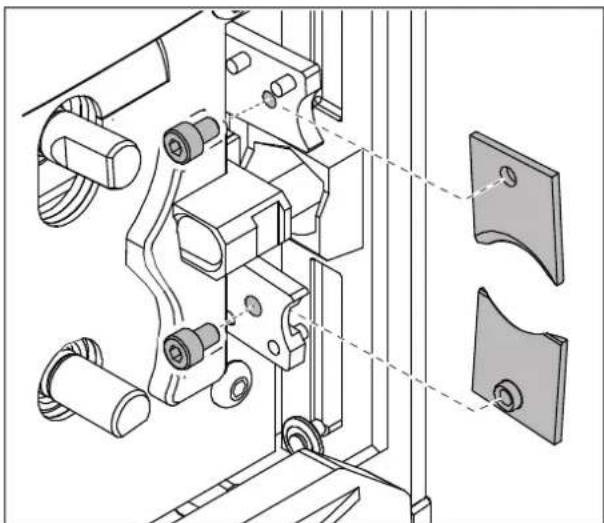
- Remove both cutters.
Mounting the cutters

NOTE:
Always replace both cutters.
Pay attention when mounting that the slanted cutting surfaces face outwards.
- Place the lower blade with the threaded insert onto the holder from the right.
- Place the upper blade onto the holder from the left.
- Tighten the screws with the Allen key.

NOTE:
Pay attention to the position of the flat guide surfaces on the shafts when mounting the rollers.
- Remount the drive rollers.
- Fold up the front door.
- Plug in the mains plug again.
A Appendix
A 1 Ordering data
Automatic cutting device and replacement parts
| Description Designation Item No. | | |
| Automatic cutting device CUTFOX 10 1206829 | | |
| Drive and metering rollers | | |
| 2 replacement rollers | CF-10 WHEEL SET 1207271 | |
| 2 replacement rollers, with PU tread, for sensitive cables/wires and their insulation (for hard insulation to some extent) | CF-10 WHEEL PU 1200098 | |
| 2 replacement rollers, with hardened, finely knurled steel tread, for very hard insulation and materials | CF-10 WHEEL STEEL 1200099 | |
| Cutter CF-10 CUTTER KNIFE SET 1207284 | | |
| Microfuse, nominal current: 2 A, tripping characteristics: slow-blow (T), length: 20 mm, diameter: 5 mm | ADT-FUSE-5X20-2A/T/250V | 1457326 |
| Removal hook | CF-10 ABZH 1207297 | |
| Accessories | | |
| Description Designation Item No. | | |
| Adapter cable, USB 2.0 connector (type A) to D-SUB/RS-232 male connector (9-pos.), for connecting serial devices to the USB port | ADT-CBL-D-MM-USB/RS23 | 1580478 |
| Cable unwinder | CUTFOX 10 C-UN 1208393 | |
A 2 Technical data
| Technical data |
| Mains connection | 100 V AC ... 240 V AC / 50 Hz ... 60 Hz |
| Power consumption | 150 VA |
| Cutting efficiency (flexible/solid) | 0.08 mm ^2 ... 10 mm ^2 / 0.08 mm ^2 ... 2.5 mm ^2 |
| Maximum throughput | 8 mm |
| Cross-section setting | Automatic |
| Number of cuts | 1 ... 9999 pcs. |
| Length of cuts | 2 mm ... 999999 mm / 0.1 in. ... 99999.9 in. |
| Feed rate | max. 0.5 m/s |
| Interface | RS-232 |
| Dimensions (W x H x D) | 194 mm x 228 mm x 301 mm |
| Weight | 10 kg |
EU Declaration of Conformity No. 000549356_05_DoC_EU
Manufacturer: Phoenix Contact GmbH & Co.KG
Address: Flachsmarktstraße 8, 32825 Blomberg, Germany
Product designation: CUTFOX 10
Order No.: 1206829
This declaration of conformity is issued under the sole responsibility of the manufacturer. The products specified in this declaration are in conformity with the following relevant harmonization legislation:
2006/42/EG
Machinery Directive (MD)
(OJ L157, 9 June 2006)
2011/65/EU
Restriction of the use of certain hazardous substances (RoHS)
(OJ L 174, 1 July 2011)
2014/30/EU
Electromagnetic Compatibility Directive (EMC)
(OJ L 96, 29 March 2014)
The following pertinent standards have been applied for the assessment of conformity:
EN 55014-1:2017+A11:2020 EN 55014-2:2015
EN 60204-1:2018 EN IEC 63000:2018
EN ISO 12100-1:2010 EN ISO 13849-1:2015
EN ISO 13854:2019 EN ISO 13857:2019
UK Declaration of Conformity No. 097137299_01_DoC_UK
Manufacturer: Phoenix Contact GmbH & Co.KG
Address: Flachsmarktstraße 8, 32825 Blomberg, Germany
Product designation: CUTFOX 10
Order No.: 1206829
This declaration of conformity is issued under the sole responsibility of the manufacturer. The products specified in this declaration are in conformity with the following relevant legislation:
S.I. 2008/1597 Supply of Machinery (Safety) Regulations 2008
S.I. 2012/3032
The Restriction of the Use of Certain Hazardous Substances in Electrical and Electronic Equipment Regulations 2012
S.I. 2016/1091 Electromagnetic Compatibility Regulations 2016
The following pertinent standards have been applied for the assessment of conformity:
EN 55014-1:2017+A11:2020 EN 55014-2:2015
EN 60204-1:2018 EN IEC 63000:2018
EN ISO 12100-1:2010 EN ISO 13849-1:2015
EN ISO 13854:2019 EN ISO 13857:2019
Please observe the following notes
General Terms and Conditions of Use for technical documentation
Phoenix Contact reserves the right to alter, correct, and/or improve the technical documentation and the products described in the technical documentation at its own discretion and without giving prior notice, insofar as this is reasonable for the user. The same applies to any changes that serve the purpose of technical progress.
The receipt of technical documentation (in particular user documentation) does not constitute any further duty on the part of Phoenix Contact to furnish information on modifications to products and/or technical documentation. You are responsible to verify the suitability and intended use of the products in your specific application, in particular with regard to observing the applicable standards and regulations. All information made available in the technical documentation is supplied without any accompanying guarantee, whether expressly mentioned, implied or tacitly assumed.
In general, the provisions of the current General Terms and Conditions of Phoenix Contact apply exclusively, in particular as concerns any warranty liability.
This manual, including all illustrations contained herein, is copyright protected. Any changes to the contents or the publication of extracts of this document are prohibited.
Phoenix Contact reserves the right to register its own intellectual property rights for the product identifications of Phoenix Contact products that are used here. Registration of such intellectual property rights by third parties is prohibited.
Other product identifications may be afforded legal protection, even where they may not be indicated as such.
Internet
Up-to-date information on Phoenix Contact products and our Terms and Conditions can be found on the Internet at: phoenixcontact.com
Make sure you always use the latest documentation. It can be downloaded at: phoenixcontact.com/products
Subsidiaries
If there are any problems that cannot be solved using the documentation, please contact your Phoenix Contact subsidiary. Subsidiary contact information is available at phoenixcontact.com.
Published by Phoenix Contact GmbH & Co. KG
Should you have any suggestions or recommendations for improvement of the contents and layout of our manuals, please send your comments to:
tecdoc@phoenixcontact.com
Instructions de service originales
natural_image
Line drawing of a computer tower with labeled ports A and B, showing internal wiring and ventilation (no text or symbols beyond labels)
natural_image
Technical line drawing of an electrical connector assembly with a black arrow indicating direction (no text or symbols)
natural_image
Technical line drawing of a mechanical device with gears and a handle, showing internal components without any text or symbols.
natural_image
Technical line drawing of a mechanical assembly with rollers and a lever (no text or symbols)
natural_image
Technical line drawing of a mechanical assembly with rollers and a handle (no text or symbols)
natural_image
Technical line drawing of mechanical assembly with mounting brackets and a bracket (no text or symbols)
Directive relative aux machines
(OJ L157, 9 June 2006)
2011/65/EU
(OJ L 174, 1 July 2011)
2014/30/EU
(OJ L 96, 29 March 2014)
UK Declaration of Conformity No. 097137299_01_DoC_UK
Manufacturer: Phoenix Contact GmbH & Co.KG
Address: Flachsmarktstraße 8, 32825 Blomberg, Germany
Product designation: CUTFOX 10
Order No.: 1206829
This declaration of conformity is issued under the sole responsibility of the manufacturer. The products specified in this declaration are in conformity with the following relevant legislation:
S.I. 2008/1597
Supply of Machinery (Safety) Regulations 2008
S.I. 2012/3032
The Restriction of the Use of Certain Hazardous Substances in Electrical and Electronic Equipment Regulations 2012
S.I. 2016/1091
Electromagnetic Compatibility Regulations 2016
The following pertinent standards have been applied for the assessment of conformity:
EN 55014-1:2017+A11:2020 EN 55014-2:2015
EN 60204-1:2018 EN IEC 63000:2018
EN ISO 12100-1:2010 EN ISO 13849-1:2015
EN ISO 13854:2019 EN ISO 13857:2019
natural_image
Line drawing of a computer tower with labeled ports A and B, showing internal wiring and ventilation (no text or symbols beyond labels)
natural_image
Technical line drawing of an electrical connector assembly with a bracket and pin (no text or symbols)
natural_image
Technical line drawing of a mechanical device with gears and a handle, showing internal components without any text or symbols.
natural_image
Technical line drawing of a mechanical assembly with rollers and a lever (no text or symbols)
natural_image
Technical line drawing of a mechanical assembly with rollers and a handle (no text or symbols)
natural_image
Technical line drawing of mechanical assembly with mounting brackets and a bracket (no text or symbols)
(OJ L157, 9 June 2006)
2011/65/EU
(OJ L 174, 1 July 2011)
2014/30/EU
(OJ L 96, 29 March 2014)
UK Declaration of Conformity No. 097137299_01_DoC_UK
Manufacturer: Phoenix Contact GmbH & Co.KG
Address: Flachsmarktstraße 8, 32825 Blomberg, Germany
Product designation: CUTFOX 10
Order No.:
1206829
This declaration of conformity is issued under the sole responsibility of the manufacturer. The products specified in this declaration are in conformity with the following relevant legislation:
S.I. 2008/1597
Supply of Machinery (Safety) Regulations 2008
S.I. 2012/3032
The Restriction of the Use of Certain Hazardous Substances in Electrical and Electronic Equipment Regulations 2012
S.I. 2016/1091
Electromagnetic Compatibility Regulations 2016
The following pertinent standards have been applied for the assessment of conformity:
EN 55014-1:2017+A11:2020 EN 55014-2:2015
EN 60204-1:2018 EN IEC 63000:2018
EN ISO 12100-1:2010 EN ISO 13849-1:2015
EN ISO 13854:2019 EN ISO 13857:2019
natural_image
Line drawing of a computer tower with labeled ports A and B, showing internal wiring and ventilation (no text or symbols beyond labels)
natural_image
Technical line drawing of an electrical connector assembly with a bracket and pin (no text or symbols)
Fusible de red defectuoso

natural_image
Technical line drawing of a mechanical device with gears and a handle, showing internal components without any text or symbols.
natural_image
Technical line drawing of a mechanical assembly with rollers and levers (no text or symbols)
natural_image
Technical line drawing of a mechanical assembly with rollers and a handle (no text or symbols)
natural_image
Technical line drawing of mechanical assembly with mounting brackets and a bracket (no text or symbols)
(OJ L157, 9 June 2006)
2011/65/EU
(OJ L 174, 1 July 2011)
2014/30/EU
(OJ L 96, 29 March 2014)
UK Declaration of Conformity No. 097137299_01_DoC_UK
Manufacturer: Phoenix Contact GmbH & Co.KG
Address: Flachsmarktstraße 8, 32825 Blomberg, Germany
Product designation: CUTFOX 10
Order No.: 1206829
This declaration of conformity is issued under the sole responsibility of the manufacturer. The products specified in this declaration are in conformity with the following relevant legislation:
S.I. 2008/1597
Supply of Machinery (Safety) Regulations 2008
S.I. 2012/3032
The Restriction of the Use of Certain Hazardous Substances in Electrical and Electronic Equipment Regulations 2012
S.I. 2016/1091
Electromagnetic Compatibility Regulations 2016
The following pertinent standards have been applied for the assessment of conformity:
EN 55014-1:2017+A11:2020 EN 55014-2:2015
EN 60204-1:2018 EN IEC 63000:2018
EN ISO 12100-1:2010 EN ISO 13849-1:2015
EN ISO 13854:2019 EN ISO 13857:2019
natural_image
Line drawing of a computer power adapter with labeled ports A and B, showing internal wiring and ventilation (no text or symbols beyond labels)

natural_image
Technical line drawing of an electrical connector assembly with a bracket and pin (no text or symbols)
natural_image
Technical line drawing of a mechanical device with gears and a handle, showing internal components without any text or symbols.
natural_image
Technical line drawing of a mechanical assembly with rollers and levers (no text or symbols)
natural_image
Technical line drawing of a mechanical assembly with rollers and a handle (no text or symbols)
natural_image
Technical line drawing of mechanical assembly with mounting brackets and a bracket (no text or symbols)
Desmontar os rolos de acionamento

(OJ L157, 9 June 2006)
2011/65/EU
(OJ L 174, 1 July 2011)
2014/30/EU
(OJ L 96, 29 March 2014)
UK Declaration of Conformity No. 097137299_01_DoC_UK
Manufacturer: Phoenix Contact GmbH & Co.KG
Address: Flachsmarktstraße 8, 32825 Blomberg, Germany
Product designation: CUTFOX 10
Order No.: 1206829
This declaration of conformity is issued under the sole responsibility of the manufacturer. The products specified in this declaration are in conformity with the following relevant legislation:
S.I. 2008/1597
Supply of Machinery (Safety) Regulations 2008
S.I. 2012/3032
The Restriction of the Use of Certain Hazardous Substances in Electrical and Electronic Equipment Regulations 2012
S.I. 2016/1091
Electromagnetic Compatibility Regulations 2016
The following pertinent standards have been applied for the assessment of conformity:
EN 55014-1:2017+A11:2020 EN 55014-2:2015
EN 60204-1:2018 EN IEC 63000:2018
EN ISO 12100-1:2010 EN ISO 13849-1:2015
EN ISO 13854:2019 EN ISO 13857:2019
natural_image
Line drawing of a computer tower with labeled ports A and B, showing internal wiring and ventilation (no text or symbols beyond labels)
Şebekeye bağlama
natural_image
Technical line drawing of an electrical connector assembly with a bracket and pin (no text or symbols)
natural_image
Technical line drawing of a mechanical device with gears and a handle, showing internal components without any text or symbols.
natural_image
Technical line drawing of a mechanical assembly with rollers and a lever (no text or symbols)
natural_image
Technical line drawing of a mechanical assembly with rollers and a handle (no text or symbols)
natural_image
Technical line drawing of mechanical assembly with mounting brackets and a bracket (no text or symbols)
EU Declaration of Conformity No. 000549356_05_DoC_EU
Manufacturer: Phoenix Contact GmbH & Co.KG
Address: Flachsmarktstraße 8, 32825 Blomberg, Germany
Product designation: CUTFOX 10
Order No.: 1206829
This declaration of conformity is issued under the sole responsibility of the manufacturer. The products specified in this declaration are in conformity with the following relevant harmonization legislation:
2006/42/EG
Machinery Directive (MD)
(OJ L157, 9 June 2006)
2011/65/EU
Restriction of the use of certain hazardous substances (RoHS)
(OJ L 174, 1 July 2011)
2014/30/EU
Electromagnetic Compatibility Directive (EMC)
(OJ L 96, 29 March 2014)
The following pertinent standards have been applied for the assessment of conformity:
EN 55014-1:2017+A11:2020 EN 55014-2:2015
EN 60204-1:2018 EN IEC 63000:2018
EN ISO 12100-1:2010 EN ISO 13849-1:2015
EN ISO 13854:2019 EN ISO 13857:2019
UK Declaration of Conformity No. 097137299_01_DoC_UK
Manufacturer: Phoenix Contact GmbH & Co.KG
Address: Flachsmarktstraße 8, 32825 Blomberg, Germany
Product designation: CUTFOX 10
Order No.: 1206829
This declaration of conformity is issued under the sole responsibility of the manufacturer. The products specified in this declaration are in conformity with the following relevant legislation:
S.I. 2008/1597 Supply of Machinery (Safety) Regulations 2008
S.I. 2012/3032
The Restriction of the Use of Certain Hazardous Substances in Electrical and Electronic Equipment Regulations 2012
S.I. 2016/1091 Electromagnetic Compatibility Regulations 2016
The following pertinent standards have been applied for the assessment of conformity:
EN 55014-1:2017+A11:2020 EN 55014-2:2015
EN 60204-1:2018 EN IEC 63000:2018
EN ISO 12100-1:2010 EN ISO 13849-1:2015
EN ISO 13854:2019 EN ISO 13857:2019
natural_image
Line drawing of a computer power adapter with labeled ports A and B, showing internal wiring and ventilation (no text or symbols beyond labels)
Подключение к сети
natural_image
Technical line drawing of an electrical connector assembly with a bracket and pin (no text or symbols)
natural_image
Technical line drawing of a mechanical device with gears and a handle, showing internal components without any text or symbols.

natural_image
Technical line drawing of a mechanical assembly with rollers and levers (no text or symbols)
natural_image
Technical line drawing of a mechanical assembly with rollers and a handle (no text or symbols)
natural_image
Technical line drawing of mechanical assembly with mounting brackets and a bracket (no text or symbols)
EU Declaration of Conformity No. 000549356_05_DoC_EU
Manufacturer: Phoenix Contact GmbH & Co.KG
Address: Flachsmarktstraße 8, 32825 Blomberg, Germany
Product designation: CUTFOX 10
Order No.: 1206829
This declaration of conformity is issued under the sole responsibility of the manufacturer. The products specified in this declaration are in conformity with the following relevant harmonization legislation:
2006/42/EG
Machine Directive (MD)
(OJ L157, 9 June 2006)
2011/65/EU
Restriction of the use of certain hazardous substances (RoHS)
(OJ L 174, 1 July 2011)
2014/30/EU
Electromagnetic Compatibility Directive (EMC)
(OJ L 96, 29 March 2014)
The following pertinent standards have been applied for the assessment of conformity:
EN 55014-1:2017+A11:2020 EN 55014-2:2015
EN 60204-1:2018 EN IEC 63000:2018
EN ISO 12100-1:2010 EN ISO 13849-1:2015
EN ISO 13854:2019 EN ISO 13857:2019
UK Declaration of Conformity No. 097137299_01_DoC_UK
Manufacturer: Phoenix Contact GmbH & Co.KG
Address: Flachsmarktstraße 8, 32825 Blomberg, Germany
Product designation: CUTFOX 10
Order No.: 1206829
This declaration of conformity is issued under the sole responsibility of the manufacturer. The products specified in this declaration are in conformity with the following relevant legislation:
S.I. 2008/1597 Supply of Machinery (Safety) Regulations 2008
S.I. 2012/3032 The Restriction of the Use of Certain Hazardous Substances in Electrical and Electronic Equipment Regulations 2012
S.I. 2016/1091 Electromagnetic Compatibility Regulations 2016
The following pertinent standards have been applied for the assessment of conformity:
EN 55014-1:2017+A11:2020 EN 55014-2:2015
EN 60204-1:2018 EN IEC 63000:2018
EN ISO 12100-1:2010 EN ISO 13849-1:2015
EN ISO 13854:2019 EN ISO 13857:2019
natural_image
Line drawing of a computer tower with labeled ports A and B, showing internal wiring and ventilation (no text or symbols beyond labels)
natural_image
Technical line drawing of an electrical connector assembly with a bracket and pin (no text or symbols)
natural_image
Technical line drawing of a mechanical device with gears and a handle, showing internal components without any text or symbols.
natural_image
Technical line drawing of a mechanical assembly with rollers and levers (no text or symbols)
natural_image
Technical line drawing of a mechanical assembly with rollers and a handle (no text or symbols)
natural_image
Technical line drawing of mechanical assembly with mounting brackets and a bracket (no text or symbols)
(OJ L157, 9 June 2006)
2011/65/EU
(OJ L 174, 1 July 2011)
2014/30/EU
(OJ L 96, 29 March 2014)
UK Declaration of Conformity No. 097137299_01_DoC_UK
Manufacturer: Phoenix Contact GmbH & Co.KG
Address: Flachsmarktstraße 8, 32825 Blomberg, Germany
Product designation: CUTFOX 10
Order No.: 1206829
This declaration of conformity is issued under the sole responsibility of the manufacturer. The products specified in this declaration are in conformity with the following relevant legislation:
S.I. 2008/1597
Supply of Machinery (Safety) Regulations 2008
S.I. 2012/3032
The Restriction of the Use of Certain Hazardous Substances in Electrical and Electronic Equipment Regulations 2012
S.I. 2016/1091
Electromagnetic Compatibility Regulations 2016
The following pertinent standards have been applied for the assessment of conformity:
EN 55014-1:2017+A11:2020 EN 55014-2:2015
EN 60204-1:2018 EN IEC 63000:2018
EN ISO 12100-1:2010 EN ISO 13849-1:2015
EN ISO 13854:2019 EN ISO 13857:2019
natural_image
Line drawing of a computer tower with labeled ports A and B, showing internal wiring and ventilation (no text or symbols beyond labels)
natural_image
Technical line drawing of an electrical connector assembly with a bracket and pin (no text or symbols)
Καμμένη ασφάλεια

natural_image
Technical line drawing of a mechanical device with gears and a handle, showing internal components without any text or symbols.
natural_image
Technical line drawing of a mechanical assembly with rollers and levers (no text or symbols)
natural_image
Technical line drawing of a mechanical assembly with rollers and a handle (no text or symbols)
natural_image
Technical line drawing of mechanical assembly with mounting brackets and a bracket (no text or symbols)
(OJ L157, 9 June 2006)
2011/65/EU
(OJ L 174, 1 July 2011)
2014/30/EU
(OJ L 96, 29 March 2014)
UK Declaration of Conformity No. 097137299_01_DoC_UK
Manufacturer: Phoenix Contact GmbH & Co.KG
Address: Flachsmarktstraße 8, 32825 Blomberg, Germany
Product designation: CUTFOX 10
Order No.: 1206829
This declaration of conformity is issued under the sole responsibility of the manufacturer. The products specified in this declaration are in conformity with the following relevant legislation:
S.I. 2008/1597
Supply of Machinery (Safety) Regulations 2008
S.I. 2012/3032
The Restriction of the Use of Certain Hazardous Substances in Electrical and Electronic Equipment Regulations 2012
S.I. 2016/1091
Electromagnetic Compatibility Regulations 2016
The following pertinent standards have been applied for the assessment of conformity:
EN 55014-1:2017+A11:2020 EN 55014-2:2015
EN 60204-1:2018 EN IEC 63000:2018
EN ISO 12100-1:2010 EN ISO 13849-1:2015
EN ISO 13854:2019 EN ISO 13857:2019
natural_image
Line drawing of a computer tower with labeled ports A and B, showing internal wiring and ventilation (no text or symbols beyond labels)
natural_image
Technical line drawing of an electrical connector assembly with a bracket and pin (no text or symbols)
Netsikring defekt

natural_image
Technical line drawing of a mechanical device with gears and a handle, showing internal components without any text or symbols.
natural_image
Technical line drawing of a mechanical assembly with rollers and levers (no text or symbols)
natural_image
Technical line drawing of a mechanical assembly with rollers and a handle (no text or symbols)
natural_image
Technical line drawing of mechanical assembly with mounting brackets and a bracket (no text or symbols)
Afmontering af drivruller

(OJ L157, 9 June 2006)
2011/65/EU
(OJ L 174, 1 July 2011)
2014/30/EU
EMC-direktiv (elektromagnetisk kompatibilitet)
(OJ L 96, 29 March 2014)
UK Declaration of Conformity No. 097137299_01_DoC_UK
Manufacturer: Phoenix Contact GmbH & Co.KG
Address: Flachsmarktstraße 8, 32825 Blomberg, Germany
Product designation: CUTFOX 10
Order No.:
1206829
This declaration of conformity is issued under the sole responsibility of the manufacturer. The products specified in this declaration are in conformity with the following relevant legislation:
S.I. 2008/1597
Supply of Machinery (Safety) Regulations 2008
S.I. 2012/3032
The Restriction of the Use of Certain Hazardous Substances in Electrical and Electronic Equipment Regulations 2012
S.I. 2016/1091
Electromagnetic Compatibility Regulations 2016
The following pertinent standards have been applied for the assessment of conformity:
EN 55014-1:2017+A11:2020 EN 55014-2:2015
EN 60204-1:2018 EN IEC 63000:2018
EN ISO 12100-1:2010 EN ISO 13849-1:2015
EN ISO 13854:2019 EN ISO 13857:2019
natural_image
Line drawing of a computer tower with labeled ports A and B, showing internal wiring and ventilation (no text or symbols beyond labels)
Vooraf ingesteld is millimeter
natural_image
Technical line drawing of an electrical connector assembly with a bracket and pin (no text or symbols)
Netzekering defect

natural_image
Technical line drawing of a mechanical device with gears and a handle, showing internal components without any text or symbols.
natural_image
Technical line drawing of a mechanical assembly with rollers and levers (no text or symbols)
natural_image
Technical line drawing of a mechanical assembly with rollers and a handle (no text or symbols)
natural_image
Technical line drawing of mechanical assembly with mounting brackets and a bracket (no text or symbols)
(OJ L157, 9 June 2006)
2011/65/EU
(OJ L 174, 1 July 2011)
2014/30/EU
(OJ L 96, 29 March 2014)
UK Declaration of Conformity No. 097137299_01_DoC_UK
Manufacturer: Phoenix Contact GmbH & Co.KG
Address: Flachsmarktstraße 8, 32825 Blomberg, Germany
Product designation: CUTFOX 10
Order No.: 1206829
This declaration of conformity is issued under the sole responsibility of the manufacturer. The products specified in this declaration are in conformity with the following relevant legislation:
S.I. 2008/1597
Supply of Machinery (Safety) Regulations 2008
S.I. 2012/3032
The Restriction of the Use of Certain Hazardous Substances in Electrical and Electronic Equipment Regulations 2012
S.I. 2016/1091
Electromagnetic Compatibility Regulations 2016
The following pertinent standards have been applied for the assessment of conformity:
EN 55014-1:2017+A11:2020 EN 55014-2:2015
EN 60204-1:2018 EN IEC 63000:2018
EN ISO 12100-1:2010 EN ISO 13849-1:2015
EN ISO 13854:2019 EN ISO 13857:2019
natural_image
Line drawing of a computer tower with labeled ports A and B, showing internal wiring and ventilation (no text or symbols beyond labels)
Koble til nettet
• Koble til strømkabelen (A).
- Slå på CUTFOX 10 med strømbryteren (B) (trykk på I). Displayet og den røde LED-en "stop" lyser.
Legge inn kabel
natural_image
Technical line drawing of an electrical connector assembly with a directional arrow indicating movement (no text or symbols present)
Nettsikring defekt

ADVARSEL: Fare for personskader
natural_image
Technical line drawing of a mechanical device with gears and a handle (no text or symbols)
natural_image
Technical line drawing of a mechanical assembly with rollers and levers (no text or symbols)
natural_image
Technical line drawing of a mechanical assembly with rollers and a handle (no text or symbols)

natural_image
Technical line drawing of mechanical assembly with mounting brackets and a bracket (no text or symbols)
Demontere drivruller

ADVARSEL: Fare for personskader
Manufacturer: Phoenix Contact GmbH & Co.KG
Address: Flachsmarktstrasse 8, 32825 Blomberg, Germany
Product designation: CUTFOX 10
Order No.: 1206829
This declaration of conformity is issued under the sole responsibility of the manufacturer. The products specified in this declaration are in conformity with the following relevant harmonization legislation:
2006/42/EG
Machinery Directive (MD)
(OJ L157, 9 June 2006)
2011/65/EU
Restriction of the use of certain hazardous substances (RoHS)
(OJ L 174, 1 July 2011)
2014/30/EU
Electromagnetic Compatibility Directive (EMC)
(OJ L 96, 29 March 2014)
The following pertinent standards have been applied for the assessment of conformity:
EN 55014-1:2017+A11:2020 EN 55014-2:2015
EN 60204-1:2018 EN IEC 63000:2018
EN ISO 12100-1:2010 EN ISO 13849-1:2015
EN ISO 13854:2019 EN ISO 13857:2019
A 4 UK-samsvarserklæring
UK Declaration of Conformity No. 097137299_01_DoC_UK
Manufacturer: Phoenix Contact GmbH & Co.KG
Address: Flachsmarktstraße 8, 32825 Blomberg, Germany
Product designation: CUTFOX 10
Order No.: 1206829
This declaration of conformity is issued under the sole responsibility of the manufacturer. The products specified in this declaration are in conformity with the following relevant legislation:
S.I. 2008/1597 Supply of Machinery (Safety) Regulations 2008
S.I. 2012/3032
The Restriction of the Use of Certain Hazardous Substances in Electrical and Electronic Equipment Regulations 2012
S.I. 2016/1091 Electromagnetic Compatibility Regulations 2016
The following pertinent standards have been applied for the assessment of conformity:
EN 55014-1:2017+A11:2020 EN 55014-2:2015
EN 60204-1:2018 EN IEC 63000:2018
EN ISO 12100-1:2010 EN ISO 13849-1:2015
EN ISO 13854:2019 EN ISO 13857:2019
Overhold følgende anvisninger
natural_image
Line drawing of a computer tower with labeled ports A and B, showing internal wiring and ventilation (no text or symbols beyond labels)
Anslutning till elnätet
natural_image
Technical line drawing of an electrical connector assembly with a bracket and pin (no text or symbols)
Nätsäkring defekt

natural_image
Technical line drawing of a mechanical device with gears and a handle, showing internal components without any text or symbols.
natural_image
Technical line drawing of a mechanical assembly with rollers and levers (no text or symbols)
natural_image
Technical line drawing of a mechanical assembly with rollers and a handle (no text or symbols)
natural_image
Technical line drawing of mechanical assembly with mounting brackets and a bracket (no text or symbols)
(OJ L157, 9 June 2006)
2011/65/EU
(OJ L 174, 1 July 2011)
2014/30/EU
EMC-direktivet (elektromagnetisk kompatibilitet)
(OJ L 96, 29 March 2014)
UK Declaration of Conformity No. 097137299_01_DoC_UK
Manufacturer: Phoenix Contact GmbH & Co.KG
Address: Flachsmarktstraße 8, 32825 Blomberg, Germany
Product designation: CUTFOX 10
Order No.: 1206829
This declaration of conformity is issued under the sole responsibility of the manufacturer. The products specified in this declaration are in conformity with the following relevant legislation:
S.I. 2008/1597
Supply of Machinery (Safety) Regulations 2008
S.I. 2012/3032
The Restriction of the Use of Certain Hazardous Substances in Electrical and Electronic Equipment Regulations 2012
S.I. 2016/1091
Electromagnetic Compatibility Regulations 2016
The following pertinent standards have been applied for the assessment of conformity:
EN 55014-1:2017+A11:2020 EN 55014-2:2015
EN 60204-1:2018 EN IEC 63000:2018
EN ISO 12100-1:2010 EN ISO 13849-1:2015
EN ISO 13854:2019 EN ISO 13857:2019
natural_image
Line drawing of a computer tower with labeled ports A and B, showing internal wiring and ventilation (no text or symbols beyond labels)
natural_image
Technical line drawing of an electrical connector assembly with a black arrow indicating direction (no text or symbols)
natural_image
Technical line drawing of a mechanical device with gears and a handle, showing internal components without any text or symbols.
natural_image
Technical line drawing of a mechanical assembly with rollers and levers (no text or symbols)
natural_image
Technical line drawing of a mechanical assembly with rollers and a handle (no text or symbols)
natural_image
Technical line drawing of mechanical assembly with mounting brackets and a bracket (no text or symbols)
(OJ L157, 9 June 2006)
2011/65/EU
(OJ L 174, 1 July 2011)
2014/30/EU
(OJ L 96, 29 March 2014)
UK Declaration of Conformity No. 097137299_01_DoC_UK
Manufacturer: Phoenix Contact GmbH & Co.KG
Address: Flachsmarktstraße 8, 32825 Blomberg, Germany
Product designation: CUTFOX 10
Order No.: 1206829
This declaration of conformity is issued under the sole responsibility of the manufacturer. The products specified in this declaration are in conformity with the following relevant legislation:
S.I. 2008/1597
Supply of Machinery (Safety) Regulations 2008
S.I. 2012/3032
The Restriction of the Use of Certain Hazardous Substances in Electrical and Electronic Equipment Regulations 2012
S.I. 2016/1091
Electromagnetic Compatibility Regulations 2016
The following pertinent standards have been applied for the assessment of conformity:
EN 55014-1:2017+A11:2020 EN 55014-2:2015
EN 60204-1:2018 EN IEC 63000:2018
EN ISO 12100-1:2010 EN ISO 13849-1:2015
EN ISO 13854:2019 EN ISO 13857:2019
natural_image
Line drawing of a computer power adapter with labeled ports A and B, showing internal wiring and ventilation (no text or symbols beyond labels)
natural_image
Technical line drawing of an electrical connector assembly with a directional arrow indicating movement (no text or symbols present)
natural_image
Technical line drawing of a mechanical device with gears and a handle (no text or symbols)
natural_image
Technical line drawing of a mechanical assembly with rollers and levers (no text or symbols)
natural_image
Technical line drawing of a mechanical assembly with rollers and a handle (no text or symbols)
natural_image
Technical line drawing of mechanical assembly with mounting brackets and a bracket (no text or symbols)
(OJ L157, 9 June 2006)
2011/65/EU
(OJ L 174, 1 July 2011)
2014/30/EU
(OJ L 96, 29 March 2014)
UK Declaration of Conformity No. 097137299_01_DoC_UK
Manufacturer: Phoenix Contact GmbH & Co.KG
Address: Flachsmarktstraße 8, 32825 Blomberg, Germany
Product designation: CUTFOX 10
Order No.: 1206829
This declaration of conformity is issued under the sole responsibility of the manufacturer. The products specified in this declaration are in conformity with the following relevant legislation:
S.I. 2008/1597 Supply of Machinery (Safety) Regulations 2008
S.I. 2012/3032
The Restriction of the Use of Certain Hazardous Substances in Electrical and Electronic Equipment Regulations 2012
S.I. 2016/1091 Electromagnetic Compatibility Regulations 2016
The following pertinent standards have been applied for the assessment of conformity:
EN 55014-1:2017+A11:2020 EN 55014-2:2015
EN 60204-1:2018 EN IEC 63000:2018
EN ISO 12100-1:2010 EN ISO 13849-1:2015
EN ISO 13854:2019 EN ISO 13857:2019
- Naravo CUTFOX 10 postavite tako, da ne more zdrsniti z delovne površine. V ta namen uporabite protizdrsno podlogo ali pa napravo CUTFOX 10 fiksirajte, kot je prikazano na sliki 2.3 (desno).
natural_image
Line drawing of a computer tower with labeled ports A and B, showing internal wiring and ventilation (no text or symbols beyond labels)
natural_image
Technical line drawing of an electrical connector assembly with a bracket and pin (no text or symbols)
natural_image
Technical line drawing of a mechanical device with gears and a handle (no text or symbols)
natural_image
Technical line drawing of a mechanical assembly with rollers and levers (no text or symbols)
natural_image
Technical line drawing of a mechanical assembly with rollers and a handle (no text or symbols)
natural_image
Technical line drawing of mechanical assembly with mounting brackets and a bracket (no text or symbols)
(OJ L157, 9 June 2006)
2011/65/EU
(OJ L 174, 1 July 2011)
2014/30/EU
(OJ L 96, 29 March 2014)
UK Declaration of Conformity No. 097137299_01_DoC_UK
Manufacturer: Phoenix Contact GmbH & Co.KG
Address: Flachsmarktstraße 8, 32825 Blomberg, Germany
Product designation: CUTFOX 10
Order No.: 1206829
This declaration of conformity is issued under the sole responsibility of the manufacturer. The products specified in this declaration are in conformity with the following relevant legislation:
S.I. 2008/1597
Supply of Machinery (Safety) Regulations 2008
S.I. 2012/3032
The Restriction of the Use of Certain Hazardous Substances in Electrical and Electronic Equipment Regulations 2012
S.I. 2016/1091
Electromagnetic Compatibility Regulations 2016
The following pertinent standards have been applied for the assessment of conformity:
EN 55014-1:2017+A11:2020 EN 55014-2:2015
EN 60204-1:2018 EN IEC 63000:2018
EN ISO 12100-1:2010 EN ISO 13849-1:2015
EN ISO 13854:2019 EN ISO 13857:2019
natural_image
Line drawing of a computer power adapter with labeled ports A and B, showing internal wiring and ventilation (no text or symbols beyond labels)
natural_image
Technical line drawing of an electrical connector assembly with a bracket and pin (no text or symbols)
natural_image
Technical line drawing of a mechanical device with gears and a handle (no text or symbols)
natural_image
Technical line drawing of a mechanical assembly with rollers and levers (no text or symbols)
natural_image
Technical line drawing of a mechanical assembly with rollers and a handle (no text or symbols)
natural_image
Technical line drawing of mechanical assembly with mounting brackets and a bracket (no text or symbols)
(OJ L157, 9 June 2006)
2011/65/EU
(OJ L 174, 1 July 2011)
2014/30/EU
(OJ L 96, 29 March 2014)
UK Declaration of Conformity No. 097137299_01_DoC_UK
Manufacturer: Phoenix Contact GmbH & Co.KG
Address: Flachsmarktstraße 8, 32825 Blomberg, Germany
Product designation: CUTFOX 10
Order No.: 1206829
This declaration of conformity is issued under the sole responsibility of the manufacturer. The products specified in this declaration are in conformity with the following relevant legislation:
S.I. 2008/1597
Supply of Machinery (Safety) Regulations 2008
S.I. 2012/3032
The Restriction of the Use of Certain Hazardous Substances in Electrical and Electronic Equipment Regulations 2012
S.I. 2016/1091
Electromagnetic Compatibility Regulations 2016
The following pertinent standards have been applied for the assessment of conformity:
EN 55014-1:2017+A11:2020 EN 55014-2:2015
EN 60204-1:2018 EN IEC 63000:2018
EN ISO 12100-1:2010 EN ISO 13849-1:2015
EN ISO 13854:2019 EN ISO 13857:2019
natural_image
Line drawing of a computer tower with labeled ports A and B, showing internal wiring and ventilation (no text or symbols beyond labels)
電源へ接続する
natural_image
Technical line drawing of an electrical connector assembly with a bracket and pin (no text or symbols)
主電源ヒューズが切れた場合

警告: 怪我をするおそれがあります
natural_image
Technical line drawing of a mechanical device with gears and a handle, showing internal components without any text or symbols.
natural_image
Technical line drawing of a mechanical assembly with rollers and a lever (no text or symbols)
ドライブローラーの締付圧力を調整する
natural_image
Technical line drawing of a mechanical assembly with rollers and levers (no text or symbols)
natural_image
Technical line drawing of mechanical assembly with mounting brackets and a bracket (no text or symbols)
ドライブローラーを取り外す

警告: 怪我をするおそれがあります
EU Declaration of Conformity No. 000549356_05_DoC_EU
Manufacturer: Phoenix Contact GmbH & Co.KG
Address: Flachsmarktstraße 8, 32825 Blomberg, Germany
Product designation: CUTFOX 10
Order No.: 1206829
This declaration of conformity is issued under the solar responsibility of the manufacturer. The product specified in this declaration are in conformity with the following relevant harmonization legislation:
2006/42/EG
Machinery Directive (MD)
(OJ L157, 9 June 2006)
2011/65/EU
Restriction of the use of certain hazardous substances (RoHS)
(OJ L 174, 1 July 2011)
2014/30/EU
Electromagnetic Compatibility Directive (EMC)
(OJ L 96, 29 March 2014)
The following pertinent standards have been applied for the assessment of conformity:
EN 55014-1:2017+A11:2020 EN 55014-2:2015
EN 60204-1:2018 EN IEC 63000:2018
EN ISO 12100-1:2010 EN ISO 13849-1:2015
EN ISO 13854:2019 EN ISO 13857:2019
A 4 英国適合宣言書
UK Declaration of Conformity No. 097137299_01_DoC_UK
Manufacturer: Phoenix Contact GmbH & Co.KG
Address: Flachsmarktstraße 8, 32825 Blomberg, Germany
Product designation: CUTFOX 10
Order No.: 1206829
This declaration of conformity is issued under the soleresponsibility of the manufacturer. The productsspecified in this declaration are in conformity with the following relevant legislation:
S.I. 2008/1597 Supply of Machinery (Safety) Regulations 2008
S.I. 2012/3032 The Restriction of the Use of Certain Hazardous Substances in Electrical and Electronic Equipment Regulations 2012
S.I. 2016/1091 Electromagnetic Compatibility Regulations 2016
The following pertinent standards have been applied for the assessment of conformity:
EN 55014-1:2017+A11:2020 EN 55014-2:2015
EN 60204-1:2018 EN IEC 63000:2018
EN ISO 12100-1:2010 EN ISO 13849-1:2015
EN ISO 13854:2019 EN ISO 13857:2019
下記の事項にご注意ください
技術文書の一般使用条件
phoenixcontact.com/products