HS820 - Headphones MOTOROLA - Free user manual and instructions
Find the device manual for free HS820 MOTOROLA in PDF.



| Product Type | Bluetooth wireless headset |
| Brand | Motorola |
| Model | HS820 |
| Connection technology | Bluetooth |
| Dimensions (L x W x H) | Approximately 5 x 2 x 1.5 cm |
| Weight | Approximately 10 g |
| Battery type | Built-in rechargeable lithium-ion |
| Talk time | Up to 6 hours |
| Standby time | Up to 100 hours |
| Charging time | Approximately 2 hours |
| Bluetooth range | Approximately 10 meters |
| LED indicator | Blue LED for charging and connection status |
| Main functions | Hands-free, voice activation, last number redial, hold, call reject, volume control |
| Supported Bluetooth profiles | Headset profile (HSP) and hands-free profile (HFP) |
| Care and cleaning | Wipe with a soft, dry cloth. Do not use harsh products. |
| Safety | Compliant with FCC rules (Part 15) and European directives (R&TTE). Do not modify the device. |
| Spare parts and repairability | Only the charger and ear hook are available as accessories. No user-serviceable parts. |
| General information | Used battery must be recycled. Do not expose to fire. Use only the original Motorola charger. |
Frequently Asked Questions - HS820 MOTOROLA
User questions about HS820 MOTOROLA
0 question about this device. Answer the ones you know or ask your own.
Ask a new question about this device
Download the instructions for your Headphones in PDF format for free! Find your manual HS820 - MOTOROLA and take your electronic device back in hand. On this page are published all the documents necessary for the use of your device. HS820 by MOTOROLA.
USER MANUAL HS820 MOTOROLA
MOTOROLA and the Stylized M Logo are registered in the US Patent & Trademark Office. All other product or service names are the property of their respective owners. The Bluetooth wordmark and logos are owned by the Bluetooth SIG, Inc. and any use of such marks by Motorola, Inc. is under license. Other trademarks and trade names are those of their respective owners.
2004 Motorola, Inc. All rights reserved. Printed in the E.U.

MOTOROLA
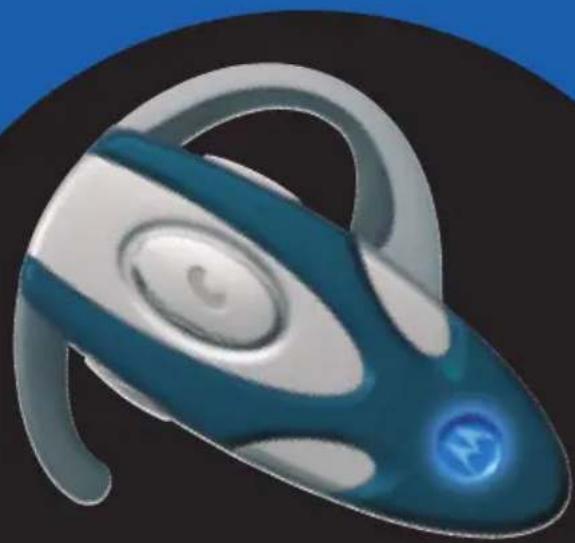
Bluetooth
Wireless Headset
User Guide
CFJN1012C Manual HS820 29/06/2004 15:09 Page 3

MOTOROLA
intelligence everywhere

Figure 1:
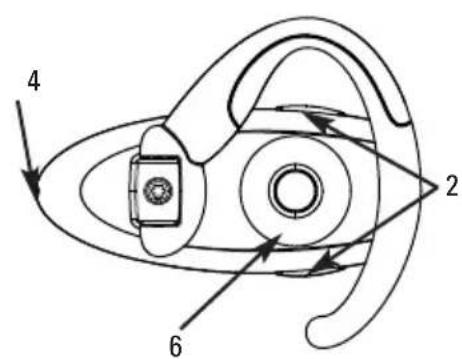
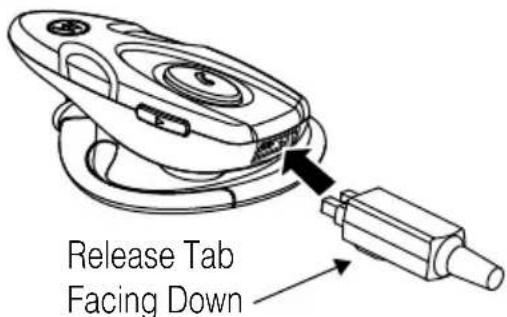
Figure 2:
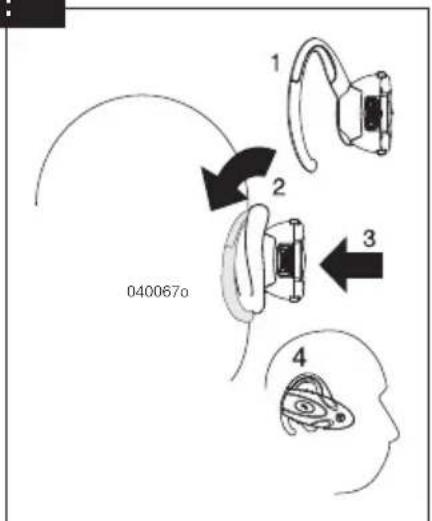
Figure 3:
Figure 4:

English
Welcome
Welcome to Motorola's "connected" world of Bluetooth® personal area wireless networking.
The headset provides hands-free convenience and freedom from cables and wires. You can place a call directly from your Bluetooth® Wireless Headset by using your Bluetooth® capable phone and your phone's activation feature. Bluetooth® wireless technology makes all connections quickly and without cables.
All Motorola wireless products are designed and manufactured to meet Motorola's rigorous specifications and world-class quality standards. During development, our testing team took the Motorola Bluetooth® wireless Headset through rigorous durability tests including temperature, humidity, shock, dust, vibration, and drop tests.
Thank you for choosing a Motorola product equipped with Bluetooth® technology!
English
Safety and General information
IMPORTANT INFORMATION ON SAFE AND EFFICIENT OPERATION. READ THIS INFORMATION BEFORE USING YOUR PHONE.
Users are not permitted to make changes or modify the device in any way. Changes or modifications not expressly approved by the party responsible for compliance could void the user's authority to operate the equipment. See 47 CFR Sec. 15.21.
This device complies with part 15 of the FCC rules and with RSS-210 / RSS-139 of the Industry Canada. Operation is subject to the following two conditions: (1) This device may not cause harmful interference, and (2) this device must accept any interference received, including interference that may cause undesired operation. See 47 CFR Sec. 15.19 (3).

European Union Directives Conformance Statement
Hereby, Motorola declares that this product ("HS820") is in compliance with
The essential requirements of European Union Directive 1999/5/EC
You can view your product's Declaration of Conformity (DoC) to Directive 1999/5/EC (the R&TTE Directive) at www.motorola.com/rtte.
Electromagnetic Interference/Compatibility
Nearly every electronic device is susceptible to electromagnetic interference (EMI) if inadequately shielded, designed, or otherwise configured for electromagnetic compatibility.
English
Introduction
What is Bluetooth wireless technology?
Bluetooth wireless technology propels you into a new dimension in connectivity. Bluetooth devices communicate without wires, using built-in radio transceivers that operate on a globally available radio frequency to ensure worldwide compatibility. Your Bluetooth Wireless Headset can communicate with other Bluetooth devices within a range of approximately 10 meters (33 feet).
How can I use my wireless headset?
Your Wireless Headset equipped with Bluetooth wireless technology lets you connect with other similarly equipped devices :
- Use your phone hands-free.
- Handle incoming and outgoing calls with the headset multifunction control button
- Use voice activation to make calls.
Headset features
Please refer to figure 1 on page 1.
- Headset Indicator LED Provides visual cue about headset status.
- Volume Control Buttons Adjust speaker volume up and down.
- Multifunction Button Controls several headset functions.
- Microphone Picks up your voice input.
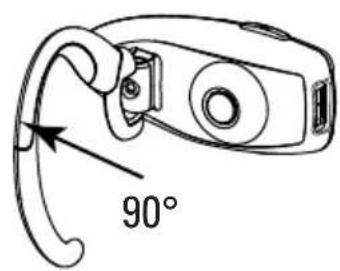
- Earhook Attaches headset to ear.
- Speaker Plays the sound you receive on the call.
- Charging Port Receives the plug for your battery charger.
English
Using your headset
Charging your headset
Please refer to figure 2 on page 1.
First-time use: Charge approximately for 2 hours before using the headset.
Recharging: When you hear 5 rapid high tones through the headset speaker repeated at 20-second intervals, the headset battery needs to be recharged.
Complete charging time is approximately 2 hours. When connected to the charger, the headset automatically turns off and the indicator lights permanently to confirm charge mode. After the battery is fully charged the indicator turns off.
The rechargeable battery that powers this product must be disposed of properly and may need to be recycled. Contact your local recycling center for proper disposal methods. Never dispose of batteries in fire because they may explode.
Notes: You can also use a Motorola Original Vehicle Power Adapter to charge the headset while in your vehicle. A fully charged headset battery provides approximately up to 6 hours of talktime 100 hours of standby time.
Turning your headset on and off
To turn the headset on or off, press the multifunction button until the indicator flashes.
Wearing your headset
Placing the headset on your ear: refer to figure 3 on page 2.
Changing for wear on the left ear: refer to figure 4 on page 2.
English
Adjusting volume
To adjust volume, press either one of the bottom and top volume buttons repeatedly until you reach the desired volume level.
Volume Orientation technology - To change the volume button orientation from left or right rear: with the headset off, press the multifunction button and desired volume button to assign a "volume up" until the LED flashes 2 times and the headset powers up.
Pairing your headset and phone
You must pair your headset and phone before you can make a call.
"Pairing" creates a link between devices equipped with Bluetooth wireless technology and allows the phone to remember the headset's unique ID. Once your headset and phone are paired, your headset automatically connects to your phone.
Pairing
With the headset and phone in close proximity:
Step 1: When the headset is off, press and hold the multifunction button until the headset indicator turns on permanently.
Step 2: Perform a device discovery (or scan) from the phone. For details about device discovery consult your phone's user guide.
Step 3: Select the Motorola HS820 in the list of discovered devices and confirm by following the on-screen prompts.
Step 4: When requested by the phone, enter the passkey 0000 and confirm.
The device ID is now stored in the phone's memory. Pairing is successful when the headset indicator flashes rapidly.
Paired link to additional devices
Your headset can store pairing information for up to eight different devices equipped with Bluetooth wireless technology. Devices are stored in a "Paired Device List" in memory in chronological order. When an attempt to pair to more than eight devices is made, the oldest paired device is removed from the list.
Any of the eight paired devices can initiate a paired connection to the headset.
English
The headset will automatically initiate a connection with the last device it was connected to either by powering up the headset or by pressing the multifunction button. If you want to connect the headset to another device in the paired device list, you must initiate the connection from that device. Whichever of the eight devices initiates a connection to the headset afterwards, that device then becomes the "last connected" device.
Placing and receiving calls
You can use the phone as usual to dial a number.
Your headset supports both Hands Free and Headset Profiles. Accessing call functions depend on which profile your phone supports.
Note: some phones do not support all features listed. See your phone's user's guide.
You can activate call functions for both Hands Free and Headset Profiles (Headset ON) according to the following table:
Function Phone Status Handsfree Profile Action
| Receive a call ON – phone rings Short press Ⓞ |
| Make a voice dial call ON - idle Short press Ⓞ, speak name |
| Redial a number ON – voice dialing turned on or off Long press Ⓞ |
| End a call ON – in call Short press Ⓞ |
| Transfer call from phone to headset ON – in call Short press Ⓞ |
| Put an active call on hold ON – in call Long press Ⓞ |
| Toggle between two calls ON – in call, another call in coming in Long press Ⓞ ON – in call, another call is on hold |
| Reject a call ON – phone rings Long press Ⓞ |
Note: if the link abnormally disconnects (for example, out of range) the headset tries to reestablish the link.
Using your headset indicator (LED)
Headset indicator (LED)
With charger plugged in:
Headset indicator
Headset
| ON | Charging in progress |
| OFF | Charging complete |
English
With no charger attached:
| Headset indicator Headset |
| OFF Power off |
| ON (steady) Pairing mode |
| 10 rapid flashes (approx. every 3 seconds) Pairing successful |
| Flashes at a 5-second interval Standby (not on a call) |
| Flashes at a 8-second interval Connected (on a call) |
Note: When the wireless headset is paired to the phone and there is no activity for 5 minutes, the blue flashing LED turns off. Any button press on the headset will reawaken the headset and the flashing resumes. If you press the up and down volume buttons simultaneously, the flashing LED turns off. If you press the up and down volume buttons simultaneously, during a call, the flashing LED turns off.
Audio tones
| Audio Tone Headset status | |
| Single high tone when pressing Volume maximum or minimum reached volume button | |
| Five rapid high tones, repeated Low battery every 20 seconds | |
| No audio indications; Out of range deterioratingaudio quality | |
| Series of 4 tones, low to hight Audio link open | |
| Ring tone Incoming call | |
| Single high tone Pairing confirmation | |
| Single low tone Initiate voice activation | |
| Dual high/low tone voice Tag not recognized | |
| Single high tone End call | |
| Series of 4 tones, high to low | Audio link closed |
| Fast high/low tone every 5 seconds | No network/service |
If you have additional questions, please call your local hotline or visit us at www.hellomoto.com
Français
Bienvenue
3NeKtpomarHHTbIe NOMEXN BOIpocbI COBMeCTMOCTn
NoTn BCE 3JIeKTPoHHbIe yCTpOInCTBa MOrTy 6bITb NODBepXeHbI BO3DeIcTBIO 3JIeKTPomarHHTbIX NOMex,ecnOn OHN 3KpaHnpOBaHbI, CnPoEeKTPoOBaHbI INN cKOHCTpyHnpOBaHbI HeHaJnExKaUIM o6pa3OM B CMBICNE 3JIeKTPomarHHTHOJ COBMECTUMOCTN.
Pycckn
BVeDeHne
IpyrnpOBKn rpoMKoCTn HaxmMaTe NIO6yIO n3 KHOOK perynpOBKn Do Tex nop, NOKa He yCTaHOBNTe XeJAEmyIO rpoMKoCTb
Pycckn
Kak m3MeHnTb KhONky peryIaTopa rPOMKocTn -YTO6bI N3MeHnTb KhONky peryIaTopa rPOMKocTn (npn IepemeueHmraHHTpybI C OndHO yxa Ha npyroe) -- npn BbIKIOueHHoR rapHntpe HxHNo HaxKaTb MHOOeJIeByIO KhoNky n OndHOBpeMeHNO BbIbpaHHyIO Bamn KhoNky peryIaTopa rPOMKocTn uDePXBaTb IN Do TEX NOp, POKa INdIKaTOP He MInrHET DBAxKDbI, a HayuHNIk BKIOHNTCA
Kak yctahOBntb CBA3b MEXky raphHtpyo n TepeohOM
PpeJe Yem DenaTb Bbl3OB, Heo6xoDnmo yctaHOBnTB CBraMxJy rapHnTypoN n TelecoHOM.
IpoceDypa B3aUMHOH HAcTpOKn CO3daET CBA3b MEKdy UcTPOJCTBaMn, OCHAeHHbIMN 6ecnpoBOHOH TexHONrHne Bluetooth, nNo3BONHeT TenefoHy 3anOMHnTB yHnKaIbHbN nJeHTnФnKaTOP raphNTpybl.
Pa3mecTnB raphNtpy pAOM c TelefoHOM:
War 1:Пи Вьклюechног rapHntpe HaxmTe n ydepxnBaTe MHOroOpyHKUHOHaJIbHyIO KhoNky DoTex np, NOKA INHdkaTOp rapHntypbl He 3aRopNTcnoCToRHHO.
Uar 2: BbINONHHTe Ha TeJeFOHe NOnCK yCTPOINCTBa (nIn "cKaHIpOBaHne"). IOpDpO6Hee o nonCKe YCTPOINCTB MOXHO INPOuHTaTb B PYKOBODCTBE K BaWemy TeJeFOHy.
Uar 3: B cnncke 6hApxKeHHbIX yCtpoiCTB BB6epnte rapHnTypy KOMnHm Motorola HS820 nnoTBePdTe Bb6Op cIeDyra Nocka3KaMa Ha 3KpaHe
War 4:BOTBET Ha 3anpoc TelepoHa BBeDte npoIb 0000 nnoTBePdTe.
IeHTnKauOnHbHmOhep yCTpoCTBa Teepb coxpaHb N pAmrTn Tepeoha. CnHaIOM ycneuHoro CoeINHeHn ABJIaETcMIRaHne INdKaTopa Ha rapHNType.
Kak yctaHOBTb CBA3b c DOONHHTeBHBIMN YCTPOINCTBaM
Bawa raphHtpa MoKet XpaHnTb HNΦopMaζIIO O CBA3N C BOCMbIPO pa3IINHbIMN yCTpoICTBAMN, OCHAeHHbIMN 6ecnpoBOJHO TexHOJrnei Bluetooth. YcTpoICTBa XpaHrTcB Namrtn B "CnncKe yCTpoICTB, C KOTOpBMN yCTaHOBNeHa CB3b" B xPOHOJrHeCKOM nOPrKe. Korda DeJaETcN ONbITka yCTaHOBtB CB3b C 6OJIee Yem BOcBMN yCTpoICTBAMN, n3 CNsCKa yDaJIaTeTc Camoe CTapoe.
JIIO6OE IN3 BOCbMn yCTpOJcTB, C KOTOpbIM yCTaHOBJIeHa CBra3b, MOXET INHUNIpOBaTb NOKJIIOueHne K rapHNType.
ДяТOrO,уTObI rAPHnTpa aBtOMaTHUeCKN COeINHnIacb C yCTpoNCTBOM,C KOTOpbIM OcyIeCTBJIIOCb NocJeDHee COeINHHeHne, HxKHO JIn6o eE BKNIOHTb, JIn6o HaxKaTb MHorOcJEneByO KhoNky. EcnBbXOTITE NOkJIIOHTb rONOBHOn TElePOnK DpyrOmy yCTpoNCTBy 3 cNcKa yCTpoNCTB, C KOTOpbIM YCTaHOBJIeHa CB3b, To DoJNXbI INHUnIpOBaTb COeINHHeHne C 3TOrO yCTpoNCTBa. To yCTpoNCTBO n3 BOCbMn, KOTOpoe INHUnIPyET COeINHHeHne C rAPHnTPOI NOcNe 3TOrO, CtaHET "NocJeHNM NOkJIIOUeHHbIM" yCTpoNCTBOM.
Pycckn
KaK 3BOHHTb n npHHMaTb 3BOHKn
TeIeHOOM MOxH0 IOnb3OBAtbcra KaK O6bHuO Iyra Habopa Homepa.
PnmeHHe:HEKOTOpbIe TeneoHbI He IIOJIepKINBaIOT BCE 3aBHeHHbIe FyHKUIN. O6paauTecb K pyKOBOCTBy NOJb3OBeTJI BaJero TeneoHa.
BaHa raphHtpya noIepKbAeT kak pexm pa60bI 6e3 pyk, TaK n pexm raphHtpyb. DocTyK KfynKUHM Bbl3OBA 3abucnt OT TORo, KaKoPPEKIM noIepKbAeT baW o6bIHyB TepeOH. Bbl MoKeTe aKTNBupOBaTB fynKcMn Bbl3OBA dnn peXIma 6e3 pyk n pexima raphHtpyb (raphHtpya BKIOHeHa) corlaCHO cneDyUeien Tablue:
HdkaTop rapHntypb (CBeToDnOd)
Korda noDkIouHe 3apJHoe ycTpoCTBO:
HMANTIKEE H O P O F O I E E I A A H K A I A N O T E E M A T I K H E I O Y P A. I A B A T E Y T E H O P O F O I E E P I N X P H I M O N O I H E T E T O T H E N O A
Oi xpnoTeC Ta npenei va eniepoov aalayec n va tponoiou vT oukeun e oniovodnote Tpno.Tuxov aalayc n tponoioeic nou Eykpivovtal pntac an tov kataokuaotn uopei va akupawouv to dikaiwa tou xpnoT va aeitoupyei tn ouakeun. Bλ. kavoviofo 47 CFR Sec. 15.21.
H oukeun oumuopfoewtalouc kavovioouc nOoovoiaknEitpornc Eikoiowivv (evotnta 15) Kai tov kavoviao RSS-210/RSS-139 tou Ynpuyeiou Biomxaviaocu Kavaa. H aitoupyia unoketai otic akoloue c npounotheci: (1) n oukeun autn dev npokaie aepescapapeoolec kai (2) n oukeun autn npenti va dextai onota napeboan laabve, ouptepalauavovewvTwv npaeboawou npopoei va npokaleouv aventhetaeta anotelemaata otn aeupyia nC. B4. 47 CFR Sec. 15.19 (3).
Anw anuBatotntac me Tc Ondyies Tc Eupwnaiikns Evwns
H Motorola dia tou npovto oti to npoiov auto("HS 820") ouuΦwve iε:
Tic Baikc npouo0eoc ts Eupwaikn Odyia 1999/5/EOK