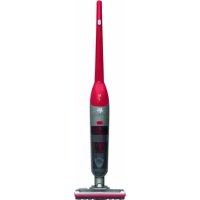
Renegade 18 DD6911 - Vacuum Cleaner DIRT DEVIL - Free user manual and instructions
Find the device manual for free Renegade 18 DD6911 DIRT DEVIL in PDF.



| Device type | Cordless hand vacuum |
| Model | Renegade 18 DD6911 |
| Accumulator voltage | 18 V (Li-ion) |
| Maximum runtime | Approx. 30 minutes |
| Maximum charging time | Approx. 4 hours |
| Power adapter | Input: 100–240 V, 500 mA, 50/60 Hz; Output: DC 21.4 V, 600 mA |
| Dust container capacity | 0.6 L |
| Power | 80 W |
| Power settings | 2 levels (MIN and MAX) |
| Cylindrical brush | Rotatable, removable for cleaning |
| Filter type | Washable motor protection filter |
| Emptying system | Removable dust container with separator |
| LED display | Charge and state indicator (red/green) |
| Wall mount | Included for storage and charging |
| Weight (approx.) | Approx. 2.5 kg (with accumulator) |
| Intended use | Hard floors, carpets and dry rugs (domestic use) |
Frequently Asked Questions - Renegade 18 DD6911 DIRT DEVIL
User questions about Renegade 18 DD6911 DIRT DEVIL
0 question about this device. Answer the ones you know or ask your own.
Ask a new question about this device
Download the instructions for your Vacuum Cleaner in PDF format for free! Find your manual Renegade 18 DD6911 - DIRT DEVIL and take your electronic device back in hand. On this page are published all the documents necessary for the use of your device. Renegade 18 DD6911 by DIRT DEVIL.
USER MANUAL Renegade 18 DD6911 DIRT DEVIL
International Services
DE
Royal Appliance International GmbH
Abt. Kundenservice
Jagenbergstraße 19
41468 Neuss
DEUTSCHLAND


de@dirtdevil-service.eu
www.dirtdevil.de
0049 (0) 180 - 501 50 50*
0049(0)2131-60906095
AT


at@dirtdevil-service.eu
0043-720-884954**
CH


ch@dirtdevil-service.eu
0041-31-5280557**
BE


be@dirtdevil-service.eu
0032-2-8085065**
LU


lu@dirtdevil-service.eu
00352-2-0880506**
FR


fr@dirtdevil-service.eu
0033-9-75 18 30 17**
ES


es@dirtdevil-service.eu
0034-91-1982787**
IT


it@dirtdevil-service.eu
0039-06-94801618**
PT


pt@dirtdevil-service.eu
00351-21-1141327**
NL

nl@dirtdevil-service.eu
0031-20-8085408**
PL

pl@dirtdevil-service.eu
0048-22-3970223**
CZ

cz@dirtdevil-service.eu
00420-2-46019541**
HU

hu@dirtdevil-service.eu
0036-1-8480686**
TR

tr@dirtdevil-service.eu
0090-85 03 90 1980**
FI

fi@dirtdevil-service.eu
00358-9-42 45 0412**
SE

se@dirtdevil-service.eu
0046-844682150**
DK

dk@dirtdevil-service.eu
0045-78-77 44 95**
SK

sk@dirtdevil-service.eu
0042-1232784549**
NO

no@dirtdevil-service.eu
0047-21999489**
GR

gr@dirtdevil-service.eu
0030-2-11 1981 203**
RO

ro@dirtdevil-service.eu
0040-316303651**
BG

bg@dirtdevil-service.eu
00359-2-4925116**
HR

hr@dirtdevil-service.eu
00385-1-6666441**
LT

li@dirtdevil-service.eu
00370-52141798**
LV

lv@dirtdevil-service.eu
00371-66090470**
EE

ee@dirtdevil-service.eu
00372-8801167**
SI

si@dirtdevil-service.eu
00386-18888074**
DE
** Charges for calls from abroad depend on the current charges imposed by the respective foreign telephone company and the respective rates.
AT,CH
We are pleased that you decided to purchase a Dirt Devil product. We hope you enjoy using your appliance and we would like to thank you for your purchase.
You will find further information on your product in this operating manual and at our website www.dirtdevil.de. To contact our service team, refer to the contact details on page 2.
Technical data
| Type of appliance: Hand-held vacuum cleaner with rechargeable battery | ||
| Model name, model: DD691 Renegade 18 DD692 Renegade 36 | ||
| Rechargeable battery: Li-ion (18 V) Li-ion (32.4 V) | ||
| max. operating duration: | approx. 30 min approx. 75 min | |
| max. charging duration: | approx. 4 hours approx. 4 hours | |
| Mains adapter: Input: 100–240 V; 500 mA; 50/60 Hz Output: DC 21.4 V; 600 mA | Input: 100–240 V; 500 mA; 50/60 Hz Output: DC 38.2 V; 600 mA | |
| Dust bin: 0.6 | 0.6 | | ||
| Power: 80 W | 80 W | |
Environmental protection and disposal
- If you wish to dispose of the appliance, remove the rechargeable battery > "Removing the rechargeable battery" on page 18, and dispose of the rechargeable battery and the appliance separately.
Do not dispose of the appliance, rechargeable battery or charger with the domestic waste.
Dispose of the appliance, charger and the rechargeable battery separately by handing them over at the appropriate collection points.
Li-ion
Warranty
If you have purchased the appliance as a consumer within the European Union, the respective national legislation implemented as per EU Directive 2011/83/EU applies as the minimum warranty standard. In non-EU countries the minimum warranty requirements in the respective country apply. This does not apply to batteries or rechargeable batteries which have become faulty or have a reduced service life as a result of normal wear or improper handling.
SAFETY INSTRUCTIONS
About the operating manual
Read this operating manual completely before using the appliance. Keep the operating manual for reference. If you pass the appliance on to third parties, it must be accompanied with the operating manual. Failure to adhere to this operating manual can lead to serious injuries or damage to the appliance. We assume no liability for damage caused as a result of failure to adhere to this operating manual. Important information not included in this chapter is indicated as follows:

WARNING!
Wards of health hazards and identifies possible risks of injury.

CAUTION!
Indicates possible dangers to the appliance or other objects.
NOTE
Highlights tips and information.
You can also download this operating manual at any time from out website: www.dirtdevil.de
Concerning certain groups of persons
These appliances can be used by children of 8 years and persons with impaired physical, sensory or mental abilities, or insufficient experience or knowledge, providing they are supervised or have been instructed
in the proper use of the appliance and understand the risks involved.
Children must not perform cleaning or user maintenance tasks without supervision. Children must not play with the appliance.
Packing material ad small parts must not be used as toys. There is risk of asphyxiation.
Children under the age of 8 years old should be kept away from the appliance, the mains adapter and the mains adapter cord whilst they are switched on, plugged in at the socket or are cooling down.
INFORMATION ON THE POWER SUPPLY
The appliance is charged with electrical current.
Thus there is always risk of electrical shock.
You must therefore observe the following:
Never touch the rechargeable battery or mains adapter with wet hands. Never immerse the appliance, the rechargeable battery or the mains adapter in water or other liquids.
Always take hold of the mains adapter when you wish to disconnect the mains adapter from the mains socket. Never pull on the mains adapter's cord.
Ensure that the mains adapter cord is not bent, pinched, rolled over and that it does not come into contact with heat sources.
Only use the mains adapter included in the scope of supply to charge the rechargeable battery.
Always check the mains adapter cord possible damage before using the appliance. Do not use a mains adapter with a damaged cord or plug. Only ever connect the mains adapter to sockets which carry the voltage indicated on the mains adapter.
Before cleaning or performing maintenance on the appliance, ensure that the appliance is switched off and that the mains adapter is not connected.
Information on the brush roller
The brush roller in the floor nozzle rotates at high speed. This poses various hazards to people, animals and objects:
Never vacuum clean people, animals or high temperatures.
plants. Keep parts of the body and items of clothing away from the moving parts and openings on the appliance when it is in operation. They may otherwise be drawn in and cause injuries.
Before you detach or attach, open or clean consult a doctor.
the floor nozzle, switch off the appliance.
Do not run over cords, cables etc. as there is a risk of them becoming tangled in the brush roller and may become damaged.
- Keep the rotating brush roller away frodisposal" on page 13.
disposal" on page 13.
all delicate surfaces. This may otherwise cause damage. Comply with the care and cleaning instructions provided by the manufacturer.
Also keep the rotating brush roller away from curtains, long tassels and the like. The objects may otherwise become drawn in and damaged.
Information on the rechargeable battery
There is a risk of injury if rechargeable batteries are handled incorrectly.
Only use the charger included in the scope of supply to charge the rechargeable battery.
Never short-circuit the rechargeable battery, i.e. never touch both poles simultaneously, especially with electrically conductive objects.
Never take the rechargeable battery apart, never deform it and never expose it to
high temperatures.
Improper handling can cause liquid to leak from the rechargeable battery. Avoid any contact with such liquid.
If you have come into contact with liquid, rinse it off with copious amounts of water
and consult a doctor.
After its service life, dispose of the appliance and the rechargeable battery in an environmentally friendly manner, as described, > "Environmental protection and
If the appliance is faulty
If the appliance, the mains adapter or the mains adapter cord are damaged, they will need to be replaced by the manufacturer, the manufacturer's customer service department or a similarly qualified person in order to prevent hazards.
Hand over a faulty appliance to an authorised dealer or send it to the Dirt Devil customer service department for repairs, > "International Services" on page 2.
Never use a faulty appliance, mains adapter, mains adapter cord or rechargeable battery!
Information on proper use
This appliance must only be used for domestic use. It is not suitable for industrial or commercial use. Only use the appliance for cleaning lightly soiled, dry hard floors, carpets or upholstered furniture. Any other use is considered improper use and is prohibited.
The following in particular is prohibited:
Vacuuming:
- People, animals, plants or items of clothing on the body
High risk of injury!
Hot ash, burning cigarettes, matches and highly flammable substances
Risk of fire!
Water and other liquids
Risk of short circuit!
- Toner (for laser printers, copying machines, etc.)
Risk of fire and explosion!
Use - in the vicinity of explosive or highly flammable substances
Risk of fire and explosion! - outdoors
Risk of damage due to rain and dirt! - of non-original accessories. This can impair appliance safety.
Carrying out repairs yourself
Risk of injury and loss of entitlement to free replacement!
Preparatory work
Getting to know the appliance
Fig.1: ① Handle; ② OFF/MIN/MAX switch; ③ LED; ④ Dust bin release catch; ⑤ Dust bin; ⑥ Floor nozzle; ⑦ Brush roller; ⑧ Handle release catch; ⑨ Rechargeable battery compartment cover; ⑩ Rechargeable battery compartment release catch; ⑪ Floor nozzle release catch; ⑫ Charging socket; ⑬ Mains adapter; ⑭ Wall mount; ⑮ Rechargeable battery
Unpacking and assembling
1 Check that the unpackaged contents are complete. If you notice any transport damage or if anything is missing, contact your dealer immediately. 2 Turn the handle (Fig. 1 / 1 ) vertically over the upper installation opening on the appliance body (Fig. 2). In the process, make sure that the cable does not become trapped between the handle and the appliance body.
NOTE:
If you wish to remove the handle again, push the handle release catch (Fig. 1/8) with a stable, pointed object, and pull the handle from the appliancebody.
3 Insert the handle into the upper installation opening on the appliance body so that you feel and hear it click into place (Fig. 3). Connect the appliance body to the floor nozzle so that you hear and feel the floor nozzle release catch click into place (Fig. 4).
NOTE:
If you wish to remove the floor nozzle again at a later time, push in the floor nozzle release catch (Fig. 1/11), thus releasing it. Then pull the appliance body and the floor nozzle apart (Fig. 6).
NOTE:
To set the assembled appliance down, set it down on the floor nozzle and tilt the appliance body forwards so that the stop catch on the floor nozzle clicks into place (Fig. 5). Connect the appliance to the wall mount (Fig. 7) when you wish to charge or store it.
5 Push the rechargeable battery compartment release catch and remove the rechargeable battery compartment cover (Fig. 8). Insert the rechargeable battery into the rechargeable battery compartment so that the contact surfaces are facing downwards (Fig. 9). Now push the rechargeable battery into the rechargeable battery compartment so that it audiably clicks into place (Fig. 10). Re-insert the rechargeable battery compartment cover and close it so that it audiably clicks into place (Fig. 11).
Charging the rechargeable battery

WARNING!
Risk of fire or explosion! Only use the mains adapter included in the scope of supply to charge the rechargeable battery.
1 Connect the mains adapter cable to the charging socket on the appliance (Fig. 12). 2 Connect the mains adapter to a socket (Fig. 13). The LED lights up constantly in red to indicate the charging process (Fig. 14). 3 After a maximum of 4 hours, the LED switches to green. The rechargeable battery is then charged. 4 Disconnect the mains adapter from the socket (to save electricity) and disconnect the mains adapter cable from the appliance.
Installing the wall mount
1 Connect the handle of the appliance to the wall mount. 2 Place the appliance against the wall, together with the wall mount, so that the floor nozzle rests flat on the floor (Fig. 7). 3 Mark the positions for the drilled holes with a pencil.
4 Drill the holes. Remove the wall mount from the handle and screw it to the wall with suitable fastening accessories. Insert the hole covers.
Switching the appliance on/off
NOTE:
When the LED flashes red, the rechargeable battery charge is low and the appliance will switch off within 20 seconds. Fully charge the rechargeable battery to use the appliance again > "Charging the rechargeable battery" on page 17.

CAUTION!
Make sure that the surface can withstand the rotating brush without becoming damaged.
To switch on the appliance, push the OFF/MIN/MAX switch one position down (Fig. 15/1). The appliance vacuums at low suction power and the brush on the floor nozzle rotates. The LED lights up green.
For full suction power, push the OFF/MIN/MAX switch one position further down (Fig. 15/II).
To switch off the appliance, push the OFF/MIN/ MAX switch all the way up (Fig. 15/O). The appliance switches off. The LED goes out.
Vacuuming floors
1 Unfasten the stop catch on the floor nozzle by placing your foot on the floor nozzle and tilting the appliance backwards with the handle. 2 Switch on the appliance with the desired suction power > "Switching the appliance on/off" on page 17. 3 Vacuum-clean the floor.
NOTE:
If the brush roller (Fig. 1 /⑦, Fig. 26) becomes blocked as a result of soiling, the appliance switches off and the LED (Fig. 1 /③) flashes red. To be able to use the appliance again, push the OFF/MIN/MAX all the way up (Fig. 15/O) and clean the brush roller > "Removing and cleaning the brush roller" on page 18.
Switch off the appliance.
Maintaining the appliance
Removing the rechargeable battery
1 Push the rechargeable battery compartment release catch (Fig. 1/10) and remove the rechargeable battery compartment cover (Fig. 1/9). Remove the rechargeable battery from the appliance.
Emptying the dust bin
1 Press the dust bin release catch (Fig. 16) and remove the dust bin from the appliance (Fig. 17). 2 Remove the separator with the filter from the dust bin (Fig. 18). 3 Dispose of the contents of the dust bin in a waste bin. Gently tap out the dust bin to remove any soiling.
Cleaning the separator and filter
NOTE:
The appliance and the filter should be cleaned regularly in order to maintain the suction power.
1 Remove the dust bin from the appliance and the separator with the filter from the dust bin > "Emptying the dust bin" on page 18.2 Turn the filter cover anti-clockwise to release the catch (Fig. 19/A) and remove the filter cover (Fig. 20/1) from the separator (Fig. 20/3).3 Pull on the tab to remove the pre-motor filter from the separator (Fig. 20/2).4 Tap out the separator over a waste bin. Use a dry cloth to remove any remaining dust and dirt.5 Remove the second pre-motor filter from the appliance body (Fig. 21).6 Rinse out the pre-motor filters under running water (max. 40^ ). Leave the pre-motor filters to dry for at least 24 hours.7 Reinsert one pre-motor filter into appliance body (Fig. 21) and the other pre-motor filter into separator with tab facing up.
8 Place the filter cover on the separator and turn it
clockwise to lock it in place (Fig. 19/B). Re-insert the separator with the pre-motor filter into the dust bin (Fig. 22). Re-insert the dust bin into the appliance and push it into the appliance so that you hear and feel it click into place (Fig. 23).
Removing and cleaning the brush roller
1 Switch off the appliance and set it down so that the brush roller is easily accessible and the appliance rests safely in place. 2 Turn the roll catch anti-clockwise using a small coin (Fig. 24) and remove the locking cover (Fig. 25). 3 Raise the brush roller at the side of the roll catch and remove it from the floor nozzle (Fig. 26). 4 Remove any dirt and hairs from the floor nozzle and from the brush roller. If necessary, you can carefully use a pair of scissors as an aid. 5 Insert the brush roller into the floor nozzle with the round end first (Fig. 27). 6 Fit the locking cover and turn the roll catch clockwise.
Accessories
- Pre-motor filter (2x) - 0691002 (Fig. 28/A)
Power adapter DD691-0691003 (Fig.28/B)
Power adapter DD692-0692003 (Fig. 28/B) - Rechargeable battery DD691-1/18V - 0691004 (Fig.28/C)
- Rechargeable battery DD692-1/32V - 0692004 (Fig. 28/C)
Brush roller - 0691013 (Fig. 28/D) - Wall mount - 0691011 (Fig. 28/E)
Troubleshooting
Before you contact our customer service department or send the appliance to the Dirt Devil customer service department, you will find a lot of additional information in the service area of our website which will help you solve problems.
Switch off the appliance before you start troubleshooting. Never use a faulty appliance, charger or rechargeable battery.
Merci beaucoup!
MHCTPyKcIM 3A B630IACHOCT
OTHOCHO yINbTBAHeTo 3a 06cnyxBaHe
IpoyeTe Te yIbTbaHe 3a 06cIyXbaHe,
Ipei Da 3anOHTe da pa6OTte cypeHa.
Ia3eTe Iobpe yntbTaHeTo 3a 06cnyXbaHe. Ako npedabate ypeDa Ha TpeTn Iuca, npedabaiTe n yntbTaHeTo 3a 06cnyXbaHe. Hecna3BaHeTo ha yntbTaHeTo 3a 06cnyXbaHe MoKe Da IOBeJe Do TeKn HapAHBaHn NIn NobpeDn Ha ypeDa. He noeMame OTROBOPHOCT 3a UeTI B pe3yIITaT Ha Hecna3BaHe Ha yntbTaHeTo 3a 06cnyXbaHe. Baxhnte yka3aHn N3BbN HaCTOaTa TlaBa ca O6o3HaueHn PO CLeDNn HaunH:

PPEyPExKdEHNIE!
IpeynpejdaBa 3a onacnoct 3a BaeweTo 3paBe I NOKa3Ba Bb3MOxHnTe pNCKOBe OT HapaHraBaHe.

BHIMAHHE!
YKa3Ba Bb3MOxHnTe OaCHOCTn 3a ypeDa nnI npyri npedmetn.
YKA3AHNE
IopUePbTaBa cBBeTn INHΦOpMaζη.
Mожete по BCЯКО Врeme Да CBаЛNTВанeto 3a 06слуЖВане OT HaшаТиНтерпетсразница: www.dirtdevil.de
3a onpeidenen rpynn ot xopa
Ypeinte Moat da ce n3no3BaT OT deua
HaI 8 roDHH n OT IINuCA C HAmaleHn fN3N-ueCKn, ceH3OpHN uIN yMCTBeHn cNoC6HOCTn uIN 6e3 OINT N/IN 3HaHnA, aKO HAKOi KOnTpOJInpa INI Te Ca INHCTpyKTIpaHn 3a 6e3oNaChata yNtpe6a Ha ypeDa n ca pa3-6paII npON3TNuaUte OT HeRo ONaCHOCTn.
IounCTBaHeto I NOdIpbKkata OT noTppe6nteHa He 6uBa Da ce N3BbPswBaT OT Deua 6e3 Ha3Op. Deuata He 6uBa Da nrgaT cypeDa.
0nakobbHHTe MaTePnaI IN dpe6HNTe
actn He 6nBa Da ce n3noJ3BaT 3a nrga.
CbueCTByBa ONaCHOCT OT 3aDywaBaHe.
Ieata noi 8-rodnHa Bb3pact Tp6Ba Da ce na3rOT ypea n MpeXOBnA aanTep, KaKTo n OT ka6ela Ha MpeXOBnA aanTep, DOKaTO Te ca BKJIoueHn, Ca CBbp3aHn C KOHTaTa nn Ce oxJaXdA.
3A EJEKTPO3AXPAHBAHETO
YpeBc ce 3apeKda c eIeKtpnueckn TOK. Pn TOBa nO npHcnn CbIeCTByBa ONaCHOCT OT TOKOB yap.
3aTOBa 06bPHeTe OcObeHo BHHMaHne Ha cIeHNHOTo:
Hnkora He xbaaate 6aTepyta mpekoBna aanTep c Mokpn pbue. Hnkora He notanTyepe, 6aTepyta mpekoBna aanTep BbB BOda nI npu TeyHOCTn.
Korato nckate da n3dbpnaTe MpekoBna aanTep ot KOHTaKaTa, BnHaRn n3DbpNaIte MnpeKTHO MpekoBna aanTep. Hnkora He nbpnaTe MpekoBna aanTep 3a Ka6ena.
BnMaBaTe Ka6eJIbT Ha MpeKOBna aIaITeP Da He Ce npeUyNba, Da He Ce npuTnCKa IIN ppeA3Ba IIN Da He Bn3a B KOHTaKT Cn3ToHnCn Ha ropeunHa.
3a 3apejdahe Ha 6aTepejra H3noJ3-BAIte caMo IOCTaBeHnC Hea MpeKOB aanTep.
IpeuynoTpe6a npOBepBaIte Ka6eHa
MpeKOBn aadTep 3a eBentyaHn nobpei.
Hnkora He n3noI3BaIte MpeKOBn aadTep,
yInTo uenCeI nn Ka6e e NobpeDen. Cbbp3-
BaTe MpeKOBn aadTep cAmO c KOHTaKTN, B
KOInTO nMa eJeKtpnuecko HappeKeHne, Koeto
CbOTBeTCTBa Ha IocOueHTo Bbpxy MpeKOBn
aadTep.
Ipei StapTupaHe Ha nouchBaHe nIIuTexHnuecka IopBjXka Ha ypeia ce yBepTe,Ye ypeIbTe n3KIOUeH mpeXOBnT aJaNTep He e BkIOUeH.
3a BbptTaaCe yeTkaaBaanK
YeTkauT BalaB HnKaHnka 3a nOc Ce Bbptnc BnCOKn 6OpOTn. OToBa npOn3Tuat pa3JIuHn OnaCHOCTn 3a Xopata, XNBOTHNTe n PpeDMeTtTe:
Hnkora He npaxocmyeTe xopa, KnBO
nIpaTeHna. TaTe Yactte Ha TAnTo n dpexnte OT DnJKeUITE ce YaCTN N OTBOpn Ha pa6oTeuYpei. Te MoT Da 6bDat 3aXBaHaTn I Taka Da 6bDat npuHHeH HapaHBAHn.
Ipeu Da cBaNTe uNn NocTaBtTe, da OTBOpTE uNn NoUcTte HaKpaHnKa 3a PoD n3KJIouTe ypeDa.
He mHaBaTe npe3 Ka6en, npoBOnu
I np., KOnTo MoRaT da Ce 3aPnEeTaBbB BbpTIAuCe YeTKaU BaJAK U TaKa Da Ce NOBpeJr.
PanaTe BbptTaaIe ce yeTKaIe BaJAK OT
BÇA KaBn ChvBCTBnTeJHn NOBbpxHOCTn. B npoTMBen CnyaM ToBa MoXe Da npeiN3BnKa noBpeNi. Cna3BaIte yka3aHnraTa 3a NouchTbaHe n PoIrpBxKHa Na pOuN3BOIDTeJIInTe.
PaeTe BbptTaae Ce yeTkau BaJAK
CbI O T NepTeTa, 3aBeCN, IbIgN peCHN I npytn PoiO6Hn. B npotuBEn cIyauaI Te3n PpeMEtN MoT Da 6bDaT 3axBaHaTN I NOBpeDeHN.
3a 6aTepeyTa
Ipn HnnpaBnHa ynoTpe6a Ha 6aTeepnTe CbIeCTByBa ONaCHOCT OT HapaHЯBaHe.
3a 3apekdahe Ha 6aTepeyra n3noJ3-BAIte cAmO IOCTaBeHOTo C HeA 3aprHOp yctpoiCTBO.
Hnkora He cBbp3BaIte 6aTepeyra Ha-Kbco, T. e. Hnkora He pnaIte DbaTa noIoca eNHOBpeMeHHo, Na-Beue He c eJeKtpo- npOBOIMn npEIMtN.
Hnkora He pa3rno6BaIte 6aTepyTa, HeJeΦopMpaIte Hnkora He Jaar-4e Ha BnCOKI Tempeatypn.
Ipn He npabnHa ynoTpe6a ot 6aTeepn- rTa MoKe Da n3Je3e TeuHocr. N36raBaiTe KOHTaKT C TeUHOCTTa.
Ako Bbnpekn TOBa CTe BJIe3nB KOHTaKT Cn3n3aua TeuHOCT, n3nPaKHeTe 06nHc BoJa n Ce 06bpHeTe KbM Iekap.
Clej KpaHa ynoTpe6aTa n3xBbPnTe UypeHa 3aeHNo c 6aTePnra cAmO ekOIo- rHuHO i KaKTo e OnncAo,> ,3aUHTa Ha OKoJIHaTa CpeHa N I3XBbPnHe" Ha CTpaHn- ca 115.
Pn DeΦeKTeH ypeI
Ako ypeDbT, MpeKOBnT aadantep nn Ka-6enbT Ha MpeKOBnA aanTepe NobpeDeH, TOn Tp8Ba Da ce CMeHn OT npOu3BODnteIy nn HerobnCepBn3 nn OT nIuce C noo6Ha KBaIInΦnKaZn, 3a Da Ce n36erHaT pNCKOBe.
IpeaTe DeeKTHnYpei 3a peMOHT Ha OToPi3nPaHa CneuAn3nPaHa fnpMa nnHa cepBn3a 3a Dirt Devil, > ,International Services"Ha cTpaHnca 2.
Hnkora He n3noI3BaIte DeeKTeH ypeI, DeeKTeH MpeXOB aIaITeP, DeeKTeH Ka6eI Ha MpeXOB aIaITeP IIN DeeKTHa 6aTePnI!
3a npabunha ynotpe6a
UpeT MoKe Da Ce I3NoI3Ba CaMo B 6uTa. ToH He e PoIxOJa3a CToIaHcKa yNoTpe6a. I3NoI3BaIte UpeDa CaMo 3a NoUcTbAHe Ha JeKO 3aMbpcEH, CyXn TBbpDn POnOBe, KInIMN INI rApHHTypN. BcKa dpyra yNoTpe6a Ce npHaMa 3a HEnpaBnHa N e 3a6paHaHa.
3a6paheHo e Han-Beue:
PpaxocmyueheToHa
Xopa, XIBOTHn, paCTeHnHa dpexn Bbpxy TAnTo
Bucok pnck OT hapaHraBaHe!
Tneeea nepei, 3ananeHn ciirapn, Kn6pnteHn KLeuKn I lecho 3aapanmM BeueCTBa
→0nacnoctoT noxkap!
Boda n npytn Teuhoctn
0nacnoct ot Kbco cbeHHeHne!
- Tohep (3a Ia3epHn npHTepn, KOnnphn Maunnn n T. H.)
→OnachocToIpoJapn eKcnno3na!
yntpe6ata
B6n30CTdoeknno3NBHn nnJeCHO 3aapanmMaTepnan
→Onacnoct ot nojkap n eKcnno3na!
- HaOTKpntO
→Onacnoct ot pa3pyuwaBaHe npaIbXd n 3aMbpcraBaHna!
- Ha HeopuHaHaHn npHaJaJIeXHoCTn. ToBa MoKe Da HapuN 6e3oNaChocTt a Ha ypeDa.
CamopbHn nHTepBeHcnn 3a peMOHT
0nachocTOTnapaHbAHe Nn3rapHaHa npaBTo Ha 6e3PnATha 3AmHa!
IodroTOBka
3an03HaBaHe cypeda
ΦnR.1:①PbKOXBaTKa;②IpeBKnHoyBaTeAUS/MIN/ MAX (N3KJI/MNH/MAKC);③LED;④6yToH 3a ocBO- 6oxJaBaHe Ha pe3epBoap 3a npax;⑤pe3epBoap 3a npax;⑥HaKpaHnK 3a NOi;⑦YeTKaU BaJrK;⑧6yTOH 3a OCBO6oxJaBaHe Ha pBkoXBaTKaT;⑨KaNaK Ha rHe3dOTo 3a 6aTePnn;⑩6yTOH 3a OCBO6oxJaBaHe Ha rHe3dOTo 3a 6aTePnn;⑪6yTOH 3a OCBO6oxJaBaHe Ha HkpaHnKA 3a NOi;⑫3apJeH n3BOJ;⑬MpexKOB aDaTep;⑭CTeHEn DbpxKaU;⑮6aTePn
Pa30nakobaHe mOHTnpaHe
1 PpOBepTe ueNoCTHa pa3oNaKOBaHOTcBbPxHHe. Ako 3a6eJXte Ueta OT TpaHCnOpTnpaHTo NN aKO HeUO LInCBA, He3a6abHO Ce CBbpxTe C Ba- uNra TBProBeu. 2 3aBbPTepe bKOxBaTKata (fur.1/ ①) BepTNkAINHO HAD rOpHna MOHTaxKeH OTBOP Ha Kopnyca Ha ypea (fur.2). BHHMaBaIte Ka6enbTaHa ce npNTncHE MeKdy PbKOXBaTKata N Kopnyca Ha ypea.
YKA3AHNE:
Ako nckaTe OTHOBo Ja demoHTnpaTe pbKOxBaTKaTa,HaTnCHete CbC CTa6uIneH OCTPOBbpx npedMeT 6yToHa 3a OCBO6oxJaBaHe Ha pbKOXBaTKaTa (mR.1/8) nI3DbpNaTe pbKOXBaTKaTa OT Kopny- ca Ha ypeDa.
BkapaTe pbKOxBaTkata B rOpHnMa MoHTaKeH OT-BOP Ha Kopnyca Ha ypea,doKaTo ce ue n ycTe KaK Toi ce fHKcnpa (fur. 3).4 BkapaTe hakpaHnKa 3a NOD B KOpNyca Ha ypea,doKaTo ce ue n ycTe KaK 6yTOhBT 3a OCBO6OxJaBaHe Ha hAkpaHnka 3a NOD ce fHKcnpa (fur. 4).
YKA3AHNE:
Ako no-KbCHO nCKaTe OTHO 0 da demoHTnpaTe HaKpaHnka 3a NO, HATNCHe 6yToHa 3a OCBO-6oxJaBaHe Ha HApHnka 3a NO (Φnr. 1/11) HabTpe N Taka ro OCBO6OJeTe. Cnei TOBa n3DbpNaIte Kopnyca Ha ypea N HaKpaHnka 3a NOeINH OT dpyr (Φnr. 6).
YKA3AHNE:
3a da napkupaTe MOHTnpaHnIypeD, ro napKpuTte Bbpxu HaKpaHnka 3a noD nHaKIOHeTe Kopnyca Ha ypeDa HAppeD,doKaTO fNkCaTopbT Ha HaKpaHnka 3a noD ce 3actOpn (fur.5). BkapBaTe ypeDa B cTeHHnIdbpJkaq (fur.7), KOrato ro 3apeXdaTe IINCbXpaHBAte.
HaTnCHHe 6yToHa 3a OCBO6OxJaBaHe Ha rHe3Do-TO 3a 6aTePnnte N MaxHete KaNaka Ha rHe3DoTO 3a 6aTePnnte (fur.8). 6 NocTaBete 6aTePnra T B rHe3-DOto 3a 6aTePnnte TaKa, Ye KOHTaKTHnTe NOBbpxHo
CTn Da cooyaT haOny (Hnr. 9). 7 HaTncHeTe 6aTepnIa B rHe3dOTo 3a 6aTePnIte, DOkato ce yye KaK Ta ce fHKcnpa (Hnr.10). 8 NocTaBeTe OTHOBo KaNakaHa rHe3dOTo 3a 6aTePnIte n ro 3aTBopete, DOkato ce yye KaK ToJ ce fHKcnpa (Hnr.11).
3apekdaheHa6atepnaTa

PENEYNPEXKDEHNE!
OnachocOT noxap n ekcnno3n! 3a 3apejdahe Ha 6aTepeyra n3non3BaIte cAmo dOCTaBeHn C He MpeXOB aanTep.
1 BkIIOUeTe Ka6ena Ha MPexKOBna aadantep B 3apAHNn H3BOJ Ha ypeJa (phi.12). 2 BkIIOUeTe MPexKOBn aadantep B KOHTaKT (phi.13). LED cBETn HenpeKbCHato UepBeHO n CnHnHaN3npa npOceca Ha 3apeKDaHe (phi.14). 3 CneMakcImyM 4 Yaca LED cBETBa 3eJeHO. Cera 6aTePnTa e 3apeHa. 4 N3dbpNaTe MPexKOBn aadantep OT KOHTaKTa (neCTn ce TOK), a Ka6ena Ha MPexKOBn aadantep OT ypeJa.
MOnTupaHe Ha cTeHHnI dIbPkaU
1 BkapaTe pBkoXbaTkata Ha ypea B CTehHnA dbpKa. 2 NocTaBeTe ypea cbc CTehHnA dbpKaHa CteHaTa Taka, Ye HaKpaHnKbT 3a NOd Da npuIra Bbpxy Noda (fNr.7). 3 MapkaTe OTbOpTe 3a pa3npo6NBaHe c MoINB.
4 Pa3npo6nute OTbOpnte.5 CbaTe CTehHnA dbpKauch ot pbKoXBaTKaTa n ro 3aBnHTeTc NODXOAnu KpeNexHN cpeDCTBa 3a CTeHaTa.6 NocTabete KaNaU-KNTe Ha OTbOpnte.
BkIIOUBaHe/u3KIIIOUBaHe Ha ypeDa
YKA3AHNE:
Ako LED mura chepbeho, 3apnT ha 6aTePnTa e HncbK n ypeBt ige ce n3KnOuN B paMKte Ha 20 cekyn. 3apeTe 6aTePnTa n3qno, 3a da n3non3BaTe ypeDa OTHOBO >,3apeJdaHe Ha 6aTePnTa"Ha cTpaHnca 119.

BHIMAHHE!
YBepete ce, ye OCHOBata Ha Bbptraata Ce YeTKa e yctoynBa.
3a da BKNIOUHTe ypeDa, npemecTe Te pEBKIOuBateNa AUS/MIN/MAX (N3KJI/MNH/MAKC) eHaNo3nua HADony (phi.15/I). YpeDbT npaxocMyue C HnCKa CMyKaTeJHa MOHOC T N YeTKaTa HaHaKpaunHka 3a noD ce BbpTN. LED cbEt n 3eneHo.
3a nbHa cmyKaTeHa MoUHOCT npMeCeTe npeB-KIIOuBaTeAUS/MIN/MAX (N3KJ/MNH/MAKC) Oue eHa no3nua HaOJy (fHr.15/II).
3aДаиЗКЛIOUHTeуpeа,прЕмсTeTe npEвКЛIOuBaTe-ЯAUS/MIN/MAX (ИЗКЛ/MИH/MAKС)иЗЯно harope (ФИR.15/O).→Уретьт ceиЗКЛIOUBA.LEDиЗraCBA.
IpaxocmyueheHa nooBe
1Ocbo6oTe ΦKCaTopa Ha NaKpaHnka 3a nOd, KaTo nocTaBnTe KpaK Bbpxy HaKpaHnka 3a nOd n HaKnloHnTe ypeDa 3a pbKoXbTkata Ha3aD. 2 BknIOyeTe ypeDa Ha XeJHaTAt CMyKaTeJHa MOUHOCT >"BknIOuBaHe/In3KnIOuBaHe Ha ypeDa" Ha cTpaHn- 119. ③ POnucTe Te noDa c npaxOCmyKaUkata.
YKA3AHNE:
Korato ueKaunr BalaK (fnr. 1 /7, fnr.26) ce 6Iokupa ot 3aMbpcBaHnra, ypeBt Ce n3- KIOUBA u LED (fnr. 1 /3) Mura cepBeHo. 3a da MoKeTe OTHOBO Da n3NoJ3BaTe ypeDa, noCTabeTe npEbkIouBaTeJRAUS/MIN/MAX (N3KJI/MNH/ MAKC) n3zno B ropHo nOLOKeHne (fnr.15/O) n NOuNCTeTe ueKaunr BaJrK > "OTcPAnBaHe n NOuNCtBaHe Ha ueKaunr BaJrK" Ha cTpaHnca 120.
4 IV3KIIIOUeTe ypea.
Texnuecka nodpbKka ha ypea
OtrpaHbHe Ha 6aTepeyTa
1HaTnCHeTe 6yToHa 3a OCBo6OJaBaHe Ha rHe3doTO 3a 6aTePnnte (fng. 1 /10) n MaxHete KaNaKa Ha rHe3DoTo 3a 6aTePnnte (fng. 1 /9). 2 N3DbpnaTe 6aTePnra ot ypeDa.
N3npa3BaHe Ha pe3epBoapa 3a npax
1HaTnCHeTe 6yToHa 3a OcBo6OxJaBaHe Ha pe3epBoapa 3a npax (fnr.16) nI3BaTepe3epBoapa 3a npax OT ypeDa (fnr.17). 2 I3BaTe cenapaTopa C fIITbpa OT pe3epBoapa 3a npax (fnr.18). 3 IV3XbPNeTe CbDpJkaHneTO Ha pe3epBoapa 3a npax B K0Fa 3a 60knyk. Jeko n3TuynTe pe3epBoapa 3a npax, 3a da OTdeNITE 3aMbpcaBHaHraTa.
IounCTBaHe Ha cenapaTopa n φnntbpa
YKA3AHNE:
3a da ce 3ana3n CmykateHata MOuHOCT, ypeDbT nΦntbpbT Tp6Ba peoBHO da ce nouchCTbaT.
1 N3BaTepe3epBoapa 3a npax OT ypea n cenapatopa C pntbpa ot pe3epBoapa 3a npax >,N3npa3BaHe Ha pe3epBoapa 3a npax"Ha CTpaHnua 120. 2 3aBbPte Te pntbphna KanaK o6paTHo Ha yacOBnKOBaTa CTpeKnka, 3a da OCBO6OJNe TcNKcatopa (pnr.19/ A) mXhTe pntbphna KanaK (pnr.20/1) ot cenapatopa (pnr.20/3). 3 DpbNHete PnAHKata, 3a da N3BaDInTe pntbpa 3a 3auNTa Ha DBnIaTeTn (pnr.20/2) ot cenapatopa. 4 N3tynaiTe cenapatopa Hnd KoFa 3a 6okJyK. N3noJI3BaIne cyxa KbPna, 3a da OTCTpaHnTe OCTaHaJIIne npax N 3AmbpcBAHnra. 5 N3BaTe
BTOPIIb3a 3aUNTa Ha DBIRATeIa OT KOpNyCa Ha ypeia (prr.21).6 IV3MnTe fNITbpa 3a 3aunTa Ha DBIRATeIa NO Teuaa BODa (MaKc.40oC).OctabeTe fNITbpa 3a 3aUNTa Ha DBIRATeIa Ha DBIRATeIa Da CbxHe Ha-Manko 24 Yaca.7IOCTABETe eINHna fNITbpr 3a 3aUnTa Ha DBIRATeIa OTHOBO B KOpNyCa Ha ypeia (prr.21), a Dpyrna fNITbpr 3a 3aUNTa Ha DBIRATeIa OTHOBO B cenapaTopa C PnAnKaTHa Horope.8IOCTABETe fNITbPHNA KaNaK Bbpxy cenapaTopa n Ro 3aBbPTeTe B Nocoka Ha YacOBHNKOBaTa CTpeIka, 3a Da ro fNkCnpate (fnr.19/B).9IOCTABETe cenapaTopa C fNITbpa 3a 3aUNTa Ha DBIRATeIa OTHOBO B pe3epBoapra 3a npax (fnr.22).10IOCTABETe pe3epBoapra 3a npax OTHOBO B ypeia n Ro HATNCheTe B ypeia, DOKATO ce ue n ycetn KaK Toi ce fNkCnpa (fnr.23).
OtctpaHЯBaHe n nouchTbaHe Ha yeTkauJa BaJIaK
1 N3KnOuTe ypea n ro napKnpaTte Taka, ye YeTKa- ⅢnT BAnk Da e IeCHO DoCTbNeH, a UpeBbT da JIexn 6e3oNaCHO. 2 3aBbPTeTe fNkCaTopa Ha BaJnKa C dpe6Ha MoHeTa B Nocoka Ha YacOBnKOBaTa CTpeJka (fNr.24) n CBanTe KaNaka Ha fNkCaTopa (fNr.25).
3ПовдигнелуЕТКацьВалякOTCTpaHaTaHaФИKCaTopaHaBalaKaIROMaxHeteOTHaKpaHnka3aNoD(ФИR.26).4OTCTpaHete3aMbpCBAHnraTaN KOCMITEOT HaKpaHnka 3aNoIOT YeTKaUng BalaK.PpN Heo6XODMOCTEBEHTyaJIHO BHMaTeJIHO CN NOMOrHete C HOJUca.5NoCTaBeTeYeTKaUngBaJIKCbc3ao6JIeHnKpa NpPBO HakpaHnka 3aNoId(ФИR.27).6NoctaBeTe KaNakaHaФИKCaTopaN3aBbPteTeФИKCaTopaHaBalaKaB NOcOKaHa YacOBHKnOBaTaCTpeJIka.
PpnuHaJneKHoCTn
Φnntpn 3a 3aunTa Ha dBuratela (26p.) -0691002 (Φnr.28/A)
- 3axpaHbaHe DD691 - 0691003 (ФИг. 28/B)
- 3axpaHbaHe DD692 - 0692003 (ФИг. 28/B)
BaTepeNa DD691-1/18V-0691004 (fur.28/C)
BaTepeNa DD692-1/32V-0692004 (Φnrg. 28/C)
- YeTeKaaBαJaK - 0691013 (Φnrg.28/D)
- CteHeHdpbkau - 0691011 (fnr.28/E)
OtctpaHЯBaHe Ha npo6JeMn
Ipei Da Ce CbpxKeTe C hauu N cepBn3 uin da n3- npaTne ypea Ha cepBn3a Ha Dirt Devil, ue HamepuTe MHO OONbHInTeHN Yka3AHN B cepBn3HaTa cekuHa Ha Hauata INHTepHET CTpaHnca 3a peWabHe n OTCTpaHraBe Ha npo6JIemnte: www.dirtdevil.de/service

PNEyPPEKDEHNE!
Ipei Da TpbTHeTe Da Tbpcnte npo6nema, n3KnIOyete ypea. Hnkora He n3noJ3BaIte DeΦeKTeHype, 3apJdHO yCTpoICTBO nn DeΦeKTHa 6aTePna.
Najljepsha hvala!
Drago nam je ste ste se odlucili za proizvod tvrtke Dirt Devil. Želimo Vam puno zadovoljstva u radu s uredajem i zahvaljujemo Vam na kupnji!
Daljnje informacije o Vašem proizvodu naci cete u ovim Uputama za rukovanje i na našoj web stranici www.dirtdevil.de. Naš servisni tim možetekontaktirati preko detalja zakontakt navenih na stranici 2.
Tehnicki podaci
| Vrsta ureðaja: Ručni usisavač za prašinu s punjivom baterijom | ||
| Naziv modela, model: DD691 Renegade 18 DD692 Renegade 36 | ||
| Punjiva baterija: Litij-ionska (18 V) Litij-ionska (32,4 V) | ||
| Maks. trajanje rada: Oko 30 min Oko 75 min | ||
| Maks. trajanje punjenja: | Oko 4 SATA Oko 4 SATA | |
| Mrežni adapter: Ulaz: 100–240 V; 500 mA; 50/60 Hz Izlaz: DC 21,4 V; 600 mA | Ulaz: 100–240 V; 500 mA; 50/60 Hz Izlaz: DC 38,2 V; 600 mA | |
| Spremnik za prašinu: 0,6 | 0,6 | | ||
| Snaga: 80 W 80 W | ||
- International Services
- DE
- AT
- CH
- BE
- LU
- FR
- ES
- IT
- PT
- NL
- PL
- CZ
- HU
- TR
- FI
- SE
- DK
- SK
- NO
- GR
- RO
- BG
- HR
- LT
- LV
- EE
- SI
- AT,CH
- Environmental protection and disposal
- Warranty
- SAFETY INSTRUCTIONS
- About the operating manual
- WARNING!
- CAUTION!
- NOTE
- Concerning certain groups of persons
- INFORMATION ON THE POWER SUPPLY
- Information on the brush roller
- Information on the rechargeable battery
- If the appliance is faulty
- Information on proper use
- The following in particular is prohibited:
- Preparatory work
- Getting to know the appliance
- Unpacking and assembling
- NOTE:
- Charging the rechargeable battery
- Installing the wall mount
- Switching the appliance on/off
- Vacuuming floors
- Maintaining the appliance
- Removing the rechargeable battery
- Emptying the dust bin
- Cleaning the separator and filter
- Removing and cleaning the brush roller
- Accessories
- Troubleshooting
- Merci beaucoup!
- MHCTPyKcIM 3A B630IACHOCT
- OTHOCHO yINbTBAHeTo 3a 06cnyxBaHe
- PPEyPExKdEHNIE!
- BHIMAHHE!
- YKA3AHNE
- 3a onpeidenen rpynn ot xopa
- 3A EJEKTPO3AXPAHBAHETO
- 3a BbptTaaCe yeTkaaBaanK
- 3a 6aTepeyTa
- Pn DeΦeKTeH ypeI
- 3a npabunha ynotpe6a
- 3a6paheHo e Han-Beue:
- IodroTOBka
- 3an03HaBaHe cypeda
- Pa30nakobaHe mOHTnpaHe
- YKA3AHNE:
- 3apekdaheHa6atepnaTa
- PENEYNPEXKDEHNE!
- MOnTupaHe Ha cTeHHnI dIbPkaU
- BkIIOUBaHe/u3KIIIOUBaHe Ha ypeDa
- IpaxocmyueheHa nooBe
- Texnuecka nodpbKka ha ypea
- OtrpaHbHe Ha 6aTepeyTa
- N3npa3BaHe Ha pe3epBoapa 3a npax
- IounCTBaHe Ha cenapaTopa n φnntbpa
- OtctpaHЯBaHe n nouchTbaHe Ha yeTkauJa BaJIaK
- PpnuHaJneKHoCTn
- OtctpaHЯBaHe Ha npo6JeMn
- PNEyPPEKDEHNE!
- Najljepsha hvala!
- Tehnicki podaci
Brand : DIRT DEVIL
Model : Renegade 18 DD6911
Category : Vacuum Cleaner