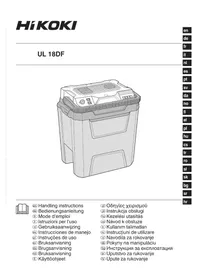
UL18DF - Electric cooler HiKOKI - Free user manual and instructions
Find the device manual for free UL18DF HiKOKI in PDF.

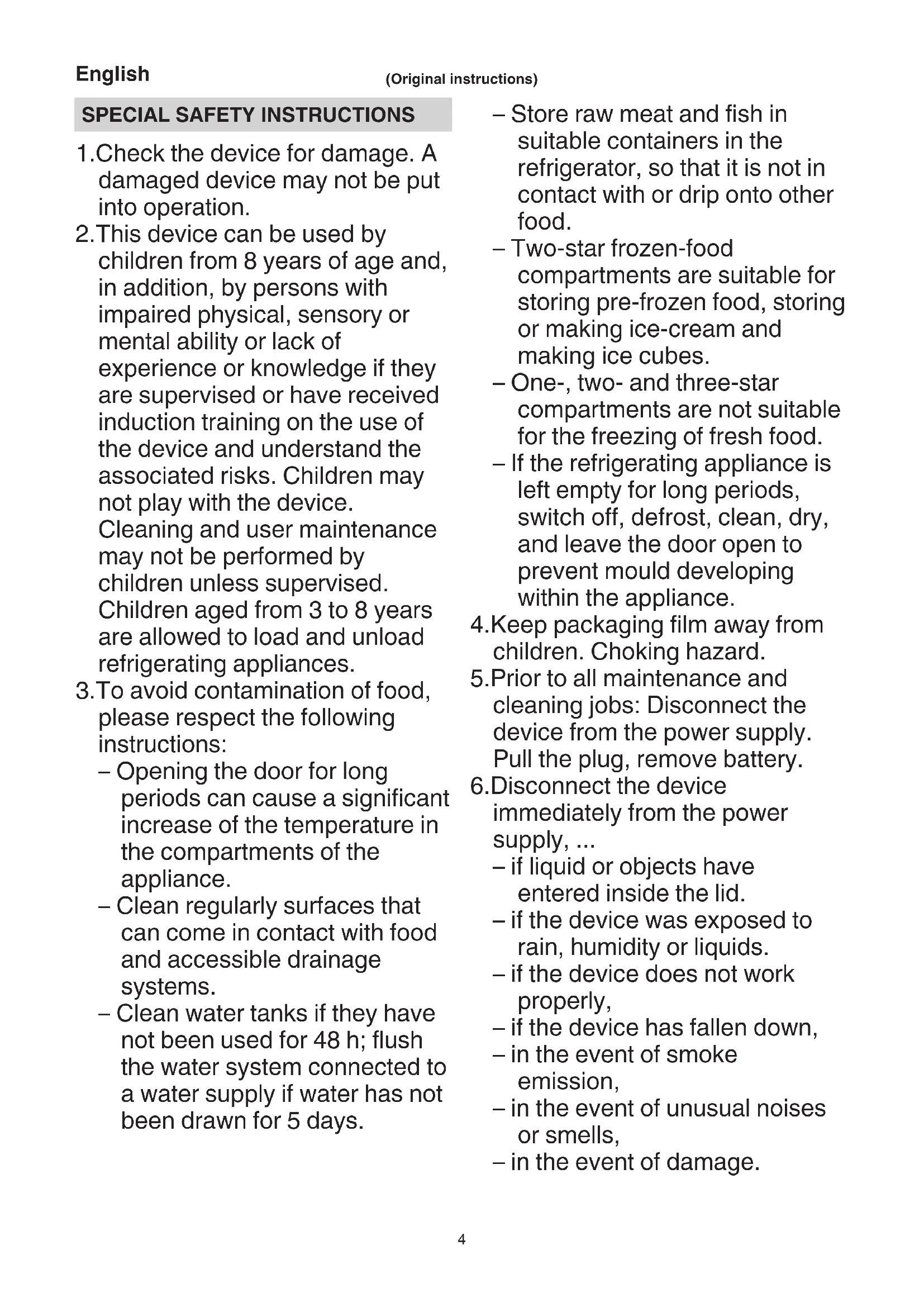


| Product type | 2-in-1 electric cooler/heater |
| Brand | HiKOKI |
| Model | UL18DF |
| Capacity | 24 liters |
| Power supply | 18 V Li-ion battery, 230 V mains, 12 V cigarette lighter |
| Min. cooling temperature | 3 °C (at 23 °C ambient) |
| Max. heating temperature | 65 °C |
| Runtime (MAX cool mode) | Approx. 2.4 h (battery BSL36B18) |
| Runtime (MAX heat mode) | Approx. 2.4 h (battery BSL36B18) |
| Runtime (ECO mode) | Approx. 11.6 h (battery BSL36B18) |
| Weight (without battery) | 5.3 kg |
| Compatible batteries | BSL18 V series (multi-volt) |
| Charger | Model UC18YSL3 (supplied) |
| Operating modes | Cold (COLD), Warm (WARM), ECO economical |
| Carrying handle | Yes, retractable |
| Lid lock | Yes, latch |
| Display | LED indicators (power, cool, heat, battery charge) |
| Maintenance | Clean exterior with soft cloth and soapy water; interior with water and dish soap; vacuum ventilation slots |
| Safety | Overload, overheat, short circuit protection; automatic motor shutoff in case of problem |
| Included accessories | Cigarette lighter cable, mains cable, quick charger UC18YSL3, battery (sold separately) |
| Warranty | Complies with national regulations; covers manufacturing defects excluding wear and misuse |
Frequently Asked Questions - UL18DF HiKOKI
User questions about UL18DF HiKOKI
0 question about this device. Answer the ones you know or ask your own.
Ask a new question about this device
Download the instructions for your Electric cooler in PDF format for free! Find your manual UL18DF - HiKOKI and take your electronic device back in hand. On this page are published all the documents necessary for the use of your device. UL18DF by HiKOKI.
USER MANUAL UL18DF HiKOKI
-
Check the device for damage. A damaged device may not be put into operation.
-
This device can be used by children from 8 years of age and, in addition, by persons with impaired physical, sensory or mental ability or lack of experience or knowledge if they are supervised or have received induction training on the use of the device and understand the associated risks. Children may not play with the device. Cleaning and user maintenance may not be performed by children unless supervised. Children aged from 3 to 8 years are allowed to load and unload refrigerating appliances.
-
To avoid contamination of food, please respect the following instructions:
-
Opening the door for long periods can cause a significant increase of the temperature in the compartments of the appliance.
- Clean regularly surfaces that can come in contact with food and accessible drainage systems.
-
Clean water tanks if they have not been used for 48h ; flush the water system connected to a water supply if water has not been drawn for 5 days.
-
Store raw meat and fish in suitable containers in the refrigerator, so that it is not in contact with or drip onto other food.
- Two-star frozen-food compartments are suitable for storing pre-frozen food, storing or making ice-cream and making ice cubes.
- One-, two- and three-star compartments are not suitable for the freezing of fresh food.
-
If the refrigerating appliance is left empty for long periods, switch off, defrost, clean, dry, and leave the door open to prevent mould developing within the appliance.
-
Keep packaging film away from children. Choking hazard.
-
Prior to all maintenance and cleaning jobs: Disconnect the device from the power supply. Pull the plug, remove battery.
6.Disconnect the device immediately from the power supply, ... -
if liquid or objects have entered inside the lid.
- if the device was exposed to rain, humidity or liquids.
- if the device does not work properly,
- if the device has fallen down,
- in the event of smoke emission,
- in the event of unusual noises or smells,
- in the event of damage.
In all these cases: Pull the plug and remove the battery. Do not continue to use. Have the machine checked by a trained specialist and repaired if necessary.
- Do not inhale smoke from a device fire. However, should you have inhaled smoke: consult a doctor, smoke can be harmful to your health.
- Do not modify the device.
- When transporting the device in a vehicle secure it against movement. Do not transport in the passenger compartment, but in the luggage compartment.
- Risk of accident. Position the connection cables in such a way that no one is obstructed.
- Do not use both connection cables at the same time to avoid damage.
- Keep the connection cables away from sharp edges, do not bent, do not tie together and do not place anything on them.
- Fire hazard. Do not expose the device to high temperatures or open fire.
- Do not expose to direct sunlight or heat sources.
- Keep the device away from moisture, rain, wetness. No liquids may enter the device. Otherwise there is a risk of electrical shock and damage to the device. Do not use this device near water.
- Never put liquids or ice in the device. Place only package food and packaged beverages in the container.
- Do not expose to excessive vibrations, shocks or impacts.
- Do not let any foreign objects enter the device through the ventilation slots.
- Risk of overheating. Always keep the ventilation slots free, do not cover, block or do not put anything inside. Always maintain sufficient distance to walls and object so that the air can circulate freely.
- Do not use adapter plugs or extension cords.
- Risk of electric shock. Keep the connection cables dry. Do not touch with wet hands.
- When disconnecting the power supply: Do not pull on the cable. Grab the plug instead.
- Do not operate the device in explosive atmospheres, such as in the presence of flammable liquids, gases or dust. Tools create sparks which may ignite the dust or fumes.
- Tool plugs must match the outlet. Never modify the plug in any way. Unmodified plugs and matching outlets will reduce risk of electric shock.
- Have your device serviced by a qualified repair person using only genuine replacement parts. This will ensure that the device functions safely.
- To avoid contamination of food, the following instructions must be observed:
- If the lid is opened for an extended period of time, there may be a significant rise in temperature in the compartments of the device.
- Store raw meat and fish in suitable containers so that it does not touch or drip onto other food.
- Regularly clean surfaces that may come into contact with food.
- If the device is left empty for an extended period of time, switch off the device, defrost it, clean it and leave the lid open to prevent mould growth.
- The device may not be exposed to rain.
- This product powered by a 12 V cigarette lighter is only allowed to be used while the vehicle is driving.
ADDITIONAL SAFETY WARNINGS
- Always charge the battery at a temperature of 0^-40^ . A temperature of less than 0^ will result in over charging which is dangerous. The battery cannot be charged at a temperature higher than 40^ . The most suitable temperature for charging is that of 20^-25^ .
- Do not use the charger continuously. When one charging is completed, leave the charger for about 15 minutes before the next charging of battery.
- Do not allow foreign matter to enter the hole for connecting the rechargeable battery.
- Never disassemble the rechargeable battery and charger.
- Never short-circuit the rechargeable battery. Short-circuiting the battery will cause a great electric current and overheat. It results in burn or damage to the battery.
- Do not dispose of the battery in fire. If the battery is burnt, it may explode.
- Bring the battery to the shop from which it was purchased as soon as the post-charging battery life becomes too short for practical use. Do not dispose of the exhausted battery.
- Do not insert objects into the air ventilation slots of the charger. Inserting metal objects or inflammables into the charger air ventilation slots will result in electrical shock hazard or a damaged charger.
- When using this unit continuously, the unit may overheat, leading to damage in the motor and switch. Therefore, whenever the housing becomes hot, give the tool a break for a while.
- Make sure that the battery is installed firmly. If it is at all loose it could come off and cause an accident.
- Do not use the product if the tool or the battery terminals (battery mount) are deformed. Installing the battery could cause a short circuit that could result in smoke emission or ignition.
- Keep the tool's terminals (battery mount) free of swarf and dust.
O Prior to use, make sure that swarf and dust have not collected in the area of the terminals.
During use, try to avoid swarf or dust on the tool from falling on the battery. - When suspending operation or after use, do not leave the tool in an area where it may be exposed to falling swarf or dust. Doing so could cause a short circuit that could result in smoke emission or ignition.
- Always use the tool and battery at temperatures between -5^ and 40^ .
CAUTION ON LITHIUM-ION BATTERY
To extend the lifetime, the lithium-ion battery equips with the protection function to stop the output. In the cases of 1 to 3 described below, when using this product, even if you are pulling the switch, the motor may stop. This is not the trouble but the result of protection function.
- When the battery power remaining runs out, the motor stops. In such a case, charge it up immediately.
- If the tool is overloaded, the motor may stop. In this case, release the switch of tool and eliminate causes of overloading. After that, you can use it again.
- If the battery is overheated under overload work, the battery power may stop. In this case, stop using the battery and let the battery cool. After that, you can use it again.
English
Furthermore, please heed the following warning and caution.
WARNING
In order to prevent any battery leakage, heat generation, smoke emission, explosion and ignition beforehand, please be sure to heed the following precautions.
- Make sure that swarf and dust do not collect on the battery.
During work make sure that swarf and dust do not fall on the battery.
Make sure that any swarf and dust falling on the power tool during work do not collect on the battery.
- Do not store an unused battery in a location exposed to swarm and dust.
Before storing a battery, remove any swarf and dust that may adhere to it and do not store it together with metal parts (screws, nails, etc.).
-
Do not pierce battery with a sharp object such as a nail, strike with a hammer, step on, throw or subject the battery to severe physical shock.
-
Do not use an apparently damaged or deformed battery.
-
Do not use the battery for a purpose other than those specified.
-
If the battery charging fails to complete even when a specified recharging time has elapsed, immediately stop further recharging.
-
Do not put or subject the battery to high temperatures or high pressure such as into a microwave oven, dryer, or high pressure container.
-
Keep away from fire immediately when leakage or foul odor are detected.
-
Do not use in a location where strong static electricity generates.
-
If there is battery leakage, foul odor, heat generated, discolored or deformed, or in any way appears abnormal during use, recharging or storage, immediately remove it from the equipment or battery charger, and stop use.
-
Do not immerse the battery or allow any fluids to flow inside. Conductive liquid ingress, such as water, can cause damage resulting in fire or explosion. Store your battery in a cool, dry place, away from combustible and flammable items. Corrosive gas atmospheres must be avoided.
-
Do not give a strong shock to the display panel or break it. It may lead to a trouble.
CAUTION
- If liquid leaking from the battery gets into your eyes, do not rub your eyes and wash them well with fresh clean water such as tap water and contact a doctor immediately.
If left untreated, the liquid may cause eye-problems.
- If liquid leaks onto your skin or clothes, wash well with clean water such as tap water immediately.
There is a possibility that this can cause skin irritation.
- If you find rust, foul odor, overheating, discolor, deformation, and/or other irregularities when using the battery for the first time, do not use and return it to your supplier or vendor.
WARNING
If a conductive foreign matter enters in the terminal of lithium ion battery, the battery may be shorted, causing fire. When storing the lithium ion battery, obey surely the rules of following contents.
O Do not place conductive debris, nail and wires such as iron wire and copper wire in the storage case.
To prevent shorting from occurring, load the battery in the tool or insert securely the battery cover for storing until the ventilator is not seen.
REGARDING LITHIUM-ION BATTERY TRANSPORTATION
When transporting a lithium-ion battery, please observe the following precautions.
WARNING
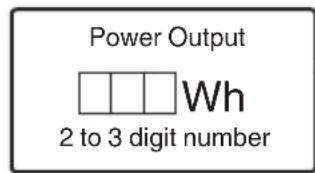
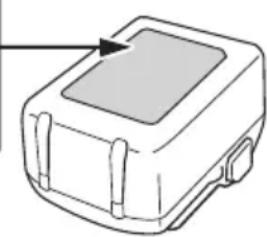
Notify the transporting company that a package contains a lithium-ion battery, inform the company of its power output and follow the instructions of the transportation company when arranging transport.
Lithium-ion batteries that exceed a power output of 100 Wh are considered to be in the freight classification of Dangerous Goods and will require special application procedures.
O For transportation abroad, you must comply with international law and the rules and regulations of the destination country.
USB DEVICE CONNECTION PRECAUTIONS (UC18YSL3)
When an unexpected problem occurs, the data in a USB device connected to this product may be corrupted or lost. Always make sure to back up any data contained in the USB device prior to use with this product.
Please be aware that our company accepts absolutely no responsibility for any data stored in a USB device that is corrupted or lost, nor for any damage that may occur to a connected device.
WARNING
- Prior to use, check the connecting USB cable for any defect or damage. Using a defective or damaged USB cable can cause smoke emission or ignition.
- When the product is not being used, cover the USB port with the rubber cover.
Buildup of dust etc. in the USB port can cause smoke emission or ignition.
NOTE
There may be an occasional pause during USB recharging.
- When a USB device is not being charged, remove the USB device from the charger.
Failure to do so may not only reduce the battery life of a USB device, but may also result in unexpected accidents.
It may not be possible to charge some USB devices, depending on the type of device.
NAMES OF PARTS
The numbers in the list below correspond to Fig. 1-Fig. 8.
| 1 | Cable storage (cigarette lighter connection cable) |
| 2 | Cable storage (mains connection cable) |
| 3 | Rotary knob (switching on/off / regulate power) |
| 4 | Operating display "cold" |
| 5 | Operating display "warm" |
| 6 | Operating mode switch (warm, cold) |
| 7 | Switch for power supply |
| 8 | Cover |
| 9 | Ventilation slots |
| 10 | Container |
| 11 | Battery |
| 12 | Name plate |
| 13 | Motor |
| 14 | Partition |
| 15 | Carry handle |
| 16 | Latch |
| 17 | Charge indicator lamp |
| 18 | Remaining battery indicator switch |
| 19 | Remaining battery indicator lamp |
| 20 | Display panel |
SYMBOLS
WARNING
The following show symbols used for the machine. Be sure that you understand their meaning before use.
| UL18DF: Cordless cooler and Warmer storage | |
| To reduce the risk of injury, user must read instruction manual. | |
| Only for EU countries Do not dispose of electric tools together with household waste material! In observance of European Directive 2012/19/EU on waste electrical and electronic equipment and its implementation in accordance with national law, electric tools that have reached the end of their life must be collected separately and returned to an environmentally compatible recycling facility. | |
| = = = | Direct current |
| V | Rated voltage |
| Disconnect the battery | |
| Switching OFF |
| Cigarette lighter socket | |
| 18V | Battery operation |
| Mains power outlet | |
| OFF OFF | |
| ECO Energy saving mode | |
| MAX Maximum output | |
| COLD Cool | |
| WARM | Keep warm |
| Lock | |
| Unlock | |
| Warning | |
STANDARD ACCESSORIES
In addition to the main unit (1 unit), the package contains the accessories listed on page 175.
Standard accessories are subject to change without notice.
APPLICATIONS
This cooling box is suitable for cooling or keeping warm packaged food and beverages. It is intended for private use when camping, inside the car or similar. It is not intended for industrial or commercial use. Not intended for outdoor use. Not intended for use in areas subject to special conditions such as corrosive or explosive atmospheres (dust, steam or gas).
SPECIFICATIONS
- Power tool
| Model UL18DF | ||
| Power supply | DC 18 V, 230 V | |
| In-Vehicle power supply DC 12 V Household power supply (using provided AC adapter) | ||
| Capacity L 24 | ||
| Cooling temperature °C | Lowest cooling temperature 3°C (at 23°C outside temperature) | |
| Warming temperature °C | Highest heating temperature up to 65°C (at 23°C outside temperature) | |
English
| Max. time for Keep-Warm/ Keep-Cool (in 23°C environment) | Keep-Cool (MAX) | Hours | 2.4 (BSL36B18) |
| Keep- Warm (MAX) | Hours | 2.4 (BSL36B18) | |
| Energy- Saving Mode | Hours | 11.6 (BSL36B18) | |
| Battery available for this tool | Multi volt battery, BSL18 Series | ||
| Weight | 5.3 kg (without battery) | ||
NOTE
Due to HiKOKI's continuing program of research and development, the specifications herein are subject to change without prior notice.
- Battery (sold separately)
| Model Voltage | Battery capacity | |
| BSL36B18 36 / | 18 V*1 | 4.0/8.0 Ah*1 |
*1 The tool itself will automatically switch over.
CHARGING
Before using the power tool, charge the battery as follows.
1. Connect the charger's power cord to the receptacle.
When connecting the plug of the charger to a receptacle, the charge indicator lamp will blink in red. (See Table 1)
2. Insert the battery into the charger.
Firmly insert the battery into the charger as shown in Fig. 3 (on page 3).
3. Charging
When inserting a battery in the charger, charging will commence and the charge indicator lamp will blink in blue.
When the battery becomes fully recharged, the charge indicator lamp will light up in green. (See Table 1)
(1) Charge indicator lamp indication
The indications of the charge indicator lamp will be as shown in Table 1, according to the condition of the charger or the rechargeable battery.
Table 1: Indications of the charge indicator lamp
| ON/OFF at 0.5 sec. intervals (RED) | Before charging *1 |
| Lights for 0.5 sec. at intervals of 1 sec. (BLUE) | Charged at less than 50% |
| Lights for 1 sec. at intervals of 0.5 sec. (BLUE) | Charged at less than 80% |
| Lights continuously (BLUE) | Charged at more than 80% |
| Lights continuously (Continuous buzzer sound: about 6 sec.) (GREEN) | Charging complete |
| ON/OFF at 0.3 sec. intervals (RED) | Overheat standby *2 |
| ON/OFF at 0.1 sec. intervals (Intermittent buzzer sound: about 2 sec.) (PURPLE) | Charging impossible *3 |
NOTE
1 If the red lamp continues to blink even after the charger has been attached, check to confirm that the battery has been fully inserted.
2 Battery overheated. Unable to charge.
Although charging will start once the battery has cooled down even when left in situ, the best practice is to remove the battery and allow it to cool down in a shaded, well-ventilated location before charging.
*3 Malfunction in the battery or the charger - Fully insert the battery.
-
Check to confirm that no foreign matter is stuck to the battery mount or terminals. If there are no foreign objects, it is probable that the battery or charger is malfunctioning. Take it to your authorized Service Center.
-
When the battery charger has been continuously used, the battery charger will be heated, thus constituting the cause of the failures. Once the charging has been completed, give 5 minutes rest until the next charging.
(2) Regarding the temperatures and charging time of the battery (See Table 2)
Table 2
| Model UC18YSL3 | ||
| Type of battery Li-ion | ||
| Charging voltage 14.4-18 V | ||
| Temperatures at which the battery can be recharged | 0°C-50°C | |
| Charging time for battery capacity, approx. (At 20°C) | 1.5 Ah 15 min | |
| 2.0 Ah 20 min | ||
| 2.5 Ah 25 min | ||
| 3.0 Ah 20 min | ||
| 4.0 Ah 26 min | ||
| 5.0 Ah 32 min | ||
| 6.0 Ah 38 min | ||
| Charging time for multi volt battery capacity, approx. (At 20°C) | 1.5 Ah (×2 unit) | 20 min |
| 2.5 Ah (×2 unit) | 32 min | |
| 4.0 Ah (×2 unit) | 52 min | |
| Number of battery cells 4-10 | ||
| Charging voltage for USB 5 V | ||
| Charging current for USB 2 A | ||
| Weight 0.6 kg | ||
NOTE
The recharging time may vary according to the ambient temperature and power source voltage.
O If charging takes a long time
-
Charging will take longer at extremely low ambient temperatures. Charge the battery in a warm location (such as indoors).
-
Do not block the air vent. Otherwise the interior will overheat, reducing the charger's performance.
-
If the cooling fan is not operating, contact a HiKOKI Authorized Service Center for repairs.
-
Disconnect the charger's power cord from the receptacle.
-
Hold the charger firmly and pull out the battery. NOTE
Be sure to pull out the battery from the charger after use, and then keep it.
Regarding electric discharge in case of new batteries, etc.
As the internal chemical substance of new batteries and batteries that have not been used for an extended period is not activated, the electric discharge might be low when using them the first and second time. This is a temporary phenomenon, and normal time required for recharging will be restored by recharging the batteries 2-3 times.
How to make the batteries perform longer.
(1) Recharge the batteries before they become completely exhausted. When you feel that the power of the tool becomes weaker, stop using the tool and recharge its battery. If you continue to use the tool and exhaust the electric current, the battery may be damaged and its life will become shorter.
(2) Avoid recharging at high temperatures. A rechargeable battery will be hot immediately after use. If such a battery is recharged immediately after use, its internal chemical substance will deteriorate, and the battery life will be shortened. Leave the battery and recharge it after it has cooled for a while.
MOUNTING AND OPERATION
| Action Figure Page | ||
| Removing and inserting the battery 2 2 | ||
| Charging 3 2 | ||
| Remaining battery indicator 6 3 | ||
| Charging a USB device from an electrical outlet | 7-a 3 | |
| Charging a USB device and battery from an electrical outlet | 7-b 3 | |
| How to recharge USB device 8 3 | ||
| Selecting accessories – 176 |
PRIOR TO OPERATION
Check for damage prior to use. A damaged device may not be put into operation.
Before use, check that the rated mains voltage and mains frequency stated on the type plate match your power supply.
Connection to mains power: Always install an RCD with a maximum trip current of 30mA upstream.
We recommend cleaning the device before first-time use. See "3. Cleaning" in "MAINTENANCE AND INSPECTION".
- Installing the carry handle (Fig. 4)
Insert the carry handle at the angle shown, first on one side: Insert the nose (on the carry handle) into the rectangular part of the opening (at the container joint). Then insert the carry handle also on the other side while pulling apart the carry handle slightly.
CAUTION
Before carrying the unit, ensure that the handle is installed correctly.
- Setting up
WARNING: When setting up the unit, make sure that the power cord is not pinched or damaged.
WARNING: Do not position the unit in front of power outlets. Mains plugs must always be easily accessible.
USE
Not intended for continuous operation. The maximum operating time is 6 days. When the maximum operating time is reached, switch off the device for at least 2 hours.
- Connect to the power supply
- Set the power supply used Set using the switch.
Supply voltage 12 Volt Take the connection cable out of the cable storage, unwind it completely and plug it into a suitable 12 Volt cigarette lighter socket in your vehicle.
Some cigarette lighter sockets supply power even when the vehicle engine is switched off.
A device that is left on could drain your vehicle's battery to the point that the engine will not start.
Unplug the device when leaving the vehicle.
O Connection to Power Mains
Take the mains connection cable out of the cable storage, unwind it completely and plug it into a suitable mains power outlet.
O Inserting the Battery
NOTE
This product cannot charge its battery from other power sources.
- Operating mode selection
Set operating mode using switch:
- Switching on/off, setting the power
Switching on: Turn rotary knob in clockwise direction.
Increase power: Turn rotary knob in clockwise direction.
Reduce power: Turn rotary knob in anti-clockwise direction.
Switching off: Turn rotary knob in anti-clockwise direction until the stop (to the "OFF" position).
"OFF"=OFF
English
NOTE
MAX position: The maximum inside temperature that can be reached is 17^ cooler than the outside temperature (at 25^ outside temperature).
A maximum inside temperature of approx. 60^ can be reached (at 25^ outside temperature).
ECO position: The energy consumption corresponds to energy class A + + + . The maximum inside temperature that can be reached is 8 - 11^ cooler than the outside temperature (at 23^ outside temperature).
5. Opening / closing the lid (Fig. 5)
Opening: To be able to open the lid: Fold the carrying handle backwards. Then open the lid backwards.
Closing: Close the lid and fold the carrying handle forwards.
6. Energy saving tips
- Do not expose to direct sunlight.
- In cooling mode: Use already cooled food and beverages.
- Do not open the lid longer than necessary, close it completely.
- Ensure that air can circulate between the food.
DANGER: Disconnect the device from the power supply. Pull the plug, remove battery. There is the risk of electric shock!
MAINTENANCE AND INSPECTION
DANGER: Disconnect the device from the power supply. Pull the plug, remove battery. There is the risk of electric shock!
1. Inspecting the mounting screws
Regularly inspect all mounting screws and ensure that they are properly tightened. Should any of the screws be loose, retighten them immediately. Failure to do so could result in serious hazard.
2. Inspection of terminals (tool and battery)
Check to make sure that swarf and dust have not collected on the terminals.
On occasion check prior, during and after operation.
CAUTION
Remove any swarf or dust which may have collected on the terminals.
Failure to do so may result in malfunction.
3. Cleaning
DANGER:Make sure that no liquid enters the inside of the lid to avoid hazards!
When the outside of the device and lid is stained, wipe with a soft dry cloth or a cloth moistened with soapy water. Do not use chloric solvents, gasoline or paint thinner, for they melt plastics.
Vacuum the ventilation slots or clean with a soft brush. Clean the inside of the container with water and dishwashing liquid. Dry well.
4. Storage
Store the device and the battery in a place in which the temperature is less than 40^ and out of reach of children.
NOTE
Storing lithium-ion batteries.
Make sure the lithium-ion batteries have been fully charged before storing them.
Prolonged storage (3 months or more) of batteries with a low charge may result in performance deterioration, significantly reducing battery usage time or rendering the batteries incapable of holding a charge.
However, significantly reduced battery usage time may be recovered by repeatedly charging and using the batteries two to five times.
If the battery usage time is extremely short despite repeated charging and use, consider the batteries dead and purchase new batteries.
CAUTION
In the operation and maintenance of power tools, the safety regulations and standards prescribed in each country must be observed.
Important notice on the batteries for the HiKOKI cordless power tools
Please always use one of our designated genuine batteries. We cannot guarantee the safety and performance of our cordless power tool when used with batteries other than these designated by us, or when the battery is disassembled and modified (such as disassembly and replacement of cells or other internal parts).
GUARANTEE
We guarantee HiKOKI Power Tools in accordance with statutory/country specific regulation. This guarantee does not cover defects or damage due to misuse, abuse, or normal wear and tear. In case of complaint, please send the Power Tool, undismantled, with the GUARANTEE CERTIFICATE found at the end of this Handling instruction, to a HiKOKI Authorized Service Center.
NOTE
Due to HiKOKI's continuing program of research and development, the specifications herein are subject to change without prior notice.
TROUBLESHOOTING
The device does not work:
- Check if the plug or battery are inserted until the stop.
- If the current selector switch is in "battery" position Check the charge status of the battery charging. Charge the battery if necessary.
- If the current selector switch is set to 12 V: Switch on the ignition of your vehicle.
- Is the device switched on from the rotary knob and on the operating mode switch?
The device does not cool properly:
- Place the device in a cooler location. Do not expose to direct sunlight.
- Ensure that the ventilation slots are not covered. Sufficient air circulation must be ensured.
- Increase power: Turn the rotary knob in clockwise direction.
The device does not warm properly:
- Ensure that the ventilation slots are not covered. Sufficient air circulation must be ensured.
- Increase power: Turn the rotary knob in clockwise direction.
VEILIGHEIDSWAARSCHUWINGEN
VOORZORGSGMAATREGELEN AANSLUITING USB-APPARAAT (UC18YSL3)
VEDLIKEHOLD OG INSPEKSJON
IPOΦYΛΑΕΙΣ Σ'YNΔΕΣΗΣ ΣΥΞΚΕΥΗΣ USB (UC18YSL3)
OTav eapavotéi kanto anpoosoknto npoβλnμ, mnpei va aopovn xaouv ta oEv aoi oukeun USB nou eivai ouvodseevn ue auto to npoiov. Na povtiεte na vta va nioupyeite avtipapa a ophialeiac twv oEvwv nou nepiiauabovtai otn oukeun USB npiv ano tn xonan e auto to npoiov.
Napakaoué λαβετe unoyn oti n εtaipeia mac δev φépei Kaia anoλuτwcs uθuvnyia tuxov δδδouéva nou evai anoŋkεuéva σμia ouokvun USB ta onoiia KataotpaΦouv n xaθouv, ouTE yia onoiadhnotε βλaβn Nou μπopei va εμφaviotei σμia ouvδδεμevn ouokeu.
NPOEIAOIOIHZH
| Model Voltaj | Batarya kapasitesi | |
| BSL36B18 36 / | 18 V* 1 | 4,0 / 8,0 Ah *1 |
| Model Tensiune | Capacitate accumulator |
| BSL36B18 36 / 18 V*1 | 4,0/8,0 Ah*1 |
*1 Scula insasi va comuta automat.
INCARCARE
Inainte de a utilizesca scula electrica, incarcai accumulatorii dupa cum urmeaz.
Ta6nua 1: HnKaun Ha CBeToHnKaTopa 3a 3ap
| ВКЛ./ИЗКЛ. наIns捜вали от 0,5 сек.(ЧЕРBEHO) | Прedeи заразожданe *1 |
| Сbeltа 3a 0,5 сек. на Ins捜вали от 1 сек.(СИНьО) ■ | ЗаразIDs c no- maлио OT 50% |
| Сbeltа 3a 1 сек. наIns捜вали OT 0,5 сек.(СИньО) ■ | ЗаразIDs c no- maлио OT 80% |
| Сbeltи неразковсanto (СИньО) ■ | ЗаразIDs c noBueye OT 80% |
| Сbeltи неразковсanto (Проблjettenяг) 3умер: okolo 6 сек.) (ЗелегО) ■ | Завршени Зразжданe |
| ВКЛ./ИЗКЛ. наIns捜вали OT 0,3 сек.(ЧЕРBEHO) ■ | Реким ротовно поради п reproявае *2 |
| ВКЛ./ИЗКЛ. наIns捜вали OT 0,1 сек.(Празковсвац звук на 3умер: okolo 2 сек.) (ЛИЛАBO) ■ | Невши можно Зразжданe *3 |
3A6EJIeHHKA
^1 Ako YepBHeHata lamnna npoDbJnxaba da mHa dopn CLei KaTo 3aprAnHoto yCTpoNCTBo e BkIIOueHo, npOBepTe daHn6baTePraTa e BkapaHa DOKpa.
2 Пергеля батерия. 3аржданeto He e Вьзможнho.Вьп配电и че заржданeto щe 3anочhe, след КATOбатерята ce oxлади, дори korato e octabeна на място, на - doбрату практуka e Тяда се ИЗвади ида се oxлади на сениесто и добpe пюоветрю BO мястопраздду.
*3 Пов体育场 в Зардноустор STO -поставете батерия докрай.
-ПровереТали НЯма 3аленhalи Уждп TeJa NO CTOnHaTа Na 6aTePnraТа Ил KJIeMnTe.Ано НЯma ChxДп TeJa,ВероRTHO 6aTePnraТа Ил 3aprHOTO yCTpoiCTBO ca NOBpeDEH. 3aHecete ГВ OTOpN3IpaH cepBn3eH ueHTbp.
OHorato 3apndHOTyycTPOcCTBOce n3noJI3Ba HnpeKbChaTO,MOHeJa3arpeeNdaCTaHE npuHa 3aOTka3nnIOBpeDa.CleKaTO3aBbPun 3apeJdAHeTO,OCTaBeTeBNOHO3apndHOTO ycTPOcCTBO3a5MnHyTN.
(2)OTHOCHO TEMNepaTpaTa n BpeMeTo 3a 3apeKdaHe Ha 6aTepeNa (BnKTe Ta6nua 2)
Ta6nua 2
| Мо德尔 UC18YSL3 | |
| Вид батерия Литnevobo-ийонна | |
| Нарpeжени рп заразданe 14,4-18 V | |
| Температуни, рпri Контоватерия може за съдеваредения | 0°C-50°C |
| Врeme за заразецдане на калачитetedа на бастени, поблелену (при 20°C) | 1,5 Ah 15 | МИH |
| 2,0 Ah 20 | МИH | |
| 2,5 Ah 25 | МИH | |
| 3,0 Ah 20 | МИH | |
| 4,0 Ah 26 | МИH | |
| 5,0 Ah 32 | МИH | |
| 6,0 Ah 38 | МИH | |
| Врeme за заразецдане за калачитetedа на састени, поблелену (пri 20°C) | 1,5 Ah (x 2 Тяло) | 20 МИH |
| 2,5 Ah (x 2 Тяло) | 32 МИH | |
| 4,0 Ah (x 2 Тяло) | 52 МИH | |
| Брочьковни заразецени 4-10 | ||
| Нар每一天енье р ri заразецдане за USB | 5 V | |
| Зар每一天enden ток за USB 2 A | ||
| Тergло 0,6 кг | ||
3A6EJIEXHKA
O BpeMeTo 3a 3apeKdaHe MoKe Da Bapnpa CnpopekOKoHaTa TeMnePaTpyu N3TOUHnKa Ha HAppeKeHne.
Ako 3apeKdaHeTo OTHEMe IbIro BpeMe -3apeKdaHeTo ue OTHEme NO-DbIro BpeMe npn H3HIOHTeJIHO HNCN BbHNI TEMpepaTyPi. 3apeKdaIte 6aTePnraTa Ha TOnIIO MrcTO (Ha npImep Ha 3aKpnto).
-He 3akpnaBnte Bb3dyuHnTe OTBOpn.B npotnbEn cnyuB bTpeuHaTa Yact Ue nperpee, Koeto ue HamaJI eEeKTHBHOCTTa Ha 3apJdHOTO yCTPOIcTBO.
-Ako oxlaaDaaIaHTBENTHaTOp He pa60TH, CBpbKeTe ce COTOpH3npAH cepBN3eH cEHbP Ha HiKOKI 3a peMOHT.
4.ИЗнIOуTe 3axpaHbuaNHa Ka6eI Ha 3apAHOTo OT MpeHaTa.
5. XBaHete Do6pe 3apAnHOTo yCTpOcTBO n 3DbpaNaTe 6aTepeHrTa.
3A6EJIENKHA
YBepete ce, che CTe n3BaDnN 6aTepeRrTa OT 3apdHOTO yCTpoNCTBO CNeD ynOTpe6a N 3ana3eTe.
OTHOCHO eJeHTpueChnTe pa3pI npHOBN 6aTePnn nT.H.
TbI KaTO BbTpewHnYXMMUeCKN CbCTaB Ha HOBInTe 6aTePN INI 6aTePN, KOITO He Ca 6ININ NOJ3BaHN Dblr0 BpeMe, He e aKTHINpaH, EJIeKTPuYeCKNrT pa3prd MOKe Da e HncbK npn PbPbA n BTopa yNoTpe6a. ToBa e BpeMeHHo YBJIeHHe N HopMaJIHOTo BpeMe 3a 3apeKdaHe 1e 6bDe Bb3ctaHOBeHo, KaTo npEzapeDInTe 6aTePnInTe 2-3 TbIn.
Hak da ydbnhtpe pa6otata Ha 6aTepuHte.
(1)Ппeзарждайе 6атеринte,прдида сиЗToшг наньлно.Кorato yceитne,че моцнocTTа на урета HamalЯBa,спгету nOТpe6a и 3apeDEte 6aTePnTa. АкpoДьннte pa60Ta cypeda ИИЗхaБnte eIeKtpnuecknTOK,6aTePnTa moHe де се NOВpeDIn HKNBOrT Iиse 6bDe no-KpaTbK.
Былгарский
(2)ИЗБЯВаTe npe3apeKdAne npn BucOnn TempeaTpyn.3apeKdaemata 6atepna 6bde ropeuza BeHara cIeJ yNtpe6a.AkoBToBa CbCToHne 6atepna Tc nepe3apeNi BeHara cIeJ yNtpe6a, BbTpewHnT N XmMueckn CbCTab ige Ce BLOwN HINBOTbT Ha 6atepna Tc ie CkbcN. Octabete 6atepna I n 3apeTe, cIeJ KaTO e I3CTInHaI 3a I3BeCTHO BpeMe.
MOHTAKI EKCIIOATAU
| Дeйстве | Фигура | Стравица |
| ОТстравае и поставаян ha батерия | 2 | 2 |
| Зараздане 3 2 | ||
| Инданахета Na HINBO Ha 6 bateperia 6 3 | ||
| Зараздане Ha USB устpoистwo и Елекtronчесни з得太шик | 7-a 3 | |
| Зараздане Ha USB устpoистwo и Баатерия OT eлекtronчесни з得太шик | 7-b 3 | |
| Кан се празаржда USB устpoистwo 8 | 3 | |
| Избор на пиславки и akcescoари - 176 |
ПЕДИ 3АОУBAHE HA PABOTA
IpoBepTe 3a noBpeN npEyn ynoTpe6a. NOBpeH ypeN He Tp86Ba da ce nol3Ba.
Ipeynynotpe6a ce ybepeTe,ye HOMHaHHTO HanpeKeHHeNueCTOTaHa 3axpaHbaHETo,NOcoeHN Ha TaBeJkata,CbOTBeTCTBaT Ha BaWeTO 3xpaHbaHe.
Cbbp3BaHe KbEm. MpeHa: BnHarHn HcTaIpaTte DT3 c MaKcMaJIeH TOK Ha N3KIIIOvBaHe ot 30 mA Harope no Bepnrata.
PpeopbVamE da noHCTnTe ypea npeHn PbBaTa ynoTpe6a. BnKTe ,3. PocntBaHe" B,IOJINPbHKHA IN IPOBEPKA".
1. MoHTaH Ha DpbHHHaTa (ΦnR. 4)
BkapaIte npbHKATA NOYka3AHnBfbl NpBBO OT eHnata cTpaHa:BkapaTe n3daHeHata qact (Ha dpbHKATA) BnpaBOBfJIHATA qact Ha OTbopa (nPc CbeDInHeHnTo HA KOHTeHepa).CJeT TOBa BkapaTe dpbHKATA n OT dpyraTa cTpaHa, KaTO rN3DbPnate IeKO.
BHIMAHNE
Ipei Da npenacrte ypea ce ybepeTe, Ye dpbKaTa e MOHTnpaHa npabnHO.
2. NaCTPOIKA
PDEYIPENHEHNE:IpnHaCTpoKaHa ypea ce yBepTe,ye 3axpaHbauT Ka6eNe e npuunan HnIN IOBpehen.
PDEyPENHEHNE:He cIraaTe ypea nped eIeKtpnuecknTe KOHTaKTn.LIencelnte Tpr6Ba BnHaRn da 6bDaT IecHOOCTbHNH.
YNOTPEBA
UpeBt He e npEHa3HaeH 3a HnpeKbchata pa6ota. MaKcMaJHATA npOdbJHKntHeNOCHT Ha pa6ota e 6 dHn. Horato ce DOCTnHE MaKcMaJHATA npOdbJHKNTeHOCHT Ha pa6ota, n3KJIIOHTe ypeDa 3a Ha-NMaIKo 2 Yaca.
1.Cbbp3BaHe KbM 3axpaHBAHeTo
2.3aainTe H3TOHnHa Ha 3axpaHbaHe 3no3BaTe npeBkIIOuBaTeJIa.
O 3axpaHbAio HnpeKeHne 12V I3BaTe 3axpaHbAun Ka6eI OT Ka6eJIHOTo OTJeHne, pa3BnIte r Ho HAnbIHO r BOHIOUcTe B 12 V rHe3do 3a 3anaJka Ha aBTOMo6nla.
HЯконгhe3da 3a 3anaIka OCHrypBaT 3axpaHbaHe DOpn KOrato DBnraTeJIaT Ha aBTOMo6nla e N3KIOUeH. Ypei, KOITo e OCTaBeH BHLIOueH, MOJE Da N3TOUIn aKymyJatopa Do CTeneH, Ye DBnraTeJIaT Da He cTapTnpa. N3KIOUeTe ypeDa, KOrato Hanyckate aBTOMo6nla.
O Cbbp3BaHe Kblm. MpeHa 13BaTe MpeKOBn Ka6eIOT Ka6eHTo OTJeHne, pa3BnTE Ro HAnbHIO I Go BkHouTe B NOxOJa eJIeKtpnueckn KOHTaKT.
O NocTaBHe Ha 6aTePnTa
3A6EJIEXHA
To3n npOdyKT He MoKe Da 3apeHda 6aTepeHra Ta cN OT DpyrN N3TOHNu Ha 3axpaHbaHe.
3.ИЗборHa pa6oTeH peHIM
3aTe pa6THnpeKIM c npeBkIOUcbTeJIa
- BkIIOUbaHe/H3KIOUbaHe, HAcTpoHа Ha MOUHOCTTa
BhIouBaHe:3aBbPTepeRyIaTopa no YacOBHnKOBaTcPeIka.
YBeHnUaBaHe Ha MoUHocTtA: 3aBbPteTe peryIaTopa no YacOBHnKOBaTa cTpeJIka.
HaMaJIraBaHe Ha MoUHocTtA: 3aBbPteTe peryIaTopa o6paTHo Ha YacOBHnKOBaTa cTpeJIka.
N3KIOUbaHe: 3aBbPTeTe peYIaTopo o6paTHO Ha yacOBHNIOBaTa CTpeJIka, DOKaTO cnpe (B NOJIOKeHne "OFF"). "OFF" = N3KJIIOUeHO
3A6EJEKHA
MAX no3nua: MaKcHMaJIHaTa BbTppeHa TemepaTypa, KOrTO MOKe Da ce DoCTnRHe, e CbC 17^ no-HnCKa OT BbHsHaTAtemepaTypa (npn BbHsHa TemepaTypa 25^
Mоже да се достигне мадсимална Вьтpeшпа Temпература ог пибл. 60°C (прв вьнша Temпература 25°C).
ECO no3nui: HoCymaunraHa eHepnncbOTBeTCTBa Ha eHepnne Hkac A+++.MakcmaHaTaBbTpeuHa TemnepaTypa, KOrTO MOKe Da ce DoCTnHe,ec 8-11°C no-HnCKa OT BbHnHaTa TemnepaTypa (npnbBbHnHa TemnepaTypa 23^
5. O'TbaprHe/3aTbaprHe Ha hanaHa (Фиг. 5)
OTbapHe:3a da OTBOpTe KaNaka:CbHete DpbKkata Ha3aI.CleT TOBa OTBopTe KaNaka Ha3aI. 3aTbapHe:3aTbOpTe KaNaka n CbHete dpbKkata HanpeI.
6. CbBETn 3a eHeprocneTBAHe
-Ja He Ce n3laHa Ha npraKa CbHueBa CBETnHa.
-BpeKHM Ha oxJaKaJaHe: H3noJ3BaITe Beue oxJaDeHn XpaHn HAnITKn.
-He octabnyTe kanaKa OTbOpEn No-dbliroOT Heo6xOIMOTO,3aTbapnTe Ro HnblHO.
- YBepete ce, Ye Bb3dyxbT MoKe Da cHpynpa MeKdy xpaHata.
ONACHOCT:ИЗКЛЮЧЕуразаOTхранbaHoTe.
H3KIOUeTe ⅢBaTe 6aTepeYra. CbIecTByBa pNCK OT TOKOB yap!
IODAPbJHKA IN IPOBEPHA
ONACHOCT:ИЗКЛЮЧЕуразаOTэхранbaHoTe.
H3KIOUeTe UeNcEla, 3BaTe 6aTePnra. CbueCTByBa pck OT TokOB yap!
CbxpaheneHaJIHTHeBO-NOHH6aTeepn.
YBepeTe ce, Ye IHTneBO-IOHHnTe 6aTePNi Ca HanbIHO 3apeHn, PpeN Da rO OCTaBnTE 3a CxbxpaHeHne.
PpOdbJbNtTeJIHO CbXpaHeHne (3 Meceua NnIOBuee) Ha HEnbJHo 3apeDeHn 6aTePN MoKe Da IOBeDe DO loWa pa6Ota, 3HaUHTeJIHO CkbcraBaHe Ha KHBota Ha 6aTepeInTE Nn Da rHn HAnpaBn HerOdHn 3a yNoTpe6a.
BbnpenTOBa,6aTePN CbC 3HaHTeHcKbcEH HNBOT MOrat Da 6bDat Bb3CTaHOBeHN, Ype3 HkoJIHKpaTHO 3apeKaHe N PbIHOTo IM pa3peKaHe OT DBA DO NET TbTN.
Ako noIe3HnT JnBOT Ha 6aTepeNtTa e 3HaunTeJHo CbKpaTeH, He3aBNCmO OT MHOrOKpArHTo 3apeJdaHe n I3NoJ3BaHe, CUnTaIe 6aTepeNtTa 3a N3Hoceha N CMeHeTe C HObA.
BHIMAHNE
IIO Bpeme Ha pa6oTa n noDpBHKHa ha eJeKtpnueChn ypeiN Tpr6Ba da ce cna3BaT pa3npoe6bnte n CTaHapTNTe 3a 6e30nacHOCT 3a BCKa CTPaHa.
BaxHa HhOpMaun 3a 6aTePN 3a 6e3HnHn HNCTpyMeHTn HiKOKI
Moln, BnHaHn n3noJ3BaIte HaWite opnHnHaHn 6aTePN. He rapaHTnpame 6e3oNaChocTt a pa6oTa t ha ypeA, KOrato CE n3NoJ3BAt 6aTePN, pa3InuHN OT nOcoUeHNTe OT HAC, INI KOraTO Ca npaBeHN IpomEH NIO 6aTePNTe (KATO p3rIIO6BaHe I NOmHa Ha KJIeTKHTE INI dpyrNBbTpEwHN KOMNOHEHTN).
TAPAHUN
Ipeoctabme rapaunna 3a EneKtpueckn
HhctpymEn HiKOKI cbflacno cneuPhiHnTe MeCteHN
3aHOdaTeJICTBa Ha cBoTBeTHnte DbpKaBn.
HaTcOuaTa rapaunna He NOKPnBa DeΦeKtn nII
NoBpeNi, npuHHeN O T HnPaBnHO nII He6peKHo
H3NOJ3BaHe, KaTO N dJlnKaaUc Ce Ha oBnauHo
H3HOcbane Ha KOMNoHENTe. B CnyaHa peKlamaunra,
MOnla, n3pateTe EKeKtpuecknT NHCtpyment, B
Hepa3rlo6eBnD, c TAPAHLCIOHHATA HAPTA,
IpODoBOJCTBeHa B KpaHa HNCTpyKUnTe, Ha
OTOpnsipan cepBn3eH ueHTbp Ha HiKOKI.
3A6EJEKHA
Iopadn HnpeKbChaTTo pa3BHTne Ha HayHopa3BoiHaTa nporpama Ha HiKOK, daeHNTe TycCneuФнkaun ca npedmet Ha npomraHa 6ez yBeDOMLeHHe.
OTCTPAHRAHE HA HEN3INPABHOCTN
YpeabT He pa60TH:
-Поверетадали ссьт Илбateрпа CBkapaHn DOKpaN.
-AKIOpeBKNIOUbATEJIeT eHaNoIIOKeHHe,6aTePnIA: IpoBepTe 3apraHa Ha 6aTePnRA.3apeDeTe 6aTePnRAta,aKOe HEO6xOdmo.
-AKOpBKNIOyBaTeIeHaNIOJOKeHne,12V" IocTabete KIOUHa aBTOMObHa KaKoHTaKT.
-Hactponnn IIN CTe peryIaTopa IN peKHMnI npebkIIOUvBaTeI?
YpeBt He oxlaXda npaBnHNo:
- NocTabete ypeHa Na-XlaHOMMCTO. Ha He ce H3IaHa Ha npKa CJIbHYeBa CBETInHa.
- YBepTe ce, Ye BeHTnlauOnHnHe OTBOpn He ca nokpntn. Tpr6Ba da ce ocInpyn cInpKyIaun Ha Bb3dyxa.
- YBENUHABAHa HAMOUIHOCTTa: 3aBBpTePeYIaTopa. NO YACOBHNKOBaTa CTpeJIka.
YpeBbHe 3aTOnnI npabnHIO:
-YBepTe ce, Ye BeHTnlauOnHnHe OTBOpn He ca nokpntn. Tpr6Ba da ce ocInrgyn CpNkUaunna Ha Bb3dyxa.
- YBENUHABAHa HAMOUIHOCTTA: 3aBBpTepepyIaTopa. no YacOBHNIOBAt CTpeJIka.
SPECIJALNA BEZBEDNOSNA UPUTSTVA
Siemensring 34, 47877 willich, Germany
Tel: +49 2154 49930
Fax: +49 2154 499350
URL: http://www.hikoki-powertools.de
Hikoki Power Tools Netherlands B.V.
Brabanthaven 11, 3433 PJ Nieuwegein, The Netherlands
Tel: +31 30 6084040
Fax: +31 30 6067266
URL: http://www.hikoki-powertools.nl
Hikoki Power Tools (U.K.) Ltd.
25 Majestic Road, Southampton, SO16 OYT,
United Kingdom
Tel: +44 1908 660663
Fax: +44 1908 606642
URL: http://www.hikoki-powertools.uk
Hikoki Power Tools France S.A.S.
Hikoki Power Tools Belgium N.V./S.A.
Koningin Astridlaan 51, B-1780 Wemmel, Belgium
Tel: +32 2 460 1720
Fax:+3224602542
URL: http://www.hikoki-powertools.be
Hikoki Power Tools Italia S.p.A
Via Piave 35, 36077, Altavilla Vicentina (VI), Italy
Tel: +39 0444 548111
Fax: +39 0444 548110
URL: http://www.hikoki-powertools.it
Hikoki Power Tools Ibérica, S.A.
C/ Puigbarral, 26-28, Pol. Ind. Can Petit, 08227 Terrassa
(Barcelona), Spain
Tel: +34 93 735 6722
Fax: +34 93 735 7442
URL: http://www.hikoki-powertools.es
Kjeller Vest 7, N-2007 Kjeller, Norway
Tel: (+47) 6692 6600
Fax: (+47) 6692 6650
URL: http://www.hikoki-powertools.no
Hikoki Power Tools Sweden AB
Rotebergsvagen 2B SE-192 78 Sollentuna, Sweden
Tel: (+46) 859899900
Fax: (+46) 859899940
URL: http://www.hikoki-powertools.se
Hikoki Power Tools Denmark A/S
Lillebaeltsvej 90,6715 Esbjerg N,Denmark
Tel: (+45) 75 14 32 00
Fax: (+45) 75 14 36 66
URL: http://www.hikoki-powertools.dk
Hikoki Power Tools Finland Oy
Tupalankatu 9,15680 Lahti,Finland
Tel: (+358) 207431530
Fax: (+358) 207431531
URL: http://www.hikoki-powertools.fi
Hikoki Power Tools Hungary Kft.
1106 Bogancsvirag u.5-7, Budapest, Hungary
Tel: +36 1 2643433
Fax: +36 1 2643429
URL: http://www.hikoki-powertools.hu
Hikoki Power Tools Polska Sp. z o.o.
Hikoki Power Tools Romania S.R.L.
Ring Road, No. 66, Mustang Traco Warehouses,
Warehouse No.1, Pantelimon City, 077145, Ilfov County, Romania
- ADDITIONAL SAFETY WARNINGS
- CAUTION ON LITHIUM-ION BATTERY
- English
- WARNING
- CAUTION
- REGARDING LITHIUM-ION BATTERY TRANSPORTATION
- USB DEVICE CONNECTION PRECAUTIONS (UC18YSL3)
- NOTE
- NAMES OF PARTS
- SYMBOLS
- STANDARD ACCESSORIES
- APPLICATIONS
- SPECIFICATIONS
- CHARGING
- Connect the charger's power cord to the receptacle.
- Insert the battery into the charger.
- Charging
- Charge indicator lamp indication
- Regarding electric discharge in case of new batteries, etc.
- How to make the batteries perform longer.
- MOUNTING AND OPERATION
- PRIOR TO OPERATION
- USE
- Opening / closing the lid (Fig. 5)
- Energy saving tips
- MAINTENANCE AND INSPECTION
- Inspecting the mounting screws
- Inspection of terminals (tool and battery)
- Cleaning
- Storage
- Important notice on the batteries for the HiKOKI cordless power tools
- GUARANTEE
- TROUBLESHOOTING
- The device does not work:
- The device does not cool properly:
- The device does not warm properly:
- VEILIGHEIDSWAARSCHUWINGEN
- VOORZORGSGMAATREGELEN AANSLUITING USB-APPARAAT (UC18YSL3)
- VEDLIKEHOLD OG INSPEKSJON
- IPOΦYΛΑΕΙΣ Σ'YNΔΕΣΗΣ ΣΥΞΚΕΥΗΣ USB (UC18YSL3)
- NPOEIAOIOIHZH
- INCARCARE
- 3A6EJIeHHKA
- 3A6EJIEXHKA
- OTHOCHO eJeHTpueChnTe pa3pI npHOBN 6aTePnn nT.H.
- Hak da ydbnhtpe pa6otata Ha 6aTepuHte.
- Былгарский
- ПЕДИ 3АОУBAHE HA PABOTA
- MoHTaH Ha DpbHHHaTa (ΦnR. 4)
- BHIMAHNE
- NaCTPOIKA
- YNOTPEBA
- 1.Cbbp3BaHe KbM 3axpaHBAHeTo
- 2.3aainTe H3TOHnHa Ha 3axpaHbaHe 3no3BaTe npeBkIIOuBaTeJIa.
- 3A6EJIEXHA
- 3A6EJEKHA
- IODAPbJHKA IN IPOBEPHA
- OTCTPAHRAHE HA HEN3INPABHOCTN
- SPECIJALNA BEZBEDNOSNA UPUTSTVA
- Hikoki Power Tools Netherlands B.V.
- Hikoki Power Tools (U.K.) Ltd.
- Hikoki Power Tools France S.A.S.
- Hikoki Power Tools Belgium N.V./S.A.
- Hikoki Power Tools Italia S.p.A
- Hikoki Power Tools Ibérica, S.A.
- Hikoki Power Tools Sweden AB
- Hikoki Power Tools Denmark A/S
- Hikoki Power Tools Finland Oy
- Hikoki Power Tools Hungary Kft.
- Hikoki Power Tools Polska Sp. z o.o.
- Hikoki Power Tools Romania S.R.L.
Brand : HiKOKI
Model : UL18DF
Category : Electric cooler