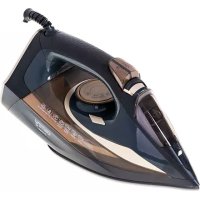
CR 5036 - Iron CAMRY - Free user manual and instructions
Find the device manual for free CR 5036 CAMRY in PDF.



| Product type | Steam iron |
| Brand | CAMRY |
| Model | CR 5036 |
| Nominal power | 2600 W |
| Maximum power | 3400 W |
| Supply voltage | 220-240 V ~50/60 Hz |
| Soleplate | Ceramic-coated |
| Dry ironing function | Yes |
| Steam function | Yes, adjustable |
| Spray function | Yes |
| Steam shot function | Yes |
| Vertical steam function | Yes |
| Anti-calc system | Yes, permanent filter |
| Anti-drip system | Yes |
| Automatic shut-off | Yes (30 s horizontal, 8 min vertical) |
| Self-cleaning | Yes |
Frequently Asked Questions - CR 5036 CAMRY
User questions about CR 5036 CAMRY
0 question about this device. Answer the ones you know or ask your own.
Ask a new question about this device
Download the instructions for your Iron in PDF format for free! Find your manual CR 5036 - CAMRY and take your electronic device back in hand. On this page are published all the documents necessary for the use of your device. CR 5036 by CAMRY.
USER MANUAL CR 5036 CAMRY
SAFETY CONDITIONS. IMPORTANT INSTRUCTIONS ON SAFETY OF USE PLEASE READ CAREFULLY AND KEEP FOR FUTURE REFERENCE
The warranty conditions are different, if the device is used for commercial purpose.
- Before using the product please read carefully and always comply with the following instructions. The manufacturer is not responsible for any damages due to any misuse.
- The product is only to be used indoors. Do not use the product for any purpose that is not compatible with its application.
- The appliable voltage is 220-240V, 50 / 60Hz . For safety reasons it is not appropriate to connect multiple devices to one power outlet.
- Please be cautious when using around children. Do not let the children to play with the product. Do not let children or people who do not know the device to use it without supervision.
- WARNING: This device may be used by children over 8 years of age and persons with reduced physical, sensory or mental capabilities, or persons without experience or knowledge of the device, only under the supervision of a person responsible for their safety, or if they were instructed on the safe use of the device and are aware of the dangers associated with its operation. Children should not play with the device. Cleaning and maintenance of the device should not be carried out by children, unless they are over 8 years of age and these activities are carried out under supervision.
- After you are finished using the product always remember to gently remove the plug from the power outlet holding the outlet with your hand. Never pull the power cable!!!
- Never leave the product connected to the power source without supervision. Even when use is interrupted for a short time, turn it off from the network, unplug the power.
- Never put the power cable, the plug or the whole device into the water. Never expose the product to the atmospheric conditions such as direct sun light or rain, etc.. Never use the product in humid conditions.
- Periodically check the power cable condition. If the power cable is damaged the product should be turned to a professional service location to be replaced in order to avoid hazardous situations.
- Never use the product with a damaged power cable or if it was dropped or damaged in any other way or if it does not work properly. Do not try to repair the defected product yourself because it can lead to electric shock. Always turn the damaged device to a professional service location in order to repair it. All the repairs can be done only by authorized service professionals. The repair that was done incorrectly can cause hazardous situations for the user.
- Never put the product on or close to the hot or warm surfaces or the kitchen appliances like the electric oven or gas burner.
- Never use the product close to combustibles.
- Do not let cord hang over edge of counter.
- Do not immerse the motor unit in water..
- In order to provide additional protection, it is recommended to install residue current device (RCD) in the power circuit, with residual current rating not more than 30mA . Contact professional electrician in this matter.
- If it is necessary to use an extension cord, use only with the grounding terminal and adapted to a current minimum of 10 A. The other ("weak") extension cords can overheat. The cable should be arranged to avoid accidental strokes or stumbles over it.
- Always, before filling with water or when the steam iron is not used, unplug it from the mains.
- Touching a hot soleplate, contact with hot steam or water may cause burns. Be careful
when you rotate the iron, as in the tank, even when disconnected from the power supply iron, may still be in hot water.
- DO NOT allow for prolonged contact hot steam iron with fabric or flammable materials.
- Be careful that the power cord does not touch the hot soleplate. Allow the iron to cool completely before storage.
- If you do not use iron, even for a short time, turn off the options of steam
- Under no circumstances should be ironed clothes and fabrics that are on humans or animals.
- Never direct the steam to humans or pets.
- Use self-cleaning function at least once a month.
- Iron must be used at a stable even surface and this can only be disposed of.
- Do not fill the water tank with chemicals, perfumes or descaling substance.
- Do not fill the water tank over MAX level.
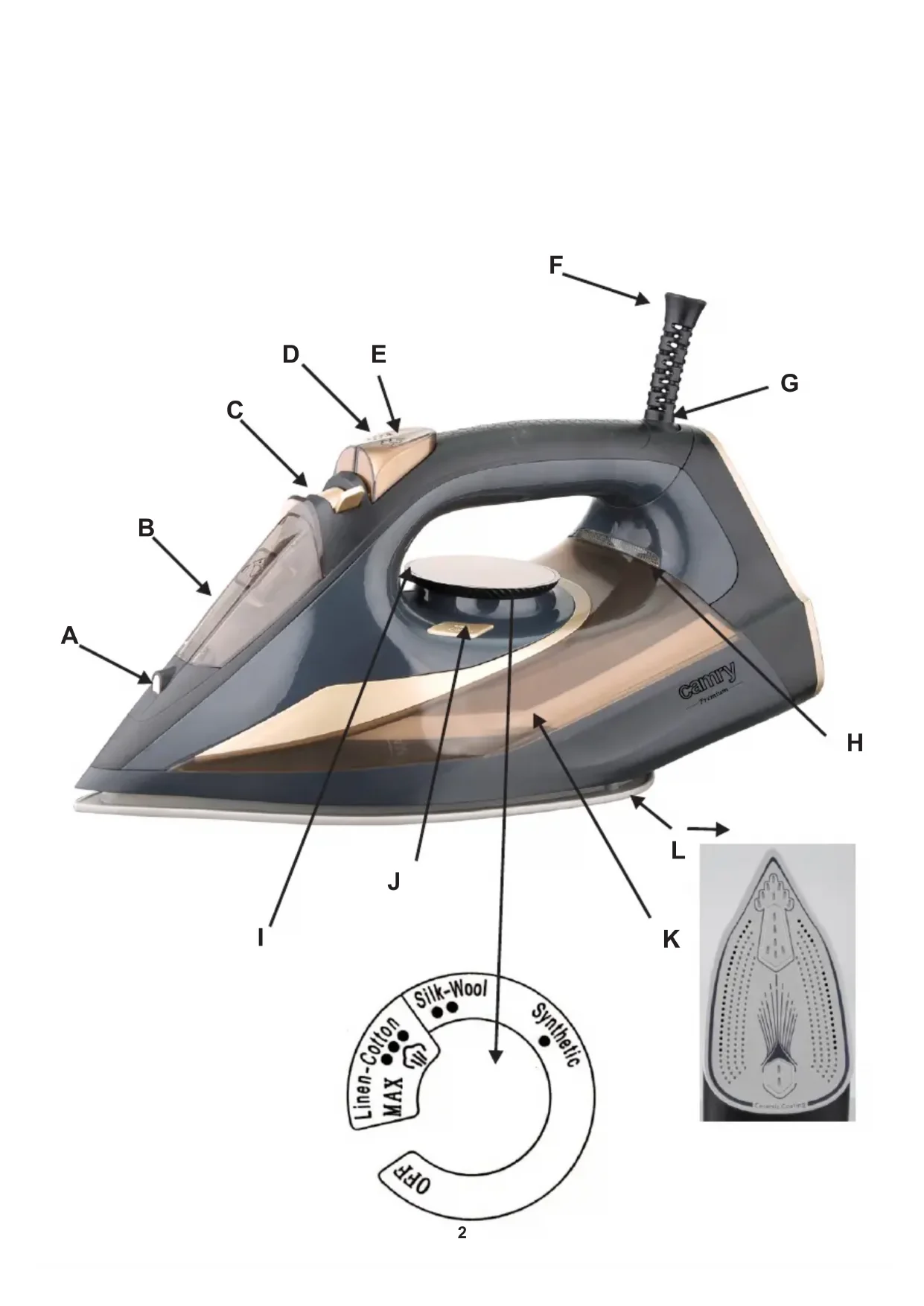
DESCRIPTION OF DEVICE
A. Spray nozzle
B. The water inlet hole
C. Steam control switch
D. Spray button
E. Steam burst button
F. Power Cord
G. Rotary cable gland
H. Heating / Thermostat indicator light
I. Temperature control knob - thermostat
J. Self-clean button
K. Water tank
L. Ceramic coated soleplate
INDICATOR LIGHT:
Plug in the iron, the heating indicator light (H) turns on, when the thermostat works, once the thermostat off work, the heating indicator light (H) turns off.
FILLING WITH WATER:
- Set the steam control (C) to "0" (= no steam).
- Open the water filling cover
- Fill the water tank with water to "MAX".
- Push the water filling cover to close it.
PREPARATION:
Sort the laundry to be ironed according to the international symbols on the garment label, or if this is missing, according to the type of fabric.
| GARMENT LABEL | FABRIC TYPE | THERMOSTAT REGULATION |
| synthetic | · low temperature | |
| silk - wool | · medium temperature | |
| Cotton - linen | · high temperature | |
| Fabric not to be ironed | ||
Caution: If the fabric consists of various kinds of fibers, always select the lowest ironing temperature of the composition of those fibers. Start ironing the garments requiring a low temperature. This reduces the waiting times (the iron takes less time to heat up than to cool down) and eliminates the risk of scorching the fabric.
FIRSTUSE
When using the iron for the first time, you may notice a slight emission of smoke and hear some sounds made by the expanding plastics. This is quite normal and it stops after a short time. We also recommend passing the iron over an ordinary cloth when using it for the first time.
DRY IRONING (without steam) FUNCTION
- Connect the power cord of the appliance to the wall outlet.
- Turn the temperature control knob (I) to the desired temperature depending on the type of fabric you want to iron. Make sure that the steam control switch (C) is in the "0" position.
-
When the iron reaches the required temperature, the heating indicator light (H) will turn off.
-
After use, turn the temperature control knob (I) to the "OFF" position.
- Remove the plug from the wall socket.
SPRAYING FUNCTION
- Fill the water tank with water as described in "Filling with water".
- Press water spray button (D).
- Note: No matter what steam ironing of dry ironing is, spray will always be available in any case.
STEAM IRONING FUNCTION
- Fill the water tank with water as described in "Filling with water".
- Plug in. The heating indicator lights (H) will turn on.
- Turn the temperature control knob (I) clockwise to the "MAX" position.
- When the iron reaches the required temperature, the heating indicator light (H) will turn off.
- Adjust the steaming by moving the steam control switch (C).
- After use, turn the temperature control knob (I) to the "OFF" position.
- Remove the plug from the wall socket.
- After each use, make sure that the water tank is empty.
Caution: Do not steam ironing synthetic fabrics, nylon, synthetic silk, or silk fabrics. Steam can ruin the texture of the fabric.
BURST OF STEAM FUNCTION
This function will be able to provide more steam to remove stubborn creases.
- Set the temperature control knob (I) to MAX until the indicator light (H) goes off.
- Release the steam by pressing the steam button (E).
-
Wait for several minutes and let the steam penetrate through the fabric, and then release more steam through pressing this button again. Note:
-
There should be 3-5 seconds rest between two times of pressing Steam burst button (E) in order to obtain the best steaming result.
- Fill the water to the MAX position before using this function.
- In order to prevent the water leaking from soleplate, please do not press the steam burst button (E) continuously with more than 5 seconds.
VERTICAL STEAM IRONING FUNCTION
The vertical steam ironing system allows you to use the iron for vertical ironing. This is especially useful for getting wrinkles out of hanging clothes, curtains.
- Fill the water tank with water as described in "Filling with water".
- Plug in. The heating indicator lights (H) will turn on.
- Turn the temperature control knob (I) to the "MAX" position.
- When the iron reaches the required temperature, the heating indicator light (H) will turn off.
- Adjust the steaming by moving the steam control switch (C).
6.Hang the garment on a clothes' hanger and pull the garment tight with one hand.
7.Hold the iron in vertical position with the other hand and press the steam burst button (E) to iron the garment. Touch the garment lightly with the soleplate of the iron to remove creases. - After use, turn the temperature control knob (I) switch to the "OFF" position.
9.Remove the plug from the wall socket. - After each use, make sure that the water tank is empty.
- Caution: Do not use steam ironing on clothes or fabrics that are wearing people or animals. The temperature is too high.
SELF-CLEANING SYSTEM
Note: Before you start the self-cleaning procedure, make sure the iron is not plugged in and the steam control (C) is in the "0" position.
- Fill the water tank with water up to "MAX". Do not use vinegar or other descaling liquids in the water tank.
- Plug in and turn the temperature control knob (I) to the "MAX" position. The heating indicator light (H) will turn on.
- When the heating indicator light (H) turns off, unplug.
- Hold the iron in a horizontal position above the sink. Press and hold the Self-Clean button (J).
- Steam and boiling water will start to come out of the iron plate holes, which contain salts and minerals that have been accumulated in the steam chamber from previous uses.
- Gently move the iron back and forth until the water tank is empty.
Caution: The water that comes out during self-cleaning is very hot. Be very careful not to fall on you. - When the water tank is empty, release the self-clean button.
- Allow the iron to cool down completely.
- Wipe the soleplate with a cold damp cloth.
ANTI-CALC SYSTEM
A special filter inside the water tank softens the water and prevents scale build-up in the soleplate. The filter is permanent and does not need replacing.
- Use tap water only.
- Distilled and demineralized water makes the anti-calc system ineffective by altering its physicochemical characteristics.
ANTI-DRIP SYSTEM
This iron is equipped with drip stop function: the iron automatically stops steaming when the temperature is too low to prevent water from dripping out of the soleplate.
With the anti-dripping system, you can perfectly iron even the most delicate fabrics.
AUTO SHUT-OFF SYSTEM
- An electronic safety device will automatically switch the heating element off if the iron has not been moved more than 30 seconds in a horizontal position. If in a vertical position, this will happen after 8 minutes.
To indicate that the heating element has been switch off, the heating indicator light (H) will turn off, there will be with alarm 6 times. - When picking up the iron again, the heating indicator light (H) will turn on. This indicates that the iron is heating up again. Wait for the heating indicator light (H) to turn off. Then the iron
is ready for use.
AFTER IRONING:
To extend the working life of the iron, whenever you finish ironing, you are recommended to empty the reservoir as follows:
Unplug from the mains socket. Empty the iron by opening water tank cover and holding it with the tip pointing downwards. Shake it lightly above a sink then close the cover. To dry the remaining moisture, turn the iron on again with the thermostat control knob (I) in the MAX position with steam control switch (C) in MAX position until heating indicator light (H) goes off. Unplug from the mains socket and allow to cool down. Clean the soleplate with a dry cloth as traces of moisture could mark it.
CLEANING AND MAINTENANCE
Before cleaning, remove the plug from the socket and allow the iron to cool down sufficiently.
- Wipe off the soleplate with a damp cloth and a non-abrasive (liquid) cleaner.
- If the fiber is adhered to the soleplate, use a damp cloth with vinegar to wipe off the soleplate.
- Never use strong acid or alkali in order to avoid damaging the soleplate.
TECHNICAL DATA:
Voltage: 220-240V 50 / 60Hz
Power Nom.: 2600W
Power Max: 3400W
To protect your environment: please separate carton boxes and plastic bags and dispose them in corresponding waste bins. Used appliance should be delivered to the dedicated collecting points due to hazardous components, which may effect the environment. Do not dispose this appliance in the common waste bin.
DEUTSCH
Cand utilized for the first time. Cendi was able to use a computer and read the text in English. He also used a computer to search for information about the weather, and he had to use a computer to calculate the temperature.
FUNCTIE DE CALCAT USCAT (fara abur).
PYSTYVALINEN HOYRYSILITYS
MaKcImaJIHa MoKHocT:3400W
3a da ce 3aWTnTat BaWata OKOInHa: Be MOJIME OndeHN KyTN n PnaCTuH N Kecn n Da paCnoIarco HNB BO COODBeHTHe KaHTn 3a OTnadoU. KopnCTn anapatot Tpe6a da 6nde npedan Ha nocBteH co6upahe noEH npaH hazarsous KOMNOHeHTN, KOJ MOxAT da BnJaat Ha JINBOTHATA cpeHnA. He cPpnaTe OBOJ anapat Bo 3aeDnHcKaTa Kopna 3a OTnadoU.
PYCCKN
OBUHE YCIOBNA BE3OJACHOCTN. BAXHAR INHOPMAZUNI PO BE3OJACHOCTN. BHIMATEJIbHO IPOUTNTE N COXPAHNTE.
YcnoBna rapaHTn npyIe, cInu yCTpOJCTBO nCNoJIb3YeTcB B KOMMepuecknx ceIax.
1.До началуnotpe6неня устpoиCTBa npoHTaTb nHCTpyKUHO o6cnyxuBAHnI neCTBOBaTNo yka3aHnM COdepXaUIMC8 B HeI. POn3BODInTeJIb He HecET OTBETCTBeHHOCTb 3aВpeI npuHHeHbI yNOTpe6JenHem yCTpoiCTBa He B COOTBETCTBnI C erO ppeHa3NaueHnEM nII erO HeCOOTBeTCTBYUOUM O6cnyxuBAHnEM.
2.YcTpoIcTBo CnyKNT TObKO dIy IOMaUHero ynoTpe6JIeHn. He ynoTpe6JIaTb c npyroIeJIbIO, He B COOTBETCTBnC eRO npeHa3NaueHnEM.
3.YcTpoIcTBO HANO NOKJIOHTb TOnbKO KrHe3dy 220-240B 50/60ΓU.ДЯ NOBbIWeHnA
6e3OpaCHOCTN yNtpe6JIeHnA, K OdHOBcEN TOKa He HANO ODNHO BkJIIOuAtb
MHOrne 3JIeKTPnueCKNe yCToPcTBA.
4.Haio cobnoidatb ocobehnyo octopoxhoctb BO Bpemy ynotpe6neHna yctpoiCTba, KOrda B6n3n haojTcra detn. He haio donyckatb deTeK pa3BneueHnM C yctpoiCTBOM, He pa3pewa Hn dETam Hn JIuam He N03HaKomNeHHbIM C yctpoiCTBOM Ha ynotpe6neHne ero.
5.YcTpoIcTBo He npEHa3HaueHO IJIy yNtpe6JIeHnA JIiAmN (B TOM YIcJIe DeTbMn) C OrpaHnueHHoJ pI3UeCKO CNOCOBHocTBIO, CNOcoBHocTBIO K OJyUeHNIO NIIY MCTBeHHoJ CNOCOBHocTBIO IIN C OTCyTCTBnEM ONbITa IIN IIO3HaKOMJIeHnA C yCTPOIcTBOM, pa3BE, YTO 3TO IPONCXODNT IIpI HAD3Ope IINIa OTBETCTBEHHORO 3a INX 6e3OJaCHOCb N B COOTBETCTBmC IHCTpyKcneYyNtpe6JIeHnA yCTpoIcTBa.
6.Bcerda nocle okohuaHn ynoTpe6IeHn, ydaIu wTeNceIb n3 nntaIOUero rHe3da npndepKnBa rHe3do pyko. HE Tanyt b 3a ceTeBOk a6eJb.
7.He norpykai Ka6eIb, WTeNceIb, TaKke BcE ycTpoiCTBO B BOe nII npyroJxNdkocTn. He BbICTaBnay yCtpoiCTBO Ha DeInCTBne aTMOCΦepHbIX ycNoBn (doXd, CoNHa cA np.), He yNOTpe6IaI npu ycNoBHX NOBbIWeHHoB BJaXHOCTN (BaHHbIe KOMHaTbI, BJaXHbIe JIeTHHe DOMIKn).
8.Перионуески поверя состорне петаюцero побoda.Есни петаюци побогдповржден, ergо дожна замень спесиалларованая ремонта мacrетсядянзбеганя угозbl.
9.He ynoTpe6nay ycTpoNcTBO c nobpeXdHbIM nHTaUOuM npOBODom nIi KOrDa OHO ynaIO nIIbIO NOBpeXdEHO KaKIM-HbUdb dpyrIM o6pa3OM nIi OHO HePpABUNbHO pa6oTaet. He ocyuEcTBnay peMOHT ycTPONcTBA camocToTeNbHO, TaK kAk 3TO yrpoXaET nopaxeHnEM TOKOM. NOBpeXdEHNOe ycTPONcTBO nepeDai B COOTBeTcTByUO cyBuCHyU TOky dIra IpOBepKn IINOCUSeCTBJIeHnRA peMOHTa. BCE peMOHTbI MOrTy OCUSeCTBJIaTb TOnbKO cepBnCHbIE ToCKN, y KOToPbIX Ha 3TO npaBO. HenpABUNho ocyuecTBJIeHHbI peMOHT MoKeT cnpuHnITb cepB3HyO yrpo3y dIra nOpb30BaTeJIa.
10. Hano yctaHaBnBaTb yCTpoiCtBO Ha XOJIOHOn, yCTOuHBO, POBHO NOBepXHOCTN, daJIeKO HArpeBaIooJeCSyKxOHHO TExHKn TaKo KaK: 3JIeKTPuYeCKa PIIHTa, Ra3OBaR ropeIka n dp.
11.He ynoTpe6nIb yCTpoiCTBO B6n3n IeKOBocPiameHIOxxCa MaTePnaIOB.
12.Пювов пітань He может Bисetting 3a краем стол a ЛИΝОПКИСТБСЕΚ Горачим NOВЕРХНOC'TЯМ.
13.He octabnay yctpoiCTBO BkIIOyeHOe B rHe3do 6e3 HaI30pa.
14.Дя ДОЛНТьн 3aитbl peKOMeHdyeTcY yCTaHOBtB B cTeN yCTpoIcTBO 3aHTHO OTKIQUeHnA (Y3O) C HOMHaJIbHbIM DnΦΦepeHuaJIbHbIM TOKOM He 6oJee 30 mA.Дя yCTaHOBKn, NOxaynCTa, O6paTInTeCb K KBaIIuΦuINpOBaHHOMy 3JIeKTPnky.
15. He donyckaTb hamokahnia MOTOPHOJ yactn yctpojCTBa.
16. Ecn Hc0xOIOMo IcnoIb3OBaHne ydINHHTeJIa, CJeDyET NcNOJb3OBaTb TOIbKO
yDINHInTeIb C 3a3eMJIHOUIM KOHTaKTOM I pncnOCO6JIeHHbIK TOKy C HapJxHeHm MHN.
10 A. Дугп («божee саьie») удинтел могут поррься. РобOD сеуET yLOXHTb TAK, чоьи n36eRaT b cIyauHOrO NOTaRnBaHnЯ ИЛN BO3MOxHOCtN CNOTKHytbcr O Hero.
17. Bcerda, nepei haonneHem ythra BOIOI INI, KOrda yTHr He nCnoJIb3yETcR, OTcoeHNHTe erO OT cTeN 3JKeKTPoNTaHnI.
18. Прикосовене К гораян пошев, Контакт С гораям napом Или Вожд угозает ожогам. Будъпесосторожны, Когда Вы пениворачибайе утог вьерх пошов, NOTOMY чTO в рзэрьаре, доже послес OTКюоченя утога OT сети, может по-празжему нахODNTSCЯ горая ВODA.
19. HE DoynckaTe CInuKOM DInTeJbHOrO KOHTaKTo rOpAYeO yTOra C TkaHrMaN INJI NERKOBOcPnIaMeHryUoUIMMucr MaTePnaJaAMN.
20. CneiTe, UTObI uHyp nHTaHn He kacanc rOpaye NODoWBbl yTOra. OCTaBbTe yTtOr Do noJIHOro OCTbIBAHn, npexDe, yem y6paTb.
21. EcnBbI He nCnoJb3yeTe yTIO rJaKe Ha KOpOTKoe BpeMra, OTKnIOuHTe cyHKUIO npa.
22. Hn B Koem clyuae He rnaBte OeJy n MaTePnaIbI, HaxOJaUneCra Ha IIOJx nn JXNBOTHbIX.
23. HnKOrda He HanpaBnaIte nap Ha IIOe nn Ha XNBOThbIX.
24. IcnoIb3yIte yHKUIO camOoHCTK, no KpaHne Mepe, Odn pa3 B Meca.
25. YIor cIeIyET IcNoJIb3OBaTb Ha yCTOuYHBOB POBHOJ NOBepXHOCTN, I TOJIbKO Ha TaKoJ MOKeT yCTaHaBJIbNAbTbCra.
26. He haJIbBaIte B pe3epByap BOy C XIMnueCKmN Do6aBkAmN, apOMaTn3aTopamN nJIn npenapaTaMn dIy ydaJIeHnKamHry.
27. He 3anonHnIe 6ak dJa BOdbI Do ypoBn MAX.
ONICAHNE YCTPOINCTBA
A. opcyHka
C. NpeeknloohateIb noaun npap
E. Khonka napoboro yapa
G. NobopoTHbI Ka6eJIbHbI cAJIbHnK
I. Puyka perynipobkn TemnepaTpybl - Tepmoctat
K. Pe3epByap nla BoDbl
B.BryckhoeOTBepCTneIINBAObl
D. Khonka pacnbIeHn
F. Zhyp nHTaHn
H. CBeTobOu INDnKATOp HArpeBa/TePmoCTaTa
J.KhONka cAmOoUncTkN
L.Пошва c КерамчecкIM NOKpbTиEM
INHДИΚATOP:
BkIouHTe yTIO, INHdkaTOp HArpeBa (H) 3aropntc, KOrda TepMoCTat cpa6oTaet,
NocIe BbIKIOUeHnI TepMOcTaTa 3aRopaETcN HndKATOp HarpeBa (H).
3ANOJIHEHIE BOOJ:
- YctaHOBnTe pepyIaTOp noaun npap (C) Ha «0» (= oTCyTcTBne npap).
- OtkpoTe KpbIbIky 3aJIbA BoDbl.
- HanoJIHInTe pe3epByap BOoI Do OTMeTKN «MAX»
- Haxmte Ha KpbIuKy 3aJIbA BoIbI, YTO6bl 3aKpItb ee.
IIOIFTOTOBKA:
PaccopTnpyIte 6eIbe IraaKn B COOTBeCTBn C MeXdYHapOHaIMN CmBOnaMn Ha 3TNKeTke OeXdbI IN, ecnn OHa OTCyTCTByeT, B COOTBeTCTBn C TINOM TKaHI.
IpepeOnCTKO BbInbTe BnIKy n3 po3eTkn I daIte yTHOY DOCTaTOH0 OCTbITb.
- IpoTpnte nooBBy BnaXHo TkaHbIO Hea6pa3nBBbIM (KuIqkM) UcHCTaUM cpeDCTBOM.
- EcnBONOKHO npnHNO K NOOWB, npoTpNE NOOWBBy BnaXHO TpAIKoC MOneHHoYKcycOM.
- HnKoRda He nCnoJb3yIe CnJbHyIO KcNToY IIN IeNoCb, YTO6bl He noBpeDntb NOOswBy.
TEXHNUECKNE DAHHBIE:
HapnkeHe: 220-240 B 50/60 T
HomHaBHaMoUHocb:2600BT
MaKcImaJIbHaRaMoUHocTb:3400BT
EAC

3a60TcB o6 OkpykaHoue cpe..UnyakOBky n3 KapToHa nepeaTe, noXaYnCTa, Ha MaKyNaTyP. POni3TuNeHOBbIe MeuKn (PE) BbIKDaT B pe3epByap dIra INaCTMaCCbI. N3HOseHHoe yctpoiCTBO HAO nepeDaTB B COOTBeTCTBYOuYTOu TY XpaHEHNA, TAK KAK HaxoJIueCAB YcTPOCTBEONACBHe COCTaBIAHIOue MOYr ABTBCsrygPO3OI JIN OKpykaHoue cpebl. 3JeKTPrueECKOE yCTPOICTBO HAO nepeDaTB TakIM OpbzOM, YTObI OOrpAHNHTb ERO NOBtOPHe yNtpeBHeHne IMNoJIb3OBAHne. ECmB yCTPOICTBe HaxOJaTcBAtApen, IN HAO BbITaHytB NpePaTaB B TOChy XpaHENHb OTdJIbHo. YcTPOICTBO He BbIKDaTb B pe3epByap dIra KOMMyHaNbHbIX OTxOIOB!
EAAHNIKA
TENIKOI KANONEAΦAIAEIA
- Piv ao tn xpon tnC oukeunC pentei va diaaote Tc odnyieCx npoewC kai va Tc aokounoeTe. O napaywoC dev euvetai yia evexoevcs nmuicTou opeiaovtai e evdeiyevn xponn noe laooxepioTO C oukeunC.
2.H ouokun npoopicietai yia oikiakn xphon. Atnayopeueta n xpnoan tnc yia aalouc OKOTOUC, yia touc otioiouc dEv npoopicietai.
3.H ouokεun πeπει va ouvδεθεi μovo με πpiα 220-240V ~50/60Hz. Γι a tν μεγaλuτερη ασφαλεία σας δεν πeπει va ouvδεετον iδio kukawμa ρεμatoç πολές ηεκτριές ΣUOKεUες.
4.IpeTVEa TPOOExTe IdaIePwC kata n diapkeia xpnoC tsouokueuc otav dIIa pioKovtai PaiDi. Ev EITpETETai Ta PaiDi va PaiGouv mE tn ouokueun. Ev EITpETETai
n xpnoTns ouokueunc aTIO TAIIDIa n atoua Tou dEv exouv evnepwtheta oxetikαe To XEPIOO TOs.
5.H ouokéun δev TPOOPIEeai yia xpnoan aTTOA (ouuPTepiAAubavouévwTwv PAIDIwV) με πεpiopioevesc IKAVOTNTEC KIVNTIKEC, aiθntikec kai vontikec eITE aTTOa TOU δEV exouv EUMTEPIA n δev exouv evnuepwoei oxetiká μe TO xεipioo TNC OuaKEUNC, EKTOS av YIVETAI auto uTIO TNY EITONTEIA atoou uTTEUovou yia TNV aOφalEA iouc kai ouμpwva μe TIC oDnyiec xpnoeWc.
6. Na'ta meta t n xon antooovdeoe to peuatoanntn aTo to dikTuO npoxnc pEuMaTOC, kpatwtaqtnvpica.MHN TpaBnEe To kaawio ouvdoenc.
7.Mn aεTe to kaawio, to pEuatoanTn kai ookLn np Tn ouokun oTo vepo n aaloo uypo. PpOoTaEeTe Tn ouokun ato duouveic Kaipikec ouvthenkcs (bpox, nlo, K.a.). Mny tn xpnoiopoieite o e ouvthenkec auenguevnc uypaiaac (mTavio, kauivky).
8. Taktika πρεπειν ελέγχετην kataσαοιου tροροδοσίας. Eav to kalωδio tροφοδοσίας uttoει ζημία, πρεπειν αντικατοταθει με ειδικo kalωδio aɪtó tŋv ειδɪkny utnpεσία εξυπρετηός πελατων γίαν αποφεύχει καθε κίνδυνος.
9.Mnv xnpoiotioie TOTe Tn ouokun eAattwpatko kawdo tropodooiac eTE ME KAWIO TOU exi neo i nexi UTOOte oTOIAOBNTNE aAN zmuia eTE deV LEIToupyei OWTa. Mnv ETIOKUACTe Tn ouokun movl oac, utapxekivduvoC nEKTPOIANxiag.Tnv EATWATIKN OOKUN PPETIE va TNV ELEyEi n va TNV ETIOKUAcEi n kataaALn uTTnpoeia EUGNTNOCTNEATWv. OELIOKEUEC MTPOOV VA YIVOVTAI MOVO aTIOELODTMEVEC UTNPDEIGEC EUGNTPENGNTNEATWv.H AAVthetaMevn EITIOKEUN MTOPeVA TPOKAeEOEIOBAPo KIVDUVO VIA TOUC Xpntec.
10."H ouokun pnti va toothe nthe i oe kpua otaepn kai eTTiEon ETIqavla, maKpia aTIO eOTIEC zEOTNC OTWCS Nkouziva, mpiki, K.a."
11.Mn xnoiioioie Tne Tn ouokun Pai oE uokta uikai.
12. To kaλωδio troφοδoσiας δεν μπορείνα κρέμεται από to τραπεζήν αγγίζι καυτες επιφάνειες.
13.Mnv aqvTe Tn ouokun ouvdeevn e To biKtu npoxnc pEuMaTOXwpiE 5
14.Me oKoTio va diaoqalioTe ppoOteTn PPOOTAOia PPOTEIVETai va EYkataoTNOeTe MEOA OTO nEKTPIKO Kukawma Tn diataa n PPOOTAOiac PEUUMATOSI APPONS (RCD) ME TO OVOpaOTIKo PEuMa Tnou dEv UNTepBaive 30 mA. Me oKoTIO VA TO KAVTE PPETIE VA KAeOeTe TOV EIDIKo NLEKTPIKO.
15. Mny epipee v a bpaxei to oep nC ouokuNC.
16. Eav éivai attapaitto va xpnoiioTIOIeEva kaWdo IO pOeKtaoNc, xpnoiioTIOIOTe Movo eva Tou exie TEPipo yeiwo n Tou eivai ouvdeEevoc eLaxioTo peuma 10 A.AAkaWdoia EtektaoNc ("aoEvoeTepa") Evexetai va utepEepauov. To kaWdo IO pPenti va toTTOETnEietoi wote va aTPOUYTE TUxAIA KUTINmuata n TO VA OKOVTAeTE.
17. NaVtA, Tpv yEmuOeTo oIdepo e vepo n otav To oIdepo dEv xpnoiooieiTai, va to aToguvdeTe aTTOvPiCa.
18. H επαφή με τη ξεστή πλάκα του σίδερου, η επαφή με ξεστό ατμό ἡνερό μπορείνα προκαλεσει εγκαύμata. Προσεξετόταν γυρίζετε το σίδερο aváπoδa, καθως μπορείνα uπάρχει ακόμα ξεστόνερο στο doxεio akóμα και μετά ην αποσύνδεσηου σίδηρου από το TPOΦΟθOTIKό.
19. MHN aφήνετε ο ζεστό σίδερο va ερθει σε επαφή με υφάσμata n ἐύφλεκτa uλικά για πολύ καipó.
20. Beβaiωθείτο οτι Μαλώδιο τροφόδοσίας δεν ερχεται σε επαφή με την θερμή πλάκα. Aφησε οτο σίδερονα κριώσει εντελώς πριν Φβγάλετε.
21. Eav xnoiopoioite to oidepo akopa kai yia miko xpoviko diaotma, aTVEpyoTOIOTE TIG EITIAOYEC atou.
22. Mny o18epwve tpouxa n uIka otav pioKovtai Tavw oE avPwTouc n Zwa.
23. Iote mnv kateuovte tov atuo npoc kaioiov avpwo n katoikia zwa.
24. Xpnoiopoioiote nV 1eitoupyia auto-kaapou toulaxiotov ia popa to nuva.
BESCHRIJVING VAN HET APPARAAT:
9.13ByuTe yTnKa uN3 3nHe yTnHnIe.
-
NocIe cBaKe yNoTpe6e, yBepuTe Ce da je pe3epBoaP 3a BOy npa3aH.
-
Onpe3: He kopncntte nepahe napom Ha odeh nnn TkaHHama koje Hoce lydu nn JxOBtHe. TemnepaTpa je npebucoka.
CNCTEM CAMOUIWHEHBA
HanomeHa: Ipe hro uTo 3anOuHete npoueDpy camounuHeBa, yBepnte ce da nnerna Hnje yKbUyeHa n da je KOHTpOJa nape (L) y noJoxajy 0^
-
Hanynte pe3epBoap 3a BODy BOOM Do ,MAKC". HeMoJTe KOpNCTnTn Cnphe NIN dpyre TeuHocTn 3a yKnaHaBe KaMeHca y pe3epBoapy 3a BOvY.
-
YkbyuHte n OkpeHnTe dYrme 3a KOHTpOly TeMpepaType (N) y noLoXaj ,MAKC". INdikatopcKa Iamnua rpejaBa (X) he ce ynaIInT.
-
Kaia ce nHnkaTopcKa Iamnua rpejaBa (X) yracn, icKJbuyTe yTnkau.
4.Држnte peTny y oxpnoHTaJIHOM nIoJoxajy u3HaD yMnBaOHka.ПрNTuCHnTe nДржnte duYrme 3a camOuNshHe (J).
-
Iapa n Kinyhba Boda noye He da n3nae n3 OTbopa Ha rbo3deHoj nnoyn, Kojn caipxke coJn mHepaJe KoJn cy ce hkynny y naphoj kOMOpN oD npTeXoNDHe ynpTepe6e.
-
JaraHO nomepajTe nery Hanei-Ha3aD oK ce pe3epBoap 3a BODy He icnpa3Hn.
Onpe3:Boda koja n3na3n TOKom camouhheha je Beoma tonna. Bynte Beoma onpe3n da He naHeTe Ha Bac.
-
KaJa je pe3ePBoap 3a BODy npa3aH, OTnycTne dyrme 3a camOuHheHe.
-
Iyctnte da ce nerna notnyho oxnaadn.
9.ObpiuHTeIOIIOyXIIaHOMBlaJxHOMKpIOM.
CNCTEM AHTN-KAJLI
Cneujiannn fntep yHytap pe3epboapa 3a BODy oMeKwaba BODy n Cnpueaba HkynbAhe kameHca Ha rpejhoj pIoyn. Fntep je TpaJAH He Tpe6a ra 3aMeHHTN.
1.KopnCTnte cmo BOy n3 CJaBHe.
2.ДecTINIOBAHa H DEMHepaIIN3OBAHa BOJa YIHn CnCTeM IpOTNB KAMEHua HeeФNKacHM MeHajyHn HeERObe FIn3Nko-XemNjCKe KapaKTePncTnke.
CNCTEM NPOTNB KANAA
Oba nnerna je onnpembenaФункиюm 3ayctabbaKaana: nrrna aytomatckn Ippectaje da napn KaJa je TempepaTpya npenicka da 6n cnpeyno da BODa KaJIbe n3 rpejne nIOue.
Ca cnCTeMOM npOTNB kaIaHaMoKeTe cabPseHo neIaTn Yak N HajdeNkATHnJe TKAHnHe.
CINCTEM AY TOMATCKOIG NCKJbUHBAHA
- EneKtpoHcN cnrypnoCHn ypehaj he ayTomatckn nckbuyuNTn rpejHn enemeHT aKO ce neHnje nomepa n Bnue od 30 ckyHn y xopn3OHTaHOM noIoxajy.AKO je y BEptNKaHOM noIoxajy, to he ce DecHTn HAcOH 8 MNHyTa.
Ja 6n ce noka3aIIO da je rpejHn eIeMeHT NCKbUyeH, INHnKATOpcKa lamnua rpejaBa (X) he ce yracntu, 6nhe ca anapm06 nyta. 2. Kaia noHOBO noINrHeTe terny, lamnua INHnKATopa rpejaBa (X) he ce ypanTn. OBO yka3yJe da ce rboxJhe noHOBO 3arpeBa.
Caukejte da ce HndkaTopcKa Iamnua rpejaBa (X) yracn. 3aTm rboxhe je cnpeMaH 3a ynoTpe6y.
PNCJI neJnba:
Ia 6nCTe npOdyxnn paadH Bek nergne, CBAKn nyT kaJa 3aBpHnte ca nepOpuyje ce da nCnpa3HnTe pe3epBoap Ha cneJe HauHH:
Nckbnyte ytka u3 ytchnue. Ncnpa3HnTe ney taKTo hTo heT oTBOpTu noklonau pe3epBoapra 3a B0dy n DpkaTu ra Bpxom OkpeHyTM HaJone. IaraHO ra npotpcuTE u3HaJnaBabo, a 3aTM 3aTBOpTu noklonau. Da bncTe ocUwnPipeOCTany Bnary, noHOBO Ykbyte ney ca dyrmeto3a KOHTPOUY TepMOCTATA (Y) y noLoXajy MAKC ca npeknDaem 3a KoHTPOUY nape (L) y noLoXajy MAKC doK ce IHDAKATOPsKa JAMnua 3a rpejahe (X) He yrac. Nckbvyte ytkauy n3 eJeKtpnuhe ytchnue n octabnte da ce oxJaIn. Ouchnte noIgory cybOM KpIOM je 6n je MOIN OCTaBNTu TpaOBu Bnare.
YINTHHeBENOPKKABAHbE
Ipe yinshheBa, n3BaJnte yTnKaun 3yTnHnue n octaBnTe da ce neRJa DOBOJbHO OxnaI.
1.Obnnte noIory BnaXHom Kpno Hne6pa3NBHM (TeHm) cpeCTbOM 3a nnhebe.
2.Ako je BlaKHO 3aienbEHO 3a rpeJHy nIOuy, KopnCTne BlaXHy Kpy ca cnpheTOM da obpniTe rpejHy nNOuy.
- HnkaHa HeMoJTe KopncTtJ aky KnceHny nn anKanJe kaKo 6nCe nn 36bernn OwTeHebe rpeJHe nNoe.
TEXHNUK NODALN:
Hanoh:220-240B\~50/60X3
Chara Hom.: 2600B
MaKcImaJIHa cHa:3400B
3a 3aHTy JxNBOThe cpeHHe: MoIIMo Bac da OJBOJTe KAPTOHcKe KyTne I PnactUHe Kece N OJIOXnTe INx y odroBapajye Kahte 3a CmeH. KopuHenn ypehaj TpeBa Da 6yde nCnpuyen Ha HameHcKe cacynbAhe Taueke 36or OWTPnx KOMHOENTN, wTo MOxte yTucaTn Ha JxNBOTHy cpeHHy. HeMoJTe OJnaraTn OBaj ypehaj y 3ajeHNyKopny 3a OTnatke.
DANSKI
SIKKERHEDSBETINGELSER. VIGTIGE INSTRUKTIONER VEDRØRENDE SIKKERHEDSVJELEDNING
LAES VIGTIGT OG BEMAERK FOR FREMTIDIG REFERENCE
- Jiauui lii jilai gao jie hao yuoyu jin jin jin jin jin jin jin jin jin jin jin jin jin jin jin jin jin jin jin jin jin jin jin jin jin jin jin jin jin jin jin jin jin jin jin jin jin jin jin jin jin jin jin jin jin jin jin jin jin jin j
-
-
-
-
-
-
-
-
-
-
-
-
-
-
-
-
-
-
-
-
-
-
-
-
-
- 40.
-
-
-
-
-
-
-
-
-
-
-
-
-
-
-
-
-
-
-
-
-
-
-
-
Jl 1
a a a a a a a a a a a a a a a a a a a a a a a a a a a a
C
(C) MAX 100000000000000000000000000000000000000000000000000000000
4x = 0 或 3x = 1
ii.
a 1
-
-
-
-
-
-
-
-
-
-
-
-
-
-
-
-
-
-
-
-
-
-
-
-
-
-
-
-
- 1.
-
-
-
-
-
-
-
-
-
-
-
-
-
-
-
-
-
-
-
-
-
-
-
-
-
-
-
-
ol all oxie 100d Jdy dty ydo aod gdoi iol all oxie ayly iiaai |!
-
al gall xelil 1yil yil yil yil
aai ciogx
y_1 = 0 · 14 · ·s 14 · 14 · 14 · 14
ab,177·s 奇妙
lab,r1t2·s S_sum all a|b|
y
jglal jbjl 4y4y yj jai jai jai jai jai jai jai jai
jall y lly bll 15 k! galdiw lgaldiw sla!. Jauia Kui i jai all abill ll gilba! gialj! x
(BG)БылгAPСКИ
UCIOBNA 3A BE3OPIACHOCT
BAKHN INHCTPyKlUN 3A BE3OJACHOCT HA N3IIOJI3BAHE
MOJI, IPOYETETE BHIMATEJIHO I PA3ETE 3A BbDEU IN PEΦEPEHcIN
IapaHcnoHHte ycNoBna ca pa3nUHN, aKO yCTpOcTBOTo ce n3nO3Ba C TbproBcKa ueI.
- Ппеди да ИЗПОЛЗВATE подукta, моля, поче te Bнмалгно И Виharи сдаьтспедипспспспспспспспспспспспспспспспспспспспспспспспспспспспспспспспспспспспспспспспспспспспспспспспспспспСИТСЕКИТСЕКИТСЕКИТСЕКИТСЕКИТСЕKИТСЕKИТСЕKИТСЕKИТСSEKИТСSEKИТСSEKИТСSEKИТСSEKИТСSEKИТСSEKИТСSEKИТСSEKИTCSSEKИTCSSEKИTCSSEKИTCSSEKИTCSSEKИTCSSEKИTCSSEKИTCSSEKИTCSSEKИTCSSEKИTCSSEKИTCSSEKИTCSSEKИTCSSEKИTCSSEKИTCSSEKИTCSSEKИTCSSEKИTCSSEKИTCSSEKИTcsSEKИTCSSEKИTCSSEKИTCSSEKИTCSSEKИTCSSEKИTCSSEKИTCSSEKИTCSSEKИTCSSEKИTCSSEKИTCSSEKИTCSSEKИTCSSEKИTCSSEKИTCSSEKИTCSSEKИTCSSEKИTCSSEKИTCSSEKИTcSSEKИTCSSEKИTCSSEKИTCSSEKИTCSSEKИTCSSEKИTCSSEKИTCSSEKИTCSSEKИTCSSEKИTCSSEKИTCSSEKИTCSSEKИTCSSEKИTCSSEKИTCSSEKИTCSSEKИTCSSEKИTCSSEKИTCSSEKИT
- Пюдуктбт Тряба да ce Използва само Ha 3akpnto. He Използваite npodukta 3a HнkaКВи цELN, KOnTO He ca CьВмecTUMC ПprINLOXeHneTo My.
- ПиложимоTo Hanpeхене e 220-240V, ~ 50/60Hz. Oс сьобрахенья 3a 6e3oNaCHOCT He e NOДХОДЯ所得税а CBbp3Вate MHOЖЕСТВО yCTpoIcTBA KБМ eДИN KOHTaKT.
- Mon, 6bTe BnMaTeHn, KOrato n3NoJ3BaTe OkoTo dea. He no3BoJaBaiTe Ha deaTda cn irpaTc npOdykTa. He no3BOJaBaTe Ha deca nn Bb3pactHn, KOtO He no3HaBaT yctpoiCTBOTO, da ro n3NoJ3BaT 6e3 Hnd3Op.
- ПЕДУПЕЖDEHNE:TOBa yctpoiCTBO MOKe Da ce n3noJ3Ba OT Deca HAD 8-roJnHa Bb3pact NJIuCa C HamaJIeHN PhN3UYeCKN,CEH3OpHN IIN YMCTBEHN Bb3MOxHOCTN IIN JIna 6e3 ONIT INI N03HaHNA 3a yCTPOIcTBOTO, CaMO NOd Ha6JIoDEHHeT OHa JInCe,OTROBOPHO 3a TExHaTa 6e3ONaCHOCr, INI aKO Ca 6NI INHCTpyKtnpAHN 3a 6e3ONaCHOT O3NOJ3BaHe Ha
yctpoiCTBOTO n ca Haacno C onaCHOCTnTe, Cbbp3aHn C pa6oTaT a My. Deuata He Tp8Ba Da nrgpaT C yctpoiCTBOTo. NocHTBaHeTo n POndpBxKata Ha ycTPOICTBOTo He Tp8Ba Da Ce n3BbpSWBaT OT Deca, OCBeH aKO He ca Ha Bb3pact Na 8 rOdHH n Te3n DeHOCTH Ce n3BbpSWBaT NOd HabJIODeHne.
6. След КATO пиключITE сизюнзванeto на рожукta, НИКORA He 3aбравяп Te BНмателно за ИЗВадиTe Урсесela OT KOТаКТа, KaTO пидьржate KOТаКТа C рьka. НИКORA He дьрайтze зхсаньшя Кабел!
7. Hnkora He octabryte npodykta CBbp3aH KbM 3axpaHbaHeTo 6e3 Na3Op. Dopn Korato ynotpe6ata e npekbchata 3a KpaTKO, n3KJIuOyeTe ro n n3BaJeTe 3axpaHbaun Ka6eI OT KOHTaTa.
8. Hnkora He noctabraite 3axpaHbauia Ka6eI, uenceIa IIN cJIoTO yCTpoiCTBO BvB Boda. Hnkora He n3naarate npodykta Ha atmoccepeHN ycNoBn KaTO npka CJIbHueBa CBetlnHa, DbXd n dp. Hnkora He n3noJ3Baai Te npodykTa BB BlaXHn ycNoBn.
9. Перношино повераяпсьсториTo Ha 3axpaHbaцяkaбел. Ако 3axpaHbaцяТ kaбел e пореен, пожукът Трябва дa 6bde 3aHeceн Ha Място 3a npoфеснолно obcnyжвае, Кбдeto Дa 6bde 3aMehen, 3a Дa ce n36eHnat onachn CNTyaци.
10. Hnkora He n3noJ3BaIte npOdykTa c nobpeDeH 3axpaHbaUc Ka6eJI nn aKO e 6nI n3nychat nIIN NOBpeDeH NO HjaKaBb Dpyr NaunH, IINI aKO He pa6OTn npaBnHNO. He ce ONITBaIte camN da nonpaBArTe DeΦeKTHpAIIra NPOdyKT, 3aTO TO TOBA MoKe da DOBeHe Do TOKOB yDap. BnHaT Ce o6pbUaIte KbM MAcTo 3a IpOΦecNoHaJIHO 06CnyXBaHe C nobpeDeHOTo yCTpoiCTBO, 3a Da 6bJe nonpaBeHo. BcnKu peMOHTn MORAT Da Ce n3BbPbWbAT camO OT OToPi3HpaHn CepBn3Hn CneuaJIncTn. PeMOHTbT, KO'To e n3BbPseH HnPaBnHIO, MoKe Da IOBeHe Do OnaCHn CNTyaUcNI 3a noTpe6nteJI.
11. Hikora He noctabraye npodykta Bbpxu nn 6n3o do ropeun nn TOnnn NOBbpxHOCTN, nn KuxHeHcKu ypeu KaTO eJeKTpueckaTa yrho nn Ra3OB KOToH.
12. Hikora He n3noJ3BaIte npOdykTa 6n30 do rOpIMN BeIecTBA.
13. He octabraye kaeba na da BnCn ha pb6a Ha nIota.
14. He notapi Te motopa BbB BOda.
15. 3a da ce ocngrypn dOnbHnTeJHa 3aunTa, ce npenopbyBa da ce MOHTnpa yctpoiCTBO 3a ocTaTbueh Tok (RCD) B cnIOBaTa Bepira c HOMHaJIeH ocTaTbueh Tok He noBeue ot 30 mA. ItoTo3n BbIpcoc ce CbbpKeTe c npoPecnoHaJIeH eJIeKtpOTexHNIK.
16. Ako e Heo6xOIMo Da n3noI3BaTe ydbJXnteHn Ka6JI, n3noI3BaIte cMo CbC 3a3emnteH TepmHaJI n aadantipan KbM TOK C MInHmym 10 A. DpyrIte ("cna6n") ydblxnteHH KabeHN MORAT Da nperepT. Ka6JIbT Tp8Ba Da 6bDe Ha noDxOJaIO MAcTo, 3a Da Ce n36erHat clyaAHn Ydapn NII npenbBAhe No Hero.
17. Binhari, npedn da hantbHnTe C BODa nJN KOrato He n3NoJ3BaTe napHaTa IOTna, ra n3KJIIOUeTe OT eJeKTpUYeCKaT a MpeJa.
18.ДOKOCBaHTo Ha ropeaTa NOmEtKa, KOHTaKTbT C ropea napa NJIb BODa MoKe Da npuHHn u3rapaHna.БbTe BHNMaTeJHn, KOrato 3aBbPtaTe IOTnra, TbN KaTO B
pe3epBoapa Ha IOTnra, IopN KOraTo e N3KIIuOeHa OT 3axpaHbaHeTo, BCE OSe MOKe Da nMa ropeua Boda.
- HEdonyckaTe npoDbIxxIeH KOHTaKT Ha ropeaTa napHa IOTna C nlaT nnn 3anaJIIMMaTePnAJI.
- BhimabaTe 3axpaHbAunr Ka6eI da He DoKocBa HArpeBaTeJHaTa NOmEtKa.
OCTaBete IOTnra Ta da ce oxlaHn HapbIHO npedn cxbxpaHeHne.
- Ako He n3no3BaTe IOTnra, Iopn 3a KpaTko, n3KJIouheTe OIcnraTa 3a npa.
- B HnkaBcIyauH He Tp6Ba Da ce IpaT dpexN TbKaHN, KOnTO ca Bbpx y Xopa nnXNBOTHn.
- Hnkora He hacoubaite napata KbM xopa nIIN domaunn IIObumu.
24.ИзползваiteфункцятаЗаCAMONОЧТВане NOHe BeHbX MecequHo. - IOTnra Tp8Ba Da ce n3noJ3Ba Ha cTa6nHa, paBHa NOBbpxHOCT mOKe da Ce n3NoJ3Ba cAmO n eINHCTBeHO Ha TaKaBa.
- He nbIhHeTe pe3epBoapa 3a BOda C XIMnKaJI, napfOMN nII NBeIecTBA 3a OTCTpaHЯBaHe Ha KOTJIeH KaMbK.
- He nbIhHeTe pe3epBoapa 3a BOda nad HnBO MAX.
ONICAHNE HA YCTPOICTBOTO
A.ДIO3a 3a npbckaHe
C. ПпевклочьATEн 3a уралени Ha napata
E. Bytoh 3a n36yxbHe Ha npapa
G. Bbpta ce kabeJeH yuep
I. Konue 3a perynipae Ha temnepaypata - Tepmoctat
K. Pe3epBoap 3a BOda
B. O'TBOP 3a BxOДЯша BOda
D. Bytoh 3a npbckaHe
F.3axpaHbau Ka6eI
H.Индикатога Лампа за OTонлесни/Термocтат
J. Byton 3a camonoyntbahe
L.Подметка с керамчно португе
CBETJIINHENHINIKATOP:
BkIIOUeTe IOTnRA, CBeTnnHHNt INdkaTOp 3a OToNNHeHne (H) ce BkIOuBa, KOrato TepMoCTaTbT pa6oTN, cNeI KaTO TepMOCTaTbTe N3KIOUeH, CBeTnnHHNt INdkaTOp 3a OToNNHeHne (H) ce BkIOuBa.
ПьЛЕНЕ C BOДА:
- 3aJaTe KOHTpOHa Ha napata (C) Ha "0" (= HЯMa npa).
- OTbopeTe Kanaka 3a nbHeHe c Boda
- HanbJIHeTe BoDNHЯ pe3epBoap c BODa do "MAX".
- HatncheTe kaKa 3a nbIHeHe C B0da, 3a da ro 3aTbOpnte.
IODIOTOBKA:
CopTpaIte npaHTo, KoTeTo ce rnaDn, cnopeMexdyHapOdHHe CmBOJn Ha eTKeTa Ha dpexaTn Ako IINCBa, cnopeBnHa Ta KaHTa.
| ETIKET HA ОBJEКLO | ТП ТьКАH | PEГUILAZИHA TEPMOCTATA |
| СИNTЕППH | • ніSCа Temпepатура | |
| КОпriпа - Блпа | • СРЕДна TemпepaTUpa | |
| ПамУк - ПЕH | ••• ВИССКА TemпeрaTUpa | |
| Пдат. КОТТ He се мади | ||
BHHMaHHe: Ako TBkaHTa ce c6ctOn OT pa3nUHN BnOBe BnAkhA, BnHarN 13bpaTe Ha-Nckata TempePaTa Ha rJaHe O TcCTaba Ha Te3n BnAkhA. 3anoHete Da rJaNTe dpexnte, n3ncBaun HnCKa TempePaTa. ToBa HAmJIraBbpeMeTo 3a N3yakBaHe (IOTNArTa OTHema No-MaKo BpeMe 3a 3arPBAHe, OTkONKOto 3a OxnaJdaHe) n EINMmHnpa PnCKa OT obrapHe Ha
TbKaHTa.
ПБРВОИЗПОЛ3BAHE
Korato n3no3BaTe oTnra 3a nbpBn nT, MoKe Da 3a6eJXte Jeko n3IbYBaHe Ha dIM n da yyeTe HAKO 3ByuN, n3DaBaHn OT pa3wnpRbauata ce nactMaCa. Toba e cBcem HopmaHIO n Cnpa Cnek KpaTKO BpeMe. PpenopbVbame cbio da npekapate oTnra Ta Bbpxy ObIKHOBeHa KbpNa, Korato r n3no3BaTe 3a nbpBn nT.
ФУHKUЯ CXYO ГАDEHE (6e3napa).
1.CbpxTe 3axpaHbaunKa6eN Ha ypeDa KbM KOHTaT.
2. 3aBbptete KOnyTe 3a KOHTpon Ha TemnepaTpyata (I) Do XeJHaHATA TemnepaTpya B 3aBNCIMOCT OT BuaHa TbKaHTa, KOrTo NCKate da rnaDte. YBepeTe ce, Ye npEbkHouBaTeNAT 3a ynpabHeHne Ha napata (C) e B noJIOKeHne ,0".
3. Korato IOTnra TdoCTnHe Heo6xOdImata Tempepatya, INDnKaTOpbT 3a OTonJIeHne (H) ue n3rache.
4.Cneynotpe6a,3abpTeTe konyeto 3a KOHTpon Ha TemnepaTypata (I) B noJIOxHeHne "OFF".
5.ИЗва对接ешеньсяа о Контакт.
ФУHKUЯ 3A Пьсkaнe
- HanbJHHeTe BODnna pe3epBoap c B0da, KaKTo e OnncaHO B, "bJHHeNe C B0da".
- Hatnche 6ytoHa 3a npbckaHe Ha Boda (D).
- 3a6eJekka: Be3 3NaueHne KaKBO e rnaJeHeTo C npapu nn cyXoTo rnaJeHe, cnpe BnHaRn Ue 6bJe Hauyeh BvB BCEKn CnyaH. ΦYHKUIN 3A rnaDEHE C IAPA
- HanbJHeTe BODHnpe3epBoaP C BOa, KaKTo e OINcAHO B, "bJHeHe C Boa".
2.BkIIOUte. INHnKaTOpuTe 3a OTOnJIeHne (H) Ue CBETHaT. - 3aBbptete konueTo 3a perynipaHe Ha tempepatpata (I) no nocoka Ha yacobnkoBa tpePka do nozuiqra "MAX".
- Korato IOTnra TdoCTnHe Heo6xOdImata Tempepatya, INDnKaTOpbT 3a OTonJIeHne (H) ue n3rache.
- PerynnpaTe BapeHTo Ha npa, KaTo npemecnte KInOua 3a npaBneHne Ha npapaTc (C).
- Cnei ynoptpe6a, 3aBpTeTe konHcTo 3a KOHTpOHa TeMnepaTypaTa (I) B noJoxHe "OFF".
7.ИЗва对接ешеньсяоТКонтakтА.
8.CneBcKa ynoTe6a ce yBepeTe,Ye pe3epBoapbT 3a BOa e npa3eH.
BHHMaHHe: He rnaTe c npa CnHTeTuHu TBKaHn, HaiIOH, CnHTeTuHa KOnpHa nn KOnpHHeu TBKaHn. Iapata MoKe da pa3BaHn TeKCTypaHa Ha TBKaHtA.
ФУHKUЯИЗПУСКАЕHAПAPA
TaznФyHKZIaJeMOKeJaocNpynNoBHe npa3a npemaxBaHeHaynOpTNrBHKn.
1. NocTaBete KOnUeTo 3a KOHTpoH Na TempepaTpaT(a) Ha MAX,doKaTo INDnKaTOpHaTa CBETnHa (H) n3rache.
2. Nychete napata, KaTo haTncHe 6yToHa 3a npa (E).
3.ИЗчakайтЕняколКМиHyTNиOCTaBeTe napaTаДапоннke Пpe3ТьKaHTa,CleД KoTo ИЗ顺序e Oсе napa, KaTO HaTnCHeTe OTHOBTo3N6byToH.
3a6eJexka:
1. Tp6Ba Da Ima 3-5 cekyHn noYBka Mexky Dba nTn HATnCKaHe Ha 6yToHa 3a napHo pa3bNaHe (E), 3a da ce noIyuHn HauDobpnyr pe3yntat ot npa.
2. HanbJHeTe BoDaTa Do no03uJa MAX, npeDn Da n3no3BaTe Ta3n cyHKua.
3. 3a da npdeotbpaTne n3TuHaHe Ha B0da ot noMeTkata, MoJ, He HATnCKaIe 6yToHa 3a n3TuHaHe Ha npa (E) HenpeKbCHaTO 3a noBee oT 5 cekyHdN.
ФУHKUЯ 3A BEPTIKAJIHO TIADEHE C IAPA
BepTKKaHnHa Tcntema 3a rnahe c npap Bn no3BOJyBa da n3noJ3BaTe IOTnra Ta 3a BepTKKaJHO rnahe. ToBa e oco6eHo nOJIe3HO 3a IpemaxBaHe Ha 6pbUKN OT BnCJn dpexn, 3aBeCN.
- HanbJHHeTe BOHNnpe3epBOap C B0a, KaKTo e OINcAHO B, NJIHeHe C BOJa".
2.BKJIIOUeTe. INHINaKATOpHTe 3a OTONJIeHHe (H) Ue CBETHaT. - 3aBbptete KOnHcTo 3a KOHTpOJ Ha TemnepaTypaTa (I) B noJIOxHeNe "MAX".
4.Korato 10Tnra DoCTnre Heo6xOIMaTa TempeaTypa, INDnKATOpbT 3a OTOnJIeHne (H) ue n3rache.
5.Hactpoite npapa, kato npemecnte knoua 3a ynpabnene Ha npapa (C). - 3aKaayete npexata Ha 3aKaayalka 3a npexn I npinDbpnaTe 3dpabo C eHa pbka.
7.Дьжte IOTnra T BvB BeptnKaJHNO NIOXKeHne C Dpyrata pKa n HATnCHe 6yToHa 3a n3nyckaHe Ha npa (E), 3a da n3rIaInte dpexata. JOKoCHTe JekO dpexata C NOmEtKATA Ha IOTnTa, 3a da npemaxheT bHKnte.
8.Cnei ynoTpe6a,3aBbptete KOnyTe 3a KOHTpol Ha TeMnepaTypata (I) B noJIOxKeHne "OFF".
9.ИЗва对接ешеньсяа о Контакт.
10.CneB BcraKa yNoTppe6a ce yBepeTe, ye pe3epBoapbT 3a BOda e npa3eH.
11.BHIMAHHe: He n3noJ3BaIe napHo rJaDeHe Bbpxy dpexn IIn TBKaHN, KOInTo HocrT Xopa ININ JXIBOTHN. TempepaTypaTe e TBbpJe Bucoka.
CAMOIOUHCTBAUCA NCTEMA
3a6eJexk: Ppei Da 3anOuHHe TpoueypaTa 3a camOnoUcTbaHe, YBepeTe Ce, Ye IOTnraT He e BKnIoueHa N KOHTpOblr 3a npa
(C) e B noIoxKeHne,0".
- HanbHHeTe BOHN Hnpe3epBoap c BODa Do "MAX". He n3non3BaIe OcET mN dpyrT TeuHocTn 3a OTcTpaHraBaHe Ha KOTNeH KaMbK B pe3epBoapa 3a BODa.
- BkIIOHETe 3aBbPTeTe KOHTo 3a KOHTpOJI Ha TemnepaTypaT (I) B NOJIOKeHne "MAX". INdNkaTopbT 3a OTONJIeHne (H) ue CBETHe.
- Korato INHdikatopbT 3a OTONJIeHne (H) n3rache, n3KJIIOyTe ueIeNcena.
4.ДрбжTe IOTnTЯВхОпзORTанnoIIOXKeHneHaN MmBkata.HaTnCHeteи3aIpbxTe6yToHa 3a camOnOuHcTBaHe(J). - Napa n Bpraa BOda 3e 3aoHAT da n3n3aT OT OTBOPHT Ha JxenJ3HaTa IIoOa, KOITOCbIbpxaT cIN MHepaNn, HATpynAnB NapHaT KaMepa OT npEiWHa yNtpe6a.
- BHIMATEJIHO IpemeCTe IOTnra HAnpei-Ha3aI, DOKaTO pe3epBoapbT 3a BODa Ce N3npa3Hn.
BHMaHHe: BodaTa, KoTo n3JIn3a no BpeMe Ha camOnOuHcTBaHcTe, e MHO rOpeUa. BHmAbaIte MHO rHa He paHete Bbpxy Bac.
- Korato pe3epBoapbT 3a BODa e npa3eH, OCB06oTe 6yToHa 3a cAMOnOuNCTBaHe.
8.OCTaBeteIOTnTaJaN3CTnHeHantbJnHO.
9.И36bpwe Te NOmTeKaTa CbC CTyDeHa BlaJxHa KbPna.
CINCTEMA IPOTNIB HAMBUEHNA
CneuaneH fntbP bTpe B pe3epBoapa 3a BOda OMEKOTBA BOdata n npedotbpaTBA HaTpynBaHTo Ha KOTJIeH KAMbkB NOMeTKATA. fntbPbTe nocToHHe He CE HxJdAe OT CMHa.
1.ИЗПОЛЗВайтесамоЧЕШМЯHA BODA.
2.ДecTNIIPAHa NДEMHepaN3npaHa BOda npabn CNTeMaTa npOTNB HAKIN HeeKcETUBHa, KaTO npOMEHa HeHHTeФИ3NKoXIMuHn XapakTePncTkn.
CINCTEMA NPOTINBO KANAHE
Ta3n IOTna e obopydBaHa c cyHKcH 3a CnnpaHe Ha KaneHTo: IOTnra aBOMaTHHO Cnnpa npata, Korato TEMpepatypatae TBbpIe HnCKa, 3a da npedotbpaTu n3TuHaHTo HA BODa OIOMeTKata.
Cbc CnCTemata npOTNB kaneHe moKeTe nepoekTHO da IaNDte DOpN Hau-DeINKaTHTE TbKaH.
CNCCTEMA 3A ABTOMATNUHO N3KJIIOYBAHE
1.EneKtpoHNO yCTpOcTB0 3a 6e3OnacHOCT aBtOMaTHUHO Ⅲe N3KnIOuN HArpeBaTeHNnEenEMeHT, Ako IOTnraTHe e 6nna npemecTeHa NoBeue ot 30 cekyHn B Xopu3oHTaHNO pIoXeHne. Ako e BB BeptNKaJIHO pIoXeHne, TOBa Ⅲe cTaHe cIeD 8 MNHyTN.
3a da nokaxe, ye HarpeBaTeHnAe eneMeHT e NkIooHe, CBeTnnHHnAe HndkaTop 3a oToPHe (H) ue n3rache, ue ima aIapMa 6 nbTu.
2. Korato OTHOBO B3EMeTe IOTnra, INDnKaTOpbT 3a OTOnJIeHne (H) ue CBETHe. TOBa NOKa3Ba, ye IOTnTa OTHOB Ce HarpRA.
N3yakaIte INDnKaTOpHaT a lamna 3a OTOnJIeHne (H) da n3rache. CneTd TOBa JxJ3oTo
e roTOB 3a ynoTpe6a.
CJIEDTJIADEHE:
3a da ydbjNknte ekcnnoatauohnna KNBOT Ha IOTnra, BnHaRn KOrato npNKIOHTe C rJaDeHTo, ce npenopbYBa da n3npa3BaTe pe3epBoapa, kaTc oCneDbA:
N3KIOHcTe 10nCtA. N3npa3HeTe IOTnTa, KaO OTBOpTe KAnaka Ha pe3epBoap a 3a BODa n ro Dbpx Ta HADOny. Pa3KnATEe Ro Jeko HAd MNBka, CneJ KoETo 3aTbOpTe Kanaka. 3a Da n3CyuInTe octHaJIATA Bnara, BKIOUeTe IOTnTa OTHOBc CKonHeTo 3a ynpabNeHne Ha TepMoCTata (I) B no3nma MAX c npebKIOUbATEn 3a ynpabNeHne Ha napata (C) B no3nma MAX, Dokato INndkAtopHaTnAmna 3a OTonJeHne (H) n3rache. N3KIOUeTe 10ncceNa ot KOHTa n OCTaBeTe da n3ctnHe.
NoIcTeTe NoIMeTKaTa CbC CyXa Kbpna, TbKaTO CneJeNTe OT BlaRa MORa Da Ra OCTaBraT.
IOnHCTBAHEIPOIDIPbJKA
Ipei nouictbahe n3BaTe Te Ie OKTaTa n octaBeTe OITnTa da Ce OxJaDi IOCTaTbUHO.
1.И36bpyeTe IOdMeTKaTc BnJaXHa Kbpna HHea6pa3INBEN(Teey)NoHCTBaU npepapaT.
2.AKOBnAkhOTo e npHJIeHnHaIO KbM IOdMeTkata, H3IOJI3BaIte BnAIXKa HcPna C OueT, 3a Da H36bpseTe NOdMeTkata.
3. HnKora He n3non3BaIte CInHa KInCeJIiHa nn aJikaiJn, 3a da n36erHete nobpeJa Ha noDMetKaTa.
TEXHNUECKN DAHHN:
MaKcImaJIHaMOUHOCT:3400W
3a da 3aunnte OKOHATA cn cpea: MOJ, OTdene Te KAPTOHnTe Kyttn n HauHOHnTe TOp6uKn n nn 3XbPneTe B CbOTBeHTnTe KOUeta 3a otnaDbu. N3non3BaHnT ypeD Tp8ba Da 6bde DoCTABe DO CNEuaHnTe NyKTOBE 3a Cb6npahe, KOTo MoRat da nobnraT ha OKOHATA cpea. He n3XbPnIte To3n ypeD B O6NKOBen KOw 3a OTnabu.
KARTA GWARANCYJNA

- SAFETY CONDITIONS. IMPORTANT INSTRUCTIONS ON SAFETY OF USE PLEASE READ CAREFULLY AND KEEP FOR FUTURE REFERENCE
- DESCRIPTION OF DEVICE
- INDICATOR LIGHT:
- FILLING WITH WATER:
- PREPARATION:
- FIRSTUSE
- DRY IRONING (without steam) FUNCTION
- SPRAYING FUNCTION
- STEAM IRONING FUNCTION
- BURST OF STEAM FUNCTION
- VERTICAL STEAM IRONING FUNCTION
- SELF-CLEANING SYSTEM
- ANTI-CALC SYSTEM
- ANTI-DRIP SYSTEM
- AUTO SHUT-OFF SYSTEM
- AFTER IRONING:
- CLEANING AND MAINTENANCE
- DEUTSCH
- FUNCTIE DE CALCAT USCAT (fara abur).
- PYSTYVALINEN HOYRYSILITYS
- PYCCKN
- OBUHE YCIOBNA BE3OJACHOCTN. BAXHAR INHOPMAZUNI PO BE3OJACHOCTN. BHIMATEJIbHO IPOUTNTE N COXPAHNTE.
- ONICAHNE YCTPOINCTBA
- INHДИΚATOP:
- 3ANOJIHEHIE BOOJ:
- IIOIFTOTOBKA:
- EAAHNIKA
- TENIKOI KANONEAΦAIAEIA
- BESCHRIJVING VAN HET APPARAAT:
- CNCTEM AHTN-KAJLI
- CNCTEM NPOTNB KANAA
- CINCTEM AY TOMATCKOIG NCKJbUHBAHA
- PNCJI neJnba:
- YINTHHeBENOPKKABAHbE
- TEXHNUK NODALN:
- DANSKI
- SIKKERHEDSBETINGELSER. VIGTIGE INSTRUKTIONER VEDRØRENDE SIKKERHEDSVJELEDNING
- (BG)БылгAPСКИ
- UCIOBNA 3A BE3OPIACHOCT
- BAKHN INHCTPyKlUN 3A BE3OJACHOCT HA N3IIOJI3BAHE
- MOJI, IPOYETETE BHIMATEJIHO I PA3ETE 3A BbDEU IN PEΦEPEHcIN
- ПБРВОИЗПОЛ3BAHE
- ФУHKUЯ CXYO ГАDEHE (6e3napa).
- ФУHKUЯ 3A Пьсkaнe
- ФУHKUЯИЗПУСКАЕHAПAPA
- ФУHKUЯ 3A BEPTIKAJIHO TIADEHE C IAPA
- CINCTEMA IPOTNIB HAMBUEHNA
- CINCTEMA NPOTINBO KANAHE
- CNCCTEMA 3A ABTOMATNUHO N3KJIIOYBAHE
- CJIEDTJIADEHE:
- IOnHCTBAHEIPOIDIPbJKA
- TEXHNUECKN DAHHN:
- KARTA GWARANCYJNA
Brand : CAMRY
Model : CR 5036
Category : Iron