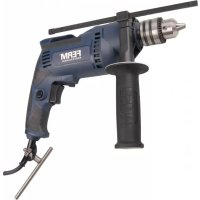
PDM1049P - Electric drill Ferm - Free user manual and instructions
Find the device manual for free PDM1049P Ferm in PDF.



| Product type | Electric hammer drill |
| Brand | Ferm |
| Model | PDM1049P |
| Mains voltage | 220-240 V~ |
| Mains frequency | 50 Hz |
| Power consumption | 710 W |
| No-load speed | 0 – 3 200 /min |
| Impact rate | 0 – 51 200 /min |
| Chuck capacity | 13 mm |
| Max. drilling diameter – Wood | 25 mm |
| Max. drilling diameter – Concrete | 13 mm |
| Max. drilling diameter – Steel | 10 mm |
| Weight | 2.20 kg |
| Sound pressure level (LPA) | 91.38 dB(A) ± 3 dB |
| Sound power level (LWA) | 102.38 dB(A) ± 3 dB |
| Vibration – Drilling in metal (ah,D) | 2.640 ± 1.5 m/s² |
| Vibration – Hammer drilling in concrete (ah,ID) | 13.363 ± 1.5 m/s² |
| Intended use | Drilling in wood, metal, plastic and hammer drilling in brick and concrete |
| Power supply | Mains (with cable) |
| Double insulation | Yes (class II) |
| Side handle | Rotatable 360° |
| Depth stop | Yes, adjustable |
| Maintenance and cleaning | Clean the housing with a soft cloth and soapy water. Do not use aggressive chemicals. |
| Warranty | Warranty certificate provided separately |
Frequently Asked Questions - PDM1049P Ferm
User questions about PDM1049P Ferm
0 question about this device. Answer the ones you know or ask your own.
Ask a new question about this device
Download the instructions for your Electric drill in PDF format for free! Find your manual PDM1049P - Ferm and take your electronic device back in hand. On this page are published all the documents necessary for the use of your device. PDM1049P by Ferm.
USER MANUAL PDM1049P Ferm
natural_image
Black FERM Industrial electric drill put with visible blade and handle (no text or symbols on the tool itself)PDM1049P\_K
EN Original instructions 3
DE Übersetzung der Originalbetriebsanleitung 6
NL Vertaling van de oorspronkelijke gebruiksaanwijzing 10
FR Traduction de la notice originale 14
ES Traducción del manual original 18
PT Tradução do manual original 21
IT Traduzione delle istruzioni originali 25
SV Översättning av bruksanvisning i original 29
FI Alkuperäisten ohjeiden käännös 33
NO Oversatt fra orginal veiledning 36
DA Oversættelse af den originale brugsanvisning 40
HU Eredeti használati utasítás fordítása 43
CS Překlad původního návodu k používání 47
SK Prevod izvirnih navodil 50
PL Tłumaczenie instrukcji oryginalnej 54
LT Originalios instrukcijos vertimas 57
LV Instrukciju tulkojums no originālvalodas 61
ET Algupärase kasutusjuhendi tõlge 64
RO Traducere a instructiunilor originale 68
SR Originalna uputstva 71
BS Originalna uputstva 71
RU Перевод исходных инструкций 75
EL Μετάφραση του πρωτοτύπου των οδηγιών χρήσης 79
AR
ترجمة التعليمات الأصلية 83
TR Orijinal talimatların çevirisi 86
MK Оригинални упатства 89
IMPACT DRILL PDM1049P\_K
Thank you for buying this FERM product. By doing so you now have an excellent product, delivered by one of Europe's leading suppliers. All products delivered to you by Ferm are manufactured according to the highest standards of performance and safety. As part of our philosophy we also provide an excellent customer service, backed by our comprehensive warranty. We hope you will enjoy using this product for many years to come.
1.SAFETYWARNINGS

WARNING
Read the enclosed safety warnings, the additional safety warnings and
the instructions. Failure to follow the safety warnings and the instructions may result in electric shock, fire and/or serious injury. Save the safety warnings and the instructions for future reference.
The following symbols are used in the user manual or on the product:

Read the user manual.

Risk of personal injury.

Risk of electric shock

Immediately remove the mains plug from the mains if the mains cable becomes damaged and during cleaning and maintenance.

Wear safety goggles. Wear hearing protection.

Wear a dust mask.

Doubleinsulated

Do not dispose of the product in unsuitable containers.

The product is in accordance with the applicable safety standards in the European directives.
ADDITIONAL SAFETY WARNINGS FOR IMPACT DRILLS
Wear ear protectors when impact drilling.
Exposure to noise can cause hearing loss.
Use auxiliary handle(s), if supplied with the tool. Loss of control can cause personal injury.
Hold power tool by insulated gripping surfaces, when performing an operation where the cutting accessory may contact hidden wiring or its own cord. Cutting accessory contacting a “live” wire may make exposed metal parts of the power tool “live” and could give the operator an electric shock.
Electrical safety
When using electric machines always observe the safety regulations applicable in your country to reduce the risk of fire, electric shock and personal injury. Read the following safety instructions and also the enclosed safety instructions.

Always check that the voltage of the power supply corresponds to the voltage on the rating plate label.

Class II machine - Double insulation - You don't need any earthed plug.
If operating a power tool in a damp location is unavoidable, use a residual current device (RCD) protected supply. Use of an RCD reduces the risk of electric shock.
2. MACHINE INFORMATION
Intended use
Your impact drill has been designed for drilling holes in wood, metal and plastics and for hammer drilling in brick and concrete.
Technical specifications
| Mains voltage 220-240V~ |
| Mains frequency 50Hz |
| Power input 710W |
| No-load speed 0-3.200/min |
| Impact rate 0-51.200/min |
| Max. chuck size 13mm |
Max. drill diameter
| Wood 25mm |
| Concrete 13mm |
| Steel 10mm |
| Weight 2.20kg |
Noise values
| Sound pressure (LPA) 91.38 + 3 dB(A) | |
| Acoustic power (LWA) | 102.38 + 3 dB(A) |
| Vibration values | |
| Drilling into metal, ah,D | 2.640 + 1.5 m/s2 |
| Impact drilling into concrete, ah,ID | 13.363 + 1.5 m/s2 |
Vibration level
The vibration emission level stated in this instruction manual has been measured in accordance with a standardised test given in EN 60745; it may be used to compare one tool with another and as a preliminary assessment of exposure to vibration when using the tool for the applications mentioned
- using the tool for different applications, or with different or poorly maintained accessories, may significantly increase the exposure level - the times when the tool is switched off or when it is running but not actually doing the job, may significantly reduce the exposure level
Protect yourself against the effects of vibration by maintaining the tool and its accessories, keeping your hands warm, and organizing your work patterns.
Description
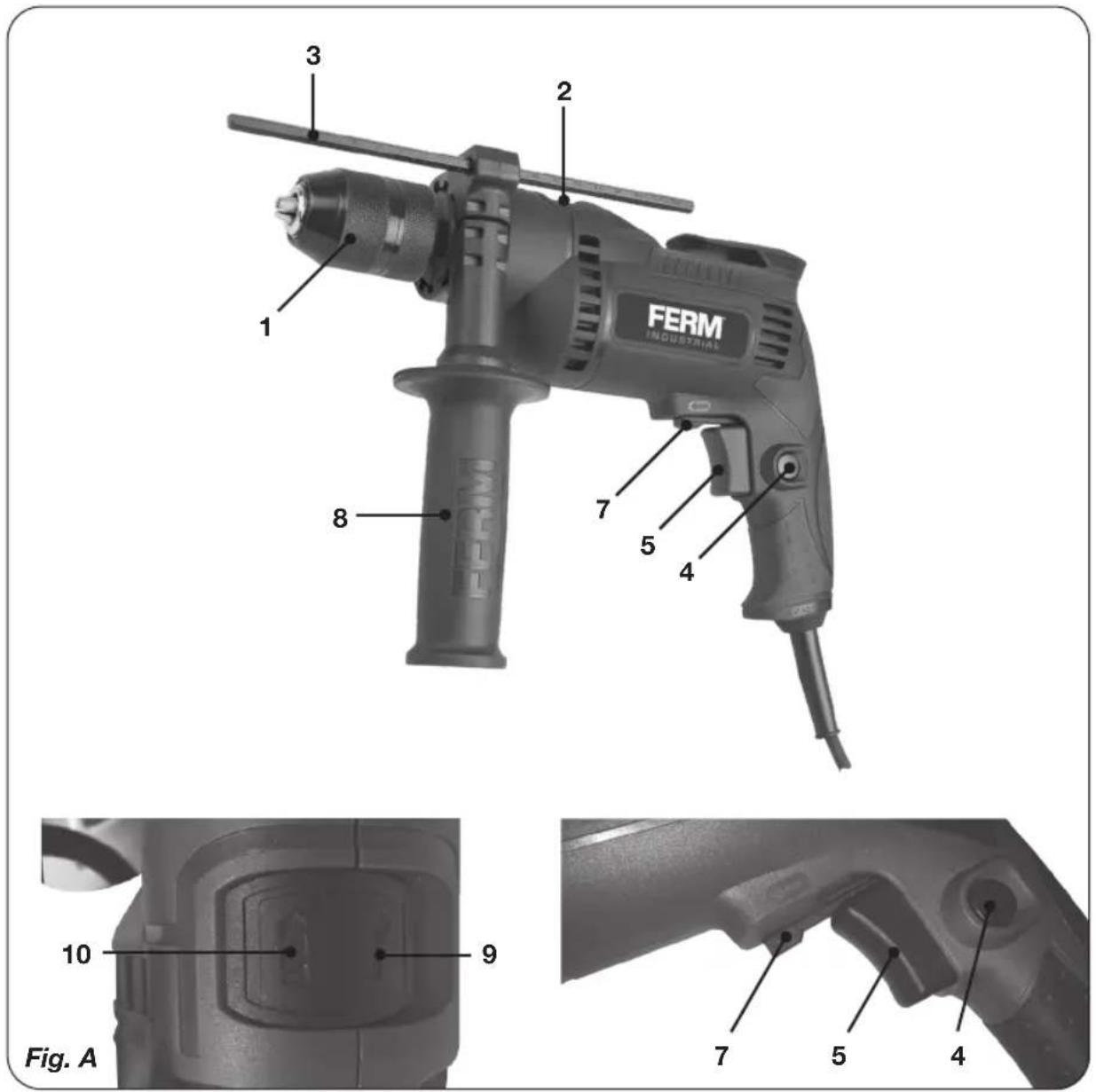
The numbers in the text refer to the diagrams on page 2.
Fig. A
- Chuck
- Function selection switch
- Depth stop
- Lock-on button
- On/Off switch
- Left/right rotation switch
- Side handle
- Function selection: Hammer drilling
- Function selection: Drilling
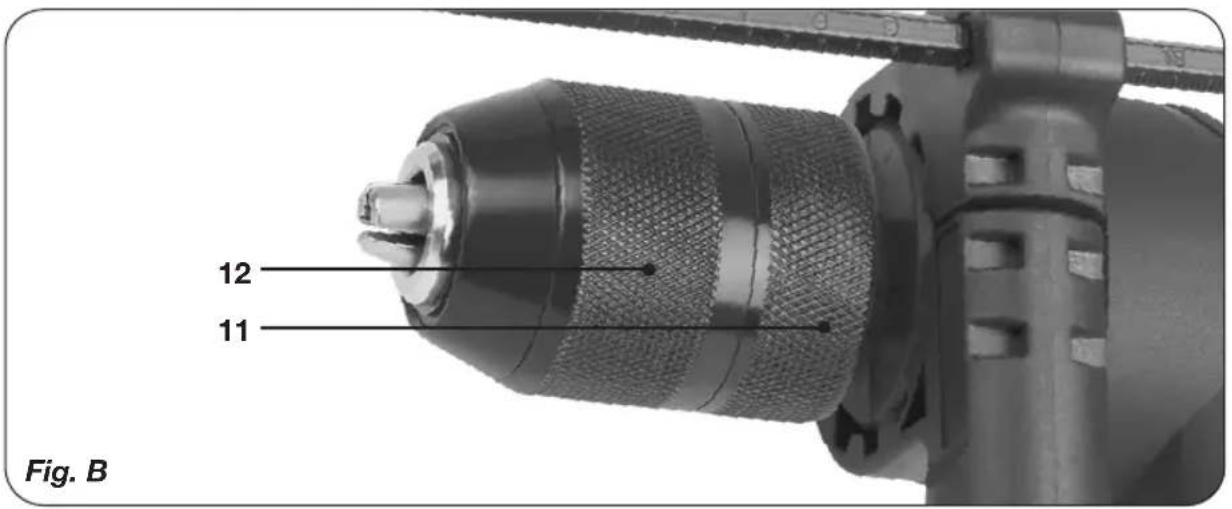
Fig. B
-
Rear sleeve
-
Front sleeve
-
Rear sleeve
- Front sleeve
3. OPERATING

Impact drills require very little operator pressure. Excessive pressure on the tool can lead to unnecessary overheating of the motor, and burning of the driven tool.
Side handle
Fig. A
The side handle (8) can be rotated 360° around the drill head, enabling safe and comfortable operation for both left and right-handed users.
- Loosen the side handle (8) by turning it anticlockwise.
- Rotate the side handle to the desired position.
- Retighten the side handle in the new position by turning it clockwise
Exchanging and removing drill bits
Fig. A - B

Before exchanging bits, first remove the power plug from the wall socket.

Inspect bits regularly during use. Blunt bits should be re-sharpened or replaced.
- Open the chuck (1) by turning the front sleeve (12) clockwise while simultaneously holding the rear sleeve (11) or turning it counterclockwise and insert the bit into the chuck opening.
- Tighten the bit by turning the front sleeve (12) counterclockwise while simultaneously holding the rear sleeve (11) or turning it clockwise.
Setting depth stop
Fig. A
- Loosen the side handle (8) by turning it counterclockwise.
- Insert the depth stop (3) through the hole in the side handle ring.
- Slide the ruler to the desired depth.
- Retighten the screw firmly by turning it clockwise
The On/Off switch
Fig. A
- Switch the machine on by pressing the On/Off switch (5). When you release the On/Off switch (5) the machine will turn off.
- The rotation-speed can be adjusted by pressing the On/Off switch (5) harder for raising the rotation-speed or release pressure for lowering the rotation-speed.
Lock-on Button
Fig. A
- You can lock the On/Off switch (5) by pressing the On/Off switch (5) and then pressing the lock-on button (4).
- To release the switch-lock; shortly press the On/Off switch (5) again.
Adjusting of the maximum rotation speed
Fig. A
- Switch the machine on by pressing the On/Off switch (5).
- Lock the On/Off switch (5) by pressing the lock-on button (4).
Switching the direction of rotation
Fig. A

Do not change the direction of rotation during use.
- Direction of rotation counter-clockwise: shift left/right rotation switch (7) to “”.
- Direction of rotation clockwise: shift left/right rotation switch (7) to “.”
Function selection switch
Fig. A

In order to avoid damage to the machine, adjusting the function selection switch (2) shall only be done when machine is not running
- Set the function selection switch (2) to (10) for drilling.
- Set the function selection switch (2) to (9) for hammer drilling.
User tips
Always use the machine with the side handle firmly anchored in place - you will not only work with more comfort, you will also work with more precision.

Caution: drills and chisels can get very hot.
Drilling and hammer drilling
- For large holes, for instance in very hard concrete, start using a smaller bit for pilot drilling first, then drill to nominal size.
- Hold the machine firmly with 2 hands. Be aware the drill can jam and because of that machine might suddenly turn (Especially when drilling deep holes).
- Do not apply a lot of pressure on the machine, let the machine do the work.
4. MAINTENANCE

Before cleaning and maintenance, always switch off the machine and remove the mains plug from the mains.
Clean the machine casings regularly with a soft cloth, preferably after each use. Make sure that the ventilation openings are free of dust and dirt. Remove very persistent dirt using a soft cloth moistened with soapsuds. Do not use any solvents such as gasoline, alcohol, ammonia, etc. Chemicals such as these will damage the synthetic components.
WARRANTY
The warranty conditions can be found on the separately enclosed warranty card.
ENVIRONMENT

Faulty and/or discarded electrical or electronic apparatus have to be collected at the appropriate recycling locations.
Only for EC countries
Do not dispose of power tools into domestic waste. According to the European Guideline 2012/19/EU for Waste Electrical and Electronic Equipment and its implementation into national right, power tools that are no longer usable must be collected separately and disposed of in an environmentally friendly way. The product and the user manual are subject to change. Specifications can be changed without further notice.
SCHLAGBOHRMASCHINE PDM1049P\_K
1. VEILIGHEIDSWAARSCHUWINGEN

WAARSCHUWING
- Takalaippa
- Etulaippa
3. KÄYTTÖ

- Bakre hylse
- Fronthylse
3. DRIFT

DECLARATION OF CONFORMITY PDM1049P\_K - IMPACT DRILL
(EN) We declare under our sole responsibility that this product is in conformity with directive 2011/65/EU of the European parliament and of the council of 8 June on the restriction of the use of certain hazardous substances in electrical and electronic equipment is in conformity and accordance with the following standards and regulations:
(DE) Der Hersteller erklärt eigenverantwortlich, dass dieses Produkt der Direktive 2011/65/EU des Europäischen Parlaments und des Rats vom 8. Juni 2011 über die Einschränkung der Anwendung von bestimmten gefährlichen Stoffen in elektrischen und elektronischen Geräten entspricht, den folgenden Standards und Vorschriften entspricht:
(NL) Wij verklaren onder onze volledige verantwoordelijkheid dat dit product voldoet aan de conform Richtlijn 2011/65/EU van het Europees Parlement en de Raad van 8 juni 2011 betreffende beperking van het gebruik van bepaalde gevaarlijke stoffen in elektrische en elektronische apparatuur en in overeenstem ming is met de volgende standaarden en reguleringen:
(FR) Nous déclarons sous notre seule responsabilité que ce produit est conforme aux standards et directives suivants: est conforme à la Directive 2011/65/EU du Parlement Européen et du Conseil du 8 juin 2011 concernant la limitation d'usage de certaines substances dangereuses dans l'équipement électrique et électronique.
(ES) Declaramos bajo nuestra exclusiva responsabilidad que este producto cumple con las siguientes normas y estándares de funcionamiento: se encuentra conforme con la Directiva 2011/65/UE del Parlamento Europeo y del Consejo de 8 de junio de 2011 sobre la restricción del uso de determinadas sustancias peligrosas en los equipos eléctricos y electrónicos.
(PT) Declaramos por nossa total responsabilidade-de que este produto está em conformidade e cumpre as normas e regulamentações que se seguem: está em conformidade com a Directiva 2011/65/EU do Parlamento Europeu e com o Conselho de 8 de Junho de 2011 no que respeita à restrição de utilização de determinadas substâncias perigosas existentes em equipamento eléctrico e electrónico.
(IT) Dichiariamo, sotto la nostra responsabilità, che questo prodotto è conforme alle normative e ai regolamenti seguenti: è conforme alla Direttiva 2011/65/UE del Parlamento Europeo e del Consiglio dell'8 giugno 2011 sulla limitazione dell'uso di determinate sostanze pericolose nelle apparecchiature elettriche ed elettroniche.
(SV) Vi garanterar på eget ansvar att denna produkt uppfyller och följer följande standarder och bestämmelser: uppfyller direktiv 2011/65/EU från Europeiska parlamentet och EG-rådet från den 8 juni 2011 om begränsningen av användning av farliga substanser i elektrisk och elektronisk utrustning.
(FI) Vakuutamme yksinomaan omalla vastuullamme, että tämä tuote täyttää seuraaval standardit ja säädökset: täyttää Euroopan parlamentin ja neuvoston 8. kesäkuuta 2011 päivätyn direktiivin 2011/65/EU vaatimukset koskien vaarallisten aineiden käytön rajoitusta sähkö- ja elektronisissa laitteissa.
(NO) Vi erklærer under vårt eget ansvar at dette produktet er i samsvar med følgende standarder og regler: er i samsvar med EU-direktivet 2011/65/EU fra Europa-parlamentet og Europa-rådet, pr. 8 juni 2011, om begrensning i bruken av visse farlige stoffer i elektrisk og elektronisk utstyr.
(DA) Vi erklærer under eget ansvar, at dette produkt er i overensstemmelse med følgende standarder og bestemmelser: er i overensstemmelse med direktiv 2011/65/EU fra Europa-Parlamentet og Rådet af 8. juni 2011 om begrænsning af anvendelsen af visse farlige stoffer i elektrisk og elektronisk udstyr.
(HU) Felelősségünk teljes tudatában kijelentjük, hogy ez a termék teljes mértékben megfelel az alábbi szabványoknak és előírásoknak: je v souladu se směrnici 2011/65/EU Evropského parlamentu a Rady EU ze dne 8. června 2011, která se týká omezení použiti určitých nebezpečných látek v elektrických a elektronických zařízeních.
(CS) Na naši vlastni zodpovědnost prohlašujeme, že je tento výrobek v souladu s následujícími standardy a normami: Je v súlade s normou 2011/65/EÚ Európskeho parlamentu a Rady z 8. júna 2011 týkajúcej sa obmedzenia používania určitých nebezpečných látok v elektrickom a elektronickom vybavení.

- PDM1049P\_K
- IMPACT DRILL PDM1049P\_K
- 1.SAFETYWARNINGS
- WARNING
- ADDITIONAL SAFETY WARNINGS FOR IMPACT DRILLS
- Electrical safety
- MACHINE INFORMATION
- Intended use
- Vibration level
- Description
- Fig. A
- Fig. B
- OPERATING
- Side handle
- Exchanging and removing drill bits
- Fig. A - B
- Setting depth stop
- The On/Off switch
- Lock-on Button
- Adjusting of the maximum rotation speed
- Switching the direction of rotation
- Function selection switch
- User tips
- MAINTENANCE
- WARRANTY
- ENVIRONMENT
- Only for EC countries
- SCHLAGBOHRMASCHINE PDM1049P\_K
- VEILIGHEIDSWAARSCHUWINGEN
- WAARSCHUWING
- KÄYTTÖ
- DRIFT
- DECLARATION OF CONFORMITY PDM1049P\_K - IMPACT DRILL
Brand : Ferm
Model : PDM1049P
Category : Electric drill