HW-S50B - Soundbar SAMSUNG - Free user manual and instructions
Find the device manual for free HW-S50B SAMSUNG in PDF.



| Product Type | Soundbar |
| Brand | Samsung |
| Model | HW-S50B |
| Dimensions (W x H x D) | 670.0 x 62.3 x 105.0 mm |
| Weight | 2.4 kg |
| Power Supply | AC/DC Adapter 19 V |
| Standby Power Consumption | 0.5 W |
| Nominal Output Power | (30 W x 2) + (30 W x 2) + 20 W |
| Supported Audio Formats | DTS, Dolby Digital, LPCM 2ch, Dolby Audio (Dolby Digital), DTS Virtual:X |
| Connectivity | HDMI ARC, Optical, Bluetooth, USB (5V/0.5A) |
| Sound Modes | DTS Virtual:X, Standard, Music, Game, Adaptive Sound |
| Special Features | Q-Symphony (with Samsung TV), Tap Sound, Bluetooth Power, Bluetooth Multi-connection (2 devices) |
| Care and Cleaning | Use a soft, dry cloth. Do not use chemical products. |
| Safety | Do not open the case, avoid humidity, unplug during storms, do not obstruct ventilation openings |
| Spare Parts and Repairability | No user-repairable parts. Contact a qualified after-sales service. |
| General Information | Operating temperature: +5°C to +35°C; humidity: 10% ~ 75% |
Frequently Asked Questions - HW-S50B SAMSUNG
User questions about HW-S50B SAMSUNG
0 question about this device. Answer the ones you know or ask your own.
Ask a new question about this device
Download the instructions for your Soundbar in PDF format for free! Find your manual HW-S50B - SAMSUNG and take your electronic device back in hand. On this page are published all the documents necessary for the use of your device. HW-S50B by SAMSUNG.
USER MANUAL HW-S50B SAMSUNG
Thank you for purchasing this Samsung product.
To receive more complete service, please register
your product at www.samsung.com/register
SAFETY INFORMATION
SAFETYWARNINGS
TO REDUCE THE RISK OF ELECTRIC SHOCK, DO NOT REMOVE THE COVER (OR BACK).
NO USER-SERVICEABLE PARTS ARE INSIDE.
REFER SERVICING TO QUALIFIED SERVICE PERSONNEL.
Refer to the table below for an explanation of symbols which may be on your Samsung product.
| CAUTION RISK OF ELECTRIC SHOCK. DO NOT OPEN. | |
| This symbol indicates that high voltage is present inside. It is dangerous to make any kind of contact with any internal part of this product. | |
| This symbol indicates that this product has included important literature concerning operation and maintenance. | |
| Class II product: This symbol indicates that it does not require a safety connection to electrical earth (ground). If this symbol is not present on a product with a power cord, the product MUST have a reliable connection to protective earth (ground). | |
| AC voltage: This symbol indicates that the rated voltage marked with the symbol is AC voltage. | |
| DC voltage: This symbol indicates that the rated voltage marked with the symbol is DC voltage. | |
| Caution, Consult instructions for use: This symbol instructs the user to consult the user manual for further safety related information. |
WARNING
- To reduce the risk of fire or electric shock, do not expose this appliance to rain or moisture.
CAUTION
- TO PREVENT ELECTRIC SHOCK, MATCH WIDE BLADE OF PLUG TO WIDE SLOT, FULLY INSERT.
- This apparatus shall always be connected to a AC outlet with a protective grounding connection.
- To disconnect the apparatus from the mains, the plug must be pulled out from the mains socket, therefore the mains plug shall be readily operable.
- Do not expose this apparatus to dripping or splashing. Do not put objects filled with liquids, such as vases on the apparatus.
- To turn this apparatus off completely, you must pull the power plug out of the wall socket. Consequently, the power plug must be easily and readily accessible at all times.
PRECAUTIONS
- Ensure that the AC power supply in your house complies with the power requirements listed on the identification sticker located on the bottom of your product. Install your product horizontally, on a suitable base (furniture), with enough space around it for ventilation (7~10 cm). Make sure the ventilation slots are not covered. Do not place the unit on amplifiers or other equipment which may become hot. This unit is designed for continuous use. To fully turn off the unit, disconnect the AC plug from the wall outlet. Unplug the unit if you intend to leave it unused for a long period of time.
- During thunderstorms, disconnect the AC plug from the wall outlet. Voltage peaks due to lightning could damage the unit.
- Do not expose the unit to direct sunlight or other heat sources. This could lead to overheating and cause the unit to malfunction.
-
Protect the product from moisture (i.e. vases), and excess heat (e.g. a fireplace) or equipment creating strong magnetic or electric fields. Unplug the power cable from the AC wall socket if the unit malfunctions. Your product is not intended for industrial use. It is for personal use only. Condensation may occur if your product has been stored in cold temperatures. If transporting the unit during the winter, wait approximately 2 hours until the unit has reached room temperature before using.
-
The battery used with this product contains chemicals that are harmful to the environment. Do not dispose of the battery in the general household trash. Do not expose the battery to excess heat, direct sunlight, or fire. Do not short circuit, disassemble, or overheat the battery.
CAUTION: Danger of explosion if the battery is replaced incorrectly. Replace only with the same or equivalent type.
CONTENTS
01 Checking the Components 6
02 Product Overview 7
Front Panel / Top Panel of the Soundbar 7
Bottom Panel of the Soundbar 8
03 Using the Remote Control 9
Inserting Batteries before using the Remote Control (AAA batteries X 2) 9
How to Use the Remote Control 9
Using the Hidden Buttons (Buttons with more than one function) 14
Output specifications for the different sound effect modes 14
Adjusting the Soundbar volume with a TV remote control 15
04 Connecting the Soundbar 16
Connecting Electrical Power 16
Connecting the Samsung Wireless Rear Kit and Subwoofer to your Soundbar 16
05 Using a wired connection to the TV 17
Method 1. Connecting with HDMI
Method 2. Connecting using an Optical Cable 19
06 Using a wireless connection to the TV 21
Connecting via Bluetooth 21
07 Connecting an External Device 23
Connecting using an Optical Cable 23
08 Connecting a USB Storage Device 24
09 Connecting a Mobile Device 26
Connecting via Bluetooth 26
Using Tap Sound 31
10 Installing the Wall Mount 32
Installation Precautions 32
Wallmount Components 32
11 Installing the Soundbar in front of TV 34
12 Software Update 35
Reset 36
13 Troubleshooting 37
14 Licence 38
15 Open Source Licence Notice 39
16 Important Notes About Service 39
17 Specifications and Guide 40
Specifications 40
01 CHECKING THE COMPONENTS
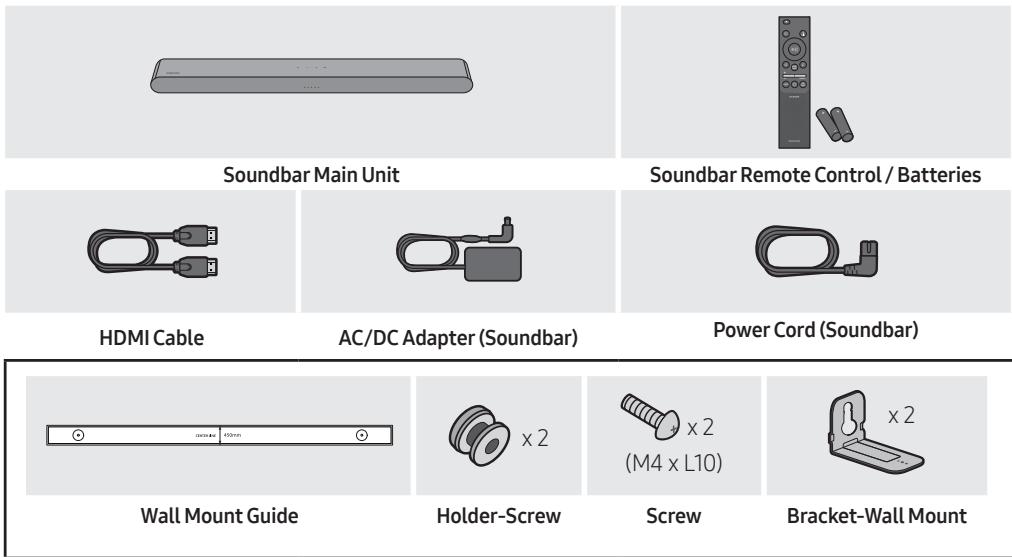
- For more information about the power supply and power consumption, refer to the label attached to the product. (Label: Bottom of the Soundbar Main Unit)
- To purchase additional components or optional cables, contact a Samsung Service Centre or Samsung Customer Care.
- For more information about the wallmount see page 32.
- Design, specifications are subject to change without prior notice.
- The appearance of the accessories may differ slightly from the illustrations above.
02 PRODUCT OVERVIEW
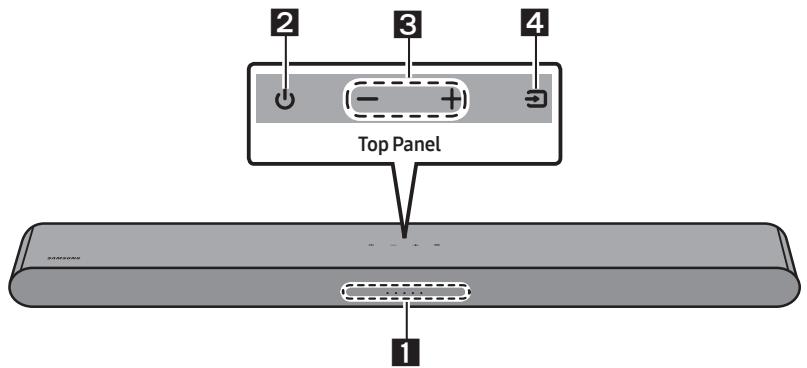
Front Panel / Top Panel of the Soundbar
| 1 | LED indicator | The LED Indicator flashes, glows, or changes colour depending on the Soundbar's current mode or status. The colour of the LED indicator and the number of lights indicate the active mode as described below. | ||||||
| W White LED | W White LED | M Multicolour LED | W White LED | W White LED | ||||
| · The Multicolour LED changes to White, Cyan, Green, Red, Yellow, Orange, Purple and Blue depending on the mode or status. | ||||||||
| 2 | Power | Turns the power on and off. | ||||||
| 3 | Volume | Adjusts the volume. | ||||||
| 4 | Source | · Press the (Source) button to change the mode. Each time you change the mode, the LED lights in white and then turns off. | ||||||
| LED Indicator | White On→Off | White On→Off | White On→Off | |||||
| ○○○○ | ○○○ | ○○○○○○○○○○○○○○○○○○○○○○○○○○○○○○○○○○○○○○○○○○○○○○○○○○○○○○○○○○○○○○○○○○○○○○○○○○○○○○○○○○○○○○○○○○○○○○○○○○○○ | "Digital Audio In" or "TV ARC" | "Bluetooth" | "USB" | |||
- When you plug in the AC cord, the power button will begin working in 4 to 6 seconds.
- When you turn on this unit, there will be a 4 to 5 second delay before it produces sound.
- If you hear sounds from both the TV and Soundbar, go to the Settings menu for the TV audio and change the TV speaker to External Speaker.
Bottom Panel of the Soundbar
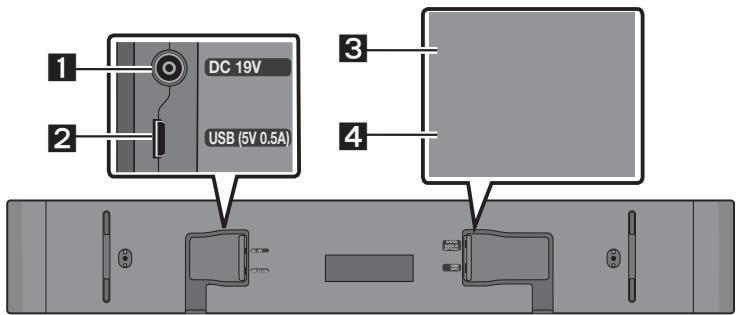
| 1 | DC 19V (Power Supply In) Connect the AC/DC power adapter. |
| 2 | USB (5V 0.5A) Connect a USB device here to play music files stored on the USB device through the Soundbar. |
| 3 | DIGITAL AUDIO IN (OPTICAL) Connect to the digital (optical) output of an external device. |
| 4 | HDMI (ARC) Connect to the HDMI (ARC) port on a TV. |
- When disconnecting the power cable of the AC/DC power adapter from a wall outlet, pull the plug. Do not pull the cable.
- Do not connect this unit or other components to an AC outlet until all connections between components are complete.
03 USING THE REMOTE CONTROL
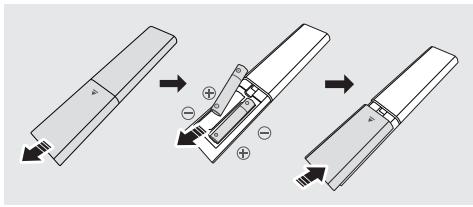
Inserting Batteries before using the Remote Control (AAA batteries X 2)
Slide the back cover in the direction of the arrow until it is completely removed.
Insert 2 AAA batteries (1.5V) oriented so that their polarity is correct. Slide the back cover back into position.
How to Use the Remote Control
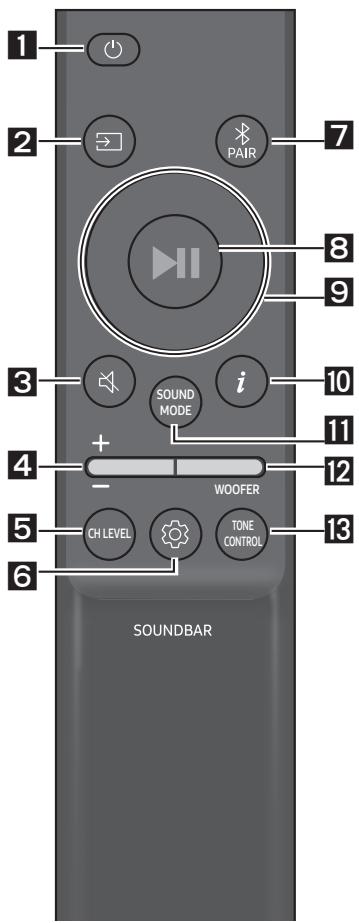
| 1 | Power Turns the Soundbar on and off. | ||
| LED Indicator | Cyan Blinks X1 On | Red Blinks X3 Off | |
| • Auto Power Down Function The unit turns off automatically in the following situations: - In "Digital Audio In" or "TV ARC" / "Bluetooth" / "USB" mode if there is no audio signal for 20 minutes. | |||
| 2 | → (Source) Press to select a source connected to the Soundbar. | ||
| 3 | ← (Mute) Press the (Mute) button to mute the sound. Press it again to unmute the sound. | ||
| LED Indicator | Blinks X Repeatedly ○○○○● | ||

Volume
Push the button up or down to adjust the volume.
| LED Indicator | White moves to right X1 Volume Up | White moves to left X1 Volume Down |

CH LEVEL
By pressing the button, you can adjust the volume of the each speaker.
| LED Indicator | White Blinks X1 |
| ○○●○○ | |
| "Centre Level" |
- If the Rear Speakers (sold separately) are connected, the setting "Rear Level" is supported. To adjust the volume of the "Rear Level" between -6 to +6 by using the Up/Down buttons.

(Sound Control)
By pressing the button, you can set the audio function. The desired item can be adjusted using the Up/Down buttons. Each time the mode changes, the Multicolour LED blinks in white.
| LED Indicator | White Blinks X1 ○○●○○ |
| "Sync" → "Night mode" → "Voice enhancement" |
- If the video on the TV and audio from the Soundbar are not synchronised, select "Sync" in Sound Control, and then set the audio delay between 0~300 milliseconds by using the Up/Down buttons. (Not available in "USB" or "Bluetooth" mode.)
"Sync" is only supported for some functions.
Night mode" and "Voice enhancement" are not supported in "DTS Virtual:X" sound mode. - "Night mode" is optimised for night time viewing with the settings adjusted to bring the volume down but keep the dialog clear.
"Voice enhancement" makes it easier to hear spoken dialog in movies and TV.
7 Band EQ
Press and hold the 3 (Sound Control) button for about 5 seconds to adjust the sound for each frequency band. 150Hz , 300Hz , 600Hz , 1.2kHz , 2.5kHz , 5kHz , and 10kHz are selectable using the Left/Right buttons and each can be adjusted to a setting between -6 to +6 using the Up/Down buttons. (Make sure the Sound mode is set to "Standard".)
| 7 Band EQ | ||
| Press and hold the 5 Sec (Sound Control) button for about 5 seconds. | Using the Left/Right buttoas and each can be adjusted to setting between -6 to+6. | |
| "150Hz" | "150Hz" → "300Hz" → "600Hz" → "1.2kHz" → "2.5kHz" → "5kHz" → "10kHz" | |

Bluetooth PAIR
Switch the Soundbar to Bluetooth pairing mode.
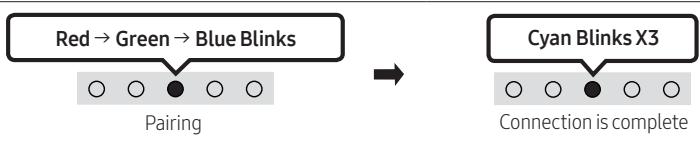
When you press the button, the LED display changes as shown below.
- Until pairing is complete, the Multicolour LED changes as Red Green Blue in turn.
LED Indicator

II (Play / Pause)
You can also play or pause music by pressing the button in "USB" mode.

Up/Down/Left/Right
Press Up/Down/Left/Right on the button to select or set functions.
- Repeat
- To use the Repeat function in "USB" mode, press the Up button.
- Music Skip
- Press the Right button to select the next music file. Press the Left button to select the previous music file.
- ID SET
- Press and hold the Up button for 5 seconds to complete ID SET (when connecting to a wireless subwoofer or wireless rear speakers).

i(Info)
Press the button to display information about the current function. (See page 7.)

SOUND MODE
By pressing the button, you can select the desired audio mode. Each time the mode changes, the Multicolour LED blinks in white. (The sound mode may differ with the TV model.)
| LED Indicator | White Blinks X1 ○○●○○ |
| “DTS Virtual:X” → “Standard” → “Music” → “Game” → “Adaptive Sound” |
- DTS Virtual:X
Immersive 3D sound from any content.
Standard
Outputs the original sound.
Music
Provides more natural and room filling sound for music content.
Game
Provides stereoscopic sound to immerse you in the action while gaming.
Adaptive Sound
Analyzes the content in real time and automatically provides the optimal sound field based on the characteristics of the content.
- Bluetooth Power On/Off
This feature automatically turns the Soundbar on when it receives a connection request from a previously connected TV or Bluetooth device. The setting is On by default.
-
Press and hold the SOUND MODE button for more than 5 seconds to turn off the Bluetooth Power function.
-
DRC (Dynamic Range Control) On/Off
Lets you apply dynamic range control to Dolby Digital tracks. Press and hold the SOUND MODE button for more than 5 seconds while the Soundbar is powered off to turn DRC (Dynamic Range Control) on or off. With the DRC turned on, loud sound is reduced. (The sound may be distorted.)
| SOUND MODE button | LED Indicator | |
| 5 Sec | Cyan Blinks X1 On (Default) | Red Blinks X1 Off |
| DRC On/Off | Toggle On → Off | |

WOOFER (BASS) LEVEL
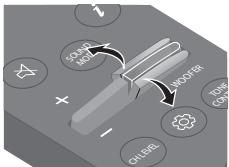
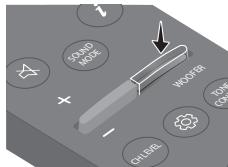
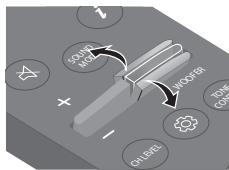
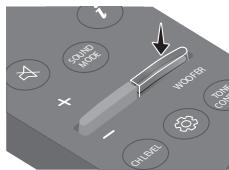
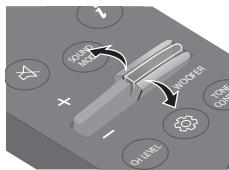
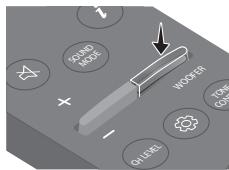
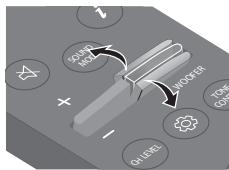
When subwoofer is connected, push the button up or down to adjust the woofer level to -12 or between -6 to +6. When subwoofer is disconnected, push the button up or down to adjust the bass level between -6 to +6. To set the woofer (bass) volume level to 0 (Default), press the button. (If Soundbar connected to wireless subwoofer (sold separately)).

TONE CONTROL
By pressing the button, you can adjust the volume of the treble or bass sound. The desired item can be adjusted using the Up/Down buttons. (This feature is available in all sound modes except "Standard" mode.)
| LED Indicator | White Blinks X1 ○○●○○ |
| “Treible” → “Bass” |
Using the Hidden Buttons (Buttons with more than one function)
| Hidden Button | Reference page | |
| Remote Control Button | Function | |
| WOOFER (Up) | TV remote control On/Off | page 15 |
| Left | TV Auto connect On/Off | page 22 |
| Up | ID SET | page 11 |
| (Sound Control) | 7 Band EQ | page 11 |
| SOUND MODE | DRC On/Off | page 12 |
| Bluetooth Power On/Off | page 12 | |
| PAIR | Bluetooth Multi connection On/Off | page 29 |
Output specifications for the different sound effect modes
| Effect | Input | Output | ||
| With Soundbar only | With Subwoofer Only | With Subwoofer & Wireless Rear Speaker Kit | ||
| DTS Virtual:X | 2.0 ch | 3.0 ch | 3.1 ch | 5.1 ch |
| 5.1 ch | 3.0 ch | 3.1 ch | 5.1 ch | |
| Standard | 2.0 ch | 2.0 ch | 2.1 ch | 2.1 ch |
| 5.1 ch | 3.0 ch | 3.1 ch | 5.1 ch | |
| Music | 2.0 ch | 3.0 ch | 3.1 ch | 5.1 ch |
| 5.1 ch | 3.0 ch | 3.1 ch | 5.1 ch | |
| Game | 2.0 ch | 3.0 ch | 3.1 ch | 5.1 ch |
| 5.1 ch | 3.0 ch | 3.1 ch | 5.1 ch | |
| Adaptive Sound | 2.0 ch | 3.0 ch | 3.1 ch | 5.1 ch |
| 5.1 ch | 3.0 ch | 3.1 ch | 5.1 ch | |
- The Samsung Wireless Rear Speaker Kit, and Subwoofer can be purchased separately. To purchase a Kit or the Subwoofer, contact the vendor you purchased the Soundbar from.
Adjusting the Soundbar volume with a TV remote control
Adjust the Soundbar volume using the TV's remote control.
- This function can be used with IR remote controls only. Bluetooth remote controls (remote controls that require pairing) are not supported.
- Set the TV speaker to External Speaker to use this function.
- Manufacturers supporting this function: Samsung, VIZIO, LG, Sony, Sharp, PHILIPS, PANASONIC, TOSHIBA, Hisense, RCA
TV remote control On/Off
- Turn Off the Soundbar.
- Push up and hold the WOOFER button for 5 seconds.
Each time you push the WOOFER button up and hold it for 5 seconds, the mode switches in the following order: "Off-TV Remote" (Default mode), "Samsung-TV Remote", "All-TV Remote".
The LED indicator status changes each time the mode is changed, as shown below.
| Remote Control Button | LED Indicator | Status |
| 5 Sec | "Off-TV Remote" (Default mode) | Disable the TV remote control. |
| 5 Sec | "Cyan Blinks X1" "Samsung-TV Remote" | Enable a Samsung TV's IR remote control. |
| 5 Sec | "Blue Blinks X1" "All-TV Remote" | Enable a third-party TV's IR remote control. |
04 CONNECTING THE SOUNDBAR
Connecting Electrical Power
Use the power components to connect the Soundbar to an electrical outlet in the following order:
- For more information about the required electrical power and power consumption, refer to the label attached to the product. (Label: Bottom of the Soundbar Main Unit)
- First connect the power cable to the AC/DC adapter. Connect the AC/DC adapter (with the power cable) to the Soundbar.
- Connect the power cord to a wall socket.
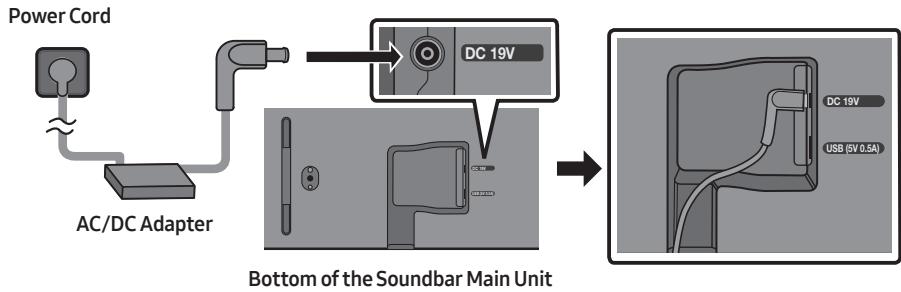
NOTES
- If you unplug and reconnect the power cord when the product is turned on, the Soundbar turns on automatically.
- Make sure to rest the AC/DC Adapter flat on a table or the floor. If you place the AC/DC Adapter so that it is hanging with the AC cord input facing upwards, water or other foreign substances could enter the Adapter and cause the Adapter to malfunction.
Connecting the Samsung Wireless Rear Kit and Subwoofer to your Soundbar
Expand to true wireless surround sound by connecting the Samsung Wireless Rear Speaker Kit (SWA-9100S, sold separately) and Wireless Subwoofer (SWA-W510, sold separately) to your Soundbar. For detailed information on connections, see the Samsung Wireless Rear Speaker Kit and Wireless Subwoofer manual.
05 USING A WIRED CONNECTION TO THE TV
Method 1. Connecting with HDMI

CAUTION
- When both the HDMI cable and optical cable are connected, the HDMI signal is received first.
- To connect the HDMI cable between the TV and Soundbar, be sure to connect the terminals marked ARC. Otherwise, the TV sound may not be output.
- The recommended cable is High Speed HDMI Cable with Ethernet.
Connecting the TV that supports HDMI ARC (Audio Return Channel)
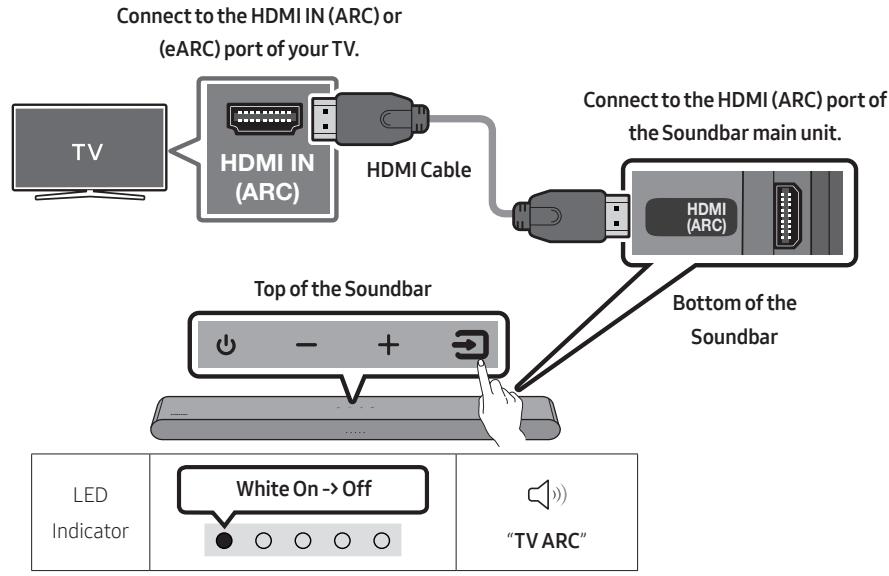
- With the Soundbar and TV turned off, connect the HDMI cable as shown in the figure.
- Turn on the Soundbar and TV.
-
TV sound is output from the Soundbar.
-
When the TV sound is not output, press the top panel of the Soundbar or the (Source) button on the remote control to select the "Digital Audio In" mode.
- When the sound is not output, check the HDMI Cable connection again.
- Use the volume buttons on the TV's remote control to change the volume on the Soundbar.
NOTES
- When you connect the TV that supports the HDMI ARC (Audio Return Channel) to the Soundbar with an HDMI cable, you can transmit the digital video and audio data without connecting a separate optical cable.
- We recommend you use a coreless HDMI cable if possible. If you use a cored HDMI cable, use one whose diameter is less than 14mm .
- This function is not available if the HDMI cable does not support ARC.
- When the audio in a broadcast is encoded in Dolby Digital and the "Digital Output Audio Format" on your TV is set to PCM, we recommend that you change the setting to Dolby Digital. When the setting on the TV is changed, you will experience better sound quality. (The TV menu may use different words for Dolby Digital and PCM depending on the TV manufacturer.)
Method 2. Connecting using an Optical Cable
Pre-connection Checklist
- When both the HDMI cable and optical cable are connected, the HDMI signal is received first.
- When you use an optical cable and the terminals have covers, be sure to remove the covers.

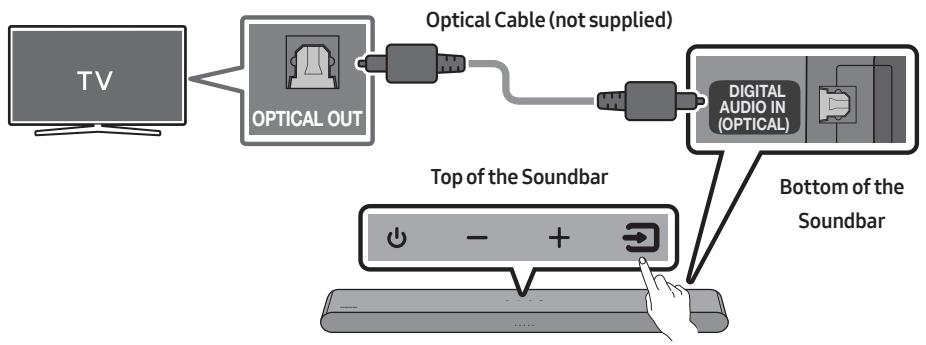
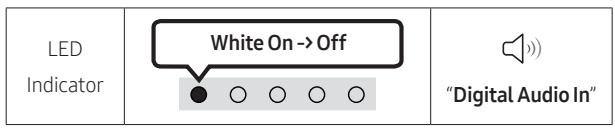
- With the TV and Soundbar turned off, connect the DIGITAL AUDIO IN (OPTICAL) port on the Soundbar and the OPTICAL output port on the TV with the optical cable (not supplied), as shown in the figure.
- Turn on the Soundbar and TV.
- Press the (Source) button on the top panel or remote control, and then select the "Digital Audio In" mode.
- The TV sound is output from the Soundbar.
Using the Q-Symphony Function
For Q-Symphony, the Soundbar syncs with a Samsung TV to output sound through two devices for optimum surround effect. When the Soundbar is connected, the menu, "TV+Soundbar" appears under the Sound Output menu of the TV. Select the corresponding menu.
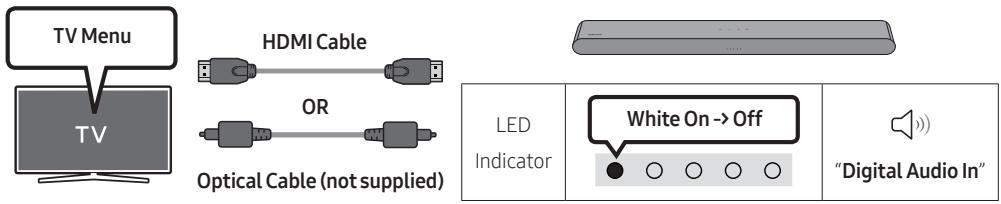
- TV menu example: TV + [AV] Soundbar series name (HDMI)
NOTES
- It can operate according to the Codec supported by TV.
- This function is supported only when the HDMI Cable or Optical Cable (not supplied) is connected.
- The message displayed may differ with the TV model.
- This function is available in some Samsung TVs and some Soundbar models.
06 USING A WIRELESS CONNECTION TO THE TV
Connecting via Bluetooth
When a Samsung TV is connected using Bluetooth, you can hear stereo sound without the hassle of cables.
- Only one Samsung TV can be connected at a time.
Samsung TV that supports Bluetooth can be connected.
Check the specifications of your TV.

The initial connection
- Press the PAIR button on the Soundbar remote control or press (Source) button on the Soundbar top panel to enter the "Bluetooth" mode.
| Bluetooth Pairing button | LED Indicator | |
| OR When in “Bluetooth” mode | Red → Green → Blue Blinks O O ● O O Pairing | Cyan Blinks X3 O O ● O O Connection is complete |
| · Until pairing is complete, the Multicolour LED changes as Red → Green → Blue in turn. | ||
| “Ready to connect via Bluetooth.” | ||
- Select Bluetooth mode on the Samsung TV.
(e.g. Home () Menu Settings () All Settings () Sound Sound Output Bluetooth Speaker List [AV] Soundbar S5B-Series (Bluetooth)) - Select " [AV] Soundbar S5B-Series" from the list on TV's screen.
An available Soundbar is indicated with "Needs pairing" or "Paired" on the TV's Bluetooth device list. To connect the Samsung TV to the Soundbar, select the message, and then establish a connection.
-
You can now hear Samsung TV sound from the Soundbar.
-
If there is a connection log between the Soundbar and Samsung TV, the Soundbar is automatically connected by changing its mode to "Bluetooth".
If the device fails to connect
- If you have an existing Soundbar (e.g., [AV] Soundbar S5B-Series) on the list of speakers on the Samsung TV, delete it.
- Then repeat steps 1 through 3.
Disconnecting the Soundbar from the Samsung TV
Press the (Source) button on the top panel or on the remote control to select the mode other than "Bluetooth".
- Disconnecting takes time because the Samsung TV must receive a response from the Soundbar. (The time required may differ, depending on the Samsung TV model.)
TV Auto connect On/Off
To cancel the automatic Bluetooth connection between the Soundbar and TV, press the Left button on the remote control for 5 seconds with the Soundbar in "Bluetooth Ready" status. (Toggle On Off)
| Left button | LED Indicator | |
| 5 Sec | Cyan Blinks X1 On (Default) | Red Blinks X1 Off |
| Bluetooth Ready | Toggle On → Off | |
Notes on Bluetooth connection
- Locate a new device within 1m to connect via Bluetooth communication.
- If asked for a PIN code when connecting a Bluetooth device, enter <0000>.
- The Soundbar automatically turns off after 20 minutes in the Ready state.
- The Soundbar may not perform Bluetooth search or connection correctly under the following circumstances:
If there is a strong electrical field around the Soundbar.
If several Bluetooth devices are simultaneously paired with the Soundbar.
If the Bluetooth device is turned off, not in place, or malfunctions.
- Electronic devices may cause radio interference. Devices that generate electromagnetic waves must be kept away from the Soundbar main unit - e.g., microwaves, wireless LAN devices, etc.
07 CONNECTING AN EXTERNAL DEVICE
Connecting using an Optical Cable
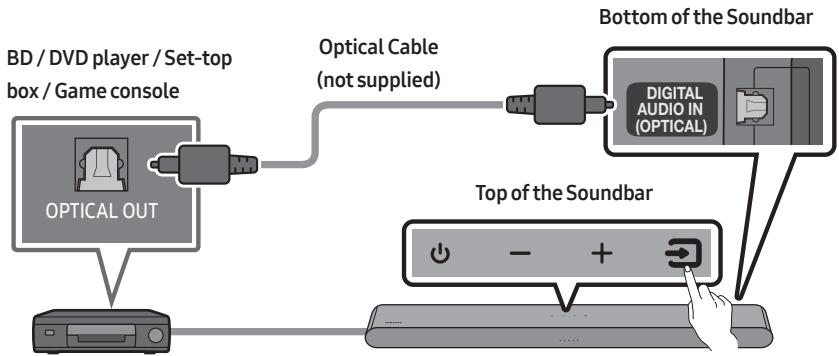
| LED Indicator | White On→Off ●○○○○ | “Digital Audio In” |
- With the external device and Soundbar turned off, connect the DIGITAL AUDIO IN (OPTICAL) port on the Soundbar and the OPTICAL output port on the external device with the optical cable (not supplied), as shown in the figure.
- Turn on the Soundbar and external device.
- Press the (Source) button on the top panel or remote control, and then select the "Digital Audio In" mode.
- The external device sound is output from the Soundbar.
08 CONNECTING A USB STORAGE DEVICE
You can play music files located on USB storage devices through the Soundbar.
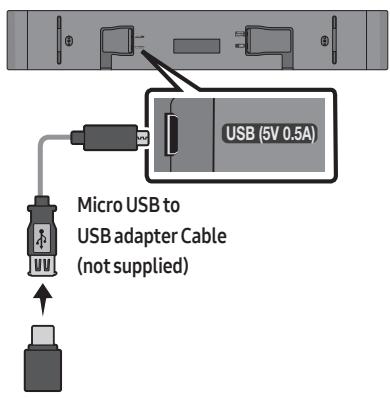
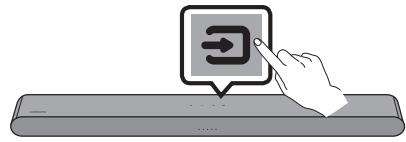
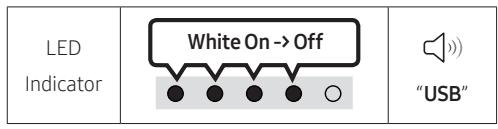
- Connect the Soundbar with the USB stick by the USB adapter cable above.
- The Micro USB to USB adapter cable is sold separately. To purchase, contact a Samsung Service Centre or Samsung Customer Care.
- Press the (Source) button on the top panel or remote control, and then select the "USB" mode.
- Play music files from the USB storage device through the Soundbar.
- The Soundbar automatically turns off (Auto Power Down) if no USB device has been connected for more than 20 minutes.
File Format Type Compatibility list
| Extension | Codec | Sampling Rate | Bit Rate |
| *.mp3 | MPEG 1 Layer2 | 16kHz ~ 48kHz | 80kbps~320kbps |
| MPEG 1 Layer3 | 16kHz ~ 48kHz | 80kbps~320kbps | |
| MPEG 2 Layer3 | 16kHz ~ 48kHz | 80kbps~320kbps | |
| MPEG 2.5 Layer3 | 16kHz ~ 48kHz | 80kbps~320kbps | |
| *.wma | Wave_Style_MSAudio1 | 16kHz ~ 48kHz | 56kbps~128kbps |
| Wave_Style_MSAudio2 | 16kHz ~ 48kHz | 56kbps~128kbps | |
| *.aac | AAC | 16kHz ~ 96kHz | 48kbps~320kbps |
| AAC-LC | 16kHz ~ 96kHz | 128kbps~192kbps5.1ch 320kbps | |
| HE-AAC | 24kHz ~ 96kHz | 48kbps~64kbps5.1ch 160kbps | |
| *.wav | - | 16kHz ~ 48kHz | up to 3000kbps |
| *.flac | FLAC | 32kHz ~ 192kHz | 162kbps ~ 8,100kbps |
| *.aiff | AIFF | 32kHz ~ 192kHz | 1,024kbps ~ 9,216kbps |
| *.ogg | OGG 1.1.0 | 16kHz ~ 48kHz | 50kbps~500kbps |
- If there are too many folders (about 200) and files (about 2000) stored on the USB device, it may take the Soundbar some time to access and play files.
- The Soundbar only supports USB devices with FAT16 (~2GB), FAT32 (~2TB) or NTFS (~2TB) file systems.
09 CONNECTING A MOBILE DEVICE
Connecting via Bluetooth
When a mobile device is connected using Bluetooth, you can hear stereo sound without the hassle of cables.
- When you connect a paired Bluetooth device with the Soundbar off, the Soundbar automatically turns on.
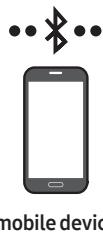
The initial connection
-
When connecting to a new Bluetooth device, make sure the device is within 1 m distance.
-
Press the PAIR button on the Soundbar remote control or press (Source) button on the Soundbar top panel to enter the "Bluetooth" mode.
| Bluetooth Pairing button | LED Indicator | |
| OR When in “Bluetooth” mode | Red → Green → Blue Blinks Pairing → Cyan Blinks X3 Connection is complete | |
| · Until pairing is complete, the Multicolour LED changes as Red → Green → Blue in turn. | ||
| “Ready to connect via Bluetooth.” | ||
- On your device, select "[AV] Samsung Soundbar S5B-Series" from the list that appears.
- Play music files from the device connected via Bluetooth through the Soundbar.
If the device fails to connect
- If you have an existing Soundbar (e.g., [AV] Samsung Soundbar S5B-Series) on the list of speakers on the Mobile device, delete it.
-
Then repeat steps 1 and 2.
-
Locate a new device within 1m to connect via Bluetooth communication.
- If asked for a PIN code when connecting a Bluetooth device, enter <0000>.
- The Soundbar automatically turns off after 20 minutes in the Ready state.
- The Soundbar may not perform Bluetooth search or connection correctly under the following circumstances:
If there is a strong electrical field around the Soundbar.
- If several Bluetooth devices are simultaneously paired with the Soundbar.
If the Bluetooth device is turned off, not in place, or malfunctions.
- Electronic devices may cause radio interference. Devices that generate electromagnetic waves must be kept away from the Soundbar main unit - e.g., microwaves, wireless LAN devices, etc.
- The Soundbar supports SBC data (44.1kHz, 48kHz).
- Connect only to a Bluetooth device that supports the A2DP (AV) function.
- You cannot connect the Soundbar to a Bluetooth device that supports only the HF (Hands Free) function.
- When connecting the Soundbar to a Bluetooth device, place them as close to each other as possible.
- The farther the Soundbar and Bluetooth device are from each other, the lower the sound quality will become.
The Bluetooth connection may break when the devices are out of the effective range.
- The Bluetooth connection may not function as intended in areas with poor reception.
-
A Bluetooth device may experience noise or malfunction under in the following conditions:
-
When the body is in contact with the signal transceiver on the Bluetooth device or Soundbar
- In corners or when there is an obstacle in proximity, such as a wall or partition, where electrical changes may occur.
- When exposed to radio interferences by other products operating on the same frequency ranges, such as medical equipment, microwave ovens, and wireless LAN devices.
-
Obstacles such as doors and walls may still impact the sound quality even when the devices are within the effective range.
-
Note that your Soundbar cannot be paired with other Bluetooth devices while using the Bluetooth option.
- This wireless device may cause electrical interference during operation.
Bluetooth Power On/Off
If a previously paired Bluetooth device tries to pair with the Soundbar when the Bluetooth Power On function is on and the Soundbar is turned off, the Soundbar turns on automatically.
- Press and hold the SOUND MODE button for more than 5 seconds on the remote while the Soundbar is turned on.
- Multicolour LED indicator on the Soundbar blinks "Cyan".
| SOUND MODE button | LED Indicator | |
| 5 Sec Sound Mode | Cyan Blinks X1 On (Default) | Red Blinks X1 Off |
| Bluetooth Power On/Off | Toggle On → Off | |
Disconnecting the Bluetooth device from a Soundbar
You can disconnect a Bluetooth device from the Soundbar. For instructions, see the Bluetooth device's user manual.
- The Soundbar will be disconnected.
- If the Soundbar is disconnected from the Bluetooth device, the multicolour LED indicator on the Soundbar blinks "Red" three times.
Disconnecting the Soundbar from the Bluetooth device
Press the (Source) button on the top panel or on the remote control to select the mode other than "Bluetooth".
- Disconnecting takes time because the Bluetooth device must receive a response from the Soundbar. (Disconnection time may differ, depending on the Bluetooth device)
The Soundbar can be connected to 2 Bluetooth devices at the same time.
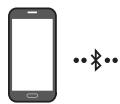
Bluetooth device A


Bluetooth device B
TV Auto connect On/Off
- Press and hold the PAIR button for more than 5 seconds on the remote while the Soundbar is turned off.
- Multicolour LED indicator on the Soundbar blinks "Cyan".
| Bluetooth Pairing button | LED Indicator | |
| When in standby mode 5 Sec | Cyan Blinks X1 Multi connection On (Default) | Red Blinks X1 Multi connection Off |
- Connect the Soundbar to up to two Bluetooth devices. (See page 26)
- Play music from one of the connected Bluetooth devices while two devices are connected.
- If music is played from the Bluetooth device "B" while playing from the device "A", the music is started playing on the device "B" and automatically being stopped/paused playback on the device "A".
- In versions prior to AVRCP V1.4, the switching time of the device playing music may be delayed.
Bluetooth Multi Pairing
How to pair multiple devices to the Soundbar
- Turn on the Soundbar.
- Only in "Bluetooth" mode, press and hold the (Source) button on the top of the Soundbar for more than 5 seconds for the Soundbar to go into "Bluetooth Pairing" mode, then on the Bluetooth device side, switch Bluetooth on, and select the Soundbar from the list of available devices, the Soundbar will automatically connect to the Bluetooth device.
- A 2nd Bluetooth device can be paired and connected to the Soundbar using the same method. If you attempt to connect a 3rd device, a connected device that is not playing audio will lose its Bluetooth connection, but will still be paired with the Soundbar.
- Using the same method, you can pair up to 8 Bluetooth devices, but only the last 2 will stay connected to the Soundbar at the same time.
NOTES
- Connect the Soundbar to up to two Bluetooth devices.
- Play music from one of the connected Bluetooth devices while two devices are connected.
- If music is played from the Bluetooth device "B" while playing from the device "A", the music is started playing on the device "B" and automatically being stopped/paused playback on the device A".
- In versions prior to AVRCP V1.4, the switching time of the device playing music may be delayed.
- The device can be switched by notification or alarm on some devices.
- Some devices do not support Bluetooth multi connection.
- "Bluetooth Pairing" mode stops when no device is paired within 3 minutes.
- Switching devices may take about 7 seconds on some apps.
- If you attempt to connect a 3rd Bluetooth device, the A or B devices will be disconnected. (A device that is not currently playing will be disconnected.)
- Only 1 Samsung TV, or 2 Bluetooth devices can be connected to the Soundbar at one time.
- The Soundbar will be disconnected from Bluetooth devices when it receives a connection request from a Samsung TV.
Using Tap Sound
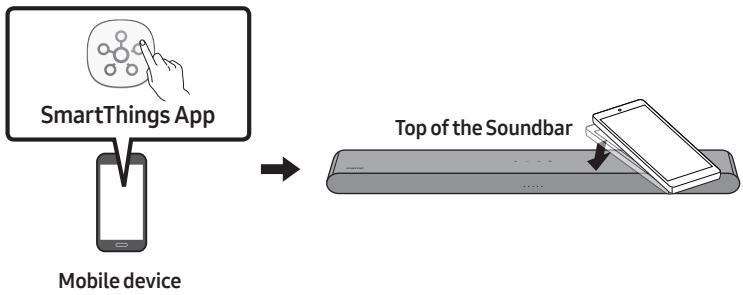
Tap the Soundbar with your mobile device to play audio from the mobile device through the Soundbar.
- This function may not be supported, depending on the mobile device.
- This function is only compatible on Samsung mobile devices with Android 8.1 or later.
-
Turn on the Tap Sound function on your mobile device.
-
For details on how to turn on the function, refer to "Enable the Tap Sound function" below.
-
Tap the Soundbar with the mobile device. Select "Start now" in the displayed message window.
A connection is established between the mobile device and Soundbar via Bluetooth.
-
Play audio from the mobile device through the Soundbar.
-
This function connects a mobile device to the Soundbar via Bluetooth by detecting vibration that occurs when the device touches the Soundbar.
- Make sure the mobile device does not tap a sharp corner of the Soundbar. The Soundbar or mobile device may become scratched or damaged.
- It is recommended that the mobile device be covered with a case. Lightly tap the wide area in the upper portion of the Soundbar, without using excessive force.
- To use this function, update the SmartThings app to the latest version.
The function may not be supported, depending on the app version.
Enable the Tap Sound function
Use the SmartThings app to turn on the Tap View, Tap Sound function.
- On the mobile device, run the SmartThings app.
- Select (→) in the SmartThings app screen displayed on the mobile device.
- Set "Tap View, Tap Sound" to On to allow the function to work when a mobile device moves close to the Soundbar.
NOTES
- When the mobile device is in power-saving mode, the Tap Sound function does not work.
- The Tap Sound function may not work if there are devices near the Soundbar that cause radio interference such as electric devices. Make sure devices that may cause radio interference are placed at a sufficient distance away from the Soundbar.
10 INSTALLING THE WALL MOUNT
Installation Precautions
Install on a vertical wall only.
- Do not install in a place with high temperature or humidity.
- Verify whether the wall is strong enough to support the product's weight. If not, reinforce the wall or choose another installation point.
Purchase and use the fixing screws or anchors appropriate for the kind of wall you have (plaster board, iron board, wood, etc.). If possible, fix the support screws into wall studs.
Purchase wall mounting screws according to the type and thickness of the wall you want to mount the Soundbar on.
Diameter: M5
Length: 35mm or longer recommended.
- Connect cables from the unit to external devices before you install the Soundbar on the wall.
- Make sure the unit is turned off and unplugged from the power source before you install it. Otherwise, it may cause an electric shock.
Wallmount Components

Wall Mount Guide


$$ (M 4 \times L 1 0) $$
Holder-Screw
Screw
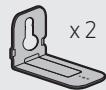
Bracket-Wall Mount
- Place the Wall Mount Guide against the wall surface.
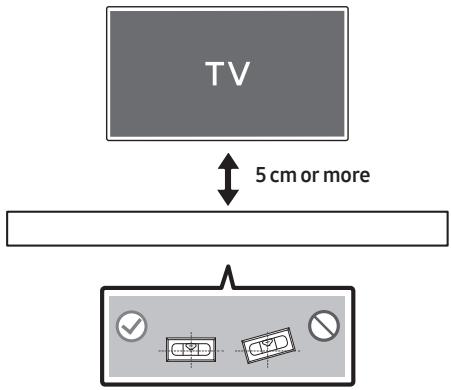
The Wall Mount Guide must be level.
- If your TV is mounted on the wall, install the Soundbar at least 5 cm below the TV.
-
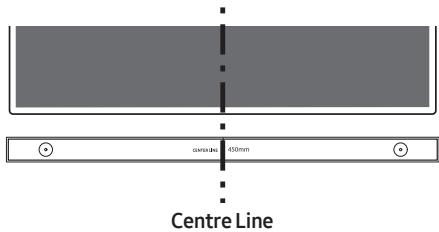
Align the Wall Mount Guide's Centre Line with the centre of your TV (if you are mounting the Soundbar below your TV), and then fix the Wall Mount Guide to the wall using tape.
-
If you are not mounting below a TV, place the Centre Line in the centre of the installation area.
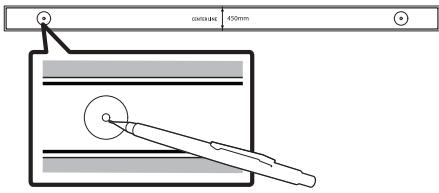
- Use a pen to mark the positions of the holes and remove the Wall Mount Guide.
-
Using an appropriately sized drill bit, drill a hole in the wall at each marking.
-
If the markings do not correspond to the positions of studs, make sure you insert appropriate anchors into the holes before you insert the support screws. If you use anchors, make sure the holes you drill are large enough for the anchors you use.
-
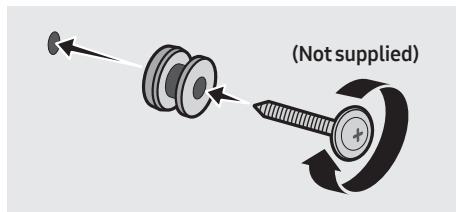
Push a screw (not supplied) through each Holder-Screw, and then screw each screw firmly into a support screw hole.
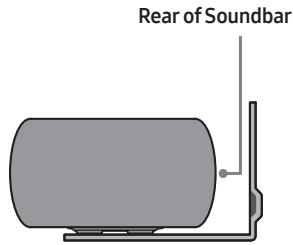
- Install the 2 Bracket-Wall Mounts in the correct orientation on the bottom of the Soundbar using 2 Screws.
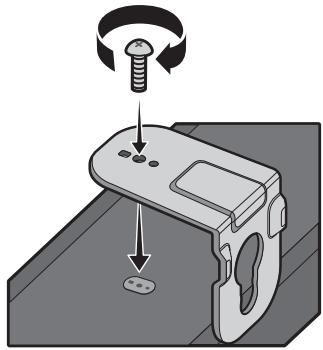
- When assembling, make sure the hanger part of the Bracket-Wall Mounts are located behind the rear of the Soundbar.
Right end of Soundbar
- Install the Soundbar with the attached Bracket-Wall Mounts by hanging the Bracket-Wall Mounts on the Holder-Screws on the wall.
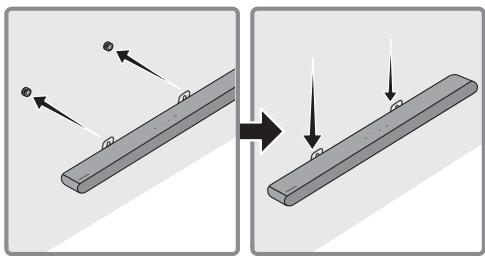
-
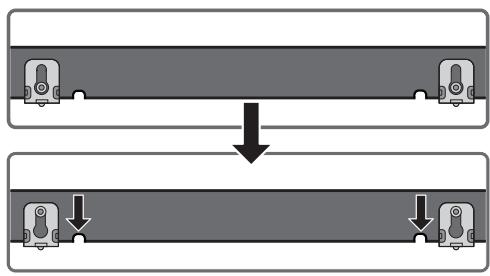
Slide the Soundbar down as shown below so that the Bracket-Wall Mounts rest securely on the Holder-Screws.
-
Insert the Holder-Screws into the wide (bottom) part of the Bracket-Wall Mounts, and then slide the Bracket-Wall Mounts down so that the Bracket-Wall Mounts rest securely on the Holder-Screws.
11 INSTALLING THE SOUNDBAR IN FRONT OF TV
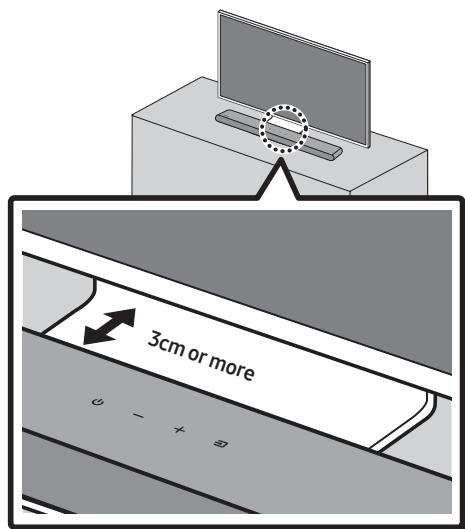
Align the centre of the Soundbar to the centre of the TV as illustrated in the image.
Place the Soundbar at least 3cm away from the TV.
NOTES
- Make sure the Soundbar is placed on a flat and solid surface.
Insufficient gap from the TV may cause acoustic problems.
12 SOFTWARE UPDATE
Important: After upgrading, keep the original Settings.
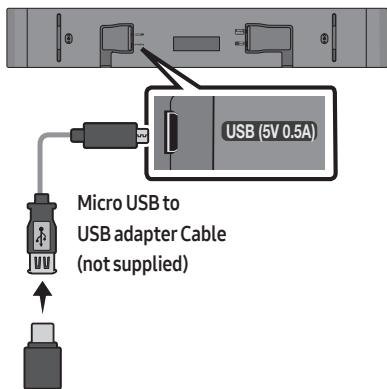
- Connect a USB memory stick to the USB port on your computer.
Important: Make sure there are no music files on the USB memory stick drive. This may cause the firmware update to fail. - Go to (samsung.com) select Enter Model Number and enter the model of your Soundbar. Select manuals and downloads and download the latest software file.
- Save the downloaded software to a USB memory stick and select "Extract Here" to unzip the folder.
-
Turn on the Soundbar and connect the USB memory stick containing the software update to the female port on a Micro USB adapter cable. Connect the cable to the USB port on the Soundbar.
-
Plug USB into Soudbar and switch to USB source, the software will update automatically and will complete update within 2 minutes. During the update process, the 5 LEDs will start flashing in a loop, and then the 5 LEDs will all be bright white, and then the 5 LEDs will flash in a loop again. When the update is complete, the cyan indicator blinks 3 times, and the soundbar automatically restarts.
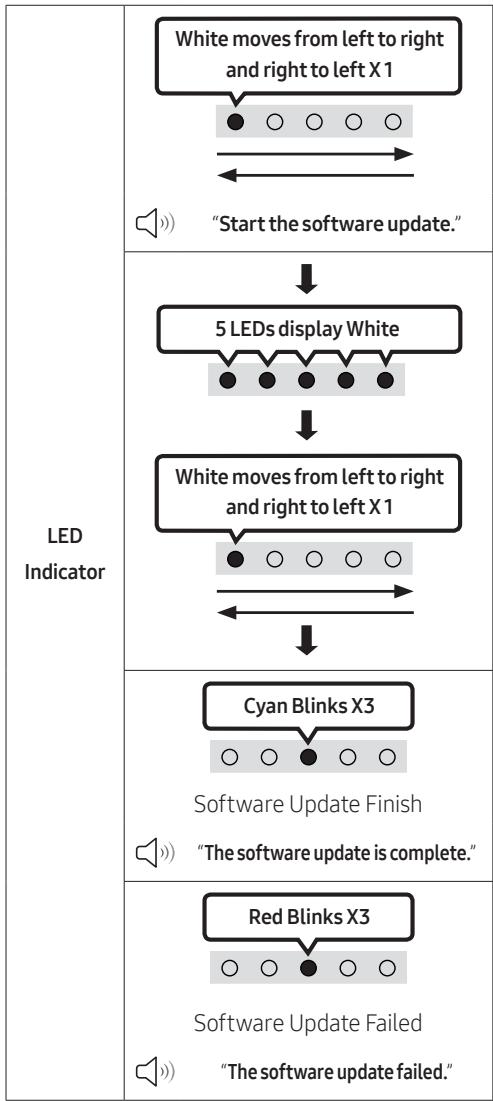
- This product has a DUAL BOOT function. If the firmware fails to update, you can update the firmware again.
If LED sequence flashing is not displayed
- Turn off the Soundbar, disconnect and then reconnect the USB storage device that contains the update files to the Soundbar's USB port.
- Disconnect the Soundbar's power cord, reconnect it, and then turn on the Soundbar.
NOTES
- The firmware update may not work properly if audio files supported by the Soundbar are stored in the USB storage device.
- Do not disconnect the power or remove the USB device while updates are being applied. The main unit will turn off automatically after completing the firmware update.
-
After upgrading, keep the original Settings. (include Volume, sound field, etc.)
-
When the firmware update is complete, the soundbar automatically turns on, and the Voice UI comes out. If the software update fails, check if the USB stick is defective.
-
Mac OS users should use MS-DOS (FAT) as the USB format.
- Updating via USB may not be available, depending on the USB storage device manufacturer.
Reset
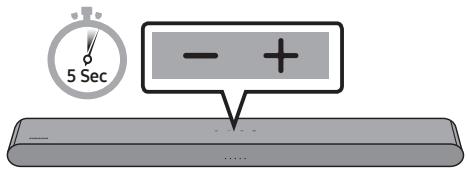
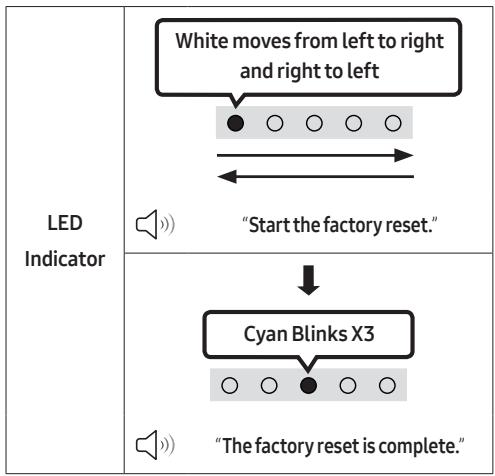
With the Soundbar on, press the - + (Volume) buttons on the body at the same time for at least 5 seconds. The LED display changes as shown below and then the Soundbar is reset.

CAUTION
- All the settings of the Soundbar are reset. Be sure to perform this only when a reset is required.
13 TROUBLESHOOTING
Before seeking assistance, check the following.
Soundbar does not turn on.
Check whether the power cord of the Soundbar is correctly inserted into the outlet.
Soundbar works erratically.
After removing the power cord, insert it again.
Power cycle the external device and try again.
If there is no signal, the Soundbar automatically turns off after a certain period of time. Turn on the power. (See page 9.)
Remote control does not work.
Point the remote directly at the Soundbar.
Replace the batteries with new ones.
Soundbar does not output any sound.
The volume of the Soundbar is too low or muted. Adjust the volume.
When any external device (STB, Bluetooth device, mobile device, etc.) is connected, adjust the volume of the external device.
For sound output of the TV, select Soundbar. (Samsung TV: Home () Menu Settings () All Settings () Sound Sound Output Select Soundbar)
The cable connection to the Soundbar may not be loose. Remove the cable and connect again.
Remove the power cord completely, reconnect, and turn the power on.
Reset the product and try again. (See page 36.)
If the TV is not connected via HDMI (ARC).
Check whether the HDMI cable is correctly connected to the ARC terminal. (See page 17)
Connection may not be possible due to the connected external device (set-top box, game machine, etc.). Directly connect the Soundbar.
HDMI-CEC may not be activated on the TV. Turn on the CEC on the TV menu. (Samsung TV: Home () Menu Settings () All Settings () Connection External Device Manager Anynet+ (HDMI-CEC) ON)
Soundbar does not connect via Bluetooth.
When connecting a new device, switch to Bluetooth Pairing for connection. (Press the PAIR button on the remote control or press the Source) button on the body for at least 5 seconds.)
If the Soundbar is connected to another device, disconnect that device first to switch the device.
Reconnect it after removing the Bluetooth speaker list on the device to connect. (Samsung TV: Home () Menu Settings (念) All Settings (念) Sound Sound Output Bluetooth Speaker List)
Remove and reconnect the power plug, then try again.
Reset the product and try again. (See page 36.)
Sound drops out when connected via Bluetooth.
If your device that is connected via Bluetooth moves too far away from the Soundbar, it may cause the sound to drop out. Move the device closer to the Soundbar.
If a part of your body is in contact with the Bluetooth transceiver or the product is installed on metal furniture, sound may drop out. Check the installation environment and conditions for use.
Bluetooth multi connection does not work.
When the TV is connected to the soundbar, Bluetooth multi connection may not operate. Disconnect the Soundbar from the TV and try again.
Check whether the Bluetooth Multi connection setting is turned on. (Refer to the "Soundbar does not connect via Bluetooth." section.)
Disconnect the device currently playing, pair with the device that you want to connect, and reconnect the previous device.
If the sound is inaudible even after connecting properly, refer to the "Sound drops out when connected via Bluetooth." section.
Soundbar does not turn on automatically with the TV.
When you turn off the Soundbar while watching TV, power synchronization with the TV is disabled. First turn off the TV.
14 LICENCE
Dolby AUDIO
Manufactured under license from Dolby Laboratories. Dolby, Dolby Audio and the double-D symbol are trademarks of Dolby Laboratories Licensing Corporation.
- This product does not support Dolby Atmos®.
dt
For DTS patents, see http://patents.dts.com. Manufactured under license from DTS, Inc. (for companies headquartered in the U.S./ Japan/Taiwan) or under license from DTS Licensing Limited (for all other companies). DTS, Digital Surround, and the DTS logo are registered trademarks or trademarks of DTS, Inc. in the United States and other countries. © 2021 DTS, Inc. ALL RIGHTS RESERVED.
HOMI™ HIGH-DEFINITION MULTIMEDIA INTERFACE
The terms HDMI and HDMI High-Definition Multimedia Interface, and the HDMI Logo are trademarks or registered trademarks of HDMI Licensing Administrator, Inc. in the United States and other countries.
Bluetooth
The Bluetooth® word mark and logos are registered trademarks owned by Bluetooth SIG, Inc. and any use of such marks by Samsung Electronics Co., Ltd. is under license. Other trademarks and trade names are those of their respective owners.

[ENERGY STAR]
ENERGY STAR qualified model only
- Your Samsung product is ENERGY STAR qualified in its factory default setting. Change to certain features, settings and functionality in this product can change the power consumption, possibly beyond the limits required for ENERGY STAR qualification.
- Environmental Protection Agency and Department of Energy. ENERGY STAR is a joint program of the Government agencies, designed to promote energy efficient products and practices.
Refer to www.energystar.gov for more information of the ENERGY STAR Program.
ENERGY STAR qualified model only (Applicable to Thin Client models only)
As an ENERGY STAR® Partner, SAMSUNG has determined that this product meets the ENERGY STAR® guidelines for energy efficiency.
- The ENERGY STAR Program has been to reduced greenhouse gas emissions and save energy through voluntary labeling.
- Power management setting of this product have been enabled by default, and have various timing settings from 1 minutes to 5 hours.
- The product can wake with a button press on the chassis from sleep mode.
ENERGY STAR qualified model only (The other models)
- As an ENERGY STAR Partner, Samsung has determined that this product or product models meets the ENERGY STAR guideline for energy efficiency.
15 OPEN SOURCE LICENCE NOTICE
To send inquiries and requests for questions regarding open sources, contact Samsung Open Source (http://opensource.samsung.com)
16 IMPORTANT NOTES ABOUT SERVICE
- Figures and illustrations in this User Manual are provided for reference only and may differ from actual product appearance.
- An administration fee may be charged if either
(a) an engineer is called out at your request and there is no defect with the product (i.e. where the user manual has not been read).
(b) you bring the unit to a repair centre and there is no defect with the product (i.e. where the user manual has not been read).
- You will be informed of the administration fee amount before a technician visits.
17 SPECIFICATIONS AND GUIDE
Specifications
| Model Name | HW-S50B / HW-S56B |
| USB | 5V/0.5A |
| Weight | 2.4 kg |
| Dimensions (W x H x D) | 670.0 x 62.3 x 105.0 mm |
| Operating Temperature Range | +5°C to +35°C |
| Operating Humidity Range | 10 % ~ 75 % |
| AMPLIFIER Rated Output power | (30W x 2) + (30W x 2) + 20W |
| Supported play formats DTS, Dolby® Digital (DTS Virtual Surround is played in DTS format.) | LPCM 2ch, Dolby Audio™ (supporting Dolby® Digital), DTS, DTS Virtual:X |
| WIRELESS DEVICE OUTPUT POWER | The transmitting power is 9 dBm. |
| Overall Standby Power Consumption (W) | 0.5W |
| Bluetooth Port deactivation method | Press and hold the SOUND MODE button for more than 5 seconds to turn off Bluetooth Power function. |
NOTES
Samsung Electronics Co., Ltd reserves the right to change the specifications without notice.
- Weight and dimensions are approximate.
Hereby, Samsung declares that this radio equipment is in compliance with Directive 2014/53/EU and the relevant UK statutory requirements.
The full text of the declaration of conformity is available at the following internet address:
http://www.samsung.com go to Support and enter the model name.
This equipment may be operated in all EU countries and in the UK.

[Correct disposal of batteries in this product]
(Applicable in countries with separate collection systems)
This marking on the battery, manual or packaging indicates that the batteries in this product should not be disposed of with other household waste at the end of their working life. Where marked, the chemical symbols Hg, Cd or Pb indicate that the battery contains mercury, cadmium or lead above the reference levels in EC Directive 2006/66.
If batteries are not properly disposed of, these substances can cause harm to human health or the environment.
To protect natural resources and to promote material reuse, please separate batteries from other types of waste and recycle them through your local, free battery return system.

Correct Disposal of This Product
(Waste Electrical & Electronic Equipment)
(Applicable in countries with separate collection systems)
This marking on the product, accessories or literature indicates that the product and its electronic accessories (e.g. charger, headset, USB cable) should not be disposed of with other household waste at the end of their working life. To prevent possible harm to the environment or human health from uncontrolled waste disposal, please separate these items from other types of waste and recycle them responsibly to promote the sustainable reuse of material resources.
Household users should contact either the retailer where they purchased this product, or their local government office, for details of where and how they can take these items for environmentally safe recycling.
Business users should contact their supplier and check the terms and conditions of the purchase contract. This product and its electronic accessories should not be mixed with other commercial wastes for disposal.
For information on Samsung's environmental commitments and product specific regulatory obligations e.g. REACH, WEEE, Batteries, visit:
www.samsung.com/uk/aboutsamsung/sustainability/environment/our-commitment/data/
COMMISSION REGULATION (EU) 2019/1782
Ecodesign requirements for external power supplies :
www.samsung.com/global/ecodesign_component
INFORMATIONS RELATIVES À LA SÉCURITÉ
AVERTISSEMENTS
02 VUE D'ENSEMBLE DU PRODUIT
II (Lecture / Pause)
Haut/Bas/Gauche/Droite
Multi-apparliament Bluetooth
Manufactured under license from Dolby Laboratories. Dolby, Dolby Audio and the double-D symbol are trademarks of Dolby Laboratories Licensing Corporation.
For DTS patents, see http://patents.dts.com. Manufactured under license from DTS, Inc. (for companies headquartered in the U.S./ Japan/Taiwan) or under license from DTS Licensing Limited (for all other companies). DTS, Digital Surround, and the DTS logo are registered trademarks or trademarks of DTS, Inc. in the United States and other countries. © 2021 DTS, Inc. ALL RIGHTS RESERVED.
HOMI™ HIGH-DEFINITION MULTIMEDIA INTERFACE
The terms HDMI and HDMI High-Definition Multimedia Interface, and the HDMI Logo are trademarks or registered trademarks of HDMI Licensing Administrator, Inc. in the United States and other countries.
Bluetooth
The Bluetooth® word mark and logos are registered trademarks owned by Bluetooth SIG, Inc. and any use of such marks by Samsung Electronics Co., Ltd. is under license. Other trademarks and trade names are those of their respective owners.

[ENERGY STAR]
ENERGY STAR qualified model only
- Your Samsung product is ENERGY STAR qualified in its factory default setting. Change to certain features, settings and functionality in this product can change the power consumption, possibly beyond the limits required for ENERGY STAR qualification.
- Environmental Protection Agency and Department of Energy. ENERGY STAR is a joint program of the Government agencies, designed to promote energy efficient products and practices.
Refer to www.energystar.gov for more information of the ENERGY STAR Program.
ENERGY STAR qualified model only (Applicable to Thin Client models only)
As an ENERGY STAR® Partner, SAMSUNG has determined that this product meets the ENERGY STAR® guidelines for energy efficiency.
- The ENERGY STAR Program has been to reduced greenhouse gas emissions and save energy through voluntary labeling.
- Power management setting of this product have been enabled by default, and have various timing settings from 1 minutes to 5 hours.
- The product can wake with a button press on the chassis from sleep mode.
ENERGY STAR qualified model only (The other models)
- As an ENERGY STAR Partner, Samsung has determined that this product or product models meets the ENERGY STAR guideline for energy efficiency.
15 AVIS DE LICENCE LIBRE
LIVELLO WOOFER (BASSO)
Manufactured under license from Dolby Laboratories. Dolby, Dolby Audio and the double-D symbol are trademarks of Dolby Laboratories Licensing Corporation.
For DTS patents, see http://patents.dts.com. Manufactured under license from DTS, Inc. (for companies headquartered in the U.S./ Japan/Taiwan) or under license from DTS Licensing Limited (for all other companies). DTS, Digital Surround, and the DTS logo are registered trademarks or trademarks of DTS, Inc. in the United States and other countries. © 2021 DTS, Inc. ALL RIGHTS RESERVED.
HOMI™ HIGH-DEFINITION MULTIMEDIA INTERFACE
The terms HDMI and HDMI High-Definition Multimedia Interface, and the HDMI Logo are trademarks or registered trademarks of HDMI Licensing Administrator, Inc. in the United States and other countries.

Bluetooth
The Bluetooth® word mark and logos are registered trademarks owned by Bluetooth SIG, Inc. and any use of such marks by Samsung Electronics Co., Ltd. is under license. Other trademarks and trade names are those of their respective owners.

[ENERGY STAR]
ENERGY STAR qualified model only
- Your Samsung product is ENERGY STAR qualified in its factory default setting. Change to certain features, settings and functionality in this product can change the power consumption, possibly beyond the limits required for ENERGY STAR qualification.
- Environmental Protection Agency and Department of Energy. ENERGY STAR is a joint program of the Government agencies, designed to promote energy efficient products and practices.
Refer to www.energystar.gov for more information of the ENERGY STAR Program.
ENERGY STAR qualified model only (Applicable to Thin Client models only)
As an ENERGY STAR® Partner, SAMSUNG has determined that this product meets the ENERGY STAR® guidelines for energy efficiency.
- The ENERGY STAR Program has been to reduced greenhouse gas emissions and save energy through voluntary labeling.
- Power management setting of this product have been enabled by default, and have various timing settings from 1 minutes to 5 hours.
- The product can wake with a button press on the chassis from sleep mode.
ENERGY STAR qualified model only (The other models)
- As an ENERGY STAR Partner, Samsung has determined that this product or product models meets the ENERGY STAR guideline for energy efficiency.
15 AVVISO DI LICENZA OPEN SOURCE
http://www.samsung.com/it/aboutsamsung/sustainability/environment/our-commitment/data/
REGOLAMENTO (UE) 2019/1782 DELLA COMMISSIONE
| Indicator LED | Blanco parpadea X1 ○ ○ ● ○ ○ |
| "DTS Virtual:X" → "Standard" → "Music" → "Game" → "Adaptive Sound" |
- DTS Virtual:X
Manufactured under license from Dolby Laboratories. Dolby, Dolby Audio and the double-D symbol are trademarks of Dolby Laboratories Licensing Corporation.
For DTS patents, see http://patents.dts.com. Manufactured under license from DTS, Inc. (for companies headquartered in the U.S./ Japan/Taiwan) or under license from DTS Licensing Limited (for all other companies). DTS, Digital Surround, and the DTS logo are registered trademarks or trademarks of DTS, Inc. in the United States and other countries. © 2021 DTS, Inc. ALL RIGHTS RESERVED.
HOMI ™ HIGH-DEFINITION MULTIMEDIA INTERFACE
The terms HDMI and HDMI High-Definition Multimedia Interface, and the HDMI Logo are trademarks or registered trademarks of HDMI Licensing Administrator, Inc. in the United States and other countries.

Bluetooth
The Bluetooth® word mark and logos are registered trademarks owned by Bluetooth SIG, Inc. and any use of such marks by Samsung Electronics Co., Ltd. is under license. Other trademarks and trade names are those of their respective owners.

[ENERGY STAR]
ENERGY STAR qualified model only
- Your Samsung product is ENERGY STAR qualified in its factory default setting. Change to certain features, settings and functionality in this product can change the power consumption, possibly beyond the limits required for ENERGY STAR qualification.
- Environmental Protection Agency and Department of Energy. ENERGY STAR is a joint program of the Government agencies, designed to promote energy efficient products and practices.
Refer to www.energystar.gov for more information of the ENERGY STAR Program.
ENERGY STAR qualified model only (Applicable to Thin Client models only)
As an ENERGY STAR® Partner, SAMSUNG has determined that this product meets the ENERGY STAR® guidelines for energy efficiency.
- The ENERGY STAR Program has been to reduced greenhouse gas emissions and save energy through voluntary labeling.
- Power management setting of this product have been enabled by default, and have various timing settings from 1 minutes to 5 hours.
- The product can wake with a button press on the chassis from sleep mode.
ENERGY STAR qualified model only (The other models)
- As an ENERGY STAR Partner, Samsung has determined that this product or product models meets the ENERGY STAR guideline for energy efficiency.
15 AVISO SOBRE LICENCIA DE CÓDIGO ABIERTO
www.samsung.com/uk/aboutsamsung/sustainability/environment/our-commitment/data/
REGLAMENTO (UE) 2019/1782 DE LA COMISION
| Indicador LED | Branco pisa X1 ○○●○○ |
| “DTS Virtual:X” → “Standard” → “Music” → “Game” → “Adaptive Sound” |
- DTS Virtual:X
Manufactured under license from Dolby Laboratories. Dolby, Dolby Audio and the double-D symbol are trademarks of Dolby Laboratories Licensing Corporation.
For DTS patents, see http://patents.dts.com. Manufactured under license from DTS, Inc. (for companies headquartered in the U.S./ Japan/Taiwan) or under license from DTS Licensing Limited (for all other companies). DTS, Digital Surround, and the DTS logo are registered trademarks or trademarks of DTS, Inc. in the United States and other countries. © 2021 DTS, Inc. ALL RIGHTS RESERVED.
HOMI™ HIGH-DEFINITION MULTIMEDIA INTERFACE
The terms HDMI and HDMI High-Definition Multimedia Interface, and the HDMI Logo are trademarks or registered trademarks of HDMI Licensing Administrator, Inc. in the United States and other countries.

Bluetooth
The Bluetooth® word mark and logos are registered trademarks owned by Bluetooth SIG, Inc. and any use of such marks by Samsung Electronics Co., Ltd. is under license. Other trademarks and trade names are those of their respective owners.

[ENERGY STAR]
ENERGY STAR qualified model only
- Your Samsung product is ENERGY STAR qualified in its factory default setting. Change to certain features, settings and functionality in this product can change the power consumption, possibly beyond the limits required for ENERGY STAR qualification.
- Environmental Protection Agency and Department of Energy. ENERGY STAR is a joint program of the Government agencies, designed to promote energy efficient products and practices.
Refer to www.energystar.gov for more information of the ENERGY STAR Program.
ENERGY STAR qualified model only (Applicable to Thin Client models only)
As an ENERGY STAR® Partner, SAMSUNG has determined that this product meets the ENERGY STAR® guidelines for energy efficiency.
- The ENERGY STAR Program has been to reduced greenhouse gas emissions and save energy through voluntary labeling.
- Power management setting of this product have been enabled by default, and have various timing settings from 1 minutes to 5 hours.
- The product can wake with a button press on the chassis from sleep mode.
ENERGY STAR qualified model only (The other models)
- As an ENERGY STAR Partner, Samsung has determined that this product or product models meets the ENERGY STAR guideline for energy efficiency.
15 AVISO DE LICENÇA DE OPEN SOURCE
www.samsung.com/uk/aboutsamsung/sustainability/environment/our-commitment/data/
REGULAMENTO (UE) 2019/1782 DA COMISSAO
| Led-lampje | Wit knippert X1 ○○●○○ |
| “DTS Virtual:X” → “Standard” → “Music” → “Game” → “Adaptive Sound” |
- DTS Virtual:X
13 PROBLEEMOPLOSSING
Manufactured under license from Dolby Laboratories. Dolby, Dolby Audio and the double-D symbol are trademarks of Dolby Laboratories Licensing Corporation.
For DTS patents, see http://patents.dts.com. Manufactured under license from DTS, Inc. (for companies headquartered in the U.S./ Japan/Taiwan) or under license from DTS Licensing Limited (for all other companies). DTS, Digital Surround, and the DTS logo are registered trademarks or trademarks of DTS, Inc. in the United States and other countries. © 2021 DTS, Inc. ALL RIGHTS RESERVED.
HOMI™ HIGH-DEFINITION MULTIMEDIA INTERFACE
The terms HDMI and HDMI High-Definition Multimedia Interface, and the HDMI Logo are trademarks or registered trademarks of HDMI Licensing Administrator, Inc. in the United States and other countries.

Bluetooth
The Bluetooth® word mark and logos are registered trademarks owned by Bluetooth SIG, Inc. and any use of such marks by Samsung Electronics Co., Ltd. is under license. Other trademarks and trade names are those of their respective owners.

[ENERGY STAR]
ENERGY STAR qualified model only
- Your Samsung product is ENERGY STAR qualified in its factory default setting. Change to certain features, settings and functionality in this product can change the power consumption, possibly beyond the limits required for ENERGY STAR qualification.
- Environmental Protection Agency and Department of Energy. ENERGY STAR is a joint program of the Government agencies, designed to promote energy efficient products and practices.
Refer to www.energystar.gov for more information of the ENERGY STAR Program.
ENERGY STAR qualified model only (Applicable to Thin Client models only)
As an ENERGY STAR® Partner, SAMSUNG has determined that this product meets the ENERGY STAR® guidelines for energy efficiency.
- The ENERGY STAR Program has been to reduced greenhouse gas emissions and save energy through voluntary labeling.
- Power management setting of this product have been enabled by default, and have various timing settings from 1 minutes to 5 hours.
- The product can wake with a button press on the chassis from sleep mode.
ENERGY STAR qualified model only (The other models)
- As an ENERGY STAR Partner, Samsung has determined that this product or product models meets the ENERGY STAR guideline for energy efficiency.
15 KENNISGEVING OPEN SOURCE- LICENTIE
www.samsung.com/uk/aboutsamsung/sustainability/environment/our-commitment/data/
VERORDENING (EU) 2019/1782 VAN DE COMMISSIE
(Standardmodus), "Samsung-TV Remote", "All-TV Remote".
Manufactured under license from Dolby Laboratories. Dolby, Dolby Audio and the double-D symbol are trademarks of Dolby Laboratories Licensing Corporation.
For DTS patents, see http://patents.dts.com. Manufactured under license from DTS, Inc. (for companies headquartered in the U.S./ Japan/Taiwan) or under license from DTS Licensing Limited (for all other companies). DTS, Digital Surround, and the DTS logo are registered trademarks or trademarks of DTS, Inc. in the United States and other countries. © 2021 DTS, Inc. ALL RIGHTS RESERVED.
HOMI™ HIGH-DEFINITION MULTIMEDIA INTERFACE
The terms HDMI and HDMI High-Definition Multimedia Interface, and the HDMI Logo are trademarks or registered trademarks of HDMI Licensing Administrator, Inc. in the United States and other countries.
Bluetooth
The Bluetooth® word mark and logos are registered trademarks owned by Bluetooth SIG, Inc. and any use of such marks by Samsung Electronics Co., Ltd. is under license. Other trademarks and trade names are those of their respective owners.

[ENERGY STAR]
ENERGY STAR qualified model only
- Your Samsung product is ENERGY STAR qualified in its factory default setting. Change to certain features, settings and functionality in this product can change the power consumption, possibly beyond the limits required for ENERGY STAR qualification.
- Environmental Protection Agency and Department of Energy. ENERGY STAR is a joint program of the Government agencies, designed to promote energy efficient products and practices.
Refer to www.energystar.gov for more information of the ENERGY STAR Program.
ENERGY STAR qualified model only (Applicable to Thin Client models only)
As an ENERGY STAR® Partner, SAMSUNG has determined that this product meets the ENERGY STAR® guidelines for energy efficiency.
- The ENERGY STAR Program has been to reduced greenhouse gas emissions and save energy through voluntary labeling.
- Power management setting of this product have been enabled by default, and have various timing settings from 1 minutes to 5 hours.
- The product can wake with a button press on the chassis from sleep mode.
ENERGY STAR qualified model only (The other models)
- As an ENERGY STAR Partner, Samsung has determined that this product or product models meets the ENERGY STAR guideline for energy efficiency.
15 BEKANNTMACHUNG ZU OPEN SOURCE LIZENZEN
9 Upp/Ned/Vanster/Hoger
| LED-indicator | Vit blinkar X1 ○ ○ ● ○ ○ |
| "DTS Virtual:X" → "Standard" → "Music" → "Game" → "Adaptive Sound" |
- DTS Virtual:X
Bluetooth-multianslutting
Manufactured under license from Dolby Laboratories. Dolby, Dolby Audio and the double-D symbol are trademarks of Dolby Laboratories Licensing Corporation.
For DTS patents, see http://patents.dts.com. Manufactured under license from DTS, Inc. (for companies headquartered in the U.S./ Japan/Taiwan) or under license from DTS Licensing Limited (for all other companies). DTS, Digital Surround, and the DTS logo are registered trademarks or trademarks of DTS, Inc. in the United States and other countries. © 2021 DTS, Inc. ALL RIGHTS RESERVED.
HOMI™ HIGH-DEFINITION MULTIMEDIA INTERFACE
The terms HDMI and HDMI High-Definition Multimedia Interface, and the HDMI Logo are trademarks or registered trademarks of HDMI Licensing Administrator, Inc. in the United States and other countries.

Bluetooth
The Bluetooth® word mark and logos are registered trademarks owned by Bluetooth SIG, Inc. and any use of such marks by Samsung Electronics Co., Ltd. is under license. Other trademarks and trade names are those of their respective owners.

[ENERGY STAR]
ENERGY STAR qualified model only
- Your Samsung product is ENERGY STAR qualified in its factory default setting. Change to certain features, settings and functionality in this product can change the power consumption, possibly beyond the limits required for ENERGY STAR qualification.
- Environmental Protection Agency and Department of Energy. ENERGY STAR is a joint program of the Government agencies, designed to promote energy efficient products and practices.
Refer to www.energystar.gov for more information of the ENERGY STAR Program.
ENERGY STAR qualified model only (Applicable to Thin Client models only)
As an ENERGY STAR® Partner, SAMSUNG has determined that this product meets the ENERGY STAR® guidelines for energy efficiency.
- The ENERGY STAR Program has been to reduced greenhouse gas emissions and save energy through voluntary labeling.
- Power management setting of this product have been enabled by default, and have various timing settings from 1 minutes to 5 hours.
- The product can wake with a button press on the chassis from sleep mode.
ENERGY STAR qualified model only (The other models)
- As an ENERGY STAR Partner, Samsung has determined that this product or product models meets the ENERGY STAR guideline for energy efficiency.
15 LICENSMEDDELANDE FÖR OPEN SOURCE
www.samsung.com/uk/aboutsamsung/sustainability/environment/our-commitment/data/
KOMMISSIONENS FÖRORDNING (EU) 2019/1782
Avgir originallyden.
Music
12
WOOFER-NIVA (BASS)
13
TONE CONTROL
Nár subwooferen er koblet til, skyver du knappen opp ellen ned for á justere nivaet til subwooferen til -12 eller mellom -6 til +6. Nár subwooferen er koblet fra, skyver du knappen opp ellen ned for á justere bassnivaet mellom -6 til +6. For á angi volumnivaet for subwooferen (bassen) til 0 (standard) trykker du på knappen (hvis Soundbar er koblet til trádløs subwoofer (selges separat)).
Ved Å trykke på knappen kan du justere volumet for diskant- eller basslyden. Ønset element kan justeres med Opp/Ned-knappene. (Denne funksjonen er tilgengelig i alle lydmoduser unntatt «Standard».)
| LED- indicator | Blinker hvit X1 ○○●○○ |
| «Treble»→ «Bass» |
Bluetooth-multitilkobling
Soundbar kan kobles til 2 Bluetooth-enheter smtidig.
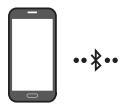
Bluetooth-enhet A


Bluetooth-enhet B
TV auto. tilkobling av/pa
- Trykk og holdinne PAIR-knappen i mer enn fem sekunder pa fjernkontrollen mens Soundbar er slatt av.
- En flertarget LED-lampe på Soundbar blinker «Cyan».
| Bluetooth-paringsknapp | LED-indikator | |
| I ventemodus 5 Sec | Blinker cyan X1 Flertilkobling på (standard) | Blinker rødt X1 Flertilkobling av |
Manufactured under license from Dolby Laboratories. Dolby, Dolby Audio and the double-D symbol are trademarks of Dolby Laboratories Licensing Corporation.
For DTS patents, see http://patents.dts.com. Manufactured under license from DTS, Inc. (for companies headquartered in the U.S./ Japan/Taiwan) or under license from DTS Licensing Limited (for all other companies). DTS, Digital Surround, and the DTS logo are registered trademarks or trademarks of DTS, Inc. in the United States and other countries. © 2021 DTS, Inc. ALL RIGHTS RESERVED.
HOMI™ HIGH-DEFINITION MULTIMEDIA INTERFACE
The terms HDMI and HDMI High-Definition Multimedia Interface, and the HDMI Logo are trademarks or registered trademarks of HDMI Licensing Administrator, Inc. in the United States and other countries.

Bluetooth
The Bluetooth® word mark and logos are registered trademarks owned by Bluetooth SIG, Inc. and any use of such marks by Samsung Electronics Co., Ltd. is under license. Other trademarks and trade names are those of their respective owners.

[ENERGY STAR]
ENERGY STAR qualified model only
- Your Samsung product is ENERGY STAR qualified in its factory default setting. Change to certain features, settings and functionality in this product can change the power consumption, possibly beyond the limits required for ENERGY STAR qualification.
- Environmental Protection Agency and Department of Energy. ENERGY STAR is a joint program of the Government agencies, designed to promote energy efficient products and practices.
Refer to www.energystar.gov for more information of the ENERGY STAR Program.
ENERGY STAR qualified model only (Applicable to Thin Client models only)
As an ENERGY STAR® Partner, SAMSUNG has determined that this product meets the ENERGY STAR® guidelines for energy efficiency.
- The ENERGY STAR Program has been to reduced greenhouse gas emissions and save energy through voluntary labeling.
- Power management setting of this product have been enabled by default, and have various timing settings from 1 minutes to 5 hours.
- The product can wake with a button press on the chassis from sleep mode.
ENERGY STAR qualified model only (The other models)
- As an ENERGY STAR Partner, Samsung has determined that this product or product models meets the ENERGY STAR guideline for energy efficiency.
15 LISENSMERKNADER OMÄPEN KILDEKODE
For a sendehenvendelserg sporsmal angaende apne kilder,contact Samsung Open Source (http://opensource.samsung.com)
16 VIKTIG MERKNAD OM SERVICE
www.samsung.com/uk/aboutsamsung/sustainability/environment/our-commitment/data/
KOMMISJONSFORORDNING (EU) 2019/1782
12
WOOFER (BASSO) LEVEL
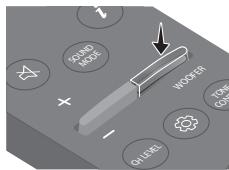
13
TONE CONTROL
Manufactured under license from Dolby Laboratories. Dolby, Dolby Audio and the double-D symbol are trademarks of Dolby Laboratories Licensing Corporation.
For DTS patents, see http://patents.dts.com. Manufactured under license from DTS, Inc. (for companies headquartered in the U.S./ Japan/Taiwan) or under license from DTS Licensing Limited (for all other companies). DTS, Digital Surround, and the DTS logo are registered trademarks or trademarks of DTS, Inc. in the United States and other countries. © 2021 DTS, Inc. ALL RIGHTS RESERVED.
HOMI™ HIGH-DEFINITION MULTIMEDIA INTERFACE
The terms HDMI and HDMI High-Definition Multimedia Interface, and the HDMI Logo are trademarks or registered trademarks of HDMI Licensing Administrator, Inc. in the United States and other countries.

Bluetooth
The Bluetooth® word mark and logos are registered trademarks owned by Bluetooth SIG, Inc. and any use of such marks by Samsung Electronics Co., Ltd. is under license. Other trademarks and trade names are those of their respective owners.

[ENERGY STAR]
ENERGY STAR qualified model only
- Your Samsung product is ENERGY STAR qualified in its factory default setting. Change to certain features, settings and functionality in this product can change the power consumption, possibly beyond the limits required for ENERGY STAR qualification.
- Environmental Protection Agency and Department of Energy. ENERGY STAR is a joint program of the Government agencies, designed to promote energy efficient products and practices.
Refer to www.energystar.gov for more information of the ENERGY STAR Program.
ENERGY STAR qualified model only (Applicable to Thin Client models only)
As an ENERGY STAR® Partner, SAMSUNG has determined that this product meets the ENERGY STAR® guidelines for energy efficiency.
- The ENERGY STAR Program has been to reduced greenhouse gas emissions and save energy through voluntary labeling.
- Power management setting of this product have been enabled by default, and have various timing settings from 1 minutes to 5 hours.
- The product can wake with a button press on the chassis from sleep mode.
ENERGY STAR qualified model only (The other models)
- As an ENERGY STAR Partner, Samsung has determined that this product or product models meets the ENERGY STAR guideline for energy efficiency.
15 AVOIMEN LÄHDEKIELEN LISENSSI-ILMOITUS
www.samsung.com/uk/aboutsamsung/sustainability/environment/our-commitment/data/
KOMISSION ASETUS (EU) 2019/1782
| LED- indicator | Blinker hvid x1 ○○●○○ |
| “DTS Virtual:X” → “Standard” → “Music” → “Game” → “Adaptive Sound” |
- DTS Virtual:X
Manufactured under license from Dolby Laboratories. Dolby, Dolby Audio and the double-D symbol are trademarks of Dolby Laboratories Licensing Corporation.
For DTS patents, see http://patents.dts.com. Manufactured under license from DTS, Inc. (for companies headquartered in the U.S./ Japan/Taiwan) or under license from DTS Licensing Limited (for all other companies). DTS, Digital Surround, and the DTS logo are registered trademarks or trademarks of DTS, Inc. in the United States and other countries. © 2021 DTS, Inc. ALL RIGHTS RESERVED.
HOMI™ HIGH-DEFINITION MULTIMEDIA INTERFACE
The terms HDMI and HDMI High-Definition Multimedia Interface, and the HDMI Logo are trademarks or registered trademarks of HDMI Licensing Administrator, Inc. in the United States and other countries.

Bluetooth
The Bluetooth® word mark and logos are registered trademarks owned by Bluetooth SIG, Inc. and any use of such marks by Samsung Electronics Co., Ltd. is under license. Other trademarks and trade names are those of their respective owners.

[ENERGY STAR]
ENERGY STAR qualified model only
- Your Samsung product is ENERGY STAR qualified in its factory default setting. Change to certain features, settings and functionality in this product can change the power consumption, possibly beyond the limits required for ENERGY STAR qualification.
- Environmental Protection Agency and Department of Energy. ENERGY STAR is a joint program of the Government agencies, designed to promote energy efficient products and practices.
Refer to www.energystar.gov for more information of the ENERGY STAR Program.
ENERGY STAR qualified model only (Applicable to Thin Client models only)
As an ENERGY STAR® Partner, SAMSUNG has determined that this product meets the ENERGY STAR® guidelines for energy efficiency.
- The ENERGY STAR Program has been to reduced greenhouse gas emissions and save energy through voluntary labeling.
- Power management setting of this product have been enabled by default, and have various timing settings from 1 minutes to 5 hours.
- The product can wake with a button press on the chassis from sleep mode.
ENERGY STAR qualified model only (The other models)
- As an ENERGY STAR Partner, Samsung has determined that this product or product models meets the ENERGY STAR guideline for energy efficiency.
15 BEMAERKING VEDR. OPEN SOURCE-LICENS
For at sende forsporgsler og anmodninger om sporgsmål vedrørende Åbne kilder, skal du kontakte Samsung Open Source (http://opensource.samsung.com)
16 VIGTIG NOTE OM SERVICE
www.samsung.com/uk/aboutsamsung/sustainability/environment/our-commitment/data/
KOMMISSIONENS FORORDNING (EU) 2019/1782
9 Sus/Jos/Stanga/Dreapta
Manufactured under license from Dolby Laboratories. Dolby, Dolby Audio and the double-D symbol are trademarks of Dolby Laboratories Licensing Corporation.
For DTS patents, see http://patents.dts.com. Manufactured under license from DTS, Inc. (for companies headquartered in the U.S./ Japan/Taiwan) or under license from DTS Licensing Limited (for all other companies). DTS, Digital Surround, and the DTS logo are registered trademarks or trademarks of DTS, Inc. in the United States and other countries. © 2021 DTS, Inc. ALL RIGHTS RESERVED.
HOMI ™ HIGH-DEFINITION MULTIMEDIA INTERFACE
The terms HDMI and HDMI High-Definition Multimedia Interface, and the HDMI Logo are trademarks or registered trademarks of HDMI Licensing Administrator, Inc. in the United States and other countries.
Bluetooth
The Bluetooth® word mark and logos are registered trademarks owned by Bluetooth SIG, Inc. and any use of such marks by Samsung Electronics Co., Ltd. is under license. Other trademarks and trade names are those of their respective owners.

[ENERGY STAR]
ENERGY STAR qualified model only
- Your Samsung product is ENERGY STAR qualified in its factory default setting. Change to certain features, settings and functionality in this product can change the power consumption, possibly beyond the limits required for ENERGY STAR qualification.
- Environmental Protection Agency and Department of Energy. ENERGY STAR is a joint program of the Government agencies, designed to promote energy efficient products and practices.
Refer to www.energystar.gov for more information of the ENERGY STAR Program.
ENERGY STAR qualified model only (Applicable to Thin Client models only)
As an ENERGY STAR® Partner, SAMSUNG has determined that this product meets the ENERGY STAR® guidelines for energy efficiency.
- The ENERGY STAR Program has been to reduced greenhouse gas emissions and save energy through voluntary labeling.
- Power management setting of this product have been enabled by default, and have various timing settings from 1 minutes to 5 hours.
- The product can wake with a button press on the chassis from sleep mode.
ENERGY STAR qualified model only (The other models)
- As an ENERGY STAR Partner, Samsung has determined that this product or product models meets the ENERGY STAR guideline for energy efficiency.
15 NOTIFICARE DELICENTÁ OPEN SOURCE
9 Harope/HaOny/HaIbO/HaIacNo
HaTINCHTe Harope/HaOny/HaIbAo/HaJcHNo Ha 6yToHa, 3a da n36peTe nn HacTpOte fynKcNm.
-Повторец.
3a da n3no13BaTe fynkuiyTa 3a noBtopeHne B pexim USB" HATNCHEte 6yToHa Harope.
- Ппескаян ha Myзиka
HaTncHe 6yToHa HaJcHcO,3a da n36epete cIeBaunmy3nKanEn PhaII. HAtncHe 6yToHa HAnBo,3a da n36epete cIpeXoHNMy3nKanEn PhaII.
- IDSET
HATINCHETI 3aDpBxTe 6yToH Harope 3a5 cekyni, 3a da 3abbpwnte ID SET (PnC Bbp3BaHe KbM 6e3KuChen cb6yfb npnn 6e3KuChn 3aDn BvCOKOBOpuTei).
10 i(Инфорmaцья)
PnHaTnCKaHe Ce nok3Ba HnΦOpMaζη 3a Bcεκ Pεχιm. (BxKTe CtpaHnζa7.)
SOUND MODE
C hatnckaheTo ha 6ytoHa moKe Ja n36peTe keJahnna aydno peKIM. Ppi BCsKa pommaHa h peKIMMa MHoroCbETHnT CBeToIDNoI npemrBa B 6JIIO. (PeKIMbT Ha 3Byka MoKe Ja ce pa3JIuHaba B 3aBcImOCT OT MoeJa Ha TeleBn3opa.)
| Сbvetoiodоdeen индikatop | Мrna в бяло X1 ○○●○○ |
| " DTS Virtual:X" → " Standard" → " Music" → " Game" → "Adaptive Sound" |
- DTS Virtual:X
Bce06xbateH 3D 3Byk OT BCsko CbIbprKaHne.
Standard
MeToI. CbByp3BaHe c HDMI

BHIMAHHE
KoratoHDMI ka6eIbT nOHTuHnIaT ka6eI ca CSbP3aHn, pBPO ce noJyabaHDMI cHnJIbT.
- 3a Да CBьржeteс HDMI ka6eena TelebeиЗора И Soundbar, ybepeTe ce, che CTe CBьрзалnИЗвдпite,обзначенсARC.В потунов сclуай TelebeиЗорь моче да He nIЗдава 3Byk.
- Пренистелов Кабел e High-Speed HDMI Cable with Ethernet.
Cbpb3BaHe Ha TeIeBn3Op, KoITo IoIaIbPjka HDMI ARC (kaHaJ 3a o6paTeH 3ByK)
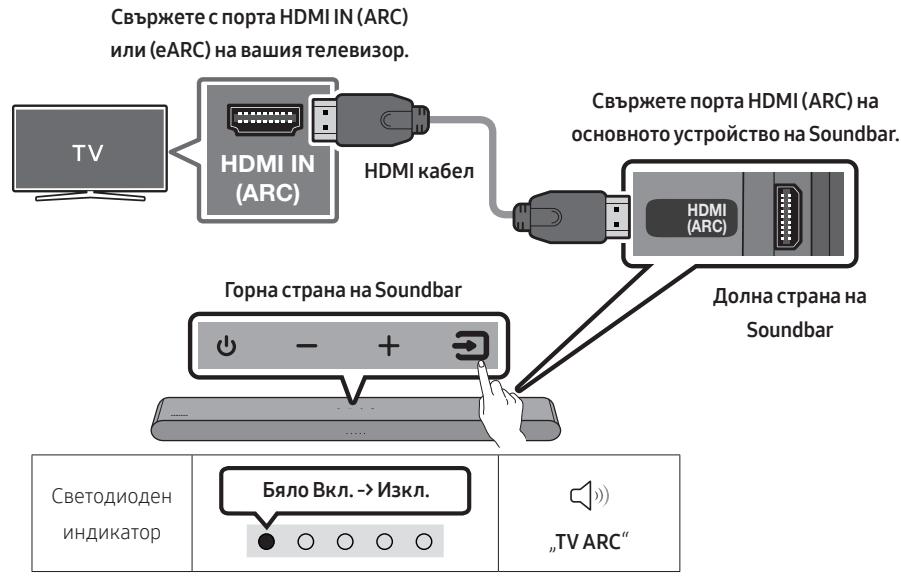
1.ПриизклioчениSoundbarиteleвиорсвьржeteHDMIka6eena,кaktoe noka3aHoHaФngypata.
2. Bkliouhe Toundbar n TeleBn3opa.
3. TeLeBn3IOHNNIaT 3ByK ce n3BVeJda oT Soundbar.
- AKO 3ByKbT OT TeIeBn3Opa He Ce Bb3npoI3BexJa, HaNCHete rOpHnaHeI Ha Soundbar nII 6yToHa (N3ToUHk) Ha IInCTaHcIOHHOT ynpabLeHne, 3a Ja N36epTe pexIma „Digital Audio In".
Korato 3Bykbt He ce n3Bexka, npoBepeTe OTHOBo HDMI ka6eJHaTa Bpb3ka. - IЗползваite 6утонITE 3a сила на 3Byka на дистанцioHHTO управлины на телевизра, за на роменITE силараз на 3Byka на Soundbar.
BJIEXKNI
Korato cBbpxte Ye3 HDMI ka6eI TeIeBnO3p, PoIaIbpkaI HDMI ARC (kaHaJI 3a o6paTeH 3Byk), KbM Soundbar, MoKeTe Da IpeJaBaTe UINΦpOBN BInDeO aUdNO daHN, 6e3 n3POn3BaHe Ha OTdeJeH ONTUnEh Ka6eI.
- Ппөрөр岫аме по вьз金融机构 Дд ринлгыт eбзжелен HDMI кабел. Ако HDMI кабел tс сжела, ИЗпалгайт e kabел сданутbp по 14 mm.
- Ta3n ΦyHKZnI He e Ha pa3noJokHeHne, aKo HDMI ka6eJbT He noDlbpka ARC.
- Korato 3bykbt ha npedabaheTo e kOipanB Dolby Digital n, "Opomat 3a uNΦpOB ayDIO u3XoJ" Ha BaIaIy TeLeBn3Op e 3aIaIeH ha PCM, npenopbUBaMe da npomEnite hAcTpoiKaTa ha Dolby Digital. Korato hAcTpoiKaTa ha TeLeBn3Opa ce npomEni, kAyeCTBOTo ha 3Byka ue ce noBNI. (TeLeBn3IOHHOTo MeHIO MoJE Da I3POn3Ba pa3JIuHn duMn 3a Dolby Digital n PCM B 3abVCIMoCT OT npON3BODInTeJHa TeLeBn3Opa.)
MeToI2.CBbP3BaHe c NOMOuTtHa onTnueH ka6eI
KoHTpOJIeH cIINcBk 3a npOBepKa npEi nCBbp3BaHe
KoratoHDMIka6eIbTnontuHnraTka6eIcaCBbp3aHn,pBPOceNoJyUabaHDMICunHaJIbT.
- Korato Изпольвate onтuousн кабел и Клемпге IMaT покрпге, уberpeTe ce, чстЕ прмхали покрптура.

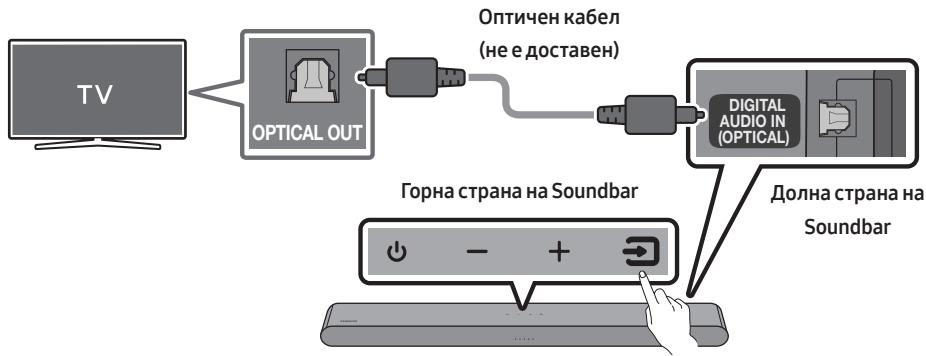

- ПиusesKIOHEnTeIeBn3Op nSoundbar cBbpxeTe npTa Ha Soundbar DIGITAL AUDIO IN (OPTICAL) n npTa OPTICAL Ha TeIeBn3Opa c onTnUHHa Ka6eN (He e JocTaBeH), KaKTo e Noka3aHo HaФИgypata.
- BkliuheTe Soundbar n TeleBn3opa.
- Hatachete 6byoHa (NtoHnK) Ha ropHnaIe IJIi Ha dIcTaHcIOHhTo ynpabHeHne, cIeT OBA n36epTe peKIM „Digital Audio In".
- 3Bykbt OT TeIeBn3Opa Ce Bb3npOn3BExJa ot Soundbar.
I3noI3BaHe Ha yHKnIyTa Q-Symphony
Ппс Q-Symphony Soundbar ce синхронизера с телевизорa Samsung, за за сильке за вук OT дve yctpoicstba за отималень сьpayнд eфekt. Когато се свьржke Soundbar, се поka3Ba мени.To
"TV+Soundbar" ПОД MEHIOTO 3ByKOB n3XoД ha TeIeBn3Opa. ИЗбете сьтВETHOTo MeHIO.
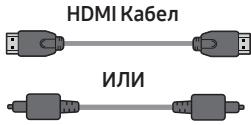
Ontnuhen Ka6eN (He e DocTabeH)

CBeToIaIODeH INIaIKaTOp
Baryo Bkn. N3kn.

Digital Audio In
PbPBOHaayalHO Cbbp3BaHe
- Hatnche 6ytoHa PAIR Ha nctaOnHTo ynpabHe He Saundbar nn HataChete 6ytoHa (N3tOuHnK) ha rOpHnaNaHeI Ha Soundbar, 3a da Bne3eTbpeKm "Bluetooth".
PbboHaaJIHo CBbp3BaHe
-
Korato ce cBbpxeTe KbM HOBo Bluetooth yctpoiCTBO, ybepeTe ce, ye yctpoiCTBOTo e ha pa3ctOaHne ot 1 m.
-
Hatnche6ytoHa PAIR Ha nctanuHTo ynpaBHeHe Ha Soundbar nIi HATNChe 6ytoHa (N3TOHNK) ha rOpHna naH eHa Soundbar, 3a da Bne3eTe B pexkM „Bluetooth".
| Бутон заBluetooth с<Dваяиоу Или При реким „Bluetooth" | Сbeltовае | М�ga в черва → Зелег → Синьо С<Dваяиоу Вpbзката e осыесраве Докато се ИЗвьршва с<Dваяиоу Многоцhevпат С Beltова поменя постковateлho ВЧерва → Зелег → Синьо. |
| "Ready to connect via Bluetooth." | ||
- Ha BaùjéTo yúctpòiCTBO n36epeTe „[AV] Samsung Soundbar S5B-Series“ OT CπiNcβka, KoITo ce nOЯВЯBa.
- Вьзрочьдай Te Myзкалн Файное оустюството, CBьрзано пeзBluetooth кьм Soundbar.
Ako yctpoiCTBOTo He ycnee da ce CBbpxe
- Ako Imate c buecctbvaa Soundbar (Hapnpimep [AV] Samsung Soundbar S5B-Series) B cnscbka C BncoKoTobOpnteHa Mo6uHTo yCtpoiCTBO, ro n3tpniTe.
-
NoBtopeTe cTbPkn 1 n 2.
-
Pa3noljokTe HOBO yctpoiCtBO B DnAmetbp O T m, 3a da yctaHOBiTe Bp3ka npe3 Bluetooth.
- Ako Bv 6bJe noncKaH PINH kOJ npi Cbvp3BaHe c Bluetooth yctpojCTBO, BbVeDeTe <0000>.
Soundbar abTomatuHc ce n3kIouBa cne20 mHyTu B cbctOraHne ha rotobhoCT.
Soundbar Moje da He n3BbPbBa npabnHo TbpceHe Ha Bluetooth nn CbPb3BaHe npc cneHnte 06ctOaTeNCTBa:
-Ako OKoNo Soundbar mHa cunHo eJeKtpuecko noJe.
- Ako Hяколко Bluetooth усточьа щноверемно с двоенсс soundbar.
- Ako Bluetooth yctpoiCTBOTe e n3KJIUoyHe He hA mJCTOTo cN iNl E B Hen3nPaBHOCT.
- EñektpOHnHTe yctpoiNCTBa moJe da npedin3BnKAT paadinocMuyIeHna. YcTpoiCTBaTa, KOITo Cb3daBaT eñektpOMaRHTn BblHn, Hapnpimep MkPobBlnHObN fypHn, 6e3xuHn LAN yctpoiCTBa n dp., Tpr6Ba da b6DaT nbpxKaHn daJeU OT OCHOBHTo yctpoiCTBO Ha Soundbar.
Soundbar noДьрka SBC дани(44,1kHz, 48kHz). - Bbpxte camo kblm Bluetooth yctpOcIbTO, KOeTo pOndlbpxka fynKcunraA2DP (AV).
- He mojkeTe da cBp3BaTe Soundbar kbM Bluetooth ycTpoiCTBO, Koeto IoIbpxka cAmO fynKuiaHT HF (xehIcphi).
Korato cBbP3BaTe Soundbar KbM Bluetooth yctpoiCTBO, pa3noJoxKeTe yctpoiCTBaTa Bb3MOxHO na-6JI3O eJHo do npyro. - KolkOTO no-daJIeUc HAMIPA Soundbar ot Bluetooth yCTpoiCTBOTO, TOLKOBa no-noIoo Ie e KaueCTBOTo Ha 3Byka. Bluetooth Bp3kata MoJc Ja 6bJe npeKbChata, KOrato yCTpoiCTBaTca ca N3BbH eΦeKTINBnIy O6xBaT.
- Bluetooth vрьзkaTа може и за не ункционира според пpeДиЗИЧЕНЕТВ зони сьс слб сигhal.
-
Bluetooth yctpojCTBO MOKeJa n3JIbUH Wym IJIN Da He fYHKcIOnHpa npaBnHOB CJe,IHITe yCIOBvI:
-
Korato koprnyc b e B kONTaK T c npneMnka h a cnHaJa h a Bluetooth yctpOiCTBOTO nnn Soundbar.
- Пыглии и в Бблзостд поpenятства, кato habример сени ини пэррада, рпи Коетоможе да настпглт помechи Веilektprueckry сигнан.
- Korato e n3nojeho Ha paDIOOCMUpEnHn Iopadn fakTa, Ye B CbIuTe yeCTOTn DnaPAna3OHN pa60Tt N dpTuN pOdykTN, KaTO MeDINCHKO 6OpUdbAHe, MKNpOBbHOBn NeKn N 6e3JnHn LAN yctpoiCTBa.
-
Ппетятства, КATO нашипимер врази и CTehи, може за поьлneyт Ha KaуесъTO Ha 3Byka, Дори Когаго устюгоства се hampatВ пpeдениТ ha eфektubня оxbхот.
-
Имайтпгдьн, чь вшил Тoundbar Нама д можда сд boенс дугri Bluetooth устюства, дкато синлзв оциетаBluetooth.
ToBa 6e3JnUH OYcTPOINCTBO MOXe Da IpeIIN3BnKa eIekTpInueckn CmUeHnNo BpeMe Ha pa6oTaTa cn.
BkIIOUbaHe/IN3KIOUBaHe Ha Bluetooth Power
Ako cDboBaHO B MmHaNoTo Bluetooth ycTpoCTBO ce onNTa da ce cDboN cbc Soundbar, kOraTO fYHKnIraTa Bluetooth Power e BkLIOUeHa n Soundbar e N3KlIOUeH, Soundbar ce BkLIOUHb ABTOMaTNUHO.
- HattincheTeиЗадьжTe 6byToHa SOUND MODE NaДиСТанцИоHOTу управление за повeche OT 5cekyнdi,doKaTO yCtpoIcTBOTO Soundbar e BklnuOeHo.
- MhoroCbETnIaT CBTeOAnoIeH INdIkaTOp Ha Soundbar npemirBa B CbIaT, LnaH".
Ako He ce noka3BaT nocledoBaTeJHo Mraun LED
1.ИЗключeteSoundbar,IЗBaДeTeиСБьржete OTHOBOSUBCTINka,KOITOCbДьржа ФαιNoBete cakTuJIaN3aUIn,КБMUSBnopTaHaSoundbar.
2.ИЗклоче Te 3axpaHbuaЯ Ka6eJHa Soundbar, cIeT TOBa rO CBbprKeTe OTHOBU IN BkILOyTe Soundbar.
BENEXKNI
- Aktyализираенто на Фърмуера може за неся работи правилно, по удinoфайовете подьржано Т soundbar, с сьхсан c USB стika.
He n3KlIOUBaIte 3axpaHbAheTo n He oTCTpaHraBaIte USB yctpoiCTBOTO,doKaTO ce aKtyaIN3aUNITE CE npInarat. OChOBnIaMOnyI Ie Ce n3KJIIOuN ABTomAtNuHO Cne,I 3aBbPbBaHe Ha aKtyaIN3aUNrTaHa _b pMyepa. - 3ana3ete nIbPBOHaunHnTe HacTPOiKN CneIHaDCTPOiKa. (ToBa BkJIIOUvBa CnJa Ha 3ByKa, 3ByKOBO none n np.)
Cnei KaTo aKtuaIIN3aUINrTaHa _b pMyepa npnkNOnu,Soundbar ue ce BkIIOU nABTomTuHNO u 1e Ce IOBn rIacobnT NOTpe6BnTeckn INTEpEeNc. Ako aKtuaIn3aUINrTa Ha coΦTyepa e HeycNeuHa, npOBepeTe daIIu USB naMeTTa He e deΦeKTHa.
Soundbar He ocblueCTBBA Bpb3ka ype3 Bluetooth.
→Korato ce Cbpb3Ba HOBO yCTpoICTBO,3a yCTaHOBBABe Ha Bp3Ka BKIIOUeTe CDbOBAHe npe3 Bluetooth.(HaTnCHete 6yToHa PAIR Ha INCTaHcNHOHOTo ynpabLeHne IInn HATnCHete 6yToHa (N3TOHNK) Ha yCTPOJCTBOtO NOHe 3a 5cekyHn.)
→ Ako Soundbar e cBbP3aH KbM dpyro yctpoiCTBO, nbpBO npeKbCHe TpB3KaTa Ha TOBa yctpoiCTBO, 3a da CMeHIne TcPoI CTBOTO.
→ CbvpjkeTe ro OTHOBO, KaTo 3a Da yctaHOBNTe Bp3ka Tp86Ba Da npemaxHeTe CnncbKa C BncoKOrOBOpTeNl, CbP3AnH npe3 Bluetooth. (TeneBn3Op Samsung: Hauano () MeHIO HacTPOiKn () BcNcKn HAcTpoiKn () 3ByK 3ByKOB n3XoD CnncbK Ha Bluetooth BncoKOrOBOpTeNl)
→ИЗвадеши龟и села и Г поставete OTHOBO, След Това ONптугпak.
→ CstaptnpaaiTe npOdykTa n OOnTaiTe oTHOBo. (BnKTe cTpaHnua 36.)
3BykT ce ry6n, kOrato e ocblueCTBeHa Bpb3ka qpe3 Bluetooth.
Ako yctpoiCTBOTO, KOeTo e Cbbp3aHo ue3 Bluetooth, 6bJe npemecTeHO TBbpDe daJeot Soundbar, 3BykT MoKeJa da Ce n3ry6n. PpemecTeyeCTpoiCTBOTO no-6JIIm3o Do Soundbar.
Ako chaT O BAaTeO TЯNo E B KOntaKT C Bluetooth npnEmo- npeDaBaTeIe IINI pOdyKTBt e MOHTpAn HBpXy MeTaIHa NOBbPxHOCT,3BykBT MOnKe Da Ce N3r6N. IpOBepTe MoNTaJxHata CpeDa N yCNoBnraTa 3a yNToTpe6a
Cbbp3BaHeTo Ha HЯКоЛko ycTpoIcTba Ype3 Bluetooth He pa60Tu.
→Korato TeLeBn3OpbTe cBbP3aH KbM
cayHnd6apa, CbP3BaHeTo Ha HraKOJIko
ycTpoiCTBa Ype3 Bluetooth MoKe Ja He
pa60Tu. PpeKbChete Bp3kata Ha Soundbar
KbM TeLeBn3Opa N OINTaIte OTHOBO.
→ Поверетали настpoикata за CBьрзва НяковустwoЧрesh Bluetooth e Вклочena. (HanpaBeTe cnpaВka c pa3delen „Soundbar He ocьшесеввь ВьзkaЧрesh Bluetooth."
Ппекьсенте Бвьзката с устpoистBOTO,OT KOETO СЕ ВьзпроиЗБекд В мочENTA, CДВОЕТУстpoистBOTO,KOETO ИСКАТД CBвржete,CLEД KOETO CBвржete OTHOBO npdeишноустpoистBO.
Ako 3Byklt He ce chyBa Iopn cIeI npabINHO CbBp3BaHe, HApnbTe CnpaBka c pa3JeI ,3Byklt Ce ry6n, KoraTo e ocBtceTBHeA Bpb3Ka qpe3 Bluetooth."
Soundbar He ce BkIIOvBa aBtOMaTnUHO 3aEINO c TeVeBnOpa.
→Korato n3kIIOUHTe Soundbar,doKaTo rIeTaTe TELeBn3nA, Ce DeaKTINBnPa cHxPOH3nPaHcTe H a 3axpaHbHeTO C TELeBn3Opa. IbpBO n3kIIOUte TELeBn3Opa.
14 リицEH3
Dolby AUDIO
Manufactured under license from Dolby Laboratories. Dolby, Dolby Audio and the double-D symbol are trademarks of Dolby Laboratories Licensing Corporation.
*TOni npOdykT He noIaBpka Dolby Atmos@.
dt
For DTS patents, see http://patents.dts.com. Manufactured under license from DTS, Inc. (for companies headquartered in the U.S./ Japan/Taiwan) or under license from DTS Licensing Limited (for all other companies). DTS, Digital Surround, and the DTS logo are registered trademarks or trademarks of DTS, Inc. in the United States and other countries. © 2021 DTS, Inc. ALL RIGHTS RESERVED.

The terms HDMI and HDMI High-Definition Multimedia Interface, and the HDMI Logo are trademarks or registered trademarks of HDMI Licensing Administrator, Inc. in the United States and other countries.

Bluetooth
The Bluetooth® word mark and logos are registered trademarks owned by Bluetooth SIG, Inc. and any use of such marks by Samsung Electronics Co., Ltd. is under license. Other trademarks and trade names are those of their respective owners.

[ENERGY STAR]
ENERGY STAR qualified model only
- Your Samsung product is ENERGY STAR qualified in its factory default setting. Change to certain features, settings and functionality in this product can change the power consumption, possibly beyond the limits required for ENERGY STAR qualification.
- Environmental Protection Agency and Department of Energy. ENERGY STAR is a joint program of the Government agencies, designed to promote energy efficient products and practices.
Refer to www.energystar.gov for more information of the ENERGY STAR Program.
ENERGY STAR qualified model only (Applicable to Thin Client models only)
As an ENERGY STAR® Partner, SAMSUNG has determined that this product meets the ENERGY STAR® guidelines for energy efficiency.
- The ENERGY STAR Program has been to reduced greenhouse gas emissions and save energy through voluntary labeling.
- Power management setting of this product have been enabled by default, and have various timing settings from 1 minutes to 5 hours.
- The product can wake with a button press on the chassis from sleep mode.
ENERGY STAR qualified model only (The other models)
- As an ENERGY STAR Partner, Samsung has determined that this product or product models meets the ENERGY STAR guideline for energy efficiency.
15 BELEKKA 3A JIINCEH3A 3A OTBOPEH KOД
3a da n3npaTnTE 3aNTBaHnI N 3aBKNI NO BbnpocN, Cbbp3aHn C OTBOpEnTe KoIOBe, CbbpKeTe ce cbc Samsung Open Source (http://opensource.samsung.com)
16 BAXKHN BELEXKKN 3A OBCJUVXBAHETO
LHΦPnte HJIIOCTpaCINTE B TOBa pKOBODCTBO 3a NOTpe6NTeJcA npEIOCTaBEHN CaMO 3a CNpABKa I MOrAT da ce pa3NIuYabAT OT DeIcTBNTeJIHnI IN3rJIeD Ha n3DeJIIneTO.
- MozejáCeHaucnLTIakca3a aDMNHINCTpnpaHe,ako:
(a) e n3BnKaH TexnK IOBaWe HaCTOBAHe IN HЯMaДeФeKTВпpoDyKTA(T.e. He CTe npOyuEN pBkoBOJCTBOTO 3a NOTpe6nteJIa
(b) 3ahece Te ypeDa B cepBn3eH ceHTbpr HЯMa DeΦeK T B npOdyKta (T.e. He cTe npOyei PbKOBOdCTBOTO 3a NOTpe6ntela).
Cymata 3a Ta3n TaKc3a a aDMHHCTpnpaHe 5e Bn 6bJe Cbo6uEHa, Ppei Da ce n3BbPn KaKbATO n da e 6nlo pa6oTa nn IocseHne BkBn.
17 CNEUΦNKAU IN PbKOBOCTBO
CneuΦnkaua
| Наименованные на м odeлa | HW-S50B |
| USB | 5V/0,5A |
| Тер lo | 2,4 кг |
| Разmersи (Ш x В x Д) | 670,0 x 62,3 x 105,0 м m |
| Диапазон на paбOTна Temпература | +5°C до +35°C |
| Диапазон на paбOTна Влajжност | 10 % do 75 % |
| УСИВВATEЛ Изхodяшma мошност | (30W x 2) + (30W x 2) + 20W |
| Пождьржани Формати за ВьзproиЗвжданe DTS, Dolby® Digital (DTS Virtual Surround ce БьзproиЗвжда в DTS Формат.) | LPCM 2ch, Dolby Audio™ (пождьржа Dolby® Digital), DTS, DTS Virtual:X |
| ИЗХОДHA MОЛHOCKT HA BEЗЖИHOTO YCTPOДICTBO | Прedeавателна мошност e 9 dBm. |
| ОвSETSКONSМАЯ на сеньгия в рекIM на ratовност (W) | 0,5W |
| Bluetooth Метод за.Deakтвиране на порт | Натисе и задрьжто бутона SOUND MODE за поеве от 5 секунди, за дa ИзключITE сункцията Bluetooth Power. |
BEJIEXKNI
Samsung Electronics Co., Ltd си зараза в паовто д пося спесидацята 6e3 npedn3BecTne.
- Terlotoи размерпес пиблізпелн.
C NahtoTo Samsung deknappa, Ye ToBa paAnoo6OpyDbaHe e B cBoTBeCTBVe C NipeKtNaBa 2014/53/EC n cn pInnoKmnte 3aKoHOBn 3nCKBaHnHa Na O6eDiNeHTo KpaIcTBO.
ПьлниотTekт на Декларацята за сботовствае налочен на сдений Иntерпетадес http://www.samsung.com, като оtnideу на Пдрьжka и Вьевeteи MeTo на модана. To3и уpeД можец де се изюлва вьв BCИЧКС CTpaHи Ha EC и ВОБединоу КралстBO.

[ПразвлноиЗХьрлие набатерпгБToЗи рpoукт]
(HaIInuHO B CTpaHc CbC CnCTeM3a pa3dElno CmToC6bupaHe)
ToBa 6o3HaueHHe BbpybAtePnTa, pBkoBOdCTB0TO nll ONaKOBKaTa, noka3Ba, ye 6aTePnTe B To3n npOyKT He 6nBa Da ce N3XbPnTc Dpyrnte 6ntoBn OTnaDbuN B kpa Ha TexHn POJe3EH JxNBoT. KbDeTo ca MapKnpaHn, XmUnecknTe CmBoln Hg, Cd nll Pb noka3BaT, ye 6aTePnTa c bDpJxka JxNBAk, KaDMn nIiOnOBO Na KOHTpONHte HnBa DInpeKtNb2006/66 Ha EO.
Ako 6atepnite He ce n3xBpIant npaBnHIO, Te3n BeIeCTBa MOrTa da npeIN3BnKaT yBpeKdaHe Ha YOBEsKOTo 3dpaBe NJI Na OKoJHaTa CpeJa.
3a da npednanaite npnpoHnTe pecypcn i 3a da cbdejctBaTe 3a MHOROKpaTHaTa ynoTpe6aHa MaTePnAHLNTe pecypcn, moJr OTdJeIte 6aTePnHTe OTpyrnte BnIDObe OTpAdbuHNn pOdykTNi rPeunKnPaIte nocpeDCTBOM BaWata loKaHna cncTeMa 3a 6e3PnAtho BpbUaHe Ha 6aTePn.

IpaBnHIO TpeTnpaHe Ha n3dennTo cneI kpaHa eKcnIpoatauOnHHMy JxHBOT (OtnaDbci, npEdctablaBaun eElektpuecKO n eElektpoHNO o6OpyDahe)
(HaHnHO BCTpaHb CbC CNTeM 3a pa3deJHo CMeTOc6bnpaHe)
To3n 3nak, nocTaBEN Bbpxu n3dEJIneTO, HeR0Bn npinHaJLeKHeCTN IINI neaTHn MaTePnAIn, O3NaUaBA, Ye npOyKbTbI n npinHaJLeKHeCTNte (Hapnpimep 3apraHDo ycTroeCTBO, CnyuAJIKN, USB Ka6eI) He 6NuBa da ce n3XbBpIaT 3aeHDo C dpYrIte 6ntOBn OTpaDbz, KOrato N3Teue ekCpIooatauOnHHnT My JxIBOT. OtDeJaTe Te3n UcTrojCTBa OT dpYrIte BnOBoN OTpaDbz, I ng PpeDaBaIte 3a peuzklnipaHe. Cna3BaKn TOBa npabNIO He n3laIarate Ha onaCHoCT 3dPaBeTo HA dpYrIg Xopa I npdePna3BaTe OKolHaTa CpeDa ot 3AmBpcBaHane, npedn3BnuKaHO OT 6e3KOHTpONHO IN3XBbPJIne Ha OTpaDbz. OCBen TOBa, noD06Ho OTROBOPHO NOBEeHne Cb3daBa Bb3MOxHocT 3a IOBTopHO (ekOJIoRNUHO Cbo6pa3HO) IN3NoL3BaHe Ha MaTePnAJIHnte pecypcsi.
Домашнипоноюгшенихрада ссвьржатсъproveца на дpe6ho,OT kOROTO caЗakynи n3deллесу,илсьсьотьетната места ДьрЖавна areHция,зд поуат порбни ИНСТPyкци Кыд e n KORA MORATда заанecат Teи усточва з рeukenлрале,бezогасно з оКOLнатаcreda.
KopnpaTbHnTe nontpe6nteIcnIcIbDa da cSe CbBpKaT cIOCTaBvNka cn I da npOBeprYucNoBraTaHa
dOrOBopa 3a Nokynka. Toba n3JeIne I HeROBtE eJeKtpOnHn npHaIeJxHocTn He 6NuBa da ce CmecTBat C
dpyrTe OTNaDbuI Ha TbProBCKOTn ppeIpnTne.
3a Информая оТною сангжименте Ha Samsung по оТношени на okолна за реда и спесифчпente за пожкета Perуларони зальжени, наразимер REACH, WEEE,батери, nocetete: www.samsung.com/uk/aboutsamsung/sustainability/environment/our-commitment/data/
PEIJIAMEHT (EC) 2019/1782 HA KOMNCYRA
Изickваня за ekoppoekTирае за вьнши поелктpo3axpaHbaи устрпсТа :
www.samsung.com/global/ecodesign_component
INFORMACJE DOTYCZACE BEZPIECZENSTWA
Manufactured under license from Dolby Laboratories. Dolby, Dolby Audio and the double-D symbol are trademarks of Dolby Laboratories Licensing Corporation.
- Ten produit nie obstuguje funkcj Dolby Atmos®.
dt
For DTS patents, see http://patents.dts.com. Manufactured under license from DTS, Inc. (for companies headquartered in the U.S./ Japan/Taiwan) or under license from DTS Licensing Limited (for all other companies). DTS, Digital Surround, and the DTS logo are registered trademarks or trademarks of DTS, Inc. in the United States and other countries. © 2021 DTS, Inc. ALL RIGHTS RESERVED.
HOMI™ HIGH-DEFINITION MULTIMEDIA INTERFACE
The terms HDMI and HDMI High-Definition Multimedia Interface, and the HDMI Logo are trademarks or registered trademarks of HDMI Licensing Administrator, Inc. in the United States and other countries.
Bluetooth
The Bluetooth® word mark and logos are registered trademarks owned by Bluetooth SIG, Inc. and any use of such marks by Samsung Electronics Co., Ltd. is under license. Other trademarks and trade names are those of their respective owners.

[ENERGY STAR]
ENERGY STAR qualified model only
- Your Samsung product is ENERGY STAR qualified in its factory default setting. Change to certain features, settings and functionality in this product can change the power consumption, possibly beyond the limits required for ENERGY STAR qualification.
- Environmental Protection Agency and Department of Energy. ENERGY STAR is a joint program of the Government agencies, designed to promote energy efficient products and practices.
Refer to www.energystar.gov for more information of the ENERGY STAR Program.
ENERGY STAR qualified model only (Applicable to Thin Client models only)
As an ENERGY STAR® Partner, SAMSUNG has determined that this product meets the ENERGY STAR® guidelines for energy efficiency.
- The ENERGY STAR Program has been to reduced greenhouse gas emissions and save energy through voluntary labeling.
- Power management setting of this product have been enabled by default, and have various timing settings from 1 minutes to 5 hours.
- The product can wake with a button press on the chassis from sleep mode.
ENERGY STAR qualified model only (The other models)
- As an ENERGY STAR Partner, Samsung has determined that this product or product models meets the ENERGY STAR guideline for energy efficiency.
15 INFORMACJA O LICENCJI OPEN SOURCE
www.samsung.com/uk/aboutsamsung/sustainability/environment/our-commitment/data/
ROZPORZADZENIE KOMISJI (UE) 2019/1782
Zapnuti/vypnuti DRC (Dynamic Range Control)
Manufactured under license from Dolby Laboratories. Dolby, Dolby Audio and the double-D symbol are trademarks of Dolby Laboratories Licensing Corporation.
For DTS patents, see http://patents.dts.com. Manufactured under license from DTS, Inc. (for companies headquartered in the U.S./ Japan/Taiwan) or under license from DTS Licensing Limited (for all other companies). DTS, Digital Surround, and the DTS logo are registered trademarks or trademarks of DTS, Inc. in the United States and other countries. © 2021 DTS, Inc. ALL RIGHTS RESERVED.
HOMI™ HIGH-DEFINITION MULTIMEDIA INTERFACE
The terms HDMI and HDMI High-Definition Multimedia Interface, and the HDMI Logo are trademarks or registered trademarks of HDMI Licensing Administrator, Inc. in the United States and other countries.
Bluetooth
The Bluetooth® word mark and logos are registered trademarks owned by Bluetooth SIG, Inc. and any use of such marks by Samsung Electronics Co., Ltd. is under license. Other trademarks and trade names are those of their respective owners.

[ENERGY STAR]
ENERGY STAR qualified model only
- Your Samsung product is ENERGY STAR qualified in its factory default setting. Change to certain features, settings and functionality in this product can change the power consumption, possibly beyond the limits required for ENERGY STAR qualification.
- Environmental Protection Agency and Department of Energy. ENERGY STAR is a joint program of the Government agencies, designed to promote energy efficient products and practices.
Refer to www.energystar.gov for more information of the ENERGY STAR Program.
ENERGY STAR qualified model only (Applicable to Thin Client models only)
As an ENERGY STAR® Partner, SAMSUNG has determined that this product meets the ENERGY STAR® guidelines for energy efficiency.
- The ENERGY STAR Program has been to reduced greenhouse gas emissions and save energy through voluntary labeling.
- Power management setting of this product have been enabled by default, and have various timing settings from 1 minutes to 5 hours.
- The product can wake with a button press on the chassis from sleep mode.
ENERGY STAR qualified model only (The other models)
- As an ENERGY STAR Partner, Samsung has determined that this product or product models meets the ENERGY STAR guideline for energy efficiency.
15 POZNÁMKA K LICENCI OTEVRENEHO SOFTWARE
UROVNE WOOFER (BASY)
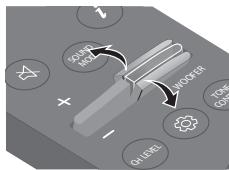
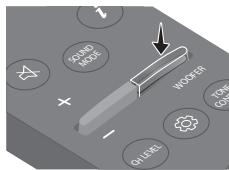
13 RIESENIE PROBLEMOV
Manufactured under license from Dolby Laboratories. Dolby, Dolby Audio and the double-D symbol are trademarks of Dolby Laboratories Licensing Corporation.
For DTS patents, see http://patents.dts.com. Manufactured under license from DTS, Inc. (for companies headquartered in the U.S./ Japan/Taiwan) or under license from DTS Licensing Limited (for all other companies). DTS, Digital Surround, and the DTS logo are registered trademarks or trademarks of DTS, Inc. in the United States and other countries. © 2021 DTS, Inc. ALL RIGHTS RESERVED.
HOMI™ HIGH-DEFINITION MULTIMEDIA INTERFACE
The terms HDMI and HDMI High-Definition Multimedia Interface, and the HDMI Logo are trademarks or registered trademarks of HDMI Licensing Administrator, Inc. in the United States and other countries.
Bluetooth
The Bluetooth® word mark and logos are registered trademarks owned by Bluetooth SIG, Inc. and any use of such marks by Samsung Electronics Co., Ltd. is under license. Other trademarks and trade names are those of their respective owners.

[ENERGY STAR]
ENERGY STAR qualified model only
- Your Samsung product is ENERGY STAR qualified in its factory default setting. Change to certain features, settings and functionality in this product can change the power consumption, possibly beyond the limits required for ENERGY STAR qualification.
- Environmental Protection Agency and Department of Energy. ENERGY STAR is a joint program of the Government agencies, designed to promote energy efficient products and practices.
Refer to www.energystar.gov for more information of the ENERGY STAR Program.
ENERGY STAR qualified model only (Applicable to Thin Client models only)
As an ENERGY STAR® Partner, SAMSUNG has
determined that this product meets the
ENERGY STAR® guidelines for energy efficiency.
- The ENERGY STAR Program has been to reduced greenhouse gas emissions and save energy through voluntary labeling.
Power management setting of this product have been enabled by default, and have various timing setting from 1 minutes to 5 hours. - The product can wake with a button press on the chassis from sleep mode.
ENERGY STAR qualified model only (The other models)
- As an ENERGY STAR Partner, Samsung has determined that this product or product models meets the ENERGY STAR guideline for energy efficiency.
15 POZNÁMKA K LICENCIIS OTVORENÍM ZDROJOVÍM KÓDOM
Ak chcetezaslat otazky ci poziadavky na otazky o otvorenych zdrojoch, obratte sa na diviziu
Samsung Open Source
(http://opensource.samsung.com).
16 DÖLEZITÁ POZNÁMKA OHL'ADOM SERVISU
| LED jelzőfény | Fehér villog X1 ○○●○○ |
| " DTS Virtual:X" → "Standard" → "Music" → "Game" → "Adaptive Sound" |
- DTS Virtual:X
WOOFER (BASSZUS) SZINT
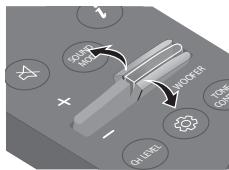
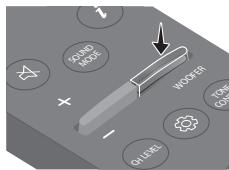
Manufactured under license from Dolby Laboratories. Dolby, Dolby Audio and the double-D symbol are trademarks of Dolby Laboratories Licensing Corporation.
For DTS patents, see http://patents.dts.com. Manufactured under license from DTS, Inc. (for companies headquartered in the U.S./ Japan/Taiwan) or under license from DTS Licensing Limited (for all other companies). DTS, Digital Surround, and the DTS logo are registered trademarks or trademarks of DTS, Inc. in the United States and other countries. © 2021 DTS, Inc. ALL RIGHTS RESERVED.
HOMI ™ HIGH-DEFINITION MULTIMEDIA INTERFACE
The terms HDMI and HDMI High-Definition Multimedia Interface, and the HDMI Logo are trademarks or registered trademarks of HDMI Licensing Administrator, Inc. in the United States and other countries.

Bluetooth
The Bluetooth® word mark and logos are registered trademarks owned by Bluetooth SIG, Inc. and any use of such marks by Samsung Electronics Co., Ltd. is under license. Other trademarks and trade names are those of their respective owners.

[ENERGY STAR]
ENERGY STAR qualified model only
- Your Samsung product is ENERGY STAR qualified in its factory default setting. Change to certain features, settings and functionality in this product can change the power consumption, possibly beyond the limits required for ENERGY STAR qualification.
- Environmental Protection Agency and Department of Energy. ENERGY STAR is a joint program of the Government agencies, designed to promote energy efficient products and practices.
Refer to www.energystar.gov for more information of the ENERGY STAR Program.
ENERGY STAR qualified model only (Applicable to Thin Client models only)
As an ENERGY STAR® Partner, SAMSUNG has determined that this product meets the ENERGY STAR® guidelines for energy efficiency.
- The ENERGY STAR Program has been to reduced greenhouse gas emissions and save energy through voluntary labeling.
- Power management setting of this product have been enabled by default, and have various timing settings from 1 minutes to 5 hours.
- The product can wake with a button press on the chassis from sleep mode.
ENERGY STAR qualified model only (The other models)
- As an ENERGY STAR Partner, Samsung has determined that this product or product models meets the ENERGY STAR guideline for energy efficiency.
15 NYICTFORRÁSKÖDULICENCMEGJEGYZÉS
SIGURNOSNE INFORMACije
SIGURNOSNA UPOZORENJA
DA BISTE SMANJILI OPASNOST OD ELEKTRICNOG
UDARA, NE ODSTRANJUJE POKLOPAC (ILI POLEDINU).
U UNUTRASNOSTINEMA DIJELOVA KOJE MOZE SERVISIRATI KORISNIK. PREPUSTITE
SERVISIRANJE KVALIFICIRANOM SERVISNOM OSOBLJU.
Objašnjenje symbola koji se mogu nalaziti na vašem proizvodu Samsung potražite u donjoj tablici.
| 4 | OPREZ OPASNOSTOD ELEKTRICNOGUDARA NE OTVARAJTE |
| 5 | Ovaj simbol znači da je struja u unutrašnjosti visokog napona. Opasno je dolaziti u bilo kakav doticaj s unutarnjim sklopopvima proizvoda. |
| 1 | Ovaj simbol naznačuje da je uz urežaj prilozena važna Dokumentacija o njegovom radu i održavanju. |
| 2 | Proizvod II. razreda: Ovaj simbol označava da.nije potrebna sigurnosna veza s uzemljenjem. Ako se taj simbol ne nalazi na proizvodu s kabelom za napajanje, proizvod MORA imati pouzdan spoj na zašitno uzemljenje. |
| ~ | AC napon: Ovaj simbol označava da nazivni napon označen navenedenim simbolom predstavlja AC napon. |
| == | DC napon: Ovaj simbol označava da nazivni napon označen navenedenim simbolom predstavlja DC napon. |
| 4i | Oprez, pogledajte upute za upotrebu: Ovaj simbol upićuje korisnika da potraži dodatne informacije u pogledu sigurnosti u korisničkom prisćniku. |
UPOZORENJE
- Da biste smanjili opasnost od požara ili elektricnog udara, ne izlažite urežaj kisi ili vlazi.
OPREZ
DA BISTE SPRIJEČILI ELEKTRICNI UDAR, NAMJESTITE ŠIROKE KONTAKTE UTIKAÇA UŠROK UTOR, UMETNUT DO KRAJA.
- Ovaj uredaj treba uvijek biti spojen na uticnicu izmjenične struje sa zašitnim uzemljenjem.
- Da biste iskligucili uredj az struje, morate izvuci utikač iz strujne uticnice. Stoga strujni utikač treba biti spreman za rad.
- Ne izlažite ovaj uredaj kapanju ili prskanju tekućina. Ne stavljaje predmete pune tekućine, poput vaza, na uredaj.
- Da biste potpuno isključili ovaj uredaj, morate izvuci utikač za napajanje iz zidne uticnice. Stoga utikač mora uvijek biti lako dostupan.
MJERE OPREZA
Gore/Dolje/Lijevo/Desno
Manufactured under license from Dolby Laboratories. Dolby, Dolby Audio and the double-D symbol are trademarks of Dolby Laboratories Licensing Corporation.
- Ovaj proizvod ne podržava sustav Dolby Atmos®.
dt
For DTS patents, see http://patents.dts.com. Manufactured under license from DTS, Inc. (for companies headquartered in the U.S./ Japan/Taiwan) or under license from DTS Licensing Limited (for all other companies). DTS, Digital Surround, and the DTS logo are registered trademarks or trademarks of DTS, Inc. in the United States and other countries. © 2021 DTS, Inc. ALL RIGHTS RESERVED.
HOMI ™ HIGH-DEFINITION MULTIMEDIA INTERFACE
The terms HDMI and HDMI High-Definition Multimedia Interface, and the HDMI Logo are trademarks or registered trademarks of HDMI Licensing Administrator, Inc. in the United States and other countries.
Bluetooth
The Bluetooth® word mark and logos are registered trademarks owned by Bluetooth SIG, Inc. and any use of such marks by Samsung Electronics Co., Ltd. is under license. Other trademarks and trade names are those of their respective owners.

[ENERGY STAR]
ENERGY STAR qualified model only
- Your Samsung product is ENERGY STAR qualified in its factory default setting. Change to certain features, settings and functionality in this product can change the power consumption, possibly beyond the limits required for ENERGY STAR qualification.
- Environmental Protection Agency and Department of Energy. ENERGY STAR is a joint program of the Government agencies, designed to promote energy efficient products and practices.
Refer to www.energystar.gov for more information of the ENERGY STAR Program.
ENERGY STAR qualified model only (Applicable to Thin Client models only)
As an ENERGY STAR® Partner, SAMSUNG has determined that this product meets the ENERGY STAR® guidelines for energy efficiency.
- The ENERGY STAR Program has been to reduced greenhouse gas emissions and save energy through voluntary labeling.
- Power management setting of this product have been enabled by default, and have various timing settings from 1 minutes to 5 hours.
- The product can wake with a button press on the chassis from sleep mode.
ENERGY STAR qualified model only (The other models)
- As an ENERGY STAR Partner, Samsung has determined that this product or product models meets the ENERGY STAR guideline for energy efficiency.
15 OBAVIJEST O LICENCI ZA UPORABU SOFTVERA OTVORENOG KODA
Želite li poslati upite i zahtjeve u vezi sa softverom otvorenog koda, obratite se grupi Samsung Open Source (http://opensource.samsung.com)
16 VAŽNA NAPOMENA VEZANA UZ SERVIS
- Slike u ovom korisničkom priručniku služe kao samo kao referencec i mogu se razlikovati od stvarnog izgleda proizvoda.
- Moguca je naplata administrativne pristoje u slučaju
(a) poziva inženjera na vaš zahtjev, a nema oštećenja na proizvodu (tj. ako niste pročitali korisnički prirucnik)
(b) da donesete Jedinicu na popravak u servis,
a nema oštećenja na proizvodu (tj. akoniste pročitali korisnički prirucnik)
- S visinom administrativne pristoje bit cete upoznati prije poduzimanja bilo kakvih radnji ili kućnog posjeta.
17 TEHNICKI PODACI I VODIC
Tehnicki podaci
| Naziv modela | HW-S50B |
| USB | 5V/0,5A |
| Težina | 2,4 kg |
| Dimenzije (Š x V x D) | 670,0 x 62,3 x 105,0 mm |
| Raspon radne temperature | +5°C do +35°C |
| Raspon vlažnosti | 10 % ~ 75 % |
| POJAČALO Nazivna izlazna snaga | (30W x 2) + (30W x 2) + 20W |
| Podržani formati za reprodukciju DTS, Dolby® Digital (DTS Virtual Surround se reproducira u DTS formatu.) | LPCM 2ch, Dolby Audio™ (podržava Dolby® Digital), DTS, DTS Virtual:X |
| IZLAZNA SNAGA BEŽICNOG UREDAJA | Snaga odašiljanja je 9 dBm. |
| Ukupna potrošnja energije u stanju mirovanja (W) | 0,5W |
| Bluetooth Način isključivanja ulaza | Pritisnite i držite gumb SOUND MODE dulje od 5 sekundi da biste isključili funkcjiju Bluetooth Power. |
NAPOMENE
Samsung Electronics Co., Ltd pridržava pravo promjene specifikacija bez prethodne obavijesti.
- Težina i dimenzije su približni.
Tvrtka Samsung ovime izjavluje da je ova radio-oprema sukladna Direktivi 2014/53/EU te relevantnim zakonskim odredbama Ujedinjenog Kraljevstva.
Cijeli tekst izjave o sukladnosti dostupan je na sljedećoj internetskoj adresi: http://www.samsung.com.
www.samsung.com/uk/aboutsamsung/sustainability/environment/our-commitment/data/
UREDBA KOMISIJE (EU) 2019/1782
SIGURNOSNE INFORMACije
SIGURNOSNA UPOZORENJA
DA BISTE SMANJILI OPASNOST OD
ELEKTRICNOG UDARA, NE SKIDAJTE POKLOPAC (ILI ZADNJU PLOCU).
UNUTRA SE NE NALAZE DELOVI KOJI SE MOGU
SERVISIRATI. SERVISIRANJE POVERITE
KVALIFIKOVANOM OSOBLJU SERVISA.
| LED indicator | Bela lampica treperi X1 ○ ○ ● ○ ○ |
| "Sync" → "Night mode" → "Voice enhancement" |
- Ukoliko slika na televizoru i zvuk sa uredaja Soundbar nisu sinhronizovani, izaberite opciju „Sync“ u Kontroli zvuka i zatim podesite zakašnjenje zvuka na vrednost izmedu 0 i 300 milisekundi pomocu dugmadi Nagore/Nadole. (Nije dostupno u režimima „USB“ ili „Bluetooth“.)
"Sync" je podržana samo za neke funkcjje.
Night mode" i, Voice enhancement" nisupodrzani rezimu zvuka ,DTS Virtual:X".
"Night mode" je optimizovan za gledanje nocu jer su postavke prilagodene takdo je jačina zvuka smanjena, a dijalog jasan.
Voice enhancement" olaksava slusanje dijaloga u filmovima i TV emisijama.
7-kanalni EQ
Pritisnite i zadržite dugme (Kontrola zvuka) na oko 5 sekundi da biste podesili zvuk za svaki frekvencijski opseg. Mogu se izabrati 150Hz, 300Hz, 600Hz, 1,2kHz, 2,5kHz, 5kHz i 10kHz pomócu dugmadi Nalevo/Nadesno i svaka opcija se moze podesiti na postavku izmedu -6 i +6 pomócu dugmadi Nagore/Nadole. (Uverite se da je režim zvuka podešen na „Standard".)
| 7-kanalni EQ | ||
| Pritisnite i zadržite dugme (Kontrola zvuka) okay 5 sekundi. | Pomoću dugmeta Nalevo/Nadesno svako od njih se要考虑 podesiti na postavku od -6 do+6. | |
| 150Hz" | 150Hz" → "300Hz" → "600Hz" → "1.2kHz" → "2.5kHz" → "5kHz" → "10kHz" | |
Bluetooth PAIR
Prebacuje Soundbar uredju urezim za Bluetooth uparivanje.
Kada pritisnete dugme, LED lampice se menjaju na način prikazan u nastavku.
- Dok se uparivanje ne završi, višebojna LED lampica naizmenićno ), menja boje: Crvena → Zelena → Plava

8 | II (Reprodukija/Pauza)
Pritiskom na ovo dugme takode mozte kokrenuti reprodukcjmu zime ili je pauzirati u rezimu "USB".
9 Nagore/Nadole/Nalevo/Nadesno
Pritisnite dugme Nagore/Nadole/Nalevo/Nadesno da biste izabrali ili podesili funkcije.
- Ponovi Da biste koristili funkcjju Ponovi u rezimu "USB", pritisnite dugme Nagore.
- Preskoči muzicku datoteku Pritisnite dugme Nadesno da biste izabrali sledeću muzicku datoteku. Pritisnite dugme Nalevo da biste izabrali prethodnu muzicku datoteku.
- ID SET Pritisnite i držite dugme Nagore 5 sekundi kako bist e izvršili ID SET (prilikom povezivanja sa bežićnim sabvuferom ili bežićnim zadnjim zvučnicima).
10 i(Informacije)
Pritiskom na ovo dugme pojavluju se informacije za svaki režim. (Pogledajte stranicu 7.)
Ako pritsnete dugme, moci cete da odaberete zejleni rezim zvuka. Svaki put kada semenja rezim, visbeojna LED lampica treperi u beloj boji. (Rezim zvuka moze se razlikovati u zavisosti od modela TV-a.)
| LED indicator | Bela lampica treperi X1 ○○●○○ |
| "DTS Virtual:X" → "Standard" → "Music" → "Game" → "Adaptive Sound" |
- DTS Virtual:X
| LED indicator | Bela lampica treperi X1 ○ ○ ● ○ ○ |
| "Treble" → "Bass" |
Manufactured under license from Dolby Laboratories. Dolby, Dolby Audio and the double-D symbol are trademarks of Dolby Laboratories Licensing Corporation.
- Ovaj proizvod ne podržava system Dolby Atmos®.
dt
For DTS patents, see http://patents.dts.com. Manufactured under license from DTS, Inc. (for companies headquartered in the U.S./ Japan/Taiwan) or under license from DTS Licensing Limited (for all other companies). DTS, Digital Surround, and the DTS logo are registered trademarks or trademarks of DTS, Inc. in the United States and other countries. © 2021 DTS, Inc. ALL RIGHTS RESERVED.
HOMI™ HIGH-DEFINITION MULTIMEDIA INTERFACE
The terms HDMI and HDMI High-Definition Multimedia Interface, and the HDMI Logo are trademarks or registered trademarks of HDMI Licensing Administrator, Inc. in the United States and other countries.
Bluetooth
The Bluetooth® word mark and logos are registered trademarks owned by Bluetooth SIG, Inc. and any use of such marks by Samsung Electronics Co., Ltd. is under license. Other trademarks and trade names are those of their respective owners.

[ENERGY STAR]
ENERGY STAR qualified model only
- Your Samsung product is ENERGY STAR qualified in its factory default setting. Change to certain features, settings and functionality in this product can change the power consumption, possibly beyond the limits required for ENERGY STAR qualification.
- Environmental Protection Agency and Department of Energy. ENERGY STAR is a joint program of the Government agencies, designed to promote energy efficient products and practices.
Refer to www.energystar.gov for more information of the ENERGY STAR Program.
ENERGY STAR qualified model only (Applicable to Thin Client models only)
As an ENERGY STAR® Partner, SAMSUNG has determined that this product meets the ENERGY STAR® guidelines for energy efficiency.
- The ENERGY STAR Program has been to reduced greenhouse gas emissions and save energy through voluntary labeling.
- Power management setting of this product have been enabled by default, and have various timing settings from 1 minutes to 5 hours.
- The product can wake with a button press on the chassis from sleep mode.
ENERGY STAR qualified model only (The other models)
- As an ENERGY STAR Partner, Samsung has determined that this product or product models meets the ENERGY STAR guideline for energy efficiency.
15 OBAVEŠTENJE O LICENCI OTVORENOG IZVORNOG KODA
Da biste poslali pitanja i zahteve u vezi sasoftverom otvorenog koda obratite se grupi
Samsung Open Source
(http://opensource.samsung.com)
16 VAŽNA NAPOMENA O SERVISIRANJU
- Slike i ilustracije koje su upotrebljene u ovom korisničkom uputstvu date su samo kao reference i mogu se razlikovati od vaseg proizvoda.
- Administrativni troškovi mogu biti naplaceni u sledećim slučajevima:
(a) tehnicar je pozvan u vaš dom na vaš zahtev i ako proizvod nije u kvaru (tj. ako niste pročitali ovo korisničko uputstvo),
(b) vi donesete uredaj u servisni centar, a proizvod nije u kvaru (tj. akniste proci tali ovo korisničko uputstvo).
www.samsung.com/uk/aboutsamsung/sustainability/environment/our-commitment/data/
VARNOSTNI PODATKI
VARNOSTNA OPOZORILA
ZARADI NEVARNOSTI ELEKTRICNEGA UDARA NE ODPIRAJTE ZADNJEGA (HRBTNEGA) POKROVA.
NAPRAVA NIMA DELOV, KI BI JIH LAHKO
POPRAVIL UPORABNIK. SERVIS NAJ OPRAVI USTREZNO USPOSOBLJENA OSEBA.
RAVENZA WOOFER (BAS)
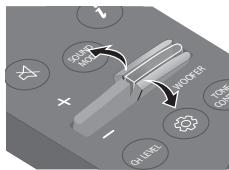
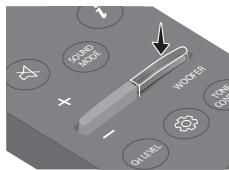
Manufactured under license from Dolby Laboratories. Dolby, Dolby Audio and the double-D symbol are trademarks of Dolby Laboratories Licensing Corporation.
- Ta izdelek ne podpira Dolby Atmos®.
dtss
For DTS patents, see http://patents.dts.com. Manufactured under license from DTS, Inc. (for companies headquartered in the U.S./ Japan/Taiwan) or under license from DTS Licensing Limited (for all other companies). DTS, Digital Surround, and the DTS logo are registered trademarks or trademarks of DTS, Inc. in the United States and other countries. © 2021 DTS, Inc. ALL RIGHTS RESERVED.
HOMI™ HIGH-DEFINITION MULTIMEDIA INTERFACE
The terms HDMI and HDMI High-Definition Multimedia Interface, and the HDMI Logo are trademarks or registered trademarks of HDMI Licensing Administrator, Inc. in the United States and other countries.

Bluetooth
The Bluetooth® word mark and logos are registered trademarks owned by Bluetooth SIG, Inc. and any use of such marks by Samsung Electronics Co., Ltd. is under license. Other trademarks and trade names are those of their respective owners.

[ENERGY STAR]
ENERGY STAR qualified model only
- Your Samsung product is ENERGY STAR qualified in its factory default setting. Change to certain features, settings and functionality in this product can change the power consumption, possibly beyond the limits required for ENERGY STAR qualification.
- Environmental Protection Agency and Department of Energy. ENERGY STAR is a joint program of the Government agencies, designed to promote energy efficient products and practices.
Refer to www.energystar.gov for more information of the ENERGY STAR Program.
ENERGY STAR qualified model only (Applicable to Thin Client models only)
As an ENERGY STAR® Partner, SAMSUNG has determined that this product meets the ENERGY STAR® guidelines for energy efficiency.
- The ENERGY STAR Program has been to reduced greenhouse gas emissions and save energy through voluntary labeling.
- Power management setting of this product have been enabled by default, and have various timing settings from 1 minutes to 5 hours.
- The product can wake with a button press on the chassis from sleep mode.
ENERGY STAR qualified model only (The other models)
- As an ENERGY STAR Partner, Samsung has determined that this product or product models meets the ENERGY STAR guideline for energy efficiency.
15 OBVESTILO O ODPRTOKODNIH LICENCAH
www.samsung.com/uk/aboutsamsung/sustainability/environment/our-commitment/data/
UREDBA KOMISIJE (EU) 2019/1782
Manufactured under license from Dolby Laboratories. Dolby, Dolby Audio and the double-D symbol are trademarks of Dolby Laboratories Licensing Corporation.
For DTS patents, see http://patents.dts.com. Manufactured under license from DTS, Inc. (for companies headquartered in the U.S./ Japan/Taiwan) or under license from DTS Licensing Limited (for all other companies). DTS, Digital Surround, and the DTS logo are registered trademarks or trademarks of DTS, Inc. in the United States and other countries. © 2021 DTS, Inc. ALL RIGHTS RESERVED.
HOMI™ HIGH-DEFINITION MULTIMEDIA INTERFACE
The terms HDMI and HDMI High-Definition Multimedia Interface, and the HDMI Logo are trademarks or registered trademarks of HDMI Licensing Administrator, Inc. in the United States and other countries.

Bluetooth
The Bluetooth® word mark and logos are registered trademarks owned by Bluetooth SIG, Inc. and any use of such marks by Samsung Electronics Co., Ltd. is under license. Other trademarks and trade names are those of their respective owners.

[ENERGY STAR]
ENERGY STAR qualified model only
- Your Samsung product is ENERGY STAR qualified in its factory default setting. Change to certain features, settings and functionality in this product can change the power consumption, possibly beyond the limits required for ENERGY STAR qualification.
- Environmental Protection Agency and Department of Energy. ENERGY STAR is a joint program of the Government agencies, designed to promote energy efficient products and practices.
Refer to www.energystar.gov for more information of the ENERGY STAR Program.
ENERGY STAR qualified model only (Applicable to Thin Client models only)
As an ENERGY STAR® Partner, SAMSUNG has determined that this product meets the ENERGY STAR® guidelines for energy efficiency.
- The ENERGY STAR Program has been to reduced greenhouse gas emissions and save energy through voluntary labeling.
- Power management setting of this product have been enabled by default, and have various timing settings from 1 minutes to 5 hours.
- The product can wake with a button press on the chassis from sleep mode.
ENERGY STAR qualified model only (The other models)
- As an ENERGY STAR Partner, Samsung has determined that this product or product models meets the ENERGY STAR guideline for energy efficiency.
15 EIDONOIHSEH TIA TIEADEIEXPHES ANOIGMIKOV ANOXTOY KQAIKA
02 PRODUKTA PÄRSKATS
WOOFER (BASI) LIMENA
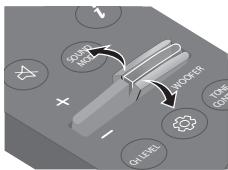
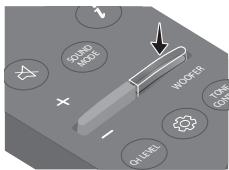
Kad zemfrevences skalrunis ir pievienots, spiediet pogu uz augsu vai uz leju, lai pielagotu zemfrevences skalruna limeni uz -12 vai diapazona no -6 lidz +6. Kad zemfrevences skalrunis ir atvienots, spiediet pogu uz augsu vai uz leju, lai pielagotu basu limeni diapazona no -6 lidz +6. Lai iestatitu zemfrevences skalruna (basu) limeni uz 0 (noklusejums), nospiediet pogu (ja Soundbar ir pievienota bezvadu zemfrevences skalrunim (iegadajams atseviški)).

TONE CONTROL
Nospiezot pogu, varat pielagot diskanta vai basu skaluma limeni. Vajadzigo vienumu var pielagot, izmantojot pogas Uzaugsu/Uz leju. (Si fungcija ir pieejama visos skanas rezmisos, iznemot rezimu "Standard".)
"Off-TV Remote" (noklusejuma rezims), "Samsung-TV Remote", "All-TV Remote".
13 PROBLEMU NOVERŠANA
Manufactured under license from Dolby Laboratories. Dolby, Dolby Audio and the double-D symbol are trademarks of Dolby Laboratories Licensing Corporation.
- Šis Produkts neatbalsta Dolby Atmos®.
dt
For DTS patents, see http://patents.dts.com. Manufactured under license from DTS, Inc. (for companies headquartered in the U.S./ Japan/Taiwan) or under license from DTS Licensing Limited (for all other companies). DTS, Digital Surround, and the DTS logo are registered trademarks or trademarks of DTS, Inc. in the United States and other countries. © 2021 DTS, Inc. ALL RIGHTS RESERVED.
HDMI
HIGH-DEFINITION MULTIMEDIA INTERFACE
The terms HDMI and HDMI High-Definition Multimedia Interface, and the HDMI Logo are trademarks or registered trademarks of HDMI Licensing Administrator, Inc. in the United States and other countries.
Bluetooth
The Bluetooth® word mark and logos are registered trademarks owned by Bluetooth SIG, Inc. and any use of such marks by Samsung Electronics Co., Ltd. is under license. Other trademarks and trade names are those of their respective owners.

[ENERGY STAR]
ENERGY STAR qualified model only
- Your Samsung product is ENERGY STAR qualified in its factory default setting. Change to certain features, settings and functionality in this product can change the power consumption, possibly beyond the limits required for ENERGY STAR qualification.
- Environmental Protection Agency and Department of Energy. ENERGY STAR is a joint program of the Government agencies, designed to promote energy efficient products and practices.
Refer to www.energystar.gov for more information of the ENERGY STAR Program.
ENERGY STAR qualified model only (Applicable to Thin Client models only)
As an ENERGY STAR® Partner, SAMSUNG has determined that this product meets the ENERGY STAR® guidelines for energy efficiency.
- The ENERGY STAR Program has been to reduced greenhouse gas emissions and save energy through voluntary labeling.
- Power management setting of this product have been enabled by default, and have various timing settings from 1 minutes to 5 hours.
- The product can wake with a button press on the chassis from sleep mode.
ENERGY STAR qualified model only (The other models)
- As an ENERGY STAR Partner, Samsung has determined that this product or product models meets the ENERGY STAR guideline for energy efficiency.
15 PAZINOJUMS PAR ATVERTA PIRMKODA LICENCI
Lai nosutitu jautajumus un pieprasijumus par atverto pirmkodu, szinieties ar uzemumu Samsung Open Source (http://opensource.samsung.com)
16 SVARIGA PIEZIME PAR APKOPI
www.samsung.com/uk/aboutsamsung/sustainability/environment/our-commitment/data/
KOMISIJAS REGULA (ES) 2019/1782
8 II (Eshitamine/Peatamine)
Manufactured under license from Dolby Laboratories. Dolby, Dolby Audio and the double-D symbol are trademarks of Dolby Laboratories Licensing Corporation.
- See toode ei toeta Dolby Atmos®-t.
dt
For DTS patents, see http://patents.dts.com. Manufactured under license from DTS, Inc. (for companies headquartered in the U.S./ Japan/Taiwan) or under license from DTS Licensing Limited (for all other companies). DTS, Digital Surround, and the DTS logo are registered trademarks or trademarks of DTS, Inc. in the United States and other countries. © 2021 DTS, Inc. ALL RIGHTS RESERVED.

The terms HDMI and HDMI High-Definition Multimedia Interface, and the HDMI Logo are trademarks or registered trademarks of HDMI Licensing Administrator, Inc. in the United States and other countries.

Bluetooth
The Bluetooth® word mark and logos are registered trademarks owned by Bluetooth SIG, Inc. and any use of such marks by Samsung Electronics Co., Ltd. is under license. Other trademarks and trade names are those of their respective owners.

[ENERGY STAR]
ENERGY STAR qualified model only
- Your Samsung product is ENERGY STAR qualified in its factory default setting. Change to certain features, settings and functionality in this product can change the power consumption, possibly beyond the limits required for ENERGY STAR qualification.
- Environmental Protection Agency and Department of Energy. ENERGY STAR is a joint program of the Government agencies, designed to promote energy efficient products and practices.
Refer to www.energystar.gov for more information of the ENERGY STAR Program.
ENERGY STAR qualified model only (Applicable to Thin Client models only)
As an ENERGY STAR® Partner, SAMSUNG has determined that this product meets the ENERGY STAR® guidelines for energy efficiency.
- The ENERGY STAR Program has been to reduced greenhouse gas emissions and save energy through voluntary labeling.
- Power management setting of this product have been enabled by default, and have various timing settings from 1 minutes to 5 hours.
- The product can wake with a button press on the chassis from sleep mode.
ENERGY STAR qualified model only (The other models)
- As an ENERGY STAR Partner, Samsung has determined that this product or product models meets the ENERGY STAR guideline for energy efficiency.
15 AVATUD LÄHTEKOODI LITSENTSI TEATIS
www.samsung.com/ee/aboutsamsung/sustainability/environment/our-commitment/data/
KOMISJONI MÄÄRUS (EL) 2019/1782
WOOFER (ZEMI DAZNIAI) LYGIO
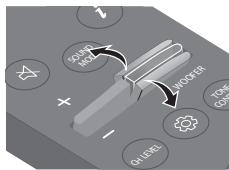
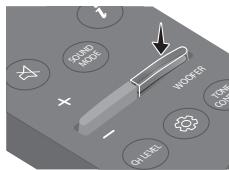
Manufactured under license from Dolby Laboratories. Dolby, Dolby Audio and the double-D symbol are trademarks of Dolby Laboratories Licensing Corporation.
For DTS patents, see http://patents.dts.com. Manufactured under license from DTS, Inc. (for companies headquartered in the U.S./ Japan/Taiwan) or under license from DTS Licensing Limited (for all other companies). DTS, Digital Surround, and the DTS logo are registered trademarks or trademarks of DTS, Inc. in the United States and other countries. © 2021 DTS, Inc. ALL RIGHTS RESERVED.
HOMI™ HIGH-DEFINITION MULTIMEDIA INTERFACE
The terms HDMI and HDMI High-Definition Multimedia Interface, and the HDMI Logo are trademarks or registered trademarks of HDMI Licensing Administrator, Inc. in the United States and other countries.
Bluetooth
The Bluetooth® word mark and logos are registered trademarks owned by Bluetooth SIG, Inc. and any use of such marks by Samsung Electronics Co., Ltd. is under license. Other trademarks and trade names are those of their respective owners.

[ENERGY STAR]
ENERGY STAR qualified model only
- Your Samsung product is ENERGY STAR qualified in its factory default setting. Change to certain features, settings and functionality in this product can change the power consumption, possibly beyond the limits required for ENERGY STAR qualification.
- Environmental Protection Agency and Department of Energy. ENERGY STAR is a joint program of the Government agencies, designed to promote energy efficient products and practices.
Refer to www.energystar.gov for more information of the ENERGY STAR Program.
ENERGY STAR qualified model only (Applicable to Thin Client models only)
As an ENERGY STAR® Partner, SAMSUNG has determined that this product meets the ENERGY STAR® guidelines for energy efficiency.
- The ENERGY STAR Program has been to reduced greenhouse gas emissions and save energy through voluntary labeling.
- Power management setting of this product have been enabled by default, and have various timing settings from 1 minutes to 5 hours.
- The product can wake with a button press on the chassis from sleep mode.
ENERGY STAR qualified model only (The other models)
- As an ENERGY STAR Partner, Samsung has determined that this product or product models meets the ENERGY STAR guideline for energy efficiency.
15 ATVIROSIOS PROGRAMINES IRANGOS LICENCIJOS PRANEŠIMAS
www.samsung.com/uk/aboutsamsung/sustainability/environment/our-commitment/data/
KOMISIJOS REGLAMENTAS (ES) 2019/1782
© 2022 Samsung Electronics Co., Ltd. All rights reserved.
Contact SAMSUNG WORLD WIDE
If you have any questions or comments relating to Samsung products, please contact the SAMSUNG customer care Centre.
| Country | Samsung Service Centre | Web Site |
| ■ Europe | ||
| UK | 0333 000 0333 | www.samsung.com/uk/support |
| IRELAND (EIRE) | 0818717100 | www.samsung.com/ie/support |
| GERMANY | 06196 77555 77 | www.samsung.com/de/support |
| FRANCE | 0148 63 00 00 | www.samsung.com/fr/support |
| ITALIA | 800-SAMSUNG (800.7267864) | www.samsung.com/it/support |
| SPAIN | 91175 00 15 | www.samsung.com/es/support |
| PORTUGAL | 210 608 098Chamada para a rede fixa nacionalDias ñteis das 9h às 20h | www.samsung.com/pt/support |
| LUXEMBURG | 26103 710 | www.samsung.com/be_fr/support |
| NETHERLANDS | 088 90 90 100 | www.samsung.com/nl/support |
| BELGIUM | 02-201-24-18 | www.samsung.com/be/support (Dutch)www.samsung.com/be_fr/support (French) |
| NORWAY | 21629099 | www.samsung.com/no/support |
| DENMARK | 707 019 70 | www.samsung.com/dk/support |
| FINLAND | 030-6227 515 | www.samsung.com/fi/support |
| SWEDEN | 0771-400 300 | www.samsung.com/se/support |
| POLAND | 801-172-678* lub +48 22 607-93-33*Specialistyczna infolinia do obstugi zapy tăni dotycznych Telefonówkomórkowych: 801-672-678* * (opłata wedug taryfy operatrice) | http://www.samsung.com/pl/support/ |
| HUNGARY | 0680SAMSUNG (0680-726-7864) | www.samsung.com/hu/support |
| AUSTRIA | 0800 72 67 864 (0800-SAMSUNG) | www.samsung.com/at/support |
| SWITZERLAND | 0800 726 786 | www.samsung.com/ch/support (German)www.samsung.com/ch_fr/support (French) |
| Country | Samsung Service Centre | Web Site |
| CZECH | 800 - SAMSUNG (800-726786) | www.samsung.com/cz/support |
| SLOVAKIA | 0800 - SAMSUNG (0800-726786) | www.samsung.com/sk/support |
| CROATIA | 072 726786 | www.samsung.com/hr/support |
| BOSNIA | 055 233 999 | www.samsung.com/support |
| NORTHMACEDONIA | 023 207777 | www.samsung.com/mk/support |
| MONTENGRO | 020 405 888 | www.samsung.com/support |
| SLOVENIA | 080 697 267 (brezplačna stevilka) | www.samsung.com/si/support |
| SERBIA | 011 321 6899 | www.samsung.com/rs/support |
| KOSovo | 038 40 30 90 | www.samsung.com/support |
| ALBANIA | 045 620 202 | www.samsung.com/al/support |
| BULGARIA | 0800 111 31 - Бразлатен за ветшик<|rotate_down|>атуо*3000 - Леса на[e]дени范围内:[р tradekп](разговор мли соред тарифота на[mobiiинят оменatorop09:00 до 18:00 - Рожdenhamdoпък) | www.samsung.com/bg/support |
| ROMANIA | 0800872678 - Apel gratuit*8000 - Apel tarifat in retea | www.samsung.com/ro/support |
| CYPRUS | 8009 4000 only from landline, toll free | www.samsung.com/gr/support |
| GREECE | 80111-SAMSUNG (80111 726 7864) onlyfrom land line(+30) 210 6897691 from mobile andland line | |
| LITHUANIA | 8-800-77777 | www.samsung.com/lt/support |
| LATVIA | 8000-7267 | www.samsung.com/lv/support |
| ESTONIA | 800-7267 | www.samsung.com/ee/support |