
PL-AC56 Kit - Powerline Adapter ASUS - Free user manual and instructions
Find the device manual for free PL-AC56 Kit ASUS in PDF.


| Product Type | PLC Adapter Kit (Powerline Communication) |
| Brand | Asus |
| Model | PL-AC56 Kit |
| PLC Standard | HomePlug AV2 |
| Maximum Speed | 1200 Mbps |
| Network Interface | 2 RJ-45 Ethernet ports 10/100/1000 Mbps |
| Built-in Power Socket | Yes, with interference filter |
| Built-in Wi-Fi | No, wired only model |
| Dimensions (unit) | 108 x 66 x 45 mm |
| Weight (unit) | 210 g |
| Power Supply | 100-240 V AC, 50/60 Hz |
| Power Consumption | Max 8 W operating, <0.5 W standby |
| Operating Temperature | 0 °C to 40 °C |
| Humidity | 20 % to 80 % RH (non-condensing) |
| Pairing Button | Yes, to secure the PLC network |
| Security | AES 128-bit encryption |
| Maintenance | Clean with a soft dry cloth. Do not use chemicals. |
| Compatibility | Windows, Mac OS, Linux (via browser for configuration) |
| Kit Contents | 2 PLC adapters, 2 RJ-45 Ethernet cables, quick start guide, utility CD |
| Warranty | 2 years (depending on country) |
Frequently Asked Questions - PL-AC56 Kit ASUS
User questions about PL-AC56 Kit ASUS
0 question about this device. Answer the ones you know or ask your own.
Ask a new question about this device
Download the instructions for your Powerline Adapter in PDF format for free! Find your manual PL-AC56 Kit - ASUS and take your electronic device back in hand. On this page are published all the documents necessary for the use of your device. PL-AC56 Kit by ASUS.
USER MANUAL PL-AC56 Kit ASUS
Quick Start Guide
PL-AC56 Kit includes:
PL-AC56
Wireless-AC1200 WiFi PowerLine
- PL-E56P
Homeplug AV 1200Mbps PowerLine Adapter
U14318 / Revised Edition V3 / June 2018
Table of contents
English....3
Български....10
Hrvatski....17
Čeština....24
Dansk....31
Nederlands....38
Eest....45
Français....52
Suomi....59
Deutsch....66
Ελληνικά....73
Magyar....80
Italiano....87
Latviski....94
Lietuvių....101
Norsk....108
Português....115
Polski....122
Русский....129
Română....136
Español....143
Srpski....150
Slovensky....157
Slovenščina....164
Svenska....171
Türkçe....178
Українська....185


Package contents
PL-AC56 Wireless-AC1200 WiFi PowerLine x 1
PL-E56P Homeplug AV 1200Mbps PowerLine Adapter x 1
Ethernet (LAN) cable x 2
Quick Start Guide x 1
√ Warranty card x 1
NOTE: If any of the items is damaged or missing, contact your retailer.
A quick look
PL-AC56 Wireless-AC1200 WiFi PowerLine
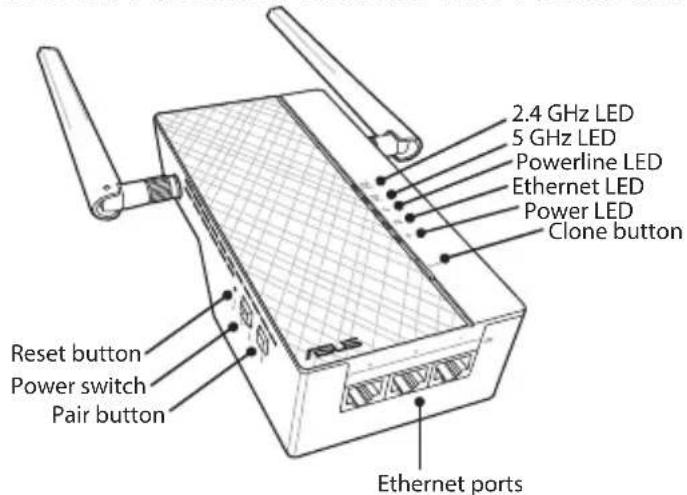
PL-E56P Homeplug AV 1200Mbps PowerLine
Adapter


English
LEDs and buttons
| LED STATUS DESCRIPTION | |||
 | 2.4G /5G Wi-Fi | Blinking rapidly | Your PL-AC56 is cloning the parent AP's SSID and password. |
| Blinking every second | Your PL-AC56 is resetting to the factory default settings. | ||
 | Power-line | On The device is connected to one or more powerline devices. | |
| Off The device is not connected to any powerline devices. | |||
| Blinking In Power-Saving mode, the powerline LED blinks every 15 seconds. | |||
 | Ethernet On/Off A device is connected or not connected to the Ethernet port. | ||
| Blinking The powerline adapter is transferring data via the Ethernet port. | |||
 | Power On/Off Your device is on/off. | ||
| BUTTON DESCRIPTION | |
| Clone Press and hold the button for about one second to start cloning the parent AP's SSID and password. | |
| Pair Press and hold the button for about one second to start the pairing process. | |
| Reset Press and hold the button for about five seconds to restore your device to the factory default settings. |
Setting up your PL-AC56 Kit
![graph LR A["Internet"] --> B["WiFi"] B --> C["WiFi"] C --> D["Ethernet Connection"] D --> E["Desktop"] E --> F["Laptop"] G["Smart phone"] --> H["Wi-Fi"] I["Tablet"] --> J["Wi-Fi"] K["Wireless Connection"] --> L["Wi-Fi"]](/content/2026/06/1286912/images/49ba8ed5bfb8d07729b43bc90480255de9625591bc305c00455159925bfd0ce7.jpg)

- Use the bundled Ethernet/network cable to connect your PL-E56P to your network's router or switch. Plug your PL-E56P to a wall outlet.
- Plug your PL-AC56 to a wall outlet located in the same circuit. Wait until the power LED turns green, indicating that your PL-AC56 has finished booting up.
- Wait until the powerline LED turns green, indicating that your PL-AC56 has successfully connected to your PL-E56P via the powerline.
- Connect your device to your PL-AC56 via wired or wireless connection.
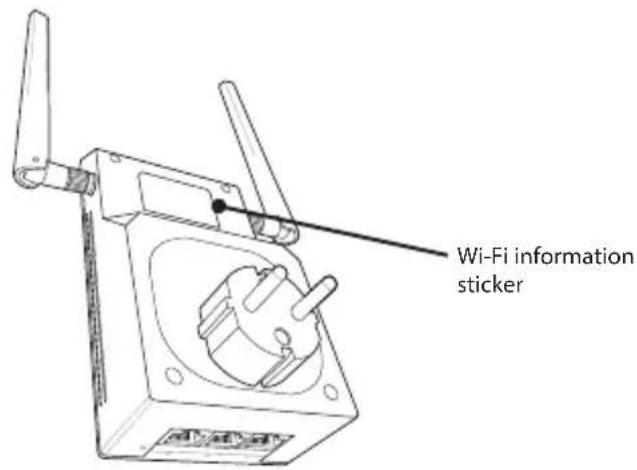
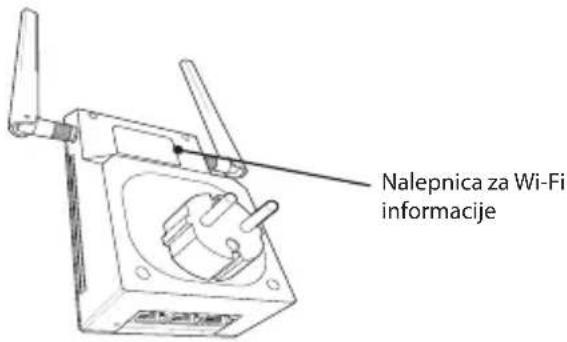
- The Wi-Fi SSID and Password is posted on the Wi-Fi information sticker on your PL-AC56.


Security pairing
Creating a secure powerline network
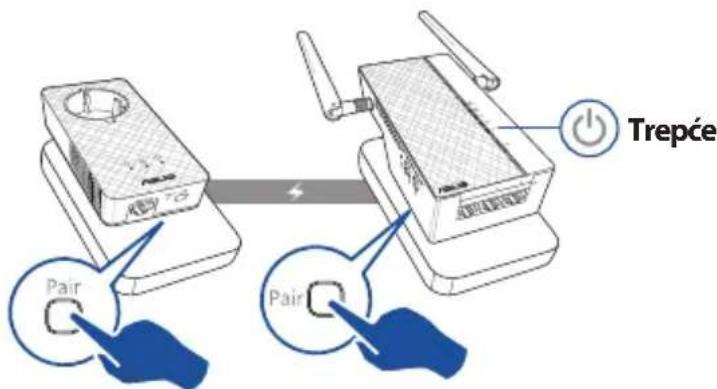
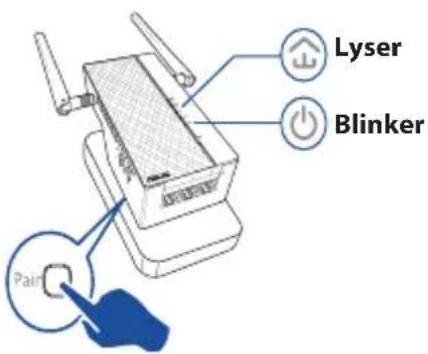
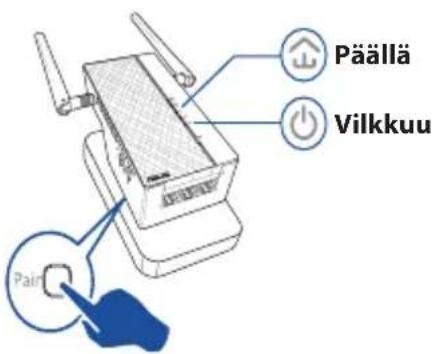
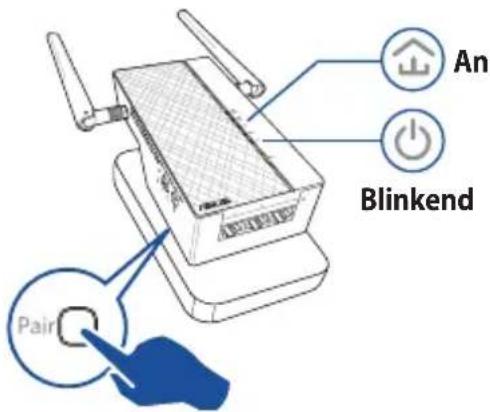
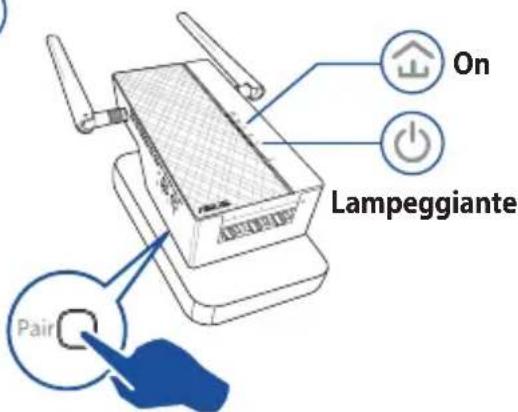
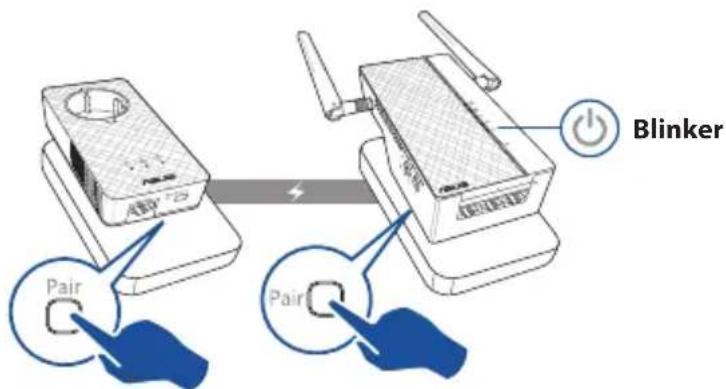
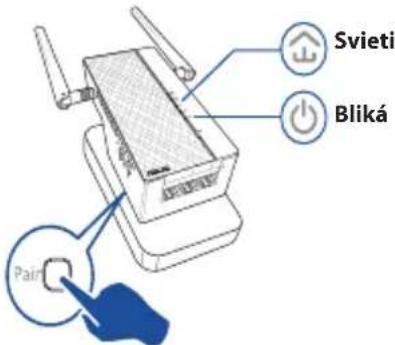
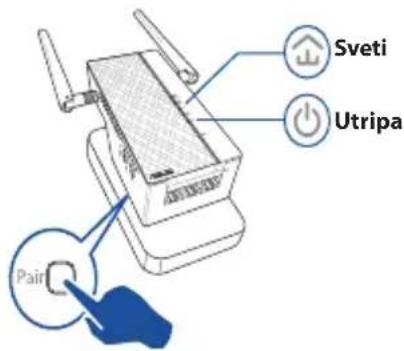
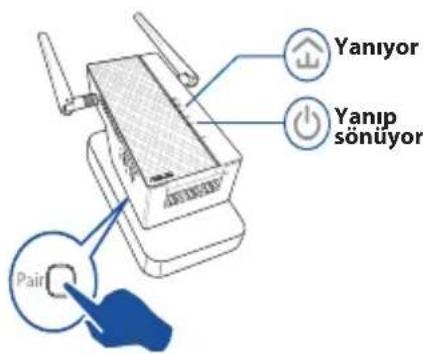
- Press the Pair button on your PL-E56P.
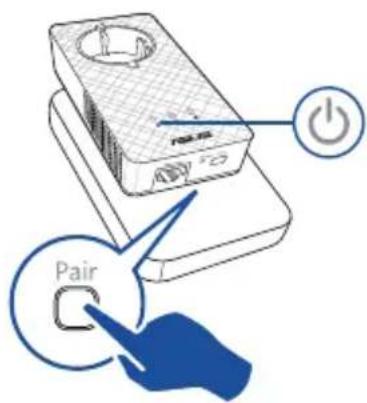
- Press the Pair button on your PL-AC56. Wait until the powerline LED lights up, indicating that a secure powerline network has been created.
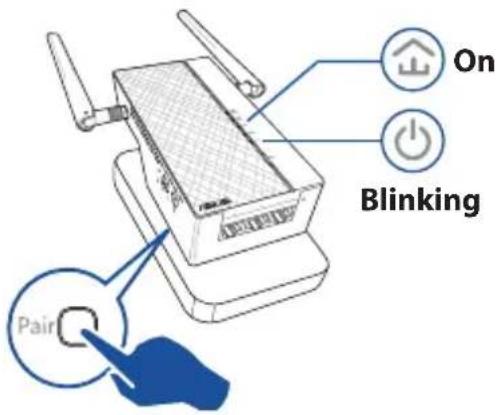
Joining a secure powerline network
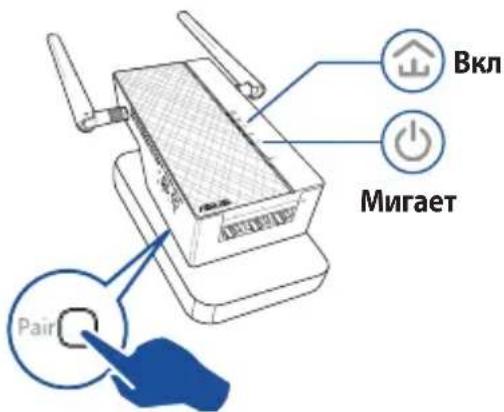
- Press the Pair button on a powerline device in the powerline network.

- Press the Pair button on another extender or adapter. Wait until the powerline LED lights up, indicating that pairing is successful.

Configuring your PL-AC56 wireless settings
You can configure the wireless settings of your PL-AC56 via its Wi-Fi Clone function or via its web interface.
Configuring via Wi-Fi Clone
Use your router's wireless network name and password to configure your PL-AC56 settings.
- Place your PL-AC56 next to your router, and turn both devices on.
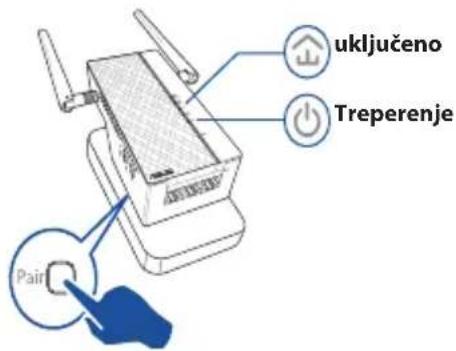
- Press the WPS button on your router.
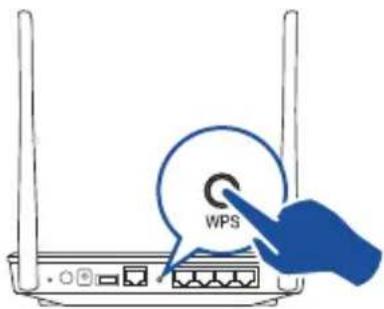
- Press the Clone button on your PL-AC56.

- Your PL-AC56 and your router now have the same wireless network name and password.
NOTE: If Wi-Fi Clone succeeds, move your PL-AC56 to your preferred location. If it fails, follow the steps in Configuring via the web interface.
English
Configuring via the web interface
- Set up your PL-AC56 via wired or wireless connection. For details, refer to the section Setting up your PL-AC56.
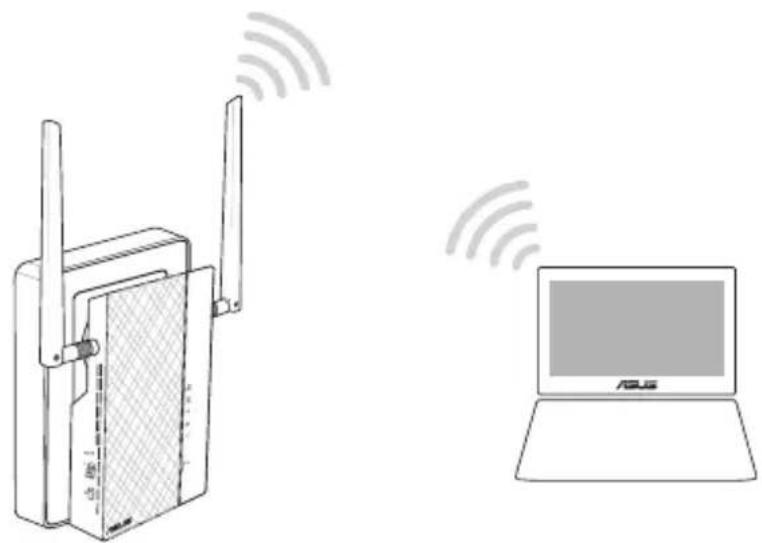
-
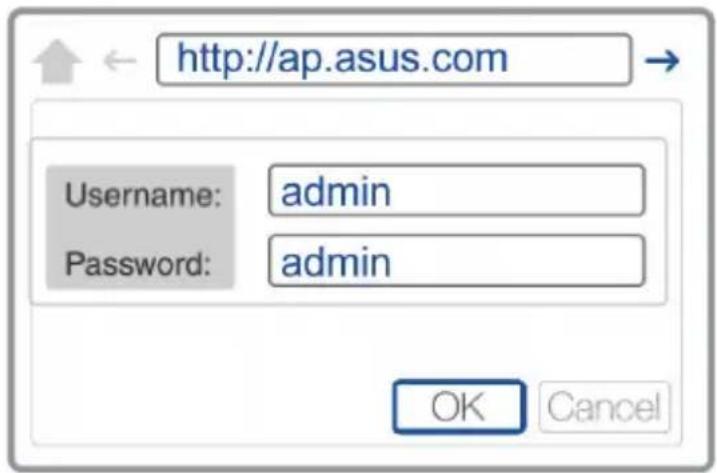
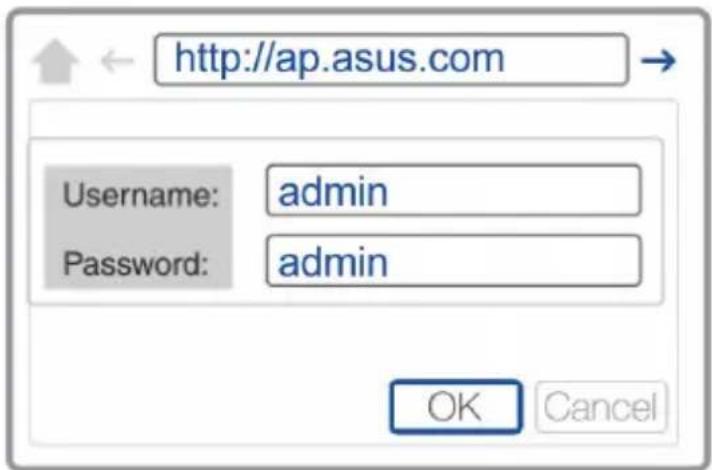
Go to http://ap.asus.com
-
Use admin as both the username and password.

- Go to Wireless > General and set the SSID (network name) and password.
- When done, click Apply.
Frequently Asked Questions (FAQs)
Q1: How do I reset my PL-AC56?
With your PL-AC56 switched on, use a pin to press and hold the Reset button until the Wi-Fi LED starts blinking. When the power LED turns green and the Wi-Fi LED is on, the reset process is completed.
Q2: My devices cannot connect to the Internet.
• Check your Internet connection.
- Ensure that the powerline LED lights up on all your powerline devices in the network. If they do not, try pairing the devices again.
• Ensure that all your devices are in the same network.
- Ensure that all the extenders and adapters are in the same electrical circuit.
Q3: My successfully-paired PL-AC56 does not work after I moved it to a new location.
- Try to pair your extender with your adapter again. For details, see Pairing devices via the Pair button.
- Check for any possible interferences that may be too close to your extenders or adapters such as air conditioners, washing machines, and other electrical appliances.
• Ensure that all your devices are in the same network. - Ensure that all the extenders and adapters are in the same electrical circuit.


Стикер с Wi-Fi информация


Pridruživanje sigurnoj mrežnoj vezi
- Pritisnite gumb za uparivanje na uređaju s mrežnom vezom u mrežnoj mreži.
- Idite na http://ap.asus.com
- Za korisničko ime i za lozinku koristite admin.


- Idite na Wireless > General (Bežično > Općenito) i podesite SSID (naziv mreže) i lozinku.
- Po završetku kliknite Apply (Primijeni).
Često postavljana pitanja (ČPP)



CPL Wi-Fi Wireless-AC1200 PL-AC56


Deutsch



- Dodieties uz cilni Wireless (Bezvadu) > General (Vispārīgi) un iestatiet SSID (tīkla nosaukumu) un paroli.
- Kad tas ir izdarits, nospiediet Apply (Lietot).


Delta i et sikkert PowerLine-nettverk
- Trykk paringsknappen på en PowerLine-enhet på PowerLine-nettverket.


Pegatina de información Wi-Fi


- Upotrebite priložen Ethernet/mrežni kabl da povežete svoj PL-E56P za mrežni ruter ili prekidač. Priključite svoj PL-E56P za priključnicu na zidu.
- Priključite svoj PL-AC56 za priključnicu na zidu koja se nalazi na istom strujnom kolu. Sačekajte da lampica za napajanje postane zelena, ukazujući da je vaš PL-AC56 završio sa pokretanjem.
- Sačekajte da powerline lampica postane zelena, ukazujući da je vaš PLAC56 uspešno povezan za vaš PL-E56P preko powerline opcije.
- Povežite svoj uređaj za svoj PL-AC56 preko bežične ili kablom povezane veze.
- Wi-Fi SSID i lozinka se prikazuju na nalepnici za Wi-Fi informacije na vašem PL-AC56.
- Vaš PL-AC56 i vaš ruter sada imaju isto ime i lozinku za bežičnu mrežu.
- Idite na adresu http://ap.asus.com
- Upotrebite admin kao korisničko ime i lozinku.

- Idite na Wireless (Bežično) > General (Opšte) i podesite SSID (mrežno ime) i lozinku.
- Kada završite, kliknite na Apply (Primeni).
Srpski
Često postavljana pitanja (FAQs)
P1: Kako da resetujem svoj PL-AC56?
Dok je vaš PL-AC56 uključen, upotrebite čiodu da pritisnete i držite pritisnut taster za Resetovanje, dok Wi-Fi lampica nepočne da treperi. Kada lampica za napajanje postane zelena i Wi-Fi lampica je uključena, process resetovanja je obavljen.
- Prejdite na lokalitu http://ap.asus.com
- Ako meno použivatel'a aj heslo použite admin.


- Pojdite na Wireless (Brezžično) > General (Splošno) in nastavite SSID (ime omrežja) in geslo.
- Ko končate, kliknite Apply (Uporabi).
Pogosta vprašanja
V1: Kako ponastavim ojačevalnik PL-AC56?
ASUS recycling and takeback programs come from our commitment to the highest standards for protecting our environment. We believe in providing solutions for you to be able to responsibly recycle our products, batteries, other components, as well as the packaging materials. Please go to http://csr.asus.com/english/Takeback.htm for the detailed recycling information in different regions.
REACH
Complying with the REACH (Registration, Evaluation, Authorisation, and Restriction of Chemicals) regulatory framework, we published the chemical substances in our products at ASUS REACH website at http://csr.asus.com/english/REACH.htm
Federal Communications Commission Statement
This device complies with Part 15 of the FCC Rules. Operation is subject to the following two conditions:
• This device may not cause harmful interference.
- This device must accept any interference received, including interference that may cause undesired operation.
This equipment has been tested and found to comply with the limits for a class B digital device, pursuant to part 15 of the FCC Rules. These limits are designed to provide reasonable protection against harmful interference in a residential installation.
This equipment generates, uses and can radiate radio frequency energy and, if not installed and used in accordance with the instructions, may cause harmful interference to radio communications. However, there is no guarantee that interference will not occur in a particular installation. If this equipment does cause harmful interference to radio or television reception, which can be determined by turning the equipment off and on, the user is encouraged to try to correct the interference by one or more of the following measures:
• Reorient or relocate the receiving antenna.
- Increase the separation between the equipment and receiver.
- Connect the equipment into an outlet on a circuit different from that to which the receiver is connected.
- Consult the dealer or an experienced radio/TV technician for help.

WARNING! Any changes or modifications not expressly approved by the party responsible for compliance could void the user's authority to operate the equipment.
Prohibition of Co-location
This device and its antenna(s) must not be co-located or operating in conjunction with any other antenna or transmitter.
IMPORTANT NOTE:
Radiation Exposure Statement: This equipment complies with FCC radiation exposure limits set forth for an uncontrolled environment. End users must follow the specific operating instructions for satisfying RF exposure compliance. To maintain compliance with FCC exposure compliance requirement, please follow operation instruction as documented in this manual.

WARNING! This equipment must be installed and operated in accordance with provided instructions and the antenna(s) used for this transmitter must be installed to provide a separation distance of at least 20 cm from all persons and must not be co-located or operating in conjunction with any other antenna or transmitter.
Compliance Statement of Innovation, Science and Economic Development Canada (ISED)
This device complies with Innovation, Science and Economic Development Canada licence exempt RSS standard(s). Operation is subject to the following two conditions: (1) this device may


not cause interference, and (2) this device must accept any interference, including interference that may cause undesired operation of the device.
Operation in the band 5150–5250 MHz is only for indoor use to reduce the potential for harmful interference to co-channel mobile satellite systems.
CAN ICES-3(B)/NMB-3(B)
Radio Frequency (RF) Exposure Information
The radiated output power of the ASUS Wireless Device is below the Innovation, Science and Economic Development Canada radio frequency exposure limits. The ASUS Wireless Device should be used in such a manner such that the potential for human contact during normal operation is minimized.
This equipment should be installed and operated with a minimum distance of 20 cm between the radiator any part of your body.
This device has been certified for use in Canada. Status of the listing in the Innovation, Science and Economic Development Canada's REL (Radio Equipment List) can be found at the following web address:
http://www.ic.gc.ca/eic/site/ceb-bhst.nsf/eng/h_tt00020.html
Additional Canadian information on RF exposure also can be found at the following web:
https://www.ic.gc.ca/eic/site/smt-gst.nsf/eng/sf08792.html
Precautions for the use of the device
a. Pay particular attention to the personal safety when use this device in airports, hospitals, gas stations and professional garages.
b. Medical device interference: Maintain a minimum distance of at least 15 cm (6 inches) between implanted medical devices and ASUS products in order to reduce the risk of interference.
c. Kindly use ASUS products in good reception conditions in order to minimize the radiation's level.
d. Keep the device away from pregnant women and the lower abdomen of the teenager.


| Manufacturer ASUSTeK Computer Inc. | |
| Tel: +886-2-2894-3447Address: 4F, No. 150, LI-TE RD., PEITOU, TAIPEI 112, TAIWAN | |
| Authorised representative in Europe | ASUS Computer GmbHAddress: HARKORT STR. 21-23, 40880 RATINGEN, GERMANY |
| Authorised distributors in Turkey | BOGAZICI BILGISAYAR TICARET VE SANAYI A.S.Tel./FAX No.: +90 212 331 10 00 / +90 212 332 28 90Address: ESENTEPE MAH. BUYUKDERECAD. ERCAN HAN B BLOKNO.121 SISLI, ISTANBUL34394 |
| CIZGI Elektronik San. Tic. Ltd. Sti.Tel./FAX No.: +90 212 356 70 70 / +90 212 356 70 69Address: GURSEL MAH. AKMANSK.47B 1 KAGITHANE/ISTANBUL | |
| KOYUNCU ELEKTRONiK BiLGi iSLEM SiST. SAN. VE DIS TIC. A.S.Tel. No.: +90 216 5288888Address: EMEK MAH.ORDUCAD. NO:18, SARIGAZi, SANCAKTEPE ISTANBUL | |
| ENDEKS BİLİŞİM SAN VE DIŞ TİC LTD ŞTİTel./FAX No.: +90 216 523 35 70 / +90 216 523 35 71Address: NECIP FAZIL BULVARI,KEYAP CARSI SITESI, G1BLOK, NO:115 Y.DUDULLU, UMRANIYE, ISTANBUL | |
| PENTA TEKNOLOJI URUNLERI DAGITIM TICARET A.STel./FAX No.: +90 216 528 0000Address: ORGANIZE SANAYI BOLGESINATO YOLU 4.CADDE NO:1UMRANIYE, ISTANBUL 34775 | |


Networks Global Hotline Information
| Region Country/ Area Hotline Number Service Hours | ||
| Europe | Cyprus 800-92491 | 09:00-13:00;14:00-18:00 Mon-Fri |
| France 0033-170949400 09:00-18:00 Mon-Fri | ||
| Germany | 0049-18050109200049-1805010923(component support)0049-2102959911(Fax) | |
| Hungary 0036-15054561 09:00-17:30 Mon-Fri | ||
| Italy 199-400089 | 09:00-13:00;14:00-18:00 Mon-Fri | |
| Greece 00800-44142044 | 09:00-13:00;14:00-18:00 Mon-Fri | |
| Austria 0043-820240513 09:00-18:00 Mon-Fri | ||
| Netherlands/Luxembourg | 0031-591570290 09:00-17:00 Mon-Fri | |
| Belgium 0032-78150231 09:00-17:00 Mon-Fri | ||
| Norway 0047-2316-2682 09:00-18:00 Mon-Fri | ||
| Sweden 0046-858769407 09:00-18:00 Mon-Fri | ||
| Finland 00358-969379690 | 10:00-19:00 Mon-Fri | |
| Denmark | 0045-38322943 09:00-18:00 Mon-Fri | |
| Poland 0048-225718040 08:30-17:30 Mon-Fri | ||
| Spain | 0034-902889688 09:00-18:00 Mon-Fri | |
| Portugal 00351-707500310 | 09:00-18:00 Mon-Fri | |
| Slovak Republic 00421-232162621 | 08:00-17:00 Mon-Fri | |
| Czech Republic 00420-596766888 | 08:00-17:00 Mon-Fri | |
| Switzerland-German | 0041-848111010 09:00-18:00 Mon-Fri | |
| Switzerland-French | 0041-848111014 09:00-18:00 Mon-Fri | |
| Switzerland-Italian | 0041-848111012 09:00-18:00 Mon-Fri | |
| United Kingdom | 0044-1442265548 09:00-17:00 Mon-Fri | |
| Ireland 0035-31890719918 | 09:00-17:00 Mon-Fri | |
| Russia and CIS | 008-800-100-ASUS 09:00-18:00 Mon-Fri | |
| Ukraine 0038-0445457727 | 09:00-18:00 Mon-Fri | |


Networks Global Hotline Information
| Region Country/ Area Hotline Numbers Service Hours | ||
| Asia-Pacific | Australia 1300-278788 09:00-18:00 Mon-Fri | |
| New Zealand 0800-278788 09:00-18:00 Mon-Fri | ||
| Japan | 0800-1232787 09:00-18:00 Mon-Fri | |
| 09:00-17:00 Sat-Sun | ||
| 0081-570783886 (Non-Toll Free) | 09:00-18:00 Mon-Fri | |
| 09:00-17:00 Sat-Sun | ||
| Korea 0082-215666868 09:30-17:00 Mon-Fri | ||
| Thailand 0066-24011717 09:00-18:00 Mon-Fri | ||
| 1800-8525201 | ||
| Singapore 0065-64157917 11:00-19:00 Mon-Fri | ||
| 0065-67203835 11:00-19:00 Mon-Fri | ||
| (Repair Status Only) 11:00-13:00 Sat | ||
| Malaysia 1300-88-3495 9:00-18:00 Mon-Fri | ||
| Philippine 1800-18550163 09:00-18:00 Mon-Fri | ||
| India | 09:00-18:00 Mon-Sat | |
| India(WL/NW) | 1800-2090365 09:00-21:00 Mon-Sun | |
| Indonesia 0062-2129495000 09:30-17:00 Mon-Fri | ||
| 500128 (Local Only) | 9:30 – 12:00 Sat | |
| Vietnam 1900-555581 | 08:00-12:00 | |
| 13:30-17:30 Mon-Sat | ||
| Hong Kong | 00852-35824770 10:00-19:00 Mon-Sat | |
| Taiwan | 0800-093-456; 9:00-12:00 Mon-Fri; 13:30-18:00 Mon-Fri | |
| 02-81439000 | ||
| Americas | USA | 1-812-282-2787 8:30-12:00 EST |
| Canada | Mon-Fri 9:00-18:00 EST Sat-Sun | |
| Mexico | 001-8008367847 08:00-20:00 CST Mon-Fri 08:00-15:00 CST Sat | |
| Brazil | 4003 0988 (Capital) 9:00am-18:00 Mon-Fri Mon-Fri (demais localidades) | |


Networks Global Hotline Information
| Region Country/ Area Hotline Numbers Service Hours | ||
| Middle East + Africa | Egypt 800-2787349 09:00-18:00 Sun-Thu | |
| Saudi Arabia 800-1212787 09:00-18:00 Sat-Wed | ||
| UAE 00971-42958941 09:00-18:00 Sun-Thu | ||
| Turkey 0090-2165243000 09:00-18:00 Mon-Fri | ||
| South Africa 0861-278772 08:00-17:00 Mon-Fri | ||
| Israel | *6557/00972-39142800 08:00-17:00 Sun-Thu | |
| *9770/00972-35598555 08:30-17:30 Sun-Thu | ||
| Balkan Countries | Romania 0040-213301786 09:00-18:30 Mon-Fri | |
| Bosnia Herzegovina | 00387-33773163 09:00-17:00 Mon-Fri | |
| Bulgaria | 00359-70014411 09:30-18:30 Mon-Fri | |
| 00359-29889170 09:30-18:00 Mon-Fri | ||
| Croatia | 00385-16401111 09:00-17:00 Mon-Fri | |
| Montenegro 00382-20608251 09:00-17:00 Mon-Fri | ||
| Serbia | 00381-112070677 09:00-17:00 Mon-Fri | |
| Slovenia | 00368-59045400 08:00-16:00 Mon-Fri | |
| 00368-59045401 | ||
| Baltic Countries | Estonia | 00372-6671796 09:00-18:00 Mon-Fri |
| Latvia | 00371-67408838 09:00-18:00 Mon-Fri | |
| Lithuania-Kaunas | 00370-37329000 09:00-18:00 Mon-Fri | |
| Lithuania-Vilnius | 00370-522101160 09:00-18:00 Mon-Fri | |



NOTES:
• UK support e-mail: network_support_uk@asus.com
- For more information, visit the ASUS support site at: https://www.asus.com/support/
English
CE statement
Simplified EU Declaration of Conformity
ASUSTek Computer Inc. hereby declares that this device is in compliance with the essential requirements and other relevant provisions of Directive 2014/53/EU. Full text of EU declaration of conformity is available at https://www.asus.com/Networking/PL-AC56-Kit/HelpDesk_Declaration/.
Declaration of Conformity for Ecodesign directive 2009/125/EC
Testing for eco-design requirements according to (EC) No 1275/2008 and (EU) No 801/2013 has been conducted. When the device is in Networked Standby Mode, its I/O and network interface are in sleep mode and may not work properly. To wake up the device, press the Wi-Fi on/off, reset, or WPS button.
This equipment complies with EU radiation exposure limits set forth for an uncontrolled environment. This equipment should be installed and operated with minimum distance 20 cm between the radiator & your body.
All operational modes:
2.4GHz: 802.11b, 802.11g, 802.11n (HT20), 802.11n (HT40)
5GHz: 802.11a, 802.11n(HT20), 802.11n(HT40), 802.11ac(VHT80)
The frequency, mode and the maximum transmitted power in EU are listed below:
2412-2472MHz (802.11g 6 Mbps): 19.32 dBm
5180-5240MHz (802.11ac VHT80 MCS0): 22.49 dBm
5260-5320MHz (802.11n HT40 13.5Mbps): 22.22 dBm
5500-5700MHz (802.11n HT40 13.5Mbps): 28.36 dBm


 | AT BE | BG CZ | DK EE | FR | |||
| DE IS | IE IT EL | ES CY | |||||
| LV | LI | LT | LU | HU | MT | NL | |
| NO PL | PT RO | SI SK TR | |||||
| FI SE | CH UK | HR |
Safety Notices
• Use this product in environments with ambient temperatures between 0° C( 32° F) and 40° C( 104° F).
• Refer to the rating label on the bottom of your product and ensure your power adapter complies with this rating.
• DO NOT place on uneven or unstable work surfaces. Seek servicing if the casing has been damaged.
• DO NOT place or drop objects on top and do not shove any foreign objects into the product.
• DO NOT expose to or use near liquids, rain, or moisture. DO NOT use the modem during electrical storms.
• DO NOT cover the vents on the product to prevent the system from getting overheated.
• DO NOT use damaged power cords, accessories, or other peripherals.
• If the Adapter is broken, do not try to fix it by yourself. Contact a qualified service technician or your retailer.
• To prevent electrical shock hazard, disconnect the power cable from the electrical outlet before relocating the system.


Bulgarian
CE statement
5260-5320MHz (802.11n HT40 13.5Mbps): 22.22 dBm
5500-5700MHz (802.11n HT40 13.5Mbps): 28.36 dBm


 | AT BE BG CZ DK EE FR | ||||||
| DE IS IE IT EL ES CY | |||||||
| LV | LI | LT | LU | HU | MT | NL | |
| NO | PL | PT | RO | SI | SK | TR | |
| FI SE | CH | UK | HR | ||||
Safety Notices
5260-5320MHz (802.11n HT40 13.5Mbps): 22.22 dBm
5500-5700MHz (802.11n HT40 13.5Mbps): 28.36 dBm


 | AT BE BG CZ DK EE FR | ||||||
| DE IS IE IT EL ES CY | |||||||
| LV | LI | LT | LU | HU | MT | NL | |
| NO PL PT | RO SI SK TR | ||||||
| FI SE CH | UK HR | ||||||
Safety Notices
- Ovaj proizvod koristite u okruženjima s temperaturom okruženja između 0 °C (32 °F) i 40 °C (104 °F).
- Pogledajte nazivnu oznaku na donjem dijelu proizvoda kako biste provjerili je li adapter sukladan.
- NE postavljajte uređaj na neravne i nestabilne radne površine. U slučaju oštećenja kućišta, zatražite pomoć servisera.
- NEMOJTE postavljati ili spuštati predmete na gornji dio uređaja i nemojte umetati strane predmete u proizvod.
- NE izlažite i ne upotrebljavajte uređaj u blizini tekućina, kiše ili vlage. NEMOJTE koristiti modem tijekom električne oluje.
- NEMOJTE prekrivati otvore na proizvodu kako ne biste uzrokovali pregrijavanje sustava.
- Nemojte koristiti oštećene kabele za napajanje, dodatnu opremu i ostale vanjske uređaje.
- Ako je adapter oštećen, nemojte ga popravljati sami. Obratite se kvalificiranom servisnom tehničaru ili dobavljaču.
- Kako biste spriječili opasnost od električnog udara, iskopčajte kabel iz električne utičnice prije premještanja sustava.


Czech
CE statement
5260-5320MHz (802.11n HT40 13.5Mbps): 22.22 dBm
5500-5700MHz (802.11n HT40 13.5Mbps): 28.36 dBm


 | AT BE BG CZ DK EE FR | ||||||
| DE IS IE IT EL ES CY | |||||||
| LV | LI | LT | LU | HU | MT | NL | |
| NO | PL | PT | RO | SI | SK | TR | |
| FI SE | CH | UK | HR | ||||
Safety Notices
5260-5320MHz (802.11n HT40 13.5Mbps): 22.22 dBm
5500-5700MHz (802.11n HT40 13.5Mbps): 28.36 dBm


 | AT BE BG CZ DK EE FR | ||||||
| DE IS IE IT EL ES CY | |||||||
| LV | LI | LT | LU | HU | MT | NL | |
| NO | PL | PT | RO | SI | SK | TR | |
| FI SE | CH | UK | HR | ||||
Safety Notices
5260-5320MHz (802.11n HT40 13.5Mbps): 22.22 dBm
5500-5700MHz (802.11n HT40 13.5Mbps): 28.36 dBm


 | AT BE BG CZ DK EE FR | ||||||
| DE IS IE IT EL ES CY | |||||||
| LV | LI | LT | LU | HU | MT | NL | |
| NO | PL | PT | RO | SI | SK | TR | |
| FI SE | CH | UK | HR | ||||
Safety Notices
5260-5320MHz (802.11n HT40 13.5Mbps): 22.22 dBm
5500-5700MHz (802.11n HT40 13.5Mbps): 28.36 dBm


| AT BE BG CZ DK EE FR | ||||||
| DE IS IE IT EL ES CY | |||||||
| LV | LI | LT | LU | HU | MT | NL | |
| NO | PL | PT | RO | SI | SK | TR | |
| FI SE | CH | UK | HR | ||||
Safety Notices
5260-5320MHz (802.11n HT40 13.5Mbps): 22.22 dBm
5500-5700MHz (802.11n HT40 13.5Mbps): 28.36 dBm


| AT BE BG CZ DK EE FR | ||||||
| DE IS IE IT EL ES CY | |||||||
| LV | LI | LT | LU | HU | MT | NL | |
| NO | PL | PT | RO | SI | SK | TR | |
| FI SE | CH | UK | HR | ||||
Safety Notices
5260-5320MHz (802.11n HT40 13.5Mbps): 22.22 dBm
5500-5700MHz (802.11n HT40 13.5Mbps): 28.36 dBm


| AT BE BG CZ DK EE FR | ||||||
| DE IS IE IT EL ES CY | |||||||
| LV | LI | LT | LU | HU | MT | NL | |
| NO | PL | PT | RO | SI | SK | TR | |
| FI SE | CH | UK | HR | ||||
Safety Notices
5260-5320MHz (802.11n HT40 13.5Mbps): 22.22 dBm
5500-5700MHz (802.11n HT40 13.5Mbps): 28.36 dBm


 | AT BE BG CZ DK EE FR | ||||||
| DE IS IE IT EL ES CY | |||||||
| LV | LI | LT | LU | HU | MT | NL | |
| NO | PL | PT | RO | SI | SK | TR | |
| FI SE | CH | UK | HR | ||||
Safety Notices
5260-5320MHz (802.11n HT40 13.5Mbps): 22.22 dBm
5500-5700MHz (802.11n HT40 13.5Mbps): 28.36 dBm


| AT BE BG CZ DK EE FR | ||||||
| DE IS IE IT EL ES CY | |||||||
| LV | LI | LT | LU | HU | MT | NL | |
| NO | PL | PT | RO | SI | SK | TR | |
| FI SE | CH | UK | HR | ||||
Safety Notices
- Koristite ovaj proizvod u sredinama sa ambijentalnom temperaturom između 0°C (32°F) and 40°C (104°F).
- Pogledajte etiketu sa oznakom na dnu svog proizvoda i proverite da se vaš adapter za napajanje slaže sa ovom oznakom.
- NE stavljajte na neravnu ili nestabilnu radnu površinu. Potražite servisiranje ukoliko je kućište oštećeno.
- NE postavljajte i ne ispuštajte predmete na vrhu i ne gurajte strane predmete u proizvod.
- NE izlažite tečnostima i ne koristite u blizini tečnosti, kiše ili vlage. NE koristite modem tokom oluja sa grmljavinom.
- NE pokrivajte otvore na proizvodu da biste sprečili da se sistem pregreje.
- NE koristite oštećene kablove za struju, dodatke ili druge periferne uređaje.
- Ukoliko se adapter polomi, ne pokušavajte da ga sami popravite. Pozovite kvalifikovanog tehničara za popravku ili svog prodavca.
- Da sprečite rizik od električnog šoka, isključite kabl za struju iz električne utičnice pre premeštanja sistema.


Slovenian
CE statement
Poenostavljena izjava o skladnosti EU
ASUSTek Computer Inc. izjavlja, da je ta naprava skladna s temeljnimi zahtevami in drugimi relevantnimi določili Direktive 2014/53/EU. Celotno besedilo izjave EU o skladnosti je na voljo na spletnem mestu https://www.asus.com/Networking/PL-AC56-Kit/HelpDesk_Declaration/.
5260-5320MHz (802.11n HT40 13.5Mbps): 22.22 dBm
5500-5700MHz (802.11n HT40 13.5Mbps): 28.36 dBm


| AT BE BG CZ DK EE FR | ||||||
| DE IS IE IT EL ES CY | |||||||
| LV | LI | LT | LU | HU | MT | NL | |
| NO | PL | PT | RO | SI | SK | TR | |
| FI SE | CH | UK | HR | ||||
Safety Notices
5260-5320MHz (802.11n HT40 13.5Mbps): 22.22 dBm
5500-5700MHz (802.11n HT40 13.5Mbps): 28.36 dBm


| AT BE BG CZ DK EE FR | ||||||
| DE IS IE IT EL ES CY | |||||||
| LV | LI | LT | LU | HU | MT | NL | |
| NO | PL | PT | RO | SI | SK | TR | |
| FI SE | CH | UK | HR | ||||
Safety Notices
5260-5320MHz (802.11n HT40 13.5Mbps): 22.22 dBm
5500-5700MHz (802.11n HT40 13.5Mbps): 28.36 dBm


| AT BE BG CZ DK EE FR | ||||||
| DE IS IE IT EL ES CY | |||||||
| LV | LI | LT | LU | HU | MT | NL | |
| NO | PL | PT | RO | SI | SK | TR | |
| FI SE | CH | UK | HR | ||||
Safety Notices
5260-5320MHz (802.11n HT40 13.5Mbps): 22.22 dBm
5500-5700MHz (802.11n HT40 13.5Mbps): 28.36 dBm


| AT BE BG CZ DK EE FR | ||||||
| DE IS IE IT EL ES CY | |||||||
| LV | LI | LT | LU | HU | MT | NL | |
| NO | PL | PT | RO | SI | SK | TR | |
| FI SE | CH | UK | HR | ||||
Safety Notices
5260-5320MHz (802.11n HT40 13.5Mbps): 22.22 dBm
5500-5700MHz (802.11n HT40 13.5Mbps): 28.36 dBm


| AT BE BG CZ DK EE FR | ||||||
| DE IS IE IT EL ES CY | |||||||
| LV | LI | LT | LU | HU | MT | NL | |
| NO | PL | PT | RO | SI | SK | TR | |
| FI SE | CH | UK | HR | ||||
Safety Notices
5260-5320MHz (802.11n HT40 13.5Mbps): 22.22 dBm
5500-5700MHz (802.11n HT40 13.5Mbps): 28.36 dBm


| AT BE BG CZ DK EE FR | ||||||
| DE IS IE IT EL ES CY | |||||||
| LV | LI | LT | LU | HU | MT | NL | |
| NO | PL | PT | RO | SI | SK | TR | |
| FI SE | CH | UK | HR | ||||
Safety Notices
5260-5320MHz (802.11n HT40 13.5Mbps): 22.22 dBm
5500-5700MHz (802.11n HT40 13.5Mbps): 28.36 dBm


| AT BE BG CZ DK EE FR | ||||||
| DE IS IE IT EL ES CY | |||||||
| LV | LI | LT | LU | HU | MT | NL | |
| NO | PL | PT | RO | SI | SK | TR | |
| FI SE | CH | UK | HR | ||||
Safety Notices
5260-5320MHz (802.11n HT40 13.5Mbps): 22.22 dBm
5500-5700MHz (802.11n HT40 13.5Mbps): 28.36 dBm


| AT BE BG CZ DK EE FR | ||||||
| DE IS IE IT EL ES CY | |||||||
| LV | LI | LT | LU | HU | MT | NL | |
| NO | PL | PT | RO | SI | SK | TR | |
| FI SE | CH | UK | HR | ||||
Safety Notices
5260-5320MHz (802.11n HT40 13.5Mbps): 22.22 dBm
5500-5700MHz (802.11n HT40 13.5Mbps): 28.36 dBm
240


| AT BE BG CZ DK EE FR | ||||||
| DE IS IE IT EL ES CY | |||||||
| LV | LI | LT | LU | HU | MT | NL | |
| NO | PL | PT | RO | SI | SK | TR | |
| FI SE | CH | UK | HR | ||||
Safety Notices
5260-5320MHz (802.11n HT40 13.5Mbps): 22.22 dBm
5500-5700MHz (802.11n HT40 13.5Mbps): 28.36 dBm


| AT BE BG CZ DK EE FR | ||||||
| DE IS IE IT EL ES CY | |||||||
| LV | LI | LT | LU | HU | MT | NL | |
| NO PL PT RO SI SK TR | |||||||
| FI SE CH UK HR | |||||||
Safety Notices
5260-5320MHz (802.11n HT40 13.5Mbps): 22.22 dBm
5500-5700MHz (802.11n HT40 13.5Mbps): 28.36 dBm


| AT BE BG CZ DK EE FR | ||||||
| DE IS IE IT EL ES CY | |||||||
| LV | LI | LT | LU | HU | MT | NL | |
| NO | PL | PT | RO | SI | SK | TR | |
| FI SE | CH | UK | HR | ||||
Safety Notices
5260-5320MHz (802.11n HT40 13.5Mbps): 22.22 dBm
5500-5700MHz (802.11n HT40 13.5Mbps): 28.36 dBm


| AT BE BG CZ DK EE FR | ||||||
| DE IS IE IT EL ES CY | |||||||
| LV | LI | LT | LU | HU | MT | NL | |
| NO PL PT RO SI SK TR | |||||||
| FI SE CH UK HR | |||||||
Safety Notices
5260-5320MHz (802.11n HT40 13.5Mbps): 22.22 dBm
5500-5700MHz (802.11n HT40 13.5Mbps): 28.36 dBm


| AT BE BG CZ DK EE FR | ||||||
| DE IS IE IT EL ES CY | |||||||
| LV | LI | LT | LU | HU | MT | NL | |
| NO | PL | PT | RO | SI | SK | TR | |
| FI SE | CH | UK | HR | ||||
Safety Notices
5260-5320MHz (802.11n HT40 13.5Mbps): 22.22 dBm
5500-5700MHz (802.11n HT40 13.5Mbps): 28.36 dBm
 | AT BE BG CZ DK EE FR | ||||||
| DE IS IE IT EL ES CY | |||||||
| LV | LI | LT | LU | HU | MT | NL | |
| NO PL PT RO SI SK TR | |||||||
| FI SE CH | UK HR | ||||||
Safety Notices


252
- QUICK START GUIDE
- TABLE OF CONTENTS
- PACKAGE CONTENTS
- A QUICK LOOK
- ENGLISH
- SETTING UP YOUR PL-AC56 KIT
- SECURITY PAIRING
- CREATING A SECURE POWERLINE NETWORK
- JOINING A SECURE POWERLINE NETWORK
- CONFIGURING YOUR PL-AC56 WIRELESS SETTINGS
- CONFIGURING VIA WI-FI CLONE
- CONFIGURING VIA THE WEB INTERFACE
- FREQUENTLY ASKED QUESTIONS (FAQS)
- Q1: HOW DO I RESET MY PL-AC56
- Q2: MY DEVICES CANNOT CONNECT TO THE INTERNET
- Q3: MY SUCCESSFULLY-PAIRED PL-AC56 DOES NOT WORK AFTER I MOVED IT TO A NEW LOCATION
- PRIDRUŽIVANJE SIGURNOJ MREŽNOJ VEZI
- ČESTO POSTAVLJANA PITANJA (ČPP)
- DEUTSCH
- DELTA I ET SIKKERT POWERLINE-NETTVERK
- SRPSKI
- ČESTO POSTAVLJANA PITANJA (FAQS)
- P1: KAKO DA RESETUJEM SVOJ PL-AC56
- POGOSTA VPRAŠANJA
- V1: KAKO PONASTAVIM OJAČEVALNIK PL-AC56
- REACH
- FEDERAL COMMUNICATIONS COMMISSION STATEMENT
- PROHIBITION OF CO-LOCATION
- IMPORTANT NOTE
- COMPLIANCE STATEMENT OF INNOVATION, SCIENCE AND ECONOMIC DEVELOPMENT CANADA (ISED)
- RADIO FREQUENCY (RF) EXPOSURE INFORMATION
- PRECAUTIONS FOR THE USE OF THE DEVICE
- NOTES
- CE STATEMENT
- SIMPLIFIED EU DECLARATION OF CONFORMITY
- DECLARATION OF CONFORMITY FOR ECODESIGN DIRECTIVE 2009/125/EC
- SAFETY NOTICES
- BULGARIAN
- CZECH
- SLOVENIAN
- POENOSTAVLJENA IZJAVA O SKLADNOSTI EU
Brand : ASUS
Model : PL-AC56 Kit
Category : Powerline Adapter