
EasyControl Adapter - Joystick BOSCH - Free user manual and instructions
Find the device manual for free EasyControl Adapter BOSCH in PDF.


| Product type | Joystick adapter for heating systems |
| Brand | Bosch |
| Model | EasyControl Adapter |
| Dimensions (L x W x H) | 80 x 80 x 50 mm |
| Weight | 150 g (with batteries) |
| Power supply | 2 AAA batteries (1.5 V) or USB power adapter (not included) |
| Battery life | Approximately 12 months |
| Communication | 868 MHz wireless radio compatible with Bosch EasyControl systems |
| Radio range | Up to 30 m indoors |
| Main functions | Temperature control, mode selection (eco, comfort, frost protection), schedule programming |
| Display | Backlit LCD screen with icons |
| Care and cleaning | Clean with a soft dry cloth; do not use abrasive products |
| Safety | Child lock function, automatic shut-off after inactivity |
| Operating temperature | 0 °C to 50 °C |
| Protection rating | IP20 |
| Spare parts and repairability | User-replaceable batteries; other parts not intended for replacement |
| Package contents | Joystick adapter, 2 AAA batteries, mounting screws, wall plugs, installation manual |
| Warranty | 2 years (parts and labor) |
| Compatibility | Bosch EasyControl systems (BRC and others) |
Frequently Asked Questions - EasyControl Adapter BOSCH
User questions about EasyControl Adapter BOSCH
0 question about this device. Answer the ones you know or ask your own.
Ask a new question about this device
Download the instructions for your Joystick in PDF format for free! Find your manual EasyControl Adapter - BOSCH and take your electronic device back in hand. On this page are published all the documents necessary for the use of your device. EasyControl Adapter by BOSCH.
USER MANUAL EasyControl Adapter BOSCH
Adapter EasyControl Adapter
natural_image
Illustration of a rectangular electronic device with ports and a circular button (no text or symbols)1
3
flowchart
graph TD
    A["①"] --> B["②"]
    B --> C["③"]
    C --> D["④"]
    D --> E["⑤"]
    E --> F["⑥"]
    F --> G["⑦"]
    G --> H["⑧"]
    H --> I["⑨"]
    I --> J["⑩"]
    J --> K["On/Off"]
    style A fill:#f9f,stroke:#333
    style B fill:#ccf,stroke:#333
    style C fill:#cfc,stroke:#333
    style D fill:#fcc,stroke:#333
    style E fill:#cff,stroke:#333
    style F fill:#ffc,stroke:#333
    style G fill:#cfc,stroke:#333
    style H fill:#fcc,stroke:#333
    style I fill:#ffc,stroke:#333
    style J fill:#fcc,stroke:#333
    style K fill:#ffc,stroke:#333
2
4
5
7
6
Съдържание
1 Safety instructions 20
2 Product information 20
3 Environmental protection/disposal 20
4 Assembly.... 21
5 Electrical connection.... 21
6 Commissioning....21
7 Technical data.... 22
8 Faults.... 22
1 S a f e t y i n
- Avoid high ambient temperatures (→ table 2).
- Avoid moisture and a dusty atmosphere.
- Prevent short circuit or damage to the product.
- Before starting the installation, switch off the boiler mains voltage.
- Only use the provided cables.
- Only clean the product with a dry cloth.
- Incorrect connection of this product can cause damage to the unit. The unit must therefore only be installed by an approved contractor.
2 Product information
This product provides communication between a boiler without an EMS function (Energy Management System) and:
• a thermostat with an EMS interface,
- a function module
This product converts the following protocols to EMS and viceversa:
- iRT (Intelligent Room Thermostat) for UBA version 3.7,
- OpenTherm®, version 4.0,
- zero volt on-off switching contact.
→ www.bosch-easycontrol.com/checktool.
Functional capability can be lost, if protocols are converted.
This product may also be used:
• to increase the electrical output of an EMS/iRT bus.
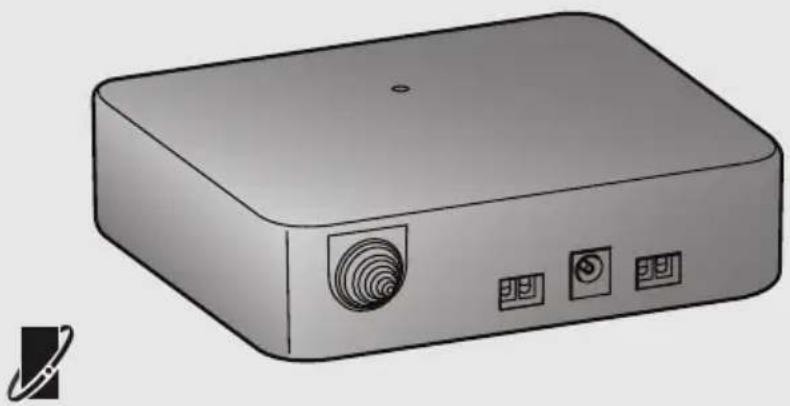
The standard delivery consists of (→ fig. 1):
[1] EasyControl adaptor
[2] screw with rawl plug (2x)
[3] technical documentation
[4] power adaptor
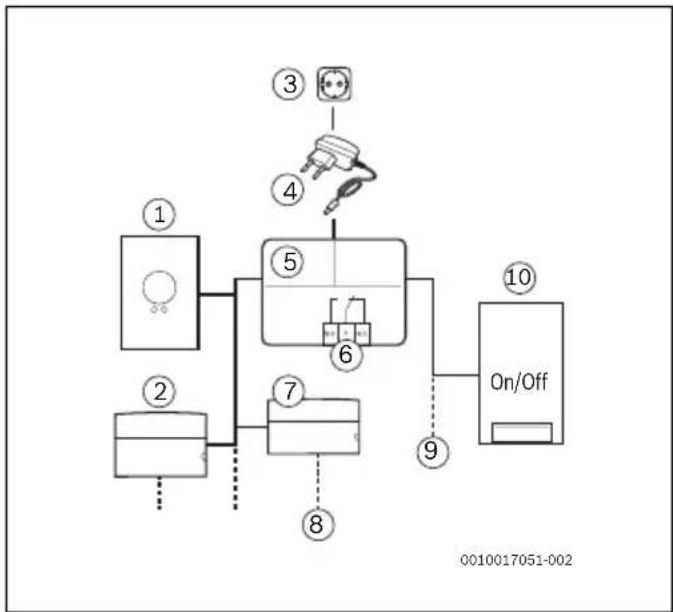
This product has the following connection possibilities ( fig. 2):
[1] room thermostat 1)
[2] function module
[3] mains voltage
[4] power adaptor
[5] EasyControl adaptor
[6] zero volt contact
[7] function module
[8] other units
[9] EMS or iRT or OpenTherm bus or on-off
[10] boiler r u c t i o n s
This product has a warranty period of 2 years.
This product is in accordance in design and operation with the European Directives and the supplementary national requirements. The conformity is indicated by the CE mark. You can ask for a copy of the declaration of conformity for this product. For this see the contact address on the back cover of these instructions.
3 Environmental protection/disposal
Environmental protection is a key company principle for the Bosch Group. Product quality, economical profitability and environmental protection are equally important to us. We strictly adhere to environmental laws and rules. To protect the environment, we adapt, subject to economical considerations, the best possible technology and materials.
Packaging
In our packaging, we consider all country specific recycling systems to guarantee optimal recycling. All of our packaging materials are environmentally friendly and recyclable.
1) The adaptor is compatible with Bosch brand smart controls and with Worcester smart controls.
Old electrical and electronic appliances
Electrical or electronic devices that are no longer serviceable must be collected separately and sent for environmentally compatible recycling (in accordance with the European Waste Electrical and Electronic Equipment Directive).
To dispose of old electrical or electronic appliances, you should use the return and collection systems put in place in the country concerned.
4 A s s e m b l y
The minimum requirements for installation of this product are:
- 2-wire cable for connection with the boiler, which is suitable for the use of the EasyControl adaptor.
▶ Before installation, check that the combination of the thermostat, the EasyControl adaptor and the boiler is possible.
▶ Ensure that the cable length between the EasyControl adaptor and the boiler is max. 3 metres, since long data cables can cause faults.
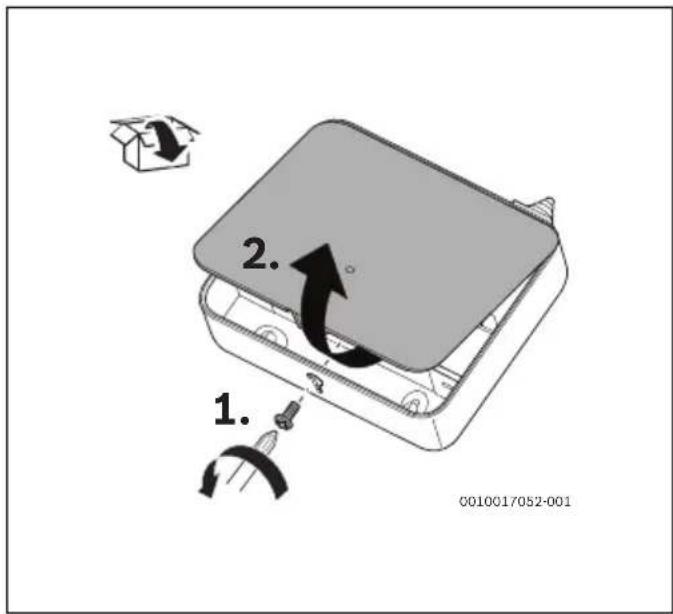
▶ Open the EasyControl adaptor casing ( fig. 3).
▶ Mark the drill holes using the centre distance between the elongated holes.
▶ Install the product using the provided screws and rawl plugs.
▶ Tighten the screws finger-tight.
5 Electrical connection
See the installation instructions for the boiler for more information on connecting the thermostat.
Thermostat and boiler connection
The "thermostat" and "boiler" cable clamps are not polarity sensitive.
▶ Remove the boiler plug from the socket.
▶ Disconnect the thermostat.
▶ Cut the 2-wire cable between the boiler and the thermostat.
- Connect the part of the 2-wire cable that connects to the boiler to the "boiler" cable clamps.
- Connect the part of the 2-wire cable that connects to the thermostat to the "thermostat" cable clamps.
Bus connection
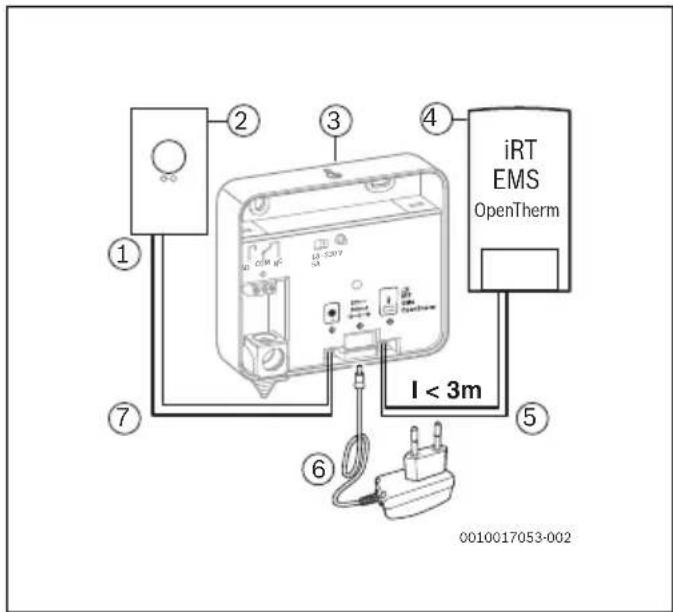
The EMS-bus is connected in the following way ( fig. 4):
[1] base plate
[2] thermostat or EMS module(s)
[3] EasyControl adaptor
[4] boiler
[5] boiler 2-wire cable
[6] power adaptor
[7] thermostat 2-wire cable
Zero volt contact
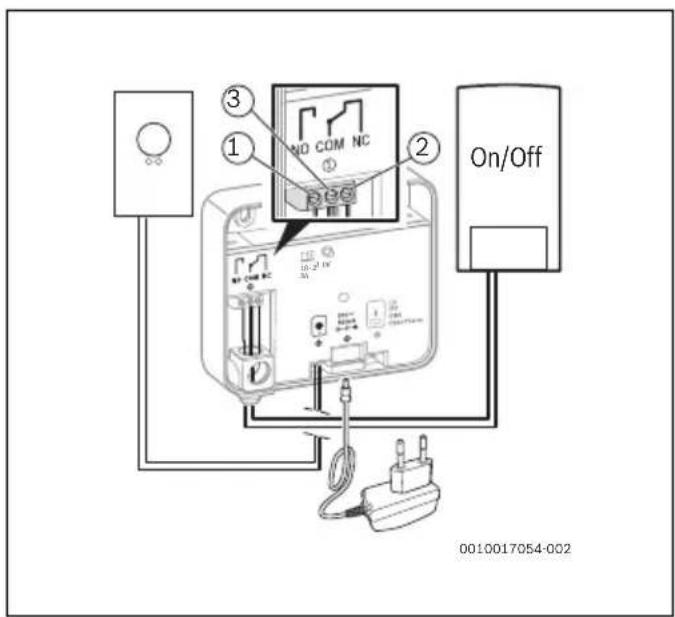
An on-off switching unit can be connected through the zero volt contact ( fig. 5):
[1] normally open connection (NO)
[2] normally closed connection (NC)
[3] common (COM)
The default connection is COM-NO. Following a heat demand, the NO contact closes.
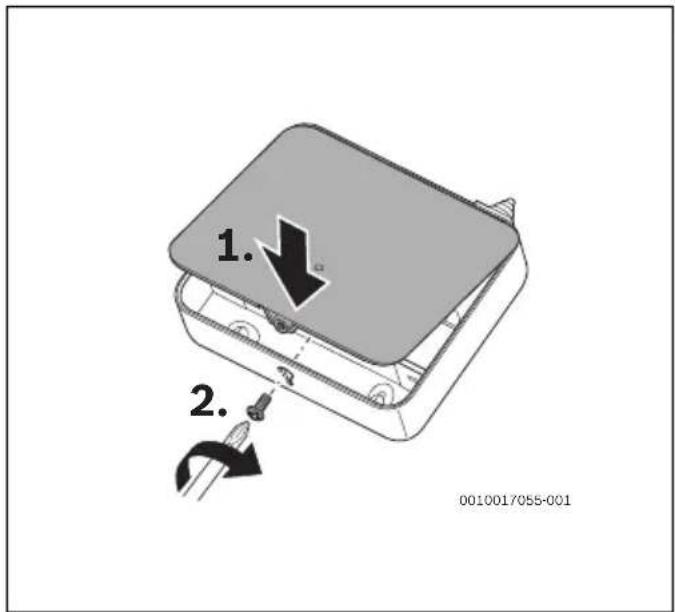
▶ Close the EasyControl adaptor casing ( fig. 6).
▶ Connect the power adaptor to the EasyControl adaptor.
6 Commissioning
▶ Position the thermostat.
▶ Insert the power adaptor into a socket.
▶ Insert the boiler plug into a socket.
▶ Turn on the boiler.
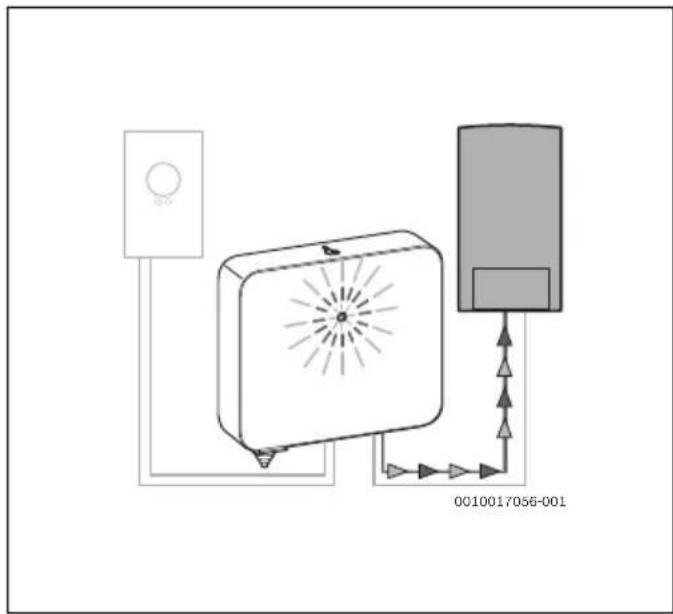
The EasyControl adaptor will start initialising ( fig. 7). The steps in table 1 are run through automatically.
| # LED indication | The EasyControl adaptor: | |
| 1 | Flashing red ... is receiving power and is waiting for protocol detection. | |
| 2 | Flashing blue ... is processing protocol detection. | |
| 3 | C o n blue | .s. hastdetected a supported protocol and is initialising the internal database. |
| 4 | Constantly green | ... has received data from the boiler as well as from the thermostat. |
| 5 | Dimmed green ... is in operation. | |
Table 1 LED indication during initialisation
7 T e c h n i c a l d a t a
| Volume Unit Value | ||
| Voltage supply V | DC | 20 |
| Nominal electrical load W < 2 . 5 | ||
| Dimensions (width x height x depth) | mm 134 × 115 × 37 | |
| Weight g 230 | ||
| Permissible ambient temperature range | °C | 0 - 50 |
| Max. storage temperature | °C | 0 - 60 |
| Permissible relative humidity | % | 10 - 90 |
IP classification | IP20 | |
| Volume | Unit | Value |
| Contact load (min.) @ 18VDC | mA | 10 |
| Contact load (max.) @ 250VAC | A | 5 |
| Cable diameter (max.) | mm2 | 2.5 |
| Cable length (max.) EasyControl adaptor - boiler | m | 3 |
| Cable length (max.) EasyControl adaptor - thermostat | m | 100 |
Table 3 Technical data, zero volt contact
Table 2 Technical data, module
8 F a u l t s
| LED | Error | Solution |
| Blinking alternating red and blue | No boiler detected. | ► Turn on the boiler.► Check the cable clamps between the power adaptor and the connection to the boiler.► Check the 2-wire cable.► Refer to the boiler installation instructions. |
| Constantly red | Short circuit connection to the thermostat.No communication with the boiler. | The boiler is turned off:► Turn on the boiler.► Check all connections.The boiler is switched on:► Remove the EasyControl adaptor power adaptor from the socket, wait at least 10 seconds, and reconnect it. |
| Constantly blue | No communication with the thermostat. | ► Turn on the boiler.► Check the cable clamps between the power adaptor and the thermostat.► Check the 2-wire cable to the thermostat. |
| Out | No power. | ► Connect the EasyControl adaptor power supply.► Replace the power adaptor. |
Table 4 Malfunctions
Sisukord
[5] Adapter EasyControl
- OpenTherm®, version 4.0,

- contact On/Off libre de potentiel.
→ www.bosch-easycontrol.com/checktool.
[1] normally open-aansluiting (NO)
[2] normally closed-aansluiting (NC)
[3] common (COM)
AU Robert Bosch (Australia) Pty Ltd
Thermotechnology Division
1555 Centre Road
Clayton Victoria 3168
Australia
Phone: 1300 30 70 37
Fax: 1300 30 70 38
www.bosch-climate.com.au
NZ New Zealand
Phone: 0800 54 33 52
Fax: 0800 54 33 55
www.bosch-climate.co.nz
BE Bosch Thermotechnology nv/sa
Bosch Thermotechnology Corp.
50 Wentworth Avenue
Londonderry, NH 03053
Tel. 603-552-1100
Fax 603-965-7581
www.boschheatingandcooling.com
Les Etats Unis
CHVertrieb
www.bosch-climate.fr
Tel: 0 820 128 128
www.bosch-climate.com.hr
HURobert Bosch Kft.
Unit L40 Cherry Orchard Industrial Estate
Cherry Orchard, Dublin 10
Tel.: 01.6305700
Fax.:01.6305706/01.6305715
www.cfquadrant.ie
E-mail: sales@cfquadrant.ie
IT Robert Bosch S.p.A.
www.bosch-climate.mx
NL Bosch Thermotechniek B.V.
Postbus 3,7400 AA Deventer
Tel: 0570-602206
Fax: 0570-602207
infott@nl.bosch.com
Installateur: www.boschsupportline.nl
RSRobert Bosch d.o.o.
Milutina Milankovića 9ž
11070 Novi Beograd
Srbija
Tel.: (+381) 11 2052 373
Fax: (+381) 11 2052 377
www.bosch-climate.rs
www.bosch-climate.si
SKRobert Bosch, spol. s r. o
Divizia Termotechnika (TT)
Ambrušova 4
821 04 Bratislava
www.bosch.sk
UKWorcester, Bosch Group
Cotswold Way, Warndon
Worcester WR4 9SW
worcester-bosch.co.uk
Worcester, Bosch Group is a brand
name of Bosch Thermotechnology Ltd.
US United States and Canada
Bosch Thermotechnology Corp.
50 Wentworth Avenue
Londonderry, NH 03053
Tel. 603-552-1100
Fax 603-965-7581
www.boschheatingandcooling.com
U.S.A.