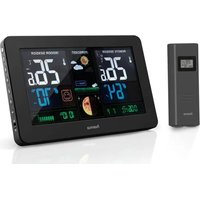
186380 - Weather Station HAMA - Free user manual and instructions
Find the device manual for free 186380 HAMA in PDF.


| Product Type | Indoor/Outdoor Weather Station |
| Brand | Hama |
| Model | 186380 |
| Base Station Power Supply | 3 V DC (2 LR6/AA batteries) or 5 V / 1.2 A power adapter (included) |
| Outdoor Sensor Power Supply | 3 V DC (2 LR6/AA batteries) |
| Indoor Temperature Range | -5 °C to +50 °C / 23 °F to 122 °F |
| Outdoor Temperature Range | -20 °C to +60 °C / -4 °F to 140 °F |
| Indoor Humidity Range | 20 % to 95 % |
| Outdoor Humidity Range | 20 % to 95 % |
| Radio Range | ≤ 60 m in open space |
| Radio Frequency | 433 MHz |
| Maximum Number of Sensors | 3 |
| Display | LCD with adjustable backlight (5 levels) |
| Main Functions | DCF radio-controlled clock, calendar, moon phases, weather forecast, temperature alarm, frost alarm, atmospheric pressure, comfort indicator |
| Connection | Wireless reception of outdoor sensor values |
| Mounting | Wall mountable (base station and sensor) |
| Maintenance and Cleaning | Clean with a soft, slightly damp cloth, without harsh detergents |
| Safety | Protect from moisture, shocks, and magnetic fields; use in dry indoor environments |
| Repairability | No user-serviceable parts; refer to a professional |
| Package Contents | Base station, outdoor sensor, power adapter, 2 LR6/AA batteries, user manual |
Frequently Asked Questions - 186380 HAMA
User questions about 186380 HAMA
0 question about this device. Answer the ones you know or ask your own.
Ask a new question about this device
Download the instructions for your Weather Station in PDF format for free! Find your manual 186380 - HAMA and take your electronic device back in hand. On this page are published all the documents necessary for the use of your device. 186380 by HAMA.
USER MANUAL 186380 HAMA
OperatingInstructions
Bedienungsanleitung
Moded'emploi
Instruccionesdeuso
Gebruiksaanwijzing
Istruzioniperl'uso
Instrukcja o bsługi
Használatiútmutató
Manualdeutilizare
Návodk p oužití
Návodnapoužitie
Manualdeinstruções
Bruksanvisning
- This quick-reference guide contains the most important basic information, such as safety instructions and the steps necessary to operate the product.
- To help protect the environment and conserve valuable raw materials, Hama does not issue a printed manual and instead make this available exclusively as a PDF download.
• The full text of the manual is available at the following internet address: www.hama.com -> 00186380 -> Downloads - Savethemanualonyourcomputerforreferenceandprintitoutifpossible.
A12Measuringstationwirelesssymbol
A13Wirelesssymbol
B1 "☀/z" button = Display lighting, interrupt alarm signal
B2 "💡" button = Switch between seconds and date display/Settings/Confirmsettingvalue
B3 "☑" button = Set alarm time / Switch between alarm time and dated display
B4 "▲" button = Increase the current setting value / Toggle between °C and °F / Activate/deactivate manual radio signalreception
B5 "▼" button = Reduce the current setting value / Retrieve values from individual outdoor radiosensors/ Manually search forthesignal from themeasuring station
B6 "8" button = Temperature alarm / Set temperature limits for the temperature alarm
B7 "★" button = Set display brightness (5 levels) / Change measurementunitforairpressure
B8 "MEM" button = Access/reset the stored maximum/minimumvalues
B9ON/OFFbutton= S witchalarmon/off
B10Socket forpowersupply
B11USBsocket
B12Batterycompartment
B13Recessforward mounting
C1Temperature indicator
C2Airhumidityindicator
C3 Celsius / Fahrenheit setting key
C4Channelsettingkey
C5Batterycompartment
C6Cut-outforwall mounting
1. ExplanationofWarningSymbolsandNotes
Warning

This symbolised to indicate safety instructions sortodraw your attention to specific hazards and risks.
Note

This symbol is used to indicate additional information or important notes.
Riskofelectricshock

Thissymbol indicates product parts energized with a dangerous voltage of sufficient magnitude to constitute a riskofelectric shock.
2.PackageContents
- Weather station (base station for indoors / measuring station foroutdoors)
- 2 x AAbatteries
- Powersupplyunit
• Theseoperatinginstructions
3.SafetyNotes
- The product is intended for private, non-commercial use only.
- Usetheproductforitsintendedpurposeonly.
- Protect the product from dirt, moisture and overheating, and only use it in a dry environment.
- Do not use the product in the immediate vicinity of heaters orotherheatsourcesorindirectsunlight.
- Keep this product, as all electrical products, out of the reach of children!
- Do not operate the product outside the power limits given in the specifications.
- Do not use the product in areas where the use of electronic devices is not permitted.
- Do not use the product in moist environments and avoid splashes.
- Do not place the product near interference fields, metal frames, computers, TVs, etc. Electronic devices and window frames can negatively affect the product's functionality
- Do not drop the product and do not expose it to any major shocks.
- Do not modify the product in any way. Doing so voids the warranty.
- Keep the packaging material out of the reach of children due totheriskofsuffocation.
- Dispose of packaging material immediately according to locallyapplicableregulations.
Riskofelectricshock

- Donotopenthedeviceorcontinuetooperateitifit becomesdamaged.
- Do not use the product if the AC adapter, adapter cable or powercable is damaged.
- Do not attempt to service or repair the product yourself. Leave any and all service work to qualified experts.
Warning-Batteries

- When inserting batteries, not the correct polarity (+ and - markings) and insert the batteries accordingly. Failure to do so could result in the batteries leaking or exploding.
- Onlyusebatteriesthatmatchthespecifiedtype.Keepthe instructionsforthecorrectchoiceofbatteriesincluded withtheoperatinginstructionsofdevicessafeforfuture reference.
- Before you insert the batteries, clean the battery contacts and the polarity contacts.
- Donotallowchildrentochangebatterieswithout supervision.
- Replace all the batteries in a set at the same time.
- Do not mix old and new batteries, or batteries of different typesorfromdifferentmanufacturers.
- Remove the batteries from products that are not being used for an extended period (unless these are being kept readyforanemergency).
- Donotshort-circuitbatteries.
- Donotchargebatteries.
• Donotburnbatteriesorheatthemup. - Neveropen, damageorswallowbatteriesorallow them to enter the environment. They can contain toxic, environmentallyharmfulheavymetals.
- Remove spent batteries from the product and dispose of themwithoutdelay.
- Avoid storing, charging and using in extreme temperatures and atextremely low atmospheric pressures(suchasat high altitudes).
- Ensure t hatbatterieswithdamagedhousings donotcomeintocontactwithwater.
- Keepbatteriesoutofthereachofchildren.

4. Getting Started
Note

Before use, ensure you insert the batteries in the measuring stationfirstandtheninthebasestation.
4.1 Insertbatteries/ c onnectpowersupply
Measuringstation
- Removethescreenprotectorfromthedisplay.
- Open the battery compartment (C5) and remove the contact breaker.
- Thenclosethebatterycompartmentcover.
Base station

Warning
- Connect the product only to a socket that has been approved for the device. The socket must be installed close to the product and must be easily accessible.
- Disconnect the product from the network using the power button – if this is not available, unplug the power cord fromthesocket.
- When using a multi-socket power strip, make sure that thesumpowerdrawofall t heconnecteddevicesdoesnot exceeditsmaximumthroughputrating.
-
If you will not be using the product for a long period of time, disconnectitfrommainspower.
-
Removethescreenprotectorfromthedisplay.
- Connect the power supply unit to the power supply unit connectionsocket (B10)onthebackofthebasestation.
- Connect the power cable of the weather station to a properly installed socket.
• Alternatively, open the battery compartment (B12), insert two AA batteries with the correct polarity and close the battery compartment cover.
Note

If the batteries are inserted correctly and you connect the power supply unit to the station, the base station will automatically switch to the external powersupply.
5. Installation
Note

- Thewirelesstransmissionrangebetweenthemeasuring and base stations is up to 50 m in open spaces.
- Before installation, ensure that wireless transmission will not be disrupted by interference or obstacles like buildings, trees, vehicles, high-voltagelines, etc.
- Before the final installation, ensure that there is sufficient reception between the intended installation locations.
- When installing the measuring station, ensure that it is protected from direct sunlight and rain.
- The international standard height for measuring air temperature is 1.25 m (4 ft) above ground.
Warning

- Buy special or suitable installation material from a specialiseddealerforwall-mounting.
- Ensure that no faulty or damaged parts are installed.
- Never apply force during installation. This could damage theproduct.
- Before installation, ensure that the chosen wall is suitable for the weight to be mounted, and make sure that there are no electrical wires, water, gas or other lines at the installationsiteonthewall.
-
Donotmounttheproductabovelocationswhere persons mightlinger.
-
Were recommend installing themeasuring station securely on an outdoor wall (C6).
• Install an anchor, screw, nail, etc. in the wall of your choice.
6. Operation
Note - Input

- Holdthe ▲ button(B4)orthebutton(B5)toselectthe valuesfaster.
6.1 Connection to the measuring station
- After you insert the batteries, the base station automatically searches for a connection to the measuring station and performsinitialsetup.
Note
- Initialsetuptakesapproximately3 m inutes.
- During the connection attempt, theradiosymbol on the measuring station (A12) will flash.
- Donotpressanybuttonsduringsetup. Otherwise, values may not be transmitted correctly and there is a risk of valueerrorsandinaccuracies.
- Thesetupprocessiscompletedwhentheindoorand outdoormeasurementdata(A1/A2/A8/A10)isdisplayed.
- If the base station still does not receive a signal from the measuring station, press and hold the ▼ button(B5)for approx. 3 seconds to start the manual search for the signal.
6.2 Automatic setting using the DCF signal
- After the first time the basestation is switched on successful transmission is established between the basestation and theme measuring station, the clock will automatically search for a DCF signal. During the search, the wireless symbol (A13) will flash.
- Whenthewirelesssignalisreceived, the date and time are automatically set.
Note - Time settings

- The search process takes about 7 minutes. If the search fails, itendsandisrepeatedatthenextclockhour.
- In the meantime you can, however, set the time and the date manually.
- The clock automatically continues to search for the DCF signal on a daily basis (between 1:00 a.m. and 5:00 a.m.). If the signal is received successfully, the manually set time and date areoverwritten.
7. Care and Maintenance
- Only clean this product with a slightly damp, lint-free cloth anddonotuseaggressivecleaningagents.
• Make sure that water does not get into the product.
Note

Disconnect the device from the powers supply before cleaning it or if it is not going to be used for a long period of time.
8. Warranty Disclaimer
Hama GmbH & Co KG assumes no liability and provides no warrantyfordamageresultingfromimproperinstallation/mounting, improper use of the product or from failure to observetheoperatinginstructionsand/orsafetynotes.
9. Technical Data
| Specifications in accordance with Regulation (EU) 2019/1782 | |
| Manufacturer's n ameor trademark, commercial registrationnumber a nd address | Hama,HRA12159, DresdnerStr.9, 86653Monheim |
| Model identifier | HX075-0501200-AG-001 |
| Inputvoltage100-2 40V | |
| Input AC frequency | 50 / 60 Hz |
| Output v oltage/ Outputcurrent/ Outputpower | 5.0V D C/ 1.2A/ 6.0W |
| Average active efficiency | 76.0 % |
| Efficiencyatlowload(10%) | 70.1% |
| No-loadpowerconsumption | 0.10W |
| Base station | Measuring station | |
| Powersupply | 3.0V2 x AAbatteries Powersupplyunit:In:100-240V ~max. 0 .3A,50/60HzOut:5.0V ≈max.1200mA | 3.0V2 x AAbatteries |
| MeasuringrangeTemperature ( °C) | -5°C- + 50°C/23°F- + 122°F | -20°C- + 60°C/-4°F- + 140°F |
| Humidity | 20%-9 5% | 20%-9 5% |
| Max.numberofmeasuringstations | 3 | |
| Range | ≤60m | |
10. Declaration of Conformity
CE Hereby, Hama GmbH & Co KG declares that the radio equipmenttype[00186380]isincompliancewith Directive 2014/53/EU. The full text of the EU declaration of conformityisavailableatthefollowinginternetaddress: www.hama.com->00186380->Downloads.
| Frequencyband(s) | 433 MHz |
| Maximumradio-frequency powertransmitted | 38.9 nW |
86652Monheim/Germany
Service& Support

www.hama.com

+499091502-0
D GB
CE


PAP RaccoltaCarta
All listed brands are trademarks of the corresponding companies. Errors and omissions excepted, and subject to technical changes. Our general terms of delivery and payment are applied.
