
TE-MD 80 - Detector EINHELL - Free user manual and instructions
Find the device manual for free TE-MD 80 EINHELL in PDF.
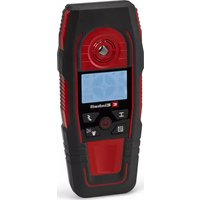


| Product type | Digital detector |
| Brand | Einhell |
| Model | TE-MD 80 |
| Power supply | 1 9V battery (type 6LR61 / 6F22) |
| Detection depth ferrous metals | max. 80 mm |
| Detection depth copper | max. 38 mm |
| Detection depth live cables | max. 60 mm |
| Detection depth wood | max. 24 mm |
| Detection depth metals / non-metals | max. 24 mm |
| Detection modes | Wood, Metal, Live cable |
| Indicators | Visual signal (green, orange, red), audible signal, reticule display |
| Additional functions | Marking hole, automatic calibration, auto power-off after 5 min |
| Sound and light on/off | Yes, via dedicated button |
| Storage temperature | 5 to 30 °C |
| Maintenance and cleaning | Clean with a damp cloth and mild soap; do not use harsh detergents |
| Safety | Protection against rain and high humidity; do not expose to extreme temperatures |
| Spare parts and repairability | Spare parts available at www.Einhell-Service.com |
| Warranty | Consult the manual for conditions |
Frequently Asked Questions - TE-MD 80 EINHELL
User questions about TE-MD 80 EINHELL
0 question about this device. Answer the ones you know or ask your own.
Ask a new question about this device
Download the instructions for your Detector in PDF format for free! Find your manual TE-MD 80 - EINHELL and take your electronic device back in hand. On this page are published all the documents necessary for the use of your device. TE-MD 80 by EINHELL.
USER MANUAL TE-MD 80 EINHELL
EN Original operating instructions Digital detector

Danger! - Read the operating instructions to reduce the risk of injury
Danger!
When using the equipment, a few safety precautions must be observed to avoid injuries and damage. Please read the complete operating instructions and safety regulations with due care. Keep this manual in a safe place, so that the information is available at all times. If you give the equipment to any other person, hand over these operating instructions and safety regulations as well. We cannot accept any liability for damage or accidents which arise due to a failure to follow these instructions and the safety instructions.
1. Safety regulations
Danger!
Read all safety regulations and instructions.
Any errors made in following the safety regulations and instructions may result in an electric shock, fire and/or serious injury.
Keep all safety regulations and instructions in a safe place for future use.
Safety information on the measuring device
- Keep the measuring instrument out of the rain, away from moisture and high humidity.
- Keep the measuring instrument away from direct sunlight.
- Keep the measuring device away from extreme temperatures.
- Keep the measuring device away from flammable gases, vapors, and solvents.
- Avoid damage and shocks!
Safety information on the batteries
Use of the batteries
- If the equipment is not used correctly, the batteries may leak. Avoid contact with the battery fluid. If you come into contact with battery fluid, clean the affected body part with running water. If you get battery fluid in your eyes, seek immediate medical assistance. • Escaped battery fluid can cause skin irritation and acid burns.
- Never expose the batteries to excess heat such as sunshine, fire, or similar.
- Never recharge batteries that are not suitable for recharging. Risk of explosion!
- Keep batteries away from children, do not short circuit or disassemble batteries.
- Seek a doctor's advice immediately if a battery is swallowed. • If necessary, clean the contacts on the batte-
ry and equipment before inserting the batteries.
- Ensure that you insert the batteries the right way round.
- Remove flat batteries immediately from the equipment. There is an increased risk of leakage. • Always change all batteries in one go.
- Insert only batteries of the same type, do not use different types of batteries or used and new batteries together.
- Make sure that the equipment is switched off after use.
- Remove the batteries if the equipment is not used over a longer period.
2. Layout and items supplied
2.1 Layout (Fig. 1)
- Light-up ring
- Marking hole
- Display
- ON/OFF button
- Metal button
- Electrical power button
- Wood button
- Audio signal/light button
- Battery compartment
- Battery compartment cover
2.2 Items supplied
- Open the packaging and take out the equipment with care.
- Remove the packaging material and any packaging and/or transportation braces (if available).
- Check to see if all items are supplied.
- Inspect the equipment and accessories for transport damage.
- If possible, please keep the packaging until the end of the guarantee period.
Danger!
The equipment and packaging material are not toys. Do not let children play with plastic bags, foils or small parts. There is a danger of swallowing or suffocating!
- Digital detector
EN
3. Proper use
The digital detector is designed for locating metal, wood and live cables in walls, floors or ceilings.
The equipment is to be used only for its prescribed purpose. Any other use is deemed to be a case of misuse. The user / operator and not the manufacturer will be liable for any damage or injuries of any kind caused as a result of this.
Please note that our equipment has not been designed for use in commercial, trade or industrial applications. Our warranty will be voided if the machine is used in commercial, trade or industrial businesses or for equivalent purposes.
Important!
The digital detector is ideally suited for locating elements in drywall of up to 80 mm.
Important!
Due to its design, the digital detector has only limited capacity for locating elements in stone and brick walls.
4. Technical data
Power supply: .... 1x 9V block battery; type 6LR61 / 6F22
Detection depth for metal / non-metal: ..... .....max. 24 mm
Detection depth for wood: ....max. 24 mm Detection depth for ferrous metals: ..max. 80 mm Detection depth for copper: ....max. 38 mm
Detection depth for live cables: ....max. 60 mm
5. Before using for the first time
Inserting batteries (Fig. 1)
- Turn off the equipment using the ON/OFF button (4)
- Open the battery compartment cover (9).
- Insert the battery into the battery compartment (10), ensuring that you fit it the right way round.
- Close the battery compartment cover (9) again, making sure that it locks securely
6. Operation
Danger!
- The measuring tool cannot provide a one hundred percent guarantee of safety. In order to eliminate possible dangers it is necessary to take precautions by checking other sources of information such as building plans, photos from the time of construction, etc., before starting any drilling, sawing or cutting work in walls, ceilings or floors.
- Whenever any material is detected in the wall, a check must always be made as to whether the material concerned is a live cable.
- Work must never be performed in the area of electric cables unless the power supply has been disconnected. If in doubt, contact an electrician or individual with similar qualifications.
- Beams and supports are generally spaced at regular intervals behind walls or ceilings. Electric cables and water pipes on the other hand, for example, are spaced irregularly. Check the spacing of objects before you start working on walls or ceilings.
- It is possible for measurement errors to occur depending on the characteristics of the surface involved.
- The identified object may actually be wider or narrower than shown on the display. This varies according to the depth.
6.1 ON/OFF switch
Press the ON/OFF button (4) to switch the equipment on and off.
The equipment switches off automatically after about 5 minutes without input.
6.2 Functions
Use the selection buttons (5, 6, 7) to choose the material you want to locate:
Wood button (7):
Important! Use only on drywall. The results may be impaired on other surfaces.
For metal and non-metal materials (wood, metal, etc.)
• Detection depth for wood: max. 24 mm
• Detection depth for metal: max. 24 mm
Metal button (5):
For ferrous materials and copper piping
• Detection depth for ferrous metals: max. 80 mm • Detection depth for copper: max. 38 mm
Electrical power button (6):
For live cables
• Detection depth: max. 60 mm
6.3 Calibration
The equipment needs to be calibrated for the characteristics of the search area before each measurement (wall, floor or ceiling). Calibration needs to be repeated every 60 seconds in order to reduce the occurrence of measuring errors.
- Switch on the equipment (see 6.1) and select the function you require (see 6.2).
- Hold the back side of the equipment up to the surface
- Select an area where there is probably less likelihood of finding the material you are trying to locate
- Press the button for the selected function again • Do not move the equipment
- After about 5 seconds, you will hear 2 brief beeps and the light-up ring (1) will light up green to indicate that the calibration is complete • You can now start your search
6.4 Searching (Fig. 2-4)
The search procedure is the same for all the functions.
Important!
The object which is found must be “scanned” twice by the equipment in every case. “Scanning” must be in opposite directions in every case.
The equipment must not be lifted or tilted during the search.
- Switch on the equipment (see section 6.1) and select the function you require (see section 6.2). • Calibrate as described in section 6.3
- Place the equipment in position against the wall and move it slowly in a horizontal direction along the wall. The equipment gives off 3 signals:
- Colored light-up ring (1)
- Increasing crosshairs on the display (3)
- Audio signal
- If the search object is not located, the light-up ring (1) is displayed in green and the crosshairs are not shown on the display (3). As you get closer to the search object, the
light-up ring (1) will turn orange and the outer rings of the crosshairs appear. See Fig. 2a.
- The closer you get, the more rings will be displayed.
- Place a mark through the marking hole (2) in the position where the light-up ring (1) turns red and the crosshairs symbol is shown completely (see Fig. 2b).
- Repeat this procedure from the other side. See Fig. 3a/3b
- The search object is located between the two marks.
Important!
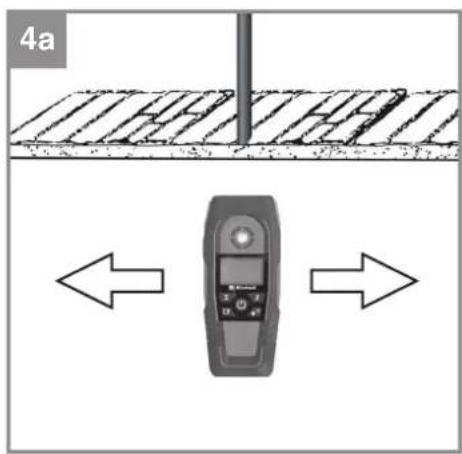
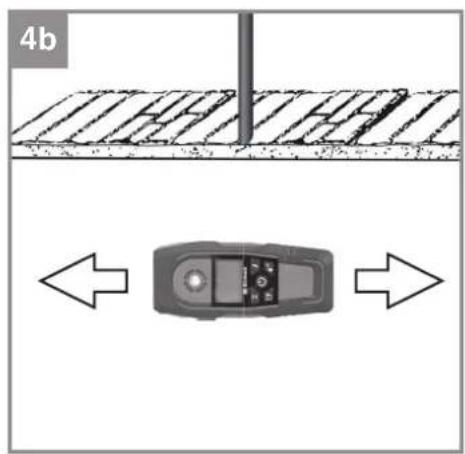
It can be helpful to repeat the object search with a search direction rotated 90° (see Fig. 4), in order to identify the extent of the object more accurately.
Metal struts or braces running parallel to the equipment may interfere with the sensor in the equipment.
A steady display of just a single ring does not mean that an object has been identified. You can only be certain that an object has been identified if the complete crosshairs is displayed.
Warning!
If AC mode is on and a lightning symbol is displayed along with the crosshairs, this means that the object which has been found is an ELECTRIC CABLE.
Supports and electric cables located close to each other can prevent the unambiguous identification of individual objects and possibly provide a misleading search result.
Where cables are routed along a known position but the equipment cannot find them in AC mode, use METAL mode. One explanation could be that the cables are shielded by a metal cover in such a case.
6.5 Switching the audio signal and light on/off (Fig. 1 / Item 8)
The audio signal and light can be switched on and off by pressing button 8.
Press 1x: Audio signal off
Press 2x: Light off
Press 3x: Audio signal on / Light on
The light and audio signal are always switched on each time the equipment is restarted.
7. Cleaning, maintenance and ordering of spare parts
7.1 Cleaning
- Keep all safety devices, air vents and the motor housing free of dirt and dust as far as possible. Wipe the equipment with a clean cloth or blow it with compressed air at low pressure. • We recommend that you clean the device immediately each time you have finished using it.
- Clean the equipment regularly with a moist cloth and some soft soap. Do not use cleaning agents or solvents; these could attack the plastic parts of the equipment. Ensure that no water can seep into the device. The ingress of water into an electric tool increases the risk of an electric shock.
7.2 Maintenance
There are no parts inside the equipment which require additional maintenance.
7.3 Ordering spare parts and accessories
Please provide the following information when ordering spare parts:
- Type of unit • Article number of the unit • ID number of the unit
- Spare part number of the required spare part. For our latest prices and information please go to www.Einhell-Service.com
8. Disposal and recycling
The equipment is supplied in packaging to prevent it from being damaged in transit. The raw materials in this packaging can be reused or recycled. The equipment and its accessories are made of various types of material, such as metal and plastic. Never place defective equipment in your household refuse. The equipment should be taken to a suitable collection center for proper disposal. If you do not know the whereabouts of such a collection point, you should ask in your local council offices.
9. Storage
Store the equipment and accessories in a dark and dry place at above freezing temperature. The ideal storage temperature is between 5 and 30
°C. Store the electric tool in its original packaging.
Disposal
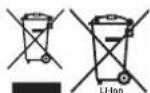
Power tools, rechargeable batteries, accessories and packaging should be sorted for environmental-friendly recycling.
Do not dispose of power tools and batteries/rechargeable batteries into household waste!
Only for EU countries:
According to the Directive 2012/19/EU on waste electrical and electronic equipment and its transposition into national law, power tools that are no longer usable, and, according to the Directive 2006/66/EC, defective or drained batteries must be collected separately and disposed of in an environmentally correct manner.
If disposed incorrectly, waste electrical and electronic equipment may have harmful effects on the environment and human health, due to the potential presence of hazardous substances.
Only for United Kingdom:
According to The Waste Electrical and Electronic Equipment Regulations 2013 (SI 2013/3113) (as amended) and the Waste Batteries and Accumulators Regulations 2009 (SI 2009/890) (as amended), products that are no longer usable must be collected separately and disposed of in an environmentally friendly manner.
The reprinting or reproduction by any other means, in whole or in part, of documentation and papers accompanying products is permitted only with the express consent of the Einhell Germany AG.
Subject to technical changes

6.1 ON/OFF switch
Insert the batteries (figure 1)
Standard references: EN 61326-1
Subject to change without notice
Archive-File/Record: NAPR030175
Documents registrar: Georg Riedel
Wiesenweg 22, D-94405 Landau/Isar
* EN Digital detector - RF detector for locating cables - IT Rilevatore digitale - D/A/DI Digitales Suchgerät - CS Digitální detektor - RX Digitální detektor - MT Digitali detector - ES Detector digital - FI Digitaalinen ilmaisin - SI Digitalni detektor - RU Цифровой детектор - RO Detector digital - EL Ψηφιακός ανιχνευτής - PT Detector digital - RA/BS Digitalni detektor - SP Digitalni detektor - PL Detektor cyfrowy - TR Dijital dedektör - RU Цифровой детектор - ET Digitaaldetektor - LV Digitālais detektors - LT Skaitmeninis detektorius - BG Цифров устройство за локализиране - UK Цифров детектор - MX Цифров устройство за детектиране

Declaration of Conformity
We, Einhell UK Ltd
Champions Business Park, First Floor Unit 10, Arrowe Brook Rd, Upton, Wirral CH49 0AB, United Kingdom
declare the conformity to UK standards and legislation was assessed for:
Digital Detector TE-MD 80 (Einhell)
UK legislation
□ Simple Pressure Vessels (Safety) Regulation □ Electrical Equipment (Safety) Regulation □ Radio Equipment Regulation □ Personal Protective Equipment Regulation □ The Ecodesign for Energy-Related Products and Energy Information Regulation X The Restriction of the Use of Certain Hazardous Substances in Electrical and Electronic Equipment Regulation □ Noise Emission in the Environment by Equipment for use Outdoors Regulation ☒ Electromagnetic Compatibility Regulation □ Measuring Instruments Regulation □ Pressure Equipment (Safety) Regulation
Annex V
Annex VI
Noise: measured L ww = dB (A); guaranteed L ww = dB (A) P = kW; L/∅ = cm UK Approved Body:
□ Supply of Machinery (Safety) Regulation
□ Annex IV
UK Approved Body:
UKTE Certificate No.:
Standards: BS EN 61326-1
Wirral, 2025.01.28

Tom Chambers, Managing Director Einhell UK Ltd.
Archive-File/Record: NAPR030175
Article Number: 22.701.45 I.-No.: 21013
Subject to change without notice Wiesenweg 22, 94405 Landau/Isar, Germany
Documents registrar: Georg Riedel
EH 06/2025 (02)
- DANGER
- SAFETY REGULATIONS
- SAFETY INFORMATION ON THE MEASURING DEVICE
- SAFETY INFORMATION ON THE BATTERIES
- LAYOUT AND ITEMS SUPPLIED
- LAYOUT (FIG. 1)
- ITEMS SUPPLIED
- EN
- PROPER USE
- IMPORTANT
- TECHNICAL DATA
- BEFORE USING FOR THE FIRST TIME
- INSERTING BATTERIES (FIG. 1)
- OPERATION
- ON/OFF SWITCH
- FUNCTIONS
- WOOD BUTTON (7)
- METAL BUTTON (5)
- ELECTRICAL POWER BUTTON (6)
- CALIBRATION
- SEARCHING (FIG. 2-4)
- WARNING
- SWITCHING THE AUDIO SIGNAL AND LIGHT ON/OFF (FIG. 1 / ITEM 8)
- CLEANING, MAINTENANCE AND ORDERING OF SPARE PARTS
- CLEANING
- MAINTENANCE
- ORDERING SPARE PARTS AND ACCESSORIES
- DISPOSAL AND RECYCLING
- STORAGE
- DISPOSAL
- ONLY FOR EU COUNTRIES
- ONLY FOR UNITED KINGDOM
- INSERT THE BATTERIES (FIGURE 1)
- STANDARD REFERENCES: EN
- DECLARATION OF CONFORMITY
- DIGITAL DETECTOR TE-MD 80 (EINHELL)
- UK LEGISLATION
Brand : EINHELL
Model : TE-MD 80
Category : Detector