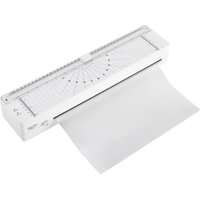
AD 1042 - Laminating machine ADLER - Free user manual and instructions
Find the device manual for free AD 1042 ADLER in PDF.


| Brand | Adler |
| Model | AD 1042 |
| Device type | Laminating machine |
| Power supply | 220-240 V ~ 50-60 Hz |
| Rated power | 170 W |
| Preheating time | 3 to 5 minutes |
| Accepted film thickness | 80 to 125 microns (max 250 microns total) |
| Laminating speed | 300 mm/min |
| Maximum sheet width | Up to A3 format (330 mm) |
| Maximum document + film thickness | 0.5 mm |
| Maximum continuous operation time | 30 minutes, then 30 minutes pause |
| Integrated functions | Built-in paper cutter, LED standby and ready indicator, jam release button |
| Intended use | Household only, for laminating paper sheets |
| Safety | Automatic shut-off after long inactivity (not specified), do not insert metal objects, do not touch hot surfaces |
| Maintenance and cleaning | Unplug before cleaning, do not use chemical products or compressed oil, clean exterior with damp cloth |
| Spare parts | Contact the seller for spare parts and complaints |
| Repairability | Do not repair yourself, entrust to an authorized service center |
| General information | Manual available in multiple languages, environmental respect: do not dispose of with household waste |
Frequently Asked Questions - AD 1042 ADLER
User questions about AD 1042 ADLER
0 question about this device. Answer the ones you know or ask your own.
Ask a new question about this device
Download the instructions for your Laminating machine in PDF format for free! Find your manual AD 1042 - ADLER and take your electronic device back in hand. On this page are published all the documents necessary for the use of your device. AD 1042 by ADLER.
USER MANUAL AD 1042 ADLER
natural_image
Exterior view of a white air conditioner unit (no visible text or symbols)AD 1042
| EN | User Manual | 3 | PL | Instrukcja obsługi | 80 |
| DE | Bedienungsanleitung | 7 | IT | Manuale d'uso | 85 |
| FR | Mode d'emploi | 12 | SV | Bruksanvisning | 90 |
| ES | Manual de usuario | 17 | BG | Ръководство за употреба | 94 |
| PT | Manual de Instruções | 22 | DA | Brugsanvisning | 100 |
| LT | Naudojimo instrukcija | 27 | SK | Používatel'ská príručka | 104 |
| LV | Lietošanas instrukcija | 32 | BS | Korisnički priručnik | 109 |
| ET | Kasutusjuhend | 36 | MK | Упатство за употреба | 114 |
| HU | Használati útmutató | 41 | HR | Korisnički priručnik | 119 |
| RO | Manual de utilizare | 45 | UK | Керівництво користувача | 123 |
| CS | Návod k použití | 50 | SR | Упутство за употребу | 129 |
| RU | Руководство пользователя | 55 | AR | دليل المستخدم | 133 |
| EL | Еүхειρίδιο хрήσης | 60 | AZ | İstifadəçi tõlimatı | 137 |
| NL | Gebruikershandleiding | 66 | SQ | Manuali i përdorimit | 142 |
| SL | Navodila za uporabo | 71 | KA | Общめる | 147 |
| FI | Käyttöohje | 75 |
1
2
3
4
5
User Manual (EN)
GENERAL SAFETY CONDITIONS IMPORTANT SAFETY INSTRUCTIONS FOR USE READ CAREFULLY AND KEEP FOR FUTURE REFERENCE
- Before using the device, read the user manual and follow the instructions contained therein. The manufacturer is not responsible for damage caused by using the device contrary to its intended use or improper operation.
- Before using the laminator, read the instruction manual and exercise extreme caution when using it.
- WARNING: Pay special attention to loose clothing such as ties, jewelry, hair and other small items and keep them away from the paper feed slot to prevent them from entering the laminating tube and causing injury.
- WARNING: Remember to remove paper clips and staples before inserting sheets of paper into the laminator.
- WARNING: Do not place your hand or fingers in the laminator slot - this can cause serious personal injury. If a paper jam occurs, always unplug the laminator before removing it.
- WARNING: Always unplug this appliance if it is left unattended and before moving, taking it apart or cleaning it.
- WARNING: The device must not be cleaned with compressed gas or lubricated with compressed oil. The use of compressed gas or oil may cause a fire.
- WARNING: The device contains dangerous moving parts. Do not use the device if there are children in the room.
- The device is for home use only. Do not use for other purposes than its intended use.
- The device should only be connected to a socket with a voltage of 220-240V\~50-60Hz.
In order to increase operational safety, do not connect multiple
electrical devices to one circuit at the same time.
-
To provide additional protection, it is advisable to install a residual current device (RCD) with a rated residual current not exceeding 30 mA. In this regard, please contact a specialist electrician.
-
The equipment is not intended to be operated using external time switches or a separate remote control system.
-
Be especially careful when using the device when children are nearby. Do not allow children to play with the device. Do not allow children or people who are not familiar with the device to use it.
-
WARNING: This equipment may be used by children over 8 years of age and by persons with limited physical, sensory or mental capabilities, or persons who have no experience or knowledge of the equipment, if this is done under the supervision of a person responsible for their safety or if they have been given instructions on how to use the device safely and are aware of the dangers associated with its use. Children should not play with the equipment. Cleaning and maintenance of the device should not be performed by children, unless they are over 8 years of age and these activities are performed under supervision.
-
WARNING: Always remove the plug from the power socket after use by holding the socket with your hand. DO NOT pull on the mains cord.
-
WARNING: Do not leave the appliance plugged in unattended.
-
WARNING: Keep the device out of the reach of children.
-
WARNING: Improper use of the device may result in injuries such as cuts, burns, abrasions or electric shock.
-
WARNING: Do not use the device near flammable materials.
-
WARNING: The temperature of accessible surfaces during operation of the device may be high. Do not touch hot surfaces.
-
Do not immerse the cable, plug or the entire device in water or any other liquid. Do not expose the device to weather conditions (rain, sun, etc.) or use in conditions of increased humidity
(bathrooms, damp camping houses).
- Periodically check the condition of the power cord. If the power cord is damaged, it should be replaced by a specialist repair shop in order to avoid a hazard.
- Do not use the device with a damaged power cord or if it has been dropped or damaged in any other way or does not work properly. Do not repair the device yourself, as this may cause electric shock. Return the damaged device to an appropriate service center for examination or repair. All repairs may only be performed by authorized service centers. Improperly performed repairs may cause serious danger to the user.
- The power cord must not touch hot surfaces.
- Do not allow the motor part of the appliance to get wet.
- Do not use the device outdoors, use only indoors.
- The device should be placed on a cool, stable, even surface, away from hot kitchen appliances such as: electric stove, gas burner, etc.
- The maximum single operating time of the device is 30 minutes, after this time the laminator can be switched on again after 30 minutes.
- Do not operate the device with wet hands.
- If the appliance has a grounding plug, it must be connected to a grounding outlet.
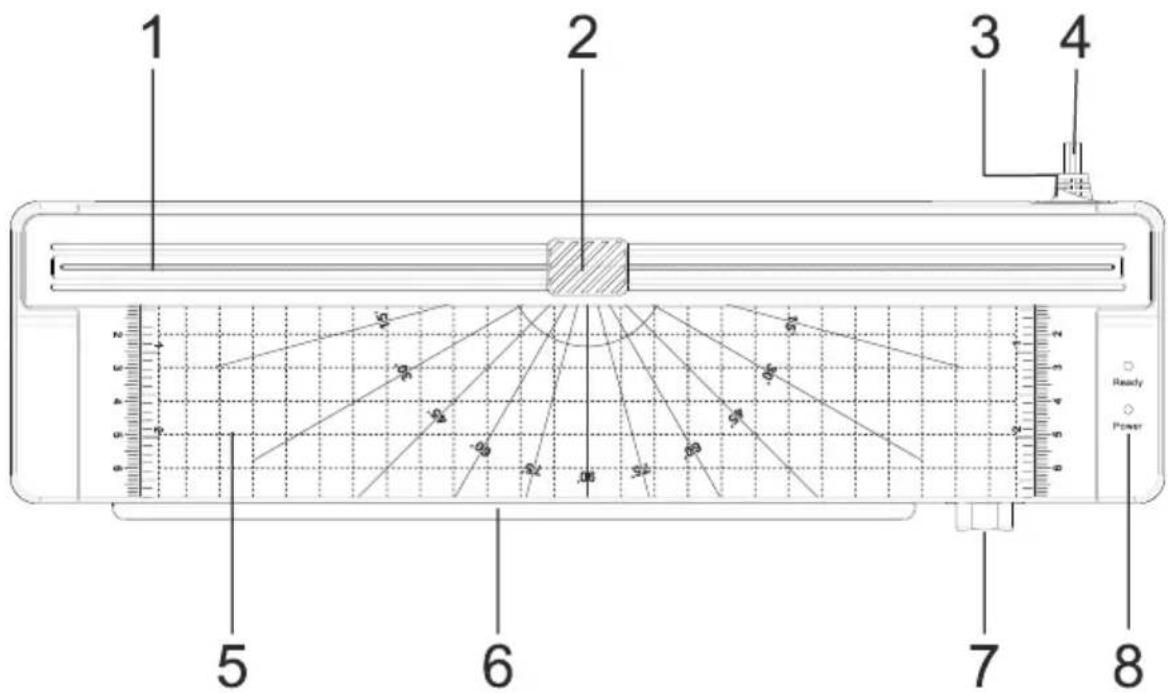
PRODUCT DESCRIPTION - Laminator (Fig.1)
| 1. Cutter rail | 2. Foil/paper cutter |
| 3. On/Off switch | 4. Power cord |
| 5. Cutting platform | 6. Foil entry slot |
| 7. Foil jam release button (ABS) | 8. Status indicators (standby/power) |
BEFORE FIRST USE
Carefully remove the laminator from the packaging and place it on a flat, safe and stable surface.
USE
- Connect the power cord (4) to the power outlet and press the switch (3) on the laminator to turn on the device. Before turning it on, select the laminating thickness that is adapted to the film that will be used: 160 (2x80) microns or 250 (2x125) microns. Set the switch to 80mic or 125mic.
NOTE: Do not use foils thicker than 250 (2x125 microns per side).
- After 3-4 minutes, when the device has reached the appropriate temperature for laminating, the device will give a ready-to-use signal by turning on the green "Ready" LED.
NOTE: Preheating time may vary depending on ambient temperature and humidity.
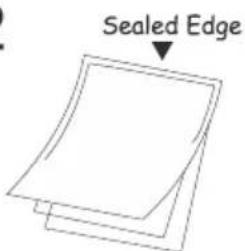
- When the device is ready to use (the "Ready" LED is green), place the document between the two sides of the laminating pouch. Make sure the document is aligned and as close to the pre-laminated edge of the pouch as possible (Fig. 2).
NOTE: To avoid sheet wrinkling and air bubbles, the total thickness of the paper and laminating film should not exceed 0.5 mm (19 mil). The thickness of the laminating films must not be less than 80 microns.
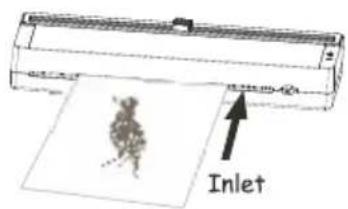
- Insert the laminating pouch into the pouch input slot (6) with the laminated edge facing down (Fig.3). Make sure the pouch is held in place by the rollers inside the machine.
NOTE: Do not insert the foil with the open side into the machine to prevent it from jamming in the machine.
NOTE: Do not laminate plant or animal specimens or metal items such as keys or coins.
-
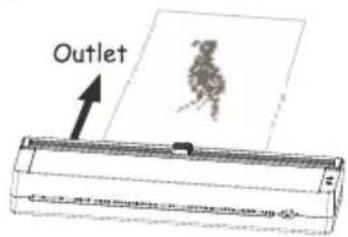
The heating rollers will automatically pull the laminating film and move it towards the exit slot (Fig.4). Do not push or pull the film through the laminator. Wait a moment for the film to cool down before handling it.
-
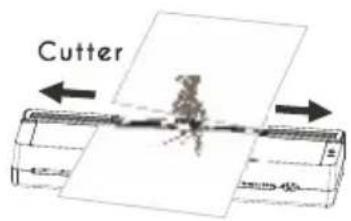
You can trim the edges of the foil using the foil/paper cutter (2). Place the laminated document on the cutting platform (5). Slide it slightly above the cutter rail (1) and pull the foil cutter (2) to the end of the rail (1) (Fig. 5).
-
Turn off the device by moving the switch to the OFF position (3). Disconnect the device from the power source.
WHEN THE FILM GETS JAMMED IN THE DEVICE
If the pouch jams in the laminator, turn off the power and remove the pouch by pressing the pouch jam button (ABS) (7).
NOTE: If the laminator is switched on and has not been used for more than an hour, excess heat may have built up inside the machine. To avoid overheating and consequently poor laminating results, insert a piece of copier paper into the machine to remove excess heat.
NOTE: If white spots appear or the film has lost transparency, run the film through the rollers and repeat if necessary.
TECHNICAL DATA
Power supply 220-240V\~50-60Hz.
Nominal power: 170W
Warm-up time: 3-5min
Foil thickness: 80-125mic
Laminating speed: 300mm/min
Maximum foil width: up to A3 format (330mm)
 | The device may not be used by more than one person at the same time. |  | While laminating documents, no other activities related to the operation of the device (e.g. cleaning, etc.) can be carried out. |
 | The laminator is designed to laminate paper sheets. Laminating other materials may cause injury or damage to the device. |  | The laminator is intended for indoor use only. |
 | The temperature of accessible surfaces of the device may be high when in operation. Do not touch hot surfaces. |  | Do not use any aerosol substances for maintenance. Keep away from aerosol products (in the case of products containing a universal (brush) motor). |
 | In case of danger, switch off the device immediately. |  | Please read the instruction manual. |
In the interest of the environment. Information on used electrical and electronic equipment In accordance with art. 13 sec. 1 and sec. 2 of the Act of 11 September 2015 on used electrical and electronic equipment, we inform you about the correct handling of waste electrical and electronic equipment:
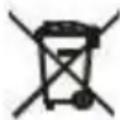
- It is prohibited to place used electrical and electronic equipment together with other waste – this is confirmed by the marking in the form of a "crossed-out bin", which requires selective collection of this type of waste.
- Electrical and electronic devices may contain hazardous substances, mixtures and components which, when released into the environment, may pose a serious threat to the health and life of humans and living organisms. They may lead to numerous health ailments, such as: vision, hearing and speech disorders, and may also damage the kidneys, liver and heart, and cause skin diseases. Harmful substances may also have an adverse effect on the respiratory and reproductive systems and lead to cancerous changes. Consumption of plants growing in contaminated soils, and products made from them, may pose a risk of the above health effects.
- Used electrical and electronic equipment should only be delivered to authorised collection points, a list of which should be available on the website of each Municipal Office.
- The household plays an important role in contributing to the reuse and recovery, including recycling, of used equipment. It also plays a key role in the waste management system for used electrical and electronic equipment due to the possibility of direct transfer to authorized collection points and the elimination of undesirable social habits resulting in leaving waste equipment in places not intended for this. In addition, Return used electrical and electronic equipment at the place of delivery. The distributor, when delivering equipment intended for households to the purchaser, is obliged to collect used equipment from households free of charge at the place of delivery of such equipment, provided that the used equipment is of the same type and performed the same functions as the delivered equipment.
Cardboard packaging and polyethylene (PE) bags should be disposed of in appropriate containers for selective collection of municipal waste according to their description. If there are batteries in the device, they should be removed and taken to a separate collection and storage point.
Do not throw the device into municipal waste!!
Service
If you wish to purchase spare parts or make any complaints, please contact the seller who issued the receipt directly.
KUI FILM SEADMESSE KINNI KINNI JÄÄB
PRODUCTBESCHRIJVING - Laminator (Fig.1)
ALS DE FILM IN HET APPARAAT VASTLOOPT
OPIS PROIZVODA - Laminator (Sl. 1)
PËRSHKRIMI I PRODUKTIT - Laminator (Fig.1)
natural_image
Illustration of a silver kettle with blue liquid, no text or symbols presentElectric Kettle AD 1282
natural_image
Close-up of a black and silver coffee grainer with a rolled spout on the side (no text or symbols visible)Burr Coffee Grinder AD 4450
Milk Frother
AD 4491
natural_image
Black rectangular electronic device with a curved top and side slots (no visible text or symbols)Sandwich Maker AD 3055
natural_image
Modern stainless steel toaster with two handles and a side grater (no visible text or symbols)TOASTER 2 SLICE AD 3222
natural_image
Exterior view of a rectangular electronic device with a black cover and metallic casing (no visible text or symbols)ELECTRIC GRILL AD 3052
natural_image
Glass juicer with orange liquid and a white handle, no visible text or symbolsCITRUS JUICER AD 4009

natural_image
Product photo of a blender with orange juice and fruit in background (no visible text or symbols)PERSONAL BLENDER AD 4081
natural_image
Assorted kitchen appliances including blender, keyboard, and cleaning tools (no visible text or labels)FOOD PROCESSOR AD 4224
natural_image
Close-up of a black and silver electric mixer with whisk, no visible text or symbolsMIXER AD 4225
natural_image
Black rectangular air fryer device with handle and control knob (no visible text or symbols)AIR FRYER AD 6310
natural_image
Exterior view of a modern silver coffee maker with black lid and side handles (no visible text or symbols)PASTEURIZATION POT AD 4496
natural_image
White portable air conditioner unit with control panel and front-mounted display (no visible text or symbols)AIR CONDITIONER AD 7916
natural_image
White cylindrical soap can with black liquid, no visible text or symbolsAIR HUMIDIFIER AD 7966

natural_image
White portable heater with ventilation grille and side-mounted buttons (no visible text or symbols)FAN HEATER AD 7725
natural_image
Top-down view of a stainless steel cooking pan with a black digital scale (no text or symbols visible)KITCHEN SCALE AD 3166
AFTER SALE SERVICE NOTICE