
AD 2910 - Razor ADLER - Free user manual and instructions
Find the device manual for free AD 2910 ADLER in PDF.


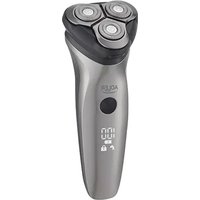
| Product Type | Electric Razor |
| Brand | Adler |
| Model | AD 2910 |
| Shaving System | Dual Rotary Blade |
| Number of Heads | 3 |
| Pop-up Trimmer | Yes, for sideburns and mustache |
| Power Supply | Rechargeable, built-in Li-ion battery |
| Charging Time | Approximately 8 hours |
| Runtime | Approximately 45 minutes |
| Charge Indicator | LED |
| Cordless Use | Yes |
| Input Voltage | 100-240 V, 50/60 Hz (power adapter) |
| Water Cleaning | Yes, washable shaving head |
| Blade Material | Stainless steel |
| Dimensions (approx.) | 15 x 5 x 4 cm |
| Weight (approx.) | 150 g |
| Box Contents | Razor, power adapter, cleaning brush, protective case, user manual |
| Maintenance | Clean under running water after each use, replace blades every 18 months |
| Safety Instructions | Use only with provided adapter, do not immerse, turn off before cleaning |
| Repairability | Spare parts available (blades, foils, battery pack) |
Frequently Asked Questions - AD 2910 ADLER
User questions about AD 2910 ADLER
0 question about this device. Answer the ones you know or ask your own.
Ask a new question about this device
Download the instructions for your Razor in PDF format for free! Find your manual AD 2910 - ADLER and take your electronic device back in hand. On this page are published all the documents necessary for the use of your device. AD 2910 by ADLER.
USER MANUAL AD 2910 ADLER
natural_image
Close-up of a black electric shaver with three circular buttons and a central knob (no visible text or symbols)AD 2910
natural_image
Diagram of a biological structure labeled Fig 3, showing a curved, layered structure with a small protrusion at the bottom (no text or symbols beyond label)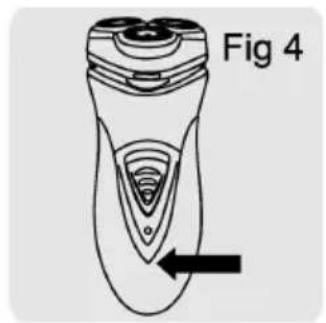
natural_image
Line drawing of a hand holding a small electric shaver (no text or symbols)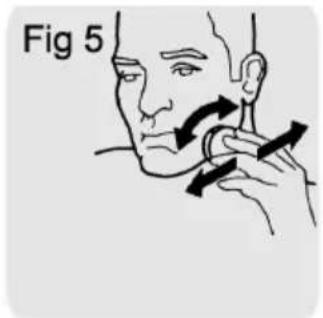



natural_image
Two mechanical components labeled Fig 13, showing gear and rotor assembly (no text or symbols on the diagrams themselves)
natural_image
Illustration of hands assembling mechanical parts, labeled Fig 14 (no text or symbols on the diagram itself)


natural_image
Illustration of hands assembling mechanical parts, labeled Fig 18 (no text or symbols on the diagram itself)ENGLISH
GENERAL SAFETY CONDITIONS. IMPORTANT INSTRUCTIONS ON SAFETY OF USE PLEASE READ CAREFULLY AND KEEP FOR FUTURE REFERENCE
The warranty conditions are different, if the device is used for commercial purpose.
- Before using the product please read carefully and always comply with the following instructions. The manufacturer is not responsible for any damages due to any misuse.
- The product is only to be used indoors. Do not use the product for any purpose that is not compatible with its application.
- The appliacable voltage is 230V, \~50Hz. For safety reasons it is not appropriate to connect multiple devices to one power outlet.
-
Please be cautious when using around children. Do not let the children to play with the product. Do not let children or people who do not know the device to use it without supervision.
-
WARNING: This device may be used by children over 8 years of age and persons with reduced physical, sensory or mental capabilities, or persons without experience or knowledge of the device, only under the supervision of a person responsible for their safety, or if they were instructed on the safe use of the device and are aware of the dangers associated with its operation. Children should not play with the device. Cleaning and maintenance of the device should not be carried out by children, unless they are over 8 years of age and these activities are carried out under supervision.
-
After you are finished using the product always remember to gently remove the plug from the power outlet holding the outlet with your hand. Never pull the power cable!!!
-
Never leave the product connected to the power source without supervision. Even when use is interrupted for a short time, turn it off from the network, unplug the power.
-
Never put the power cable, the plug or the whole device into the water. Never expose the product to the atmospheric conditions such as direct sun light or rain, etc.. Never use the product in humid conditions.
-
Periodically check the power cable condition. If the power cable is damaged the product should be turned to a professional service location to be replaced in order to avoid hazardous situations.
-
Never use the product with a damaged power cable or if it was dropped or damaged in any other way or if it does not work properly. Do not try to repair the defected product yourself because it can lead to electric shock. Always turn the damaged device to a professional service location in order to repair it. All the repairs can be done only by authorized service professionals. The repair that was done incorrectly can cause hazardous situations for the user.
-
Never put the product on or close to the hot or warm surfaces or the kitchen appliances like the electric oven or gas burner.
-
Never use the product close to combustibles.
-
Do not let cord hang over edge of counter.
-
Always unplug the device after using and before cleaning.
-
Never use this device close to water, e.g.: Under shower, in bathtub, or above sink filled with water.
-
If using the device in bathroom after use remove the power plug from the socket, because water proximity presents risk, even if the device is turned off.
-
Do not allow the device or power adaptor to wet. If the device falls into water, immediately remove the power plug or power adaptor from the socket. If the device is powered, do not put hands in the water. Have the device checked by the qualified electrician before using it again.
- Do not touch the device or power adaptor with wet hands.
- The device has to be turned off after every use.
- In order to provide additional protection, it is recommended to install residue current device (RCD) in the power circuit, with residual current rating not more than 30 mA. Contact professional electrician in this matter.
- If the device utilises a power adaptor, do not cover it, because this can cause a dangerous temperature rise and can damage the device. Always connect the power adaptor cable to the device, and then connect the power adaptor to the power socket.
- The shaver charging temperature should not be above 35 degrees Celsius or below 5 degrees Celsius.
23 Only the shaver head can be washed in water, the other parts of the shaver cannot be immersed in water. Be careful, the hot water can cause burns to your hands (fig. 2) - Do not use towel or paper tissues for cleaning of shaver head, as they can damage the head.
SHAVER CHARGING
Before charging make sure, that the shaver is switched off. Charging takes about 8 hours. The shaver cannot be plugged to the power socket for longer than 24 hours.
- Connect the charger cable to the shaver (fig. 3).
- The charging LED will illuminate (fig. 4).
- After full charging of the shaver, unplug the charger from the power socket, then disconnect the cable from the shaver.
- If the battery is discharged during shaving, you can charge the shaver for a couple of minutes in order to finish shaving.
USING SHAVER, SHAVING
- Switch the shaver on using the button on the housing.
- Move the shaver head along the skin, making straight as well as circular moves (fig. 5).
- After each use put the protective cover on for protection of the shaving heads against the mechanical damage (fig. 6).
USING TRIMMER, TRIMMING
For sideburns and moustache shaping.
- Move the slide upwards to open the trimmer. You can use trimmer after switching the device on (fig. 7).
CLEANING AND MAINTENANCE
Frequent shaver cleaning ensures better shaving results.
Clean the head and hair container daily.
-
Switch the shaver off, unplug the power cable.
-
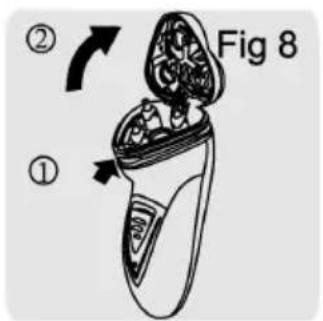
Push the release button (fig. 8, 1), the shaving assembly will open (fig. 8, 2).
-
Every few shaves sweep out the cut hair out of the heads and container with attached brush.
Cleaning shaver heads (every 6 months)
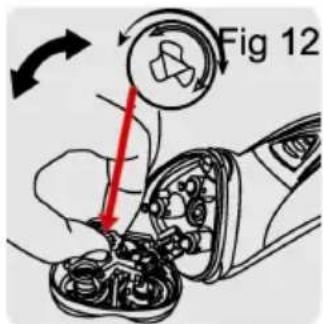
- Open the shaving assembly, turn the lock conterclockwise (fig. 12), remove the securing element, and remove the blades.
- Clean the blades and covers using the attached brush (fig. 13). Clean only one set of blade and cover per time. Do not mix the blades and covers. The effective operation of each set can be assured only by exact fit of blades to covers.
The heads can be water rinsed.
-
After cleaning put the blades into the cover and place the set in the casing, watching the guiding cuts on the cover edge (fig. 14). Make sure the cut on the cover edge matches the tooth on the head casing. Next, put the securing element back on and turn the lock clockwise.
-
Close the head until it snaps. Trimmer cleaning
Clean the trimmer after each use.
-
Switch the shaver off, unplug the power cable and unplug the small plug off the shaver.
-
Clean the trimmer using the attached brush (fig. 15).
-
Every 6 months oil the trimmer teeth with machine oil (fig. 16).
Blade replacement
Replace the shaving heads every year to ensure optimal device operation. The shaver has long durability if used according to the manual. Damaged or worn shaving heads should be replaced only with original shaving heads.
- Switch the shaver off, unplug the power cable and unplug the small plug off the shaver.
- Open the shaver heads (fig. 17). Turn the lock counterclockwise to remove old blades and covers.
- Put new blades into covers (fig. 18). Make sure the cut on the blade cover edge matches the tooth on the head casing. After replacement turn the lock clockwise. Device is made in class II of isolation. Device is compliant with EU dire
TECHNICAL DATA
Charger voltage: 230 V \~50Hz
Device is made in class II of isolation. Device is compliant with EU directives:
- Low voltage directive (LVD)
- Electromagnetic compatibility (EMC)
Device marked CE mark on rating label

To protect your environment: please separate carton boxes and plastic bags and dispose them in corresponding waste bins. Used appliance should be delivered to the dedicated collecting points due to hazarsous components, which may effect the environment. Do not dispose this appliance in the common waste bin.
DEUTSCH
POUŽÍVANIE SHAVER, SHAVING
- Zapnite holiaci strojček pomocou tlačidla na kryte.
- Pošuňte hlavu holiácehô strojčeka po koži tak, aby sa rovné, ako aj kruhové pohyby pohybovali (obr. 5).
- Po každom použití položte ochranný kryt na ochranu holiacích hlavíc pred mechanickým poškodením (obr. 6).
POUŽÍVAJÚC TRIMMER, TRIMMING
Pre kotlety a tvarovanie fúzy.
USING SHAVER, SHAVING
ANVANDA SHAVER, SHAVING
TIRAS MAKINININ YOLDURULMASI

ЗАРЕЖДАНЕ НА БРЪСНАЧКА
natural_image
Exterior view of a modern silver kettle with blue liquid, no visible text or symbolsElectric Kettle AD 1282

natural_image
Close-up of a black and white coffee maker with a spool of brown powder being poured into it (no text or symbols visible)Burr Coffee Grinder AD 4450
Milk Frother
AD 4491

natural_image
Black rectangular electronic device with a flat lid and ventilation slots (no visible text or symbols)Sandwich Maker AD 3055
natural_image
Silver AOLTA 2000 instant drink with two top-tiered grill (no visible text or symbols)TOASTER 2 SLICE AD 3222

natural_image
Exterior view of a modern kitchen grater with a black and silver plate (no visible text or symbols)ELECTRIC GRILL AD 3052

natural_image
White ADLER juice organizer with orange juice and a wooden squee stick (no text or symbols visible)CITRUS JUICER AD 4009

natural_image
Product photo of a blender with various orange juice containers and fruit slices (no visible text or labels)PERSONAL BLENDER AD 4081

natural_image
Assorted kitchen utensils including blender, spatula, and kitchen tools (no text or labels visible)FOOD PROCESSOR AD 4224

natural_image
Electric hand mixer with two coiled wires attached (no text or symbols visible)MIXER AD 4225

natural_image
Black square air fryer with control panel and side door (no visible text or symbols)AIR FRYER AD 6310
natural_image
Exterior view of a modern silver coffee maker with black lid and control buttons (no visible text or symbols)PASTEURIZATION POT AD 4496

natural_image
White portable air purifier with control panel and wheels (no visible text or symbols)AIR CONDITIONER AD 7916
natural_image
White and black industrial water filter can with 'ADSTEP' branding and '54" logo (no visible text beyond labels)AIR HUMIDIFIER AD 7966

natural_image
White portable heating fan with heat sink and ventilation grille (no visible text or symbols)FAN HEATER AD 7725
natural_image
Close-up of a stainless steel kitchen scale with digital display (no visible text or symbols)KITCHEN SCALE AD 3166
AFTER SALE SERVICE NOTICE
| GB | If you want to buy spare parts or make any complaints, please contact the seller who issued the receipt directly. |
| DE | Wenn Sie Ersatzteile kaufen oder reklamieren möchten, wenden Sie sich bitte direkt an den Verkäufer, der die Quittung ausgestellt hat. |
| FR | Si vous souhaitez acheter des pièces de rechange ou faire des réclamations, veuillez contacter directement le vendeur qui a émis le reçu. |
| ES | Si desea comprar repuestos o presentar alguna queja, comuníquese directamente con el vendedor que emitió el recibo. |
| PT | Se você quiser comprar peças de reposição ou fazer alguma reclamação, entre em contato diretamente com o vendedor que emitiu o recibo. |
| LT | Jei norite jsigyti atsarginių dalių ar pateikti nusiskundimų, susisiekite tiesiogiai su kvitą išdavusiu pardavėju. |
| LV | Ja vēlaties iegādāties rezerves daļas vai izteikt pretenzijas, lūdzu, sazinieties tieši ar pārdevēju, kurš izsniedza čeku. |
| EST | Kui soovite osta varuosi või esitada pretensioone, võtke otse ühendust kvitungi väljastanud müüjaga. |
| HU | Ha pótalkatrészeket szeretne vásárolni, vagy panaszt szeretne tenni, forduljon közvetlenül a bizonylatot kiállító eladóhoz. |
| BS | Ako želite kupiti rezervne dijelove ili napraviti reklamaciju, obratite se direktno prodavaču koji je izdao račun. |
| RO | Если вы хотите купить запчасти или предъявить какие-либо претензии, пожалуйста, свяжитесь напрямую с продавцом, выдавшим чек. |
| CZ | Chcete-li zakoupit náhradní díly nebo uplatnit jakoukoli reklamaci, kontaktujte přimo prodejce, který účtenku vystavil. |
| RU | Dacă doriți să cumpărati piese de schimb sau să faceți vreo reclamație, vă rugăm să contactați direct vânzătorul care a emis chitanța. |
| GR | Eáv θέλετε να αγοράσετε ανταλλακτικά ή να κάνετε οποιαδήποτε παράπονα, επικοινωνήστε απευθείας με τον πωλητή που εξέδωσε την απόδειξη. |
| MK | Ако сакате да купите резервни делови или да поднесете какви било поплаки, контакрајте директно со продавачот koj ja издал сметката. |
| NL | Als u reserveonderdelen wilt kopen of een klacht wilt indienen, neem dan rechtstreeks contact op met de verkoper die de bon heeft afgegeven. |
| SL | Če želite kupiti nadomestne dele ali vložiti reklamacije, se obrnite neposredno na prodajalca, ki je izdal račun. |
| FI | Jos haluat ostaa varaosia tai tehdä valituksia, ota yhteyttä suoraan kuitin antaneeseen myyjään. |
| PL | W przypadku chęci zakupu części zamiennych lub zgłoszenia ewentualnych reklamacji należy kontaktować się bezpośrednio ze sprzedawcą, który wystawił paragon. |
| IT | Se desideri acquistare pezzi di ricambio o presentare reclami, contatta direttamente il venditore che ha emesso la ricevuta. |
| HR | Se desideri acquistare pezzi di ricambio o presentare reclami, contatta direttamente il venditore che ha emesso la ricevuta. |
| SV | Om du vill köpa reservdelar eller göra några reklamationer, vänligen kontakta säljaren som utfärdat kvittot direkt. |
| DK | Hvis du ønsker at købe reservedele eller reklamere, bedes du kontakte sælgeren, som har udstedt kvitteringen, direkte. |
| UA | Якщо ви хочете придбати запчастини або подати будь-які претензії, зверніться безпосередньо до продавця, який видав чек. |
| SR | Ако желите да купите резервне делове или да уложите рекламацију, обратите се директно продавцу који је издао рачун. |
| SK | Ak si chcete küpit náhradné diely alebo uplatnit' akúkol'vek reklamáciu, kontaktujte priamo predajcu, ktorý účtenku vystavil. |
| AR | و غيارقطعاع settling في ترゴب كنتاذ! شكوي أي نقديم لاصotta فيرجي مباشرلاصibiaا رдумсаً يذلا بالباغ |
| BG | Ако искате да закупите резервни части или да направите оплаквания, моля, свържете се директно с продавача, който е издал касовата бележка. |
| AZ | Ehtiyat hissələri almaq və ya hər hansı şikayət etmək istəyirsinizsə, qəbzi verən satıcı ilə birbaşa əlaqə saxlayın. |
| ALB | Nëse déshironi të blini pjesë këmbimi ose të bëni ndonjë ankesë, j l temi kontaktoni drejtpërdrejt shitësin që ka lësh ar !at rën. |



- AD 2910
- ENGLISH
- GENERAL SAFETY CONDITIONS. IMPORTANT INSTRUCTIONS ON SAFETY OF USE PLEASE READ CAREFULLY AND KEEP FOR FUTURE REFERENCE
- SHAVER CHARGING
- USING SHAVER, SHAVING
- USING TRIMMER, TRIMMING
- CLEANING AND MAINTENANCE
- DEUTSCH
- POUŽÍVANIE SHAVER, SHAVING
- POUŽÍVAJÚC TRIMMER, TRIMMING
- TIRAS MAKINININ YOLDURULMASI
- ЗАРЕЖДАНЕ НА БРЪСНАЧКА
Brand : ADLER
Model : AD 2910
Category : Razor