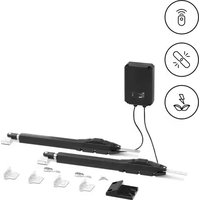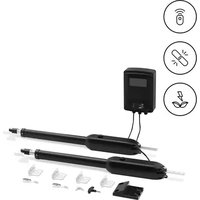
GDOOR-003B - Garage door MSW - Free user manual and instructions
Find the device manual for free GDOOR-003B MSW in PDF.


| Brand | MSW |
| Model | GDOOR-003B |
| Product type | Automatic operator for swing gate |
| Power supply | 230 V/50 Hz or 110 V/60 Hz |
| Motor power | 62 W |
| Maximum weight of one leaf | 400 kg |
| Maximum length of one leaf | 4 m |
| Piston stroke | 45 cm |
| Maximum force | 3800 N |
| Travel speed | 22 to 26 s / 90° |
| Remote control range | 30 m |
| Backup battery (optional) | 24 V DC, 4.5 or 9 Ah |
| Duty cycle | S2, 30 min |
| Operating temperature | -20 °C to +70 °C |
| Number of remotes provided | 2 |
| Main functions | Opening, closing, stop, pedestrian mode, automatic closing, travel learning |
| Safety | Obstacle detection, infrared sensor (optional), limit switch |
| Maintenance | Monthly functional check, cleaning of tracks |
| Installation | Inside the enclosure, by a professional |
Frequently Asked Questions - GDOOR-003B MSW
User questions about GDOOR-003B MSW
0 question about this device. Answer the ones you know or ask your own.
Ask a new question about this device
Download the instructions for your Garage door in PDF format for free! Find your manual GDOOR-003B - MSW and take your electronic device back in hand. On this page are published all the documents necessary for the use of your device. GDOOR-003B by MSW.
USER MANUAL GDOOR-003B MSW
Abbildung 1
Abbildung 2
natural_image
Five sequential illustrations of a tool or device with circular holes, shown in different angles (no text or symbols)Abbildung 5
WIFI Module(24VDC)
Abbildung 14
This User Manual has been translated for your convenience using machine translation. Reasonable efforts have been made to provide an accurate translation; however, no automated translation is perfect nor is it intended to replace human translators. The official User Manual is the English version. Any discrepancies or differences created in the translation are not binding and have no legal effect for compliance or enforcement purposes. If any questions arise related to the accuracy of the information contained in the User Manual, please refer to the English version of those contents which is the official version.
Dear users,
Thank you for choosing this product. Please read the manual carefully before assembling and using it. Please do not leave out the manual if you send this product to a third party.
1. Safety Instruction
- Please read this manual carefully before installation, in which involves with important information about installation, using, maintenance and safety.
- Any undefined operations under this manual are not allowed, incorrect using may damage the product even causing the injuries or property losses.
- To consider the possible danger during the installation or using process of swing gate operator, installation must strictly comply with the construction standard and electrical operating procedure.
- Before installation, please make sure that the power voltage being used matches with the supply voltage of this product. Please check if the leakage protection switch is installed and the grounding system is correct.
- Please check if additional equipment or materials are required to meet the specific requirements.
- The disposal of packaging material must be complying with the local regulation.
- Please do not change any parts except for those defined under this manual. Any undefined changes may cause the malfunction. Any damages to the product arising therefrom shall be beyond the liability of the company.
- Please do not leak water or any liquid into the controller or any other open devices. Please disconnect the power immediately if any mentioned cases happened.
- Please keep this product away from heat and open fire. Or it may damage the components; cause the failure or other hazards.
- Please make sure there is no vehicles, passengers and objects passing through while the swing gate is moving.
-
Anti-clip equipment like infrared protection switch must be installed to avoid injuries to person and property losses. The company shall not be liable for any damage or accident arising therefrom.
-
The installation, using and maintenance of this product must be carried out by professionals.
- Children are not allowed be touch the control devices or remote transmitters.
- A warning sign must be placed somewhere on the swing gate according to the national standard.
-
Please keep this instruction properly for future reference.
-
Packing List (Standard)
| No. | Picture | Name | Quantity |
| 1 | 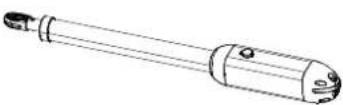 | Main machine 2 | |
| 2 | 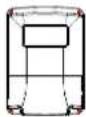 | Control box 1 | |
| 3 | 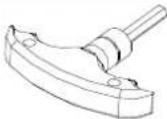 | Manual release bar 1 | |
| 4 | 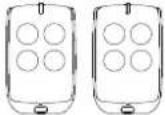 | Remote control 2 | |
| 5 | 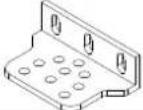 | Wall bracket 4 | |
| 6 | 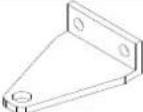 | Front mounting bracket 2 | |
| 7 | 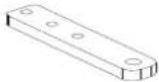 | Connecting bracket 2 | |
| 8 |  | Mounting screw (short) 2 | |
| 9 | 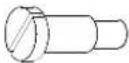 | Mounting screw (long) 2 | |
| 10 |  | Screw M8×25 4 | |
| 11 |  | Nut M8 6 | |
| 12 | 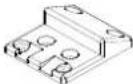 | Limit stopper 1 | |
| 13 | 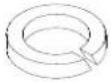 | Spring washer ∅12 2 | |
| 14 | 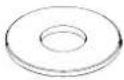 | gasket 2 |
Packing List (Optional)
| No. | Picture | Name | Quantity |
| 1 | 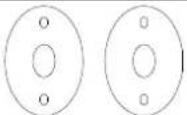 | Infrared sensor 1 | |
| 2 | 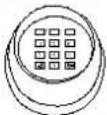 | Wireless keypad 1 | |
| 3 | 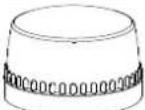 | Alarm lamp 1 | |
| 4 | 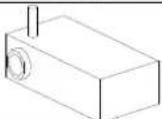 | Electric lock 1 | |
| 5 |  | Storage battery 2 |
- Technical Parameters
| Product name | Automation for swing gate |
| Model | MSW-GDOOR-003B |
| Power supply | 230V/50Hz; 110V/60Hz |
| Motor power | 62W |
| Gate moving speed | 22~26s / 90° |
| Max. single-wing weight | 400 kg |
| Max. single-wing length | 4 m |
| Max. piston stroke | 45 cm |
| Max. force | 3800 N |
| Remote control distance | 30m |
| Storage battery (optional) | DC24V (4.5Ah or 9Ah) |
| Working duty | S2, 30min |
| Working temperature | -20°C - +70°C |
4. Installation
Swing gate opener is applicable to single leaf gate weight less than 400kg, and the length shorter than
4m. The drive mode adopts the worm and worm gear to combine the screw rod transmission. This gate opener must be installed inside the enclosure or yard for protection.
4.1 Installation Drawing
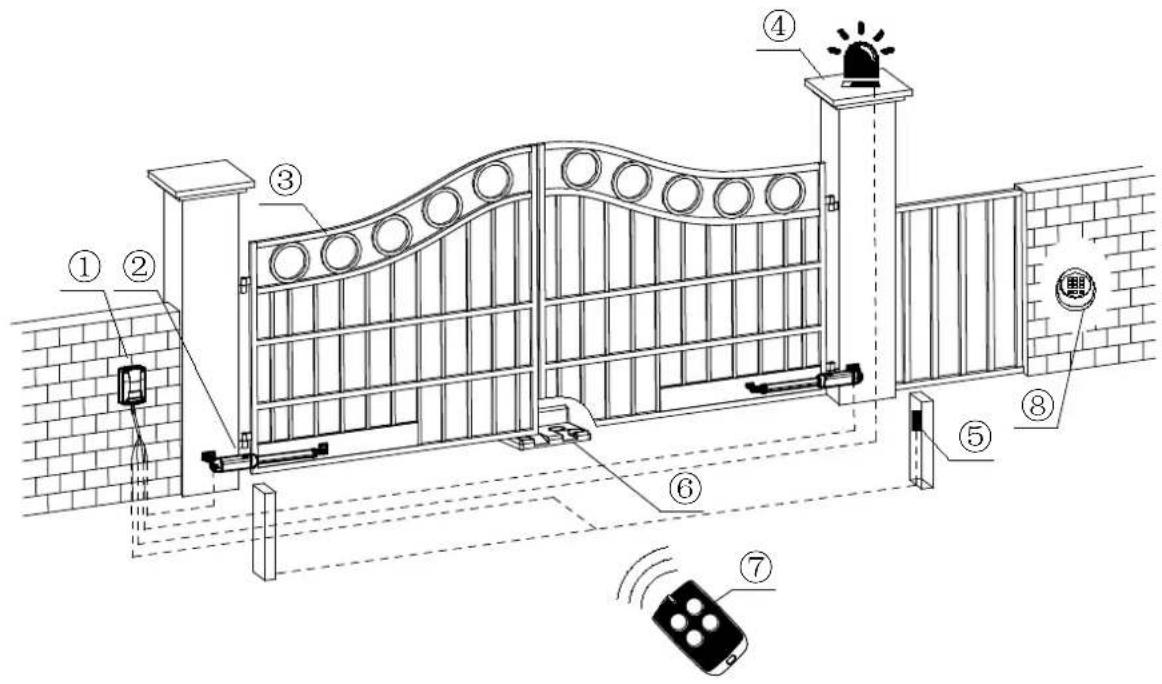
Figure 1
① Control box control
③ Gate
⑤ Infrared sensor (optional)
⑦ Remote
② Gate opener keypad (optional)
④ Alarm lamp (optional)
⑥ Limit stopper
⑧ Wireless
4.2 Size of Main Machine and Accessories
4.2.1 Size of Main Machine
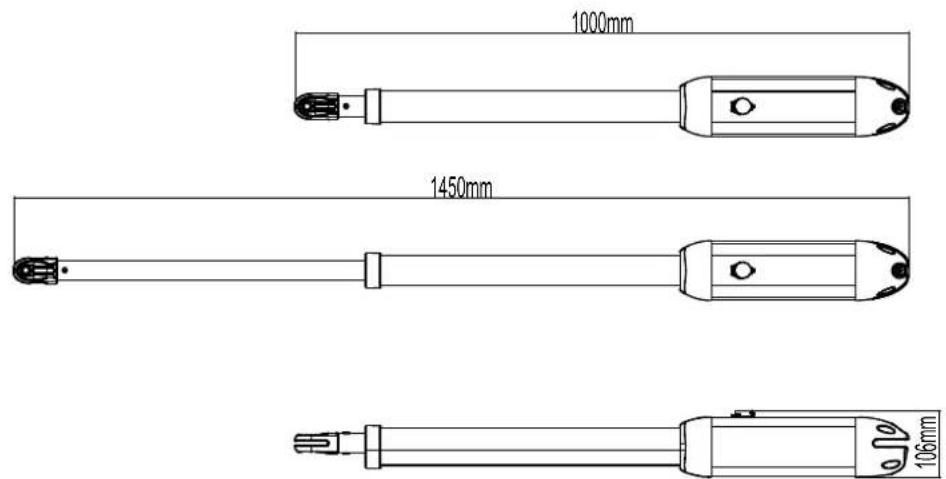
Figure 2
4.2.2 Size of Mounting Plate
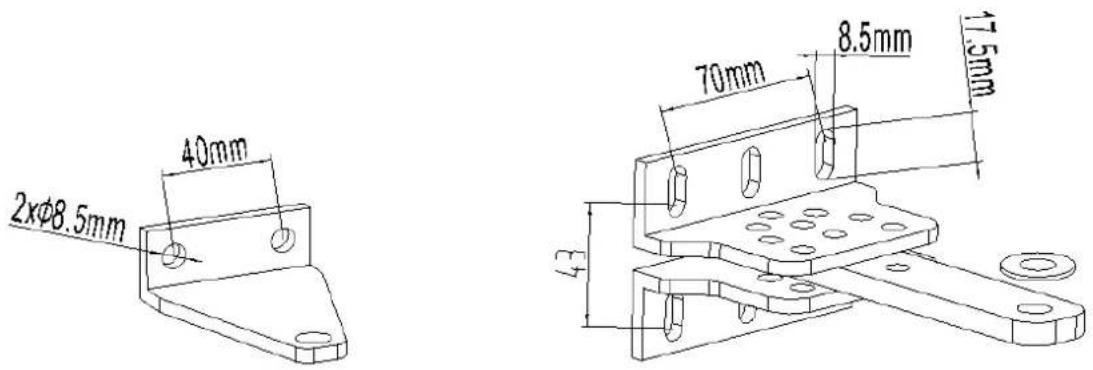
Front mounting bracket Wall bracket
Figure 3
4.3 Installation Steps
4.3.1 Preparation before Main Machine Installation
a) Before installing the door opener, please confirm that the door were installed correctly, please ensure that the door can be manually operated smoothly, and the door limit stopper can effectively prevent the door to continue moving.
b) Please keep a distance of 40-50mm between the door bottom and the ground for installing the electric lock. If electric lock is not required, the distance between the door bottom and the ground should be ≥20mm.
c) The recommended mounting height of the 2 main machines is around 300\~800mm above the ground, and make sure there are reliable fixed points for mounting brackets.
Cable bury.
In order to ensure the normal operation of the door opener and protect the cable from damage, please use two PVC pipes to bury the motor and power cables, and the control cables separately. One PVC pipe for motor and power cables, the other one for control cables.
Mounting brackets fixing
In order to install the main machines firmly, it is recommended to use the expansion screws to fix the mounting brackets.
4.3.2 Accessory Installation
a) Before installing the main machines, please install the wall bracket on the wall first, then fix
the connecting bracket, finally install the front mounting bracket on the door.
Note: Please detect by gradient before fixing to ensure that the front mounting bracket and the connecting bracket are in the same level.
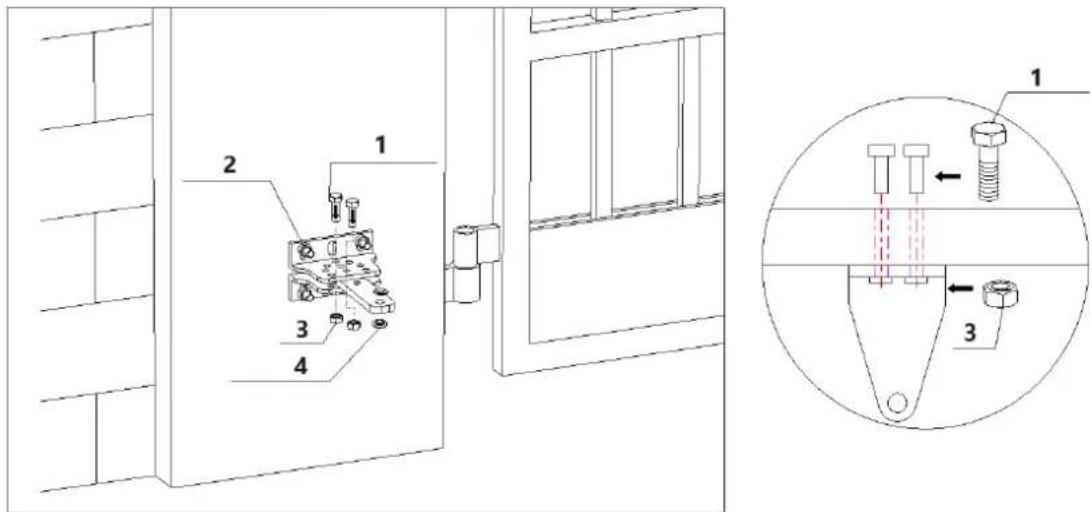
1 - Hexagon screw; 2 - Expansion screw; 3 - Nut; 4 - Nylon gasket
Figure 4
b) The connecting bracket and the wall bracket can be connected according to different conditions, please refer to figure 5.

natural_image
Five sequential diagrams showing a tool interacting with a component, each with a black dot and circular holes (no text or symbols)Figure 5
c) Users should prepare power cables for the control box and the main machines by themselves due to the different installation environment. The cores for the control box power supply cable should be more than 3, the cores for the motor cable are 2. If users need to install external accessories like electric lock, infrared sensor, alarm lamp, external button switch etc., please increase the embedded cables accordingly, please make sure the sectional diameter of electric lock cable is over 1.5mm^2 , sectional diameter of other cables is over 0.5mm^2 . The cable length should be determined by users according to their installation situations.
Note: The outlet on the PVC pipe should be downward in order to avoid the rainwater flowing into the pipe along the cable.
d) Before the installation, please unlock the two main machines. Unlock method: Remove the cover, insert the manual release bar, rotate the bar until it's released, as shown in Figure 6, then turn the telescopic arm, you'll find it is stretched easily.
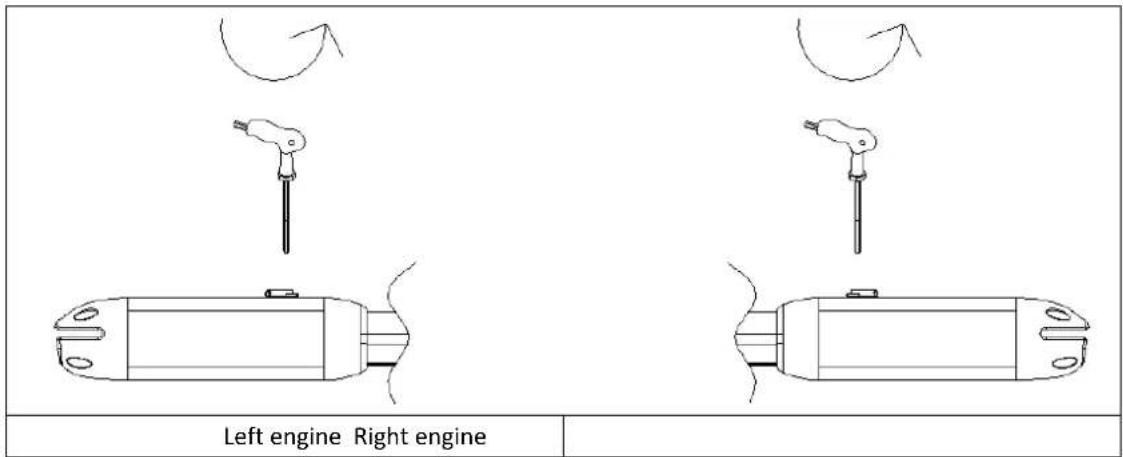
Figure 6
4.3.3 Main Machine Installation
Please refer to Figure 7 to fix the tail of the main machine and the connecting bracket with the installation screws, and then manually adjust the telescopic arm to the appropriate length, finally fix the telescopic arm connector and the front mounting bracket with the installation screws. Pull the door after installation to ensure the travel is flexible without jamming.
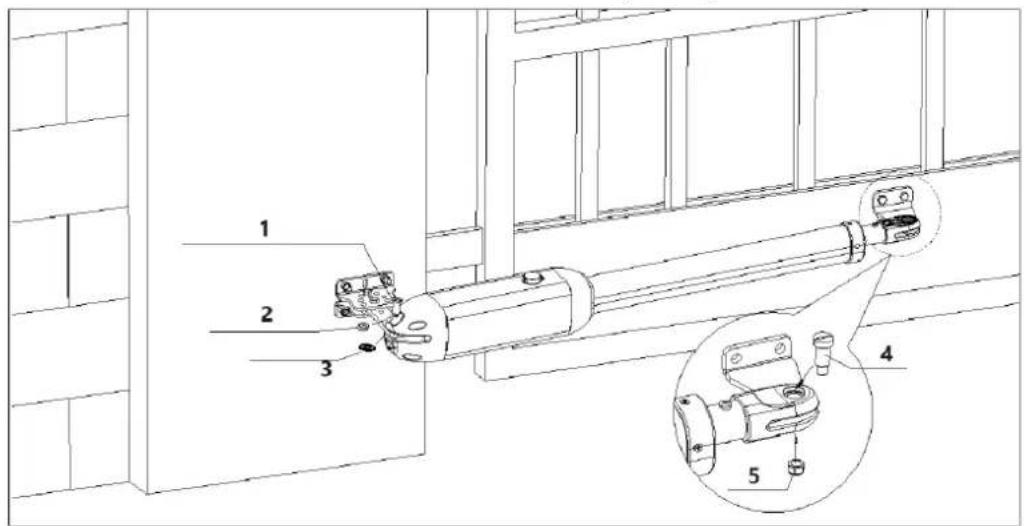
1 - Mounting screw (long); 2 - Spring washer; 3 - Gasket; 4 - Mounting screw (short); 5 - Nut
Figure 7
Installation direction: door opens inward.
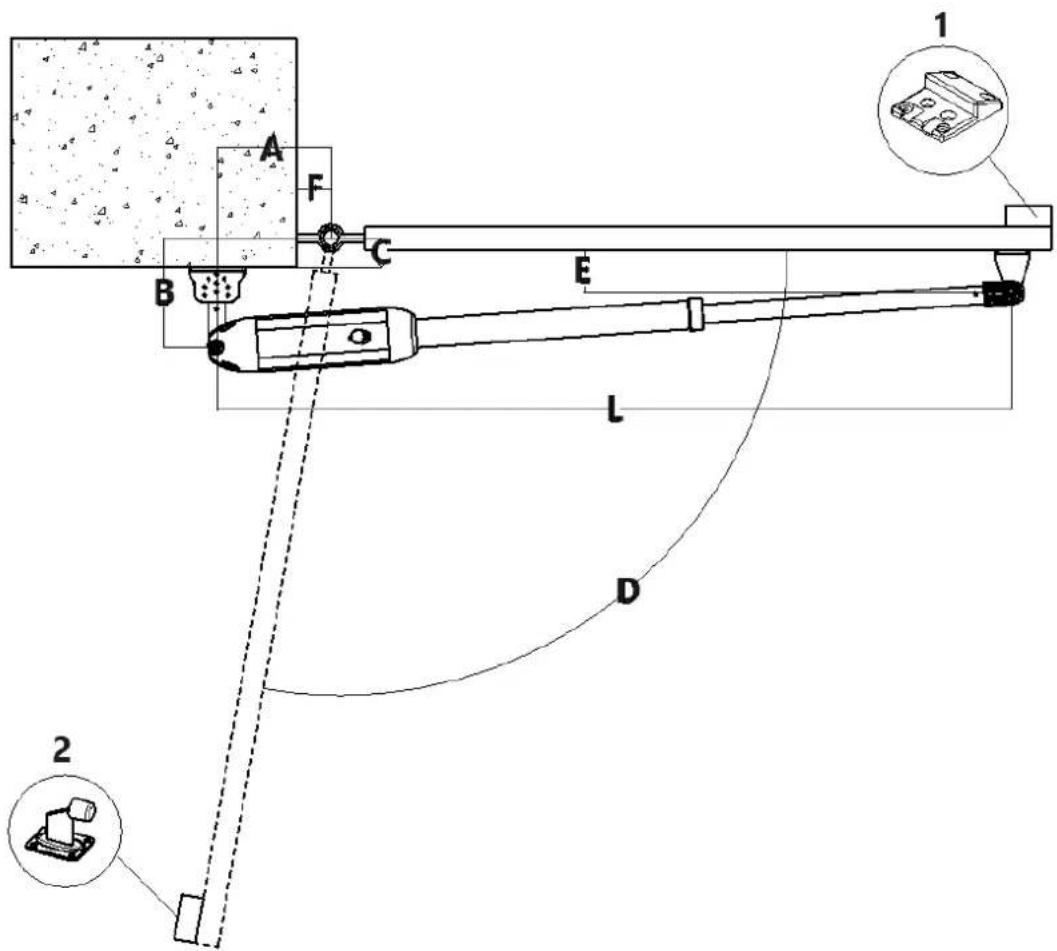
1 - NOTE: the unlimited version must have a limit stopper installed.
2 – It is recommended to install with a safety stopper (should be prepared by the users themselves).
Figure 8
| A (mm) | B (mm) | C (mm) | D max | L (mm) | |
| SIZE | 240 | 115 | 15 | 100^ | 1400 |
| 220 | 125 | 25 | 100^ | 1440 | |
| 200 | 135 | 35 | 100^ | 1420 | |
| 180 | 145 | 45 | 90^ | 1420 |
Table 1 Recommended Installation Position
Installation direction: door opens outward.
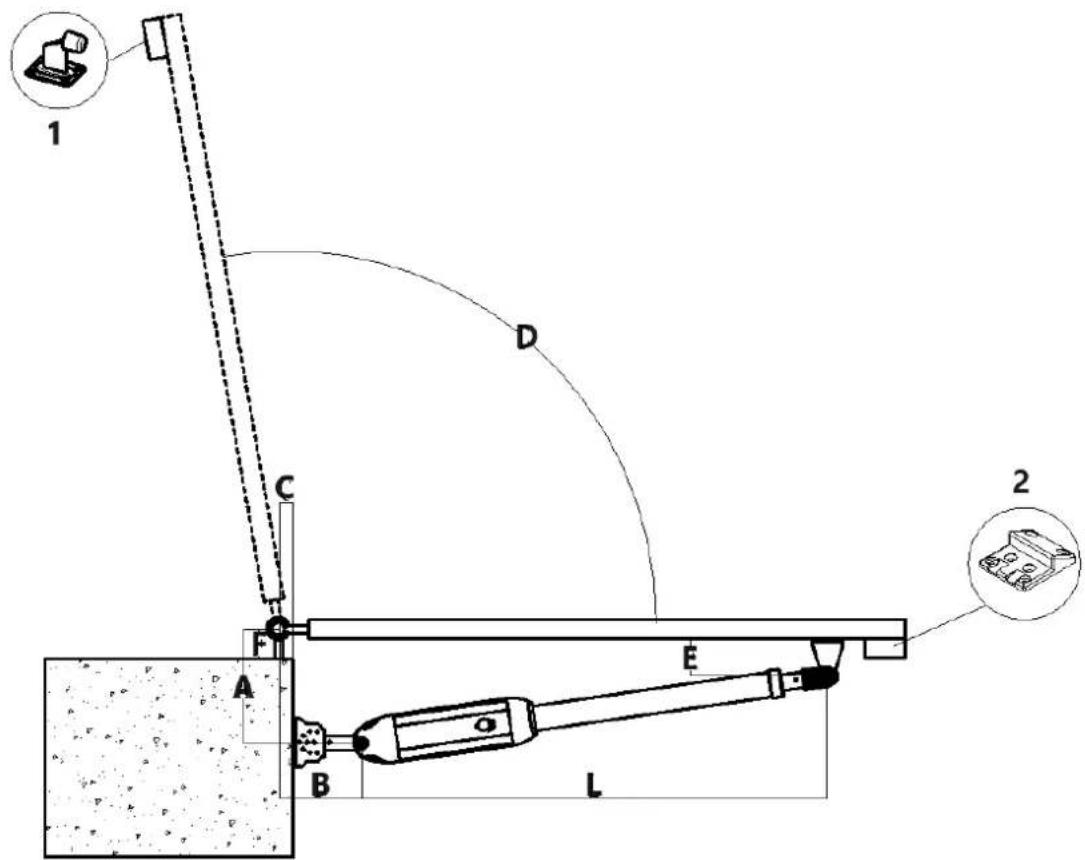
1 - It is recommended to install with a safety stopper (should be prepared by the users). 2 - NOTE: the unlimited version must have a limit stopper installed
Figure 9
| A(mm) | B(mm) | C(mm) | D max | L(mm) | |
| SIZE | 170 | 170 | 40 | 90° | 1000 |
| 180 | 170 | 30 | 100° | 1000 | |
| 190 | 170 | 30 | 100° | 1000 | |
| 200 | 180 | 40 | 100° | 1000 |
Table 2 Recommended Installation Position
Note: Value B must be close or equal to the value A to reach the best mechanical advantage.
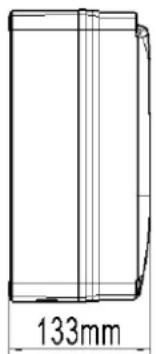
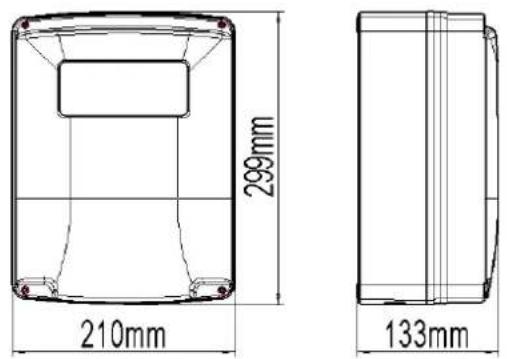
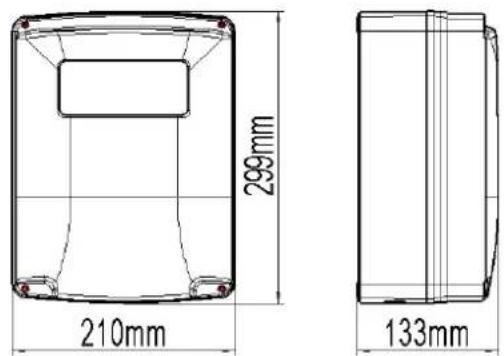
4.3.4 Size of Control Box
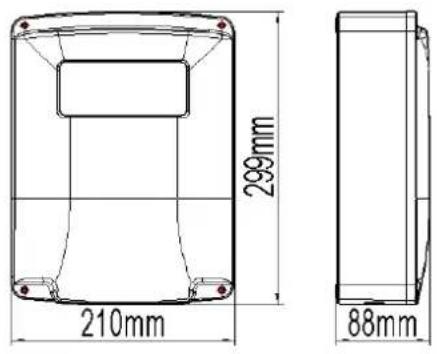
Control box without built-in battery
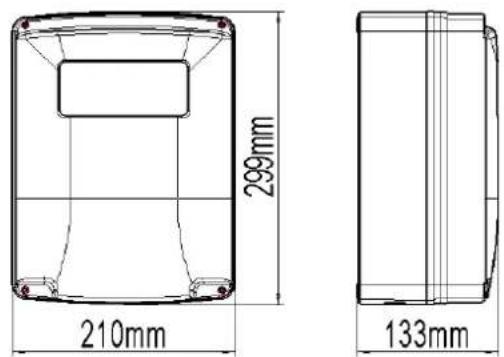
Control box with built-in battery
Figure 9

Warning
- To ensure safety, please install the limit stopper at the close limit position when the door opens inward (as shown in figure 8).
- Before installing the main machine, please make sure the main machine and components are in good mechanical performance and the door can be manually operated flexibly.
● One control unit can optionally drive one main machine or two main machines. - Earth leakage circuit breaker must be installed on where the gate movement can be seen, and the minimum mounting height for the control box should be over 1.5m to avoid being touched by kids.
● After installation, please check whether the mechanical property is good or not, whether gate movement is flexible or not after unlocking, and whether the infrared sensor (optional) is installed correctly and effectively.
5.Wiring and Debugging
5.1 Wiring Instructions
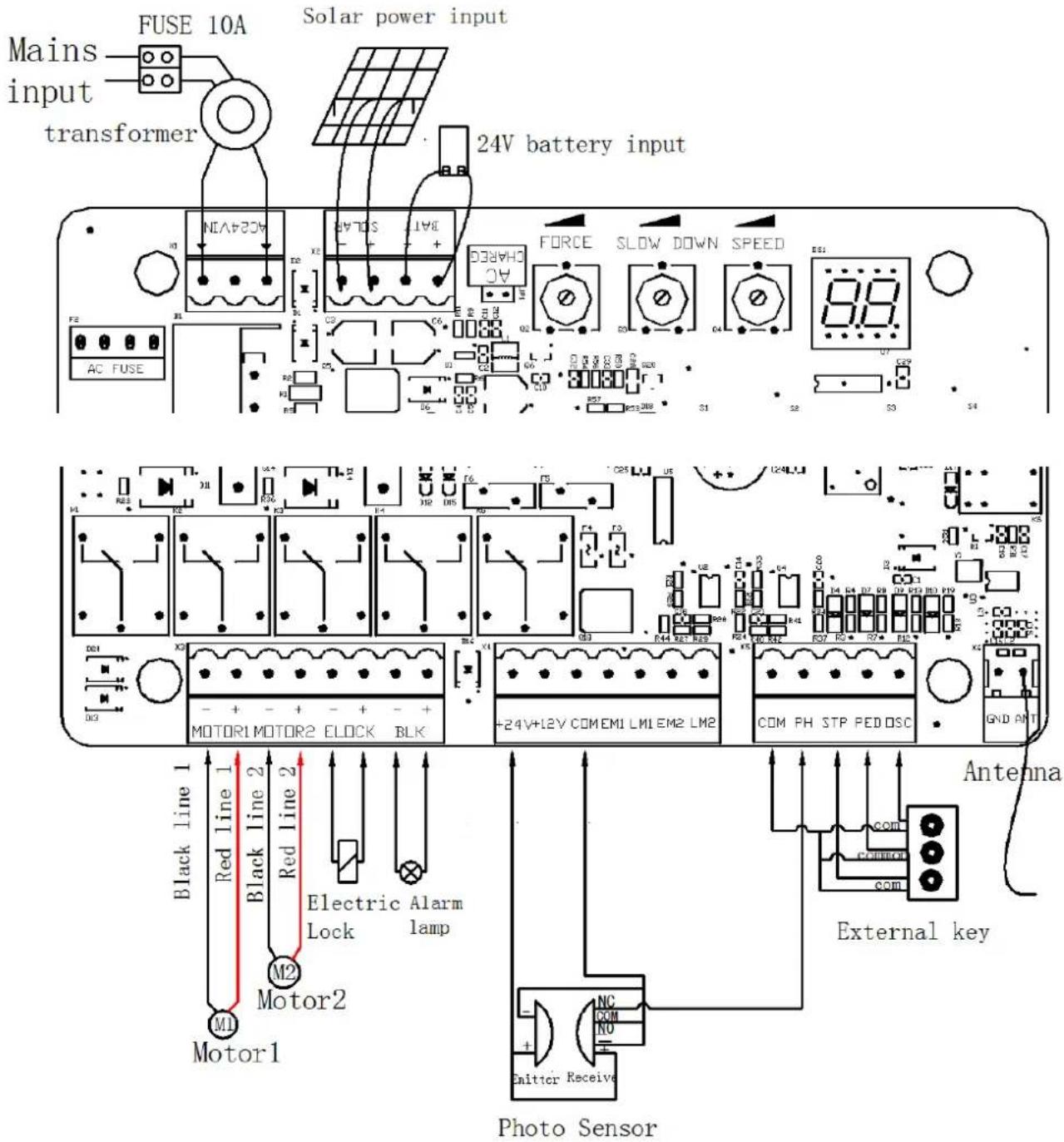
Figure 11
5.2 Control Board Drawing and Instructions
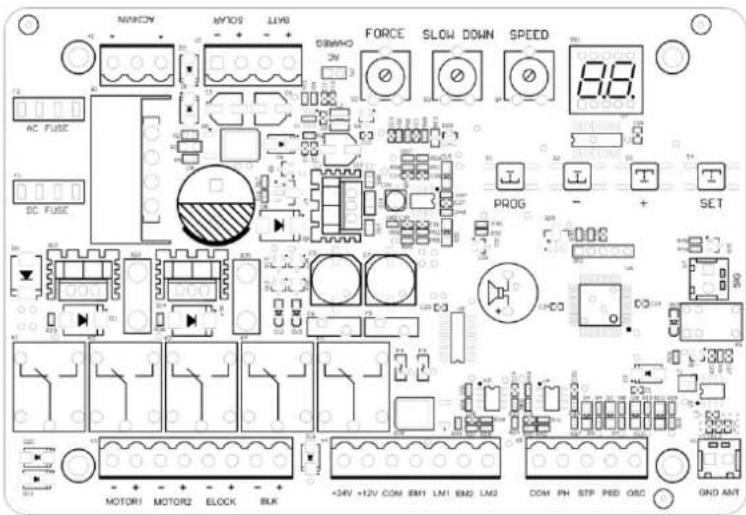
Figure 12
| Terminal | Description |
| 1. AC24VIN | 24VAC Power Supply Input |
| 2. +SOLAR- | Solar Power Input |
| 3. +BATT- | 24V Battery Input |
| 4. FORCE | Resistance Force |
| 5. SLOW DOWN | Slow Stop Distance |
| 6. SPEED | Moving Speed |
| 7. MOTOR1 Motor1 Output | |
| 8. MOTOR2 Motor2 Output | |
| 9. -ELOCK+ | Electric Lock Output |
| 10. -BLK+ | Alarm Lamp Output (Note: pay attention to the negative and positive.) |
| 11. +24V | 24V Output Positive |
| 12. +12V | 12V Output Positive (No output under dormant state) |
| 13. EM1 | Motor1 Hall Sensor Power Output |
| 14. LM1 | Motor1 Hall Sensor Limit Signal Input |
| 15. EM2 | Motor2 Hall Sensor Power Output |
| 16. LM2 | Motor2 Hall Sensor Limit Signal Input |
| 17. PH | Photo Sensor Input Active |
| 18. PED | Single Gate/Pedestrian Mode Input Active |
| 19. OSC | Single Channel Input Active |
| 20. ANT | Antenna |
| 21. COM | Common |
| 22. SIG | The signal is normally closed only after the door is in place |
Photo Sensor Wiring Instructions
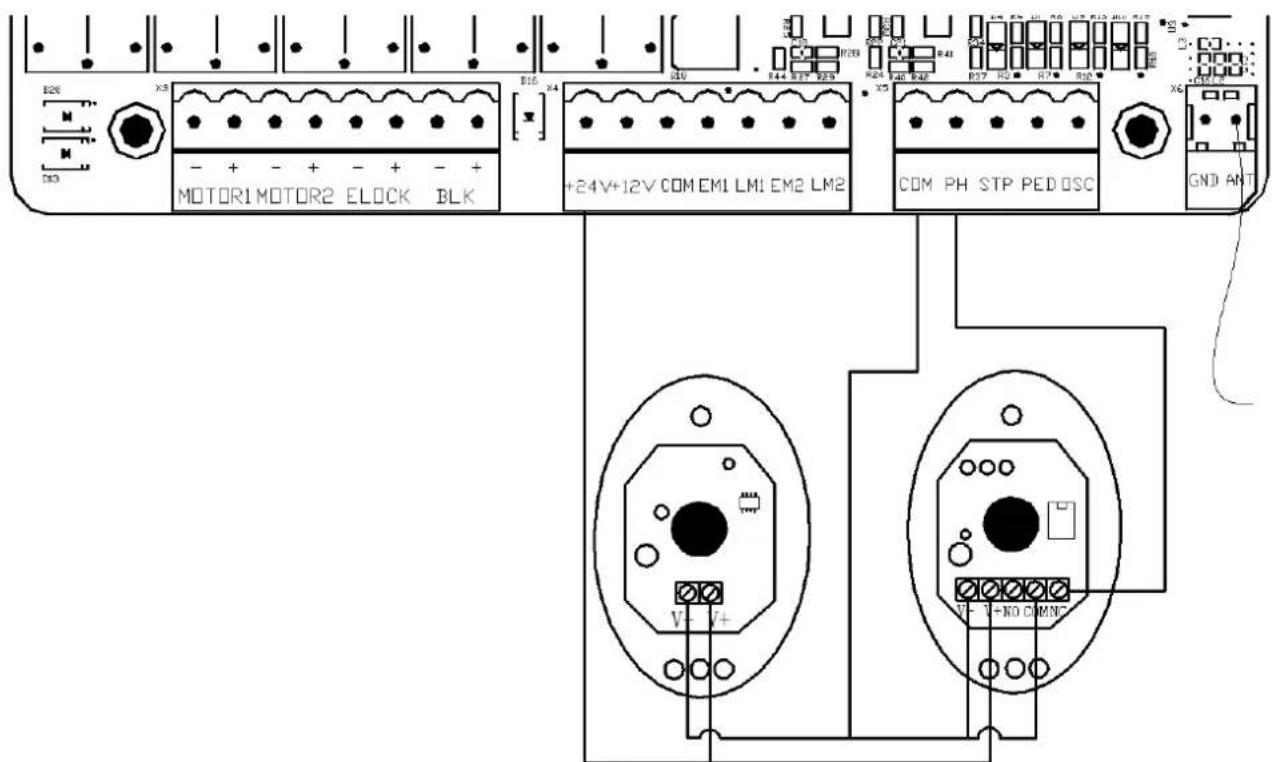
Figure 13
WIFI Module Wiring Instructions
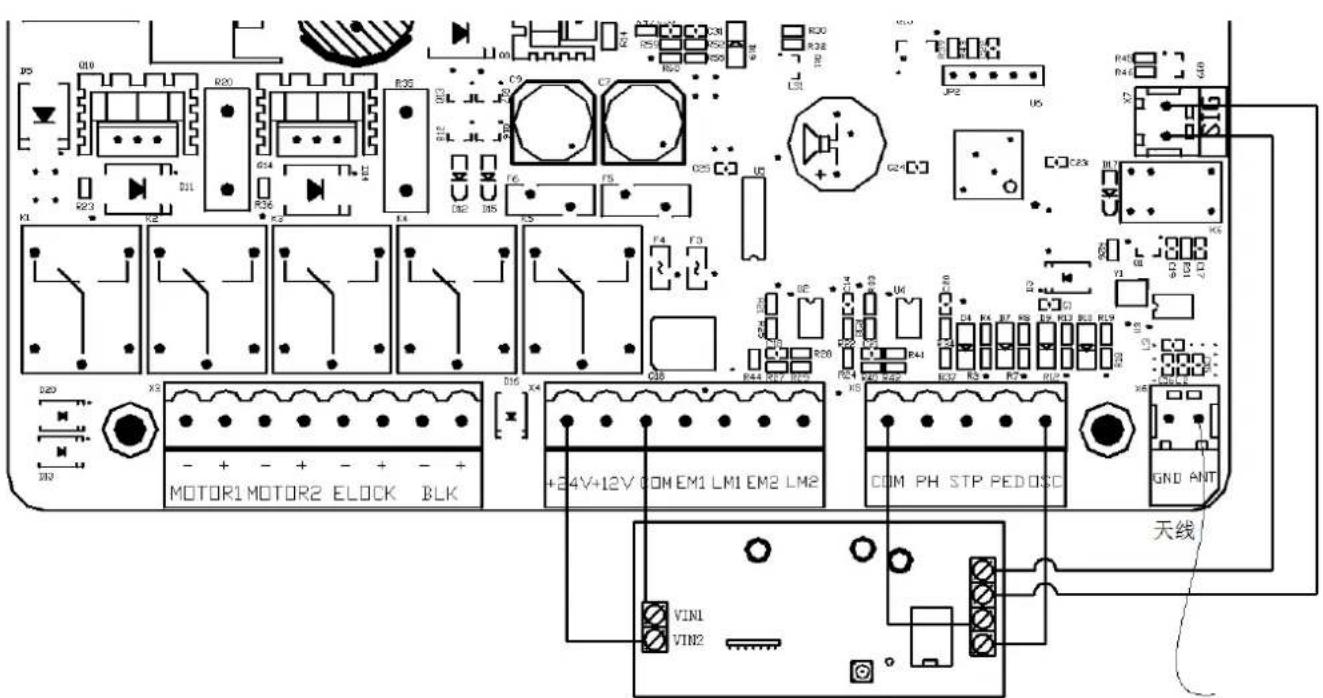
WIFI Module(24VDC)
Figure 14
5.3 Digital Screen Setting
When the control board is working, the users can check working state of gate opener by digital screen on the control board.
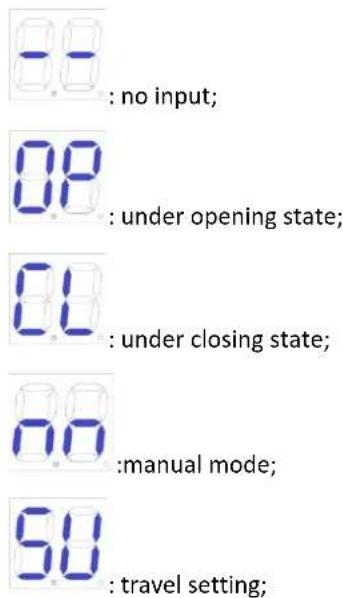
5.4 Travel Setting (VERY IMPORTANT)
In the first installation of gate openers, the installer needs to set open and closed limit switch positions for running the travel.
5.4.1 Learn the journey in the distress limit mode
Open both sides of the gate and lock the clutch, and then press and hold the "+" button on the control board until the digital screen shows "SU". After this step, the gate will firstly run towards the closing direction and stop, and then the gate will automatically open. When the two swing gates are fully open, the gates will automatically close for the second time, and the travel setting will be completed when the gates are closed. If the distance of starting slow speed of gate is not appropriate, adjust the "SLOW DOWN" button to revise the distance.
Note:
● Wiring: the black wire of main engine 1 is connected to the left side of MOTOR1; The brown cable of host 1 connects to the right side of MOTOR1. The black cable of main engine 2 connects to the left side of MOTOR2; The brown cable of main engine 2 connects to the right side of MOTOR2.
- In single-door mode, the host connects to MOTOR1.
- If the gate suddenly stops during travel setting, please increase the resistance force.
- If the gate didn't stop when meets the obstacles during travel setting, please appropriately reduce the resistance force.
- Installer must redo travel setting after modifying the "SPEED" trimmer.
5.5 Trimmers Setting
Obstacle Sensibility Trimmer
To adjust the sensitivity of obstacle -- clockwise to increase, counterclockwise to reduce the sensitivity of obstacle. If there are environmental effects, such as heavy winds, adjust the trimmer according to environment.
Slow Speed Distance Trimmer
To adjust slow speed distance -- clockwise to increase, counterclockwise to decrease slow speed distance. Please do not set very short slow speed distance, to avoid the gate collision.
Gate Moving Speed Trimmer
To adjust gate moving speed -- clockwise to accelerate, counterclockwise to slow down. The trimmer can be adjusted to change the opening and closing travel time. This adjustment must be finished before travel setting.

Figure 15
5.6 Learning Remote Control & Delete Remote Control
5.6.1 Learning Remote Control
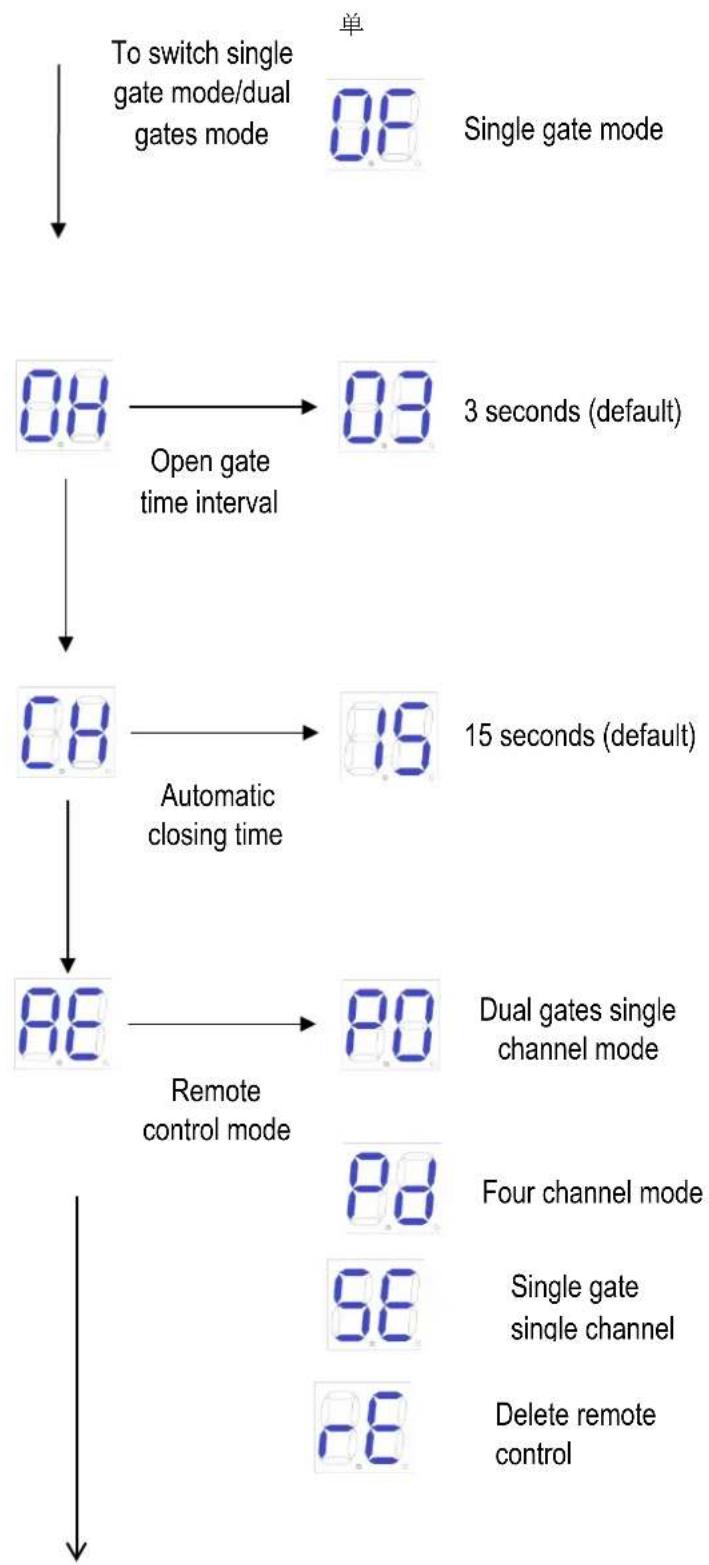
Press and hold "-" button, the alarm light will keep flashing, and digital screen displays remote control mode -- "PO" -- two swing gates single channel mode; "Pd" -- single gate four channel mode; Press the button of the remote control to be learned, the digital screen will show the number of current learned remote control, then the remote-control learning is completed. (The default of new paired remote control is two swing gates single channel mode).
5.6.2 Delete Remote Control
Enter "AE" in the digital screen and then to choose "rE" to delete the remote controls.
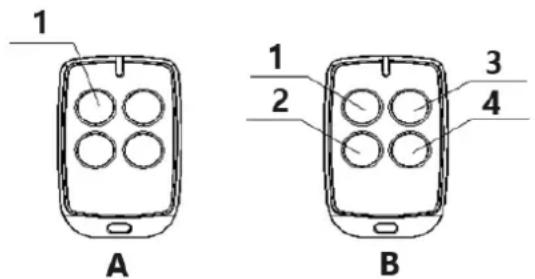
A: Single Channel Mode:
1 - Open / Close / Stop
B: Four Channel Mode:
1 – Open; 2 – Stop; 3 – Close; 4 – Single Gate
Figure 16
5.6.3 Special Remote-Control Key-button
Press and hold the combination keys for 5S.
"Stop" + "Single gate" combination key -- enter into remote control learning.
5.7 Control Board Settings
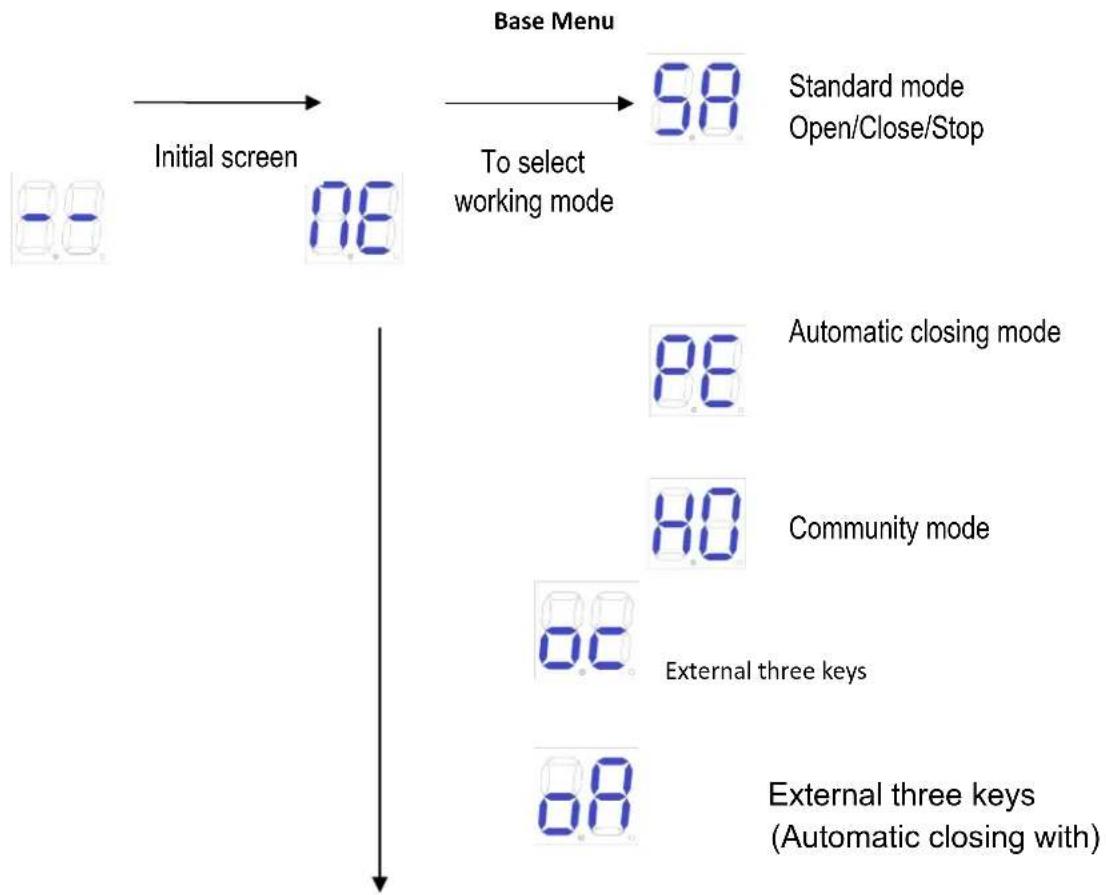
5.7.1 Base Menu
Press "PROG" to enter into base menu;
Digital screen shows "NE", select other functions of this menu by "+" and "-" buttons.
Press "SET" to confirm or to enter into sub-menu.
To exit menu, press "PROG".
If no command for one minute, the menu will automatically exit.
flowchart
graph TD
    A["Base Menu"] --> B["Initial screen"]
    B --> C["To select working mode"]
    C --> D["Standard mode Open/Close/Stop"]
    D --> E["Automatic closing mode"]
    E --> F["Community mode"]
    F --> G["External three keys"]
    G --> H["External three keys (Automatic closing with)"]

flowchart
graph TD
    A["To switch single gate mode/dual gates mode"] --> B["08"]
    B --> C["3 seconds (default)"]
    C --> D["08"]
    D --> E["15 seconds (default)"]
    E --> F["08"]
    F --> G["90"]
    G --> H["48"]
    H --> I["58"]
    I --> J["Delete remote control"]
    D --> K["Open gate time interval"]
    K --> L["08"]
    L --> M["Automatic closing time"]
    M --> N["88"]
    N --> O["Remote control mode"]
5.7.2 Base Menu Instruction
| MenuPress "PROG" to enter into base menu. | OptionPress "+"(up) or "-" (down) to select;Press "SET" to confirm. | Default/Attention |
| Working Mode | 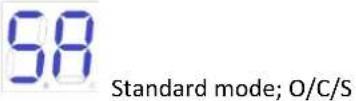 (Open/Close/Stop). (Open/Close/Stop).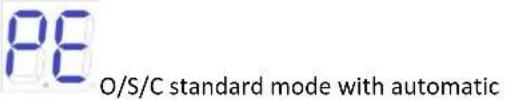 closing function. When the gate opens, it will automatically close after automatic closing time. If a "close the gate" command is sent during the automatic closing time waiting time, the automatic closing function will be cancelled. closing function. When the gate opens, it will automatically close after automatic closing time. If a "close the gate" command is sent during the automatic closing time waiting time, the automatic closing function will be cancelled. closing function). When the gate opens, any gate command will not be responded until it closes automatically. If user sends gate command during the closing process, then the gate will reopen. If a gate command is sent during the automatic closing waiting time, this waiting time will be recalculated. If the gate is not closed completely for more than ten consecutive times, the automatic closing function will be cancelled, and the gate will be closed by re-sending the gate closing command. Note that in community mode, the gate still has the automatic closing function in case of meeting obstacles. closing function). When the gate opens, any gate command will not be responded until it closes automatically. If user sends gate command during the closing process, then the gate will reopen. If a gate command is sent during the automatic closing waiting time, this waiting time will be recalculated. If the gate is not closed completely for more than ten consecutive times, the automatic closing function will be cancelled, and the gate will be closed by re-sending the gate closing command. Note that in community mode, the gate still has the automatic closing function in case of meeting obstacles. External three keys (open/close/stop) External three keys (open/close/stop) External three keys o/p/s (Automatic closing with) External three keys o/p/s (Automatic closing with) | 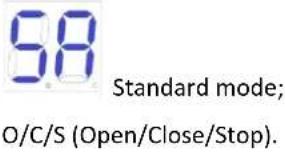 |
 Single Gate/Dual Gates Switch Single Gate/Dual Gates Switch |  Dual gates mode(default). Dual gates mode(default). Single gate mode. Single gate mode. |  Dual gates mode. Dual gates mode. |
 Open Gate Time Interval Open Gate Time Interval | 00-10: Open gate time interval is 0-10 seconds(default 3 seconds). If the interval shorter than 2 seconds, then the electric lock cannot be used. |  3 seconds. 3 seconds. |
 Automatic Closing Time Automatic Closing Time | Automatic closing time can be set as 15(default), 30, 60, 90 seconds. |  15 seconds. 15 seconds. |
 Remote Control Mode Remote Control Mode |  Dual gates single channel mode. Dual gates single channel mode. Four channel mode. Four channel mode. Single gate single channel mode. Single gate single channel mode. Delete all paired remote controls Delete all paired remote controls |  Dual gates single channel mode. Dual gates single channel mode. |
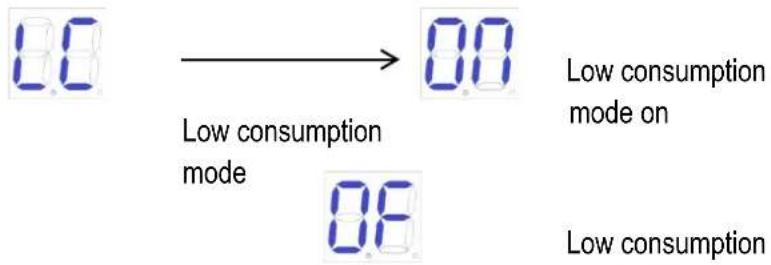
 Low consumption mode Low consumption mode |  Low consumption mode on(When there is no operation in the initial screen, the control board will automatically enter the low-consumption mode after 1 minute.) Low consumption mode on(When there is no operation in the initial screen, the control board will automatically enter the low-consumption mode after 1 minute.) Low consumption mode off Low consumption mode off |  Low consumption mode on Low consumption mode on |
5.7.3 Advanced Menu Instruction
Long press "PROG" 2 seconds to enter into advanced menu.
Digital Screen shows "TL", press "+" (up) or "-" (down) to select;
Short press "SET" to confirm or to enter into sub-menu.
Short press "PROG" to exit.
If no command for one minute, the menu will automatically exit.
Advanced Menu
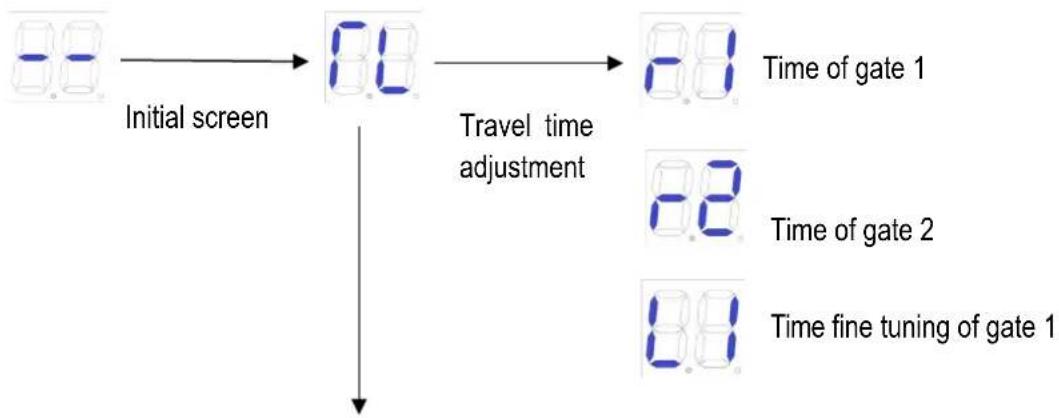
flowchart
graph TD
    A["Initial screen"] --> B["8.8"]
    B --> C["Travel time adjustment"]
    C --> D["8.8 Time of gate 1"]
    C --> E["8.8 Time of gate 2"]
    C --> F["8.8 Time fine tuning of gate 1"]
Electric lock
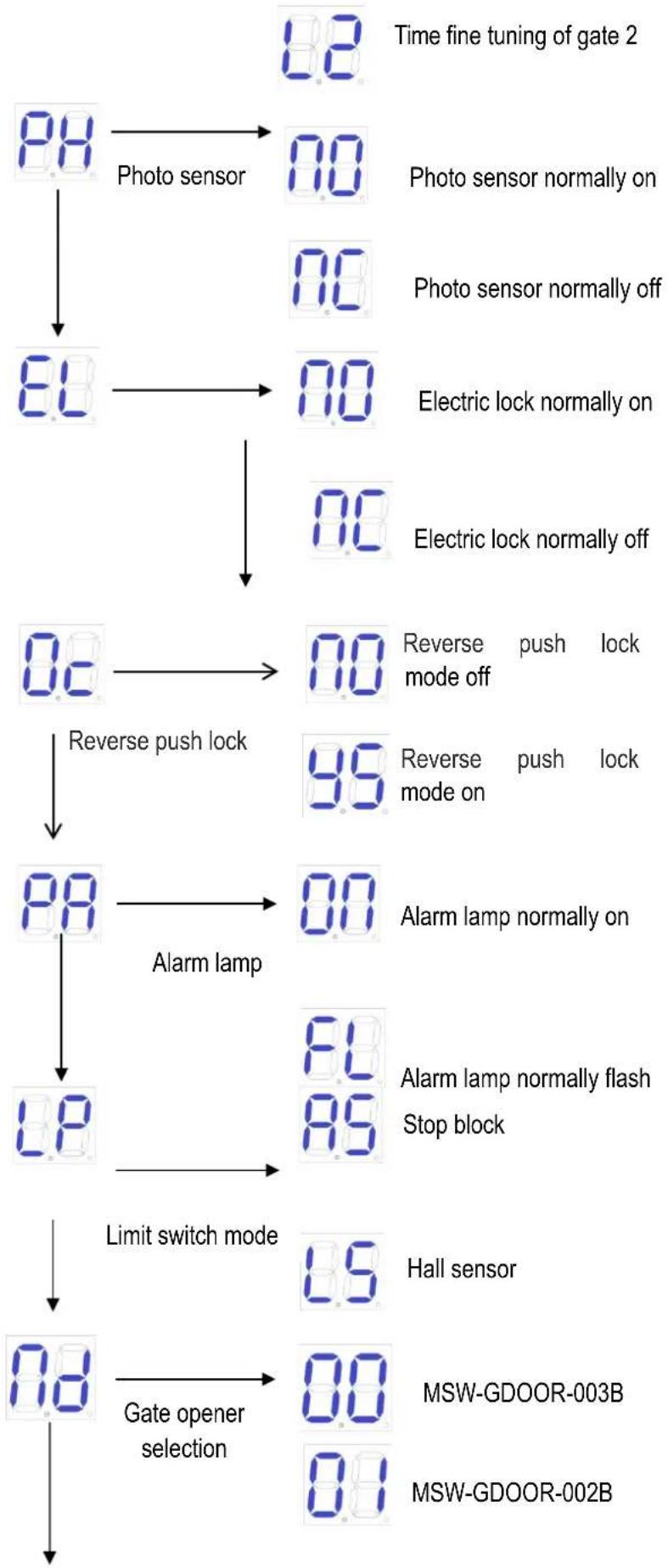
flowchart
graph TD
    A["Time fine tuning of gate 2"] --> B["Photo sensor"]
    B --> C["8.0"]
    C --> D["8.0"]
    D --> E["Electric lock normally on"]
    E --> F["8.0"]
    F --> G["Reverse push lock"]
    G --> H["8.0"]
    H --> I["Alarm lamp"]
    I --> J["8.0"]
    J --> K["Limit switch mode"]
    K --> L["8.0"]
    L --> M["Gate opener selection"]

    N["Photo sensor normally on"] --> O["8.0"]
    P["Photo sensor normally off"] --> Q["8.0"]
    R["Electric lock normally on"] --> S["8.0"]
    T["Electric lock normally off"] --> U["8.0"]
    V["Reverse push lock"] --> W["8.0"]
    X["Reverse mode off"] --> Y["9.0"]
    Z["Reverse mode on"] --> AA["9.0"]
    AB["Alarm lamp normally on"] --> AC["8.0"]
    AD["Alarm lamp normally flash Stop block"] --> AE["8.0"]
    AF["Hall sensor"] --> AG["8.0"]
    AH["MSW-GDOOR-003B"] --> AI["8.0"]
    AJ["MSW-GDOOR-002B"] --> AK["8.0"]
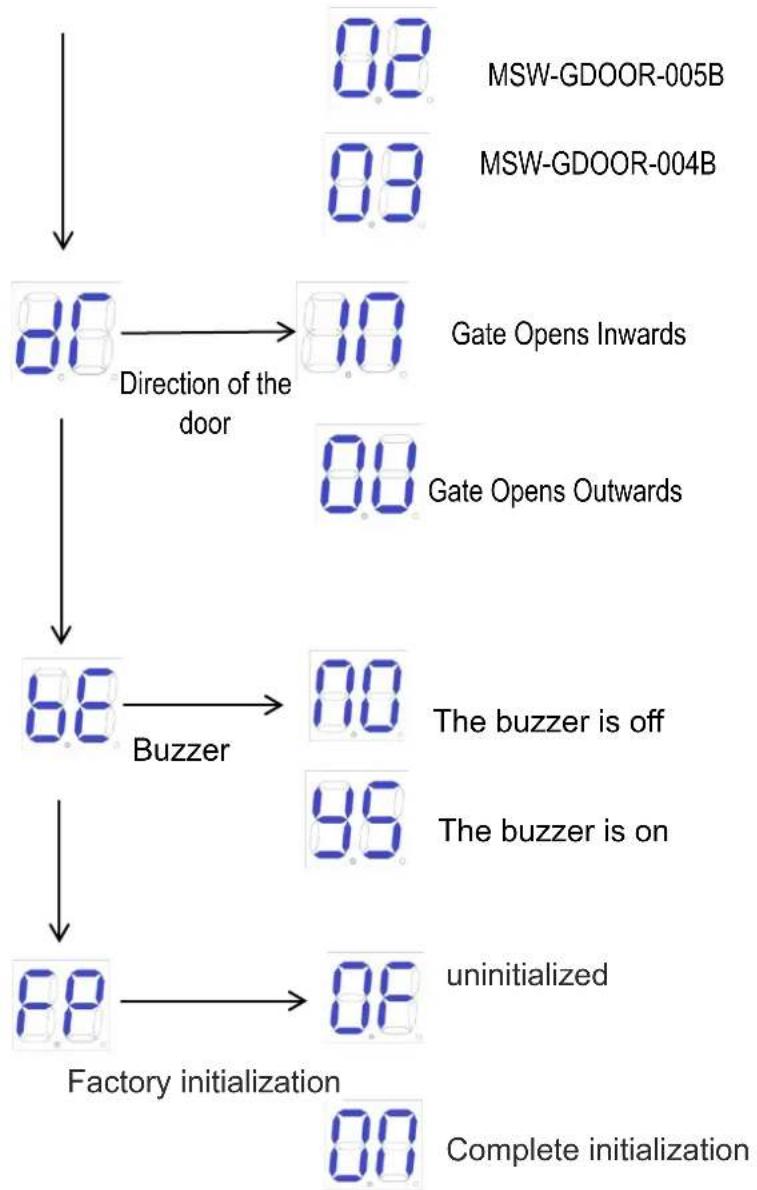
flowchart
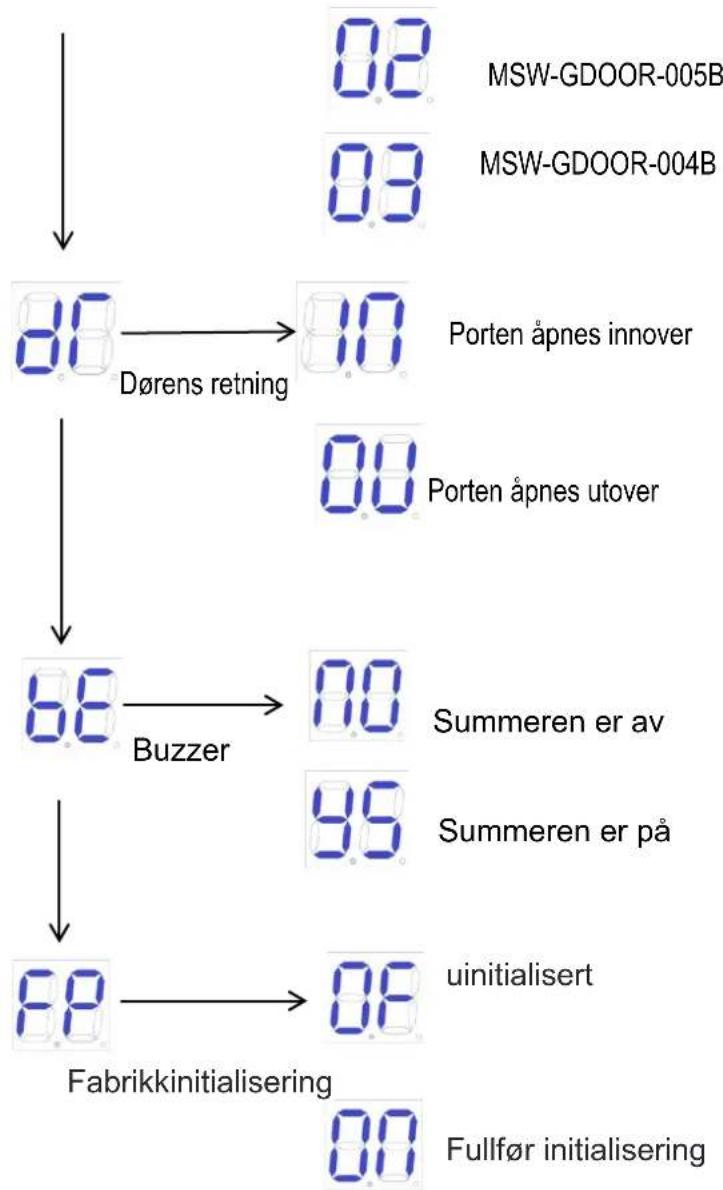
graph TD
    A["0.8 MSW-GDOOR-005B"] --> B["0.3 MSW-GDOOR-004B"]
    B --> C["0.0 Gate Opens Inwards"]
    C --> D["1.0 Gate Opens Outwards"]
    D --> E["0.0 Buzzer"]
    E --> F["0.0 The buzzer is off"]
    F --> G["9.9 The buzzer is on"]
    G --> H["0.0 Factory initialization"]
    H --> I["0.0 Complete initialization"]
5.7.4 Advanced Menu Instruction
| Menu | Option | Default/Attention |
| Long press "PROG" 2 seconds to enter into base menu. | Press "+"(up) or "-" (down) to select;Press "SET" to confirm. | |
| Travel time adjustment | Time of gate1 | After automatic learning, if the stroke is not ideal, it can be adjusted manually. The shorter the time under the resistance limit, the farther the deceleration distance of the door.And in the Hall limit, the shorter the time, the shorter the door travel. |
| Time of gate2 | ||
| Time fine tuning of gate 1 | ||
| Time fine tuning of gate 2 | ||
| Photo Sensor | N/C; photo sensor normally is on.(Default) | N/O; photo sensor normally on. |
| N/O; photo sensor normally off. | ||
| Electric Lock | Electric lock normally is on. (Default) | Electric lock normally on. |
| Electric lock normally is off. | ||
| Reverse push lock | Reverse push lock mode of | Reverse push lock mode off |
| Reverse push lock mode on.(When the electric lock is started, M1 will run for a distance in the direction of the door to prevent the electric lock from getting stuck and unable to be opened.) | ||
| [AL572]Alarm Lamp |  Alarm lamp normally is on. 24V power supply. (Default) Alarm lamp normally is on. 24V power supply. (Default) Alarm lamp normally flashes. 24V power supply. Alarm lamp normally flashes. 24V power supply. |  Alarm lamp normally is on. 24V power supply. Alarm lamp normally is on. 24V power supply. |
 Limit Switch Mode Limit Switch Mode |  Stop block.(Default) Stop block.(Default) Hall sensor. Hall sensor. |  Stop block. Stop block. |
 Gate Opener Selection Gate Opener Selection |  MSW-GDOOR-003B. MSW-GDOOR-003B. MSW-GDOOR-002B. MSW-GDOOR-002B. MSW-GDOOR-005B. MSW-GDOOR-005B. MSW-GDOOR-004B MSW-GDOOR-004B |  MSW-GDOOR-005B. MSW-GDOOR-005B. |
 Direction of the door Direction of the door |  Gate Opens Inwards (Default) Gate Opens Inwards (Default) Gate Opens Outwards Gate Opens Outwards |  Gate Opens Inwards Gate Opens Inwards |
 Buzzer Buzzer | The buzzer is offThe buzzer is on (When the mains is running normally, the buzzer buzzes short and long. When the battery is in normal use, the buzzer buzzes for 6S and then stops. When the battery power is low, the buzzer stops after 3 seconds. When the control board runs incorrectly, the buzzer buzzes fast and long.) | The buzzer is on |
 Factory Default Setting Factory Default Setting | Cancel factory default setting.Factory default setting completes. |
6. Others
6.1 Maintenance
Check whether the gate normally operates every month.
For the sake of safety, each gate is suggested to be equipped with infrared protector, and regular inspection is required as well.
Before installation and operation of the gate opener, please read all instructions carefully.
We reserve the right to change the instruction without prior notice.
6.2 Error Message
Errors that may occur when the door is operating properly.
| Wrong Indication | Cause of Error | Solution |
 | Door 1 Obstructed in opening | 1. Check whether there are obstacles when opening door 12. Adjust resistance sensitivity appropriately3. Increase deceleration distance appropriately |
 | Door 2 Obstructed in opening | 1. Check whether there are obstacles when opening door 22. Adjust resistance sensitivity appropriately3. Increase deceleration distance appropriately |
 | Door 2 is closing with difficulty | 1. Check whether there are obstacles when door 1 is closed2. Adjust resistance sensitivity appropriately3. Increase deceleration distance appropriately |
 | Door 2 is closing with difficulty | 1. Check whether there are obstacles when door 2 is closed2. Adjust resistance sensitivity appropriately3. Increase deceleration distance appropriately |
 | Infrared disconnect | 1. Check the infrared setting status2. Whether there are occlusions in the infrared |
 | Door 1 closes before door 2 | 1. Relearn your itinerary2. Adjust the opening time interval |
 | The motor works for too long | 1. Check whether you have completed the itinerary2. Hall component damage |
 | No study itinerary | Re-complete the trip |
6.3 Troubleshooting
| Problems | Possible Reasons | Solutions |
| The gate cannot open or close normally, and Display does not light. | 1.The power is off.2.Fuse is burned.3.Control board power wiring with problem. | 1.Switch on the power supply.2.Check the fuse, change the fuse if burnt.3.Re wiring according to instructions. |
| The gate can open but cannot close. | 1.Photocell wiring with problem.2.Photocell mounting with problem.3.Photocell is blocked by objects.4.Sensitivity of obstacle is too high. | 1.If not connect photocell, please make sure that the 5 and 6, 5 and 7 short circuit; if connect infrared sensor, please make sure the wiring is correct and the photocell is N.C.2.Make sure that the photocell mounting position can be mutually aligned.3.Remove the obstacle.4.Reduce the sensitivity of obstacle. |
| Remote control doesn’t work. | 1.Battery level of the remote control is low.2.Remote control learning is not completed. | 1.Change the remote-control battery.2.Re-conduct remote control learning. |
| Press OPEN, CLOSE button, the gate is not moving, motor has noise. | Gate moving is not smoothly. | According to the actual situation to adjust the motor or the gate. |
| Leakage switch tripped. | Power supply line short circuit or motor line short circuit. | Check wiring. |
| Remote control working distance is too short. | Signal is blocked. | Connect external receiver antenna, 1.5 meters above ground. |
| The gate moves to the middle position to stop or reverse. | 1.Motor output force is not enough.2.Sensitivity of obstacle is too high.3.Gate meets obstacle. | 1.Check whether the transformer power is normal, if not, change the transformer.2.Adjust the TR2.3.Remove the obstacle. |

Rysunek 1
Rysunek 2
Obrázek 1
Obrázek 2
natural_image
Five sequential illustrations of a mechanical tool or component with holes and a handle, showing progressive assembly (no text or symbols)Obrázek 5
Figure 1
Figure 2
figure 3
WIFI Module (24VDC)
Figure 14
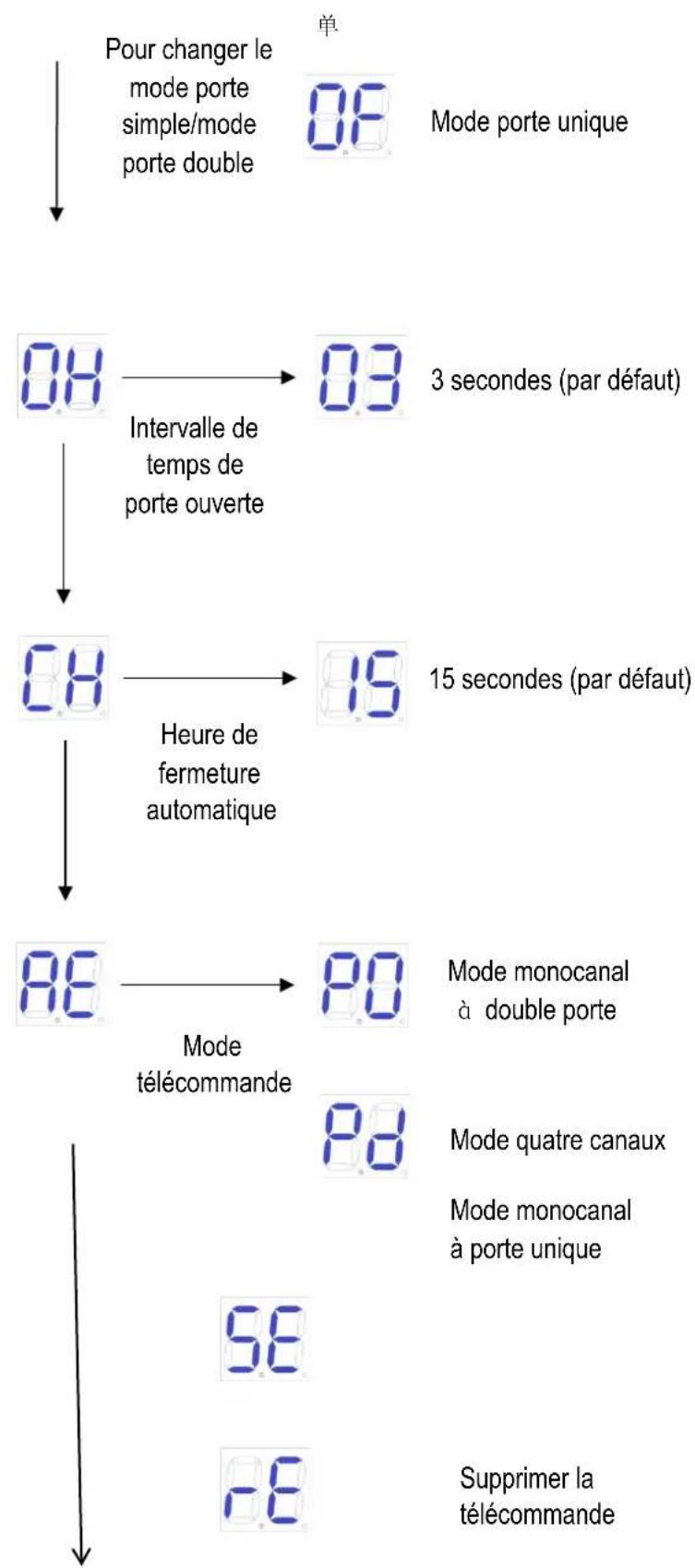
Figura 1
figura 2
natural_image
Five sequential illustrations of a mechanical clamp or bracket with holes and dots, showing different mounting points (no text or symbols present)Figura 5
WIFI Module(24VDC)
Figura 14
1 - Apri/Chiudi/Stop
Figura 1
Figura 2
natural_image
Five sequential illustrations of a mechanical tool or bracket with holes and a handle, showing progressive assembly (no text or symbols)Figura 5
WIFI Module(24VDC)
Figura 14
1. ábra
natural_image
Five line drawings of a mechanical clamp or bracket with holes and dots, shown from different angles (no text or symbols)- ábra
Figur 1
Figur 2
1 - Sekskantskrue; 2 - Ekspansionsskrue; 3 - Møtrik; 4 - Nylonpakning
Figur 4
natural_image
Five sequential illustrations of a tool holder with black dots and handles, showing progressive assembly or cleaning process (no text or symbols)Figur 5
1 - Monteringsskrue (lang); 2 - Fjederskive; 3 - Pakning; 4 - Monteringsskrue (kort); 5 - Møtrik
Figur 7
WIFI Module(24VDC)
Figur 14
Kuvio 1
Kuva 2
natural_image
Five sequential diagrams showing a tool interacting with a container, each with a handle and circular components (no text or symbols)Kuva 5
Figuur 1
① Bedieningskast ③ Hek ⑤ Infraroodsensor (optioneel) ⑦ Afstandsbediening
② Poortopener④ Alarmlamp (optioneel)⑥ Grensstopper⑧ Draadloos toetsenbord (optioneel)
Figuur 2
1 – Zeskantschroef; 2 – Expansieschroef; 3 – Moer; 4 – Nylon pakking
Figuur 4
natural_image
Five line drawings of a mechanical component with holes and bolts, shown from different angles (no text or symbols)Figuur 5
WIFI Module(24VDC)
Figuur 14
5.3 Digitale scherminstelling
Figur 1
① Kontroll boks③ Port⑤ Infrarød sensor (valgfritt)⑦ Fjernkontroll
② Portåpner④ Alarmlampe (valgfritt)⑥ Grensestopper⑧ Trådløst tastatur (valgfritt)
Figur 2
4.2.2 Størrelse på monteringsplate

Figur 3
1 – Sekskantskrue; 2 – Ekspansjonsskrue; 3 - Mutter; 4 – Nylonpakning
Figur 4
natural_image
Five sequential diagrams showing a tool interacting with a container, each with a handle and circular components (no text or symbols)Figur 5
WIFI Module(24VDC)
Figur 14
5.3 Digital skjerminnstilling
Slow Speed Distance Trimmer
flowchart
graph TD
    A["88"] --> B["Fotosensor"]
    B --> C["81"]
    C --> D["70"]
    D --> E["70"]
    E --> F["70"]
    F --> G["86"]
    G --> H["80"]
    H --> I["95"]
    I --> J["95"]
    J --> K["80"]
    K --> L["80"]
    L --> M["80"]
    M --> N["80"]
    N --> O["80"]
    O --> P["80"]
    P --> Q["80"]
    Q --> R["80"]
    R --> S["80"]
    S --> T["80"]
    T --> U["80"]
    U --> V["80"]
    V --> W["80"]
    W --> X["80"]
    X --> Y["80"]
    Y --> Z["80"]
    Z --> AA["80"]
    AA --> AB["80"]
    AB --> AC["80"]
    AC --> AD["80"]
    AD --> AE["80"]
    AE --> AF["80"]
    AF --> AG["80"]
    AG --> AH["80"]
    AH --> AI["80"]
    AI --> AJ["80"]
    AJ --> AK["80"]
    AK --> AL["80"]
    AL --> AM["80"]
    AM --> AN["80"]
    AN --> AO["80"]
    AO --> AP["80"]
    AP --> AQ["80"]
    AQ --> AR["80"]
    AR --> AS["80"]
    AS --> AT["80"]
    AT --> AU["80"]
    AU --> AV["80"]
    AV --> AW["80"]
    AW --> AX["80"]
    AX --> AY["80"]
flowchart
graph TD
    A["MSW-GDOOR-005B"] --> B["80"]
    C["MSW-GDOOR-004B"] --> D["83"]
    B --> E["Dørens retning"]
    D --> F["Porten åpnes innover"]
    E --> G["10"]
    F --> H["Porten åpnes utover"]
    G --> I["66"]
    H --> J["66"]
    I --> K["Buzzer"]
    J --> L["Summeren er av"]
    K --> M["99"]
    L --> N["Summeren er på"]
    M --> O["99"]
    N --> P["Fabrikinitialisering"]
    O --> Q["uinitialisert"]
    P --> R["80"]
    Q --> S["80"]
    R --> T["Fullfør initialisering"]
Figur 1
figur 2
1 – Sexkantskruv; 2 – Expansionsskruv; 3 – Mutter; 4 – Nylonpackning
Figur 4
natural_image
Five sequential diagrams showing a mechanical component with holes and dots, no text or symbols presentBild 5
Kontrollbox utan inbyggt batteri
Slow Speed Distance Trimmer
figura 1
Figura 2
natural_image
Five sequential line drawings of a mechanical clamp or bracket with holes and dots, no text or symbols present.Figura 5
WIFI Module(24VDC)
Figura 14
postava 1
① Ovládacia skrinka ③ Brána ⑤ Infračervený senzor (volitelné) ⑦ Dialkové ovládanie
② Otvárač brány④ Poplachové svetlo (voliteľné)⑥ Limitná zátka⑧ Bezdrôtová klávesnica (voliteľné)
Obrázok 2
Obrázok 3
1 – Šesthranná skrutka; 2 – Expanzná skrutka; 3 – Orech; 4 - Nylonové tesnenie Obrázok 4
natural_image
Five sequential illustrations of a tool or device with circular holes, shown from top to bottom (no text or symbols)Obrázok 5
Ovládacia skrinka bez vstavanej batérie
For the disposal of the device please consider and act according to the national and local rules and regulations.
CONTACT
expondo Polska sp. z o.o. sp. k.