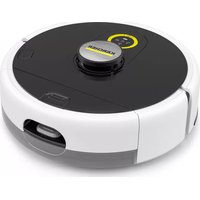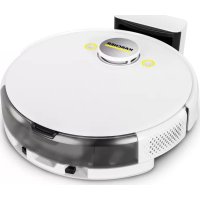
KIRA CV 50 - Robot vacuum Kärcher - Free user manual and instructions
Find the device manual for free KIRA CV 50 Kärcher in PDF.


User questions about KIRA CV 50 Kärcher
0 question about this device. Answer the ones you know or ask your own.
Ask a new question about this device
Download the instructions for your Robot vacuum in PDF format for free! Find your manual KIRA CV 50 - Kärcher and take your electronic device back in hand. On this page are published all the documents necessary for the use of your device. KIRA CV 50 by Kärcher.
USER MANUAL KIRA CV 50 Kärcher
natural_image
3D rendering of a robotic vacuum cleaner with control panel and yellow buttons (no text or symbols visible)Deutsch 3
English 16
Français 29
Italiano 42
Español 55
Português 68
Nederlands 81
Türkçe 94
Svenska 106
Suomi 118
Norsk 130
Dansk 142
Eesti 154
Latviešu 166
Lietuviškai 178
Polski 191
Magyar 204
Čeština 217
Slovenčina 230
Slovenščina 242
Română 254
Hrvatski 267
Srpski 280
Ελληνικά 291
Русский 304
Українська 318
Български 331
日本語 345
Inhalt
natural_image
Close-up of a mechanical component with two spiky protrusions and a base, no visible text or symbolsHinweis
natural_image
3D rendering of a robotic vacuum cleaner with black arrows indicating motion or force direction (no text or symbols)natural_image
3D rendering of a robotic device with two labeled components and directional arrows indicating assembly or operation (no text or symbols visible)Hinweis
Einstellungen
natural_image
3D rendering of a robotic vacuum cleaner with directional arrows indicating motion (no text or symbols)natural_image
3D diagram of a device interior with highlighted components and arrows indicating movement (no text or symbols)
H. Jenner
Chairman of the Board of Management
S. Reiser
Manager Regulatory Affairs & Certification
71364 Winnenden (Germany)
Tel.: +49 7195 14-0
Fax: +49 7195 14-2212
Winnenden, 2024/11/01
Technische Daten
Environmental protection.... 16
Intended use.... 16
Safety information 16
Safety devices 17
Accessories and spare parts 18
Scope of delivery.... 18
Device description 19
Function of the cleaning robot 20
Unpacking 21
Charging battery packs 21
Startup 21
Operation.... 22
Transport 26
Storage 26
Care and service 27
Troubleshooting guide 27
Customer Service department.... 27
Warranty 27
Declaration of Conformity 27
Technical data 28
General notes

Before using the device read the enclosed original instructions of this device, the battery pack and the charger.
Act in accordance with them.
Keep these documents for future reference or for future owners.
- If the operating instructions are not observed, the device can be damaged and dangers could arise for users and other persons.
- Notify the dealer immediately in the case of shipping damage.
- Check the package contents when unpacking for missing accessories or for damage.
Accompanying product information
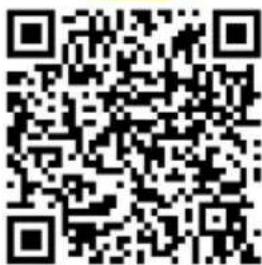
You will find a QR ^® code to download the app and call up the online operating instructions here:
Trademark
QR-Code ^® is a registered trademark of DENSO WAVE INCORPORATED.
Environmental protection

The packing materials can be recycled. Please dispose of packaging in accordance with the environmental regulations.

Electrical and electronic devices contain valuable, recyclable materials and often components such as batteries, rechargeable batteries or oil, which - if handled or disposed of incorrectly - can
pose a potential danger to human health and the environment. However, these components are required for the correct operation of the device. Devices marked by this symbol are not allowed to be disposed of together with the household rubbish.
Notes on the content materials (REACH)
Current information on content materials can be found at: www.kaercher.de/REACH
Intended use
- This cleaning robot is intended for autonomous dry cleaning of carpets and hard floors and can be used for autonomous, continuous maintenance cleaning of all common floor coverings.
- Do not use the cleaning robot to clean wet floors, washrooms or other damp areas, stairs, table tops, shelves or outdoor areas.
- The manufacturer accepts no liability for possible damage caused by improper use or incorrect operation.
- This device is suitable for commercial use, e.g. in hotels, schools, shops, offices or libraries.
Only charge the battery pack with the chargers approved for charging:
BC 36V 0,5-7,5A
Safety information
Hazard levels
⚠️DANGER
- Indication of an imminent threat of danger that will lead to severe injuries or even death.
⚠ WARNING
- Indication of a potentially dangerous situation that may lead to severe injuries or even death.
△CAUTION
- Indication of a potentially dangerous situation that may lead to minor injuries.
ATTENTION
- Indication of a potentially dangerous situation that may lead to damage to property.
General safety instructions
⚠️ DANGER • Risk of asphyxiation. Keep packaging film out of the reach of children.
⚠ WARNING • Only use the device for its proper use. Take into account the local conditions and beware of third parties, in particular children, when working with the device. • This device must not be used by persons (including children) with restricted physical, sensory or mental abilities or those lacking in experience and knowledge. • Only people who have been instructed on how to use the device, or have proven their ability to operate it, and have been explicitly instructed to use it, must use the device. • Children must not operate the device. • Children must be supervised to prevent them from playing with the appliance. • Do not expose the device or the battery to excessive temperatures.
⚠️ CAUTION • Risk of accidents and injuries. Take into account the weight of the device for transportation and storage. See chapter Technical data in the operating instructions. • Safety devices are provided for your own protection. Never modify or bypass safety devices. • Store the battery pack separately from the device for safety.
ATTENTION • Damage to the device. Do not stand on the device or place children, objects or pets on it.
Safety instructions for operation
⚠ WARNING • The appliance contains electrical components - do not clean the appliance under running water. • Inspect the charger and battery pack for damage every time before use. Do not use any damaged devices. Only have damaged parts repaired by specialist personnel.
⚠️ CAUTION • Switch off the device and remove the battery pack before performing any care and service work. • Have repair work and work on electrical components carried out by the authorised customer service only.
Safety instructions for operation
⚠️ DANGER • Do not operate the device in rooms where the air contains flammable gases from petrol, heating oil, paint thinner, solvents, petroleum or spirit (risk of explosion). • Do not operate the device in rooms with a burning fire or embers in an open fireplace without supervision. • Do not operate the device in rooms with burning candles without supervision. • Do not use non-rechargeable batteries as a replacement for rechargeable batteries.
⚠ WARNING • Short circuit hazard. Keep conductive objects (e.g. screwdrivers or similar tools) away from the charging contacts.
⚠️ CAUTION • Do not stand or sit on the charging station of the replaceable battery or the cleaning robot. • Be aware of the risk of tripping due to the cleaning robot moving around. • Risk of injury. Never touch the rotating cleaning brush or the rotating side brushes of
the device with your fingers or with tools during operation. ● Be aware that objects can fall over if the cleaning robot bumps into them (also objects on tables or small pieces of furniture). ● The device is not suitable for sucking dust that is harmful to health.
ATTENTION • Do not operate the device in rooms that are secured with an alarm system or motion sensor. • Only use the device indoors. • Do not use the device on floors with liquids or sticky substances. • Do not use the device to pick up any sharp or large objects, e.g. shards or packaging film. • Do not spray any liquids into the device and make sure the dust container is dry before fitting it. • The device can get caught in hanging electric cables, tablecloths, cords, etc. and knock over objects. • Pick up all cables from the floor before using the device to prevent it from dragging them when cleaning. • Do not use the device in an area that is above the floor, e.g. on a sofa. • Do not operate the device on elevated levels that are not protected by a physical barrier, e.g. by a railing. • Delimit danger zones such as holes in the floor or dangerous fall points with physical barriers before operation.
Safety devices
Locking functions
There are two options to lock the display of the cleaning robot for unauthorised persons.
Child lock:
The child lock locks the display if the user presses "Up" button and "Down" button simultaneously. To unlock, both buttons must be pressed again.
The childproofing function is also automatically activated when autonomous cleaning has been started or when the cleaning robot has switched to sleep mode when not in use.
The option for switching the child lock on and off can only be selected in the settings menu of the cleaning robot. When the PIN lock is active, the child lock cannot be used.
PIN lock:
The PIN lock allows the user to set their 4-digit personal security code, which they can use to unlock the cleaning robot.
The PIN lock activates the display when the cleaning robot switches to sleep mode after 5 minutes or when the cleaning robot starts the cleaning process.
When the PIN lock is active, the child lock cannot be used.
The PIN lock can be activated and set in the app. To be able to assign a personal PIN, the initial PIN 9999 must be used.
Anti-theft function
With the anti-theft function, both the cleaning robot and the battery pack can be protected against theft. This protection can be activated separately in the app.
The anti-theft function can be activated in the app once a PIN has been assigned and the PIN lock is active.
If the battery compartment cover is opened or the cleaning robot is lifted before it has been unlocked via the PIN lock, an alarm in the form of sound and light signals is triggered until the cleaning robot is unlocked using the PIN.
Accessories and spare parts
Only use original accessories and original spare parts. They ensure that the appliance will run fault-free and safely.
Information on accessories and spare parts can be found at www.kaercher.com.
Scope of delivery
Check the contents for completeness when unpacking. If any accessories are missing or in the event of any shipping damage, please notify your dealer.
Device description

① Dust container
② Dust container unlocking button
③ Telescopic handle
④ Telescopic handle unlocking button
⑤ Storage compartment lid, telescopic handle
⑥ Display
⑦ LiDAR sensor
⑧ "Back / cancel" button
⑨ "Up" button
⑩ "Down" button
⑪ "Confirm" button
⑫On/Off/Pause button + Emergency stop
⑬ Battery compartment cover
⑭ Safety bumper
⑮ Recessed grip on the device
⑯ Coupling / decoupling of wheel
⑰ Steering roller
⑱ Wheel
19 Side brushes
20 Cleaning brush
(21) Cover of cleaning brush with sweeping edge
⑳Fall sensor
②3 Ultrasound sensor for detecting transparent objects
⑳ Sensor for wall tracking
25* Charger, Battery Power+ 36/60
⑳* Battery pack, Battery Power+ 36/75
* optional
Symbols on the display
| Symbol Meaning | |
 | The device is connected to WLAN. |
 | The device is connected to the installed SIM card. |
 | The dot on the symbol indicates a new maintenance notice. |
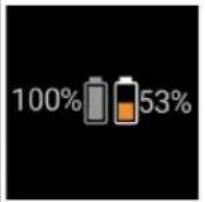 | The percentage value describes the remaining battery run time per battery pack. |
 | The device is operated in Eco mode. |
Function of the cleaning robot
- The mobile cleaning robot draws its energy from replaceable batteries inserted into the device. With two fully charged 36 V battery packs, the cleaning robot can clean up to 210 minutes.
- The cleaning robot moves systematically. It scans the room with a LiDAR sensor and then cleans the room in stages. With additional ToF, ultrasonic and crash sensors, it detects obstacles and crashes early and avoids them. It touches low objects with its safety bumper that it cannot recognise with its sensors and avoids them after touching them.
Status displays
| LED light colour Meaning | |
| Blue Autonomous operation | |
| White Transport mode | |
| Yellow • Ready for use | • Boot up / shut down |
| Orange • Warning | • Maintenance instructions• Update installation• Battery packs are empty |
LED light colour Meaning
Red • Critical fault
- Alarm
- Cleaning cannot be carried out
• Human assistance required
Modes
Cleaning modes
There are two cleaning modes to choose from. In both modes, the cleaning robot systematically cleans the room by dividing it into segments. A cleaning around the edges of the segment is always carried out first. The cleaning robot then cleans the segment "lanes".
Basic Modus:
• One-time cleaning that cannot be scheduled.
- Suitable for closed rooms in which the cleaning robot is allowed to move freely.
- The cleaning robot can be operated via the app without any set-up and is ready for use immediately after the initial start-up.
- The cleaning robot does not need to be set up in advance. Cleaning is carried out without a previously established and stored map.
- After cleaning, the cleaning robot returns to the starting point where it began cleaning.
Routine mode:
- Suitable for complex environments that require regular cleaning. To be able to use this mode, a map of the surroundings must be created beforehand. The card is named in the app and should be processed for efficient cleaning.
- To carry out cleaning, an already created map is selected on the cleaning robot. This allows the cleaning robot to plan the segments efficiently from the beginning and to work in an even more productive manner. The map adapted by the user is taken into account by the cleaning robot when planning the segments.
- The cleaning of a selected map can be started by using the display on the cleaning robot or through a scheduled cleaning in the app.
- The cleaning robot must be placed in the starting area (approx. 2 m x 2 m) of the map.
- If the map selected on the cleaning robot does not match the outline of the room to be cleaned where the cleaning robot is located, the localisation fails and the cleaning robot does not start cleaning. A notification appears on the display.
Suction strength
The desired suction strength can be selected on the cleaning robot's display under "Settings" > "Suction mode" or in the app. The setting applies to the entire map, except for special cleaning zones.
1 Normal mode
2 Eco mode
- Reduced suction performance and brush speed
• Energy-saving: resulting in longer run time - Reduced volume: thus suitable for noise-sensitive environments, e.g. in corridors in front of conference rooms or hotel rooms
Sleep mode
The cleaning robot automatically switches to sleep mode after 5 minutes of inactivity.
The display is switched off, the cloud or app connection and the buttons remain active. In idle mode, the clean-
ing robot is online for approx. 3 days before the battery packs are empty.
To exit sleep mode, press any operation button.
Error mode
When light and sound are activated, the cleaning robot emits an acoustic signal and visual signal as soon as an error occurs.
Critical error (red):
- The cleaning robot cannot continue cleaning.
- The cleaning robot emits an acoustic signal and the LED strip flashes red
• A notification is displayed in the app.
Warning notice (orange):
- The cleaning robot emits an acoustic signal and the LED strip flashes orange.
- Cleaning continues. Human assistance may be necessary, e.g. to change the battery packs or empty the dirt receptacle. Once the cleaning robot finishes cleaning or a battery change is necessary beforehand, the robot returns to the starting point of the map.
• A notification is displayed in the app.
Unpacking
- Check the package contents when unpacking.
- In case of shipping damage, inform dealer immediately.
- Remove the protective film from the top of the device, the battery compartment cover and the lid of the storage compartment for the telescopic handle.
- Remove the foam to protect the safety bumper.
Charging battery packs
Charge the battery packs (see operating instructions and safety instructions for the battery packs and the charger).
Note
Fully charge the battery packs each time they are charged before reinserting them into the device.
Startup
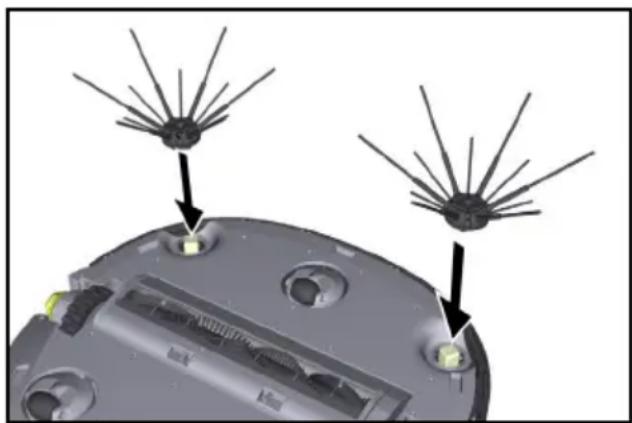
Installing the side brush
- Push the side brushes into the holders at the bottom of the device until they audibly click into place.
natural_image
3D diagram of a device's internal components with radiating blades, no text or symbols presentNote
Two screws are included to secure the side brushes to the device if they should come loose during cleaning and require additional securing.
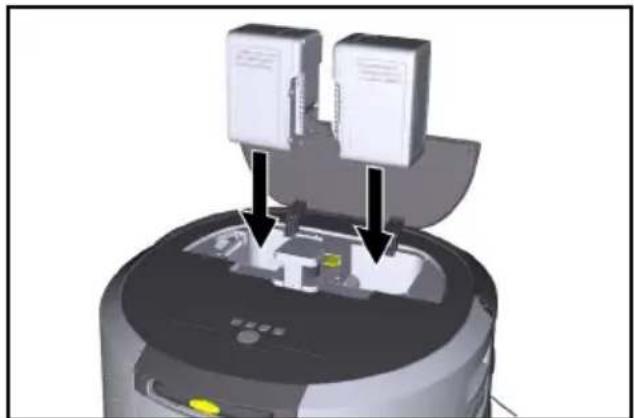
Fitting the battery packs
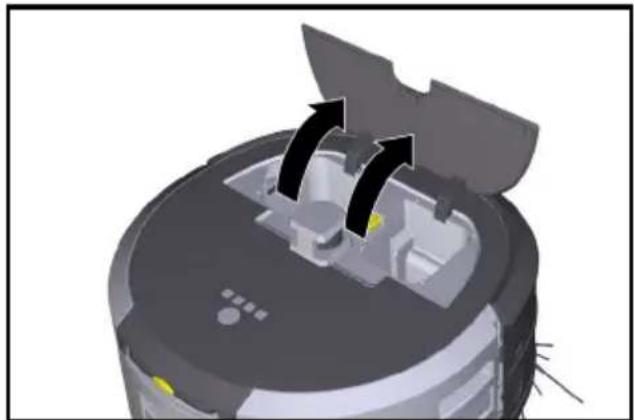
- Open the battery compartment cover.
natural_image
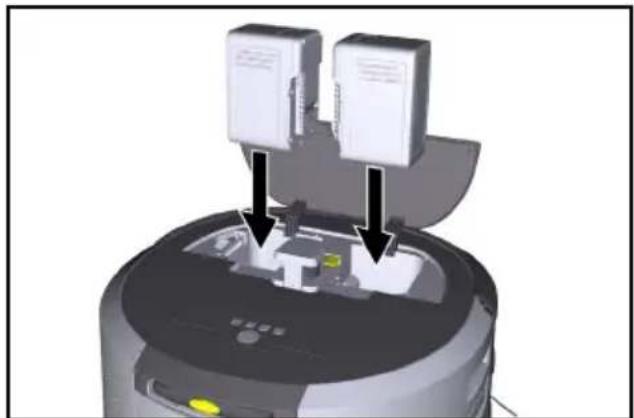
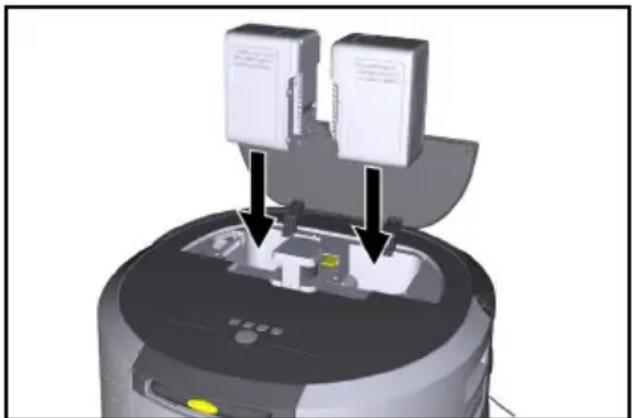
3D rendering of a robotic vacuum cleaner with directional arrows indicating motion (no text or symbols)- Press one or two battery packs into the battery pack holder on the device until you feel it/them latch into place.
natural_image
3D rendering of a robotic device with two labeled components and directional arrows indicating assembly or operation (no text or symbols present)- Close the battery compartment cover.
Downloading the app and connecting the device
To be able to use all available functions we recommended downloading the Kärcher KIRA Robots app, see Accompanying product information.
Connect cleaning robots with the Kärcher KIRA Robots app:
- Download the Kärcher KIRA Robots app.
- Open the Kärcher KIRA Robots app.
- Log in or create an account.
- Follow the step-by-step instructions in the App.
Operation
ATTENTION
Danger due to obstacles
Risk of damage
Before operating the cleaning robot, make sure that there are no obstacles on the floor.
ATTENTION
Risk of damage to the floor
During cleaning, small parts could get caught in the Cleaning brush and scratch the floor.
Before each cleaning process, check the Cleaning brush for small parts that are stuck.
ATTENTION
Risk of damage
The cleaning robot does not recognise escalators, which can cause the device to fall.
Keep the cleaning robot away from escalators.
Rules for operation
- Keep the floor free of objects lying around to ensure efficient cleaning. Obstacles require time-consuming cleaning because the cleaning robot has to drive around objects.
- Open the doors of the rooms that were also open during the creation of the map and are to be cleaned.
- For cleaning in Routine mode: Carry out the configuration in the app so that the cleaning robot can clean according to individual cleaning requirements (no-go zones, different cleaning parameters, etc.), see chapter Adaptation options in the app.
- Danger zones, such as holes in the floor or dangerous fall points, must be manually demarcated with physical barriers. Areas that the cleaning robot is not allowed to enter must be demarcated in the map beforehand with a no-go zone.
Switching on the device
- Keep On/Off/Pause button pressed for 3 seconds. The device starts up.
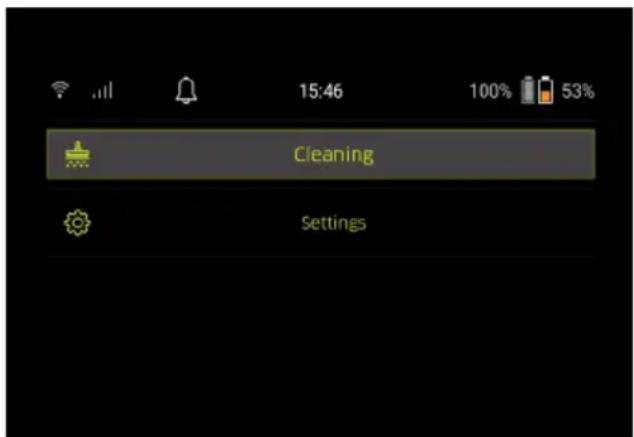
- Wait until the dashboard appears on the display.
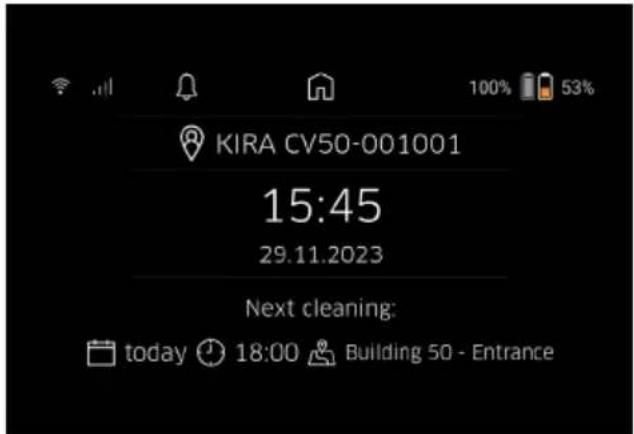
Note
When starting up the device for the first time, wait briefly until the SIM card establishes reception.
- Press any button.
The main menu appears on the display.
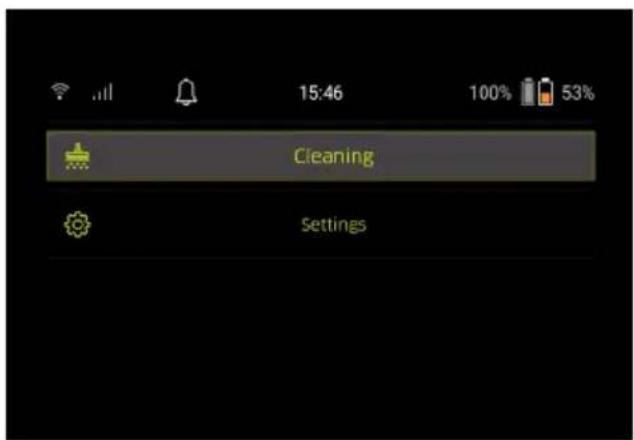
Settings
The settings can be accessed in the main menu under "Settings".
Suction strength
You can choose between Normal mode and Eco mode, see chapter Suction strength.
Notifications
- Select the "Notifications" button in the "Settings" main menu. The display shows the last five notifications, which could still be relevant.
Device settings
Settings for light, sound and language can be made on the cleaning robot. Settings can also be reset.
Light:
1 In the "Settings" main menu, select the "Device settings" button.
2 Select the "Lights" button.
3 Select the desired setting using the arrow keys and confirm with "Confirm" button.
Sound:
-
In the "Settings" main menu, select the "Device settings" button.
-
Select the "Sound" button.
-
Select the desired setting using the arrow keys and confirm with "Confirm" button.
If the "Warnings" setting is selected, signals are only emitted when warning or error messages occur.
If the "Device sounds" setting is selected, signals are also emitted when the unit is booted up and shut down.
The language of the display on the cleaning robot can be selected in the main menu via "Settings" > "Device settings" > "Language".
The unit can be reset to the factory settings in the main menu under "Settings" > "Device settings" > "Reset settings".
Note
The maps that have already been created and the device settings that have been made are deleted when the device is reset.
Locking / security
- In the "Settings" main menu, select the "Locking/security" button.
- Select the desired setting using the arrow keys and confirm with "Confirm" button.
Selecting the "Flight mode" setting disconnects the Internet connection.
Selecting the "Child lock" setting activates the child lock.
Help
- In the "Settings" main menu, select the "Help" button to call up animations on the maintenance of the device.
- Select the desired animation using the arrow keys and confirm with "Confirm" button.
My robot
- In the "Settings" main menu, select the "My robot" button. Information about the device is shown on the display:
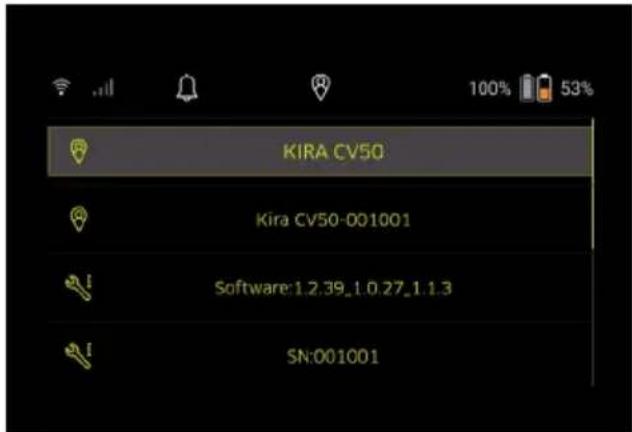
Connecting the device to the app
When opening the app for the first time, step-by-step instructions appear.
- Follow the step-by-step instructions in the App.
- On the device display, select the "Connect robot to app" button in the "Settings" main menu.
- Scan the QR code.
The device is connected to the app.
Note
The cleaning robot can only be added to one account. To connect the cleaning robot to a new account, it must first be removed from the old account. However, a main account can invite several users to give them access to a cleaning robot. However, no cleaning robot may yet be stored in the user's account.
Settings in the app
The following settings can only be made in the app:
- Create an account and invite other users to this account
- Connect a user and cleaning robot
- Schedule cleanings and predefine suction modes
• Create and edit cleaning maps
• Receiving notifications
• View detailed cleaning reports - Set a security code
• Activate an anti-theft device
• Use the "Where is my robot?" search function - Edit data for "My robot", see chapter My robot.
- Assign and change robot names
Basic mode
Basic mode can be used without an app.
• One-time cleaning that cannot be scheduled.
- Suitable for closed rooms in which the cleaning robot is allowed to move freely.
Starting cleaning
Note
Check the sensors for dirt and clean them with a damp, lint-free cloth if necessary.
-
In the "Cleaning" main menu, select the "Basic mode" button.
A prompt appears on the display asking whether the device and the environment have been prepared for cleaning. -
Prepare the device and the environment accordingly and confirm with the "Confirm" button. The cleaning robot starts cleaning.
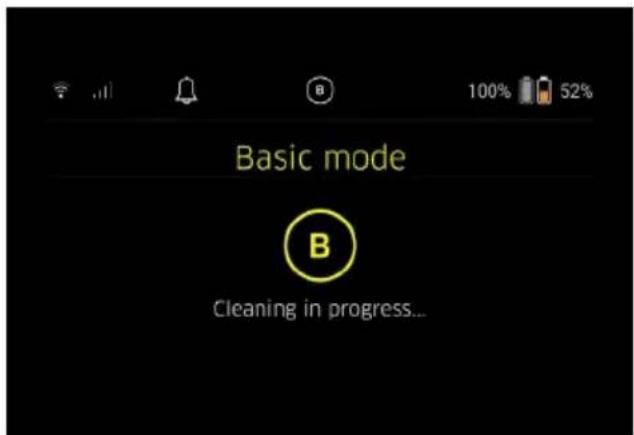
- Once cleaning is finished, the cleaning robot returns to the starting area.
The display shows the time needed for cleaning and the size of the cleaned area.
A detailed cleaning report can be viewed in the app.
Routine mode
Starting the exploratory run on the device
- In the "Cleaning" main menu, select the button "New map" > "Autonomous mapping".
A prompt appears on the display asking whether the device and the environment have been prepared for cleaning. - Prepare the device and the surrounding area accordingly and keep the floor free of objects lying around. Open the doors of the rooms that are to be cleaned.
- Confirm with "Confirm" button The cleaning robot starts the exploratory run.
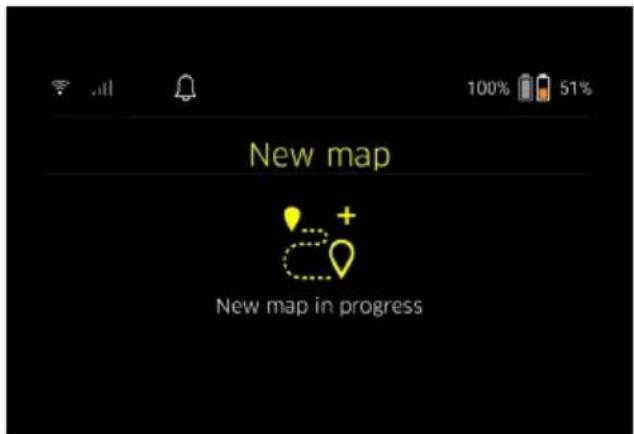
- Once the exploratory run is complete, the cleaning robot returns to the starting point. The display shows the time needed for the exploratory run.
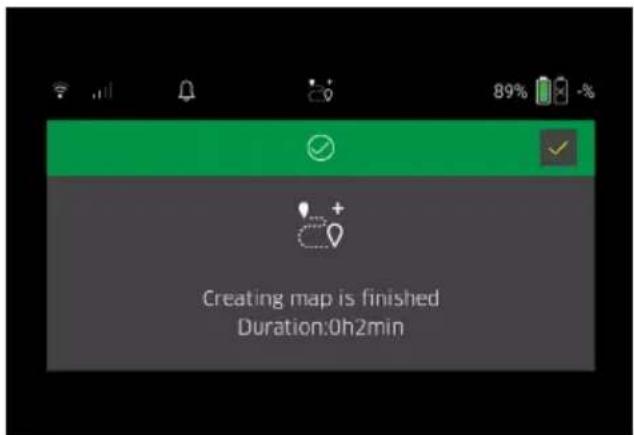
The map is now available in the app and can be named and adapted. If there is no connection to the app when the map is created, the map is still initially saved on the cleaning robot with a date and time stamp.
Performing a manual exploratory run via remote control
Manual map creation via remote control is suitable for areas where autonomous map creation could be challenging for the cleaning robot (e.g. glass buildings) or for areas that do not need to be fully mapped, as no complete cleaning of the area is required.
- In the "Cleaning" main menu, select the button "New map" > "Map creation via remote control". A message that the remote control should be called up in the app appears on the display.
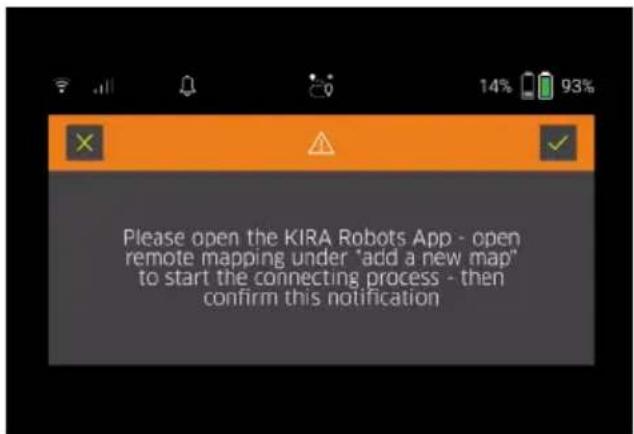
- Call up the remote control in the app and confirm the message with "Confirm" button.
- Use the remote control to guide the cleaning robot through the areas to be mapped.
The map creation is shown on the display at the same time.
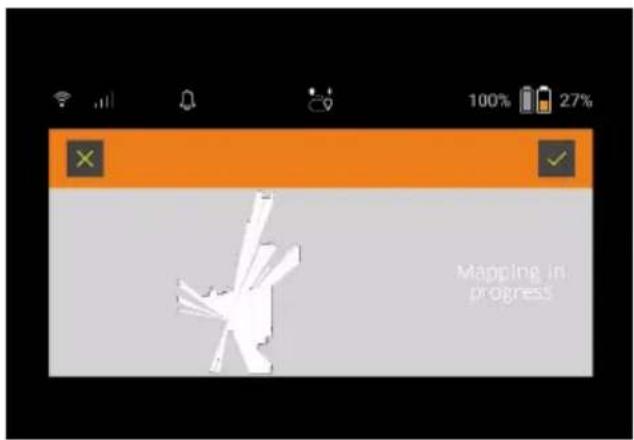
Once the area has been mapped and the area to be cleaned is displayed in white on the map, the map is saved via the app and the map creation is completed.
The display shows the time needed for the exploratory run.
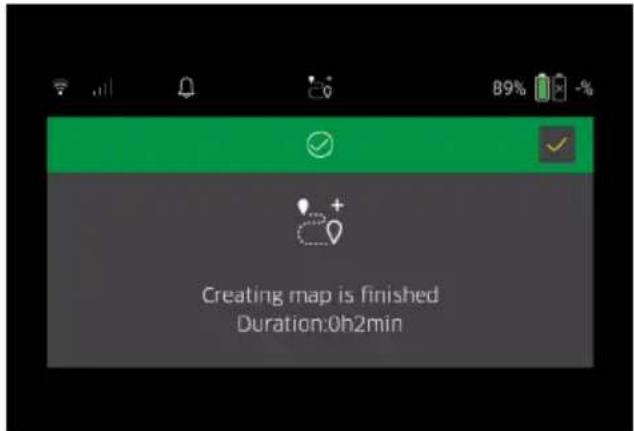
The map is now available in the app and can be named and adapted.
Naming and adapting the map in the app
The map can be named and adapted in the app via the "Maps" tab.
Adaptation options in the app
• Determining no-go zones and virtual walls
- Define starting area
- Set special cleaning zones and definition of single or double cleaning
- Defining suction strength (see chapter Suction strength) for cleaning maps and cleaning zones
- Create schedules
Select a map on the cleaning robot and start cleaning
Note
The cleaning robot must be placed in the starting area marked on the map before cleaning. The starting area is approx. 2 m x 2 m and initially corresponds to the place where the cleaning robot started creating the map. For easier localisation, it is recommended that the starting area is close to surrounding walls, e.g.in a corner instead of in the centre of the room. The starting area can be subsequently moved in the app. The labels supplied with the device can be attached to the wall or a hard floor to mark the start area. The labels are not detected by the device, but merely serve as a guide for the user.
Note
Check the sensors for dirt and clean them with a damp, lint-free cloth if necessary.
- In the "Cleaning" main menu, select the button "Existing maps".
A list of the stored maps appears on the display.
- Select the desired map and confirm with "Confirm" button.
The cleaning robot starts cleaning.
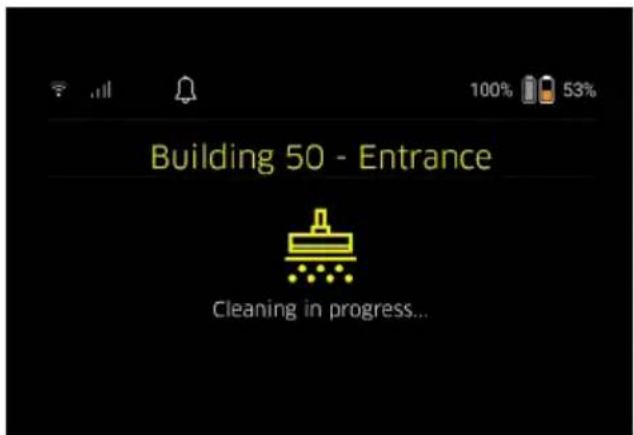
- Once cleaning is finished, the cleaning robot returns to the starting point.
The display shows the time needed for cleaning and the size of the cleaned area.
A detailed cleaning report is available in the app.
Create scheduled cleaning
- A scheduled cleaning can be created in the app via the "Tasks" tab.
Assign card to a device
A card can be assigned to one or more cleaning robots in the app via the "Maps" tab or via the cleaning robot detail view.
Initially, the map is assigned to the cleaning robot with which it was created.
Exchanging battery packs
- If the battery charge is less than 20%, a notification appears on the display of the device and in the app indicating the need to replace of one or both battery packs so that the cleaning robot can continue cleaning.
- If the battery charge is 10%, the cleaning robot stops cleaning and returns to the starting area. A message appears on the display and in the app.
Note
The cleaning robot can only continue cleaning after the battery packs have been replaced.
If the battery packs are not replaced, the cleaning robot switches off.
- Open the battery compartment cover.
- Remove the battery packs (see chapter Removing the battery pack).
- Insert the battery packs, see chapter Fitting the battery packs.
- Close the battery compartment cover.
- Confirm with "Confirm" button.
Cleaning continues.
Interrupt or end cleaning
- Press the On/Off/Pause button.
Cleaning is interrupted.
A message indicating that cleaning has been paused appears on the display for 3 seconds - Confirm with "Confirm" button or wait 3 seconds. The options "Continue cleaning", "Back to starting point", "End cleaning" appear on the display.
- Select the desired setting using the arrow keys and confirm with "Confirm" button. Depending on the selection, the cleaning robot continues cleaning, returns to the starting point or stops cleaning.
Note
If the child lock is enabled during the interruption, it needs to be unlocked before making a selection. If the PIN lock is activated during the interruption, a message appears on the display. The code must be entered using the arrow keys and then confirmed before making a selection.
Switching off the device
- Keep On/Off/Pause button pressed for 3 seconds. A prompt appears on the display asking whether the cleaning robot should really be switched off.
- Confirm with "Confirm" button. The cleaning robot switches off.
Removing the battery pack
- Open the battery compartment cover.
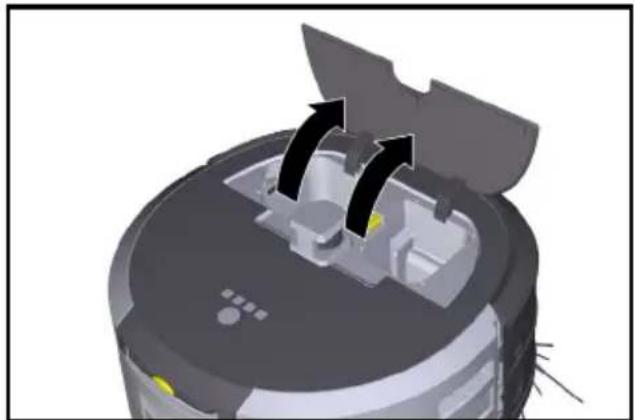
natural_image
3D rendering of a robotic vacuum cleaner with directional arrows indicating motion (no text or symbols)- Press the battery pack unlocking button. The battery pack pops a few centimetres out of the battery pack holder.
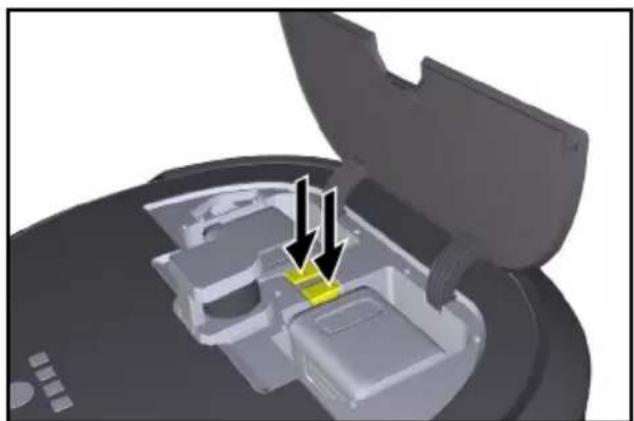
natural_image
3D diagram of a device interior with highlighted components and arrows indicating movement (no text or symbols)- Remove the battery pack.
Transport
⚠CAUTION
Risk of injury or damage due to non-observance of the weight
Be aware of the weight of the device during transportation.
Note
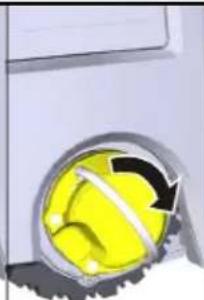
Before transport, both edges must be decoupled.
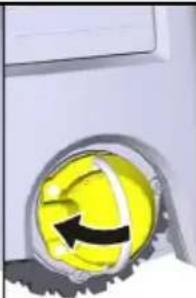
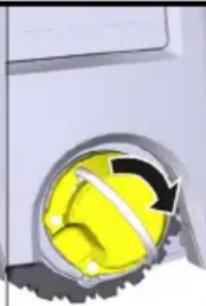
- Lift up the tab on the decoupler, pull the tab and turn it anticlockwise.
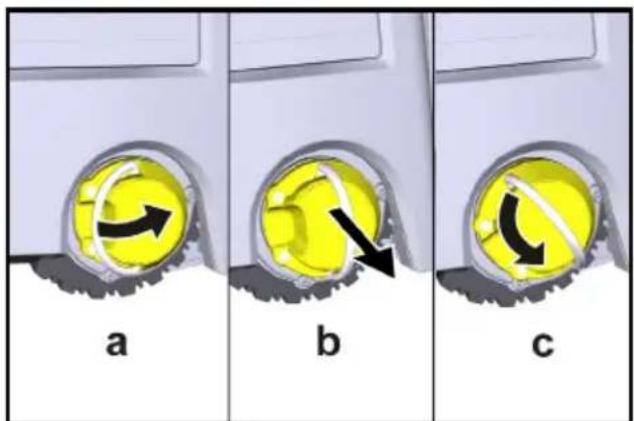
The wheel is decoupled.
- Open the lid of the storage compartment for the telescopic handle.
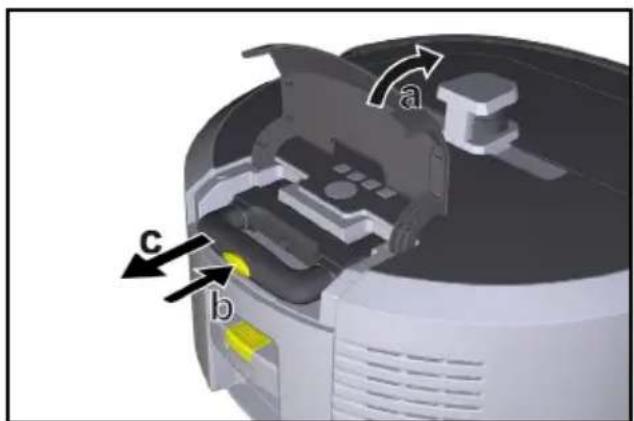
- Press the unlocking button on the telescopic handle.
- Pull the telescopic handle and remove it from the device.
- Use the telescopic handle to transport the unit.
- After transport, push the telescopic handle back into the device and close the lid of the storage compartment.
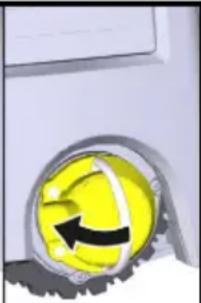
- Lift up the tab on the decoupler, press the decoupler in via the tab and turn it clockwise.
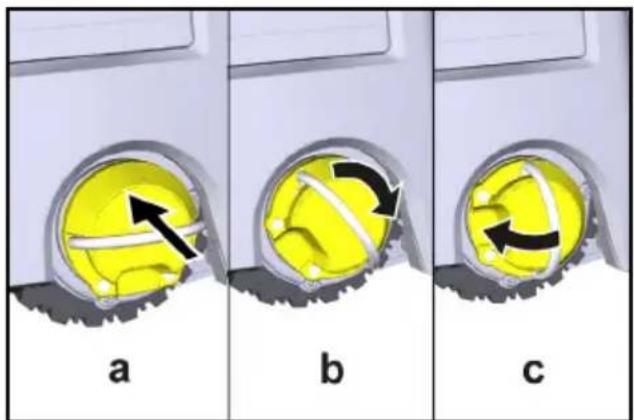
The wheel is coupled.
Storage
△CAUTION
Risk of injury or damage due to non-observance of the weight
Be aware of the weight of the device during storage.
The device may only be stored indoors.
If the cleaning robot is not to be used for a longer period of time, proceed as follows:
- Charge the battery pack (see operating instructions for the battery pack and charger).
- Store the charged battery pack in a cool and dry place.
Care and service
Maintenance intervals
Notifications appear on the display and in the app to remind the user to maintain the device. The maintenance intervals may differ, depending on how often the cleaning robot is used.
After each operation
- Check the cleaning brush, the side brushes and the wheels and clean them if necessary.
- Charge the battery packs.
- Check whether the dust container needs to be emptied.
- Clean the sensors with a moist, lint-free cloth. If necessary, use additional glass cleaner.
Weekly
- Clean the filter and the pre-filter.
- Clean the cleaning brush.
- Clean the wheels.
Replacing upon wear
- Replace the side brushes.
- Replace the sweeping edge.
- Replace the cleaning brush.
- Replace the filter.
Every 2 years
- Replace the button cell.
Maintenance work
Maintenance tasks as animation
Various maintenance tasks are stored as animations in the device and can be called up on the display or in the app, see chapter Help.
Cleaning the wheels
Dirt particles (e.g. sand.) can get stuck on the running surface and then damage sensitive, smooth floor surfaces.
- Clean the wheel running surfaces.
Emptying the dust container
-
Press the unlocking button on the dust container and remove the dust container from the device.
-
If necessary, lift up the handle on the dust container.
- Press the unlocking button on the door of the dust container.
- Lower the door of the dust container.
- Empty the dust container.
Cleaning the filter
- Press the unlocking button on the dust container and remove the dust container from the device.
- Press the tab on the filter cover and lift up the filter cover.
- Remove the filter.
- Knock out the filter.
Removing and cleaning the cleaning brush
- Remove the cover of the cleaning brush with sweeping edge.
- Remove the cleaning brush.
- Remove tangled threads and hairs.
Removing and cleaning the side brush
- Remove the side brush from the holder.
- Remove tangled threads and hairs.
Cleaning the sensors
- Clean the sensors with a moist, lint-free cloth. If necessary, use additional glass cleaner.
Replacing the button cell
- Remove the battery packs, see Removing the battery pack.
- Use a screwdriver to remove the screws from the cap next to the left battery pack holder.
- Replace the button cell type CR2032.
- Use a screwdriver to reinsert the screws into the cap.
- Insert the battery packs, see Fitting the battery packs.
Troubleshooting guide
If an error occurs, a notification appears on the device display with instructions that must be followed to correct the problem.
For error messages that can only be rectified by a service technician, an error code is also displayed. If this still occurs after several restarts, please contact customer service.
Faults not shown on the display
Further troubleshooting aids can be found in the Kärcher KIRA Robots app under FAQ.
Malfunction Rectification
The cleaning robot can- not be switched on
- Check whether the battery packs are charged and charge them if necessary.
Customer Service department
If the malfunction cannot be corrected, the device must be checked by the Customer Service department.
Warranty
The warranty conditions issued by our relevant sales company apply in all countries. We shall remedy possible malfunctions on your appliance within the warranty period free of cost, provided that a material or manufacturing flaw is the cause. In a warranty case, please contact your dealer (with the purchase receipt) or the next authorised customer service site.
(See overleaf for the address)
Further warranty information (if available) can be found in the service area of your local Kärcher website under "Downloads".
Declaration of Conformity
EU Declaration of Conformity
We hereby declare that the machine described below complies with the relevant basic safety and health requirements in the EU Directives, both in its basic design and construction as well as in the version placed in cir-
culation by us. This declaration is invalidated by any changes made to the machine that are not approved by us.
Product: Autonomous vacuum cleaner
Type: 1.454-500.0
Currently applicable EU Directives
2006/42/EC (+2009/127/EC)
2014/53/EU
2011/65/EU
Harmonised standards used
EN 60335-1
EN 60335-2-72
EN 62368-1: 2014
EN 62311: 2020
EN IEC 63000: 2018
EN IEC 55014-1: 2021
EN IEC 55014-2: 2021
EN 301 489-1 V2.2.3
EN 301 489-17 V3.2.4
EN 301 489-52 V1.2.1
EN 301 908-1 V15.1.1
EN 301 908-2 V13.1.1
EN 301 908-13 V13.2.1
EN 301 511 V12.5.1
EN 300 328 V2.2.2
EN 301 893 V2.1.1
Additional implemented standard
IEC63327:2021
EN 60335-2-69
The signatories act on behalf of and with the authority of the company management.
H. Jenner
Chairman of the Board of Management
S. Reiser
Manager Regulatory Affairs & Certification
Documentation supervisor:
S. Reiser
Alfred Kärcher SE & Co. KG
Alfred-Kärcher-Str. 28 - 40
71364 Winnenden (Germany)
Ph.: +49 7195 14-0
Fax: +49 7195 14-2212
Winnenden, 2024/11/01
Declaration of Conformity (UK)
We hereby declare that the product described below complies with the relevant provisions of the following
UK Regulations, both in its basic design and construction as well as in the version put into circulation by us.
This declaration shall cease to be valid if the product is modified without our prior approval.
Product: Autonomous vacuum cleaner
Type: 1.454-500.0
Currently applicable UK Regulations
S.I. 2008/1597 (as amended)
S.I. 2017/1206 (as amended)
S.I. 2012/3032 (as amended)
Designated standards used
EN 60335-1
EN 60335-2-72
EN 62368-1: 2014
EN 62311: 2020
EN IEC 63000: 2018
EN IEC 55014-1: 2021
EN IEC 55014-2: 2021
EN 301 489-1 V2.2.3
EN 301 489-17 V3.2.4
EN 301 489-52 V1.2.1
EN 301 908-1 V15.1.1
EN 301 908-2 V13.1.1
EN 301 908-13 V13.2.1
EN 301 511 V12.5.1
EN 300 328 V2.2.2
EN 301 893 V2.1.1
Additional implemented standard
IEC63327:2021
EN 60335-2-69
The signatories act on behalf of and with the authority of the company management.
H. Jenner
Chairman of the Board of Management
S. Reiser
Manager Regulatory Affairs & Certification
Documentation supervisor:
S. Reiser
Alfred Kärcher SE & Co. KG
Alfred-Kärcher-Str. 28 - 40
71364 Winnenden (Germany)
Ph.: +49 7195 14-0
Fax: +49 7195 14-2212
Winnenden, 2024/11/01
Technical data
| Kira CV50 | |
| Electrical connection | |
| Nominal power W 230 | |
| Wireless connections LTE/4G, | WLAN |
| Frequency MHz 2400- | 24835170-5835 |
| Max. signal strength, WLAN dBm <20 | |
| Device performance data | |
| Tank content I 4,5 | |
| Suction performance, air quantity l/s 16 | |
| Suction performance, vacuum kPa (mbar) | 19,3(193) |
| Theoretical surface performance m ^2 /h 525 | |
| Operating time with full battery charge (2 batteries) in normal operation (7.5 Ah) | Minutes 140 |
| Operating time with full battery charge (2 batteries) in Eco mode (7.5 Ah) | Minutes 210 |
| Autonomous travel speed (max.) km/h | 1,5 |
| Dimensions and weights | |
| Length x width x height | mm 577 x580 x302 |
| Weight (without accessories) | kg 15,5 |
Kira CV 50
Working width mm 350
Autonomous passage width (min.) mm 650
Autonomous clearance height mm 320 (min.)
Maximum drive-over height mm 20
Incline
Climbing ability % 6
Battery pack
Number of battery packs 2
Charging time of battery pack with Minutes 58/81 quick charger 80% / 100%
Charging current A 6
Determined values in acc. with EN 60335-2-69
| Sound pressure level L_pA | dB(A) 57 |
| Sound power level L_wA | dB(A) 70 |
L_PA and L_WA uncertainty dB(A) 2
Subject to technical modifications.
Contenu
Marque déposée
natural_image
Close-up of a mechanical component with two spiky protrusions and a small green component, no visible text or symbols.Remarque
natural_image
3D rendering of a robotic vacuum cleaner with directional arrows indicating motion (no text or symbols)natural_image
3D rendering of a robotic vacuum cleaner with two-mounted devices and a central control panel (no text or symbols visible)Remarque
Réglages
natural_image
3D rendering of a robotic vacuum cleaner with directional arrows indicating motion (no text or symbols)natural_image
3D diagram of a device interior with highlighted components and arrows indicating movement (no text or symbols)- Retirer les blocs-batteries.
Transport
⚠ PRÉCAUTION
natural_image
Close-up of a yellow circular object with a black arrow pointing to it, no visible text or symbolsa
natural_image
Close-up of a yellow spherical object with a black arrow indicating rotation, partially enclosed by a metallic ring (no text or symbols visible)b
natural_image
Close-up of a yellow circular object with a black arrow, resembling a stylized face or button (no text or symbols visible)2006/42/CE (+2009/127/CE)
2014/53/UE
2011/65/UE
H. Jenner
Chairman of the Board of Management
S. Reiser
Manager Regulatory Affairs & Certification
71364 Winnenden (Germany)
Marchi
natural_image
Close-up of a mechanical component with two spiky protrusions and a base, no visible text or symbolsNota
natural_image
3D rendering of a robotic vacuum cleaner with directional arrows indicating motion (no text or symbols)natural_image
3D rendering of a robotic device with two labeled components and directional arrows indicating assembly or operation (no text or symbols visible)Nota
Impostazioni
natural_image
3D rendering of a robotic vacuum cleaner with black arrows indicating motion or force direction (no text or symbols)natural_image
3D diagram of a device interior with highlighted components and arrows indicating movement (no text or symbols)
H. Jenner
Chairman of the Board of Management
S. Reiser
Manager Regulatory Affairs & Certification
71364 Winnenden (Germany)
Tel.: +49 7195 14-0
Fax: +49 7195 14-2212
Winnenden, 01/11/2024
Dati tecnici
Marcas registradas
natural_image
Close-up of a robotic device's internal components with radiating blades (no text or symbols visible)Nota
natural_image
3D rendering of a robotic vacuum cleaner with directional arrows indicating motion (no text or symbols)natural_image
3D rendering of a robotic device with two labeled components and directional arrows indicating assembly or operation (no text or symbols visible)Nota
Ajustes
natural_image
3D rendering of a robotic vacuum cleaner with black arrows indicating motion or force direction (no text or symbols)natural_image
3D diagram of a device interior with highlighted components and arrows indicating movement (no text or symbols)- Retirar la batería.
Transporte
△PRECAUCIÓN
natural_image
Close-up of a yellow circular object with a black arrow pointing to it, no visible text or symbolsa
natural_image
Close-up of a yellow spherical object with a black arrow indicating rotation, partially enclosed by a metallic ring (no text or symbols visible)b
natural_image
Close-up of a yellow circular object with a black arrow and curved line, partially obscured by a metallic gear (no text or symbols visible)C
La rueda se acopla.
Almacenamiento
⚠PRECAUCIÓN
2006/42/CE (+2009/127/CE)
2014/53/UE
2011/65/UE
H. Jenner
Chairman of the Board of Management
S. Reiser
Manager Regulatory Affairs & Certification
71364 Winnenden (Germany)
Tel.: +49 7195 14-0
Fax: +49 7195 14-2212
Winnenden, 01/11/2024
Datos técnicos
Marca registada
natural_image
Close-up of a robotic device's internal components with radiating blades (no text or symbols visible)Aviso
natural_image
3D rendering of a robotic vacuum cleaner with directional arrows indicating motion (no text or symbols)natural_image
3D rendering of a robotic device with two labeled components and directional arrows indicating assembly or operation (no text or symbols visible)Aviso
Definições
natural_image
3D rendering of a robotic vacuum cleaner with black arrows indicating motion or force direction (no text or symbols)natural_image
3D diagram of a device interior with highlighted components and arrows indicating movement (no text or symbols)- Retirar os conjuntos de bateria.
Transporte
△CUIDADO
natural_image
Close-up of a yellow circular button with a black arrow pointing right, labeled 'a' at the bottom (no other text or symbols)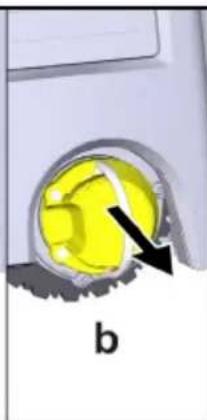
natural_image
Close-up of a yellow circular object with a black arrow pointing to it, labeled 'b' (no text or symbols on the object itself)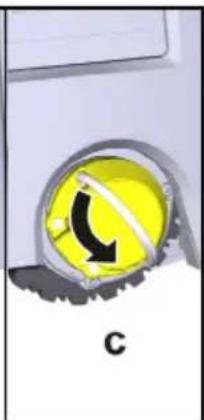
natural_image
Close-up of a yellow circular button with a black curved arrow and 'C' label, no readable text or symbols beyond the label.Retirar e limpar as vassouras laterais
2006/42/CE (+2009/127/CE)
2014/53/UE
2011/65/UE
H. Jenner
Chairman of the Board of Management
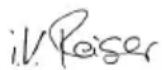
S. Reiser
Manager Regulatory Affairs & Certification
Winnenden, 2024/11/01
Dados técnicos
Handelsmerken
natural_image
3D diagram of a device's internal components with radiating blades, no text or symbols presentInstructie
natural_image
3D rendering of a robotic vacuum cleaner with directional arrows indicating motion (no text or symbols)natural_image
3D rendering of a robotic device with two labeled components and directional arrows indicating assembly or operation (no text or symbols visible)Instructie
Schoonmaak instellingen
natural_image
3D rendering of a robotic vacuum cleaner with black arrows indicating motion or force direction (no text or symbols)natural_image
3D diagram of a device interior with highlighted yellow components and arrows indicating movement (no text or symbols)natural_image
Close-up of a yellow circular button with a black arrow icon, mounted on a metallic surface (no text or symbols visible)
natural_image
Close-up of a yellow circular object with a black arrow pointing to it, labeled 'b' (no text or symbols on the object itself)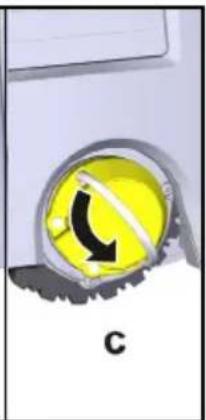
natural_image
Yellow circular icon with a black curved arrow inside, partially obscured by a gray gear-like shape (no text or symbols)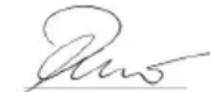
H. Jenner
Chairman of the Board of Management
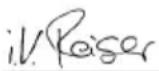
S. Reiser
Manager Regulatory Affairs & Certification
71364 Winnenden (Germany)
Tel.: +49 7195 14-0
Fax: +49 7195 14-2212
Winnenden, 2024/11/01
Technische gegevens
| Kira CV50 | |
| Elektrische aansluiting | |
| Nominaal vermogen W 230 | |
| Draadloze verbindingen LTE/4G, | WLAN |
| Frequentie MHz 2400- | 2483 |
| 5170- | |
| 5835 | |
Ticari marka
natural_image
Close-up of a computer mouse with two spiky hairpins pointing to the head (no text or symbols visible)Not
natural_image
3D rendering of a robotic vacuum cleaner with directional arrows indicating motion (no text or symbols)natural_image
3D rendering of a robotic vacuum cleaner with two labeled components and directional arrows indicating assembly (no text or symbols present)Not
Ayarlar
natural_image
3D rendering of a robotic vacuum cleaner with black arrows indicating motion or force direction (no text or symbols)natural_image
3D diagram of a device interior with highlighted components and arrows indicating movement (no text or symbols)natural_image
Close-up of a yellow circular button with a black arrow, partially inserted into a metallic ring (no text or symbols visible)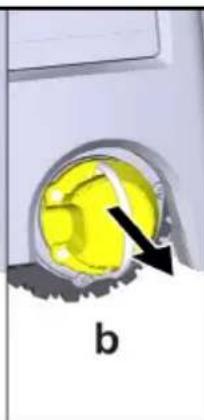
natural_image
Close-up of a yellow circular object with a black arrow pointing to it, labeled 'b' (no text or symbols on the object itself)
natural_image
Yellow circular button with black arrow symbol, labeled 'C' at bottom (no readable text or symbols beyond label)natural_image
Close-up of a yellow circular object with a black arrow pointing to it, labeled 'a' (no text or symbols on the object itself)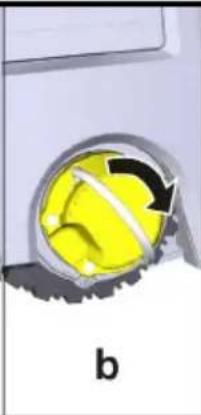
natural_image
Close-up of a yellow spherical object with a black arrow indicating rotation, partially enclosed by a metallic ring (no text or symbols)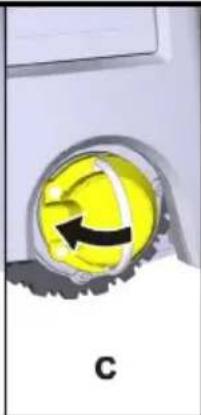
natural_image
Close-up of a yellow circular object with a black arrow and label 'C' (no readable text or symbols)2006/42/AT (+2009/127/AT)
2014/53/AB
2011/65/AB
H. Jenner
Chairman of the Board of Management
S. Reiser
Manager Regulatory Affairs & Certification
Winnenden, 2024/11/01
Teknik bilgiler
Varumärke
natural_image
3D diagram of a device's internal components with radiating blades, showing no text or symbolsHänvisning
natural_image
3D rendering of a robotic vacuum cleaner with directional arrows indicating motion (no text or symbols)natural_image
3D rendering of a robotic device with two labeled components and directional arrows indicating assembly or operation (no text or symbols visible)Hänvisning
Inställningar
natural_image
3D rendering of a robotic vacuum cleaner with directional arrows indicating motion (no text or symbols)natural_image
3D diagram of a device interior with highlighted components and arrows indicating movement (no text or symbols)- Ta ut batteripaketen.
Transport
⚠FÖRSIKTIGHET
natural_image
Close-up of a yellow circular button with a black arrow, partially inserted into a metallic ring (no text or symbols visible)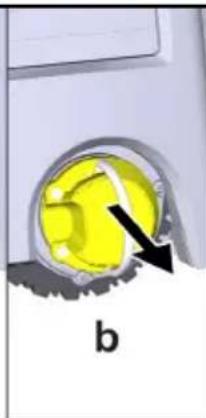
natural_image
Close-up of a yellow circular object with a black arrow pointing to it, labeled 'b' (no text or symbols on the object itself)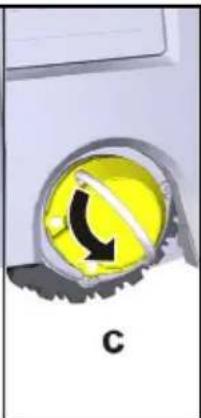
natural_image
Close-up of a yellow circular object with a black curved arrow and letter C, no readable text or symbols present.Hjulet frikopplas.
natural_image
Close-up of a yellow circular object with a black arrow pointing to it, labeled 'a' (no text or symbols on the object itself)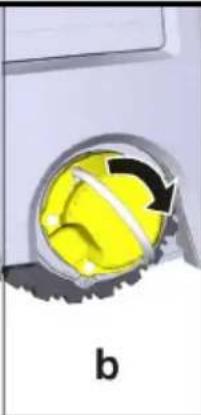
natural_image
Close-up of a yellow spherical object with a black arrow indicating rotation, labeled 'b' (no text or symbols on the object itself)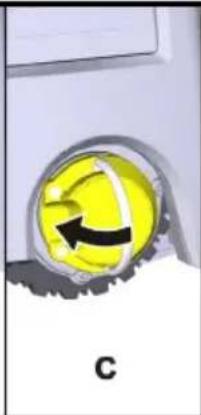
natural_image
Close-up of a yellow circular object with a black arrow and label 'C' (no readable text or symbols)Hjulet kopplas.
Förvaring
⚠FÖRSIKTIGHET
H. Jenner
Chairman of the Board of Management
S. Reiser
Manager Regulatory Affairs & Certification
D-71364 Winnenden (Germany)
Tfn: +49 7195 14-0
Fax: +49 7195 14-2212
Winnenden, 01.11.2024
Tekniska data
| Kira CV50 | |
| Elanslutning | |
| Märkeffekt W 230 | |
| Trådlösa anslutningar LTE/4G, | WLAN |
| Frekvens MHz 2400- | 2483 |
| 5170- | |
| 5835 | |
Max signalstyrka, WLAN dBm <20
Tavaramerkit
natural_image
Close-up of a device's internal components with radiating blades, no visible text or symbolsHuomautus
natural_image
3D rendering of a robotic vacuum cleaner with directional arrows indicating motion (no text or symbols)natural_image
3D rendering of a robotic vacuum cleaner with two labeled components and directional arrows indicating assembly or operation (no text or symbols present)- Sulje akkulokeron luukku.
Huomautus
Puhdistusasetukset
natural_image
3D rendering of a robotic vacuum cleaner with black arrows indicating motion or force direction (no text or symbols)natural_image
3D diagram of a device interior with highlighted components and arrows indicating movement (no text or symbols)- Poista akkupaketit.
Kuljetus
△VARO
Chairman of the Board of Management
S. Reiser
Manager Regulatory Affairs & Certification
71364 Winnenden (Germany)
Puh.: +49 7195 14-0
natural_image
Close-up of a computer mouse with two spiky hairpins pointing to the head (no text or symbols visible)Merknad
natural_image
3D rendering of a robotic vacuum cleaner with black arrows indicating motion or force direction (no text or symbols)natural_image
3D rendering of a robotic vacuum cleaner with two labeled components and directional arrows indicating assembly (no text or symbols present)- Lukk batteriromklaffen.
Merknad
Innstillinger
Apparatinnstillinger
natural_image
3D rendering of a robotic vacuum cleaner with black arrows indicating motion or force direction (no text or symbols)natural_image
3D diagram of a device interior with highlighted components and arrows indicating movement (no text or symbols)natural_image
Close-up of a yellow circular button with a black arrow, partially inserted into a metallic ring (no text or symbols visible)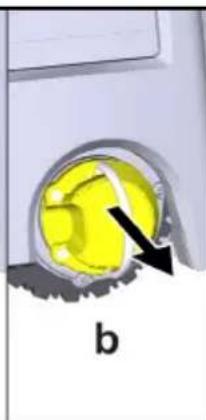
natural_image
Close-up of a yellow circular object with a black arrow pointing to it, labeled 'b' (no text or symbols on the object itself)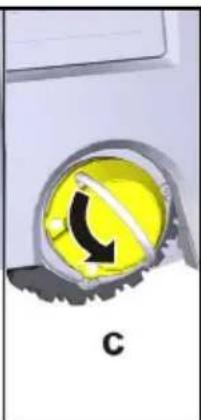
natural_image
Close-up of a yellow circular button with a black arrow and letter C, mounted on a silver surface (no readable text or symbols)Hjulet kobles fra.
natural_image
Close-up of a yellow circular object with a black arrow pointing to it, labeled 'a' (no text or symbols on the object itself)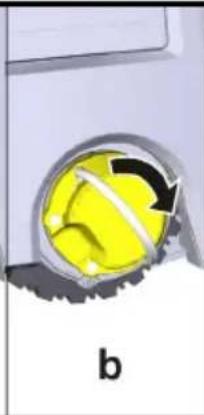
natural_image
Close-up of a yellow spherical object with a black arrow indicating rotation, partially enclosed by a metallic ring (no text or symbols)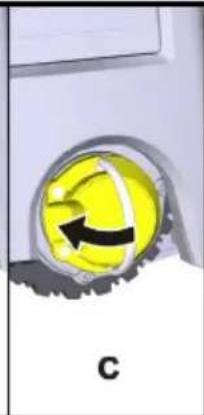
natural_image
Close-up of a yellow circular emblem with a black arrow, partially obscured by metallic lines and a gray border (no text or symbols)Hjulet kobles til.
Oppbevaring
⚠FORSIKTIG
2006/42/EF (+2009/127/EF)
2014/53/EU
2011/65/EU
Anvendte harmoniserte standarder
EN 60335-1
EN 60335-2-72
EN 62368-1: 2014
EN 62311: 2020
EN IEC 63000: 2018
EN IEC 55014-1: 2021
EN IEC 55014-2: 2021
EN 301 489-1 V2.2.3
EN 301 489-17 V3.2.4
EN 301 489-52 V1.2.1
EN 301 908-1 V15.1.1
EN 301 908-2 V13.1.1
EN 301 908-13 V13.2.1
EN 301 511 V12.5.1
EN 300 328 V2.2.2
EN 301 893 V2.1.1
Ytterligere anvendt standard
IEC63327:2021
EN 60335-2-69
H. Jenner
Chairman of the Board of Management
S. Reiser
Manager Regulatory Affairs & Certification
71364 Winnenden (Germany)
Tlf.: +49 7195 14-0
Winnenden, 2024/11/01
Tekniske data
| Kira CV50 | |
| Elektrisk tilkobling | |
| Nominell effekt W 230 | |
| Trådløse tilkoblinger LTE/4G, | WLAN |
| Frekvens MHz 2400- | 2483 |
| 5170- | |
| 5835 | |
Maks. signalstyrke, WLAN dBm <20
| Effektspesifikasjoner apparat | ||
| Innhold i beholderen I 4,5 | ||
| Sugekraft, luftmengde I/s 16 | ||
| Sugekraft, undertrykk kPa | (mbar) | 19,3(193) |
| Teoretisk flateeffekt m | ^2 /h 525 | |
| Driftstid i normal drift ved fulladet batteri (2 batterier) (7,5 Ah) | Minutter | 140 |
| Driftstid i Eco-modus ved fulladet batteri (2 batterier) (7,5 Ah) | Minutter | 210 |
| Kjørehastighet autonom (maks.) | km/h | 1,5 |
Varemærke
natural_image
3D diagram of a computer mouse with two spines and a central hub, showing internal components (no text or symbols)Obs
natural_image
3D rendering of a robotic vacuum cleaner with directional arrows indicating motion (no text or symbols)natural_image
3D rendering of a robotic device with two labeled components and directional arrows indicating assembly or operation (no text or symbols visible)- Luk batterirummets klap.
Obs
Indstillinger
Indstillingerne kan hentes i hovedmenuen under "Indstillinger".
Sugekraft
natural_image
3D rendering of a robotic vacuum cleaner with black arrows indicating motion or force direction (no text or symbols)natural_image
3D diagram of a device interior with highlighted yellow component and two arrows indicating movement (no text or symbols)2006/42/EF (+2009/127/EF)
2014/53/EU
2011/65/EU
H. Jenner
Chairman of the Board of Management
S. Reiser
Manager Regulatory Affairs & Certification
71364 Winnenden (Germany)
Tlf.: +49 7195 14-0
Fax: +49 7195 14-2212
Winnenden, 2024/11/01
Tekniske data
natural_image
3D diagram of a device's internal components with radiating blades, no text or symbols presentMärkus
natural_image
3D rendering of a robotic vacuum cleaner with directional arrows indicating motion (no text or symbols)natural_image
3D rendering of a robotic device with two labeled components and directional arrows indicating assembly or operation (no text or symbols visible)- Sulgege akupesa klapp.
Märkus
Seaded
Seaded saab ette kutsuda peamenüüs jaotises "Seaded".
Imemistugevus
natural_image
3D rendering of a robotic vacuum cleaner with black arrows indicating motion or force direction (no text or symbols)- Vajutage akupaki lahtilukustusklahve.
natural_image
3D diagram of a device interior with highlighted components and arrows indicating movement (no text or symbols)natural_image
Close-up of a yellow circular button with a black arrow and label 'a' (no text or symbols on the button itself)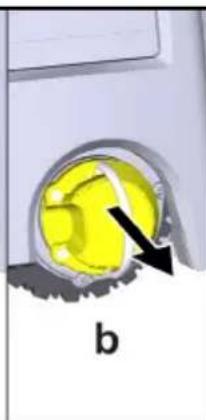
natural_image
Close-up of a yellow circular object with a black arrow pointing to it, labeled 'b' (no text or symbols on the object itself)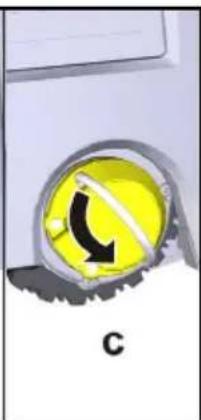
natural_image
Yellow circular button with black arrow symbol, labeled 'C' at bottom (no text or symbols on the button itself)Ratas sidestatakse lahti.
natural_image
Close-up of a yellow circular object with a black arrow pointing to it, labeled 'a' (no text or symbols on the object itself)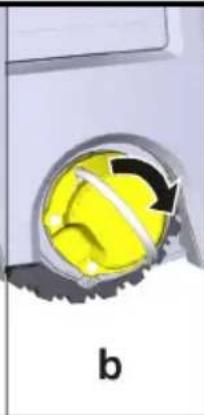
natural_image
Close-up of a yellow spherical object with a black arrow indicating rotation, partially enclosed by a metallic ring (no text or symbols)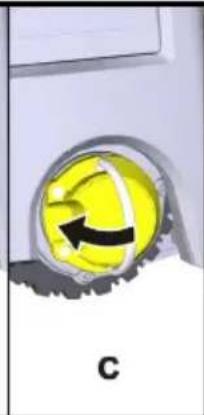
natural_image
Close-up of a yellow circular emblem with a black arrow, partially obscured by metallic lines and a gray border (no text or symbols)Ratas sidestatakse.
Ladustamine
⚠ETTEVAATUS
2006/42/EÜ (+2009/127/EÜ)
2014/53/EL
2011/65/EL
H. Jenner
Chairman of the Board of Management
S. Reiser
Manager Regulatory Affairs & Certification
71364 Winnenden (Germany)
Tel: +49 7195 14-0
Winnenden, 2024/11/01
Tehnilised andmed
Preču zīme
QR kods ^® ir DENSO WAVE INCORPORATED registrē-ta preču zīme.
natural_image
Close-up of a computer mouse with two spines above the head, showing internal components (no text or symbols visible)Norādījum
natural_image
3D rendering of a robotic vacuum cleaner with directional arrows indicating motion (no text or symbols)natural_image
3D rendering of a robotic vacuum cleaner with two labeled components and directional arrows indicating assembly (no text or symbols present)- Aizveriet akumulatoru nodalijuma vāku.
Norādījum
natural_image
3D rendering of a robotic vacuum cleaner with black arrows indicating motion or force direction (no text or symbols)natural_image
3D diagram of a device interior with highlighted components and arrows indicating movement (no text or symbols)- Iznemiet akumulatoru blokus.
Transportēšana
⚠UZMANĪBU
Chairman of the Board of Management
S. Reiser
Manager Regulatory Affairs & Certification
natural_image
Close-up of a device's internal components with radiating blades, no visible text or symbolsPastaba
natural_image
3D rendering of a robotic vacuum cleaner with black arrows indicating motion or force direction (no text or symbols)natural_image
3D rendering of a robotic vacuum cleaner with two labeled components and directional arrows indicating assembly or operation (no text or symbols present)Pastaba
Valymo nustatymai
Nustatymus galima rasti pagrindiniame meniu, skiltyje "Nustatymai".
Siurbimo galia
natural_image
3D rendering of a robotic vacuum cleaner with black arrows indicating motion or force direction (no text or symbols)natural_image
3D mechanical component diagram showing internal structure with two yellow arrows indicating a highlighted section (no text or symbols present)Chairman of the Board of Management
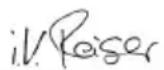
S. Reiser
Manager Regulatory Affairs & Certification
natural_image
Close-up of a robotic device's internal components with radiating blades (no text or symbols visible)Wskazówka
natural_image
3D rendering of a robotic vacuum cleaner with black arrows indicating motion or force direction (no text or symbols)natural_image
3D rendering of a robotic device with two labeled components and directional arrows indicating assembly or operation (no text or symbols visible)Wskazówka
Ustawienia
natural_image
3D rendering of a robotic vacuum cleaner with directional arrows indicating motion (no text or symbols)natural_image
3D diagram of a device interior with highlighted components and arrows indicating movement (no text or symbols)2006/42/WE (+2009/127/WE)
2014/53/UE
2011/65/UE
Chairman of the Board of Management
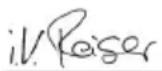
S. Reiser
Manager Regulatory Affairs & Certification
71364 Winnenden (Germany)
Tel.: +49 7195 14-0
Védjegy
natural_image
Close-up of a robotic device's internal components with radiating blades (no text or symbols visible)Megjegyzés
natural_image
3D rendering of a robotic vacuum cleaner with directional arrows indicating motion (no text or symbols)natural_image
3D rendering of a robotic device with two control panels and a central display (no text or symbols visible)Megjegyzés
Beállítások
natural_image
3D rendering of a robotic vacuum cleaner with black arrows indicating motion or force direction (no text or symbols)natural_image
3D mechanical component diagram showing internal components with arrows indicating movement or force (no text or symbols)Chairman of the Board of Management
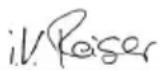
S. Reiser
Manager Regulatory Affairs & Certification
Winnenden, 2024/11/01
Műszaki adatok
Ochranná známka
natural_image
3D diagram of a device's internal components with radiating blades, no text or symbols presentUpozornění
natural_image
3D rendering of a robotic vacuum cleaner with directional arrows indicating motion (no text or symbols)natural_image
3D rendering of a robotic vacuum cleaner with two labeled components and directional arrows indicating assembly or operation (no text or symbols present)Upozornění
Nastavení čištění
natural_image
3D rendering of a robotic vacuum cleaner with black arrows indicating motion or force direction (no text or symbols)natural_image
3D diagram of a device interior with highlighted components and arrows indicating movement (no text or symbols)2006/42/ES (+2009/127/ES)
2014/53/EU
2011/65/EU
Chairman of the Board of Management
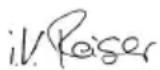
S. Reiser
Manager Regulatory Affairs & Certification
Winnenden, 2024/11/01
Technické údaje
natural_image
Close-up of a mechanical component with two spiky protrusions and a base, no visible text or symbolsUpozornenie
natural_image
3D rendering of a robotic vacuum cleaner with directional arrows indicating motion (no text or symbols)natural_image
3D rendering of a robotic vacuum cleaner with two control panels and a central chamber (no text or symbols visible)Upozornenie
Nastavenia
natural_image
3D rendering of a robotic vacuum cleaner with directional arrows indicating motion (no text or symbols)natural_image
3D diagram of a device interior with highlighted components and arrows indicating movement (no text or symbols)2006/42/ES (+2009/127/ES)
2014/53/EÚ
2011/65/EÚ
Chairman of the Board of Management
S. Reiser
Manager Regulatory Affairs & Certification
71364 Winnenden (Germany)
Tel.: +49 7195 14-0
Fax: +49 7195 14-2212
Winnenden, 01.11.2024
Technické údaje
natural_image
3D diagram of a computer mouse with two spines pointing to the head (no text or symbols present)Napotek
natural_image
3D rendering of a robotic vacuum cleaner with directional arrows indicating motion (no text or symbols)- Enega ali dva paketa akumulatorskih baterij potisnite v nastavek za paket akumulatorskih baterij na napravi, da se slišno zaskočijo.
natural_image
3D rendering of a robotic device with two labeled components and directional arrows indicating assembly or operation (no text or symbols present)- Zaprite pokrov predala za baterije.
Napotek
Nastavitve
natural_image
3D rendering of a robotic vacuum cleaner with directional arrows indicating motion (no text or symbols)natural_image
3D rendering of a device's internal components with arrows indicating a highlighted yellow component (no text or symbols visible)- Odstranite pakete akumulatorskih baterij.
Prevažanje
PREVIDNOST
2006/42/ES (+2009/127/ES)
2014/53/EU
2011/65/EU
Chairman of the Board of Management
S. Reiser
Manager Regulatory Affairs & Certification
natural_image
Close-up of a robotic device's internal components with radiating blades (no text or symbols visible)Indicatie
natural_image
3D rendering of a robotic vacuum cleaner with directional arrows indicating motion (no text or symbols)natural_image
3D rendering of a robotic device with two white components and a central base, showing internal components and arrows indicating assembly or operation (no text or symbols visible)Indicatie
natural_image
3D rendering of a robotic vacuum cleaner with directional arrows indicating motion (no text or symbols)natural_image
3D diagram of a device interior with highlighted components and arrows indicating movement (no text or symbols)natural_image
Close-up of a yellow circular button with a black arrow pointing right, labeled 'a' at the bottom (no other text or symbols)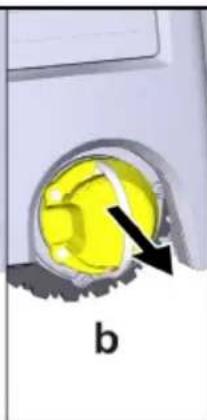
natural_image
Close-up of a yellow mechanical component with a black arrow pointing to it, labeled 'b' (no text or symbols on the object itself)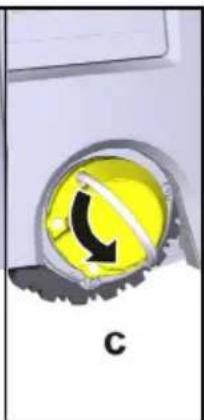
natural_image
Close-up of a yellow circular object with a black curved arrow and label 'C' (no readable text or symbols)Directive UE relevante
2006/42/UE (+2009/127/UE)
2014/53/UE
2011/65/UE
Norme armonizate aplicate
EN 60335-1
EN 60335-2-72
EN 62368-1: 2014
EN 62311: 2020
EN IEC 63000: 2018
EN IEC 55014-1: 2021
EN IEC 55014-2: 2021
EN 301 489-1 V2.2.3
EN 301 489-17 V3.2.4
EN 301 489-52 V1.2.1
EN 301 908-1 V15.1.1
EN 301 908-2 V13.1.1
EN 301 908-13 V13.2.1
EN 301 511 V12.5.1
EN 300 328 V2.2.2
EN 301 893 V2.1.1
Standardul suplimentar implementat
IEC63327:2021
EN 60335-2-69
H. Jenner
Chairman of the Board of Management
S. Reiser
Manager Regulatory Affairs & Certification
71364 Winnenden (Germania)
Tel.: +49 7195 14-0
Fax: +49 7195 14-2212
Winnenden, 2024/11/01
Date tehnice
Zaštitni znak
① Spremnik za prašinu
② Tipka za deblokiranje spremnika za prašinu
③ Teleskopska ručka
④ Tipka za deblokiranje teleskopske ručke
⑤ Poklopac pretinca za odlaganje teleskopske ručke
⑥Zaslon
⑦ LiDAR senzor
⑧ Tipka "natrag/otkaži"
⑨Tipka "gore"
⑩ Tipka "dolje"
⑪ Tipka "Potvrdi"
⑫ Tipka za uključivanje/isključivanje/stanka + zau-stavljanje u nuždi
⑬Poklopac pretinca za baterije
⑭ Odbojnik
⑮ Udubljenje za držanje na uređaju
⑯ Spajanje/odvajanje kotača
⑰ Upravljački kotačić
⑱ Kotač
⑲Bočna metla
⑳ Četka za čišćenje
②1 Poklopac četke za čišćenje s rubom za metenje
22 Senzor pada
②3 Ultrazvučni senzor za otkrivanje prozirnih predmeta
24 Senzor za praćenje zidova
⑳ * Punjač Battery Power+ 36/60
26* Komplet baterija Battery Power+ 36/75
* opcionalno
Simboli na zaslonu
| Simbol Značenje | |
 | Uređaj je spojen s WLAN-om. |
 | Uređaj je spojen s ugrađenom SIM karticom. |
 | Točka na simbolu označava novu obavijest o održavanju. |
 | Vrijednost u postotku opisuje preo-stalo vrijeme rada baterije po kom-pletu baterije. |
 | Uređaj radi u načinu rada Eco. |
Funkcija robota za čišćenje
- Mobilni robot za čišćenje dobiva energiju iz izmjenjivih baterija koje se umeću u uređaj. S dva potpuno napunjena kompleta baterija od 36 V, robot za čišćenje može očistiti do 210 minuta.
- Robot za čišćenje kreće se sustavno. Uz pomoć Li-DAR senzora robot skenira prostoriju i čisti je u koracima. S dodatnim ToF i ultrazvučnim senzorima te senzorima pada, pravovremeno prepoznaje prepreke i padove i izbjegava ih. Svojim odbojnikom dodiruje niske predmete koje ne može prepoznati svojim senzorima i izbjegava ih nakon što ih dotakne.
Indikatori statusa
| Boja LED svjetla Značenje | |
| Plavi Autonomni rad | |
| Bijela Način transporta | |
| Žuti • Spremno za upotrebu | Pomicanje gore / dolje |
| Narančasto | UpozorenjeNapomena o održavanjuAžurirajte instalacijuKompleti baterija su prazni |
| Crveni | Kritična pogreškaAlarmČ išćenje se ne može provestiPotrebna je ljudska pomoć |
Načini rada
Načini čišćenja
Možete birati između dva načina čišćenja. U oba načina rada robot za čišćenje sustavno čisti prostoriju dijeleći je na segmente. Uvijek se prvo čisti rub segmenta. Robot za čišćenje zatim čisti segment u stazama.
Basic Modus:
natural_image
Close-up of a mechanical component with two spiky protrusions and a small green component on the surface (no text or symbols visible)Napomena
natural_image
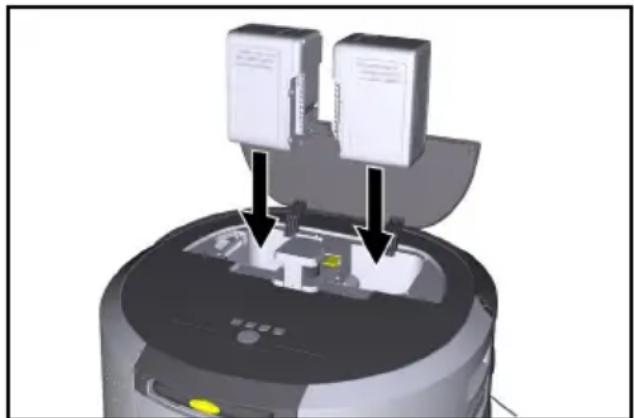
3D rendering of a robotic vacuum cleaner with directional arrows indicating motion (no text or symbols)- Gurnite jedan ili dva kompleta baterija u prihvat kompleta baterija na uređaju dok osjetno ne sjednu na svoje mjesto.
natural_image
3D rendering of a robotic device with two labeled components and directional arrows indicating assembly or operation (no text or symbols visible)- Zatvorite poklopac odjeljka za baterije.
Napomena
Postavke
Postavkama se može pristupiti u glavnom izborniku pod "Postavke".
Usisna snaga
Možete birati između normalnog načina rada i načina rada Eco, vidi poglavlje Usisna snaga.
Obavijesti
- Kada je čišćenje završeno, robot za čišćenje se vraća na početno područje. Zaslon prikazuje trajanje potrebno za čišćenje i veličinu očišćene površine.
Karta je sada dostupna u aplikaciji te se može imenovati i uređivati. Ako prilikom izrade karte ne postoji veza s aplikacijom, karta se prvo s oznakom datuma i vremena sprema u robot za čišćenje.
Karta je sada dostupna u aplikaciji te se može imenovati i uređivati.
Imenovanje i uređivanje karte u aplikaciji
Karta se može imenovati i uređivati u aplikaciji putem kartice "Karte".
natural_image
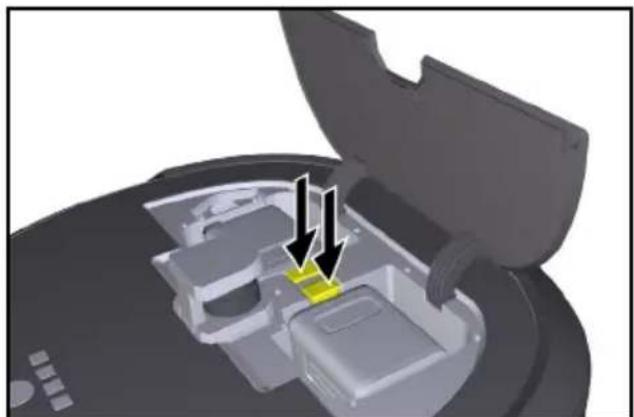
3D rendering of a robotic vacuum cleaner with directional arrows indicating motion (no text or symbols)- Pritisnite tipke za deblokiranje kompleta baterija. Kompleti baterija skoče nekoliko cm iz prihvatnika kompleta baterija.
natural_image
3D diagram of a device interior with highlighted components and arrows indicating movement (no text or symbols)- Izvadite komplete baterija.
Transport
△OPREZ
Opasnost od ozljeda i oštećenja zbog nepridržavanja težine
2006/42/EZ (+2009/127/EZ)
2014/53/EU
2011/65/EU
Primijenjene uskladene norme
EN 60335-1
EN 60335-2-72
EN 62368-1: 2014
EN 62311: 2020
EN IEC 63000: 2018
EN IEC 55014-1: 2021
EN IEC 55014-2: 2021
EN 301 489-1 V2.2.3
EN 301 489-17 V3.2.4
EN 301 489-52 V1.2.1
EN 301 908-1 V15.1.1
EN 301 908-2 V13.1.1
EN 301 908-13 V13.2.1
EN 301 511 V12.5.1
EN 300 328 V2.2.2
EN 301 893 V2.1.1
Dodatno primijenjena norma
IEC63327:2021
EN 60335-2-69
H. Jenner
Chairman of the Board of Management
S. Reiser
Manager Regulatory Affairs & Certification
Opunomoćenik za dokumentaciju:
S. Reiser
Alfred Kärcher SE & Co. KG
Alfred-Kärcher-Str. 28 - 40
71364 Winnenden (Njemačka)
Tel.: +49 7195 14-0
Telefaks: +49 7195 14-2212
Winnenden, 01.11.2024.
Tehnički podaci
| Kira CV50 | |
| Električni priključak | |
| Nazivna snaga W 230 | |
| Bežične veze LTE/4G, | WLAN |
| Frekvencija MHz 2400- | 24835170-5835 |
| Maks. snaga signala, WLAN dBm <20 | |
| Podaci o snazi uređaja | |
| Zapremina spremnika I 4,5 | |
| Snaga usisavanja, količina zraka I/s 16 | |
| Snaga usisavanja, potlak kPa | 19,3(mbar) (193) |
| Teoretski površinski učinak m | ^2 /h 525 |
| Kira CV 50 | ||
| Vrijeme rada s potpuno napunje-nom punjivom baterijom (2 punjive baterije) u normalnom načinu rada (7,5 Ah) | minute | 140 |
| Vrijeme rada s potpuno napunje-nom punjivom baterijom (2 punjive baterije) u načinu rada Eco (7,5 Ah) | minute | 210 |
| Autonomna brzina vožnje (maks.) | km/h | 1,5 |
| Dimenzije i težine | ||
| Duljina x širina x visina | mm 577 x 580 x 302 | |
| Težina (bez pribora) | kg 15,5 | |
| Radna širina | mm 350 | |
| Autonomna širina prolaza (min.) | mm 650 | |
| Autonomna visina vožnje ispod (min.) | mm 320 | |
| Najveća visina vožnje | mm 20 | |
| nagib | ||
| Savladavanje uspona | % | 6 |
| Punjiva baterija | ||
| Broj kompleta baterija | 2 | |
| Vrijeme punjenja baterije s brzim punjačem 80% / 100% | minute | 58/ 81 |
| Struja punjenja | A | 6 |
| Vrijednosti utvrđene prema EN 60335-2-69 | ||
| Razina zvučnog tlaka L_pA | dB(A) | 57 |
| Razina zvučne snage L_WA | dB(A) | 70 |
| Nesigurnost L_PA i L_WA | dB(A) | 2 |
①Posuda za prašinu
② Taster za deblokadu posude za prašinu
③ Teleskopska drška
④ Taster za deblokadu teleskopske drške
⑤ Poklopac pregrade za čuvanje teleskopske drške
⑥Ekran
⑦ LiDAR senzor
⑧ Taster „nazad/ prekid“
⑨ Dugme „nagore“
⑩Dugme „nadole“
⑪ Taster „Potvrdi“
⑫ Dugme za uključivanje/ isključivanje/ pauzu + Hitno zaustavljanje
⑬Poklopac odeljka za baterije
14 Branici
⑮ Udubljenje za držanje na uređaju
⑯ Točak za spajanje/ razdvajanje
⑰ Upravljački točkić
⑱Točak
⑲Bočna metla
⑳Četka za čišćenje
⑳ Poklopac četke za čišćenje sa ivicom za čišćenje
22 Senzor pada
⑳ Ultrazvučni senzor za detekciju providnih predmeta
24 Senzor za praćenje zida
⑳ * Punjač Battery Power+ 36/60
⑳* Akumulatorsko pakovanje Battery Power+ 36/75
* opcioni
Simboli na ekranu
natural_image
Close-up of a mechanical component with two spiky protrusions and a small green component on the surface (no text or symbols visible)Napomena
Priložena su dva zavrtnja za pričvršćivanje bočnih metli po potrebi na uređaj, ako se olabave tokom čišćenja i zahtevaju dodatno pričvršćivanje.
Postavljanje akumulatorskih pakovanja
natural_image
3D rendering of a robotic vacuum cleaner with directional arrows indicating motion (no text or symbols)- Jedno ili dva akumulatorska pakovanja gurnite u prihvatnik akumulatorskog pakovanja na uređaju sve dok čujno ne nalegnu.
natural_image
3D rendering of a robotic vacuum cleaner with two labeled components and directional arrows indicating assembly or operation (no text or symbols present)Napomena
Kada prvi put puštate uređaj u rad, sačekajte kratko dok SIM kartica ne podesi prijem.
- Pritisnite bilo koji taster. Glavni meni se pojavljuje na ekranu.
Podešavanja
Podešavanjima se može pristupiti u glavnom meniju pod „Podešavanja“.
Usisna snaga
- Kada se istraživačka vožnja završi, robot za čišćenje se vraća u početnu oblast.
Mapa je sada dostupna u aplikaciji i može se imenovati i uređivati. Ako tokom kreiranja mape ne postoji veza sa aplikacijom, mapa se na početku čuva na robotu za čišćenje sa datumom i vremenskim žigom.
Izvođenje probne vožnje preko daljinskog upravljanja
Ručna izrada mapi preko daljinskog upravljanja je pogodna za područja u kojima bi samostalna izrada mapi mogla da bude suviše izazovna za robota za čišćenje (npr. staklene zgrade) ili za prostore koje nije potrebno u potpunosti mapirati, jer nije potrebno kompletno čišćenje prostora.
- U glavnom meniju „Čišćenje“ izaberite dugme „Nova mapa“ > „Izrada mape preko daljinskog upravljanja“. Na ekranu se prikazuje poruka da u aplikaciji treba pozvati daljinsko upravljanje.
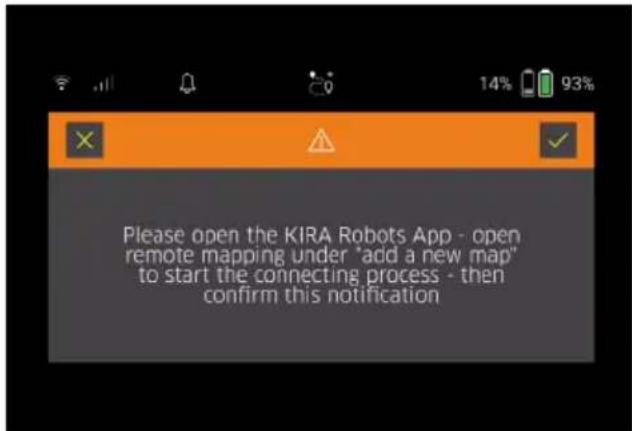
- Pozovite daljinsko upravljanje u aplikaciji i potvrdite poruku pomoću Taster „Potvrdi“.
- Uz pomoć daljinskog upravljanja provedite robota za čišćenje kroz područja koja treba da se mapiraju. Na ekranu se istovremeno prikazuje kreiranje mape.
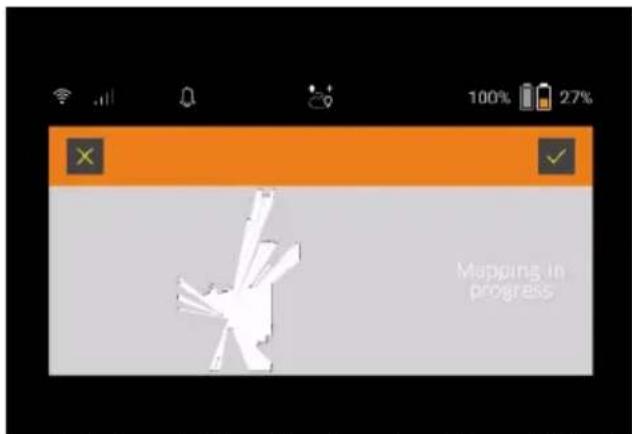
Kada je područje evidentirano i površina za čišćenje prikazana na mapi u beloj boji, mapa se memoriše preko aplikacije, a kreiranje mape je završeno. Na ekranu se prikazuje trajanje potrebno za istraživačku vožnju.
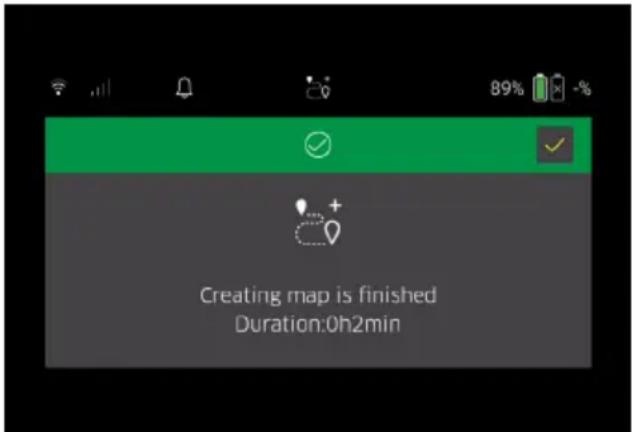
Mapa je sada dostupna u aplikaciji i može se imenovati i uređivati.
Imenovanje i uređivanje mape u aplikaciji
Mapa se može imenovati i uređivati u aplikaciji putem kartice „Mape“.
natural_image
3D rendering of a robotic vacuum cleaner with black arrows indicating motion or force direction (no text or symbols)- Pritisnite taster za deblokadu akumulatorskog pakovanja. Akumulatorska pakovanja štrče nekoliko centimetara od prihvatnog dela akumulatorskog pakovanja.
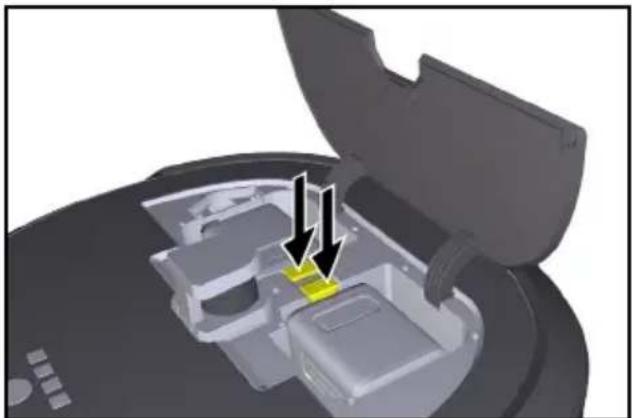
natural_image
3D diagram of a device interior with highlighted components and arrows indicating movement (no text or symbols)- Izvadite akumulatorska pakovanja.
Transport
△OPREZ
Opasnost od povreda i opasnost od oštećenja usled ignorisanja težine Prilikom transporta obratite pažnju na težinu uređaja.
Napomena
Obe ivice moraju biti odvojene pre transporta. 1. Preklopite jezičak na odvajaču, povucite jezičak i okrenite u smeru suprotnom od kazaljke na satu.
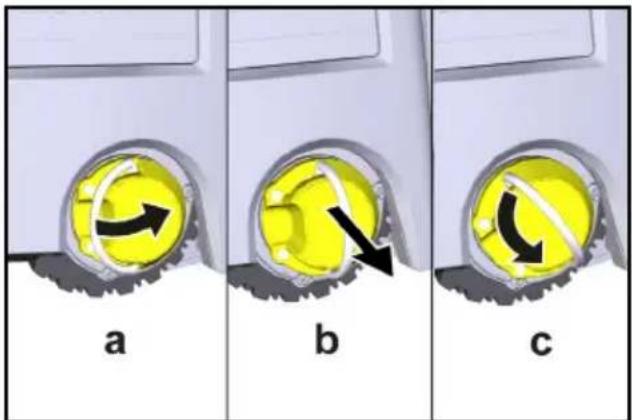
Točak je odvojen.
- Otvorite poklopac pregrade za čuvanje teleskopske drške.
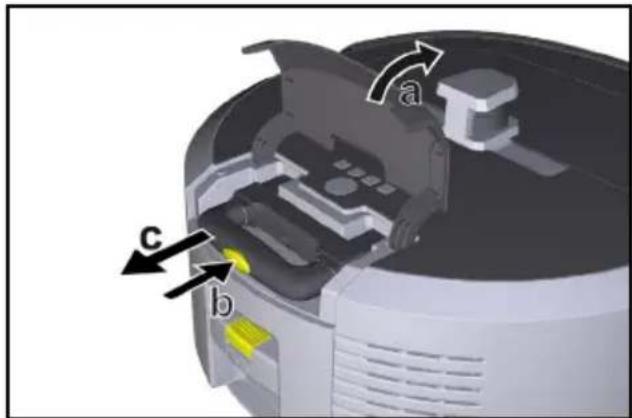
- Pritisnite taster za deblokadu na teleskopskoj drški.
- Uhvatite teleskopsku dršku i izvucite je iz uređaja.
- Koristite teleskopsku dršku za transport uređaja.
- Nakon transporta, gurnite teleskopsku dršku nazad u uređaj i zatvorite poklopac pregrade za čuvanje.
- Otklopite jezičak na odvajaču, pritisnite odvajač pomoću jezička i okrenite u smeru kazaljke na satu.
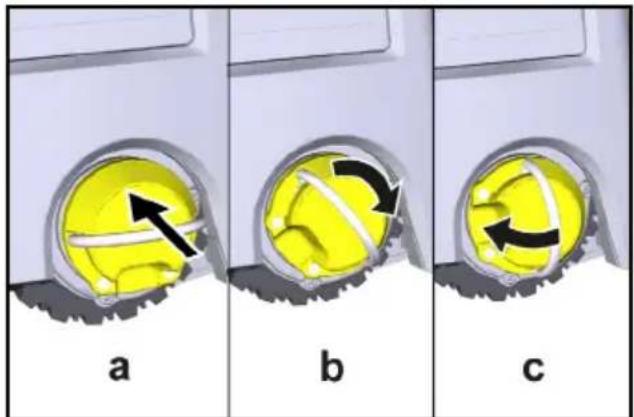
Točak je spojen.
Skladištenje
△OPREZ
Opasnost od povreda i opasnost od oštećenja usled ignorisanja težine
Prilikom skladištenja obratite pažnju na težinu uređaja. Uređaj sme da se skladišti samo u unutrašnjem prostoru.
Ako robot za čišćenje ne treba da se koristi duže vreme, postupite na sledeći način:
- Napunite akumulatorsko pakovanje (vidi sigurnosne napomene za akumulatorsko pakovanje i punjač).
- Skladištite napunjeno akumulatorsko pakovanje na hladnom i suvom mestu.
Nega i održavanje
Intervali održavanja
Obaveštenja se pojavljuju na ekranu i u aplikaciji kako bi podsetila korisnika da održava uređaj. U zavisnosti od toga koliko često se robot za čišćenje koristi, intervali održavanja mogu se razlikovati.
2006/42/EZ (+2009/127/EZ)
2014/53/EU
2011/65/EU
Primenjene harmonizovane norme
EN 60335-1
EN 60335-2-72
EN 62368-1: 2014
EN 62311: 2020
EN IEC 63000: 2018
EN IEC 55014-1: 2021
EN IEC 55014-2: 2021
EN 301 489-1 V2.2.3
EN 301 489-17 V3.2.4
EN 301 489-52 V1.2.1
EN 301 908-1 V15.1.1
EN 301 908-2 V13.1.1
EN 301 908-13 V13.2.1
EN 301 511 V12.5.1
EN 300 328 V2.2.2
EN 301 893 V2.1.1
Chairman of the Board of Management
S. Reiser
Manager Regulatory Affairs & Certification
Lice ovlašćeno za dokumentaciju:
S. Reiser
Alfred Kärcher SE & Co. KG
Alfred-Kärcher-Str. 28 - 40
71364 Winnenden (Germany)
Tel.: +49 7195 14-0
Winnenden, 2024/11/01
Tehnički podaci
| Kira CV50 | ||
| Električni priključak | ||
| Nominalna snaga W 230 | ||
| Bežične veze LTE/4G, | WLAN | |
| Frekvencija MHz 2400- | 24835170-5835 | |
| Maks. jačina signala, WLAN dBm <20 | ||
| Podaci o snazi uređaja | ||
| Zapremina posude I 4,5 | ||
| Snaga usisavanja, protok vazduha | I/s 16 | |
| Snaga usisavanja, podpritisak kPa (mbar) | 19,3(193) | |
| Teoretski površinski učinak m | ^2 /h | 525 |
| Vreme rada pri punom akumulatoru (2 akumulatora) u normalnom radu (7,5 Ah) | minuta | 140 |
| Vreme rada pri punom akumulatoru (2 akumulatora) u Eco režimu (7,5 Ah) | minuta | 210 |
| Brzina vožnje autonomna (maks.) | km/h | 1,5 |
| Dimenzije i težine | ||
| Dužina x širina x visina | mm | 577 x580 x302 |
| Težina (bez pribora) | kg 15,5 | |
| Radna širina | mm | 350 |
| Širina prolaza autonomna (min.) | mm | 650 |
| Kira CV 50 | ||
| Autonomna visina podliva (min.) | mm | 320 |
| Maksimalna visina prekoračenja | mm | 20 |
| Uspon | ||
| Savladavanje uspona | % | 6 |
| Akumulator | ||
| Broj akumulatorskih pakovanja | 2 | |
| Vreme punjenja akumulatorskog pakovanja sa punjačem za brzo punjenje 80% / 100% | minuta | 58/ 81 |
| Struja za punjenje | A | 6 |
| Utvrdene vrednosti prema EN 60335-2-69 | ||
| Nivo zvučnog pritiska L_pA | dB(A) | 57 |
| Nivo zvučne snage L_WA | dB(A) | 70 |
| Tolerancija L_PA i L_WA | dB(A) | 2 |
Zadržano pravo na tehničke promene.
Περιεχόμενα
natural_image
Close-up of a mechanical component with two spiky protrusions and a small central component (no text or symbols visible)Υπόδειξη
natural_image
3D rendering of a robotic vacuum cleaner with directional arrows indicating motion (no text or symbols)natural_image
3D rendering of a robotic device with two labeled components and directional arrows indicating assembly or operation (no text or symbols visible)Υπόδειξη
Ρυθμίσεις
natural_image
3D rendering of a robotic vacuum cleaner with black arrows indicating motion or force direction (no text or symbols)natural_image
3D diagram of a mechanical component with highlighted yellow areas and arrows indicating assembly or movement (no text or symbols)natural_image
Close-up of a yellow circular object with a black arrow pointing to it, no visible text or symbolsa
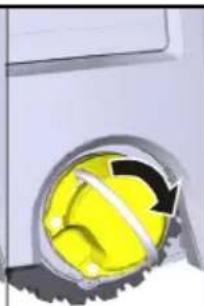
natural_image
Close-up of a yellow spherical object with a black arrow indicating rotation or direction, partially enclosed by a metallic ring (no text or symbols visible)b
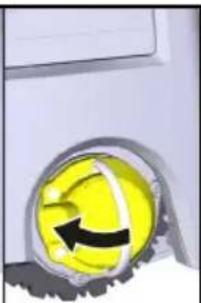
natural_image
Close-up of a yellow circular object with a black arrow and checkmark, mounted on a white surface (no text or symbols visible)
H. Jenner
Chairman of the Board of Management
S. Reiser
Manager Regulatory Affairs & Certification
71364 Winnenden (Germany)
Tηλ.: +49 7195 14-0
Φαξ: +49 7195 14-2212
Winnenden, 2024/11/01
Τεχνικά στοιχεία
Товарный знак
natural_image
Close-up of a mechanical component with two spire-like protrusions and a base, no visible text or symbolsПримечание
natural_image
3D rendering of a robotic vacuum cleaner with black arrows indicating motion or force direction (no text or symbols)natural_image
3D rendering of a robotic device with two labeled components and directional arrows indicating assembly or operation (no text or symbols visible)Примечание
Настройки
natural_image
3D rendering of a robotic vacuum cleaner with directional arrows indicating motion (no text or symbols)natural_image
3D diagram of a device interior with highlighted yellow components and arrows indicating movement or force (no text or symbols)natural_image
Close-up of a yellow circular object with a black arrow pointing to it, no visible text or symbolsa
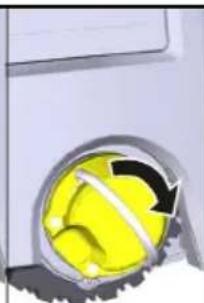
natural_image
Close-up of a yellow spherical object with a black arrow indicating rotation, partially enclosed by a metallic ring (no text or symbols visible)b
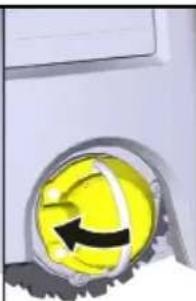
natural_image
Close-up of a yellow circular object with a black arrow, resembling a stylized smiley face (no text or symbols visible)
H. Jenner
Chairman of the Board of Management
S. Reiser
Manager Regulatory Affairs & Certification
71364 Winnenden (Germany)
Тел.: +49 7195 14-0
Факс: +49 7195 14-2212
Торгова марка
natural_image
Close-up of a robotic device's internal components with radiating blades (no text or symbols visible)Вказівка
natural_image
3D rendering of a robotic vacuum cleaner with highlighted internal components and directional arrows indicating motion (no text or symbols)natural_image
3D rendering of a robotic vacuum cleaner with two monitors and control panel (no text or symbols visible)Вказівка
Налаштування
natural_image
3D rendering of a robotic vacuum cleaner with directional arrows indicating motion (no text or symbols)natural_image
3D diagram of a device interior with highlighted components and arrows indicating movement (no text or symbols)natural_image
Close-up of a yellow circular object with a black arrow pointing to it, no visible text or symbols.a
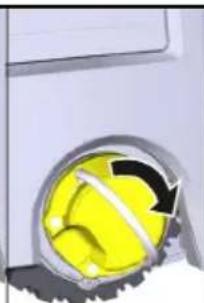
natural_image
Close-up of a yellow spherical object with a black arrow indicating rotation or direction, partially enclosed by a metallic ring (no text or symbols visible)b
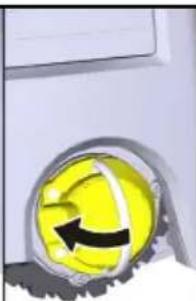
natural_image
Close-up of a yellow circular object with a black arrow inside, mounted on a silver surface (no text or symbols visible)
H. Jenner
Chairman of the Board of Management
S. Reiser
Manager Regulatory Affairs & Certification
71364 Winnenden (Germany)
Тел.: +49 7195 14-0
Факс: +49 7195 14-2212
Търговска марка
natural_image
Close-up of a mechanical device showing two spiky components with arrows pointing to them (no text or symbols visible)Указание
natural_image
3D rendering of a robotic vacuum cleaner with directional arrows indicating motion (no text or symbols)natural_image
3D rendering of a robotic device with two labeled components and directional arrows indicating assembly or operation (no text or symbols visible)Указание
Настройки
natural_image
3D rendering of a robotic vacuum cleaner with directional arrows indicating motion (no text or symbols)natural_image
3D diagram of a device interior with highlighted components and arrows indicating movement (no text or symbols)natural_image
Close-up of a yellow circular button with a black arrow, mounted on a metallic surface (no text or symbols visible)a
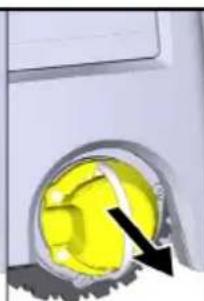
natural_image
Close-up of a yellow mechanical component with a black arrow pointing to it, no visible text or symbols.b
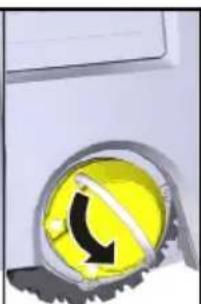
natural_image
Close-up of a yellow circular object with a black curved arrow, possibly indicating rotation or direction (no text or symbols visible)C
Колелото се сваля.
natural_image
Close-up of a yellow circular object with a black arrow pointing to it, labeled 'a' (no text or symbols on the object itself)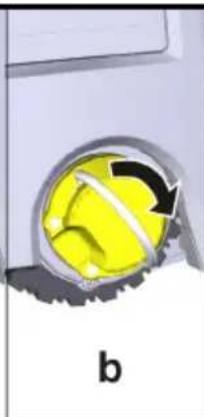
natural_image
Close-up of a yellow spherical object with a black arrow indicating rotation, partially enclosed by a metallic ring (no text or symbols)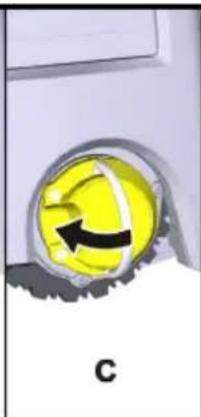
natural_image
Close-up of a yellow circular object with a black arrow and label 'C' (no readable text or symbols)Chairman of the Board of Management
S. Reiser
Manager Regulatory Affairs & Certification
71364 Winnenden (Germany)
Тел.: +49 7195 14-0
Факс: +49 7195 14-2212
Виненден, 2024/11/01
Технически данни
natural_image
Close-up of a robotic device's internal components with three spiky protrusions pointing to a central yellow object (no text or symbols visible)注意事项
natural_image
3D rendering of a robotic vacuum cleaner with directional arrows indicating motion (no text or symbols)natural_image
3D rendering of a robotic vacuum cleaner with two monitors and control panel (no text or symbols visible)注意事项
設定
natural_image
3D rendering of a robotic vacuum cleaner with black arrows indicating motion or force direction (no text or symbols)natural_image
3D mechanical component diagram showing internal components with a yellow arrow indicating a specific part (no text or symbols present)- 充電式バッテリーを取り外します。
搬送
注意
S. I. 2017/1206 (as amended)
2011/65/EU
適用された調和規格
EN 60335-1
EN 60335-2-72
EN 62368-1: 2014
EN 62311: 2020
EN IEC 63000: 2018
EN IEC 55014-1: 2021
EN IEC 55014-2: 2021
EN 301 489-1 V2.2.3
EN 301 489-17 V3.2.4
EN 301 489-52 V1.2.1
EN 301 908-1 V15.1.1
EN 301 908-2 V13.1.1
EN 301 908-13 V13.2.1
EN 301 511 V12.5.1
EN 300 328 V2.2.2
EN 301 893 V2.1.1
追加で適用される基準
IEC63327:2021
EN 60335-2-69
Chairman of the Board of Management
S. Reiser
Manager Regulatory Affairs & Certification
文書の全権委員:
S. Reiser
Alfred Kärcher SE & Co. KG
Alfred-Kärcher-Str. 28 - 40
71364 Winnenden (Germany)
電話番号:+49 7195 14-0
natural_image
Black and white line drawing of a hand giving a thumbs-up gesture (no text or symbols)THANK YOU!
MERCI! DANKE! iGRACIAS!

Register your product and benefit from many advantages.
www.kaercher.com/welcome


Rate your product and tell us your opinion.
natural_image
Icon showing a gear and wrench inside a square frame (no text or symbols)www.kaercher.com/dealersearch
Alfred Kärcher SE & Co. KG
Alfred-Kärcher-Str. 28-40
71364 Winnenden (Germany)