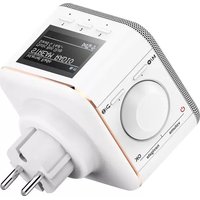
IR40MBT - Internet Radio HAMA - Free user manual and instructions
Find the device manual for free IR40MBT HAMA in PDF.



| Product type | Internet Radio |
| Brand | Hama |
| Model | IR40MBT |
| Power supply | Mains (AC adapter) |
| Network connectivity | WiFi 2.4 GHz and 5 GHz, Bluetooth 2.402-2.480 GHz |
| Connections | USB (playback), Aux-In audio input (3.5 mm jack) |
| Display | Yes, digital display |
| Control buttons | Navigation (rotate + push), Mode/Settings, Back/Info, Presets 1-4, Play/Pause, Fast forward/Rewind |
| Functions | Internet radio, Bluetooth streaming, USB playback, auxiliary input, station presets |
| Available languages | German, English, Danish, Dutch, Finnish, French, Italian, Norwegian, Polish, Portuguese, Spanish, Swedish, Turkish |
| Mobile app | UNDOK (compatible iOS/Android) |
| Protection class | II (double insulation) |
| Cleaning | Slightly damp lint-free cloth, no harsh detergents |
| Package contents | IR40MBT radio, 3.5 mm jack cable, user manual |
| Customer service | Hotline +49 9091 502-115 (German/English) |
| Recycling | WEEE compliant (directive 2012/19/EU) |
| WiFi frequency bands | 2.412-2.472 GHz, 5.150-5.350 GHz, 5.470-5.725 GHz |
| Max. radio frequency power | Bluetooth: 4 dBm (EIRP), WiFi 2.4 GHz: 17 dBm (EIRP), WiFi 5 GHz: 16.5 dBm (EIRP) |
| Usage | Non-commercial domestic, dry premises |
| Warranty | Legal warranty of conformity (exclusion in case of non-compliance with instructions) |
Frequently Asked Questions - IR40MBT HAMA
User questions about IR40MBT HAMA
0 question about this device. Answer the ones you know or ask your own.
Ask a new question about this device
Download the instructions for your Internet Radio in PDF format for free! Find your manual IR40MBT - HAMA and take your electronic device back in hand. On this page are published all the documents necessary for the use of your device. IR40MBT by HAMA.
USER MANUAL IR40MBT HAMA
natural_image
Line drawing of a portable electronic device with a screen and power plug (no text or symbols)QuickGuide
Kurzanleitung
Noticed'utilisation
Instruccionesbreves
Краткоеруководство
Istruzionibrevi
Further information and features are available on/
00054868:www.hama.com/54868#downloads
A
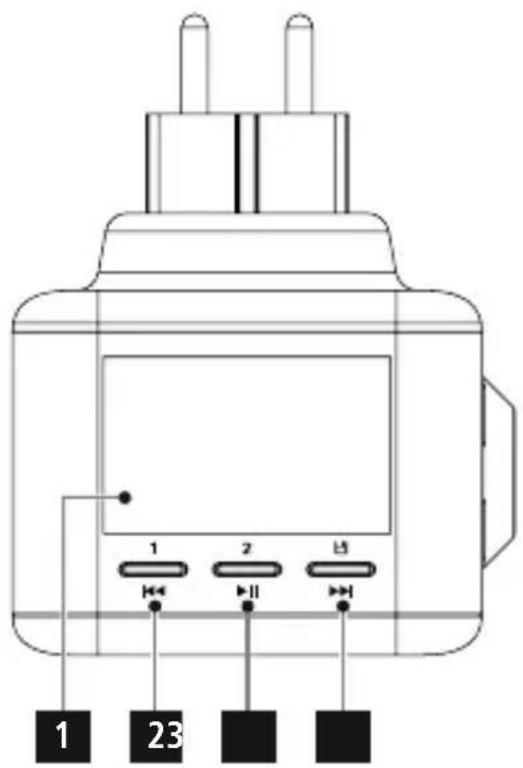
text_image
1 2 23B
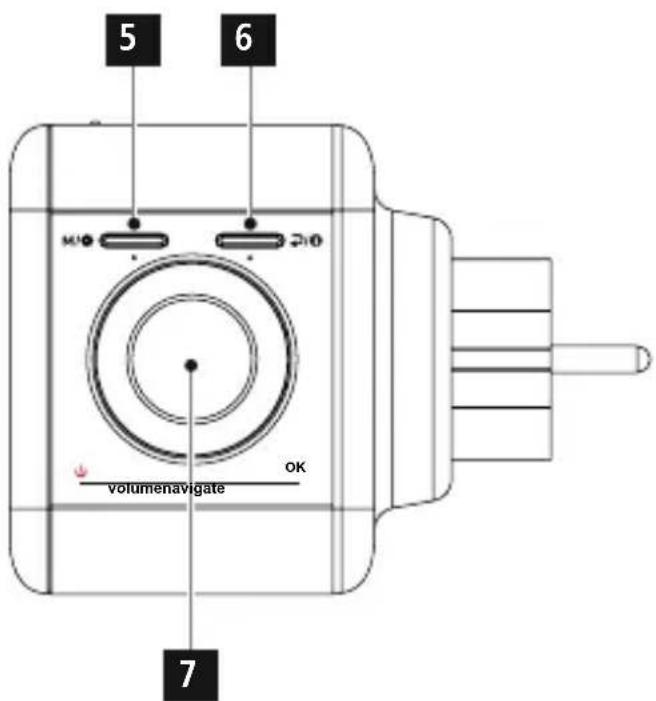
text_image
5 6 MIO 210 volumenavigate OK 7C
text_image
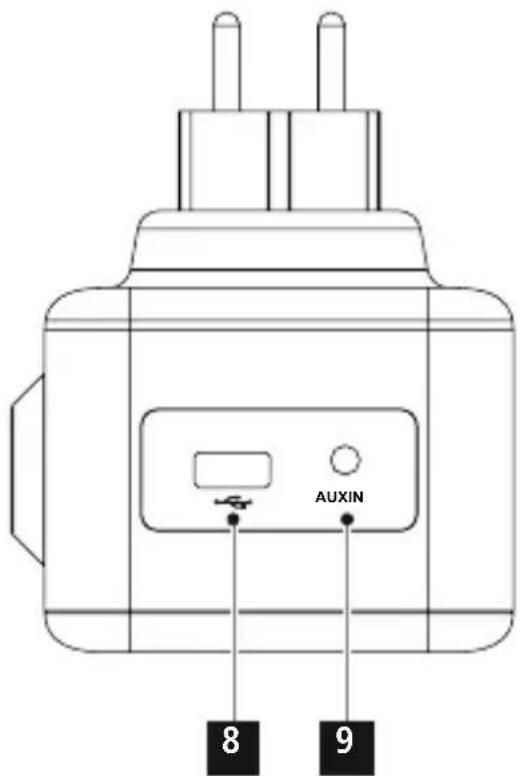
AUXIN 8 9ControlsandDisplays
A
- Display
2.Preset1/Back(Rewind)
3.Preset2/Play/Pause
4.Preset/Forward ( Fastforward)
B
5.[Mode/Settings]
6.[Back/Info]
7.[NAVIGATE/ENTER/VOLUME]
C
8.USBconnection
9.Aux-In

Importantnote— Operating instructions:
- T hisisa quickguidetoprovideyouwith themostimportantbasicinformation,such assafetywarningsandhowtogetstarted usingtheproduct.
- F orthesakeofprotectingtheenvironment and saving resources, Hamadispenses with printed operating instructions and providesthemonlyintheformofPDFfiles/eManualsonwww.hama.com.
- U sethesearchfunctionwiththeitem numberofyourproducttoeasilyfindthe productdocumentation.
- S avetheoperatinginstructionstoyour computer's hard drive for future reference, orprintitoutifnecessary.
1. ExplanationofWarningSymbolsand Notes

Warning
This symbol is used to indicate safety instructions to draw your attention to specific hazards and risks.

Note
This symbol is used to indicate additional information or important notes.

Riskofelectricshock
This symbol indicates product parts energized with a dangerous voltage of sufficient magnitude to constitute a risk of electric shock.
2. Explanation of product markings symbols

Electricaldeviceofprotection classII
Protection against the electric shocks by reinforced double insulation of voltage-carrying parts

The product must be used only with alternating current.
3.PackageContents
- InternetRadiolR40MBT
- 3.5-mmjackcable
- Q uickguide
4. SafetyNotes
- The product is intended for private, non-commercial use only.
- Protect the product from dirt, moisture and overheating and use it in dry rooms only.
- A s w ithallelectricaldevices, this devices should be kept out of thereachofchildren.
- D o n otdroptheproductanddonotexposeit toanymajorshocks.
- Do not operate the product outside the power limits given in the specifications.
- Keep the packaging material out of there each of child renduet other risk of suffocation.
- D isposeofpackagingmaterialimmediately accordingtolocallyapplicableregulations.
- Do not modify the device in any way. Doing so voidsthewarranty.
- Do not place any object on the device and never use it for keeping things on.

Riskofelectricshock
- D o n otopenthedeviceorcontinueto operateitifitbecomesdamaged.
- D on otusetheproductiftheACadapter, adaptercableorpowercableisdamaged.
- D o n otattempttoserviceorrepairthe deviceyourself. L eaveanyserviceworkto qualifiedexperts.
5.Beforestarting

Note
A d etaileddescriptionoftheUNDOKappand thefullscopeoffunctionscanbefoundinour UNDOKguideat:

natural_image
Gray square icon with a white Wi-Fi symbol inside, no text or numbers present.www.hama.com->00054868->Downloads

Notesonuse
- W hena s electionamongmenuitemsisto bemade(suchasYorN), theonecurrently selectedflashes.
- In menus offering a variety of different options(suchasDRC, languageandso on), thecurrentlyselectedoptionismarked with*.
Navigationandcontrols
NAVIGATE/ENTER/VOLUMEhastwodifferent functions:
- TurnNAVIGATE/ENTER/VOLUMEtoselect amongmenuitems.
- ConfirmtheselectionbypassingNAVIGATE/ENTER/VOLUME.
PressBack/Infotoreturntotheprevious menulevel.
Volumeadjustment
TurnNAVIGATE/ENTER/VOLUMEtoincrease/reducethevolume.
Settingupa n etworkconnection WLAN(wirelessnetwork)
- Ensure that thereouterisswitchedon, is functioning correctly and that thereisa connection to the internet.
- A activate the WLAN function of your router.
- Followyourrouter'soperatinginstructionsas regardsthecorrectfunctioningoftheWLAN connection.
- Then proceed directly as described under section6, Gettingstarted'.
6. Gettingstarted 6.1 Switchingthedeviceon
- Connect the device to a properly installed socket.

Warning
- Onlyconnecttheproducttoa socketthat hasbeenapprovedforthedevice.The electricalsocketmustalwaysbeeasily accessible.
- D isconnecttheproductfromthemains usingtheon/offswitch— if t hisisnot available,unplugtheproductfromthe socket.
- Waituntiltheradioinitialisationprocedure has finished.
ThestationsearchintheoperatingmodeDAB startsupautomaticallywhentheradioisturned onforthefirsttime.
Bydefault,theradiostartswiththeEnglishmenu navigation.Setupyourdesiredlanguageas describedin6.2Language.
6.2Language
Atinitialstartup, thelanguageoftheradio defaultstoEnglish.Tochangethelanguage, pleaseproceedasfollows:
- Press and hold [Mode/Settings] (5) for about 3 seconds to access these settings menu.
- Turn[VOLUME/ENTER/NAVIGATE] to navigatetothe'System'menuitem.
- Confirmtheselectionbypassing[VOLUME/ENTER/NAVIGATE].
- Turn[VOLUME/ENTER/NAVIGATE] to get tothe'Language'menuitem.Confirmthe selectionbypassing[VOLUME/ENTER/NAVIGATE].
- Turn[VOLUME/ENTER/NAVIGATE] to select yourdesiredsystemlanguage.
- Confirmtheselectionbypassing[VOLUME/ENTER/NAVIGATE].

Note
- You can choose from the following languages: English, German, Danish, Dutch, Finnish, French, Italian, Norwegian, Polish, Portuguese, Spanish, Swedish, Turkish.
7. Care and Maintenance
- O nlycleanthisproductwitha s lightlydamp, lint-freeclothanddonotuseaggressive cleaningagents.
- If you do not use the product for a long time, turnoffthedeviceanddisconnectitfromthe power supply. Store it in a clean, dry place out ofdirectsunlight.
8.WarrantyDisclaimer
HamaGmbH& C o K G a ssumesnoliability and providesnowarrantyfordamageresultingfrom improperinstallation/mounting,improperuse oftheproductorfromfailure t o o bserve the operatinginstructionsand/orsafetynotes.
9. Service and Support
PleasecontactHamaProductConsultingifyou haveanyquestionsaboutthisproduct. Hotline:+499091502-115(German/English) Furthersupportinformationcanbefoundhere: www.hama.com
10. Recycling Information Noteon environmental protection:
Aftertheimplementationofthe EuropeanDirective2012/19/EUand 2006/66/EUinthenationallegal system, the following applies: Electric andelectronicdevicesaswellasbatteriesmust notbedisposedofwithhouseholdwaste. Consumersare o bligedbylawtoreturnelectrical andelectronicdevicesaswellasbatteriesatthe endoftheirservicelivestothepubliccollecting pointssetupforthispurposeorpointofsale. Details to this are defined by the national law of therespectivecountry. Thissymbolonthe product,theinstructionmanualorthepackage indicatesthata p roductissubjecttothese regulations. By recycling, reusing the materials or otherformsofutilisingolddevices/Batteries,you are m akinganimportantcontributionto protectingourenvironment.
11. Declaration of Conformity
CE Hereby, H amaGmbH& C o K G declaresthattheradioequipment type[00054868]isincompliance with Directive 2014/53/EU. The full text of the EU declarationofconformityisavailableatthe followinginternetaddress: www.hama.com->00054868->Downloads.
| Frequencyband(s) | Bluetooth:2.402- 2 .480GHzWiFi:2.412- 2 .472GHzWiFi:5.150- 5 .350GHzWiFi:5.470- 5 .725GHz |
| Maximumradio-frequencypower transmitted | Bluetooth:4dBm(EIRP)WiFi:2.4GHz/ 1 7dBm(EIRP)WiFi:5GHz/ 1 6.5dBm(EIRP) |
RestrictionsorRequirementsin
Belgium, Bulgaria, Czech Republic, Denmark, Germany, Estonia, Ireland, Greece, Spain, France, Croatia, Italy, Cyprus, Latvia, Lithuania, Luxembourg, Hungary, Malta, the Netherlands, Austria, Poland, Portugal, Romania, Slovenia, Slovakia, Finland, Sweden, United Kingdom

Note
Ifchannels36–64(frequency5.150–5.350 GHz) are used in a 5-GHz WLAN, the product may only be used in closed rooms.
natural_image
Icon of a white Wi-Fi symbol with signal waves, no text or numbers presentwww.hama.com->00054868->Downloads

Bedienungshinweise
natural_image
Icon of a Wi-Fi symbol with signal waves inside a rounded square (no text or numbers)www.hama.com->00054868->Downloads

Restrictionsouexigencesen
natural_image
Icon of a white Wi-Fi symbol with signal waves, no text or numbers presentwww.hama.com->00054868->Downloads

natural_image
Icon of a white Wi-Fi symbol with signal waves, no text or numbers presentwww.hama.com->00054868->Downloads

natural_image
Icon of a white Wi-Fi symbol with signal waves, no text or numbers presentwww.hama.com->00054868->Downloads

Avvertenzeperl'uso
natural_image
Icon of a Wi-Fi symbol with signal waves inside a rounded square (no text or numbers)www.hama.com->00054868->Downloads

natural_image
Icon of a white Wi-Fi symbol with signal waves, no text or numbers presentwww.hama.com->00054868->Downloads

Οδηγίεςχειρισμού
natural_image
Icon of a white Wi-Fi symbol with signal waves, no text or numbers presentwww.hama.com->00054868->Downloads

natural_image
Icon of a white Wi-Fi symbol with signal waves, no text or numbers presentwww.hama.com->00054868->Downloads

Kezelésitudnivalók
natural_image
Icon of a white Wi-Fi symbol with signal waves, no text or numbers presentwww.hama.com->00054868->Downloads

Pokynyk p oužívání
natural_image
Icon of a white Wi-Fi symbol with signal waves, no text or numbers presentwww.hama.com->00054868->Downloads

Pokynypre o b s l u h u
natural_image
Icon of a white Wi-Fi symbol with signal waves, no text or numbers presentwww.hama.com->00054868->Downloads

natural_image
Icon of a Wi-Fi symbol with signal waves inside a rounded square (no text or numbers)www.hama.com->00054868->Downloads

natural_image
Gray square icon with a white Wi-Fi symbol inside, no text or numbers present.www.hama.com->00054868->Downloads

Hotline:+499091502-115(Ger/Ang)
natural_image
Icon of a Wi-Fi symbol with signal waves inside a U-shape, no text or numbers present.www.hama.com->00054868->Downloads

Support:+499091502-115(ty/eng)
Duhittarmersupportinformationhär:
www.hama.com
10.KasseringsinformationMiljöskydd:
natural_image
Icon of a white Wi-Fi symbol with signal waves inside a rounded square (no text or numbers)www.hama.com->00054868->Downloads

Käyttöohjeet
natural_image
Icon of a Wi-Fi symbol with signal waves inside a rounded square (no text or numbers)www.hama.com->00054868->Downloads

natural_image
Icon of a Wi-Fi symbol with signal waves inside a rounded square (no text or numbers)www.hama.com->00054868->Downloads

Informasjonombruk
The Spotify software is subject to third party licenses found here: www.spotify.com/connect/third-party-licenses
TheBluetooth ^® word mark and logos are registered trademarks owned by Bluetooth SIG, Inc. and any use of such marks by Hama GmbH & Co KG is under license. Other trademarks and trade names are those of their respective owners.
All listed brands are trademarks of the corresponding companies. Errors and omissions excepted, and subject to technical changes. Our general terms of delivery and payment are applied.