
TH-120 - Weather Station HAMA - Free user manual and instructions
Find the device manual for free TH-120 HAMA in PDF.


| Type de produit | Weather Station |
| Marque | Hama |
| Modèle | TH-120 |
| Dimensions (station de base) | Approx. 120 x 80 x 20 mm |
| Poids (station de base) | Approx. 150 g |
| Alimentation (station de base) | 2 piles AAA (non incluses) |
| Alimentation (capteur extérieur) | 2 piles AAA (non incluses) |
| Affichage | LCD, rétroéclairé |
| Température intérieure | Plage : 0°C à +50°C, précision ±1°C |
| Température extérieure | Plage : -20°C à +50°C, précision ±1°C |
| Humidité intérieure | Plage : 20% à 95%, précision ±5% |
| Humidité extérieure | Plage : 20% à 95%, précision ±5% |
| Affichage de l'heure | Horloge 12/24h avec alarme |
| Calendrier | Affichage de la date et du jour de la semaine |
| Prévisions météo | Icônes pour ensoleillé, nuageux, pluvieux |
| Capteur extérieur | Sans fil, portée jusqu'à 30 mètres (murs inclus) |
| Fréquence de transmission | 433 MHz |
| Entretien et nettoyage | Nettoyer avec un chiffon doux et sec. Ne pas utiliser de solvants. |
| Sécurité | Ne pas exposer à l'humidité extrême. Tenir hors de portée des enfants. |
| Pièces détachées et réparabilité | Les piles sont remplaçables. Pièces détachées disponibles auprès du fabricant. |
| Informations générales | Fonctionne avec 2 capteurs extérieurs maximum (en option). |
Frequently Asked Questions - TH-120 HAMA
User questions about TH-120 HAMA
0 question about this device. Answer the ones you know or ask your own.
Ask a new question about this device
Download the instructions for your Weather Station in PDF format for free! Find your manual TH-120 - HAMA and take your electronic device back in hand. On this page are published all the documents necessary for the use of your device. TH-120 by HAMA.
USER MANUAL TH-120 HAMA
All listed brands are trademarks of the corresponding companies. Errors and omissions excepted, and subject to technical changes. Our general terms of delivery and payment are applied.
00123136_38/04.15
hama®
00123136 00123137 00123138
THE SMART SOLUTION
Thermo-/Hygrometer "TH-120"


00123138man_de_el_en_es_fr_it_nl_pl_ru.indd 2-3
GB Operating instruction
Controls and Displays
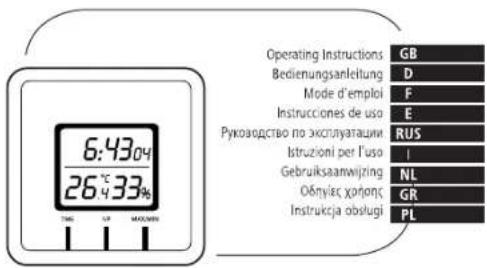
- TIME button = setting/ toggling between time and date on the display
- UP button = changing the set value / toggling between seconds and weekday on the display
-
MAX / MIN button = accessing/ resetting the stored maximum/minimum values
-
Mounting hook
-
Base
-
Magnet
-
Battery compartment cover
Thank you for choosing a Hama product.
Take your time and read the following instructions and information completely. Please keep these instructions in a safe place for future reference. If you sell the device, please pass these operating instructions on to the new owner.
1. Explanation of Warning Symbols and Notes

This symbol is used to indicate safety instructions or to draw your attention to specific hazards and risks.
2


This symbol is used to indicate additional information or important notes.
2. Package Contents
• Thermometer/hyrometer TH-120
• 1 button cell battery LR44
• These operating instructions
3. Safety Instructions
• The product is intended for private, non-commercial use only.
- Protect the product from dirt, moisture and overheating, and only use it in a dry
environment.
- Do not operate the product outside the power limits given in the specifications.
- Do not use the product in moist environments and avoid splashes.
- Do not drop the product and do not expose it to any major shocks.
- Do not attempt to service or repair the product yourself. Leave any and all service work to qualified experts.
- Keep the packaging material out of the reach of children due to the risk of
suffocation
- Dispose of packaging material immediately according to locally applicable
regulations
- Do not modify the product in any way. Doing so voids the warranty.
3
20.04.15 16:35

Warning - Batteries
- Immediately remove and dispose of dead batteries from the product.
- Only use batteries (or rechargeable batteries) that match the specified type.
- When inserting batteries, note the correct polarity (+ and - markings) and insert the batteries accordingly. Failure to do so could result in the batteries leaking or exploding.
- Do not overcharge batteries.
- Keep batteries out of the reach of children.
- Do not short circuit the batteries/rechargeable batteries and keep them away from uncoated metal objects.
4. Getting Started
- Open the battery compartment (7), insert one LR44 button cell battery and close the battery compartment (7). The thermometer/hygrometer is now ready for use.
5. Installation
- Use the base (S) to position the thermometer/hygrometer on a level surface.
- Alternatively, you can mount the thermometer/hygrometer on a wall using the mounting hook (4) on the back. To do so, carefully pull the mounting hook (4) upwards.
- You can also use the magnet (6) to attach the thermometer/hygrometer to a magnetic surface, e.g. fridge door, pin board, etc.

Warning
Before installation, ensure that the chosen wall is suitable for the weight to be installation, and make sure that there are no electrical wires, water, gas or other lines at the installation site on the wall.
6. Operation
Setting the date/time/time format

Note - Input
When the item flashes, it means that the item selected can be set.
Press and hold the TIME button (1) for approx. 3 seconds to make the following settings one after the other:
• 12/24 hour format
• Hours
- Minutes
• Year
- Month
· Day
- To select the individual values, press the UP button (2) and confirm your selection by pressing the TIME button (1).
- Press the TIME button (1) immediately to adopt the set value displayed and skip ahead.

Note
• The weekday is set automatically when setting the date manually.
- In the 12-hour format, PM (from noon to one minute before midnight) appears before the time.
- If you do not make an entry for 30 seconds, you automatically exit the setup mode.
The settings that were made up to that point are saved!
- Repeatedly press the TIME button (1) to toggle between time and date on the display.
- When the time is displayed, repeatedly press the UP button (2) to toggle between seconds and weekday on the display.
Maximum and minimum temperature and humidity values
- The thermometer/hygrometer automatically stores the maximum and minimum temperature and humidity values.
- Repeatedly press the MAX/ MIN button (3) to switch between the current temperature and humidity, minimum temperature and humidity (MIN) and maximum temperature and humidity (MAX).
- Press and hold the MAX/ MIN button (3) for approx. 3 seconds to reset the stored maximum and minimum values.
7. Care and Maintenance
Only clean this product with a slightly damp, lint-free cloth and do not use aggressive cleaning agents. Make sure that water does not get into the product.
6
8. Warranty Disclaimer
Hama GmbH & Co. KG assumes no liability and provides no warranty for damage resulting from improper installation/mounting, improper use of the product or from failure to observe the operating instructions and/or safety notes.
9. Service and Support
Please contact Hama Product Consulting if you have any questions about this product.
Hotline: +49 9091 502-115 (German/English)
Further support information can be found here:
www.hama.com
- Technical Data
| Thermometer/nygrometer TH-120 | |
| Power supply | 1.5 V1 x LR44 button cell battery |
| Measuring rangeTemperature Humidity | -10ircC — +50ircC 1% - 99% |
7
11. Recycling Information
Note on environmental protection:
After the implementation of the European Directive 2002/96/EU and 2006/66/EU in the national legal system, the following applies: Electric and electronic devices as well as batteries must not be disposed of with household waste. Consumers are obliged by law to return electrical and electronic devices as well as batteries at the end of their service lives to the public collecting points set up for this purpose or point of sale. Details to this are defined by the national law of the respective country. This symbol on the product, the instruction manual or the package indicates that a product is subject to these regulations. By recycling, reusing the materials or other forms of utilising old devices/Batteries, you are making an important contribution to protecting our environment.
8


The Ground Truth image displays a single, solid horizontal line. According to Rule 2 (UNDERSCORE & LINE RULES), this is a stylistic or background line, not a placeholder underscore. Therefore, the OCR result must ignore it and output nothing or only meaningful text. The provided OCR content is "____", which consists of four underscores. This is an incorrect interpretation of the line as a placeholder, violating the rule that stylistic lines must be ignored. The OCR has hallucinated underscores where none should exist based on the GT's visual context. Hence, the OCR result is inconsistent with the Ground Truth.



- hama®
- Thermo-/Hygrometer "TH-120"
- GB Operating instruction
- Controls and Displays
- Explanation of Warning Symbols and Notes
- Package Contents
- Safety Instructions
- Warning - Batteries
- Getting Started
- Installation
- Warning
- Operation
- Setting the date/time/time format
- Note - Input
- Note
- Maximum and minimum temperature and humidity values
- Care and Maintenance
- Warranty Disclaimer
- Service and Support
- Recycling Information
- Note on environmental protection:
Brand : HAMA
Model : TH-120
Category : Weather Station