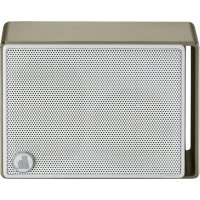
Pocket Steel - Docking station HAMA - Free user manual and instructions
Find the device manual for free Pocket Steel HAMA in PDF.



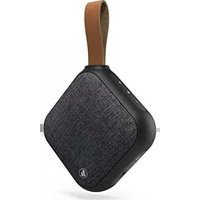
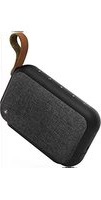
| Product type | Bluetooth docking station |
| Brand | Hama |
| Model | Pocket Steel |
| Dimensions (L x W x H) | 9.1 x 7.0 x 2.8 cm |
| Weight | 160 g |
| Power supply | Li-Ion battery 3.7 V / 400 mAh (1.48 Wh), charging via micro-USB (5 V / 400 mA max) |
| Battery life | ~5-6 h (Bluetooth), ~8-10 h (microSD) depending on volume |
| Charging time | ~2-3 h |
| Power | 3 W |
| Impedance | 4 Ω |
| Frequency response | 180 Hz - 20 kHz |
| Wireless technology | Bluetooth 5.0 (A2DP, AVRCP, HFP, etc.) |
| Bluetooth range | <10 m (without obstacles) |
| Audio formats | MP3 (via microSD) |
| Main functions | microSD playback, Bluetooth streaming, hands-free kit, playback/volume controls |
| Control elements | ON/OFF switch, Track+/Volume+, Play/Pause/Mode, Track-/Volume- |
| Connectivity | Micro-USB port, microSD card slot, built-in microphone |
| LED indicator | Status (blue solid/flashing, red charging) |
| Package contents | Speaker, USB cable, user manual |
| Maintenance and cleaning | Slightly damp lint-free cloth, avoid harsh detergents |
| Safety | Use in dry rooms, avoid humidity, overheating, shocks; do not open; keep out of reach of children |
| Warranty | Manufacturer's warranty: follow instructions for use; exclusion in case of non-compliant damage |
| After-sales service | Direct line: +49 9091 502-115, www.hama.com |
Frequently Asked Questions - Pocket Steel HAMA
User questions about Pocket Steel HAMA
0 question about this device. Answer the ones you know or ask your own.
Ask a new question about this device
Download the instructions for your Docking station in PDF format for free! Find your manual Pocket Steel - HAMA and take your electronic device back in hand. On this page are published all the documents necessary for the use of your device. Pocket Steel by HAMA.
USER MANUAL Pocket Steel HAMA
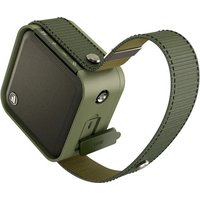
MobileBluetooth ^® Speaker POCKET STEEL
OperatingInstructions
Bedienungsanleitung
Moded'emploi
Instruccionesdeuso
natural_image
Close-up of a textured fabric or panel with uniform horizontal lines, no visible text or symbols.
GB Operatinginstruction
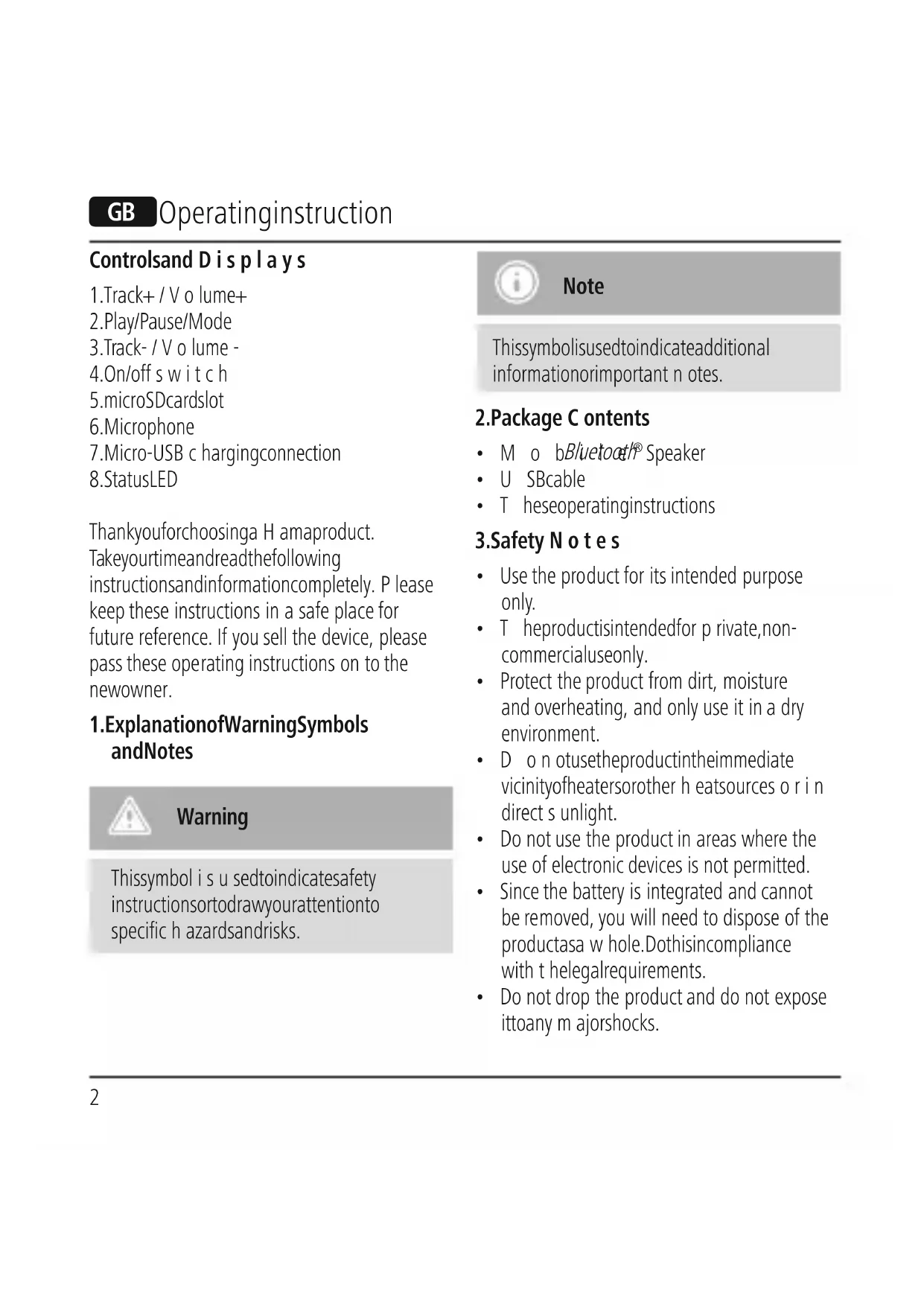
Controlsand Displays
- Track+ / Volume+
2.Play/Pause/Mode - Track- / Volume -
- On/off switch
5.microSDcardslot - Microphone
- Micro-USB charging connection
8.StatusLED
Thankyouforchoosinga H amaproduct. Takeyourtimeandreadthefollowing instructionsandinformationcompletely. P lease keep these instructions in a safe place for future reference. If you sell the device, please pass these operating instructions on to the newowner.
1. ExplanationofWarningSymbols andNotes

Warning
This symbol is used to indicate safety instructions to draw your attention to specific hazards and risks.

Note
This symbol is used to indicate additional information or important notes.
2.Package Contents
- M o bBluetooth® Speaker
- U SBcable
• T heseoperatinginstructions
3. Safety Notes
- Use the product for its intended purpose only.
- T heproductisintendedfor private,non-commercialuseonly.
- Protect the product from dirt, moisture and overheating, and only use it in a dry environment.
- D o n otusetheproductintheimmediate vicinityofheatersorother h eatsources o r i n direct s unlight.
- Do not use the product in areas where the use of electronic devices is not permitted.
- Since the battery is integrated and cannot be removed, you will need to dispose of the productasa w hole.Dothisincompliance with t helegalrequirements.
-
Do not drop the product and do not expose ittoany majorshocks.
-
D o n otattempttoserviceorrepairthe product yourself. Leave any and all service work to qualified experts.
- D o n otopenthedeviceorcontinueto operateitifitbecomes d amaged.
- Keep the packaging material out of the reach of children due to the risk of suffocation.
- Be considerate. Loud volumes can have a detrimental effect on your surroundings.
- D isposeofpackagingmaterialimmediately accordingtolocallyapplicableregulations.
- Do not modify the product in any way. Doingsovoidsthe w arranty.
- Keep this product, as all electrical products, out of the reach of children!
4. Gettingstartedandoperation
4.1 Switching on the product
- S lidetheOn/offswitch(4)totheON positiontoswitchthe s peakeron.
- A voice notification confirms that the device is ready for operation. The LED indicator (8) lightsupblue.
4.2 Switching of the product
- S lidetheOn/offswitch(4)totheOFF positiontoswitchthespeakeroff.
• The LED indicator (8) goes out.

Note – Automaticswitch-off
- Note that the speaker will automatically turn off after 10 minutes without action (no a udio playback/no Bluetooth® function). A corresponding announcement will play.
4.3Changingmode

Note – microSDcard
- If you switch on the speaker without having inserted a microSD card, the speakerisin Bluetooth® mode.
- If you have inserted a microSD card, the speaker is automatically in microSD mode when you switch it on.
- T o s witchtBluetooth® modewitha microSD card inserted, press and hold Play/Pause/Mode (2) for about 3 seconds.
4.4 AudioplaybackviamicroSD
- Ensure that the speaker is switched off.
- InsertthemicroSDcardcorrectlyintothe microSDcardslot(5).
• S witchonthe s peakerasdescribedin
4.1 Switching on the product.
- Press Play/Pause (2) to start or pause audio playback.
- Press and hold Track + / Volume + (1) to skip to the next track.
- Press and hold Track - / Volume - (3) to skip back to the previous track.
- Briefly press Track - / Volume - (3) to reduce the volume.
- Briefly press Track + / Volume + (1) to increase the volume.

Note
The speaker is only suitable for the playbackofMP3files.
4.5 Bluetooth ^® pairing

Note
- Check whether your mobile device (MP3 player, mobile phone, etc.) is Bluetooth®-capable.
- If not, you can only use the speaker with the microSD card slot.
-
T hefunctionsdescribed in this section are only available for Bluetooth®-capableterminaldevices.
-
Note that the max. range of Bluetooth® without any obstacle such as walls, people, etc. is 10 metres.
- M akesure that your Bluetooth®-capableterminaldevice is on and Bluetooth® is activated.
- M akesure that your Bluetooth®-capableterminaldeviceis visibleforother Bluetooth® devices.
-
Make sure that the speaker is located within the Bluetooth® rangeofmax. 10metres.
-
S witchonthe s peakerasdescribedin 4.1 Switching on the product.
- Make sure that the speaker is in Bluetooth® mode.Switchmode,ifnecessary, a s described in 4.3 Changing mode.
- T hespeakerautomaticallysearchesfora connection. The LED display (8) flashes.
- O pentheBluetooth® settingsonyour terminal device and wait until "Hama Pocket Steel" appears in the list of Bluetooth® devices found.
-
Select "Hama Pocket Steel" and wait until you hear the speaker remita voice notification and the speaker is listed as connected in the Bluetooth® settings on your terminal device. The LED indicator (8) is steady blue.
-
Start and stop audio playback on your terminal device or using Play/Pause/Mode (2)onthe s peaker.
- Alternatively, music playback can be controlled from the speaker as described under 4.4 Audio playback via microSD.

Note – Bluetooth® password
Some terminal devices require a password in order to connect to another Bluetooth® device.
- If your terminal device requests a password for connection with the speaker, enter "Hama Pocket Steel".
4.6 Automatic Bluetooth® connection (after successful pairing)
- M akesure that your Bluetooth®-capable terminal device is on and Bluetooth® is activated.
- M akesure that your Bluetooth®-capable terminal device is visible for other Bluetooth® devices.
- Make sure that the speaker is located within the Bluetooth® range of max. 10 metres.
-
Switch on the speaker as described under 4.1 Switching on the product.
-
After a con n ectionhasbeenestablished automatically, the LED indicator (8) is constantlylit b lue.
- Start and stop audio playback on your terminal device or using Play/Pause/Mode (3) on the speaker.
- Alternatively, music playback can be controlled from the speaker as described under 4.4 Audio playback via microSD.

Note – Connectionimpaired
After the speaker and terminal device have been paired, a connection is established automatically. If the Bluetooth® connection is not established automatically, check the following:
- ChecktheBluetooth® settingsof yourterminaldevicetoseewhether "HamaPocketSteel"isconnected. If not, repeat the steps listed under Bluetooth® pairing.
-
Check whether your terminal device and the speaker are less than 10 metres apart. If not, move them closer together.
-
Check whether obstacles are impairing therange.Ifso,movethe devices closertogether.
- C heckwhetherthespeakerisin Bluetooth® mode.Ifnot, s witchto Bluetooth® modeasdescribedin4.3 Changingmode.
4.7 H ands-freefunction
You can use the speaker as a hands-free set for your mobile phone. For this function, the mobile phone must be connected to the speaker v i aBluetooth®.
- Press the Play/Pause/Mode button (2) once to answer a n i ncomingcall.
- Press and hold the Play/Pause/Mode button (2) for about 3 seconds to reject an incomingcall.
- If you would like to end a call, press the Play/Pause/Modebutton(2)onceduring thecall.

Note – Call quality
To increase the call quality, make sure that you are near the speaker with your mobile phoneduringthecall.
4.8 Batterycharging function

Warning – Rechargeable battery
- Only use suitable charging devices with USBconnectionsforcharging.
- A s a rule, donotusecharging devices or USB connection that are defective and do not try to repair them yourself.
- Avoid storing, charging or using batteriesinextremetemperatures.
-
When stored for a long period of time, batteriesshouldbechargedregularly (atleast e verythreemonths).
-
Connect the included USB charging cable to the speaker's USB socket(7).
- Connect the unused plug on the USB cable toanavailableUSBportonyourcomputer oranothersuitable U SBdevice.
- The LED indicator will light up in red during active charging. If the battery is fully charged, the red LED indicator will go out.
- Please charge the speaker for at least 4 hours before using it for the first time.

Note-Charging
- It takes approx. 2 hours to completely charge the product.
- The speaker's battery can be charged whether the speaker is on or off.
- If the battery capacity is less than 10%, the speaker willemittwoacoustic signals. You will only receive this information if the speaker is on.
- T heactualbatterylifevariesdepending on use of the device, the settings and the ambient conditions (rechargeable batteries have a limitedservicelife).
5. Care and Maintenance
Only clean this product with a slightly damp, lint-free cloth and do not use aggressive cleaningagents.
6.WarrantyDisclaimer
Hama GmbH & Co KG assumes no liability and provides no warranty for damage resulting from improperinstallation/mounting,improperuse oftheproductfromfailure t o o bserve the operatinginstructionsand/orsafetynotes.
7. Service and Support
Please contact Hama Product Consulting if you have any questions about this product.
Hotline: +49 9091 502-115 (German/English)
Further support information can be found here: www.hama.com
8. Service and Support
| Frequency | 1 | 80Hz-20kHz |
| Output3 W | ||
| Inpedance4Ω | ||
| Range<10 m | ||
| Bluetooth®Technology | Bluetooth®v5.0+A 2DP,AVCTP, AVDTP, AVRCP, HFP,SPP, SMP | |
| Size | 9,1 x 7,0 x 2,8 cm | |
| Weight160g | ||
| Connections | Micro-USBMicro-SDcard slot | |
| Chargingvoltagemax.5V | —400mA | |
| Battery | |
| Typ | 3.7VLi-Ion:400mAh/ 1 .48Wh |
| Chargingtime~ 2 – 3 h | |
| Playback | Via Bluetooth®: ~ 5 – 6 hViaMicroSD:~ 8 – 10 h(dependingonvolumeandaudiocontent) |
9. Declaration of Conformity

Hereby, Hama GmbH & Co KG declaresthattheradioequipment type[00173124,00173125,
00173126] is in compliance with Directive 2014/53/EU. The full text of the EU declaration of conformity is available at the following internet address: www.hama.com->00173124, 00173125, 00173126->Downloads.
| Frequencyband(s) | 2402MHz~2480MHz |
| Maximumradio-frequency powertransmitted | -1.24dBm |
Avertizare – accumulator
86652Monheim/Germany
www.hama.com
www.hama.com/nep
The Bluetooth® word mark and logos are registered trademarks owned by Bluetooth SIG, Inc. and any use of such marks by Hama GmbH & Co KG is under license. Other trademarks and trade names are those of their respective owners.
All listed brands are trademarks of the corresponding companies.
Errors and omissions excepted, and subject to technical changes.
Our general terms of delivery and payment are applied.

- MobileBluetooth ® Speaker POCKET STEEL
- GB Operatinginstruction
- Controlsand Displays
- ExplanationofWarningSymbols andNotes
- Warning
- Note
- 2.Package Contents
- Safety Notes
- Gettingstartedandoperation
- Switching on the product
- Switching of the product
- Note – Automaticswitch-off
- 4.3Changingmode
- Note – microSDcard
- AudioplaybackviamicroSD
- Switching on the product.
- Bluetooth ® pairing
- Note – Bluetooth® password
- Automatic Bluetooth® connection (after successful pairing)
- Note – Connectionimpaired
- H ands-freefunction
- Note – Call quality
- Batterycharging function
- Warning – Rechargeable battery
- Note-Charging
- Care and Maintenance
- 6.WarrantyDisclaimer
- Service and Support
- Service and Support
- Declaration of Conformity
- Avertizare – accumulator
- 86652Monheim/Germany
- www.hama.com
Brand : HAMA
Model : Pocket Steel
Category : Docking station