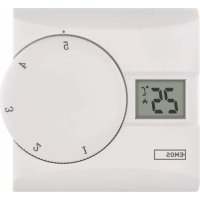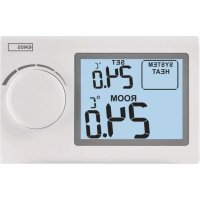
P5604 - Thermostat Emos - Free user manual and instructions
Find the device manual for free P5604 Emos in PDF.


| Product type | Programmable thermostat |
| Brand | Emos |
| Model | P5604 |
| Dimensions (W × H × D) | 30 × 120 × 75 mm |
| Weight | 125 g |
| Power supply | 2 AAA alkaline batteries 1.5 V (non-rechargeable) |
| Max. switched load | 230 V AC; 8 A (resistive) / 2 A (inductive) |
| Temperature measurement range | 0 °C to 40 °C (resolution 0.1 °C) |
| Measurement accuracy | ±1 °C at 20 °C |
| Temperature setting range | 5 °C to 35 °C (in steps of 0.5 °C) |
| Set temperature variation | 0.2 °C |
| Clock accuracy | ±60 seconds/month |
| Operating temperature | 0 °C to 40 °C |
| Storage temperature | -20 °C to 60 °C |
| Operating modes | Heating (HEAT), Cooling (COOL), Frost protection (OFF at 7 °C) |
| Temperature calibration | Adjustable from -3 °C to +3 °C in steps of 0.5 °C |
| Backlight | Yes, activated by pressing the knob (10 seconds) |
| Installation | Wall mounting (screws and wall plugs provided); electrical connection 230 V (NO/NC) |
| Maintenance | Clean with a soft slightly damp cloth; do not use solvents |
| Safety | Disconnect power before installation; entrust repairs to a professional |
| Supplied accessories | 2 screws, 2 wall plugs |
| Repairability | Batteries replaceable by user; other repairs by qualified specialist |
Frequently Asked Questions - P5604 Emos
User questions about P5604 Emos
0 question about this device. Answer the ones you know or ask your own.
Ask a new question about this device
Download the instructions for your Thermostat in PDF format for free! Find your manual P5604 - Emos and take your electronic device back in hand. On this page are published all the documents necessary for the use of your device. P5604 by Emos.
USER MANUAL P5604 Emos
natural_image
Line drawing of two electronic devices with screwdrivers and a close-up view showing internal components (no text or symbols)2
GB | Thermostat
The P5604 thermostat is designed for controlling heating and air-conditioning systems.
Important
- Before the first use, make sure to carefully read the Operating Manual for the thermostat, as well as the boiler or air-conditioning equipment.
- Turn off power supply before installing the thermostat!
• Installation should be carried out by a qualified person! - During installation, follow applicable standards.
Technical specifications:
Switched load: max. 230 V AC; 8 A for resistive load; 2 A for inductive load
Clock accuracy: ±60 seconds/month
Temperature measurement: 0 °C to 40 °C with 0.1 °C resolution accuracy ±1 °C at 20 °C
Temperature setting: 5 °C to 35 °C in 0.5 °C increments
Temperature differential: 0.2 °C
Operating temperature: 0 °C to 40 °C
Storage temperature: -20 °C to 60 °C
Power supply: 2× 1.5 V AAA batteries
Accessories: 2 screws, 2 wall plugs
Dimensions and weight: 30 × 120 × 75 mm; 125 g
Display Description (See Fig. 1)
1 - Operating mode
2 - Cooling mode
3 - Low battery indicator
4 - Current set temperature
5 - Room temperature
6 - Heating mode
Procedure for Removing the Front of the Thermostat (See Fig. 2)
Display Backlighting
Pressing the control wheel activates display backlighting for 10 seconds.
INSTALLATION
Warning:
Before replacing the thermostat, disconnect the heating/air-conditioning system from the main power in your flat. This will prevent potential injury by electric current.
Thermostat Installation
The rear of the thermostat carries 4 openings for mounting onto a wall. Use the enclosed screws and wall plugs to mount the thermostat.
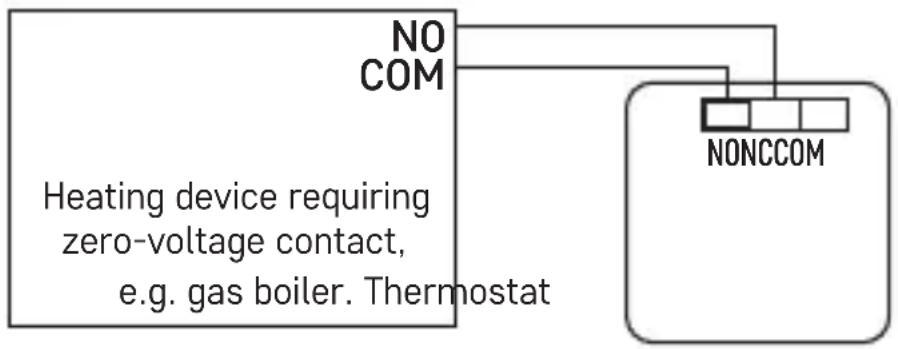
Wiring Diagram
Voltage connection diagram for connecting thermostat P5604 to a boiler with "NO" outlet:
Max. 230 V 8(2) A
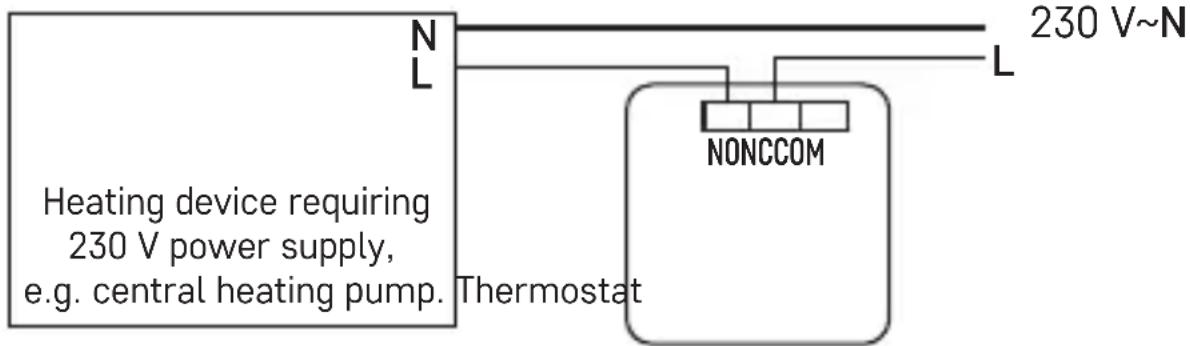
* When connecting a cooling device to the thermostat, connect the "L" phase conductor to the "NC" terminal.
Zero-voltage connection diagram for connecting thermostat P5604 to a boiler with "NO" outlet:
Max. 230 V 8(2) A
flowchart
graph TD
    A["Heating device requiring zero-voltage contact, e.g. gas boiler. Thermostat"] --> B["NO COM"]
    A --> C["NONCCOM"]
Putting into Operation
- Remove the front portion of the thermostat and insert 2× 1.5 V AAA batteries. Use alkaline batteries only, not rechargeable ones.
- Replace the front of the thermostat.
- The thermostat now has an active display and is operational.
If the thermostat is not working properly, please check the polarity of the batteries, whether they are sufficiently charged, or reset the thermostat by removing the batteries.
Choosing Operating Mode (Heating, Cooling, Anti-Freeze Temperature)
- Press and hold the control wheel for 5 seconds to enter mode settings.
- Turn the control wheel to select one of the following modes:
a. HEAT (heating system)
b. OFF (anti-freeze temperature of 7 °C)
c. COOL (cooling system)
- Press the control wheel to confirm your selection.
Room Temperature Calibration
Press and hold the control wheel for 5 seconds until the setting mode indicator starts flashing on the screen.
Press and hold the control wheel again for 5 seconds until the temperature calibration value starts flashing on the screen.
Use the wheel to set the temperature value of choice (-3.0 °C to 3.0 °C, in 0.5 °C steps) and confirm by pressing the wheel.
Room temperature calibration is used if, for example, the thermostat shows 21 °C but you want it to show 20 °C. In that case, the calibration value should be set to -1 °C.
Upkeep and Maintenance
The product is designed to provide trouble-free service for many years if used properly. Here are some tips for proper operation:
- Read the manual carefully before using this product.
- Do not expose the product to direct sunlight, extreme cold and humidity, and sudden changes in temperature. This would reduce accuracy of detection.
- Do not place the product in locations prone to vibration and shocks – these may cause damage.
- Do not expose the product to excessive force, impacts, dust, high temperatures or humidity – these may cause malfunction, shorter battery life, damage to batteries and deformation of plastic parts.
- Do not expose the product to rain or high humidity, dropping or splashing water.
- Do not place any open flame sources on the product, e.g. a lit candle, etc.
- Do not place the product to places with inadequate air flow.
- Do not insert any objects in the product vents.
- Do not tamper with the internal electric circuits of the product – doing so may damage the product and will automatically void the warranty. The product should only be repaired by a qualified professional.
- To clean the product, use a slightly moistened soft cloth. Do not use solvents or cleaning agents – they could scratch the plastic parts and cause corrosion of the electric circuits.
- Do not immerse the product in water or other liquids.
- In the event of damage or defect of the product, do not perform any repairs by yourself. Have it repaired in the shop where you bought it.
- This device is not intended for use by persons (including children) whose physical, sensory or mental disability or whose lack of experience or knowledge prevents them from using it safely. Such persons should be instructed as to how to use the device and should be supervised by a person responsible for their safety. Children must always be supervised and must never play with the device.
Do not dispose with domestic waste. Use special collection points for sorted waste. Contact local authorities for information about collection points. If the electronic devices would be disposed on landfill, dangerous substances may reach groundwater and subsequently food chain, where it could affect human health.
WARNING: The contents of this manual may be changed without prior notice – due to printing limitations, the symbols shown may differ slightly from those on the display – the content of this manual may not be reproduced without the manufacturer's permission.
Manual can be found at: http://www.emos.eu/download.