
DS200 - Sander SCHEPPACH - Free user manual and instructions
Find the device manual for free DS200 SCHEPPACH in PDF.



| Product type | Drywall sander |
| Brand | Scheppach |
| Model | DS200 |
| Rated voltage | 230 V~ |
| Rated frequency | 50 Hz |
| Power consumption | 1200 W |
| Rated grinding wheel speed | 1500 – 3200 min⁻¹ |
| Grinding disc diameter | 210 mm |
| Dimensions (L × W × H) | 380 × 260 × 260 mm |
| Weight | 3.4 kg |
| Protection class | II |
| Sound pressure level LpA | 94.2 dB |
| Sound power level LWA | 102.2 dB |
| Vibration main handle | 2.409 m/s² |
| Vibration additional handle | 4.303 m/s² |
| Spindle size | M14 |
| Suction hose length | 1500 mm |
| Intended use | Dry sanding of drywall |
| Included accessories | Additional handle, 6 abrasive papers, hose, collection bag, strap, screwdriver, key, adapter, spare carbon brushes |
| Speed adjustment | Yes, thumbwheel |
| Suction function | Yes, adjustable |
| Activation lock | Yes |
| Abrasive fixation type | Velcro |
Frequently Asked Questions - DS200 SCHEPPACH
User questions about DS200 SCHEPPACH
0 question about this device. Answer the ones you know or ask your own.
Ask a new question about this device
Download the instructions for your Sander in PDF format for free! Find your manual DS200 - SCHEPPACH and take your electronic device back in hand. On this page are published all the documents necessary for the use of your device. DS200 by SCHEPPACH.
USER MANUAL DS200 SCHEPPACH
natural_image
Exterior view of a Schippack industrial grinding machine (no signage or text visible on the device body)
DS200
| DE | TrockenbauschleiferOriginalbetriebsanleitung | 6 |
| GB | Drywall grinderTranslation of original instruction manual | 22 |
| FR | Ponceuse de cloisons sèchesTraduction des instructions d'origine | 34 |
| IT | Levigatrice a seccoLa traduzione dal manuale di istruzioni originale | 48 |
| NL | DroogslijpmachineVertaling van de originele gebruikshandleiding | 62 |
| ES | Lijadora para paneles de yesoTraducción del manual de instrucciones original | 75 |
| PT | Lixadeira para gesso cartonadoTradução do manual de operação original | 89 |
| CZ | Bruska na suché stavbyPřeklad originálního návodu k obsluze | 102 |
| SK | Brúska pre suché stavbyPreklad originálneho návodu na obsluhu | 115 |
| HU | Szárazépítési csiszológépEredeti használati utasítás fordítása | 128 |
| PL | Szlifierka do suchej zabudowyTłumaczenie oryginalnej instrukcji obsługi | 142 |
| HR | Brusilica za gipsane pločePrijevod originalnog priručnika za uporabu | 156 |
| SI | Brusilnik za suhomontažne materialePrevod originalnih navodil za uporabo | 168 |
| EE | ViimistluslihvijaOriginaalkäitusjuhendi tõlge | 181 |
| LT | Gipskartonio šlifuoklisOriginalios naudojimo instrukcijos vertimas | 193 |
| LV | Slipmašina sausiem apdares darbiemOriginālās lietošanas instrukcijas tulkojums | 206 |
| SE | Slip för gipsskivorÖversättning av original-bruksanvisning | 219 |
| FI | Kipsilevyn hiomakoneKäännös alkuperäisestä käyttöohjeesta | 231 |
| DK | Gipsvægs-slibemaskineOversættelse fra den oprindelige betjeningsvejledning | 244 |
natural_image
Circular object with evenly spaced dots, labeled '9' and marked with number 4 (no text or symbols on the object itself)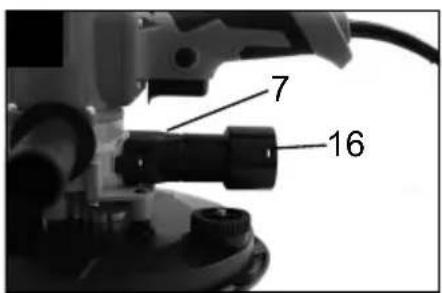
natural_image
Close-up of a mechanical component with coiled spring and adjustment knob (no visible text or symbols)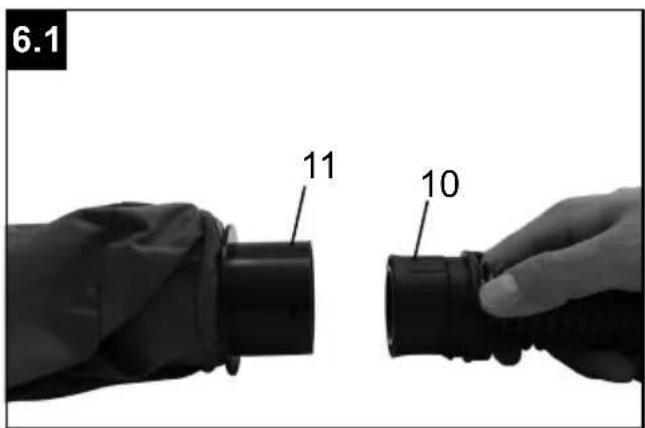
natural_image
Close-up of a hand holding a circular mechanical component with perforated holes, labeled '8.1' and marked with number '9' (no text or symbols on the component itself)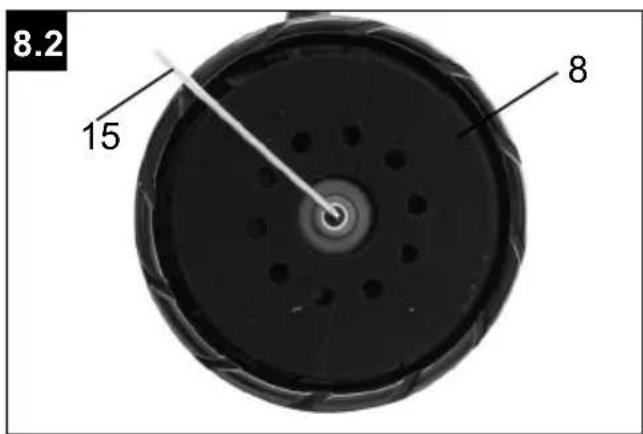
Günzburger Straße 69
D-89335 Ichenhausen
Verehrter Kunde
Homepage: https://www.scheppach.com/de/service
Explanation of the symbols on the product
Symbols are used in this manual to draw your attention to potential hazards. The safety symbols and the accompanying explanations must be fully understood. The warnings themselves will not rectify a hazard and cannot replace proper accident prevention measures.
 | Warning - Read the operating manual to reduce the risk of injury. |  | Always work with two hands! |
 | Wear hearing protection. Excessive noise can result in a loss of hearing. |  | Protection class II |
 | Wear a dust protection mask. When machining wood and other materials, harmful dust may be generated. Do not machine material containing asbestos! |  | Wear safety goggles. Sparks created during work or fragments, chippings and dust ejected by the device can case sight loss. |
 | The product complies with the applicable European directives. |  | We have marked points in these operating instructions that impact your safety with this symbol. |
Table of contents: Page:
- Introduction....24
- Product description, fig. A 24
- Scope of delivery, fig. A....24
- Proper use 25
- Safety instructions 25
- Technical data.... 29
- Unpacking 29
- Assembly and operation....30
- Electrical connection 31
- Cleaning, maintenance and storage.... 32
- Transport....32
- Disposal and recycling....33
- Troubleshooting 33
- Declaration of conformity 259
1. Introduction
Manufacturer:
Scheppach GmbH
Günzburger Straße 69
D-89335 Ichenhausen
Dear Customer
We hope your new product brings you much enjoyment and success.
Note:
In accordance with the applicable product liability laws, the manufacturer of this product assumes no liability for damage to the product or caused by the product arising from:
- Improper handling
• Non-compliance with the operating manual
• Repairs carried out by third parties, unauthorised specialists
• Installing and replacing non-original spare parts
• Application other than specified - Failure of the electrical system in the event of the electrical regulations and VDE provisions 0100, DIN 57113 / VDE0113 not being observed
Note:
Read through the complete text in the operating manual before installing and commissioning the device.
This operating manual should help you to familiarise yourself with your product and to use it for its intended purpose.
The operating manual includes important instructions for the safe, proper and economic operation of the product, for avoiding danger, for minimising repair costs and downtimes and for increasing the reliability and extending the service life of the product.
In addition to the safety instructions in this operating manual, you must also observe the regulations applicable to the operation of the product in your country.
Keep the operating manual package with the power tool at all times and store it in a plastic cover to protect it from dirt and moisture. They must be read and carefully observed by all operating personnel before starting the work.
The product may only be used by personnel who have been trained to use it and who have been instructed with respect to the associated hazards.
The required minimum age must be observed.
In addition to the safety instructions in this operating manual and the separate regulations of your country, the generally recognised technical rules relating to the operation of such products must also be observed.
We accept no liability for accidents or damage that occur due to a failure to observe this manual and the safety instructions.
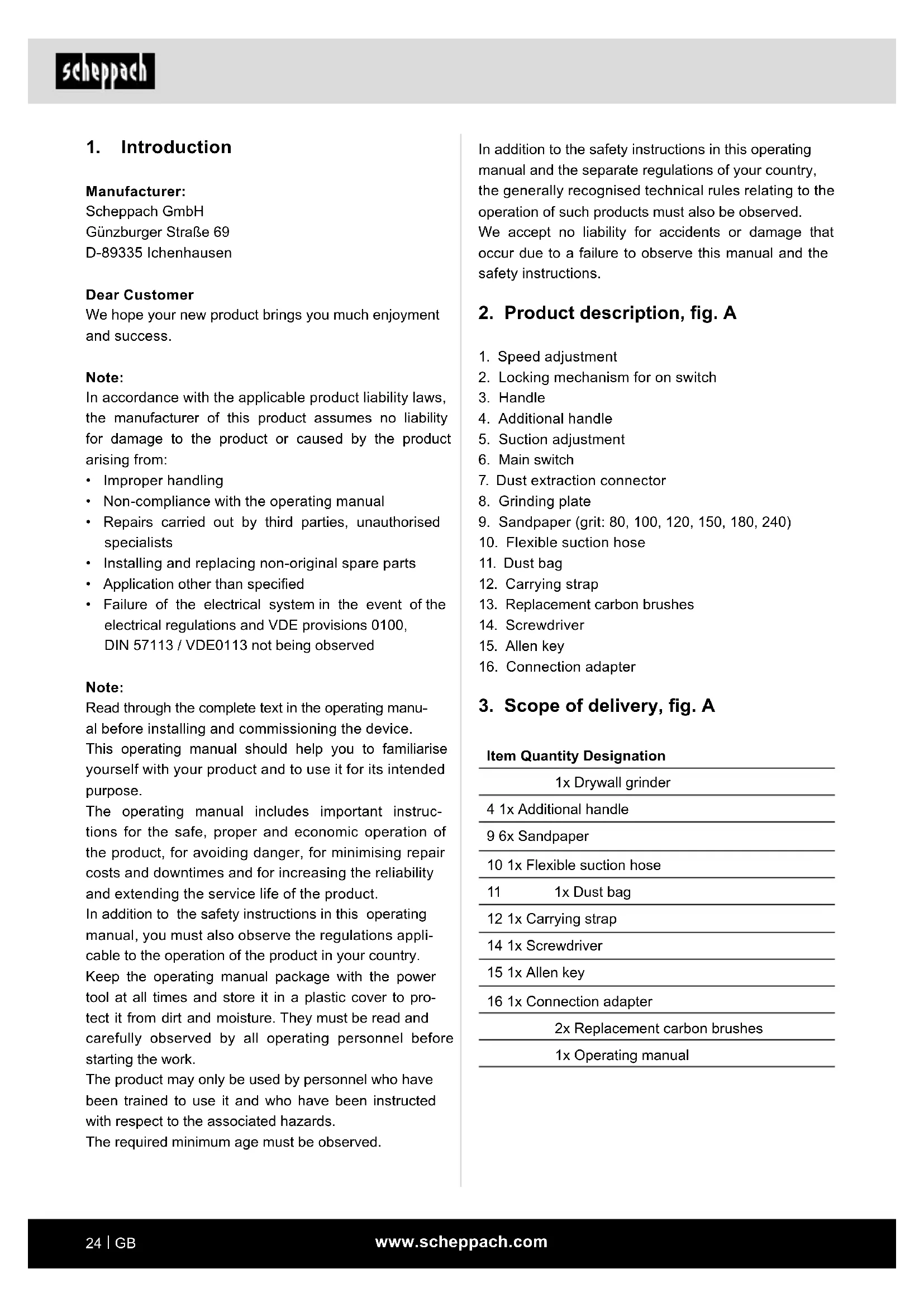
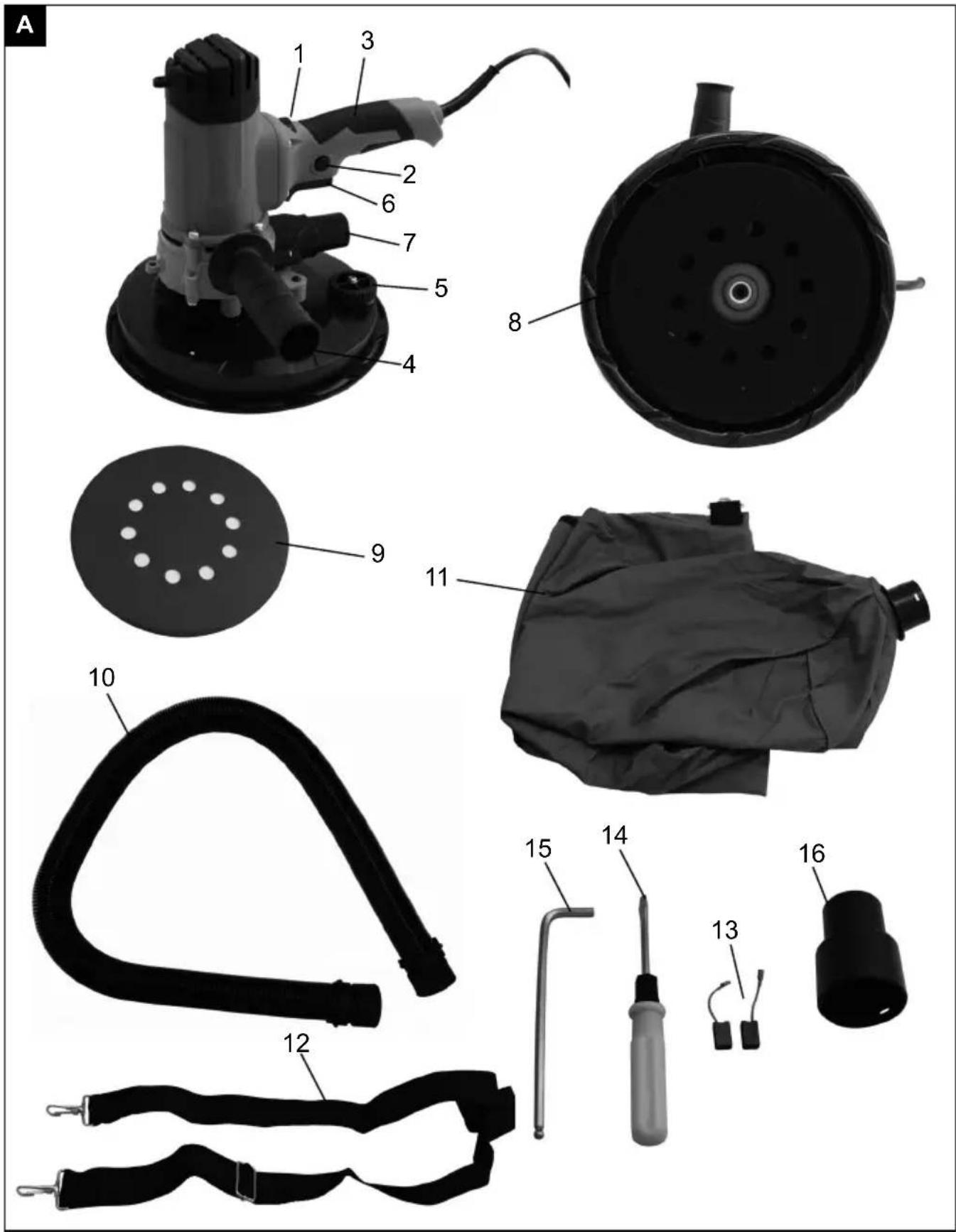
2. Product description, fig. A
- Speed adjustment
- Locking mechanism for on switch
- Handle
- Additional handle
- Suction adjustment
- Main switch
- Dust extraction connector
- Grinding plate
- Sandpaper (grit: 80, 100, 120, 150, 180, 240)
- Flexible suction hose
- Dust bag
- Carrying strap
- Replacement carbon brushes
- Screwdriver
- Allen key
- Connection adapter
3. Scope of delivery, fig. A
Item Quantity Designation
| 1x Drywall grinder |
| 4 1x Additional handle |
| 9 6x Sandpaper |
| 10 1x Flexible suction hose |
| 11 1x Dust bag |
| 12 1x Carrying strap |
| 14 1x Screwdriver |
| 15 1x Allen key |
| 16 1x Connection adapter |
| 2x Replacement carbon brushes |
| 1x Operating manual |
4. Proper use
The intended use of this product is the sanding of large areas of drywalls with suitable abrasive sheets as a preparation before painting or wallpapering.
This product is neither suited for the preparation of small areas, corners and edges, nor for the removal of wallpaper and the grinding of ceilings and wet grinding.
Do not use the product for cutting or roughing or polishing. Do not use it together with wire brushes. Do not treat asbestos containing materials with this product.
The product may only be used in the intended manner. Any use beyond this is improper. The user/operator, not the manufacturer, is responsible for damages or injuries of any type resulting from this.
An element of the intended use is also the observance of the safety instructions, as well as the assembly instructions and operating information in the operating manual.
Persons who operate and maintain the product must be familiar with the manual and must be informed about potential dangers.
In addition, the applicable accident prevention regulations must be strictly observed.
Other general occupational health and safety-related rules and regulations must be observed.
The liability of the manufacturer and resulting damages are excluded in the event of modifications of the product.
The product may only be operated with original parts and original accessories from the manufacturer.
The safety, operating and maintenance specifications of the manufacturer, as well as the dimensions specified in the technical data, must be observed.
Please note that our products were not designed with the intention of use for commercial or industrial purposes. We assume no guarantee if the product is used in commercial or industrial applications, or for equivalent work.
The manufacturer is not liable for damage caused by an improper use or incorrect operation of this device.
5. Safety instructions
△ WARNING - Read all safety information, instructions, illustrations and technical data for this electric tool.
Failure to follow all instructions listed below may result in electric shock, fire and/or serious injury.
Save all warnings and instructions for future reference.
The term “power tool” used in the safety instructions refers to mains-powered electrical tools (with a mains cable) and battery-powered electrical tools (without a mains cable).
Work area safety
a) Keep your work area clean and well-lit. Cluttered or dark areas invite accidents.
b) Do not operate power tools in explosive atmospheres, such as in the presence of flammable liquids, gases or dust. Power tools create sparks which may ignite the dust or fumes.
c) Keep children and bystanders away while operating a power tool. Distractions can cause you to lose control.
Electrical safety
a) Power tool plugs must match the outlet. Never modify the plug in any way. Do not use any adapter plugs with earthed (grounded) power tools. Unmodified plugs and matching outlets will reduce risk of electric shock.
b) Avoid body contact with earthed or grounded surfaces, such as pipes, radiators, ranges and refrigerators. There is an increased risk of electric shock if your body is earthed or grounded.
c) Do not expose power tools to rain or wet conditions. Water entering a power tool will increase the risk of electric shock.
d) Do not abuse the cord. Never use the cord for carrying, pulling or unplugging the power tool. Keep cord away from heat, oil, sharp edges or moving parts. Damaged or entangled cords increase the risk of electric shock.
e) When operating a power tool outdoors, use an extension cord suitable for outdoor use. Use of a cord suitable for outdoor use reduces the risk of electric shock.
f) If operating a power tool in a damp location is unavoidable, use a residual current device (RCD) protected supply. Use of an RCD reduces the risk of electric shock.
Personal safety
a) Stay alert, watch what you are doing and use common sense when operating a power tool. Do not use a power tool while you are tired or under the influence of drugs, alcohol or medication. A moment of inattention while operating power tools may result in serious personal injury.
b) Wear personal protective equipment and always safety goggles. Protective equipment such as a dust mask, non-skid safety shoes, hard hat or hearing protection used for appropriate conditions will reduce personal injuries.
c) Prevent unintentional starting. Ensure the switch is in the off-position before connecting to power source and/or rechargeable battery, picking up or carrying the tool. Carrying power tools with your finger on the switch or energising power tools that have the switch on invites accidents.
d) Remove any adjusting key or screwdriver before turning the power tool on. A wrench or a key left attached to a rotating part of the power tool may result in personal injury.
e) Do not overreach. Keep proper footing and balance at all times. This enables better control of the power tool in unexpected situations.
f) Dress properly. Do not wear loose clothing or jewellery. Keep your hair and clothing away from moving parts. Loose clothes, jewellery or long hair can be caught in moving parts.
g) If devices are provided for the connection of dust extraction and collection facilities, ensure these are connected and properly used. Use of dust collection can reduce dust-related hazards.
h) Do not let familiarity gained from frequent use of tools allow you to become complacent and ignore tool safety principles. A careless action can cause severe injury within a fraction of a second.
Power tool use and care
a) Do not force the power tool. Use the correct power tool for your application. The correct power tool will do the job better and safer at the rate for which it was designed.
b) Do not use the power tool if the switch does not turn it on and off. Any power tool that cannot be controlled with the switch is dangerous and must be repaired.
c) Disconnect the plug from the power source and/or remove the battery pack, if detachable, from the power tool before making any adjustments, changing accessories, or storing power tools. Such precautionary measures reduce the risk of starting the power tool accidentally.
d) Store idle power tools out of the reach of children and do not allow persons unfamiliar with the power tool or these instructions to operate the power tool. Power tools are dangerous in the hands of untrained users.
e) Maintain power tools and accessories. Check for misalignment or binding of moving parts, breakage of parts and any other condition that may affect the power tool's operation. If damaged, have the power tool repaired before use. Many accidents are caused by poorly maintained power tools.
f) Keep cutting tools sharp and clean. Properly maintained cutting tools with sharp cutting edges are less likely to bind and are easier to control.
g) Use electric tools, insertion tools, etc. according to these instructions. taking into account the working conditions and the work to be performed. Use of the power tool for operations different from those intended could result in a hazardous situation.
h) Keep handles and grasping surfaces dry, clean and free from oil and grease. Slippery handles and grasping surfaces do not allow for safe handling and control of the tool in unexpected situations.
Service
a) Only have your electric tool repaired by qualified specialists and only with original spare parts. This will ensure that the safety of the power tool is maintained.
Safety instructions for all operations - Safety warnings common for grinding, sanding, wire brushing, polishing or abrasive cutting-off operations
a) This power tool is intended to function as a sander. Read all safety warnings, instructions, illustrations and specifications provided with this power tool. Failure to follow all instructions listed below may result in electric shock, fire and/or serious injury.
b) Operations such as grinding, wire brushing, polishing or cutting-off are not recommended to be performed with this power tool. Operations for which the power tool was not designed may create a hazard and cause personal injury.
c) Do not use any accessories that have not been specifically provided or recommended by the manufacturer for this power tool. Just because you can attach the accessories to your power tool does not guarantee they are safe to use.
d) The maximum speed of the accessory tool used must be at least as high as the maximum speed specified for the power tool. Accessories which rotate faster than the maximum permissible rate can break and throw pieces into the air.
e) The external diameter and thickness of the accessory tool used must comply with the dimensions of the power tool. Incorrectly dimensioned accessory tools cannot be sufficiently shielded or controlled.
f) The arbour size of wheels, flanges, backing pads or any other accessory must properly fit the spindle of the power tool. Insertion tools that do not fit exactly on your electrical tool's grinding spindle rotate unevenly, vibrate very strongly and can cause a loss of control.
g) Never use damaged accessory tools. Before each use inspect the accessory such as abrasive wheels for chips and cracks, backing pad for cracks, tear or excess wear, wire brush for loose or cracked wires. If the power tool or the accessory tool in use is dropped, check to see if it is damaged or use an undamaged accessory tool. When you have checked and inserted the accessory tool, ensure that you and any other people in the vicinity remain outside of the level of the rotating accessory tool and allow the tool to rotate at maximum speed for one minute. Damaged tool attachments usually break during this test period.
h) Wear personal protective equipment. Depending on application, use face shield, safety goggles or safety glasses. Where appropriate, wear a dust mask, hearing protection, protective gloves or a special apron that will keep small grinding and material particles away from you. The eye protection must be capable of stopping flying debris generated by various operations. Dust or breathing masks must filter the dust generated during use.
Prolonged exposure to high intensity noise may cause hearing loss.
i) Ensure that other people remain at a safe distance from your workspace. Anyone who enters the workspace must wear personal protective equipment. Fragments of workpiece or of a broken accessory may fly away and cause injury beyond immediate area of operation.
j) Hold power tool by insulated gripping surfaces only, when performing an operation where the cutting accessory may contact hidden wiring or its own cord. Contact with a live wire may make exposed metal parts of the power tool live and could give the operator an electric shock.
k) Keep the power cord away from any rotating accessories. If you lose control, the cord may be cut or snagged and your hand or arm may be pulled into the spinning accessory.
I) Never put the power tool down until the accessory tool being used has come to a complete standstill. The rotating accessory tool can come into contact with the surface and cause you to lose control of the power tool.
m) Do not run the power tool while carrying it at your side. Accidental contact of your clothing with the rotating attachment part could lead to an injury.
n) Clean the ventilation slits of your power tool regularly. The engine fan draws dust into the housing and a strong accumulation of metal dust can cause electrical hazards.
o) Never use the power tool in the vicinity of inflammable materials. Sparks can ignite such materials.
p) Do not use any accessory tools which require liquid coolant. The use of water or other liquid coolants may lead to an electric shock.
Safety instructions for all operations - Kickback and related warnings
Kick-back is the sudden reaction resulting from a caught or jammed rotating insert tool, such as a grinding disc, grinding wheel, wire brush, etc. Catching or jamming results in the rotating insert tool stopping abruptly.
As a result, an uncontrolled electric tool is accelerated against the direction of rotation of the tool attachment at the blocking point.
For example, if an abrasive wheel is snagged or pinched by the workpiece, the edge of the wheel that is entering into the pinch point can dig into the surface of the material causing the wheel to climb out or kick out. The wheel may either jump toward or away from the operator, depending on direction of the wheel's movement at the point of pinching. Abrasive wheels may also break under these conditions.
Kickback is the result of incorrect or deficient use of the electrical tool.
It can be prevented by suitable precautionary measures, as described in the following.
a) Hold the power tool firmly in both hands and position your body and arms so they can absorb the force of a kickback. Always use the additional handle, if available, so that you have the maximum possible control over the kickback force or reaction forces at full speed. By taking adequate precautions, the operator can stay in control of the kickback and reaction forces.
b) Never hold your hand close to a rotating accessory tool. The accessory tool could jump out of your hand if there is a kickback.
c) Avoid having any part of your body in the region in which the power tool is likely to move in event of a kickback. The kickback will force the power tool in the opposite direction to the direction of rotation of the sanding disc at the blockage.
d) Take special care when working near corners, sharp edges, etc. Avoid allowing the accessory tool to bounce back from the workpiece or jam. The rotating tool attachment tends to jam at corners, sharp edges or when it bounces back. This causes a loss of control or kick-back.
e) Do not use chains or toothed saw blades. Such accessories often cause a kickback or loss of control over the power tool.
Safety instructions for sandpaper grinding
a) Do not use excessively oversized sanding disc paper. Follow manufacturers recommendations, when selecting sanding paper. Larger sanding paper extending beyond the sanding pad presents a laceration hazard and may cause snagging, tearing of the disc or kickback.
Additional safety instructions
a) Connect a vacuum cleaner to the supplied adapter before starting your operations.
b) ATTENTION! Keep away sanding dust from open fire. Dust may be explosive.
c) Always wear safety glasses and a dust protection mask when sanding, in particular during overhead work and when processing critical materials!
When sanding certain materials (e. g. lead paint, certain types of wood and metal) harmful or noxious dust may be generated.
Touching or breathing in such dust may imply risks for the operator or bystanders.
Notes regarding vibration and noise emissions
Keep the noise level and vibration to a minimum!
- Only use power tools which are free of defects.
- Maintain and clean the power tool on a regular basis.
- Adjust your way of working to the power tool.
- Do not force the power tool.
- Have your power tool checked if necessary.
- Switch off the power tool if it is not in use.
Residual risks
Even when this power tool is operated properly, residual risks still remain. The following hazards may arise in connection with the design and construction of this power tool:
a) Damage to health resulting from hand/arm vibration if the device is used over an extended period of time or if it is not properly operated and maintained.
b) Injury and property damage caused by insert tools being flung around and unexpectedly out of/from the electric tool due to sudden damage, wear or improper attachment.
c) Burns and cuts if the accessories are touched directly after use and/or with your bare skin.
⚠ WARNING! This power tool generates an electromagnetic field during operation. This field can impair active or passive medical implants under certain circumstances. In order to prevent the risk of serious or deadly injuries, we recommend that persons with medical implants consult with their physician and the manufacturer of the medical implant prior to operating the power tool.
6. Technical data
Rated voltage 230 V\~
| Nominal frequency 50 Hz | |
| Power consumption 1200 W | |
| Nominal speed grinding wheel 1500-3200 rpm | |
| Sanding disc diameter 210 mm | |
| Grinding wheel diameter | 215 mm |
| Dimensions LxWxH | 380x260x260 mm |
| Extraction hose length | 1500 mm |
| Spindle size | M14 |
| Protection class | II |
| Weight | 3.4 kg |
Noise and vibration characteristics
| Sound pressure level L_PA | 94.2 dB |
| Sound power level L_WA | 102.2 dB |
| Uncertainty K | 3 dB |
Vibration parameters
| Vibration main handle a_h | 2.409 m/s ^2 |
| Vibration additional handle a_h | 4.303 m/s ^2 |
| Uncertainty K | 1.5 m/s ^2 |
Subject to technical changes!
Wear hearing protection!
Excessive noise can result in a loss of hearing.
Note:
- The hand-arm vibration value given is based on grinding with one sanding sheet. Other applications may result in different values.
- The noise and vibration values have been determined in accordance with EN 62841-1.
- The specified vibration value has been measured in accordance with a standardised test procedure and can be used for comparison of one electric tool with another.
- The specified vibration value can also be used for an initial estimation of the exposure.
Vibration:
Avoid the risks associated with vibration, e.g. the risk of white finger syndrome (circulatory disorders) by taking frequent breaks from work where you rub your palms together, for example.
Raynaud's syndrome is a vascular disease that causes the small blood vessels on the fingers and toes to cramp in spasms. The symptoms include: Insensitivity, loss of sensitivity, tingling, itching, pain, loss of strength, change in colour or condition of the skin.
The affected areas are no longer supplied with sufficient blood and therefore appear extremely pale.
The frequent use of vibrating tools can cause nerve damage in people whose circulation is impaired (e.g. smokers, diabetics). If you notice unusual adverse effects, stop working immediately and seek medical advice. For long-term and regular users, it is therefore recommended to closely monitor the condition of your hands and fingers. Observe the following information to reduce hazards:
- Keep your body warm, especially your hands, especially in cool weather.
• Take regular breaks and move your hands to promote circulation. - Limit the use of high vibration tools per day and spread them over several days Make a work schedule that limits vibration exposure.
- Ensure as little vibration as possible of the product via regular maintenance and stable parts on the product. Replace worn parts immediately.
- Change your working position regularly.
- If the product is to be used or operated frequently, you, should contact your specialist dealer and request anti-vibration accessories (handles) if applicable.
7. Unpacking
- Open the packaging and carefully remove the product.
- Remove the packaging material, as well as the packaging and transport safety devices (if present).
- Check whether the scope of delivery is complete.
- Check the product and accessory parts for transport damage. In the event of complaints the carrier must be informed immediately. Later claims will not be recognised.
-
If possible, keep the packaging until the expiry of the warranty period.
-
Familiarise yourself with the product by means of the operating manual before using for the first time.
- With accessories as well as wearing parts and replacement parts use only original parts. Spare parts can be obtained from your specialist dealer.
- When ordering please provide our article number as well as type and year of manufacture for the product.
⚠ WARNING!
The product and the packaging material are not children's toys! Do not let children play with plastic bags, films or small parts! There is a danger of choking or suffocating!
8. Assembly and operation
ATTENTION!
Always make sure the product is fully assembled before commissioning!
⚠ WARNING!
Always remove the mains plug before carrying out adjustments on the product.
8.1 Assemble additional handle (4)
- Take the additional handle (4) and turn it clockwise into the thread provided until it is firmly seated.
- To remove, unscrew the additional handle (4) anticlockwise out of the thread.
8.2 Select sandpaper
The grain of the sandpaper is indicated on the back. The smaller the number, the coarser the grain.
-
Use coarse grain sandpaper for rough sanding and fine grain sandpaper for finishing. Sandpapers with aluminium oxide, silicon carbide or other synthetic abrasives are recommended.
-
Start with a coarse grain and finish with the finest grain if you have sandpaper with different grains to choose from to achieve a good, smooth sanding result.
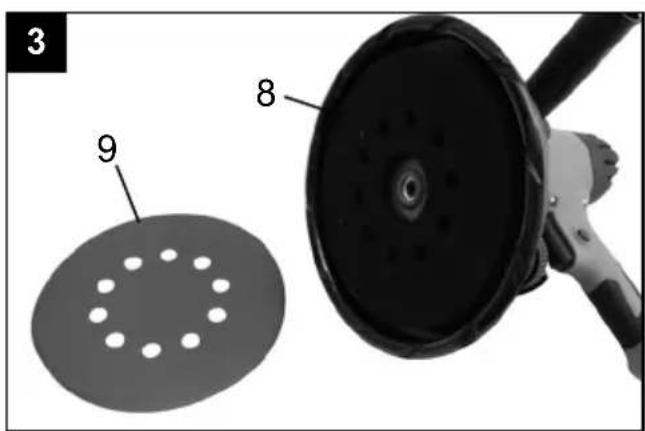
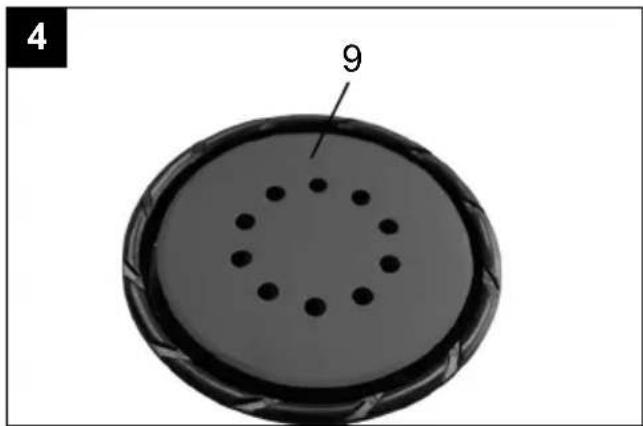
8.3 Attaching the sandpaper (Fig. 3, 4)
- Set the product down on a level surface.
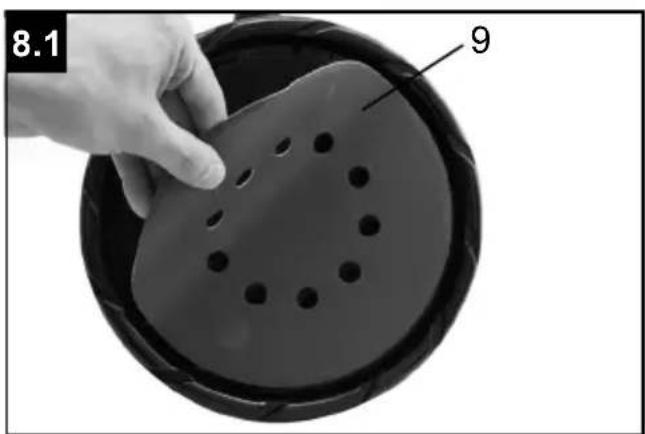
- Secure the sand paper (9) to the grinding plate (8) with the Velcro backing.
- Align the sandpaper (9) with the grinding plate (8) and press it on evenly.
- Make sure that the holes of the sanding plate (8) align with the holes of the sanding paper (9).
8.4 Connection for dust extraction ⚠ WARNING!
When working on lead-based paint for example, harmful/toxic gases may be produced. These pose a danger both to the user and to persons in the vicinity! Therefore, only use this electric tool with a dust extraction device and additionally protect yourself and other persons in the working area with suitable personal protective equipment!
A large amount of dust is generated when working with this product. The dust extraction is very useful to keep your work area clean and reduce dust exposure on the operator's side.
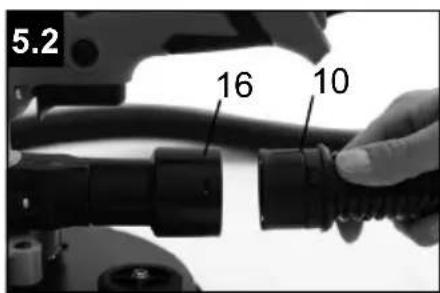
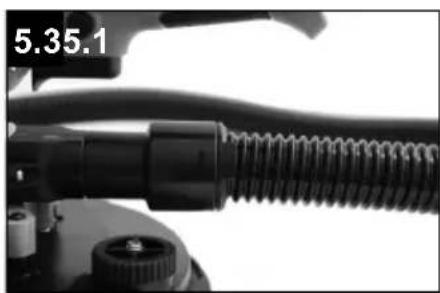
8.5 Installing the suction hose (fig. 5.1 - 5.3)
- Push the connection adapter (16) onto the dust extraction connector (7).
- Insert the suction hose (10) into the connection adapter (16).
- Turn the suction hose (10) to the right to connect the two elements together.
- To dismantle, turn the suction hose (10) to the left, pull out the suction hose (10) and remove the connection adapter (16).
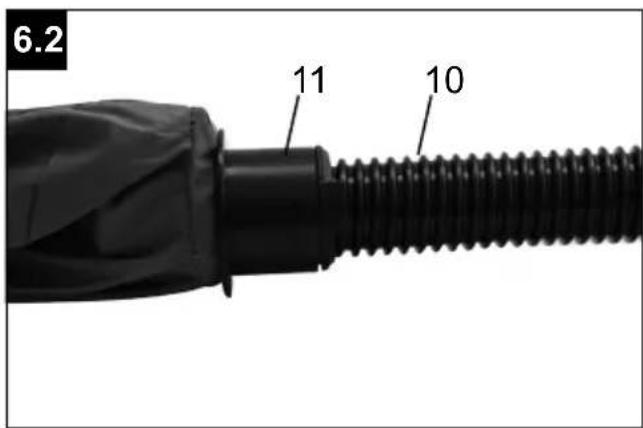
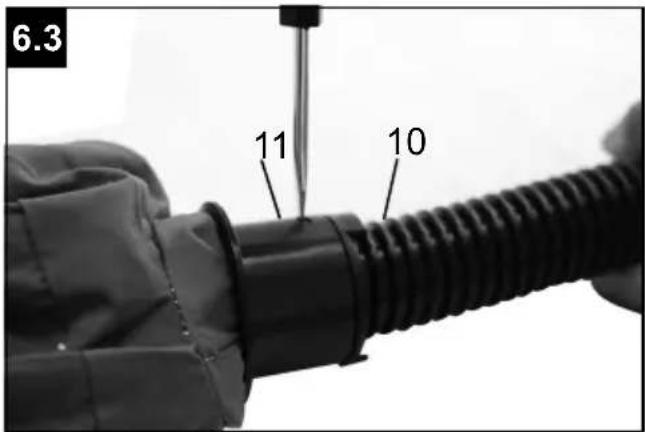
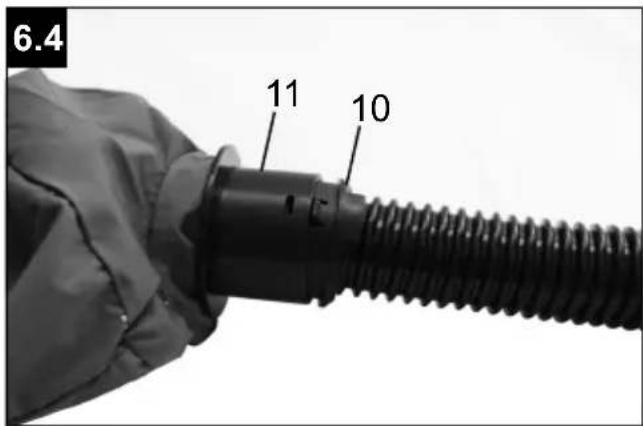
8.6 Assembling the dust bag (Fig. 6.1 - 6.4)
- Insert the suction hose (10) into the connection piece of the dust bag (11).
- Make sure that the spigot locks into place in the connection piece of the dust bag (11) to securely connect the suction hose (10) with the dust bag (11).
- Hook the carrying strap (12) into the eyelets on the dust collection bag (11) and on the product.
- To dismantle the dust collection bag (11), squeeze the locked connector of the suction hose (10) using a screwdriver (14) and pull out the suction hose (10).
8.7 Connection to the power supply
- Ensure that the product is switched off. Always switch the off the main switch (6) first before connecting it to the power supply.
- Insert the mains plug into a properly installed socket that meets the appropriate requirements per the technical data.
- Your product is now ready for use.
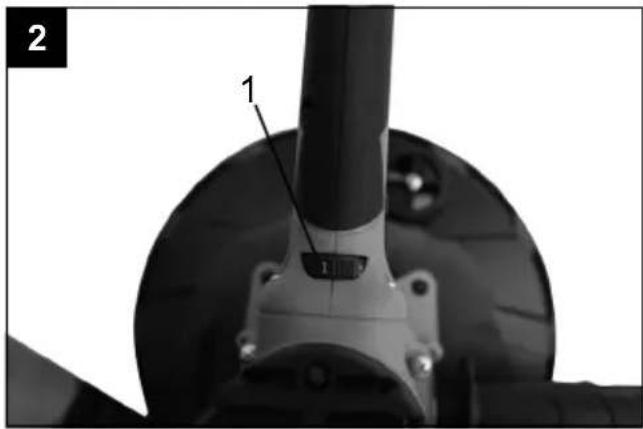
8.8 Setting the speed (fig. 2)
Before starting work, set the speed to suit the application. Use a low speed for coarse grinding work, increase the speed for fine work.
Adjust the speed of the grinding plate rate by turning the setting wheel (1).
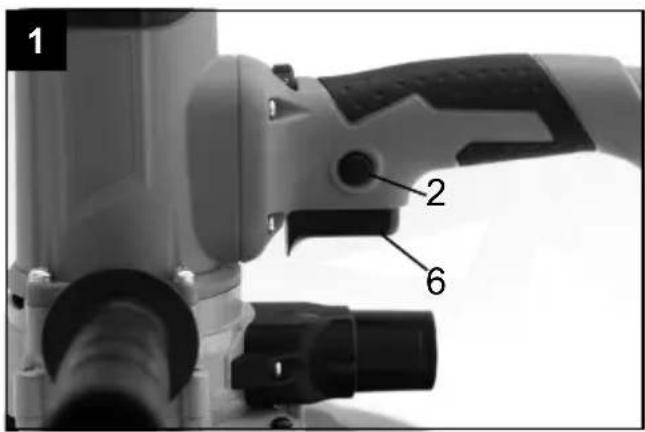
8.9 Switching on/off (fig. 1)
Switching on:
Press the main switch (6).
Continuous operation:
Actuate the main switch (6) and secure it with the locking mechanism (2).
Switching off:
Briefly press the main switch (6) and release it immediately.
Note: The insert tool rotates after it has been switched off. Wait until the tool attachment has come to a standstill before putting the product down.
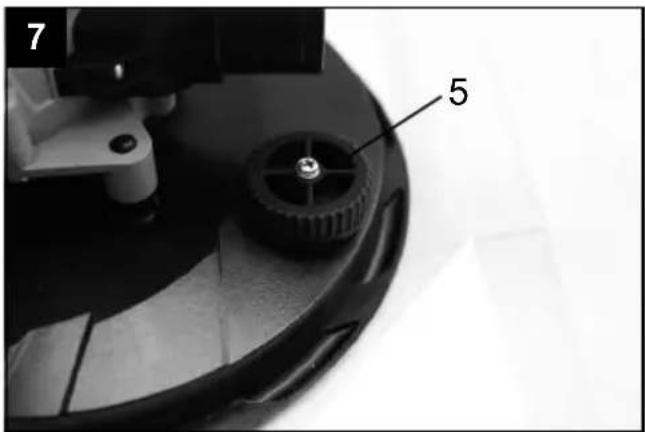
8.10 Adjusting the suction capacity (fig. 7)
- Turn the suction adjustment (5) until the desired suction power is achieved.
8.11 Grinding
-
Attach a suitable sanding paper (9) and select a suitable speed.
-
Hold the product securely by the gripping surfaces (3, 4) and switch it on as described.
-
Wait until the tool attachment has reached its full working speed.
-
Calibrate the suction performance if necessary.
-
Guide the grinding plate (8) as parallel as possible to the wall and place it first on the surface to be worked on.
-
Move the product over the surface with even movements.
Note: Do not hold the product in one place for too long to avoid uneven sanding results.
-
Lift the grinding plate (8) from the surface to be worked on before switching off the product.
-
Wait until the tool attachment has come to a standstill before putting the product down.
8.12. After use
-
Switch off the product as described, disconnect it from the power supply and allow it to cool down.
-
Clean and maintain the product as under point 10 described and then store it carefully.
9. Electrical connection
The electrical motor installed is connected and ready for operation. The connection complies with the applicable VDE and DIN provisions.
The customer's mains connection as well as the extension cable used must also comply with these regulations.
Damaged electrical connection cables
The insulation on electrical connection cables is often damaged.
Causes are:
- Pressure points, where connection cables are passed through windows or doors.
- Kinks where the connection cable has been improperly fastened or routed.
- Places where the connection cables have been cut due to being driven over.
• Insulation damage due to being ripped out of the wall outlet.
- Cracks due to the insulation ageing.
Such damaged electrical connection cables must not be used and are life-threatening due to the insulation damage.
Check the electrical connection cables for damage regularly. Ensure that the connection cables are disconnected from electrical power when checking for damage.
Electrical connection cables must comply with the applicable VDE and DIN provisions. Only use connection cables with designation H05VV-F.
The printing of the type designation on the connection cable is mandatory.
For single-phase AC motors, we recommend a fuse rating of C 16A or K 16A for machines with a high starting current (from 3000 watts)!
Connection type Y
If it is necessary to replace the mains connection cable, this must be done by the manufacturer or their representative to avoid safety hazards.
10. Cleaning, maintenance and storage
⚠ WARNING!
Pull out the mains plug before working on the product itself (e.g. transport, set up, modification, cleaning and maintenance work)!
10.1 Cleaning
- Keep protective devices, ventilation openings and the motor housing as free of dust and dirt as possible.
- Wipe the product clean with a clean cloth or blow it off with compressed air at low pressure.
- Clean the product thoroughly directly after each use.
- Do not use any cleaning products or solvents, as they could attack the plastic parts of the device. Make sure that no water can penetrate the device interior.
10.2 Maintenance
Before and after each use, check the product and accessories (e.g. tool attachments) for wear and damage. If necessary, replace them with new ones as described in this operating manual.
When doing so, observe the technical requirements.
10.2.1 Replacing the grinding plate (Fig. 8.1 - 8.2)
- Remove the sanding paper (9).
- Insert the Allen key (15) into the hexagonal hole in the centre of the grinding plate (8) and turn it clockwise to remove the damaged grinding plate (8).
- Insert the new grinding plate (8) and tighten it again.
10.2.2 Replacing the carbon brushes
The carbon brushes are wear parts that wear out during use. The carbon brushes should therefore be checked regularly. To prevent damage to the circuit, the two carbon brushes must be replaced at the same time.
⚠ WARNING!
The carbon brushes may only be replaced by authorised service personnel.
The device must only be used with both carbon brushes.
10.2.3 Replacing the sanding paper (fig. 3)
⚠ WARNING!
Pull out the mains plug!
-
Set the product down on a level surface.
-
Remove the sanding paper (9) from the grinding plate (8).
- Fit new/different sandpaper (see 8.3).
10.2.4 Replacing the mains connection cable
Have a damaged mains connection cable of the power tool replaced by the manufacturer or its customer service or a similarly qualified person in order to avoid hazards.
⚠ WARNING!
There are no parts which can be maintained by the user within this product. Never open the product! Take it to a qualified specialist for further maintenance work!
10.2.5 Service information
With this product, it is necessary to note that the following parts are subject to natural or usage-related wear, or that the following parts are required as consumables.
Wearing parts*: Carbon brushes, sanding plate, sand-paper
* may not be included in the scope of delivery!
Spare parts and accessories can be obtained from our service centre. To do this, scan the QR code on the cover page.
10.3 Storage
Store the product and its accessories in a dark, dry and frost-free place that is inaccessible to children.
The optimum storage temperature lies between 5 and 30 °C.
Store the product in its original packaging. Cover the product to protect it from dust or moisture. Store the operating manual with the product.
11. Transport
⚠ WARNING!
Pull out the mains plug!
- Always hold the product at its gripping surfaces.
- To avoid transport damages, pack the product or use the original packaging.
- Protect the product from vibrations and shocks, in particular during vehicular transport.
12. Disposal and recycling
Notes for packaging


The packaging materials are recyclable. Please dispose of packaging in an environmentally friendly manner.
Notes on the electrical and electronic equipment act [ElektroG]
![SCHEPPACH DS200 - Notes on the electrical and electronic equipment act [ElektroG] - 1](/content/2026/03/572543/images/3b6ab7b5ca738bd0209774fced5122ce4e3bde41be6e5fff5f73429aa3c5ea6b.jpg)
Waste electrical and electronic equipment does not belong in household waste, but must be collected and disposed of separately!
- Used batteries or rechargeable batteries that are not installed permanently in the old appliance must be removed non-destructively before disposal. Their disposal is regulated by the battery law.
- Owners or users of electrical and electronic devices are legally obliged to return them after use.
- The end user is responsible for deleting their personal data from the old device being disposed of!
- The symbol of the crossed-out dustbin means that waste electrical and electronic equipment must not be disposed of with household waste.
- Waste electrical and electronic equipment can be handed in free of charge at the following places:
- Public disposal or collection points (e.g. municipal works yards) - Points of sale of electrical appliances (stationary and online), provided that dealers are obliged to take them back or offer to do so voluntarily.
- Up to three waste electrical devices per type of device, with an edge length of no more than 25 centimetres, can be returned free of charge to the manufacturer without prior purchase of a new device from the manufacturer or taken to another authorised collection point in your vicinity.
- Further supplementary take-back conditions of the manufacturers and distributors can be obtained from the respective customer service.
- If the manufacturer delivers a new electrical appliance to a private household, the manufacturer can arrange for the free collection of the old electrical appliance upon request from the end user. Please contact the manufacturer's customer service for this.
- These statements only apply to devices installed and sold in the countries of the European Union and which are subject to the European Directive 2012/19/EU. In countries outside the European Union, different regulations may apply to the disposal of waste electrical and electronic equipment.
13. Troubleshooting
The following table shows fault symptoms and describes remedial measures in the event of your machine failing to work properly. If you cannot localise and rectify the problem with this, please contact your service workshop.
| Fault Possible cause Remedy | ||
| Product does not start Power supply | supply interrupted Check power supply by connecting another product | |
| Power cord or plug defective Have an electrician check the tool | ||
| Other electrical defect of the product | Have an electrician check the tool | |
| Product does not operate with full power | Extension cord too long and/or cross-section too small | Use extension cord with permissible length and/or adequate cross-section |
| Power supply (e.g. generator) voltage is too low | Connect product to an appropriate power supply | |
| Poor operation results | Accessory worn out | Have accessory replaced |
| Sanding plate worn out | Have sanding plate replaced | |
| Considerable dust formation | Dust extraction not connected/switched on | Connect / switch on dust extraction |
Günzburger Straße 69
D-89335 Ichenhausen
Cher client,
Günzburger Straße 69
D-89335 Ichenhausen
Egregio cliente,
Günzburger Straße 69
D-89335 Ichenhausen
Geachte klant,
Günzburger Straße 69
Günzburger Straße 69
Günzburger Straße 69
D-89335 Ichenhausen
Vážený zákazníku,
Günzburger Straße 69
D-89335 Ichenhausen
Vážený zákazník,
Günzburger Straße 69
D-89335 Ichenhausen
Tisztelt Ügyfelünk!
Günzburger Straße 69
D-89335 Ichenhausen
Szanowny Kliencie
Günzburger Straße 69
D-89335 Ichenhausen
Poštovani kupci
Želimo vam mnogo zadovoljstva i uspjeha prilikom rada s novim proizvodom.
Napomena:
Prema važećem njemačkom Zakonu o odgovornosti za proizvode, proizvođač ovog proizvoda ne odgovara za štete koje nastanu na ovom proizvodu ili koje ovaj proizvod uzrokuje:
- nestručne obrade
- Nepridržavanje priručnika za uporabu
- Popravcima koje obave neovlašteni stručnjaci
- Montiranje i zamjena neoriginalnih rezervnih dijelova
- nenamjenskom uporabom
- kvarom električnog sustava zbog nepoštivanja električnih propisa i propisa VDE 0100, DIN 57113 / VDE 0113
Günzburger Straße 69
D-89335 Ichenhausen
Spoštovani kupec,
Želimo vam veliko veselja in uspeha pri delu z vašim novim izdelkom.
Napotek:
Proizvajalec tega izdelka skladno z veljavnim zakonom o odgovornosti za izdelke ne jamči za poškodbe na tem izdelku ali poškodbe s tem izdelkom, do katerih pride pri:
Günzburger Straße 69
D-89335 Ichenhausen
Austatud klient!
Günzburger Straße 69
D-89335 Ichenhausen
Gerbiamas kliente,
Günzburger Straße 69
Günzburger Straße 69
D-89335 Ichenhausen
Bästa Kund!
Günzburger Straße 69
D-89335 Ichenhausen
Arvoisa asiakas
Günzburger Straße 69
D-89335 Ichenhausen, Tyskland
Kære kunde
EU Declaration of Conformity
| X 2006/42/EG | |
| Annex IV Notified Body: Notified Body No.: Certificate No.: | |
Standard references:
EN 62841-1:2015/A11:2022; EN IEC 62841-2-3:2021/A11:2021; EN 55014-1:2017/A11:2020; EN IEC 55014-1:2021; EN 55014-2:2015; EN IEC 55014-2:2021; EN IEC 61000-3-2:2019/A1:2021; EN 61000-3-3:2013/A1:2019
This declaration of conformity is issued under the sole responsibility of the manufacturer.
The object of the declaration described above fulfils the regulations of the directive 2011/65/EU of the European Parliament and Council from 8th June 2011, on the restriction of the use of certain hazardous substances in electrical and electronic equipment.
Subject to change without notice
Documents registrar: Ann-Katrin Bloching Günzburger Str. 69, D-89335 Ichenhausen
EU Declaration of Conformity
Standard references:
EN 62841-1:2015/A11:2022; EN IEC 62841-2-3:2021/A11:2021; EN 55014-1:2017/A11:2020; EN IEC 55014-1:2021;
EN 55014-2:2015; EN IEC 55014-2:2021; EN IEC 61000-3-2:2019/A1:2021; EN 61000-3-3:2013/A1:2019
This declaration of conformity is issued under the sole responsibility of the manufacturer.
The object of the declaration described above fulfils the regulations of the directive 2011/65/EU of the European Parliament and Council from 8th June 2011, on the restriction of the use of certain hazardous substances in electrical and electronic equipment.
Subject to change without notice
Documents registrar: Ann-Katrin Bloching
Günzburger Str. 69, D-89335 Ichenhausen
EU Declaration of Conformity
Standard references:
EN 62841-1:2015/A11:2022; EN IEC 62841-2-3:2021/A11:2021; EN 55014-1:2017/A11:2020; EN IEC 55014-1:2021;
EN 55014-2:2015; EN IEC 55014-2:2021; EN IEC 61000-3-2:2019/A1:2021; EN 61000-3-3:2013/A1:2019
This declaration of conformity is issued under the sole responsibility of the manufacturer.
The object of the declaration described above fulfils the regulations of the directive 2011/65/EU of the European Parliament and Council from 8th June 2011, on the restriction of the use of certain hazardous substances in electrical and electronic equipment.
Subject to change without notice
Documents registrar: Ann-Katrin Bloching
Günzburger Str. 69, D-89335 Ichenhausen
Garantie DE
Apparent defects must be notified within 8 days from the receipt of the goods. Otherwise, the buyer's rights of claim due to such defects are invalidated. We guarantee for our machines in case of proper treatment for the time of the statutory warranty period from delivery in such a way that we replace any machine part free of charge which provably becomes unusable due to faulty material or defects of fabrication within such period of time. With respect to parts not manufactured by us we only warrant insofar as we are entitled to warranty claims against the upstream suppliers. The costs for the installation of the new parts shall be borne by the buyer. The cancellation of sale or the reduction of purchase price as well as any other claims for damages shall be excluded.
Garantie FR
Apparent defects must be notified within 8 days from the receipt of the goods. Otherwise, the buyer's rights of claim due to such defects are invalidated. We guarantee for our machines in case of proper treatment for the time of the statutory warranty period from delivery in such a way that we replace any machine part free of charge which provably becomes unusable due to faulty material or defects of fabrication within such period of time. With respect to parts not manufactured by us we only warrant insofar as we are entitled to warranty claims against the upstream suppliers. The costs for the installation of the new parts shall be borne by the buyer. The cancellation of sale or the reduction of purchase price as well as any other claims for damages shall be excluded.
Záruka CZ
Apparent defects must be notified within 8 days from the receipt of the goods. Otherwise, the buyer's rights of claim due to such defects are invalidated. We guarantee for our machines in case of proper treatment for the time of the statutory warranty period from delivery in such a way that we replace any machine part free of charge which provably becomes unusable due to faulty material or defects of fabrication within such period of time. With respect to parts not manufactured by us we only warrant insofar as we are entitled to warranty claims against the upstream suppliers. The costs for the installation of the new parts shall be borne by the buyer. The cancellation of sale or the reduction of purchase price as well as any other claims for damages shall be excluded.