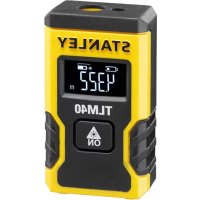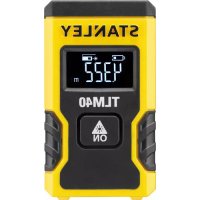
TLM40 - Rangefinder STANLEY - Free user manual and instructions
Find the device manual for free TLM40 STANLEY in PDF.



| Product type | Laser distance meter |
| Brand | Stanley |
| Model | TLM40 |
| Range | 16.5 cm to 12 m (6.5 in to 40 ft) |
| Accuracy | ±6 mm (±1/4 in) in favorable conditions up to 9 m |
| Display resolution | 1 mm (1/16 in) |
| Laser class | Class 2 (IEC/EN60825-1:2014) |
| Laser wavelength | 620-690 nm, ≤ 1.0 mW |
| Power supply | Rechargeable lithium-ion battery via USB cable |
| Charging time | Approximately 2.5 hours |
| Battery life | Up to 3,000 measurements or 30 days in standby |
| Auto power off | After 120 seconds of inactivity |
| Dimensions (H x D x W) | 62 x 17.5 x 32 mm |
| Weight | 31.75 g |
| Protection rating | IP54 (protected against dust and splashes) |
| Operating temperature | 0°C to +40°C |
| Storage temperature | -10°C to +60°C |
| Measurement units | Meters, decimal feet, fractional feet, inches |
| Main functions | Simple distance measurement, continuous unit change |
| Maintenance and cleaning | Clean with a soft, dry cloth. Avoid solvents. |
| Safety | Class 2 laser: do not look directly into the beam. |
| Spare parts and repairability | No user-serviceable parts. Integrated battery non-replaceable. |
| General information | Warranty and recycling: see www.2helpU.com. Do not dispose of in household waste. |
Frequently Asked Questions - TLM40 STANLEY
User questions about TLM40 STANLEY
0 question about this device. Answer the ones you know or ask your own.
Ask a new question about this device
Download the instructions for your Rangefinder in PDF format for free! Find your manual TLM40 - STANLEY and take your electronic device back in hand. On this page are published all the documents necessary for the use of your device. TLM40 by STANLEY.
USER MANUAL TLM40 STANLEY
Please read these instructions before operating the product.
| GB |
| D |
| F |
| I |
| E |
| PT |
| NL |
| DK |
| SE |
| FIN |
| NO |
| PL |
| GR |
| CZ |
| RU |
| HU |
| SK |
| SI |
| BG |
| RO |
| EE |
| LV |
| LT |
| TR |
| HR |
| KO |

Figures


C


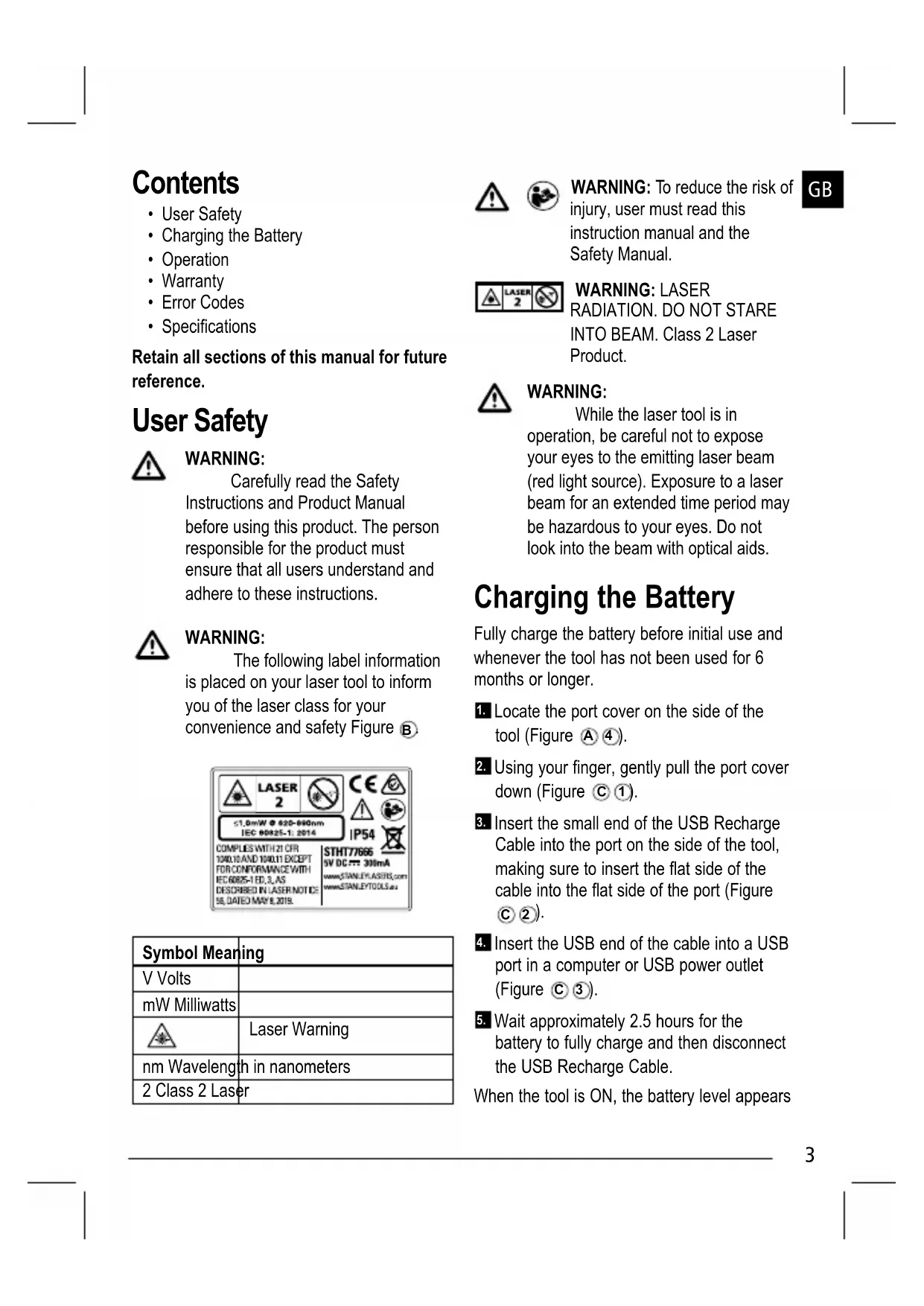
Contents
- User Safety
- Charging the Battery
Operation
Warranty - Error Codes
- Specifications
Retain all sections of this manual for future reference.
User Safety

WARNING:
Carefully read the Safety Instructions and Product Manual before using this product. The person responsible for the product must ensure that all users understand and adhere to these instructions.

WARNING:
The following label information is placed on your laser tool to inform you of the laser class for your convenience and safety Figure B
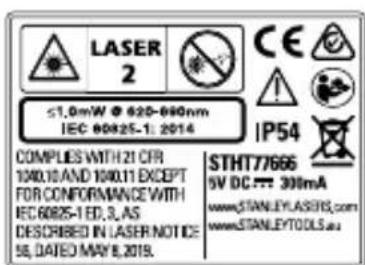
| Symbol Meaning | |
| V Volts | |
| mW Milliwatts | |
| Laser Warning | |
| nm Wavelength in nanometers | |
| 2 Class 2 Laser | |


WARNING: To reduce the risk of injury, user must read this instruction manual and the Safety Manual.
GB
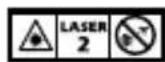
WARNING: LASER
RADIATION. DO NOT STARE INTO BEAM. Class 2 Laser Product.

WARNING:
While the laser tool is in operation, be careful not to expose your eyes to the emitting laser beam (red light source). Exposure to a laser beam for an extended time period may be hazardous to your eyes. Do not look into the beam with optical aids.
Charging the Battery
Fully charge the battery before initial use and whenever the tool has not been used for 6 months or longer.
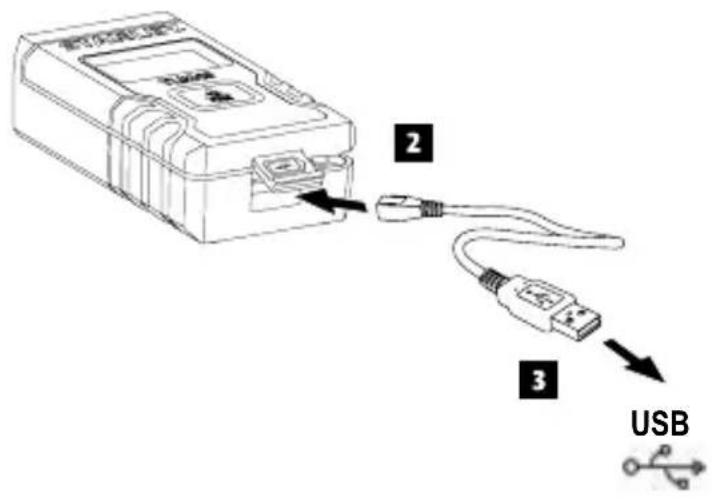
- Locate the port cover on the side of the tool (Figure A4).
- Using your finger, gently pull the port cover down (Figure ①).
- Insert the small end of the USB Recharge Cable into the port on the side of the tool, making sure to insert the flat side of the cable into the flat side of the port (Figure C2).
- Insert the USB end of the cable into a USB port in a computer or USB power outlet (Figure 3).
- Wait approximately 2.5 hours for the battery to fully charge and then disconnect the USB Recharge Cable.
When the tool is ON, the battery level appears
GB
in the display window (Figure D 1).
Operation
- Point the laser at the top of the tool (Figure A 1) toward the wall whose distance you need to measure (Figure E 1).
- Click Figure A3) to turn the tool on and display a laser dot on the wall (Figure E1).
- When the bottom of the tool is positioned at the correct distance from the wall, click to take the measurement (Figure E 2).
- View the measurement on the display window (Figure ①③).
Changing the Unit of Measure
Once the current measurement is taken, you can change the unit of measure from decimal ft (6.21 ft) to fractional ft (6'02"9/16), fractional ft to meters (1.894 m), meters to inches (74 9/16 in), or inches to decimal ft.
To change the unit of measurement, press and hold until you see the measurement change (3 seconds).
NOTE: If you continue to hold after the measurement changes, the tool will turn off.
Re-measuring
When you need to take a new measurement, point the laser toward the wall whose distance you need to measure.
- Click

The previous measurement (Figure D 3) will be cleared from the display window.
will change to in the display window (Figure D 2).
- When the bottom of the tool is positioned at the correct distance from the wall, click to take the measurement (Figure E 2).
Turning Off the Tool
The tool can be turned off in either of these ways:
After taking a measurement, press and hold for 5 seconds (until the display window clears).
If you do not use the tool for 120 seconds, it will automatically turn off.
Warranty
Go to www.2helpU.com for the latest warranty information.
End of Life
DO NOT dispose of this product with household waste.
ALWAYS dispose of batteries per local code.
PLEASE RECYCLE in line with local provisions for the collection and disposal of electrical and electronic waste under the WEEE Directive.
Specifications
GB
| Range 16.5 cm to 12m (6.5in to 40ft) | |
| Measuring Accuracy* Typically ± 6mm (± 1/4in)* | |
| Resolution** 1mm (1/16in)** | |
| Laser Class Class 2 (IEC/EN60825-1: 2014) | |
| Laser Wavelength ≤ 1.0mW @ 620-690nm | |
| Automatic Power Switch-off After 120s | |
| Battery Life Up to 3000 Measurements | or 30 days (if the tool is not used) |
| Dimension (H x D x W) 62 x 17.5 x 32mm (2.44 x .69 x 1.25in) | |
| Weight 31.75g (1.12oz) | |
| IP Rating IP54 | |
| Storage Temperature Range -10°C ~ +60°C (14°F ~ 140°F) | |
| Operating Temperature Range 0°C ~ +40°C (32°F ~ 104°F) | |
| *Measuring Accuracy depends on the current conditions. Under favorable conditions (good target surface, low background illumination, and good room temperature) up to 30ft (10m). The measurement error can increase by up to ± 0.5mm/m for distances over 30ft (10m). **Resolution is the finest measurement you can see. In inches, that is 1/16". In mm, that is 1mm. | |
Inhalt
D
NOTA Se si continua a tenere premuto il pulsante --- ++ -- -- -- -- -- -- -- -- -- -- -- -- -- -- -- -- -- -- -- -- -- -- -- -- -- -- -- -- -- -- -- -- -- -- -- -- -- -- -- -- -- -- -- -- -- -- -- -- -- -- -- -- -- -- -- -- -- -- -- -- -- -- -- -- -- -- -- -- -- -- -- -- -- -- -- -- -- -- -- - - - - - - - - - - - - - - - - - - - - - - - - - - - - - - - - - - - - - - - - - - - - - - - - - - - - - - - - - - - - - - - - - - - - - - - - - - - - - - - - - - - - - - - - - - - - - - - - - - - - - -- --- --- --- --- --- --- --- --- --- --- --- --- --- --- --- --- --- --- --- --- --- --- --- --- --- --- --- --- --- --- --- --- --- --- --- --- --- --- --- --- --- --- --- --- --- --- --- --- --- --- --- --- --- --- --- --- --- --- --- --- --- --- --- --- --- --- --- --- --- --- --- --- --- --- --- --- --- --- --- --- --- --- --- --- - 0 - 1 - 2 - 3 - 4 - 5 - 6 - 7 - 8 - 9 - 10 - 11 - 12 - 13 - 14 - 15 - 16 - 17 - 18 - 19 - 20 - 21 - 22 - 23 - 24 - 25 - 26 - 27 - 28 - 29 - 30 - 31 - 32 - 33 - 34 - 35 - 36 - 37 - 38 - 39 - 40 - 41 - 42 - 43 - 44 - 45 - 46 - 47 - 48 - 49 - 50 - 51 - 52 - 53 - 54 - 55 - 56 - 57 - 58 - 59 - 60 - 61 - 62 - 63 - 64 - 65 - 66 - 67 - 68 - 69 - 70 - 71 - 72 - 73 - 74 - 75 - 76 - 77 - 78 - 79 - 80 - 81 - 82 - 83 - 84 - 85 - 86 - 87 - 88 - 89 - 90 - 91 - 92 - 93 - 94 - 95 - 96
Nuova misurazione
OCTOPOXHO! Ia3EPHOE H3IyueHHe. HE HAPABJIaTb Iyu B Ila3A. Ia3epHoe u3eJue knacc2.

OCTOPOXHO:
BoBpem3KcNpyatauyn yCTpoIcTBaCo6nIouaTeOC6bUO OCToPoxHocTb,yTO6blnyJNa3epa He IOnanBrrna3a(NCTOCHNK KpacHO CBeta).Bo3dEINCTBneJNa3epHoro N3NyueHnB TeueHnE DInTeJIbHOrO cPOKa MoKeT CTaTB npuHHoH yXuDHeHn3peHn. He CMOptTe nprMo BnnH3y Lyua npn NOMOuONPTUeCKNX CpeDCTB.
3apяdka 6aTapei
IoiHocTbIO 3apAInTe aKKymyIaTOphHyO 6aTaapeIO neped nepBbIM nCNoIb3OBaHNEm, a TAKKe B CJIyuaX, KOrda INHCTpyMeHT He nCNoIb3yETcR B TeueHne 6 MecaeB IIN 6oJee.
HaHnTe KpbIuKy nopTa Ha 6oKOBoYacTn HnCTpyMeHTa (PncyHOK A 4).
2.ПальемocToPOxHOOTKpoIe KpbIuKy npTa(PucyHOK①).
3. BCTaBbTe 3apAHyI USB-Ka6eIb B nOpT Ha 60KoBOu qactn IHCTpyMeHTa, npocJIeINB 3a TeM, yTo6bl IIOCKa c TcPOHa Ka6eJl 6bla COBMeUeHa c IIOCKoI CTOPOHOI NopTa (PucyHOK C2).
4. BcTaBbTe USB ka6eIb B pa3bEm USB KOMnIbItepa IINI 6NOK NITaHnIe USB (PncyHok C 3).
5. Побождente пибпиЗИтELьНо 2,5 уас,TO6blakKуMЛЯТOPнЯ 6bTaperNoIHOCTbIO 3apRdINaCb, 3aTeM OTKJIIOUHTe3apRdHbI Ka6eNB USB.
Pn BKNHHeHOM HNCTpyMeHTe Ha DnCnnee OTo6paXaEtc yPoBeHb 3apJa (pnc. D ①).
3KcPnyataun
- HanpaBbTe na3ep B BepxHei qactn HhctpyMeHTa (PncyHOK A ①) Ha CTeHy dIЯ BblOnHeHn I3MepeHn (PncyHOK E ①).
2.HaKMnTe PcyHOK A3),YTO6bl BKJIOHTb INCTpyMeHT N CnpoeKtnpOBaTb Na3epHyIO TOky Ha CTeHy (PcyHOK E1). - Korda HIXKHAqTB INHCTpyMeHTa 6ydet pa3MeueHa Ha npaBnIbHOM ydaJIeHNOT CTehbl, HAXMNTe ,YTObI N3MEpITb pacCTOJHHe (PcCyHOK E ②).
4.CuNTaIte n3MepeHne c dncnpe (PcCyHOK E ②).
N3MeHeHne eDnHnU N3MepeHnA
Iocne BbINOHeHnna H3MepeHnBa MoKeTe
H3MeHntb eHNuCbI H3MepeHnC DeCraTnHbIX
fYTOB (6,21 fYTa) Ha Ipo6HbIe (6'02"9/16), c
3Mnnpuecknx fYTOB Ha MeTpnuCeckNe MeTpbl
(1,894 M), C MetPOB Ha IIOHMbl
(74 9/16 IIOMa), INN C IIOMOB Ha
DeCraTnHbIe fYtbl.
ДяиИЗмeнeня eДИнuц ИЗмeрeня HaxmITE n ydepxnBaITe Do Tex nop, nOKa He npO3oNdetИЗмeнeHne (4 cekyHdbl).
PIMMEUAHNE: Pn daJIbHeIWeM ydepxaHnN NOcNe I3MeHEnIeEINHnI U3MepeHn INCTpyMeENT BbIKJIOHTcR.
Повторhoe Измеренье
HCTpyMeHT MOxHO BbIKIIOUHTb DByMcNoCobAM:
- BыллнИВ n3mepeHne, naxMITE n ydepxnBaIte B TeueHne 6 cekyHd (noka n3mepeHne He 6ydt y6paHo c ekpana).
- Ecnn INHCTpyMeHT He NcNoIb3OBaTbdoJIbWe 120 cekyHd, OH aBtOMaTnuecknOTKIIIOuHaETcra.
TapaHTnA
IocTeTne www.2helpU.com 3a HOBeiueH INΦopMaçnei O rapaHTnIX.
Konec cpoka cnjx6bl
HE yTnIIN3npyIe 3OT npOdyKT BmecTe
C6bITOBBIMNOTXODAMN.
OB3ATEBHOyTINHnHyTe
6aTapeB COOTBETCTBIM C MeCTHbIM
3aKoHOJaTeJIbCTBOM.
NOKAJNYUCTA, BbINOHJYTE
YTNJIN3AUHIO B COOTBETCTBUN C MECTHBIMN
noJoxeHnMaOc6opeu yTuJIn3aU
3JIeKTPnuecknx IN 3JIeKtpoHHbIX OTXoIOB
corlaecho dnpektnbe WEEE.
XapnFepokKAKN
NPEDYNPEXDEHNE:JA3EPHA
PAINALI. HE TLEDAITE HAPABOB JbYA.Klac 2 naapehen npodykm.

PENEYNPEXKDEHNE:
IokaTo Ia3epHnT INCTpyMeHT e B EKCnIIOaTaun, da Ce BHMaBa Da He ce N3Iarat OUnTe Ha N3JIbYBaHeTo Ha Ia3epHnra JbU (YepeBc HCBETNIHEn N3TOuHnK). N3IparAHeTo Ha Ia3epen JbU 3a IpOdbJXInTeJeNepNoD OT Bpeme MoKe Da 6bJe OnaCHO 3a OUnTe BN. He rpeJaTe B Jbua
C ONTNUHn CpeIcTBa.
3apekdahe Ha 6aTepeyTa
3apeTe Hnblno 6aTepeTaNpei NpBbTa yNtpe6a, INKorato INHCTpyMeHTbT He ce n3PON3Ba 3a 6 Meceua nn nobuee.
- HamepeTe kanaka Ha nopTa oTcpaHnHa nHCTpyMeHTa (Furpa A 4).
2 KaTo H3NoI3BaTe npbCTa CN, HeXHo 13dbpnaTe HaOny KanaKa Ha nopTa (Hrypa C ①). - BkapaTe MaKnI KpaI Ha USB Ka6eNa 3a Ipe3apexKaIe H nopTa OTCTpaHn Ha IHCTpyMeHTa, KaTO BHIMaBaTe Da BkapaTe NIOCKaTa CTPaHa Ha Ka6eNa B NIOCKaTa CTPaHa Ha nopTa (ФИгура C ②).
- BkapaTe USB kpaHa Ka6eHa USB npTa Ha KOMnIOTpB pIIN USB KOHTaKT 3a 3apeXdaHe c TOK (Φnrypa C 3).
5.ИЗчakайтприблнзитello 2,5 уа ca,3a da може 6ateрята дa ce habлнд Края,и сеД това ИЗвадete USB kaобena 3a 3apeждаhe.
Korato INHCTpyMeHTbT e BKJIIOUeH, HNBOTo Ha 3apJn Ha 6aTePnTa ce NOBRAHa DnCnpey (FInrypa D1).
Pa6ota
- Hacouete Na3epa B rophata yact Ha
HnCTpyMeHTa (ФИгура A ①) KbM CTeHaTa,
YHeTo pa3CTOJHne XeJaTe Da N3MepuTe
(ФИгура E ①).
2.ⅢpaKHeTe Ha (ФИгура A 3a Да ВКПЮчИte ИНСТPyмЕпА И HAcOчЕт ЛаЗерHaTa TОчka КБМ CTeHаТа (ФИгура E ①). - Korato DoJIHaTa YacT Ha INHcTpymeHTa eNo3nOHHpaHa Ha npaBnIHOTO
pa3CTOJHHe OT CTeHaTa, KInKHeTe Da n3MePnTe (Furpa E 2).

3a
4.ПерлесадаTeи3МерВанЯТаHaДИСппя(ФИгураD③)
CmHa Ha MepHa eHnHa
BéndbIX, cIeI KaTo TeKyuIte pa3Mepn ca B3eTn, MoKeTe Da npOMeHIne MePHaTa eINHua OT DecetNCHyHTa (6,21 CyHTa) Ha YactuHn CyHTa (6'02"9/16), YactuHn CyHTa Ha MeTpN (1 894 M), MeTpN Ha INHObE (74 9/16 INHua), INI INHObE Ha DecetNCHyHTOBe.
3a da npomeHnte MepHaTa eINHnua, HaTNCHeTe 3aDpbXTe, DOkATO BnNTe npomHaTHa MePa Ta eINHnua (4 cekyHn).
3A6EJIEXKKA:Ako npoIbJnxTe da 3aIbpxkaTe ,CneI KaTO MepHaTa eINHnca ce npomEni, INCTpyMeHTbT ue Ce n3KJIIOUH.
Повторно ИЗМерванe
Ako Tpra6Ba Da B3eMeTe HOBn pa3Mepn, KNIKKHeTe
- PpeHnHOTo n3MepBaHe (Φnrgpa ②) ue ce n3Tpne ot dncnpe.
Korato CTe roTOBn Da B3eMeTe HOBNTe aKtyaHn pa3Mepn,KnKHeTe
ИЗКПЮУВане на ИНСТРУМЕNTA
HCTpyMeHTbT MoKe Da 6bJe N3KIOUeH No eINH OT CNeHNTe HaHH:
CneI KaTo HnPaBnTe N3MePbAHnTa, HATNCHeTn 3aApbXte 3a6ceKHyDn (DOkato DnCnPeT Ce n3uNCTn).
Ako He n3noJ3BaTe HNCTpyMeHTa B npOdbJIkeHne Ha 120 cekyHn, Toi ue ce N3KIIouH aBTOMaTNoHO.
TapaHcH
OTnTe Ha www.2helpU.com 3a HauakTyaHnHaTnHOpMaun 3a rapaunnte.
KpaHnnoJe3HnJXNBOT
HE n3xBbPnIe TO3n npOdyKT C 6ntOBnTe OTnAdbU.
BnHAn n3XbPnIe 6aTeepnIte cnopeMecTHnTe pa3npoe6n.
MOJI,PEUKNIPAITE BCbOTBETCTBHe C MeCTHnTe pa3nope6n 3a cb6npaHe I oBe3BpeKdaHe Ha eJekTpueckn I eJekTPOHHN OTnaIbCn CnopeD INpeKTNBaTa 3a N3XBpIaHe Ha eJekTpuecko I eJekTPOHO O6OpyDbAHe WEEE.

BG
CpeunΦkaun
| Оьхват 16,5cm до 12m (6,5in до 40ft) | |
| Точность на язмервае *标明ковETOю ± 6 MM (± 1/4 Инчa)* | |
| Разденилha способrost** 1 MM (1/16) | инчa)** |
| Клас на язера Клас 2 (IEC/EN60825-1: 2014) | |
| Дължина на язэрна вълha ≤ 1,0 MB | @ 620-690 Нм |
| АВТOMATИЧNO язк nullовае на зхраимbaNETO | Сразд 120 сек. |
| ЖИВOT на язэрны До 3000 язэрваня илл 30 дни (akо injструмента не в уnotреба) | |
| Размери (В x Д x Ш) 62 x 17,5 x 32 MM | 2,44 x 0,69 x 1,25 Инчa) |
| Тergл 31,75g (1,12oz) | |
| IP homina STOй�ст IP54 | |
| Tempepatура на сьхсане -10° C ~ +60 C (14° F ~ 140° F) | |
| Диапазон на работнata temпература | 0° C ~ +40° C (32° F ~ 104° F) |
| *TOUCHТА рprи язмервае заиси OTTekуцITE усlogья. Рри标明огригэн усlogья (добра целев поьхост и Tempepatура в помшениeto) до 9 M (30 Фунта). **Рazденилha способrost e най-дбpoTo Izhмервае, koeto можete на Вдитe. В Ичове,_TOBa e 1/16". B ММ,_TOBa e 1 MM. | |
Cuprins
© 2020 Stanley Tools
Stanley Europe, Egide Walschaertsstraat 14-16, 2800 Mechelen, Belgium
224160
December 2020