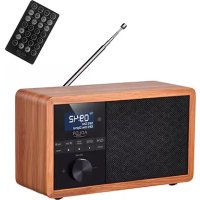
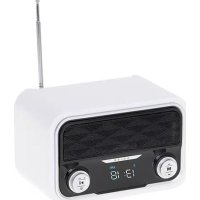
USER MANUAL AD 1184 ADLER
SAFETY CONDITIONS IMPORTANT SAFETY INSTRUCTIONS PLEASE READ CAREFULLY AND KEEP FOR FUTURE USE
The warranty conditions vary when the device is used for commercial purposes.
- Before using the product, please read carefully and always follow the instructions below. The manufacturer is not liable for any damage resulting from improper use.
- The product may only be used indoors. Do not use the product for purposes inconsistent with its intended use.
- The device should only be connected to a power socket with a voltage of 220-240V \~ 50 / 60Hz. In order to increase the safety of use, many electrical devices should not be connected to one electric circuit simultaneously.
4 .. Do not let children play with the product. Do not allow children or people unfamiliar with the device to use it unsupervised.
5.WARNING: This device may be used by children over 8 years of age and people with reduced physical, sensory or mental abilities, or people with no experience or knowledge of the device, only under the supervision of a person responsible for their safety or if they have been instructed on safe use device and are aware of the dangers of operating it. Children should not play with the device. Children should not clean and maintain the device unless they are 8 years old and the activities are performed under supervision.
-
After you finish using the product, always be sure to gently pull the plug out of the outlet while holding the outlet with your hand. Never pull on the power cord !!!
-
Never put the power cord, plug or the entire device into water. Never expose the product to weather conditions such as direct sunlight, rain, etc. Never use the product in a wet room.
-
Periodically check the condition of the power cord. If the power cord is damaged, take the product to a professional service center for replacement to avoid hazardous situations.
-
Never use the product if the power cord is damaged or if it has been dropped or damaged in any way or if it does not function properly. Do not try to repair a damaged product yourself as this may result in electric shock. A damaged device should always be taken to a professional service center for repair. Any repairs may only be performed by authorized service technicians. Incorrectly performed repairs may cause dangerous situations for the user.
-
Never place the product on hot or warm surfaces or kitchen appliances such as an electric oven or gas burner.
-
Never use the product near flammable materials.
-
Do not let the cord hang over a worktop or touch a hot surface.
-
Never leave the product connected to the power supply unattended. Even if use is interrupted for a short time, disconnect it from the mains, disconnect the power supply.
-
For additional protection, it is recommended to install a residual current device (RCD) with a rated residual current not exceeding 30 mA in the supply circuit. Please contact a professional electrician in this regard.
-
Avoid getting the device wet.
- The device may only be wiped with a dry cloth. Do not use water or cleaning fluids.
- The device should be stored in a dry room.
Device Description:
Front (A):
- Power / Play / Pause 2. Info Menu 3. Scan Select
- Tune Previous 5. Tune Next
- Source 7,8,9. Favorite Station number 1,2,3 10. Preset
Back (B):
- Antenna 13. Headphones jack 14. USB slot 15. ON / Off Switch 16. Power Input 17. Sd card slot
Remote ©:
- Short press the standby button: enter function mode/standby
- DAB/FM mode: short press to search for radio stations
- CLOCK setting key: short press to enter the clock setting interface
- ALARM key: short press--enter the alarm setting state
- MENU Key: short press to enter the menu settings
- INFO button: short press to display various information
- NUMBER Keys: Combine numbers 0-9 keys to select radio station or song number
- Previous IN:
DAB mode: short press— select previous station
Press and hold--to move backwards quickly
FM mode: short press-- fine-tuning backwards
Press and hold-- automatic search backwards
Menu mode: short press--move backwards
- MUTE button: Speaker Mute/Unmute
- MODE button: select DAB/FM/BT/USB or TF / SD mode
- In all modes, short press to set SLEEP Function: OFF/15/30/45/60/75/90/120 minutes
- SNOOZE button: When the alarm sounds, short press to enter the snooze function.
In the snooze function, short press to select different snooze time
- ENTER Key
DAB and FM mode: OK function
BT mode: play/pause function
In menu mode: confirm current selection
- BACK Key: Short press to return back one stage
- BRIGHTNESS Key: LCD brightness adjustment key. Short press to select between 3 levels of brightness
- VOL + Key: Increase the VOLUME
- VOL - Key: Decrease the VOLUME
- PRESET Key
- SKIP+ Key
Power Supply:
Use supplied AC adaptor (5V/1.2A) to connect the device AD 1184 with electrical socket to supply power.
Power ON/OFF
Move the Power switch (on back side) to ON / OFF side (B15) to power on / off the device.
Long press On / Off (A1) button to enter / exit standby mode.
DAB/DAB+ Radio
- Press SOURCE (A6) button to switch to DAB mode. Long press SELECT / SCAN (A3) button to start automatic searching.
2, Press TUN (A5) (A4) button to select available DAB radio stations, then press SELECT/SCAN (A3)(A3) button to play.
3, Long press PRESET (A10) button to PRESET current DAB/DAB+ radio station as your favorite radio, press TUN (A5) (A4) button to select the DAB/DAB+ radio channel list number you want and press SELECT / SCAN (A3) button to confirm。
4, Short press PRESET (A10) button to go to your favorite DAB/DAB+ radio stations list. press TUN (A5) (A4) button to select the DAB stations, and press SELECT/SCAN (A3) button to play.
5, Long press shortcut key 1/2/3 (A7, A8, A9) to PRESET (A10) current DAB/DAB+ radio station to favorite list 1/2/3 (A7, A8, A9); Short press shortcut key 1/2/3 (A7, A8, A9) to play stored favorite DAB station 1/2/3 (A7, A8, A9) directly.
FM Radio
1, Press SOURCE (A6) button to switch to FM mode. Long press SELECT/SCAN (A3) button to start automatic searching.
The FM channels will be stored after automatic searching. If no stations were found, extend the antenna (B12).
-
Press PRESET (A10) button to go to the stored Radio station list, then press TUN (A5) (A4) button to select your desired station and press SELECT/SCAN (A3) button to play.
-
Long press PRESET (A10) button to PRESET (A10) current radio station to the stored radio station list, press TUN (A5) (A4) button to select the list number you want to PRESET (A10), then press SELECT/SCAN (A3) button to confirm.
5, Short press TUN (A5) (A4) button to adjust radio frequency 0.05MHz each time. Long press TUN (A5) (A4) button to automatic searching next/previous radio station.
6, Long press shortcut key 1/2/3 (A7, A8, A9) to PRESET (A10) current FM radio station to favorite list 1/2/3 (A7, A8, A9); Short press shortcut key 1/2/3 (A7, A8, A9) to play stored favorite FM station 1/2/3 (A7, A8, A9) directly.
Bluetooth music play
1, Press SOURCE (A6) button to switch to BT mode.
2, Use your Bluetooth transmitting device, turn on the Bluetooth function, search for "AD 1184" and click it to connect.
3, Once connect successfully, it will show "BT Connected" on display. Then play music from your device.
- Press SELECT/SCAN (A3) button to play or pause the music. Press TUN (A5) (A4) button to go previous or next songs.
5, Turn VOLUME (A11) knob to adjust the VOLUME.
USB / micro SD music play
1, Insert USB flash drive/micro SD card, then press SOURCE (A6) button to switch to USB/SD mode to play music from USB/ micro SD. (Largest capacity of USB/ micro SD the device can support: 32GB).
2, Turn VOLUME (A11) knob to adjust the VOLUME.
3, Press TUN (A5) (A4) button to go previous or next songs..
4, Press SELECT/SCAN (A3) button to play or pause the music.
Time / Date Setting
A- If DAB available, under DAB mode, the device will automatically synchronize the local time.
B- Manual clock setting :
-
Long press Info / Menu (A2) button to enter Menu, press TUN (A5) (A4) button to select System submenu. Press SELECT/SCAN (A3) button to enter System submenu
-
Press SELECT/SCAN (A3) button to select and enter Time/Date setting: Date - Month - Year- Hour - Minute (press TUN (A5) (A4) button to adjust the numbers, press SELECT/SCAN (A3) button to confirm and go to next.)
3, After setting, it will return to Time and date menu automatically. Press Info / Menu (A2) to return.
Alarm clock Setting
This device can set 2 sets of alarms, operation as below:
- Long press Info / Menu (A2) button to enter Menu, press TUN (A5) (A4) button to select System submenu.
Press SELECT/SCAN (A3) button enter System submenu, press TUN (A5) (A4) button to select Alarms submenu
Press SELECT/SCAN (A3) button again to enter Alarms setting, and press TUN (A5) (A4) button to select Alarm1 / Alarm2:
2, Press SELECT/SCAN (A3) button to enter Alarm setting: ON/OFF - Alarm time - Alarm SOURCE (A6) - Repeat -
Alarm VOLUME (A11) - Alarm duration. (Press TUN (A5) button to select, press SELECT/SCAN (A3) to confirm and go to next.)
Alarm SOURCE (A6): Buzzer / FM / DAB
Repeat: Once / Daily / Weekends / Weekday
Alarm duration: 15 Minutes / 30 Minutes / .... / 2 Hours
3, After alarm setting, it will exit Menu setting automatically.
- When the alarm clock rings, press any other button (except VOLUME (A11) button) to activate snooze function. After 5 min, the alarm clock will go off again.
5, Press VOLUME (A11) button to shut down the Alarm clock.
Sleep Timer
- Long press Info / Menu (A2) button to enter Menu, press TUN (A5) (A4) button to select System submenu. Press SELECT/SCAN (A3) button enter System submenu, press TUN (A5) (A4) button to select Sleep submenu. Press SELECT/SCAN (A3) button to enter Sleep Timer setting.
2, Press TUN (A5) (A4) button to select Sleep OFF/ Sleep 15 minutes / ... / Sleep 1 Hour 30 minutes.
- "Sleep 15 minutes": Device automatically goes into standby mode after 15 minutes
- "Sleep 30 minutes": Device automatically goes into standby mode after 15 minutes.
- "Sleep 1 Hour 30 minutes": Device automatically goes into standby mode after 90 minutes.
- "OFF": Sleep timer function turned off.
3, Press SELECT/SCAN (A3) button to confirm sleep timer setting.
Technical Data:
Input voltage: 220-240V \~ 50/60Hz
Output Voltage: DC 5V -- 1.2A
DAB: 174 -240 MHZ
To protect your environment: please separate carton boxes and plastic bags and dispose them in corresponding waste bins. Used appliance should be delivered to the dedicated collecting points due to hazarsous components, which may effect the environment. Do not dispose this appliance in the common waste bin.
DEUTSCH
Afstandsbediening (C):
Alarm SOURCE (A6) : Buzzer / FM / DAB
5, Drej VOLUME (A11) -knappen for at justere VOLUME.
7: Average active efficiency
8:Efficiency at low load (10 %)
9: No-load power consumption
1: Modellkennung
2: Eingangsspannung
1: identificator model