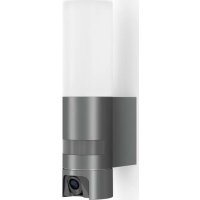
L 600 CAM S - Lighting STEINEL - Free user manual and instructions
Find the device manual for free L 600 CAM S STEINEL in PDF.


| Product type | Outdoor light fixture with integrated camera and intercom |
| Brand | Steinel |
| Model | L 600 CAM S |
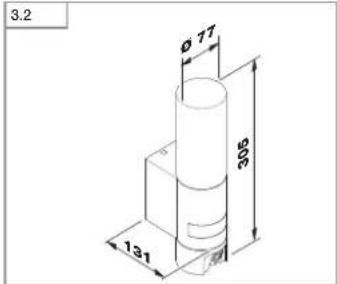
| Dimensions (H × W × D) | 305 × 78 × 131 mm |
| Weight | Approximately 0.8 kg (estimated) |
| Power supply | 220-240 V, 50/60 Hz |
| Power | 14.3 W |
| Luminous flux | 781 lm |
| Color temperature | 3000 K (warm white) |
| Color rendering index (CRI) | ≥ 80 |
| Light source lifetime | 50,000 hours (L70B10 per LM80) |
| Detection technology | Passive infrared detector (PIR) |
| Detection angle | 180° with 45° angular opening |
| Detector range | 10 m tangential |
| Settings | Trigger threshold (10-10,000 lux), timer (1/3/10/15 min), marking light (0-40%) |
| Camera | Resolution 1280×720 px, opening angle 110° H / 90° V, anti-glare protection |
| Recording | On memory card (up to 32 GB, 8 GB card included) |
| Connectivity | WiFi 2.4 GHz, smartphone app (iOS/Android) |
| Protection rating | IP44 |
| Electrical class | I |
| Operating temperature range | -10 °C to +40 °C |
| Recommended installation height | 1.8 to 2 m |
| Package contents | Light fixture with camera, wall bracket, 4 screws, 4 wall plugs, reset key, Torx key, 8 GB memory card |
| Maintenance and cleaning | Clean the lenses with a damp cloth, without detergent |
| Safety | Cut off power before any intervention; installation in accordance with NF C-15100 standard |
| Warranty | 36 months, repair or replacement of defective parts |
Frequently Asked Questions - L 600 CAM S STEINEL
User questions about L 600 CAM S STEINEL
0 question about this device. Answer the ones you know or ask your own.
Ask a new question about this device
Download the instructions for your Lighting in PDF format for free! Find your manual L 600 CAM S - STEINEL and take your electronic device back in hand. On this page are published all the documents necessary for the use of your device. L 600 CAM S by STEINEL.
USER MANUAL L 600 CAM S STEINEL
The mobile terminal device must be connected with the chosen Wi-Fi.
The devices must be able to communicate with each other.
-Connection with a guest access is not possible.
-Access from unknown devices must be permitted.
-Connection is only possible with a 2.4-GHz band. With Dual-WLAN,
the 5-GHz band must be deactivated for the period of initial connection.
3. Connection
- Switch on mains power for the camera light. The camera light beeps every 4 seconds.
- Open app.
3.1
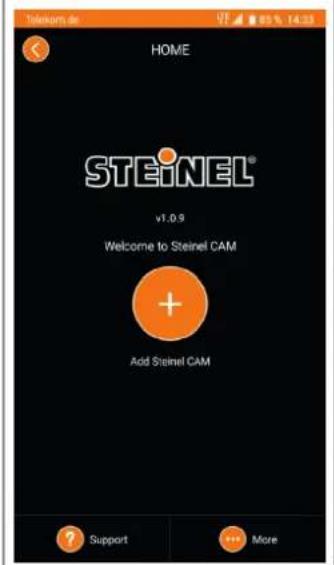
- Press "+ " on the home page.
3.2
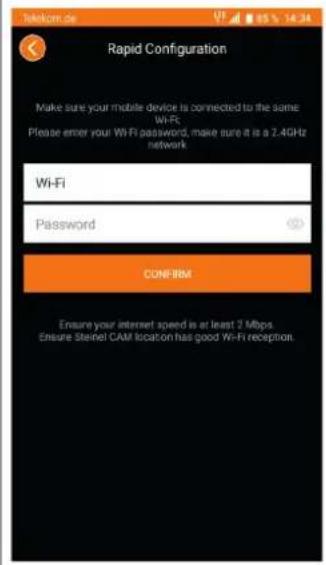
- Enter Wi-Fi network key and
confirm.
Note: the current Wi-Fi (SSID) is
completed automatically.
- The camera light now beeps faster.
- The camera light stops beeping once it has been successfully connected.
- A password must be created for accessing the camera light.
Technical customer service
Phone: +49 5245 448 188
Intelligent technology
Information
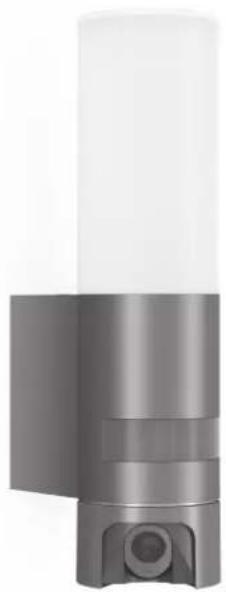
L 600 CAM

GB....13 Follow written instructions!
RU. .158 Co6nIOaTb TeKCTOBNo INHTyKuNOI
BG...165 PpoHcTeE HcHcTpKuHnT!
CN.172 遵守文字说明要求!
DE
Please read carefully and keep in a safe place.
Under copyright. Reproduction either in whole or in part only with our consent.
- Subject to change in the interest of technical progress.
Symbols

Hazard warning!

Reference to other information in the document.
2. General safety precautions

Disconnect the power supply before performing any work on the unit.
- During installation, the electric power cable being connected must not be live. Therefore, switch off the power first and use a voltage tester to make sure the wiring is off-circuit.
- Installing the camera light involves work on the mains voltage supply. This work must therefore be carried out professionally in accordance with national wiring regulations and electrical operating conditions. (e.g. DE-VDE 0100, AT-OVE/ONORM E8001-1, CH-SEV 1000)
Only use genuine replacement parts. - Repairs may only be made by specialist workshops.
3. L600 CAM
Proper use
- Sensor-switched light with integrated camera and intercom system for installing on outdoor walls
The L 600 CAM features a camera with memory card and intercom system. Both functions can also be controlled via an app.
A passive motion detector is integrated in the L 600 CAM. The integrated high-performance infrared sensor detects the invisible heat radiated from moving objects (people, animals, etc.). The heat detected in this way is converted electronically into a signal that switches the light ON automatically. Heat is not detected through obstacles, such as walls or panes of glass. Heat radiation of this type will, therefore, not trigger the sensor.
Important:
The most reliable way of detecting motion is to install the camera light with the sensor aimed across the direction in which a person would walk and by ensuring that no obstacles (such as trees and walls, for example) obstruct the line of sensor vision. Reach is limited when walking directly towards the light.
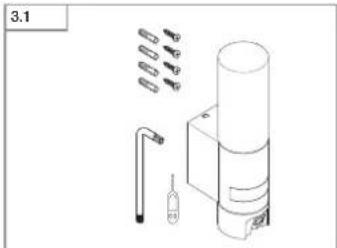
Package contents (Fig. 3.1)
- Camera light
Four screws - Four wall plugs
-Resetkey - Torx spanner
Product dimensions (Fig. 3.2)
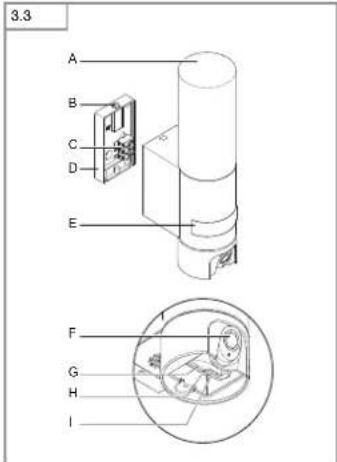
Product components (Fig. 3.3)
A Camera light
B Lock
C Connecting terminal
D Wall mount
E Sensor unit
E. Camera
G Reset button
H Status LED
Slot for memory card
4. Electrical connection
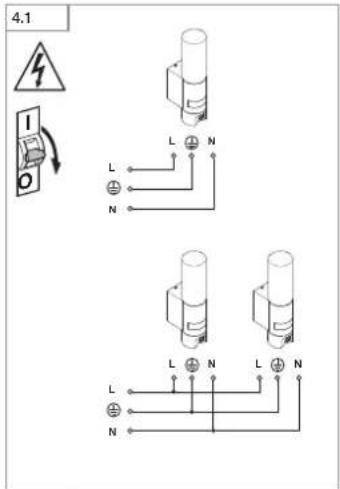
- Switch OFF power supply (Fig. 4.1)
Wiring diagram (Fig. 4.1)
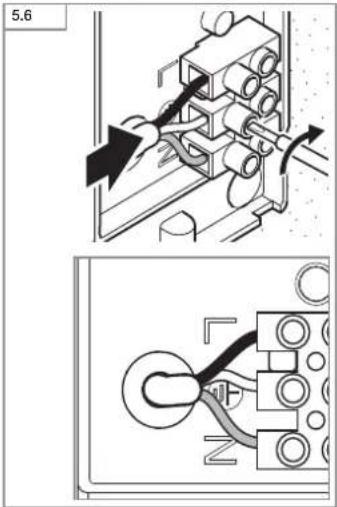
The supply lead consist of three wires:
L = phase conductor (usually black, brown or grey)
N = Neutral conductor (usually blue)
protective-earth conductor (green/yellow)
If you are in any doubt, identify the conductors using a voltage tester; then disconnect from the power supply again. Connect phase, neutral and protective-earth conductor to the terminal.
Important: Incorrectly wired connections will produce a short circuit later on in the product or your fuse box. In this case, you must identify the individual conductors once again and reconnect them. A mains power switch for turning the unit ON and OFF may of course be installed in the mains supply lead. The light source of this luminaire cannot be changed. If the light source needs to be replaced (e.g. at the end of its service life), the complete luminaire must be replaced.
Connection to a dimmer will result in damage to the camera light.
5. Mounting
- Check all components for damage.
Do not use the product if it is damaged. - When installing the camera light, make sure the installation site is not exposed to vibration.
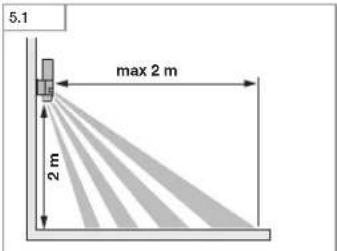
- Select an appropriate mounting location, taking the reach and motion detection into consideration. (Fig. 5.1)
- Select an appropriate mounting location, taking the WLAN speed into consideration. A minimum of 2 Mbps must be available for operation.
Mounting procedure
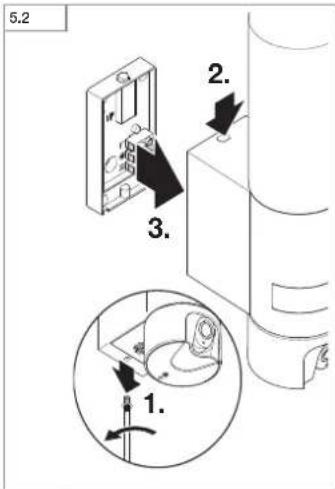
- Undo retaining screw, detach camera light from wall mount. To do this, press lock (Fig. 5.2)
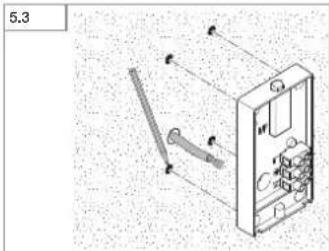
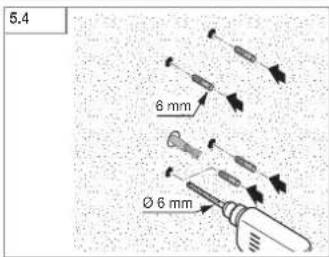
Mark drill holes (Fig. 5.3) - Drill holes and insert wall plugs (Fig. 5.4)
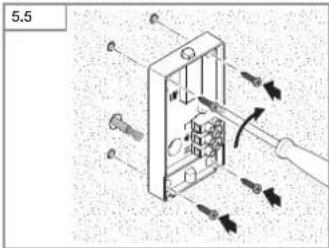
- Screw down wall mount (Fig. 5.5)
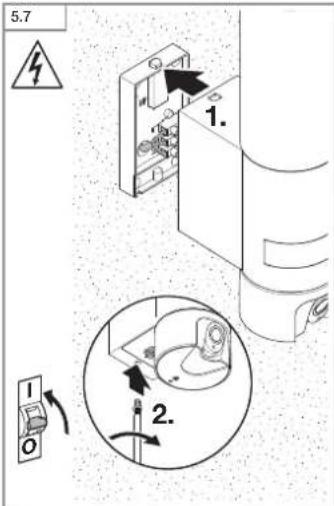
Connect conductors (Fig. 5.6) - Fit camera light on wall mount and tighten retaining screw (Fig. 5.7)
- Switch ON power supply (Fig. 5.7)
- Make settings "6. Function"
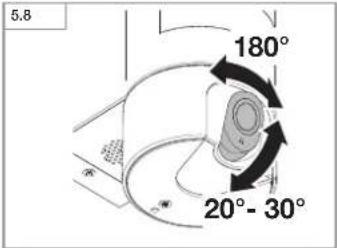
The camera can be aligned by hand. (Fig. 5.8)
6. Function
Factory settings
Twilight level: 10,000 lux
Time setting: 1 minute
Night light: 40%
Android

iOS
Note:
The camera light needs a stable Wi-Fi connection. The smartphone or tablet used must have access to the Internet and be connected to the same Wi-Fi network as the camera light for the installation process.
Installation
- Download app.
The camera light is ready for configuration as soon as the power supply is switched ON. A signal sounds every 4 seconds during configuration.
The signal sounds once a second while the camera light is being connected to the smartphone or tablet. - Now enter the network name and password of the Wi-Fi router into your app.
Camera function
When the camera is connected to a smartphone or tablet, it is disabled for external access. A QR code is generated on the smartphone or tablet which can be read by another smartphone or tablet.
- Once the sensor has triggered, you will receive a push notification via the app.
- Open the app. You can now use the image display and intercom system. The camera films a sequence when the sensor has been triggered. The filmed sequence is saved on the memory card and can be retrieved at any time. The recorded data is only saved on the camera light's memory card.
Note:
You will find further information on the functions and setting options in the app.
Twilight setting
The chosen response threshold can be infinitely varied from 10 to 10,000 lux.
Time setting
The time you wish light to stay ON for can be set to 1 minute, 3 minutes, 10 minutes or 15 minutes. Any movement detected before this time elapses will restart the timer.
Night light
The night-light function provides illumination at 0% to 40% light output when ambient light falls below the light-level setting.
Changing the memory card
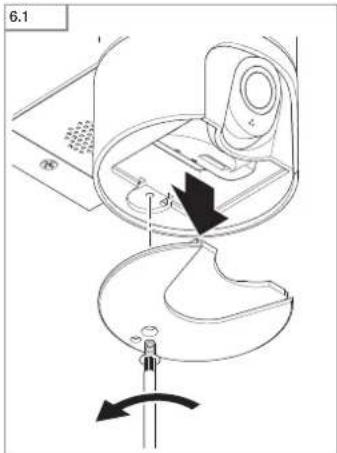
- Undo retaining screw and remove cover (Fig. 6.1)
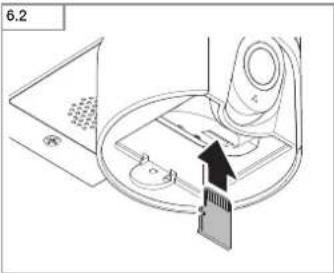
- Insert memory card (Fig. 6.2)
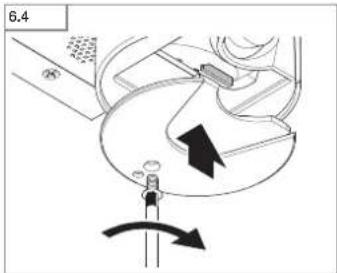
- Fit cover and tighten retaining screw (Fig. 6.4)
Restoring factory settings
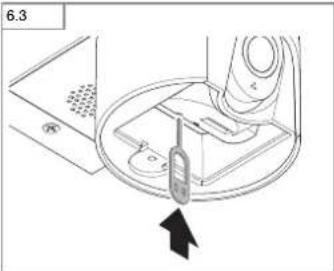
- Press the reset button for approx. 7 seconds (Fig. 6.3)
Note:
Pressing the reset button with the key will return the camera light to factory settings.
Once the light has been reset, an acoustic signal will be heard every 4 seconds.
- Fit cover and tighten retaining screw (Fig. 6.4)
7. Maintenance and care
The camera light requires no maintenance.
Weather conditions may affect the way the camera light functions. Strong gusts of wind, snow, rain or hail may cause the light to come ON when it is not wanted because the sensor is unable to distinguish sudden changes of temperature from sources of heat. Detector lens and camera lens may be cleaned with a damp cloth if they get dirty (do not use cleaning agents).
8. Disposal
Electrical and electronic equipment, accessories and packaging must be recycled in an environmentally compatible manner.

Do not dispose of electrical and electronic equipment as domestic waste.
EU countries only:
Under the current European Directive on Waste Electrical and Electronic Equipment and its implementation in national law, electrical and electronic equipment no longer suitable for use must be collected separately and recycled in an environmentally compatible manner.
9. Declaration of Conformity
STEINEL Vertrieb GmbH hereby declares that the L 600 CAM conforms to Directive 2014/53/EU. The full wording of the EU Declaration of Conformity is available for downloading from the following Internet address:
www.steinel.de
10. Manufacturer's warranty
This STEINEL product has been manufactured with great care, tested for proper operation and safety in accordance with applicable regulations and then subjected to random sample inspection. STEINEL guarantees that it is in perfect condition and proper working order. The warranty period is 36 months, starting from the date of sale to the consumer. We will remedy defects caused by material flaws or manufacturing faults. The warranty will be met by repair or replacement of defective parts at our own discretion. The warranty shall not cover damage to wear parts, damage or
defects caused by improper treatment or maintenance. Further consequential damage to other objects shall be excluded.
Claims under warranty shall only be accepted if the product is sent fully assembled and well packed complete with receipt or invoice (date of purchase and dealer's stamp) to the appropriate service centre or handed in to the dealer within the first 6 months.
Repair service:
Please ask your nearest service centre how to proceed for repairing faults not covered by the warranty or occurring after the warranty expires.

11. Legal Notes
Privacy
The L 600 CAM has been developed for outdoor use. Laws in your country may restrict the observation of areas outside your home or property. Please familiarise yourself with local legislation. To protect the privacy of others, install the camera so that it is unable to film public places, roads or your neighbour's property. We also recommend that you inform relatives, visitors and household employees about the L 600 CAM and its function.
Safety
Please note that the app will not automatically inform you if the L 600 CAM is activated in emergencies or, for instance, in the event of burglaries.
- Technical specifications
| Dimensions (H × W × D) 305 × 78 × 131 mm | |
| Power supply 220 - 240 V, 50 / 60 Hz | |
| Power consumption 14.3 W | |
| Luminous flux 781 lm | |
| Efficiency 54 lm/W | |
| Colour temperature 3000 K (warm white) | |
| Colour rendering index Ra ≥ 80 | |
| Life expectancy 50,000 hours (L70B10 to LM80) | |
| Sensor technology Passive infrared | |
| Communication Wi-Fi 2400-2483.5 MHz | |
| Transmitter power < 100 mW | |
| Angle of coverage | 180° with 45° angle of aperture |
| Mounting height | 1.8 - 2 m |
| Detection reach 10 m tangential | |
| Light-level setting | 10 - 10,000 lux |
| Night light | 0 - 40% |
| Time setting | 1 min, 3 min, 10 min, 15 min |
| Camera | Resolution 1280 × 720 pixels Dazzle guard Angle of aperture 110° H / 90° V Vertical angle 20° to 30°, horizontal angle 90° to each side Supports memory cards up to 32 GB (an 8 GB memory card is included with the camera light) |
| Temperature range | -10°C to +40°C |
| IP rating | IP44 |
| Protection class | I |
- Troubleshooting
| Malfunction | Cause | Remedy |
| Camera light without power | ■ Fuse has tripped, not switched ON, break in wiring | ■ Activate, change fuse, turn ON power switch, check wiring with voltage tester |
| ■ Short circuit in mains power supply lead | ■ Check connections | |
| ■ Mains switch OFF | ■ Switch on mains switch | |
| Camera light not switching ON | ■ Incorrect twilight setting selected | ■ Readjust |
| ■ Mains switch OFF | ■ Switch ON | |
| ■ Fuse has tripped | ■ Activate, change fuse, check connection if necessary | |
| Camera light not switching OFF | ■ Continued movement within the detection zone | ■ Check detection zone |
| Camera light switches ON without obvious movement | ■ Camera light not mounted for detecting movement reliably | ■ Securely mount enclosure |
| ■ Movement occurred, but not identified by the observer (movement behind wall, movement of a small object in immediate lamp vicinity etc.) | ■ Check detection zone | |
| Camera light not switching ON despite movement | ■ Rapid movements are suppressed to minimise malfunctioning or detection zone set too small | ■ Check detection zone |
| ■ Incorrect twilight setting selected | ■ Readjust | |
| No access to camera light via app | ■ Wi-Fi router is too far from the camera light or building elements, such as walls, are obstructing transmission | ■ Use repeater |
| Smartphone/tablet cannot be connected to camera light | ■ A terminal device is already connected | ■ Press reset button or scan QR code from connected terminal device |
| No live image transmission | ■ Temperature too high | ■ If necessary, deactivate manual override and let cool down |
FR
① = aarde (groen/geel)
openingshoek 110° H/90° V
verticale hoek 20^ tot 30^ , horizontale hoek 90^ maarijdere kant ondersteunt geheugenkaarten tot 32 GB (8 GB-gheugenkaart bligeleverd)
N =OusTePoc aywyoC (ouwnBucmuAe)
Auyocyeliwanc( npdaow/ktpwo
Se nepintwn aipboaun npentv aoepoitee de ayawupian tuv ayuwuvi Eokuaotko taoc. Katotn atoucuovseTn anrtnkxtpkraon. Dao, ouetepn ayuwoc kai ayuwoc yelwano uovbeovtai otav akposektn ouvseanc.
Npoox:
To nepoea tuv ouoedeauu 8a npokaoae otn okeuei n otav niva aopaleauv opakukkaua. TnV npinnwnout npnte va yevk eveu
avwipion Tuvpeovwovawuyuiv Kai eavaowsean. Tov ayuyo trofo0o oiaacmuopieouka va unapxiel diakortmc diktuuptofo0saciyeepoyonin anevepyoioi
Hnnn fwnrcc autou Tou auntnpaaev evaiavntkataaagun,ce nepittwnou Tnnpenve va ankatraatBei nnnf npoc (TnX,me m nn Tnc diaknacwnc nnc) npenevaanvatnactaBeoiokAnpoc o auntnnpac.
Haovseonae pootatko diakotttn npokai Bnou aunnpa je Kepa.
5.Eykaradotaon
Eevxete oTa Eaaptnata oxetik aBae
- Ε πηρπιαων βλβαν δεν επρεπεται
η λειουρία του προίοντος.
Kata thy eykataotaon Tou Aqinnnpa
mu Kepua TpTei va 0oBei npdox
WTE va atnpyte Ie aotokoiop
kpdaaiuiv.
EtnyetyeKaTAAAnAo aneio Syka TaotaOncLqapovotacunolny Tny sBaeiaKATnv avxveuaon Kwnoeuw. (Ek.5.1)
EuaeTcKaaAnAo anuio EkyKaTaOtaCnAupovvacunOnDn Tny TaXoTnTA WNL. TaTn Aetouyia npemai va evai diaeoea TouaoTov 2 MbpS.
Bnata ykataa
AIVETIEBia aapaiane, anoxipieCTe Aaunnpiaue Kauepaa to othpnu Toxou. PooCto kOto auro nieTey aaoaon (uk.52)
- 2nuaeEeTe onueia yia Tpuiec (Eik.5.3)
Avoyetepunteckai toroBete tounat (ek.5.4)
Biswete oxto atipya toxou (Ek.5.5)
- 2uv6eTeKaAωio auw6eOnc (Eik.5.6)
IpoaoaoceteAaqtnpaekeqapeo aToTnnpia Tojxou kaiBswvete agyta Bda aapmnc (Euk.5.7).
- EverypotoieTrepofoobooaepuatac (EUK,5.7)
Kavetepuipie "6.Aertoupyia"
H Kquepa eBvupuicTea xepokmra. (EIK.5.8)
6. Aetoupyia
Pouioic Epyoataoiou
Pθμηon ευασθησιας: 10.000 Lux
Pbunxpoov:1a
Φwvuxtac:40%

Android

iOS
YnO8eHn
O aqurtnipac,pe kapepa ananei otaBepn ouvean WLAN.To Smartphone n to Tablet pntei va exou npaaon siaKTOo KAI KATA TIV EYKAATOAAN penei va eivai ouwse6epeva To Iio WLAN oTWC O aqurtnipac,pe kapepa.
KoTeβaTeTo App.
Molc evpyantoinf n topofoocia peuioac, o aumnoac me kagepa eivai etoioic wipouian. Kata tn diakkeia tnc pueiucn nxie 4-6eTepoAetta Evahua.
KataTn diapkeia ouweong,TOU
Aauntnpa je kapepa Koi TOU
Smartphone nou Tablet ngi onja
kabe deupeoAeTTO.
Kataxupite tua to ovoia dktou kai Tov Kwiko Tou Wlan-Router otkokac App.
Aeioyia kapeac
Eav n kquepa cuvseBle ie Smartphone nTablet,evu uokapoeyn va eUtopiKc enmuadac.2o Smartphone n Tablet npayetra evac kiokoc QR-Code o orioL onpce va aywovte and aLo Smartphone n Tablet.
AauBvETe ia aonn Push oAp App,epocovavrpsaceoaiqntpoc
Avoite To App. Tupaiauopefte va xponpouonpoete tv Eikovkiv Evieyki KAI to BupotnAduvo
H kapepa aywntoekonie pia akoxoBta,
exooov ovteepae o aoeBnnpac,H
kvnaotopyapnneynakokouBa anouny
uovetai otny kaptora uynnc ka npotepa va KaNbei ava nda otymun. Taaywn tookamteya 560eVa anOBeKevovta
anokaiotika otny kaptora uynnc tou
lambdaipae kapepa.
Ynod
PnepaTepeu Tnpoepoec Oxetna Me Tc
LeToupyie Kai Suatototntec pueponic 8a
Bpiste oTo Ap.
Pouan euaon
To emiunto opio EaioeIaueoTou Amuimnpia npoei va oepuTei aiaokpua nanto 10 EwC 10.000 Lux.
Pouion xovou
H emiunm diapkeia duiauou u tropei va pueutre otic tique 1 aenr,3 aenr, 10 aenr n 15 aenr. Me kae avxveun kwnane np anr npapeau auou tou xovou vivetak ek vsek kwnon Tou xovouepou.
Φwuxtac
H Iaouyia dvtoc vxtac daopalte
dntuoc 0% euc 40% tnc toxoc
dtoc, aovvntutnei npueqevn
tnp doteivotnctc.
Avtikataaon kaptac mnc
AUMETe 5a aopalanc kai atopakpuWETE KAKI (EK.6.1)
TortobetnKapotacmuJunc (6.2)
IipocapucetateKanakiKaiBiwete opxtia6aopuaianc (ek.6.4)
Enavaopapoepuoieicepyooataou
Kpatate nattjvto Koujnti
tavapopac (Reset) via pTe
7eutepeAETTA. (ek.6.3)
Ytio6eIEn:
Edn mae To kouni enavaopac,ue To kaioi, o auiinnpac Ke kqepa enavaepetai de pubicic epyotaiaou.
Meta ano Tnv ktekao enavaopac,
nxel khe 4 deupeoenta eva onua.
Pooaaepae Kanaa Kaai bivene apyia bila aocuaion (ek.6.4)
Natancno preberite in shranite!
Zašćiteno z avtorskimi pravicami.
Ponatis v celoti all po delil je dovoljen
le z nasim soglasjem.
Spremembe zaradi tehníknega napredka so pridržane.
Razlaga simbolov

Oporzorilo pred nevarnostmil

Napotek na mesta besedila v dokumentu.
2. Udised ohutusjuhised
Katkestage enne igasuguseid toid seadme kallal pingetoide!
PPOCM TuaTeBHO PPOeCTb M COXPAHtB!
-3auiuHNO ATOBTCKMMI PABAMM.
PepeHHTKa, TAKOe BueDpKkAMM,
TOLko C HauEo COrAeNc.
- Ml coxpaHem 3a cO60 npaBO HA NmEHEHMI, KOTOpBc CIyKAT TEXHHeCKOMY nPORECCY.
Pa3brcHeHne CmBBOIOB

PpeynpejdeHme 06 onachoctx!

Yka3aHHe Ha TEKCTB DOKyMeHTe.
2. 06uime yka3aHnno TExHMke 6e3oNaCHOCTN

Ipeed Haayolm IIOb6x pa60t, npoobIMbX Ha npu6ope, cIeNyET OTKHOHTb HapnKHeH!
PnnpoBcHmMOHTaKaIOpKIOH 电MnAIEKTPPOBODJOpKHeOttB 06ctOH,TOCTOMYBNEpyIO OpepeB CnEETOTKINTHbNtOyTOKA INPOOBPTBOTCYTCTBVEHApKHeHM C NOMOIOHOINIKATOPAHNPKHeHM
MOnTaXHbIe paobToI NO NOKHOHeH CEBTBIHnKc KAMepoO OTHoCtORK KATEOPm PAOB T cTeBBIM HAnpRKeHMe. PO30My PIO MONTaxe CBOTINbIKOB CNQyET COBIOaTB yKa3AHnY I YCNOBN, PnPBBeJHHe B INCTpykMn IO NOKHOHeH. (HanpImep, DE-VDE 0100, AT-OVE/ ONORM E8001-1, CH-SEV 1000)
MIOJIbOBAIbTOJIbKOOpINHJIbHI3BIO 3aIACHeYACTN.
PEMOHTpaepuEaETcBbIIOHHTb TLOKBO CTEPLAIAHINPOBaHBHXMACTECKIX.
3. CAM light
PnIMHeHMeNoHa3HaYeHmO
—CeHOCOPHb CEBTINBbIMC BCTPOOHKAMOPOMNHCPOPBOHPbIMYCTPOHMDBIHACTEHHOMOHTaKA HOTKOBITOM 03DIXe
L600 CAM OCHALLEN KAMEPON C KAPTON NAMMTH IN NEPEROBOPHBM YCTPOCTBOM. YITPABAHHEME DByMM NTMM DYHKUNMM OCYUCEBTBNETCRNPOPECDTBOM PIMNOKHEHJ.
B L 600 CAM BCTPOEN NACCINHb
DAHN DANKOHNBACTPOONHBI BcKOMOULHINHOPAKPACBHcEHCCOP
PERNTIPPYET HEBDIMMOE TELIOBOE
N3IyHEME DNNKUHxO8OBKTOB (IO-
JXIKOTBHXN T.D.P.) PERNTIPPOYEMOE
TENIOBOE INIyHeHE NPOeOpa3yTCB
3NOKTOHHn CMHn, KOTOpB bBbBa
ET ABMATMNECKOE BKIOHOHE CBTNIH
HNA.ECN HA IITN IMEOTCR PEPRT
CTBN.HANPMEP, CTBnMI NKOKHHe
CTKIA,TOPECTPAuN TENKON3yHEH
HE PONCXODHTA, CNDQOBATEBHo, HE
PONOXDDN BKNIOHOH CBEOTNBHKa
Baxho: nO 6eCHeHn HaeKHO paOBoTH CEHCOPbH bCBtINbHmK CIEyEOT MOHTPOBaT NepENHnkyTPhHO K HApBaJIeHNIO BnKeHnO CBApHyKnBaMbIX OBeKTOB, a TAKKE NCKHOHTb BC3MOXHbI PEPNTCTBNH (HapIMpep, DopOBBy, CTbHI I.T.D.) NpeKpbBaIOUHcEOOy 3OHy OeHApKyEHn. PaDyuc DeCTBv ByET TaKke OOrHMnE, Ecmbl BbNoDnDEte HenoCpeCTBeHNO K CBETINbHkY.
OEBEM NOCTABKN (pnc.3.1)
- CBeTINbHmK cKaMepeo
-4BnHTA
-4
KIOUc6poca
-3Be3d006pa3HbMKnIO
PaaMepeI npOdyKa (pnc.3.2)
O530pnp60pa(pnc.3.3)
A CBeTINbHnK C KAMepoI
BΦmKcaTop
C KIeMaTnIOKKnOCHeHm
D KpoHHTeHH
E CeHcOpHbIy3eI
F Kamepa
G Khonka C6poc
H CBeTcNOcOCToHn
1 The300
4.3neKtpmueckoe NOdklouyehne
OTKIOHTb 2eKTPoNTAHHe (pnc.4.1)
Cxema coeDHHHn (pnc.4.1)
Cetebon npoBOn coCTOnn 3Xnn
L = cpa3a(06bMHOePHoro, KOpMHEOBORIO INIcPORO UPETA)
N HnyeBOH npOBQ

PBOB01383EMNEHIN
(3enehmyjembl)
B CNYAe COMHHeMn HJHTNPMUPOBaT npBOaC NOMOIOHO MIMKATOPA,
3ATEM CHOBA OKIIOHHTb HANTPOKHEME.
PnCOeMHHTb a3aHb, HNYEBOI npOBOD
N pOBOD 3aEBEMHEK K COOTBETCTBYIO
LMM KEMMM CEBITNEHKA.
Baxho: HENPABINbHOE PINGCOOHNHHEIPOBODB B YCTPOKTE BIM B PACHPEIDENTHEOMIKCE PEOXPANHTNEMMOKET PNOBECTN K KOPIOTKOMY 3AMBAKAA
HIO. B TakOM cyyae peKOMHyETcE
epe3PnPOBEPnTb PPOBOJa 3aHOB0
IIOKIOCHITb IN. Pn IHO6OxIMOCmT B
CETEBOIPNOBOIDMOKET 6bITBMOHTIN
POBAH BIKIOHOTBe DIA BIKIOHEHN I
BIKIOHEHM CETERO TOKA
NCTOHNK CQTA 3TOI PPOKOKTop He
NDIEKT 3aMeHe. Pn IEO6OxIMOCmT
3aMEHbI NCTOHHHKa CgTa (HApIMOp, B
KOHJe erpCPOA CnykBo), HEo6OxIMO
3aMEHHTB BECb IPPOKEKTOp.
PQKIOHOHEME K CYMPEHOMY OCBELHE HMO BEBET K NOBPEKDEHNO CBETNTSHKBA C KAMOPK
5. MoHTaK
POBePbTtB BCE KOHCTpyKTHBHe DToaH HnPDmOT NpOeKdoHnA
PnnoepckdeHHeBkHcHb npdyki.
PIMMOHTAKCEBNTBNYKCA KAMEPON CNEITBA3TMETOBH OH KPNENIC 6E3 Bbpaun.
Bubopb TaonooMoo MeToJn MoTHAaC yHcTOM paDyCA deHTBmU npeTACpaum nnKHeHH. (puc. 5.1)
Bb6pTaNpOxPdUeMeCTO 1nMOTaKaC yHETOM CKOPoCTn WLAN. Dnra paOToI DnKHa 6bTb 06cpeHHeA CKOPoCTb B KAK MMHIMMy 2MoNT/c.
TopoKMOHTaKa
OTTYCTHTB KPEIIEKHHB INHTH NCHBTB CBETINBLHK CKAIMEPOC KPOHUTEN HA.ДАТЗTOH HAKATbФИKcatop (pnc.5.2)
HAMOTNT OTBOPCTNA DnC BOPNIN (pnc.5.3)
PPOOeBpNTb CTBepTnB n BCTaBNTb 106beHn (puc.5.4)
PnKpyTntb KPOOHHTAH (pnc.5.5)
PnOKnIOHHTb COoHHHTeHbHk60B (pnc.5.6)
HadeTb CBTWlbHMK C KAMPOH HA KPOHHTM H 3aTRAHYb KPeNEKHBI BNT (puc.5.7)
BknHHTb aektponTahHe (pnc.5.7)
BbInonHHTpepynnpoBKn
→"6.3Kcnnyatauur
KaMepy MoXHO BbIPOBHTb BpyHIO. (pnc.5.8)
6.3Kcnnyataa
3aBODcKHe HAcTpoKn
YcTaHOBKa cymepeHOro nOpora:
10000JK