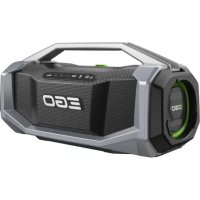
Power+ SK1800E - Bluetooth speaker EGO - Free user manual and instructions
Find the device manual for free Power+ SK1800E EGO in PDF.



| Product type | Portable Bluetooth speaker |
| Brand | EGO |
| Model | Power+ SK1800E |
| Total output power | 180 W |
| Speaker configuration | Woofer 80 W × 1, Tweeter 10 W × 2, Midrange 40 W × 2 |
| Battery voltage | 56 V |
| Mains power supply | 100-240 V~, 50/60 Hz via PD adapter (not included) |
| Bluetooth connectivity | Range > 55 m |
| Auxiliary input | 3.5 mm jack |
| USB ports | USB-A (output 5 V, 2 A) and USB-C (input/output up to 20 V, 5 A) |
| Link function | Connects up to 100 SK1800E speakers |
| Lighting | Breathing light controllable via Link button |
| Protection rating | IP54 (dust and water splash resistant) |
| Weight (without battery) | 7.7 kg |
| Operating temperature | -15 °C to 40 °C |
| Storage temperature | -20 °C to 70 °C |
| Compatible battery | EGO 56 V batteries (not included) |
| Controls | On/off, Bluetooth, Link, volume +/-, play/pause, Bass + |
| Maintenance | Clean with a dry cloth; do not use solvents |
| Repairability | Repairs by a qualified technician with identical parts |
Frequently Asked Questions - Power+ SK1800E EGO
User questions about Power+ SK1800E EGO
0 question about this device. Answer the ones you know or ask your own.
Ask a new question about this device
Download the instructions for your Bluetooth speaker in PDF format for free! Find your manual Power+ SK1800E - EGO and take your electronic device back in hand. On this page are published all the documents necessary for the use of your device. Power+ SK1800E by EGO.
USER MANUAL Power+ SK1800E EGO
natural_image
Line drawing of a portable electronic device with EGO branding and control buttons (no text or symbols on body)SK1800E
56V LITHIUM-ION OUTDOOR BLUETOOTH SPEAKER
EN 56V LITHIUM-ION OUTDOOR BLUETOOTH SPEAKER 5
DE 56 V LITHIUM-IONEN OUTDOOR-BLUETOOTH-LAUTSPRECHER 13
FR HAUT-PARLEUR BLUETOOTH D'EXTÉRIEUR LITHIUM-ION 56V 21
ES ALTAVOZ BLUETOOTH PARA EXTERIORES CON BATERÍA DE IONES DE LITIO DE 56 V 29
PT COLUNA DE SOM BLUETOOTH DE EXTERIOR DE IÃO DE LÍTIO DE 56V 37
IT ALTOPARLANTE BLUETOOTH DA ESTERNI LI-ION 56 V 45
NL 56V LITHIUM-ION BLUETOOTH-LUIDSPREKER VOOR BUITEN 53
DK UDEND∅RSH∅JTTALER MED BLUETOOTH OG 56V LITIUM-ION-BATTERI 61
SE 56V LITIUM-JON BLUETOOTH-HÖGTALARE FÖR UTOMHUSBRAUK 69
FI 56 V LITIUM-IONIAKULLA TOIMIVA BLUETOOTH-KAIUTIN ULKOKÄYTTÖÖN 77
NO 56V LITHIUM-ION UTENDORS BLUETOOTH-H∅YTTALER 85
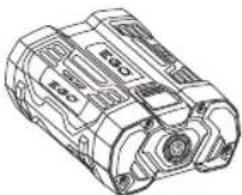
A2
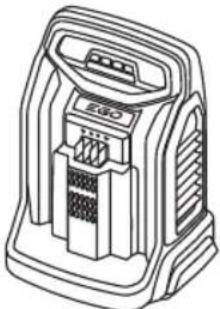
BA1400, BA2800,
BA4200, BA1400T,
BA2240T, BA2242T,
BA2800T, BA3360T,
BA4200T, BA5600T.
BA6720T
natural_image
Technical line drawing of a mechanical component with no visible text or symbolsCH2100E, CH5500E,
CH3200E, CH7000E,
CH7000E-T
natural_image
Line drawing of a portable electronic device with control panel and buttons (no text or symbols)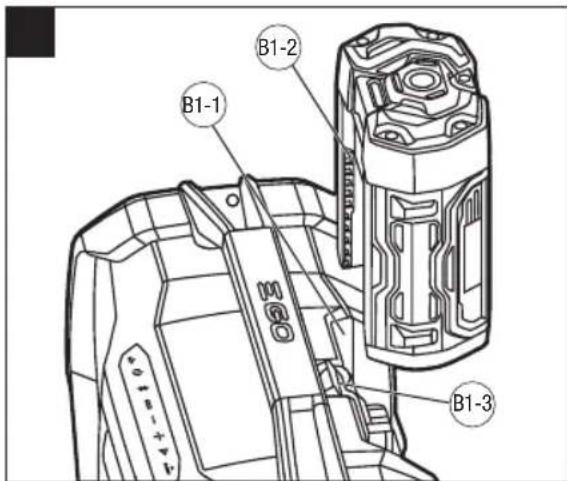
natural_image
Technical line drawing of a camera body with an upward arrow indicating motion or assembly (no text or symbols present)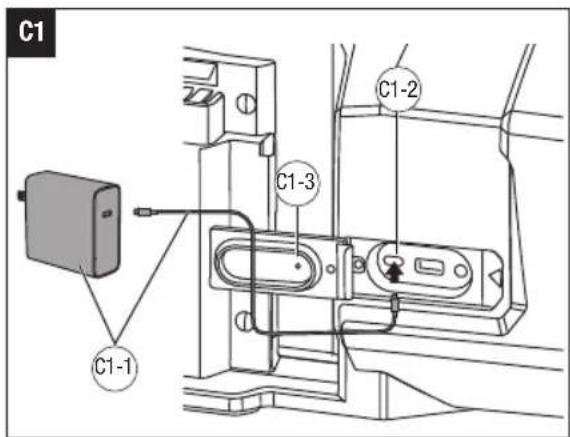
READ ALL INSTRUCTIONS!
EN

READ OPERATOR'S MANUAL
WARNING: To ensure safety and reliability, all repairs should be performed by a qualified service technician.
SAFETY SYMBOLS
The purpose of safety symbols is to attract your attention to possible dangers. The safety symbols and the explanations with them deserve your careful attention and understanding. The symbol warnings do not, by themselves, eliminate any danger. The instructions and warnings they give are no substitutes for proper accident prevention measures.
WARNING: Be sure to read and understand all safety instructions in this Operator's Manual, including all safety alert symbols such as "DANGER", "WARNING", and "CAUTION" before using this machine. Failure to follow all instructions listed below may result in electric shock, fire, and/or serious personal injury.
SAFETY INSTRUCTIONS
This page depicts and describes safety symbols that may appear on this product. Read, understand, and follow all instructions on the machine before attempting to assemble and operate.

Safety Alert

To reduce the risk of injury, user must read the operator's manual.

Bluetooth®
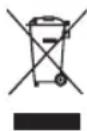
Waste electrical products should not be disposed of with household waste. Take to an authorized recycler.

This product is in accordance with applicable EC directives.

UK Conformity Assessed

Direct Current W Watt
Hz Hertz m Meter
V Voltage kg Kilogram
o C Celsius mm Millimeter
EN GENERAL MACHINE SAFETY WARNINGS
WARNING: READ ALL SAFETY WARNINGS, INSTRUCTIONS, ILLUSTRATIONS AND SPECIFICATIONS PROVIDED WITH THIS MACHINE. Failure to follow all instructions listed below may result in electric shock, fire and/or serious injury.
SAVE ALL WARNINGS AND INSTRUCTIONS FOR FUTURE REFERENCE.
WORK AREA SAFETY
- Keep work area clean and well lit. Cluttered or dark areas invite accidents.
- Do not operate machines in explosive atmospheres, such as in the presence of flammable liquids, petrol or dust. Machines create sparks which may ignite the dust or fumes.
- Keep children and bystanders away while operating a machine. Distractions can cause you to lose control.
ELECTRICAL SAFETY
■ Machine plugs must match the outlet. Never modify the plug in any way. Do not use any adapter plugs with earthed (grounded) machines. Unmodified plugs and matching outlets will reduce risk of electric shock.
- Avoid body contact with earthed or grounded surfaces, such as pipes, radiators, ranges and refrigerators. There is an increased risk of electric shock if your body is earthed or grounded.
- Do not abuse the cord. Never use the cord for carrying, pulling or unplugging the machine. Keep cord away from heat, oil, sharp edges or moving parts. Damaged or entangled cords increase the risk of electric shock.
- When operating a speaker outdoors, use an extension cord suitable for outdoor use. Use of a cord suitable for outdoor use reduces the risk of electric shock.
■ If operating a machine in a damp location is unavoidable, use a Ground-fault circuit interrupter protected supply. Use of a GFCI reduces the risk of electric shock.
PERSONAL SAFETY
■ Stay alert, watch what you are doing and use common sense when operating a machine. Do not use a machine while you are tired or under the influence of drugs, alcohol or medication. A
moment of inattention while operating machines may result in serious personal injury.
MACHINE USE AND CARE
- Keep handles and grasping surfaces dry, clean and free from oil and grease. Slippery handles and grasping surfaces do not allow for safe handling and control of the machine in unexpected situations.
BATTERY MACHINE USE AND CARE
■ Recharge only with the charger specified by the manufacturer. A charger that is suitable for one type of battery pack may create a risk of fire when used with another battery pack.
■ Use machines only with specifically designated battery packs. Use of any other battery packs may create a risk of injury and fire.
- When the battery pack is not in use, keep it away from other metal objects, like paper clips, coins, keys, nails, screws or other small metal objects, that can make a connection from one terminal to another. Shorting the battery terminals together may cause burns or a fire.
■ Under abusive conditions, liquid may be ejected from the battery; avoid contact. If contact accidentally occurs, flush with water. If liquid contacts eyes, additionally seek medical help. Liquid ejected from the battery may cause irritation or burns.
■ Do not use a battery pack or machine that is damaged or modified. Damaged or modified batteries may exhibit unpredictable behaviour resulting in fire, explosion or risk of injury.
■ Do not expose a battery pack or machine to fire or excessive temperature. Exposure to fire or temperature above 130 °C may cause explosion.
■ Follow all charging instructions and do not charge the battery pack or machine outside the temperature range specified in the instructions. Charging improperly or at temperatures outside the specified range may damage the battery and increase the risk of fire.
SERVICE
- Have your machine serviced by a qualified repair person using only identical replacement parts. This will ensure that the safety of the machine is maintained.
■ Never service damaged battery packs. Service of battery packs should only be performed by the manufacturer or authorized service providers.
SAFETY WARNINGS FOR OUTDOOR BLUETOOTH SPEAKER
■ To reduce the risk of fire or electric shock, do not expose this apparatus to rain or moisture. Dry location use only.
■ Only operate this apparatus in a well-ventilated area.
- Read these instructions.
■ Heed all warnings.
■ Follow all instructions.
■ Do not use this apparatus near water.
■ Clean only with dry cloth.
- Do not block any ventilation openings. Install in accordance with the manufacturer's instructions.
- Do not install near any heat sources such as radiators, heat registers, stoves, or other apparatus (including amplifiers) that produce heat.
■ Only use attachments/accessories specified by the manufacturer.
- Use only with the cart, stand, tripod, bracket, or table specified by the manufacturer, or sold with the apparatus. When a cart is used, use caution when moving the cart/ apparatus combination to avoid injury from tip-over.
■ Refer all servicing to qualified service personnel. Servicing is required when the apparatus has been damaged in any way, such as power-supply cord or plug is damaged, liquid has been spilled or objects have fallen into the apparatus, the apparatus has been exposed to rain or moisture, does not operate normally, or has been dropped. Service or maintenance performed by unqualified personnel could result in a risk of injury.
- A battery operated apparatus with integral batteries or a separate battery pack must be recharged only with the specified charger for the battery. A charger that may be suitable for one type of battery may create a risk of fire when used with another battery.
- Never disassemble the apparatus or try to do any rewiring on the apparatus's electrical system.
- Maintain the apparatus. Check for misalignment, breakage of parts and any other condition that may affect the apparatus operation. If damaged, have the apparatus repaired before use. Use the apparatus in accordance with these instructions, taking into account the working conditions and the work to be performed. Use of the apparatus for operations different from those intended could result in a hazardous situation.
- Keep the apparatus away from other metal objects such as paper clips, coins, keys, nails, screws, or other small metal objects that can make a connection from one terminal to another. Shorting the terminals together may cause burns or a fire.
- Do not use the apparatus if it has been dropped or received a sharp blow. A damaged apparatus will increase the risk of fire.
■ Dispose of a used battery promptly. Keep away from children. Do not disassemble and do not dispose of in fire.
■ Use only with the specified battery packs and chargers.
Save these instructions. Refer to them frequently and use them to instruct others who may use this machine. If you lend someone this machine, lend them these instructions also to prevent misuse of the product and possible injury.
a SPECIFICATIONS
| Voltage 56 V | |
| Voltage for AC Power Adaptor | 100-240 V~, 50/60 Hz |
| Output Power 180 W | |
| Amplifier Power Output | Woofer: 80W x1 |
| Tweeter: 10W x 2 | |
| Mid: 40W x 2 | |
| AUX Port 3.5 mm | |
| USB-A Output 5 V, 2 A | |
| USB-C Input/Output | DC5V 3A / DC9V 3A / DC12V 3A / DC15V 3A / DC20V 5A |
| Bluetooth® Range > 55 m | |
| Weight (Without battery pack) 7.7 kg | |
| Recommended Operating Temperature | -15°C - 40°C |
| Recommended Storage Temperature | -20°C - 70°C |
EN
Ingress Protection Rating
IP54* (Protected against dust and splashing water)
* NOTE: IP54 rating is based on the apparatus.
PACKING LIST (FIG. A1)
DESCRIPTION
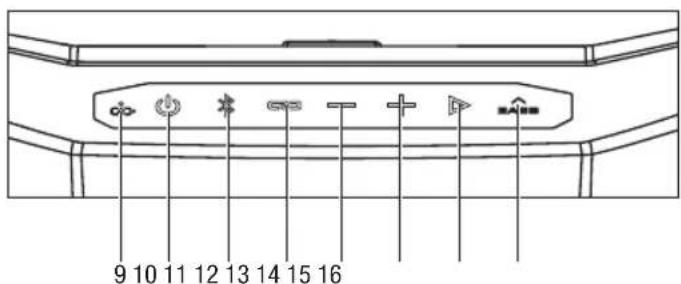
KNOW YOUR OUTDOOR BLUETOOTH SPEAKER (Fig. A1)
- Handle
- Control Panel
- Battery-release Button
- Breathing Light
- Rubber Cover
- AUX Port
- USB-A Output Port
- USB-C Input/Output Port
- Charge Indicator
- ON/OFF Button
- Bluetooth Button
- Link Button
- Volume Down Button
- Volume Up Button
- Play/Pause Button
- Bass Up Button
OPERATION
APPLICATION
You may use this product for the purposes listed below:
■ Audio playback from devices connected wirelessly or via and AUX cable.
ATTACHING/DETACHING THE BATTERY PACK
Use only with EGO's battery packs and chargers listed in Fig. A2.
Refer to corresponding battery packs and chargers manuals for more details.
Fully charge before first use.
NOTE: A sound will remind when the charge of battery pack is low.
To attach
Align the battery ribs with the mounting slots and press the battery pack down until you hear a "click" (Fig. B1).
To detach
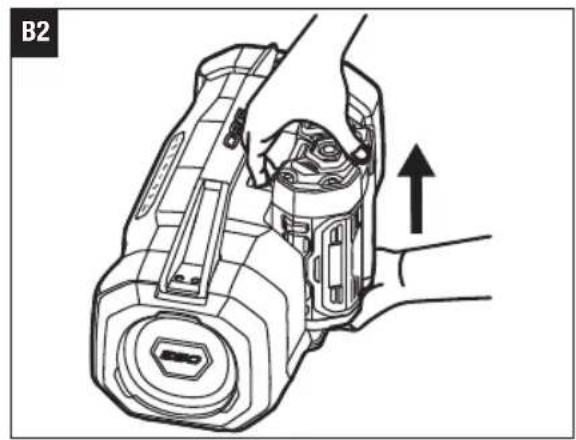
Depress the battery-release button and pull the battery pack out (Fig. B2).
WARNING: Always take care to note the location of your feet, children, or pets when pressing the battery-release button. Serious injury could result if the battery falls. NEVER remove the battery when in a high location.
| B1-1 Mounting Slot B1-2 Rib | ||
| B1-3 Battery-release Button |
USING THE AC POWER ADAPTOR (NOT INCLUDED)
The AC power adaptor is not included when shipped. Adaptor and charging cable that comply with PD protocol and greater than 60W can be used as a power adaptor.
NOTE: When using the AC power adapter alone, the sound quality and volume of the music may be affected.
Open the rubber cover and insert the AC power adaptor plug into the USB-C input/output port on the back of the speaker. Plug the adaptor into a standard power outlet (Fig. C1).
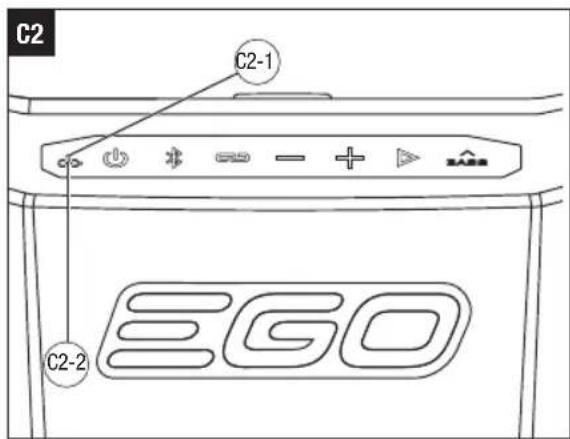
Whenever the power adaptor is connected, the inserted battery pack is automatically being charged. The small dot light above the charge indicator symbol will flash white. When the battery pack is fully charged, the small dot light will shine solid white. When the small dot light shines solid red, it means the battery pack is faulty (Fig. C2).
The AC power adaptor should be disconnected from the power outlet when not in use.
NOTE: The battery pack and USB devices such as cell phones, MP3 players, etc. connected to USB-A output port can be charged when the AC power adaptor is connected.
NOTICE: Always close the rubber cover after each use to protect the ports from dust, dirt, and moisture.
| C1-1 | AC Power Adaptor | C1-2 | USB-C Input/ Output Port |
| C1-3 Rubber Cover C2-1 Small Dot | |||
| C2-2 Charge Indicator | |||
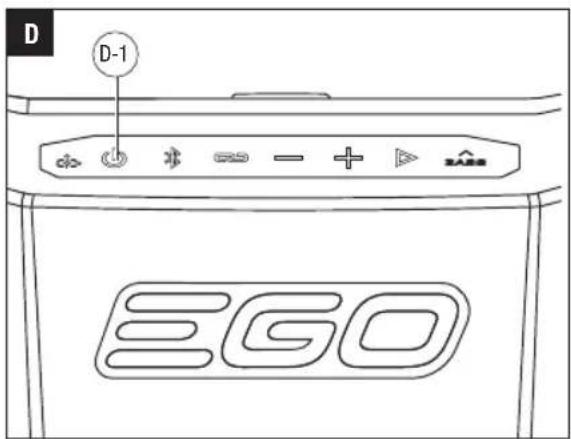
SWITCHING THE SPEAKER ON AND OFF (Fig. D)
Briefly press the ON/OFF button, the speaker will switch on and the ON/OFF button light will stay illuminated and a sound will announce the connection.
To switch off the speaker, briefly press the ON/OFF button. A sound will announce the disconnection.
NOTE: the speaker will turn off automatically after 20 minutes, if there is no music playing or no output from
USB-A or USB-C ports.
D-1 ON/OFF Button
BLUETOOTH® OPERATING MODE (Fig. E)
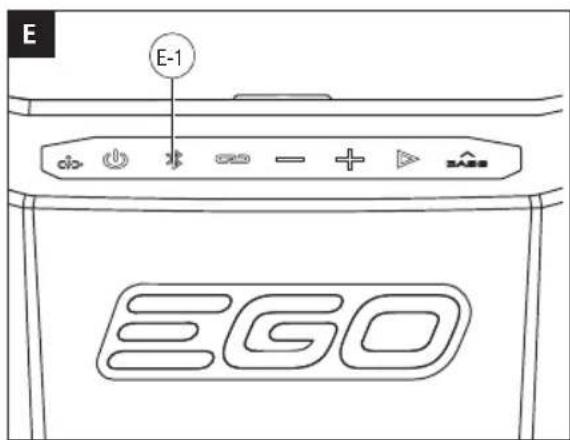
After you turn on the speaker, the Bluetooth® pairing will automatically turn on indicated by the white flashing Bluetooth® button.
■ Activate the Bluetooth connection on the device to be connected (smartphone or similar) and select "EGO SK1800E" as the target of the Bluetooth® connection on your device.
A sound will announce the connection and the Bluetooth® button will remain illuminated after a device is connected successfully.
NOTE: If previously paired to the desired device, the speaker will automatically reconnect to the same device when the speaker is turned on.
NOTE: If the speaker suddenly has no sound or plays other media sound, it means that the second connected device has taken over the control of the speaker and popped up a silent advertisement or playing a song.
The Bluetooth ® pairing mode will only be active for 3 minutes and will turn off automatically if no device is connected/paired.
Briefly press the Bluetooth ® button, the Bluetooth ® button starts flashing to indicate that a device can be connected.
Two devices can be connected to the speaker via Bluetooth ® at the same time.
Turn the speakers on and make sure that one of the speakers is connected to a device via Bluetooth.
The speaker connected to the device will act as the "host" unit and can control playback (volume, play/pause, etc.).
NOTE: Once the volume is adjusted on the "host" unit, other connected speakers immediately adjust to the same volume level as the "host" unit.
Press and hold the link button for more than 2 seconds on the "host" and secondary speaker. When the connected speaker plays the music of the "host" unit, it means the two speakers are automatically linked with each other.
NOTE: If you want to connect to the third, fourth, or ninety-ninth speakers later, you only need to press and hold the LINK button for more than 2 seconds on the additional speaker(s).
The distance between the two linked speakers cannot exceed 40 meters in an open field.
Press and hold the link button for more than 2 seconds on the "host" unit or briefly turn off the other speakers to disconnect the LINK system.
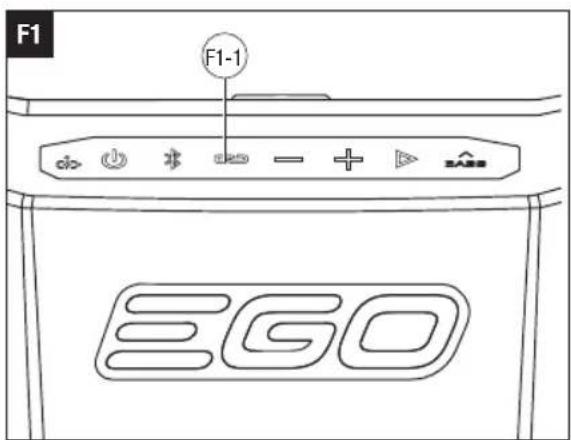
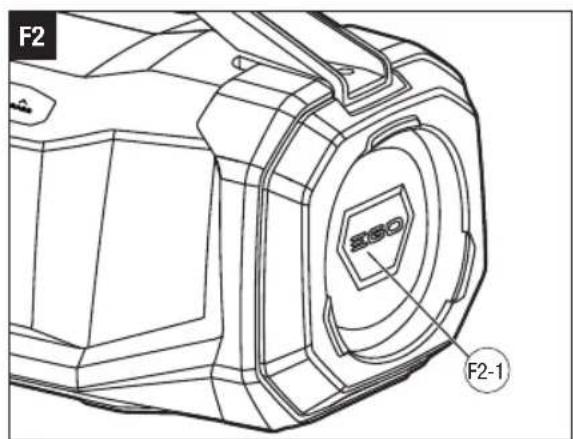
In addition to connecting multiple speakers, the link button can also controls the breathing light. Press the LINK button to turn on or turn off the breathing light. When there is no music playing, the breathing light will gradually dim to completely off, then gradually return to maximum brightness.
F1-1 Link Button F2-1 Breathing Light
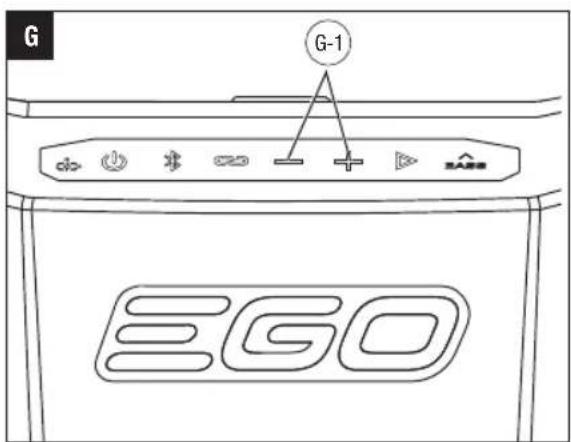
SETTING THE VOLUME (Fig. G)
■ After the first device is connected, press the BluetoothThe speaker features 16 volume levels.
button until it starts flashing.
■ Once the Bluefobutton starts flashing, select "EGO SK1800E" on the second device and connect it to the speaker. After the connection is successful, there will be a voice announcement that the second device has been connected.
NOTE: If there is a playback problem, restart the speaker.
To disconnect Bluetooth® device: Press and hold the Bluetooth® button for more than 2 seconds or disconnect the speaker on your device.
E-1 Bluetooth ☐ Button
TO CONNECT MULTIPLE SK1800E UNITS USING LINK (Fig. F1, F2)
Up to 100 pcs SK1800E speakers can be connected using the link.
- To reduce the volume, press the “—” button once to decrease the volume by one level.
- Press and hold the “—” button, to reduce the volume gradually. You can stop pressing the “—” button when the volume reaches your desired volume.
■ To increase the volume, press the “+” button once to increase the volume by one level. - Press and hold the “+” button, to increase the volume gradually. You can stop pressing the “+” button when the volume reaches your desired volume.
The volume adjustment can not only adjust the speaker volume, but also can adjust the volume on the device.
NOTE: When the volume is adjusted to the maximum, a sound will announce that it has reached the maximum volume.
EN
G-1 Volume Down and Up Button
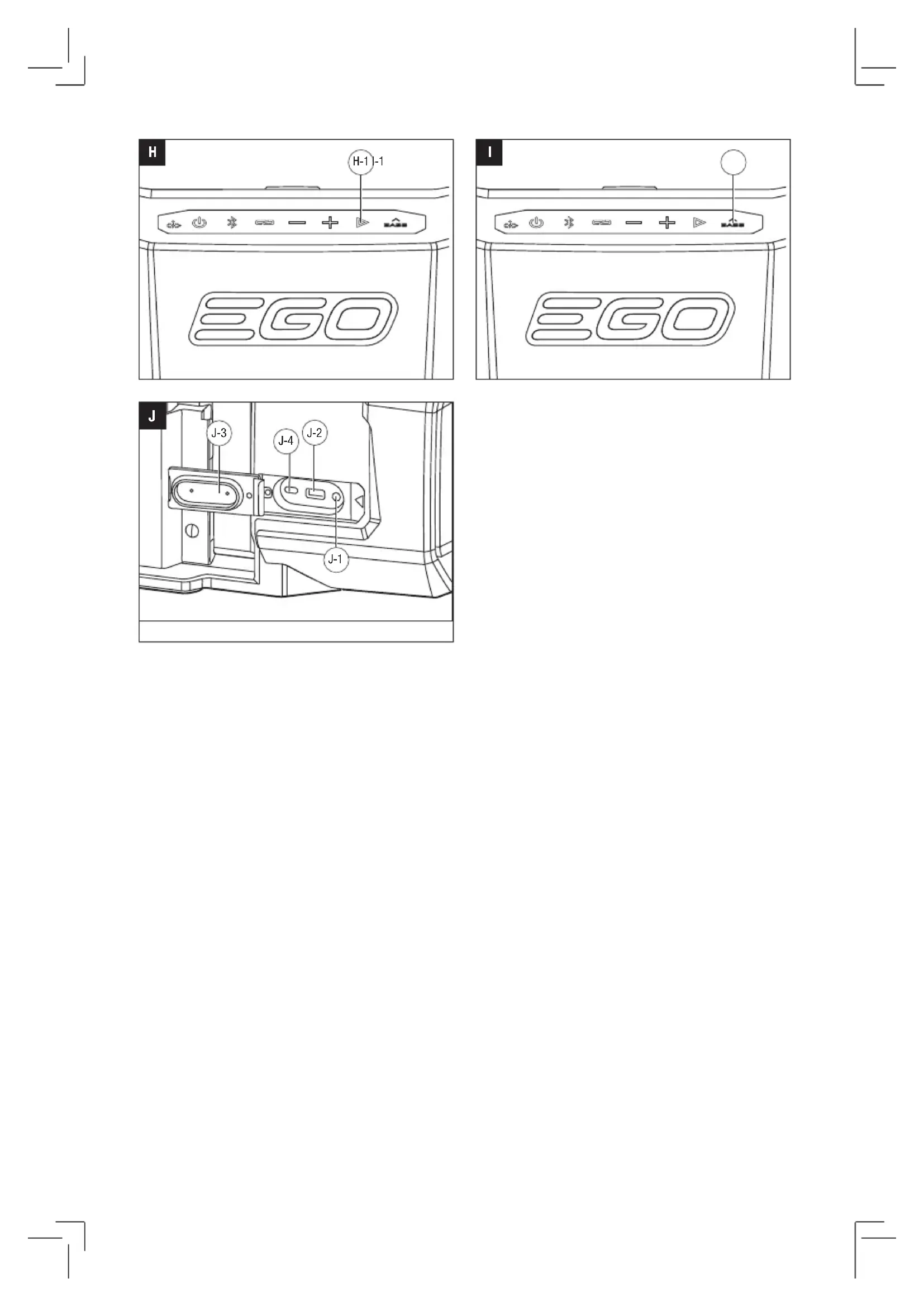
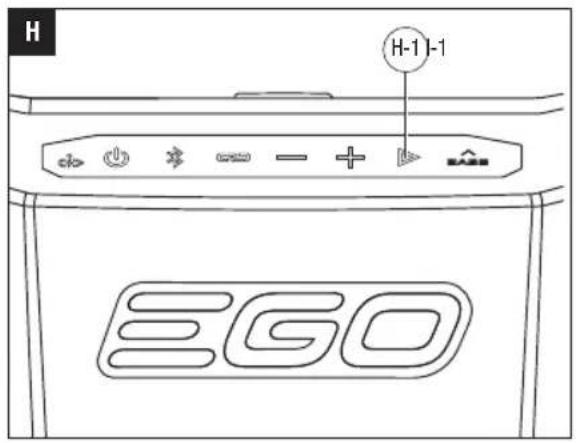
PLAY/PAUSE (Fig. H)
Press the play/pause button to start or pause the music. Press the play/pause button twice quickly to move to the next track/file.
H-1 Play/Pause Button
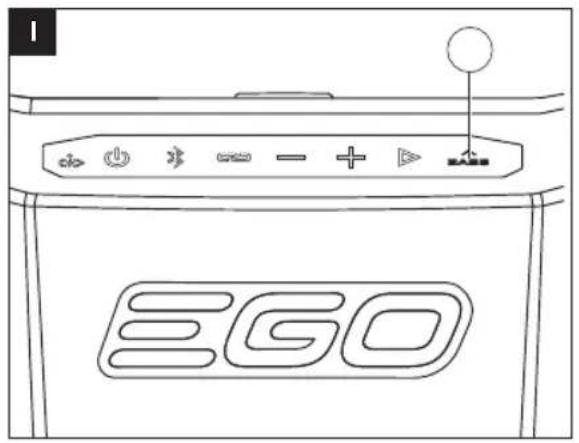
BASS UP (Fig. I)
- Press the bass up button to amplify the bass. The bass up button will stay illuminated to indicate that the bass is amplified.
■ Press the bass up button again to return the bass to the normal level. The bass up button light will turn off.
I-1 Bass Up Button
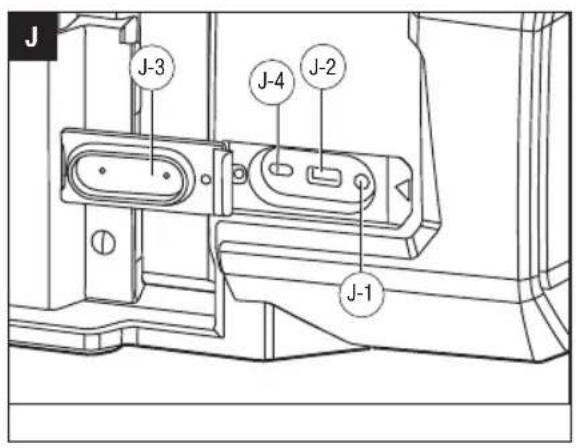
AUX OPERATING MODE (Fig. J)
Open the rubber cover, insert the AUX cable (not included) into the AUX port and make sure that it is properly connected.
Connect the external music source (MP3 player or similar) to the other end of the AUX cable.
Switch on the speaker and start the playback.
When finished playback, disconnect the AUX cable.
NOTE: Batteries of the connected devices cannot be charged via the AUX connection.
NOTE: When the speaker is switched off, the connected device is not automatically switched off.
| J-1 AUX | Port J-2 | USB-A Output Port | |
| J-3 Rubber Cover J-4 | USB-C Input/Output Port | ||
USB POWER PORTS (Fig. J)
When a battery pack is installed or the speaker is connected to an AC power adaptor and the speaker is turned on, the USB-A output port and USB-C input/output port will supply charging power for low power devices such as cell phones, MP3 players, etc. Immediately disconnect the USB device after charging.
NOTE: The USB-A output port cannot be used for audio playback. Audio playback is only possible via Bluetooth or AUX connection.
NOTICE: Always close the rubber cover after each use to protect the ports from dust, dirt, and moisture.
MAINTENANCE
WARNING: When servicing, use only identical replacement parts. Use of any other parts may create a hazard or cause product damage. To ensure safety and reliability, all repairs should be performed by a qualified service technician.
WARNING: To avoid serious personal injury, always remove the battery from the product when cleaning or performing any maintenance.
GENERAL MAINTENANCE
Avoid using solvents when cleaning plastic parts. Most plastics are susceptible to damage from various types of commercial solvents and may be damaged by their use. Use a clean cloth to remove dirt, dust, oil, grease, etc.
WARNING: Do not at any time allow brake fluids, gasoline, petroleum-based products, penetrating oils, etc. to come in contact with plastic parts. Chemicals can damage, weaken or destroy plastic which may result in serious personal injury.
WARNING: To reduce the risk of fire, personal injury, and product damage due to a short circuit, never immerse your machine, battery pack or charger in fluid or allow a fluid to flow inside them. Corrosive or conductive fluids, such as seawater, certain industrial chemicals, and bleach or bleach containing products, etc., can cause a short circuit.
STORAGE
- Remove the battery pack from the speaker.
- Clean all foreign material from the speaker.
- Store the speaker in a dry, well-ventilated area, out of the reach of children. Do not store the speaker on or adjacent to fertilizers, gasoline, or other chemicals.
PROTECTING THE ENVIRONMENT
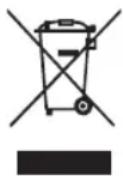
Do not dispose of electrical equipment, used battery and charger into household waste! Take this product to an authorized recycler and make it available for separate collection. Electric tools must be returned to an environmentally compatible recycling facility.
EN
EN TROUBLESHOOTING
| PROBLEM CAUSE SOLUTION | ||
| Speaker doesn’t work. | The battery pack is not attached to the speakerThere is no electrical contact between the speaker and battery.The battery pack charge is depleted.The battery pack is too hot. | Attach the battery pack to the speaker.Remove battery pack, check contacts and reinstall the battery pack.Charge the battery pack.Cool the battery pack until its temperature drops below 67°C. |
| The speaker cannot properly pair with a Bluetooth device. | Out of Bluetooth pairing range. | Move your device closer to the speaker. |
WARRANTY
EGO WARRANTY POLICY
Please visit the website egopowerplus.eu for full terms and conditions of the EGO Warranty policy.
Courant continu W Watt

H-1 Bouton lecture/pause
BASS + (Fig. I)
LISTA DE PEÇAS (IMAGEM A1)
DESCRIÇÃO
VERPAKKINGSLIJST (AFB. A1)
BESCHRIJVING
MAAK KENNIS MET UW BLUETOOTH-LUIDSPREKER VOOR BUITEN
(Afb. A1)
SIKKERHET I ARBEIDSOMRÅDET
GENERELT VEDLIKEHOLD
BEZPIECZEŃSTWO W MIEJSCU PRACY
POLITYKA GWARANCYJNA EGO
D-1 Buton pornit/oprit (ON/OFF)
MODUL DE FUNCTIONARE BLUETOOTH® (FIG. E)
SKALUMA NOREGULÉŠANA (G att.)
AUX DARBIBAS REŽIMS (J att.)
LUGEGE KASUTUSJUHENDIT
SEADME ÜLDISED OHUTUSHOIATUSED
HOIATUS: LUGEGE LÄBI KÖIK SEADMEGA KAASAS OLEVAD HOIATUSED, JUHISED, JOONISED JA ANDMED. Alltoodud juhiste eiramine vöib pöhjustada elektrilööki, tulekahju ja/vöi tösiseid vigastusi.
SÄILITAGE HOIATUSED JA JUHISED HILISEMAKS KASUTUSEKS.
TÖÖPIIRKONNA OHUTUS
°C 30°1000000000000000000000
KA
QSOB300930ms obuO6mD30s.
| הכלההכלההכלההכלההכלההכלההכלההכלההכלההכלההכלההכלההכלההכלההכלההכלההכלההכלההכלההכלההכלההכלההכלההכלההכלההכלההכלההכלההכלההכלההכלההכלההכלההכלה | ||
| • lipolyticin | • lipolyticin lipolyticin lipolyticin lipolyticin lipolyticin lipolyticin lipolyticin lipolyticin lipolyticin lipolyticin lipolyticin lipolyticin lipolyticin lipolyticin lipolyticin lipolyticin lipolyticin lipolyticin lipolyticin lipolyticin lipolyticin lipolyticin lipolyticin lipolyticin lipolyticin lipolytic in lipolyticin lipolyticin lipolyticin lipolyticin lipolyticin lipolyticin lipolyticin lipolyticin lipolyticin lipolyticin lipolyticin lipolyticin lipolyticin lipolyticin lipolyticin lipolyticin lipolyticin lipolyticin lipolyticin lipolyticin lipolyticin lipolyticin lipolyticin lipolyticin lipolyticn lipolyticin lipolyticin lipolyticin lipolyticin lipolyticin lipolyticin lipolyticin lipolyticin lipolyticin lipolyticin lipolyticin lipolyticin lipolyticin lipolyticin lipolyticin lipolyticin lipolyticin lipolyticin lipolyticin lipolyticin lipolyticin lipolyticin lipolyticin lipolyticin lipolytic.67°C-π | • lipolyticin lipolyticin lipolyticin lipolyticin lipolyticin lipolyticin lipolyticin lipolyticin lipolyticin lipolyticin lipolyticin lipolyticin lipolyticin lipolyticin lipolyticin lipolyticin lipolyticin lipolyticin lipolyticin lipolyticin lipolyticin lipolyticin lipolyticin lipolyticin lipollyticin lipolyticin lipolyticin lipolyticin lipolyticin lipolyticin lipolyticin lipolyticin lipolyticin lipolyticin lipolyticin lipolyticin lipolyticin lipolyticin lipolyticin lipolyticin lipolyticin lipolyticin lipolyticin lipolyticin lipolyticin lipolyticin lipolyticin lipolyticin lipolyticin lipollytlelelelelelelelelelelelelelelelelelelelelelelelelelelelelelelelelelelelelelelelelelelelelelelelelelelelelelelelelelelelelelelelelelelelelelelelelelelelelelelelelelelelelelelelelelelelelelelelelelelelel lipolyticin lipolyticin lipolyticin lipolyticin lipolyticin lipolyticin lipolyticin lipolyticin lipolyticin lipolyticin lipolyticin lipolyticin lipolyticin lipolyticin lipolyticin lipolyticin lipolyticin lipolyticin lipolyticin lipolyticin lipolyticin lipolyticin lipolyticin lipolyticin lipolytic:67°C-π |
| • lipolyticin lipolyticin lipolyticin lipolyticin lipolyticin lipolyticin lipolyticin lipolyticin lipolyticin lipolyticin lipolyticin lipolyticin lipolyticin lipolyticin lipolyticin lipolyticin lipolyticin lipolyticin lipolyticin lipolyticin lipolyticin lipolyticin lipolyticin lipolyticin lippolyticin lipolyticin lipolyticin lipolyticin lipolyticin lipolyticin lipolyticin lipolyticin lipolyticin lipolyticin lipolyticin lipolyticin lipolyticin lipolyticin lipolyticin lipolyticin lipolyticin lipolyticin lipolyticin lipolyticin lipolyticin lipolyticin lipolyticin lipolyticin lipolyticin lipalyticin lipolyticin lipolyticin lipolyticin lipolyticin lipolyticin lipolyticin lipolyticin lipolyticin lipolyticin lipolyticin lipolyticin lipolyticin lipolyticin lipolyticin lipolyticin lipolyticin lipolyticin lipolyticin lipolyticin lipolyticin lipolyticin lipolyticin lipolyticin lipolyticin lipallyticin lipolyticin lipolyticin lipolyticin lipolyticin lipolyticin lipolyticin lipolyticin lipolyticin lipolyticin lipolyticin lipolyticin lipolyticin lipolyticin lipolyticin lipolyticin lipolyticin lipolyticin lipolyticin lipolyticin lipolyticin lipolyticin lipolyticin lipolyticin lipolyticin lplolyticin lipolyticin lipolyticin lipolyticin lipolyticin lipolyticin lipolyticin lipolyticin lipolyticin lipolyticin lipolyticin lipolyticin lipolyticin lipolyticin lipolyticin lipolyticin lipolyticin lipolyticin lipolyticin lipolyticin lipolyticin lipolyticin lipolyticin lipolyticin lipolyticin lmlolyticin lipolyticin lipolyticin lipolyticin lipolyticin lipolyticin lipolyticin lipolyticin lipolyticin lipolyticin lipolyticin lipolyticin lipolyticin lipolyticin lipolyticin lipolyticin lipolyticin lipolyticin lipolyticin lipolyticin lipolyticin lipolyticin lipolyticin lipolyticin lipolyticin leplolyticin lipolyticin lipolyticin lipolyticin lipolyticin lipolyticin lipolyticin lipolyticin lipolyticin lipolyticin lipolyticin lipolyticin lipolyticin lipolyticin lipolyticin lipolyticin lipolyticin lipolyticin lipolyticin lipolyticin lipolyticin lipolyticin lipolyticin lipolyticin lipolytic in lmlolyticin lipolyticin lipolyticin lipolyticin lipolyticin lipolyticin lipolyticin lipolyticin lipolyticin lipolyticin lipolyticin lipolyticin lipolyticin lipolyticin lipolyticin lmlolyticin lipolyticin lipolyticin lipolyticin lipolyticin lipolyticin lipolyticin lipolyticin lipolyticin lipolytic in lmlolyticin lipolyticin lipolyticin lipolyticin lipolyticin lipolyticin lipolyticin lipolyticin lipolyticin lipolyticin lipolyticin lipolyticin lipolyticin lipolyticin lipolytic in lmlolyticin lipolyticin lipolyticin lipolyticin lipolyticin lipolyticin lipolyticin lipolyticin lipolyticin lipolytic in lmlolyticin lipolyticin lipolyticin lipolyticin lipolyticin lipolyticin lipolyticin lipolyticin lipolyticin lipolyticin lipolyticin lipolyticin lipolyticin lmlolyticin lipolyticin lipolyticin lipolyticin lipolyticin lipolyticin lipolyticin lipolyticin lipolyticin lipolyticin lipolyticin lipolytic in lmlolyticin lipolyticin lipolyticin lipolyticin lipolyticin lipolyticin lipolyticin lipolyticin lipolyticin lipolyticin lipolyticin lipolyticin lmlolyticin lipolyticin lipolyticin lipolyticin lipolyticin lipolyticin lipolyticin lipolyticin lipolyticin lmlolyticin lipolyticin lipolyticin lipolyticin lipolyticin lipolyticin lipolyticin lmlolyticin lipolyticin lipolyticin lipolyticin lipolyticin lipolyticin lmlolyticin lipolyticin lipolyticin lipolyticin lmlolyticin lipolyticin lipolyticin lmlolyticin lipolyticin lmlolyticin lipolyticin lmlolyticin lipolyticin lmlolyticin lmlolyticin lmlolyticin lmlolyticin lmlolyticin lmlolyticin lmlolyticin lmlolyticin lmlolyticin lmlolyticin lmlolyticin lmlolyticin lmlolyticin lmlolyticin lmlolyticin lmlolyticin lmlolyticin lmlolyticin lmlolyticin lmlolyticin lmmolyticin lipolyticin lipolyticin lipolyticin lipolyticin lipolyticin lipolyticin lipolyticin lipolyticin lipolyticin lipolyticin lipolyticin lipolyticin lipolyticin lipolyticin lipolyticin lipolyticin lipolyticin lipolyticin lipolyticin lipolyticin lipolyticin lipolyticin lipolyticin lipolyticin lapolyticin lipolyticin lipolyticin lipolyticin lipolyticin lipolyticin lipolyticin lipolyticin lipolyticin lipolyticin lipolyticin lipolyticin lipolyticin lipolyticin lipolyticin lipolyticin lipolyticin lipolyticin lipolyticin lipolyticin lipolyticin lipolyticin lipolyticin lipolyticin lipolyticin apolyticin lipolyticin lipolyticin lipolyticin lipolyticin lipolyticin lipolyticin lipolyticin lipolyticin lipolyticin lipolyticin lipolyticin lipolyticin lipolyticin lipolyticin lipolyticin lipolyticin lipolyticin lipolyticin lipolyticin lipolyticin lipolyticin lipolyticin lipolyticin lipolyticin repolyticin lipolyticin lipolyticin lipolyticin lipolyticin lipolyticin lipolyticin lipolyticin lipolyticin lipolyticin lipolyticin lipolyticin lipolyticin lipolyticin lipolyticin lipolyticin lipolyticin lipolyticin lipolyticin lipolyticin lipolyticin lipolyticin lipolyticin lipolyticin lipolyticin propolyticin lipolyticin lipolyticin lipolyticin lipolyticin lipolyticin lipolyticin lipolyticin lipolyticin lipolyticin lipolyticin lipolyticin lipolyticin lipolyticin lipolyticin lipolyticin lipolyticin lipolyticin lipolyticin lipolyticin lipolyticin lipolyticin lipolyticin lipolyticin lipolyticin limolyticin limolyticin limolyticin limolyticin limolyticin limolyticin limolyticin limolyticin limolyticin limolyticin limolyticin limolyticin limolyticin limolyticin limolyticin limolyticin limolyticin limolyticin limolyticin limolyticin limolyticin limolyticin limolyticin limolyticin limolyticin lmlolyticin limolyticin limolyticin limolyticin limolyticin limolyticin limolyticin limolyticin limolyticin limolyticin limolyticin limolyticin limolyticin limolyticin limolyticin limolyticin limolyticin limolyticin limolyticin limolyticin limolyticin limolyticin limolyticin limolyticin limolyticin lamlolyticin limolyticin limolyticin limolyticin limolyticin limolyticin limolyticin limolyticin limolyticin limolyticin limolyticin limolyticin limolyticin limolyticin limolyticin limolyticin limolyticin limolyticin limolyticin limolyticin limolyticin limolyticin limolyticin limolyticin limolytic in limolytic in limolytic in limolytic in limolytic in limolytic in limolytic in limolytic in limolytic in limolytic in limolytic in limolytic in limolytic in limolytic in limolytic in limolytic in limolytic in limolytic in limolytic in limolytic in limolytic in limolytic in limolytic in limolytic in limolytic in limolytic and limolytic in limolytic in limolytic in limolytic in limolytic in limolytic in limolytic in limolytic in limolytic in limolytic in limolytic in limolytic in limolytic in limolytic in limolytic in limolytic in limolytic in limolytic in limolytic in limolytic in limolytic in limolytic in limolytic in limolytic in limolytic, limolytic in limolytic in limolytic in limolytic in limolytic in limolytic in limolytic in limolytic in limolytic in limolytic in limolytic in limolytic in limolytic in limolytic in limolytic in limolytic in limolytic in limolytic in limolytic in limolytic in limolytic in limolytic in limolytic in limolytic in limolytic 100% of the whole (100%) | ||
תְרָהּ
EGO 77-10-20
הכלה 2-הכלההוּרָהוּרָהוּרָהוּרָהוּרָהוּרָהוּרָהוּרָהוּרָהוּרָהוּרָהוּרָהוּרָהוּרָהוּרָה
', אַרְשָׁוֹת אַרְשָׁוֹת אַרְשָׁוֹת אַרְשָׁוֹת אַרְשָׁוֹת אַרְשָׁוֹת אַרְשָׁוֹת אַרְשָілֵי אַרְשָілֵי אַרְשָілֵי אַרְשָілֵי אַרְשָілֵי אַרְשָілֵי אַרְשָілֵי אַרְשָілֵי א'
natural_image
Line drawing of a digital camera with EGO branding and control buttons (no text or symbols on body)SK1800E
- SK1800E
- 56V LITHIUM-ION OUTDOOR BLUETOOTH SPEAKER
- READ ALL INSTRUCTIONS!
- READ OPERATOR'S MANUAL
- SAFETY SYMBOLS
- SAFETY INSTRUCTIONS
- EN GENERAL MACHINE SAFETY WARNINGS
- SAVE ALL WARNINGS AND INSTRUCTIONS FOR FUTURE REFERENCE.
- WORK AREA SAFETY
- ELECTRICAL SAFETY
- PERSONAL SAFETY
- MACHINE USE AND CARE
- BATTERY MACHINE USE AND CARE
- SERVICE
- SAFETY WARNINGS FOR OUTDOOR BLUETOOTH SPEAKER
- EN
- PACKING LIST (FIG. A1)
- DESCRIPTION
- KNOW YOUR OUTDOOR BLUETOOTH SPEAKER (Fig. A1)
- OPERATION
- APPLICATION
- ATTACHING/DETACHING THE BATTERY PACK
- Fully charge before first use.
- To attach
- To detach
- USING THE AC POWER ADAPTOR (NOT INCLUDED)
- SWITCHING THE SPEAKER ON AND OFF (Fig. D)
- BLUETOOTH® OPERATING MODE (Fig. E)
- SETTING THE VOLUME (Fig. G)
- TO CONNECT MULTIPLE SK1800E UNITS USING LINK (Fig. F1, F2)
- PLAY/PAUSE (Fig. H)
- BASS UP (Fig. I)
- AUX OPERATING MODE (Fig. J)
- USB POWER PORTS (Fig. J)
- MAINTENANCE
- GENERAL MAINTENANCE
- STORAGE
- PROTECTING THE ENVIRONMENT
- EN TROUBLESHOOTING
- WARRANTY
- EGO WARRANTY POLICY
- BASS + (Fig. I)
- LISTA DE PEÇAS (IMAGEM A1)
- DESCRIÇÃO
- VERPAKKINGSLIJST (AFB. A1)
- BESCHRIJVING
- MAAK KENNIS MET UW BLUETOOTH-LUIDSPREKER VOOR BUITEN
- (Afb. A1)
- SIKKERHET I ARBEIDSOMRÅDET
- GENERELT VEDLIKEHOLD
- BEZPIECZEŃSTWO W MIEJSCU PRACY
- POLITYKA GWARANCYJNA EGO
- MODUL DE FUNCTIONARE BLUETOOTH® (FIG. E)
- SKALUMA NOREGULÉŠANA (G att.)
- AUX DARBIBAS REŽIMS (J att.)
- LUGEGE KASUTUSJUHENDIT
- SEADME ÜLDISED OHUTUSHOIATUSED
- TÖÖPIIRKONNA OHUTUS
Brand : EGO
Model : Power+ SK1800E
Category : Bluetooth speaker