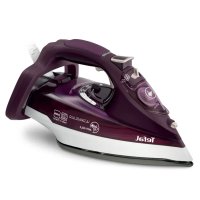
Ultimate AntiCalc FV9657 - Iron TEFAL - Free user manual and instructions
Find the device manual for free Ultimate AntiCalc FV9657 TEFAL in PDF.



| Product type | Steam iron |
| Brand | Tefal |
| Model | Ultimate AntiCalc FV9657 |
| Dimensions (approx.) | 30 x 15 x 20 cm |
| Weight (approx.) | 1.5 kg |
| Power supply | 220-240 V, 50-60 Hz |
| Power (approx.) | 2400 W |
| Tank capacity (approx.) | 300 ml |
| Soleplate | Gliss/Glide Protect™ Autoclean (depending on model) |
| Steam functions | Continuous steam, steam boost, spray, adjustable steam flow |
| Anti-scale system | Removable anti-scale rod with self-clean function |
| Safety | Auto-Stop (automatic shut-off after 8 min on heel, 30 sec on soleplate) |
| Anti-drip function | Yes |
| Recommended water type | Tap water, mix 50% demineralized water if water is very hard |
| Maintenance | Self-clean, monthly cleaning of anti-scale rod with white vinegar or lemon juice |
| Cord | Easycord system for easy winding |
| Heel | Extra Stable |
| Indicators | Thermostat, Auto-Stop safety |
| Spare parts / Repairability | Replaceable anti-scale rod, self-cleaning soleplate (depending on model) |
Frequently Asked Questions - Ultimate AntiCalc FV9657 TEFAL
User questions about Ultimate AntiCalc FV9657 TEFAL
0 question about this device. Answer the ones you know or ask your own.
Ask a new question about this device
Download the instructions for your Iron in PDF format for free! Find your manual Ultimate AntiCalc FV9657 - TEFAL and take your electronic device back in hand. On this page are published all the documents necessary for the use of your device. Ultimate AntiCalc FV9657 by TEFAL.
USER MANUAL Ultimate AntiCalc FV9657 TEFAL
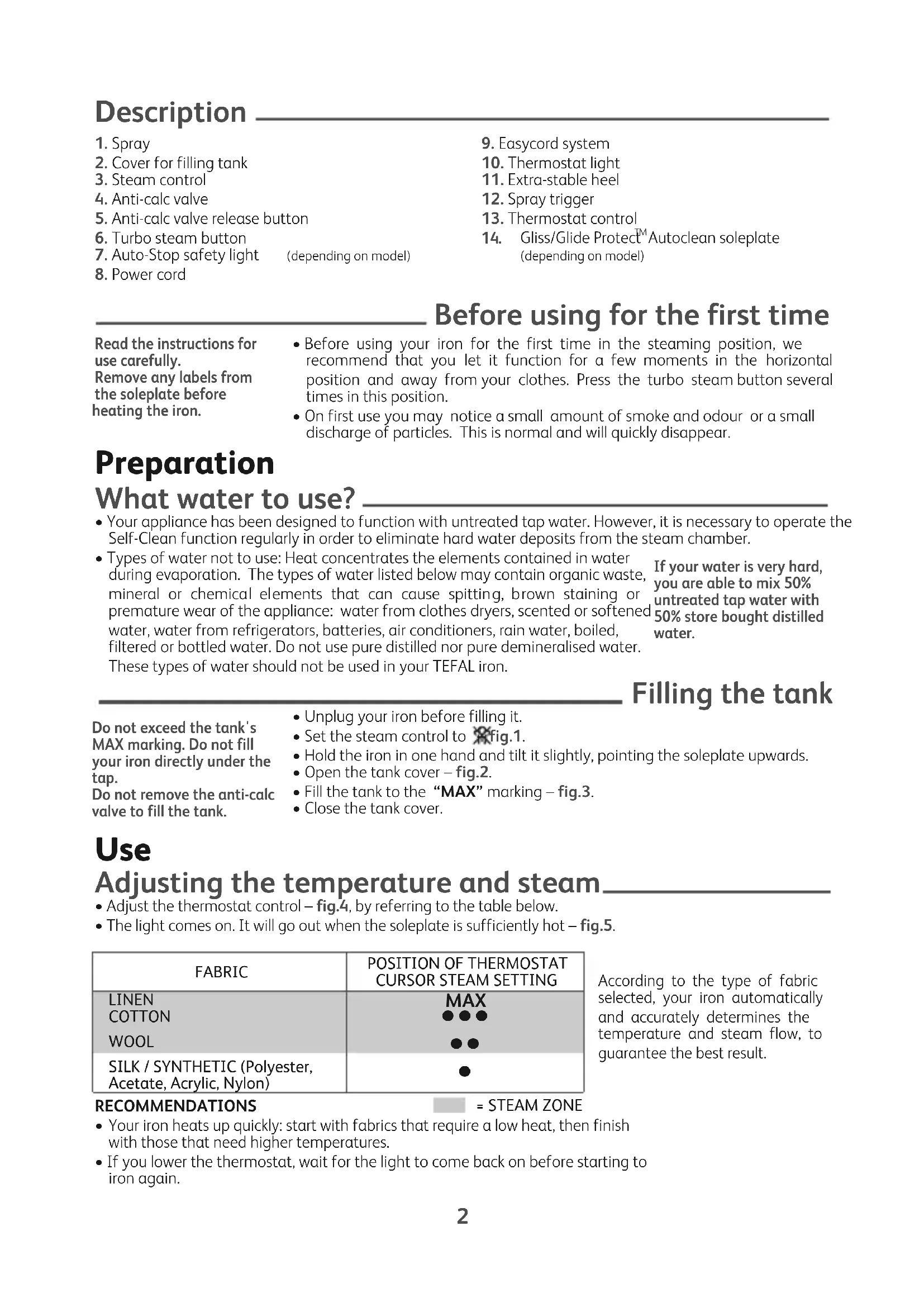
- Spray
- Cover for filling tank
- Steam control
- Anti-calc valve
- Anti-calc valve release button
- Turbo steam button
- Auto-Stop safety light (depending on model)
-
Power cord
-
Easycord system
- Thermostat light
- Extra-stable heel
- Spray trigger
- Thermostat control
- Gliss/Glide Protect™ Autoclean soleplate (depending on model)
Before using for the first time
Read the instructions for use carefully.
Remove any labels from the soleplate before heating the iron.
- Before using your iron for the first time in the steaming position, we recommend that you let it function for a few moments in the horizontal position and away from your clothes. Press the turbo steam button several times in this position.
- On first use you may notice a small amount of smoke and odour or a small discharge of particles. This is normal and will quickly disappear.
Preparation
What water to use?
- Your appliance has been designed to function with untreated tap water. However, it is necessary to operate the Self-Clean function regularly in order to eliminate hard water deposits from the steam chamber.
- Types of water not to use: Heat concentrates the elements contained in water during evaporation. The types of water listed below may contain organic waste, mineral or chemical elements that can cause spitting, brown staining or premature wear of the appliance: water from clothes dryers, scented or softened water, water from refrigerators, batteries, air conditioners, rain water, boiled, filtered or bottled water. Do not use pure distilled nor pure demineralised water. These types of water should not be used in your TEFAL iron.
Filling the tank
Do not exceed the tank's
MAX marking. Do not fill
your iron directly under the tap.
Do not remove the anti-calc valve to fill the tank.
- Unplug your iron before filling it.
- Set the steam control to fig.1.
- Hold the iron in one hand and tilt it slightly, pointing the soleplate upwards.
- Open the tank cover - fig.2.
- Fill the tank to the "MAX" marking - fig.3.
- Close the tank cover.
Use
Adjusting the temperature and steam
- Adjust the thermostat control - fig.4, by referring to the table below.
- The light comes on. It will go out when the soleplate is sufficiently hot - fig.5.
| FABRIC | POSITION OF THERMOSTAT CURSOR STEAM SETTING |
| LINEN | MAX |
| COTTON | ●●● |
| WOOL | ●● |
| SILK / SYNTHETIC (Polyester, Acetate, Acrylic, Nylon) | ● |
According to the type of fabric selected, your iron automatically and accurately determines the temperature and steam flow, to guarantee the best result.
RECOMMENDATIONS
- Your iron heats up quickly: start with fabrics that require a low heat, then finish with those that need higher temperatures.
-
If you lower the thermostat, wait for the light to come back on before starting to iron again.
-
If you are ironing a fabric comprising a mixture of fibres: adjust the temperature to the most delicate fibre.
- If you put your thermostat in the "MIN" position, the iron does not become hot.
Using the water spray trigger (spray)
Check that there is water in the tank before using the spray trigger.
- When ironing with the steam or dry function, press the spray trigger several times in succession to remove stubborn wrinkles – fig.6.
Obtaining more steam
- Set the thermostat control to "MAX" or "●●●".
- Press the turbo steam button from time to time - fig.7.
- To avoid water dripping onto your clothes, wait a few seconds before pressing again.
Hold the iron a few centimetres from the fabric so as not to burn delicate fabrics.
Smoothing garments vertically
- Hang the garment on a hanger and hold the fabric using one hand. The steam is very hot so you should always do this with the garment on a hanger – never while someone is wearing it.
- Set the thermostat control to "MAX" - fig.8.
- Pulse the turbo steam button - fig.7 and move from top to bottom - fig.9.
Dry Iron function
- Adjust the temperature to the fabric being ironed.
- Set the steam control to Fig.1.
- You can iron when the light goes out.
Additional functions
Gliss/Glide Protect™ autoclean soleplate (depending on model)
- Your iron is equipped with a catalytic self-cleaning soleplate.
- Its exclusive coating removes all impurities generated by normal use.
- It is recommended that you always rest your iron on its support base to preserve its self-cleaning coating.
In normal use, the autopost light is on!
Auto-stop safety function (depending on model)
- The electronic system cuts the power and the auto-stop light flashes if the iron is placed on its support base for more than 8 minutes or left flat for more than 30 seconds - fig.10.
- To restart the iron, simply shake it gently until the light stops flashing.
Anti-drip function
- The automatic steam selection function is based on the fabric being ironed, which is integrated into your iron, reduces the steam flow at low temperatures and prevents the iron from dripping onto your clothes.
Cleaning and maintenance
Self-cleaning
- Put the steam button on "MAX".
- Place the iron on its base with a full tank and set the thermostat to the "MAX" position.
- When the light goes out, disconnect the iron and place it over a sink.
- Set the thermostat to the "MIN" position.
- Remove the anti-calc valve.
- Shake the iron lightly and horizontally above a sink until part of the water (with the impurities) flows from behind the appliance - fig.21.
- Once you have finished this operation, replace the anti-calc valve, inserting it until you hear a click - fig.20.
- Plug in your iron and let it stand on its base for 2 minutes in order to clean the soleplate.
-
Unplug your iron and when the soleplate is lukewarm, dry it with a soft cloth.
-
When you next use your iron, switch it on in the horizontal position, holding it away from you, to remove any water and limescale residue left in the baseplate.
Clean the anti-calc valve (once a month)
Warning!
- Never touch the end of the valve - fig.18.
-
The iron does not work without the anti-calc valve.
-
Unplug your iron and empty the tank.
- Put the steam button on max and set the thermostat to the "MIN" position.
- To remove the anti-calc valve, press the self-clean extraction button - fig.16 and pull the valve upwards - fig.17.
- Let the valve soak for 4 hours in a glass of commercially available white vinegar or natural lemon juice - fig.19.
- Rinse the valve under tap water.
- Reposition the anti-calc valve; push it until it clicks - fig.20.
Cleaning the soleplate
Your steam iron is equipped with a self-cleaning soleplate (depending on model):
- Its exclusive active coating eliminates all impurities that can be generated under normal conditions of use.
- Ironing using the incorrect temperature could however leave traces that require manual cleaning. In this case, it is recommended that you use a soft damp cloth on the still warm soleplate so as not to damage clothing.
Your steam iron is equipped with the Ultragliss soleplate (depending on model):
- Clean with a damp non-metallic sponge or damp soft cloth while the soleplate is still warm.
Warning! Using any abrasive sponge damages the self-cleaning coating (according to model) of your soleplate - fig.22.
Do not use corrosive or abrasive products.
Storing your iron
- Unplug it and wait for the soleplate to cool down - fig.23.
- Empty the tank and set the steam control to . little water may remain in the tank.
- Wind the cord around the heel of the iron. Position the iron on its support base - fig.24.

Environment protection first!
① Your appliance contains valuable materials which can be recovered or recycled.
Leave it at a local civic waste collection point.
A problem with your iron?
| PROBLEM POSSIBLE | CAUSE SOLUTION | |
| Water drips from the holes in the soleplate. | The chosen temperature is too low and does not allow for the formation of steam. | Position the thermostat in the steam range (from •• to MAX). |
| You are using steam while the iron is not hot enough. | Wait until the thermostat light goes out. | |
| You are using the Shot of Steam button too often. | Wait a few seconds between each use of the button. | |
| There is too much steam. | Reduce the steam. | |
| You have stored the iron horizontally, without emptying it and without setting it to ×. | See the section "Storing your iron". | |
| The iron drips when you start ironing. | You have removed the anti-scale rod to fill your iron. | Do not extract the anticalc valve when filling the iron. |
| Brown streaks come through the holes in the soleplate and stain the linen. | You are using chemical descaling agents. | Do not add any descaling agents to the water in the water tank. |
| You are not using the right type of water. | Perform a self-cleaning operation and consult the chapter "What water should I use?". | |
| Fabric fibres have accumulated in the holes of the soleplate and are burning. | Perform the self-cleaning operation and clean the soleplate with a damp sponge. Vacuum the holes of the soleplate from time to time. | |
| Your linen has not been rinsed sufficiently or you have ironed a new garment before washing it. | Make sure that your laundry is rinsed sufficiently so as to remove any deposits of soap or chemical products on new clothes. | |
| The soleplate is dirty or brown and can stain the linen. | Your are ironing with an inappropriate program (temperature too high). | Clean the soleplate as indicated above. Select the appropriate program. |
| You are using starch. | Clean the soleplate as indicated above. Always spray starch onto the reverse side of the fabric to be ironed. | |
| There is little or no steam. | The water tank is empty. | Fill it. |
| The anti-calc valve is dirty. | Clean the anti-calc valve. | |
| Your iron has a build-up of scale. | Clean the anti-calc valve and carry out a self-clean. | |
| Your iron has been used dry for too long. | Carry out a self-clean. | |
| The soleplate is scratched or damaged. | You have placed your iron flat on a metallic rest-plate or ironed over a zip. | Always set your iron on its heel. Do not iron over zips. |
| Steam or water come from the iron as you finish filling the tank. | The steam control is not set to the × position. | Check that the steam control is set to the × position. |
| The water tank is overfilled. | Never exceed the Max level. | |
| The spray does not spray. | The water tank is not filled enough. | Fill up the water tank. |
If you have any problems or queries please contact our Customer Service helpline as listed below.
Beschreibung
= DAMPFAUSLASSBEREICH
Rengøring af anti-kalk stangen (hver 1. maned)
Bemaerk!
IapHaTbN IOTnE cHa6DeHa Cbc camOnOuNCtBaUa ce nIOua (B 3aBncMOCr OT MoJe):
- YHnKaJIHOTo My NOKpITHe IpemaxBa BCnUKN HeuNCTOTnN, NopoJeHN OT HopMaJIHa yNoTpe6a.
- Ilahe C HeNoxOJaMa npoPama MoKe Bce NaK da OCTaBn Cnei, KOnto Ce HjkaT OT pbuH NouchTaBe. B To3n CnyaN, ce npenOpbUba Da ce n3non3Ba MeKa N BlaxHa KbpNa Bbpxy BCE OSe XnaHa Pnoa, 3a Da He NobpeDInTe NOKpHTNeTo.
IapHaTa Bn IOTnia e cHa6DeHa C nloa Ultragliss (B 3aBncmOcT OT MoJeNa):
-ДOKATO ПLOUATA e BCE OSe XNaIaK,Я NOUHCTeC HEmTaJIeH BnJaKeH TaMIOH.
BHHMaHHe!YnOTpe6aTaHa a6pa3uBcH TaMnOH NOBpeKda camOnOuNCTBaUcTO NOKpUThe (B 3aBNCUMoCT OT MoJena) Ha IIIOuAta Bn -fig.22.
Hnkora He n3noJ3BaIte arpecuBn nn a6pa3uBn npenapatn.
CbxpaheneHaIOTnra
-ИЗклочеяиИЗчakайт,ДOKATOПLOЧАТИЗCTINHE -fig.23.
-ИзпраЗнete pe3epBoapа И постаBete 6byToHa 3a ynpabIeHne Ha napaTbNo3nua.Ялko BOda MoKe da octaHe B pe3epBoapa.
- Habinyte shypa OKOLO 3aHaTb BnIka Ha IOTyra. NocTabeTe IOTyra BepTKaJIHO Bbpx neTaTaN - fig.24.
3aunTeTe OKoHaTa CpeDa!
BaunrT eNekTpOpypeD cbDbpxa MaTePnAaN, KOnto Morat Da 6bDaT peuKlnpaH. OTheceTe rB Hau-6nn3KnueHTbp 3a OTnaDbuN.
=OBJACTbBIIDNAPIOBAHH
B 3aJexKHOCTi BiD o6paHOro TnTyTKaHHN, Ba7a npacka aBTOMaTnHyO Ta ToUHO o6epe Temnepatypy Ta iHTeHCNBicThb BiNapIOBaHHN dIra 3a6e3neueHH HaIKpaUorO pe3yIbTaTy.
HAJI NOPADI
- Bawa npacka WBNIOHarpibaTbca : NOUHaIe InpacyBaTN 3 TkaHH, Aki BUMaraIOb Hn3bKnx TempepaTyp i 3akIHynte TmN, Aki BUMaraIOb BUCOKNX TempepaTyp.
- RaKuo Bn 3MeHuyeTe Tempepatpy, NoeKaIte NOKn CBITIOBn IHNkATOp 3HOBy 3acBITNbCra, nepu HIX NOHNHaTN npacyBaTu.
-Пи пасуванні Таанн 3i 3Miшанx BOLOKOH : o6epiTb TempepaTy pасуванн, npn3HaYe hy dIy 6JIbW cyTINBnx BOLOKOH.
-ЯкsoВиВCTaHOBnTe TepMOCTaT HaNo3HaChy "MIH", npacka He HarpiBaTmEtbcA.
3BOLOXeHHaHnHn (po3npncyBa)
Ipekeohntec, 0Bpe3epByapt KOnn Bn o6npaTe BiinapKoBaHH a6o cyxepacyBaHH, HATNCHTb KInbKa pa3IB Ha € BOda, nepu HIX HAtncKaTu Ha KHONKy po3npucKyBaHH, 06 3BOLOXHTu OJr Ta po3rnaNTu CINbHi CKNaDN - fig.6. KNONky po3npucKyBaHH.
OTo6 oTpMaTu 6iIbWe napn.
- HanaHTyIe peryIaTOp TempePaTyIu Ha no3HaCy "MAX" a6o "●●".
- Yac BiD yacy HaTnCKaIte Ha KhoNky Typ6onapa - fig.7.
- ⅢO6 yHnKHyTn po3xIyBaHHB BODn Ha 6iIN3Hy, DOTpIMyIeCb iHTepBaIy B KJIbKa ceKyHd mix DbOMa HATUCKAHHAMN KHONK.
TpmaTe npacky Ha BiDctani KInbKOxCaHTmEtpiB BiT KaHHN, 0o6 He cpanTu DeIkaTHI BOLOKHa.
Ipcayte B BeptkaJbHomy noJoxeHHi
- Nobicte Ondr Ha Biiawkny Ta po3TnHtTkAHHy pykoIO. OcknbKn npa dyke rapya, hikonn He po3rnaJkynte Ondr Ha IIOJx, Niue Ha BiiwaniCi.
- HanaHTyIe peryIaTOp TempePaTyprn Ha nO3NaCy "MAX" - fig.8.
-IMnybcamHaTnckaTe Tka KhoNky Typ6oNapa -fig.7i BiinapIOte 3Bepxy do Hn3y - fig.9.
Cyxe npacyBaHHa
Obepitb TemnepaTpy BiINOBiDHO TUNY TKAHNH.
- HanauTyIe napoperyIaTOp Ha Fig.1.
- Moxe Te nouHaTn nicToro, JK CBiTIOBn iHnKaTOp norache.
Доаткови Функцii
Пида Ва Gliss/Glide Protect™ autoclean (залекно вд моdeni) -
- Bawa npacka 6bnaHaHa aBTOOuHcHIO niOuBOIO, i OunueHH BIDyBaETBC 3aBnKa KaTani3aTopy.
- YhikalbHe NOKpTTaIapOM KaTani3aTopa I03BOJc BndaJIaTI a6pydHeHH, Aki BnHnKaIOb npHOPMaJIbHOMy BnKOpNCaHHI npackn.
- Ⅱлг 36epeжehнabTOOCHORO nOKpTTTpeKOMeHIOBaHO 3aBXdN BCTaHOBJIOBaTN npacky y BepTKKaJIbHe NOLOXeHH.
3aNo6ixHe ABTO-BIMnKaHHa (3aJexHo BiMmOdei)
B HopMaIbHomy pexuMi iHnKaTOp aBTOMaTuHoro BmKaua He CBiTuTbcra!
- EneKtpoHnA cnCTema BmNkAe XNBHeHHa, i CbITIOBn IHINKaTOp 6e3neKn aBO-BMKNHeHHa MInrOHTb, kIIO neepBa y BnKOpNCtAHHi npackn, BCTaHOBNeHOi y BepTKaJIbHOMy NOLOXKeHHi, cTAHOBNTb 8 XBnIHn, a60 30 cekHy Ha pIBHi NOBepxHi - fig.10.
- ⅢO6 npacka 3HOby noaJa npauoBaTn, DocTaTHbO HeIO IereHbKO NOxITaTn, 106 CBtIbONi INdkaTop norac.
ФункциаHTN-KpanлЯ
-ПинцпabTomatunHOrO b6OpI INTeHCnBHOCTi BiINapIOBaHHRA 3aJIeXHOCTi BiO O6paHOIT KaHNH Do3BOJRE 3MeHUnTI BNXID napn npn Hn3bKnx TempepaTpyax I yHnKHyTN BUnIeHHKpaneIb BoNHa OJr.
OuHcHHe i DOrJa
Self-cleaning
- HabejiTb KHONky napi Ha MaKC.
- NocTaBte npacky Ha n'rTk, 6aK MaE 6ytu NobHn i BCTaHObitb TepMOcTaHa noJoxeHHra "MAX".
KoIN CBITIO 3rache, BIMKHiTb npacky i NOMICTb II HaYMMBaIbHNKOM. - HanaHTyIte TepMOCTaT Ha NO3uciIO "MIN"
-3HIMITb npOTnHaKINHH CTpNXKeHb. - Ctpychitb npacky M'ko i ropn3oHTaIbH No ad yMnBaJIbHnKOM, NOKn He BnIe deJka KInbKicTb BoN (36pydOm) uepe3 niDowBy - fig.21.
B KInci onepaici, nobepHITb npOTnHaKnIHn CTrpXKeHb Ha Micce, HATNCHTb Ha HbOTo DO KnaCaHHra - fig.20.
BkIIOUITb npacky Ha 2 XBUNHn, B NOJooKeHHa n'arTi, iO6 BVcCyuHTn iIDouBy.
BIMKHIb npacky, i koni niOwBa cTaHe TENIOI, IpOpiTb II M'KOIO TKaHINHOI.
-Пи HabtynHomy BnKOpNCTaHHI, BBIMKHITb CBOIO npacky B rOpu3OHTaJIbHOMy nIoXeHHI noJani BiD 6iJin3Hn, 0o6 ONUCTNTI pIoWBy BiD 3aJIuWKIB BOIN Ta HAKIny.
OuNyTe aHTnHaKnHnCTepXKeHb (KoXHi 4 Micai)
yBara!
- Hikonn He TopkaTecn KInHnKa CTePxHn - fig.18.
-Пpacka He npaioe 6e3 aHTnHaKUnHOrO cTePxHr.
BiiKnIOuITb npacky BiI eNeKtpomepexi Ta BIIInTe BOy 3 pe3epByapy.
- HabeniB KONky napi Ha makc. i BCTaHOBIb TepMOCTa B NOJIOKeHHA "MIN".
- Ⅲo6 BHTaHTHyTn aHTINHaKInHn CTePxeHb, HATNCHITb Ha KHONky cAMOOUHueHHa - fig.16i NOTaHRtB CTePxeHb DOROpn - fig.17.
-ПocТаВTe CTpИжЕнь 4 ГДИНВ CСЛЯнky 3 6IIM CпИPTOBИМ OцTom a60 JIMMOHHM COKOM - fig.19.
-Помит ectpnxkeHbOdoI 3-nIkpaHy.
BBeiTb aHTnHaKnHnI CTpNKeHb Ha MicSe; BdaBIOIe NOrO NOKn He NoyETe KlaaHHra - fig.20.
OuHnHnPiOoBn npackn
Lapobaa npacka 06naHaHa aBTOOCHIO niOswBOIO (3aneKHO BID Moeni):
- Ynikabhe nokpnTTa wapom kaTani3atopa 03BONJE 6e3nepepbHO BuaTn a6pydHeHHaKi BNHKaOTb npHOPMaIbHOMy BKNOpNCtAHHi npackn.
Ja npaCyBaHHBnKOpncTBycHHeiNobiHa nporpaMa,Ha NiOWBIMoKyTB 3aIIuWATNCb cnIi,aki Notpe6yToB uNueHH BpyHy. B Taknx Bnpankax peKomeHDoBaHO npOTnpaTIe TENny NiOwBy M'koTO Ta BONoroIO raHupKOIO, Oo6 He NOWKOHTN NOKpTTT.
Lra napoBa npacka 6naHaHa niouBoU Ultragliss (B 3aJIexKHOCTi BiD moJeni):
3ДиСЮЛеЧИSEнHЯ сe TeNПОIпIDOWBn 3a ДОПOMOROBOJBOJOrI HEMETAJIeBOI raHчIPKN.
YBara! BnKOpncTaHHa6pa3nBHOI r6Kn npu3BOdntb do NooKOJxHn ABTOOChCHO nOKpTTT (3aJeXHo BiM MoDeni) NiOoBN - fig.22.
3a60pOHaETbCBAKOpNCTOByBaTu arpeCbHia6o a6pa3nBHi 3ac06n.
36иразня пpackи
- Biiknluoyitb npacky Bié eneKtpomepexi i noeKaite nok niiooBa oxonohe - fig.23.
Bunnte Body 3 peepbyapu n HanaWtuYte iHTeHcNBHictb napn H B peepbyapi moke 3aannntncb He3HaHa KInbKiCTb BOIN. - HamotaTe ⅢHyp npackn HABKOLO II 3aIbOoi YacTHHH. NocTabe npacky B BePTKaNbHOMy NOJoxHeHi - fig.24.
He 3a6pydHIOte oTOuyIOue cepeIOBnIeI
Bau npnlaMICTb MaTepiann, kI MOxHa nepepo6uTu i BnKOpncTaTu ue pa3. BiJaTe NOro BVnyHKT 360py BTOPCnPOBHH.
DepKHTe yTIOr Ha pacCTOHHN HECKONbKnx CaHTMETPOB OTTKaHn, UTO6bl He NOBpeNTb DeNKaTHbIE BOJOKHa.
BeptnkaJIbHoe pa3rJaXnBaHne
- NObecbTe OndexNy Ha BeWaIky HHaTaNHTe TkaHb pyKoN. NocKoJIbKy nap OueHb TOpAun, HIKoRda He pa3rIaXnBaIte OndexNy Ha IIOJAx, ToIbKO Ha BeWaIKe.
- YCTAHOBITE OTMETKY TEPMOCTATA Ha "MAX" - fig.8.
- HaximaiTe Ha KHONky napOBOro ydapa npepbIBNCbIMn DBNXKeHnMaN 图.7 n pa3rJaXBaIte OeJky CBepxBy Bn3 - fig.9.
Cyхая глжka
- YctaHOBnTe TEMnepaTpy B 3aBNCIMOCTN OT TINa TKAH
- YctahOBInTe yKa3aTeJIb TempepaTpybl OTnpaBnHa Ha Fig.1.
Bb mokeTe HaunHaTb IaNTb NocJe TOrO, KaC CBeTOBOHnDnKaTOP NoracHT.
CBeTOBoi HndnkaTop 6e3ONaCHOCTN aBTOOTKJIUoyehnra (B 3aBnCmOCTn OT MoJeH)
Pn HopMaIbHOJ 3KcNpyaTaun, CBeTOBOH INdKaTOp 6e3oNaCHOCTu ABTOOTKIOUeHn CBETITCA!
- ΘηκτροHHa CNTeMa OTKJIUOaEt yTIOr IN INHДNKaTOp HauINHaET MInrA Tb, KOrda yTIOr He INCNoIb3yETcR Ha InpOTJKeHn 8 MmHyT B BepTnKaJIbHOM NOLOXeHn INN 30 cekYd B rOpI3OHTaJIbHOM NOLOXeHn INN Ha 6oky - fig.10.
- TTo6bI CHOBA npNCTyNtB K rJaXKe, IOCTaTOUHO eRO CJIeRka BCTpXHyTb NOKa CBETOBO INHnKATop He NepeCTaHET MmTaTb.
Функця Капл-стор
- PnHnIaBToMaTuueCKoR OnPepEneHn INTeHCNBHOCTN OTnapINBaHnB 3aBNCIMOCnOT Bbl6paHHOro TnPaTKaHn, NO3BOJnEYMeHbUnTb BbPa6Okny npa npn Hn3Knx TempepaTypax nPpeD0rBpaNTb IpoteKaHne BoDbHa 6eJIbe.
YNCTKA N YXOD
Self-cleaning
- YctaHOBNTe KhoNky npa Ha MaKC.
- Поставыт eугог На пяту, peзервayap Должен 6ыт b nonньim, И установite Термocтат
На поизию "MAX".
KordaCBetnorachET,OTKNIOHTeYTOI NOMECTteeroHaYmbiBaJIbHNKOM. - YctaHOBnte TepMOCTaT B NOJIOXeHHe «MIN» (MUNHMym).
- CHINMITE npotIBON3BecTKOBbI CTepKeHb.
BCTPAXHHTe yTIO MRKO I ROPN3OHTaIbHO HaJ paKOBnHO, NOKA He BbIeT HeKOTOpoe KOINueCTBO BOIbI (C 3aRpa3HeHnAMy) UpeE3 NODOWBy - fig.21.
B KOHcE ONEpaCIN, NOBepHnTE pOtnbON3BeCTKOBbI CTepeXeHb Ha MeCTOn HaxMnTe Ha Hrero Do UeNyKa - fig.20.

BKnIOuHTe yTIO HA 2 MNHyTb, B NOIOXKeHHe HA NITKe, YTO6bI BbCyUHTb NOOUIBY.
- OTKIOUHTe yTIOr, n KOrDa noOoBa CTAHET TEnNoI, npOTpNTe ee MArKoT KaHbIO.
- Bo Bpemr cneDyUoIeRo NcNoIb3OBAHnR, BKJIouHTe yTIOr B TROP3OHTaIbHOM NOLOXKeHHN NOJaIbWe OT 6eJIb, YTO6bl OUYCTNTb NOOswBy OT OCTaTKOB BOIb I NaKIN.
-Промыг Te npOTnBOU3BeCTKOBbI CTepeKaIbIe 4 Meca)
BHMMaHHe!
- Hukorda He npntparnBaItecb K KOHny CTepxHry - fig.18.
-
YTIOr He pa6oTaet 6e3 npOTnBON3BecTHKOBOrO CTepKHH.
-
Otkliounte yIor ot 3JIeKtpoNITAHnI N BbIeNTe BOdy n3 pe3epByapa.
- YCTAHOBITE KHONKy napa Ha MaKC. N yCTaHOBITE TepMOCTaT Ha No3NtIO "MIN".
- To6bl BbITaHyTb npOTnBOUN3BeccTKOBbI cTepeXeHb, HaxMnte Ha KhoNky self-clean - fig.16 n NotAHHTe CTepeXeHb BBepx - fig.17.
-Погузnte cTepexHeB bCTaKaH C yKcycOM NIN JIMMOHHbIM COKOM Ha 4 Yaca - fig.19.
CnONOCHNtE CTepKHeB B BOe N3-NOk KpaHa. - YCTaHOBInTe IPOTNBOIN3BeCTKOBbI CTePKeHb Ha MeCTO; NOKa He ycNbIiUNTe ⅢeNvOK - fig.20.
OuNTka NODOWBbl
Baw yTOr oCHaueH cAmooUuuaIoUeIcra nOdoUBoi (B 3aBnCmOCTN OT moJeN):
- YHnKaJIbHOe NOKpbITHe, OCHOBaHHoe Ha npINcUne KaTaN3aTopa, NO3BOJAreT HeNpepbIBHO ydaJIrTb 3aIrpA3HeHn, KOTOpBie NORBIAKOTc npHOPMaJIbHOM IcNoJIb3OBAHN yTIORa
- IVcnoIb3OBAHne HecooTBeCTByUoien nporpaMMbl IaXeHnMa MoKeT, TeM He MeHee, BbI3BaTb CneBbl, Tpe6yIOuNe OuncTkn BpyHyIO. B 3Tom cIyueae, COBeTyem Bam nCNoIb3OBAtMbIgKyIO BnaKHyIO TkaHb dIra OuncTkn eIe TepNOI NOIoWBBbl yTORa, YTO6bI He NOBpeDInTB NOKpbITne.
Baw ytor ochaen nooowBoi Ultragliss (B 3abncmocntn OT moJeN):
- Ecnn noooba eue TeTnna, ouHCTnTe ee c nOMOu BnaJHo Hea6pa3nBHO r6kn
BHHMaHHe! NcNoIb3OBAHHe
a6pa3nBhblx CpeDCTB
BpeiT cMoOuNtAIOUeCn
NOBepXHOCTn (B
3aBNCmOCTn OT MoJeN)
POnoUBBbI BaWero
yTjora - fig.22
He nCnoJIb3yIte MoIOUne arpeccNBHbIe IIN a6pa3NHBHbIe cpeCTBa.
KaK xpaHnTb yTIOr
- OTKHouHTe erO OT NITaHnI NIOOxKdTe, NOKa NIOoWbA OCTbHET - fig.23.
BbIeTe BOyupeepByapa uYCTaHOBNTe HHTeHCNBHOCt b OTnapBaHnHa MmHmym B pe3epByape MOKET OCTaTbCn He3HaUNTEJBHOE KOJIueCTBO BObl. - Hamotaite uHyp Ha HnKHOU qactb yTtOra. YcTaHOBnte yTIOr BePTNKaIbHo - fig.24.
He 3aqr3nIte okpykaIoU cyedy!
① Baùnpiδop coDépχιT MaéρnαβI, KOtOpβe MOXHO nepepa60TaT b INCNoβ3OBaTb BTOpUH。
OTdaIteeroBnyHKTc6opabaTOpcbipb.
Tirisana unapkope Self-cleaning
Novietojiet tvaika raditaju max pozicija.
- Uzstadiet gludekli ar pilnu tvertni uz pamatnes un noregulejiet termostatu "MAX" pozicijā.
- Kad lampiña nodziest, atvienojiet gludekli no elektrotíka un novietojiet virs izlietnes.
- lestatiet termostatu pozicijă "MIN".
- Nonemiet pretapkalkosanas varstu.
Viegli sakratiet gludekli, turot to horizontali virs izlietnes lidz daja udens (ar netirumiem) iztek no pamatnes - fig.21.
Daribas beigas uzlieciet pretapkalkosanas varstu vieta; spiediet lidz klikskim - fig.20.
- Novietojiet gludekli uz paliktna un iesledziet uz 2 minutem, lai pamatne izztut.
- Kad pamatne ir silta, atvienojiet gludekli no elektrotikla, noslaukiet to ar mitru dranu.
- Sagatavojoties lietosanai, Jaujiet gludeklim pastavet horizontali, negludinot, lai no ta iztek udens un kalku atliekas, kas palikuas pamatne.
Pretapkalkosanas varsta tirisana(katrus 4 meneus)
Uzmanibu!
-Nekadagadjumanepieskarietiesvarstagalam -fig.18.
- Gludeklis nestradas bez pretapkalkosanas varsta.
- Atvienojiet gludekli no elektribas tikla un iztuksojiet tvertni.
- Novietojiet tvaika raditaju max pozicijau un noreguljiet termostatu "MIN" pozicijau.
Lai izvilktu pretapkalkosanas varstu, nospiediet pastiri'sanas izvlk'sanas pogu -fig.16.un pavelciet varstu uz augsu -fig.17. - Atstajiet värstu uz Četram stundam pamirkt etiki vai dabigā citronu sulā - fig.19.
- Izskalojiet värstu zem tekosa udens.
-Uzlieciet pretapkalkosanas varstu; spiediet, lidz sadzirdesiet klikski -fig.20.
Pamatnes tirisana
Tvaika gludeklis ir aprikots ar pašattirošo pamatni (atbilstoši modelim):

- Before using for the first time
- Preparation
- What water to use?
- Filling the tank
- Use
- Adjusting the temperature and steam
- RECOMMENDATIONS
- Using the water spray trigger (spray)
- Obtaining more steam
- Smoothing garments vertically
- Dry Iron function
- Additional functions
- Gliss/Glide Protect™ autoclean soleplate (depending on model)
- Auto-stop safety function (depending on model)
- Anti-drip function
- Cleaning and maintenance
- Self-cleaning
- Clean the anti-calc valve (once a month)
- Warning!
- Cleaning the soleplate
- Storing your iron
- Environment protection first!
- A problem with your iron?
- Beschreibung
- Rengøring af anti-kalk stangen (hver 1. maned)
- Bemaerk!
- CbxpaheneHaIOTnra
- 3aunTeTe OKoHaTa CpeDa!
- =OBJACTbBIIDNAPIOBAHH
- HAJI NOPADI
- 3BOLOXeHHaHnHn (po3npncyBa)
- OTo6 oTpMaTu 6iIbWe napn.
- Ipcayte B BeptkaJbHomy noJoxeHHi
- Cyxe npacyBaHHa
- Доаткови Функцii
- Пида Ва Gliss/Glide Protect™ autoclean (залекно вд моdeni) -
- 3aNo6ixHe ABTO-BIMnKaHHa (3aJexHo BiMmOdei)
- ФункциаHTN-KpanлЯ
- OuHcHHe i DOrJa
- OuNyTe aHTnHaKnHnCTepXKeHb (KoXHi 4 Micai)
- yBara!
- OuHnHnPiOoBn npackn
- Lapobaa npacka 06naHaHa aBTOOCHIO niOswBOIO (3aneKHO BID Moeni):
- Lra napoBa npacka 6naHaHa niouBoU Ultragliss (B 3aJIexKHOCTi BiD moJeni):
- 36иразня пpackи
- He 3a6pydHIOte oTOuyIOue cepeIOBnIeI
- BeptnkaJIbHoe pa3rJaXnBaHne
- Cyхая глжka
- CBeTOBoi HndnkaTop 6e3ONaCHOCTN aBTOOTKJIUoyehnra (B 3aBnCmOCTn OT MoJeH)
- Функця Капл-стор
- YNCTKA N YXOD
- -Промыг Te npOTnBOU3BeCTKOBbI CTepeKaIbIe 4 Meca)
- BHMMaHHe!
- OuNTka NODOWBbl
- Baw yTOr oCHaueH cAmooUuuaIoUeIcra nOdoUBoi (B 3aBnCmOCTN OT moJeN):
- Baw ytor ochaen nooowBoi Ultragliss (B 3abncmocntn OT moJeN):
- KaK xpaHnTb yTIOr
- He 3aqr3nIte okpykaIoU cyedy!
- Tirisana unapkope Self-cleaning
- Pretapkalkosanas varsta tirisana(katrus 4 meneus)
- Uzmanibu!
- Pamatnes tirisana
Brand : TEFAL
Model : Ultimate AntiCalc FV9657
Category : Iron