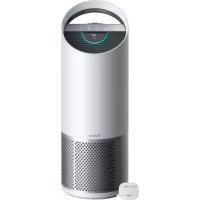
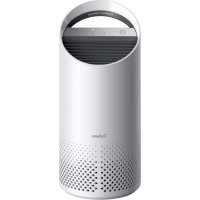
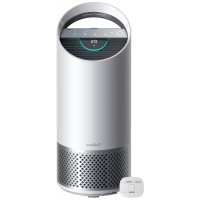
TruSens Z3000 - Air purifier LEITZ - Free user manual and instructions
Find the device manual for free TruSens Z3000 LEITZ in PDF.




| Product Type | Air Purifier |
| Brand | Leitz |
| Model | TruSens Z3000 |
| Dimensions (L x W x H) | 263 x 263 x 726 mm |
| Weight | 5.7 kg |
| Power Supply | 220-240 V, 50/60 Hz, 0.5 A |
| Power Consumption | 68 W |
| Noise Level | 32 - 66 dB |
| Coverage Area | Up to 70 m² (2 air changes per hour) |
| Air Quality Sensor | Wireless SensorPod™, range up to 15 m |
| Fan Speeds | Whisper, 1, 2, 3, Turbo and Auto mode |
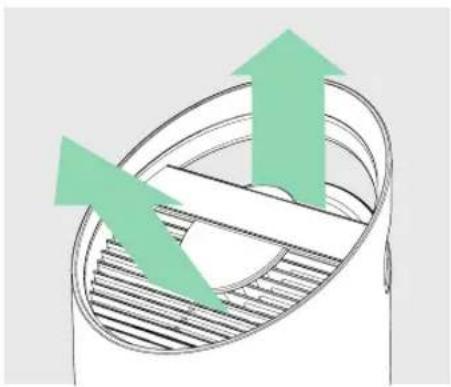
| Dispersion Technology | PureDirect™ (dual air flow) |
| Filtration | Washable pre-filter, activated carbon filter, 360° HEPA filter, UV-C lamp |
| Programmable Timer | 2, 4, 8 or 12 hours |
| Air Quality Display | Color-coded light ring (blue/yellow/red) and numerical value (0-500) |
| Night Mode | Yes, turns off light display |
| Replacement Indicators | HEPA, Carbon and UV (red indicator lights) |
| Replacement Parts | Complete 3-in-1 HEPA filter (2415110), Activated carbon filter pack of 3 (2415109), UV-C lamp (2415111) |
| Warranty | 2 years |
| Radio Frequency | 2462 MHz (wireless) |
Frequently Asked Questions - TruSens Z3000 LEITZ
User questions about TruSens Z3000 LEITZ
0 question about this device. Answer the ones you know or ask your own.
Ask a new question about this device
Download the instructions for your Air purifier in PDF format for free! Find your manual TruSens Z3000 - LEITZ and take your electronic device back in hand. On this page are published all the documents necessary for the use of your device. TruSens Z3000 by LEITZ.
USER MANUAL TruSens Z3000 LEITZ
Welcome to clean air with TruSens. Thank you for allowing us to join you on your journey towards wellness.
The air you breathe should be clean, no matter where you are in the room. TruSens SensorPod™, PureDirect™ Technology & 360 degree filtration ensure the whole room benefits from cleaner air.
SAFETY INFORMATION
PLEASE READ AND SAVE THESE INSTRUCTIONS
Unplug or disconnect the appliance from the power supply before replacing filters or UV-C emitter, or when appliance is not in use.

WARNING: To reduce the risk of fire or electric shock, do not use this fan with any solid-state speed control device.
Do not operate any purifier with a damaged cord or plug, or if the wall socket is loose. If the supply cord is damaged, it must be replaced by the manufacturer, its service agent or similarly qualified persons in order to avoid a hazard.
Do not run cord under carpeting, throw rugs, runners, or similar coverings. Do not run cord under furniture or appliances. Arrange cord away from traffic area and where it will not be tripped over.

WARNING: Skin or eye damage may result from directly viewing the light produced by the UV-C emitter in this apparatus. Unintended use of the appliance or damage to the housing may result in the escape of dangerous UV-C radiation. UV-C radiation may, even in little doses, cause harm to the eyes and skin. Always disconnect power before relamping or servicing. Replace UV-C emitter with 2415108 (for Z-2000), or 2415111 (for Z-3000), Manufactured by ACCO Brands.
- Remove all packaging, including the filter bag, before use.
- Appliances that are obviously damaged must not be operated.
- This appliance must only be connected to a wall socket outlet matching the supply plug type and rating stated on the rating plate.
- Locate air purifier near the outlet wall socket and do not use extension cords.
- This appliance can be used by children aged from 8 years and above and persons with reduced physical, sensory or mental capabilities or lack of experience and knowledge if they have been given supervision or instruction concerning use of the appliance in a safe way and understand the hazards involved.
Children shall not play with, clean, or try to maintain the appliance. - Replace the UV-C emitter with the model specified within this manual.
- Do not attempt to service or repair this product yourself.
- Only use the purifier and SensorPod™ with the power cable provided.
- Only clean this machine with a damp cloth, do not use solvents or bleach.
- Ensure appliance is always placed on firm level surface before operation.
- Do not block or obstruct the air intake or outlet vents.
- Do not insert fingers or other items into the air intake or outlet vents.
- When the air purifier is in standby mode the SensorPod™ is still transmitting a signal/data.
Operating Frequency
Wireless: 2462 MHz
Maximum Transmit Power (EIRP)
Wireless: 0 dBm
Antenna Gain
Wireless: 2 Dbi
Hereby, ACCO UK Ltd declares that the radio equipment types, Leitz TruSens Air Purifier Z-2000/Z-3000 are in compliance with Directive 2014/53/EU.
The full text of the EU declaration of conformity is available at the following internet address: https://declarations.accobbrands.com/
A minimum separation distance of 0.2m must be maintained between the user's body and the device, to comply with RF exposure requirements.
Waste Electrical and Electronic Equipment (WEEE)
At the end of its useful life, your product is considered to be WEEE. As such, it is important to note that: WEEE is not to be disposed of as unsorted municipal waste. It is to be collected separately such that it can be disassembled so its components and materials can be recycled, reused, and recovered (burned for energy content in the production of electricity).
Public collection points have been set up by municipalities for the collection of WEEE, free of charge to you. Please return your WEEE to the collection facility nearest your home or office.
If you have difficulty locating a collection facility, the retailer that sold you the product should accept your WEEE. If you are no longer in contact with your retailer, please contact ACCO for assistance with this matter. Recycling of WEEE is geared toward protecting the environment, protecting human health, preserving raw materials, improving sustainable development, and ensuring a better supply of commodities in the European Union. This will be achieved by retrieving valuable secondary raw materials and reducing the disposal of waste. You can contribute to the success of these goals by returning your WEEE to a collection facility. Your product is marked with the WEEE symbol (wheelie bin with an X through it). This symbol is to inform you that the WEEE is not to be disposed of as unsorted municipal waste Leitz TruSens air purifiers also come equipped with a UV-C emitter. Upon replacement of this item (during the lifetime of the product), these must also be returned and disposed of at your local WEEE collection facility. Further information and installation guides / videos for the UV-C emitter can be found at www.leitz.com
FEATURE HIGHLIGHTS

SensorPodTM
Remote air quality monitor that ensures cleaner air, right where you need it.

PureDirect™ Technology
Independent lab testing confirms that two airflow streams are better than one, moving air effectively and more comfortably throughout the room.

Informs and Adapts
Colour-coded illuminated ring provides additional information by communicating air quality in real-time.

360° Purification
HEPA filter captures pollutants and VOC gases/ odours from all directions. UV-C light kills germs and bacteria that can get trapped in the filter.

Thoughtful Execution
Exceptional functionality wrapped in a contemporary design that fits any environment.
PRODUCT OVERVIEW
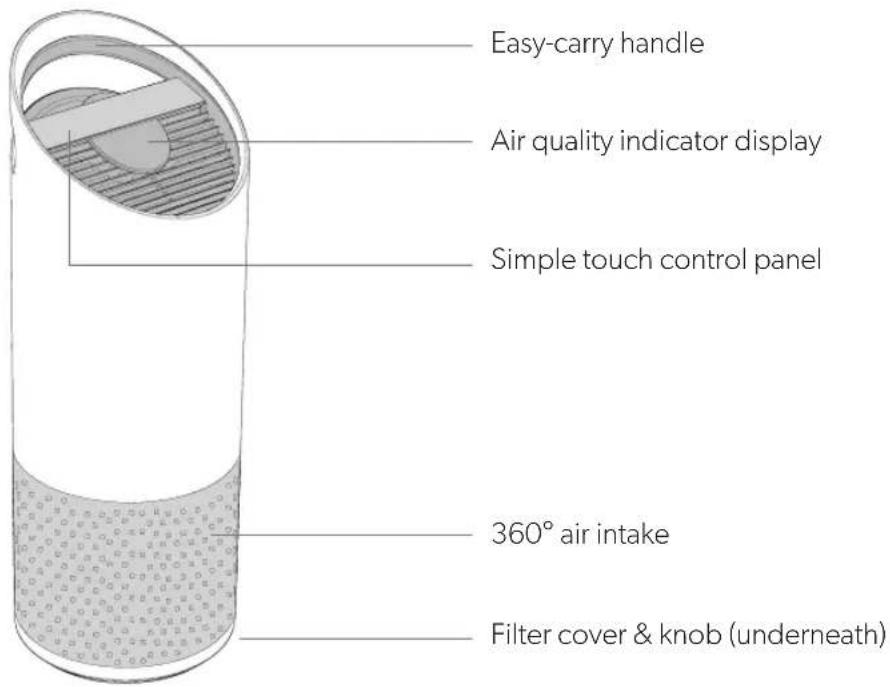
Air Purifier
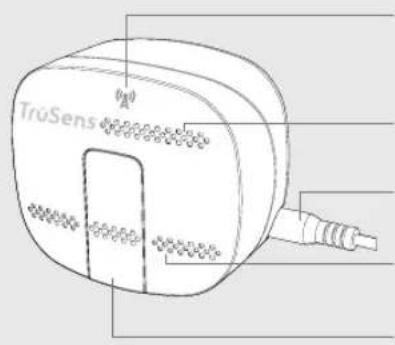
SensorPodTM
Power & signal
indicator
Air outlet
Power cord
Air inlet
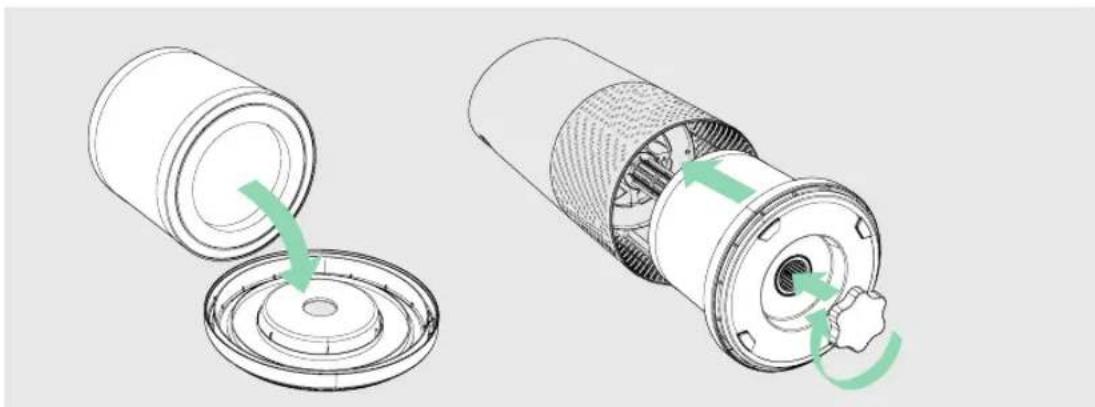
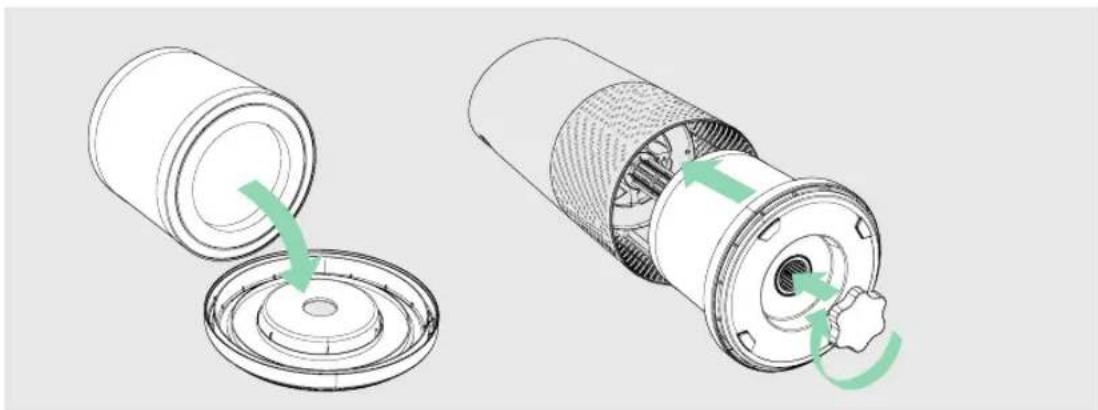
1. Remove plastic bag from filter
Unscrew the bottom cover and remove the plastic bag from the filter.
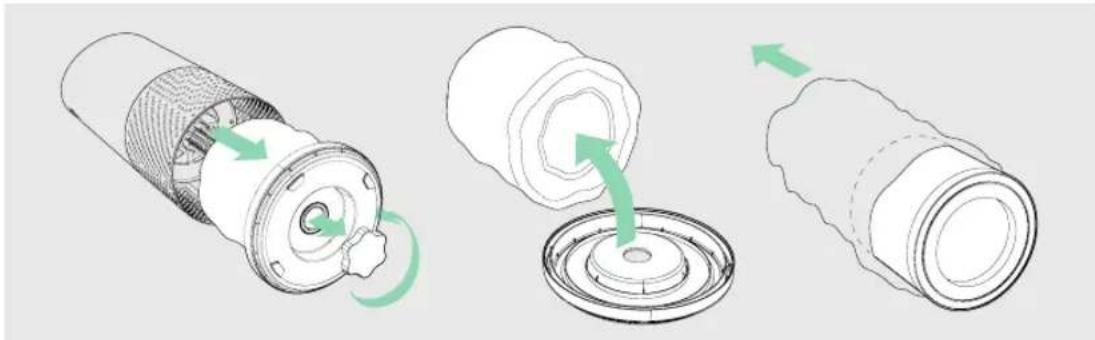
2. Re-attach filter
Secure filter on the bottom cover and replace inside the purifier.
3. Set up
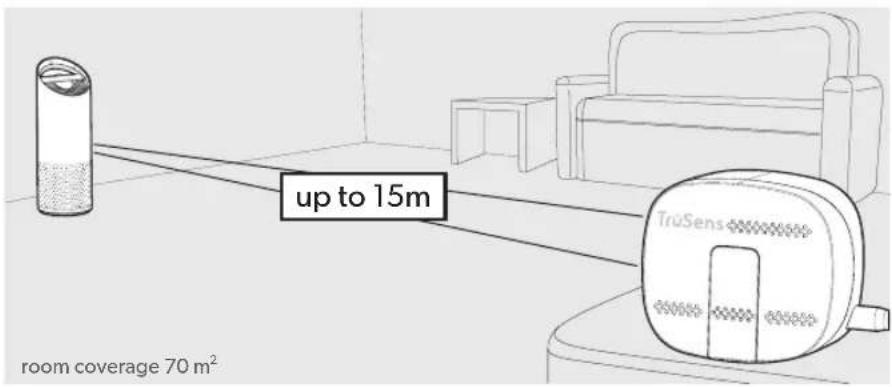
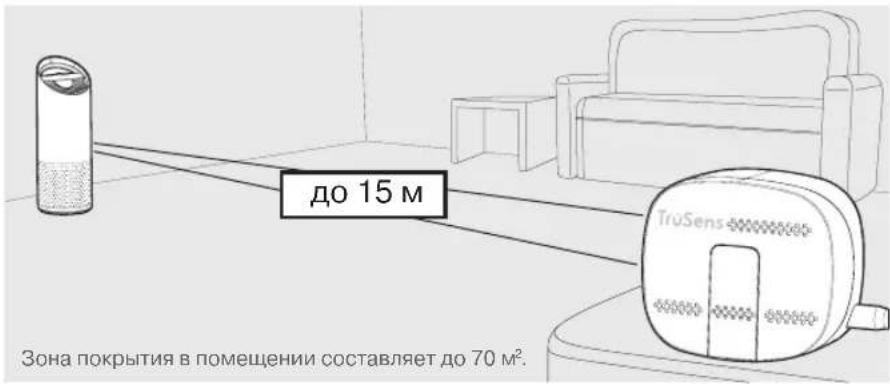
Plug-in your SensorPod™, and place upright on tabletop or counter across the room, within line of sight of the purifier.
Plug-in your air purifier unit and power on. Place the purifier on a flat surface, free from obstructions.
Signal strength may vary by location. In the rare occasion that it doesn't work - see page 18.
4. Start living with cleaner air!
The purifier will automatically adjust fan speeds based on the air quality readings from SensorPod, and proprietary PureDirect™ technology will deliver purified air throughout the room!
CONTROL PANEL


Power Button

Fan Speed Settings
Select fan speed or AUTO mode. In AUTO mode, purifier automatically adjusts fan speed based on air quality readings from SensorPodTM.
(AUTO mode only available when purifier is paired with SensorPod and receiving signal)

Dimmer Mode
Display illumination turns off - for use while sleeping - without sacrificing the effectiveness of the purifier. Simply press the button again to bring back all display features.

Timer Mode
Purifier will automatically turn off after 2, 4, 8, or 12 hours. To cancel this countdown, simply press button until no timer setting is displayed.

UV Mode
UV-C lamp within the purifier's filter chamber is on when the symbol is white. The symbol will glow red when it is time to replace the UV-C lamp.
(See page 15 for replacement instructions)

Filter and UV Indicator Reset
HEPA, Carbon and UV indicators glow red when it is time for each to be replaced.
When 1 indicator is on, simply hold Reset button for 3 seconds to reset that indicator.
When 2+ indicators are on, tap the Reset button to select the correct indicator (selected indicator will blink) before holding 3 seconds to reset that indicator.
(See pages 13-15 for replacement instructions. Follow above Reset button instructions after replacing filter.)
AIR QUALITY DISPLAY
Real-time Feedback
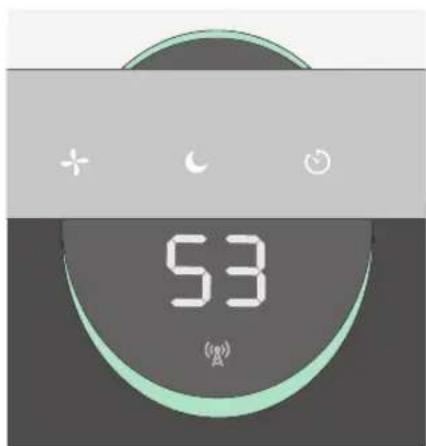
The revolutionary SensorPod™ evaluates the condition of your air by measuring both small (PM2.5) and larger (PM10) particulate matter. It calculates the overall air quality using a proprietary algorithm that is reactive to genuine increases in pollutants without overreacting to someone entering the room or settling into the couch.
The illuminated, colour-coded display communicates good, moderate or poor air quality and a numeric value provides a greater level of detail.
In AUTO mode, the purifier automatically adjusts the fan speed in response to these air quality readings.
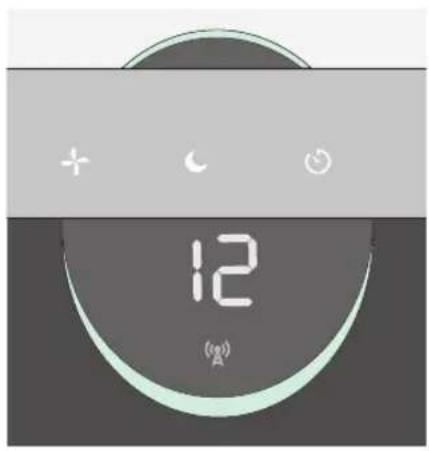
GOOD
BLUE | 0-50
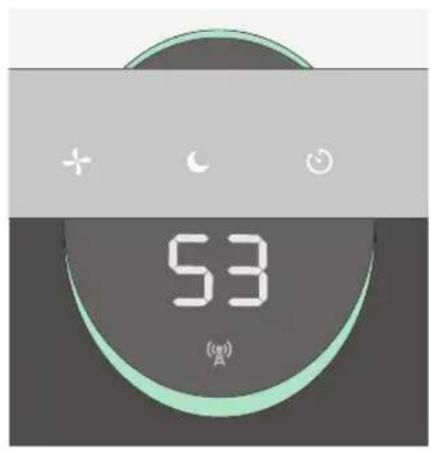
MODERATE
YELLOW | 50-100
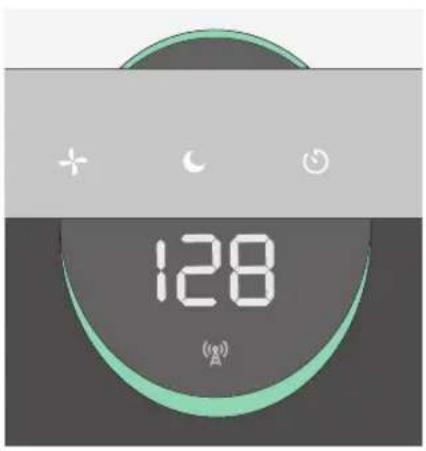
POOR
RED | 100 - 500
SPECIFICATIONS
| Air Inlet 360° | |
| Air changed 2 times per hr 70 m² | |
| Air Delivery Type PureDirect | TM |
| Sensor SensorPod | TM, works up to 15 m from purifier |
| Fan Speed Settings Whisper, 1, 2, 3, Turbo | |
| Purification Levels Washable Prefilter, Carbon, HEPA, UV-C Lamp | |
| Timer Settings 2, 4, 8, 12 hr | |
| Filter Change Indicators Carbon, HEPA, UV | |
| Noise 32 - 66 dB | |
| Dimensions 263 x 263 x 726 mm | |
| Weight 5.7 kg | |
| Motor Type DC motor | |
| Power Requirements | 220-240v 50/60H 0.5A |
| Power Consumption | 68 W |
| Warranty | 2 years |
Replacement Filters & UV-C Lamp
| 3-in-1 HEPA drum filter | 2415110 |
| Carbon filter (3-pack) | 2415109 |
| UV-C Lamp | 2415111 |
CARE & MAINTENANCE
Accessing the filter chamber
- Always power off the purifier by pressing the Power Button and unplugging the power cord.
- Gently place the unit on its side on the floor so that the filter chamber cover and knob are exposed.
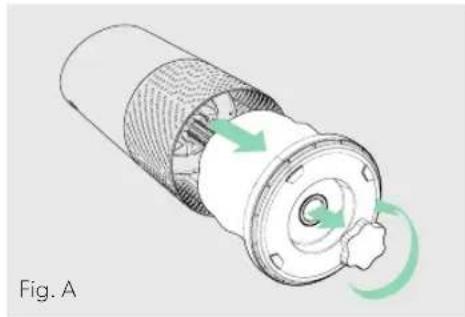
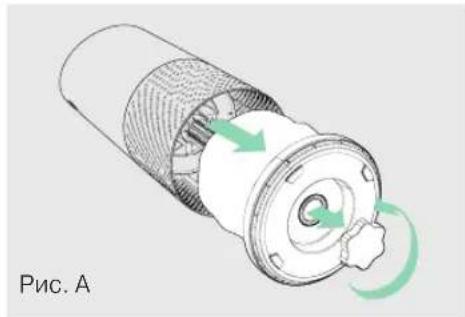
- Turn the knob counterclockwise and remove the filter cover and 360° HEPA filter drum (Fig. A).
REPLACING HEPA FILTER
- The HEPA indicator will glow red when it is time to change the entire HEPA drum filter.
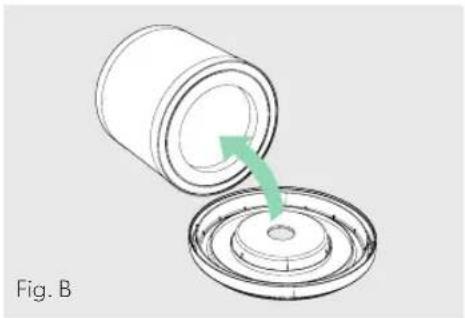
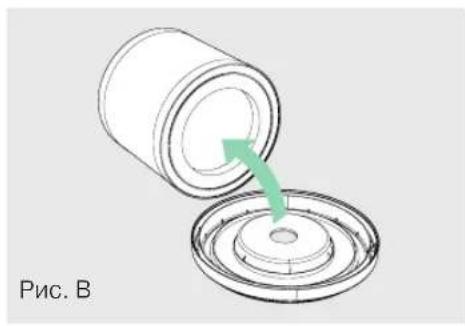
- Gently pull the HEPA drum filter away from its place secured to the filter cover (Fig. B).
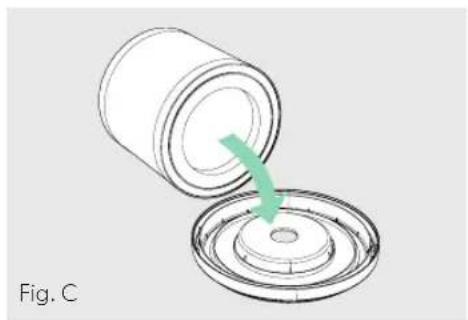
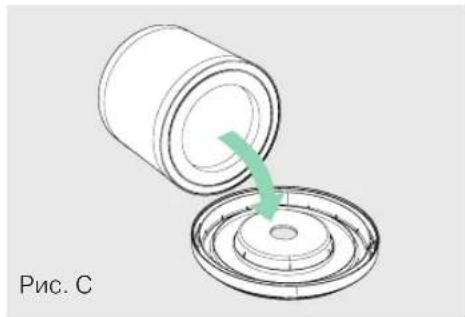
- Secure the replacement HEPA filter onto the filter cover (Fig. C).
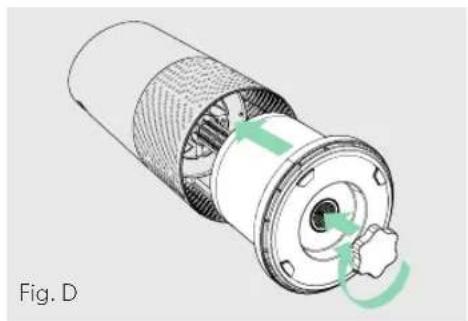
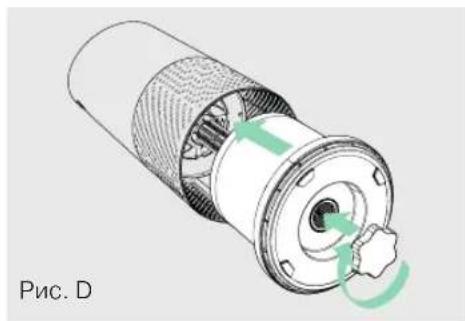
- Gently replace the filter cover with filter drum into the filter chamber and onto the threading, and turn the knob clockwise until the knob and filter chamber cover are securely tightened (Fig. D).
- Plug-in and power on your purifier, and hold the Reset button until the red HEPA indicator turns off.
Note: HEPA drum filter (on page 12) will include 3 layers: Washable, Prefilter, Carbon and HEPA
REPLACING CARBON FILTER
- The Carbon indicator will glow red when it is time to replace the Carbon layer.
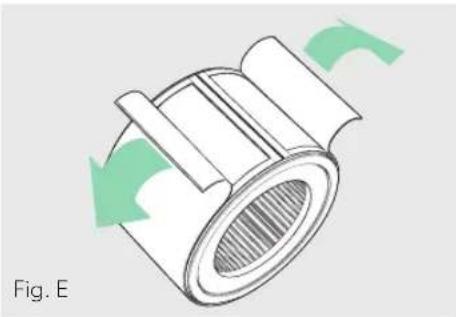
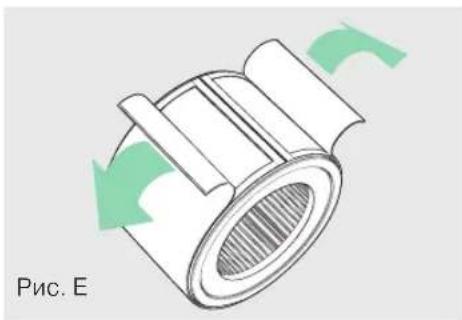
- Gently peel away the Prefilter from the fastener strips (Fig. E).
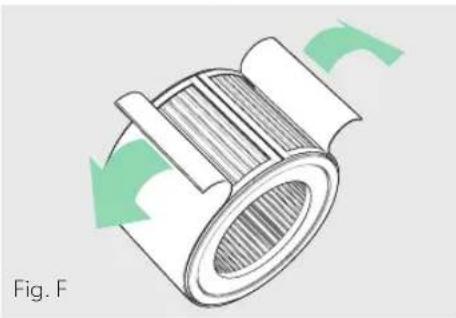
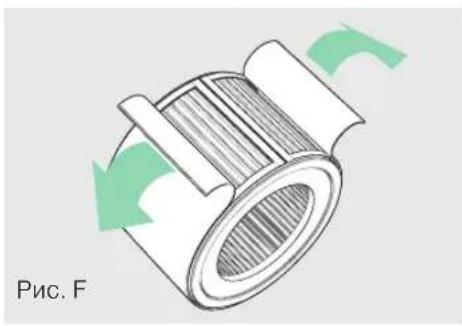
- Gently peel away the used Carbon layer from the fastener strips (Fig. F).
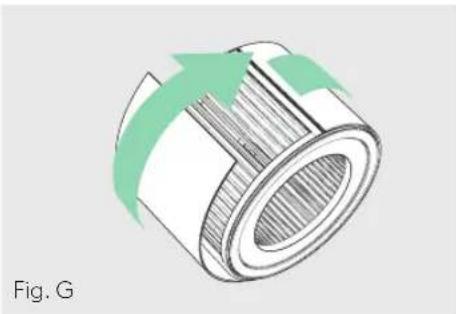
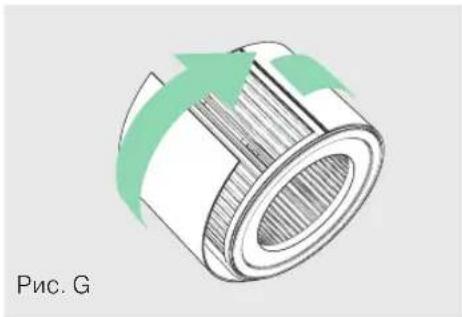
- Wrap a new Carbon layer around the filter drum and attach to the same fastener strips (Fig. G).
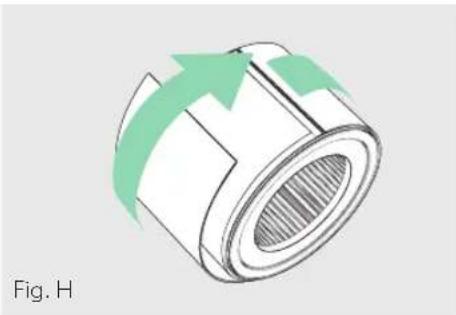
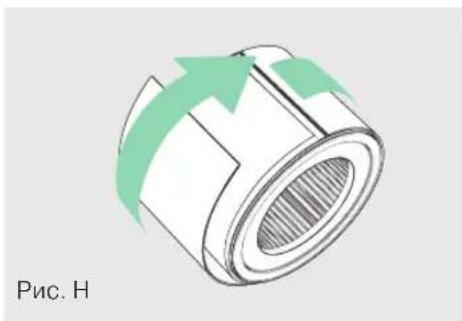
- Replace the Prefilter by wrapping it around the Carbon layer and attach to the fastener strips (Fig. H).
- Once the purifier is powered-on, hold the Reset button until the red Carbon indicator turns off.
Note: Carbon filter 3-pack (on page 12) will cover 3 Carbon changes between replacing the entire HEPA drum filter assembly (on page 13).
WASHING THE PREFILTER
- We recommend that you visually inspect the Prefilter every month, and clean as needed. At minimum, you should hand wash the Prefilter every time you change the Carbon filter.
- Gently peel away the Washable Prefilter from the fastener strips (Fig. E).
- Gently rinse with running water - allow Prefilter to air dry before re-installing.
- Replace the Prefilter by wrapping it around the filter drum and attach to the fastener strips (Fig. H).
REPLACING UV-C LAMP
- The indicator will glow red when it is time to replace the UV-C lamp.
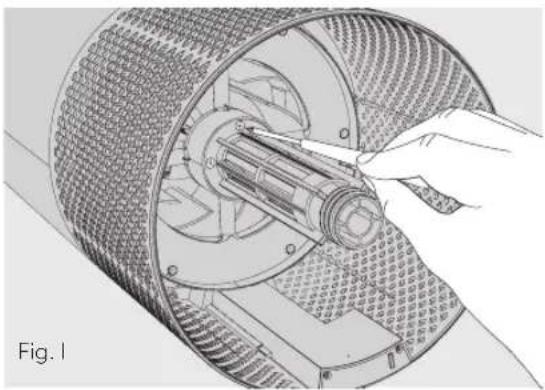
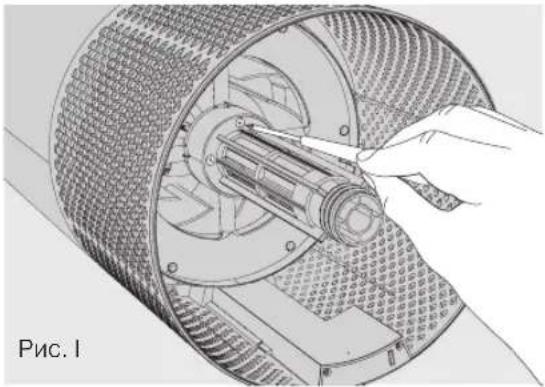
- Remove HEPA filter drum (Fig. A), and use a screwdriver to remove the 4 screws securing the UV housing (Fig. I).
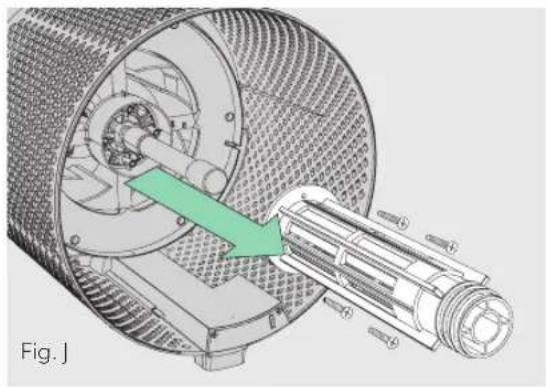
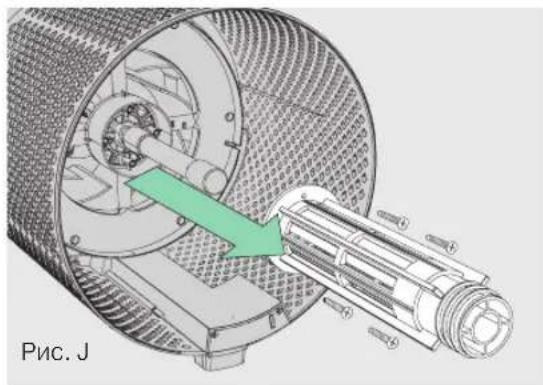
- Gently remove the UV housing (Fig. J).
-
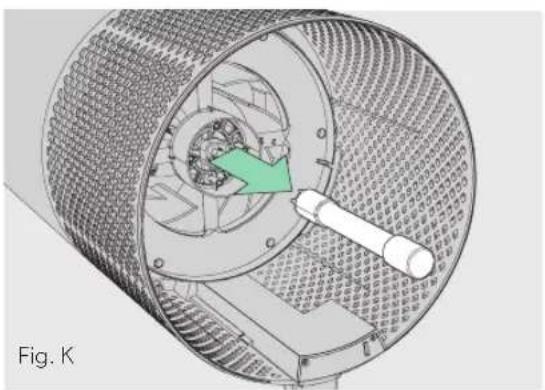
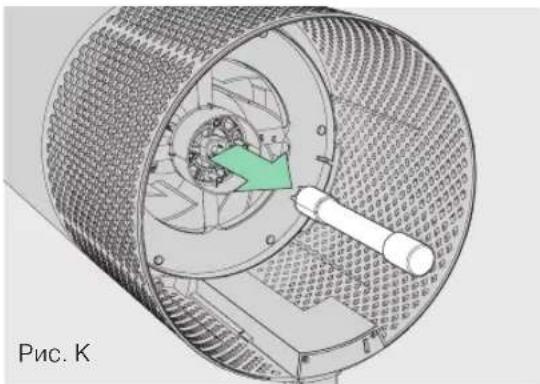
Disconnect the UV-C lamp from the socket within the purifier (Fig. K).
-
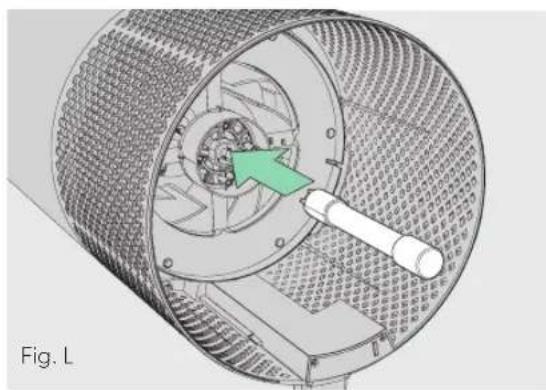
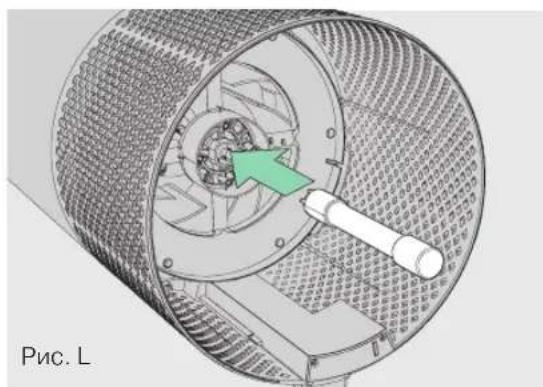
Your replacement UV-C lamp (on page 12) will plug directly into the same socket (Fig. L).
- Replace the UV housing and use a screwdriver to tighten the fastening screws.
- Once the purifier is powered-on, hold the Reset button until the indicator turns white.
Note: Upon replacement of the UV-C emitter please dispose of at your local WEEE collection facility.
CLEANING THE SENSORPOD
Cleaning the air quality sensor
The SensorPod™ uses an infrared light to detect particulate matter, so it is important that you clean the viewing chamber every 1-2 months to remove any dust or particles that may affect the accuracy of the sensor's readings.
- Turn-off the SensorPod by unplugging the power cord.
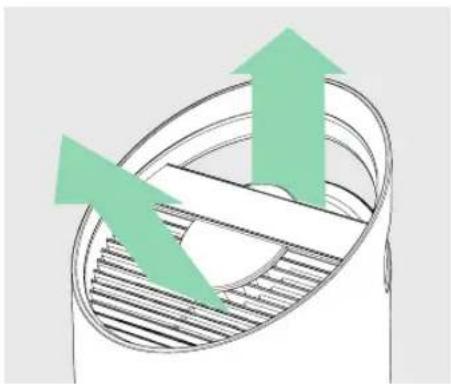
- Open the easy-access door on the front side by pulling the door up at a 90° angle.
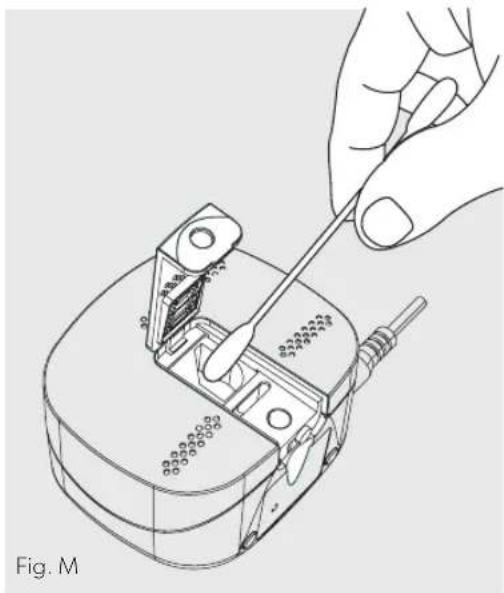
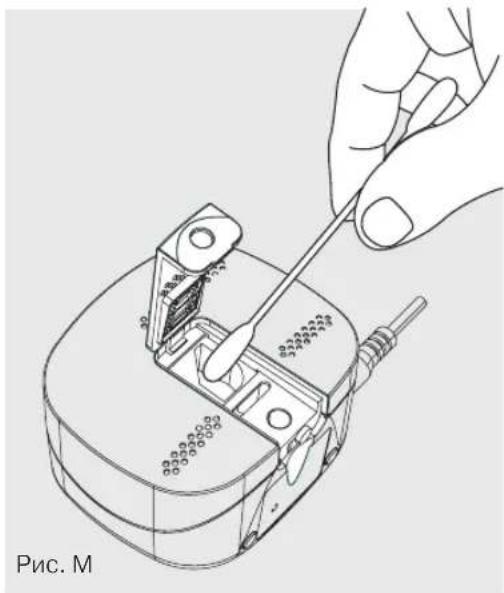
- Use a damp cotton swab to wipe the lens and intake area of the dust sensor (Fig. M).
- Use a dry cotton swab to wipe away any remaining moisture.
- Close the cover by rotating the door back down and sliding it back into place until you hear a click.
FAQ & TROUBLESHOOTING
| Where do I place the SensorPodTM? | Anywhere you want to measure the air quality within the room! For optimal results, place the SensorPodTM up to 15 m away from the air purifier on a counter or table, within line of sight of the purifier. In Auto Mode, the purifier will work to distribute clean air until the SensorPod reads an acceptable level of air quality. |
| How often do I need to change the filters? | That's easy! The purifier's replacement indicators will notify you when it is time to replace the Carbon or HEPA filters, or the UV-C lamp. Plan on replacing the Carbon every 3-4 months, HEPA every 12-15 months, and UV-C lamp every 1-3 years. |
| How often do I need to wash the Prefilter? | The Prefilter captures larger particles and preserves the efficiency of the other filters, so we recommend that you visually inspect the prefilter every month and wash as needed. Another good habit is to wash the prefilter every time you replace the Carbon filter. |
| How often do I need to clean the dust sensor within SensorPodTM? | For the most accurate measurement of your air quality, we'd recommend you clean the surface of the dust sensor every 1-2 months. |
| Purifier won't turn on. | Check that the power cord is connected securely to both the wall outlet and the purifier. Check if there is a power outage in the outlet by trying a nearby light or device, or by trying a working device in the same outlet. Check that the HEPA filter is fitted properly into filter chamber. Please contact us if you're still having a problem! (page 19) |
FAQ & TROUBLESHOOTING
| Purifier won't go into Auto Mode. OR Air quality indicators are off. OR Purifier's sensor signal indicator is blinking. | First, check that the SensorPod is plugged-in and that its light is solid. Next, check that the SensorPod is within range of the purifier (up to 15m). If both are true and the connection is still failing, see below instructions on repairing the SensorPod's connection. |
| I've lost my SensorPod™! Don't worry! Please contact our customer support team and you can order a replacement SensorPod. Follow the easy pairing instructions below to pair your replacement SensorPod with your existing air purifier! | |
Pairing SensorPod™ and Purifier
The SensorPod communicates with the purifier using radio frequency signals, and will be paired on the production line and ready for use when you open the box. In the rare event that the signal is interrupted, the purifier's sensor indicator light (A) will blink. You can repair the connection in just a few easy steps.
- Unplug the SensorPod.
- HOLD the Power Button on the purifier for 3 seconds, when you should hear two chimes.
-
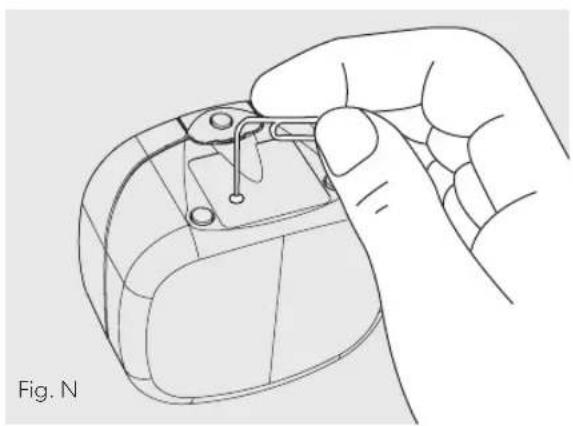
Plug-in the SensorPod and use an item with a small point (paper clip) to press and HOLD the pairing button underneath the SensorPod for 5-7 seconds (Fig. N).
-
The connection is established when the purifier's sensor indicator light is lit with no blinking, and the air quality indicators turn on.
GUARANTEE
Operation of this machine is guaranteed for two years from date of purchase, subject to normal use. Within the guarantee period, ACCO will at its own discretion either repair or replace the defective machine free of charge. Defects due to misuse or use for inappropriate purposes are not covered under the guarantee. Proof of date of purchase will be required. Repairs or alterations made by persons not authorized by ACCO will invalidate the guarantee. It is our aim to ensure that our products perform to the specifications stated. This guarantee does not affect the legal rights which consumers have under applicable national legislation governing the sale of goods.
SUPPORT
Thank you for welcoming TruSens™ into your home. Our customers are at the heart of what we do, and we strive to design products that fit your lifestyle. If you have any questions or feedback, please reach out!
Visit our website at www.leitz.com/trusens
Email us at service.uk@acco.com
Call us at 0800 279 5102
To register and activate your warranty go to www.leitz.com/register
TruSens
Purification 360°
REEMPLACEMENT DE LA LAMPE UV-C
VEELGESTELDE VRAGEN EN PROBLEEMOPLossING
Bezoek onsite website op www.leitz.com/trusens
(EIRP) Wireless: O dBm
Guadagno antenna
Wireless: 2 Dbi
UDSKIFTNING AF UV-C-LAMPEN
SKIFTE UT UV-C-LAMPE
- Indikatoren lyser rodt nár det er på tide á skifte ut UV-C-lampen.
- Fjern HEPA-filtertrommelen (fig. A), og bruk en skrutrekker til a fjerne de fire skruene som fester UV-huset (fig. I).
- Ta ut UV-huset forsiktig (fig. J).
-
Koble fra UV-C-lampen fra kontakten i renseren (fig. K).
-
Den nye UV-C-lampen (se side 165) kobles direkte til samme Kontakt (fig. L).
- Sett UV-huset pã plass og bruk en skrutrekker til a stramme festeskruene.
- När luftrenseren er slätt på, holder duinne Resetknappen til indikatoren blir hvit.
https://declarations.accobbrands.com/.
Starp lietotaja kermeni un ieri ci janodrosina vismaz
0,2 m attalums, lai tiktu ieverotas prasibas attieciba uz radiofrekvencu iedarbibu.
Elektrisko un elektronisko iekartu atkritumi (EEIA)
Sis produits ta darbmuza beigas ir uzskatams par EEIA. Ir svarigi ieverot, ka EEIA nedrikst apglabat kaneškirotus sadzives atkritumus. Tie ir jasavac atseviski, lai tos varetu izjaukt un componentus un materialus varetu pärstradat, atkartoti izmantot un regeneret (ka degvielu energijas regeneracijai, ražojot elektribu).
TYTO POKNY SI PRECTETE A USCHOVEJTE.
CASTÉ DOTAZY A RESENI PROBLEMU
CASTÉ DOTAZY A RESENI PROBLEMU
https://declarations.accobrand.com/
https://declarations.accobrand.com/
AZ UV-C LÁMPA CSERÉJE
https://declarations.accobrand.com/
(EIRP) Wireless: 0 dBm
Castigul antenei
Wireless: 2 Dbi
Prin prezenta, ACCO UK Ltd Declare cã modele de echipamente radio Leitz TruSens Air Purifier Z-2000/Z-3000 respecta cerintele Directivei 2014/53/UE.
Feedback in temp real
HauJIO NcNoJIb3OBAHnI

2.YCTaHOBNTeΦnIbTpHa MeCTO
3aKpeNtE nIbTp Ha HnXHe N KpbIuKe I NOMeCTnte ero o6paTHO BHyTpB OYNCHTeJIa.
3. Hactpoika
ПОДКЛЮЧNTЕ K ЭЛЕКТРИСЕСКО CETN ДИСТАнЦИНь MOHITOP KAUCECTBA BO3dYxa SensorPod. ПОCTавы TE MOHITOP SensorPod Ha CTOL ИЛ NИ ИНΥю pa6Oую NOВЕХHOCtB В пеДeлax Рямо BIVIMOCTи OCHNTITEЯ, HO Na ДPyROM KOHuce NOMEUSEHIN.
IOnKJIIOHTe ONUCTNTeB K 3JIeKTPnuecCKo CETN IN BKIOUHTe NITaHne. IocTaBBTe ONUCTNTeB Ha pOBHyIO NOBepxHOCTb, He IMeIOUyIO npenrTCTBn
- B MecTe, rIe BO3dUx MOxET CBO6OJHO NOCTyNaTb B OCHNTeJIb CO BCEx CTOpOH - n36eRaIte MeCt, B KOTOpBix HaxoIITcI NOCTeJIbHoe 6eJIbe N 3aHaBeCKn, a TaKX NCTOHHKu TepJa IIN BlaFIn.
UpoBHeB CnHana MoXeT BapbIPOBaTbC8 B 3aBnCmOcTn OT MeCTOnoJoxeHn. B peKoN cTuayu, KOrDa yCTpOiCTBO He pa6oTaet, CM. CTp. 341.
4. HaHTte XNTb C OUNUeHHbIM BO3dyXOM!
OuHCTIeJIb aBTOMaTnueCKn peRyIInpyET qACTOTy BpaUeHnB BeHTnIaTOPOB B 3aBNCIMoCTN OT noka3aHn KaeeCTBa BO3dyxa, noCTyaIOxN OMTMOHToP a SensorPod, a bnaOapra yHnKaJIbHOI TexHOLOrn PureDirect™ BCE nomEeHne 6ydt 3aONHeH OOnIeHHbIM BO3dyXOM!
IaHEJIb ynpABJIeHnIa


Khonka nHTaHnA

HactpoKnCKOpocnBENTNJIATOPa
BbIbepeTeCKopocTbBeHTnIaTopaNNn ABTomatNueckn peKm (AUTO).
B aBTOMaTnueckOM pexKIMe OCHNTeJIb
aBTOMaTnueckN peYIINpyET HAcTOTy BpaUeHn
BEHTNJrTOPOB B 3aBNCUMOCTN OT NOKa3aHn KaYeCTBa
BO3dYxa, NOCTyNaIOUxN OT MOHITopa SensorPod.
(ABTOMaTnueckn peKIM IOCTyneH, TOnbKO KOrda OOHTeNb COpJxKeH C MOHITOpom SensorPod n NOJyaeT OT Hrero CnHaJ.)

Houhnopekm
DaHHbpeKIMnpEHa3HaueHdIINCNoJIb3OBAHNBO BpemcHa. POnCBETKa DnCnJIe OTKIIouaETcHO 3TO HNKaHE BnREt Ha 3ΦΦeKTNBHOCTb pa60TbOCHNTeJIa.
Дя BOCCTaHOBJIeHЯ ДЕИСТВЯ BCEXФУHKUIMДИСПЛЯ ПОСTOHAKMITEKHONKYCHOBA.

Pekm TaMepa
OuHCTIeJIb aBTOMaTnueCKN BbIKIOHTcY Hepe3 2,4,8 nn12 YacOB.
Дя OTMeHbI O6paTHOrO OTCcheta NO TaIMepy HaxMnTe N ydePknBaIte KHOkNy, NOka He nepeCTaHET OTo6paKaTbCra HAcTpoKa TaIMepa.
UV
Pexm yIbtpafoJeTOBOuN3nyeHnna UV-CBΦnIbTpOBAJbHOJ Kamepe ONUCTNTELBKNIOUHeHa,KOJa CUMBOJ CBETITc6JIbIM UBEtom.
Ecnn CmBON. 0BETTCKpaChbIM UBeTOM, npuIIO BpeMg 3ameHntb lammy UV-C.
(CM. nHCTpyKun Ha cTp. 338.)
Reset
C6poc INIINKATOPOBΦNJIbTpa N yJIbTpaΦNOJETOBOJ lamnbl
INHdkatopbI“HEPA”,“Carbon”(«AKTINBupoBaHHbI yroJIb>)n «UV"(yΦ)CBETrCkpaCHbIMcBeTOM, KOrJa HEO6XoDmO 3aMeHNtB COOTBeTCTBYIOUeeyCTPOJCTBO.
Korda BkIIOueH 1 INdkaTOp, HaxMITE u ydepXnBaIte KHOIpKy c6pOca (Reset) B TeueHne 3 ceKHyI, YTO6bI BbINOJIHHTb C6pOC COCTOHNr 3TOrO INdkaTOpa.
Korda BkJIOyeHb 2 nnn BoJee HnDnKaTOpOB, KOCHNTecb KhoNKn C6poca (Reset), TTo6b BbI6paTb Tpe6yEmb INHnKATOp (BbI6paHHb INHnKAtOp ByET Mrratb), a 3aTeM Haxmnte N ydepxnBaHTe ee B TeHeHne 3 CekyHd, TTo6b BblNoHnTb C6poc COCTOHNB bI6paHHOrn HnDnKaTopa.
YMEPEHHOEKAUECTBO KEJITbI 50-100
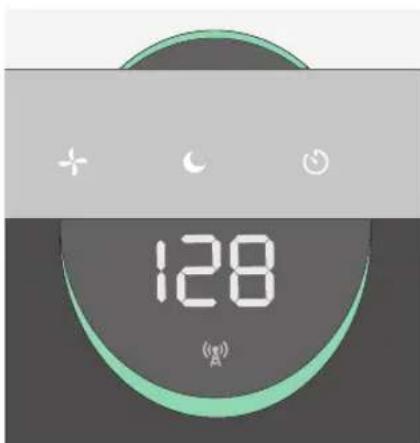
ПLOXOE KAUCHBO KPACHы | 100 - 500
B MOHITope TruSens nCnoIb3yeTc nHnDeKc KaueCTBa Bo3dyxa (1—500), pa3pa6oTaHHbI amepNKaHCKM aReHTCTBOM no OxpaHe OkpykaIOUeJ cpebl (EPA).
TEXHNUECKNEXAPAKTEPNCIKN
YXODI TEXHINCHECKOE OBCJUJKBAHNE
DocTyN KΦnIbTpoBaJIbHOJ Kamepe
- 063aTeIbHo OTKIIOUHTe 3JIeKTPoNTaHHe, HaxaB KHOKNy 3JIeKTPoNTaHnI NOTCOEINHNB SHHyp NTaHnI OT pO3ETKn.
- Octopoxho noJoxte yCTpoNCTBO 6OKOBO CTOPHO Ha non TaK, TTObI bHa BnHa KpbuKa n pyka fNbTPOBaJIbHO KaMepbl.
- ПовернITE ручky npOTnB XOДа YacOBо CTpeKIn n ChIMITE KpbIshKy ФильТрОВаьHой Камерbl 6apabahHbI HEPA-ФильТр 360° (pnc.A).
3AMEHA HEPA-ФИJBTPA
- Korda npiJeT BpeMra3aMeHnTB BeCb 6apabHaHbI HEPA-ФиNbTp, INdNkaTop HEPA-ФиNbTppa 6yEt CBETNbC KpaCHbIM CBeTOM.
- OcToPoxHo n3BnKeKNe 6apa6aHbHbI HEPA-ΦnIbTp n3 erO paCNoLoXeHnR, B KOTOpOM OH npNKpeNHe K KpbIke FnJIbTp a (pnc.B).
- YcTaHOBnTe n 3aKePnTe Ha KpbIuKe FInbTp a HObIi HEPA-ФnIbTp (pnc.C).
4.Octopoxno NomeCTne Ha MeCTO KpbIuKy fNlBtpa n 6apabHHbHnBnTp BHyTpB fNlBtPOBaIbHOJ KamepbI nHa pe3b6oBOe COeINHeHne, NOcJIe Yero NOBepHNTe pyKy n OxOdy uacOBoi CTpeLKn, YTObI HAdExHo 3aTaNyt pyKy n KpbIuKy fNlBTPa (pnc. D). - ПодсоeинHTe shHyр пNTaHnЯ кpo3eTke n BKIOuHTe эл ektpoNTaHnue OunchTeJI. HaxmTe n ydepxNBAITE KhoNKy c6poca (Reset), noka He BbIKIQUHTcKpaCHbI INdikatop HEPA-ФиNbTpra.
PpmeaHne. Bapa6aHHbI HEPA-ΦnIbTp (cm. cTp. 335) COCTO n3 ypoBHe: MOIOuINcNpeDBApnteHbIyΦnIbTp, ΦnIbTp C aKTHBnPOBaHHbIM yIeM N HEPA-ΦnIbTp.
3AMEHAФильТРС
AKTUNBINOBAHHbIM yTJEM
- KorIDA npiDeT BpEmaMeHnTB ΦnIbTp C aKTHBnPoBAHHbIM yIeM, INDnKaTOp ΦnIbTpca C aKTHBnPoBAHHbIM yIeM 6yIeT CBETNbCRA KpaChbIM UCBETOM.
- OcToPoxHo OTcoeHnHTe npeBapntbHbI nIbTpOT Kcnpuyuux noLocok (pnc.E).
- OctopoxhoOTcoeHHnte cNoI OTPa6oTaHHoro AKTINBpuOBaHHoro yrrn OT NIKCnpuyuux Noocok (pnc.F).
4.ОбернITE HOвьи сLOй aKTиВирOBaHHOrO yrIЯ BOKpyr 6apabHa ФИьТра и писоEdинITE erO K Tem JKe ΦИКсИpyUOsm ПОLOСКам (pnc.G).
5.ObepHnTe npedBapnteHbI HnBtp BOKpyr CIOaKTHBnPOBaHHOrO yrrn npncoeHNHTe erKΦHKcnpyUOMnoLOckam (pnc.H).
6.ПослЕВКЛIOЧЕНЯЗLEKТРОПNTAHNYOCHNTTEHAЖMITE uYdepxnBaIte KhoNky c6poca (Reset), noka He BbIKNoHTCk KpaCHbINHДИΚAToPФиьTpca CakTNBIPOBaHHbIM yJIeM. Iprimeahne:KOMIIeKta n3 3ФINbTpOB CakTNBIPOBaHHbIM yJIeM (CM.CTp. 335)doCTaTOHNOДЯ BbINOJIHeHNe 33aMeHФINbTpca CakTNBIPOBaHHbIM yJIeM B nepnoJ MEXdny 3aMeHaMn 6apabaaHoro HEPA-ФINbTpca (CM.CTp.336).
MOIKA IPEBAPNTbHOrO FJIbTPA
- PpOu3BOUnteJIpeKOMeHnyETexMeCyaHO OCMaTpNBaTb
PpeBapNTeJIbHbIΦNJIbTpIOOnuTaTbeEro NO Mepe HaIo6HoCTN.
PpeBapNTeJIbHbIΦNJIbTp CNeDuYeT MbITb BpyHyIO He pExe Yem
pn KaJdoJ 3aMeHeΦNJIbTpca AKTINBnPoBAHHbIM yIeM. - Octopoxho OTcoeHnHTe MOUuNcra npedBapntbHbI φ nltpOT φ Kcnpuyuxn noocok (pc. E).
- Octopoxho npomOnTe npToHOBoI NaIte npEaBapTeJIbHOMy FmIbTpY BbICOXHyTb Ha BO3dyXe, NocJe Yero yCTaHOblte erHa MeCTO.
4.ObepHnTe npedBapntbHbI ΦnIbTp BOKpy 6apa6aHHoro ΦnIbTp a npncOeDHNHe ero KΦnKcnpyUoIm nolockam (pnc.H).
3AMEHA JAMNbI UV-C
- Ecnn HndnKaTOp. CBeNTcKpaChbIM cBETOM, npuJNo BpeM 3aMeHnTB Jamny UV-C.
- CHIMITE 6apab6aHbI HEPA-ΦnIbTp (pnc.A) IN C NOMOUIO OTBepTKBbIKpyTne 4 BnHTa, KOTOpbIMKpeNTcKOpNyc y3Ja YΦ-JaAMbl (pnc.l).
-
Octopoxho CHIMITE KOpnyc y3na YΦ-naMnbl (pnc.J).
4.ИЗВЛЕКИТЕ ЛAMNY UV-C ИЗ ΚΟΚΟΥ, paCNoJIoXeHHORO B OUHCTIteIe (pIc.K). -
Hobyu Iamny UV-C (cm. ctp. 335) cneinyet BCTaBnTb HeNOCpeIcTBeHHO TOT Xe LOKoJIb (pnc. L).
- YcTaHOBnTe KOpnyc y3na yΦ-JaMnbl Ha MeCTO n C NOMOuBo OTBepTKn 3aTaNHTe KpeNexHbIe BNHTbl.
- После Вкюченя щектponпань оочтenteя нжмITE и уdeckхивайу сноку сбрoca (Reset), поka Иndикатор. He hauchet CBETNTbCЯбIM CBETOM.
PpmeHne. Pocne 3aMeHb n3nyatela UV-C, noxaynta, ytnn3npyte ero B MeCTHom ypeKdHm WEEE.
OCHCTKA MOHHTOPA SENSORPOD™
OuNTka DaTnKa KaueCTBa BO3dyxa
MoHntop SensorPodTM BbIIOJIHReT O6HapyKeHne
B3BeWeHHbIX B BO3dUxE TBepDbIX qACTNc C NOMOUIbIO
INΦpaKpachoro n3JyueHn, NO3OTOMy BaxHO kaxDble 1-2
MEcra OuNtAaTb KaMepy DaTUnKa PbIIN OT TBepDbIX qACTNu
IIIN PbIIN, KOTOpbIE MOrY OTPuCaTeJIbHO CKa3aTbCS Ha
TOUHOCTN POKa3AHn 3TOFO DaTUnKa.
- Otklouhnte əJIeKtpoNTaHne MOHTopa SensorPod, OTCOeINHb WHyp NITaHn.
- OTKpoIte IDbepu IJy yIO6HOro IOCTyna Ha nepeDHei CTopoHc, NOdHRe ee NOD yrnom 90°.
- C nOMOUIBnaxHO BAtHOI NaIOUKN BbITpTe IINH3y IN BXoHyIO Oblactb DaTHNka Nbln (Pnc.M).
- YdaIte OCTaTOK BnaIc C NOMOuC cyXoB BaTHoI naIOUKN.
- 3akpoTe KpbIuKy, onyCTnB n 3aDbHHyB ee Ha MeCTO do IeJyKa.
YACTO 3AADABAEMBIE BONPOCBI N OTBETBI HA HNX,
ПОИСК И YYSTРАЕНЕ HENСПAPВHOCTЕN
| Где сnéдует установьать MOHITOP SensorPod™? | В пошим мосте, гд требуETСЯ ИЗмерение качесТВа BOЗДУХа вnomецни! Для полоченя ONTIMальных розуltытOBУСТANВИBA? расстор,在оуговь OT OЧИСТЕЛЯ BOЗДУХа наразочи NOВЕРХОCTN.IИп на СтOLе ТAK,чTOБы MOHITOP HAXODINICSB INDEJALIX ПпседлaxппяраMDIOМOTООCHТЕ; В aBtOMATUHECKOM pexIMme pa6OTbI OЧИСТЕЛь BуET PaCppeDJIeY CHSTБ YOZ3DUX,пOKA MOHITOP SensorPod™ He onpeDeJIIT nprieMleMbIу yrobeH b KauceCTBA BOZДУХa. |
| Как чадуET мени ФИльту? Кто чадуET мени пrel'dвар'tь� SensorPod? | Замена ФИльтугяяяETСЯ РОцToIлproseурpos. Индікайтбу 3amehы, pacnoLOженны на очирtenе, уavedOMayTВAC O Heo6xOДМОCTN 3amehы ФИльтус akTNBupOBaHHbIM yIeM, HEPA-ФИльту рпллamпь UV-C. Планир? Замену ФИльтус aKТИВUPOBaHHbIM yIeM kaxdBiE 3-4 Meca; HEPA- ФИльту кождь 12-15 MecaeBи и lamпь UV-C kaxdBiE 1-3 roda. |
| Кто чадуET мени пrel'dвар'tь� SensorPod? | ПрedeВар'tь�нь ФИльту за对接хиBaET TVERдьчauthиь boLьшero размера д? coхраненя зф�екТВHOCHTДеICTBIVОCTNФИльтуВОТВ. POnETOMу пОИЗВODИТь peKOMeHДуET exeMeCryHNO OCMatprIBaTb рdeВар'tьньФИльту MBytБ erо NOМepe надобHOCТN.KpOME TOrO, peKOMeHДуETСЯ МытБ рdeВар'tьньФИьу prn KaKdoi Замене ФИльтус aKТИВUPOBaHHbIM yIeM. |
| Очир? Очир? SensorPod? | Дlia DOCTINEXH MaKcIMaJIbHO TOUHORO I3MepENHЯ KauceCTBA BOZДУХа peKOMeHДуETСЯ Очир? Очир? SensorPod? |
YACTO 3AADABAEMBIE BONPOCSI N OTBETbI HA HNX, IONCK N YCTPAHEHNE HENCINPABHOCTEIN
Pnpoopiec oE npaymuiko xpovo
www.leitz.com/trusens

BRANDS
Leitz ACCO Brands GmbH & Co KG
Siemenssta64
70469Stuart
Germany
www.leitz.com
©2021 ACCO Brands. All rights reserved.
TruSens™, U™ & Design, SensorPod™ and PureDirect™ are trademarks of ACCO Brands.
21973P002

- SAFETY INFORMATION
- PLEASE READ AND SAVE THESE INSTRUCTIONS
- OPERATING FREQUENCY
- MAXIMUM TRANSMIT POWER (EIRP)
- ANTENNA GAIN
- WASTE ELECTRICAL AND ELECTRONIC EQUIPMENT (WEEE)
- FEATURE HIGHLIGHTS
- SENSORPODTM
- PUREDIRECT™ TECHNOLOGY
- INFORMS AND ADAPTS
- 360° PURIFICATION
- THOUGHTFUL EXECUTION
- PRODUCT OVERVIEW
- REMOVE PLASTIC BAG FROM FILTER
- RE-ATTACH FILTER
- SET UP
- START LIVING WITH CLEANER AIR
- CONTROL PANEL
- POWER BUTTON
- FAN SPEED SETTINGS
- DIMMER MODE
- TIMER MODE
- UV MODE
- FILTER AND UV INDICATOR RESET
- AIR QUALITY DISPLAY
- REAL-TIME FEEDBACK
- CARE & MAINTENANCE
- ACCESSING THE FILTER CHAMBER
- REPLACING HEPA FILTER
- REPLACING CARBON FILTER
- WASHING THE PREFILTER
- REPLACING UV-C LAMP
- CLEANING THE SENSORPOD
- CLEANING THE AIR QUALITY SENSOR
- FAQ & TROUBLESHOOTING
- PAIRING SENSORPOD™ AND PURIFIER
- GUARANTEE
- SUPPORT
- TRUSENS
- PURIFICATION 360°
- REEMPLACEMENT DE LA LAMPE UV-C
- VEELGESTELDE VRAGEN EN PROBLEEMOPLOSSING
- GUADAGNO ANTENNA
- UDSKIFTNING AF UV-C-LAMPEN
- SKIFTE UT UV-C-LAMPE
- TYTO POKNY SI PRECTETE A USCHOVEJTE
- CASTÉ DOTAZY A RESENI PROBLEMU
- AZ UV-C LÁMPA CSERÉJE
- CASTIGUL ANTENEI
- FEEDBACK IN TEMP REAL
- HAUJIO NCNOJIB3OBAHNI
- 2.YCTAHOBNTEΦNIBTPHA MECTO
- HACTPOIKA
- HAHTTE XNTB C OUNUEHHBIM BO3DYXOM
- IAHEJIB YNPABJIEHNIA
- KHONKA NHTAHNA
- UV
- RESET
- YXODI TEXHINCHECKOE OBCJUJKBAHNE
- DOCTYN KΦNIBTPOBAJIBHOJ KAMEPE
- 3AMEHA HEPA-ФИJBTPA
- 3AMEHAФИЛЬТРС
- AKTUNBINOBAHHBIM YTJEM
- MOIKA IPEBAPNTBHORO FJIBTPA
- 3AMEHA JAMNBI UV-C
- OCHCTKA MOHHTOPA SENSORPOD™
- OUNTKA DATNKA KAUECTBA BO3DYXA
- YACTO 3AADABAEMBIE BONPOCBI N OTBETBI HA HNX
- ПОИСК И YYSTРАЕНЕ HENСПAPВHOCTЕN
- YACTO 3AADABAEMBIE BONPOCSI N OTBETBI HA HNX, IONCK N YCTPAHEHNE HENCINPABHOCTEIN
- PNPOOPIEC OE NPAYMUIKO XPOVO
Brand : LEITZ
Model : TruSens Z3000
Category : Air purifier