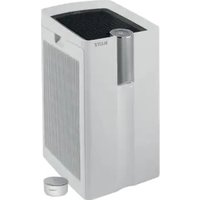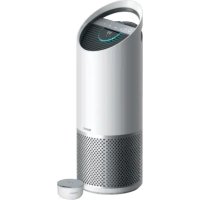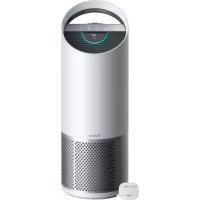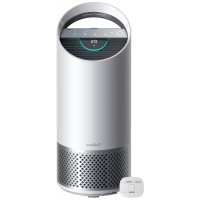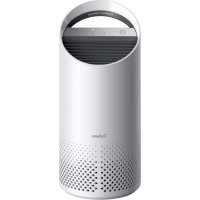
TruSens Z1000 - Air purifier LEITZ - Free user manual and instructions
Find the device manual for free TruSens Z1000 LEITZ in PDF.




User questions about TruSens Z1000 LEITZ
0 question about this device. Answer the ones you know or ask your own.
Ask a new question about this device
Download the instructions for your Air purifier in PDF format for free! Find your manual TruSens Z1000 - LEITZ and take your electronic device back in hand. On this page are published all the documents necessary for the use of your device. TruSens Z1000 by LEITZ.
USER MANUAL TruSens Z1000 LEITZ
Welcome to clean air with TruSens. Thank you for allowing us to join you on your journey towards wellness.
Enjoy cleaner air in your home with PureDirect™ Technology & 360 degree filtration that ensure the whole room benefits from cleaner air.
SAFETY INFORMATION
PLEASE READ AND SAVE THESE INSTRUCTIONS
Unplug or disconnect the appliance from the power supply before replacing filters or UV-C emitter, or when appliance is not in use.

WARNING:
To reduce the risk of fire or electric shock, do not use this fan with any solid-state speed control device.
Do not operate any purifier with a damaged cord or plug, or if the wall socket is loose. If the supply cord is damaged, it must be replaced by the manufacturer, its service agent or similarly qualified persons in order to avoid a hazard.
Do not run cord under carpeting, throw rugs, runners, or similar coverings. Do not run cord under furniture or appliances. Arrange cord away from traffic area and where it will not be tripped over.

WARNING: Skin or eye damage may result from directly viewing the light produced by the UV-C emitter in this apparatus. Unintended use of the appliance or damage to the housing may result in the escape of dangerous UV-C radiation. UV-C radiation may, even in little doses, cause harm to the eyes and skin. Always disconnect power before relamping or servicing. Replace UV-C emitter with item 2415105, Manufactured by ACCO Brands.
- Remove all packaging, including the filter bag, before use.
- Appliances that are obviously damaged must not be operated.
- This appliance must only be connected to a wall socket outlet matching the supply plug type and rating stated on the rating plate.
- Locate air purifier near the outlet wall socket and do not use extension cords.
- This appliance can be used by children aged from 8 years and above and persons with reduced physical, sensory or mental capabilities or lack of experience and knowledge if they have been given supervision or instruction concerning use of the appliance in a safe way and understand the hazards involved.
Children shall not play with, clean, or try to maintain the appliance. - Replace the UV-C emitter with the model specified within this manual.
- Do not attempt to service or repair this product yourself.
- Only use the purifier with the power cable provided.
- Only clean this machine with a damp cloth, do not use solvents or bleach.
- Ensure appliance is always placed on firm level surface before operation.
- Do not block or obstruct the air intake or outlet vents.
- Do not insert fingers or other items into the air intake or outlet vents.
FEATURE HIGHLIGHTS

PureDirect™ Technology
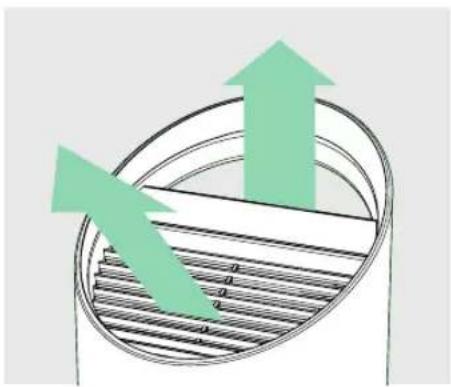
Independent lab testing confirms that two airflow streams are better than one, moving air effectively and more comfortably throughout the room.

360^ Purification
A Particulate Air filter captures pollutants and VOC gases/ odours from all directions. UV-C light kills germs and bacteria that can get trapped in the filter.

Thoughtful Execution
Exceptional functionality wrapped in a contemporary design that fits any environment.
CONTROL PANEL


Power Button

Fan Speed Settings
Select fan speed: 1, 2, or Turbo.

UV Mode
UV-C lamp within the purifier's filter chamber is on when the symbol is white. The symbol will glow red when it is time to replace the UV-C lamp.
(See page 13 for replacement instructions)
Reset
Filter and UV Indicator Reset
HEPA, Carbon and UV indicators glow red when it is time for each to be replaced.
When 1 indicator is on, simply hold Reset button for 3 seconds to reset that indicator.
When 2+ indicators are on, tap the Reset button to select the correct indicator (selected indicator will blink) before holding 3 seconds to reset that indicator.
(See pages 11-13 for replacement instructions. Follow above Reset button instructions after replacing filter.)
PRODUCT OVERVIEW
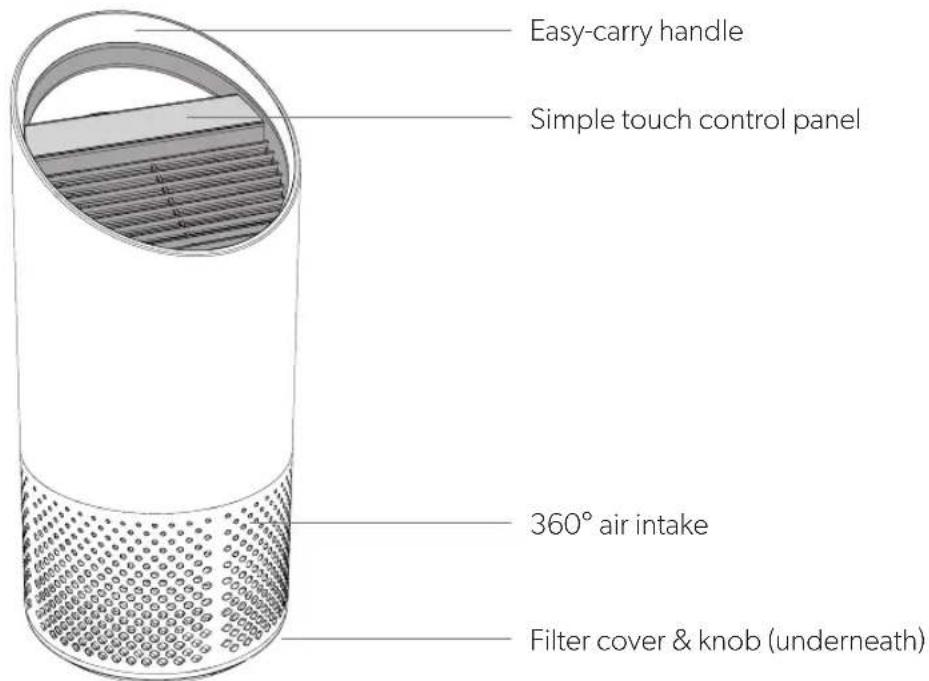
Air Purifier
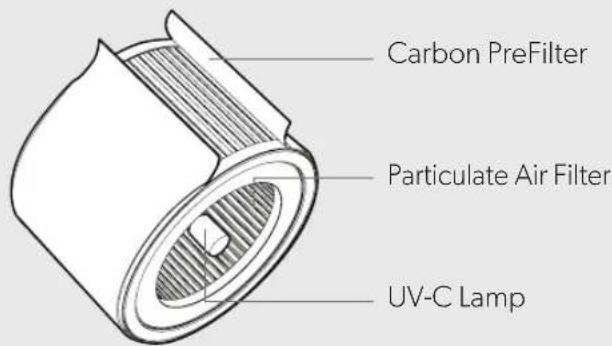
Filter & UV-C Lamp
GETTING STARTED

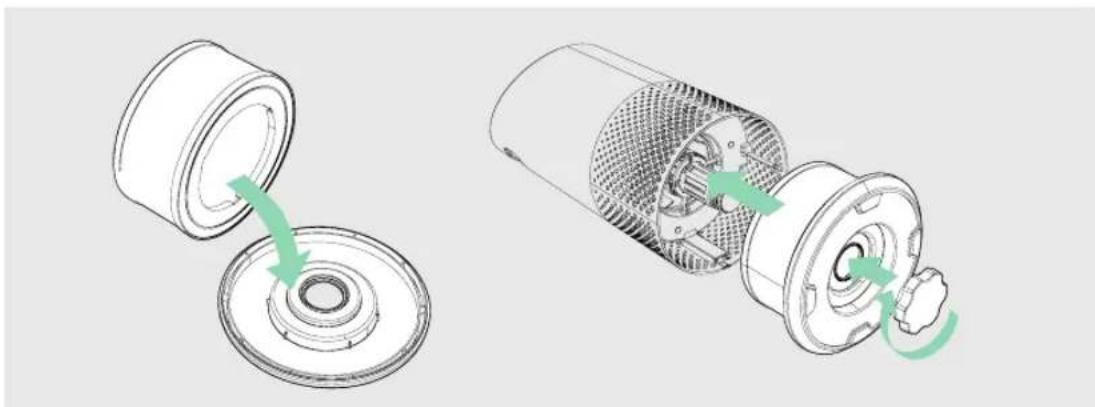
1. Remove plastic bag from filter
Unscrew the bottom cover and remove the plastic bag from the filter.
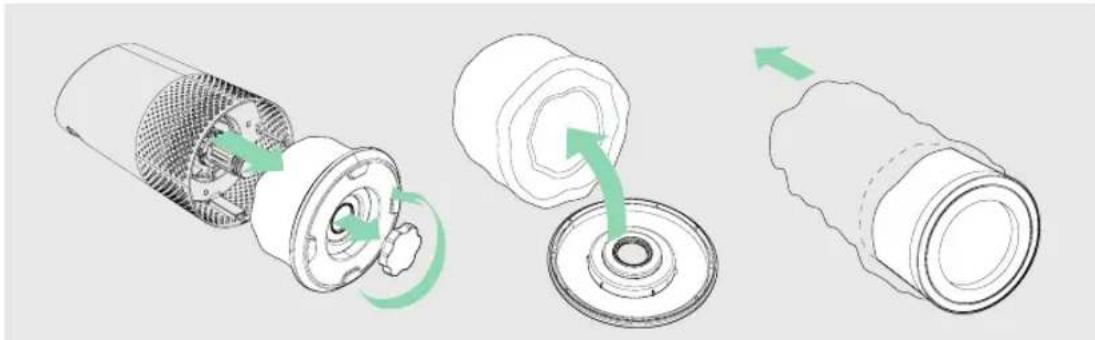
2. Re-attach filter
Secure filter on the bottom cover and replace inside the purifier.
3. Setup
Plug-in your air purifier unit and power on.
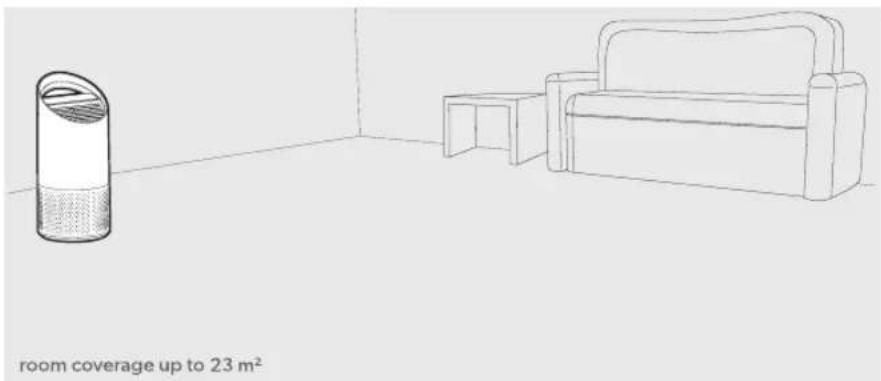
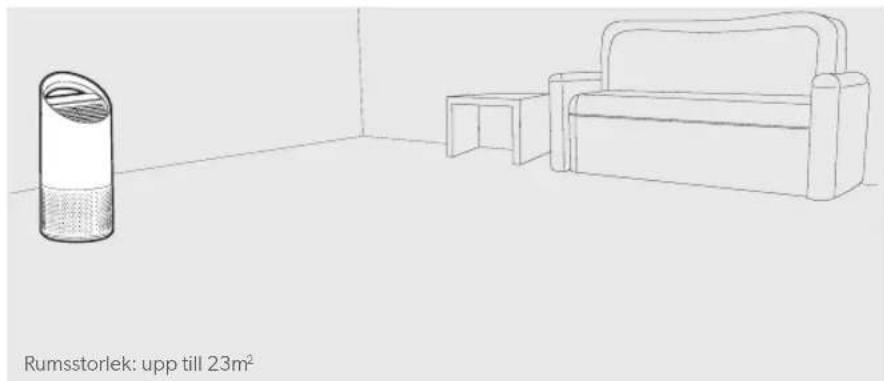
Place the purifier on a flat surface, free from obstructions:
- where air can flow freely into the purifier from all sides
- avoiding furnishings like bedding and curtains, as well as sources of heat or moisture
4. Start living with cleaner air!
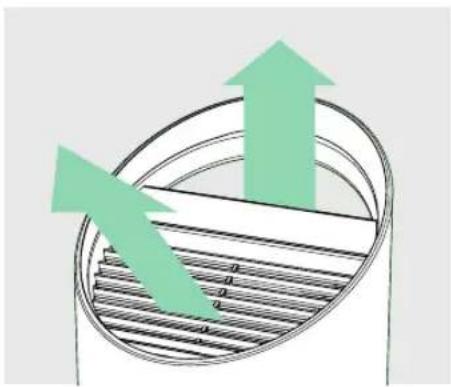
Select your preferred fan speed and proprietary PureDirect™ technology will deliver purified air throughout the room!
SPECIFICATIONS
| Air Inlet | 360° |
| Air changed 2 times per hr | 23㎡ |
| Air Delivery Type | PureDirect™ |
| Fan Speed Settings | 1, 2, Turbo |
| Purification Levels Carbon Prefilter, Particulate Air Filter, UV-C Lamp | |
| Filter Change Indicators | Carbon, HEPA, UV |
| Noise | 39 - 65 dB |
| Dimensions | 195 x 195 x 451 mm |
| Weight | 3.5 kg |
| Motor Type | AC motor |
| Power Requirements | 220-240v 50/60Hz 0.3A |
| Power Consumption | 40 W |
| Warranty | 2 years |
Replacement Filters & UV-C Lamp
| 2-in-1 Particulate Air drum filter | 2415104 |
| Carbon Prefilter (3-pack) | 2415103 |
| UV-C Lamp | 2415105 |
CARE & MAINTENANCE
Accessing the filter chamber
- Always power off the purifier by pressing the Power Button and unplugging the power cord.
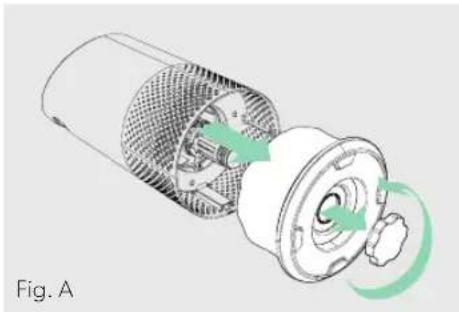
- Gently place the unit on its side on the floor so that the filter chamber cover and knob are exposed.
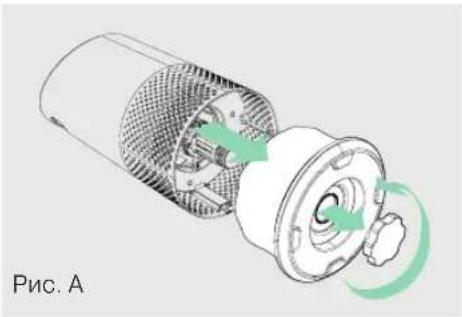
- Turn the knob counterclockwise and remove the filter cover and 360^ filter drum (Fig. A).
REPLACING PARTICULATE AIR FILTER
- The HEPA indicator will glow red when it is time to change the entire drum filter.
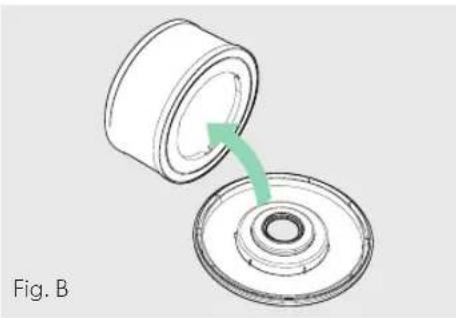
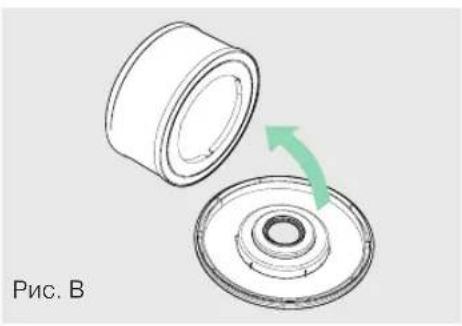
- Gently pull the drum filter away from its place secured to the filter cover (Fig. B).
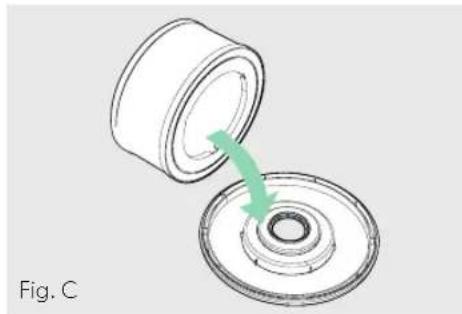
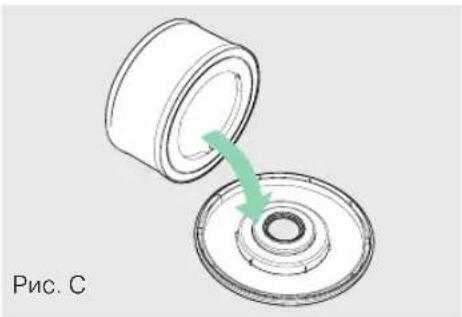
- Secure the replacement filter onto the filter cover (Fig. C).
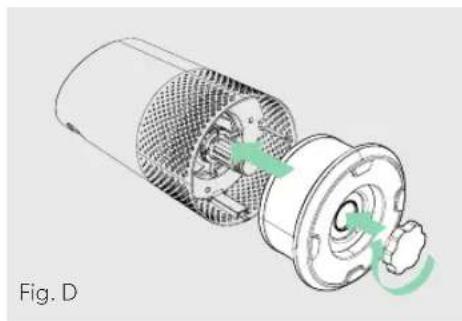
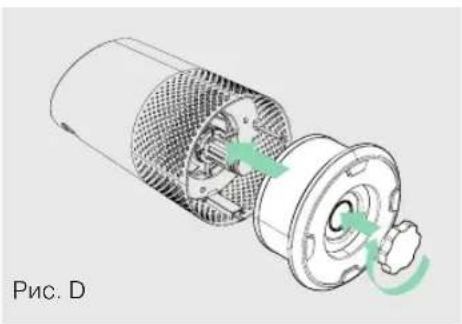
- Gently replace the filter cover with filter drum into the filter chamber and onto the threading, and turn the knob clockwise until the knob and filter chamber cover are securely tightened (Fig. D).
- Plug-in and power on your purifier, and hold the Reset button until the red HEPA indicator turns off.
Note: Particulate air drum filter (on page 10) will include 2 layers: Carbon Prefilter and particulate layer
REPLACING CARBON PREFILTER
- The Carbon indicator will glow red when it is time to replace the Carbon layer.
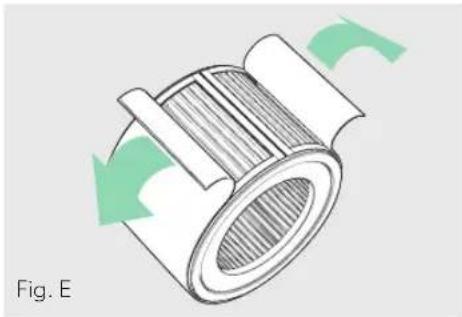
- Gently peel away the used Carbon layer from the fastener strips (Fig. E).
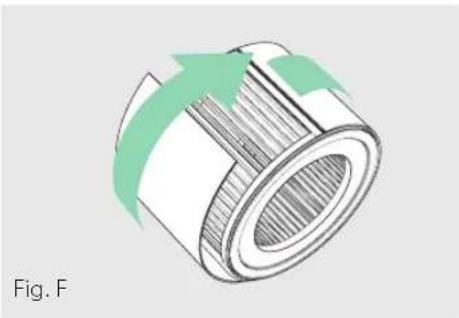
- Wrap a new Carbon layer around the filter drum and attach to the same fastener strips (Fig. F).
- Once the purifier is powered-on, hold the Reset button until the red Carbon indicator turns off.
Note: Carbon Prefilter 3-pack (on page 10) will cover 3 Carbon changes between replacing the entire drum filter assembly (on page 11).
EN
REPLACING UV-C LAMP
- The indicator will glow red when it is time to replace the UV-C lamp.
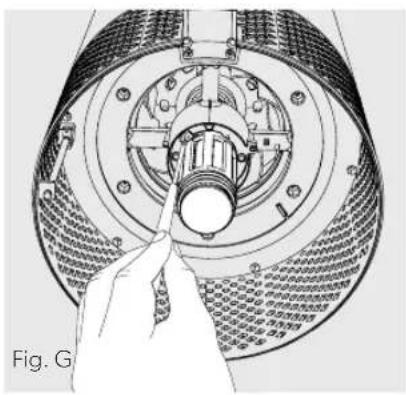
- Remove filter drum (Fig. A), and use a screwdriver to remove the screw securing the UV housing (Fig. G).
-
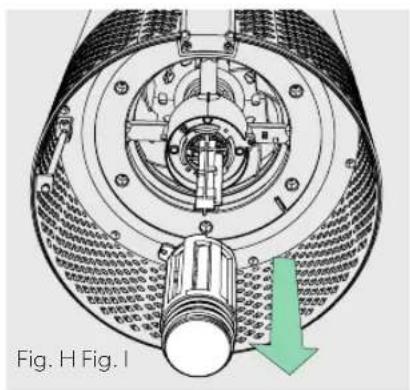
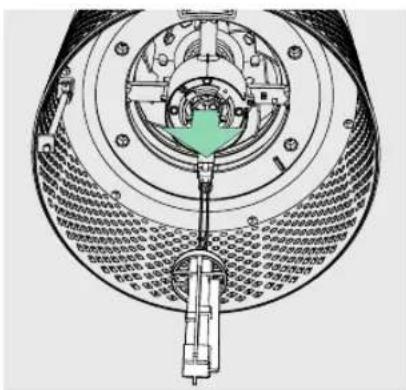
Gently remove the UV housing (Fig. H) and disconnect the UV-C lamp from the socket (Fig. I).
-
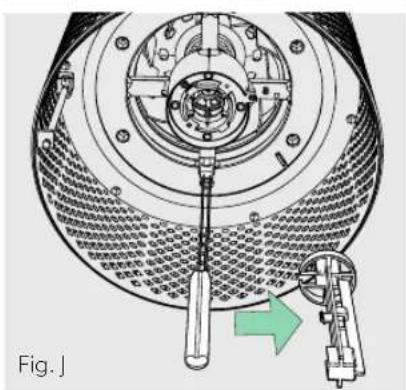
Release carriage from the UV-C lamp (Fig. J).
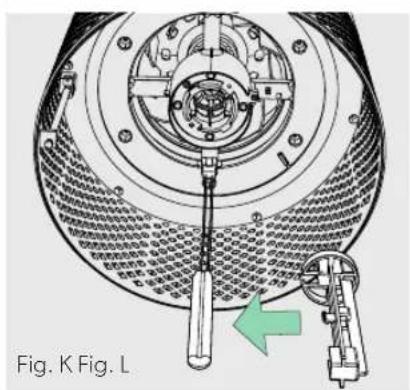
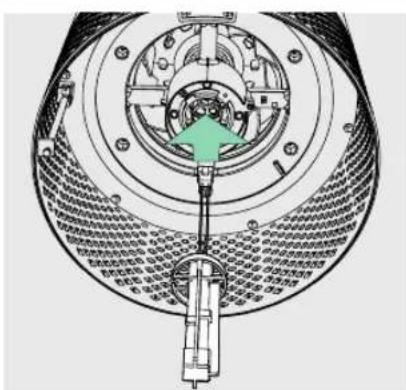
- Secure carriage to new UV-C lamp (on page 10) (Fig. K) and connect UV-C lamp into purifier (Fig L).
- Replace the UV housing and use a screwdriver to tighten the fastening screw.
- Once the purifier is powered-on, hold the Reset button until the indicator turns white.
Note: Upon replacement of the UV-C emitter please dispose of at your local WEEE collection facility.
FAQ & TROUBLESHOOTING
| How often do I need to change the filters? | That's easy! The purifier's replacement indicators will notify you when it is time to replace the filters, or the UV-C lamp. Plan on replacing the Carbon every 3-4 months, Particulate Air Filter every 12-15 months, and UV-C lamp every 1-3 years. |
| Purifier won't turn on. | Check that the power cord is connected securely to both the wall outlet and the purifier. Check if there is a power outage in the outlet by trying a nearby light or device, or by trying a working device in the same outlet. Check that the filter is fitted properly into filter chamber. Please contact us if you're still having a problem! (page 15) |
GUARANTEE
Operation of this machine is guaranteed for two years from date of purchase, subject to normal use. Within the guarantee period, ACCO will at its own discretion either repair or replace the defective machine free of charge. Defects due to misuse or use for inappropriate purposes are not covered under the guarantee. Proof of date of purchase will be required. Repairs or alterations made by persons not authorized by ACCO will invalidate the guarantee. It is our aim to ensure that our products perform to the specifications stated. This guarantee does not affect the legal rights which consumers have under applicable national legislation governing the sale of goods.
SUPPORT
Thank you for welcoming TruSens™ into your home. Our customers are at the heart of what we do, and we strive to design products that fit your lifestyle. If you have any questions or feedback, please reach out!
Visit our website at www.leitz.com/trusens
Email us at service.uk@acco.com
Call us at 0800 279 5102
To register and activate your warranty go to www.leitz.com/register
TruSens
Purification 360^
REEMPLACEMENT DE LA LAMPE UV-C
VEELGESTELDE VRAGEN EN PROBLEEMOPLossING
Bezoek once website op www.leitz.com/trusens
UDSKIFTNING AF UV-C-LAMPEN
(See pages 128-130 for replacement instructions. Follow above Reset button instructions after replacing filter.)
PRODUKTOVERSIKT
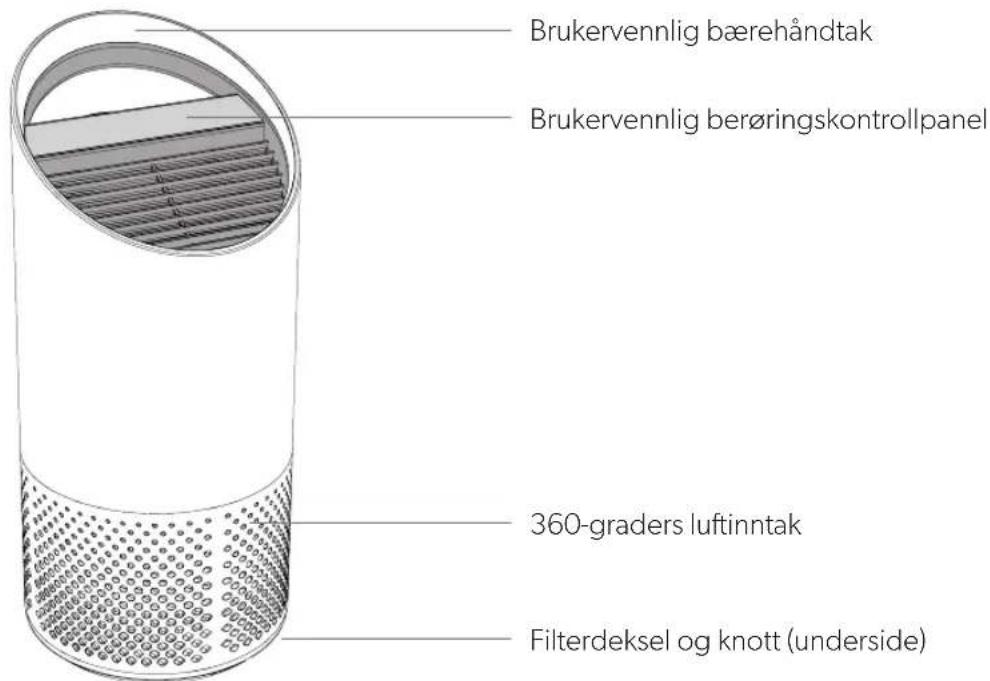
Luftrenser
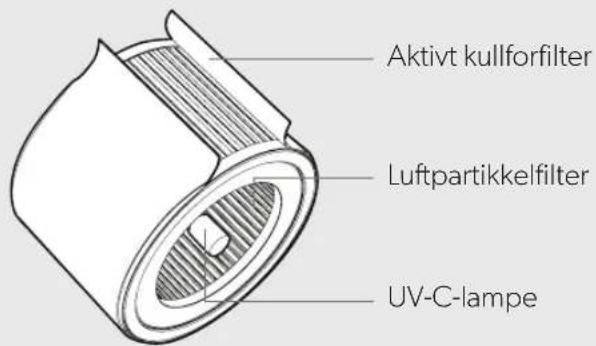
Filtrering og UV-C-lampe
KOMMEIGANG

SKIFTE UT UV-C-LAMPE
Select your preferred fan speed and proprietary PureDirect™ technology will deliver purified air throughout the room!
SPECIFICATIONER
TYTO POKNY SI PRECTETE A USCHOVEJTE.
CASTÉ DOTAZY A RESENI PROBLEMU
AZ UV-C LÁMPA CSERÉJE
PpOyMaHHOe INcNoJIHeHne
IcklouHTeJIbHaJyHKUHOHaJIbHOCTbN COBpeMeHHaKOHCTpyKcH, KOtOpblye ydaHOBnWuTcB LIO6oINHTepbep.
IIAHIELb ynpabJIeHnIa


KhoNka NITaHnA

HactpoynCKopocTNBeHTnIaTopa Bb6op cKopocTN BeHTnIaTopa:1,2 nIu Typ60
UV
PexnM yIbTpapnoJIoTeBOrO n3JyHeHna lamna UV-C BΦnIbTpObaIbHOKampe OCHNTeJIBAKIIIOHeHa, KOrDa CmB0N CBETITcR BoIbIM LCBETOM.
Ecnn CmB0J 8ETNTcKpaChbIM UBeTOM, npuIIO BpeM 3ameHHTb lamny UV-C.
(CM. INHCTpyKUnn Ha cTp. 260.)
Reset
C6poc INHdkaTopOBФINbTpna
yNbTpaΦnoTeBOJ lamnbl
HNdkaTopbl «HEPA», «Carbon» («AKTNBupOBaHHbI yroJIb)И «UV» («YΦ») CBETATcKpaCHbIM UBeTOM, KOrDa Heo6xOIMO 3aMeHHTb COOTBETCTByIOUe eYCTPOIcTBO. Korda BkIoUeH 1 INHdkaTOp, HaxMITE u ydePknBaIte KhoNky c6poca (Reset)В TeueHne 3 cekHy, YTO6bI BbINOHNb Tc6poc CoCTOAHN aTOrO INHdkaTopa. Korda BkIoUeHbI 2 nIIb 60Jee INHdkaTopoB, KOChNTecb KHOKn C6poca (Reset), YTO6bl Bb6paTb Tpe6yEmbI INHdkaTOp (Bb6paHHbI INHdkaTOp 6yDet MmTaTb), a 3aTeM HaxMITE n ydePknBaIte ee B TeueHne 3 cekHy, YTO6bl BbINOHNb C6poc COCTOAHN Bb6paHHO r INHdkaTopa.
HauJIO NcNoJIb3OBAHnI

TEXHNUECKNEXAPAKTEPNUCTUKN
YXODI TEXHINCHECKOE OBCJUJKBAHNE
DocTyKΦnIbTpOBAJIbHOJ KAmpe
- 063aTeIbHo OTKJIIOHTe 3JIeKTpOHTaHHe, HaxaB KHOky 3JIeKTpOHTaHnI NOTCOEINHnB UHyp NITaHnI OT PO3ETKn.
- Octopoxho noJoxte yCTpoNCTBO 6OKOBO CTOPHO Ha NOJI TaK, YTO6bI 6bIa BnHa KpbIuKa n pyka ΦnBtPOBaJIbHO KaMepbl.
- ПовернITE ручky пotingвхда уасово CTpeлки n CHIMITE Крьшky Фпьтюваьнй камеры n bapabahhhii Фпьтр 360° (pnc. A).
3AMEHAФильТРАДЛЯ
yIABJIINBAHnYCACTNU
- KOrda npIeT BpEmaHnTB BeCb 6apa6aHHbI ΦnIbTp, INIkaTOp «HEPA» 6yJeT CBeITbCra KpaCHbIM UBEtom.
- Octopoxho n3BneKeTe 6apabHbI ΦnIbTp n3 erO paCnoJIOXeHn, B KOTOpOM OH npKpeJIeH K KpbIuKe ΦnIbTp a (pnc. B).
- YcTaHOBnTe n 3aKpeHnTe Ha KpbIuKe FmJIbTp a HOBbI HmJIbTp (pnc.C).
- Octopoxno nomeCTne Ha MeTo KpbIuKy fNtBtpa HapabHHbI OJIbTp BHyTpB fNtBpOBAHbHO KaMepbHa pe3bOBoe coeINHeHne, NocJe Yero NOBepHnTe pyKny IIO XoMy uCoBOI CTpeIKN, TTObI HaJeXHo 3aTHyTbpyKy IN KpbIuKy fNtBtpa (pnc.D).
- ПодсоeДинITE shHyp nHTaHnЯ Kpo3eTke N BKJIIOUHTe эл ekTpOПNTaHne oYncTnteJЯ. HaxmTe N ydepxNBAITe KhoNky c6poca (Reset), noka He BbIKJIIOUHTcR kpaCHbI INHdNKatOp «HEPA».
PpmeaHne. BapabHHbI NtBtp (Ha cTp. 257) coCTOITn 2 ypoBHe: npedBapnteJIbHbI NtBtp CAKTNBPoBAHHbIM YJIeM n CIOI NtBtpa Dn ynaBnBaHnHaCTnU.
3AMEHA INPEДВAPИTEЛьHOrO
www.leitz.com/trusens