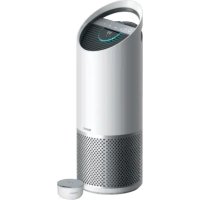
TruSens Z3500H - Air purifier LEITZ - Free user manual and instructions
Find the device manual for free TruSens Z3500H LEITZ in PDF.


| Product type | Air purifier |
| Brand | Leitz |
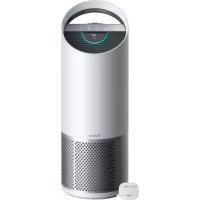
| Model | TruSens Z3500H |
| Dimensions (L x W x H) | 263 x 263 x 726 mm |
| Weight | 5.7 kg |
| Power supply | 220-240 V, 50/60 Hz, 0.5 A |
| Power consumption | 68 W |
| Noise level | 32 - 66 dB |
| Covered area | 60 m² (2 air changes per hour) |
| Filtration | Washable pre-filter, activated carbon filter, HEPA filter, UV-C lamp |
| Air quality sensor | SensorPod™ advanced (PM1.0, PM2.5, PM10 and VOC) |
| Connectivity | Wi-Fi 2.4 GHz, Bluetooth, TruSens app, Alexa compatible |
| Speed settings | Whisper, 1, 2, 3, Turbo + Auto |
| Modes | Timer (2/4/8/12 h), Night, UV-C |
| Air quality display | Blue/yellow/red light ring and numerical value (0-500) |
| Pre-filter maintenance | Monthly water wash |
| Activated carbon filter replacement | Every 3 to 4 months (ref. 2415109 pack of 3) |
| HEPA filter replacement | Every 12 to 15 months (ref. 2415143) |
| UV-C lamp replacement | 1 year or 2-3 years (ref. 2415111 / 2415150) |
| Safety | Automatic shut-off, UV-C protection, use by children >8 years with supervision |
| Warranty | 2 years |
| General information | Manufacturer: ACCO Brands GmbH & Co KG; EU Declaration: https://declarations.accobrands.com/; WEEE: do not dispose of with household waste |
Frequently Asked Questions - TruSens Z3500H LEITZ
User questions about TruSens Z3500H LEITZ
0 question about this device. Answer the ones you know or ask your own.
Ask a new question about this device
Download the instructions for your Air purifier in PDF format for free! Find your manual TruSens Z3500H - LEITZ and take your electronic device back in hand. On this page are published all the documents necessary for the use of your device. TruSens Z3500H by LEITZ.
USER MANUAL TruSens Z3500H LEITZ
Welcome to clean air with TruSens. Thank you for allowing us to join you on your journey towards wellness.
The air you breathe should be clean, no matter where you are in the room. TruSens SensorPod™, PureDirect™ Technology & 360 degree filtration ensure the whole room benefits from cleaner air.
You're always in control with voice command compatibility and the TruSens App remote functions. Track outdoor air quality changes, get filter change reminders, and reorder supplies.
CONTENTS
SAFETY INFORMATION 4
FEATURE HIGHLIGHTS 6
PRODUCT OVERVIEW 7
GETTING STARTED 8
CONTROL PANEL 10
AIR QUALITY DISPLAY 11
TRUSENS APP 12
VOICE CONTROL 13
SPECIFICATIONS 14
CARE & MAINTENANCE 15
Replacing HEPA Filter 15
Replacing Carbon Filter 16
Washing the Prefilter 16
Replacing UV-C Lamp 17
FAQ & TROUBLESHOOTING 18
GUARANTEE & SUPPORT 20
SAFETY INFORMATION
PLEASE READ AND SAVE THESE INSTRUCTIONS
Unplug or disconnect the appliance from the power supply before replacing filters or UV-C emitter, or when appliance is not in use.

WARNING: To reduce the risk of fire or electric shock, do not use this fan with any solid-state speed control device.
Do not operate any purifier with a damaged cord or plug, or if the wall socket is loose. If the supply cord is damaged, it must be replaced by the manufacturer, its service agent or similarly qualified persons in order to avoid a hazard.
Do not run cord under carpeting, throw rugs, runners, or similar coverings. Do not run cord under furniture or appliances. Arrange cord away from traffic area and where it will not be tripped over.

WARNING: Skin or eye damage may result from directly viewing the light produced by the UV-C emitter in this apparatus. Unintended use of the appliance or damage to the housing may result in the escape of dangerous UV-C radiation. UV-C radiation may, even in little doses, cause harm to the eyes and skin. Always disconnect power before relamping or servicing. Replace UV-C emitter with 2415108 / 2415149 (for Z-2500H), or 2415111 / 2415150 (for Z-3500H), Manufactured by ACCO Brands.
- Remove all packaging, including the filter bag, before use.
- Appliances that are obviously damaged must not be operated.
- This appliance must only be connected to a wall socket outlet matching the supply plug type and rating stated on the rating plate.
- Locate air purifier near the outlet wall socket and do not use extension cords.
- This appliance can be used by children aged from 8 years and above and persons with reduced physical, sensory or mental capabilities or lack of experience and knowledge if they have been given supervision or instruction concerning use of the appliance in a safe way and understand the hazards involved.
- Children shall not play with, clean, or try to maintain the appliance.
- Replace the UV-C emitter with the model specified within this manual.
- Do not attempt to service or repair this product yourself.
- Only use the purifier and SensorPod™ with the power cable provided.
- Only clean this machine with a damp cloth, do not use solvents or bleach.
- Ensure appliance is always placed on firm level surface before operation.
- Do not block or obstruct the air intake or outlet vents.
- Do not insert fingers or other items into the air intake or outlet vents.
- When the air purifier is in standby mode the SensorPod™ is still transmitting a signal/data.
Operating Frequency
Sensor: 2468 to 2480 MHz
Wireless: IEEE 802.11 b/g/n 2.4 GHz
BLE: Bluetooth 2400 to 2484 MHz
Maximum Transmit Power (EIRP)
Sensor: -5.3 dBm
Wireless: +15.3 dBm
BLE: +5 dBm
Hereby, Leitz ACCO Brands GmbH & Co KG declares that the radio equipment types, Leitz TruSens Air Purifier Z-2500H/Z-3500H are in compliance with Directive 2014/53/EU and the relevant UK statutory requirements.
The full text of the EU/UK declaration of conformity is available at the following internet address: https://declarations.accobrands.com/
A minimum separation distance of 0.2m must be maintained between the user's body and the device, to comply with RF exposure requirements.

Waste Electrical and Electronic Equipment (WEEE)
Electrical and electronic devices contain materials and substances that can have damaging effects on human health and the environment. This symbol indicates that this device must not be treated as unsorted municipal waste but must be collected separately. Dispose of the device via a collection point for the recycling of waste electrical and electronic equipment within the EU, UK and in other European countries that operate separate collection systems for waste electrical and electronic equipment. By disposing of the device in the proper manner, you help to avoid possible hazards for the environment and public health that could otherwise be caused by improper treatment of waste equipment. The recycling of materials contributes to the conservation of natural resources.
Leitz TruSens air purifiers also come equipped with a UV-C emitter. Upon replacement of this item (during the lifetime of the product), these must also be returned and disposed of at your local WEEE collection facility.
Further information and installation guides / videos for the UV-C emitter can be found at www.leitz.com
FEATURE HIGHLIGHTS

SensorPod™
Remote air quality monitor that ensures cleaner air, right where you need it.

PureDirect™ Technology
Independent lab testing confirms that two airflow streams are better than one, moving air effectively and more comfortably throughout the room.

Informs and Adapts
Colour-coded illuminated ring provides additional information by communicating air quality in real-time.

360° Purification
HEPA filter captures pollutants and VOC gases/odours from all directions. UV-C light kills germs and bacteria that can get trapped in the filter.

TruSens App and Alexa Device Voice Commands
You're always in control with voice command compatibility and the TruSens App remote functions. Track outdoor air quality changes, get filter change reminders, and reorder supplies.
PRODUCT OVERVIEW
Air Purifier

SensorPod™

Filter & UV-C Lamp

GETTING STARTED

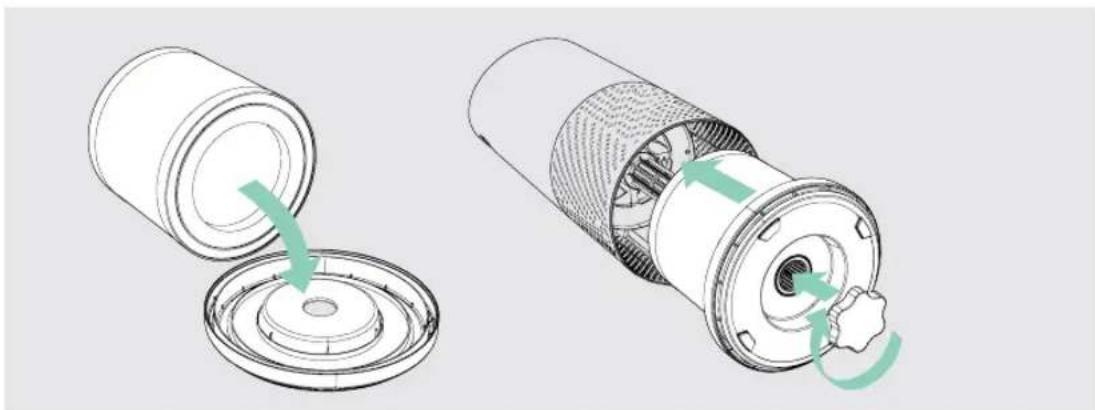
1. Remove plastic bag from filter
Unscrew the bottom cover and remove the plastic bag from the filter.

2. Re-attach filter
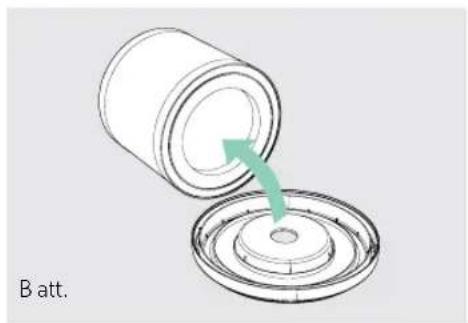
Secure filter on the bottom cover and replace inside the purifier.
3. Set up
Plug-in your SensorPod™, and place upright on tabletop or counter across the room, within line of sight of the purifier.
Plug-in your air purifier unit and power on. Place the purifier on a flat surface, free from obstructions.
Signal strength may vary by location. In the rare occasion that it doesn't work – see page 19.
4. Start living with cleaner air!
The purifier will automatically adjust fan speeds based on the air quality readings from SensorPod, and proprietary PureDirect™ technology will deliver purified air throughout the room!


CONTROL PANEL


Power Button

Fan Speed Settings
Select fan speed or AUTO mode. In AUTO mode, purifier automatically adjusts fan speed based on air quality readings from SensorPod™.
(AUTO mode only available when purifier is paired with SensorPod and receiving signal)

Dimmer Mode
Display illumination turns off – for use while sleeping – without sacrificing the effectiveness of the purifier. Simply press the button again to bring back all display features.

Timer Mode
Purifier will automatically turn off after 2, 4, 8, or 12 hours. To cancel this countdown, simply press button until no timer setting is displayed.

UV Mode
UV-C lamp within the purifier's filter chamber is on when the symbol is white. The symbol will glow red when it is time to replace the UV-C lamp.
(See page 17 for replacement instructions)
Reset
Filter and UV Indicator Reset
HEPA, Carbon and UV indicators glow red when it is time for each to be replaced.
When 1 indicator is on, simply hold Reset button for 3 seconds to reset that indicator.
When 2+ indicators are on, tap the Reset button to select the correct indicator (selected indicator will blink) before holding 3 seconds to reset that indicator.
(See pages 15-17 for replacement instructions. Follow above Reset button instructions after replacing filter.)
AIR QUALITY DISPLAY
Real-time Feedback
The enhanced SensorPod evaluates the condition of your air by measuring both particulate matter (PM1.0, PM2.5, PM10) and volatile organic compounds (VOCs). It calculates the overall air quality using a proprietary algorithm that is reactive to genuine increases in pollutants without overreacting to someone entering the room or settling into the couch.
The illuminated, colour-coded display communicates good, moderate or poor air quality and a numeric value provides a greater level of detail.
In AUTO mode, the purifier automatically adjusts the fan speed in response to these air quality readings.
GOOD
BLUE | 0 - 50

MODERATE
YELLOW | 50 - 100

POOR
RED | 100 - 500

TRUSENS APP

The TruSens app allows you to conveniently control your TruSens air purifier from your smart device, whether you are across the room or across town.
You'll have the same control and real-time air quality feedback as on the purifier, and will also find historical tracking of your indoor air quality, information on your local outdoor air quality, and you will be able to set a schedule for the purifier. The app will also notify you when it's time to replace your filter or UV-C lamp.


Download the TruSens App from the Google Play Store or the Apple App Store.
Apple and the Apple Logo are trademarks of Apple Inc.
Google Play and the Google Play logo are trademarks of Google LLC.
ALEXA DEVICE VOICE CONTROL
INSTALL THE ALEXA APP AND PAIR YOUR TRUSENS SMART AIR PURIFIER
- Download the latest version of the Amazon Alexa app to your smart device.
- Once loaded, open the Alexa app and tap the Devices button on the bottom right of the screen.
- Scroll down and click "YOUR SMART HOME SKILLS".
- Click the "ENABLE SMART HOME SKILLS" button. In the skills list that appears, click the magnifying glass top right of the screen to search. Type "TruSens" in the search bar.
- Select the TruSens skill to install it. This is technically a new skill for your Alexa device, so you may be expected to link your air purifier again.
- To link your TruSens Smart air purifier, toggle to your TruSens Smart App within your mobile device and navigate to the settings tab. Click "Reveal" next to the "Alexa Code" option.
- Copy the code shown and navigate back to the Alexa app to paste it in. Note: Each code is randomly generated and only valid for a limited time.
- To complete the setup process, the Alexa App will need to identify the TruSens Smart Air Purifier, this can take up to 45 seconds to complete.
- Once completed, your TruSens Smart Air Purifier will be listed within the Alexa App under "Devices".
- Start enjoying voice commands with your TruSens Smart Air Purifier.
SPECIFICATIONS
| Air Inlet 360° | |
| Air changed 2 times per hr 60 m2 | |
| Air Delivery Type PureDirect | TM |
| Sensor Enhanced SensorPodTM technology with improved air quality measurement sensors that monitor pollutants (PM1.0, PM2.5, PM10) and VOCs (formaldehyde, paint fumes); works up to 15 m from purifier | |
| Smart Features • TruSens Mobile App with remote functionality• Alexa Voice Control | |
| Fan Speed Settings Whisper, 1, 2, 3, Turbo | |
| Purification Levels Washable Prefilter, | Carbon, HEPA, UV-C Lamp |
| Timer Settings 2, 4, 8, 12 hr | |
| Filter Change Indicators Carbon, HEPA, UV | |
| Noise 32 - 66 dB | |
| Dimensions 263 x 263 x 726 mm | |
| Weight 5.7 kg | |
| Motor Type | DC motor |
| Power Requirements | 220-240v 50/60H 0.5A |
| Power Consumption | 68 W |
| Warranty | 2 years |
| Replacement Filters & UV-C Lamp | Standard | Allergy & Flu | Odour & VOC | Pet |
| HEPA Drum Filter | 2415143 | 2415119 | 2415125 | 2415131 |
| Carbon Filter | 2415109 (3-pack) | 2415120 | 2415126 | 2415132 |
| UV-C Lamp | 2415111 or 2415150 | - | - | - |
CARE & MAINTENANCE
Accessing the filter chamber
- Always power off the purifier by pressing the Power Button and unplugging the power cord.
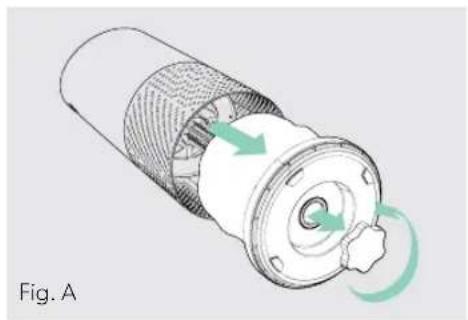
- Gently place the unit on its side on the floor so that the filter chamber cover and knob are exposed.
- Turn the knob counter-clockwise and remove the filter cover and 360° HEPA filter drum (Fig. A).
REPLACING HEPA FILTER
- The HEPA indicator will glow red when it is time to change the entire HEPA drum filter.
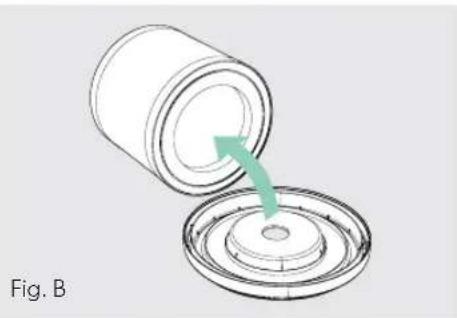
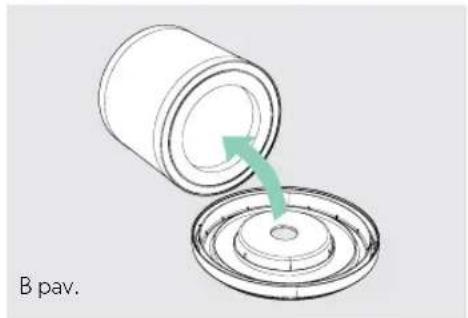
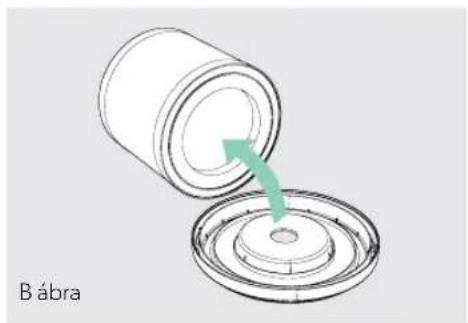
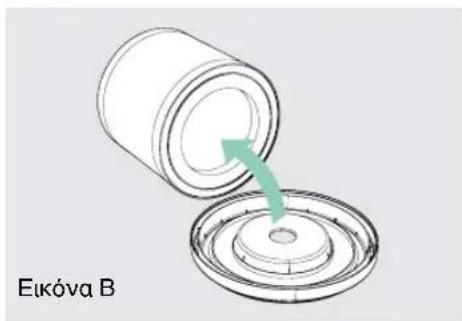
- Gently pull the HEPA drum filter away from its place secured to the filter cover (Fig. B).
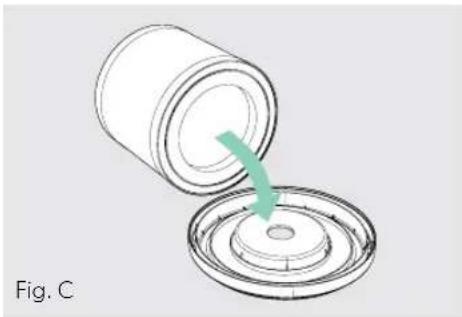
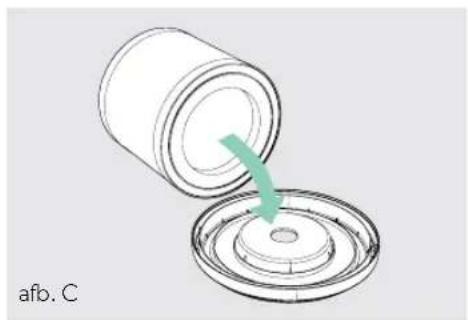
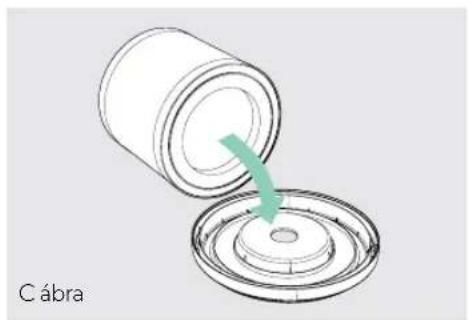
- Secure the replacement HEPA filter onto the filter cover (Fig. C).
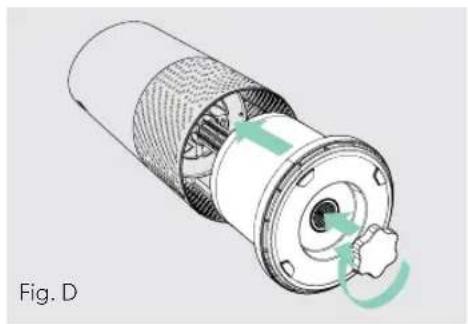
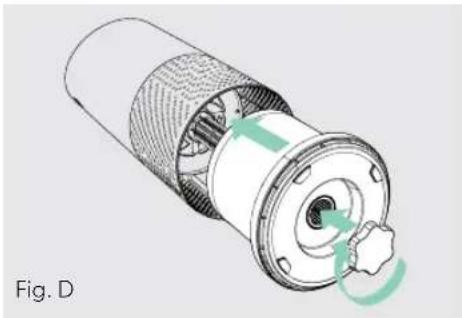
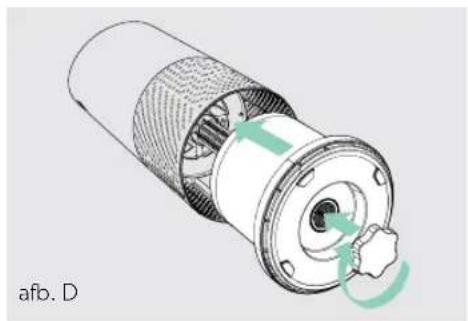
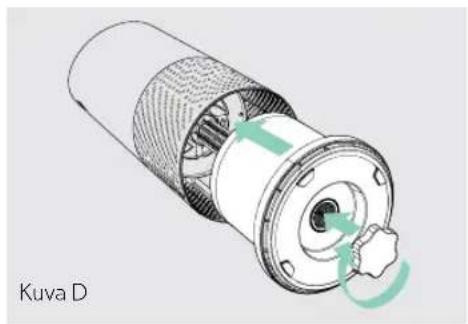
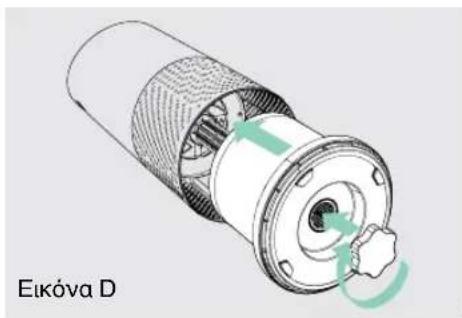
- Gently replace the filter cover with filter drum into the filter chamber and onto the threading, and turn the knob clockwise until the knob and filter chamber cover are securely tightened (Fig. D).
- Plug-in and power on your purifier, and hold the Reset button until the red HEPA indicator turns off.
Note: HEPA drum filter (on page 14) will include 3 layers: Washable Prefilter, Carbon and HEPA


REPLACING CARBON FILTER
- The Carbon indicator will glow red when it is time to replace the Carbon layer.
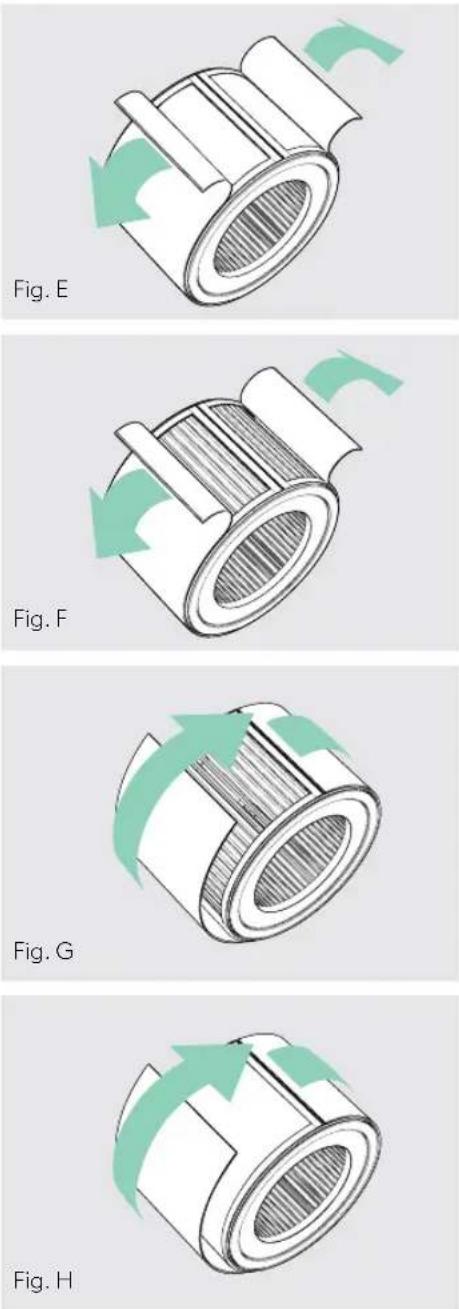
- Gently peel away the Prefilter from the fastener strips (Fig. E).
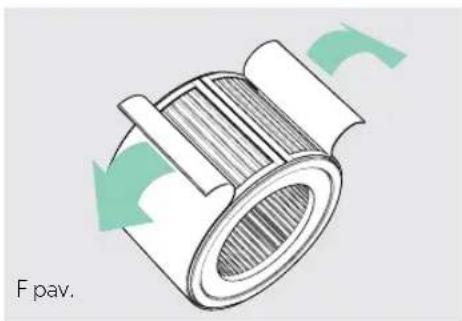
- Gently peel away the used Carbon layer from the fastener strips (Fig. F).
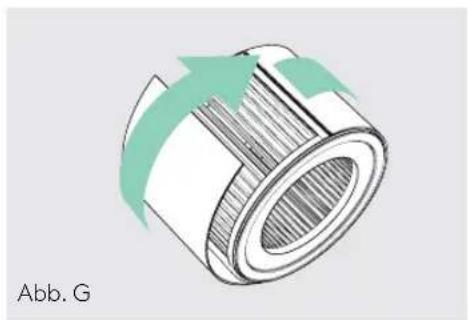
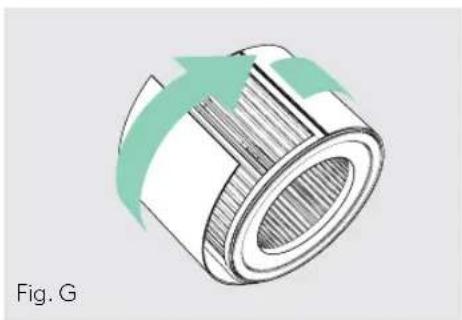
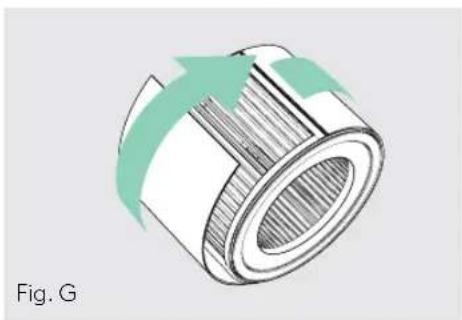
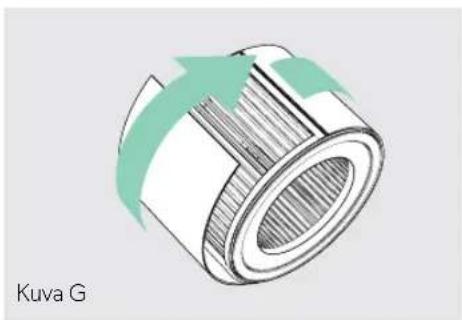
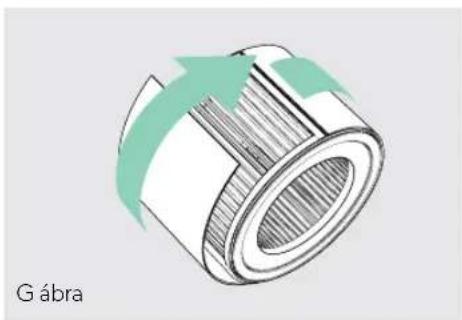
- Wrap a new Carbon layer around the filter drum and attach to the same fastener strips (Fig. G).
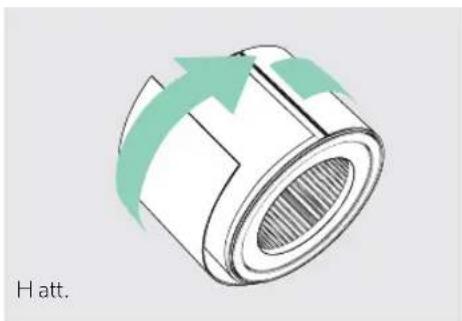
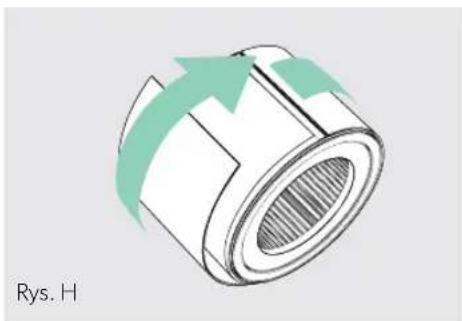
- Replace the Prefilter by wrapping it around the Carbon layer and attach to the fastener strips (Fig. H).
- Once the purifier is powered-on, hold the Reset button until the red Carbon indicator turns off.
Note: Carbon filter 3-pack (on page 14) will cover 3 Carbon changes between replacing the entire HEPA drum filter assembly (on page 15).
WASHING THE PREFILTER
- We recommend that you visually inspect the Prefilter every month, and clean as needed. At minimum, you should hand wash the Prefilter every time you change the Carbon filter.
- Gently peel away the Washable Prefilter from the fastener strips (Fig. E).
- Gently rinse with running water – allow Prefilter to air dry before re-installing.
- Replace the Prefilter by wrapping it around the filter drum and attach to the fastener strips (Fig. H).
REPLACING UV-C LAMP
- The indicator will glow red when it is time to replace the UV-C lamp.
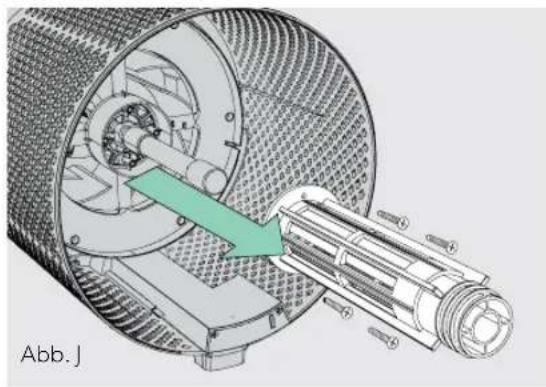
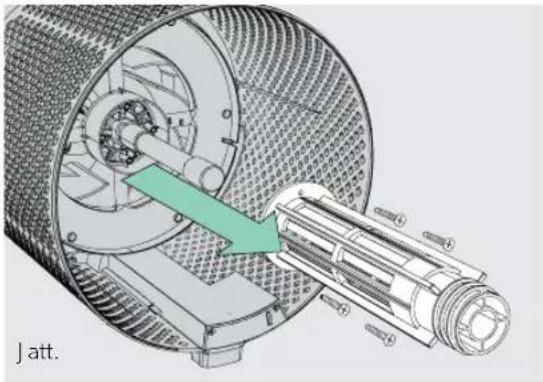
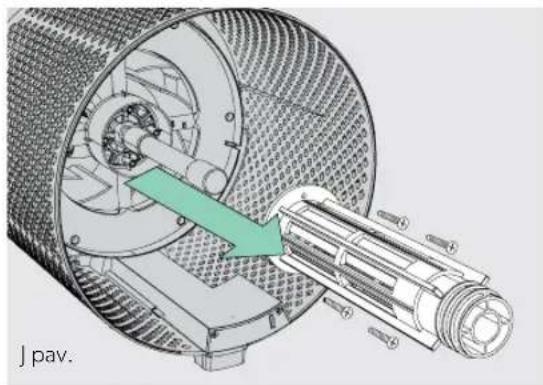
- Remove HEPA filter drum (Fig. A), and use a screwdriver to remove the 4 screws securing the UV housing (Fig. I).
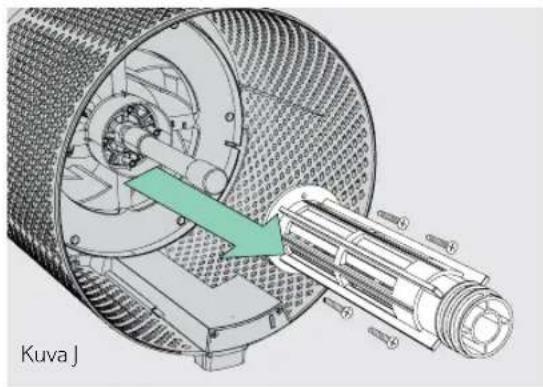
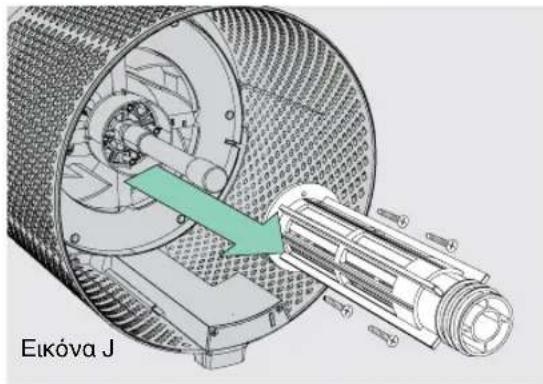
- Gently remove the UV housing (Fig. J).
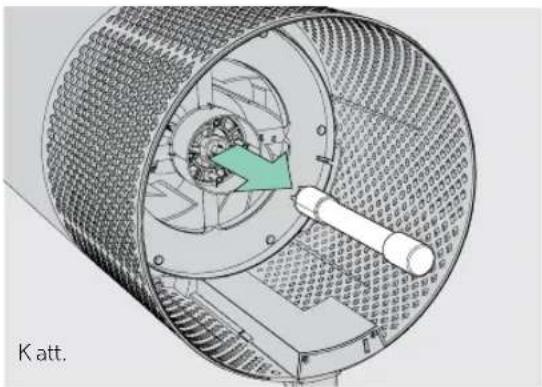
-
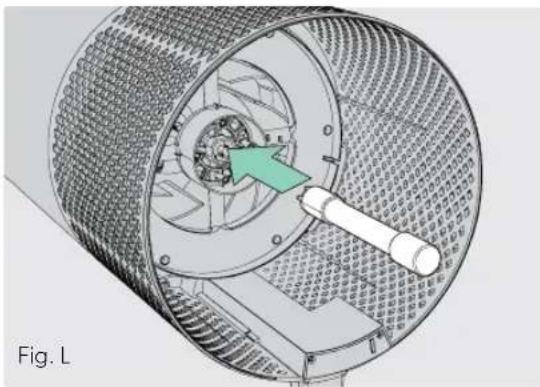
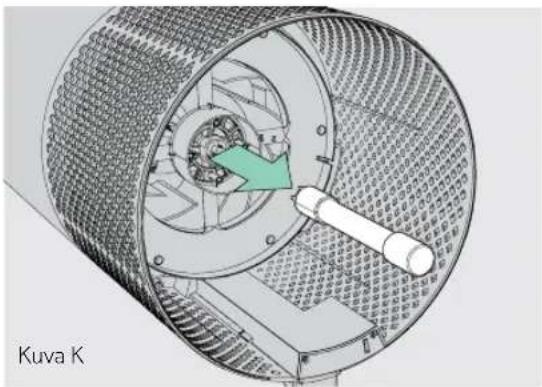
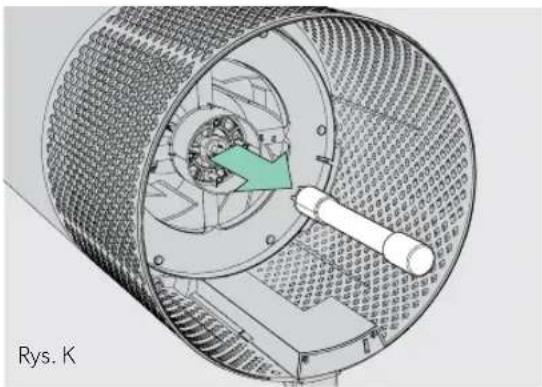
Disconnect the UV-C lamp from the socket within the purifier (Fig. K).
-
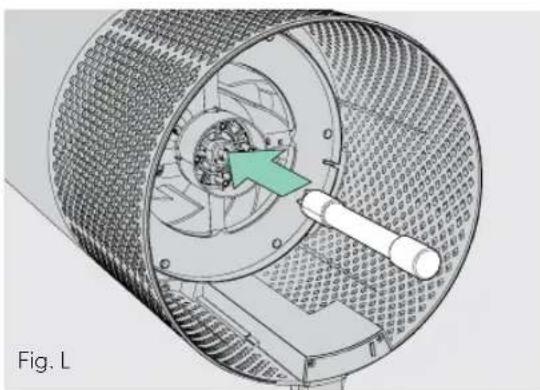
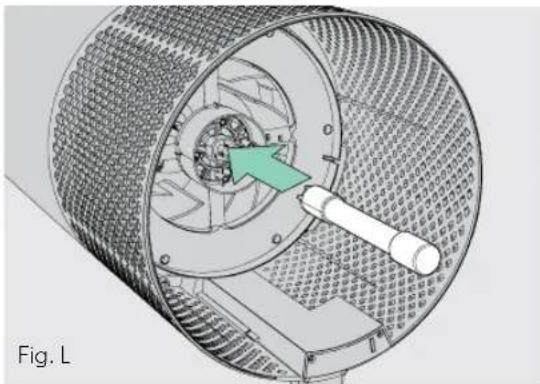
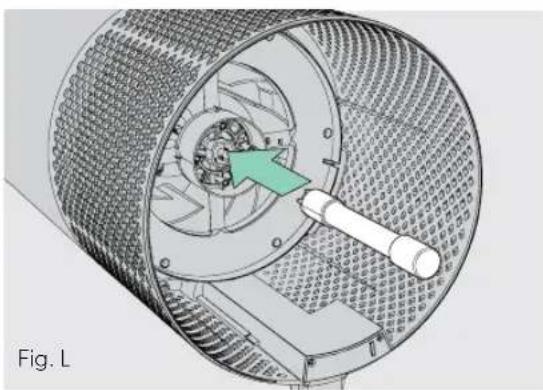
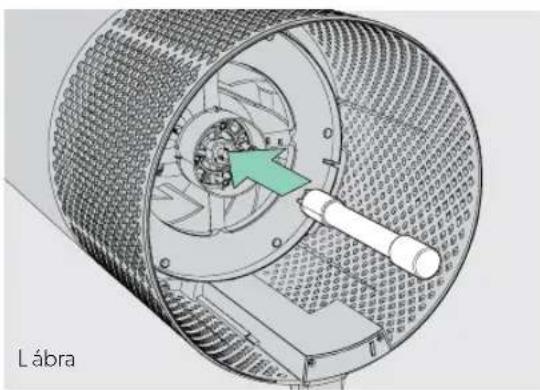
Your replacement UV-C lamp (on page 14) will plug directly into the same socket (Fig. L).
- Replace the UV housing and use a screwdriver to tighten the fastening screws.
- Once the purifier is powered-on, hold the Reset button until the indicator turns white.
Note: Upon replacement of the UV-C emitter please dispose of at your local WEEE collection facility.


FAQ & TROUBLESHOOTING
| Where do I place the SensorPodTM? | Anywhere you want to measure the air quality within the room!For optimal results, place the SensorPodTM up to 15 m away from the air purifier on a counter or table, within line of sight of the purifier. In Auto Mode, the purifier will work to distribute clean air until the SensorPod reads an acceptable level of air quality. |
| How often do I need to change the filters? | That's easy! The purifier's replacement indicators will notify you when it is time to replace the Carbon or HEPA filters, or the UV-C lamp.Plan on replacing the Carbon every 3-4 months, HEPA every 12-15 months, and UV-C lamp every 1-3 years. |
| How often do I need to wash the Prefilter? | The Prefilter captures larger particles and preserves the efficiency of the other filters, so we recommend that you visually inspect the prefilter every month and wash as needed. Another good habit is to wash the prefilter every time you replace the Carbon filter. |
| Questions about the TruSens app? | First, always check you are connected to a Wi-Fi® network and that Bluetooth is enabled on your smart device. For other questions, please visit www.leitz.com/trusens for more information on troubleshooting. |
| Purifier won't turn on. | Check that the power cord is connected securely to both the wall outlet and the purifier. Check if there is a power outage in the outlet by trying a nearby light or device, or by trying a working device in the same outlet.Check that the HEPA filter is fitted properly into filter chamber.Please contact us if you're still having a problem! (page 20) |
FAQ & TROUBLESHOOTING
| Purifier won’t go into Auto Mode.ORAir quality indicators are off.ORPurifier’s sensor signal indicator is blinking. | First, check that the SensorPod is plugged-in and that its light is solid.Next, check that the SensorPod is within range of the purifier (up to 15m).If both are true and the connection is still failing, see below instructions on repairing the SensorPod’s connection. |
| I’ve lost my SensorPodTM! Don’t worry! | Please contact our customer support team and you can order a replacement SensorPod. Follow the easy pairing instructions below to pair your replacement SensorPod with your existing air purifier! |
Pairing SensorPod™ and Purifier
The SensorPod communicates with the purifier using radio frequency signals, and will be paired on the production line and ready for use when you open the box. In the rare event that the signal is interrupted, the purifier's sensor indicator light ( g ) will blink. You can repair the connection in just a few easy steps.
- Unplug the SensorPod.
- HOLD the Power Button on the purifier for 3 seconds, when you should hear two chimes.
-
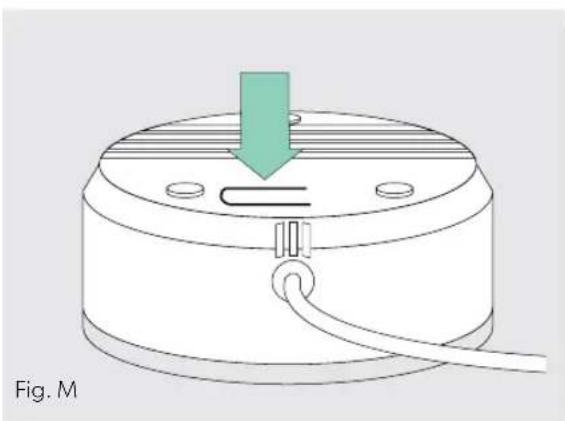
Plug-in the SensorPod and press and HOLD the pairing button underneath the SensorPod for 5-7 seconds (Fig. M).
-
The connection is established when the purifier's sensor indicator light is lit with no blinking, and the air quality indicators turn on.
GUARANTEE
Operation of this machine is guaranteed for two years from date of purchase, subject to normal use. Within the guarantee period, ACCO will at its own discretion either repair or replace the defective machine free of charge. Defects due to misuse or use for inappropriate purposes are not covered under the guarantee. Proof of date of purchase will be required. Repairs or alterations made by persons not authorised by ACCO will invalidate the guarantee. It is our aim to ensure that our products perform to the specifications stated. This guarantee does not affect the legal rights which consumers have under applicable national legislation governing the sale of goods.
SUPPORT
Thank you for welcoming TruSens™ into your home. Our customers are at the heart of what we do, and we strive to design products that fit your lifestyle. If you have any questions or feedback, please reach out!
Visit our website at www.leitz.com/trusens
Email us at service.uk@acco.com
Call us at 0800 279 5102
To register and activate your warranty go to www.leitz.com/register
TrùSens™
www.leitz.com/trusens

BRANDS
Leitz ACCO Brands GmbH & Co KG
Siemensstraße 64
70469 Stuttgart
Germany
www.leitz.com
©2022 ACCO Brands. All rights reserved.
Leitz ® , TruSens TM , U TM & Design, SensorPod TM and PureDirect TM are trademarks of ACCO Brands.
21973P001
LEITZ®
TruSens Z-3500H
BEDIENUNGSANLEITUNG
TruSens™
3. Einrichtung
BEDIENFELD


Betriebsschalter


AUSTAUSCH DES AKTIVKOHLEFILTERS


AUSTAUSCH DER UV-C-LAMPE


GARANTIE
www.leitz.com/trusens

BRANDS
Leitz ACCO Brands GmbH & Co KG
Siemensstraße 64
70469 Stuttgart
Germany
www.leitz.com
Application TruSens et assistant vocal Alexa
PANNEAU DE COMMANDE


Bouton marche/arrêt

REPLACEMENT DU FILTRE HEPA
REEMPLACEMENT DU FILTRE À CHARBON ACTIF
REPLACEMENT DE LA LAMPE UV-C


GARANTIE
www.leitz.com/trusens

BRANDS
Leitz ACCO Brands GmbH & Co KG
Siemensstraße 64
70469 Stuttgart
Germany
www.leitz.com
3. Instellen
BEDIENINGSPANEEEL


Aan/uit-knop


HET ACTIEVE-KOOLFILTER VERVANGEN


DE UV-C-LAMP VERVANGEN


VEELGESTELDE VRAGEN EN PROBLEEMOPLOSSING
GARANTIE
www.leitz.com/trusens

BRANDS
Leitz ACCO Brands GmbH & Co KG
Siemensstraße 64
70469 Stuttgart
Germany
www.leitz.com
3. Preparazione
PANNELLO DI CONTROLLO


SOSTITUZIONE DEL FILTRO A CARBONE
ATTIVO



GARANZIA
www.leitz.com/trusens

BRANDS
Leitz ACCO Brands GmbH & Co KG
Siemensstraße 64
70469 Stuttgart
Germany
www.leitz.com
2. Feste filteret på nytt
3. Oppsett
KONTROLLPANEL


Strømknapp

Innstillinger for viftehastighet
Velg viftehastigheten selv eller velg automatisk modus. I automatisk modus justerer luftrenseren viftehastigheten automatisk basert på avlesningen av luftkvaliteten fra SensorPod.


SKIFTE UT AKTIVT KULLFILTER


SKIFTE UT UV-C-LAMPE


VANLIGE SP∅RSMÅL OG FEILS∅KING
GARANTI
www.leitz.com/trusens

BRANDS
Leitz ACCO Brands GmbH & Co KG
Siemensstraße 64
70469 Stuttgart
Germany
www.leitz.com
©2022 ACCO Brands. Med enerett.
Leitz ® , TruSens TM , U TM & Design, SensorPod TM og PureDirect TM er varemerker tilhørende ACCO Brands.
21973P001
LEITZ®
TruSens Z-3500H
KÄYTTÖOPAS
TruSens™
https://declarations.accobrands.com/
3. Asennus
Kytke SensorPod pistorasiaan.
OHJAUSPANEELI


Virtapainike


AKTIIVIHIILISUODATTIMEN
VAIHTAMINEN


UV-C-LAMPUN VAIHTAMINEN

USEIN KYSYTYT KYSYMYKSET JA VIANMÄÄRITYS
TAKUU
www.leitz.com/trusens

BRANDS
Leitz ACCO Brands GmbH & Co KG
Siemensstraße 64
70469 Stuttgart
Germany
www.leitz.com
https://declarations.accobrands.com/
2. Paigaldage filter uuesti
3. Seadistamine
JUHTPANEEL


Toitenupp


AKTIIVSÖEFILTRI VAHETAMINE


KKK JA VEAOTSING
GARANTII
www.leitz.com/trusens

BRANDS
Leitz ACCO Brands GmbH & Co KG
Siemensstraße 64
70469 Stuttgart
Germany
www.leitz.com
https://declarations.accobrands.com/.
2. Piestipriniet filtru no jauna.
3. Sagatavojiet ierīci.
lespraudiet SensorPod kontaktdakšu ligzdā.
VADĪBAS PANELIS


Barošanas poga



AKTĪVĀS OGLES FILTRA NOMAINA


UV-C LAMPAS NOMAINA

BUJ UN PROBLÉMU NOVĚRŠANA
GARANTIJA
www.leitz.com/trusens

BRANDS
Leitz ACCO Brands GmbH & Co KG
Siemensstraße 64
70469 Stuttgart
Germany
www.leitz.com
3. Saranka
VALDYMO SKYDELIS


Maitinimo mygtukas



AKTYVINTOSIOS ANGLIES FILTRO KEITIMAS


UV-C LEMPOS KEITIMAS


DUK IR TRIKČIŲ ŠALINIMAS
GARANTIJA
www.leitz.com/trusens

BRANDS
Leitz ACCO Brands GmbH & Co KG
Siemensstraße 64
70469 Stuttgart
Germany
www.leitz.com
© 2022 „ACCO Brands“, Visos teisés saugomos.
GWARANCJA I WSPARCIE 240
INFORMACJE DOTYCZĄCE BEZPIECZEŃSTWA
PRZECZYTAJ I ZACHOWAJ TE INSTRUKCJE
https://declarations.accobrands.com/
3. Przygotowanie
PANEL STEROWANIA


Przycisk zasilania


WYMIANA FILTRA WSTĘPNEGO Z
AKTYWNYM WEGLEM


WYMIANA LAMPY UV-C


CZĘSTO ZADAWANE PYTANIA I ROZWIĄZYWANIE PROBLEMÓW
GWARANCJA
www.leitz.com/trusens

BRANDS
Leitz ACCO Brands GmbH & Co KG
Siemensstraße 64
70469 Stuttgart
Germany
www.leitz.com
https://declarations.accobrands.com/
3. Üzembe helyezés
VEZÉRLÓPULT


Bekapcsológomb


AKTÍVSZÉNSZÚRŐ CSERÉJE


AZ UV-IZZÓ CSERÉJE


www.leitz.com/trusens

BRANDS
Leitz ACCO Brands GmbH & Co KG
Siemensstraße 64
70469 Stuttgart
Germany
www.leitz.com
©2022 ACCO Brands. Minden jog fenntartva.
3. Ρύθμιση
ΠΙΝΑΚΑΣ ΕΛΕΓΧΟΥ


Κουμπί λειτουργίας





www.leitz.com/trusens

BRANDS
Leitz ACCO Brands GmbH & Co KG
Siemensstraße 64
70469 Stuttgart
Germany
www.leitz.com

- CONTENTS
- SAFETY INFORMATION
- PLEASE READ AND SAVE THESE INSTRUCTIONS
- OPERATING FREQUENCY
- MAXIMUM TRANSMIT POWER (EIRP)
- WASTE ELECTRICAL AND ELECTRONIC EQUIPMENT (WEEE)
- FEATURE HIGHLIGHTS
- SENSORPOD™
- PUREDIRECT™ TECHNOLOGY
- INFORMS AND ADAPTS
- 360° PURIFICATION
- TRUSENS APP AND ALEXA DEVICE VOICE COMMANDS
- PRODUCT OVERVIEW
- GETTING STARTED
- REMOVE PLASTIC BAG FROM FILTER
- RE-ATTACH FILTER
- SET UP
- START LIVING WITH CLEANER AIR
- CONTROL PANEL
- POWER BUTTON
- FAN SPEED SETTINGS
- DIMMER MODE
- TIMER MODE
- UV MODE
- RESET
- FILTER AND UV INDICATOR RESET
- AIR QUALITY DISPLAY
- REAL-TIME FEEDBACK
- TRUSENS APP
- ALEXA DEVICE VOICE CONTROL
- INSTALL THE ALEXA APP AND PAIR YOUR TRUSENS SMART AIR PURIFIER
- CARE & MAINTENANCE
- ACCESSING THE FILTER CHAMBER
- REPLACING HEPA FILTER
- REPLACING CARBON FILTER
- WASHING THE PREFILTER
- REPLACING UV-C LAMP
- FAQ & TROUBLESHOOTING
- PAIRING SENSORPOD™ AND PURIFIER
- GUARANTEE
- SUPPORT
- TRÙSENS™
- WWW.LEITZ.COM/TRUSENS
- LEITZ®
- TRUSENS Z-3500H
- BEDIENUNGSANLEITUNG
- TRUSENS™
- EINRICHTUNG
- BEDIENFELD
- BETRIEBSSCHALTER
- AUSTAUSCH DES AKTIVKOHLEFILTERS
- AUSTAUSCH DER UV-C-LAMPE
- GARANTIE
- APPLICATION TRUSENS ET ASSISTANT VOCAL ALEXA
- PANNEAU DE COMMANDE
- BOUTON MARCHE/ARRÊT
- REPLACEMENT DU FILTRE HEPA
- REEMPLACEMENT DU FILTRE À CHARBON ACTIF
- REPLACEMENT DE LA LAMPE UV-C
- INSTELLEN
- BEDIENINGSPANEEEL
- AAN/UIT-KNOP
- HET ACTIEVE-KOOLFILTER VERVANGEN
- DE UV-C-LAMP VERVANGEN
- VEELGESTELDE VRAGEN EN PROBLEEMOPLOSSING
- PREPARAZIONE
- PANNELLO DI CONTROLLO
- SOSTITUZIONE DEL FILTRO A CARBONE
- ATTIVO
- GARANZIA
- FESTE FILTERET PÅ NYTT
- OPPSETT
- KONTROLLPANEL
- STRØMKNAPP
- INNSTILLINGER FOR VIFTEHASTIGHET
- SKIFTE UT AKTIVT KULLFILTER
- SKIFTE UT UV-C-LAMPE
- GARANTI
- KÄYTTÖOPAS
- ASENNUS
- OHJAUSPANEELI
- VIRTAPAINIKE
- AKTIIVIHIILISUODATTIMEN
- VAIHTAMINEN
- UV-C-LAMPUN VAIHTAMINEN
- TAKUU
- PAIGALDAGE FILTER UUESTI
- SEADISTAMINE
- JUHTPANEEL
- TOITENUPP
- AKTIIVSÖEFILTRI VAHETAMINE
- GARANTII
- PIESTIPRINIET FILTRU NO JAUNA
- SAGATAVOJIET IERĪCI
- VADĪBAS PANELIS
- BAROŠANAS POGA
- AKTĪVĀS OGLES FILTRA NOMAINA
- UV-C LAMPAS NOMAINA
- GARANTIJA
- SARANKA
- VALDYMO SKYDELIS
- MAITINIMO MYGTUKAS
- AKTYVINTOSIOS ANGLIES FILTRO KEITIMAS
- UV-C LEMPOS KEITIMAS
- INFORMACJE DOTYCZĄCE BEZPIECZEŃSTWA
- PRZECZYTAJ I ZACHOWAJ TE INSTRUKCJE
- PRZYGOTOWANIE
- PANEL STEROWANIA
- PRZYCISK ZASILANIA
- WYMIANA FILTRA WSTĘPNEGO Z
- AKTYWNYM WEGLEM
- WYMIANA LAMPY UV-C
- CZĘSTO ZADAWANE PYTANIA I ROZWIĄZYWANIE PROBLEMÓW
- GWARANCJA
- ÜZEMBE HELYEZÉS
- VEZÉRLÓPULT
- BEKAPCSOLÓGOMB
- AKTÍVSZÉNSZÚRŐ CSERÉJE
- AZ UV-IZZÓ CSERÉJE
- ΡΎΘΜΙΣΗ
- ΠΙΝΑΚΑΣ ΕΛΕΓΧΟΥ
- ΚΟΥΜΠΊ ΛΕΙΤΟΥΡΓΊΑΣ
Brand : LEITZ
Model : TruSens Z3500H
Category : Air purifier