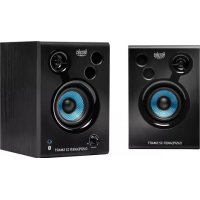
DJSpeaker 32 Smart - Speaker HERCULES - Free user manual and instructions
Find the device manual for free DJSpeaker 32 Smart HERCULES in PDF.

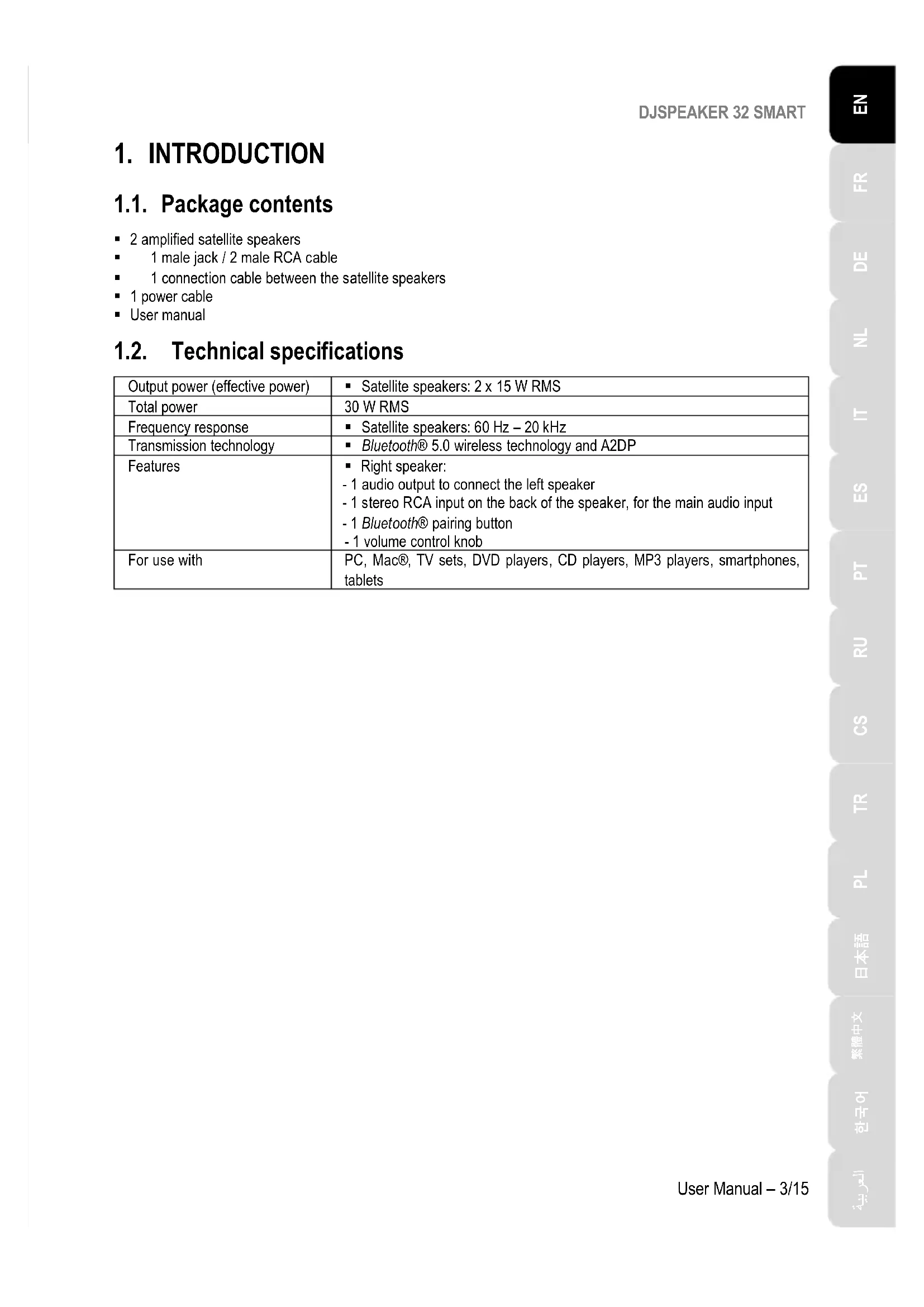


| Product type | Powered 2.0 speaker kit |
| Brand | Hercules |
| Model | DJSpeaker 32 Smart |
| Total power (RMS) | 30 W RMS (2 x 15 W RMS) |
| Frequency response | 60 Hz – 20 kHz |
| Wireless technology | Bluetooth 5.0 with A2DP |
| Audio inputs | Stereo RCA input (rear of right speaker), 3.5 mm jack input (via included cable) |
| Wired connectivity | 1 x RCA input, 1 x output to left speaker (terminal block), 1 x AC power connector |
| Box contents | 2 satellite speakers, 1 jack cable (m) / 2 RCA (m), 1 linking cable between satellites, 1 power cord, user manual |
| Recommended use | PC, TV, DVD player, smartphone, tablet |
| Power supply | Mains via power cord (IEC C7 connector) |
| Control functions | General volume (knob), Bluetooth pairing button, On/Off switch |
| Indicator lights | Power indicator (not specified), Bluetooth indicator (flashing blue when pairing, solid when connected) |
| Maintenance | Unplug before cleaning; use a damp cloth, no aerosols |
| Safety | Do not open; keep away from water, heat, sunlight; do not place liquid-filled objects on top; plug easily accessible |
| Recycling | Do not dispose of with household waste; take to a WEEE collection point |
| Warranty | 2 years minimum in the EU (according to local legislation) |
| Country of manufacture | China |
Frequently Asked Questions - DJSpeaker 32 Smart HERCULES
User questions about DJSpeaker 32 Smart HERCULES
0 question about this device. Answer the ones you know or ask your own.
Ask a new question about this device
Download the instructions for your Speaker in PDF format for free! Find your manual DJSpeaker 32 Smart - HERCULES and take your electronic device back in hand. On this page are published all the documents necessary for the use of your device. DJSpeaker 32 Smart by HERCULES.
USER MANUAL DJSpeaker 32 Smart HERCULES
2.1. Positioning the speaker kit 4
2.2. Wired connection 5
2.2.1. Connection to a PC/Mac® 6
2.2.2. Connection to a television set equipped with a headphone jack.. 6
2.2.3. Connection to a DVD player/television set equipped with Left and Right audio outputs 6
2.3. Connection via Bluetooth® wireless technology 7
- USING THE DJSPEAKER 32 SMART SPEAKER KIT 10
- TROUBLESHOOTING 11
1. INTRODUCTION
1.1. Package contents
2 amplified satellite speakers
1 male jack / 2 male RCA cable
1 connection cable between the satellite speakers
1 power cable
- User manual
1.2. Technical specifications
| Output power (effective power) | Satellite speakers: 2 x 15 W RMS |
| Total power | 30 W RMS |
| Frequency response | Satellite speakers: 60 Hz – 20 kHz |
| Transmission technology | Bluetooth® 5.0 wireless technology and A2DP |
| Features | Right speaker: - 1 audio output to connect the left speaker - 1 stereo RCA input on the back of the speaker, for the main audio input - 1 Bluetooth® pairing button - 1 volume control knob |
| For use with | PC, Mac®, TV sets, DVD players, CD players, MP3 players, smartphones, tablets |
1.3. Recommendations
- Place your satellite speakers on a flat surface to avoid the risk of the speakers falling.
- Never open up your speaker kit, as you risk damaging its internal components.
- This speaker kit is intended for use in a temperate environment.
- To prevent the risk of fire or electrical discharge, keep your speaker kit away from:
-
direct sunlight.
-
Do not expose your speaker kit to drips or splashes of water.
- Never place any object filled with liquid (a glass, vase...) on your speaker kit.
- Unplug the power cable if you do not plan on using your speaker kit for an extended period of time. To disconnect the power cable, take hold of and pull on the plug; never pull on the cable itself.
- Make sure that the speaker kit's power plug connected to an electrical outlet remains easily accessible.
- Disconnect the speaker kit before cleaning. Use a damp cloth and avoid using aerosol cleaners.
The speaker kit's power plug serves to power off the device and must therefore be easily accessible at all times. - Markings are located on the back of the speakers.
2. INSTALLING THE DJSPEAKER 32 SMART SPEAKER KIT
2.1. Positioning the speaker kit
- Place the satellite speakers on a desk to either side of your monitor, keeping them at least 50~cm away from the side walls.
- Place the speakers at an equal distance from the listener and direct them towards the listening position.
2.2. Wired connection
-
Power off the audio source (PC, Mac®, television set, DVD player) to which you would like to connect your speaker kit.
-
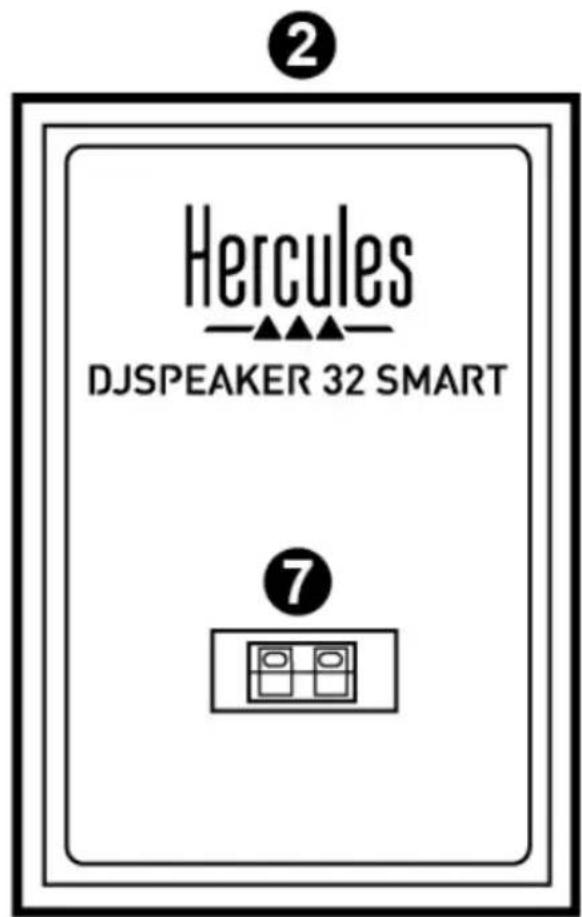
General connection diagram:
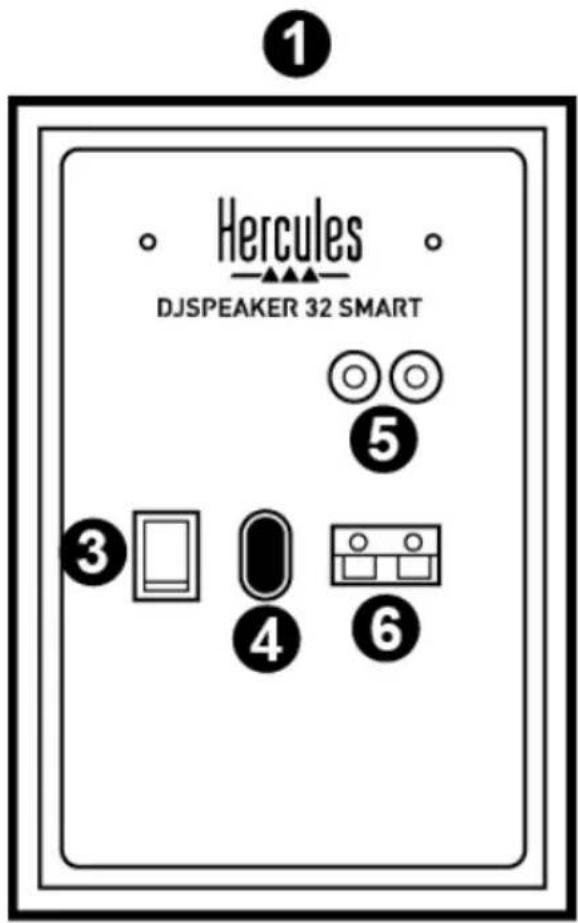
1: Right speaker
2: Left speaker
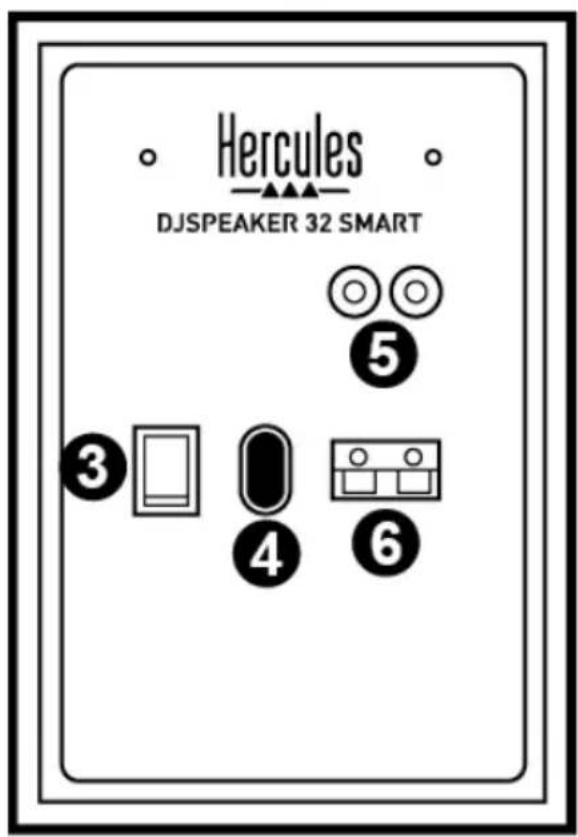
3: On/Off switch
4: Power connector
5: RCA connectors for main audio input
6: Terminal block output connector on right satellite speaker
7: Terminal block input connector on left satellite speaker
DJSPEAKER 32 SMART
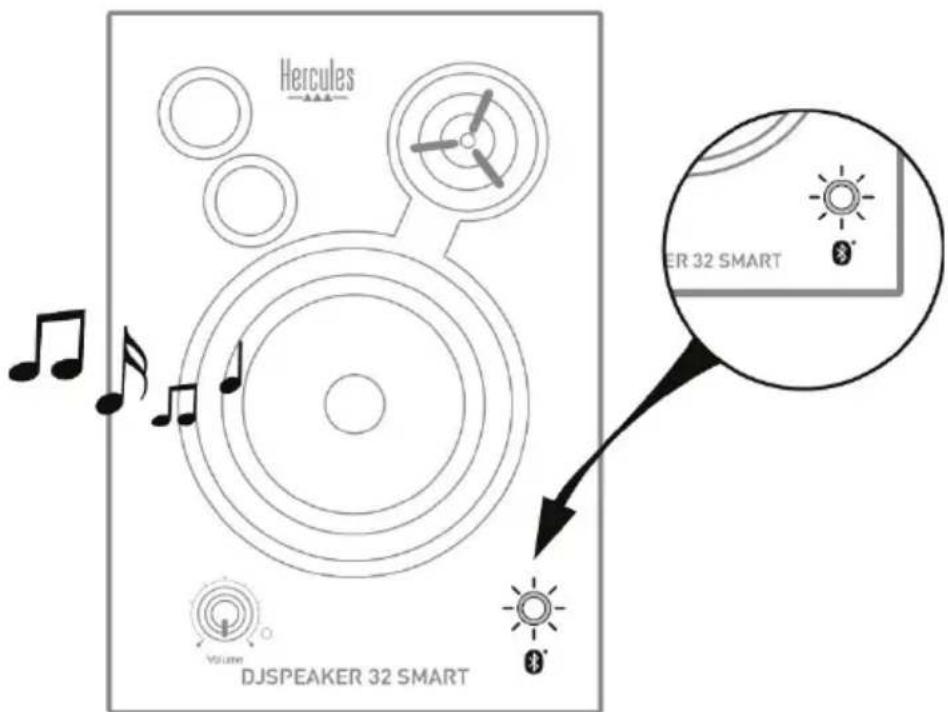
- Right speaker with controls:
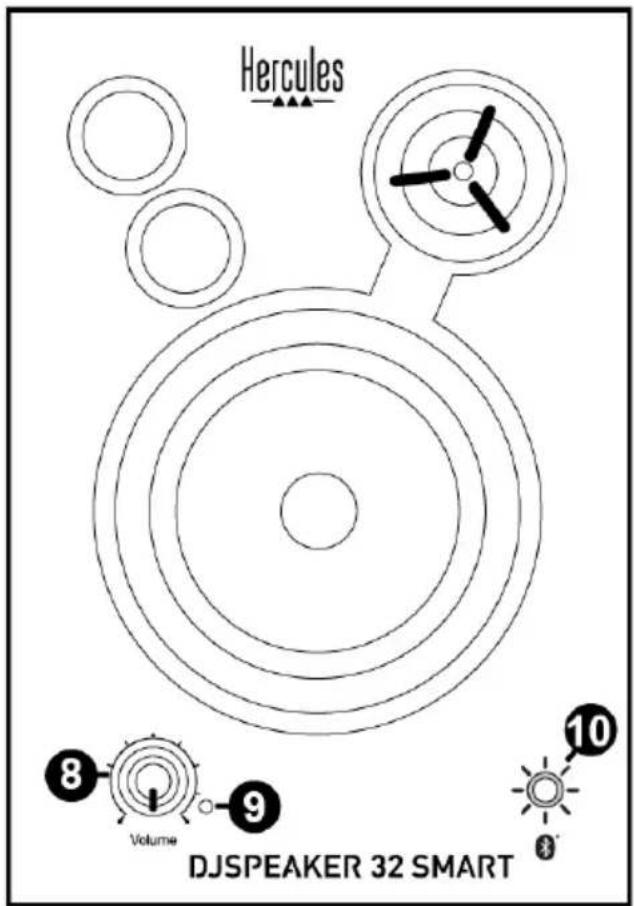
8: Master volume control knob
9:PowerLED
10: Bluetooth® pairing button and LED
2.2.1. Connection to a PC/Mac®
- Connect your speaker kit's main audio input (RCA connectors on the back of the right satellite speaker) (5) to the green FRONT SPEAKERS or FRONT OUT connector on your sound card or on the sound card integrated into your computer's motherboard, using the included male jack / 2 male RCA cable.
2.2.2. Connection to a television set equipped with a headphone jack
- Connect your speaker kit's main audio input (RCA connectors on the back of the right satellite speaker) (5) to the headphone jack on your television set.
2.2.3. Connection to a DVD player/television set equipped with Left and Right audio outputs
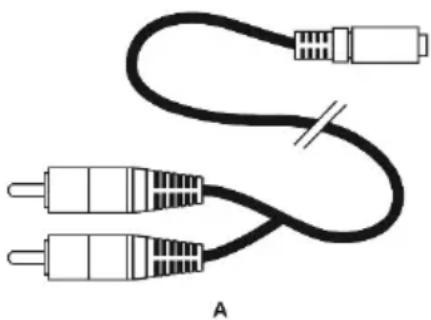
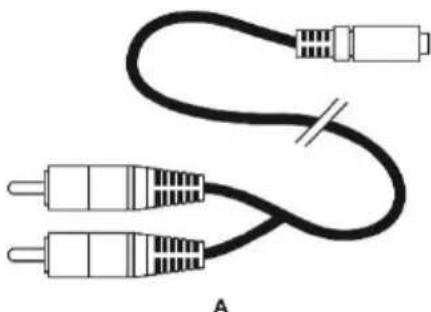
Requires a female jack / 2 male RCA cable (not included - please see diagram A, below).
- Connect your male jack / 2 male RCA cable to the female jack / 2 male RCA cable.
- Connect the white RCA connector on the female jack / 2 male RCA cable to the corresponding audio output on your DVD player/television set.
- Connect the red RCA connector on the female jack / 2 male RCA cable to the corresponding audio output on your DVD player/television set.
2.3. Connection via Bluetooth® wireless technology
Before connecting your Bluetooth® device (smartphone, tablet, PC, Mac...), you must first pair your Bluetooth® device with the speaker kit: that is to say, you must establish a connection between them. Once pairing is complete, the relevant information is stored in each device's memory (the Bluetooth® device and the speaker kit). Once a device has been paired with the speaker kit, it doesn't need to be paired again.
Please note: The wired connection to another device remains active even if other devices are connected to the speaker kit via Bluetooth® wireless technology.
Connecting a first device
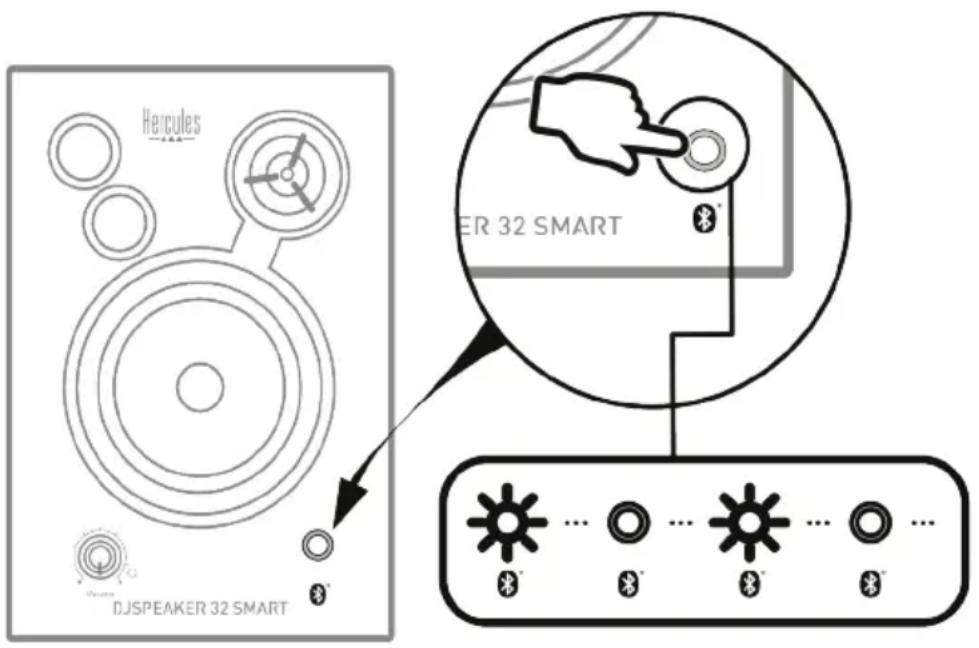
- Press the Bluetooth® pairing button (10) to launch pairing with your device. The blue LED starts flashing.
DJSPEAKER 32 SMART
- Enable the Bluetooth® function on the device that you would like to pair. Access your device's Bluetooth® settings and select your DJSpeaker 32 Smart speaker kit in the list.

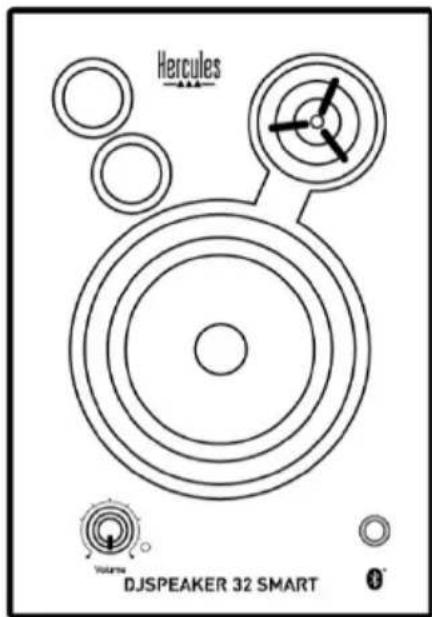
- When a device is connected, a tone sounds and the blue LED stops flashing.
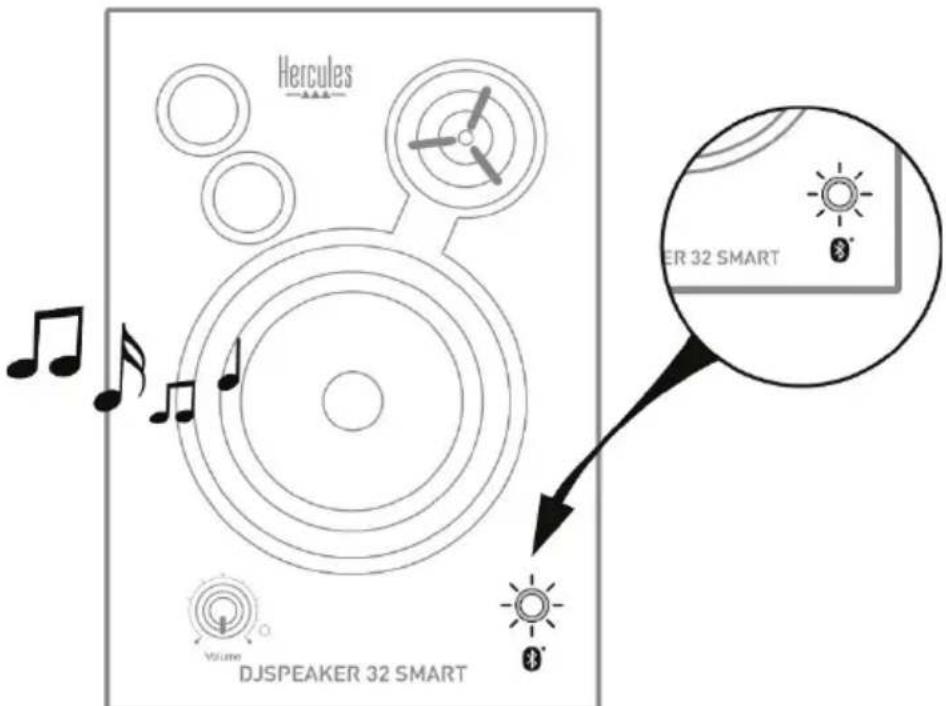
Connection to other devices
Your DJSpeaker 32 Smart speaker kit can store pairing information for up to eight devices, but only two can be connected simultaneously. After you have successfully connected your first device, follow the procedure set out below to connect another device:
- Press the Bluetooth® pairing button (10) to restart the pairing process. The blue LED starts flashing.
- Enable the Bluetooth® function on your new device. Access your device's Bluetooth® settings and select your DJSpeaker 32 Smart speaker kit in the list.
- When the device is connected, a tone sounds and the LED stops flashing.
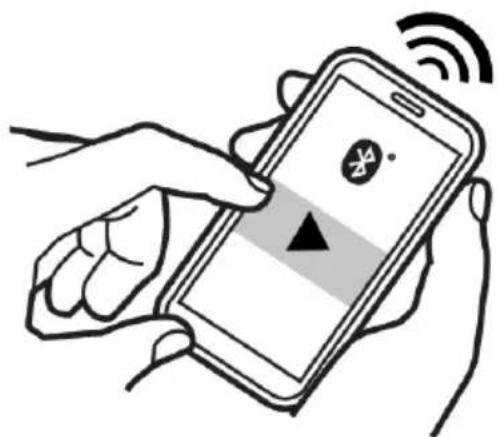
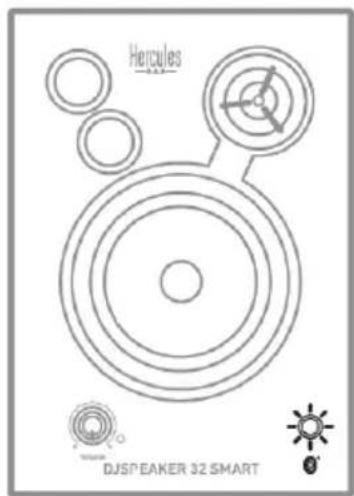
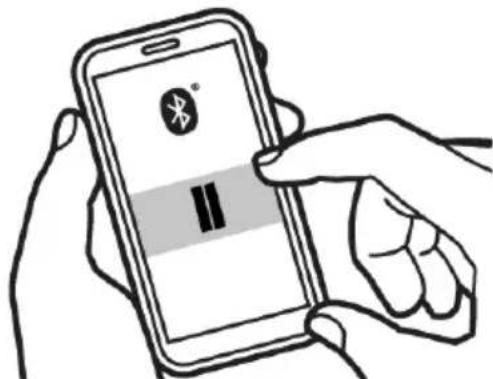
When music is played on one of the two devices, the music on the other device is automatically paused. It may take a few seconds for the music on the second device to start playing on the speaker kit.
If two devices are connected via Bluetooth® to your DJSpeaker 32 Smart speaker kit and you press the Bluetooth® pairing button (10), the last device paired will be disconnected in order to allow for a new device to be paired/connected.
Please note: Your DJSpeaker 32 Smart speaker kit stores the last eight devices to which it has been connected. When your speaker kit is powered back on, it automatically tries to reconnect to the last connected device.
To reset and clear the list of paired devices (eight devices maximum), press and hold the Bluetooth® pairing button (10) for eight seconds. A tone sounds when the list has been cleared.
3. USING THE DJSPEAKER 32 SMART SPEAKER KIT
- Plug your speaker kit's power cable (4) into an electrical outlet.
- Set the On/Off switch (3) to ON.
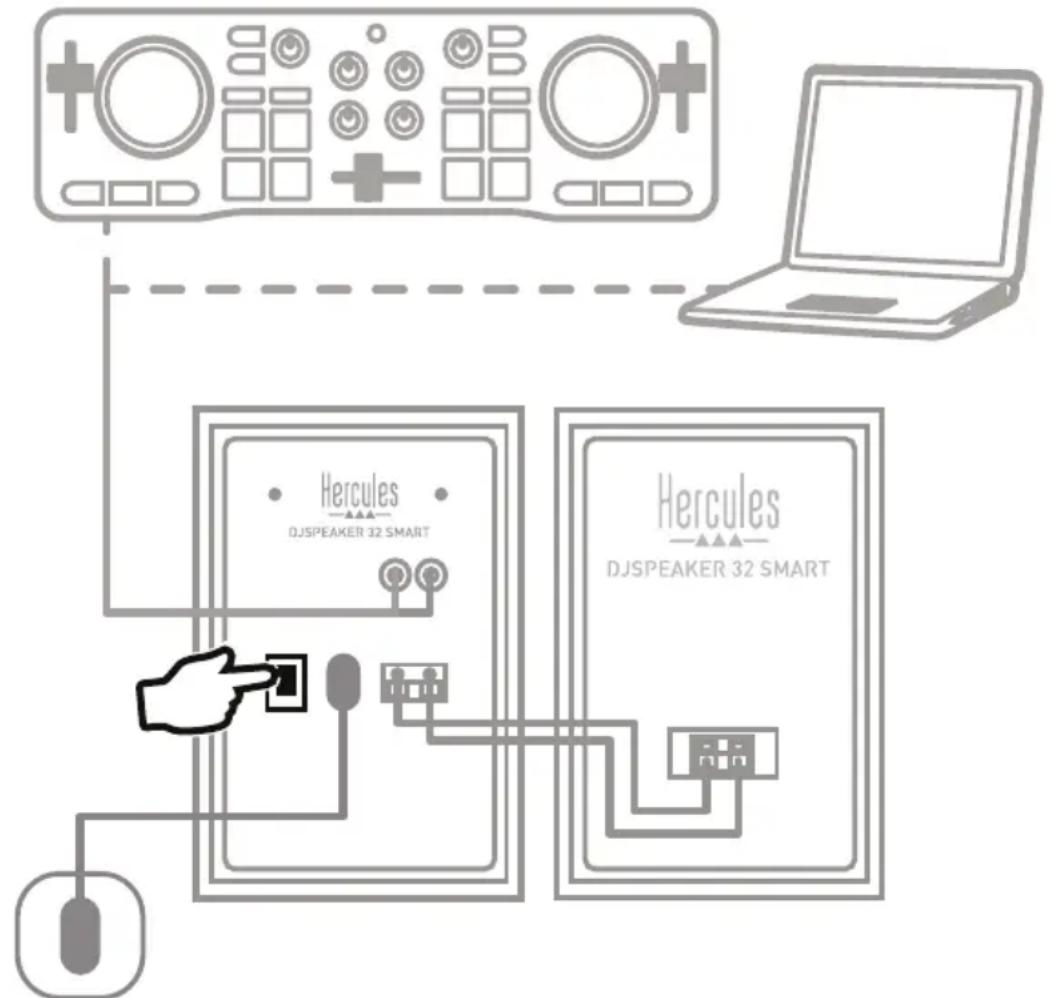
- Connect the audio source that you would like to use (PC, Mac®, television set, DVD player) to the RCA input (5) using the required cable(s), and then power on the audio source.
or - Follow the procedures set out in section 2.3 in order to connect your devices (smartphone, tablet) via the Bluetooth® function.
Please note: The two inputs — RCA (5) and Bluetooth® (10) — are mixed, which means that you don't need to unplug/disconnect them in order to choose one or the other.
- Adjust the master volume (8).
4. TROUBLESHOOTING
| Problem | Possible solutions |
| The speaker indicates a connection (the LED is lit up in blue), but no sound is heard. | • Power off all paired devices in the area or disable their Bluetooth® function, then reconnect the device that you want to use for playback. • Power off your DJSpeaker 32 Smart speaker kit by setting the On/Off switch (3) to OFF, wait 5 seconds and then power it back on again by setting the On/Off switch (3) to ON. |
| No sound from a Bluetooth® device can be heard on the speaker kit. | • Make sure that your speaker kit's sound isn't disabled and that the volume level isn't on minimum. • Make sure that your device's Bluetooth® function is enabled. • Your Bluetooth® device may be out of range: move it closer to the speaker kit. • Power off your DJSpeaker 32 Smart speaker kit by setting the On/Off switch (3) to OFF, wait 5 seconds and then power it back on again by setting the On/Off switch (3) to ON. |
| I can't connect the speaker kit to a paired Bluetooth® device. | • Power off your DJSpeaker 32 Smart speaker kit by setting the On/Off switch (3) to OFF, wait 5 seconds and then power it back on again by setting the On/Off switch (3) to ON. Press the Bluetooth® pairing button (10) to restart the pairing process. • Remove your DJSpeaker 32 Smart speaker kit from the list of paired devices stored on your Bluetooth® device (for more information, please refer to your device's user manual). Then, pair the speaker kit and the device again (for more information, please see the instructions set out in section 2.3). |
| I can't pair the speaker kit with my Bluetooth® device. | • Press the Bluetooth® pairing button (10) on the right speaker to enable pairing mode. • Make sure that the Bluetooth® function is enabled on the device that you want to pair. • Your Bluetooth® device may be out of range: move it closer to the speaker kit. • Make sure that your Bluetooth® device supports audio transmission (A2DP protocol). • Move your Bluetooth® device and/or the speaker kit away from any other device liable to cause interference (cordless telephones, microwave ovens, Wi-Fi routers and all other Bluetooth® devices). • If possible, power off all other Bluetooth® devices in the area, or disable their Bluetooth® function. • Power off your DJSpeaker 32 Smart speaker kit by setting the On/Off switch (3) to OFF, wait 5 seconds and then power it back on again by setting the On/Off switch (3) to ON. • Press and hold the Bluetooth® pairing button (10) for eight seconds: the list of paired devices is reset and cleared. |
| Poor sound quality in Bluetooth® mode. | • Your Bluetooth® device may be out of range: move it closer to your speaker kit. • Move your Bluetooth® device and/or the speaker kit away from any other device liable to cause interference (cordless telephones, microwave ovens, Wi-Fi routers and all other Bluetooth® devices). • If several applications are running simultaneously on the Bluetooth® device, close any non-essential applications. Running multiple applications simultaneously reduces the internal resources required for audio transmission. • Disable your device's Wi-Fi network. • Remove the pairing between your Bluetooth® device and your DJSpeaker 32 Smart speaker kit, then pair both devices again. Doing so should eliminate any problems which may have occurred during the initial pairing. |
CONSUMER WARRANTY INFORMATION
Worldwide, Guillemot Corporation S.A., whose registered office is located at Place du Granier, B.P. 97143, 35571 Chantepie, France (hereinafter "Guillemot") warrants to the consumer that this Hercules product shall be free from defects in materials and workmanship, for a warranty period which corresponds to the time limit to bring an action for conformity with respect to this product. In the countries of the European Union, this corresponds to a period of two (2) years from delivery of the Hercules product. In other countries, the warranty period corresponds to the time limit to bring an action for conformity with respect to the Hercules product according to applicable laws of the country in which the consumer was domiciled on the date of purchase of the Hercules product (if no such action exists in the corresponding country, then the warranty period shall be one (1) year from the original date of purchase of the Hercules product).
Notwithstanding the above, rechargeable batteries are covered by a warranty period of six (6) months from the date of original purchase.
Should the product appear to be defective during the warranty period, immediately contact Technical Support, who will indicate the procedure to follow. If the defect is confirmed, the product must be returned to its place of purchase (or any other location indicated by Technical Support).
Within the context of this warranty, the consumer's defective product shall, at Technical Support's option, be either replaced or returned to working order. If, during the warranty period, the Hercules product is subject to such reconditioning, any period of at least seven (7) days during which the product is out of use shall be added to the remaining warranty period (this period runs from the date of the consumer's request for intervention or from the date on which the product in question is made available for reconditioning, if the date on which the product is made available for reconditioning is subsequent to the date of the request for intervention). If permitted under applicable law, the full liability of Guillemot and its subsidiaries (including for consequential damages) is limited to the return to working order or the replacement of the Hercules product. If permitted under applicable law, Guillemot disclaims all warranties of merchantability or fitness for a particular purpose.
This warranty shall not apply: (1) if the product has been modified, opened, altered, or has suffered damage as a result of inappropriate or abusive use, negligence, an accident, normal wear, or any other cause unrelated to a material or manufacturing defect (including, but not limited to, combining the Hercules product with any unsuitable element, including in particular power supplies, rechargeable batteries, chargers, or any other elements not supplied by Guillemot for this product); (2) if the product has been used for any use other than home use, including for professional or commercial purposes (game rooms, training, competitions, for example); (3) in the event of failure to comply with the instructions provided by Technical Support; (4) to software, said software being subject to a specific warranty; (5) to consumables (elements to be replaced over the product's lifespan: disposable batteries, audio headset or headphone ear pads, for example); (6) to accessories (cables, cases, pouches, bags, wrist-straps, for example); (7) if the product was sold at public auction.
This warranty is nontransferable.
The consumer's legal rights with respect to laws applicable to the sale of consumer goods in his or her country are not affected by this warranty.
DJSPEAKER 32 SMART
Additional warranty provisions
During the warranty period, Guillemot shall not provide, in principle, any spare parts, as Technical Support is the only party authorized to open and/or recondition any Hercules product (with the exception of any reconditioning procedures which Technical Support may request that the consumer carry out, by way of written instructions - for example, due to the simplicity and the lack of confidentiality of the reconditioning process - and by providing the consumer with the required spare part(s), where applicable).
Given its innovation cycles and in order to protect its know-how and trade secrets, Guillemot shall not provide, in principle, any reconditioning notification or spare parts for any Hercules product whose warranty period has expired.
In the United States of America and in Canada, this warranty is limited to the product's internal mechanism and external housing. In no event shall Guillemot or its affiliates be held liable to any third party for any consequential or incidental damages resulting from the breach of any express or implied warranties. Some States/Provinces do not allow limitation on how long an implied warranty lasts or exclusion or limitation of liability for consequential or incidental damages, so the above limitations or exclusions may not apply to you. This warranty gives you specific legal rights, and you may also have other rights which vary from State to State or Province to Province.
Liability
If permitted under applicable law, Guillemot Corporation S.A. (hereinafter "Guillemot") and its subsidiaries disclaim all liability for any damages caused by one or more of the following: (1) the product has been modified, opened or altered; (2) failure to comply with assembly instructions; (3) inappropriate or abusive use, negligence, an accident (an impact, for example); (4) normal wear; (5) the use of the product for any use other than home use, including for professional or commercial purposes (game rooms, training, competitions, for example). If permitted under applicable law, Guillemot and its subsidiaries disclaim all liability for any damages unrelated to a material or manufacturing defect with respect to the product (including, but not limited to, any damages caused directly or indirectly by any software, or by combining the Hercules product with any unsuitable element, including in particular power supplies, rechargeable batteries, chargers, or any other elements not supplied by Guillemot for this product).
FCC STATEMENT
- This device complies with Part 15 of the FCC Rules. Operation is subject to the following two conditions:
(1) This device may not cause harmful interference, and
(2) This device must accept any interference received, including interference that may cause undesired operation. - Changes or modifications not expressly approved by the party responsible for compliance could void the user's authority to operate the equipment.
COPYRIGHT
© 2019 Guillemot Corporation S.A. All rights reserved. Hercules® is a registered trademark of Guillemot Corporation S.A. The Bluetooth® word mark and logos are registered trademarks owned by Bluetooth SIG, Inc. and any use of such marks by Guillemot Corporation S.A. is under license. All other trademarks and brand names are hereby acknowledged and are property of their respective owners. Illustrations not binding. Contents, designs and specifications are subject to change without notice and may vary from one country to another. Made in China.
DECLARATION OF CONFORMITY WITH EU DIRECTIVES
Hereby, Guillemot Corporation S.A. declares that the DJSpeaker 32 Smart device complies with the essential requirements and other relevant provisions of Directive 1999/5/EC. The declaration of conformity may be consulted at the following address:
http://www.hercules.com/certificates/wireless-speaker/DoC-DJSpeaker32-Smart.pdf
ENVIRONMENTAL PROTECTION RECOMMENDATION
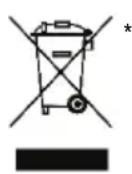
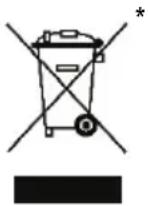
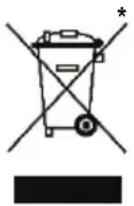
In the European Union: At the end of its working life, this product should not be disposed of with standard household waste, but rather dropped off at a collection point for the disposal of Waste Electrical and Electronic Equipment (WEEE) for recycling.
This is confirmed by the symbol found on the product, user manual or packaging.
Depending on their characteristics, the materials may be recycled. Through recycling and other forms of processing Waste Electrical and Electronic Equipment, you can make a significant contribution towards helping to protect the environment.
Please contact your local authorities for information on the collection point nearest you.
For all other countries: Please adhere to local recycling laws for electrical and electronic equipment.
Retain this information. Colours and decorations may vary.
Plastic fasteners and adhesives should be removed from the product before it is used.
www.hercules.com
*Applicable to EU and Turkey only

Hercules
DJ-speAKER 32 SMART
TABLE DES MATIÈRES
- INTRODUCTION 3
1.1. Contenu de la boite 3
1.2. Specifications techniques 3
1.3. Recommendations 4
- INSTALLATION DU KIT D'ENCEINTES DJSPEAKER 32 SMART 4
1.2. Specifications techniques
http://www.hercules.com/certificates/wireless-speaker/DoC-DJSpeaker32-Smart.pdf
RECOMMANDATION RELATIVE A LA PROTECTION DE L'ENVIRONNEMENT
http://www.hercules.com/certificates/wireless-speaker/DoC-DJSpeaker32-Smart.pdf
INFORMATIE MET BETREKKING TOT KOPERSGARANTIE
http://www.hercules.com/certificates/wireless-speaker/DoC-DJSpeaker32-Smart.pdf
AANBEVELINGEN VOOR DE BESCHERMING VAN HET MILIEU
- INSTALLAZIONE DEL SET DI ALTOPARLANTIDJSPEAKER 32 SMART 4
http://www.hercules.com/certificates/wireless-speaker/DoC-DJSpeaker32-Smart.pdf
RACCOMANDAZIONI SULLA TUTELA DELL'AMBIENTE
http://www.hercules.com/certificates/wireless-speaker/DoC-DJSpeaker32-Smart.pdf
http://www.hercules.com/certificates/wireless-speaker/DoC-DJSpeaker32-Smart.pdf
RECOMENDACOs DE PROTECCAO AMBIENTAL
- Nocne BbInonHeHnnoKJIoueHn CnHn HnDnKaTOp nepeCTaeT MraTb.
IopKnHoueHne KdpYm yctpoiCTBaM
B namrny aynocnembl DJSpeaker 32 Smart mokeT coxpaHbCra HfopMaun O BOCBMn cnpjHexhbx yctpoiCTbax, Ondako OndHOpeMeHHo MOKHO NOkHouHTb TlboKo Dba. Iocne ycneHoro NOkHouEnnepBoro yctpoiCTBa BInONHte CneDyUOuNe DeIcTBnI dNpOKluOeHnA dpYrOToYcTPOiCTBa.
- Haxmte KhoNky cnpjxehn Bluteoth@ (10), TTo6bI nepe3anyctntb npouecc cnpjxehn. Haunhaet MngtaB CNHm INDMKATOp.
- BkIOUHTe yHKUHO Bluetooth® Ha HOBOM yCTPOICTBE. OTKPOITe HAcTPOIKn Bluetooth® Ha yCTPOICTBE n BbI6epNTe B cINcKe ayDIOOCNCTemy DJSpeaker 32 Smart.
- Pocne BbInonHeHnnoDkNIOueHn HnDkaTOp nepeCTaet MuraTb.
Daanha rapaTna He noIpeKHT nepeDahe.
Hactoa rapaHTn He yueemTne npab notpebTeJn, npeocTabnEmbIX emy npimeHMbIMn 3akohAmn B OTHoueHH npodaxn notpebTeJIbcknx TOBAPOB COOTBeTCTBYIOUe CTpaHe.
DJSPEAKER 32 SMART
DOnoJIHnTeIbHbIe ycJIOBnra rapaHTn
B TeueHne rapaHTnHoro cpoKa komnaHnGuillemot, B obuem n ceIom, He npedocTabnEe HnkaKnx 3aNaChbIX qacteT, TAK KAK BCKpbITHe u/nn MoDnΦnKaUIO NIObIX u3DeNn Hercules Bnpabe ocuyceTB ToNbKO CnyX6a TexHnuecko NpOdepKKn (3a NcKlnOHeHEm KaKnx-Imbo IpoaeDyp NO moDnΦnKaUIN, KOtbpIE CnyK6a TexHnuecko NpOdepKKn MOKeT PpeINOxITb BblONHITb KIneHTy NytEM NcBMeHHbIX IHCTpyKUn IN ppeOCTaBnEHN, PnH NoobxOIMOCTH, TpeSyembIX 3aNaCHbIX qacteY: HapPmEp, B CB83N C OTCyTCTBnEM CTAtyCa CNOxHOCTN UIN KOHPhiJeHnAJIbHOCTN y TaKo BOcCTaHOBtJIbHOJ PnoeDypbl).
C yueTOM nepnoDa OCBOEHNr HOBbIX N3dJIIM N B cIeJx 3aIITbI CBOX HOy-Xay N KOMMepYeCKNX TaH KOMnAHnGuillemot, B o6IeM n cIeNOM, He npedocTabIeT KaKIX-NIbO yBeDOMneH N O BOCCTAHOBJIeH N IIN 3aNaCHbIX qacteI dnn JIObix N3dJIIM Hercules c NcTEKUIM rapaHTmHbIM cPOKOM.
B CSHA n KaHade HacToaJra rapaHTnO rpaHnUHbAeTcB BHyTpEHm MExaHImM o6oNoyKo yCTpoiCTBa. KopnpaunGuillemot n ee douepHne npednpaTn H npn KaHX ycNoBHX He hecyt OTBeTCTBeHHocTN nepe TpeTbHMn IInaMn 3a KOCBeHbIe INn CnyaHbIe y6bITKn, CBzAHbIe C hapyeHMe KaHX-JINBO ABHbIX INn NOpa3yMeBaembIX rapaTn. B HeKOTopbIX StTaTAX/npOBuHcIax He dOnyckaTeCra ORpaHueHme cPoka DeiCTBna NpOpa3yMeBaEMo rapaHTn INn ORpaHueHme OTBeTCTBeHHocTn 3a KOCBeHbIe/CnyaHbIe y6bITKn, PO3TOMy B BaWeM Clyuae Bbiweyka3aHHbIe ORpaHueHn INn NCKlouHHeN MOr7 bItb HenpIMeHMBI. HaCToiaar rapaHTn PpeOCTabJIeRt Bam onpeJeHbIe IOpDInuCeckne npaba. Y Bac mOrY taXke 6blpyrme npaba, onpeJeHbIe 3aKOHoDAteJIbCTBOM stTaTAn INn pOBuHcIin.
OTBetCTBeHHOCTb
B Mepe, pa3peSeHHo npImeHmMbIM 3aKOHoTaTeNbCTBOM, KOMnHaHg Guillemot Corporation S.A. (daee - «Guillemot») n ee doyepHne npednpnTna OTKa3bBAOTcra ot IIObo OTBeTCTBeHHocTn 3a IIObo yuep6, BbI3BaHHbI ODHm IIN HeCKoJIbKIMN N3 CNeDyUOx PhAKTOPOB: (1) BINOJ3MeHeHne, BCKpyTne INI MOniΦnKaunr I3DeHn; (2) HecobnHOe HNCTpykCn no c6Opke; (3) HeDonyctmoe INI HEnpaBnHoe NCIOB3OBAHne, He6peXHoCTb, HecactHbC JCyuaI (HaNPmep, Pn3uYeCKoe BO3deCTBne); (4) ECTeCTBeHHbI N3HOC; (5) IcNoIb3OBaHne npOdyKTa B IIo6bIX ZEJAX, KpOME bIToBbIX, B TOM YNCNE IpOpeCCNOHaJIbHOe INI KOMMepueckoe npImeHne (HaNPmep, B INrpoBbIX 3aJax, DnI npObeJeHne oByeHn I COpeBHOBaHn). B Mepe, pa3peHHo npImeHMbl 3aKOHoTaTeNbCTBOM, KomnHaHg Guillemot n ee doyepHne npednpnTna OTKa3bBAOTcra ot IIObo OTBeTCTBeHHocTn 3a IIObo yuep6, He CBzAHHbI C DepeKtAmM MaTePnAIOB INI IN3rOToBLeHn, B OTHOeHHM daHHoro I3DeJIa (BKlOchA, NOMMO npOyeR, IIObo yuep6, Bbl3BaHHbI pIpMo INI ONOpceDOBaHNO IIObIM npOrpamMhblm ObecneueHem INI NcNoJIb3OBaHmE IN3DeJIa HRcules C IIObIMn HenoJXDoxUzIMM 3JeMeHTAMN, B qACTHOCTN - 6JLOkAMn PITaHnA, AKKymJIaTOpAMn, 3apJdHbIMN UCTPOJCTBAMN INIObIMn dpyHMn 3JeMeHTAMN, He BXODaUMN B KOMPiKeTaUHO Guillemot dJaDaHHoro I3DeJIa).
ABTOPCKNE IIPABA
© Guillemot Corporation S.A., 2019. BCE npaba 3aunuhenb. Hercules® — 3apeucmpupoeahhbu moapbui 3nak Kopnpauuu Guillemot Corporation S.A. Cnoecbui 3nuk u nozomunbl Bluetooth® ABLIOTc 3apeinctpnpoBAHbIMTOBAPbIMN 3nakamn rpynnbl Bluetooth Slg Inc., n IIO6oe nCNOJb3OBAHne 3Tnx 3nakOB ocyuieCTBnIETcK Kopnpauue Guillemot Corporation S.A. no liueh3m. Bce octanbHbte TOBAPbHe 3nAKn H3BaHnB 6peHDoB ABJIOTc CO6CTBEHHOCbIO COOTBeTCTByOuix BnaJeNbE. INIIOCpaUIM MOyT He COOTBETCTBOBATB BHeHemy BVnu/phiHKuINM KOHKPeTHORO n3dJIINr. CoedePkaHne, KOHCTpykUnn IN TexHnueckne XapaKTepNCtIK N3dJIINr MOrYT 6blb N3MeHbI 6e3 PpeBapNTbHO yBeOMNeHnR IN 3aBNCrT OT CTpaHbI npno6peTeHn. CdenaHO B KITae.
http://www.hercules.com/certificates/wireless-speaker/DoC-DJSpeaker32-Smart.pdf
EAC
Hercules
DJ-speAKER 32 SMART
OBSAH
- Uvod. 3
http://www.hercules.com/certificates/wireless-speaker/DoC-DJSpeaker32-Smart.pdf
DOPORUCENA OCHRANA ZIVOTNIHO PROSTREDI
http://www.hercules.com/certificates/wireless-speaker/DoC-DJSpeaker32-Smart.pdf
CEVRE KORUMA ÖNERILERİ
http://www.hercules.com/certificates/wireless-speaker/DoC-DJSpeaker32-Smart.pdf
ZALECENIE DOTYCZACE OCHRONY SRODOWISKA
http://www.hercules.com/certificates/wireless-speaker/DoC-DJSpeaker32-Smart.pdf
環境保護推獎
http://www.hercules.com/certificates/wireless-speaker/DoC-DJSpeaker32-Smart.pdf
环保建议
请遵守当地电气电子设备的回收法律。
Hercules
技术支持
https://support.hercules.com

Hercules
DJ-speAKER 32 SMART
目錄
- 简介
http://www.hercules.com/certificates/wireless-speaker/DoC-DJSpeaker32-Smart.pdf
環保建議
1(AM)/2RCA(个)制iBililgHnA
http://www.hercules.com/certificates/wireless-speaker/DoC-DJSpeaker32-Smart.pdf
韓國忠 彭立國
)
www.hercules.com

C E
Hercules
DJ-speAKER 32 SMART
#
3 1
- 1.1
- 2.1
4 3.1
4. DJSPEAKER 32 SMART: A. J. K. J. B. M. C. S. L. E. R. T. H. S. W. S. F.
4 1.2
5. 2.2
6...Mac/..1.2.2
6.
6. 3.2.2
7. 3.2
10. .DJSPEAKER 32 SMART: the power of a single
11 4
S OBC = S COD + S_ BOC
.1.1
Cswll 2
SIRCA 2/ SIRCA2
sall 5
1 1
aiaai 1.2
| الترجمة الحرفية 15x2 ⒊راني⒊راني⒊راني⒊راني⒊راني⒊راني⒊راني⒊راني⒊راني⒊راني⒊راني⒊راني⒊راني⒊راني⒊راني⒊راني⒊راني⒊راني⒊راني⒊r مصحيى مصحيى مصحيى مصحيى مصحيى مصحيى مصحيى مصحيى مصحيى مصحيى مصحيى مصحيى مصحيى مصحيى مصحيى مصحيى مصحيى مصحيى مصحيى مصحيى مصحيى مصحيى مصحيى مصحيى مصحيى مصحي弩 مصحيى مصحيى مصحيى مصحيى مصحي弩 مصحيى مصحيى مصحي弩 مصحي弩 مصحي弩 مصحي弩 مصحي弩 مصحي弩 مصحي弩 مصحي弩 مصحي弩 مصحي弩 مصحي弩 مصحي弩 مصحي弩 مصحي弩 مصحي弩 مصحي弩 مصحي弩 مصحي驽 مصحي弩 مصحي弩 مصحي弩 مصحي弩 مصحي弩 مصحي弩 مصحي弩 مصحي弩 مصحي弩 مصحي弩 مصحي弩 مصحي弩 مصحي弩 مصحي弩 مصحي弩 مصحي弩 مreds مreds مreds مreds مreds مreds مreds مreds مreds مreds مreds مreds مreds مreds مreds مreds مreds مreds مreds مreds مreds مreds مreds مreds مreds مyps مyps مyps مyps مyps مyps مyps مyps مyps مyps مyps مyps مyps مyps مyps مyps مyps مyps مyps مyps مyps مyps مyps مyps مyps مreds مreds مreds مreds مreds مreds مreds مreds مreds مreds مreds مreds مreds مreds مreds مreds مreds مreds مreds مreds مreds مreds مreds مreds مchs مchs مchs مchs مchs مchs مchs مchs مchs مchs مchs مchs مchs مchs مchs مchs مchs مchs مchs مchs مchs مchs مchs مchs مchs مreds مreds مreds مreds مreds مreds مreds مreds مreds مreds مreds مreds مreds مreds مreds مreds مreds مreds مreds مreds مreds مreds مreds مreds مredits مreds مreds مreds مreds مreds مreds مreds مreds مreds مreds مreds مreds مreds مreds مreds مreds مreds مreds مreds مreds مreds مreds مreds مreds مths مths مths مths مths مths مths مths مths مths مths مths مths مths مths مths مths مths مths مths مths مths مths مths مths مreds مreds مreds مreds مreds مreds مreds مreds مreds مreds مreds مreds مreds مreds مreds مreds مreds مreds مreds مreds مreds مreds مreds مreds مdds مdds مdds مdds مdds مdds مdds مdds مdds مdds مdds مdds مdds مdds مdds مdds مdds مdds مdds مdds مdds مdds مdds مdds مdds مDDS مDDS مDDS مDDS مDDS مDDS مDDS مDDS مDDS مDDS مDDS مDDS مDDS مDDS مDDS مDDS مDDS مDDS مDDS مDDS مDDS مDDS مDDS مDDS مDDS م DDS م DDS م DDS م DDS م DDS م DDS م DDS م DDS م DDS م DDS م DDS م DDS م DDS م DDS م DDS م DDS م DDS م DDS م DDS م DDS م DDS م DDS م DDS م DDS م DDS مDDS مDDS مDDS مDDS مDDS مDDS مDDS مDDS مDDS مDDS مDDS مDDS مDDS مDDS مDDS مDDS مDDS مDDS مDDS مDDS مDDS مDDS مDDS مDDS مDDR مDDR مDDR مDDR مDDR مDDR مDDR مDDR مDDR مDDR مDDR مDDR مDDR مDDR مDDR مDDR مDDR مDDR مDDR مDDR مDDR مDDR مDDR مDDR مDDR مDDS مDDS مDDS مDDS مDDS مDDS مDDS مDDS مDDS مDDS مDDS مDDS مDDS مDDS مDDS مDDS مDDS مDDS مDDS مDDS مDDS مDDS مDDS مDDS مdds مdds مdds مdds مdds مdds مdds مdds مdds مdds مdds مdds مdds مdds مdds مdds مdds مdds مdds مdds مdds مdds مdds مdds مths مths مths مths مths مths مths مths مths مths مths مths مths مths مths مths مths مths مths مths مths مths مths مths مdds مdds مdds مdds مdds مdds مdds مdds مdds مdds مdds مdds مdds مdds مdds مdds مdds مdds مdds مdds مdds مdds مdds مdds مyps مyps مyps مyps مyps مyps مyps مyps مyps مyps مyps مyps مyps مyps مyps مyps مyps مyps مyps مyps مyps مyps مyps مyps مdds مdds مdds مdds مdds مdds مdds مdds مdds مdds مdds مdds مdds مdds مdds مdds مdds مdds مdds مdds مdds مdds مdds مdds مreds مreds مreds مreds مreds مreds مreds مreds مreds مreds مreds مreds مreds مreds مreds مreds مreds مreds مreds مreds مreds مreds مreds مreds مDDS مDDS مDDS مDDS مDDS مDDS مDDS مDDS مDDS مDDS مDDS مDDS مDDS مDDS مDDS مDDS مDDS مDDS مDDS مDDS مDDS مDDS مDDS مDDS مDDD مDDS مDDS مDDS مDDS مDDS مDDS مDDS مDDS مDDS مDDS مDDS مDDS مDDS مDDS مDDS مDDS مDDS مDDS مDDS مDDS مDDS مDDS مDDS مDDS مDDL مDDS مDDS مDDS مDDS مDDS مDDS مDDS مDDS مDDS مDDS مDDS مDDS مDDS مDDS مDDS مDDS مDDS مDDS مDDS مDDS مDDS مDDS مDDS مDDS مDLL مDLL مDLL مDLL مDLL مDLL مDLL مDLL مDLL مDLL مDLL مDLL مDLL مDLL مDLL مDLL مDLL مDLL مDLL مDLL مDLL مDLL مDLL مDLL مDLL مDDS مDDS مDDS مDDS مDDS مDDS مDDS مDDS مDDS مDDS مDDS مDDS مDDS مDDS مDDS مDDS مDDS مDDS مDDS مDDS مDDS مDDS مDDS مDDS م-DDS مDDS مDDS مDDS مDDS مDDS مDDS مDDS مDDS mDDS mDDS mDDS mDDS mDDS mDDS mDDS mDDS mDDS mDDS mDDS mDDS mDDS mDDS mDDS mDDS mDDS mDDS mDDS mDDS mDDS mDDS mDDS mDDS mDDS MDDS MDDS MDDS MDDS MDDS MDDS MDDS MDDS MDDS MDDS MDDS MDDS MDDS MDDS MDDS MDDS MDDS MDDS MDDS MDDS MDDS MDDS MDDS MDDS MDDS mDDS mDDS mDDS mDDS mDDS mDDS mDDS mDDS mDDS mDDS mDDS mDDS mDDS mDDS mDDS mDDS mDDS mDDS mDDS mDDS mDDS mDDS mDDS mDDS nDDS nDDS nDDS nDDS nDDS nDDS nDDS nDDS nDDS nDDS nDDS nDDS nDDS nDDS nDDS nDDS nDDS nDDS nDDS nDDS nDDS nDDS nDDS nDDS nDDS mDDS mDDS mDDS mDDS mDDS mDDS mDDS mDDS mDDS mDDS mDDS mDDS mDDS mDDS mDDS mDDS mDDS mDDS mDDS mDDS mDDS mDDS mDDS mDDS kDDS kDDS kDDS kDDS kDDS kDDS kDDS kDDS kDDS kDDS kDDS kDDS kDDS kDDS kDDS kDDS kDDS kDDS kDDS kDDS kDDS kDDS kDDS kDDS kDDS mDDS mDDS mDDS mDDS mDDS mDDS mDDS mDDS mDDS mDDS mDDS mDDS mDDS mDDS mDDS mDDS mDDS mDDS mDDS mDDS mDDS mDDS mDDS mDDS rDDS rDDS rDDS rDDS rDDS rDDS rDDS rDDS rDDS rDDS rDDS rDDS rDDS rDDS rDDS rDDS rDDS rDDS rDDS rDDS rDDS rDDS rDDS rDDS rDDS mDDS mDDS mDDS mDDS mDDS mDDS mDDS mDDS mDDS mDDS mDDS mDDS mDDS mDDS mDDS mDDS mDDS mDDS mDDS mDDS mDDS mDDS mDDS mDDS lDDS lDDS lDDS lDDS lDDS lDDS lDDS lDDS lDDS lDDS lDDS lDDS lDDS lDDS lDDS lDDS lDDS lDDS lDDS lDDS lDDS lDDS lDDS lDDS lDDS mDDS mDDS mDDS mDDS mDDS mDDS mDDS mDDS mDDS mDDS mDDS mDDS mDDS mDDS mDDS mDDS mDDS mDDS mDDS mDDS mDDS mDDS mDDS mDDS fDDS |
.1.3
g 10000000000000000000000000000000000000000000000000000000000000000000000000000000000000000000
DJSPEAKER 32 SMART
.2.1
AaJn Jn Jn Jn Jn Jn Jn Jn Jn Jn Jn Jn Jn Jn Jn Jn Jn Jn Jn Jn Jn Jn Jn Jn Jn Jn Jn Jn Jn Jn Jn Jn Jn Jn Jn Jn Jn Jn Jn Jn Jn Jn Jn Jn Jn Jn Jn Jn Jn Jn Jn
2
(
DVD
Joo
Mac®
sll
.2.2
j()-1
A( 1,0) .B( -34,34)
:paill jagil bbi
1

2
julil 1
S OBC = S COD + S BOC - S BOC
y/1y
ailll j 4
RCA 5
gll gall gss sckill jia 8
LED 与上帝
LEDBluetooth 10
Mac/2.2.1
8.29999999999999999999999999999999999999999999999999999999999999999999
jgs jc g 1/9 Bluetooth® jgs
g 1 g 1 g 1 g 1 g 1 g 1 g 1 g 1 g 1 g 1 g 1 g 1 g 1 g 1 g 1 g 1 g 1 g 1 g 1 g 1 g 1 g 1 g 1 g 1 g 1 g 1 g 1 g 1 g 1
. (s_j > 1) Bluetooth® _j≥ j J _ (g|Jl)
http://www.hercules.com/certificates/wireless-speaker/DoC-DJSpeaker32-Smart.pdf
aaiyaiyaiyaiyaiyaiyaiyaiyaiyaiyaiyaiyaiyaiyaiyaiyaiyaiyaiyaiyaiyaiyaiyaiyaiyaiyaiyaiyaiyaiyaiyaiyaiyaiyaiyaiyaiyaiyaiyaiyaiyaiyaiyaiyaiyaiyaiyaiyaiyaiyai
a 111 111 111 111 111 111 111 111 111 111 111 1
i 15
J 1
y 1
j j j j j j j j j j j j j j j j j j j j j j j j j j j j j j j j j j j j j j j j j j j j j j j j j
Aalai jieiial no aedil gaiial glall j
www.hercules.com
1

C E
Hercules
DJSPEAKER 32 SMART
INNEHÄLL
- INTRODUKTION 3
1.1. Inneháll i forpackningen 3
1.2. Tekniska specificationer 3
1.3. Rekommendationer 4
- INSTALLERA HÖGTALARKITTET DJSPEAKER 32 SMART
2.1. Placera hogehtalarkittet 4
2.2. Trädbunden anslutning 5
http://www.hercules.com/certificates/wireless-speaker/DoC-DJSpeaker32-Smart.pdf
MILJÖSKYDD
http://www.hercules.com/certificates/wireless-speaker/DoC-DJSpeaker32-Smart.pdf
YMPÄRISTÖNSUOJELUSUOSITUS
4. RIESENIE PROBLEMOV
http://www.hercules.com/certificates/wireless-speaker/DoC-DJSpeaker32-Smart.pdf
ODPORUCANIE PRE OCHRANU ZIVOTNEHO PROSTREDA
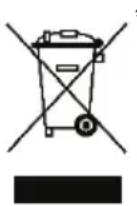
V Europskej unii: Na konci svojejŽivotnosti by sa nemal tento produkt vyhodit's beznám domovym odpadom, ale mal byt' odovzdaný na recykláciu v zbernom mieste na likvidáciu opadu z elektrickych a elektronicích zariadení. Potvrdujúci symbol o recyklácii najdete na produits, na navode na použitie alebo na obale. V závislosti od ich vlastnosti, možu byt' materiały recyklované. Prostrednictvom recyklácie a inych foriem spracovania odpadu z elektrickych a elektronicích zariadení možete vyznamne prispić k ochraneŽivotného prostrendia. Pre ziskanie informácie o prevas najblžšom možnom mieste odovzdania, kontaktujte miestne orgány.
http://www.hercules.com/certificates/wireless-speaker/DoC-DJSpeaker32-Smart.pdf
JINXN NIN XIN NIN NIN NIN DVD JIN.2.2.3
(AA) - 40
nrrnrrRCA 1
111 2 2RCA 2
.07w nT117b/DVD-n 12xnnn
1111 2 2 2 2 2 2 2 2 2 2 2 2 2 2 2 2 2 2 2 2 2 2 2 2 2 2
.07w nTTHo/DVD-n 100
n'oinx Bluetooth® n"ihnoiinynx .2.3
nannn Gillemot. ynn nnn nn nnn nnn nnn nnn nnn nnn nnn nnn nnn nnn nnn nnn nnn nnn nnn nnn nnn nnn nnn nnn nnn nnn nnn nnn nnn nnn nnn nnn nnn nnn nnn nnn nnn nnn nnn nnn nnn nnn nnn nnn nnn nnn nnn nnn nnn nnn nnn nnn nnn nnn nenn nnn nnn nnn nnn nnn nnn nnn nnn nnn nnn nnn nnn nnn nnn nnn nnn nnn nnn nnn nnn nnn
#
n nn nnn (Guillemot): (1) Guillemot Corporation S.A. ,in 9 nn nn nn nn nn nn nn nn nn nn nn nn nn nn nn nn nn nn nn nn nn nn nn nn nn nn nn nn nn nn nn nn nn nn nn nn nn nn nn nn nn nn nn nn nn nn nn nn nn nn nn nn nn nn nn nn nn nn nn nn nn nn nn nn nn nn nn nn nn nn nn nn nn nn nn nn nn nn nn nn nn nn nn nn nn nn nn nn nn nn nn nn nn nn nn nn nn nn nn nn gn nnnn nnnn nnnn nnnn nnnn nnnn nnnn nnnn nnnn nnnn nnnn nnnn nnnn nnnn nnnn nnnn nnnn nnnn nnnn nnnn nnnn nnnn nnnn nnnn nnnn nnnn nnnn nnnn nnnn nnnn nnnn nnnn nnnn nnnn
N
Hercules®. Guillemot Corporation S.A. 2019 © Guillemot Corporation S.A.
Bluetooth®. Guillemot Corporation S.A.
Bluetooth®. Guillemot Corporation S.A.
Bluetooth®. Guillemot Corporation S.A.
Bluetooth®. Guillemot Corporation S.A.
Bluetooth®. Guillemot Corporation S.A.
Bluetooth®. Guillemot Corporation S.A.
Bluetooth®. Guillemot Corporation S.A.
Bluetooth®. Guillemot Corporation S.A.
Bluetooth®. Guillemot Corporation S.A.
Bluetooth®.Guillemot Corporation S.A.
o nnnn nn nn nn nn nn
1111111111111111
DjSpeaker 32 Smart Guillemot Corporation S.A. EC/199/5 w
:
http://www.hercules.com/certificates/wireless-speakers/DoC-DJSpeakers32-
Smart.pdf
X7N, nnnn nn nnnn nn nnnn nn nnnn nn nnnn nn nnnn nn nnnn nn nnnn nn nnnn nn nnnn nn nnnn nn nnnn nn nnnn nn nnnn nn nnnn nn nnnn nn nnnn nn nnnn nn nnnn nn nnnn nn nnnn nn nnnn nn nnnn nn nnnn nn nnnn nn nnnn
nnon nNx7nn
n nn n nn nn nn nn nn nn nn nn nn nn nn nn nn nn nn nn nn nn nn nn nn nn nn nn nn nn nn nn nn nn nn nn nn nn nn nn nn nn nn nn nn nn nn nn nn nn nn nn nn nn nn nn nn nn nn nn nn nn nn nn nn nn nn nn nn nn nn nn nn nn nn nn nn nn nn nn nn nn nn nn nn nn nn nn nn nn nn nn nn nn nn nn nn nn nn nn nn nn nn nn
n 109 nnn nn nn nn nn nn nn nn nn nn nn nn nn nn nn nn nn nn nn nn nn nn nn nn nn nn nn nn nn nn nn nn nn nn nn nn nn nn nn nn nn nn nn nn nn nn nn nn nn nn nn nn nn nn nn nn nn nn nn nn nn nn nn nn nn nn nn nn nn nn nn nn nn nn nn nn nn nn nn nn nn nn nn nn nn nn nn nn nn nn nn nn nn nn nn nn nn
nOn ynn nyn nn nnn nnnn
Xn nn nnnnnnnnnnnnnnnnnnnnnnnnnnnnnnnnnnnnnnnnnnnnnnnnnnnnnnnnnnnnnnnnnnnnnnnnnnnnnnnnnnnnnnnnnnnnnnnnnnnnnnnnnnn
n nn nnnnnnnnnnnnnnnnnnnnnnnnnnnnnnnnnnnnnnnnnnnnnnnnnnnnnnnnnnnnnnnnnnnnnnnnnnnnnnnnnnnnnnnnnnnnnnn
- INTRODUCTION
- Package contents
- Technical specifications
- Recommendations
- INSTALLING THE DJSPEAKER 32 SMART SPEAKER KIT
- Positioning the speaker kit
- Wired connection
- DJSPEAKER 32 SMART
- Connection to a PC/Mac®
- Connection to a television set equipped with a headphone jack
- Connection to a DVD player/television set equipped with Left and Right audio outputs
- Connection via Bluetooth® wireless technology
- Connecting a first device
- Connection to other devices
- USING THE DJSPEAKER 32 SMART SPEAKER KIT
- TROUBLESHOOTING
- CONSUMER WARRANTY INFORMATION
- Additional warranty provisions
- Liability
- FCC STATEMENT
- COPYRIGHT
- DECLARATION OF CONFORMITY WITH EU DIRECTIVES
- ENVIRONMENTAL PROTECTION RECOMMENDATION
- Hercules
- DJ-speAKER 32 SMART
- TABLE DES MATIÈRES
- Specifications techniques
- RECOMMANDATION RELATIVE A LA PROTECTION DE L'ENVIRONNEMENT
- INFORMATIE MET BETREKKING TOT KOPERSGARANTIE
- AANBEVELINGEN VOOR DE BESCHERMING VAN HET MILIEU
- RACCOMANDAZIONI SULLA TUTELA DELL'AMBIENTE
- RECOMENDACOs DE PROTECCAO AMBIENTAL
- IopKnHoueHne KdpYm yctpoiCTBaM
- DOnoJIHnTeIbHbIe ycJIOBnra rapaHTn
- OTBetCTBeHHOCTb
- ABTOPCKNE IIPABA
- OBSAH
- DOPORUCENA OCHRANA ZIVOTNIHO PROSTREDI
- CEVRE KORUMA ÖNERILERİ
- ZALECENIE DOTYCZACE OCHRONY SRODOWISKA
- 環境保護推獎
- 环保建议
- 目錄
- 環保建議
- #
- 1
- DJSPEAKER 32 SMART: A. J. K. J. B. M. C. S. L. E. R. T. H. S. W. S. F.
- .DJSPEAKER 32 SMART: the power of a single
- .1.3
- .2.1
- INNEHÄLL
- MILJÖSKYDD
- YMPÄRISTÖNSUOJELUSUOSITUS
- RIESENIE PROBLEMOV
- ODPORUCANIE PRE OCHRANU ZIVOTNEHO PROSTREDA
- n'oinx Bluetooth® n"ihnoiinynx .2.3
Brand : HERCULES
Model : DJSpeaker 32 Smart
Category : Speaker