
DJMonitor 42 - Speaker HERCULES - Free user manual and instructions
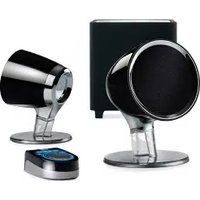
Find the device manual for free DJMonitor 42 HERCULES in PDF.



| Product type | Amplified speaker kit for PC, TV, and media players |
| Brand | Hercules |
| Model | DJMonitor 42 |
| Total power | 40 W RMS (2 x 20 W per satellite) |
| Frequency response | 60 Hz – 20 kHz |
| Audio inputs | Stereo RCA input (main), 3.5mm jack auxiliary input |
| Audio output | 3.5mm headphone jack |
| Controls | Master volume, bass, treble |
| Power supply | Mains via included power adapter/cable |
| Box contents | 2 amplified satellite speakers, jack (M) / 2 RCA (M) cable, satellite linking cable, power cable, user manual |
| Recommended use | PC, TV, DVD player, CD-Audio, MP3 |
| Warranty | 2 years in EU (according to local legislation in other countries) |
| Cleaning | Damp cloth, do not use aerosols |
| Safety | Do not open, avoid water, humidity, heat sources, and direct sunlight |
| Recycling | Do not dispose with household waste; bring to WEEE collection point |
| Operating temperature | Temperate climate only |
Frequently Asked Questions - DJMonitor 42 HERCULES
User questions about DJMonitor 42 HERCULES
0 question about this device. Answer the ones you know or ask your own.
Ask a new question about this device
Download the instructions for your Speaker in PDF format for free! Find your manual DJMonitor 42 - HERCULES and take your electronic device back in hand. On this page are published all the documents necessary for the use of your device. DJMonitor 42 by HERCULES.
USER MANUAL DJMonitor 42 HERCULES
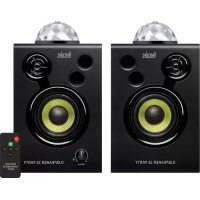
natural_image
Black DJMONITOR 42 audio speaker with visible sound waves and two speakers (no text or symbols on body)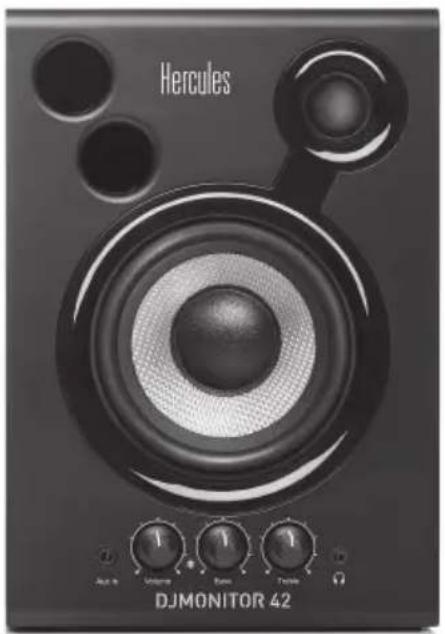
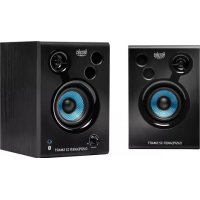
natural_image
Black DJMONITOR 42 audio amplifier with visible speaker and control knobs (no text or symbols on main body)Europe, Middle East
ENGLISH
FRANÇAIS
DEUTSCH
NEDERLANDS
ITALIANO
ESPAÑOL
PORTUGUÊS
РУССКИЙ
ČESTINA
TÜRKÇE
POLSKI
SVENSKA
SUOMI
SLOVENCINA
MAGYAR NYELV
תְרָבִי

North America/
Norteamérica
ENGLISH
FRANÇAIS
ESPAÑOL
Latin America/
América Latina
ENGLISH
ESPAÑOL
PORTUGUÊS
Asia Pacific
日本語
简体中文
繁體中文
한국어
ENGLISH
Hercules®
DJMONITOR 42
CONTENTS
1. INTRODUCTION....3
2. INSTALLING THE DJMONITOR 42 SPEAKER KIT....4
1.1. Package contents ....3
1.2. Specifications ....3
1.3. Recommendations....4
2.1. Positioning the speakers ....4
2.2. Connecting the speaker kit....5
2.2.1. Connection to a PC....6
2.2.2. Connection to a television set equipped with a headphone jack....6
2.2.3. Connection to a DVD player/television set equipped with Left and Right audio outputs....6
3. USING YOUR DJMONITOR 42 SPEAKER KIT....7
1. INTRODUCTION
1.1. Package contents
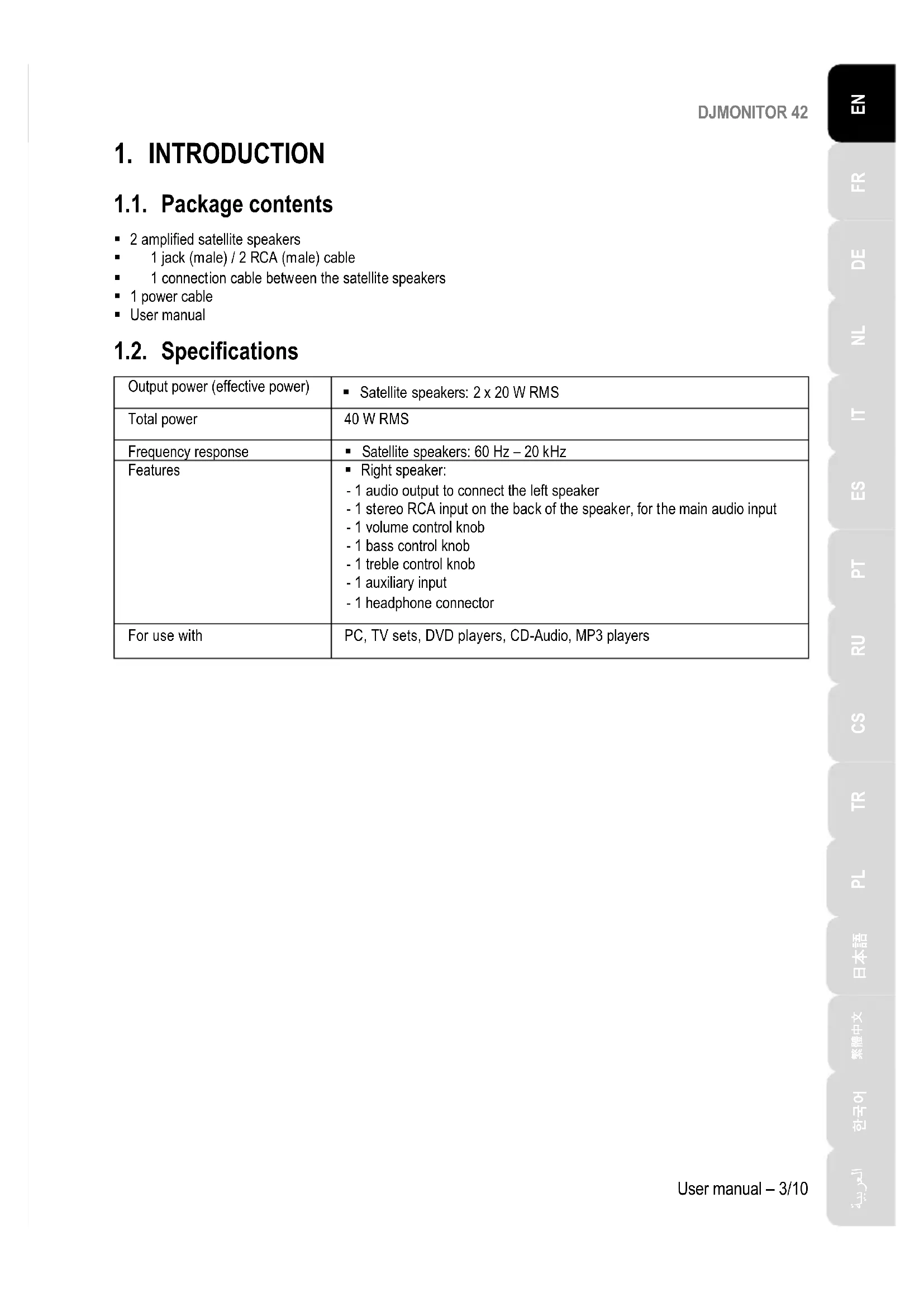
■ 2 amplified satellite speakers
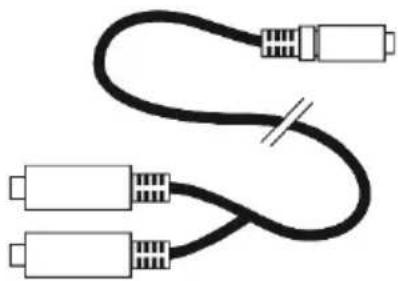
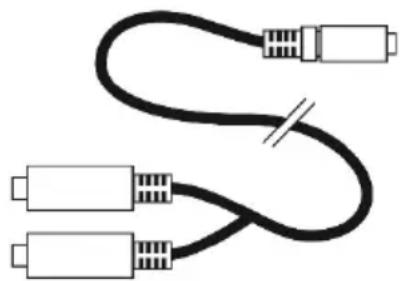
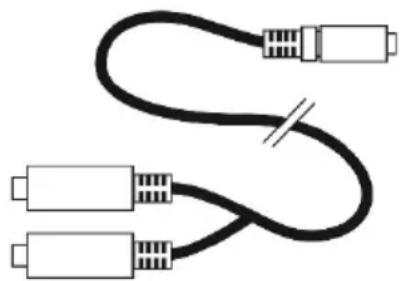
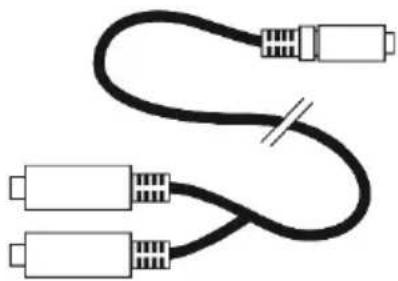
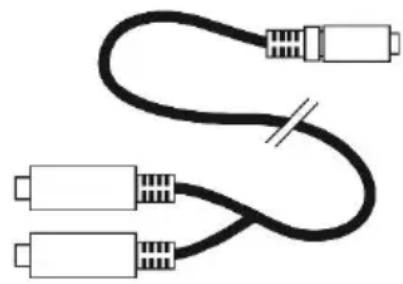
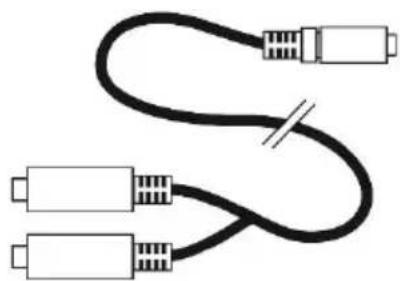
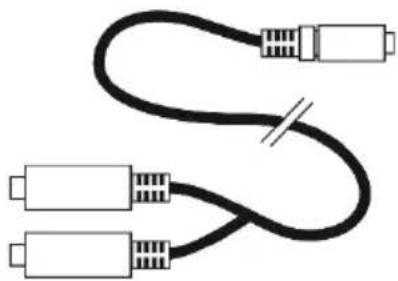
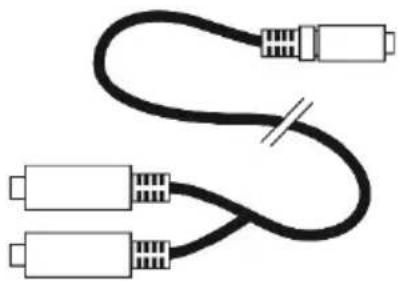
■ 1 jack (male) / 2 RCA (male) cable
■ 1 connection cable between the satellite speakers
■ 1 power cable
■ User manual
1.2. Specifications
| Output power (effective power) | ▪ Satellite speakers: 2 x 20 W RMS |
| Total power | 40 W RMS |
| Frequency response | ▪ Satellite speakers: 60 Hz – 20 kHz |
| Features | ▪ Right speaker:- 1 audio output to connect the left speaker- 1 stereo RCA input on the back of the speaker, for the main audio input- 1 volume control knob- 1 bass control knob- 1 treble control knob- 1 auxiliary input- 1 headphone connector |
| For use with | PC, TV sets, DVD players, CD-Audio, MP3 players |
1.3. Recommendations
- Place your satellite speakers on a flat surface to avoid the risk of the speakers falling.
- Never open up your speaker kit, as you risk damaging its internal components.
- This speaker kit is intended for use in a temperate environment.
- To prevent the risk of fire or electrical discharge, keep your speaker kit away from:
- rain or humidity, as well as all fluids (water, chemical products or any other liquids),
- sources of heat such as heaters, stoves or any other heat-producing devices (including amplifiers),
- direct sunlight.
- Do not expose your speaker kit to drips or splashes of water.
- Never place any object filled with liquid (a glass, vase...) on your speaker kit.
- Unplug the power cable if you do not plan on using your speaker kit for an extended period of time. To disconnect the power cable, take hold of and pull on the plug; never pull on the cable itself.
- Make sure that the speaker kit's power plug connected to an electrical outlet remains easily accessible.
- Disconnect the speaker kit before cleaning. Use a damp cloth and avoid using aerosol cleaners.
- The speaker kit's power plug serves to power off the device and must therefore be easily accessible at all times.
- Attention: at full power, prolonged listening with headphones may cause damage to the user's ears and hearing.
- Markings are located on the back of the speakers.
2. INSTALLING THE DJMONITOR 42 SPEAKER KIT
2.1. Positioning the speakers
- Place the satellite speakers on a desk to either side of your monitor, keeping them at least 50 cm away from the side walls.
- Place the speakers at an equal distance from the listener and direct them towards the listening position.
2.2. Connecting the speaker kit
- Switch off the audio source (PC, television set, DVD player) to which you wish to connect your speaker kit.
- General connection diagram:
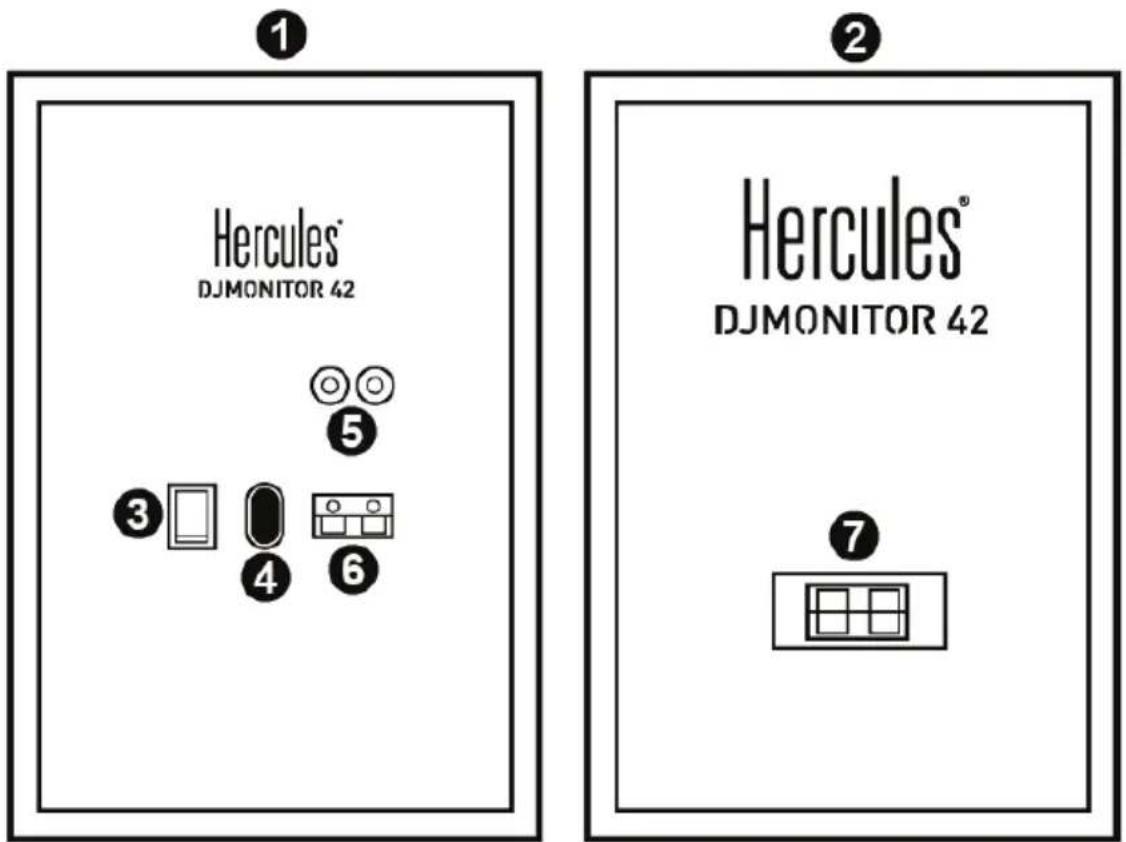
1: Right speaker
2: Left speaker
3: On/Off switch
4: Power connector
5: Connectors for main audio input
6: Right satellite speaker connector
7: Left satellite speaker connector
DJMONITOR 42
- Right speaker with controls:
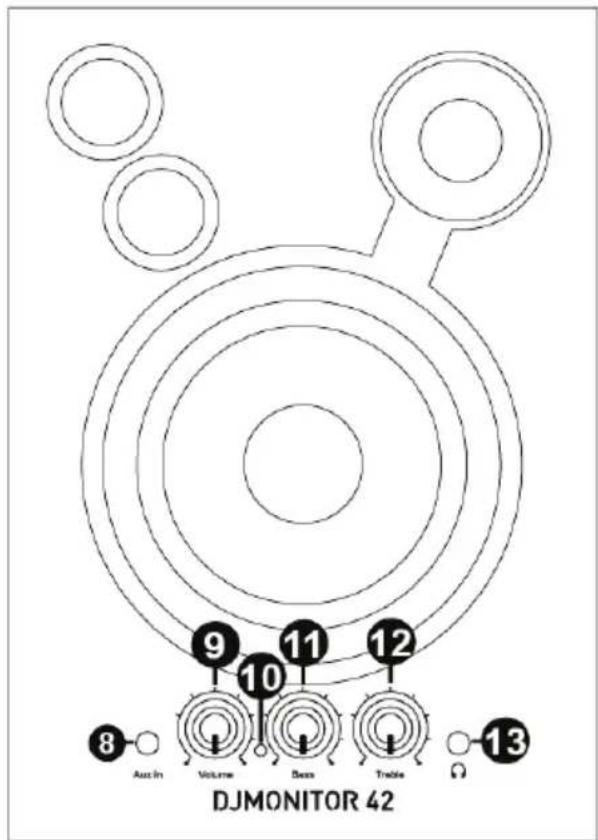
8: Auxiliary audio input
9: Master volume control knob
10: Power LED
11: Bass control knob
12: Treble control knob
13: Headphone connector
2.2.1. Connection to a PC
- Connect your speaker kit's main input (RCA connectors on the back of the right satellite speaker) to the green FRONT SPEAKERS or FRONT OUT connector on your sound card or on the sound card integrated into your computer's motherboard, using the included jack (male) / 2 RCA (male) cable.
2.2.2. Connection to a television set equipped with a headphone jack
- Connect your speaker kit's main input (RCA connectors on the back of the right satellite speaker) to the headphone jack on your television set.
2.2.3. Connection to a DVD player/television set equipped with Left and Right audio outputs
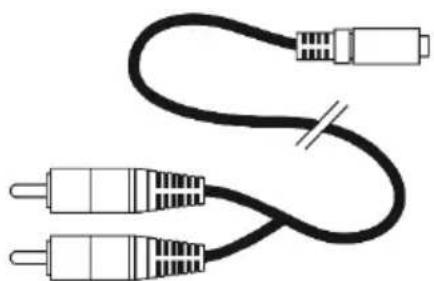
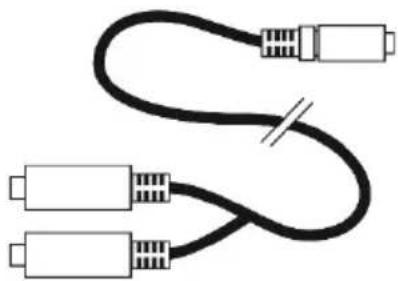
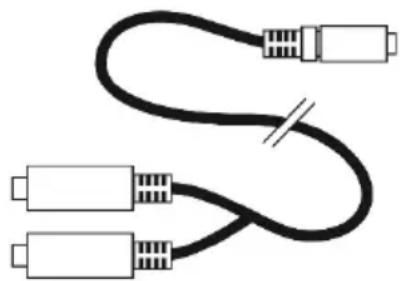
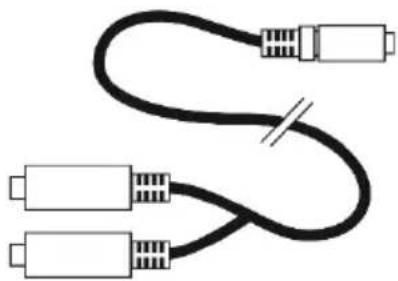
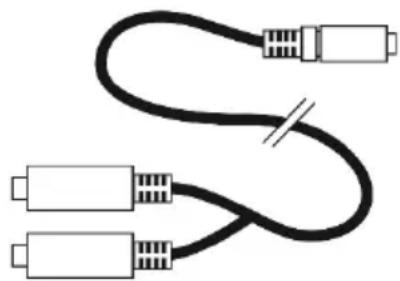
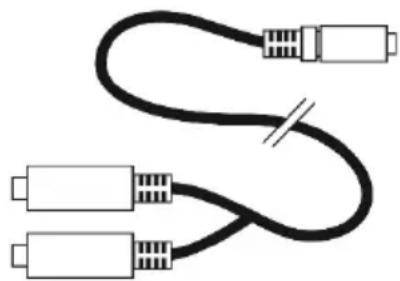
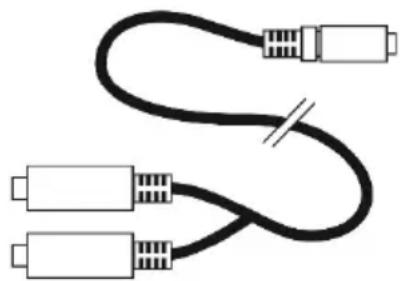
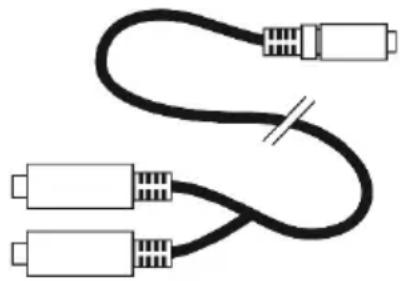
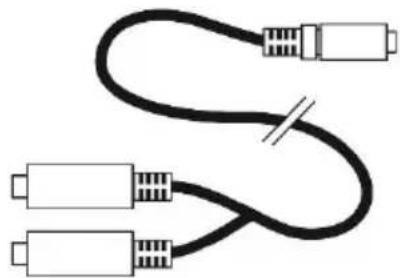
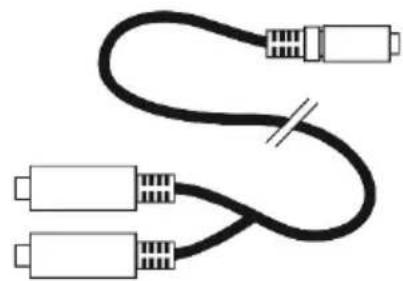
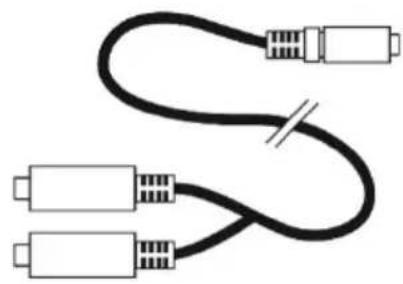
Requires a female jack / 2 male RCA cable (not included – please see diagram A, below).
- Connect your male jack / 2 male RCA cable to the female jack / 2 male RCA cable.
- Connect the white RCA connector on the female jack / 2 male RCA cable to the corresponding audio output on your DVD player/television set.
- Connect the red RCA connector on the female jack / 2 male RCA cable to the corresponding audio output on your DVD player/television set.
6/10 – User manual
natural_image
Pure electrical circuit lines without any symbolsA
natural_image
Pure diagram of three connected USB cables without any text or symbolsB
3. USING YOUR DJMONITOR 42 SPEAKER KIT
- Switch on the audio source you wish to use (PC, television set, DVD player).
- Plug your speaker kit's power cable (4) into an electrical outlet.
- Set the On/Off switch (3) to ON.
- Adjust the master volume.
DJMONITOR 42
CONSUMER WARRANTY INFORMATION
Worldwide, Guillemot Corporation S.A., whose registered office is located at Place du Granier, B.P. 97143, 35571 Chantepie, France (hereinafter "Guillemot") warrants to the consumer that this Hercules product shall be free from defects in materials and workmanship, for a warranty period which corresponds to the time limit to bring an action for conformity with respect to this product. In the countries of the European Union, this corresponds to a period of two (2) years from delivery of the Hercules product. In other countries, the warranty period corresponds to the time limit to bring an action for conformity with respect to the Hercules product according to applicable laws of the country in which the consumer was domiciled on the date of purchase of the Hercules product (if no such action exists in the corresponding country, then the warranty period shall be one (1) year from the original date of purchase of the Hercules product).
Notwithstanding the above, rechargeable batteries are covered by a warranty period of six (6) months from the date of original purchase.
Should the product appear to be defective during the warranty period, immediately contact Technical Support, who will indicate the procedure to follow. If the defect is confirmed, the product must be returned to its place of purchase (or any other location indicated by Technical Support).
Within the context of this warranty, the consumer's defective product shall, at Technical Support's option, be either replaced or returned to working order. If, during the warranty period, the Hercules product is subject to such reconditioning, any period of at least seven (7) days during which the product is out of use shall be added to the remaining warranty period (this period runs from the date of the consumer's request for intervention or from the date on which the product in question is made available for reconditioning, if the date on which the product is made available for reconditioning is subsequent to the date of the request for intervention). If permitted under applicable law, the full liability of Guillemot and its subsidiaries (including for consequential damages) is limited to the return to working order or the replacement of the Hercules product. If permitted under applicable law, Guillemot disclaims all warranties of merchantability or fitness for a particular purpose.
This warranty shall not apply: (1) if the product has been modified, opened, altered, or has suffered damage as a result of inappropriate or abusive use, negligence, an accident, normal wear, or any other cause unrelated to a material or manufacturing defect (including, but not limited to, combining the Hercules product with any unsuitable element, including in particular power supplies, rechargeable batteries, chargers, or any other elements not supplied by Guillemot for this product); (2) if the product has been used for any use other than home use, including for professional or commercial purposes (game rooms, training, competitions, for example); (3) in the event of failure to comply with the instructions provided by Technical Support; (4) to software, said software being subject to a specific warranty; (5) to consumables (elements to be replaced over the product's lifespan: disposable batteries, audio headset or headphone ear pads, for example); (6) to accessories (cables, cases, pouches, bags, wrist-straps, for example); (7) if the product was sold at public auction.
This warranty is nontransferable.
The consumer's legal rights with respect to laws applicable to the sale of consumer goods in his or her country are not affected by this warranty.
Additional warranty provisions
During the warranty period, Guillemot shall not provide, in principle, any spare parts, as Technical Support is the only party authorized to open and/or recondition any Hercules product (with the exception of any reconditioning procedures which Technical Support may request that the consumer carry out, by way of written instructions – for example, due to the simplicity and the lack of confidentiality of the reconditioning process – and by providing the consumer with the required spare part(s), where applicable).
Given its innovation cycles and in order to protect its know-how and trade secrets, Guillemot shall not provide, in principle, any reconditioning notification or spare parts for any Hercules product whose warranty period has expired.
In the United States of America and in Canada, this warranty is limited to the product's internal mechanism and external housing. In no event shall Guillemot or its affiliates be held liable to any third party for any consequential or incidental damages resulting from the breach of any express or implied warranties. Some States/Provinces do not allow limitation on how long an implied warranty lasts or exclusion or limitation of liability for consequential or incidental damages, so the above limitations or exclusions may not apply to you. This warranty gives you specific legal rights, and you may also have other rights which vary from State to State or Province to Province.
Liability
If permitted under applicable law, Guillemot Corporation S.A. (hereinafter “Guillemot”) and its subsidiaries disclaim all liability for any damages caused by one or more of the following: (1) the product has been modified, opened or altered; (2) failure to comply with assembly instructions; (3) inappropriate or abusive use, negligence, an accident (an impact, for example); (4) normal wear; (5) the use of the product for any use other than home use, including for professional or commercial purposes (game rooms, training, competitions, for example). If permitted under applicable law, Guillemot and its subsidiaries disclaim all liability for any damages unrelated to a material or manufacturing defect with respect to the product (including, but not limited to, any damages caused directly or indirectly by any software, or by combining the Hercules product with any unsuitable element, including in particular power supplies, rechargeable batteries, chargers, or any other elements not supplied by Guillemot for this product).
FCC STATEMENT
- This device complies with Part 15 of the FCC Rules. Operation is subject to the following two conditions:
(1) This device may not cause harmful interference, and
(2) This device must accept any interference received, including interference that may cause undesired operation. - Changes or modifications not expressly approved by the party responsible for compliance could void the user's authority to operate the equipment.
DJMONITOR 42
COPYRIGHT
© 2019 Guillemot Corporation S.A. All rights reserved. Hercules® is a registered trademark of Guillemot Corporation S.A. All other trademarks and brand names are hereby acknowledged and are property of their respective owners. Illustrations not binding. Contents, designs and specifications are subject to change without notice and may vary from one country to another.
ENVIRONMENTAL PROTECTION RECOMMENDATION
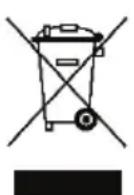
In the European Union: At the end of its working life, this product should not be disposed of with standard household waste, but rather dropped off at a collection point for the disposal of Waste Electrical and Electronic Equipment (WEEE) for recycling.
This is confirmed by the symbol found on the product, user manual or packaging.
Depending on their characteristics, the materials may be recycled. Through recycling and other forms of processing Waste Electrical and Electronic Equipment, you can make a significant contribution towards helping to protect the environment.
Please contact your local authorities for information on the collection point nearest you.
For all other countries: Please adhere to local recycling laws for electrical and electronic equipment.
Retain this information. Colours and decorations may vary.
Plastic fasteners and adhesives should be removed from the product before it is used.
www.hercules.com
*Applicable to EU and Turkey only


Hercules® DJMONITOR 42
TABLE DES MATIÈRES
1. INTRODUCTION 3
natural_image
Pure electrical circuit lines without any symbolsA
natural_image
Pure diagram of three connected USB cables without any text or symbolsB
3. UTILISATION DU KIT D'ENCEINTES DJMONITOR 42
natural_image
Pure electrical circuit lines without any symbolsA
natural_image
Pure diagram of three connected USB cables without any text, numbers, or symbolsB
natural_image
Pure electrical circuit lines without any symbolsA
natural_image
Pure diagram of three connected USB cables without any text or symbolsB
3. DE DJMONITOR 42 SPEAKERKIT GEBRUIKEN
INFORMATIE MET BETREKKING TOT KOPERSGARANTIE
natural_image
Pure electrical circuit lines without any symbolsA
natural_image
Pure diagram of three connected USB cables without any text, numbers, or symbolsB
3. UTILIZZARE IL TUO SET DI ALTOPARLANTI DJMONITOR 42
natural_image
Pure electrical circuit lines without any symbolsA
natural_image
Pure diagram of three connected USB cables without any text or symbolsB
3. CÓMO USAR EL KIT DE ALTAVOCES DJMONITOR 42
natural_image
Pure electrical circuit lines without any symbolsA
natural_image
Pure diagram of three connected USB cables without any text or symbolsB
3. UTILIZAR O KIT DE ALTIFALANTES DJMONITOR 42
natural_image
Pure electrical circuit lines without any symbolsA
natural_image
Pure diagram of three connected USB cables without any text or symbolsB
natural_image
Three black icons: a lowercase 'i' in a circle, an envelope symbol, and a telephone handset (no text or labels)EAC
Hercules® DJMONITOR 42
OBSAH
1. ÚVOD ....3
2. INSTALACE REPRODUKTORÜ DJMONITOR 42....4
natural_image
Pure electrical circuit lines without any symbolsA
natural_image
Pure diagram of three connected USB cables without any text or symbolsB
3. POUŽITÍ REPRODUKTOROVÉ SOUPRAVY DJMONITOR 42
natural_image
Pure electrical circuit lines without any symbolsA
natural_image
Pure diagram of three connected USB cables without any text or symbolsB
3. DJMONITOR 42 HOPARLÖR KİTİNİZİN KULLANILMASI
natural_image
Pure electrical circuit lines without any symbolsA
natural_image
Pure diagram of three connected USB cables without any text, numbers, or symbolsB
3. KORZYSTANIE Z ZESTAWU GŁOŚNIKÓW DJMONITOR 42
natural_image
Pure electrical circuit lines without any symbolsA
natural_image
Pure diagram of three connected USB cables without any text or symbolsB
natural_image
Pure electrical circuit lines without any symbols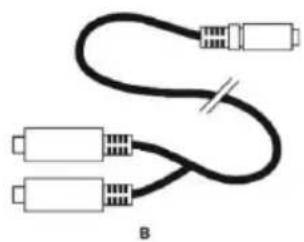
natural_image
Pure electrical connector diagram showing three connected bands with a cable, labeled B (no text or symbols beyond label)8:輔助音訊輸入
9:主音量控制旋钮
10: 電源 LED
11: 低音控制旋钮
12: 高音控制旋钮
13: 耳機接頭
2.2.1. 連接到PC
natural_image
Pure electrical circuit lines without any symbolsA
natural_image
Pure diagram of a black cable with multiple connectors, no text or symbols presentB
natural_image
Pure electrical circuit lines without any symbolsA
natural_image
Pure diagram of three connected audio/video cables without any text, numbers, or symbolsB
CE
Hercules®
DJMONITOR 42
المحتويات
natural_image
Pure electrical circuit lines without any symbolsA
natural_image
Pure diagram of three connected USB cables without any text or symbolsB
natural_image
Line drawing of a three-pin audio jack connected to a cable (no text or symbols)A
natural_image
Pure diagram of three connected USB cables without any text or symbolsB
3. ANVÄNDA HÖGTALARKITTET DJMONITOR 42
natural_image
Line drawing of a three-pin audio jack connected to a cable (no text or symbols)A
natural_image
Pure diagram of three connected USB cables without any text or symbolsB
3. DJMONITOR 42 -KAIUTINSETIN KÄYTTÖ
natural_image
Pure electrical circuit lines without any symbolsA
natural_image
Pure diagram of three connected USB cables without any text or symbolsB
3. POUŽITIE VAŠEJ SÚPRAVY REPRODUKTOROV DJMONITOR 42
natural_image
Pure electrical circuit lines without any symbols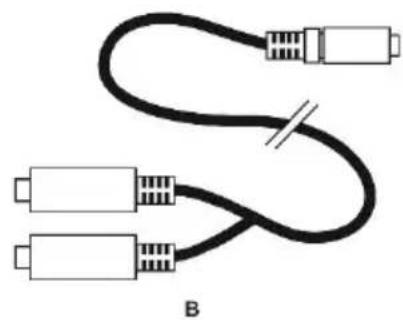
natural_image
Pure diagram of a cable with multiple connectors and a switch, no text or symbols present3. A DJMONITOR 42 HANGFALSZETT HASZNÁLATA
natural_image
Line drawing of a three-pin audio jack connected to a cable (no text or symbols)A
natural_image
Pure diagram of three connected USB cables with no text or symbolsB
DJMONITOR 42.3
.(DVD 1, 1740, PC) 1740
.הכלההוּרָהוּרָהוּרָהוּרָהוּרָהוּרָהוּרָהוּרָהוּרָהוּרָהוּרָהוּרָהוּרָהוּרָהוּרָה

- Europe, Middle East
- North America/
- Norteamérica
- Latin America/
- América Latina
- Asia Pacific
- Hercules®
- DJMONITOR 42
- CONTENTS
- INTRODUCTION....3
- INSTALLING THE DJMONITOR 42 SPEAKER KIT....4
- USING YOUR DJMONITOR 42 SPEAKER KIT....7
- INTRODUCTION
- Package contents
- Specifications
- Recommendations
- INSTALLING THE DJMONITOR 42 SPEAKER KIT
- Positioning the speakers
- Connecting the speaker kit
- Connection to a PC
- Connection to a television set equipped with a headphone jack
- Connection to a DVD player/television set equipped with Left and Right audio outputs
- USING YOUR DJMONITOR 42 SPEAKER KIT
- CONSUMER WARRANTY INFORMATION
- Additional warranty provisions
- Liability
- FCC STATEMENT
- COPYRIGHT
- ENVIRONMENTAL PROTECTION RECOMMENDATION
- Hercules® DJMONITOR 42
- TABLE DES MATIÈRES
- INTRODUCTION 3
- UTILISATION DU KIT D'ENCEINTES DJMONITOR 42
- DE DJMONITOR 42 SPEAKERKIT GEBRUIKEN
- INFORMATIE MET BETREKKING TOT KOPERSGARANTIE
- UTILIZZARE IL TUO SET DI ALTOPARLANTI DJMONITOR 42
- CÓMO USAR EL KIT DE ALTAVOCES DJMONITOR 42
- UTILIZAR O KIT DE ALTIFALANTES DJMONITOR 42
- OBSAH
- ÚVOD ....3
- INSTALACE REPRODUKTORÜ DJMONITOR 42....4
- POUŽITÍ REPRODUKTOROVÉ SOUPRAVY DJMONITOR 42
- DJMONITOR 42 HOPARLÖR KİTİNİZİN KULLANILMASI
- KORZYSTANIE Z ZESTAWU GŁOŚNIKÓW DJMONITOR 42
- 連接到PC
- المحتويات
- ANVÄNDA HÖGTALARKITTET DJMONITOR 42
- DJMONITOR 42 -KAIUTINSETIN KÄYTTÖ
- POUŽITIE VAŠEJ SÚPRAVY REPRODUKTOROV DJMONITOR 42
- A DJMONITOR 42 HANGFALSZETT HASZNÁLATA
- DJMONITOR 42.3
Brand : HERCULES
Model : DJMonitor 42
Category : Speaker