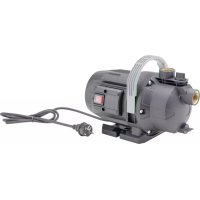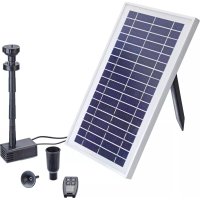
PondoSolar 600 Control - Pump Pontec - Free user manual and instructions
Find the device manual for free PondoSolar 600 Control Pontec in PDF.



| Product type | Solar fountain pump with LED lighting |
| Brand | Pontec |
| Model | PondoSolar 600 Control |
| Power supply | Solar panel and integrated rechargeable battery |
| Remote control | Yes, max range 10 m |
| Adjustable flow | 5 levels |
| Timer | Programmable up to 4 hours |
| LED lighting | Yes, automatic activation in darkness |
| Pump cable length | 5 m |
| LED cable length | 5 m |
| Material | Plastic |
| Maintenance | Clean at least twice a year |
| Wear parts | Functioning unit, filter sponge, bulb, batteries |
| Warranty | 2 years |
| Use | Water fountain, clean water |
| Restrictions | Do not use with chemicals, do not run dry |
| Included accessories | Pump, solar panel, remote control, LED lighting, set of extension rods, nozzles, stand |
| Remote control battery | CR2032 |
| Recycling | Do not dispose of with household waste |
| Winter storage | Frost-free, dry |
| Protection rating | Not specified |
Frequently Asked Questions - PondoSolar 600 Control Pontec
User questions about PondoSolar 600 Control Pontec
0 question about this device. Answer the ones you know or ask your own.
Ask a new question about this device
Download the instructions for your Pump in PDF format for free! Find your manual PondoSolar 600 Control - Pontec and take your electronic device back in hand. On this page are published all the documents necessary for the use of your device. PondoSolar 600 Control by Pontec.
USER MANUAL PondoSolar 600 Control Pontec
EN Operating instructions
FR Notice d'emploi
natural_image
Line drawing of various mechanical and electrical components including a box, plate, and tools (no text or symbols)
A
text_image
Technical diagram showing exploded view of mechanical components with numbered labelsPSO0040
B
text_image
Technical diagram showing a mechanical setup with labeled components and directional arrows indicating motion or assembly.PSO0041
text_image
C 1. 2. 3. 4. PSO0042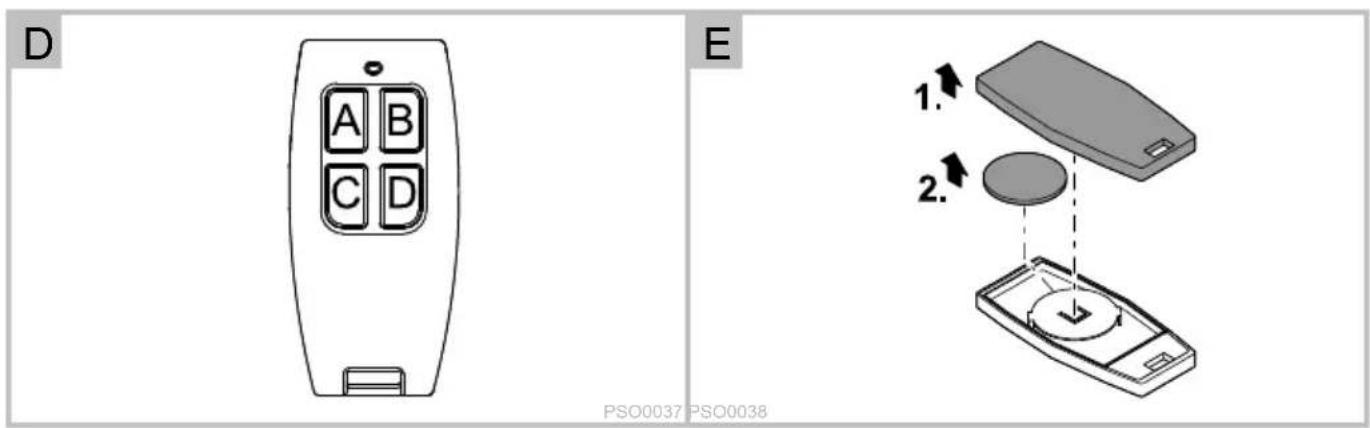
text_image
D E 1. 2. PSO0037 PSO0038text_image
Remote Control A Timer B LED C Hi D On/Off Battery status: Green: fully charged Orange: half charged Red: needs charge Charger Pump Light 1 3 2PSO0045
Translation of the original Operating Instructions
Information about these operating instructions
You made a good choice with the purchase of this product PondoSolar 600 Control.
Prior to commissioning the unit, please read the instructions of use carefully and fully familiarise yourself with the unit.
Ensure that all work on and with this unit is only carried out in accordance with these instructions.
Adhere to the safety information for the correct and safe use of the unit.
Keep these instructions in a safe place! Please also hand over the instructions when passing the unit on to a new owner.
Symbols used in these instructions
☐ A Reference to one or more figures. In this example: Reference to Fig. A.
→ Reference to another section.
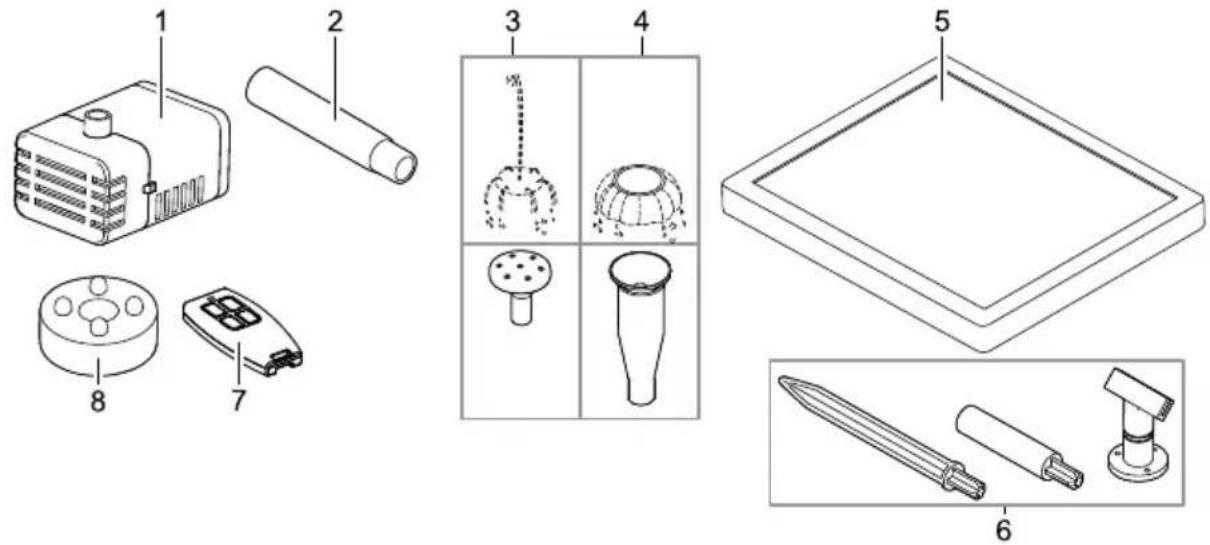
Scope of delivery
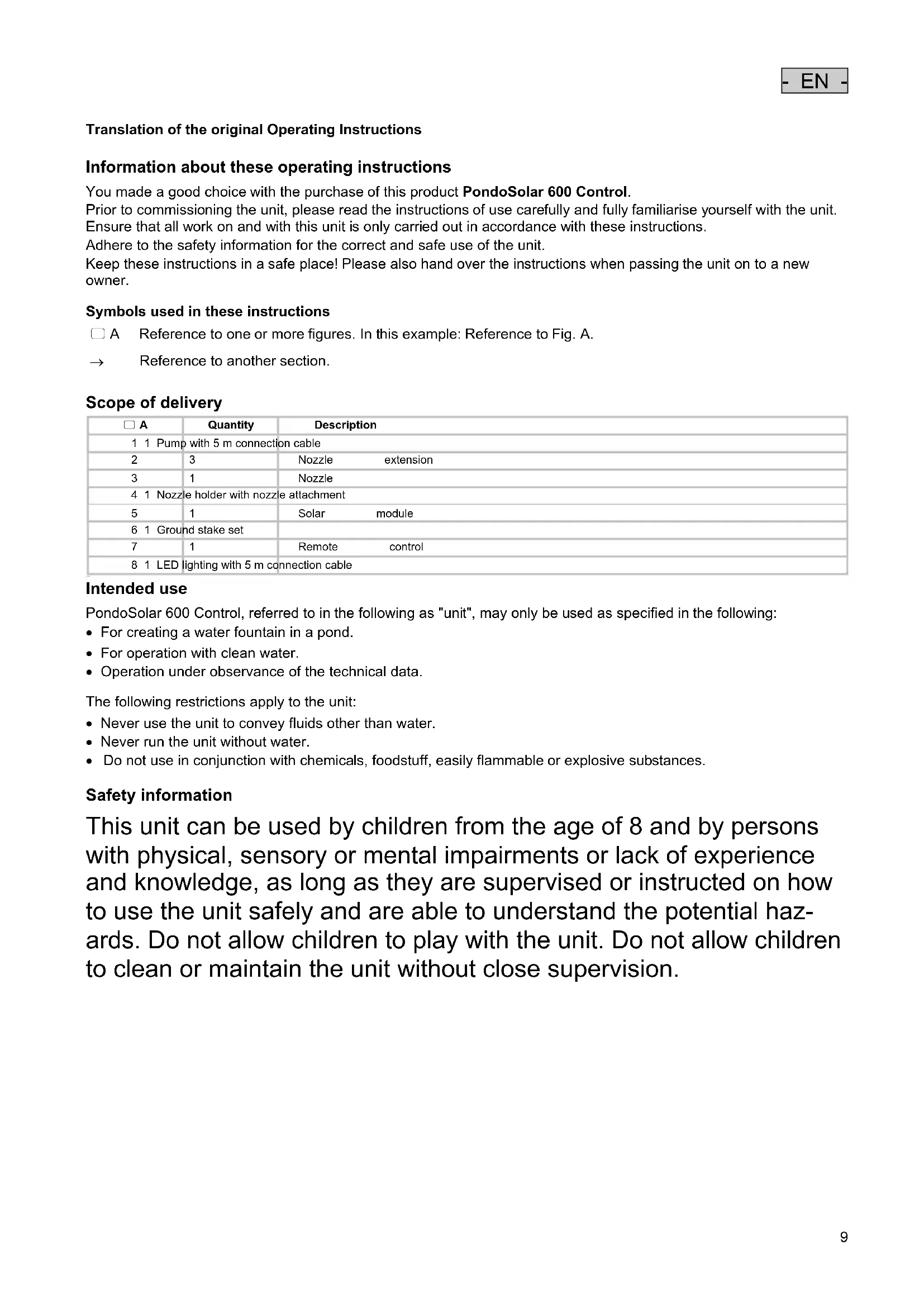
| ☐ A | Quantity | Description |
| 1 1 Pump with 5 m connection cable | ||
| 2 | 3 | Nozzle extension |
| 3 | 1 | Nozzle |
| 4 1 Nozzle holder with nozzle attachment | ||
| 5 | 1 | Solar module |
| 6 1 Ground stake set | ||
| 7 | 1 | Remote control |
| 8 1 LED lighting with 5 m connection cable | ||
Intended use
PondoSolar 600 Control, referred to in the following as "unit", may only be used as specified in the following:
- For creating a water fountain in a pond.
- For operation with clean water.
• Operation under observance of the technical data.
The following restrictions apply to the unit:
- Never use the unit to convey fluids other than water.
- Never run the unit without water.
- Do not use in conjunction with chemicals, foodstuff, easily flammable or explosive substances.
Safety information
This unit can be used by children from the age of 8 and by persons with physical, sensory or mental impairments or lack of experience and knowledge, as long as they are supervised or instructed on how to use the unit safely and are able to understand the potential hazards. Do not allow children to play with the unit. Do not allow children to clean or maintain the unit without close supervision.
- EN -
Safe operation
- Do not carry or pull the unit by its electrical cable.
- Route cables/hoses such that they are protected from damage and do not present a tripping hazard.
- Only use original spare parts and accessories for the unit.
- In the case of electrical units and installations with a rated voltage of U > 12 V AC or U >30 V DC located in the water: Isolate the units and installations (switch off and disconnect from the power supply) before reaching into the water.
- Only operate the pump together with the supplied solar module.
- Do not allow the pump to run dry.
- Protect the unit from knocks or vibration.
- Clean the unit at least twice a year.
- Keep the connection plugs dry.
Installation and connection
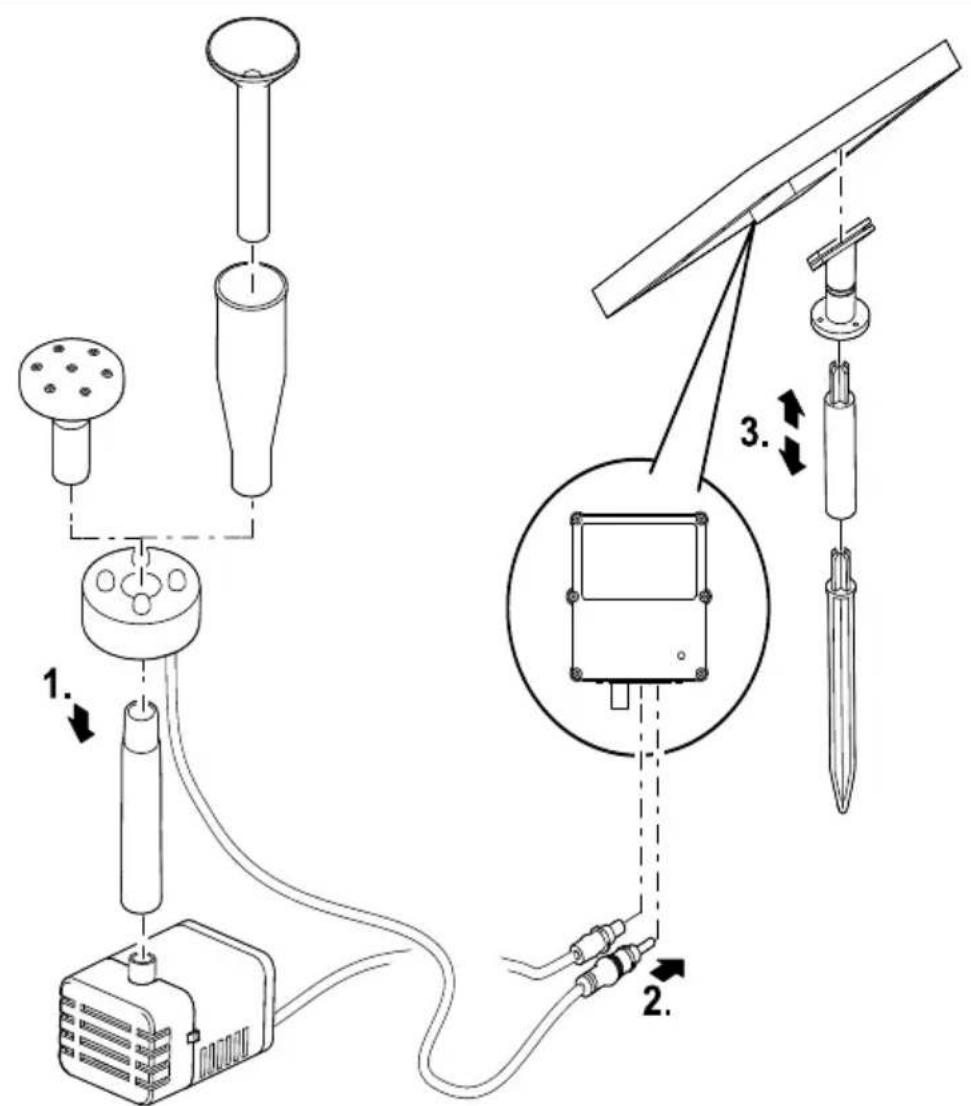
How to proceed:
□ B
- Assemble the nozzle unit and the LED lighting and fit onto the pump.
- Adapt the number of nozzle extensions used to the depth of the pond.
- Connect the connection cables of the pump and LED lighting to the solar module. (→ Commissioning/start-up)
- Push each plug into the socket as far as possible to ensure that the connection is watertight.
- Assemble the ground stake set and attach it to the solar module.
- Align the solar module such that the sockets with the connection cables point downwards.
- Install the solar module so that it is exposed to direct sunlight.
- Recommendation: Align the solar module to the sun to ensure maximum energy yield.
- Fix the pump underwater to a smooth, clean surface using the suction cups.
Commissioning/start-up
How to proceed:
The rechargeable battery of the unit is not charged. Expose the unit to sunlight for one day before using it for the first time. Then use the remote control to operate the device.
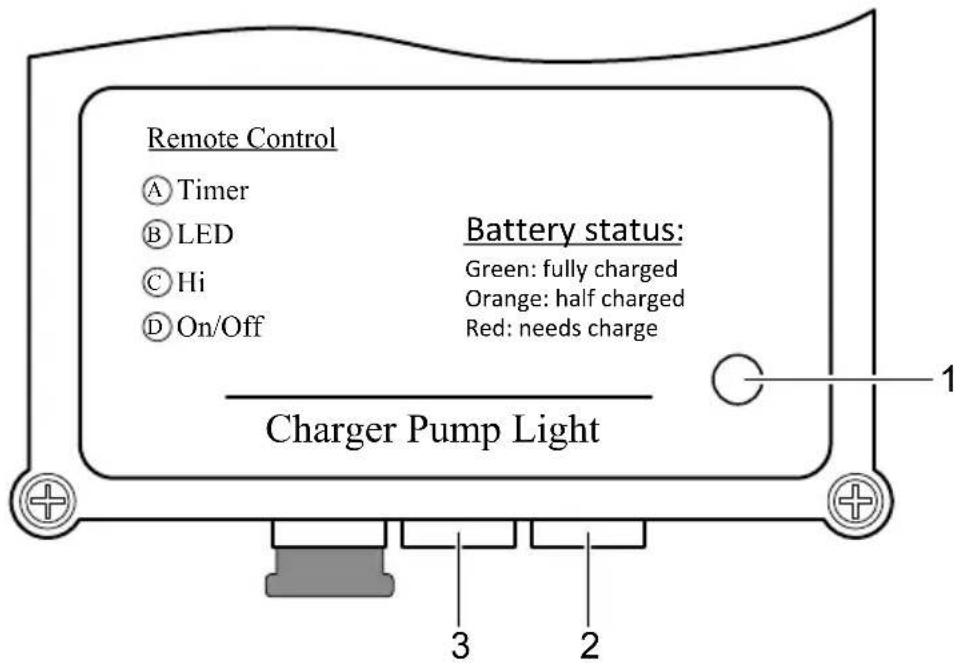
Solar module: Connections and labelling
text_image
Remote Control A Timer B LED C Hi D On/Off Battery status: Green: fully charged Orange: half charged Red: needs charge Charger Pump Light 1 3 2PSO0045
| Description | Function | |
| 1 | LED display for the rechargeable battery capacity | LED is lit green: The battery is charged.- Possible pump operating time: 4 to 6 hours |
| LED is lit orange: The battery is half discharged.- Possible pump operating time: 2 to 3 hours | ||
| LED is lit red: The battery is nearly empty and needs to be charged.- Possible pump operating time: less than 1 hour | ||
| LED off: The battery is discharged beyond the limit.- The pump and LED lighting are switched off. | ||
| 2 | LED lighting connection socket | — |
| 3 | Pump connection socket | — |
Remote control

The remote control has a range of max. 10 m.
| Description | Function | |
| A | Determines the pump operating time (max. 4 h).– To overwrite the current setting, switch off the pump with key D and then set the new pump operating time with key A. The pump will then start up automatically. | Press the key slowly 1 ×. The LED flashes according to the newly set pump operating time.– Example: Desired pump operating time 3 h.Press the key A 3 × slowly. The LED flashes 3 × several times in a row. |
| B | Switches the LEDs on and off (they are only lit when it is dark) | Press the key briefly. |
| C | For setting the flow rate of the pump (5 stages) | Press the key slowly 1 × for each stage. |
| D | For switching the pump on and off | Press the key briefly. |
Remedy of faults
| Malfunction | Cause | Remedy | |
| Pump does not start. No connection to | the solar module. | - Check the connection to the solar module.- Connect the pump to the solar module.- Push the plug completely into the socket (up to the stop). | |
| The solar module is soiled. Clean | |||
| The impeller unit is blocked. Clean | |||
| The battery capacity is exhausted. Charge the battery for at least 4 hours. | |||
| Insufficient sunlight Align the solar module to the sun. | |||
| Insufficient or no pump delivery The filter is clogged. Remove the filter housing, remove and clean | the filter. | ||
| LEDs are not lit. No connection to the solar module. | - Connect the LED lighting to the solar module.- Push the plug completely into the socket (up to the stop). | ||
Maintenance and cleaning
The unit has to be taken out of the water for cleaning or maintenance.
Cleaning the unit
- Never use aggressive cleaning agents or chemical solutions. These could attack the housing surface or impair the function.
- Recommended cleaning agent for removing stubborn limescale deposits:
– Vinegar- and chlorine-free household cleaning agent.
How to proceed:
- Disassemble the unit.
- Pull the nozzle unit and LED lighting apart.
- Clean the filter housing and impeller unit. (→ Replacing the impeller unit)
- Clean all parts.
- Use a soft brush as an aid.
– Rinse parts in clean water. - Clean the solar module with a damp cloth and wipe dry.
- Reassemble the unit in the reverse order.
Replacing the impeller unit
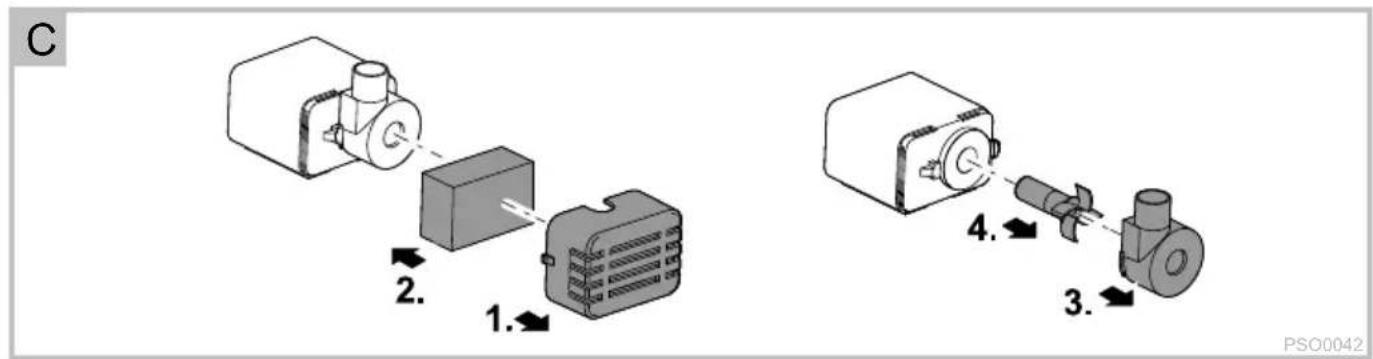
How to proceed:
□ C
- Pull the filter housing from the pump.
- Remove the foam filter from the filter housing and rinse it out.
- Pull the cover off the impeller unit (bayonet closure, turn clockwise).
- Pull out the impeller unit and clean or replace.
- Reassemble the unit in the reverse order.
Change battery
How to proceed:
□ E
-
Turn the remote control over and remove the cover.
-
Replace the battery.
- Use a button cell battery of the type CR 2032.
- Close the cover.
Wear parts
The following components are wear parts and are excluded from the warranty:
- Impeller unit
- Foam filter
- Bulb
- Rechargeable batteries/batteries
Storage/Over-wintering
Observe the permissible operating temperature range. (→ Technical data)
- If the limit values are exceeded or gone below, it is necessary to remove the unit. Clean the unit thoroughly and check it for damage.
- Store the unit in a dry and frost-free place.
- Store the pump submerged and in a frost-free environment.
Disposal

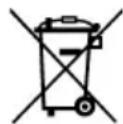
This unit contains electronic components - do not dispose of this unit with domestic waste! For disposal purposes, please use the return system provided.
- Render the unit unusable beforehand by cutting the cables.
- Remove the replaceable rechargeable batteries and batteries from the unit and dispose of them separately.
Disposal of batteries
Do not dispose of batteries with the household waste. Only dispose of dead batteries by using the return system provided for this purpose.
Disposal of batteries within the European Union
As a user, you are obligated by law to return used batteries. Return is free of charge.
Either dispose of batteries through the public return and recycling systems of your municipality or community, or return the batteries to the place where they were bought.
Batteries containing harmful substances bear the following signs:
Pb = Battery contains lead
Cd = Battery contains cadmium
Hg = Battery contains mercury
Li = Battery contains lithium
Guarantee conditions
PfG grants a 2 year guarantee from the date of sale on proven material and manufacturing faults. Prerequisite for our guarantee is the presentation of the purchase receipt. Our guarantee will become null and void if the unit is misused, electrically or mechanically damaged by inappropriate use and improper repair by non-authorised workshops. Repairs are reserved for workshops authorised by PfG or by PfG itself. In the case of warranty claims, please return the defective unit or part freight paid to PfG together with a description of the fault and the purchase receipt. PfG reserves the right to invoice repair costs. PfG is not liable for transport damage. Any damage must be claimed against the carrier. Further claims of whatever type, especially consequential damage, are excluded. This guarantee does not affect the final customer's claims against the dealer.
text_image
Remote Control A Timer B LED C Hi D On/Off Battery status: Green: fully charged Orange: half charged Red: needs charge Charger Pump Light 1 3 2PSO0045
text_image
Remote Control A Timer B LED C Hi D On/Off Battery status: Green: fully charged Orange: half charged Red: needs charge Charger Pump Light 1 3 2PSO0045
text_image
Remote Control A Timer B LED C Hi D On/Off Battery status: Green: fully charged Orange: half charged Red: needs charge Charger Pump Light 1 3 2PSO0045
text_image
Remote Control A Timer B LED C Hi D On/Off Battery status: Green: fully charged Orange: half charged Red: needs charge Charger Pump Light 1 3 2PSO0045
text_image
Remote Control A Timer B LED C Hi D On/Off Battery status: Green: fully charged Orange: half charged Red: needs charge Charger Pump Light 1 3 2PSO0045
text_image
Remote Control A Timer B LED C Hi D On/Off Battery status: Green: fully charged Orange: half charged Red: needs charge Charger Pump Light 1 3 2PSO0045
text_image
Remote Control A Timer B LED C Hi D On/Off Battery status: Green: fully charged Orange: half charged Red: needs charge Charger Pump Light 1 2 3PSO0045
| Beskrivelse | Funksjon | |
| 1 | LED-indikering batterikapasitet | LED lyser grønt: Batteriet er oppladet.- Mulig pumpedriftstid 4 til 6 timer |
| LED lyser oransje: Batteriet er halvveis utladet- Mulig pumpedriftstid 2 til 3 timer | ||
| LED lyser rødt: Batteriet er nesten tomt og må lades- Mulig pumpedriftstid mindre enn 1 time | ||
| LED av: Utladingsgrense er underskredet.- Pumpe og LED-belysning er slått av. | ||
| 2 | Tilkoblingskontakt LED-belysning | — |
| 3 | Tilkoblingskontakt pumpe | — |
Fjernkontroll

Rekkevidden til fjernkontrollen er maks. 10 m.
text_image
Remote Control A Timer B LED C Hi D On/Off Battery status: Green: fully charged Orange: half charged Red: needs charge Charger Pump Light 1 3 2PSO0045
text_image
Remote Control A Timer B LED C Hi D On/Off Battery status: Green: fully charged Orange: half charged Red: needs charge Charger Pump Light 1 3 2PSO0045
text_image
Remote Control A Timer B LED C Hi D On/Off Battery status: Green: fully charged Orange: half charged Red: needs charge Charger Pump Light 1 3 2PSO0045
text_image
Remote Control A Timer B LED C Hi D On/Off Battery status: Green: fully charged Orange: half charged Red: needs charge Charger Pump Light 1 3 2PSO0045
text_image
Remote Control A Timer B LED C Hi D On/Off Battery status: Green: fully charged Orange: half charged Red: needs charge Charger Pump Light 1 3 2PSO0045
text_image
Remote Control A Timer B LED C Hi D On/Off Battery status: Green: fully charged Orange: half charged Red: needs charge Charger Pump Light 1 3 2PSO0045
text_image
Remote Control A Timer B LED C Hi D On/Off Battery status: Green: fully charged Orange: half charged Red: needs charge Charger Pump Light 1 3 2PSO0045
text_image
Remote Control A Timer B LED C Hi D On/Off Battery status: Green: fully charged Orange: half charged Red: needs charge Charger Pump Light 1 3 2PSO0045
text_image
Remote Control A Timer B LED C Hi D On/Off Battery status: Green: fully charged Orange: half charged Red: needs charge Charger Pump Light 1 3 2PSO0045
text_image
Remote Control A Timer B LED C Hi D On/Off Battery status: Green: fully charged Orange: half charged Red: needs charge Charger Pump Light 1 3 2PSO0045
text_image
Remote Control A Timer B LED C Hi D On/Off Battery status: Green: fully charged Orange: half charged Red: needs charge Charger Pump Light 1 3 2PSO0045
text_image
Remote Control A Timer B LED C Hi D On/Off Battery status: Green: fully charged Orange: half charged Red: needs charge Charger Pump Light 1 3 2PSO0045