
GTA 700 - Grass trimmer Wolf Garten - Free user manual and instructions
Find the device manual for free GTA 700 Wolf Garten in PDF.



| Product type | Cordless grass trimmer (battery) |
| Brand | Wolf Garten |
| Model | GTA 700 |
| Power supply | Lithium-ion battery 18 V / 1.5 Ah |
| Charger included | Yes, model 41A30--E650 |
| Charging time | Approximately 1.2 hours |
| Cutting system | Nylon filament spool (cassette) |
| Automatic filament advance | Yes |
| Adjustable head | Yes, 3 positions |
| Edging function | Yes, by rotating the handle 180° |
| Telescopic shaft | Yes |
| Adjustable central handle | Yes (height and angle) |
| Plant guard | Protection hoop |
| Safety | Double switch (unlock + on/off) |
| Weight | Approximately 2.5 kg |
| Color | Green and black |
| Warranty | According to manufacturer's conditions |
| Maintenance | Clean the ventilation slots, replace the filament spool |
| Spare parts | Filament spool (092.61.022), battery (41A20--L650), charger (41A30--E650) |
| Included accessories | Filament spool, charger, battery |
| Recommended use | Maintenance of lawn edges and small private lawns |
| Important safety instructions | Wear safety glasses, suitable clothing, closed shoes |
Frequently Asked Questions - GTA 700 Wolf Garten
User questions about GTA 700 Wolf Garten
0 question about this device. Answer the ones you know or ask your own.
Ask a new question about this device
Download the instructions for your Grass trimmer in PDF format for free! Find your manual GTA 700 - Wolf Garten and take your electronic device back in hand. On this page are published all the documents necessary for the use of your device. GTA 700 by Wolf Garten.
USER MANUAL GTA 700 Wolf Garten
Original operating instructions 12
8 Middle grip adjustment
9 Handle angle adjustment
10 Cord spool
F
1 Poignée centrale
natural_image
Illustration of a hand using a power tool to adjust or install a component, showing motion arrows (no text or symbols)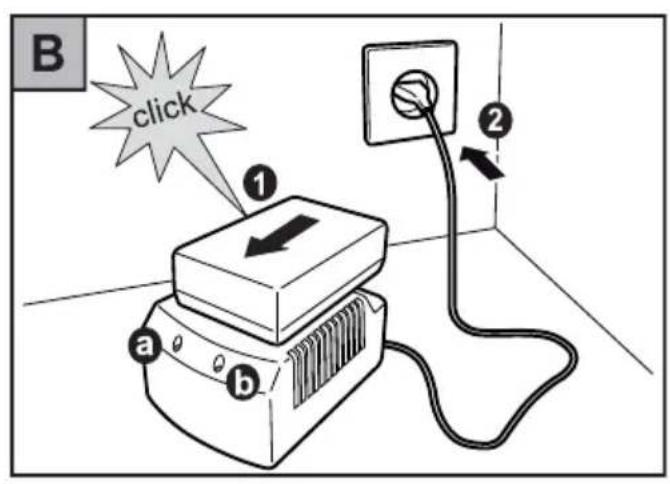
text_image
B click ① a b ②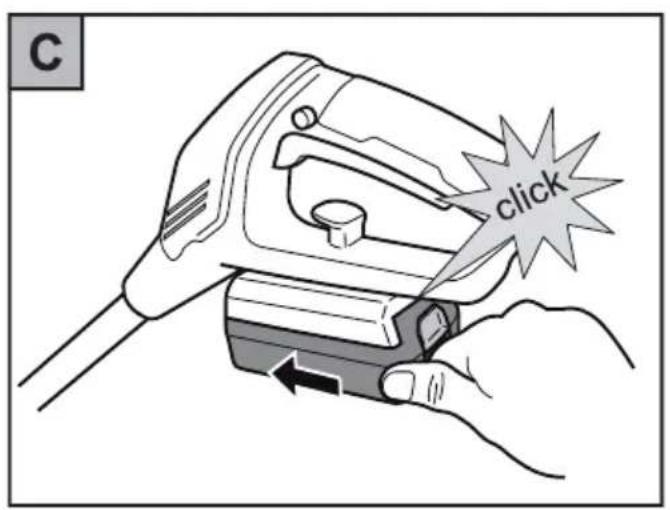
text_image
C click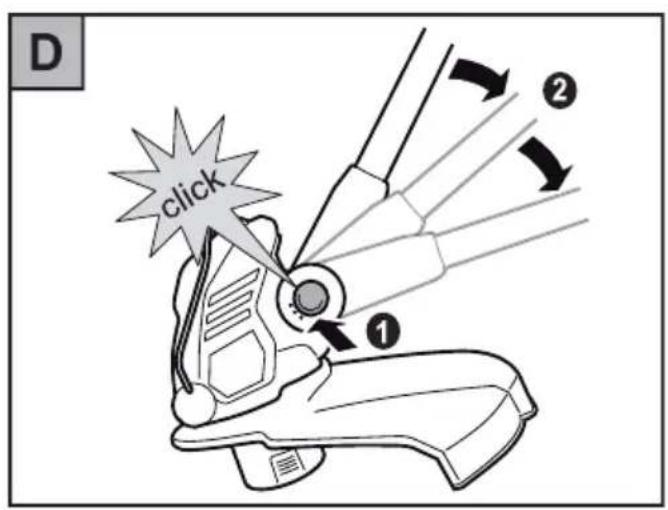
text_image
D click ① ②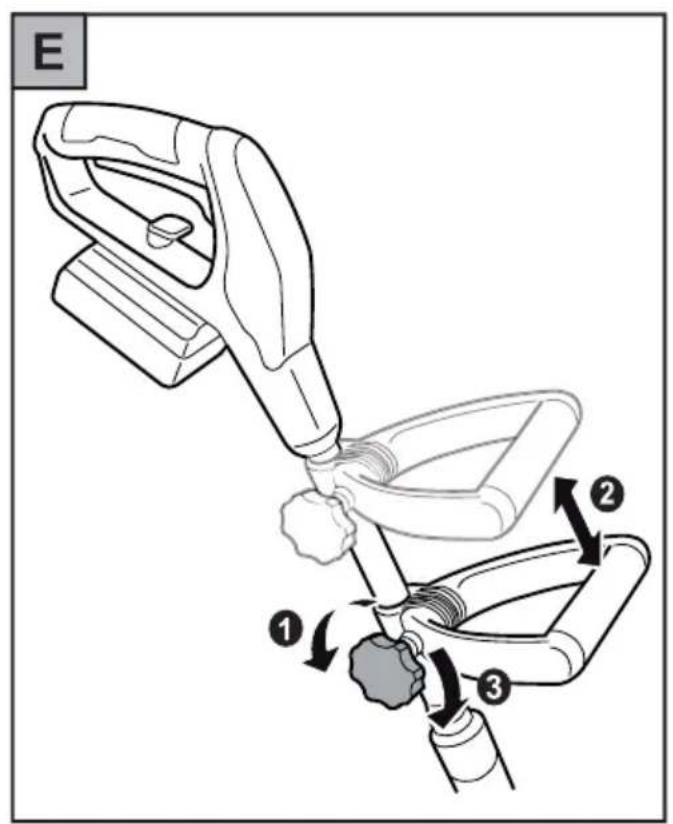
text_image
E ① ② ③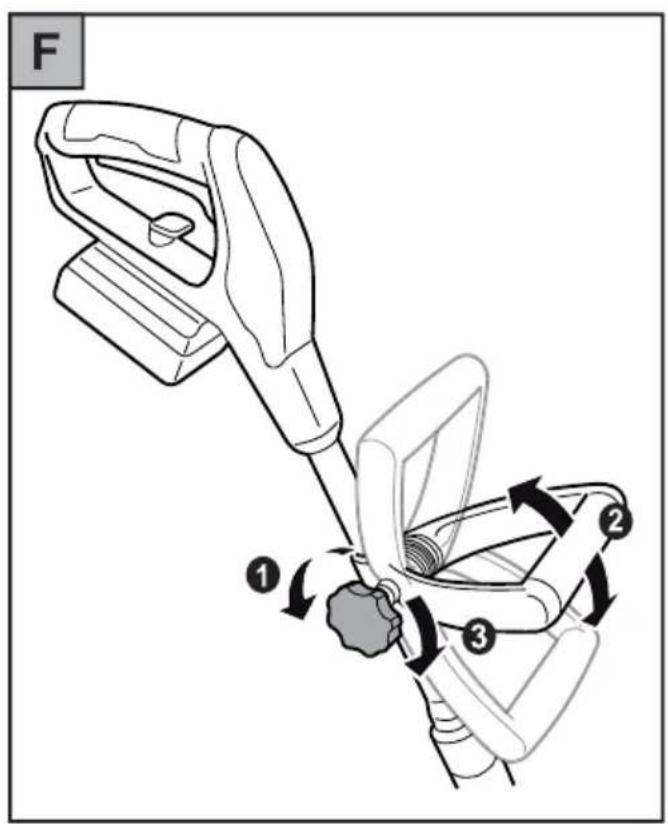
text_image
F ① ② ③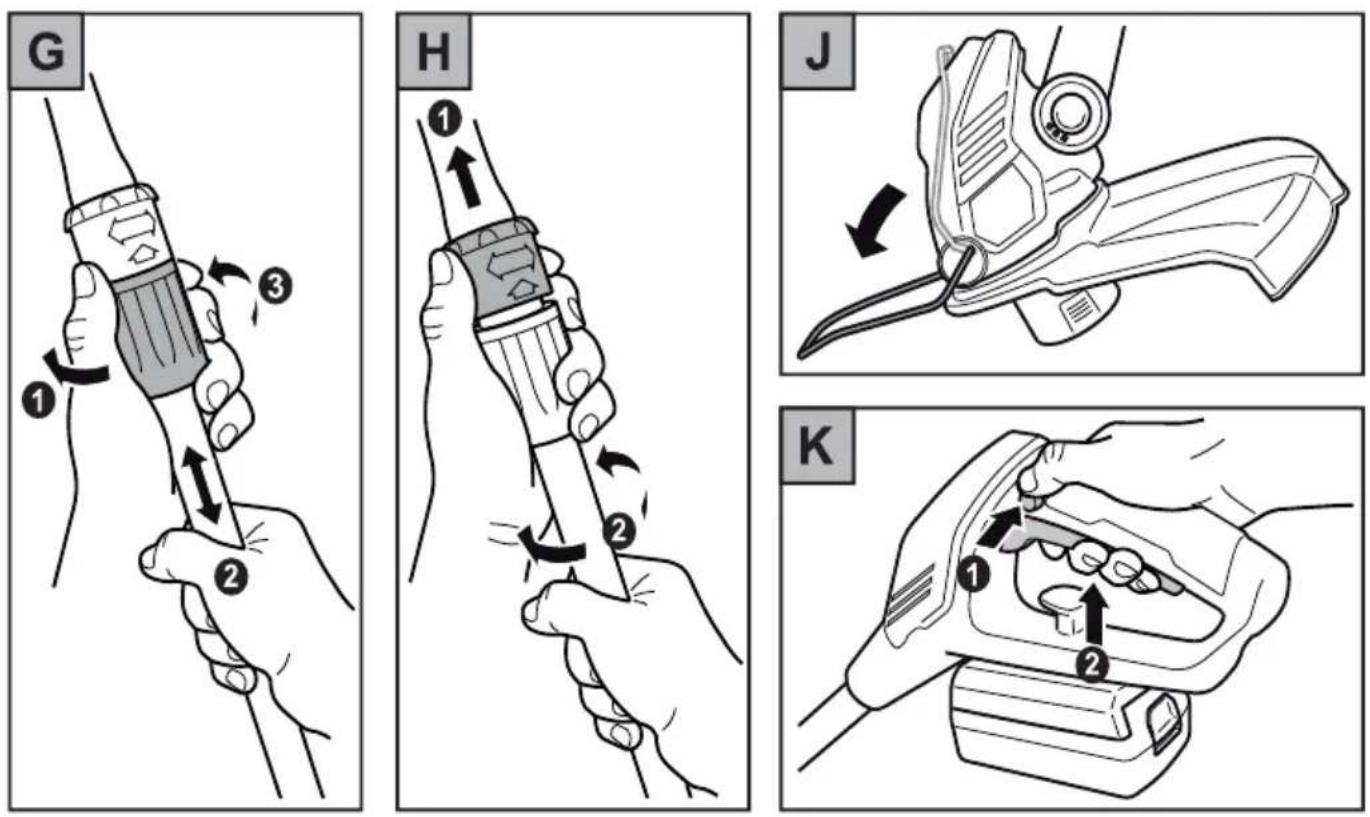
text_image
L a b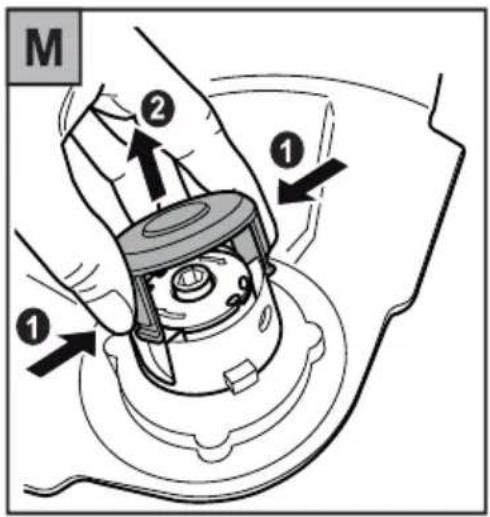
text_image
M ① ② ①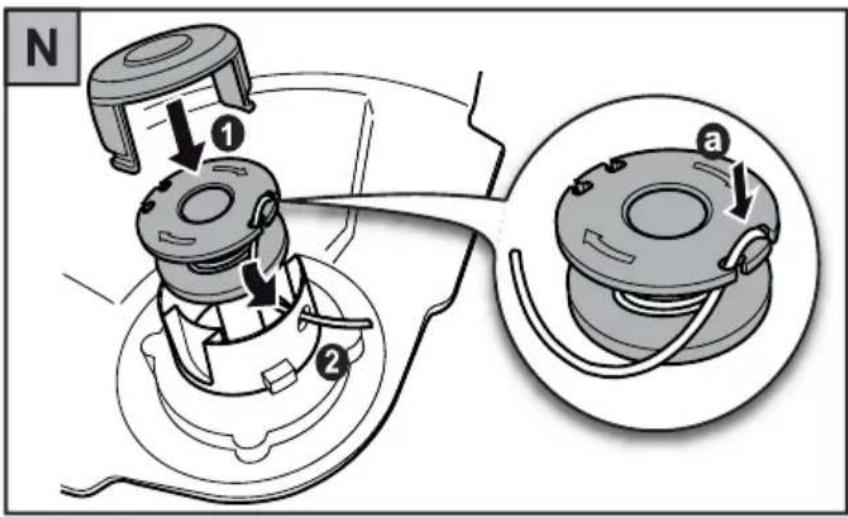
text_image
N ① ② atext_image
Warning symbol with exclamation mark and open book icon, commonly used to indicate educational or operational hazard.text_image
Warning sign with pictogram of falling object and human figure, indicating hazard or hazardnatural_image
Three abstract black-and-white icons: tree with vertical bars, hand with cross, and tree with curved lines (no text or symbols)Congratulations on the purchase of your WOLF-Garten product!

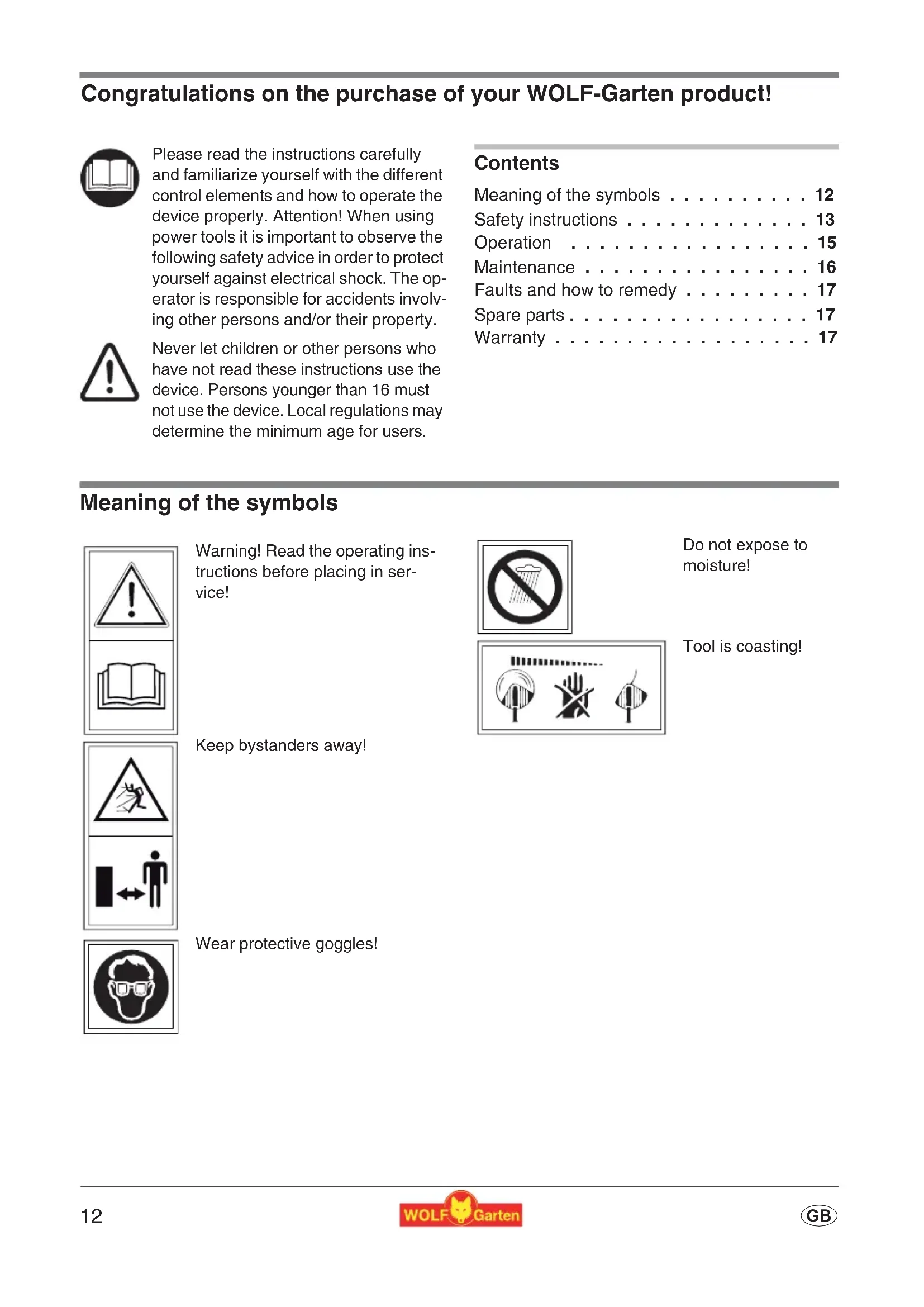
Please read the instructions carefully and familiarize yourself with the different control elements and how to operate the device properly. Attention! When using power tools it is important to observe the following safety advice in order to protect yourself against electrical shock. The operator is responsible for accidents involving other persons and/or their property.

Never let children or other persons who have not read these instructions use the device. Persons younger than 16 must not use the device. Local regulations may determine the minimum age for users.
Contents
Meaning of the symbols ..... 12
Safety instructions ..... 13
Operation 15
Maintenance 16
Faults and how to remedy ..... 17
Spare parts ..... 17
Warranty 17
Meaning of the symbols

text_image
Warning sign with exclamation mark and open book icon, commonly used to indicate educational or operational hazard.Warning! Read the operating instructions before placing in service!

Do not expose to moisture!
natural_image
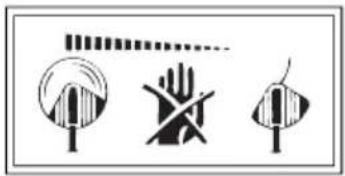
Three abstract black-and-white icons: tree with vertical stripes, hand with crossed lines, and tree with curved lines (no text or symbols)Tool is coasting!
text_image
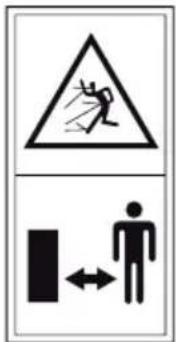
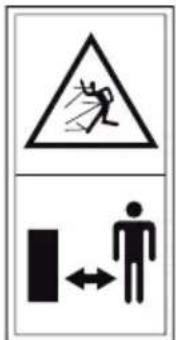
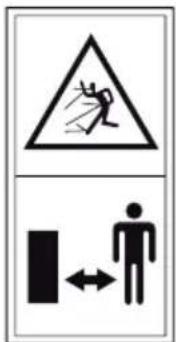
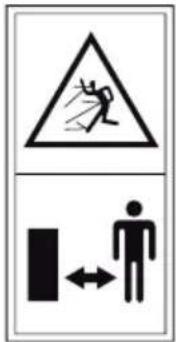
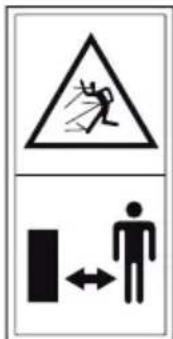
Warning sign with pictogram of falling object and human figure, indicating hazard or safety warningKeep bystanders away!

Wear protective goggles!
Safety instructions
General
- This trimmer is ideal for trimming lawn edges and small lawn areas in private gardens. The trimmer should not be used in public gardens, parks, sports grounds, streets etc. and in farming and forestry.
●Because of possible accidents the trimmer must not be used for:
– trimming of bushes and hedges
- cutting of flowers
– cutting garden by-products for composting
●For safety reasons, the trimmer is not for use by persons below 16 years of age and persons who are not familiar with its handling.
● Make sure that no persons (in particular children) or pets are in the vicinity of the working area. You are responsible for damages.
●Never operate the unit in the presence of individuals (particularly children) or animals.
●Only operate the unit in daylight hours or if adequate artificial lightning is available.
- Use trimmer when the weather is dry and do not leave it outside when it rains.
- Use a residual current device (RCD) rated for a residual current not greater than 30 mA.
●Never install metal cutting elements.
Before operating
●Before starting the trimmer, clear all string, wire etc. away from the area to be cut. Whilst cutting look out for foreign objects.
●Tool must not be used when the safety device or the covering is damaged.
- For safety reasons only original WOLF-Garten spare-parts or parts appointed by the manufacturer shall be used. Please note the installation instructions!
- Before cleaning or adjusting the device, switch it off and remove the battery.
Working
● Always keep hands and feet well clear of the cutting mechanism, particularly when starting the unit.
- Avoid injury from each of the components which serve to cut the line length. After pulling out a new length of line, always hold the unit in its normal operating position before starting it.
- When starting the trimmer hold its base parallel to the lawn area in order to avoid accidents.
- Keep your hands away from the moving cord.
●Wear eye protection!
●Always wear appropriate working clothes and sound footwear when using the trimmer.
●Before carrying the trimmer to the next lawn area to be cut, switch it off. - Be careful when you go backwards. You may stumble!
- Never leave the trimmer without supervision. Store it in a safe place.
- The switches installed shall not be removed or bridged over, e. g. by binding the switch to the handle.
- Do not allow the cord spool to strike the ground or edges of working area. If the cord spool receives a hard knock, this will cause a strong vibration on the handle. If this occurs, the trimmer should be checked by a qualified service centre.
After operating
- When switching off the trimmer: Attention: the cutting tool does not stop immediately!
●Always wait for the cutting tool is stop. - Before examining or cleaning the tool or before removing the safety device or the cord spool, switch off and disconnect the trimmer from the battery. Only use original WOLF-Garten cord spools and note the installation instructions!
●The cutting knife should not be cleaned under running water or under high-pressure.
●Faults shall only be repaired by appointed service centres or by the manufacturer.
●Make sure all air holes are free of dirt. - Do not store the unit within reach of children.
Charger
●The charger may only be used in dry rooms.
●Unplug cable connections only by pulling on the plug. Pulling on the cable could damage cable as well as plug and electrical safety could not be guaranteed.
●Never use the charger if cable, plug, or the device itself have been damaged through external influence. Bring the charger to the nearest repair shop.
● Under no circumstances should you open the charger. In case of a malfunction take the device to a repair shop.
●Charge the battery only with a suitable WOLF Garten charger. The use of other chargers might cause a fire or damage to the battery.
Battery
●As a result of incorrect use, fluid can leak from the rechargeable battery. Avoid contact with the fluid. In case of accidental contact, rinse with water. In case of fluid contact with the eyes, seek medical aid. Leaking battery fluid can cause irritation of the skin or burns.
- In the event of improper use of the battery pack, there is a risk of escaping hazardous vapours. Always ensure proper ventilation and immediately consult a doctor, if you feel unwell. The vapours might irritate the respiratory track.

Danger of fire!
●Never charge batteries in the vicinity of acids or easily flammable materials.
●Charge battery only at a temperature between 5 °C to 45 °C. After a heavy load, first allow the battery to cool.

Danger of explosion!
- Protect the device from direct exposure to heat and fire.
- Do not place on heating units or expose to strong sunlight for an extended period.
- Operate the device only at temperatures between 5 °C to 45 °C.

Risk of short circuit!
- For disposal, transport or storage, pack the battery in a plastic bag or a cardboard box, or isolate the contacts with adhesive tape.
- Do not open the battery pack.
Safe disposal of batteries

●WOLF-Garten batteries are designed according to the latest state of technology and optimized for the use in electric tools. Lithium ion cells contain hazardous substances and may therefore not be disposed off with normal household waste.
●WOLF-Garten batteries are lithium ion cells and are therefore subject to special disposal regulations. Bring defective batteries to your specialist dealer. Before disposing of the tool, remove the battery.
●WOLF-Garten wishes to encourage users to act in an environmentally friendly manner. It therefore guarantees to take back and recycle old batteries that are returned to WOLF-Garten dealers.
Disposal
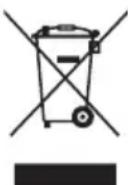
Do not dispose of electrical equipment in domestic waste. Recycle equipment, accessories and packaging in an environment-friendly manner.
Operation
Operating times
- Please check noise abatement regulations prevailing in your country.
Charging A B C

Attention! Only use battery charger in dry places.
Before first use, the battery needs to be charged for about 1,2 hours.
Use only the original WOLF-Garten charger (part no. 41A30--E650)!
- Remove the battery from the device . A
-
Insert the battery into the charger .B 1
-
Connect the charger to the mains voltage ② (LED lights up green).

Notes on charger : B
●LED lights up red: Battery is charging
- LED lights up green: Charging completed
- LED links red: Fault (e.g., battery is too hot)

Self-discharge of batteries! Remove the battery from the charger once it is fully charged.

General instructions:
regarding the battery In order to maintain the long service life of the battery, always follow the instructions below:
●The lawn trimmer are automatically switched off when the battery voltage is low. The battery must then be recharged before the shears can be used again.
● Always recharge the lithium-ion battery prior to any prolonged period of non-use, i.e. before storing the shears away in autumn.
- The charging time is 1,2 hours for a battery that is completely empty.
- The lithium-ion rechargeable battery can be charged at any charge level and charging can be interrupted at any time without damaging the battery (no memory effect)
Working angle D
The trimmer has 3-adjustable working angles. This allows you to easily reach hard to reach areas in your garden.
- Press the lock button .①
- Adjust to the desired working angle (the handle noticeably snaps into place).
i While working, the cutting head should be tilted forwards slightly.
Adjusting the middle grip E F
- Adjust the height and angle of the middle grip as desired according to the figures.
Adjusting the grip height G
- Unscrew the threaded sleeve . ①
- Pull apart the telescope handle until the ideal grip height is reached ②
- Tighten the threaded sleeved . ③
Working position
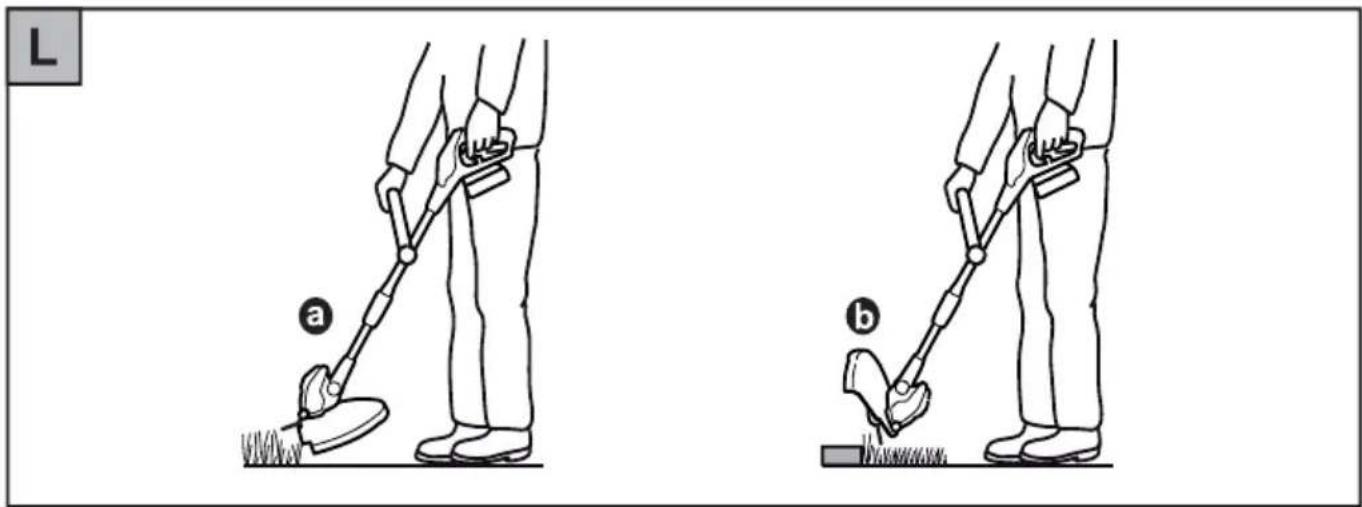
Free-cutting L
- Hold the device at the upper and middle grips .a
- Swing the device in semicircles in front of the body (without touching the ground).


The plant protector protects shrubs trees and bedding plants.
- Fold the plant protector downwards, if necessary.
Edge-cutting H L
The edge-cutting function allows for precise trimming along the lawn edge.
- Pull the sleeves upwards .H ①
-
Turn the handle 180^ until it clicks into place H ②
-
Hold the device at the upper and middle grips L b
-
Run the device along the lawn edge (without touching the ground).
Start K
Turning on
- Press and hold the unlock button . ①
- Press the power ON/OFF button . ②
- Release the unlock button . 1
Turning off

Attention! Rotating string!
Tool is still running!
●Release the ON/OFF button. ②

Tips on trimming
●Cut high grass slowly, step by step.
- You can prolong the life of your trimmer by removing grass from the ventilation slots and the bottom of the trimmer before or after each use.
- In order to take full advantage of the battery capacity, you should not switch the trimmer on and off unnecessarily.
Maintenance
Replacing the cord spool M N

Attention! Rotating string!
Tool is still running!
●Always remove battery before performing any work on the trimmer!
- Press both locking tabs of spool cover simultaneously and remove M
- Remove cord spool
- Clean, if necessary
- Insert cord spool into housing .N ①
- Thread the end of the wire through the eye of the wire box N ②

To avoid inadvertent unwinding, do not take wire on the new spool out through the support holes before inserting .N a
- Place the spool cover on the cord spool holder so that the two locking tabs lock into place.

Before switching on: Hold trimmer parallel to the ground; otherwise, there is danger of injury.
Faults and how to remedy
| Problem Cause | Remedy | |
| Automatic line feed mechanism is not working. | Spool is empty.Fit new spool.Line is torn and stuck inside spool.Line is „welded“ to itself or to spool through heat build-up. | Remove spool, check tightness of winding and replace spool in the usual way.Remove welded line section, check tightness of winding and replace spool in the usual way. |
| String breaks too frequently | String in contact with fence posts, trees, etc. | Use plant guard. |
| Secateurs switch off inadvertently | Battery overheating (temperature exceeding 45°C)Battery flatRecharge battery | Allow battery to cool down |
| Secateurs cannot be switched on | Battery flatRecharge batteryBattery defectiveReplace battery | |
| Charger: No charging (red LED constantly on) | Battery temperature below 5 °C or above 45 °CBattery defectiveReplace battery | Allow battery to cool down or heat up |
| Charger: Mal-function (red LED flashes) | Contacts dirtyClean contactsBattery defectiveReplace battery |
When in doubt, always consult a WOLF-Garten service workshop.

Switch off the trimmer and disconnect the battery before inspecting, cleaning or working on the thread.
Spare parts
| Ordering Number Designation of the item Description of the item | ||
| 092.61.022 Cord spool | ||
| 41A20--L650 LI-ION POWER Pack 5 Battery 18 V / 1,5 Ah | ||
| 41A30--E650 | LI-ION POWER CA 700 | Charger |
Supplied by your dealer
Warranty
The warranty rules issued by our company or the importer apply to every country. As part of the warranty, we remedy malfunctions on your appliance free of charge provided that this malfunction is caused by a material or manufacturing defect.
In the event of a warranty claim, please turn to your dealer or the nearest branch office.
text_image
Warning sign with exclamation mark and open book icon, commonly used to indicate educational or operational hazard.text_image
Warning sign with pictogram of falling object and human figure crossing a barrier symbolnatural_image
Three abstract black-and-white icons: tree with wave-like patterns, hand with crossed lines, and tree with curved lines (no text or symbols)Messa in opera....27
Manutenzione 28
text_image
Warning sign with exclamation mark and open book icon, commonly used to indicate educational or operational hazard.text_image
Warning sign with pictogram of a person falling, indicating hazard or accident risknatural_image
Abstract black-and-white graphic with tree, hand, and eye symbols (no text or labels)text_image
Warning sign with exclamation mark and open book icon, commonly used to indicate educational or operational hazard.text_image
Warning sign with pictogram of a person falling, indicating hazard or accident risknatural_image
Abstract black-and-white graphic with tree, hand, and eye symbols (no text or labels)text_image
Warning sign with exclamation mark and open book icon, commonly used to indicate educational or operational hazard.text_image
Warning sign with pictogram of falling object and human figure crossing a barrier symbolnatural_image
Three abstract black-and-white icons: tree with wave-like patterns, hand with crossed lines, and eye-like shapes (no text or symbols)- Slip start/stop-knappen . ②
i
Tips til trimmingen
text_image
Warning sign with exclamation mark and open book icon, commonly used to indicate educational or operational hazard.natural_image
Three abstract black-and-white icons: tree with curved lines, hand crossed out, and tree with stylized shapes (no text or symbols)Työkalu ei käy!
text_image
Warning sign with pictogram of a person falling, indicating hazard or accident risktext_image
Warning sign with exclamation mark and open book icon, commonly used to indicate educational or operational hazard.text_image
Warning sign with pictogram of falling object and human figure crossing a barrier symbolnatural_image
Three abstract symbols: tree, hand, and eye, rendered in black-and-white with no text or labels.text_image
Warning sign with exclamation mark and open book icon, commonly used to indicate educational or operational hazard.text_image
Warning sign with pictogram of falling object and human figure crossing a barrier symbolnatural_image
Three abstract black-and-white icons: tree with wave patterns, hand with crossed lines, and eye-like shape (no text or symbols)text_image
Warning sign with exclamation mark and open book icon, commonly used to indicate educational or operational hazard.text_image
Warning sign with pictogram of falling object and human figure crossing a barrier symbolnatural_image
Abstract black-and-white graphic with tree, hand, and eye symbols (no text or labels)Nástroj dobíhá!
Bezpečnostní pokyny
Všeobecné odkazy
text_image
Warning sign with exclamation mark and open book icon, commonly used to indicate educational or operational hazard.natural_image
Three abstract black-and-white icons: tree with vertical stripes, hand with crossed lines, and tree with curved lines (no text or symbols)text_image
Warning sign with pictogram of a broken object and a person crossing a barrier symboltext_image
Warning sign with exclamation mark and open book icon, likely indicating incorrect or invalid conditionstext_image
Warning sign with pictogram of falling object and human figure, indicating hazard or accidenttext_image
Two safety symbols: a person wearing glasses and a circle with raindrops, both enclosed in black boxes.natural_image
Three abstract black-and-white icons: tree with vertical stripes, hand with cross, and eye-like shape (no text or symbols)text_image
Warning sign with exclamation mark and open book icon, commonly used to indicate educational or operational hazard.Upozorenje! Prije puštanja u pogon pročitati upute za upotrebu!
text_image
Warning sign with pictogram of falling object and human figure with bidirectional arrownatural_image
Three abstract black-and-white icons: tree with wave-like patterns, hand with crossed lines, and eye-like shapes (no text or symbols)text_image
Warning sign with exclamation mark and open book icon, commonly used to indicate educational or operational hazard.natural_image
Three abstract black-and-white icons: tree with wave patterns, hand with crossed lines, and tree with curved lines (no text or symbols)Nástroj dobieha!
text_image
Warning sign with pictogram of falling object and human figure crossing a barrier symbolIné osoby držte bokom mimo nebezpečia!

Nosit' ochranu zraku!
text_image
Warning symbol with exclamation mark and open book icon, commonly used to indicate educational or operational hazard.Opozorilo! Pred zagonom naprave obvezno preberite navodilo za uporabo!
text_image
Warning sign with pictogram of a person falling, indicating hazard or accident risknatural_image
Three abstract black-and-white icons: tree with vertical bars, hand crossed out, and tree with curved lines (no text or symbols)Orodje rabi čas, da se izteče!
Varnostna navodila
Splošna navodila
text_image
Warning sign with exclamation mark and open book icon, commonly used to indicate educational or operational hazard.text_image
Warning sign with pictogram of falling object and human figure, indicating hazard or accidentnatural_image
Three abstract black-and-white icons: tree with wave-like patterns, hand with crossed lines, and eye-like shapes (no text or symbols)text_image
Warning sign with exclamation mark and open book icon, likely indicating incorrect or invalid conditionstext_image
Warning sign with pictogram of falling object and human figure crossing a barrier symbolnatural_image
Abstract black-and-white graphic with tree, wave, and hand symbols (no text or labels)text_image
Warning sign with exclamation mark and open book icon, commonly used to indicate educational or operational hazard.text_image
Warning sign with pictogram of falling object and human figure, indicating hazard or hazard warningnatural_image
Three abstract black-and-white icons: tree with vertical stripes, hand with crossed lines, and tree with curved lines (no text or symbols)text_image
Warning sign with exclamation mark and open book icon, commonly used to indicate educational or operational hazard.text_image
Warning sign with pictogram of falling object and human figure, indicating hazard or hazardnatural_image
Three abstract black-and-white icons: tree with vertical stripes, hand with cross, and tree with curved lines (no text or symbols)text_image
Warning sign with exclamation mark and open book icon, commonly used to indicate educational or operational hazard.Προσοχή!
text_image
Warning sign with pictogram of falling object and human figure, indicating hazard or safety warningnatural_image
Three abstract black-and-white icons: tree with vertical stripes, hand with cross, and tree with curved lines (no text or symbols)natural_image
Person using a red and yellow chainsaw on a tree branch, with green foliage in the background (no visible text or symbols)
natural_image
Person using a red-handled hatched shrub in a grassy field (no text or symbols visible)
natural_image
Person using a red and silver hair shaver on grass, next to a white wall (no text or symbols visible)
natural_image
Close-up of a red and black hairpin cutting through dense green fern branches (no text or symbols visible)
natural_image
Red and silver lawn shaver in a grassy field with trees in the background (no text or symbols visible)LI-ION Power PACK 5

natural_image
3D rendered image of a gray electronic device with a yellow accent, set against a red background (no text or symbols visible)LI-ION Power PACK 6