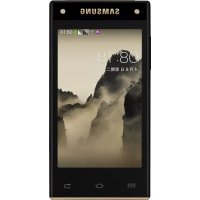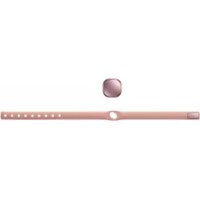
Galaxy Smart Charm EIAN920 - Cellphone SAMSUNG - Free user manual and instructions
Find the device manual for free Galaxy Smart Charm EIAN920 SAMSUNG in PDF.


| Product Type | Activity bracelet (pedometer) |
| Dimensions | Approximately 30 mm diameter, 10 mm thickness |
| Weight | Approximately 10 g |
| Power | Rechargeable lithium-ion battery via charging station |
| Main functions | Step counting, notification reception (calls, SMS, apps), LED indicator (red/green/blue) |
| Connectivity | Bluetooth 4.0 (Bluetooth Low Energy) |
| Compatibility | Android devices 4.4 or later with Bluetooth 4.0 |
| Maintenance and cleaning | Clean with a soft, dry cloth. Avoid contact with liquids, sweat, or dust. |
| Safety | Do not expose to magnetic fields. Use only Samsung approved accessories. |
| Spare parts and repairability | Bracelet and charging station available as accessories. Battery can only be removed by an authorized service center. |
| General information | Brand: Samsung, Model: Galaxy Smart Charm EIAN920, Warranty period: check the manual, Country of manufacture: not specified |
Frequently Asked Questions - Galaxy Smart Charm EIAN920 SAMSUNG
User questions about Galaxy Smart Charm EIAN920 SAMSUNG
0 question about this device. Answer the ones you know or ask your own.
Ask a new question about this device
Download the instructions for your Cellphone in PDF format for free! Find your manual Galaxy Smart Charm EIAN920 - SAMSUNG and take your electronic device back in hand. On this page are published all the documents necessary for the use of your device. Galaxy Smart Charm EIAN920 by SAMSUNG.
USER MANUAL Galaxy Smart Charm EIAN920 SAMSUNG
Please read this manual before using the device to ensure safe and proper use.
- Images may differ in appearance from the actual product. Content is subject to change without prior notice.
- Before using the Samsung Charm, make sure it is compatible with your device.
- The Samsung Charm is compatible with mobile devices running Android 4.4 or higher that support the Bluetooth 4.0 (Bluetooth Low Energy, BLE) feature.
Instructional icons

Warning: situations that could cause injury to yourself or others

Caution: situations that could cause damage to your device or other equipment

Notice: notes, usage tips, or additional information
About the Samsung Charm
Connect your Samsung Charm to a mobile device. When you wear the Samsung Charm, it counts the number of steps you have taken, and receives notifications from your mobile device.
Package contents
Check the product box for the following items:
Samsung Charm
- Charging dock
- Strap
- Quick start guide

- The items supplied with the device and any available accessories may vary depending on the region or service provider.
- The supplied items are designed only for this device and may not be compatible with other devices.
- Appearances and specifications are subject to change without prior notice.
- You can purchase additional accessories from your local Samsung retailer. Make sure they are compatible with the device before purchase.
- Use only Samsung-approved accessories. Using unapproved accessories may cause the performance problems and malfunctions that are not covered by the warranty.
- Availability of all accessories is subject to change depending entirely on manufacturing companies. For more information about available accessories, refer to the Samsung website.
Device layout
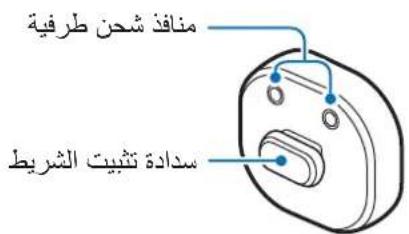
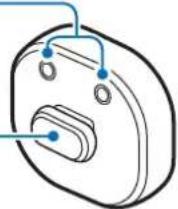
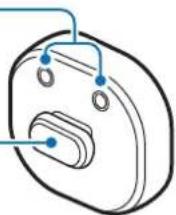
Samsung Charm
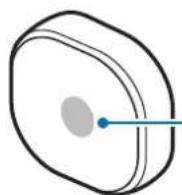
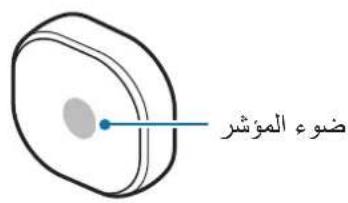
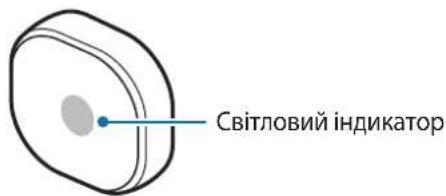
Indicator light
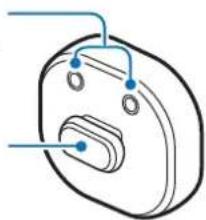
Charging terminals
Strap attachment stopper
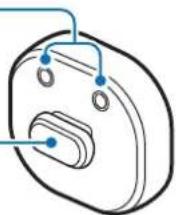
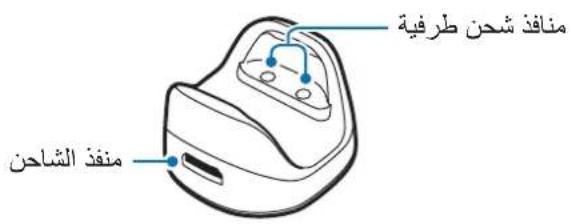
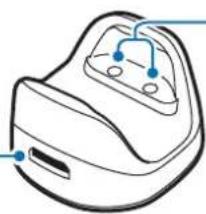
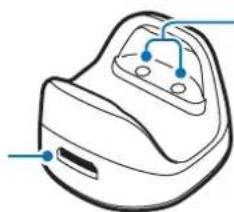
Charging dock
Charger port
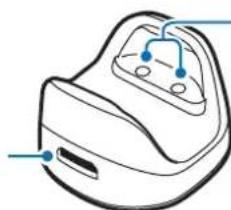
Charging terminals
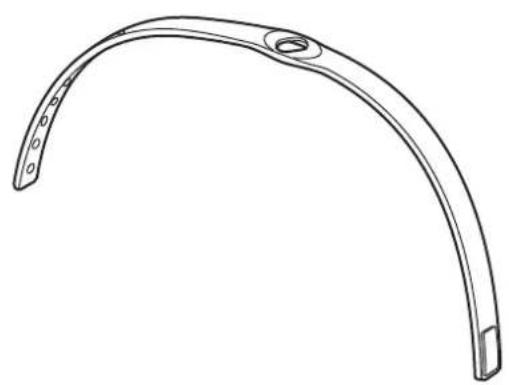
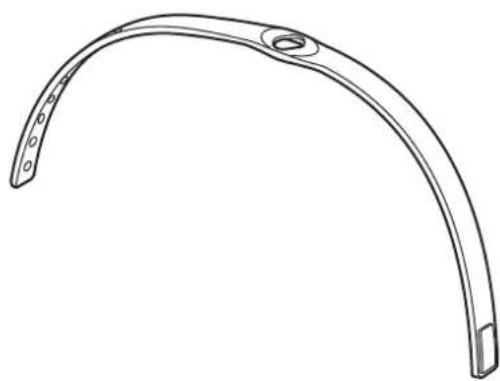
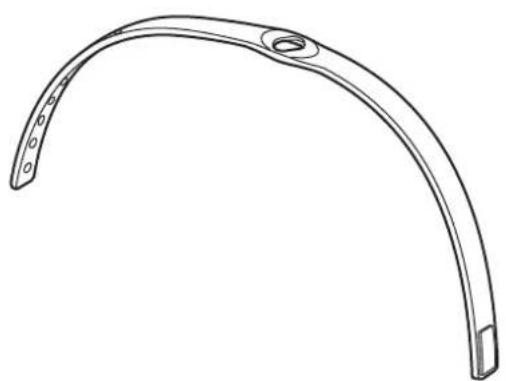
Strap
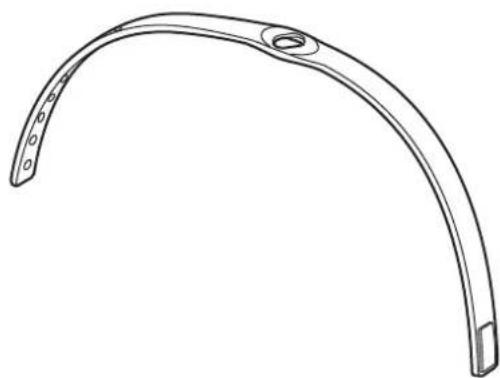
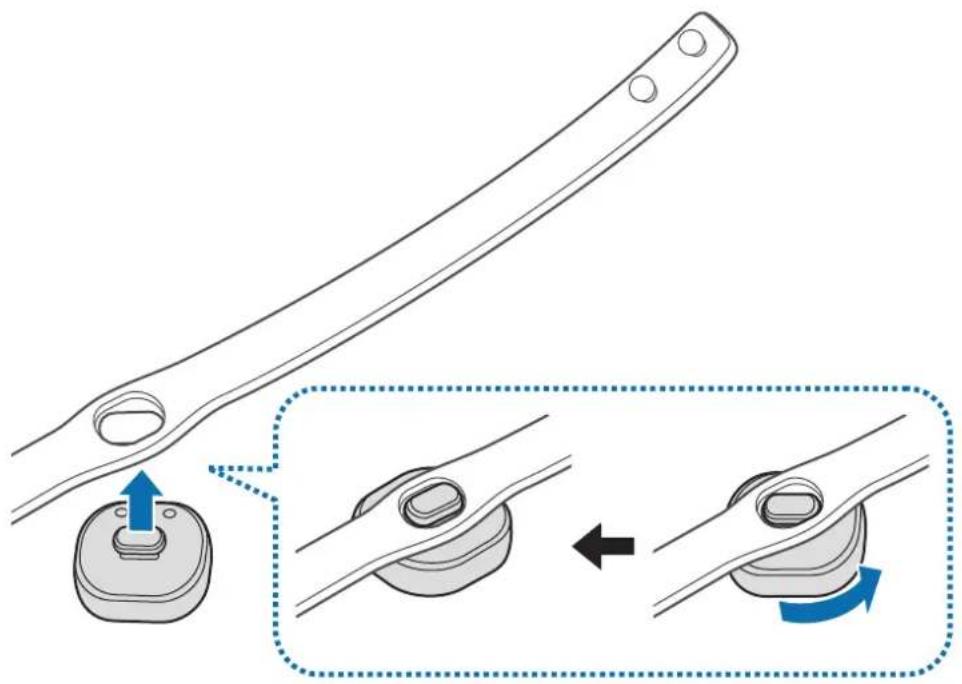
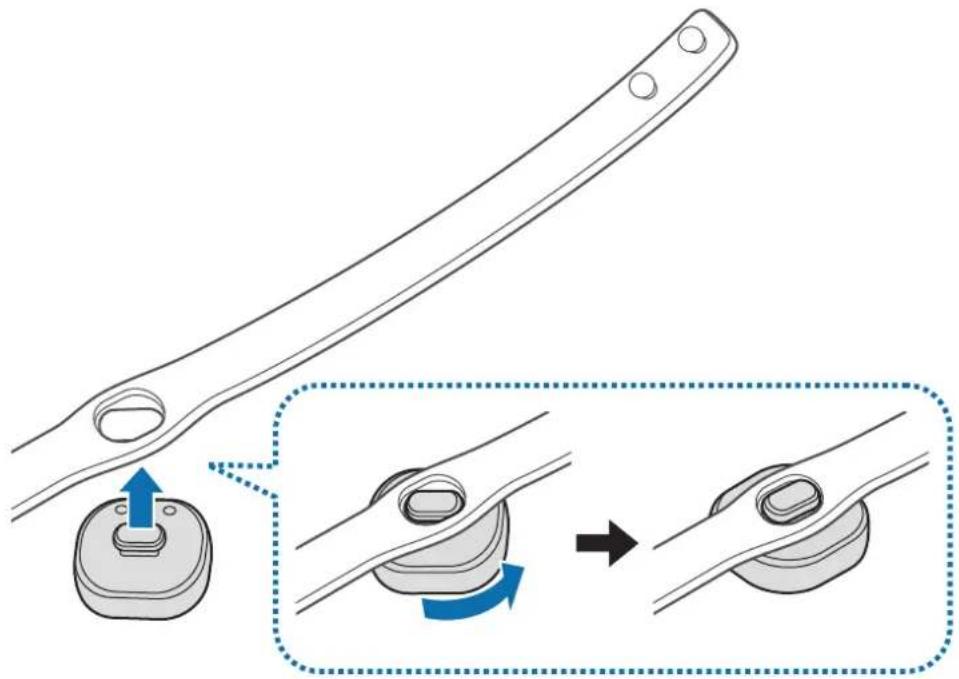
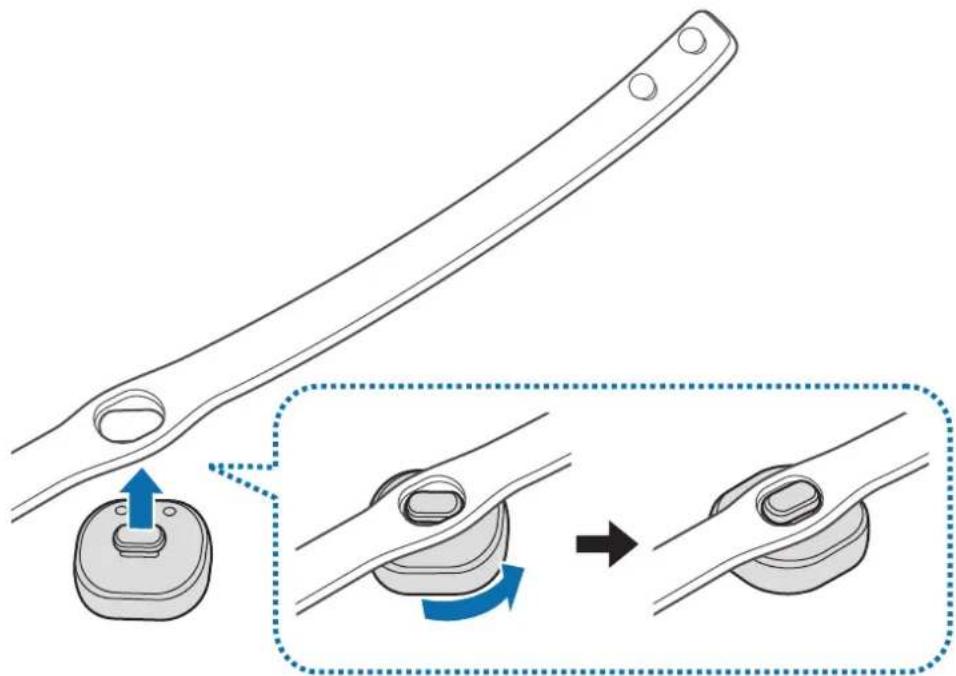
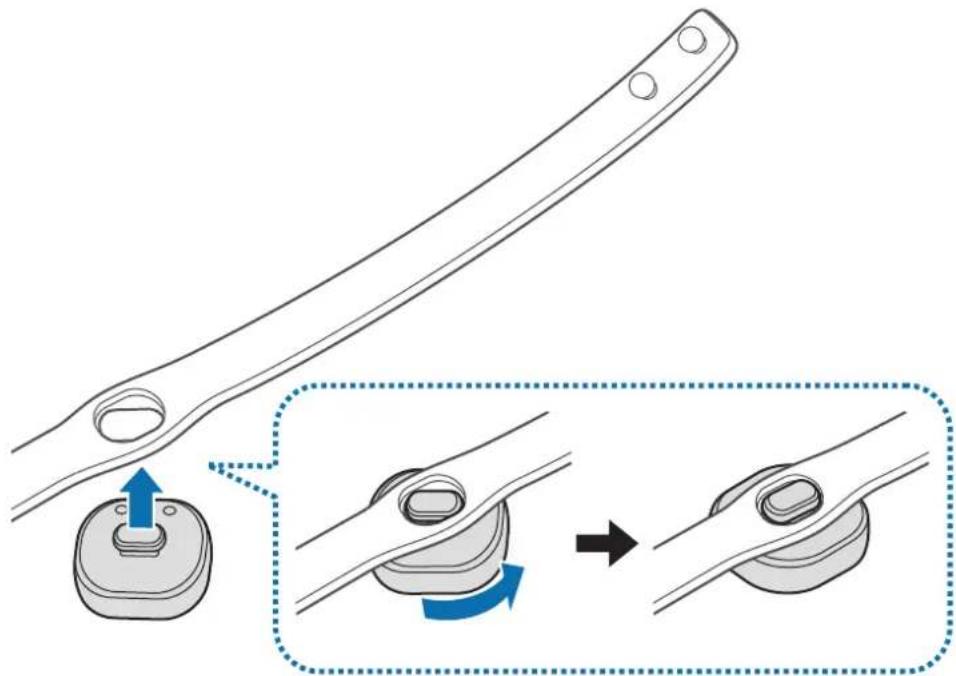
Attaching the strap
Before using the Samsung Charm, attach the strap to it.
Rotate the Samsung Charm to fix it to the strap as shown in the image below.
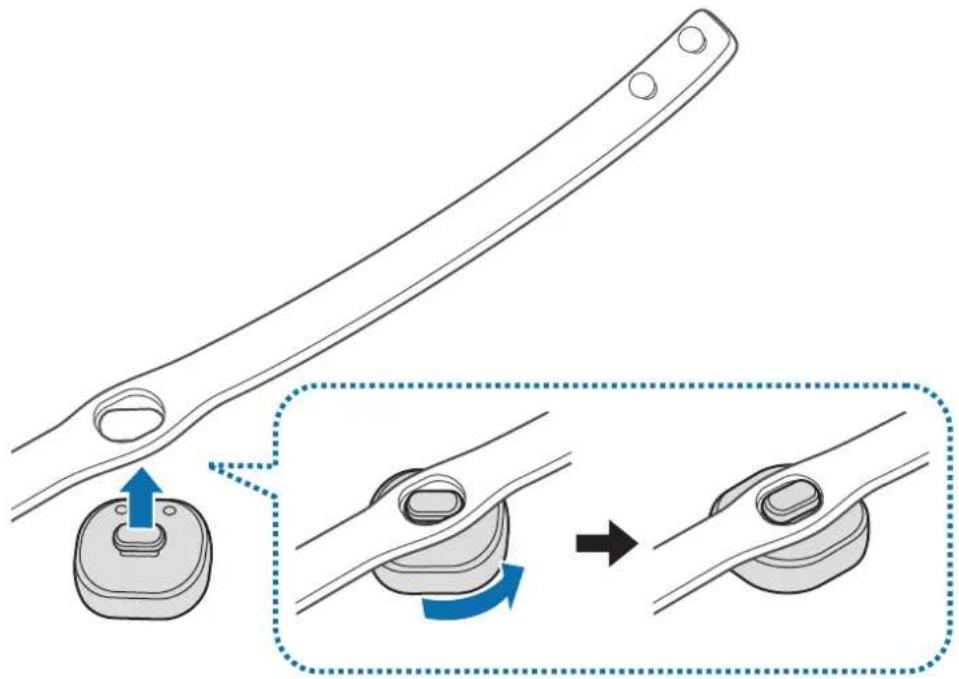
Detaching the strap
Rotate the Samsung Charm slightly.
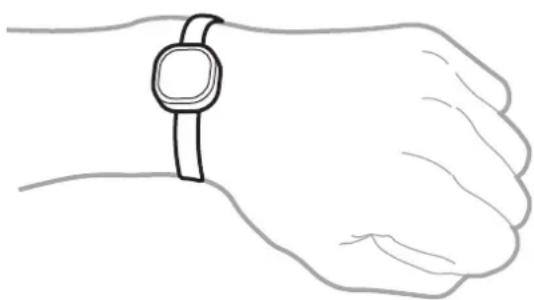
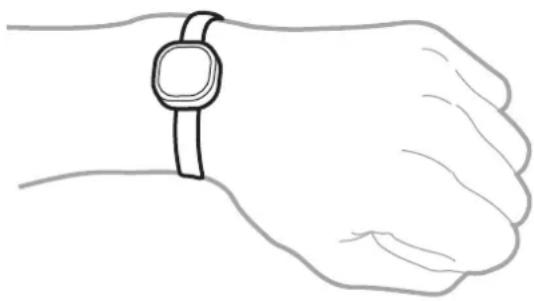
Wearing the strap

- Do not store your Samsung Charm near magnetic fields. Magnetic stripe cards, including credit cards, phone cards, passbooks, and boarding passes, may be damaged by magnetic fields.
- Do not bend or twist the strap excessively.
- Do not apply excessive pressure to the Samsung Charm.
- Do not pull on the strap excessively.
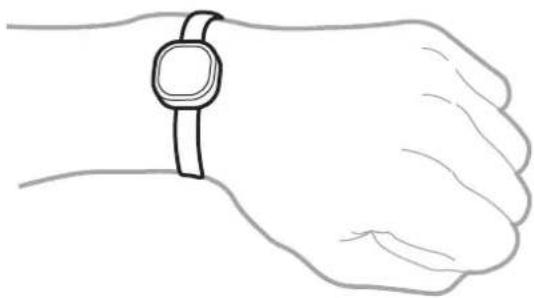
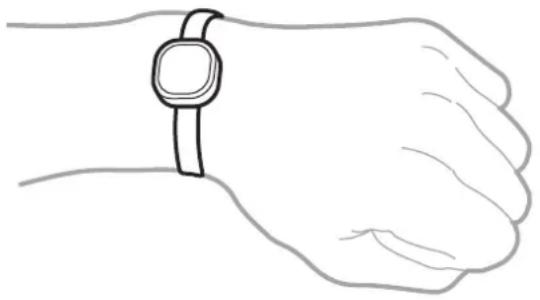
Open the buckle and place the strap around your wrist. Fit the strap to your wrist, insert the pin into an adjustment hole, and then secure the buckle to close it.
Charging the battery
Charge the battery before using the Samsung Charm for the first time or when the Samsung Charm has been unused for extended periods.

Use only Samsung-approved chargers and cables. Unapproved chargers or cables can cause the battery to explode or damage the Samsung Charm.

- If there are obstructions between the Samsung Charm and the charging dock, the Samsung Charm may not charge properly. Prevent the Samsung Charm and the charging dock from coming into contact with sweat, liquids, or dust.
- Prevent the charging terminals from coming into contact with conductive materials as they may corrode the terminals. If this happens, wipe the terminals with a soft dry cloth.

- If the battery is completely discharged, the Samsung Charm cannot be turned on immediately when the charger is connected. Allow a depleted battery to charge for a few minutes before turning on the Samsung Charm.
- If the Samsung Charm has been unused for extended periods, the battery life can be reduced. Charge the Samsung Charm at least once every week.
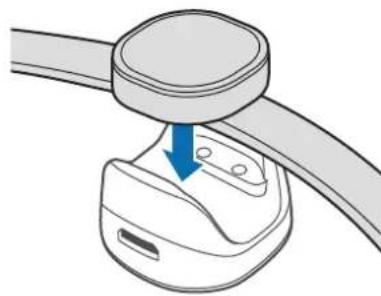
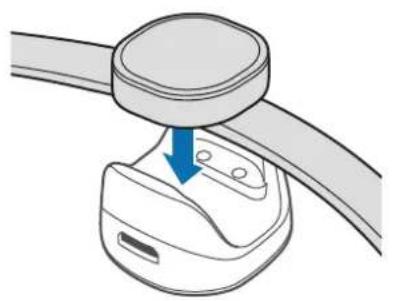
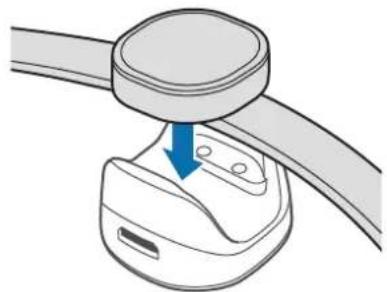
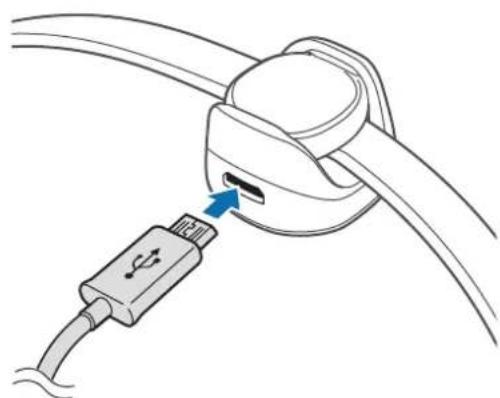
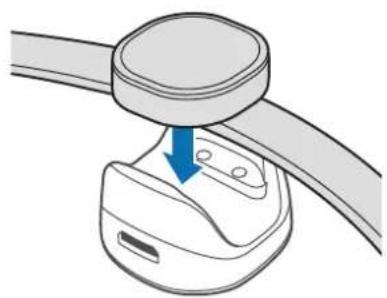
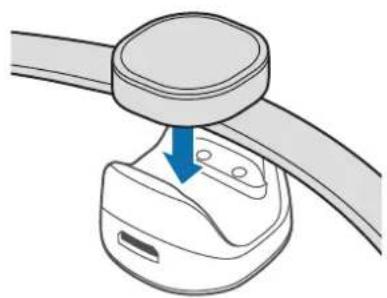
1 Connect the Samsung Charm to the charging dock by aligning the charging terminals of the two devices.
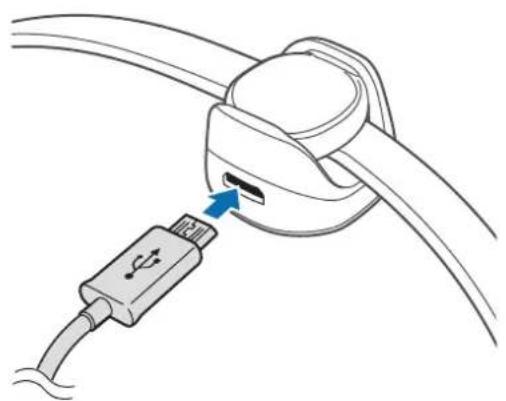
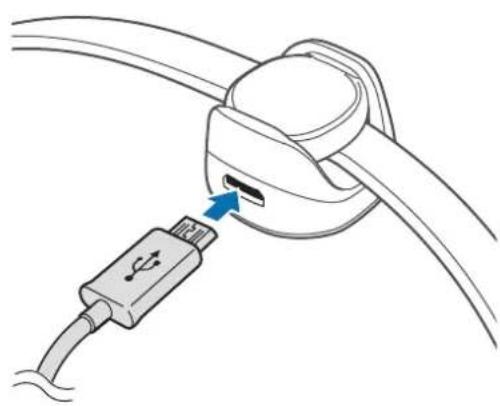
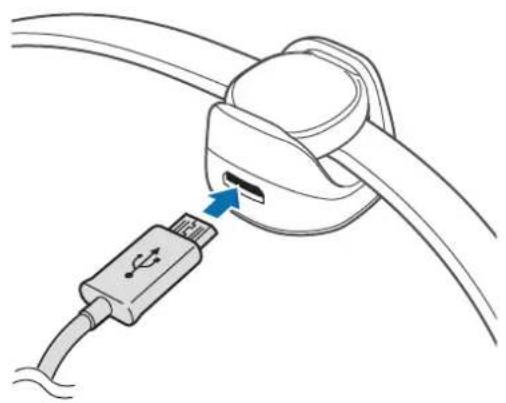
2 Connect the charging dock to the charger and plug the other end of the charger into an electric socket.
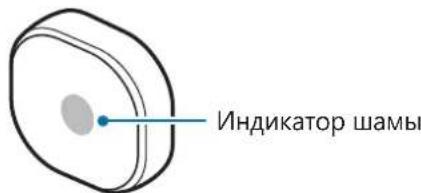
While charging, the indicator light will flash red. When it is fully charged, the indicator light will flash green.
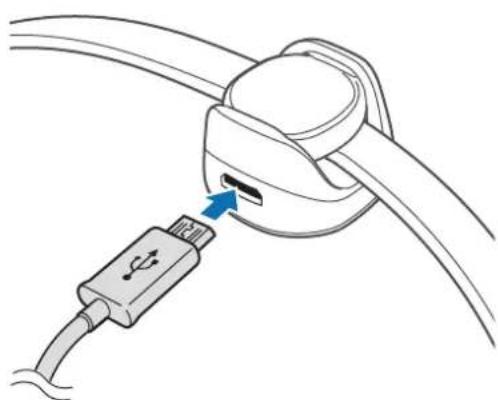

Connecting the charger improperly may cause serious damage to the Samsung Charm. Any damage caused by misuse is not covered by the warranty.

- Chargers are sold separately.
- While charging, the Samsung Charm may heat up. This is normal and should not affect the Samsung Charm's lifespan or performance. If the battery gets hotter than usual, the charger may stop charging.
- The Samsung Charm cannot connect to a mobile device while it is charging. When the Samsung Charm is fully charged, disconnect it from the charging dock and then try to connect it to a mobile device.
- If the Samsung Charm's battery life is just one or two days after it is fully charged, its battery has expired.
- If the Samsung Charm is not charging properly, take the Samsung Charm and the charger to a Samsung Service Centre.
3 After fully charging, first unplug the charger from the charging dock, and then unplug it from the electric socket.

- To save energy, unplug the charger when not in use. The charger does not have a power switch, so you must unplug the charger from the electric socket when not in use to avoid wasting power. The charger should remain close to the electric socket and easily accessible while charging.
- The socket-outlet shall be installed near the equipment and shall be easily accessible.
Indicator light identification
The indicator light informs you of your Samsung Charm's status.
| Status Colour | |
| Charging | • Continuously on red |
| Fully charged | • Continuously on green |
| Incoming notification | • Continuously on blue |
| During use or in sleep mode | • Off |

If the indicator light does not work as described, disconnect the charger from the Samsung Charm and reconnect it.
Using the Samsung Charm
Connecting via Bluetooth
About Bluetooth
Bluetooth is a wireless technology standard that uses a 2.4 GHz frequency to connect to various devices over short distances. It can connect and exchange data with other Bluetooth enabled devices, such as mobile devices, computers, printers, and other digital home appliances, without connecting via cables.
Notices for using Bluetooth
- To avoid problems when connecting your Samsung Charm to another device, place the devices close to each other.
- Ensure that your Samsung Charm and the other Bluetooth device are within the Bluetooth connection range (10 m). The distance may vary depending on the environment the devices are used in.
- Ensure that there are no obstacles between the Samsung Charm and a connected device, including human bodies, walls, corners, or fences.
- Do not touch the Bluetooth antenna of a connected device.
- Bluetooth uses the same frequency as some industrial, scientific, medical, and low power products and interference may occur when making connections near these types of products.
- Some devices, especially those that are not tested or approved by the Bluetooth SIG, may be incompatible with the Samsung Charm.
- Do not use the Bluetooth feature for illegal purposes (for example, pirating copies of files or illegally tapping communications for commercial purposes).
Connecting to other devices
To connect your Samsung Charm and mobile device, install the Samsung Charm app on the mobile device. Launch Galaxy Apps or Play Store to download it.
Mobile device
1 On the Apps screen, tap Charm by Samsung.
If necessary, update the Samsung Charm app to the latest version.
2 Tap CONNECT TO SAMSUNG CHARM.
3 Select the colour flashed on the Samsung Charm's indicator light and tap CONNECT.
4 Follow the on-screen instructions to complete the connection.

- Connection methods may vary depending on your mobile device and software version.
- If the Bluetooth connection fails or the Samsung Charm is not located, charge the Samsung Charm and try again.
- If the Samsung Charm does not work, connect it to the charging dock to charge it. The Samsung Charm will reset.
Reconnecting the devices
If the Bluetooth connection ends due to the distance between the devices, bring the devices closer together within a certain period of time. The devices will automatically reconnect.
If the Bluetooth connection ends because of a device malfunction, launch the Samsung Charm app and tap CONNECT.
Disconnecting the devices
Launch the Samsung Charm app and tap About Samsung Charm Connections. Then tap the currently connected Samsung Charm.
Using the Samsung Charm app
Introduction
Using the Samsung Charm app, you can check your Samsung Charm's status or customise its settings. Launch Galaxy Apps or Play Store to download it.

Some features may not be available depending on the type of connected mobile device.
S Health
View the number of steps you have taken and measure the distance travelled.
On the Apps screen of the mobile device, tap Charm by Samsung S Health.

- To use this feature, the S Health app must be installed on your mobile device.
- To use the S Health app with the Samsung Charm app, you must use S Health version 4.6 or higher.
- When the Samsung Charm's battery is low, the step tracking information may not be stored on your mobile device. Charge the Samsung Charm when its indicator light flashes red.
- Only records from the past 14 days are saved. If you use the Samsung Charm while it is connected to your mobile device for more than 14 days, it deletes the step tracking information from the oldest day.
Notifications
Manage apps on the mobile device to send notifications to your Samsung Charm.
1 On the Apps screen of the mobile device, tap Charm by Samsung Notifications.
2 Tap the switch to activate the notification feature.
3 Tap EDIT.
4 Tick the apps to get the notification and tap DONE.
About Samsung Charm
View the Samsung Charm app's version information and your Samsung Charm's connection status. You can also update your Samsung Charm's software.
On the Apps screen of the mobile device, tap Charm by Samsung About Samsung Charm.
User manual
View the user manual to learn how to use your Samsung Charm.
On the Apps screen of the mobile device, tap Charm by Samsung User manual.
Appendix
Troubleshooting
Before contacting a Samsung Service Centre, please attempt the following solutions.
The battery does not charge properly (For Samsung-approved chargers)
Ensure that the charger is connected properly.
If the problem is still not resolved, contact a Samsung Service Centre.
Another Bluetooth device cannot locate your Samsung Charm
- Charge your Samsung Charm fully and try to connect again.
- Ensure that your Samsung Charm and the other Bluetooth device are within the Bluetooth connection range (10 m).
If the tips above do not solve the problem, contact a Samsung Service Centre.
Bluetooth connection is often disconnected
- If there are obstacles between the devices, the operating distance may be reduced.
- Ensure that your Samsung Charm and the other Bluetooth device are within the maximum Bluetooth range (10 m).
- When using the Samsung Charm with other Bluetooth devices, the connection may be affected by electromagnetic waves. Use the Samsung Charm in environments with fewer wireless devices present.
The Samsung Charm works differently as described in the manual
Available functions may differ depending on the connected device.
The battery depletes faster than when first purchased
- When you expose the Samsung Charm or the battery to very cold or very hot temperatures, the useful charge may be reduced.
- The battery is consumable and the useful charge will get shorter over time.
Removing the battery
- To remove the battery, you must visit an authorised service centre with the provided instructions.
- For your safety, you must not attempt to remove the battery. If the battery is not properly removed, it may lead to damage to the battery and device, cause personal injury, and/or result in the device being unsafe.
- Samsung does not accept liability for any damage or loss (whether in contract or tort, including negligence) which may arise from failure to precisely follow these warnings and instructions, other than death or personal injury caused by Samsung's negligence.
1 Remove the strap from the Samsung Charm.
2 Remove the glass from the Samsung Charm's body using a flat edged tool.
3 Remove the circuit board by loosening screws from the Samsung Charm's body.
4 Remove the battery from the circuit board using solder machine.
Copyright
Copyright © 2016 Samsung Electronics
This manual is protected under international copyright laws.
No part of this manual may be reproduced, distributed, translated, or transmitted in any form or by any means, electronic or mechanical, including photocopying, recording, or storing in any information storage and retrieval system, without the prior written permission of Samsung Electronics.
Trademarks
SAMSUNG and the SAMSUNG logo are registered trademarks of Samsung Electronics.
- Bluetooth® is a registered trademark of Bluetooth SIG, Inc. worldwide.
- All other trademarks and copyrights are the property of their respective owners.
Démarrage
Copyright © 2016 Samsung Electronics
Copyright © 2016 Samsung Electronics
Copyright © 2016 Samsung Electronics
Copyright © 2016 Samsung Electronics
Copyright © 2016 Samsung Electronics
Copyright © 2016 Samsung Electronics
IdeHTnΦnKaζη Na HndnKaTOpHaTa IaMnUyKa
INnKaTOpHaTa IaMnUka Bn INHΦopMnpa 3a cbCToHHeTo Ha Samsung Charm.
Haekpana c npiloxeHn yKHeCharm by Samsung.
Ako e Heo6xoJIMO, aKryaun3npaiTe npJIOxKeHneTo Samsung Charm do NaH-HOBata Bepcna.
2 4yKHeTe CbP3BAHE C SAMSUNG CHARM.
3 I36epeTe cBeTa, npemrBaU Ha nHnKaTOpHaTa lamnueKa Ha Samsung Charm n yKHeTe CbbP3BAHE.
4 CnEaBaiTe HNCTpyKcHInTe Ha ekpaHa, 3a da CBbpxKeTe yCTpoiCTBaTa.

- MeToIte 3a CBbp3BaHe MoKe Ia ce pa3nUaBaT B 3aBncMocT OT BaJeTO MOHIOyCTpoIcTBo N BepCraTa Ha coΦTyepa.
- Ako He ycneete da ce cbpke Te ue3 Bluetooth nnn Samsung Charm He 6bnde hamepeH, 3apeTe Samsung Charm n onntaute OTHO.
- Ako Samsung Charm He pa60Tn, ro cBbpxKeTe c DOKINr CTaHcIa 3a 3apeJdaHe, 3a da ro 3apeIte. Samsung Charm Ie ce Hynipa.
NoBToPHO CBbp3BaHe Ha yCTpoiCTBaTa
Ako Bluetooth Bpb3kata npekbche npaapan pa3ctoHneTo Mejdy yctpoiCTbata,do6nHexe Te yctpoiCTbata B pAMKITE Ha ONpeJeH nepnoI OT Bpeme. YcTPOiCTbATA ige ce CBbpXaT OTHOB aBTOMaTuHNo.
Ako Bluetooth БрьзкаТа сп配电алл поади поврада на устюстбOTO,сторpaite прилwxенeto Samsung Charmи чукнete CBbP3BAHE.
IpekpaTBAHe Ha Bpb3KaTa MeKdy yCTpoiCTBaTa
СтартуарейприложениTo Samsung Charmи чук hare3a Samsung Charm Bpb3kn. След това чук hare Tekyшо CBbp3ань Samsung Charm.
Ha ekpaHa c npnloxehna Ha Mo6nHTo yCTpoiCtBO uKHeTe Charm by Samsung S Health.

3a da n3noI3BaTe Ta3n fynKcNna, npinloXeHneTo S Health Tp6Ba da e nHCTaInpaHo Ha BaSeTO MO6uINHO yCtpoiCTBO.
3a da n3no3BaTe npinoxeHneTo S Health c npinoxeHneTo Samsung Charm, Tp6Ba da n3no3BaTe BercnHa S Health 4.6 nnn no-Bncoka.
Korato 3apaT ha 6aTePnTa Ha Samsung Charm e HncbK, nHΦopMaunra 3a npocIeBaHe Ha cTbPKte MoKe da He ce 3aNa3n Ha BaSeTo MO6uInHO yCTPOIcTBO. 3apeTe Samsung Charm, Korato INndkaTopHaTa lamnueKa npncBETBA B cepBeHo.
3ana3BaT ce camo 3aHnCOn OT nocneHNte 14 dH. Ako n3noJ3BaTe Samsung Charm, JOKaTO ToI e Cbbp3aH C BaWeto MO6uHNO yCTpoNCTBO 3a NOBueO T 14 dH, ToI n3TpNa HOpMaunraTa 3a IPOcneJaBaHe Ha CTbKnTe OT Ha-CTapnJeH.
YBeDomJIeHnIa
YnpaBnaBaTe npIoXeHnHa Mo6uHTo yCtpoiCTBO, 3a Da n3pauaTe n3BecTnDo cBoa Samsung Charm.
1 Ha ekpaHa c npinloxeHnHa Mo6nHTo ycTpoiCTBO uKHeTe Charm by Samsung YBeDomJIeHn.
2 2yKHeTe npEeBKnIOuBaTeIa Da aKTINBnPaTe fYHKnraTa 3a n3BeCTna.
3 UyKHeTe PEAKUN.
4 Otmethe npnlojkeHnaTa, OT KOInTo da nolUyabate n3BecTna, cIeD KoETo yKHeTe OK.
3a Samsung Charm
BnKTe INΦopMaζη 3a BερζηTa Na πριλοχεΗηeTo Samsung Charm Ι cβσθηHηeTo Na cβνρ3BaHe Na Baζηa Samsung Charm. MoκeTe cβιο έа ακτγαλιπιρaTe coΦτερa Na Samsung Charm.
Ha ekpaHa c npuIoxeHn Ha MO6nIHOTo yCTpoiCTBO uYKHeTe Charm by Samsung 3a Samsung Charm.
PbKOBOdCTBO 3a nOTpe6nTei
BnKTe pBkoBOdCTBOTO Ha nOTpe6nteJ, 3a da HayuTe KaK da n3noJ3BaTe Samsung Charm.
Ha ekpaHa c npuIoxeHn Ha MO6uHTo yCTpoiCTBO uKHeTe Charm by Samsung PbKOBoCTBO 3a noTpe6uTeH.
Приложкени
Pa3peшаBaHe NaПробLEMn
Ipei Da ce Cbpxe Te CbC cepBn3en cehTbp Ha Samsung, MoJ, ONiTaNTe HAKoe OT CJIeHNITe peWeHn.
Батугияе не се зарожда правлино (за зapядн устюп STBA, одобreno ot Samsung)
YBepTe Ce, Ye 3apAnHOTo yCtpoiCTBO e BKNIOueHo npaBnHNo.
Ako npo6JIembT He ce pa3peuH,ce cBbpxTe cbc cepBn3eH eHTbp Ha Samsung.
Дуго Bluetooth устюве He може за откpane Samsung Charm
3apepehe hantbIHO cB0r Samsung Charm n onntaTe da ro cbbpkeTe OTHOBO.
Samsung CharmиДр Astro Bluetooth yctpoiCTBO Tp6Ba Da 6bdaT B dnaana3OHa 3a CBbp3BaHe ue3 Bluetooth (10 M).
Ako rohpHnte cbbetn He pa3peWt npo6nema, CbpxTe ce cbc cepBn3en eHTbp Ha Samsung.
BluetoothВрьзкаТа ce npeКьсВа YeCTO
- Ако мени устюп CTBaTа Има пpenЯТCBи, може д e hyжно да hamajnte onepaTHBHTO pa3ctoHnE.
Samsung Charm und pyroto Bluetooth yctpoiCTBO Tp86Ba da 6bdaT B MaKcImaHnra Dnaan3OH Ha CBbp3BaHe ue3 Bluetooth (10 M). - Пии ИЗползва На Samsung Charm с дугni Bluetooth устpoиства врьзкат може на 6бдеговл�на от eнектpondини Вьлни. ИЗползbaite Samsung Charm Ha Mecta с по-mалко налични 6e3ЖИЧИУстpoиства.
Samsung Charm pa60Tn pa3mUHO OT ONICAHOTO B pBKOBOdCTBOTO
HaHnHTe yHKcIM MoKe da ce pa3IuBaT B 3aBcMOCr OT CBbp3aHOTyCTPOINCTBO.
BaTepeTae n3ToaBa no-6bP30, OTKoIkoTO npn 3aKynyBaHeTo i.
- Ako ИзлобжITE Samsung Charm Илибateрята на много високи Или много Ниcke ТемпepаТуп, палеЗнигт заю можеда се hamann.
BaTepeyTa e KOHcymaTb N IIOJIe3HnT 3apJd ige CTaba No-MaIbK C TeueHne Ha BpeMeTo.
Отстара на захута
3a da OTCTpaHnTe 6aTepnraTa, Tp6Ba Da Nocetnte yIbHOMoueh cepBn3e H cHTbp C npedoctaBeHnTe INHCTpyKcnn.
3a BaSha 6e3oNaCHOCT He Tp86Ba Da ONNTBaTe Da OTcPaHbAte Camn 6aTePnra. Ako 6aTePnraHe Ce OTcPaHn PpaBnHNO, TOBa MoKe Da npuHn NobPeHa Ha 6aTePnra n yCTPOICTBOTo, da npEiN3BnKa fN3uYeCKo HapaHbAhe N/nn Da IOBeDe Do Iunca Ha 6e3oNaCHOCT Ha yCTPOICTBOTo.
Samsung He Hocn OTROBOPHOCT 3a 7eTn nn 3ary6n (He3abncmo daan ca BCneCTBne Ha doROBOp nn Ha npaBOHApUSeHne, B TOBa YNCIO n He6peXHoCT), KONTO MOraT da Bb3HNKHaT OT HeTOOHOTcna3BaHe Ha Te3n npedynpeXdEHHn INHCTpykCmN, C N3KnIOueHne Ha cnyaHTe Ha cMbPT nΦn3NuEcko HapaHbAHe, PpeIN3BnKaHn OT He6peXHoCTTa Ha Samsung.
1 OToTpaHeTe KaIIsKaTa ot Samsung Charm.
2 OTePaHeTe cTbKlToO t Kopnyca Ha Samsung Charm, n3non3Baikn uHcTpymeHT C nlockn pb6OBe.
3 I3baTe neaTHata nlaTka, kaTo pa3xIa6nTe BInTOBete ot Kopnyca Ha Samsung Charm.
4 N3BaTe 6aTepeTAt O T neaTHaTa nlaTka, n3NoJ3BaKm MaunHa 3a 3anOraBe.
ABTOpCKn npaBa
Copyright © 2016 Samsung Electronics
ToBa pbkoBOIDCTBO e 3aunTeHO OT MeKdyHapOHN 3aKOHN 3a ABTOPCKn npaba.
HnKoJtO pBkoBODCTBOTo He MoKe da 6bJe Bb3POn3BexJaHa, pa3npocTpaHraHa, npeBexJaHa nn npexBpIHa NOD KaKBaTO I Da e fOpMa nn NO KaKBbTO I Da e Naun, eneKtponeH nn MExAHueH, B TOBa YncNo fOTOKOpnpaHe, 3anC nn CbXpaHeHne B KaKBaTO I Da e CnCTema 3a HfOpMaunHO CbXpaHHeHne I n3BnuHae, 6e3 npedBapntelHoto pa3peHne Ha Samsung Electronics.
TbproBcN MapKn
SAMSUNG n IoroTo Ha SAMSUNG ca pernctpupaH TbproBckn MapKn Ha Samsung Electronics.
- Bluetooth® e périçtrpùpaHa TbproBcka Mapka Ha Bluetooth SIG, Inc. 3a ÇeɪnəcBЯT.
- Bcnyn npytn Tbprobckn Mapkn n aBtOpckn npaba ca co6ctBeHocT ha CbOTBeHTHe IM co6CTBeHnCn.
Kako započeti
Najprije pročitajte
Pije uporabe uredaja pazljivo procitajte ovaj prisučnik kako biste osigurali sigurnu i pravilnu uporabu.
- Slike se mogu razlikovati od stvarnog proizvoda. Sadržaj je podložan promjeni bez prethodne obavijesti.
- PrijneNgu upotrijebite uredaj Samsung Charm provjerite je li kompatibilan s vašim uredajem.
- Urešaj Samsung Charm kompatibilan je s mobilnim urežajima koji koriste operacijski sustav Android 4.4 ili noviji koji podržava opcjiu Bluetooth 4.0 (niskoenergetski Bluetooth, BLE).
Koristeni symboli

Upozorenje: situacije u kojima se vi ili druge osobe mozte ozljediti

Copyright © 2016 Samsung Electronics
Ovaj je prisucnik zasticen medunarodnim zakonima o zastiti autorskih prava.
Niti jegan dio ovog prisučnika ne smije se reproduci rati, distribuirati, prevoditi ili prenositi u bilokojem obliku, ni na koji način, elektronici ili mehanički, ukljućujuci fotokopiranje, snimanje ili pohranjivanje na bilo kojem mediju za pohranu informaci je i sustavu dohvata podataka, bez prethodnog pisanog dopusteŋa Samsung Electronicsa.
Zašitni znakovi
Copyright © 2016 Samsung Electronics
Ovaj prisucnik je zasticen medunarodnim zakonima o autorskim pravima.
Nijedan deo ovog priručnika se ne sme reprodukovati, distribuirati, prevoditi niti prenositi ni u Jednom obliku niti bilo kojim putem, elektronskim niti mehanickim, što podrazumeva fotokopiranje, snimanje i skladistenje u okviru bilo kog skladista informacija i sistemas za preuzimanje, bez prethodne dozvole kompanije Samsung Electronics u pisanom obliku.
Trgovačke marke
- SAMSUNG i SAMSUNG logotip su registrovane trgovace marke kompanije Samsung Electronics.
- Bluetooth® je registrovana trgovačka marka kompanije Bluetooth SIG, Inc. širom sveta.
Sve ostale trgovačke marke i autorska prava su vlasništro njihovih vlasnika.
Começar
Leia primeiro
Copyright © 2016 Samsung Electronics
1 Programu ekrane palieskite Charm by Samsung.
Copyright © 2016 Samsung Electronics
Verbinding makes via Bluetooth
Over Bluetooth
Copyright © 2016 Samsung Electronics
Copyright © 2016 Samsung Electronics
Copyright © 2016 Samsung Electronics
Copyright © 2016 Samsung Electronics
Identification of indicatorlys
Copyright © 2016 Samsung Electronics
Copyright © 2016 Samsung Electronics
- Pil tamamen boşalmıssa Samsung Charm, Şarj cihazi®,®,®,®,®,®,®,®,®,®,®,®,®,®,®,®,®,®,®,®,®,®,®,®,®,®,®,®,®,®,®,®,®,®,®,®,®,®,®,®,®,®,®,®,®,®,®,®,®,®,®,®,®,®,®,®,®,®,®,®,®,®,®,®,®,®,®,®,®,®,®,®,®,®,®,®,®,®,®,®,®,®,®,®,®,®,®,®,®,®,®,®,®,®,®,®,®,®,®,®,®.
- Çiçilmayabilir. Samsung Charm! ® acmadan ℊnce, boş pilin Şarj olması icin bırkıç dokka bekleyin.
Samsung Charm uzun sure kullanilmamissa, pil omru azalmis olabilir. Samsung Charm'1 haftada en az bir kere sarj edin.
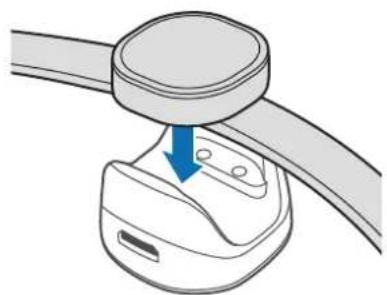
1 Iki cihazin sarj uclarini hizalayarak Samsung Charm'i sarj yudasina baglayin.
Telif hakki © 2016 Samsung Electronics
aalalalalalalalalalalalalalalalalalalalalalalal
.
J 1
.
JaaalabwIy IJIbIy
Jg 1
.


Samsung Charm
山

Samsung Charm Samsung Charm
山
Samsung Charm
#
Lbblzlll Jll lalb. yuubliizll CyljB Samsung Charm n 2y
Clylll Jbuii jn jkns ybjr jlr dllg ll tll bbl 1

.
Samsung Charm .
i 1
山
Samsung Charm Samsung Charm
Ji 100000000000000000000000000000000000000000000000000000000000000000000000

Samsung Charm 5

1 1
Samsung Charm

Samsung Charm

Samsung Charm
Samsung Charm
Samsung Charm
. 1
Samsung Charm jiey hiai iil llll
y

Joo

J. Samsung Charm 8
Samsung Charm
jai jie jai jie jie jie jie jie
JiaSsIie. Samsung Charm
Jg Jg jgs Jg Jg Samsung Charm
Samsung Charm yj j
Aii jbi xi
Samsung Charm Samsung Charm
.
y
J 1
n n nn nnnnnnnnnnnnnnnnnnnnnnnnnnnnnnnnnnnnnnnnnnnnnnnnnnnnnnnnnnnnnnnnnnnnnnnnnnnnnnnnnnnnnnnnnnnnnnnnnnnnnnnnnnnnnnnnn
J 11

gai gao
Samsung Charm
.S Health Charm by Samsung
Jooee S Health

S Health Samsung Charm S Health
4.6
J 1
J.
Samsung Charm 1
j 1 j
Samsung Charm
Charm by Samsung
1
Jie 1c biol
Samsung Charm
Samsung Charm Jss Samsung Charm 2
Samsung Charm
Charm by Samsung
Samsung Charm
piaiial
Samsung Charm
Charm by Samsung
Ailll lglal alglgclg jy gwsol s yj
(1)
a
i gwsalw aod jy jy J 1 1 y 1 k wll 13!
Samsung Charm
Samsung Charm
.(p1·)GJgSsJgJgJgJgJgJgJgJgJgJgJgJgJgJgJgJgJgJgJgJgJgJgJgJgJgJgJgJgJgJgJgJgJgJgJgJgJgJgJgJgJgJgJgJgJgJgJgJgJgJgJ
jwulw jy JnJ 100
dLgaaagagag
J 1
.(p))dJgS Samsung Charm n
Samsung Charm
Samsung Charm
Samsung Charm
Jiaiall jiei iaiiall aiibgaii
jglg jglg jglg jglg jglg jglg jglg jglg jglg jglg jglg jglg jglg jglg jglg jglg jglg jglg jglg jglg jglg jglg jglg jglg jglg jglg jglg jglg jglg jglg jglg jglg jglg jglg j
Samsung Charm s
.
g
i j 17
1
a 1
Jg Jg j 1 g j j j j j j j j j j j j j j j j j j j
i 1
y
.
Bluetooth SIG, Inc.
i 1
1 1 1 1 1 1 1 1 1 1 1 1 1 1 1 1 1 1 1 1
1g 1
.15
Samsung Charm jda
J 4.4 Jalee Sss
.(BLE 4.0 4.0
gai gai slai
j 1

j 1 j 1 1 1 1 1 1 1 1 1 1 1 1 1 1 1 1 1

Sui ciLbI y oiai siai

Samsung Charm
Samsung Charm 5.15 S 15
Jg
:du 1
Samsung Charm
iiS
()
i 1

.
jL jL jL jL oK 100000000000000000000000000000000000
.
.
j 1 j 1 j 1 j 1 j 1 j 1 j 1
Jil. 1 J 1 J 1 J 1 J 1 J 1 J 1 J 1 J 1
J 1
Jrnnn nn nnnn nn nnnn nn nnnn nn nnnn nn nnnn nn nnnn nn nnnn nn nnnn nn nnnn nn nnnn nn nnnn nn nnnn nn nnnn nn nnnn nn nnnn nn nnnn nn nnnn nn nnnn nn nnnn nn nnnn nn nnnn nn nnnn nn nnnn nn nnnn nn nnnn nn
Samsung Charm 2
S ACD = S COD + S_ CDA

Samsung Charm
Samsung Charm.
Samsung Charm 0
1
j 1 j 1 j 1 j 1 j 1 j 1 j 1 j 1 j 1 j 1 j 1 j 1 j 1 j 1 j 1 j 1 j 1 j 1 j 1 j 1 j 1 j 1
.
Samsung Charm y jy Jn
. 1

.

J 1 J 1 J 1 J 1 J 1 J 1 J 1 J 1 J 1 J 1 J 1 J 1 J 1 J 1 J 1 J 1 J 1 J 1 J 1 J 1 J 1 J 1 J 1 J 1 J 1 J 1 J 1 J 1 J 1
. 1


i
Samsung Charm
| العربية | |
| زيره مoserام · | زيره رزام |
| زيره مoserام · | زيره نزام |
| العربية بوراني · | العربية الحرفية |
| زيره نزام · | زيره پوراني |
Samsung Charm j 1 r j 2 j 3 j 4 j 5 j

S Health Charm by Samsung
. 4.6 S Health Samsung Charm S Health

Samsung Charm
Samsung Charm jj
.
Samsung Charm 1.
1 1
1,2,3 1,3,4
Samsung Charm 1r 1e 1 1 1 1 1 1 1 1 1 1 1 1 1 1
Charm by Samsung 00
1
1
P
Samsung Charm
Samsung Charm Samsung Charm
Samsung Charm
Samsung Charm 一 Charm by Samsung
.
JSLGLai
Samsung Charm j 1
Charm by Samsung
J 1 J
()
i
J 1
Samsung Charm
Samsung Charm -
J 1
a
.
Samsung Charm j. dai Siam
Samsung Charm
J 1
J 1
Samsung Charm
J 1
s
Copyright © 2016 Samsung Electronics
.
Samsung Electronics j 1j 0j 0j 0j 0j 0j 0j 0j 0j 0j 0j 0j 0j 0j 0j 0j 0j 0j 0j 0j 0j 0j 0j 0j 0j 0j 0j
J 14 j j j j j j j j j j j j j j j j j j
sJgsl
Samsung Electronics
Bluetooth SIG, Inc.
.
Haualo pa60tbl
1 Ha ekpahe npiloxeHn Bb6epnte nykT Charm by Samsung.
OboBte npiloxeHne Samsung Charm do nocJeHe Bercn (pnp Heo6xOIMocT).
2 BbI6epuTe npHKT IOKJIIOUHTbcRA K SAMSUNG CHARM.
3 BbIePHTe CBeT, KOTOpbIM 3aRopaeTcra CBeTOBoi INHnKaTOp Ha Samsung Charm, n BbIePeNTe nyHKT NOIDKJIIOUHTb.
4ДяЗавершенипоdkлоченя сдуteинстукцям Ha ekpahe.

Cnooc noKIOueHn MOKeT OTNuaTbca B 3aBcIMoCTn OT MObIbHOro yCTpoiCTBa IN Bepcn nporpaMMHO o6ecneHn.
- Ecni npo30weI c6oN noKlueyHn Bluteoth nSamsung Charm He naJeH, 3apAInTe Samsung Charm n nobTopuTe nonbItKy.
- Ecnn Samsung Charm He pa6oTaE, noKIOuHte erO K DOK-CTaHcN INI 3apAKn, UTO6bl 3apAINb erO. Samsung Charm 6yDet c6poWeH.
POBTOHoe POKJIIOUeHne yCTPOIcTB
Ecnn nodklouehne no Bluetooth 6ydt npepBaHO n3-3a 6oIbIoro paCCTOHNm MeJy uCTPOINCTBAMn, pa3MeCTte yCTpOInCTBa pIOM dpyr C dpYROM Ha HeKOToPoe BpeM. NOBTOHoe nOdkIIOueHne MeJy yCTpOInCTBAMn 6ydt UCTaHOBNeHO aBTOMaTnueCKn.
Ecnn nodkloueHne no Bluetooth 6ydt npepBaHO n3-3a c6oEB B pa6ote yctpoiCTBa, 3anyctnte npilooxeHne Samsung Charm n Bbl6epnte nyHKT NODKIQUHTb.
OTKIIUOHeHne yCTpoIcTB
3aynctnte npniloxeHne Samsung Charm n BbI6epnte nyHKT CBeHn o Samsung Charm Npkluoyenra. A NOTOM HaKMTe HeDaBHO NpKluoyehHoe yCTpoiCTBO Samsung Charm.
Icnojb30BaHne npiloxeHnA Samsung Charm
BVeDHeNne
C nomoou npnloxene Samsung Charm moxno npOBepntb coCTOHNue yctpoiCTBa Samsung Charm nHaCTpontb ero napameTpbI. 3aynCTte Galaxy Apps nn Play MapKeT, uTo6bl ero 3arpy3nTb.

IocTyHnOcTb HeKOTOpbIX yHKUIM 3aBVCNT OT TUNa NOkNIOeHHORo MObNbHOrO yCTpoiCTBa.
S Health
PpocMToKoJIueCTBa CdeJaHHbIX WaRO Nn3MepeHne npoiJeHHoro paCCTOHnI.
Ha 3KpaHe npuJoxeHm Mo6nIbHO rCTpoiCtBa Bbl6epnte NyHKT Charm by Samsung S Health.

- Дя Incрлбзовая заю сункции на мобиьом усточьdoхho 6byt b yctahobneho npiloxeHne S Health.
- Дя Incnoьбовпprinokжн S Health c nomоью prinokжн Samsung Charm Heo6xodmo Incnoьбовt S Health 4.6 Ии 6oee no3dneBepcnn.
- Ecni akkymyIaTops Samsung Charm pa3pIITcI, INHOpMaIgO6 oTcIeKuBaHIn KOJIueCTBa IarOB MoKeT He coXpaHrTCa H Ma M6UJbHOM yCtpoIcTBe. 3apIITe Samsung Charm, ecNI cBeTOBoi INDnKaTOp CBETTCa KpaCHbIM.
CoXpaHЯIOTc 3aIncuTolbKO 3a noCneIHnue 14 dHe. Ecln Samsung Charm nodkluoyen KMObIbHOMy yCTpoIcTBy 6Oee 14 dHe, nHΦopMauny o6 OTCLeKJBaHN KOnIueCTBa IaROB aBTOMaTNUeCKN ydaJIaERcTc 3a npEblDyUne dHI.
YBeDOMJIeHnIa
YnpaBHeHne npINOxKeHnMa Ha MO6NbHOM yCTpoiCTBe dIy OTnpaBKn yBeDomLeHn Ha yCTpoiCTBO Samsung Charm.
1 Ha ekpahe npinloxeHm MO6nIbHOro ycTpoiCTBa Bbl6epuTe nyHKr Charm by Samsung YBeDomJIeHra.
2 Kocnntecb nepeKIOUaTeJyTo6bl BKNIOHTb OYHKUIO OTnpabKn yBeOMneHn.
3 BbI6epnte npHKT N3MEHHTb.
4 YcTaHOBInTe fJiaKn pIaOM c npIIOXeHnAMy, OT KOToPbIX Heo6xOIMo nOlyuAtb yBeOMJIeHnA, N Bbl6epInTe nyHKT OK.
O Samsung Charm
PykoBODCTBO NOIb3OBaTeJia
O3HaKOMbTecb c pyKOBoCTBOM NOIb3OBaTeJIЯ dIЯ NOJIyUeHnI INHΦOpMauIN O6 NcNoIb3OBaHnI yCTpoiCTBa Samsung Charm.
Ha 3KpaHe npuOxHm MO6nIbHOro yCTpoiCTBa Bbl6epnte nyHKT Charm by Samsung PykoBODTBO nolb30BaTeIa.
Приложкени
YcTpaHHe NHeNoJaOK
Ipeed o6paueHnem B cepBnchb i ceHTp Samsung nonpo6yIe cIeDyOuIe cnocobI yCTpaHeHHa HeNoJaOK.
AkkymyIaTOp He 3apJxaeTc (pnp nCnoJIb3OBAHn Odo6peHHbIX 3apJIbIX yCTpoiCTB Samsung)
Y6eIITecb, yTO 3apAIDHOe ycTpoiCTBO NOkNIOyeH npaBnIbHo.
EcnHnNoJaKa He yCtpaHeHa, o6paTntecb B cepBnchbI ueHtp Samsung.
© Samsung Electronics, 2016.
Данhoe рукововсBO 3aшишно мждуharopним 3akohamn 6abTOpcknx npaBax.
3a nppeaetcB BOCpOuN3BOUHTb, paCnpocTpaHrTb, nepeBoUHTb IINI nepeDaBaTb KaKne-JI6o Yactn DaHHoro pyKOBOdCTBa B IIO6oF oOpMe I IIO6bIM CnOCo6OM, 3JeKTPoHbIM IINI MExaHueckm, BKJIouyA foTOkOuPiOBaHne, 3aNcB I XpaHEnE B IIO6oB CNCTeMe XpaHEnR I NOncKa INHΦopMaun, 6e3 npedBaPntbHO r NcBMeHOrO pa3peSeHnKOMpaHnn Samsung Electronics.
Tobaphe 3HaKn
SAMSUNG n Iorotn SAMSUNG yBJIOTc3apeRNCpnpOBaHHbIMN TOBaPbIMN 3HaKaMn KOMNaHm Samsung Electronics.
- Bluetooth®яваяетсаразгострпювным Товарьим 3нakомBluetooth SIG, Inc. BO BCEM Mnpe.
OCTaIbHbIe aBTOpCKn IpaBa n TOBapHbIe 3HaKn YBJIaOTc Co6CTBeHHOCtBu IN BlaJeIbIeB.
| ИнфОРМАЦЯ O ПОДУКТЕ ФиТhec-Т repeкр Samsung Smart Charm (El-AN920) ИСПОЛБ3уETСЯ ДЯя КОНТРОЛЯ ФИЗЧЕСКО АKTINВHOCТN | |
| ЕАС Данныnpodукт cootBETCT Byet trpe6obAnYam Тхнчесни рergamentов Таможен Horo coho3a. | Сtrпаи и Data npoIzhBoDcTBA уka3anaHa Na ynaKOBke npoduKta. Сcod rapaHTm coSctabPnEeT 12 mec7aeB c MOMeHt npno6peTeHry npoduKta. Сcod snjx6bI - 2 roDa. Ccod snjx6bI 3aBnCHT OT yCNoBm 3KcPnyatauHm. По Истechени npocA snjx6bI npoduKta ИЗТOTOBITeB peKOMeHdyeT образсенье в УнOLHOMOчEHь СерВиCSHь LcHTP дЯ npovBeDEHry прордактчеснх pa6ot и пolyeHry peKOMeHdaцm no daNBHeJшe Бezopachon 3KcPnyatauHm npoduKta. Тхнчесни xapakTepnCTrNK: 5V --- ;17mA |
| Имpopтетр: | OOO «Сamcyнг 3ЛeКТрОнIKС Рс Kompanи», 123242 РSCN, MockBa, Новинскney 6ульвар, 31. |
| Из�OTOBITeH: | Сamcyнг 3ЛeKТрОнIKС К. ЛтД., (MэТан-донг) 129, Camsyнг-р,ЕнTOH-ry, r. СуBOH, КEGHn-до, Pecnyблка Коря |
| Адрас завODВ: "Сamcyнг 3ЛeKТрОнIKС К., ЛтД", 94-1, ИмCo-ДоHr, ГUM-NiTи, КУнг-БaK, 39388, Pecnyблка Коря "Тянжин Camcyнг Телекom TexHOnOДЖи К., ЛтД", BeiBy PoaId, МнкоэЛeKТрОнIKС ИndactPmaIл Пар TEДA, КсИКВи ДИСТРИТ TянЖи 300385, КТаи "Сamcyнг 3ЛeKТрОнIKС Xynxoy K., ЛтД.", Yechkaanr TayH, Xynxoy, npobinuzma ГаHRdoHr, КТаи "Сamcyнг 3ЛeKТрОнIKС ВьETHam K., ЛтД.", РомышлENHьnpak IeHnXOHr Aï, IeHTpaHr Kombyoh, okpyr IeHnXOHr, ровиця БэКнIHx, ВьETHam | |
Початок роботи
OzhahomTece nepei noaTKOM BnKOpncTaHna
Дя 6e3neuHOro Ta HanexKHorO KOpNcTyBaHHЯ npnCTpoE m nepw 3a BCE yBaXHo O3HaJOMTeC8 3 cIM noci6Hnikom.
3OBHiiHnBnI BnrrnI npOdykTu MoKe BiDpi3HrTncB iD 3o6paXeHHa. Bmict MoKe 3miHIOBaTnC8e3 3aBuachoro nonepdXeHHa.
- Пара викорпостанham пистою Samsung Charm nepekohaTecra, до Вин symichni i3 Baшим пистоюm.
Samsung Charm cymichn i3 Mo6iNbHmN npncTpoMn 3 OC Android 4.4 ta 6iNbHOBmN Bepciamn, kni nItpmmyotb fynkciu Bluetooth 4.0 (Bluetooth Low Energy, BLE).
POncHIOBaJIbHi 3HaUKN

PonepeJxKeHn: cTyaui, lo MoKyb npu3BcTNo TpaBMyBaHHe6e a6o IHnx oci6

Ybara: cnTuayi, yo MoKyTB npn3Becn Do noNtKoJKeHHy npncTpo a6o iHoro 06naHaHHa

Pnmitka: npmitkn, npa3 KOpntyBaHH a6o doaTKOBA iHopmaia
Пpo Samsung Charm
Piknuyi Samsung Charm do Mobihoro npncpto. Pid yac HocHH npncpto Samsung Charm Ha Hbomy BmipcBcra KlbKicTB npoJeHx Kpokib, i Ha Hboro hdxOjaTb cnoBiueneHH BID Mobihoro npncpto.
KoMnpeKtaCi
IpebeipTe HABHICTb y KOMNNEKTI TAKNX KOMNOHEHTIB:
Samsung Charm
-OK-CTaHcIgIyIa3apJxehHH
-Бpacnet
KopoTkn noci6nK KopncTyBaHa

KOMnoHeHTn, rki BXoJaTb do KOMnIeKTy npNcTpoU, MoKyTb pi3HNTnc 3aJIexKHO bID KpaIHn a6o onepaTopa 3B'ra3ky.
KOMnoHeHTn, 1o nocTaauoTbcB KOMnIeKti, po3po6neHi cneuaIbHo Ira zboI npucTroTO Ta moKytb 6TyH HeCymicHMn 3 iHmIM npucTroPMN.
3OBHIHINBnIaXapAKTePNCIMOxyTb 3MIHOBaTnC8e33aBuachoro nonepeJxehn.
-ДоаТКОВIakceCyapnMoЖнaПриДбатиВmiceBOrOnoCTaayalbHnkaSamsung.Ipepeix PrinD6aHHmpepeKoHaTeCЯ,цOBHcymiHi3цIMprncTpoEM.
Bukopnctobyte Iiue akcecyapu, pekomehoBaHi KOMnaHIO Samsung. BkOpncTahHepeKomeHIOBAHnx akcecyapIB MOKe npn3BecTN Do BUNHKHeHHI np6Jem y po6oti Ta HecnpaBHOCTe, Ha kI He p03NOBCIOJxUcRraPHTi.
- Доступнистусяха akсесуаров може зminюватися заlexно вд компай-Bиробнков.
- Доступου винорmaцю по доступни akсесуаров можна дзатися на Be6-caитi Samsung.
3OBHiushiBvIgIaI npIcTpoI
Samsung Charm
Po3'EMnIJIa 3apJxKeHHN npNCtpoIO
KpinnneHHnI npueHaHHpeMH
Ipeed BnKOpncTaHnM npicToO Samsung Charm npEHaTe Do hboro 6pacIeT.
PobephiB Samsung Charm, 06 npkpinnt noo do 6paeta, kokaHa Ho 36paKeHnKue.
Bid'εdHaHn6pacneTa
Tpoxn noBepHt b Samsung Charm.
Hocinna 6pacneTa

He 36epiraTe npicpti Samsung Charm no6n3y marHITnx nolib. MarHITHi nOJ moKytb npn3BecrI Do nooKoJKeHHa KapTOK i3 MarHITHOIO CMyROIO, BKIOuaIOU KpeuHTHi Ta TeNeΦOHHi KapTu, 6aHKiBCbKi po3paxyHKOBi KHNKKu Ta nocaoUHt TaIoHn.
He BnHnHaTe Ta He cKpyuYte 6paCneT 3aHaTo CnIbHO.
He TnchItb Ha npucptpii Samsung Charm 3aHaTc nIbHo.
He 3aTayIte 6paCneT 3aHaTcO cnIbHo.
BidkpniTe 3acti6ky Ta oJarHITb 6paCnT ha 3an'ЯCTra. 3aKcyIte 6paCnT HabKOIO 3an'ЯCTra, BCTaBTe TpImauy CneiaJIbHNI OTBip DnA peryIIOBaHnI i 3akpiTe 3acti6ky, 0o6 ii 3acte6HyTu.
3apяДжЕнЯ akymулЯTopa
Ipeed nepshm BnKOpncTaHnMa npioctpoS Samsung Charm, a taKoJkso npicptiH He BnKOpncTOBvBaCra npOTaROM TpNbAlorO yacy, notpi6Ho 3apdntn aKymyIaTOp.

BnKopncTobuIte Iiue 3apAHi npicTroi ta Ka6eni, peKomeHdoBaHi kOmnaHieSamsung. BnKopncTahNHepeKomeHDoBaHnx 3apAHHx npicTroiv a6o Ka6eJIb MoKe npn3BeCTn do Bn6yxy Akymylatopa nn NowkoJkeHHa npicTroio Samsung Charm.

3a haBhoCTi nepeKoM mix Samsung Charm ta doK-ctanciio dna 3apJxehnra Samsung Charm moKe 3apJxatncn HeHaJIeXHm YInHom. BepeXitb Samsung Charm i doK-ctanciio dna 3apJxehnra BiD noty, BOnorTa nIuLy.
3aJra 3ao6irHnKopo3i He donyckaTe KOHTaTy po3'EMIB nIy 3apJxHn 3 npoBIDHMMaTePiaIam. JkToT KOnTAKT cTaHeTbC, npOTpItb PO3'EMM'M'aKOIO cyXOIO TKAHNHO.

JaKuo akymyIaTOp nobHicTIO po3pRJKeHn, Ira yBIMKHeHHa Samsung Charm nicna nnKIOueHHa 3apAHO npICrpoIO 3HaO6bTbc nEBHn Yac. Nepw HIX BMNKaTI npIcTpii Samsung Charm, 3aueKaIte DeKInbKa XBINIH, DOKn akymyIaTOp TPOXn 3apAINTbcra.
- RaKsqo Samsung Charm He BnKOpNCTOByBaBcR npotrrom TpNbAioro yacy, qac po60tn BiD akymylTopa MoKe CKOpOTnTscR. 3apJxKaIte Samsung Charm xOua 6 oOnn pa3 Ha TIXKDeHb.
1Пдкючы Samsung Charmdo DOK-CTaHcii DnA 3apxKeHH,3'EDHaBnPo3'EMn DnA 3apxKeHHaX DBOX npncTroIB.
2 Pniklouitb doK-ctanio dna 3apJxehnno 3apJHoro npncpoio, a noro iHnn KHeub nID'edHaTe do eNeKTpuHoi p0eTKn.
Пд уас зарджени CBITNOВи iHДИКaTOp 6bIMMaTmE uePBOHm. Пicя NOBHOi 3apdKu CBITNOBи iHДИKaTOp 3aRopNTbcr 3eJIeHm.

HenpaBnIbHe niklueyHn 3apdHoro npncToIO MoKe npn3BeCTn Do cepno3HOro
NoKoJxehnA Samsung Charm. IapaHTi He nouPiOeTbcra Na noKoJxehnA npncToIO,
cnpuHHe HnpaBnIbHM BkOpNCtAHm.

3apnHe BxOaTb B KOMnIeKT NocTabKn.
-Пд уас заряжени писди Samsung Charm може HARpiaTися.ЧeHopmaльно� He BnINBa€ Ha noro po6otу n TepmiH cnjx6n.Якso akymyIaTOp HARpiBa€TbcS CuNbHiSe HIX 3BNUaHOb,Заряжени 3a DonomoroIOЗаряdHOrO писрIo може пиHHHTuC.
Samsung Charm He moxha niklountn do mobihoro npuctroo ndac noro 3apjkeHH. Picna nobHoro 3apjkeHH bID'edHaite Samsung Charm Bid dok-ctanii dny 3apjkeHH, a notim cnp6yute niklouHTn noo do mobihoro npuctroo.
- Ykso npoшno oDnA abO dBa dHi nicna nobHoro 3apJxKeHHa Samsung Charm, akymyIaTOp Moke 6byu po3pJxKeHn.
- Ykso Samsung Charm He 3apraJkaetbca HaneXHm YINHom, BiHeciTb Ioro Ta 3apaHn npicrpii do cepBicHoro ueHTpy Samsung.
3Пия noBHOrO 3apJxHnCnoaTky Bi'EDHaIe 3apAHN npicTpBi DOK-CTAHJI dny 3apJxHnA, a notIM - BiD eNEKtpuHoi p0eTKN.

Для 3аоцаджehня eilektpoeheprii Bi'd'EDHyIte 3apraHn npictpi, kkuo npictpi He BVKOPNCOTOBYETbcr. JaKUO Ha 3apraHOMy npictpoi Hemae KHOKN JKNBLeHH, Ioro cniD BInMaTn 3 elektpruHoi po3eTK, KOJI BIn HE BVKOPNCOTOBYETbcr, dJa 3aOuadJxehnre alektpoeheprii. Pid Yac 3apraJxehnra 3apraHn npictpi Mae uiNbHo npinlaRaTn Do rHi3da Ta 6ytN IerKO DOCTyHnM..
HaekpaHnporpam HATncHiTb Charm by Samsung.
3a Heo6xidnocti OHOBiTb nporpamy Samsung Charm do octaHHboi Bepci.
2 HaTnCHiTb PIIKJIIOUHTNCr DO SAMSUNG CHARM.
3 Bn6epitb konip, kIM Cbitntbcra cbitnoBni iHdkaTOp Ha Samsung Charmi TopKHTbcn IIDKNIOHTN.
4 4

Cnoci6 niknueHn moKe pi3HNTcB 3aIeXHocTi BiD MobInbHoro npucToio i Bepci nporpamHoro 3a6e3neuHn.
- Ykso Tpansbca 36i niknueHnbluetooth a6o Samsung Charm He 3naJeHo, 3apdItb Samsung Charm i cnpo6yute ue pa3.
- Ykso Samsung Charm He npaioe, niknouitb noo do oK-ctanii dna 3apjxehn, 06 noo 3apndtn. Samsung Charm 6ynde nepezanyucho.
POBTOPHe nIDKJIIOUeHnI npICrpoIB
Y pa3i nepepmbaHHn iiklueyn Bluteoth uee3 3abEnky BiDcTaHb mix npictpoamn po3auyte ix Heoanik OINn BiD oHoro Ha neBn yac. Nobtophe iikluoyehn mix npictpoamn 6yde BCTaHOBJEHO aBTOMaTNUHO.
Y pa3i nepepuaHnna iKluueHHa Bluetooth uee3 HecnpaBnicb npncpoo 3anyctitb nporpaMy Samsung Charm i HaTusChItb NIKLIOHTN.
BidknoueHH npncTroob
3anyctitb nporpamy Samsung Charm i HatauChiTb Inphiopmaiz npo Samsung Charm PiknoueHHA Notim TopKHiTbcra niknueHoro hapa3i npucTroo Samsung Charm.
Ha ekpahi nporpaM MO6IbHoro npicToHO HaTnCHiTb Charm by Samsung S Health.

- Дя викорпостанна усій суньшу мобільно рпострій ма\'е 6утв bctановлени поportamy S Health.
- Дя викорпстань поррами S Health за дономою поррами Samsung Charmnotpiбно matи S Health bercii 4.6 abo вицоi.
- RaKuo akymyIaTOp Samsung Charm po3pIxKeHn, iNΦopMaizu Ioo BoiDCTeXeHHa KpokB MoKe He 36epiratnc Ha Mo6IbHomy npicTpoi. 3apRITb Samsung Charm, RaKuo cBtIOBn iHdNKaTOp Cbitntbcr YepBOHm.
36epiraotbca liwe 3a nncn 3a ocTahHi 14 dhib. JaKuo Samsung Charm niikloueHo do Mo6ilbHoro npictpoio 6iNbwe 14 dhib, abTomatuHNO BuaJraetbcra iHopMauciaI zoDo BiDCTexeHHa Kpokiv 3a camn paHHi Dehb.
CnoBizhen
KepybaHHa nporpaamHa MoibHomy npicptoi dna haCnHn cnoBieh Ha npicpti Samsung Charm.
Ha ekpaHI nporpaM MO6IbHoro npnCTpoHO HaTnCHiTb Charm by Samsung CnoBIeHHa.
2 HataHcHtB nepemkauch, 6b yBIMKHyTn 4yHKciu HaDCnnaHHcNobiueh.
3 HaTnCHiTb 3MIHHTN.
4 Bn6epitb nporpaMn, Bi d knx noTpi6Ho OTpmyBaTu cnoBiuueHnaHTncihtb IOTOBO.
Пpo Samsung Charm
IpeerJiaiHphiOpMaui npo Bepciu nporpaMn Samsung Charm i cTaN iKluueHH npucTroo Samsung Charm. TakoX MoJHa OHOBHTn nporpaMHe 3a6e3neueHH Samsung Charm.
Ha ekpahi nporpaam MobilbHoro npictpoHaTnCHiB Charm by Samsung Infopmaia npo Samsung Charm.
Посicontкорисьа
Ioo6 oTpImaTu nHOpMaIIO npo BnKOpNCTaHH npuCtpoS Samsung Charm, 03NaHOMTeca 3 Noci6HnKOM KOpNCTyBaHa.
Ha ekpaHI nporpaM MO6IbHoro npucToIO HaTnCHiTb Charm by Samsung Noci6Hk KopncTyBaA.
Додатук
YcyneHnHeNoJaDOK
Nepw Hix 3BepHyTnca Do cepBicHOro ceHTpy Samsung, cnpo6yTe cKOpNCaTnca TaKIMn piWeHHaMn.
AkymyIaTOp He 3apJkaeTbCS HaJeXHm YInHom (dJa 3apJdHx npIcTpoiB, peKOMeHDoBaHnx KOMnaiEio Samsung)
IpekeKaHntec, 30 3apAHHn npucpii nikKluOeHO HaJIeXHM YINOM.
Ykuo npo6nemy He Bdaetbca ycyhTu, 3BepHiTbc4 do cepBicHoro ueHTpy Samsung.
Iиший писстрий Bluetooth He може знайтс Samsung Charm
- Повсглардп Samsung Charm i cnpo6yute BCTaHOBUTn iKluoyenHa pa3.
-ipekeonaiTeCra,io Samsung Charm ta iHn nn pncpti Bluteoth nepe6ybaotb B mexax paiciydy 3'edHaHHa Bluetooth (10 m).
Якwo nicra Викованн haBedeHnx Bnue di npo6nema He 3HnKae, 3BepHITbca do cepBicHO rHTpy Samsung.
Samsung Electronics, 2016
IeHn6HK KOpNCTyBaHa 3axuueHO 3rJIO 3 MIXHapOHNM 3aKOHAMN 0do ABTOPCbKNX npab.
3a6opoheno biTbopouBaTu, po3noBcOJkyBaTu, nepeKnaIaTu a6o nepeJaBaTu B 6ydb-akii fOpMi a6o 6yb-kaIMN 3ac06aMn, eJeKTpoHHmN a6o MexaHicNHmN, BKIOUHO i3 KcepOKoiOBaHHam,
3aHcCyBaHHaM a6o 36epirAHnMa Ha 6ydb-akomy npncTrooi dIra 36epiraHHaDaHx uB iHOpMaiziHo- noUykoBii cIcTeMi, KODHy qacTInHy cboRo noci6Hnka 6e3 nonepedhboro rncbMOBoro do3BOny KomnaHii Samsung Electronics.
Tobaphi 3HaKn
- SAMSUNG i norotin SAMSUNG € 3apeectrobaHIMN TOBAPHIMN 3HaKaAMN KOMNaHII Samsung Electronics.
- Bluetooth® € 3apeεctpoBaHIM TOBAPHIM 3HaKOM KOMNaHII Bluetooth SIG, Inc. Bycby My cBiTI.
- Yci iHsi TOBapHi 3HaKn i ABTOPcbKi npaba HaLeXkaTb BiIDIOiDNHM BlaacHnKaM.
Kmbictbi 6actay
KymbICTbi 6actamac 6ypbIH OKbIHbl3
Kayinci3 api dypbic naaalaany yuih kypblfblbI naaalaH6ac 6ypbIH ocbI HcckayltbIKtbi OKbin WblfbIHbI3.
CypETepiH cbIptKbl Typi HaKTbI eHimHeh epeKweJeHyi MymKiH. Ma3Myn aIdbH aJa eckepTyci3 03reptinyi MymKiH.
Samsung Charm KypbIfbcIH naJaHaHydbIH aJdbIHda, OHbIH KypbIfblHbI36eH yJleCIMdi eKeHH TeKcepHiz3.
Samsung Charm KypbIfbcbl, Bluetooth 4.0 (Bluetooth Low Energy, BLE) yHKcuncaHa KoJday KepceTeiH,Android 4.4 HeMece oAn da Jxofapbl onepaunlaik xyneim Hen backapblatbH MO6nIbdi KypblfblapmeH yInecimDi.
Hycayb6eIriwelep

Eckepy: 3iH3diH HeMece 6aKaIapDbIH XapaKaI aIybiHa eKeIyI yMkIH KaFdaIap

A6aIHaB3: KypbIJIbIHbI HeMece 6aca Xa6dbIKTbI 3aKbIMdaybl MyMKiH KaFdaJnap

Eckepim: eckepTylep, naDalaHy TpyaJIb KeHeCTep Hemece KocbIMsa aKnapaT
Samsung Charm KypbIaIbICbI TypaJIbI
YaIbI KypblfblFa Samsung Charm KypblfbcIn Kocblb3. Samsung Charm KypblfbcIn TaKaHda, OJ TycipilreH Kaamdap caHbH eceTei JxHe ci3in YraIbI KypblfblHbI3daH xa6aplaMaIapdbI Ka6bldaIbI.
Opama Kypambl
KypblfblbIHcblpTKbl KepiHici
Samsung Charm KypbIfbcbl
3apayTepMaHaJaIapbi
Bay6ekitkiwihwkeTteriwi
3apraTay cHaHcIaCbI
3apraTafbiNnptbi
3apTay TepMNHaIapBb
Bay
BaydBi 6ekity
Samsung Charm KypbIfbcIH KOJaHydbIH aIbIHda, oFaH 6aydbI 6eKiTiHi3.
Samsung Charm KypbIbIbIcBIn TemeHderi cypeTte KepceTilreHdei 6ayfa 6eKity ywiH, KypbIbIbIHbI 6ypbIbI3.
Baydbla aKbipaty
Samsung Charm Kypbblfbcih cai 6ypaHbi3.
Baydby Ta-Fy

Samsung Charm KypbIbIbICbIH MarHNTTI epictep XaHbIHda caKaTaMaHbI3. MarHNTI KOJaKTBi KapTalap, OHbIH iwiHde Hecne KapTalapbl, Telefoh KapTalapbl, bAnK ecenaiBipcy KITanWacbl XaHe KOHy TaIOHbIMarHNTTI epictep acepineH 3aKbIMdAlybl MymKiH.
BaydbI WamadaH TbIC 6yKneH3 Hemece 6ypamaHb3.
Samsung Charm KypbIbIcBiHa WaMaDaH TbIC Kyw CaImaHbI3.
BaydbI WamadaH TbIC TAPTNaHbI3.
CbIbIpMa iIreKti axbipatbIHb3 xHe 6aydbi 6IreKtiH aHaJacbHa KoBihb3. Baydbi 6ileriH3diH actbHa KeJItipHi3, e3eKti peTey TeciriHc bIbI3 xHe cbIbIpMa iReKti ceHIMdi Typde 6ekitHi3.
Батуарегны заютay
Samsung Charm Kypblfbcih 6ipiHwi pet naHaIaHy aIbIHHa Hemece Samsung Charm Kypblfbcbl y3aK yaKbl 6Obl naHaIaHbIMaca, 6atapeHbI 3apAdTaHbI3.

Tek Samsung 6ekitkeh 3apraTafblTapdbj XaHe Ka6eIbepdi naJaHaHbIbI3.
Bekitimereh 3apraTafblTap HeMece Ka6eJIbep 6atapeyHbIH, XapblIybiHa Hemece
Samsung Charm KypblfblcblH, 3akblMaJybiHa aKeJIyIMyMkiH.

- Erep Samsung Charm KypbIbIcBi MeH 3apAaTay cTaHcNcBbIH apacBHa KaHda Ja 6ip Keepri 6oJca, Samsung Charm KypbIbIcBi Tnicti TypDe 3apAaTalMaybIMyMKiH. Samsung Charm KypbIbIcBi MeH 3apAaTay cTaHcNcBbHa TepDi, cybIKbIKTapDbI Hemece WaHdbI Tnir36eHiz.
3apTay TepMNHaIaPbIH oTKi3riu MaTePnAldapFa Tnir36eHiz, ce6eBi TepMNHaIaP ToTTaBn KeTy i MyMkiH. Erep 6yHdaJ XaFdaJ opbH aJca, TepMNHaIaPdbI Kypfak api KymCaK MaTaMeH cyptiHiz.

Erep 6atapea 3apraTbTOIbIFbIMeH Taycblnca, 3apraTafbltbl XaIfaraHHan KeiH Samsung Charm Kypblfbcih 6ipdeH Kocyfa 6oJMaH. Samsung Charm Kypblfbcih KocyaH 6ypbH Taycblnfah 6atapeaHbH, 6ipheWe MNHyT 3apraTalbyHa MymKinhik 6epiniz.
Erep Samsung Charm KypbIbIcBi y3aK yaKbiT iwiHne naJaIaHa6aca, KeiH 6atapea3aBbIn KaJIybl MymKiH. Samsung Charm KypbIbIcBiH KEM dereHde 6ip anTaIa 6ip pet 3apAITaHbI3.
1 Eki KypbIbIbIH 3apTay TepMHaIaPbIH TypaJIay apKbIbI 3apTay CtaHcIcBHa Samsung Charm KypbIbICbIH KocBbIbI.
2 3apraTay cTaHcIaBH 3apraTbIaKa KocbiHbI3 XHe 3apraTafbltBIn eKihwi yuBH pO3eTKaFa KocbiHbI3.
HnDnKaTOp 3apraTaIbIn XaTKaHda Kbl3bl TycneH XblnbIKTaIbI. Kypblfbl TOIbIFMeH 3apraTaIbFaHda, HnDnKaTOp 3aMbI Xacbl Tycne H XblnbIKTaIbI.

3apraTafblbI dypbic xanfamay Samsung Charm KypblfbcbiH KaTbI 3aKbIMdaByi Mymki. Dypbc naDanaH6ay tydbipfaH eW6ip 3akBIMdbI KeiJaik KaMTbImaDbI.

3apraTaftap6eKcatblaBl.
3apay KeiHde, Samsung Charm KypbIbIcBi Kbi3bIn KeTyi MymKiH. ByI KaIbIbI JkaFdai XaHe Samsung Charm KypbIbIcBiHbIH, Kbi3MeT Mep3iMe He Hemece OHiMdiirHe acep etneyi Tnic. Erep 6atapea AeTTeridEn bICTbIfbpak 6oJca, 3apraTaftu 3aprTaaydtTOKtaTybl MymKiH.
Samsung Charm KypbIbIcbl 3apraTalbIn XaTKaHda MO6nJIbDi KypblfblFa Kocblna aImaIdbI. Samsung Charm KypbIbIcbl TOJIbIFbIMeH 3apraTalbIn 6OJFaHHaH COH, OHbl 3apraTay cTaHcIIraHaHa aKbIpTaBbI3, CoaH KeiH, OHbl MO6nJIbDi KypblfblFa Kocbln KepiHiz.
- Erep Samsung Charm Курьлфысbl Толык Зарадталfaxнан KeiH 6aTapeMeH 6ip Hemece ekI KYNЖмblc icTece,ДeMek 6aTaperЯ Kbl3MeTIH,Мep3imi 6itKeHi.
Samsung Charm KypbIITbICbl dypbc 3apraTalmaJxatca, Samsung Charm KypbIITbICbl MeH 3apraTafbltbl Samsung cepBnC optaIbIFHa anapbIHbI3.
3 ToIbIbIMeH 3apraTafAHHeH KeiH, aIdbIMeH 3apraTafbltbl 3aprTay cTaHcIcBHaH axbipatblb13, codah KeiH 3JIeKtp po3etKa YcblHaH axbipaTbIHb13.

KyaattbI yHemdey ysiH naJaalaHaBMaHaN Ke3e 3apraTafbltBjKeJIiDeH axkbipTaBHbI3. 3apraTafbltBIn KyaT KCKblbXoK, COHbIKTaH KyaTbI bICbpantaybI 6OJbIpMay ywiH naJaalaHaFAn Ke3e 3apraTafblTbI 3JeKTp po3eTKa YcBiHa AxbipAty Kepek. 3apraTay keiHde 3apraTafbls 3JeKTp po3eTKa YcBiHa XaKbIH XaHe OHaon KOJ XeTimdi 6OlybI kepek.
HndnkaTop 7aMbIbIn xa6apnaHdbIpyapbl
IHHdkatop 1aMbci3re Samsung Charm KypbIbIcBiHbIn Kyi Typalbi xa6apnaIdbI.
Baça Ka KypbIbnfblapfa KaIay
Samsung Charm KypbIbIcBih Mo6nIbDi KypbIbIbIfa Kocy ywiH, Mo6nIbDi KypbIbIbIfa Samsung Charm KoJaHa6acBih opHaTbIHbI3. Ohbl JxKTey ywiH Galaxy Apps Hemece Play Store icKe KOCbIHbI3.
Mo6nIbdi Kypblnfbl
1 KoJaHa6aJap 3KpaHbIHda Charm by Samsung OIcuaCbH TyptiHi3.
Kaxet 6oIca, Samsung Charm KoiJaH6acbIH COHfbl HcCKaFa DeiH XaHaPbHbI3.
2 SAMSUNG CHARM KYPbIJIfBiCbiHA KOCY ONUcBIn TyptiH3.
3 Samsung Charm KypbIrfbcIHbIH INHdNKaTOP WAMbIHda XaHraH KOCy TyciH TaHaHbI3.
4 KaIayaay ywiH 3KpaHaftbHyCKayapOpbHdaHbI.

KocbIy TcicIepi ci3di MO6nIbDi KypblfbiHbI3fa XaHepaJaMaIbIK XacaKaTamaHbIH HycckacbHa 6aJIaHbICTbI e3repin Typybl MymKiH.
- Erep Bluetooth KocblmbiH opHaTy MymKIn 6oImaca Hemece Samsung Charm KypblfbcI Ta6blmaca, Samsung Charm KypblfbcIH 3apAaTan, apeKeTTi KaYtaHaB13.
Samsung Charm KypbIfbcI XyMbIC icTeMeCe, OHbl 3apAaTay cTaHcNcBHa XaIFaHbI3 XHe 3apAaTaHbI. Samsung Charm KypbIfbcI 6acTanKbI Kyre KeJItipiJeI.
Kypblfblapda KaTakocy
Erep Bluetooth Kocblmbi KypblfblapdbiH apacbIHdafbi KaWbIKTBk ce6e6iHeH y3iIce, Kypblfblapdbi 6ipa3 yaKbit 6oBbl 6ip-6ipiHe XaKaBHdaTbHb3. Kypblfblap aBTOMaTTbI TypDe KaTa Kocblala.
Erep Bluetooth Kocblmbi KypblfbiHbIH aKaylbIbIH 6aJIaHbICTbI y3iJce, Samsung Charm KojdaH6acBH icKe Kocblb3 XHe KOCY ONUcBih TyptiH3.
KypblfblnapaXkbipaTy
Samsung Charm KoJaH6acbH icKe KocbHb3 XaHe Samsung Charm typaB KocblbIMap TapMaftbH TytiH3. CodaH Kein H ocbl cTte KocblbIn TypFaH Samsung Charm KypbIrfbcH TyptHi3.
Samsung Charm kOlaH6acbIn KoIaHy
Kipicne
Samsung Charm KojdaH6acbHbIH, Kemerimeh Samsung Charm KypbIbIcblH, KyiH Tekcepyre Hemece OHbIH napameTpIepin KyJeyre 6oJaB. Ohbl JyKtey ywiH Galaxy Apps Hemece Play Store icke Kocblb3.

Kei6ip MymkiHdiKTepe Kocblfah KypbIbIbIH TnPiHe 6aJIaHbICTbl KOJ XeTIMdi 6oJMaybl MymkiH.
S Health
Xypin eTKen Kaam caHaH Kapan TypbIHb3 XeHe Kypin eTKeH KaWbIKTBkTB1 EJIWeH3.
Mo6nJIbI KypblfblHbIH KOJaHa6aIap 3KpaHbIHDa Charm by Samsung S Health TapMaftbIH TpyTHi3.

OcbI cyHKunHbI KOJaHy ywiH Mo6nJIbDi KypblfbiDa S Health KoJaHa6acbl opHaTbIybl Tnic.
S Health KojdaH6acbI MeH Samsung Charm KojdaH6acbIH KOJaHy ywiH S Health KojdaH6acbIHbH 4.6 HeMece OaH da XoFapbl HyckalapbH KOJaHy KepeK.
Samsung Charm KypbIbIcBi 6aTapeBcHbIH 3apAdbI TEmeH 6oJCa, KaamdApdbI 6aikay TypaJIbI aKnapaTTb CI3diH Mo6nJIbDi KypbIbIFbIHbI3da CaKtay MyMKiH 6oImaNDbI. INndkaTop WAmBI Kbi3bl 6OJIbIN XaHaFaHda Samsung Charm KypbIbIFbcIH 3apAHTaHbI3.
Tek coHfbl 14 kyn iwiHderi ka36bIap fana caKtaIaDbI. Samsung Charm KypblfbcIH e3iHizIH MO6nIbdi KypblfbiHbI3fa Kocylb I Kynde 14 KYNHeH apTbIK yakbl 6oNbl KOJaHcAHbI3, KaamdapdbI baKayTypalbI aKnapaTe H ecki KYNHeH bactan oWipJIeTIH 6oJabl.
Xa6aplaHdbipyIap
Samsung Charm Kypblfblbixfa xa6aplaHdbipynapdbi xibepy ywiH Mo6nIbdi KypblfbldafbkoldaH6aIapdbi 6ackapblb3.
1 Mo6nJIbdi KypblIbHbIH KOJaHa6aIap 3KpaHbIHDa Charm by Samsung Xa6aplaHdbIpyIap TapMaftbH TyptiH3.
2 Xa6aplaHdbipynap yHKunraCbIH Kocy ywiH Kockbltby TytHi3.
3 ΘHdEy onuycbH TyptiHi3.
4 Xa6apIaHbIpyIap aIbIbI3 KeJIeTIH KoJaHa6aIapIbI 6eJIJIeHI3 JHeA. OnuIcBIn TypTHi3.
Samsung Charm KypbIJIbICbI TypaJIbI
Samsung Charm KypbIbIcblHn HycKaCbI TypaIbI aKnapaTbI XaHe Samsung Charm KypbIbIbI3dbIH Kyi TypaIbI aKnapaTbI kapaHbI3. Samsung Charm 6aFdaplaMaIbIK XacaKaTaMaCbIH XaHaPtyFa da 6oJaBl.
Mónbái KúpbífátbIH, KoIdaHbánap éKpaHbIHDA Charm by Samsung → Samsung Charm TypaIbI TapMaftbIH TypTiHi3.
PaindaIahymbi HycKaybifbl
Samsung Charm KypbIfBbIB3db Kaaln KoJaHy KepeKTIi TypaIbI 6iny uin naJaHaHyu bI HcayIbIFbIH KapaHbI3.
Mo6nJIbdi KypblfblH, KOJaHa6aIap 3KpaHbHda Charm by Samsung PaJaAaHysbI HcaylbHbI TapMaftbIH TpyTHi3.
KocbIMwa
AkaayIbIKTapdbI JKOHO
Samsung cepBnC opTaIbIbHa xa6apIacnaT TypbIn, KeIeCi weSiIMdePdi KoJaIbHbN KepiH3.
Баразец дурбic зараздалмайды (Samsung 6ekitken Зраздтafыштap ушин)
3apraTafbIHTbIH Dypbc Kocblbn TypfaHbHa Ke3 XeTKi3iHi3.
ErepakaybIK aJI de ueiIme Xatca, Samsung cepBnc opTaIbIFbHa xa6aplaCbIb3.
БаckaBluetooth Курьлфысbl Samsung Charm Курьлфысblн Та6a онлайн
Samsung Charm KypbIbIbIcBih TOIbIfbIMe3apAaTahbI3 da, TaBbI da KocblbIN KePiH3.
Samsung Charm KypbIfbcI MeH ekHsi Bluetooth KypbIfbcI Bluetooth Kocblm ayKbImbIHn (10 M) iwiHne ekeHHe K3 XeTki3iH3.
Erep xofapbidaftkehectep akayltbIwewyre kEmekTecnece, Samsung cepBnc opTaIbIfbHa xa6aplaCbIHb3.
Bluetooth kocbIbIMbi XniaXkbIpaTbIaIbI
Erep KpybIbnap apacbHda Keepriinep 6oJca, Kymblc KaBbIKbIFbTMeHDeyi MymKiH.
Samsung Charm KypbIbIcbl MeH eKINwi Bluetooth KypbIbIcbl eH yIKeH Bluetooth ayKbIMbIHn WEn6epiHde (10 M) eKeHHe K3 XeTKi3iH3.
Samsung Charm KypbIbIc6a Ka Bluetooth KypblIbIapbIme6ipre naHaHaHaKaOcbIbIMfa 3JIeKTPOMarHHTIK TOIkbIHap acep eTy i MyMkiH. Samsung Charm KypblIbICbIHa3bpak CbIMCbI3 KypblIbIap 6ap opTalapda naJaHaHbIHbI3.
Samsung Charm KypbIfbcI HycKaaylbIKTa CnPaTTaJFaHHaH 6ackaHa JyMbic iTeiDi
KoJ KetimDi fuyHKuJaIap Kocblfah Kypblffa 6aJIaHbICTbl e3repIN OTbIPybl MymKiH.
Батуарегнын, Куаты, сатын щал-fаннан KeиIHri стKE кара-fанда Te3Тayсылады
- Erep Samsung Charm Курьлфысьин Немесяатaperяfa оTe Тмен Немеся оTe кOFapbl Temперatype осер eTce, падалы зард КбICКаруbl MYMKIN.
- BaTape rTo3aIbI XaHe naiDaJIbI 3aprA yakblrTe KeJe KbICkapa 6epei.
ABTOPJIbIK KyKbIK
Copyright © 2016 Samsung Electronics
Bny Hcyckaylbik XaIbIKapaIbIK aBTOPbIK KyKbIKTap TpyaJIb 3aHapMeH Kopfalfan.
Samsung Electronics KOMnHaHcBbIH aIbIH aIa Xa36aHa pyKCaTbIHcB13, 6yI HycKaYbIKbIH e6ip 6eJIirH Ke3 KeIReH TypDe Hemece Ke3 KeIReH aDic, 3JeKTPOHdbIK Hemece MExAHNkaIBK, coBH iWiHde, fOToKeWipy, Xa3y Hemece Ke3 KeIReH aKnapaTbIK KOImada XHe IbIFapbIn aIy JxueCInDe caTay apKbIbI KeWipyre, TapaTyfA, aydapyfA Hemece TaCbIMaJdAyfA 6oImaNdbI.
Cayda 6eIrilepi
SAMSUNG XaHe SAMSUNG Iorotnpi — Samsung Electronics KOMnaHnrcbHbH, tipKeJreH cayda 6eIrIepi.
- Bluetooth® — Bluetooth SIG kopnpauncaibHbH anemderi tipkeJreH cayda 6eIrci.
- BapIbIK 6aKa cayda 6eIriepi XaHe aBTOpIbIK KYKbIKTap caikec nelepiH, MeHwiRi 6oJIbIN Ta6blAdbI.
Getting started
Read me first
Please read this manual before using the device to ensure safe and proper use.
- Images may differ in appearance from the actual product. Content is subject to change without prior notice.
- Before using the Samsung Charm, make sure it is compatible with your device.
- The Samsung Charm is compatible with mobile devices running Android 4.4 or higher that support the Bluetooth 4.0 (Bluetooth Low Energy, BLE) feature.
Instructional icons

Warning: situations that could cause injury to yourself or others

Caution: situations that could cause damage to your device or other equipment

Notice: notes, usage tips, or additional information
About the Samsung Charm
Connect your Samsung Charm to a mobile device. When you wear the Samsung Charm, it counts the number of steps you have taken, and receives notifications from your mobile device.
Package contents
Check the product box for the following items:
Samsung Charm
- Charging dock
- Strap
- Quick start guide

- The items supplied with the device and any available accessories may vary depending on the region or service provider.
- The supplied items are designed only for this device and may not be compatible with other devices.
- Appearances and specifications are subject to change without prior notice.
- You can purchase additional accessories from your local Samsung retailer. Make sure they are compatible with the device before purchase.
- Use only Samsung-approved accessories. Using unapproved accessories may cause the performance problems and malfunctions that are not covered by the warranty.
- Availability of all accessories is subject to change depending entirely on manufacturing companies. For more information about available accessories, refer to the Samsung website.
Device layout
Samsung Charm
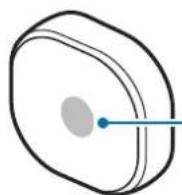
Indicator light
Charging terminals
Strap attachment stopper
Charging dock
Charger port
Charging terminals
Strap
Attaching the strap
Before using the Samsung Charm, attach the strap to it.
Rotate the Samsung Charm to fix it to the strap as shown in the image below.
Detaching the strap
Rotate the Samsung Charm slightly.
Wearing the strap

- Do not store your Samsung Charm near magnetic fields. Magnetic stripe cards, including credit cards, phone cards, passbooks, and boarding passes, may be damaged by magnetic fields.
- Do not bend or twist the strap excessively.
- Do not apply excessive pressure to the Samsung Charm.
- Do not pull on the strap excessively.
Open the buckle and place the strap around your wrist. Fit the strap to your wrist, insert the pin into an adjustment hole, and then secure the buckle to close it.
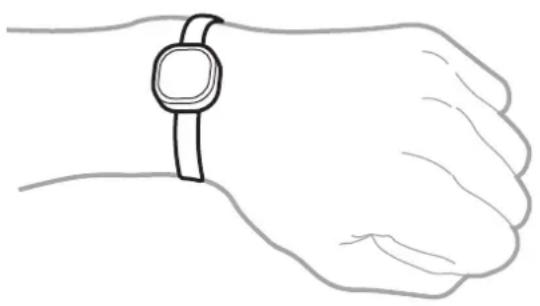
Charging the battery
Charge the battery before using the Samsung Charm for the first time or when the Samsung Charm has been unused for extended periods.

Use only Samsung-approved chargers and cables. Unapproved chargers or cables can cause the battery to explode or damage the Samsung Charm.

- If there are obstructions between the Samsung Charm and the charging dock, the Samsung Charm may not charge properly. Prevent the Samsung Charm and the charging dock from coming into contact with sweat, liquids, or dust.
- Prevent the charging terminals from coming into contact with conductive materials as they may corrode the terminals. If this happens, wipe the terminals with a soft dry cloth.

- If the battery is completely discharged, the Samsung Charm cannot be turned on immediately when the charger is connected. Allow a depleted battery to charge for a few minutes before turning on the Samsung Charm.
- If the Samsung Charm has been unused for extended periods, the battery life can be reduced. Charge the Samsung Charm at least once every week.
1 Connect the Samsung Charm to the charging dock by aligning the charging terminals of the two devices.
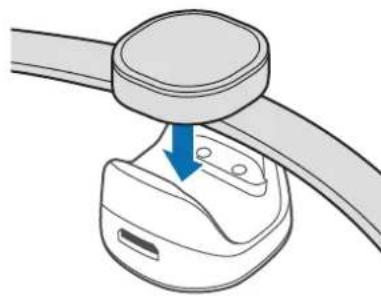
2 Connect the charging dock to the charger and plug the other end of the charger into an electric socket.
While charging, the indicator light will turn red. When it is fully charged, the indicator light will turn green.
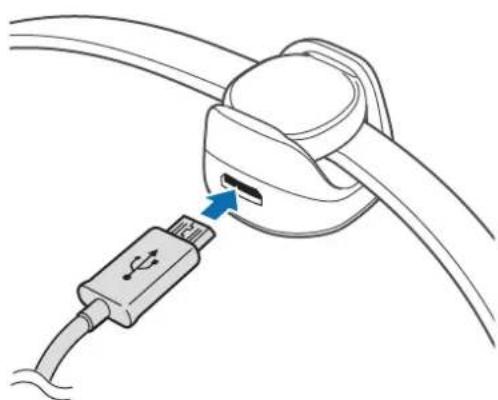

Connecting the charger improperly may cause serious damage to the Samsung Charm. Any damage caused by misuse is not covered by the warranty.

- Chargers are sold separately.
- While charging, the Samsung Charm may heat up. This is normal and should not affect the Samsung Charm's lifespan or performance. If the battery gets hotter than usual, the charger may stop charging.
- The Samsung Charm cannot connect to a mobile device while it is charging. When the Samsung Charm is fully charged, disconnect it from the charging dock and then try to connect it to a mobile device.
- If the Samsung Charm's battery life is just one or two days after it is fully charged, its battery has expired.
- If the Samsung Charm is not charging properly, take the Samsung Charm and the charger to a Samsung Service Center.
3 After fully charging, first unplug the charger from the charging dock, and then unplug it from the electric socket.

To save energy, unplug the charger when not in use. The charger does not have a power switch, so you must unplug the charger from the electric socket when not in use to avoid wasting power. The charger should remain close to the electric socket and easily accessible while charging.
Indicator light identification
The indicator light informs you of your Samsung Charm's status.
| Status Color | |
| Charging | • Continuously on red |
| Fully charged | • Continuously on green |
| Incoming notification | • Continuously blue |
| During use or in sleep mode | • Off |

If the indicator light does not work as described, disconnect the charger from the Samsung Charm and reconnect it.
Using the Samsung Charm
Connecting via Bluetooth
About Bluetooth
Bluetooth is a wireless technology standard that uses a 2.4 GHz frequency to connect to various devices over short distances. It can connect and exchange data with other Bluetooth enabled devices, such as mobile devices, computers, printers, and other digital home appliances, without connecting via cables.
Notices for using Bluetooth
- To avoid problems when connecting your Samsung Charm to another device, place the devices close to each other.
- Ensure that your Samsung Charm and the other Bluetooth device are within the Bluetooth connection range (10 m). The distance may vary depending on the environment the devices are used in.
- Ensure that there are no obstacles between the Samsung Charm and a connected device, including human bodies, walls, corners, or fences.
- Do not touch the Bluetooth antenna of a connected device.
- Bluetooth uses the same frequency as some industrial, scientific, medical, and low power products and interference may occur when making connections near these types of products.
- Some devices, especially those that are not tested or approved by the Bluetooth SIG, may be incompatible with the Samsung Charm.
- Do not use the Bluetooth feature for illegal purposes (for example, pirating copies of files or illegally tapping communications for commercial purposes).
Connecting to other devices
To connect your Samsung Charm and mobile device, install the Samsung Charm app on the mobile device. Launch Galaxy Apps or Play Store to download it.
Mobile device
1 On the Apps screen, tap Charm by Samsung.
If necessary, update the Samsung Charm app to the latest version.
2 Tap CONNECT TO SAMSUNG CHARM.
3 Select the color flashed on the Samsung Charm's indicator light and tapCONNECT.
4 Follow the on-screen instructions to complete the connection.

- Connection methods may vary depending on your mobile device and software version.
- If the Bluetooth connection fails or the Samsung Charm is not located, charge the Samsung Charm and try again.
- If the Samsung Charm does not work, connect it to the charging dock to charge it. The Samsung Charm will reset.
Reconnecting the devices
If the Bluetooth connection ends due to the distance between the devices, bring the devices closer together within a certain period of time. The devices will automatically reconnect.
If the Bluetooth connection ends because of a device malfunction, launch the Samsung Charm app and tap CONNECT.
Disconnecting the devices
Launch the Samsung Charm app and tap About Samsung Charm Connections. Then tap the currently connected Samsung Charm.
Using the Samsung Charm app
Introduction
Using the Samsung Charm app, you can check your Samsung Charm's status or customize its settings. Launch Galaxy Apps or Play Store to download it.

Some features may not be available depending on the type of connected mobile device.
S Health
View the number of steps you have taken and measure the distance travelled.
On the Apps screen of the mobile device, tap Charm by Samsung S Health.

- To use this feature, the S Health app must be installed on your mobile device.
- To use the S Health app with the Samsung Charm app, you must use S Health version 4.6 or higher.
- When the Samsung Charm's battery is low, the step tracking information may not be stored on your mobile device. Charge the Samsung Charm when its indicator light flashes red.
- Only records from the past 14 days are saved. If you use the Samsung Charm while it is connected to your mobile device for more than 14 days, it deletes the step tracking information from the oldest day.
Notifications
Manage apps on the mobile device to send notifications to your Samsung Charm.
1 On the Apps screen of the mobile device, tap Charm by Samsung Notifications.
2 Tap the switch to activate the notification feature.
3 Tap EDIT.
4 Check the apps to get the notification and tap DONE.
About Samsung Charm
View the Samsung Charm app's version information and your Samsung Charm's connection status. You can also update your Samsung Charm's software.
On the Apps screen of the mobile device, tap Charm by Samsung About Samsung Charm.
User manual
View the user manual to learn how to use your Samsung Charm.
On the Apps screen of the mobile device, tap Charm by Samsung User manual.
Appendix
Troubleshooting
Before contacting a Samsung Service Center, please attempt the following solutions.
The battery does not charge properly (For Samsung-approved chargers)
Ensure that the charger is connected properly.
If the problem is still not resolved, contact a Samsung Service Center.
Another Bluetooth device cannot locate your Samsung Charm
- Charge your Samsung Charm fully and try to connect again.
- Ensure that your Samsung Charm and the other Bluetooth device are within the Bluetooth connection range (10 m).
If the tips above do not solve the problem, contact a Samsung Service Center.
Bluetooth connection is often disconnected
- If there are obstacles between the devices, the operating distance may be reduced.
- Ensure that your Samsung Charm and the other Bluetooth device are within the maximum Bluetooth range (10 m).
- When using the Samsung Charm with other Bluetooth devices, the connection may be affected by electromagnetic waves. Use the Samsung Charm in environments with fewer wireless devices present.
The Samsung Charm works differently as described in the manual
Available functions may differ depending on the connected device.
The battery depletes faster than when first purchased
- When you expose the Samsung Charm or the battery to very cold or very hot temperatures, the useful charge may be reduced.
- The battery is consumable and the useful charge will get shorter over time.
Copyright
Copyright © 2016 Samsung Electronics
This manual is protected under international copyright laws.
No part of this manual may be reproduced, distributed, translated, or transmitted in any form or by any means, electronic or mechanical, including photocopying, recording, or storing in any information storage and retrieval system, without the prior written permission of Samsung Electronics.
Trademarks
SAMSUNG and the SAMSUNG logo are registered trademarks of Samsung Electronics.
- Bluetooth® is a registered trademark of Bluetooth SIG, Inc. worldwide.
- All other trademarks and copyrights are the property of their respective owners.
Para comenzar
Copyright © 2016 Samsung Electronics
Charm by Samsung AnpLRIeIeIn to iHae hte rle of hte to hin hag n selge to ngh us hngn.
Galaxy Apps und Play Sboter ane Charm by Samsung Aepolirikaien to n aarabou sey.

[1]