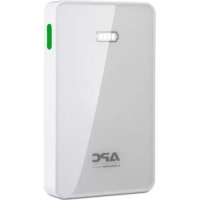
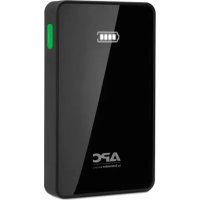
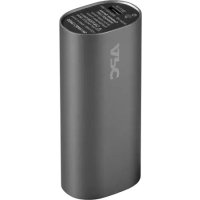
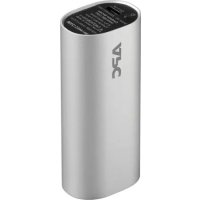
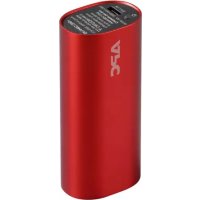
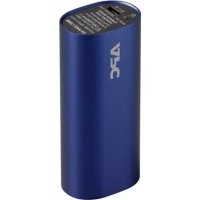
Power Pack M5 - Power bank APC - Free user manual and instructions
Find the device manual for free Power Pack M5 APC in PDF.



| Product type | Portable battery (Power Bank) |
| Brand | APC by Schneider Electric |
| Model | Power Pack M5 |
| Battery capacity | 5000 mAh |
| Input current (max) | 1.5 A |
| Input voltage | 5 V DC |
| Total output current | 2.4 A (combined ports) |
| USB output port 1 | 5 V / 1 A |
| USB output port 2 | 5 V / 2.4 A |
| Output voltage | 5 V |
| Capacity indicator | 4 LED levels (100%, 70%, 40%, 15%) |
| Power Pack charging time | 4 hours |
| Dimensions (L x W x H) | 10.75 x 6.44 x 1.44 cm |
| Weight | 142 g (0.31 lb) |
| Operating temperature | 0 °C to 35 °C |
| Key features | Charges smartphones, tablets and other USB devices; direct recharge mode (charges the device first, then the Power Pack) |
| Safety | Protection against short circuits, thermal overload and deep discharge; do not heat or incinerate; avoid metal objects |
| Maintenance and cleaning | Keep USB and micro-USB ports clean and unobstructed |
| Recycling | Lithium-ion battery: return to a certified recycling center |
| Warranty | Contact APC dealer or APC by Schneider Electric customer service |
| Spare parts and repairability | Not user-serviceable; contact APC for technical support |
Frequently Asked Questions - Power Pack M5 APC
User questions about Power Pack M5 APC
0 question about this device. Answer the ones you know or ask your own.
Ask a new question about this device
Download the instructions for your Power bank in PDF format for free! Find your manual Power Pack M5 - APC and take your electronic device back in hand. On this page are published all the documents necessary for the use of your device. Power Pack M5 by APC.
USER MANUAL Power Pack M5 APC
Mobile Power Pack M5/M10
User Manual
Bedienungsanleitung
PykoBoDCTBO NOIb3OBaTeJa
Kullanma Kilavuzu
Inventory Safety and General
Information
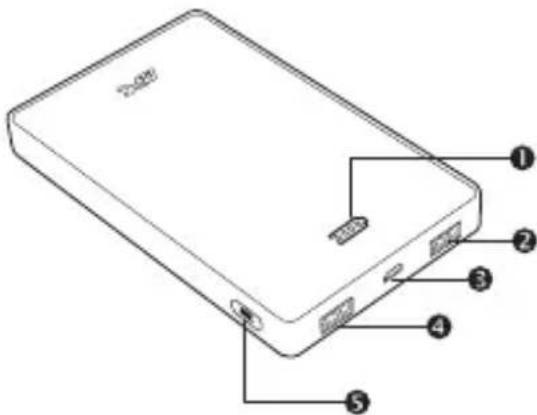
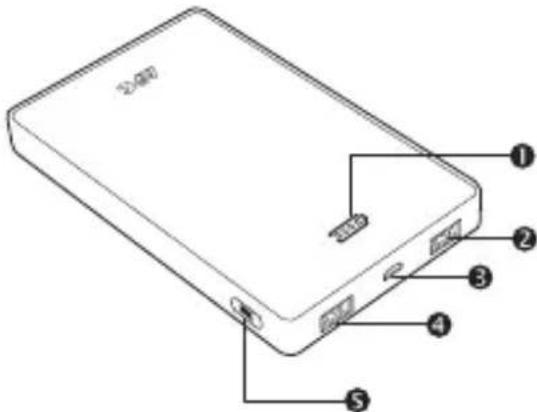
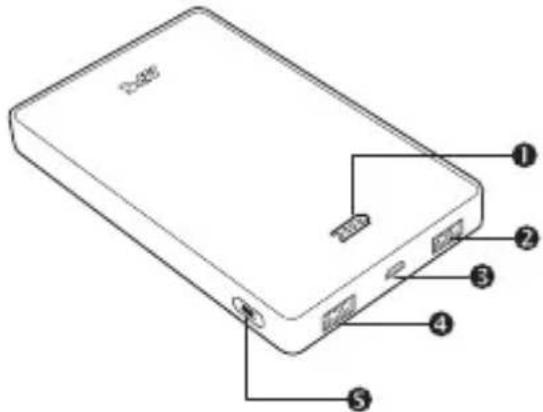
Battery capacity display
USB 5V/1A output
Micro-USB 5V / 1.5A input
USB 5V/2.4A output
5 POWER button

USB cable

User Manual

Read this user manual carefully before using the product, and keep it for future reference.
- Do not short circuit this device. To avoid short circuit, keep the device away from any metal objects (e.g., hair clips and keys).
- This device may get hot during use, and this is normal. Hold carefully.
This unit is not user repairable; contact APC for tech support related issues. - Do not heat this device or throw it into a fire.
- Do not drop or place the unit under a heavy object.
- Keep this device away from high temperature, wet, or dusty environments.
- During normal usage keep the device out in the open to allow excess heat to dissipate.
- Charge M5 for 4 hours / M10 for 8 hours before initial use.
- Keep the USB output port and microUSB input port clean and free of obstruction.
Failure to follow these instructions can result in equipment damage.
Operation
Charging USB based devices such as smartphones, portable media players and tablets
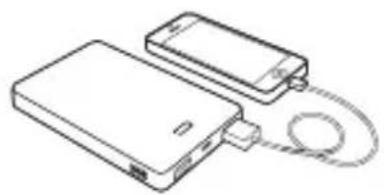
Charge devices using the original USB cable that comes with the unit, or another USB charging cable.
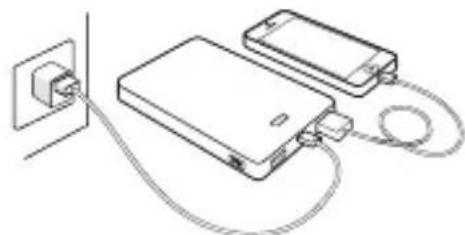
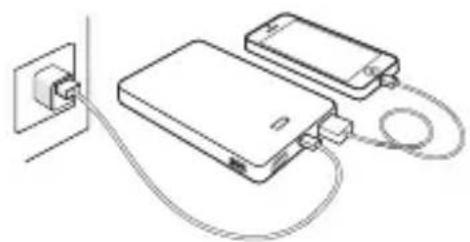
Properly connect the mobile power pack with the device to be charged. To begin charging press the POWER button for about 1 second.
a. M5/M10 Mobile Power Pack charging devices
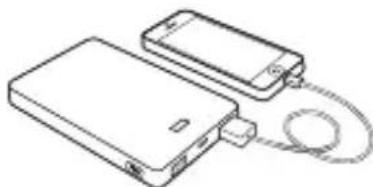
b.Pass-through charging mode will charge the mobile device first, and then charge the M5/M10 Mobile Power Pack.
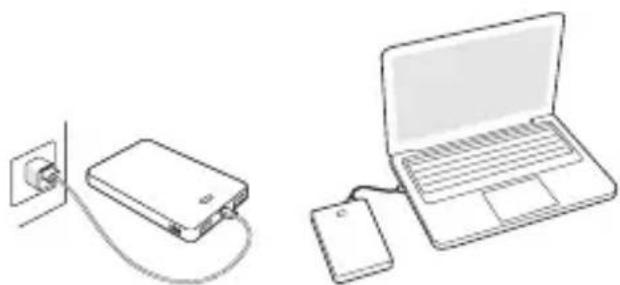
Charging the Power Pack
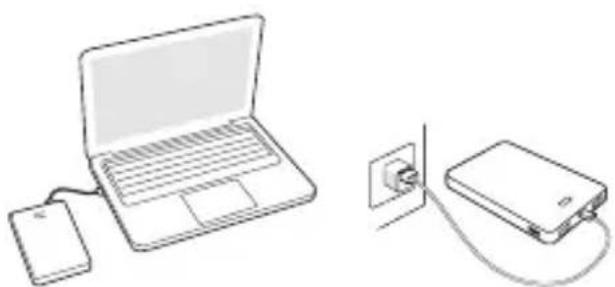
Charge via USB adapter or computer connection
Connect the power pack to the USB output port of a PC or USB charger using the included charging cable (Note: Some PCs in sleep mode will not charge this device.)
Typical number of charges by device
| Device | M5 | M10 |
| Smartphone | 2x | 4x |
| Tablet | ~0.5x | ~ 1x |
Note: The charge times in this table are approximate figures. They can vary depending on the type of device, ambient conditions, or battery discharge level of the M5 and M10.
The battery capacity display will illuminate to show how much of the battery is charged. Once all of the battery capacity LEDs are lit, the unit should be fully charged. Once complete, disconnect the charging cable from the unit.
Checking the remaining battery charge of this device
In standby mode, press the POWER button for about 1 second. The battery capacity display will display how much battery power is remaining.
Status Indicators
| Battery capacity display | State explanation |
| ~ 100% capacity | |
| ~ 70% capacity | |
| ~ 40% capacity | |
| ~ 15% capacity | |
| Alarm for low battery | |
| No more charge remains. The battery has been completely discharged. | |
| The battery is being normally charged | |
| The battery has been fully charged | |
| Internal fault detected |
Turning On/Off the M5 / M10
- On: To turn on the M5 / M10, press the POWER button once within one second.
- Off: Turning off the M5 / M10 is done by pressing the POWER button for more than 3 seconds.
Note: The M5 / M10 enters into Sleep or Standby mode 6 minutes after all connected devices are unplugged from it.
Specifications
| Item | Specification | |
| Model number | M5 | M10 |
| Capacity | 5000mAh | 10000mAh |
| Input current (maximum) | 1.5A | |
| Rated input voltage | 5V dc (Voltages other than 5 V dc are not supported) | |
| Output current | USB: 2.4A (Total), USB1: 1A, USB2: 2.4A*1 | |
| Output voltage | 5V | |
| Capacity indicator light | 4 level capacity display | |
| Charging time | 4 hours | 8 hours |
| Dimensions (L x W x H) | 10.75 x 6.44 x 1.44 cm | 14.65 x 8.89 x 1.35 cm |
| 4.5 x 2.5 x 0.6 in | 5.7 x 3.5 x 0.5 in | |
| Weight | 142g, 0.31lb | 268g, 0.59lb |
| Operating temperature | 0 °C - 35 °C | |
*1 The two (2) USB ports combined have a maximum output of 2.4A. If two (2) devices together draw more than 2.4A, overload protection circuits will trigger and disable output.
Battery Recycling Information

Always dispose of used or spent batteries properly.
Return the spent battery to an appropriate facility for proper disposal and recycling.
Troubleshooting
| Problem and Possible Cause | Solution |
| The mobile power pack cannot be charged. | |
| The PC is in sleep mode. | Wake PC from sleep mode. |
| The temperature is outside of the recommended temperature range for use. | Stop using the mobile power pack until it is within the correct temperature range. |
| The charging cable is malfunctioning. | Carefully check if the charging cable is functioning. Clean the micro-USB port in case there is an obstruction. |
| All battery capacity LEDs flash simultaneously while charging. | Stop using the mobile power pack and contact your APC by Schneider Electric dealer or authorized APC by Schneider Electric service agency. |
| The mobile power pack cannot charge some devices. | |
| The remaining capacity of the mobile power pack is low. | Charge the mobile power pack. |
| The mobile power pack may have failed to recognize and detect the devices connected to it. | Remove connected devices. Turn the unit on, reconnecting each device one at a time. A dedicated charging cable may be required. |
| A short circuit has occurred in the mobile device(s) connected to the mobile power pack. | A short circuit will cause the mobile power pack to enter into safe mode. To deactivate safe mode, disconnect all devices from the mobile power pack and connect the mobile power pack to a USB charger as if charging. |
| The life of the mobile power pack has expired or a detected fault has occurred in it. | In the case of a system fault detected, contact your local APC by Schneider Electric dealer or authorized APC by Schneider Electric service agency. |
Warranty

Contact your local APC by Schneider Electric dealer, an authorized APC by Schneider Electric service agency, or APC by Schneider Electric Customer Support.
APC by Schneider Electric IT Customer Support Worldwide
For country specific customer support, go to the APC by Schneider Electric Web site, www.apc.com.
3BepHITbcra lo MicIeBOTo IpeIcTaBHnITBa APC by Schneider Electric, aBTOpH3ObaHO APC by Schneider Electric cepBicHO areHTCTBa a6o APC by Schneider Electric IIITprHMKn KJIeHTIB.
BcecbiTHa Cny6a IT-niTpumKn KJIeHTiB kompanii APC by Schneider Electric
IIIO6 OTpHMaTH IIITpHMky B BaIIH KpaIHi, IpeHJIb Ha Bc6-CTOpIHky KOMHaII APC by Schneider Electric 3a IocHlaAHM WWW.apc.com.
APC by Schneider Electric Global IT-kundsupport
Kypblfbl apkblbl 3apndaydbin KaIbINTbl yaKbITbl
| Курьлгы | M5 | M10 |
| Смартоpon | 2x | 4x |
| Планшет | ~0,5x | ~ 1x |
Eckeptne: ByI KcTeIerI 3apIITay yaKbITb I IaMaMeH KepCetIJreH. OJIAP KypblfBi TpyiHe, KopIIaFaH opta KaIaNJIapBHa HEmce M5 XoHe M10 KypblfBICbIHbH 6aTapez 3apIbIHbH aKraJy DeHreInHe 6aJIaHbICTbl.
BaTape cBbIMbIbIFbIHnHcJIe i6BaTapeHHk KaIIaJIbIKb3aprTaIyBH KopceTy HJiH KHaJIb. BapIK 6aTape cBbIMbIbIFbIHnKJ II IaMApB JkaHFaHHa KeIH KypblfTOJIbK 3apraTalb. AAKtaJIraHHa KeIH 3aprTay Ka6JIH KypblfHa aKbipaTHbI3.
By KypbnfblbHk KaFah 6aTapeaapdbH TeKcepy
KyTypeKIMiHcKvAT TyIMeIIirH 1 cekyn60b6acbHb3. BaTape cyBIMbIbIFbIHIN HcIIeHHcKaHsia6aTape 3apAihn KaJIraHbIKepceTiJIeJI.
Kун керсетkiштepi
| Баразец сбийдьлынгьндиспел徳 | Кут тусиндірмени ~ 100% сбийдьлык ~ 70% сбийдьлык ~ 40% сбийдьлык ~ 15% сбийдьлык |
| Темен сьразец денихи Зарядаяктулды. Баразецнын зapяды Толыгименаяктулды. | |
| Баразец калыntы зapядтолда | |
| Баразец Толыгименаярдтолда | |
| Ишki akayлбд д aныктулда |
M5 / M10 kocy/ewipy
AkaayIbIKTapdbI XOIO
YTo6bI 6paTntbc83aTexHnueckoIIOJIepKkoB KOKpeTHOcTpaHe, IpeeJHTe Ha caIT APC by Schneider Electric: www.apc.com.
TEKNIK ÖZELLİKLER KULLANIM SIRASINDA INSAN VE ÜRUN ÖZELLİKLERİ VEYA ÇEVRE SAGLIGINA ILE ILGILI TEMEL BILGILER TEHLİKELİ VEYA ZARARLI OLABİLECEK DURUMLARA İLISKİN UYARILAR & KULLANIM HATALARINA İLISKİN BILGILER
0 Pil kapasitesi gostergesi
USB 5V/1A ÇiKiS
Micro-USB 5V/1,5A girls
USB 5V/2,4A cikis
GUC duğmesi

USB kablosu
Kullanici Elkitabi

J USB 1 J L K J U USB J L K J U J J J J J J J J J J J J J J J J J J J J J J J J J J J J J J J J J J J J J J J
Jg jn nn nnnn nn nnnn nn nnnn nn nnnn nn nnnn nn nnnn nn nnnn nn nnnn nn nnnn nn nnnn nn nnnn nn nnnn nn nnnn nn nnnn nn nnnn nn nnnn nn nnnn nn nnnn nn nnnn nn nnnn nn nnnn nn nnnn nn nnnn nn nnnn nn nnnn nn nannn nn nnnn nn nnnn nn nnnn nn nnnn nn nnnn nn nnnn nn nnnn nn nnnn nn nnnn nn nnnn nn nnnn nn nnnn nn nnnn nn nnnn nn nnnn nn nnnn nn nnnn nn nnnn nn nnnn nn nnnn nn nnnn nn nnnn nn nnnn nn nnnn nn nennn nn nnnn nn nnnn nn nnnn nn
M5/M10
a
1 1
JU 1 JU USB JU JU
JSSS JSSS USB 20000000000000000000000000000000000000000000000000000000000000000000000000
120 5
J
J
J
J
J
J
J
J
J
J
J
J
J
J
J
J
J
J
J
J
J
J
J
J
J
J
J
J
J
J
J
J
J
J
J
J
J
J
J
J
J
J
J
J
J
J
J
J
J
J
I M10gM5
Jie Jolil yiaia 100000000000000000000000000000000000000000000000000000000000
jai g jia 1i jia jia
pSla 4slwla
pc all jgall APC 5
aui 1000
j j
Jaa aai 4aag jgall bgaui
aaiy jlljll
J 1
J 1
slll 1
M10/leu 5 M5 jall
J 1
USB
micro-USB
jll 1
jgljll
1
USB
10
USB 4,2
5


USB
Mobile Power Pack M5/M10
Jd
- Mobile Power Pack M5/M10
- Inventory Safety and General
- Information
- Operation
- Charging USB based devices such as smartphones, portable media players and tablets
- Charging the Power Pack
- Charge via USB adapter or computer connection
- Checking the remaining battery charge of this device
- Status Indicators
- Turning On/Off the M5 / M10
- Specifications
- Battery Recycling Information
- Warranty
- APC by Schneider Electric IT Customer Support Worldwide
- BcecbiTHa Cny6a IT-niTpumKn KJIeHTiB kompanii APC by Schneider Electric
- APC by Schneider Electric Global IT-kundsupport
- By KypbnfblbHk KaFah 6aTapeaapdbH TeKcepy
- Kун керсетkiштepi
- M5 / M10 kocy/ewipy
- TEKNIK ÖZELLİKLER KULLANIM SIRASINDA INSAN VE ÜRUN ÖZELLİKLERİ VEYA ÇEVRE SAGLIGINA ILE ILGILI TEMEL BILGILER TEHLİKELİ VEYA ZARARLI OLABİLECEK DURUMLARA İLISKİN UYARILAR & KULLANIM HATALARINA İLISKİN BILGILER
- a
- jgljll
Brand : APC
Model : Power Pack M5
Category : Power bank