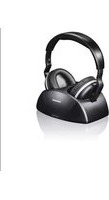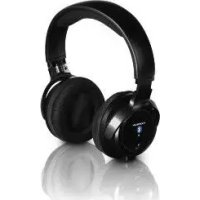
WHP6316BT - Headphones THOMSON - Free user manual and instructions
Find the device manual for free WHP6316BT THOMSON in PDF.



| Product Type | Bluetooth air conduction headset |
| Model | WHP6316BT |
| Brand | Thomson |
| Bluetooth Technology | Bluetooth V4.1 |
| Bluetooth Profiles | DP, HFP, HSP, AVRCP |
| Frequency Band | 2402 - 2480 MHz |
| Maximum RF Power | 3 dBm |
| Battery Life (music) | Up to 11 h at half volume, 7 h at max volume |
| Charging Time | Approximately 10 hours for first charge |
| Battery Type | 2 AAA rechargeable NiMH batteries (1.2 V, 700 mAh) |
| Power Supply | Power adapter included (charging station) |
| Range | Approximately 10 meters (without obstacles) |
| Frequency Response | 20 Hz - 20 kHz |
| Weight | Approximately 180 g (estimated) |
| Main Functions | Play/Pause, track skip, volume, hands-free, Bluetooth pairing |
| Package Contents | 1 headset, 1 charging station, 1 power adapter, 2 AAA batteries, 1 user manual |
| Care and Cleaning | Clean with a slightly damp cloth, avoid harsh detergents |
| Safety | Do not use while driving, respect sound levels, keep out of reach of children |
| Spare Parts and Repairability | User-replaceable batteries (AAA batteries); other repairs by a professional |
| General Information | Manufactured by Hama GmbH & Co KG, declaration of conformity available online |
Frequently Asked Questions - WHP6316BT THOMSON
User questions about WHP6316BT THOMSON
0 question about this device. Answer the ones you know or ask your own.
Ask a new question about this device
Download the instructions for your Headphones in PDF format for free! Find your manual WHP6316BT - THOMSON and take your electronic device back in hand. On this page are published all the documents necessary for the use of your device. WHP6316BT by THOMSON.
USER MANUAL WHP6316BT THOMSON
Wireless headphones, Bluetooth
Casque Bluetooth sans fil
Operating Instruction
Mode d'emploi
Bedienungsanleitung
GB Operating Instructions
F Mode d'emploi
D Bedienungsanleitung
E Instrucciones de uso
I Istruzioni per l'uso
P Manual de instruções
RUS PykoBoIDCTBO IO 3KcnJyatauIN
NL Gebruiksaanwijzing
PL Instrukcja obslugi
H Hasznalati utmutató
GR Odyies Xpno
CZ Navod k pouziti
SK Navod na pouzitie
TR Kullanma kilavuzu
S Bruksanvisining
FIN Käyttoohje
RO Manual de utiliser
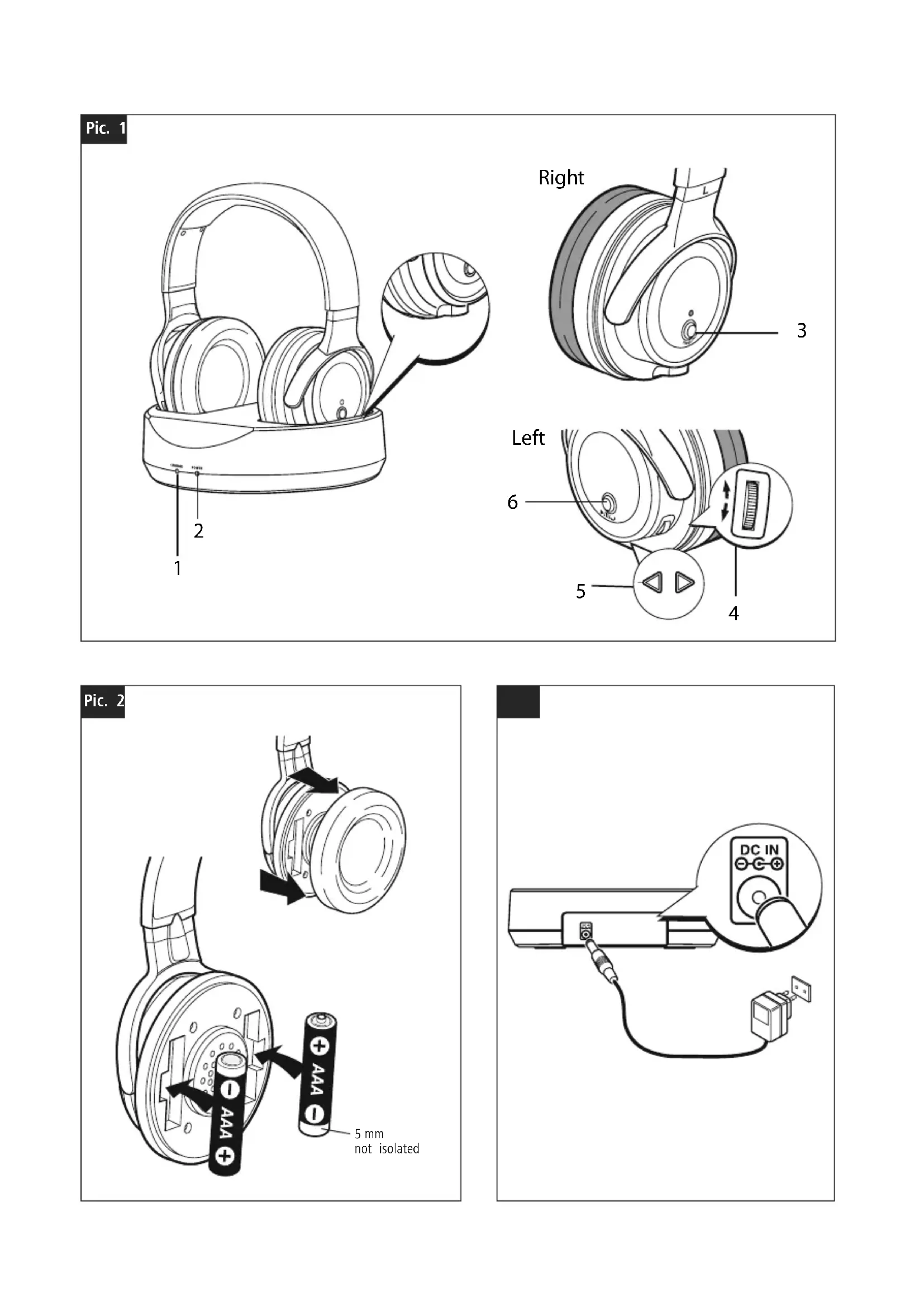
Pic. 1
Pic. 2
Thank you for choosing a Thomson product.
Take your time and read the following instructions and information completely. Please keep these instructions in safe place for future reference. If you sell the device, pass these operating instructions on to the new owner.
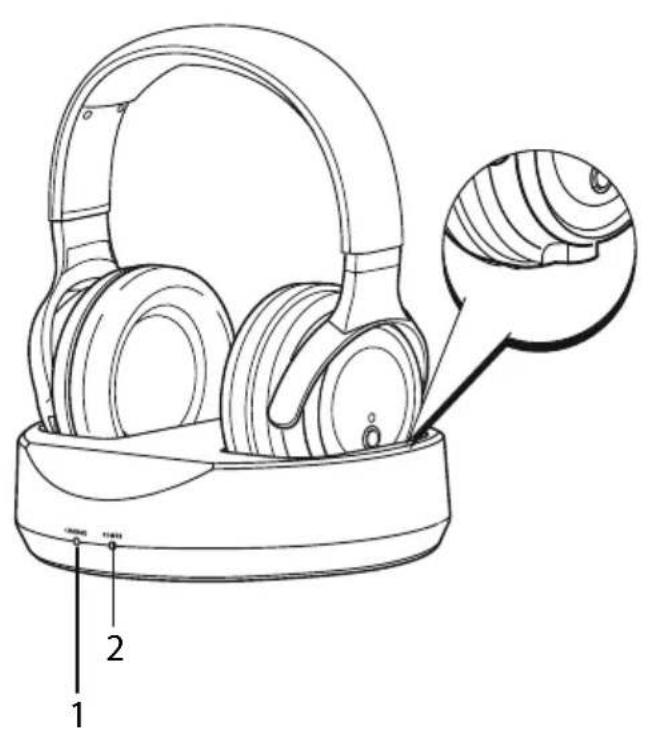
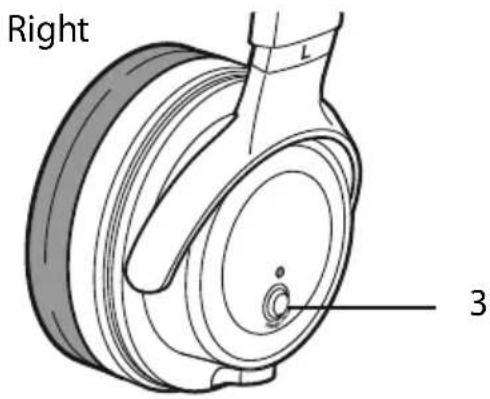
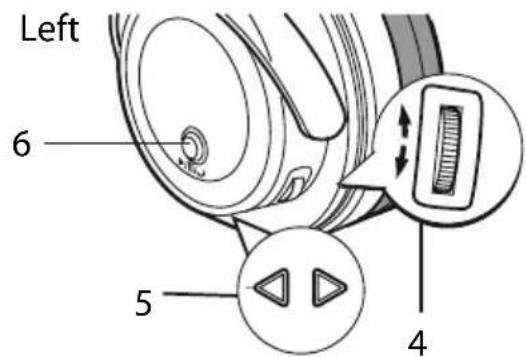
1.Controls and displays
- Charge status LED
- Power LED
- Power/Pairing button
- Volume control
- Next/Previous track
- Multifunction button (Play/Pause/Telephone)
2. Explanation of Warning Symbols and Notes

Warning
This symbol is used to indicate safety instructions or draw your attention to specific hazards and risks.

Note
This symbol is used to indicate additional information important notes.
3. Package contents
1 WHP6316 Bluetooth headphones
1 power supply unit
1 charging station
2 NiMH AAA batteries
1 set of operating instructions
4. Safety Notes

Warning
-
Using this product limits your perception of ambient noise. For this reason, do not operate any vehicles machines while using this product.
Always keep the volume at a reasonable level. Loud volumes, even over short periods, can cause hearing loss. -
Never open, damage or swallow batteries or allow to enter the environment. They can contain toxic, environmentally unfriendly heavy metals.
- Do not tamper with or damage/heat/disassemble the batteries/rechargeable batteries.
- The product is intended for private, non-commercial use
- Use the product for its intended purpose only.
- Children should be supervised to ensure that they do not play with the device.
-
Do not use the product in areas where the use of electronic devices is not permitted.
-
Only connect the product to a socket that has been approved for the device. The socket must be installed close to the product and easily accessible.
ple disconnect the product from the network using the power button - if this is not available, unplug the power cord from the socket. - Lay all cables so that they do not pose a tripping hazard
- Do not bend or crush the cable.
- Do not drop the product and do not expose it to any major shocks.
- Dispose of packaging material immediately according to locally applicable regulations.
- Do not modify the product in any way. Doing so voids the warranty.
- Do not use the product if the adapter, connection cable or power cable is damaged.
- Do not attempt to service or repair the product yourself. Leave any and all service work to qualified experts.
Do not open the device or continue to operate it if it becomes damaged.
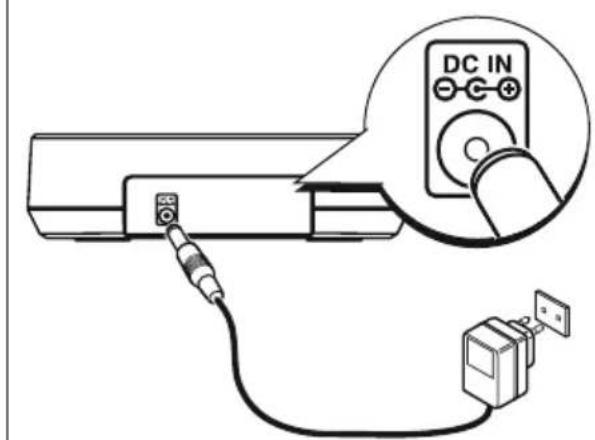
5.Installing the charging station (Pic 3)
- Connect the power supply to the power socket on the rear side of the transmitter.
- Connect the power supply to a mains socket.
- Both LEDs light up as soon as the power supply is connected to the mains socket.
6. Installing the receiver/headphones
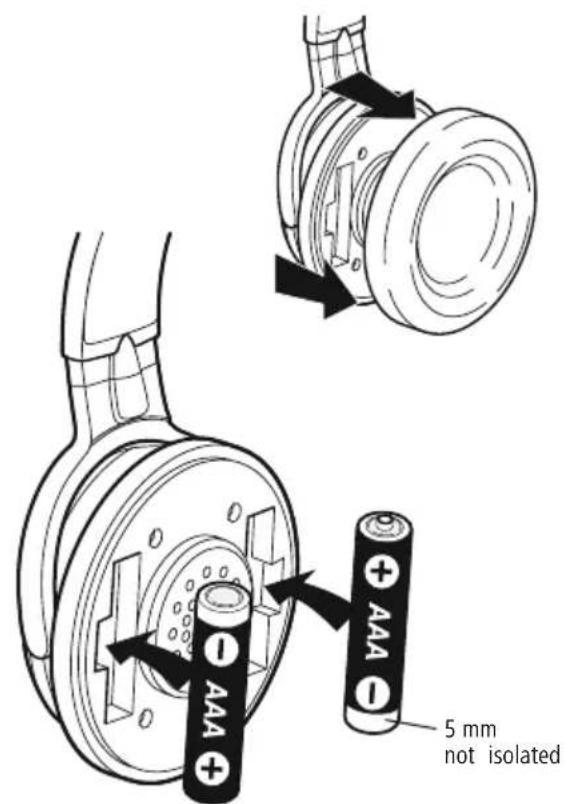
- Carefully pull off the ear pads on the right-hand side.
- Insert the two batteries supplied, making sure you observe correct polarity (Pic 2).
- Reinsert the ear pad until it audiably clicks into place.
- Charge the headphones for at least 10 hours before using them for the first time. The green LED is lit during charging. It goes out automatically once the batteries are fully charged.
Operation
7.1 Bluetooth pairing

Note - Pairing
```c //ironMake sure that your Bluetooth-capable terminal device is on and Bluetooth is activated.
- Make sure that your Bluetooth-capable terminal device is visible for other Bluetooth devices.
only For more information, please refer to the operating instructions of your terminal device.

Bluetooth connection to television
- Make sure that your television is compatible with Bluetooth headphones.
- Check whether you must carry out the pairing procedure using the Sound/Audio menu or using the Connection menu. A connection to other accessories, such as keyboards, is thus prevented.
-
For more information, please refer to your television's operating instructions.
-
The headphones and the terminal device should be no further than one metre apart. The shorter the distance, the better.
- Make sure that the headphones are charged.
- Press and hold the power button for approximately 3 seconds to turn on the headphones ("Power on", headphones flash blue). Press and hold the power button for approximately 6 seconds to switch to pairing mode ("removal successful", headphones flash blue/red). The headphones are searching for a Bluetooth connection.
- Open the Bluetooth settings on your terminal device wait until "WHP6316BT" is shown in the list.
- Select "WHP6316BT" and wait until the headphones are listed as connected in the Bluetooth settings on terminal device (connected).
- You can now use the headphones.

Note - Bluetooth password
Some terminal devices require a password in order to connect to another Bluetooth device.
- If your terminal device requests a password for connection to the headset, enter 0000.
7.2 Automatic Bluetooth connection (after successful pairing)
- Make sure that the headphones are on.
- Press the Multifunction button to automatically connect the headphones to your terminal device.
- You can now use the headphones.
7.3 Audio playback

Note
- Note that the functions described are only possible with an active Bluetooth connection.
- Your terminal device must also support the individual functions (in particular, it must support Bluetooth profiles).
- For more information, please refer to the operating instructions of your terminal device.
e, The functions can still be controlled directly via the terminal device.
- Set the volume on your terminal device to a low level.
- Start audio playback on the connected terminal device.
- Press the Multifunction button to switch between Play and Pause.
de Press the arrow buttons to go to the next or previous track - Gently press the volume control from the middle position upwards to increase the volume and downwards to amenduce the volume.

Note
your The headphones will automatically switch off after about 25 seconds of inactivity (only when controlled using the.
headphone buttons, for example, Pause).
7.4 Hands-free function
You can use the headphones as a hands-free set for your smartphone if your terminal device supports it. Press the Multifunction button once to answer an incoming call. Press the Multifunction button again to end the call.

Note
Whenever you want to charge the headphones, please switch them off first by holding the Power button for about 3 seconds. For a complete restart, please disconnect the charging station from the mains supply.
8. Care and Maintenance
Only clean this product with a slightly damp, lint-free cloth and do not use aggressive cleaning agents.
9. Warranty Disclaimer
Hama GmbH & Co. KG assumes no liability and provides no warranty for damage resulting from improper installation/ mounting, improper use of the product or from failure to observe the operating instructions and/or safety notes.
10. Service and Support
Please contact Hama Product Consulting if you have questions about this product.
Hotline: +49 9091 502-115 (German/English)
Further support information can be found here:
www.hama.com
13. Declaration of Conformity
Hereby, Hama GmbH & Co KG declares that the radio equipment type [00131976, 00131977] is in compliance with Directive 2014/53/EU. The full text of the EU declaration of conformity is available at the following internet address:
www.hama.com->00131976->Downloads.
www.hama.com->00131977->Downloads.
11. Technical Data
| ① | Bluetooth Headphones |
| Talking time/music | Max. volume: 7 h, mid volume: 11 h (with fully charged battery) |
| Standby | |
| Range | |
| Bluetooth technology | Bluetooth V4.1 |
| Bluetooth profiles | DP/ HFP/ HSP/ AVRCP |
| Battery | 1,2 V |
| Battery capacity | mAh |
| Frequency | - 20 kHz |
| Frequency band(s) | D2 - 2480 MHz |
| Maximum radio-frequency power transmitted | 3 dBM |
12. Recycling Information
Note on environmental protection:
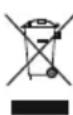
After the implementation of the European Directive 2012/19/EU and 2006/66/EU in the national legal system, the following applies: Electric and electronic devices as well as batteries must not be
disposed of with household waste. Consumers are obliged by law to return electrical and electronic devices as well as batteries at the end of their service lives to the public collecting points set up for this purpose or point of sale. Details to this are defined by the national law of the respective country. This symbol on the product, the instruction manual or the package indicates that a product is subject to these regulations. By recycling, reusing the materials or other forms of utilising old devices/Batteries, you are making an important contribution to protecting our environment.
www.hama.com->00131977->Downloads.
5.Installation Ladestation (Pic 3)
www.hama.com ->00131976->Downloads.
www.hama.com ->00131977->Downloads.
www.hama.com->00131976 -> Downloads.
www.hama.com->00131977 -> Downloads.
Blaorapm 3a Nokynky n3deleny fnpmbi Thomson. BHIMateJIbHO O3HaKOMbTecb C HactoIeHnCTpyKcnei. XpaHnte INCTpyKcIO B HAnExHOM MceTe IInr CnpabOK B6dyusem.B cnyuepepeaun n3delenny dpYromy JnU npINOxnte n 3Tu INCTpyKcIO.
1.0praHbI ynpaBJeHnI n HndkaCnn
- INДиКаТОр 3apЯДКИ
2.Инд nntaHnA - Khonka nHTaHnA/corlaacobAHnA
- PerynlaTop rpoMkoCTN
- Ppebldyuyn/cJeDyUoyn faui
- MhorofoyHKUHOHaJIbHnA KhoIka (BOcnpou3BeJeHne/ naay3a/TeJefoH)
2. PpndynpeinteHbIe NIKTORpaMMbl INHCTpyKcnn

BHIMAHme
JaHHbIM 3HauchOM OTMeueHbl HNCTpyKcun, Heco6JIIOJeHne KOTOpbIX MoXeT npUBeCTn K ONaCHOn CNTyaCm.

PpMueaHne
IOnOHHTeHbHaNJIiBaXHaNHOOpMaUa.
3. CoCTaB KOMnJIeKTa
1 Hayshnki WHP6316, Bluetooth
16JOKNTAHIN
1 3apnHoe yctpoCTBO
2 akkymyIopA AAA, HnkeIb-MeTaNIOHpNHyIe
1 HCTpykunno Kcnnyataa
4. TexHnka 6e3onachOCTn

BHHMaHHe
-
Bo BpemЯ ᵇкслуatauŋn n3delena Chnkaetcra CTeneHb. BOCnpnTna OKpykaIOuNX 3ByKOB n WymOB. 3anpe-ⅢaETcRA NCNoIb3OBAtB n3delene BO BpemЯ BOXdEHHa. ABTOMObUry npabLeHHaMaUNHaMn.
He npebbIaTb HopMaJIbHyIO rpmKoCTb. Bo3JeIcTBnE rpmKOro 3ByKa, B T.y. B TeueHne KOpOTkoRO BpeMeHN, MoKeT npInBeCTN K NOBpeXdEHNO opraHOB cnYxa. -
AkkyuIopbl 6aTapeH He OTkpBbTaB, He pa36npaTb, He TlOtaB, He yTuNIm3npoBaTb C 6bITOBbIM Mycopom. B 6aTapeX MOryT COePxAcbB BpeHbIe TJeJIbe MetaJIbI.
- BaTapeH He JeΦoPmIPOBaTb, He HaPeBaTb, He pa36npaTb.
-ИЗделпpeнHa3HачehоТолькОДлЯДOMaшHERO npIMeHENI.
3anpeaetcnaCNoJb30BaTb He no Ha3HaueHnIO.
He octabnTb DeTei 6e3 npncMoTpa BO n36exaHne nx doctyna K yCTpOInCTBy.
He npImeHrB B 3anpeThbIX 30HaX.
- Pπb6op pa3pewaeTcnoKJIHOaTb TOnbKO K COOTBeCTByHoueepo3etKe əJIeKTPocetN. Po3eTKa əJIeKTPocetNdoJXHa HaxOHTbcpaIOM C yCTpOietBOM B JERKOIOCTyHOM MecTe.
- OTKJIIOUaTb C NOMOuBbIKIIOUaTeJIA JIeKtPoCeTn, a npn erO OTCyTCTBUN BbITaUHTb IPOBOD n3 pO3eTKn.
- Kaběni He „Должны COздаВаТь NOMEXI nepemeцehиюл�дeн.
- Ka6eJb He crn6aTb n He 3axKImaTb.
He poHb. Bepeb OT cnJIbHbIX yIapOB. - YtNiI3npoBaTb yNaKOBky B COOTBeTCTBmC MeCTHbIMN HOpMaMn.
3anpeaaetcBHCNTb n3MeHeHnB KOHCTpyKUIO. B npotNBHom clyae rapaHTnHbIe o8aTeNbCTBa aHHynpyIOTc.
3anpeaetcnaKcnnyataun npn HncnpabHom 6loKe nHTAHN NNI NOBpexdHOM Ka6e ne nTahn.
3anpeaetc caMOCToTeIbHO peMOHTnpOBaTb yctpoiCTBO.PeMOHT pa3peaaetc npON3BOIDt b TOJIbKO KBaJIHΦnUncPOBaHHOMy nepcoHaJy. - N3dJIe He OTKpbIbTaB. 3aIpeuaetcA KcNpyaTnpoBaTb HeNCnPpabHoe N3dJIeNe.
5.YctaHObKa 3apAHorO yCTpoNCTBa (pnc. 3)
-ПоДКЛЮЧITE 6лOK nITaHnK pa3bemy nITaHnHa 3aДнe ПаHeN nepeDaTчka.
- PoiKJIouHTe 6Iok nITaHnK pO3eTKe 3JIeKTpocEtN.
- 06a cBeToIIOJa 3aIopaiOTc npn nOdkJIoueHm 6Ioka NHTAHN K CeTn.
6. YcTaHOBka npnEmHnKa/rapHnTpybl
- ChnMnte npaByu am6yHopy, co6JIIOda octopoxKHOCTb.
BctabbTe Dba akKymyIaTopa (B KOMnJIeKTe), co6JIIOJaI
noJrphocTb (pnc. 2).
YcTaHOBtte am6yHOpy BHOb Ha MeCTO Do CblIMo3Byka fNkCaunn.
-пелдпрвим Исноьзовием 3ардпг rapнтур нлочен He Mehee 10 yapob. Bo Врем зардк rognt 3eJIeHbI INДИКaTOp. Пocл eЗавершени 3apdkn OH nOrachet abTomatueckn.
7. Pekumbl
7.1 CornacobAHne yCTpoHCTB no npotokony Bluetooth

CorjacoBaHne. PpMeyaHne
- BkIIOHTe yCTpOcTBO BOCpOu3BeDeHnA n aKTUNBpynte Ha hem Bluetooth.
- Yepe3 INTEpΦeNC Bluetooth y6eɪntecb, yTO yCTpOCTBO BOCPON3BedeHnObHApXnBAeTcA npYnMn yCTpOCTBaMn.
- Побпбпссмтгпсинсчкцию по Ксплуатци устpoиства.

CornaobHne. NokKIOUeHne K TeJIeBn3Opy no npToKOJy Bluetooth
- Y6eNTecb B TOM, yTO BaI TeJIeBn3Op COBMeCTIM C Bluetooth-HayuHnKamn.
- Поберп, Heo6xOДМО JIN BbIIOJIHHTb cOrIacOBaHne B MeHIO HAcTPOiKN 3ByKa NII N B MeHIO NOkKIOUeHn Ipn 3tOM IOkJIIOUeHne C NOMOuBIO dpyrNx pInHa,I leXHOCTe, HanpIMep KJIaBnAtypbl, NCKJIOuaETCra.
- BoinnoPb6HbIe CBeJeHnM. B INHCTpyKcNn N0 3Kcnpyataun TeleBu3opa.
-「rapHnIpya n yCtpoNCTBO DoJXhbl paCNoIaratbCra He daJIbwe 1 MeTp a npy r ot npya. Yem MeHbwe Dnctar cnry Mexdy yCtpoNCTBaMn, Tem yBepeHHee CBa3b. - Y6eIntecb B TOM, yTO rAPHnTypa 3apJxKeHa.
-ДяВКЛЮЧЕнHAUHNUKOB HAKMITEu ydepxNBaTeKHOKNy PNTAHNBA TeueHne 3 c («Power on», HaUHNI
MURAOT CINHM).HaxMITE u yedeXNBaIte KhoNky NITAHNA B TeueHne npimepno 6 c dIy nepeKlioueHNB PekIM coeINHeHn ( 一 remove successful》,HayuHnKIM MRAOT CINHM/KpaChbIM).HayuHnKn HaHyT nonck CunHaJa Bluetooth.
- OtkpoTe HacTpoKn Bluetooth Ha yCTpOInCTBe BocnpoBedeHn N DoXdnteCb NOBJIeHn B CnNcKe yCTpOInCTBaWHP6316BT.
- Bb6epnte yctpoiCTBO WHP6316BT n nooXnTe, noKa raphHnIpya He noBnTcB CnncKe yctpoiCTB, noKnIOue HbIX no npotoKony Bluetooth (connected).
- Tenepb MOXHO NOJb3OBaTbCra rapHntypoi.

Napols Bluetooth
Дя yctahOBkn CoeHHeHn C HeKOTOpbIMn yCTpOInCTBaMm MoKeT Notpe6oBAtbc napoiB Bluetooth.
B 3TOM cnyae BBeDnte npoIb no yMOnyauHnO: 0000
7.2 ABTomatueckoe coeHHeHne no npotoKony Bluetooth (nocne ycneuHoro cornaocbaHn)
- Y6eIntecb B TOM, yTO rAPHITypa BKIOUOeHa.
- YTo6bI aBTOMaTnueckn CoeHnHTb rapHnTypy C yCTpoiCTBOM, HaxMNTe MHOrOfoYHKUHOHaJIbHyIO KHONKy.
- Tenepb MoXHO NOJb3OBaTbCra rapHNTypo.
7.3 Bocnpoun3BepeHne 3Byka

PpMueaHne
- OnncanHbIe BblIe FyHKcun pa60TaHr TOnbko npn Hauuyn coeHNHeHn Bluetooth.
Kpome 3Toro, yCTpoiCTBO BOCnpon3BeDeHnna DOJXHO 6bITb COBMeCTMnO C HeKOTOpblm FyHKUaMn yCTpoiCTBa BOCnpon3BeHnna (DOJXHbI noJIepXnBaTbcn npoDnlln Bluetooth). - Pónpo6Hee cmOpnte nHCTpyKcIHO no 3KcNlyatauyn yctpoiCTBa BOCnpoU3BedeHna.
-ФункцяMuMOxHOn ynpaBnTb HEnOpceIcTBeHHO uepe3 yCTpoiCTBO BOCpOuN3BeDeneHn.
YCTAHOBNTe Ha yCTPOINCTBE BOCNPOIN3BeDEnHn MUNMaJIbHyIO rPOMKOCTb.
Ha nctouhne 3Byka BKJIOHTe BOCnpOn3BeDeHne.
-Дяпескюець Мжду BOCроиЗБеонem n nay3oHaxmITE MHorOФунКциОнаьHyTO KHOKNy.
H-Для nepexoanda K cneIyUOcEmy nIIN ppeIbIyUcEmy paIny BOCNoJIb3yIITecb KHOKNKaMn CO CTpeJIkAmn.
-Дя ублчehня Или умehьшеня ГрмкocTN CmecntepepyIЯTOp rpoMkoCTN BBepx Или, COOTBeTCTBeHHO, BHN3KOT ueHtpa.

PpMueaHne
EcnB TeueHne 25 cekyHn He haxata Hn Onda KhoNka (ToNbko npu ynpabLeHn C NOMOUsbKHONoKr rapHtypbl, Hanpumep KhoNkn NaY3bl), rapHtypa 13 ABTomatUeCKn OTKlnouHTcra.
7.4ФункцягрOMKOB
HapHTpy MOxHO npImeHb B KaueCTBe yCTpoNCTBa
rPOMKo CB3n DnA MO6nIbHOro TeJefoHa (yCTpoNCTBO
BOcnpOu3BedeHn DOJXHO NODepXNBaTb 3Ty fHyKcuHO).
TO6bl OTBeNTb Ha 3BOHOK, HaxMITE MHOFOyHKUHO
HaJIbHyIO KONky. IJa 3aBepWeHn pa3roBopa Heo6xoNiMo NOBtOpHO HaxKaTb MHOROFyHKUHOHaJIbHyIO KHONKy.

PpMueaHne
BbIKnOuaTe raphNtpy nepeK kaxdo3apJkoH, Haxab u ydepXnbay KHOKNy nHTAHn B TeueHne npImepHo 3 c.ДЯ NOJHO nepe3arpy3Kn OTKIIOHTe 3apJNDHyo CTaHcHIO OT CETn.
8. YxOД n TexHnueckoe 06cIyXnBaHne
YnCTky n3dEJnna npOn3BOoNTb TOnbKO 6e3BOPCOO nCner BnaxHO canfepTKo. 3anpeuaetc npImeHrTb arpeccNB Hble YnCTaUne cpeCTBa.
9. OTKa3 OT rapaHTnHbIX 6o83aTeNbCTB
Kompana Hama GmbH & Co. KG He HeceT OTBeTCTBe HOCTb 3a yuep6, BO3HnKuIN BCJeCDTBne He npabunbHO MOHTaxa, NOkIoueHn I nCNoJb3OBAHn I3deJIInr He IIO Ha3NaueHIO, a TAKKe BCJeCDTBne Heco6JIoDeHn IHCTpyKUIN NO EKcNlyaTaUIN N TexHKn 6e3OnaCHOCTn.
10. OTeIe Iexo6cIyXnBaHna
No Bonpocam pemonta nn 3amehbi HncnpabHbIX n3de
nnn o6paatac b K npodabuy nn B cepBnchyo cnyk6
kompann Hama.
Topayar nnna OTdela Texo6cnykBaHna:
+49 9091 502-115 (hemecn, anrnnckn)
Piopobhee cmotpnte 3decb: www.hama.com
11. TexHHueckne xapaKTepeNCTnKN
www.hama.com ->00131976->Downloads.
www.hama.com ->00131977 ->Downloads.
www.hama.com->00131977->Downloads.
Zac euxapiotoupe yia tvayopauutou tou npoiovtoc. TcMny metatpente kaih nnu npapauopphiwve/epuaivete/ Thomson! aoviyte tic anlec/entavaoaptioevec mntatapiec.
Diaabaote npoektikac tic napakatow obnyiec kai unodbeic. StTo npoiov npoopiTeai yia okiota oikiaknc xphonc.
ouvexia, pfalaTe auto to eyxepidio oe aoppaec mepoc yia To npoiov npenei va xpnoiopoiteitai antoklaiotika yia to
eAiovkiKn xpon. Ze nepintwnououlnoeTc oukeunpkontou npoBfienai.
www.hama.com->00131976 -> Downloads.
www.hama.com->00131977 -> Downloads.