
WHP3321 - Headphones THOMSON - Free user manual and instructions
Find the device manual for free WHP3321 THOMSON in PDF.
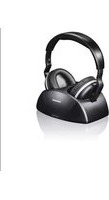


| Product type | Wireless TV headset |
| Brand | Thomson |
| Model | WHP3321 |
| Transmission mode | Stereo UHF |
| Frequency band | 863.53 - 864.53 MHz |
| Maximum transmission power | < 9.35 dBm |
| Audio frequency range | 20 Hz - 20 kHz |
| Distortion | < 2 % |
| Signal-to-noise ratio | > 54 dB |
| Range | max. 100 m (outdoors) / 20 to 30 m (indoors) |
| Battery life | 8 h (at medium volume) |
| Charging time | approx. 10 h (first charge 24 h) |
| Transmitter power supply | 8 V DC, 0.4 A via provided AC adapter |
| Headset power supply | 2 x AAA NiMH 1.2 V (provided) |
| AC adapter input voltage | 100 - 240 V, 50/60 Hz |
| Transmitter audio inputs | Analog RCA, digital optical |
| Input selection | Audio IN switch (Analog/Optical) |
| Channel selection | 3 channels (switch at back of transmitter) |
| Special functions | Auto-Tune, volume adjustment, automatic mute after 4 min without signal |
| Package contents | Headset, transmitter with charging station, 2 NiMH AAA batteries, AC adapter, RCA to 3.5 mm jack cable, optical cable |
| Cleaning | Slightly damp lint-free cloth, no harsh detergents |
| Battery care | Observe polarity, do not mix types or charge levels, remove if not used for extended periods |
| Repairability | User-replaceable batteries (under pad), other repairs by qualified technician |
Frequently Asked Questions - WHP3321 THOMSON
User questions about WHP3321 THOMSON
0 question about this device. Answer the ones you know or ask your own.
Ask a new question about this device
Download the instructions for your Headphones in PDF format for free! Find your manual WHP3321 - THOMSON and take your electronic device back in hand. On this page are published all the documents necessary for the use of your device. WHP3321 by THOMSON.
USER MANUAL WHP3321 THOMSON
TV Wireless Headphones
Take your time and read the following instructions and information completely. Please keep these instructions in a safe place for future reference. If you sell the device, please pass these operating instructions on to the new owner.
1. Explanation of warning symbols and notes
Risk of electric shock

This symbol indicates a risk of electric shock from touching product parts carrying hazardous voltage.
Warning

This symbol is used to indicate safety instructions to draw your attention to specific hazards and risks.
Note

This symbol is used to indicate additional information or important notes.
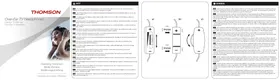
2. Controls and displays Pic 1+3
1. LED indicator: Power/Signal (red); Charging status (green) 2. LED indicator for Auto-tune (green) 3. Auto-tune button 4. Volume control 5. On/Off switch indicator (red) 6. On/Off switch (power) 7. Charging contacts 8. DC input socket (power supply unit) 9. Frequency channels switch 10. Audio input RCA (analogue) 11. Audio input optical (digital) 12. Input selector switch
3. Packaging contents
- 1 WHP3321BKTV wireless headphones - 1 transmitter with charging station - 2 AAA NiMH batteries - 1 power supply unit - 1 RCA-stereo - 3.5 mm jack audio cable - 1 optical cable
4. Safety instructions
The product is intended for private, non-commercial use only. - Use the product only for the intended purpose. Children should be supervised to ensure that they do not play with the product. - Do not use the product in areas in which electronic products are not permitted. - Route all cables so that there is no risk of tripping. - Do not bend or crush the cable. Do not drop the product and do not expose it to any major shocks. - Dispose of packaging material immediately in accordance with the locally applicable regulations. - Do not modify the product in any way. Doing so voids the warranty. The batteries and charging station go together and should always be used in the combination supplied. The product is intended only for use inside buildings. - Protect the product from dirt, moisture and overheating and use it in dry environments only. Only use the article under moderate climatic conditions. - As with all electrical products, this device should be kept out of the reach of children. - Do not operate the product outside the power limits specified in the technical data. - Do not use the product in a damp environment and avoid splashing water. - Do not place any objects on the device and never use it as a resting surface. - Do not use the product in the immediate vicinity of heaters, other heat sources or indirect sunlight. - Keep the packaging material out of the reach of children due to the risk of suffocation.
Risk of electric shock

- Do not open the device or continue to operate it if it becomes damaged.
- Do not use the product if the
AC adapter, the adapter cable or the mains cable are damaged.
- Do not attempt to service or repair the product yourself. Leave any and all service work to qualified experts.
Warning - Batteries

- When inserting batteries, note the correct polarity (+ and - markings) and insert the batteries accordingly. Failure to do so could result in the batteries leaking or exploding. Only use batteries (or rechargeable batteries) that match the specified type.
- Before you insert the batteries, clean the battery contacts and the polarity contacts. Do not allow children to change batteries without supervision.
- Do not mix old and new batteries, or batteries of different types or from different manufacturers.
- Remove the batteries from products that are not being used for an extended period (unless these are being kept ready for emergency).
- Do not short-circuit batteries.
- Do not charge batteries. Do not burn batteries.
- Keep batteries out of the reach of children.
- Never open, damage or swallow batteries or allow them to enter the environment. They can contain toxic, environmentally harmful heavy metals. Remove spent batteries from the product and dispose of them without delay.
- Avoid storing, charging and using in extreme temperatures and at extremely low atmospheric pressures (such as high altitudes).
Warning - high volume

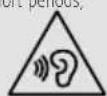
High sound pressure! There is a risk of hearing damage. - To prevent any loss of hearing, avoid listening at loud volumes for prolonged periods. Always keep the volume at a sensible level. Loud volumes, even over short periods, can cause hearing loss. - Using this product limits your perception of ambient noise
. You should therefore not
use any vehicles or machinery while using it
5. Technical data
| TransmitmodeUHFstereo | |
| Frequencyband/ frequencybands | 863.53-8 64.53MHz |
| Maximumradio-frequencypower transmitted | <9.35dBm |
| Operatingvoltage | Transmitter:8 V, 7.0 mA Receiver:2.4V(2xAAA1.2V N IMH) |
| Frequencyrange20Hz-20 K Hz | |
| Distortion<2% | |
| Signal-to-noiseration>54 dB | |
| Range | Max.100m (outdoors) 20-30 m (insidebuildings) |
| Operatingtime8 h (at mediumvolume) | |
Specifications according to EU Directive 2019/1782

| Brandname, commercial/ register number, address | Thomson,HRA12159, DresdnerStr9, 86653Monheim, Germany |
| Model identifier YLS0056A-E080040 | |
| Input voltage 100-240V | |
| Input alternating current frequency | 50/60Hz |
| Output voltage/ output current/ output power | 8.0 V DC/ 0.4 A/ 3.2 W |
| Average efficiency during operation | 76.8% |
| Efficiency at low load(10%) | 65.1% |
| Power consumption at zero load | 0.04 W |
6. Installation of the transmitter/charging station (Pic 3)
Warning

Only operate the product from a socket that has been approved for the device. The socket must be installed close to the product and must be easily accessible. - Disconnect the product from the power supply using the On/Off switch; if this is not available, unplug the power cord from the socket. If using a multi-socket power strip, make sure that the total power consumption of all connected devices does not exceed the power strip's maximum throughput rating. - If you will not be using the product for a prolonged period, disconnect it from mains power.
Connect the power supply unit to the connection socket or the DC input socket (8) on the back of the transmitter. - Connect the plug-in power supply to a socket. - Connect one of the included audio cables (RCA or optical) to the audio inputs / ANALOGUE / (10) or / OPTIC / (11) on the back of the transmitter and to the corresponding audio output of your playback device (TV or audio source). - Push the input selector switch (12) on the back of the transmitter towards the connected audio input cable (Audio IN - optical)
7. Installation of the receiver/headphones (Pic 2)
- Carefully remove the ear pad on the right-hand side.
- Insert the two supplied batteries and check the correct polarity.
- Reattach the ear pad until it clicks audibly into place.
8. Getting started
- Switch on the audio source connected to the transmitter.
- Switch the headphones on by moving the Power button (6) to ON. The LED (5) on the headphones lights up red.
- Ensure that the LED indicator on the bar on the charging station (1) is red.
- Put on the headphones and adjust the volume as required. Before using them for the first time, ensure that the battery is fully charged. Please charge the battery for at least 24 hours before first use.
- Switch the headphones off when not in use and place them back on the transmitter's charging contacts.
Note

If you are unable to find an ideal reception frequency, press the Auto-tune button (3) on the headphones. If you are unable to find an adequate frequency, change the frequency channel on the back of the transmitter. Then confirm the corresponding channel on the headphones by pressing the Auto-tune button. To achieve the best possible sound from your headphones, you should set the volume of the sound source (TV, stereo system, etc.) as loud as possible and then reduce the volume on the headphones yourself.
The transmitter switches off automatically if no audio signal is detected for a period of around 4 minutes or if the audio source signal becomes too weak for error-free reception. As soon as the signal strength is sufficient again, the transmitter switches itself back on.
The headphones do not switch themselves off automatically.
9. Charging process (Pic. 3)
- Switch the headphones off.
- Place the headphones as shown in the charging station. As you do so, ensure that the charging contacts touch both devices. The green LED (1) now lights up. The charging process begins automatically.
Note

- To avoid damage to the batteries, always switch the headphones off when they are not in use. The batteries must be fully charged before first use. A 24-hour initial charge is required to guarantee an acceptable service life for the batteries. Subsequent charging processes should take around 10 hours. The batteries are not charged when the transmitter is switched off.
10. Troubleshooting
10.1 No sound
- Check whether the audio settings on your TV set are set to "Format of the digital audio signal". Then switch the audio source from Digital Dolby to PCM.
- Check that the plug-in power supply unit is fully connected to the socket and that, at the other end, it is correctly connected to the power supply unit's input socket on the transmitter.
- Ensure that the headphones are switched on. The batteries in the headphones may have an inadequate residual charge. Charge the batteries. Check whether your TV set, HiFi system or audio component is switched on and that one channel is set to transfer audio signals. - Increase the volume using the control on the headphones.
- Is it possible that the connected audio / video device is not in playback mode? Please switch this on accordingly. The output level of the audio source may be set too low. Adjust the volume accordingly.
10.2 Distortion
- Press the Auto-tune button
- Select a different frequency channel (1, 2 or 3). Then press the Auto-tune button again. The batteries in the headphones may have an inadequate residual charge. Charge the batteries. - Increase the volume using the control on the headphones. The distance between the headphones and the transmitter may be too great. Bring the two devices closer together and rotate the headphones toward the transmitter. The input level of the audio signal may be too low. Increase the volume on the audio source.
11. Care and maintenance
Note

Disconnect the device from the mains before cleaning and during prolonged periods of non-use.
Only clean this product with a slightly damp, lint-free cloth and do not use aggressive cleaning agents.
12. Warranty Disclaimer
Hama GmbH & Co KG assumes no liability and provides no warranty for damage resulting from improper installation/mounting, improper use of the product, or failure to observe the operating instructions and/or safety notes.
13. Service and Support
Please contact Hama Product Consulting if you have any questions about this product. Hotline: +49 9091 502-0 (German/English)
Further support information can be found here: www.hama.com
14. Recycling information
Note on environmental protection:
Following the implementation of European Directive 2012/19/EU and 2006/66/EU into national legal systems, the following applies: Electrical and electronic devices as well as batteries must not be disposed of with household waste. Consumers are obliged by law to return electrical and electronic devices as well as batteries to the designated public collection points or other points of
sale at the end of their service lives. Detailed information on this topic is defined in the national laws of the respective country. The presence of the above symbol on the product, operating instructions, or package indicates that the product is subject to these regulations. By recycling, reusing the materials, or other forms of utilizing old devices/batteries, you are making an important contribution to protecting our environment.
15. Declaration of Conformity

Hama GmbH & Co KG hereby declares that the radio equipment type [00131985] is in compliance with Directive 2014/53/EU. The full text of the EU declaration of conformity is available at the following internet address:
www.hama.com -> 00131985 -> Downloads.

The device must be connected to a power supply with a protective earth connection, which can prevent electric shock.

Warning
Follow the safety instructions in the operating manual and pay special attention to the warnings about dangerous voltages.

Note
The device must not be used without the protective earth connection. Follow the instructions in the operating manual.
15. Declaration of Conformity
This company Hama GmbH & Co KG declares that the radio equipment [00131985] complies with the requirements of Directive 2014/53/EU. The full text of the EU declaration of conformity is available at the following internet address:
www.hama.com -> 00131985 -> Downloads.
Indication of conformity with Directive (EU) 2019/1782

7. Installing the receiver/headphones Pic2
13. Support services
If you have any questions about the product, you can contact the Hama product consultancy service. Support line: +49 9091 502-0 (Ger/Eng) You can find additional support information here: www.hama.com
14. Disposal instructions
Thomson is a trademark of Technicolor (S.A.) or its affiliates, used under license by HAMA GmbH & Co KG in 86652 Monheim/Germany.
- TV WIRELESS HEADPHONES
- EXPLANATION OF WARNING SYMBOLS AND NOTES
- RISK OF ELECTRIC SHOCK
- WARNING
- NOTE
- CONTROLS AND DISPLAYS PIC
- PACKAGING CONTENTS
- SAFETY INSTRUCTIONS
- WARNING - BATTERIES
- WARNING - HIGH VOLUME
- TECHNICAL DATA
- SPECIFICATIONS ACCORDING TO EU DIRECTIVE
- INSTALLATION OF THE TRANSMITTER/CHARGING STATION (PIC 3)
- INSTALLATION OF THE RECEIVER/HEADPHONES (PIC 2)
- GETTING STARTED
- CHARGING PROCESS (PIC. 3)
- TROUBLESHOOTING
- NO SOUND
- DISTORTION
- CARE AND MAINTENANCE
- WARRANTY DISCLAIMER
- SERVICE AND SUPPORT
- RECYCLING INFORMATION
- NOTE ON ENVIRONMENTAL PROTECTION
- DECLARATION OF CONFORMITY
- INDICATION OF CONFORMITY WITH DIRECTIVE (EU)
- INSTALLING THE RECEIVER/HEADPHONES PIC
- SUPPORT SERVICES
- DISPOSAL INSTRUCTIONS
Brand : THOMSON
Model : WHP3321
Category : Headphones