Arena Sub100 - Subwoofer JBL - Free user manual and instructions
Find the device manual for free Arena Sub100 JBL in PDF.



| Brand | JBL |
| Model | Arena Sub100 / SUB100P |
| Product Type | Active Subwoofer (Powered Subwoofer) |
| Transducer | Integrated bass driver with amplifier |
| Amplifier | Integrated, high performance |
| Power Supply | Mains, direct plug (not on accessory) |
| Consumption (standby) | Low, Auto mode with standby after 10 minutes |
| Audio Input | 1 x Subwoofer/LFE (RCA) |
| Settings | Volume, Low-pass filter (50-150 Hz), Phase (Normal/Reverse), Power mode (Auto/On/Off) |
| LED Indicator | Blue (on), Red (standby) |
| Special Features | Auto power on/off, adjustable filter, phase switch |
| Dimensions (approx.) | 350 x 370 x 420 mm (estimated) |
| Weight (approx.) | 12 kg (estimated) |
| Included Accessories | 4 metal spikes for carpet |
| Recommended Placement | Along the same wall as the speakers, or in a corner for more bass |
| Maintenance | Clean with a soft, dry cloth. Do not use chemicals. |
| Safety | Do not expose to moisture, do not block openings, unplug during storms or prolonged non-use |
| Repairability | Contact an authorized HARMAN service center. No user-serviceable parts. |
| Manual Available | French, English and other languages at notice-facile.com |
Frequently Asked Questions - Arena Sub100 JBL
User questions about Arena Sub100 JBL
0 question about this device. Answer the ones you know or ask your own.
Ask a new question about this device
Download the instructions for your Subwoofer in PDF format for free! Find your manual Arena Sub100 - JBL and take your electronic device back in hand. On this page are published all the documents necessary for the use of your device. Arena Sub100 by JBL.
USER MANUAL Arena Sub100 JBL
natural_image
Front view of a rectangular appliance with a blank front panel and two side bowls at the bottom (no text or symbols)Powered Subwoofer • Caisson de graves actif • Subwoofer alimentado • Leistungsstarker Subwoofer • Subwoofer alimentato • パワード・サブウーファー • 강력한 서브우퍼 • Subwoofer alimentado • Aktiv subwoofer • Aktiivinen alibassokaiutin • Aktiv subwoofer • Aktiv subwoofer • Aangedreven subwoofer • Aktywny głosnik niskotonowy • 通電式重低音喇叭 • 有源低音扬声器 • Subwoofer bertenaga • Активный сабвуфер
Mode d'emploi
natural_image
Illustration of two people in conversation, one gesturing with a question mark above the other (no text or symbols present)Besoin d'aide?
natural_image
Line drawing of a front-mounted TV or appliance with two small bowls at the base (no text or symbols)THANK YOU FOR CHOOSING THIS JBL® PRODUCT
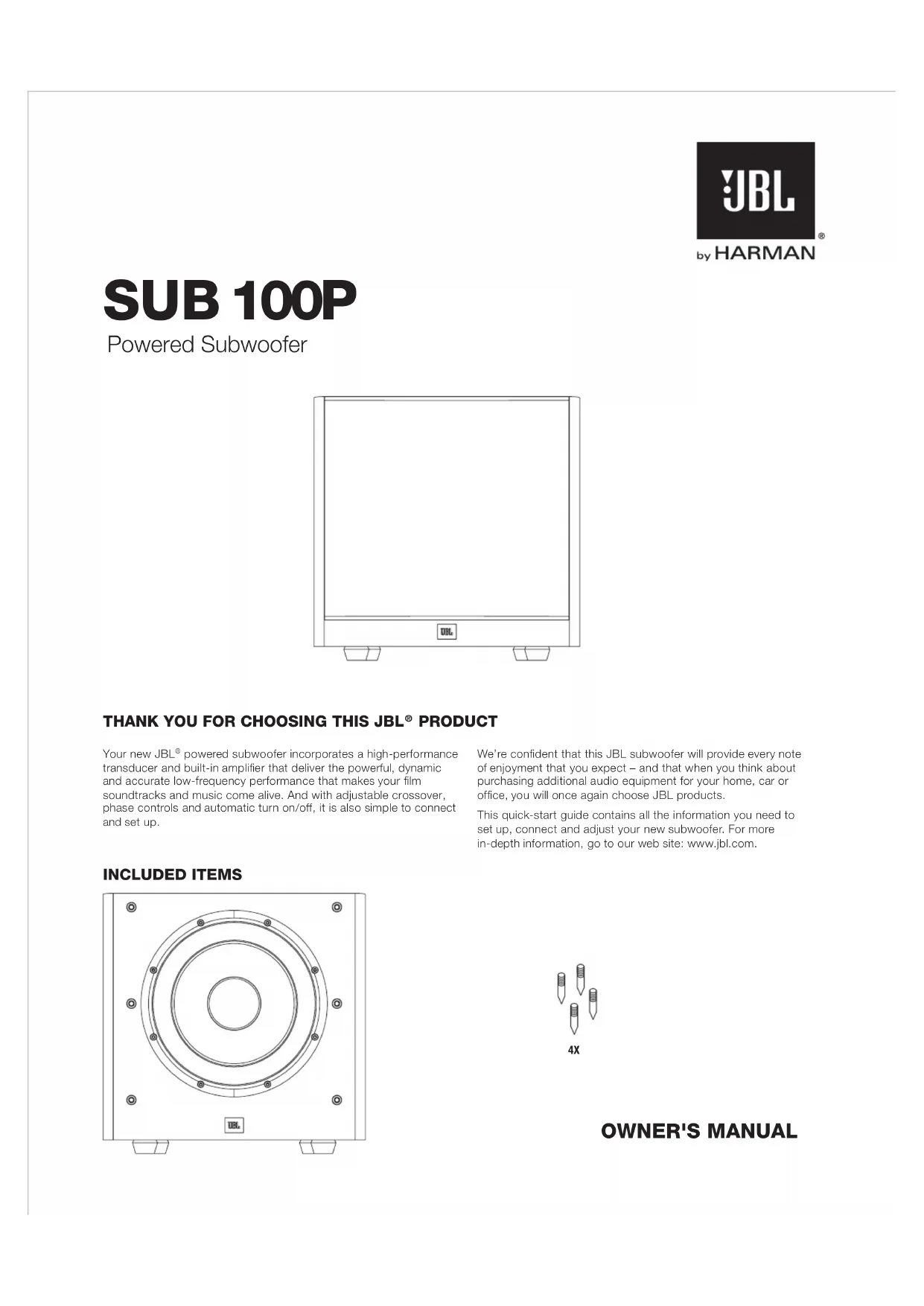
Your new JBL ^® powered subwoofer incorporates a high-performance transducer and built-in amplifier that deliver the powerful, dynamic and accurate low-frequency performance that makes your film soundtracks and music come alive. And with adjustable crossover, phase controls and automatic turn on/off, it is also simple to connect and set up.
INCLUDED ITEMS

natural_image
Technical line drawing of a circular mechanical component with mounting holes and central concentric rings (no text or symbols)We're confident that this JBL subwoofer will provide every note of enjoyment that you expect – and that when you think about purchasing additional audio equipment for your home, car or office, you will once again choose JBL products.
This quick-start guide contains all the information you need to set up, connect and adjust your new subwoofer. For more in-depth information, go to our web site: www.jbl.com.
OWNER'S MANUAL
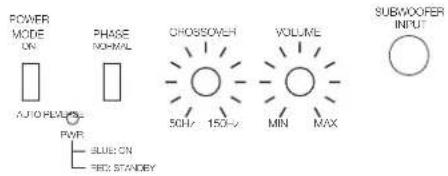
SUBWOOFER REAR-PANEL CONTROLS AND CONNECTION
text_image
POWER MODE ON PHASE NORMAL AUTO FLOW PWR BLUE ON RED STANDAYE CHROSS/ROSS 50Hz 150Hz VOLUME MIN MAX SUBWOOFER INPUTJBL
SUB 100P
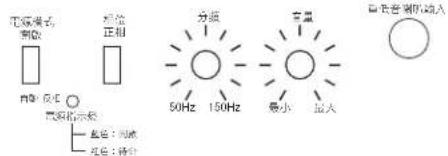
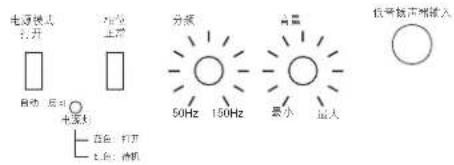
1) Power Mode:
When switched to 'Auto' position, the subwoofer will then be in Standby mode. It will automatically turn on when an audio signal is detected and will return to the Standby mode when no audio signal is detected after approximately 10 minutes. Setting this switch to 'On' keeps the subwoofer powered until Power Switch is turned 'Off.'
2) On/Standby LED:
When the Power Switch is in the 'On' position, this LED indicates whether the subwoofer is in the On or Standby state.
- When the LED glows blue, the subwoofer is turned On.
- When the LED glows red, the subwoofer is in the Standby mode.
3) Phase Switch:
This switch determines whether the subwoofer transducer's piston-like action moves in and out in phase with the main speakers. If the subwoofer were to play out of phase with the main speakers, the sound waves from the main speakers could partially cancel out the sound waves from the subwoofer, reducing bass performance and sonic impact. This phenomenon depends in part on the placement of all the speakers relative to the listening position and to each other in the room.
4) Crossover Control:
This control determines the highest frequency at which the subwoofer reproduces sounds. The higher you set the Crossover control, the higher in frequency the subwoofer will operate and the more its bass will "overlap" that of the speakers. This adjustment helps achieve a smooth transition of bass frequencies between the subwoofer and the speakers for a variety of different rooms and subwoofer locations.
5) Volume:
Use this control to adjust the subwoofer's volume. Turn the knob clockwise to increase the volume; turn the knob counterclock-wise to decrease the volume.
Connect the subwoofer to the dedicated subwoofer / LFE output of a receiver/processor.
7) Power Switch:
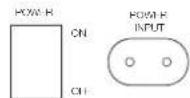
Set this switch in the 'On' position to turn the subwoofer on. If you will be away from home, or will not be using the subwoofer for an extended period, set this switch in the 'Off' position to conserve energy.
8) Power Input:
After you have made and verified the subwoofer's input connection, plug the power cord into an active, unswitched electrical outlet for proper operation of the subwoofer.
DO NOT plug the power cord into the accessory outlets found on some audio components.
PLACING THE SUBWOOFER
The performance of a subwoofer is directly related to its placement in the listening room and its physical position relative to the other speakers in the system.
While it is true that in general our ears do not hear directional sounds at the low frequencies where subwoofers operate, when installing a subwoofer within the limited confines of a room, the reflections, standing waves and absorptions generated within the room will strongly influence the performance of any subwoofer system. As a result, the specific location of the subwoofer in the room does become important to the amount and quality of bass that is produced.
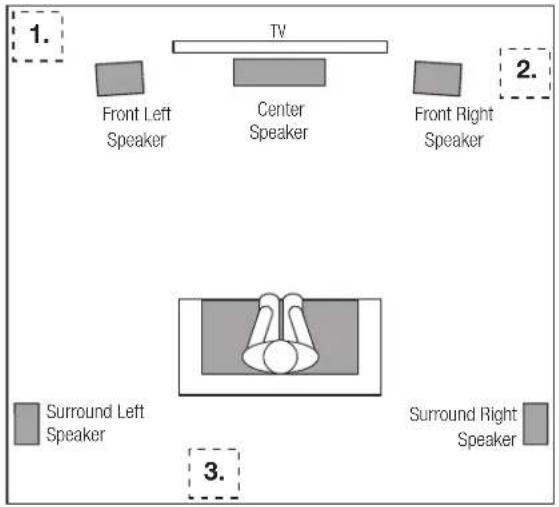
For example, placing the subwoofer next to a wall generally will increase the amount of bass in the room; placing it in a corner (1) generally will maximize amount of bass in the room. However, corner placement can also increase the destructive effect of standing waves on bass performance. This effect can vary depending on the listening position – some listening positions may yield very good results while others may have far too much (or too little) bass at certain frequencies.
In many rooms, placing the subwoofer along the same plane as the left and right speakers (2) can produce the best integration between the sound of the subwoofer and that of the left and right speakers. In some rooms, the best performance could even result from placing the subwoofer behind the listening position (3).
We strongly recommend that you experiment with placement before choosing a final location for your subwoofer. One way you can determine the best location for the subwoofer is by temporarily placing it in the listening position and playing music with strong bass content. Move around to various locations in the room while the system is playing (putting your ears where the subwoofer would be placed), and listen until you find the location where the bass performance is best. Place the subwoofer in that location.
text_image
1. TV Front Left Speaker Center Speaker Front Right Speaker 2. Surround Left Speaker Surround Right Speaker 3.CONNECTING THE SUBWOOFER
TO A RECEIVER OR PREAMP/PROCESSOR WITH A LOW-PASS FILTERED DEDICATED SUBWOOFER OUTPUT (LFE)

text_image
Receiver/Processor SUBWOOFER LFE OUT NOTE: This subwoofer / LFE cable is not included, but can be purchased from an electronics retailer. SUBWOOFER LFE • File sure to turn the Crossover on the subwoofer clockwise when using this type of connection. The type of setting bypasses the subwoofer's internal prossover and uses your receiver or processor's crossover. • Check your receiver or processor menu settings and set the subwoofer switching by 'On' or 'Yes'.TO A RECEIVER OR PREAMP/PROCESSOR WITH PREAMP OUTPUTS
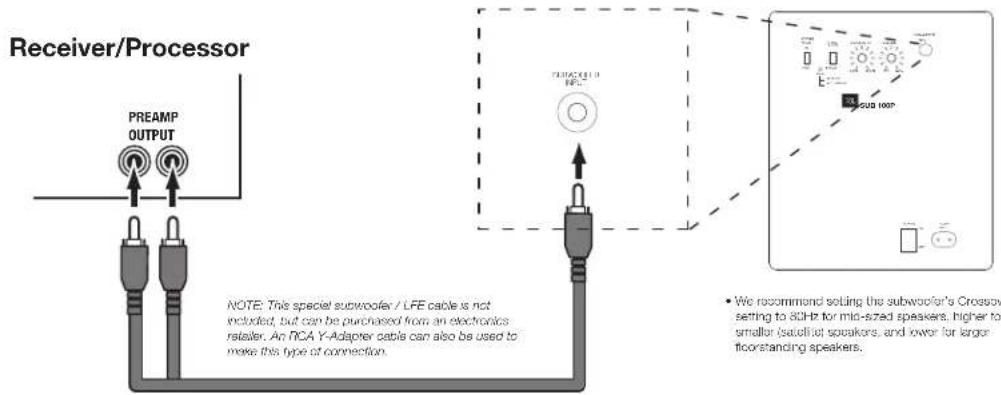
text_image
Receiver/Processor PREAMP OUTPUT NOTE: This special subwoofer / LFE cable is not included, but can be purchased from an electronics retailer. An NCA Y-Adapter cable can also be used to make this type of connection. • We recommend setting the subwoofer's Crossbow setting to 8GHz for mid-sized speakers, higher to smaller satellite speakers, and lower for larger floorstanding speakers.- Be sure to turn the Crossover on the subwoofer fully clockwise when using this type of connection. This type of setting bypasses the subwoofer's internal crossover and uses your receiver or processor's crossover.
- Check your receiver or processor menu settings and set the subwoofer selection to 'On' or 'Yes.'
Please be sure to review the owner's manual for your receiver or processor for more information on speaker setup and configuration.
text_image
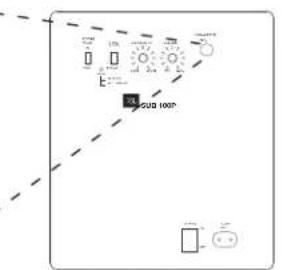
SUG 100P• We recommend setting the subwoofer's Crossover setting to 80Hz for mid-sized speakers, higher for smaller (satellite) speakers, and lower for larger floorstanding speakers.
OPERATING THE SUBWOOFER
TURNING THE SUBWOOFER ON AND OFF
Set the subwoofer's Power Switch to the 'On' position. Now set the subwoofer's Power Mode to the 'Auto' position. The subwoofer will automatically turn itself on when it receives an audio signal, and it will go into Standby mode after it has received no audio signal for approximately 10 minutes. The subwoofer's LED will glow blue when the subwoofer is on and will glow red when the subwoofer is in Standby.
If you will not be using the subwoofer for an extended period – for instance, if you're going on vacation – set the Power Switch to the 'Off' position.
SUBWOOFER ADJUSTMENTS: CROSSOVER
The Crossover control adjusts the subwoofer's built-in low-pass filter crossover between 50Hz and 150Hz. The higher you set the Crossover control, the higher in frequency the subwoofer will operate and the more its bass will 'overlap' that of the speakers. This adjustment helps achieve a smooth transition of bass frequencies between the subwoofer and the speakers for a variety of different rooms and subwoofer locations.
To set the Crossover control, listen for the smoothness of the bass. If the bass seems too strong at certain frequencies, try a lower Crossover control setting. If the bass seems too weak at certain frequencies, try a higher Crossover control setting.
SUBWOOFER ADJUSTMENTS: VOLUME
Use the volume control to set the subwoofer's volume. Turn the knob clockwise to increase the subwoofer's volume; turn the knob counterclock-wise to decrease the volume. Once you have balanced the subwoofer's volume with that of the other speakers in your system, you shouldn't have to change the volume control setting.
Notes on Setting Subwoofer Volume:
- Sometimes the ideal subwoofer volume setting for music is too loud for films, while the ideal setting for films is too quiet for music. When setting the subwoofer volume, listen to both music and films with strong bass content and find a 'middle ground' volume level that works for both.
- If your subwoofer always seems too loud or too quiet, you may want to place it in a different location. Placing the subwoofer in a corner will tend to increase its bass output, while placing it away from any walls or corners will tend to lessen its bass output.
SUBWOOFER ADJUSTMENTS: PHASE
The Phase switch determines whether the subwoofer driver's piston-like action moves in and out in phase with the speakers. If the subwoofer were to play out of phase with the speakers, the sound waves from the speakers could partially cancel out the waves from the subwoofer, reducing bass performance and sonic impact. This phenomenon depends in part on the placement of all the speakers relative to each other and the listener(s) in the room.
Although in most cases you should leave the Phase switch in the 'Normal' position, there is no absolutely correct setting for the Phase switch. When the subwoofer is properly in phase with the speakers, the sound will be clearer and have maximum impact, and percussive sounds like drums, piano and plucked strings will sound more life-like. The best way to set the Phase switch is to listen to music that you know well and to set the switch in the position that gives drums and other percussive sounds maximum impact.
USING THE SUPPLIED CARPET SPIKES
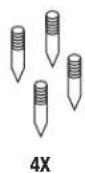
Four metal spikes are supplied for use when you place the subwoofer on a carpeted surface. Do not use these spikes when placing subwoofer on non-carpeted surfaces.
To insert the spikes:
-
Gently lay the subwoofer on its side (not its front or back) on a soft, nonabrasive surface.
-
Screw each spike into the threaded insert in each foot. Make sure all four spikes are screwed in completely for stability.
Note: NEVER drag the subwoofer to move it. Always carefully lift the subwoofer and carry it to its new location.

HARMAN International Industries, Inc.
8500 Balboa Boulevard, Northridge, CA 91329 USA
© 2014 HARMAN International Industries, Inc. All rights reserved.
JBL is a trademark of HARMAN International Industries, Incorporated, registered in the United States and/or other countries.
Features, specifications and appearance are subject to change without notice.
www.jbl.com
SUB 100P
natural_image
Front view of a rectangular appliance with a label 'OK' on the front panel (no other text or symbols)MERCI D'AVOIR CHOISI CE PRODUIT JBL®
natural_image
Technical line drawing of a circular mechanical component with mounting holes and central concentric rings (no text or symbols)HARMAN International Industries, Inc.
8500 Balboa Boulevard, Northridge, CA 91329 USA
natural_image
Front view of a rectangular appliance with a label 'OK' on the front panel (no other text or symbols)GRACIAS POR ELEGIR ESTE PRODUCTO JBL®
natural_image
Technical line drawing of a circular mechanical component with mounting holes and central concentric rings (no text or symbols)HARMAN International Industries, Inc.
8500 Balboa Boulevard, Northridge, CA 91329 USA
© 2014 HARMAN International Industries, Inc. Todos los derechos reservados.
natural_image
Line drawing of a front-mounted TV or appliance with two small bowls at the base (no text or symbols)natural_image
Technical line drawing of a circular mechanical component with mounting holes and central concentric rings (no text or symbols)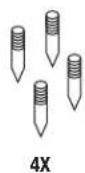
BEDIENUNGSANLEITUNG
HARMAN International Industries, Inc.
8500 Balboa Boulevard, Northridge, CA 91329 USA
natural_image
Line drawing of a front-mounted TV or appliance with two small bowls at the base (no text or symbols)GRAZIE PER AVER SCELTO QUESTO PRODOTTO JBL®
natural_image
Technical line drawing of a circular mechanical component with mounting holes and central concentric rings (no text or symbols)HARMAN International Industries, Inc.
8500 Balboa Boulevard, Northridge, CA 91329 USA
natural_image
Line drawing of a front-mounted TV or appliance with two small bowls at the base (no text or symbols)natural_image
Technical line drawing of a circular mechanical component with mounting holes and central concentric rings (no text or symbols)natural_image
Front view of a rectangular appliance with a label 'OK' on the front panel (no other text or symbols)natural_image
Technical line drawing of a circular mechanical component with mounting holes and central concentric rings (no text or symbols)HARMAN International Industries, Inc.
8500 Balboa Boulevard, Northridge, CA 91329 USA
© 2014 HARMAN International Industries, Inc. All rights reserved.
natural_image
Line drawing of a front-mounted TV or appliance with two small bowls at the base (no text or symbols)MUITO OBRIGADO POR ESCOLHER UM PRODUTO JBL®
natural_image
Technical line drawing of a circular mechanical component with mounting holes and central concentric rings (no text or symbols)HARMAN International Industries, Inc.
8500 Balboa Boulevard, Northridge, CA 91329 EUA
natural_image
Front view of a rectangular appliance with a label 'OK' on the front panel (no other text or symbols)TAKK FOR VALG DETTE JBL® PRODUKTET
natural_image
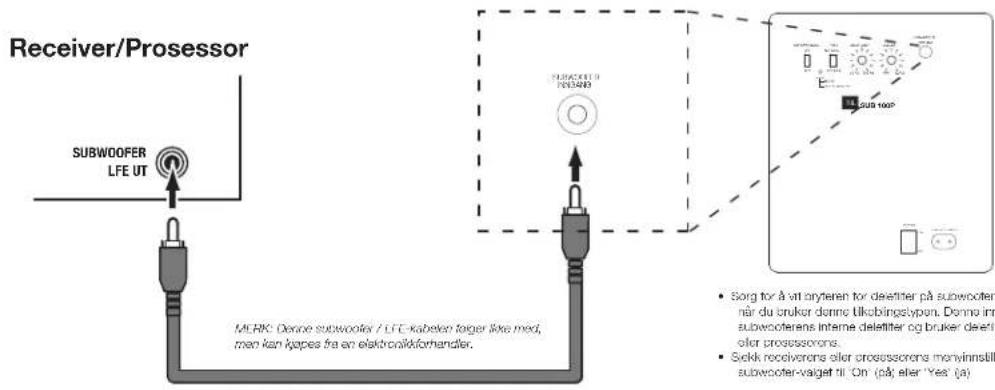
Technical line drawing of a circular mechanical component with mounting holes and central concentric rings (no text or symbols)KOBLE TIL SUBWOOFEREN
TIL EN REVEIVER ELLER FORFORSTERKER / PROSESSOR MED LAVPASSFILTRERT DEDIKERT SUBWOOFERUTGANG (LFE)
HARMAN International Industries, Inc.
8500 Balboa Boulevard, Northridge, CA 91329 USA
© 2014 HARMAN International Industries, Inc. Alle rettigheter er forbeholdt.
JBL er et varemerke for HARMAN International Industries, Incorporated, registrert i USA og/eller andre land.
natural_image
Front view of a rectangular appliance with a label 'OK' on the front panel (no other text or symbols)KIITOS, ETTÄ VALITSIT TÄMÄN JBL® -TUOTTEEN
natural_image
Technical line drawing of a circular mechanical component with mounting holes and central concentric rings (no text or symbols)natural_image
Front view of a rectangular appliance with a label 'OK' on the front panel (no other text or symbols)TACK FÖR ATT DU VALDE EN PRODUKT FRÅN JBL®
natural_image
Technical line drawing of a circular mechanical component with mounting holes and central concentric rings (no text or symbols)© 2014 HARMAN International Industries, Inc. Alla rättigheter reserverade.
natural_image
Front view of a rectangular appliance with a label 'OK' on the front panel (no other text or symbols)TAK, FORDI DU HAR VALGT DETTE JBL®-PRODUKT
natural_image
Technical line drawing of a circular mechanical component with mounting holes and central concentric rings (no text or symbols)PLACERING AF SUBWOOFEREN
TILSLUTNING AF SUBWOOFEREN
TIL EN RECEIVER ELLER FORFORSTÆRKER/PROCESSOR MED LAVPASFILTERET DEDIKERET SUBWOOFERUDGANG (LFE)

text_image
Receiver/processor SUBWOOFER LFE-UDGANG BEMERK: Dette subwoofer-LFE-klabel meridolger ikke man kan købes i hos an radio/tie-forhandler. SUBWOOFERUDGANG Serg for at drejo kontrollan til crossoverer hele vajtural, när du benyllor denne boud tissutning. Denne insettling tisdesætter subwooferens interne cross anvondar din receivers olat processors crossoverer. Kontroller menundstillingene for din receiver eller processor, og indstill vaig af subwoofer til "On" olTÆNDING OG SLUKNING AF SUBWOOFEREN
natural_image
Front view of a rectangular appliance with a label 'OK' on the front panel (no other text or symbols)DANK U VOOR DE AANKOOP VAN DIT JBL® PRODUCT
natural_image
Technical line drawing of a circular mechanical component with mounting holes and central concentric rings (no text or symbols)HARMAN International Industries, Inc.
8500 Balboa Boulevard, Northridge, CA 91329 USA
natural_image
Front view of a rectangular appliance with a label 'OK' on the front panel (no other text or symbols)DZIEKUJEMY ZA WYBRANIE PRODUKTU FIRMY JBL®
natural_image
Technical line drawing of a circular mechanical component with mounting holes and central concentric rings (no text or symbols)HARMAN International Industries, Inc.
8500 Balboa Boulevard, Northridge, CA 91329 USA
natural_image
Front view of a rectangular appliance with a label 'OK' on the front panel (no other text or symbols)natural_image
Technical line drawing of a circular mechanical component with mounting holes and central concentric rings (no text or symbols)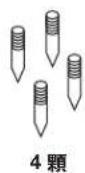
擁有者手冊
重低音喇叭後面板控制鈕和連接
natural_image
Front view of a rectangular appliance with a label 'OK' on the front panel (no other text or symbols)感谢您选择 JBL® 产品
natural_image
Technical line drawing of a circular mechanical component with mounting holes and central concentric rings (no text or symbols)
用户手册
低音扬声器后面板控件和连接
HARMAN International Industries, Inc.
8500 Balboa Boulevard, Northridge, CA 91329 USA
© 2014 HARMAN International Industries, Inc. 保留所有权利。
natural_image
Front view of a rectangular appliance with a label 'OK' on the front panel (no other text or symbols)TERIMA KASIH TELAH MEMILIH PRODUK JBL® INI
natural_image
Technical line drawing of a circular mechanical component with mounting holes and central concentric rings (no text or symbols)MENEMPATKAN SUBWOOFER
PENYESUAIAN SUBWOOFER VOLUME
PENYESUAIAN SUBWOOFER PHASE
natural_image
Front view of a rectangular appliance with a label 'DH' on the front panel (no other text or symbols)natural_image
Technical line drawing of a circular mechanical component with mounting holes and central concentric rings (no text or symbols)HARMAN International Industries, Inc.
8500 Balboa Boulevard, Northridge, CA 91329 USA (CWA)
HARMAN International Industries, Inc.
8500 Balboa Boulevard, Northridge, CA 91329 USA
© 2014 HARMAN International Industries, Inc. All rights reserved.
JBL is a trademark of HARMAN International Industries, Incorporated, registered in the United States and/or other countries.
Features, specifications and appearance are subject to change without notice.
www.jbl.com