SDM-S95AR - Monitor SONY - Free user manual and instructions
Find the device manual for free SDM-S95AR SONY in PDF.



User questions about SDM-S95AR SONY
0 question about this device. Answer the ones you know or ask your own.
Ask a new question about this device
Download the instructions for your Monitor in PDF format for free! Find your manual SDM-S95AR - SONY and take your electronic device back in hand. On this page are published all the documents necessary for the use of your device. SDM-S95AR by SONY.
USER MANUAL SDM-S95AR SONY
This monitor complies with the TCO'99 guidelines.
(for the black model)

This monitor complies with the TCO'03 guidelines.
(for the silver model)
目次
使用上の注意 4
DyIsPLeIyの型名を確認する 5
各部の名前はたさ 5
接統と設定 6
準備1:stsndを組み立る 6
準備2:匕德才信号ケープルをつう. 7
準備3:才一徳才接統コトをつねく 8
準備4:電源コトをつうく 9
準備5:一卜類をまごる 9
準備6:電源を入る 9
TCO'99 Eco-document (for the black model)
TCO'03 Eco-document (for the silver model)
This display is designed for use in Japan only and cannot be used in any other country.
主仕樣
TCO'99 Eco-document (for the black model)

Congratulations!
You have just purchased a TCO'99 approved and labelled product! Your choice has provided you with a product developed for professional use. Your purchase has also contributed to reducing the burden on the environment and also to the further development of environmentally adapted electronics products.
Why do we have environmentally labelled computers?
In many countries, environmental labelling has become an established method for encouraging the adaptation of goods and services to the environment. The main problem, as far as computers and other electronics equipment are concerned, is that environmentally harmful substances are used both in the products and during their manufacture. Since it is not so far possible to satisfactorily recycle the majority of electronics equipment, most of these potentially damaging substances sooner or later enter nature.
There are also other characteristics of a computer, such as energy consumption levels, that are important from the viewpoints of both the work (internal) and natural (external) environments. Since all methods of electricity generation have a negative effect on the environment (e.g. acidic and climate-influencing emissions, radioactive waste), it is vital to save energy. Electronics equipment in offices is often left running continuously and thereby consumes a lot of energy.
What does labelling involve?
This product meets the requirements for the TCO'99 scheme which provides for international and environmental labelling of personal computers. The labelling scheme was developed as a joint effort by the TCO (The Swedish Confederation of Professional Employees), Svenska Naturskyddsforeningen (The Swedish Society for Nature Conservation) and Statens Energimyndighet (The Swedish National Energy Administration).
Approval requirements cover a wide range of issues: environment, ergonomics, usability, emission of electric and magnetic fields, energy consumption and electrical and fire safety.
The environmental demands impose restrictions on the presence and use of heavy metals, brominated and chlorinated flame retardants, CFCs (freons) and chlorinated solvents, among other things. The product must be prepared for recycling and the manufacturer is obliged to have an environmental policy which must be adhered to in each country where the company implements its operational policy.
The energy requirements include a demand that the computer and/or display, after a certain period of inactivity, shall reduce its power consumption to a lower level in one or more stages. The length of time to reactivate the computer shall be reasonable for the user.
Labelled products must meet strict environmental demands, for example, in respect of the reduction of electric and magnetic fields, physical and visual ergonomics and good usability.
Below you will find a brief summary of the environmental requirements met by this product. The complete environmental criteria document may be ordered from:
TCO Development
SE-114 94 Stockholm, Sweden
Fax: +46 8 782 92 07
Email (Internet): development@tco.se
Current information regarding TCO'99 approved and labelled products may also be obtained via the Internet, using the address: http://www.tco-info.com/
Environmental requirements
Flame retardants
Flame retardants are present in printed circuit boards, cables, wires, casings and housings. Their purpose is to prevent, or at least to delay the spread of fire. Up to 30% of the plastic in a computer casing can consist of flame retardant substances. Most flame retardants contain bromine or chloride, and those flame retardants are chemically related to another group of environmental toxins, PCBs. Both the flame retardants containing bromine or chloride and the PCBs are suspected of giving rise to severe health effects, including reproductive damage in fish-eating birds and mammals, due to the bio-accumulative* processes. Flame retardants have been found in human blood and researchers fear that disturbances in foetus development may occur.
The relevant TCO'99 demand requires that plastic components weighing more than 25 grams must not contain flame retardants with organically bound bromine or chlorine. Flame retardants are allowed in the printed circuit boards since no substitutes are available.
Cadmium**
Cadmium is present in rechargeable batteries and in the colour-generating layers of certain computer displays. Cadmium damages the nervous system and is toxic in high doses. The relevant TCO'99 requirement states that batteries, the colour-generating layers of display screens and the electrical or electronics components must not contain any cadmium.
Mercury**
Mercury is sometimes found in batteries, relays and switches. It damages the nervous system and is toxic in high doses. The relevant TCO'99 requirement states that batteries may not contain any mercury. It also demands that mercury is not present in any of the electrical or electronics components associated with the labelled unit.
CFCs (freons)
The relevant TCO'99 requirement states that neither CFCs nor HCFCs may be used during the manufacture and assembly of the product. CFCs (freons) are sometimes used for washing printed circuit boards. CFCs break down ozone and thereby damage the ozone layer in the stratosphere, causing increased reception on earth of ultraviolet light with e.g. increased risks of skin cancer (malignant melanoma) as a consequence.
Lead**
Lead can be found in picture tubes, display screens, solders and capacitors. Lead damages the nervous system and in higher doses, causes lead poisoning. The relevant TCO'99 requirement permits the inclusion of lead since no replacement has yet been developed.
- Bio-accumulative is defined as substances which accumulate within living organisms.
** Lead, Cadmium and Mercury are heavy metals which are Bio-accumulative.
TCO’03 Eco-document (for the silver model)
TCDDevelopment
Tio'03
DISPLAYS
www.tcodevelopment.com
Congratulations!
The display you have just purchased carries the TCO'03 Displays label. This means that your display is designed, manufactured and tested according to some of the strictest quality and environmental requirements in the world. This makes for a high performance product, designed with the user in focus that also minimizes the impact on our natural environment.
Ergonomics
- Good visual ergonomics and image quality in order to improve the working environment for the user and to reduce sight and strain problems. Important parameters are luminance, contrast, resolution, reflectance, colour rendition and image stability.
Energy
- Energy-saving mode after a certain time - beneficial both for the user and the environment
- Electrical safety
Emissions
- Electromagnetic fields
- Noise emissions
Ecology
- The product must be prepared for recycling and the manufacturer must have a certified environmental management system such as EMAS or ISO 14 001
-
Restrictions on
-
chlorinated and brominated flame retardants and polymers
-
heavy metals such as cadmium, mercury and lead.
The requirements included in this label have been developed by TCO Development in co-operation with scientists, experts, users as well as manufacturers all over the world. Since the end of the 1980s TCO has been
involved in influencing the development of IT equipment in a more user-friendly direction. Our labelling system started with displays in 1992 and is now requested by users and IT-manufacturers all over the world.
For more information, please visit www.tcodevelopment.com
Recycling Information
Customer in Europe
The collection and recycling of this product has been planned according to your country's relevant legislation. To ensure that this product will be collected and recycled in way that minimizes the impact on the environment, please do the following:
-
If you purchased this product for private use, contact your municipality or the waste collection system and bring the product to this collection point / have the product be picked up by the waste collection system. Alternatively, your retailer might take back this if you purchase new equivalent equipment; please check with your retailer whether he will take back this product before bringing it. For information on your country's recycling arrangements, please contact the Sony representation in your country (contact details at: www.sony-europe.com). Further details on specific recycling systems can be found at the following addresses:
-
Belgium: www-recupel.be
- Netherlands: www.nvmp.nl (consumer electronics)
www.ictmilieu.nl (IT equipment) - Norway: www.elretur.no
- Sweden: www.el-kretsen.se
-
Switzerland: www.swico.ch
-
If you use this product professionally, check the product's delivery contract for take back / recycling arrangements and follow the procedures described therein. Alternatively, follow the procedures described under point 1.
Customer in USA
We Sony as a member of EIA recommends to visit URL below http://www.eiae.org/
Customer in Asia
http://www.sony.co.jp/SonyInfo/Environment/recycle/3R.html
TFTLCD Color Computer Display
SDM-S75*
SDM-S95***
Owner's Record
The model and serial numbers are located at the rear of the unit. Record these numbers in the spaces provided below. Refer to them whenever you call upon your dealer regarding this product. Model No. __ Serial No. ____
WARNING
To reduce the risk of fire or electric shock, do not expose this apparatus to rain or moisture.
Dangerously high voltages are present inside the unit. Do not open the cabinet. Refer servicing to qualified personnel only.
FCC Notice
This equipment has been tested and found to comply with the limits for a Class B digital device, pursuant to Part 15 of the FCC Rules. These limits are designed to provide reasonable protection against harmful interference in a residential installation. This equipment generates, uses, and can radiate radio frequency energy and, if not installed and used in accordance with the instructions, may cause harmful interference to radio communications. However, there is no guarantee that interference will not occur in a particular installation. If this equipment does cause harmful interference to radio or television reception, which can be determined by turning the equipment off and on, the user is encouraged to try to correct the interference by one or more of the following measures:
- Reorient or relocate the receiving antenna.
- Increase the separation between the equipment and receiver.
- Connect the equipment into an outlet on a circuit different from that to which the receiver is connected.
- Consult the dealer or an experienced radio/TV technician for help. You are cautioned that any changes or modifications not expressly approved in this manual could void your authority to operate this equipment.
IMPORTANT
If you have any questions about this product, you may call; Sony Customer Information Services Center 1-800-222-7669 or http://www.sony.com/
Declaration of Conformity
Trade Name :SONY
Model : SDM-S75/S95*
Note : *means any number or alphanumeric character.
Responsible Party : Sony Electronics Inc.
Address : 16530 Via Esprillo, San Diego, CA
92127 U.S.A.
Telephone Number : 858-942-2230
This device complies with part 15 of the FCC rules. Operation is subject to the following two conditions: (1) This device may not cause harmful interference, and (2) this device must accept any interference received, including interference that may cause undesired operation.
Be sure to confirm the carton that came with your display. The ID label of your display model is located at the rear of the display.
NOTICE
This notice is applicable for USA/Canada only.
If shipped to USA/Canada, install only a UL LISTED/CSA
LABELLED power supply cord meeting the following
specifications:
SPECIFICATIONS
Plug Type Nema-Plug 5-15p
Cord Type SVT or SJT, minimum 3× 18 AWG
Length Maximum 15 feet
Rating Minimum 7 A, 125 V
NOTICE
As an ENERGY STAR Partner, Sony Corporation has determined that this product meets the ENERGY STAR guidelines for energy efficiency.

This monitor complies with the TCO'99 guidelines.
(for the black model)

This monitor complies with the TCO'03 guidelines.
(for the silver model)
Table of Contents
Precautions. 4
Checking the model name of the display 5
Identifying parts and controls 5
Setup. 6
Setup 1: Assemble the stand. 6
Setup 2: Connect the video signal cables. 7
Setup 3: Connect the audio cords 8
Setup 4: Connect the power cord 9
Setup 5: Secure the cords. 9
Setup 6: Turn on the display and computer. 9
Setup 7: Adjust the tilt and height 10
Selecting the input signal (INPUT1/INPUT2) 11
Customizing Your Display 12
Navigating the menu. 12
Menu options list. 13
PICTUREADJUSTmenu. 14
COLOR menu 14
SHARPNESS menu 14
MODE RESET menu (PICTURE ADJUST menu only). 14
A SCREEN menu (analog RGB signal only) 14
- MENU POSITION menu. 15
INPUT SENSING menu 15
LANGUAGE menu. 15
RESET menu (reset to the default setting) 15
MENU LOCK menu. 15
Technical Features 16
Power saving function. 16
Reducing the power consumption (ECO mode) 16
Automatic picture quality adjustment function (analog RGB signal only) 16
Troubleshooting. 17
On-screen messages 17
Trouble symptoms and remedies 18
Specifications. 20
TCO'99 Eco-document (for the black model)
TCO'03 Eco-document (for the silver model) .ii
- Macintosh is a trademark licensed to Apple Computer, Inc., registered in the U.S.A. and other countries.
- Windows® is registered trademarks of Microsoft Corporation in the United States and other countries.
- IBM PC/AT and VGA are registered trademarks of IBM Corporation of the U.S.A.
- VESA and DDC™ are trademarks of the Video Electronics Standards Association.
- ENERGY STAR is a U.S. registered mark.
- Adobe and Acrobat are trademarks of Adobe Systems Incorporated.
- All other product names mentioned herein may be the trademarks or registered trademarks of their respective companies.
- Furthermore, "TM" and "8" are not mentioned in each case in this manual.
Precautions
Warning on power connections
- Use the supplied power cord. If you use a different power cord, be sure that it is compatible with your local power supply.
For the customers in the U.S.A.
If you do not use the appropriate cord, this display will not conform to mandatory FCC standards.
For the customers in the UK
If you use the display in the UK, be sure to use the appropriate UK power cord.
Example of plug types
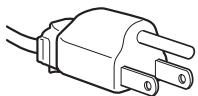
for 100 to 120V AC
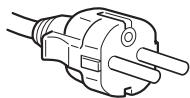
for 200 to 240 V AC
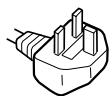
for 240 V AC only
The equipment should be installed near an easily accessible outlet.
Installation
Do not install or leave the display:
- In places subject to extreme temperatures, for example near a radiator, heating vent, or in direct sunlight. Subjecting the display to extreme temperatures, such as in an automobile parked in direct sunlight or near a heating vent, could cause deformations of the casing or malfunctions.
- In places subject to mechanical vibration or shock.
- Near any equipment that generates a strong magnetic field, such as a TV or various other household appliances.
- In places subject to inordinate amounts of dust, dirt, or sand, for example near an open window or an outdoor exit. If setting up temporarily in an outdoor environment, be sure to take adequate precautions against airborne dust and dirt. Otherwise irreparable malfunctions could occur.
Handling the LCD screen
- Do not leave the LCD screen facing the sun as it can damage the LCD screen. Take care when you place the display by a window.
- Do not push on or scratch the LCD screen. Do not place a heavy object on the LCD screen. This may cause the screen to lose uniformity or cause LCD panel malfunctions.
- If the display is used in a cold place, a residual image may appear on the screen. This is not a malfunction. The screen returns to normal as the temperature rises to a normal operating level.
- If a still picture is displayed for a long time, a residual image may appear for a while. The residual image will eventually disappear.
- The LCD panel becomes warm during operation. This is not a malfunction.
Note on the LCD (Liquid Crystal Display)
Please note that the LCD screen is made with high-precision technology. However, black points or bright points of light (red, blue, or green) may appear constantly on the LCD screen, and irregular colored stripes or brightness may appear on the LCD screen. This is not malfunction.
(Effective dots: more than 99.99% )
Maintenance
- Be sure to unplug the power cord from the power outlet before cleaning your display.
- Clean the LCD screen with a soft cloth. If you use a glass cleaning liquid, do not use any type of cleaner containing an anti-static solution or similar additive as this may scratch the LCD screen's coating.
- Clean the cabinet, panel, and controls with a soft cloth lightly moistened with a mild detergent solution. Do not use any type of abrasive pad, scouring powder, or solvent, such as alcohol or benzine.
- Do not rub, touch, or tap the surface of the screen with sharp or abrasive items such as a ballpoint pen or screwdriver. This type of contact may result in a scratched picture tube.
- Note that material deterioration or LCD screen coating degradation may occur if the display is exposed to volatile solvents such as insecticide, or if prolonged contact is maintained with rubber or vinyl materials.
Transportation
- Disconnect all the cables from the display. If you use a height adjustable stand adjust its height to the highest position and hold both sides of the LCD display securely. Be careful not to scratch the screen when transporting. If you drop the display, you may injured or the display may be damaged.
- When you transport this display for repair or shipment, use the original carton and packing materials.
- Replace the stopper pin for the height adjustable stand to fix the stand during the transportation.
Disposal of the display
- Do not dispose of this display with general household waste.
- The fluorescent tube used in this display contains mercury. Disposal of this display must be carried out in accordance to the regulations of your local sanitation authority.
For customers in the United States
This product contains mercury. Disposal of this product may be regulated if sold in the United States. For disposal or recycling information, please contact your local authorities or the Electronics Industries Alliance (http://www.eiae.org).
Checking the model name of the display
Check the model name of the display first.
The model name is located at the rear of the display (Example : SDM-S75A).
You cannot use some of the functions or menu options for certain display models.
Identifying parts and controls
See the pages in parentheses for further details.
The illustration only shows one of all the models that are available for this display.
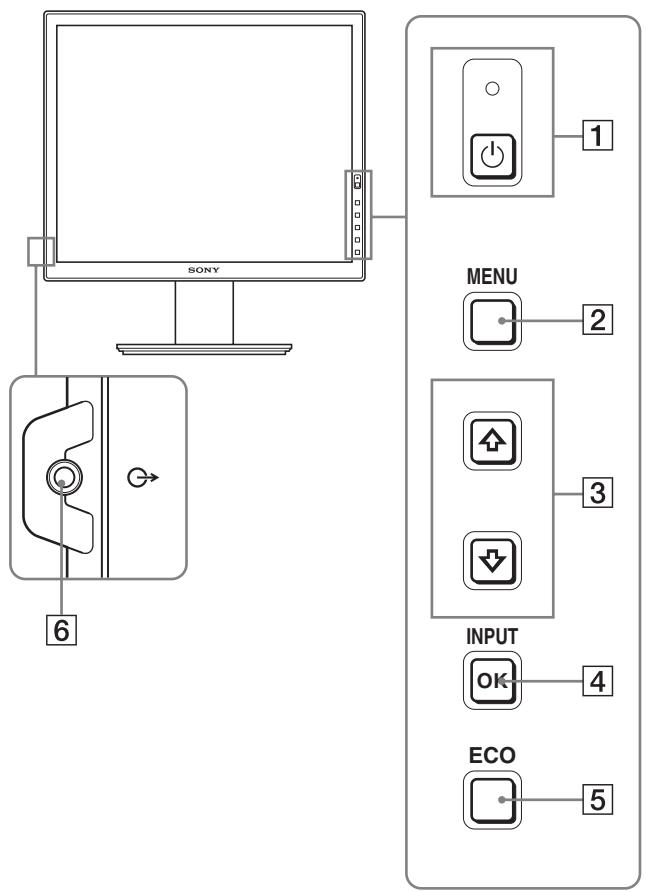
Front of the display
The contents with mark for specifications vary depending on the models. For details, see "Specifications" (page 20).
1 (Power) switch and (power) indicator (pages 9, 16)
This switch turns the display on. To turn the display off, press this switch again.
2 MENU button (pages 12)
This button turns the menu screen on and off.
3 / buttons (page 12)
These buttons are used to select the menu items and make adjustments.
OK button (page 12)
This button activates the selected menu item and adjustments made using the / buttons (3).
INPUT (page 11)*
These buttons switch the video input signal between INPUT1 and INPUT2 when two computers are connected to the display. (Only available when menu is turned off.)
5 ECO button (page 16)
This button is used to reduce the power consumption.
When the menu screen is not displayed, you can also automatically adjust the picture quality for the current input signal while keeping pressing this button for more than 3 seconds (One touch Auto adjust). (analog RGB signal only)
6 Audio output jack (page 8)
This jack outputs audio signals to speakers or other audio equipment.
Real of the display
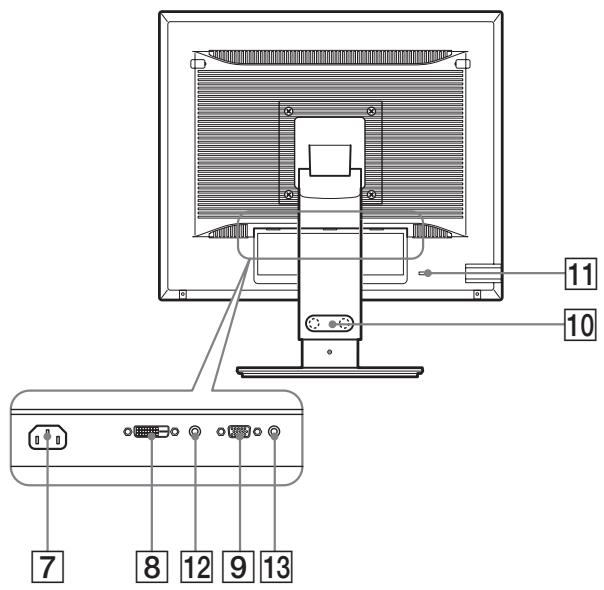
7 AC IN connector (page 9)
This connector connects the power cord (supplied).
8 DVI-D input connector (digital RGB)* (page 8)
This connector inputs digital RGB video signals that comply with DVI Rev.1.0.
9 HD15 input connector (analog RGB) (page 8)
This connector inputs analog RGB video signals (0.700 Vp-p, positive) and sync signals.
10 Cable holder\* (page 9)
This part secures cables and cords to the display.
11 Security lock hole
The security lock hole should be used with the Kensington Micro Saver Security System.
Micro Saver Security System is a trademark of Kensington.
12 Audio jack for INPUT1*
This jack inputs audio signals when connected to the audio output jack of a computer or other audio equipment connected to INPUT1.
13 Audio jack for INPUT2\*
This jack inputs audio signals when connected to the audio output jack of a computer or other audio equipment connected to INPUT2.
Setup
Before using your display, check that the following items are included in your carton:
LCD display
Power cord
- Stand Base
- HD15-HD15 video signal cable (analog RGB)
- DVI-D video signal cable (digital RGB)
- CD-ROM (utility software for Windows/Macintosh, Operating Instructions, etc.)
Warranty card
- Quick Setup Guide
The contents with mark for specifications vary depending on the models. For details, "Specifications" (page 20).
Setup 1: Assemble the stand
Do not press the LCD display when placing or raising the display straight on a desk or a like.
It may affect the uniformity of the screen or damage the LCD display.
When using supplied stand*
1 Open the carton and take out the stand base.
2 Confirm the supplied items.
- Stand Base (with the screw at the bottom side)
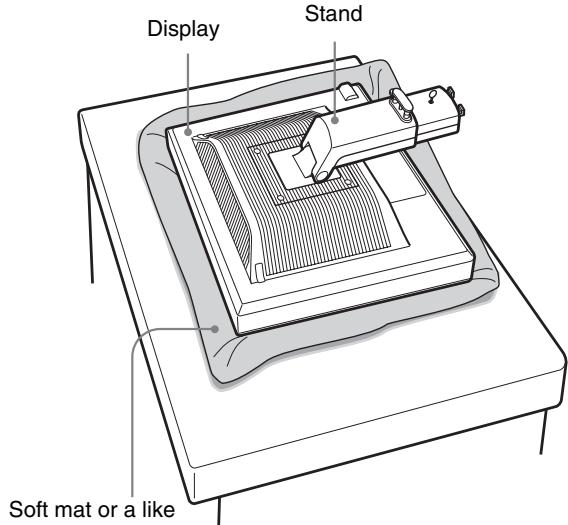
3 Place a soft mat or a kind on a flat surface like a desk.
You may damage the LCD screen and the display itself if putting the display directly on the desk.
4 Take the display out from the carton and then place the frame of the laid display along the edge of the desk.
The figure shows the height adjustable stand. If you use the fixed stand, your last step of assembling procedure is Step 5.
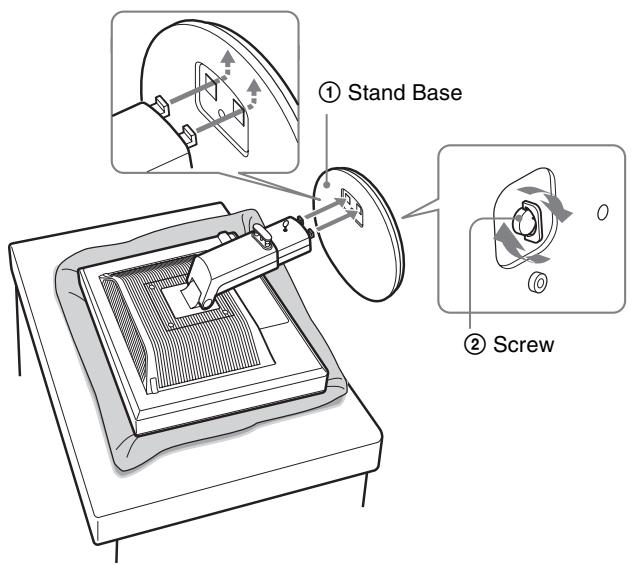
5 Hook the stand base holes onto the prongs of stand to attach. ①
Lift the handle of screw to screw the stand base securely. ②
Be sure that the screw is secured and turn the screw handle back.
6 If you use the height adjustable stand, remove the stopper pin after raising the height adjustable stand straight.
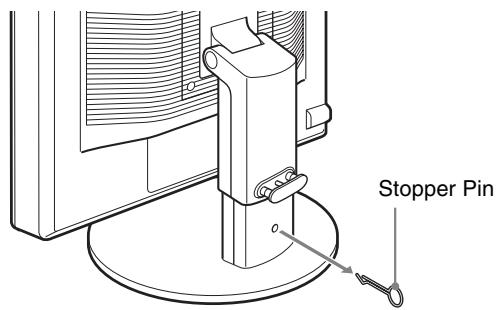
Note
Do not remove the stopper pin while the stand is laid. It may fall or injure you by the stand neck coming off the stand base impetuously.
When using VESA Stand*
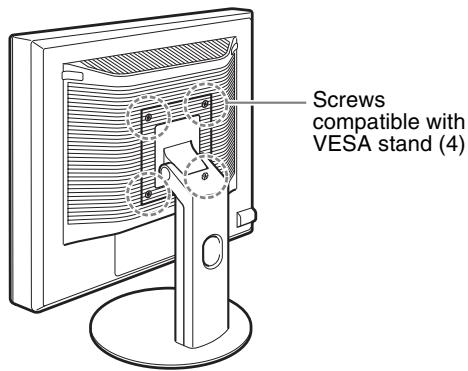
You can attach a VESA stand in other brands by removing the supplied stand attached to the display.
Setup 2: Connect the video signal cables
- Turn off the display and computer before connecting.
Notes
- Do not touch the pins of the video signal cable connector as this might bend the pins.
- Check the alignment of the connector to avoid bending the pins of the video signal cable connector.
1 Tilt the display up.
When using the height adjustable stand, raise the display higher.*
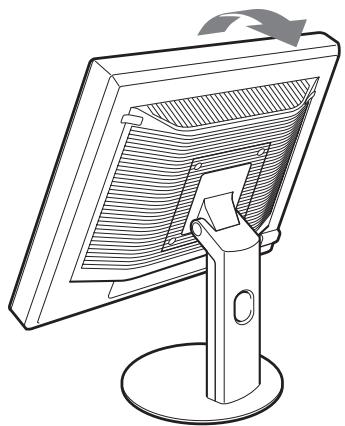
2 Connect the video signal cables to the display.
If you use the fixed stand, draw the video signal cables through the stand hole first and then connect them to the display. For more details see "Setup 5: Secure the cords."
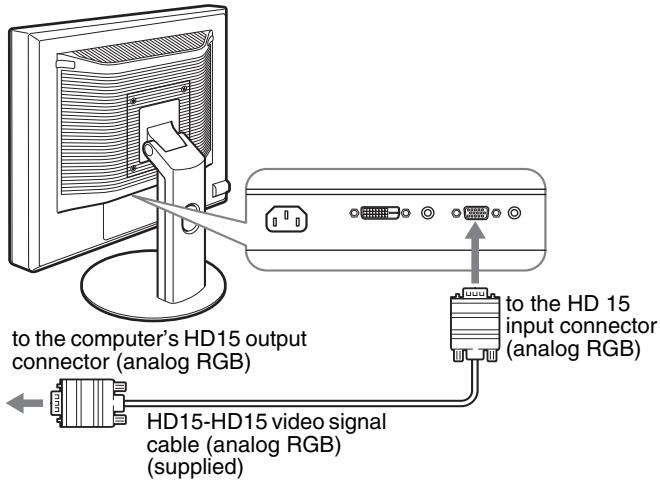
Connect a computer equipped with an HD15 output connector (analog RGB)
Using the supplied HD15-HD15 video signal cable (analog RGB), connect the computer to the display's HD 15 input connector (analog RGB).
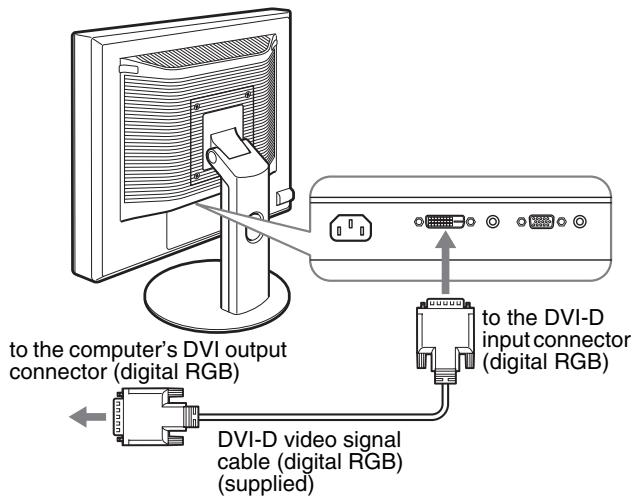
Connect a computer equipped with a DVI output connector (digital RGB)
Using the supplied DVI-D video signal cable (digital RGB), connect the computer to the display's DVI-D input connector (digital RGB).
Setup 3: Connect the audio cords
If you are not intended to output audio, you do not need this connection.
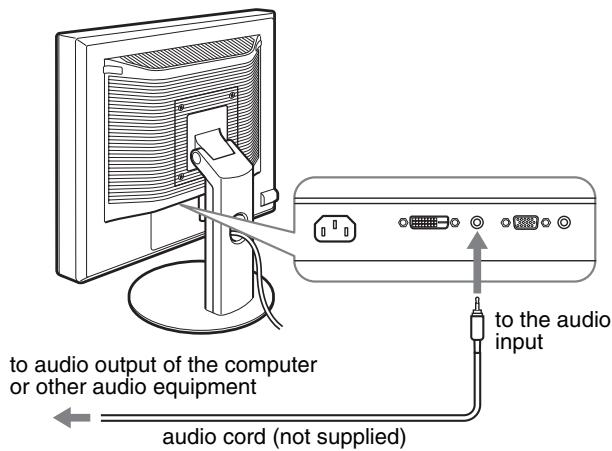
If you use the fixed stand, draw the audio cords through the stand hole first and then connect them to the display. For more details see "Setup 5: Secure the cords."
1 Connect the display's audio input jack and audio output jack of the computer or other audio equipment using the audio cord (not supplied).
2 Connect the audio cable (not supplied) securely to the display's audio output jack.
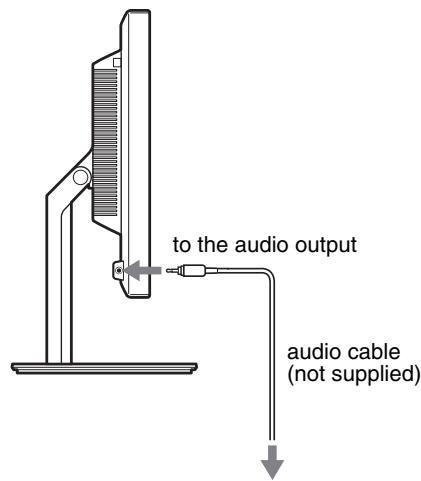
Audio output will be changed when the display's audio input and audio output connection has been completed.*
Connect audio equipment that is within the input range shown in the display's audio input specifications. Too high of an input may cause damage to the display.*
Setup 4: Connect the power cord
If you use the fixed stand, draw the power cord through the stand hole first and then connect them to the display. For more details see "Setup 5: Secure the cords."
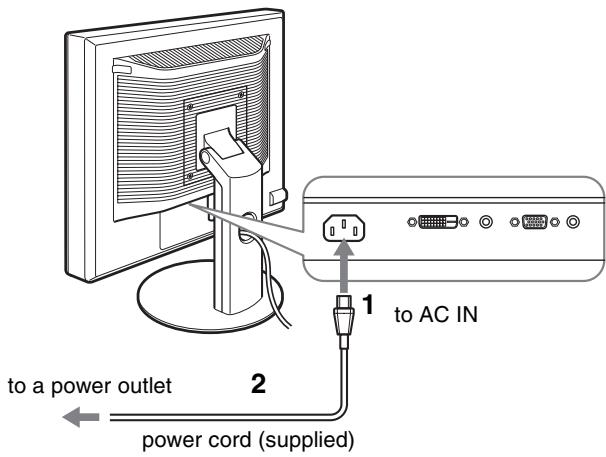
1 Connect the supplied power cord securely to the display's AC IN connector.
2 Connect the other end securely to a power outlet.
Setup 5: Secure the cords
Fixed Stand*
Be sure that the cords and cables have been drawn into the stand hole as illustrated.
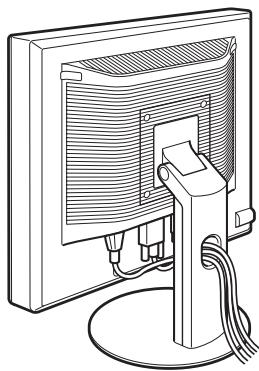
Height adjustable stand*
Draw the cords and cables through the cable holder as illustrated.
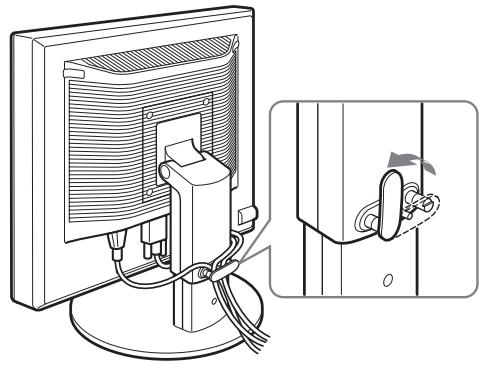
Note
When bounding the cords and cables, be sure to loosen them a little. If they get pulled hard they may come off from the connectors or plugs as you adjust the screen angle. If you stretch the cords and cables too hard they may get damaged.
Setup 6:Turn on the display and computer
1 Press the (power) switch located on the front right of the display.
The (power) indicator lights up in green.
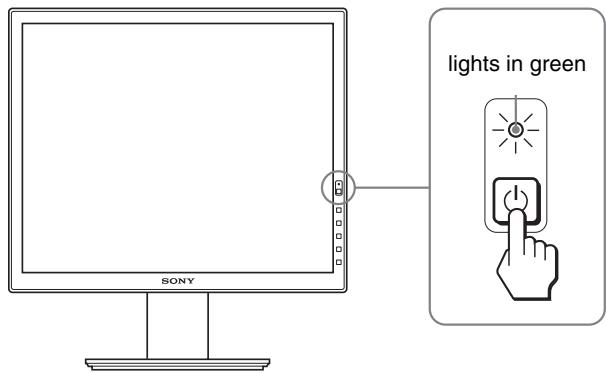
2 Turn on the computer.
If no picture appears on your screen
- Check that the power cord and the video signal cables are properly connected.
-
If "NO INPUT SIGNAL" appears on the screen:
-
The computer is in the power saving mode. Try pressing any key on the keyboard or moving the mouse.
- Check that the input signal setting is correct by pressing the OK button (page 11).
- If "CABLE DISCONNECTED" appears on the screen:
- Check that the video signal cables are properly connected.
-
Check that the input signal setting is correct by pressing the OK button (page 11).
-
If "OUT OF RANGE" appears on the screen:
Reconnect the old display. Then adjust the computer's graphics board within the following ranges.
| Analog RGB | Digital RGB | |
| Horizontal frequency | 28-80 kHz | 28-64 kHz |
| Vertical frequency | 48-75 Hz | 60 Hz |
| Resolution | 1280 × 1024 or less | |
For more information about the on-screen messages, see "Trouble symptoms and remedies" on page 18.
No need for specific drivers
The display complies with the "DDC" Plug & Play standard and automatically detects all the display's information. No specific driver needs to be installed to the computer.
The first time you turn on your computer after connecting the display, the setup Wizard may appear on the screen. If this is the case, follow the on-screen instructions. The Plug & Play display is automatically selected so that you can use this display.
The vertical frequency turns to 60Hz
Since flickers are unobtrusive on the display, you can use it as is. You do not need to set the vertical frequency to any particular high value.
Setup 7: Adjust the tilt and height
This display can be adjusted within the angles shown below.
Hold both sides of the LCD panel, then adjust screen angles.
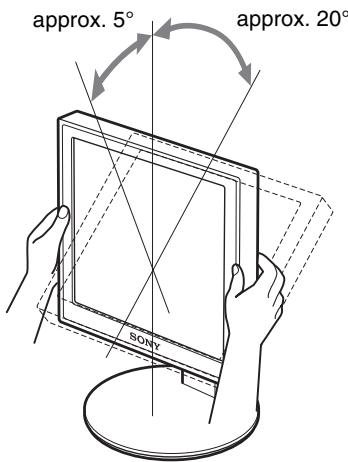
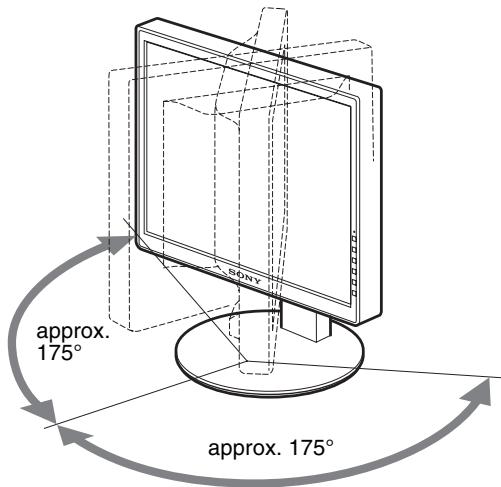
When you use the height adjustable stand, the height adjust is also available as below.
Hold both sides of the LCD panel, then adjust screen height.
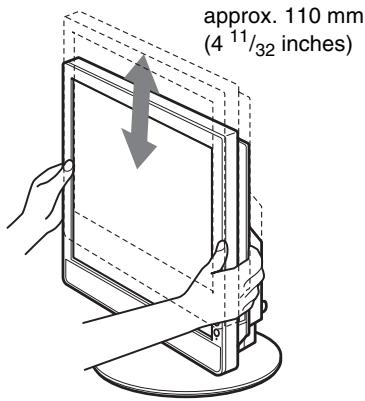
To use the display comfortably
Adjust the viewing angle of your display according to the height of your desk and chair, so that light is not reflected from the screen to your eyes.
Notes
- When adjusting the screen's angle, be sure not to crash it against any objects around the display.
- Do not put any objects under the display when you adjust the height of stand. It may get damaged by accident.
Selecting the input signal (INPUT1/ INPUT2)*
Press the OK button.
The input signal change each time you press this button.

INPUT
| On-screen message (Appears about 5 seconds on the upper left corner.) | Input signal configuration |
| INPUT1: DVI-D* | DVI-D input connector (digital RGB) for INPUT1 |
| INPUT2: HD15 | HD15 input connector (analog RGB) for INPUT2 |
GB
Customizing Your Display
Before making adjustments
Connect the display and the computer, and turn them on. For the best results, wait for at least 30 minutes before making any adjustments after display is connected to the computer and turned on.
You can make numerous adjustments to your display using the on-screen menu.
Navigating the menu
1 Display the main menu.
Press the MENU button to display the main menu on your screen.

2 Select the menu you want to adjust.
Press the / buttons to display the desired menu. Press the OK button to select the menu item.
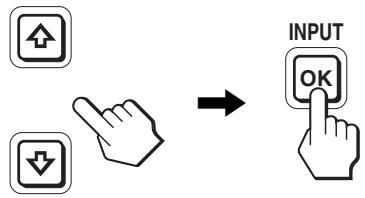
3 Adjust the item.
Press the / buttons to make the adjustment, then press the OK button.
When you press the OK button, the setting is stored, then the display returns to the previous menu.
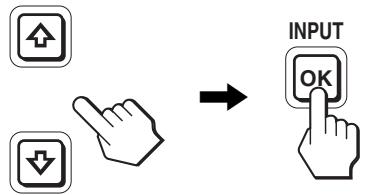
4 Close the menu.
Press the MENU button once to return to normal viewing. If no buttons are pressed, the menu closes automatically after about 45 seconds.

Resetting the adjustments to the default settings
You can reset the adjustments using the RESET menu. For more information about resetting the adjustments, see (RESET) on page 15.
Menu options list
Menu options vary depending on the models.
Check your model name on the bottom of the display and refer to the tables below.
| SDM-S75A/S95AR SDM-S75E/S95ER | |
| BACKLIGHT | ☑ |
| CONTRAST | ☑1) |
| BRIGHTNESS | ☑1) |
| γ GAMMA | ☑1) |
| COLOR | 9300K |
| 6500K | |
| sRGB1) | |
| USER (gain of R and B) | |
| SHARPNESS | ☑ |
| MODE RESET* | - |
| SCREEN | AUTO |
| PHASE | |
| PITCH | |
| H CENTER | |
| V CENTER | |
| MENU POSITION | ☑ |
| INPUT SENSING* | - |
| LANGUAGE | ENGLISH |
| FRANÇAIS | |
| DEUTSCH | |
| ESPAÑOL | |
| ITALIANO | |
| NEDERLANDS | |
| SVENSKA | |
| ΥСΚΗΠ | |
| 日本語 | |
| 中文 | |
| RESET | OK |
| CANCEL | |
| MENU LOCK | ON |
| OFF |
| SDM-S75D/S95DR SDM-S75F/S95FR SDM-S75N/S95NR | |
| PICTURE ADJUST menu* | |
| MODE (ECO mode) | HIGH |
| MIDDLE | |
| LOW | |
| USER | |
| BACKLIGHT | ☑ |
| CONTRAST | ☑1) |
| BRIGHTNESS | ☑1) |
| γ GAMMA | ☑1) |
| COLOR | 9300K |
| 6500K | |
| sRGB1) | |
| USER (gain of R and B) | |
| SHARPNESS | ☑ |
| MODE RESET* | ☑ |
| SCREEN | AUTO |
| PHASE | |
| PITCH | |
| H CENTER | |
| V CENTER | |
| MENU POSITION | ☑ |
| INPUT SENSING* | AUTO ON |
| INPUT1 | |
| INPUT2 | |
| AUTO OFF | |
| LANGUAGE | ENGLISH |
| FRANÇAIS | |
| DEUTSCH | |
| ESPAÑOL | |
| ITALIANO | |
| NEDERLANDS | |
| SVENSKA | |
| ΥССКИ | |
| 日本語 | |
| 中文 | |
| RESET | OK |
| CANCEL | |
| MENU LOCK | ON |
| OFF | |
1) CONTRAST, BRIGHTNESS, and GAMMA are not adjustable when "sRGB" selected.
PICTURE ADJUST menu\*
For those display with analog inputs, BACKLIGHT, CONTRAST, and BRIGHTNESS can be adjustable when the ECO mode is selected for the USER only.
| Items | Press the ↑ button | Press the ↓ button |
| MODE | Set the ECO mode. | |
| HIGH | Select the brightness of your display from "HIGH," "MIDDLE," "LOW," or "USER" to save power consumption. | |
| MIDDLE | ||
| LOW | ||
| USER | You can adjust the subtle tones of your display brightness when selecting the "USER" mode. | |
| You can set a variety of mode by setting an input. | ||
| BACKLIGHT | Brightens the screen. | Darkens the screen. |
| CONTRAST | Sharpens the picture contrasts. | Blurs the picture contrasts. |
| BRIGHTNESS | Brightens the picture (Black label). | Darkens the picture (Black label). |
| γ GAMMA | Features You can adjust your pictures on the screen to the original coloring. | |
Note
If you select "sRGB," you cannot adjust CONTRAST, BRIGHTNESS, and GAMMA.
COLOR menu
| Items | Features |
| 9300K | Bluish hue |
| 6500K | Reddish hue |
| sRGB1) | When you select “sRGB” the color are adjusted to the sRGB profile. (The sRGB color setting is an industry-standard color space protocol designed for computer products.) When you select “sRGB,” the color settings of your computer must be set to the sRGB profile. |
| USER2) | You can adjust color temperature finely and that color setting is stored in memory. |
1) If a computer or other equipment connected to the display is not sRGBcompliant, color cannot be adjusted to the sRGB profile. When you select "sRGB," you cannot adjust CONTRAST, BRIGHTNESS, and GAMMA. sRGB is unavailable when HIGH or MIDDLE or LOW mode for ECO mode is selected. ("sRGB" would be gray-out)
2) This adjustment changes the color temperature by increasing or decreasing the R and B components with respect to G (green). G component is fixed.
SHARPNESS menu
| Items | Press the ↓/↑ buttons |
| SHARPNESS | Adjust to sharpen the edge of images, etc. |
MODE RESET menu (PICTURE ADJUST menu only)*
| Items | Features |
| OK | You can reset the adjustments of BACKLIGHT, CONTRAST, BRIGHTNESS, GAMMA, COLOR, and SHARPNESS to the default setting. |
| CANCEL | To cancel resetting and return to the menu. |
A SCREEN menu (analog RGB signal only)
Automatic picture quality adjustment function
When the display receives an input signal, it automatically adjusts the picture's position and sharpness (phase/pitch), and ensures that a clear picture appears on the screen (page 17).
Note
While the automatic picture quality adjustment function is activated, only the (power) switch is operable.
The picture may flicker during this time, but this is not a malfunction.
Simply wait a few moments until the adjustment completes.
If the automatic picture quality adjustment function of this display did not seem to adjust the picture completely
You can make further automatic adjustment of the picture quality for the current input signal. (See AUTO below.)
If you still need to make further adjustments to the picture quality
You can manually adjust the picture's sharpness (phase/pitch) and position (horizontal/vertical position).
These adjustments are stored in memory and automatically recalled when the display receives the same input signal. These settings may have to be repeated if you change the input signal after reconnecting your computer.
| Items | Features |
| AUTO | Make the appropriate adjustments of the screen’s phase, pitch and horizontal/vertical position for the current input signal and store them. |
Adjust the picture's sharpness and position manually (PHASE/PITCH/H CENTER/V CENTER)
You can adjust the picture's sharpness and position as follows.
1 Set the resolution to 1280 × 1024 , on the computer.
2 Load the CD-ROM.
3 Start the CD-ROM, and display the test pattern.
For Windows User
When Auto run operates:
1 Click "DISPLAY ADJUSTMENT TOOL (UTILITY)".
2 Click "Adjust" and confirm the resolution and then click "Next".
3 Test pattern for PITCH, PHASE, H CENTER and V CENTER appears in order.
When Auto run fails to operate:
1 Open "My Computer" and right click the CD-ROM icon. Go to "Explorer" and open the CD-ROM icon.
2 Open [Utility] and then select [Windows].
3 Start [Win_Utility.exe].
Test pattern appears.
For Macintosh user
1 Open [Utility] and then select [Mac].
2 Start [Mac_Untility.exe]
Test pattern appears.
| Items | Press the ↓/↑ buttons |
| PHASE | Minimize the horizontal stripes on the screen. |
| PITCH | Vertical stripes become vanished. |
| H CENTER | Adjust the picture position when your picture does not appear on the center of the screen. |
| V CENTER |
-MENU POSITION menu
| Items | Press the ↓/↑ buttons |
| MENU POSITION | You can change the menu displayed position on the screen. You can choose one of 9 positions. |
INPUT SENSING menu*
Those models of digital input search any input signals. You can switch the signals back and forth automatically.
| Items | Features |
| AUTO ON | When the selected input has no signal, or when you select an input with the OK button and if it has no input signal, an on-screen message appears. Then the display checks the input signal and switch to other input automatically. When an input is changed, the selected input is displayed on the upper left corner of the screen. When there still is no input signal, the display goes into the power saving mode. |
| INPUT 1 | When turning on the display, INPUT1 or INPUT2 will be displayed as priority setting (INPUT SENSING will not function). |
| INPUT 2 |
| Items | Features |
| AUTO OFF | The input is not changed automatically. Press the OK button to change the input. |
LANGUAGE menu
| Items | Press the ↓/↑ buttons |
| ENGLISH | |
| FRANÇAIS | French |
| DEUTSCH | German |
| ESPÁÑOL | Spanish |
| ITALIANO | Italian |
| NEDERLANDS | Dutch |
| SVENSKA | Swedish |
| ΡУСКМ | Russian |
| 日本語 | Japanese |
| 中文 | Chinese |
RESET menu (reset to the default setting)
| Items | Features |
| OK | To reset all the adjustment data to the default setting except for the A (LANGUAGE) setting. |
| CANCEL | To cancel resetting and return to the menu screen. |
O-MENU LOCK menu
| Items | Features |
| ON | Only the (1) (power) switch will operate. If you attempt any other operation, the ON (MENU LOCK) icon appears on the screen. |
| OFF | Set ON (MENU LOCK) to off. If ON (MENU LOCK) has been set to ON, when you press the MENU button, ON (MENU LOCK) is automatically selected. |
Technical Features
Power saving function
This display meets the power-saving guidelines set by VESA, ENERGY STAR, and NUTEK. If the display is connected to a computer or video graphics board that is DPMS (Display Power Management Standard) for Analog input / DMPM (DVI Digital Monitor Power Management) for Digital input compliant, the display will automatically reduce power consumption as shown below.
| Power mode | ( power) indicator |
| normal operation | green |
| active off 1) (deep sleep) | orange |
| power off | off |
1) When your computer enters the "active off" mode, the input signal is cut and NO INPUT SIGNAL appears on the screen. After 5 seconds, the display enters the power saving mode. "deep sleep" is the power saving mode defined by the Environmental Protection Agency.
Reducing the power consumption (ECO mode)
If you press the ECO button on the front of the display repeatedly, you can select the screen brightness.
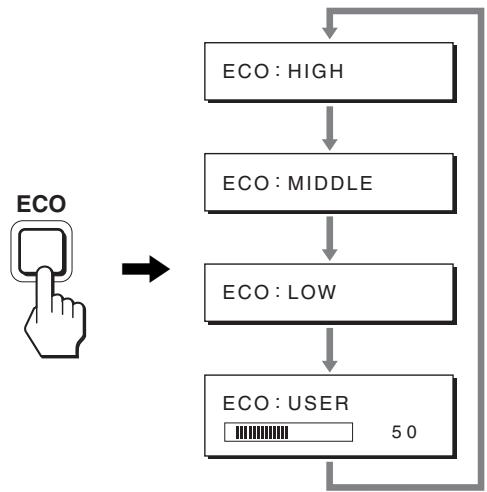
Each mode appears on the screen and the screen brightness is reduced according to the mode. The menu automatically disappears after about 5 seconds.
Screen brightness and power consumption are reduced as the mode changes from HIGH to MIDDLE to LOW.
The default setting of the screen brightness is set to HIGH. If you select USER, you can adjust the backlight level by pressing the / buttons, the same as when you select BACKLIGHT using the menu.
Note*
For those displays with analog inputs, only while the ECO mode is set to USER, are the BACKLIGHT, CONTRAST, and BRIGHTNESS items of the menu available (page 14).
Automatic picture quality adjustment function (analog RGB signal only)
When the display receives an input signal, it automatically adjusts the picture's position and sharpness (phase/pitch), and ensures that a clear picture appears on the screen.
The factory preset mode
When the display receives an input signal, it automatically matches the signal to one of the factory preset modes stored in the display's memory to provide a high quality picture at the center of the screen. If the input signal matches the factory preset mode, the picture appears on the screen automatically with the appropriate default adjustments.
If input signals do not match one of the factory preset modes
When the display receives an input signal that does not match one of the factory preset modes, the automatic picture quality adjustment function of this display is activated to ensure that a clear picture always appears on the screen (within the following display frequency ranges):
Horizontal frequency: 28 - 80kHz
Vertical frequency: 48 - 75Hz
Consequently, the first time the display receives input signals that do not match one of the factory preset modes, the display may take a longer time than normal to display the picture on the screen. This adjustment data is automatically stored in memory so that next time, the display will function in the same way as when the display receives the signals that match one of the factory preset modes.
If you adjust the phase, pitch, and picture position manually
For some input signals, the automatic picture quality adjustment function of this display may not completely adjust the picture position, phase, and pitch. In this case, you can set these adjustments manually (page 14). If you set these adjustments manually, they are stored in memory as user modes and automatically recalled whenever the display receives the same input signals.
Note
While the automatic picture quality adjustment function is activated, only the (power) switch will operate.
The picture may flicker during this time, but this is not a malfunction.
Simply wait a few moments until the adjustment completes.
Troubleshooting
Before contacting technical support, refer to this section.
On-screen messages
If there is something wrong with the input signal, one of the following messages appears on the screen. To solve the problem, see "Trouble symptoms and remedies" on page 18.
If "OUT OF RANGE" appears on the screen
This indicates that the input signal is not supported by the display's specifications. Check the following items.
For more information about on-screen messages, see "Trouble symptoms and remedies" on page 18.
If "xxx.x kHz/xxx Hz" is displayed
This indicates that either the horizontal or vertical frequency is not supported by the display's specifications.
The figures indicate the horizontal and vertical frequencies of the current input signal.
Example
1INFORMATION
OUT OF RANGE
INPUT1:DVI-D
xxxx.xkHz/ xxxHz
If “RESOLUTION >1280 × 1024 ” is displayed
This indicates that the resolution is not supported by the display's specifications ( 1280× 1024 or less).
Example
INFORMATION
OUT OF RANGE
INPUT1:DVI-D
RESOLUTION > 1280X1024
If “NO INPUT SIGNAL” appears on the screen
This indicates that no signal is being input via the currently selected connector.
When INPUT SENSING (page 15) is set to ON, the display finds another input signal and changes the input automatically.
Example
INFORMATION
NO INPUT SIGNAL
INPUT1:DVI-D
GO TO POWER SAVE
signals cannot be found
"GO TO POWER SAVE" message appears.
5 seconds later, the power saving mode starts.
If "CABLE DISCONNECTED" appears on the screen
This indicates that the video signal cable has been disconnected from the currently selected connector.
When INPUT SENSING (page 15) is set to ON, the display finds another input signal and changes the input automatically.
Example
0INFORMATION
CABLE DISCONNECTED
INPUT1:DVI-D
GO TO POWER SAVE
When input signals cannot be found
"GO TO POWER SAVE" message appears.
45 seconds later, the power saving mode starts.
Trouble symptoms and remedies
If a problem occurs as a result of a connected computer or other equipment, refer to the connected computer/equipment's instruction manual.
| Symptom | Check these items |
| No picture | |
| If the (power) indicator is not lit, or, (power) indicator turns on in orange, | · Check that the (power) switch is on. |
| If the (power) indicator will not light up when the (power) switch is pressed, | · Check that the power cord is properly connected. |
| If CABLE DISCONNECTED appears on the screen, | · Check that the video signal cable is properly connected and all plugs are firmly seated in their sockets (page 7). · Check that the video input connector's pins are not bent or pushed in. · Check that the input select setting is correct (page 11). · A non-supplied video signal cable is connected. If you connect a non-supplied video signal cable, CABLE DISCONNECTED may appear on the screen. This is not a malfunction. |
| If NO INPUT SIGNAL appears on the screen, or, (power) indicator turns on in orange, | · Check that the video signal cable is properly connected and all plugs are firmly seated in their sockets (page 7). · Check that the video input connector's pins are not bent or pushed in. · Check that the input select setting is correct (page 11). ■ Problems caused by a computer or other equipment connected, and not caused by the display · The computer is in the power saving mode. Try pressing any key on the keyboard or moving the mouse. · Check that your graphics board is installed properly. · Check that the computer's power is on. · Restart the computer. |
| If OUT OF RANGE appears on the screen (page 17), | ■ Problems caused by a computer or other equipment connected, and not caused by the display · Check that the video frequency range is within that specified for the display. If you replaced an old display with this display, reconnect the old display and adjust the computer's graphics board within the following ranges: Horizontal: 28 - 80 kHz (analog RGB), 28 - 64 kHz (digital RGB) Vertical: 48 - 75 Hz (analog RGB), 60 Hz (digital RGB) Resolution: 1280 × 1024 or less |
| If using Windows, | · If you replaced an old display with this display, reconnect the old display and do the following. Select "SONY" from the "Manufacturers" list and select the desired model name from the "Models" list in the Windows device selection screen. If the model name of this display does not appear in the "Models" list, try "Plug & Play." |
| If using a Macintosh system, | · When connecting a Macintosh computer, use an adapter (not supplied) if necessary. Connect the adapter to the computer before connecting the video signal cable. |
| Picture flickers, bounces, oscillates, or is scrambled | · Adjust the pitch and phase (analog RGB signal only) (page 14). · Try plugging the display into a different AC outlet, preferably on a different circuit. ■ Problems caused by a computer or other equipment connected, and not caused by the display · Check your graphics board manual for the proper display setting. · Confirm that the graphics mode (VESA, Macintosh 19" Color, etc.) and the frequency of the input signal are supported by this display. Even if the frequency is within the proper range, some graphics boards may have a sync pulse that is too narrow for the display to sync correctly. · This display does not process interlace signals. Set for progressive signals. · Adjust the computer's refresh rate (vertical frequency) to obtain the best possible picture. |
| Picture is fuzzy | ·Adjust the brightness and contrast (page 14). ·Adjust the pitch and phase (analog RGB signal only) (page 14). |
| ■Problems caused by a computer or other equipment connected, and not caused by the display. ·Set the resolution to 1280×1024 on your computer. | |
| Picture is ghosting | ·Eliminate the use of video cable extensions and/or video switch boxes. ·Check that all plugs are firmly seated in their sockets. |
| Picture is not centered or sized properly (analog RGB signal only) | ·Adjust the pitch and phase (page 14). ·Adjust the picture position (page 14). Note that some video modes do not fill the screen to the edges. |
| Picture is too small | ■Problems caused by a computer or other equipment connected, and not caused by the display. ·Set the resolution to 1280×1024 on your computer. |
| Picture is dark | ·Adjust the backlight (page 14). ·Adjust the brightness (page 14). ·Adjust the gamma using GAMMA menu (page 14). ·It takes a few minutes for the display to become bright after turning on the display. ·The screen might turn darker, depends on ECO mode you selected. |
| Wavy or elliptical pattern (moire) is visible | ·Adjust the pitch and phase (analog RGB signal only) (page 14). |
| Color is not uniform | ·Adjust the pitch and phase (analog RGB signal only) (page 14). |
| White does not look white | ·Adjust the color temperature (page 14). |
| Display buttons do not operate (○n appears on the screen) | ·If MENU LOCK is set to ON, set it to OFF (page 15). |
| The display turns off after a while | ■Problems caused by the connected computer or other equipment ·Set the computer's power saving setting to off. |
| Resolution displayed on the menu screen is incorrect. | ·Depending on the graphics board setting, the resolution displayed on the menu screen may not coincide with the one set on the computer. |
Displaying this display's information
While the display is receiving a video signal, press and hold the MENU button for more than 5 seconds until the information box appears.
Press the MENU button again to make the box disappear.

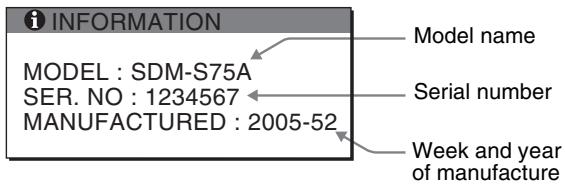
Example
Although the safety standard registered model name of this display is SDM-S75/S95**, the name of SDM-S75A/S95AR/ S75D/S95DR/S75E/S95ER/S75F/S95FR/S75N/S95NR is used on sale.
If any problem persists, call your authorized Sony dealer and give the following information:
-
Model name
-
Serial number
- Detailed description of the problem
- Date of purchase
- Name and specifications of your computer and graphics board
- Type of input signals (analog RGB/digital RGB)
Specifications
| Model name | SDM-S75A | SDM-S95AR | SDM-S75E | SDM-S95ER |
| LCD panel | Panel type: a-Si TFT Active Matrix | |||
| Picture size: inch | 17.0 | 19.0 | 17.0 | 19.0 |
| Input signal format | RGB operating frequency1)Horizontal: 28 - 80 kHzVertical: 48 - 75 Hz | |||
| Resolution | Horizontal: Max.1280 dotsVertical: Max.1024 lines | |||
| Type of input signal(Digital/Analog) | Analog ×1 | |||
| Input signal levels | Analog RGB video signal 0.7 Vp-p, 75 Ω, positiveSYNC signal TTL level, 2.2 kΩ, positive or negative | |||
| Audio input | Stereo minijack, 0.5 Vrms | |||
| Audio output | Stereo minijack | |||
| Power requirements | 100 - 240 V, 50 - 60 Hz, Max. 1.0 A | |||
| Power consumption | Max. 45 W | Max. 50 W | Max. 45 W | Max. 50 W |
| Operating temperature | 5 - 35 °C | |||
| Type of the stand | Fixed | Fixed | Height adjust | Height adjust |
| Dimensions (width/height/depth) | Approx. 369 × 423.5 × 225 mm (14 5/8 × 16 3/4 × 8 7/8 inches) (with stand) Approx. 369 × 315 × 66 mm (14 5/8 × 12 3/8 × 2 5/8 inches) (without stand) | Approx. 414 × 439.5 × 225 mm (16 3/8 × 17 3/8 × 8 7/8 inches) (with stand) Approx. 414 × 348 × 69 mm (16 3/8 × 13 3/4 × 2 3/4 inches) (without stand) | Approx. 369 × 393.5 - 503.5 × 253 mm (14 5/8 × 15 1/2 - 19 7/8 × 10 inches) (with stand) Approx. 369 × 315 × 66 mm (14 5/8 × 12 3/8 × 2 5/8 inches) (without stand) | Approx. 414 × 409.5 - 519.5 × 277.5 mm (16 3/8 × 16 1/8 - 20 1/2 × 11 inches) (with stand) Approx. 414 × 348 × 69 mm (16 3/8 × 13 3/4 × 2 3/4 inches) (without stand) |
| Mass | Approx. 6.4 kg (14 lb 1 3/4 oz) (with stand) Approx. 4.3 kg (9 lb 7 5/8 oz) (without stand) | Approx. 7.3 kg (16 lb 1 1/2 oz) (with stand) Approx. 5.2 kg (11 lb 7 3/8 oz) (without stand) | Approx. 7.5 kg (16 lb 8 1/2 oz) (with stand) Approx. 4.3 kg (9 lb 7 5/8 oz) (without stand) | Approx. 8.7 kg (19 lb 2 7/8 oz) (with stand) Approx. 5.2 kg (11 lb 7 3/8 oz) (without stand) |
| Plug & Play | DDC2B | |||
| Accessories | See page 6. | |||
1) Recommended horizontal and vertical timing condition
Horizontal sync width duty should be more than 4.8% of total horizontal time or 0.8~ s whichever is larger.
Horizontal blanking width should be more than 2.5 sec.
Vertical blanking width should be more than 450~ sec
Design and specifications are subject to change without notice.
| Model name | SDM-S75D | SDM-S95DR | SDM-S75F | SDM-S95FR |
| LCD panel | Panel type: a-Si TFT Active Matrix | |||
| Picture size: inch | 17.0 | 19.0 | 17.0 | 19.0 |
| Input signal format | RGB operating frequency1)Horizontal: 28 - 80 kHz (analog RGB)28 - 64 kHz (digital RGB)Vertical: 48 - 75 Hz (analog RGB)60 Hz (digital RGB) | |||
| Resolution | Horizontal: Max.1280 dotsVertical: Max.1024 lines | |||
| Type of input signal(Digital/Analog) | Digital × 1/Analog × 1 | |||
| Input signal levels | Analog RGB video signal 0.7 Vp-p, 75 Ω, positiveSYNC signal TTL level, 2.2 kΩ, positive or negativeDigital RGB (DVI) signal TMDS (single link) | |||
| Audio input | Stereo minijack, 0.5 Vrms | |||
| Audio output | Stereo minijack | |||
| Power requirements | 100 - 240 V, 50 - 60 Hz, Max. 1.0 A | |||
| Power consumption | Max. 45 W | Max. 50 W | Max. 45 W | Max. 50 W |
| Operating temperature | 5 - 35 °C | |||
| Type of the stand | Fixed | Fixed | Height adjust | Height adjust |
| Dimensions (width/height/depth) | Approx. 369 × 423.5 × 225 mm (14 5/8 × 16 3/4 × 8 7/8 inches) (with stand) Approx. 369 × 315 × 66 mm (14 5/8 × 12 3/8 × 2 5/8 inches) (without stand) | Approx. 414 × 439.5 × 225 mm (16 3/8 × 17 3/8 × 8 7/8 inches) (with stand) Approx. 414 × 348 × 69 mm (16 3/8 × 13 3/4 × 2 3/4 inches) (without stand) | Approx. 369 × 393.5 - 503.5 × 253 mm (14 5/8 × 15 1/2 - 19 7/8 × 10 inches) (with stand) Approx. 369 × 315 × 66 mm (14 5/8 × 12 3/8 × 2 5/8 inches) (without stand) | Approx. 414 × 409.5 - 519.5 × 277.5 mm (16 3/8 × 16 1/8 - 20 1/2 × 11 inches) (with stand) Approx. 414 × 348 × 69 mm (16 3/8 × 13 3/4 × 2 3/4 inches) (without stand) |
| Mass | Approx. 6.4 kg (14 lb 1 3/4 oz) (with stand) Approx. 4.3 kg (9 lb 7 5/8 oz) (without stand) | Approx. 7.3 kg (16 lb 1 1/2 oz) (with stand) Approx. 5.2 kg (11 lb 7 3/8 oz) (without stand) | Approx. 7.5 kg (16 lb 8 1/2 oz) (with stand) Approx. 4.3 kg (9 lb 7 5/8 oz) (without stand) | Approx. 8.7 kg (19 lb 2 7/8 oz) (with stand) Approx. 5.2 kg (11 lb 7 3/8 oz) (without stand) |
| Plug & Play | DDC2B | |||
| Accessories | See page 6. | |||
1) Recommended horizontal and vertical timing condition
Horizontal sync width duty should be more than 4.8% of total horizontal time or 0.8~ s whichever is larger.
Horizontal blanking width should be more than 2.5 sec
Vertical blanking width should be more than 450~ sec
Design and specifications are subject to change without notice.
| Model name | SDM-S75N | SDM-S95NR |
| LCD panel | Panel type: a-Si TFT Active Matrix | |
| Picture size: inch | 17.0 | 19.0 |
| Input signal format | RGB operating frequency1)Horizontal: 28 - 80 kHz (analog RGB)28 - 64 kHz (digital RGB)Vertical: 48 - 75 Hz (analog RGB)60 Hz (digital RGB) | |
| Resolution | Horizontal: Max.1280 dotsVertical: Max.1024 lines | |
| Type of input signal(Digital/Analog) | Digital × 1/Analog × 1 | |
| Input signal levels | Analog RGB video signal0.7 Vp-p, 75 Ω, positiveSYNC signalTTL level, 2.2 kΩ, positive or negativeDigital RGB (DVI) signal TMDS (single link) | |
| Audio input | Stereo minijack, 0.5 Vrms | |
| Audio output | Stereo minijack | |
| Power requirements | 100 - 240 V, 50 - 60 Hz, Max. 1.0 A | |
| Power consumption | Max. 45 W | Max. 50 W |
| Operating temperature | 5 - 35 °C | |
| Type of the stand | - | - |
| Dimensions (width/height/depth) | Approx. 369 × 315 ×66 mm (14 5/8 × 12 3/8× 2 5/8 inches) | Approx. 414 × 348 ×69 mm (16 3/8 × 13 3/4× 2 3/4 inches) |
| Mass | Approx. 4.3 kg(9 lb 7 5/8 oz) | Approx. 5.2 kg(11 lb 7 3/8 oz) |
| Plug & Play | DDC2B | |
| Accessories | See page 6. | |
1) Recommended horizontal and vertical timing condition
Horizontal sync width duty should be more than 4.8% of total horizontal time or 0.8~ s ,whichever is larger.
Horizontal blanking width should be more than 2.5 sec
Vertical blanking width should be more than 450~ sec
Design and specifications are subject to change without notice.
TCO'99 Eco-document (for the black model)

Congratulations!
You have just purchased a TCO'99 approved and labelled product! Your choice has provided you with a product developed for professional use. Your purchase has also contributed to reducing the burden on the environment and also to the further development of environmentally adapted electronics products.
Why do we have environmentally labelled computers?
In many countries, environmental labelling has become an established method for encouraging the adaptation of goods and services to the environment. The main problem, as far as computers and other electronics equipment are concerned, is that environmentally harmful substances are used both in the products and during their manufacture. Since it is not so far possible to satisfactorily recycle the majority of electronics equipment, most of these potentially damaging substances sooner or later enter nature.
There are also other characteristics of a computer, such as energy consumption levels, that are important from the viewpoints of both the work (internal) and natural (external) environments. Since all methods of electricity generation have a negative effect on the environment (e.g. acidic and climate-influencing emissions, radioactive waste), it is vital to save energy. Electronics equipment in offices is often left running continuously and thereby consumes a lot of energy.
What does labelling involve?
This product meets the requirements for the TCO'99 scheme which provides for international and environmental labelling of personal computers. The labelling scheme was developed as a joint effort by the TCO (The Swedish Confederation of Professional Employees), Svenska Naturskyddsforeningen (The Swedish Society for Nature Conservation) and Statens Energimyndighet (The Swedish National Energy Administration).
Approval requirements cover a wide range of issues: environment, ergonomics, usability, emission of electric and magnetic fields, energy consumption and electrical and fire safety.
The environmental demands impose restrictions on the presence and use of heavy metals, brominated and chlorinated flame retardants, CFCs (freons) and chlorinated solvents, among other things. The product must be prepared for recycling and the manufacturer is obliged to have an environmental policy which must be adhered to in each country where the company implements its operational policy.
The energy requirements include a demand that the computer and/or display, after a certain period of inactivity, shall reduce its power consumption to a lower level in one or more stages. The length of time to reactivate the computer shall be reasonable for the user.
Labelled products must meet strict environmental demands, for example, in respect of the reduction of electric and magnetic fields, physical and visual ergonomics and good usability.
Below you will find a brief summary of the environmental requirements met by this product. The complete environmental criteria document may be ordered from:
TCO Development
SE-114 94 Stockholm, Sweden
Fax: +46 8 782 92 07
Email (Internet): development@tco.se
Current information regarding TCO'99 approved and labelled products may also be obtained via the Internet, using the address: http://www.tco-info.com/
Environmental requirements
Flame retardants
Flame retardants are present in printed circuit boards, cables, wires, casings and housings. Their purpose is to prevent, or at least to delay the spread of fire. Up to 30% of the plastic in a computer casing can consist of flame retardant substances. Most flame retardants contain bromine or chloride, and those flame retardants are chemically related to another group of environmental toxins, PCBs. Both the flame retardants containing bromine or chloride and the PCBs are suspected of giving rise to severe health effects, including reproductive damage in fish-eating birds and mammals, due to the bio-accumulative* processes. Flame retardants have been found in human blood and researchers fear that disturbances in foetus development may occur.
The relevant TCO'99 demand requires that plastic components weighing more than 25 grams must not contain flame retardants with organically bound bromine or chlorine. Flame retardants are allowed in the printed circuit boards since no substitutes are available.
Cadmium**
Cadmium is present in rechargeable batteries and in the colour-generating layers of certain computer displays. Cadmium damages the nervous system and is toxic in high doses. The relevant TCO'99 requirement states that batteries, the colour-generating layers of display screens and the electrical or electronics components must not contain any cadmium.
Mercury**
Mercury is sometimes found in batteries, relays and switches. It damages the nervous system and is toxic in high doses. The relevant TCO'99 requirement states that batteries may not contain any mercury. It also demands that mercury is not present in any of the electrical or electronics components associated with the labelled unit.
CFCs (freons)
The relevant TCO'99 requirement states that neither CFCs nor HCFCs may be used during the manufacture and assembly of the product. CFCs (freons) are sometimes used for washing printed circuit boards. CFCs break down ozone and thereby damage the ozone layer in the stratosphere, causing increased reception on earth of ultraviolet light with e.g. increased risks of skin cancer (malignant melanoma) as a consequence.
Lead**
Lead can be found in picture tubes, display screens, solders and capacitors. Lead damages the nervous system and in higher doses, causes lead poisoning. The relevant TCO'99 requirement permits the inclusion of lead since no replacement has yet been developed.
- Bio-accumulative is defined as substances which accumulate within living organisms.
** Lead, Cadmium and Mercury are heavy metals which are Bio-accumulative.
TCO’03 Eco-document (for the silver model)
TCDDevelopment
Tio'03
DISPLAYS
www.tcodevelopment.com
Congratulations!
The display you have just purchased carries the TCO'03 Displays label. This means that your display is designed, manufactured and tested according to some of the strictest quality and environmental requirements in the world. This makes for a high performance product, designed with the user in focus that also minimizes the impact on our natural environment.
Ergonomics
- Good visual ergonomics and image quality in order to improve the working environment for the user and to reduce sight and strain problems. Important parameters are luminance, contrast, resolution, reflectance, colour rendition and image stability.
Energy
- Energy-saving mode after a certain time - beneficial both for the user and the environment
- Electrical safety
Emissions
- Electromagnetic fields
- Noise emissions
Ecology
- The product must be prepared for recycling and the manufacturer must have a certified environmental management system such as EMAS or ISO 14 001
-
Restrictions on
-
chlorinated and brominated flame retardants and polymers
-
heavy metals such as cadmium, mercury and lead.
The requirements included in this label have been developed by TCO Development in co-operation with scientists, experts, users as well as manufacturers all over the world. Since the end of the 1980s TCO has been
involved in influencing the development of IT equipment in a more user-friendly direction. Our labelling system started with displays in 1992 and is now requested by users and IT-manufacturers all over the world.
For more information, please visit www.tcodevelopment.com
Recycling Information
Customer in Europe
The collection and recycling of this product has been planned according to your country's relevant legislation. To ensure that this product will be collected and recycled in way that minimizes the impact on the environment, please do the following:
-
If you purchased this product for private use, contact your municipality or the waste collection system and bring the product to this collection point / have the product be picked up by the waste collection system. Alternatively, your retailer might take back this if you purchase new equivalent equipment; please check with your retailer whether he will take back this product before bringing it. For information on your country's recycling arrangements, please contact the Sony representation in your country (contact details at: www.sony-europe.com). Further details on specific recycling systems can be found at the following addresses:
-
Belgium: www-recupel.be
- Netherlands: www.nvmp.nl (consumer electronics)
www.ictmilieu.nl (IT equipment) - Norway: www.elretur.no
- Sweden: www.el-kretsen.se
-
Switzerland: www.swico.ch
-
If you use this product professionally, check the product's delivery contract for take back / recycling arrangements and follow the procedures described therein. Alternatively, follow the procedures described under point 1.
Customer in USA
We Sony as a member of EIA recommends to visit URL below http://www.eiae.org/
Customer in Asia
http://www.sony.co.jp/SonyInfo/Environment/recycle/3R.html
TFTLCD Color Computer Display
SDM-S75*
SDM-S95***
Owner's Record
The model and serial numbers are located at the rear of the unit. Record these numbers in the spaces provided below. Refer to them whenever you call upon your dealer regarding this product. Model No. __ Serial No. ____
WARNING
To reduce the risk of fire or electric shock, do not expose this apparatus to rain or moisture.
Dangerously high voltages are present inside the unit. Do not open the cabinet. Refer servicing to qualified personnel only.
FCC Notice
This equipment has been tested and found to comply with the limits for a Class B digital device, pursuant to Part 15 of the FCC Rules. These limits are designed to provide reasonable protection against harmful interference in a residential installation. This equipment generates, uses, and can radiate radio frequency energy and, if not installed and used in accordance with the instructions, may cause harmful interference to radio communications. However, there is no guarantee that interference will not occur in a particular installation. If this equipment does cause harmful interference to radio or television reception, which can be determined by turning the equipment off and on, the user is encouraged to try to correct the interference by one or more of the following measures:
- Reorient or relocate the receiving antenna.
- Increase the separation between the equipment and receiver.
- Connect the equipment into an outlet on a circuit different from that to which the receiver is connected.
- Consult the dealer or an experienced radio/TV technician for help. You are cautioned that any changes or modifications not expressly approved in this manual could void your authority to operate this equipment.
IMPORTANT
If you have any questions about this product, you may call; Sony Customer Information Services Center 1-800-222-7669 or http://www.sony.com/
Declaration of Conformity
Trade Name
:SONY
Model
:SDM-S75/S95*
Note
: *means any number or alphanumeric character.
Responsible Party Address
: Sony Electronics Inc.
: 16530 Via Esprillo, San Diego, CA 92127 U.S.A.
Telephone Number
:858-942-2230
This device complies with part 15 of the FCC rules. Operation is subject to the following two conditions: (1) This device may not cause harmful interference, and (2) this device must accept any interference received, including interference that may cause undesired operation.
This notice is applicable for USA/Canada only. If shipped to USA/Canada, install only a UL LISTED/CSA LABELLED power supply cord meeting the following specifications:
SPECIFICATIONS
Plug Type
Nema-Plug 5-15p
Cord
Type SVT or SJT, minimum 3 × 18 AWG
Length
Maximum 15 feet
Ra
Minimum 7 A, 125 V
NOTICE
As an ENERGY STAR Partner, Sony Corporation has determined that this product meets the ENERGY STAR guidelines for energy efficiency.

This monitor complies with the TCO'99 guidelines.
(for the black model)

This monitor complies with the TCO'03 guidelines.
(for the silver model)
Table des matières
Précautions. 4
TCO'03 Eco-document (for the silver model) .ii
Specifications techniques
TCO'99 Eco-document (for the black model)

Congratulations!
You have just purchased a TCO'99 approved and labelled product! Your choice has provided you with a product developed for professional use. Your purchase has also contributed to reducing the burden on the environment and also to the further development of environmentally adapted electronics products.
Why do we have environmentally labelled computers?
In many countries, environmental labelling has become an established method for encouraging the adaptation of goods and services to the environment. The main problem, as far as computers and other electronics equipment are concerned, is that environmentally harmful substances are used both in the products and during their manufacture. Since it is not so far possible to satisfactorily recycle the majority of electronics equipment, most of these potentially damaging substances sooner or later enter nature.
There are also other characteristics of a computer, such as energy consumption levels, that are important from the viewpoints of both the work (internal) and natural (external) environments. Since all methods of electricity generation have a negative effect on the environment (e.g. acidic and climate-influencing emissions, radioactive waste), it is vital to save energy. Electronics equipment in offices is often left running continuously and thereby consumes a lot of energy.
What does labelling involve?
This product meets the requirements for the TCO'99 scheme which provides for international and environmental labelling of personal computers. The labelling scheme was developed as a joint effort by the TCO (The Swedish Confederation of Professional Employees), Svenska Naturskyddsforeningen (The Swedish Society for Nature Conservation) and Statens Energimyndighet (The Swedish National Energy Administration).
Approval requirements cover a wide range of issues: environment, ergonomics, usability, emission of electric and magnetic fields, energy consumption and electrical and fire safety.
The environmental demands impose restrictions on the presence and use of heavy metals, brominated and chlorinated flame retardants, CFCs (freons) and chlorinated solvents, among other things. The product must be prepared for recycling and the manufacturer is obliged to have an environmental policy which must be adhered to in each country where the company implements its operational policy.
The energy requirements include a demand that the computer and/or display, after a certain period of inactivity, shall reduce its power consumption to a lower level in one or more stages. The length of time to reactivate the computer shall be reasonable for the user.
Labelled products must meet strict environmental demands, for example, in respect of the reduction of electric and magnetic fields, physical and visual ergonomics and good usability.
Below you will find a brief summary of the environmental requirements met by this product. The complete environmental criteria document may be ordered from:
TCO Development
SE-114 94 Stockholm, Sweden
Fax: +46 8 782 92 07
Email (Internet): development@tco.se
Current information regarding TCO'99 approved and labelled products may also be obtained via the Internet, using the address: http://www.tco-info.com/
Environmental requirements
Flame retardants
Flame retardants are present in printed circuit boards, cables, wires, casings and housings. Their purpose is to prevent, or at least to delay the spread of fire. Up to 30% of the plastic in a computer casing can consist of flame retardant substances. Most flame retardants contain bromine or chloride, and those flame retardants are chemically related to another group of environmental toxins, PCBs. Both the flame retardants containing bromine or chloride and the PCBs are suspected of giving rise to severe health effects, including reproductive damage in fish-eating birds and mammals, due to the bio-accumulative* processes. Flame retardants have been found in human blood and researchers fear that disturbances in foetus development may occur.
The relevant TCO'99 demand requires that plastic components weighing more than 25 grams must not contain flame retardants with organically bound bromine or chlorine. Flame retardants are allowed in the printed circuit boards since no substitutes are available.
Cadmium**
Cadmium is present in rechargeable batteries and in the colour-generating layers of certain computer displays. Cadmium damages the nervous system and is toxic in high doses. The relevant TCO'99 requirement states that batteries, the colour-generating layers of display screens and the electrical or electronics components must not contain any cadmium.
Mercury**
Mercury is sometimes found in batteries, relays and switches. It damages the nervous system and is toxic in high doses. The relevant TCO'99 requirement states that batteries may not contain any mercury. It also demands that mercury is not present in any of the electrical or electronics components associated with the labelled unit.
CFCs (freons)
The relevant TCO'99 requirement states that neither CFCs nor HCFCs may be used during the manufacture and assembly of the product. CFCs (freons) are sometimes used for washing printed circuit boards. CFCs break down ozone and thereby damage the ozone layer in the stratosphere, causing increased reception on earth of ultraviolet light with e.g. increased risks of skin cancer (malignant melanoma) as a consequence.
Lead**
Lead can be found in picture tubes, display screens, solders and capacitors. Lead damages the nervous system and in higher doses, causes lead poisoning. The relevant TCO'99 requirement permits the inclusion of lead since no replacement has yet been developed.
- Bio-accumulative is defined as substances which accumulate within living organisms.
** Lead, Cadmium and Mercury are heavy metals which are Bio-accumulative.
TCO’03 Eco-document (for the silver model)
TCDDevelopment
Tc0'03
DISPLAYS
www.tcodevelopment.com
Congratulations!
The display you have just purchased carries the TCO'03 Displays label. This means that your display is designed, manufactured and tested according to some of the strictest quality and environmental requirements in the world. This makes for a high performance product, designed with the user in focus that also minimizes the impact on our natural environment.
■ Ergonomics
- Good visual ergonomics and image quality in order to improve the working environment for the user and to reduce sight and strain problems. Important parameters are luminance, contrast, resolution, reflectance, colour rendition and image stability.
Energy
- Energy-saving mode after a certain time - beneficial both for the user and the environment
- Electrical safety
Emissions
- Electromagnetic fields
- Noise emissions
Ecology
- The product must be prepared for recycling and the manufacturer must have a certified environmental management system such as EMAS or ISO 14 001
-
Restrictions on
-
chlorinated and brominated flame retardants and polymers
- heavy metals such as cadmium, mercury and lead.
The requirements included in this label have been developed by TCO Development in co-operation with scientists, experts, users as well as manufacturers all over the world. Since the end of the 1980s TCO has been
involved in influencing the development of IT equipment in a more user-friendly direction. Our labelling system started with displays in 1992 and is now requested by users and IT-manufacturers all over the world.
For more information, please visit www.tcodevelopment.com
Recycling Information
Customer in Europe
The collection and recycling of this product has been planned according to your country's relevant legislation. To ensure that this product will be collected and recycled in way that minimizes the impact on the environment, please do the following:
-
If you purchased this product for private use, contact your municipality or the waste collection system and bring the product to this collection point / have the product be picked up by the waste collection system. Alternatively, your retailer might take back this if you purchase new equivalent equipment; please check with your retailer whether he will take back this product before bringing it. For information on your country's recycling arrangements, please contact the Sony representation in your country (contact details at: www.sony-europe.com). Further details on specific recycling systems can be found at the following addresses:
-
Belgium: www-recupel.be
- Netherlands: www.nvmp.nl (consumer electronics)
www.ictmilieu.nl (IT equipment) - Norway: www.elretur.no
- Sweden: www.el-kretsen.se
-
Switzerland: www.swico.ch
-
If you use this product professionally, check the product's delivery contract for take back / recycling arrangements and follow the procedures described therein. Alternatively, follow the procedures described under point 1.
Customer in USA
We Sony as a member of EIA recommends to visit URL below http://www.eiae.org/
Customer in Asia
http://www.sony.co.jp/SonyInfo/Environment/recycle/3R.html
TFTLCD Color Computer Display
SDM-S75*
SDM-S95***
Owner's Record
The model and serial numbers are located at the rear of the unit. Record these numbers in the spaces provided below. Refer to them whenever you call upon your dealer regarding this product. Model No. __ Serial No. ____
WARNING
To reduce the risk of fire or electric shock, do not expose this apparatus to rain or moisture.
Dangerously high voltages are present inside the unit. Do not open the cabinet. Refer servicing to qualified personnel only.
FCC Notice
This equipment has been tested and found to comply with the limits for a Class B digital device, pursuant to Part 15 of the FCC Rules. These limits are designed to provide reasonable protection against harmful interference in a residential installation. This equipment generates, uses, and can radiate radio frequency energy and, if not installed and used in accordance with the instructions, may cause harmful interference to radio communications. However, there is no guarantee that interference will not occur in a particular installation. If this equipment does cause harmful interference to radio or television reception, which can be determined by turning the equipment off and on, the user is encouraged to try to correct the interference by one or more of the following measures:
- Reorient or relocate the receiving antenna.
- Increase the separation between the equipment and receiver.
- Connect the equipment into an outlet on a circuit different from that to which the receiver is connected.
- Consult the dealer or an experienced radio/TV technician for help. You are cautioned that any changes or modifications not expressly approved in this manual could void your authority to operate this equipment.
IMPORTANT
If you have any questions about this product, you may call; Sony Customer Information Services Center 1-800-222-7669 or http://www.sony.com/
Declaration of Conformity
Trade Name :SONY
Model : SDM-S75/S95*
Note : *means any number or alphanumeric character.
Responsible Party : Sony Electronics Inc.
Address : 16530 Via Esprillo, San Diego, CA 92127 U.S.A.
Telephone Number : 858-942-2230
This device complies with part 15 of the FCC rules. Operation is subject to the following two conditions: (1) This device may not cause harmful interference, and (2) this device must accept any interference received, including interference that may cause undesired operation.
This notice is applicable for USA/Canada only. If shipped to USA/Canada, install only a UL LISTED/CSA LABELLED power supply cord meeting the following specifications:
SPECIFICATIONS
Plug Type Nema-Plug 5-15p
Cord Type SVT or SJT, minimum 3× 18 AWG
Length Maximum 15 feet
Rating Minimum 7 A, 125 V
NOTICE
As an ENERGY STAR Partner, Sony Corporation has determined that this product meets the ENERGY STAR guidelines for energy efficiency.

This monitor complies with the TCO'99 guidelines.
(for the black model)

This monitor complies with the TCO'03 guidelines.
(for the silver model)
Inhalt
TCO'99 Eco-document (for the black model)
TCO'03 Eco-document (for the silver model) .ii
TCO'99 Eco-document (for the black model)

Congratulations!
You have just purchased a TCO'99 approved and labelled product! Your choice has provided you with a product developed for professional use. Your purchase has also contributed to reducing the burden on the environment and also to the further development of environmentally adapted electronics products.
Why do we have environmentally labelled computers?
In many countries, environmental labelling has become an established method for encouraging the adaptation of goods and services to the environment. The main problem, as far as computers and other electronics equipment are concerned, is that environmentally harmful substances are used both in the products and during their manufacture. Since it is not so far possible to satisfactorily recycle the majority of electronics equipment, most of these potentially damaging substances sooner or later enter nature.
There are also other characteristics of a computer, such as energy consumption levels, that are important from the viewpoints of both the work (internal) and natural (external) environments. Since all methods of electricity generation have a negative effect on the environment (e.g. acidic and climate-influencing emissions, radioactive waste), it is vital to save energy. Electronics equipment in offices is often left running continuously and thereby consumes a lot of energy.
What does labelling involve?
This product meets the requirements for the TCO'99 scheme which provides for international and environmental labelling of personal computers. The labelling scheme was developed as a joint effort by the TCO (The Swedish Confederation of Professional Employees), Svenska Naturskyddsforeningen (The Swedish Society for Nature Conservation) and Statens Energimyndighet (The Swedish National Energy Administration).
Approval requirements cover a wide range of issues: environment, ergonomics, usability, emission of electric and magnetic fields, energy consumption and electrical and fire safety.
The environmental demands impose restrictions on the presence and use of heavy metals, brominated and chlorinated flame retardants, CFCs (freons) and chlorinated solvents, among other things. The product must be prepared for recycling and the manufacturer is obliged to have an environmental policy which must be adhered to in each country where the company implements its operational policy.
The energy requirements include a demand that the computer and/or display, after a certain period of inactivity, shall reduce its power consumption to a lower level in one or more stages. The length of time to reactivate the computer shall be reasonable for the user.
Labelled products must meet strict environmental demands, for example, in respect of the reduction of electric and magnetic fields, physical and visual ergonomics and good usability.
Below you will find a brief summary of the environmental requirements met by this product. The complete environmental criteria document may be ordered from:
TCO Development
SE-114 94 Stockholm, Sweden
Fax: +46 8 782 92 07
Email (Internet): development@tco.se
Current information regarding TCO'99 approved and labelled products may also be obtained via the Internet, using the address: http://www.tco-info.com/
Environmental requirements
Flame retardants
Flame retardants are present in printed circuit boards, cables, wires, casings and housings. Their purpose is to prevent, or at least to delay the spread of fire. Up to 30% of the plastic in a computer casing can consist of flame retardant substances. Most flame retardants contain bromine or chloride, and those flame retardants are chemically related to another group of environmental toxins, PCBs. Both the flame retardants containing bromine or chloride and the PCBs are suspected of giving rise to severe health effects, including reproductive damage in fish-eating birds and mammals, due to the bio-accumulative* processes. Flame retardants have been found in human blood and researchers fear that disturbances in foetus development may occur.
The relevant TCO'99 demand requires that plastic components weighing more than 25 grams must not contain flame retardants with organically bound bromine or chlorine. Flame retardants are allowed in the printed circuit boards since no substitutes are available.
Cadmium**
Cadmium is present in rechargeable batteries and in the colour-generating layers of certain computer displays. Cadmium damages the nervous system and is toxic in high doses. The relevant TCO'99 requirement states that batteries, the colour-generating layers of display screens and the electrical or electronics components must not contain any cadmium.
Mercury**
Mercury is sometimes found in batteries, relays and switches. It damages the nervous system and is toxic in high doses. The relevant TCO'99 requirement states that batteries may not contain any mercury. It also demands that mercury is not present in any of the electrical or electronics components associated with the labelled unit.
CFCs (freons)
The relevant TCO'99 requirement states that neither CFCs nor HCFCs may be used during the manufacture and assembly of the product. CFCs (freons) are sometimes used for washing printed circuit boards. CFCs break down ozone and thereby damage the ozone layer in the stratosphere, causing increased reception on earth of ultraviolet light with e.g. increased risks of skin cancer (malignant melanoma) as a consequence.
Lead**
Lead can be found in picture tubes, display screens, solders and capacitors. Lead damages the nervous system and in higher doses, causes lead poisoning. The relevant TCO'99 requirement permits the inclusion of lead since no replacement has yet been developed.
- Bio-accumulative is defined as substances which accumulate within living organisms.
** Lead, Cadmium and Mercury are heavy metals which are Bio-accumulative.
TCO’03 Eco-document (for the silver model)
TCDDevelopment
Tc0'03
DISPLAYS
www.tcodevelopment.com
Congratulations!
The display you have just purchased carries the TCO'03 Displays label. This means that your display is designed, manufactured and tested according to some of the strictest quality and environmental requirements in the world. This makes for a high performance product, designed with the user in focus that also minimizes the impact on our natural environment.
■ Ergonomics
- Good visual ergonomics and image quality in order to improve the working environment for the user and to reduce sight and strain problems. Important parameters are luminance, contrast, resolution, reflectance, colour rendition and image stability.
Energy
- Energy-saving mode after a certain time - beneficial both for the user and the environment
- Electrical safety
Emissions
- Electromagnetic fields
- Noise emissions
Ecology
- The product must be prepared for recycling and the manufacturer must have a certified environmental management system such as EMAS or ISO 14 001
-
Restrictions on
-
chlorinated and brominated flame retardants and polymers
-
heavy metals such as cadmium, mercury and lead.
The requirements included in this label have been developed by TCO Development in co-operation with scientists, experts, users as well as manufacturers all over the world. Since the end of the 1980s TCO has been
involved in influencing the development of IT equipment in a more user-friendly direction. Our labelling system started with displays in 1992 and is now requested by users and IT-manufacturers all over the world.
For more information, please visit www.tcodevelopment.com
Recycling Information
Customer in Europe
The collection and recycling of this product has been planned according to your country's relevant legislation. To ensure that this product will be collected and recycled in way that minimizes the impact on the environment, please do the following:
-
If you purchased this product for private use, contact your municipality or the waste collection system and bring the product to this collection point / have the product be picked up by the waste collection system. Alternatively, your retailer might take back this if you purchase new equivalent equipment; please check with your retailer whether he will take back this product before bringing it. For information on your country's recycling arrangements, please contact the Sony representation in your country (contact details at: www.sony-europe.com). Further details on specific recycling systems can be found at the following addresses:
-
Belgium: www-recupel.be
- Netherlands: www.nvmp.nl (consumer electronics)
www.ictmilieu.nl (IT equipment) - Norway: www.elretur.no
- Sweden: www.el-kretsen.se
-
Switzerland: www.swico.ch
-
If you use this product professionally, check the product's delivery contract for take back / recycling arrangements and follow the procedures described therein. Alternatively, follow the procedures described under point 1.
Customer in USA
We Sony as a member of EIA recommends to visit URL below http://www.eiae.org/
Customer in Asia
http://www.sony.co.jp/SonyInfo/Environment/recycle/3R.html
TCO'99 Eco-document (for the black model)
TCO'03 Eco-document (for the silver model) .ii
Precauciones
TCO'99 Eco-document (for the black model)

Congratulations!
You have just purchased a TCO'99 approved and labelled product! Your choice has provided you with a product developed for professional use. Your purchase has also contributed to reducing the burden on the environment and also to the further development of environmentally adapted electronics products.
Why do we have environmentally labelled computers?
In many countries, environmental labelling has become an established method for encouraging the adaptation of goods and services to the environment. The main problem, as far as computers and other electronics equipment are concerned, is that environmentally harmful substances are used both in the products and during their manufacture. Since it is not so far possible to satisfactorily recycle the majority of electronics equipment, most of these potentially damaging substances sooner or later enter nature.
There are also other characteristics of a computer, such as energy consumption levels, that are important from the viewpoints of both the work (internal) and natural (external) environments. Since all methods of electricity generation have a negative effect on the environment (e.g. acidic and climate-influencing emissions, radioactive waste), it is vital to save energy. Electronics equipment in offices is often left running continuously and thereby consumes a lot of energy.
What does labelling involve?
This product meets the requirements for the TCO'99 scheme which provides for international and environmental labelling of personal computers. The labelling scheme was developed as a joint effort by the TCO (The Swedish Confederation of Professional Employees), Svenska Naturskyddsforeningen (The Swedish Society for Nature Conservation) and Statens Energimyndighet (The Swedish National Energy Administration).
Approval requirements cover a wide range of issues: environment, ergonomics, usability, emission of electric and magnetic fields, energy consumption and electrical and fire safety.
The environmental demands impose restrictions on the presence and use of heavy metals, brominated and chlorinated flame retardants, CFCs (freons) and chlorinated solvents, among other things. The product must be prepared for recycling and the manufacturer is obliged to have an environmental policy which must be adhered to in each country where the company implements its operational policy.
The energy requirements include a demand that the computer and/or display, after a certain period of inactivity, shall reduce its power consumption to a lower level in one or more stages. The length of time to reactivate the computer shall be reasonable for the user.
Labelled products must meet strict environmental demands, for example, in respect of the reduction of electric and magnetic fields, physical and visual ergonomics and good usability.
Below you will find a brief summary of the environmental requirements met by this product. The complete environmental criteria document may be ordered from:
TCO Development
SE-114 94 Stockholm, Sweden
Fax: +46 8 782 92 07
Email (Internet): development@tco.se
Current information regarding TCO'99 approved and labelled products may also be obtained via the Internet, using the address: http://www.tco-info.com/
Environmental requirements
Flame retardants
Flame retardants are present in printed circuit boards, cables, wires, casings and housings. Their purpose is to prevent, or at least to delay the spread of fire. Up to 30% of the plastic in a computer casing can consist of flame retardant substances. Most flame retardants contain bromine or chloride, and those flame retardants are chemically related to another group of environmental toxins, PCBs. Both the flame retardants containing bromine or chloride and the PCBs are suspected of giving rise to severe health effects, including reproductive damage in fish-eating birds and mammals, due to the bio-accumulative* processes. Flame retardants have been found in human blood and researchers fear that disturbances in foetus development may occur.
The relevant TCO'99 demand requires that plastic components weighing more than 25 grams must not contain flame retardants with organically bound bromine or chlorine. Flame retardants are allowed in the printed circuit boards since no substitutes are available.
Cadmium**
Cadmium is present in rechargeable batteries and in the colour-generating layers of certain computer displays. Cadmium damages the nervous system and is toxic in high doses. The relevant TCO'99 requirement states that batteries, the colour-generating layers of display screens and the electrical or electronics components must not contain any cadmium.
Mercury**
Mercury is sometimes found in batteries, relays and switches. It damages the nervous system and is toxic in high doses. The relevant TCO'99 requirement states that batteries may not contain any mercury. It also demands that mercury is not present in any of the electrical or electronics components associated with the labelled unit.
CFCs (freons)
The relevant TCO'99 requirement states that neither CFCs nor HCFCs may be used during the manufacture and assembly of the product. CFCs (freons) are sometimes used for washing printed circuit boards. CFCs break down ozone and thereby damage the ozone layer in the stratosphere, causing increased reception on earth of ultraviolet light with e.g. increased risks of skin cancer (malignant melanoma) as a consequence.
Lead**
Lead can be found in picture tubes, display screens, solders and capacitors. Lead damages the nervous system and in higher doses, causes lead poisoning. The relevant TCO'99 requirement permits the inclusion of lead since no replacement has yet been developed.
- Bio-accumulative is defined as substances which accumulate within living organisms.
** Lead, Cadmium and Mercury are heavy metals which are Bio-accumulative.
TCO’03 Eco-document (for the silver model)
TCDDevelopment
Tc0'03
DISPLAYS
www.tcodevelopment.com
Congratulations!
The display you have just purchased carries the TCO'03 Displays label. This means that your display is designed, manufactured and tested according to some of the strictest quality and environmental requirements in the world. This makes for a high performance product, designed with the user in focus that also minimizes the impact on our natural environment.
■ Ergonomics
- Good visual ergonomics and image quality in order to improve the working environment for the user and to reduce sight and strain problems. Important parameters are luminance, contrast, resolution, reflectance, colour rendition and image stability.
Energy
- Energy-saving mode after a certain time - beneficial both for the user and the environment
- Electrical safety
Emissions
- Electromagnetic fields
- Noise emissions
Ecology
- The product must be prepared for recycling and the manufacturer must have a certified environmental management system such as EMAS or ISO 14 001
-
Restrictions on
-
chlorinated and brominated flame retardants and polymers
- heavy metals such as cadmium, mercury and lead.
The requirements included in this label have been developed by TCO Development in co-operation with scientists, experts, users as well as manufacturers all over the world. Since the end of the 1980s TCO has been
involved in influencing the development of IT equipment in a more user-friendly direction. Our labelling system started with displays in 1992 and is now requested by users and IT-manufacturers all over the world.
For more information, please visit www.tcodevelopment.com
Recycling Information
Customer in Europe
The collection and recycling of this product has been planned according to your country's relevant legislation. To ensure that this product will be collected and recycled in way that minimizes the impact on the environment, please do the following:
-
If you purchased this product for private use, contact your municipality or the waste collection system and bring the product to this collection point / have the product be picked up by the waste collection system. Alternatively, your retailer might take back this if you purchase new equivalent equipment; please check with your retailer whether he will take back this product before bringing it. For information on your country's recycling arrangements, please contact the Sony representation in your country (contact details at: www.sony-europe.com). Further details on specific recycling systems can be found at the following addresses:
-
Belgium: www-recupel.be
- Netherlands: www.nvmp.nl (consumer electronics)
www.ictmilieu.nl (IT equipment) - Norway: www.elretur.no
- Sweden: www.el-kretsen.se
-
Switzerland: www.swico.ch
-
If you use this product professionally, check the product's delivery contract for take back / recycling arrangements and follow the procedures described therein. Alternatively, follow the procedures described under point 1.
Customer in USA
We Sony as a member of EIA recommends to visit URL below http://www.eiae.org/
Customer in Asia
http://www.sony.co.jp/SonyInfo/Environment/recycle/3R.html
TFTLCD Color Computer Display
SDM-S75*
SDM-S95***
Owner's Record
The model and serial numbers are located at the rear of the unit. Record these numbers in the spaces provided below. Refer to them whenever you call upon your dealer regarding this product. Model No. __ Serial No. ____
WARNING
To reduce the risk of fire or electric shock, do not expose this apparatus to rain or moisture.
Dangerously high voltages are present inside the unit. Do not open the cabinet. Refer servicing to qualified personnel only.
FCC Notice
This equipment has been tested and found to comply with the limits for a Class B digital device, pursuant to Part 15 of the FCC Rules. These limits are designed to provide reasonable protection against harmful interference in a residential installation. This equipment generates, uses, and can radiate radio frequency energy and, if not installed and used in accordance with the instructions, may cause harmful interference to radio communications. However, there is no guarantee that interference will not occur in a particular installation. If this equipment does cause harmful interference to radio or television reception, which can be determined by turning the equipment off and on, the user is encouraged to try to correct the interference by one or more of the following measures:
- Reorient or relocate the receiving antenna.
- Increase the separation between the equipment and receiver.
- Connect the equipment into an outlet on a circuit different from that to which the receiver is connected.
- Consult the dealer or an experienced radio/TV technician for help. You are cautioned that any changes or modifications not expressly approved in this manual could void your authority to operate this equipment.
IMPORTANT
If you have any questions about this product, you may call; Sony Customer Information Services Center 1-800-222-7669 or http://www.ony.com/
Declaration of Conformity
Trade Name :SONY
Model : SDM-S75/S95*
Note : *means any number or alphanumeric character.
Responsible Party : Sony Electronics Inc.
Address : 16530 Via Esprillo, San Diego, CA 92127 U.S.A.
Telephone Number : 858-942-2230
This device complies with part 15 of the FCC rules. Operation is subject to the following two conditions: (1) This device may not cause harmful interference, and (2) this device must accept any interference received, including interference that may cause undesired operation.
This notice is applicable for USA/Canada only. If shipped to USA/Canada, install only a UL LISTED/CSA LABELLED power supply cord meeting the following specifications:
SPECIFICATIONS
Plug Type Nema-Plug 5-15p
Cord Type SVT or SJT, minimum 3× 18 AWG
Length Maximum 15 feet
Rating Minimum 7 A, 125 V
NOTICE
As an ENERGY STAR Partner, Sony Corporation has determined that this product meets the ENERGY STAR guidelines for energy efficiency.

This display complies with the TCO'99 guidelines.
(for the black model)

This monitor complies with the TCO'03 guidelines.
(for the silver model)
Indice
Precauzioni. 4
TCO'99 Eco-document (for the black model)
TCO'03 Eco-document (for the silver model) .ii
Precauzioni
TCO'99 Eco-document (for the black model)

Congratulations!
You have just purchased a TCO'99 approved and labelled product! Your choice has provided you with a product developed for professional use. Your purchase has also contributed to reducing the burden on the environment and also to the further development of environmentally adapted electronics products.
Why do we have environmentally labelled computers?
In many countries, environmental labelling has become an established method for encouraging the adaptation of goods and services to the environment. The main problem, as far as computers and other electronics equipment are concerned, is that environmentally harmful substances are used both in the products and during their manufacture. Since it is not so far possible to satisfactorily recycle the majority of electronics equipment, most of these potentially damaging substances sooner or later enter nature.
There are also other characteristics of a computer, such as energy consumption levels, that are important from the viewpoints of both the work (internal) and natural (external) environments. Since all methods of electricity generation have a negative effect on the environment (e.g. acidic and climate-influencing emissions, radioactive waste), it is vital to save energy. Electronics equipment in offices is often left running continuously and thereby consumes a lot of energy.
What does labelling involve?
This product meets the requirements for the TCO'99 scheme which provides for international and environmental labelling of personal computers. The labelling scheme was developed as a joint effort by the TCO (The Swedish Confederation of Professional Employees), Svenska Naturskyddsforeningen (The Swedish Society for Nature Conservation) and Statens Energimyndighet (The Swedish National Energy Administration).
Approval requirements cover a wide range of issues: environment, ergonomics, usability, emission of electric and magnetic fields, energy consumption and electrical and fire safety.
The environmental demands impose restrictions on the presence and use of heavy metals, brominated and chlorinated flame retardants, CFCs (freons) and chlorinated solvents, among other things. The product must be prepared for recycling and the manufacturer is obliged to have an environmental policy which must be adhered to in each country where the company implements its operational policy.
The energy requirements include a demand that the computer and/or display, after a certain period of inactivity, shall reduce its power consumption to a lower level in one or more stages. The length of time to reactivate the computer shall be reasonable for the user.
Labelled products must meet strict environmental demands, for example, in respect of the reduction of electric and magnetic fields, physical and visual ergonomics and good usability.
Below you will find a brief summary of the environmental requirements met by this product. The complete environmental criteria document may be ordered from:
TCO Development
SE-114 94 Stockholm, Sweden
Fax: +46 8 782 92 07
Email (Internet): development@tco.se
Current information regarding TCO'99 approved and labelled products may also be obtained via the Internet, using the address: http://www.tco-info.com/
Environmental requirements
Flame retardants
Flame retardants are present in printed circuit boards, cables, wires, casings and housings. Their purpose is to prevent, or at least to delay the spread of fire. Up to 30% of the plastic in a computer casing can consist of flame retardant substances. Most flame retardants contain bromine or chloride, and those flame retardants are chemically related to another group of environmental toxins, PCBs. Both the flame retardants containing bromine or chloride and the PCBs are suspected of giving rise to severe health effects, including reproductive damage in fish-eating birds and mammals, due to the bio-accumulative* processes. Flame retardants have been found in human blood and researchers fear that disturbances in foetus development may occur.
The relevant TCO'99 demand requires that plastic components weighing more than 25 grams must not contain flame retardants with organically bound bromine or chlorine. Flame retardants are allowed in the printed circuit boards since no substitutes are available.
Cadmium**
Cadmium is present in rechargeable batteries and in the colour-generating layers of certain computer displays. Cadmium damages the nervous system and is toxic in high doses. The relevant TCO'99 requirement states that batteries, the colour-generating layers of display screens and the electrical or electronics components must not contain any cadmium.
Mercury**
Mercury is sometimes found in batteries, relays and switches. It damages the nervous system and is toxic in high doses. The relevant TCO'99 requirement states that batteries may not contain any mercury. It also demands that mercury is not present in any of the electrical or electronics components associated with the labelled unit.
CFCs (freons)
The relevant TCO'99 requirement states that neither CFCs nor HCFCs may be used during the manufacture and assembly of the product. CFCs (freons) are sometimes used for washing printed circuit boards. CFCs break down ozone and thereby damage the ozone layer in the stratosphere, causing increased reception on earth of ultraviolet light with e.g. increased risks of skin cancer (malignant melanoma) as a consequence.
Lead**
Lead can be found in picture tubes, display screens, solders and capacitors. Lead damages the nervous system and in higher doses, causes lead poisoning. The relevant TCO'99 requirement permits the inclusion of lead since no replacement has yet been developed.
- Bio-accumulative is defined as substances which accumulate within living organisms.
** Lead, Cadmium and Mercury are heavy metals which are Bio-accumulative.
TCO’03 Eco-document (for the silver model)
TCDDevelopment
Tc0'03
DISPLAYS
www.tcodevelopment.com
Congratulations!
The display you have just purchased carries the TCO'03 Displays label. This means that your display is designed, manufactured and tested according to some of the strictest quality and environmental requirements in the world. This makes for a high performance product, designed with the user in focus that also minimizes the impact on our natural environment.
■ Ergonomics
- Good visual ergonomics and image quality in order to improve the working environment for the user and to reduce sight and strain problems. Important parameters are luminance, contrast, resolution, reflectance, colour rendition and image stability.
Energy
- Energy-saving mode after a certain time - beneficial both for the user and the environment
- Electrical safety
Emissions
- Electromagnetic fields
- Noise emissions
Ecology
- The product must be prepared for recycling and the manufacturer must have a certified environmental management system such as EMAS or ISO 14 001
-
Restrictions on
-
chlorinated and brominated flame retardants and polymers
- heavy metals such as cadmium, mercury and lead.
The requirements included in this label have been developed by TCO Development in co-operation with scientists, experts, users as well as manufacturers all over the world. Since the end of the 1980s TCO has been
involved in influencing the development of IT equipment in a more user-friendly direction. Our labelling system started with displays in 1992 and is now requested by users and IT-manufacturers all over the world.
For more information, please visit www.tcodevelopment.com
Recycling Information
Customer in Europe
The collection and recycling of this product has been planned according to your country's relevant legislation. To ensure that this product will be collected and recycled in a way that minimizes the impact on the environment, please do the following:
-
If you purchased this product for private use, contact your municipality or the waste collection system and bring the product to this collection point / have the product be picked up by the waste collection system. Alternatively, your retailer might take back this if you purchase new equivalent equipment; please check with your retailer whether he will take back this product before bringing it. For information on your country's recycling arrangements, please contact the Sony representation in your country (contact details at: www.sony-europe.com). Further details on specific recycling systems can be found at the following addresses:
-
Belgium: www-recupel.be
- Netherlands: www.nvmp.nl (consumer electronics) www.ictmilieu.nl (IT equipment)
- Norway: www.elretur.no
- Sweden: www.el-kretsen.se
-
Switzerland: www.swico.ch
-
If you use this product professionally, check the product's delivery contract for take back / recycling arrangements and follow the procedures described therein. Alternatively, follow the procedures described under point 1.
Customer in USA
We Sony as a member of EIA recommends to visit URL below http://www.eiae.org/
Customer in Asia
http://www.sony.co.jp/SonyInfo/Environment/recycle/3R.html
TFTLCD Color Computer Display
SDM-S75*
SDM-S95***
Owner's Record
The model and serial numbers are located at the rear of the unit. Record these numbers in the spaces provided below. Refer to them whenever you call upon your dealer regarding this product. Model No. __ Serial No. ____
WARNING
To reduce the risk of fire or electric shock, do not expose this apparatus to rain or moisture.
Dangerously high voltages are present inside the unit. Do not open the cabinet. Refer servicing to qualified personnel only.
FCC Notice
This equipment has been tested and found to comply with the limits for a Class B digital device, pursuant to Part 15 of the FCC Rules. These limits are designed to provide reasonable protection against harmful interference in a residential installation. This equipment generates, uses, and can radiate radio frequency energy and, if not installed and used in accordance with the instructions, may cause harmful interference to radio communications. However, there is no guarantee that interference will not occur in a particular installation. If this equipment does cause harmful interference to radio or television reception, which can be determined by turning the equipment off and on, the user is encouraged to try to correct the interference by one or more of the following measures:
- Reorient or relocate the receiving antenna.
- Increase the separation between the equipment and receiver.
- Connect the equipment into an outlet on a circuit different from that to which the receiver is connected.
- Consult the dealer or an experienced radio/TV technician for help. You are cautioned that any changes or modifications not expressly approved in this manual could void your authority to operate this equipment.
IMPORTANT
If you have any questions about this product, you may call; Sony Customer Information Services Center 1-800-222-7669 or http://www.sony.com/
Declaration of Conformity
Trade Name :SONY
Model : SDM-S75/S95*
Note : *means any number or alphanumeric character.
Responsible Party : Sony Electronics Inc.
Address : 16530 Via Esprillo, San Diego, CA
92127 U.S.A.
Telephone Number : 858-942-2230
This device complies with part 15 of the FCC rules. Operation is subject to the following two conditions: (1) This device may not cause harmful interference, and (2) this device must accept any interference received, including interference that may cause undesired operation.
This notice is applicable for USA/Canada only.
If shipped to USA/Canada, install only a UL LISTED/CSA
LABELLED power supply cord meeting the following
specifications:
SPECIFICATIONS
Plug Type Nema-Plug 5-15p
Cord Type SVT or SJT, minimum 3× 18 AWG
Length Maximum 15 feet
Rating Minimum 7 A, 125 V
NOTICE
As an ENERGY STAR Partner, Sony Corporation has determined that this product meets the ENERGY STAR guidelines for energy efficiency.

This monitor complies with the TCO'99 guidelines.
(for the black model)

This monitor complies with the TCO'03 guidelines.
(for the silver model)
Indices
Precauçôes 4
TCO'03 Eco-document (for the silver model) .ii
TCO'99 Eco-document (for the black model)

Congratulations!
You have just purchased a TCO'99 approved and labelled product! Your choice has provided you with a product developed for professional use. Your purchase has also contributed to reducing the burden on the environment and also to the further development of environmentally adapted electronics products.
Why do we have environmentally labelled computers?
In many countries, environmental labelling has become an established method for encouraging the adaptation of goods and services to the environment. The main problem, as far as computers and other electronics equipment are concerned, is that environmentally harmful substances are used both in the products and during their manufacture. Since it is not so far possible to satisfactorily recycle the majority of electronics equipment, most of these potentially damaging substances sooner or later enter nature.
There are also other characteristics of a computer, such as energy consumption levels, that are important from the viewpoints of both the work (internal) and natural (external) environments. Since all methods of electricity generation have a negative effect on the environment (e.g. acidic and climate-influencing emissions, radioactive waste), it is vital to save energy. Electronics equipment in offices is often left running continuously and thereby consumes a lot of energy.
What does labelling involve?
This product meets the requirements for the TCO'99 scheme which provides for international and environmental labelling of personal computers. The labelling scheme was developed as a joint effort by the TCO (The Swedish Confederation of Professional Employees), Svenska Naturskyddsforeningen (The Swedish Society for Nature Conservation) and Statens Energimyndighet (The Swedish National Energy Administration).
Approval requirements cover a wide range of issues: environment, ergonomics, usability, emission of electric and magnetic fields, energy consumption and electrical and fire safety.
The environmental demands impose restrictions on the presence and use of heavy metals, brominated and chlorinated flame retardants, CFCs (freons) and chlorinated solvents, among other things. The product must be prepared for recycling and the manufacturer is obliged to have an environmental policy which must be adhered to in each country where the company implements its operational policy.
The energy requirements include a demand that the computer and/or display, after a certain period of inactivity, shall reduce its power consumption to a lower level in one or more stages. The length of time to reactivate the computer shall be reasonable for the user.
Labelled products must meet strict environmental demands, for example, in respect of the reduction of electric and magnetic fields, physical and visual ergonomics and good usability.
Below you will find a brief summary of the environmental requirements met by this product. The complete environmental criteria document may be ordered from:
TCO Development
SE-114 94 Stockholm, Sweden
Fax: +46 8 782 92 07
Email (Internet): development@tco.se
Current information regarding TCO'99 approved and labelled products may also be obtained via the Internet, using the address: http://www.tco-info.com/
Environmental requirements
Flame retardants
Flame retardants are present in printed circuit boards, cables, wires, casings and housings. Their purpose is to prevent, or at least to delay the spread of fire. Up to 30% of the plastic in a computer casing can consist of flame retardant substances. Most flame retardants contain bromine or chloride, and those flame retardants are chemically related to another group of environmental toxins, PCBs. Both the flame retardants containing bromine or chloride and the PCBs are suspected of giving rise to severe health effects, including reproductive damage in fish-eating birds and mammals, due to the bio-accumulative* processes. Flame retardants have been found in human blood and researchers fear that disturbances in foetus development may occur.
The relevant TCO'99 demand requires that plastic components weighing more than 25 grams must not contain flame retardants with organically bound bromine or chlorine. Flame retardants are allowed in the printed circuit boards since no substitutes are available.
Cadmium**
Cadmium is present in rechargeable batteries and in the colour-generating layers of certain computer displays. Cadmium damages the nervous system and is toxic in high doses. The relevant TCO'99 requirement states that batteries, the colour-generating layers of display screens and the electrical or electronics components must not contain any cadmium.
Mercury**
Mercury is sometimes found in batteries, relays and switches. It damages the nervous system and is toxic in high doses. The relevant TCO'99 requirement states that batteries may not contain any mercury. It also demands that mercury is not present in any of the electrical or electronics components associated with the labelled unit.
CFCs (freons)
The relevant TCO'99 requirement states that neither CFCs nor HCFCs may be used during the manufacture and assembly of the product. CFCs (freons) are sometimes used for washing printed circuit boards. CFCs break down ozone and thereby damage the ozone layer in the stratosphere, causing increased reception on earth of ultraviolet light with e.g. increased risks of skin cancer (malignant melanoma) as a consequence.
Lead**
Lead can be found in picture tubes, display screens, solders and capacitors. Lead damages the nervous system and in higher doses, causes lead poisoning. The relevant TCO'99 requirement permits the inclusion of lead since no replacement has yet been developed.
- Bio-accumulative is defined as substances which accumulate within living organisms.
** Lead, Cadmium and Mercury are heavy metals which are Bio-accumulative.
TCO’03 Eco-document (for the silver model)
TCDDevelopment
Tc0'03
DISPLAYS
www.tcodevelopment.com
Congratulations!
The display you have just purchased carries the TCO'03 Displays label. This means that your display is designed, manufactured and tested according to some of the strictest quality and environmental requirements in the world. This makes for a high performance product, designed with the user in focus that also minimizes the impact on our natural environment.
Ergonomics
- Good visual ergonomics and image quality in order to improve the working environment for the user and to reduce sight and strain problems. Important parameters are luminance, contrast, resolution, reflectance, colour rendition and image stability.
Energy
- Energy-saving mode after a certain time - beneficial both for the user and the environment
- Electrical safety
Emissions
- Electromagnetic fields
- Noise emissions
Ecology
- The product must be prepared for recycling and the manufacturer must have a certified environmental management system such as EMAS or ISO 14 001
-
Restrictions on
-
chlorinated and brominated flame retardants and polymers
-
heavy metals such as cadmium, mercury and lead.
The requirements included in this label have been developed by TCO Development in co-operation with scientists, experts, users as well as manufacturers all over the world. Since the end of the 1980s TCO has been
involved in influencing the development of IT equipment in a more user-friendly direction. Our labelling system started with displays in 1992 and is now requested by users and IT-manufacturers all over the world.
For more information, please visit www.tcodevelopment.com
Recycling Information
Customer in Europe
The collection and recycling of this product has been planned according to your country's relevant legislation. To ensure that this product will be collected and recycled in way that minimizes the impact on the environment, please do the following:
-
If you purchased this product for private use, contact your municipality or the waste collection system and bring the product to this collection point / have the product be picked up by the waste collection system. Alternatively, your retailer might take back this if you purchase new equivalent equipment; please check with your retailer whether he will take back this product before bringing it. For information on your country's recycling arrangements, please contact the Sony representation in your country (contact details at: www.sony-europe.com). Further details on specific recycling systems can be found at the following addresses:
-
Belgium: www-recupel.be
- Netherlands: www.nvmp.nl (consumer electronics)
www.ictmilieu.nl (IT equipment) - Norway: www.elretur.no
- Sweden: www.el-kretsen.se
-
Switzerland: www.swico.ch
-
If you use this product professionally, check the product's delivery contract for take back / recycling arrangements and follow the procedures described therein. Alternatively, follow the procedures described under point 1.
Customer in USA
We Sony as a member of EIA recommends to visit URL below http://www.eiae.org/
Customer in Asia
http://www.sony.co.jp/SonyInfo/Environment/recycle/3R.html
TFTLCD Color Computer Display
SDM-S75 * SDM-S95 * *
Owner's Record
The model and serial numbers are located at the rear of the unit. Record these numbers in the spaces provided below. Refer to them whenever you call upon your dealer regarding this product. Model No. __ Serial No. ____
WARNING
To reduce the risk of fire or electric shock, do not expose this apparatus to rain or moisture.
Dangerously high voltages are present inside the unit. Do not open the cabinet. Refer servicing to qualified personnel only.
FCC Notice
This equipment has been tested and found to comply with the limits for a Class B digital device, pursuant to Part 15 of the FCC Rules. These limits are designed to provide reasonable protection against harmful interference in a residential installation. This equipment generates, uses, and can radiate radio frequency energy and, if not installed and used in accordance with the instructions, may cause harmful interference to radio communications. However, there is no guarantee that interference will not occur in a particular installation. If this equipment does cause harmful interference to radio or television reception, which can be determined by turning the equipment off and on, the user is encouraged to try to correct the interference by one or more of the following measures:
- Reorient or relocate the receiving antenna.
- Increase the separation between the equipment and receiver.
- Connect the equipment into an outlet on a circuit different from that to which the receiver is connected.
- Consult the dealer or an experienced radio/TV technician for help. You are cautioned that any changes or modifications not expressly approved in this manual could void your authority to operate this equipment.
IMPORTANT
If you have any questions about this product, you may call; Sony Customer Information Services Center 1-800-222-7669 or http://www.sony.com/
Declaration of Conformity
Trade Name :SONY
Model
Note
:SONY
:SDM-S75/S95*
: *means any number or alphanumeric character.
: Sony Electronics Inc.
: 16530 Via Esprillo, San Diego, CA 92127 U.S.A.
Telephone Number : 858-942-2230
This device complies with part 15 of the FCC rules. Operation is subject to the following two conditions: (1) This device may not cause harmful interference, and (2) this device must accept any interference received, including interference that may cause undesired operation.
IpoBepbTe cOdepKxMoe ynaKOBKn dncnpe. Bnpka cyKa3aHneM MoJeN BaWeero nCnpe HaxoDITcHa erO 3aDne NaHei.

BZ02
I3roTOBtJIb:COHnKopnpeIHN
Ampec: 6-7-35 KntaunHaraba,
山HaraKaKy, Tokno 141-0001, RnOHn
CtpaHa-npOun3BODnTeNb:KuTai
NOTICE
This notice is applicable for USA/Canada only. If shipped to USA/Canada, install only a UL LISTED/CSA LABELLED power supply cord meeting the following specifications:
SPECIFICATIONS
Plug Type Nema-Plug 5-15p
Cord Type SVT or SJT, minimum 3× 18 AWG
Length Maximum 15 feet
Rating Minimum 7 A, 125 V
NOTICE
As an ENERGY STAR Partner, Sony Corporation has determined that this product meets the ENERGY STAR guidelines for energy efficiency.

This monitor complies with the TCO'99 guidelines.
(for the black model)

This monitor complies with the TCO'03 guidelines.
(for the silver model)
Copepkne
MepblnpedoctopoKHOCTn 4
PoiroTobKa Ka6ote 7: PeryunpoBka BbICToBn HaKJNoHa. . . . 10
Bb6op BxoJnOro cnHaIa (INPUT1/INPUT2) 11
Повстюкадистя. 12
IepemeseHne no 3KpaHHomy MeHIO 12
CnncoknapaMeTpoB MeHIO 13
MeHIO PEGYUNPOBKA 14
MeHIO LJBET. 14
MeHIO PE3KoCTb. 14
MeHOCBPOCPEKIMA(ToJbKOdNPERYJINPOBKA) .14
MeHIO 3KPAH (ToIbko IaHaIaNoRoBOrO cInHaNa RGB). .14
MeHIOI03 MEHIO 15
MeHIO PACNO3HBXODA. 15
A MeHIO LANGUAGE 15
MeHIO C5POC (BOcCTaHOBJIeHHe 3HaYeHHnNo yMOJUaHHIO).15
MeHIO BJIOKIPOBKAMEHIO 15
TexHHueckne ocObeHHOCTn 16
ФункцяЗКОHOMN3Heprrn 16
ChinkeHne noTppe6JIeHnA 3Heprn (peXmECO) 16
Функця abTomatnuecko pergunpoBkn kauecTba n3obpaKeHn (ToIbko aHaIorOBbI cnHaN RGB) 16
YcTpaHHe HEnCnPaBHOCTeI 17
3KpaHHbIe coo6ueHnra. 17
CmPTombl HeNoJaOk n DeiCTBnI NO IN yCTpaHeHIO 18
Texnueckne xapaKtepcntuKn 20
TCO'99 Eco-document (for the black model)
TCO'03 Eco-document (for the silver model) .ii
Macintosh ABJAE TCR TopROBOM MapKoApple Computer, Inc., 3apeRnCTprpOBaHHoB B CLJA n dpyrnx cTpaHax.
- Windows® RAIBIAOTCA3apernctpnpoBaHHbIMTOPROBIMMMapkammsMicrosoftCorporationBCLUAIpyrnxCTpaHax.
- IBM PC/AT n VGA ABJIAOTcra 3apernctpnpoBaHHbIMN TOPROBbIMN Mapkamn IBM Corporation B CLUA.
VESA UNDDC T ABJIHOCTA ToprobIMM MapKamn Video Electronics Standards Association.
ENERGY STAR ABJIeTcT ToproBoi MapKo, 3apeRnCTpnpObaHNoB CCU
- Adobeи Acrobat Альговту TopROBыIMn Марками Adobe Systems Incorporated.
- OctaIbHbIe Ha3BaHnI pOdyKToB, yIOMaHyTbIe B 3TOM DOKyMeHTe, MOrTy ABJIaTbCRA 3apeRInCTpnpoBaHHbIMTOptROBbIMN MapKaMn IIN TopROBbIMN MapKaMn COOTBETCTBYUOnx BlaJeIbCeB.
BДаьншемсИМВОЛы"m" He yPOMHaIOTcB 3TOM pyKOBOДCTBe.
MepbI npedoctopoxhoctn
Mepbl npedocTopoXHocTn pnpnoKluoyehnn K ceTN 3JIeKTPoNTaHH
- IcnojI3yIe Ka6eJIb NITaHIN, NOCTaBJIeMbI C MOHTOpOM. Iprn IcNoJIb3OBAHIn dpyrOro Ka6eJIaNTHaHIN y6eJITecb B TOM, YTO OH NODXoIIT dIra IcNoJIb3OBAHIN B MecTHOH CETN.
nokynateleB CUSA
Прии IncnoIb3OBAHmн HeCOOTBcTCTByUoJero Ka6eJIЯ ПИТАнЯ MOHITOP He 6yIeT OTBeHaTb 6OBaTeIbHbIM СТанДартам FCC.
Дя nokynateJeB BeNko6puTaHn
Прии IncnoIb3OBAHm MOHITopaВ BeJIHKo6pntaHm INOB3yITeCb COOTBETCTByUOzIM Ka6eJem NITaHnДЯ BeJIHKo6pntaHm.
PpIMepbI CeTeBbIX BUNOK
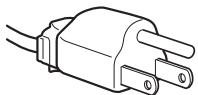
Дли 100-120В
nepemehoro toka

Длг200-240B nepemehhoroToka

Tolbokd240B nepemehoro toka
Ceteba p03eTka doJxHa HaxoNtbcB bJeKoOcTyHOM MeCTe B6n3n ot np6bopa.
YctaHOBka
He yctaHaBnBaIte n He octaBnIte MOHITOp:
B MeCTax, NOBVerpeKeHHbIX BO3DeIeCTBnIO BbICOKHX Tempeatyp, HApPIMep, prDom C 6aTapeMn, HArpeBaTeJIbHbIMN BO3DyXOBoAMn, ININ B MeCTax, IDe BO3MOxHO nONaDaHne npAmoro COJHeuHOro CBeta. Pa3MeJeHne MOHtOpa B MeCTax, NOBVerpeKeHHbIX BO3DeIcTBnIO BbICOKNX Tempeatyp, HApPIMep, B ABTOMo6NJIax, INpINapKOBaHHbIX B COJHeuHbIX MeCTax ININ PAnOM C HArpeBaTeJIbHbIMN BO3DyXOBoAMn, MOKET npNBecTI K DeOpMaun KOpNyCa ININ K HeNCnPabHOCTAM.
B MeCTax, rIe npCytCTByET Bn6paZnI nn pe3Kne MExaHnueCKNe BO3dEInCTBnI.
PraDcM cIIO6bIM o6OpUdOBAHHeM, KOTOpoe n3NyuaeT CINbHOe MaHHTHOe IOne, HApnMpEe, TeJIeBn3OpAMn IInI DpyrHMn DOMAuHmN pnp6OpAMn.
B MeCTax, Ie MoKet cKaJIINBaTbC MHOro nIINI, rpr3n nI INPeCKa, HApIMep, pIOM COTKpbITbIM OKHOM nIIN BbIXODOMnI NOMEseHn. EcIn yCTpoiCTBO nepeHocNTcNo yIInCe, O6raTeJIbHO npIMITE COOTBeTCTByIOUne MEpbIpEdoCTOPoXHOCtN IpOTNB cyIeCTByIOUeB BO3dYxEnbln I rpa3N. B npOTNbHOM clyuae yCTpoiCTBO moKet 6bITb 6e3BO3BpArTHO NOBpeJKeDeHO.
06paueHne c 3KpaHOM KKd
He octablante 3kpan JKKB Mectax, Ie Ha Hero naaet CoINHcE, TAK KAK 3TO MOKET npNBecTN K erO nobpejKeHNIO. Co6IIOdaIte OCTOPOKHOCTb pnp pa3MeueHm MOHITopa y OKHa.
He tonkaite He zapanai Te 3kpan JKKJ. He knaite TaeIbe npdmtebl Ha 3kpan JKKJ. 3To moKet npnbectn K NCKpNBneHIO 3kpaHa nHn HncnpabHocTn naheJN JKKJ.
- Ecπ MoHITOp IcπOJIb3yETcB XoIOnHOM MecTe, To Ha 3KpaHe MoKET NOrBITcR OCTaToUHoe IN3O6paXeHne. ΘTo He YBnAETcR HEnOJaIKoN. 3KpaH Bo3BpaUaEaTcR K O6blHOMy BOCpOIN3BeDeHIO, KaK TOnbKO TempePaTyPc CTAHOBITcR HOpMaIbHoN.
- Ecni B TeueHne IOnIroTo BpEmeHn OTo6paXaetc HEnoDbNkHoe N3O6paXeHne, To Ha 3KpaHe MoXeT HeHaDoJIr NOBbTbCt OCTaTOUHOe N3O6paXeHne. OCTaTOUHOe N3O6paXeHne CO BpEmeHem NcYe3HeT.
-ПанельЖКДharpeBaetcBOBpeMa pa6Otbl.3To He RAJIaETcHEnoJaKoI.
HeKOTopbIe yHkUIn MHeIO HeJIb3r IcNoJIb3OBaTb dJIa HeKOTopbIX MoJeIeM MOHTOpOB.
IdeHTnΦnKauny deTaJeN oprAHOB ynpaBLeHn
Cm. cTpaHnCbI B cKobkax dIa IOnyuHeHH noOpboHbIX CBeDeHn.
Ha pncyHke oTo6paXeHa TOnbKO OJHa MoJeIb MOHITopa n3 BCEX BO3MOXHbIX.
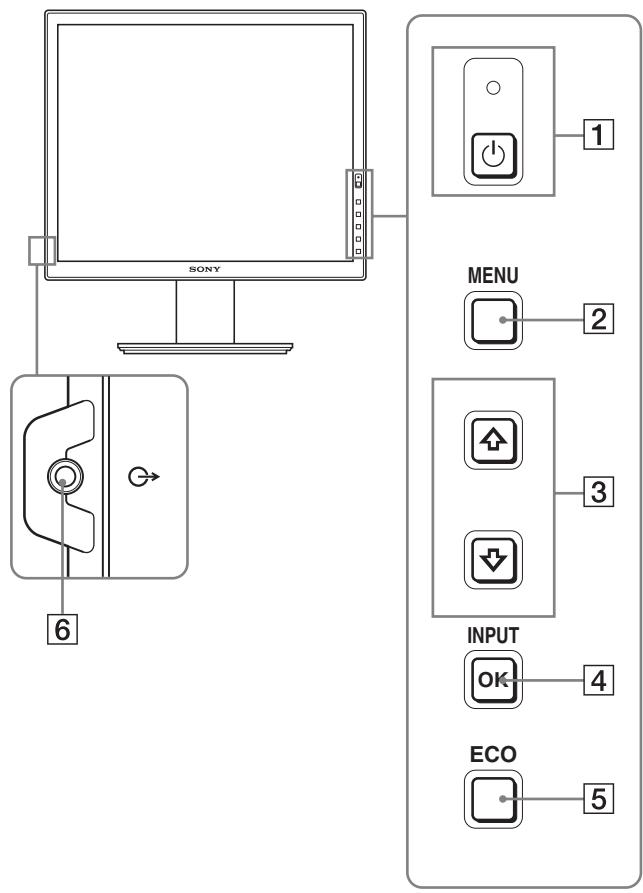
BudcpeepnHa dncnne
Copepkahne c nometkOJ * Jn TExHnuecknx XapaKtepncTnK MeHReTCB 3aBNCmOCTn OT MoeJIeN. IJn noJyehn DOonOHnHTeNbHbIX CBeDeHn CM. pa3deJ "TexHnueckne xapaKtepncTnK" (cTp.20).
1 BbIKJIouaTeJb (nHTaHne) n HdNKaTOP (nHTaHne) (ctp. 9, 16)
3Ta KhoNka BkIIOuaET DcNpIe. YTo6bl OTKIOUHTb DcNpIe, HAKMITE BbIKIOuHaTeJIb eIe pa3.
2 KhoNka MENU (cTp. 12)
Öta KhoIGNka BkIIOUaET N BbIKIIOUaET 3KpaH MeHIO.
3 KhoNKn / (ctp. 12)
3TN KHOPIK INCIOJIb3yIOTc IIN BbIbOpa 3JIeMeHToB MeHIO BbINONHeHn HAcTPOEK.
4 KhoNka OK (ctp. 12)
3Ta KHONka aKTHBUN3npyeT 3JeMeHT MeHIO HAcTPOkN, BbIbpaHHbIE C NOMOuKHOKHOK / (3). INPUT (ctp.11)*
C NOMOUIO 3TINKHOKO MOXHO nepeKJIIOUaTB BxOHDH BnDEOCINHaJ MEXy INPUT1 n INPUT2, KOrJa KMOHITOPY NOkJIIOUHeHb IBa KOMNbIOTepa (3TO BO3MOXHO, TOJIbKO KOrJa MeHIO OTKJIIOUeHO).
5 KhoNka ECO (ctp. 16)
He hadaBnBaTe Ha KK-ekpaH, onycka nn BblpRmJra DNcPJIeH Na IIOCKoN NOBepXHOCTN (Ha npImep, Ha cTone).
Bbl MoXeTe NOBpeDntb OndHOpOHyU CTpyKtpy NOBepXHOCTN 3KpaHa Nn Cam KK-3KpaH.
- Ochobahne IOndTabkN (C BnHTOM Ha HIXKEM TOPe)
3 NpOxHte Ha nlockyIO NOBepXHOCTb (Ha npIMep, Ha cTOn) MArkyIO NOCTnIKy.
EcnI noJoxNtB nucnIeH enocpeCTBeHHo Ha NOBepxHOcTb CTOna, moXHo nOBpeDHTb XXK-3KpaH i cam dncnJIe.
4 BbIbTe IncPJIe N3 Kopo6Kn I NOJIOXHTe erO Ha KpaI cToJa.
Ha pncyHke noka3aHa nOCTabKa c peryIinpyeMoB BbICOTo. Ecnn nCnObl3yETc nOCTabKa CФнКирOBaHHoB BbICOTo, TO nOcNeHm DeiCTBHeM npN c6OpKe 6yTeT war 5.
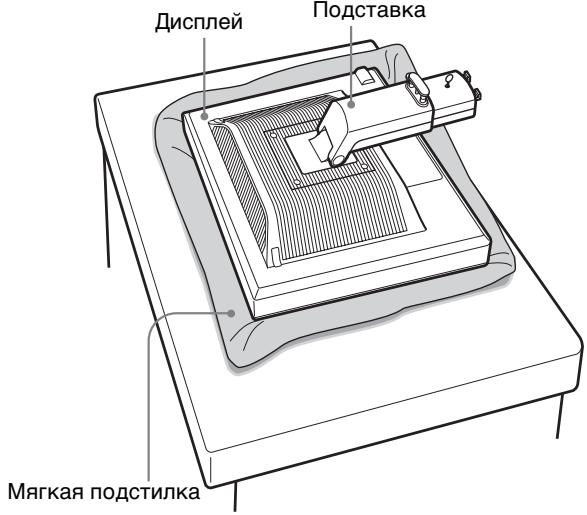
5 3aKpeNtE BbICTyIbI pbIuAxxKa NOcCTaBKn B OTBepCTnX OCHObbl NOcCTaBKn DJIe ee npIKpeNJIeHn. ① Y6eNTecB, 4TO BNHT 3aBepHyT, N OTKNHbTe 6apaWeK BNHTa. 4TO6bl HadeJxHO 3aKpeNtB OCHOBaHne NOcCTaBKn, NOdHMnTe 6apaWeK BNHTa. ② Y6eNTecB, 4TO BNHT 3aBepHyT, N OTKNHbTe 6apaWeK BNHTa.
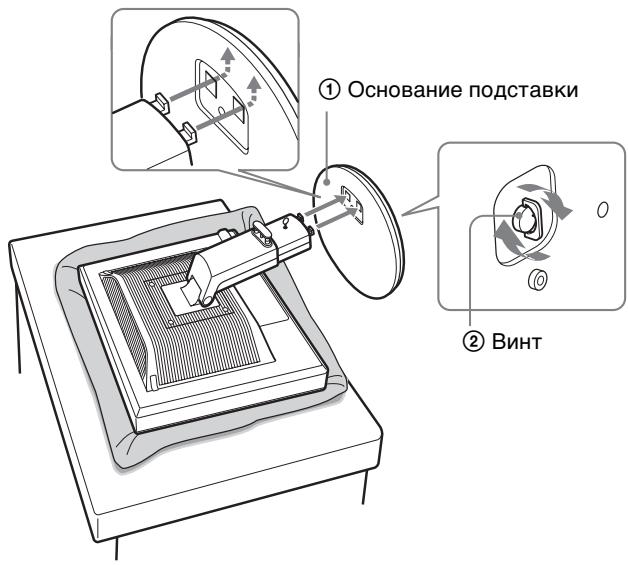
6 Ecnn nCnONb3yETcN IOCTaBkA c perynnpemyo BbICOTOn, pacpmaNB perynnpemyIO IOCTaBky, 3BJIeKNTe CTOnOpHbI WtntT.
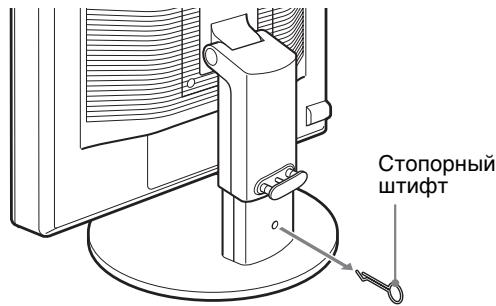
Ppmeuahne
He bIHHMaTe CTOnOpHbI uTnΦT, noka noDCTaBka hXoDITcB CLOKeHHOM BnDe. OHa moKet yNaCTb nII TpaBMIpOBAtB Bac, HeOXNuHaHHO OTCoEiHNHBuNCb OT OCHOBaHnA.
IcnoJb3ObaHne noDcTaBKn VESA\*
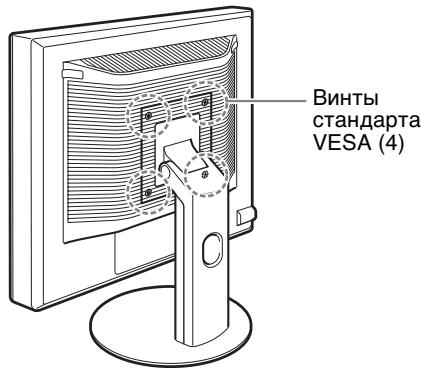
EcnI ChAByt 7TaTHyIO NOcTaBky, To MOxHO nCNoB3OBAbT IIO6yo NOcTaBky VESA npynx npOn3BOuNTeNei.
Подговka к paбOTE 2: Подсоeingнene kaбелей ВидаocnHaJa
- Ipeed noqKJIIOUeHnEM ducnneN KOMnbIOTep DOJIxHbI 6bITb BbIKLIQUeHbI.
Приимейсань.
- He cneyuET npkacaTbC K uTbIpbKam pa3bema Ka6eJI BnDeOcHnHa, TAK KAk pNt OTH Mx MOXHO COrHyTb.
Bo n36eXaHHe NOBpeJdeHnI KOHTaKToB Ha pa3bEme Ka6eJI BnDeOcInHaIa O83aTeJIbHO y6eINTEcB B npabInbHoi opneHTaUpa3bEma.
1 HakloHnTe DucnJIeB BnepeD.
B clyuae nCnoIb3OBAHnpepyInpyEmoNo BbICote NpOCTaBKn POnHMnTe DnCnIe eSe Bblwe.*
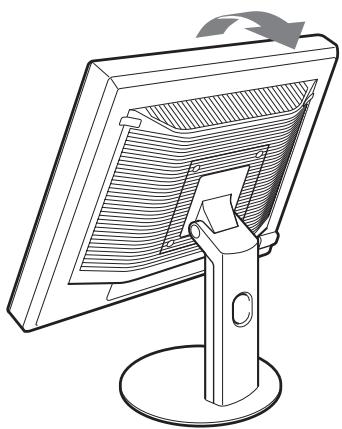
2 IopcoeHnHTe BndeokabeJN K dncJIeIo.
PnncnoIb3OBAHnn nOCTaBKn C qNKcnpoBaHHoB BbICOTOn cHaayla npOnyCTnTe BnDeOkabEni Chepe3 OTBepCTne B nOCTaBKe n 3aTEM nOCDoeHNHTe nx K dInCpJIeIo. PnDpO6Hee o6 3tOM cm. B pa3dene
"Под�товka к paбote 5:Зakpenлени Кабел".
IapametpbMeHMO MeHAOTcB 3aBNCIMOCTN OT MoJeIeN.
IpoBepbTe Ha3BaHHe MoDeJI Na HnXnHe Yactn MOHtOpa N o6paTntecb K Ta6nUcaM, npNBeDeHHbIM HnXe.
| SDM-S75A/S95AR SDM-S75E/S95ER | |
| ПОДСВETKA | ☑ |
| ΚΟΥΝΡΑCT | ☑1) |
| ΑρΚΟΥΤΙδύ | ☑1) |
| γ GΑΜΜΑ | ☑1) |
| ζΙΒΕΤ | 9300K |
| 6500K | |
| sRGB1) | |
| РУЧАЙ (увениейе Р и В) | |
| ΠΕΚΟΥΤΙδύ | ☑ |
| ↔← CBΡΟС ΠΕχΙΜΑ* | - |
| Α ΘΚΑΡΗ | АВТОΦОМАТ |
| ФΑЗА | |
| ΙΙΑΓ | |
| ΓΟΥΙΝΙ ΚΙΕΗΡΗ | |
| ΒΕΡΤΙΚ ΚΙΕΗΡΗ | |
| ΠΟ3 MEΗΟ | ☑ |
| Ε ΔΡΑΝΟ3Η BΧΟΥΑ* | - |
| Α LANGUAGE | ENGLISH |
| FRAN3AIS | |
| DEUTSCH | |
| ESPACOL | |
| ITALIANO | |
| NEDERLANDS | |
| SVENSKA | |
| ΡΥСΚΙΝΙ | |
| 日本語 | |
| 中文 | |
| ↔← CBΡΟС | OK |
| OTMEHA | |
| ΟΝΑ ΒΙΚΟΥΝΟΒΚΑΜΕΗΟ | BKЛ |
| БыIKЛ |
| SDM-S75D/S95DR SDM-S75F/S95FR SDM-S75N/S95NR | |
| Мени PMEGУЛПОВКА* | |
| PEЖИМ (peжим ECO) | Якову |
| Сраздуня | |
| Темнaya | |
| Чужая | |
| |ФОДСВETКA | ☑ |
| ① KOHTРACT | ☑1) |
| Яковоctь | ☑1) |
| γ GAMMA | ☑1) |
| 乙CBET | 9300K |
| 6500K | |
| sRGB1) | |
| Чучая (ув鳏стенье RиВ) | |
| PEЗКОCTь | ☑ |
| ←← CBPOC PEЖИМА* | ☑ |
| эКPAH | ABTOФOPMAT |
| ФАЗА | |
| ШАг | |
| Гориз лесHTР | |
| BEPTИК лесHTР | |
| ПОЗ MEHIO | ☑ |
| PACПОЗН BXODА* | ABTOPACП ВКЛ |
| BXODI1 | |
| BXOD2 | |
| ABTOPACП ВБIKЛ | |
| LANGUAGE | ENGLISH |
| FRAN3AIS | |
| DEUTSCH | |
| ESPACOL | |
| ITALIANO | |
| NEDERLANDS | |
| SVENSKA | |
| РУСКИЙ | |
| 日本語 | |
| 中文 | |
| ←← CBPOC | OK |
| OTMEHA | |
| БЛOKИРОВКAMEHIO | ВКЛ |
| ВБIKЛ | |
1) KOHTPACT, RPKOCTb u GAMMA He peryunpyoTc npu Bblbope peXmMa "sRGB".
MeHIO PEGYJINPOBKA*
Длг STнх MOHITOPOB c aHaIOrObIMn BXOdAMN MOKHOpeRyInpoBaTb napaMeTpbl IOICBETKA, KOHTPACTИRPKOCTb, ecn peXm ECO bI6paH TOnbko Длг 3NaueHnIPOJIb3OBATEJIb.
Ecni Bb6paHo 3aueHHe "sRGB," 6yTeH HeB03MoXHO perYIpObaTb KOHTpactHoCTb HApKoCTb B MeHIO KOHTPACT, APKoCTb n GAMMA.
MeHIO LEBET
Korda ABTONOnc He pa6oTaeT:
1 OTkpoIe "MoI KOMpbIOTe" n npaBoI KHOJIKOI MblIu ⅢeJIKNHITe 3HaOK CD-ROM.
ПерейдиTeВ“ПровдиК"ИОТкpoиTe 3нauok CD-ROM.
2 OTkpoiTe [Utility] n BbI6epuTe [Windows].
3 3anyctnte [Win_Utility.exe].
IoBntcTeTObaTa6nla.
YcTpaHHeH HenCpabHOCTeI
IpejKeJe cem O6paTntbC BcnyK6y TeXnuecko IopdepKKn, O3HaKoMbTeCb C daHHbIM pa3deJOM.
3KpaHHbIe coo6eHnIa
EcIIyTO-TO He B NopAJaKe CO BXOJHbIM CnHnaJIOM, Ha 3KpaHe NOBILIETCA ONDHO 3CJeDyUOxN Coo6uHEni. JIy UcTpaHEnH HENoJaKm CM. pa3dJe "CmMNTombl HENoJaOK I deIcTBnno nX yCTpaHEnH"Ha cTp.18.
EcnHa 3KpaHe NOBJIaTeC8 COo6eHne "HEONYCT. IPAΦ. PEXKIM"
3TO yKa3bIBAeT Ha TO, YTO BXoJHO CnHrHaJI He COOTBETCTBYET XapaKTePncTnKam DnCnJIe. IPoBepbTe CneDyUOeE. ⅡIaONyuEHN aONOpHNITeNBbIX CBeDeHIn O6 3KpaHHbIX COO6UeHNX CM. pa3JeN "CmMNTOMbI HEnOJaOK I DeIcTBnI PO INx ycTpaHeHnIO" Ha cTp. 18.
EcnnHa3kpaheOTo6pkaetc“xxx.xkHz/ xxxHz"
3TO yka3bIbaeT Ha TO, YTO JIN6O YacToTA rOpN30HTaJIbHO pa3BepTKn, JIN6O YacToTA BepTKaJIbHO pa3BepTKn He COOTBETCTByET XapaKTePncTNUkAM DInCJIpeJ.
LcnpbO3HaHOT qactoTbI rOpn30HTaJIbHOI BepTKaJIbHOI pa3BepTKI TeKyuIero BXoJHOr CnHaJa.
Ppimep
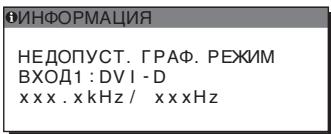
EcnHa 3KpaHe OTo6paXaetcH“PA3PEUeHNE>1280 ×1024"
3To yka3bIbaeT Ha To, YTO 3To pa3peSeHHe COOTBeTcTByeT XapaKTePncTnKaM DnCnPeN (1280×1024 nJIN HnKe).
Ppimep
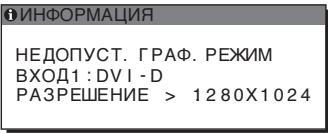
EcnHa 3KpaHe nOBnEeTcCoO6eHne“HET CnHaja"
3To yka3bIbaeT Ha To, YTO uepe3 BbIbpaHHb I B HactoIznn MOMeHT pa3bem CnHaJ He NoJaTeCra.
KordaДлгnapaMeTpapACnO3H BXODA(ctp.15) yctahOBJIeHO 3NaueHne BKL,dncIne HaxoJIT dpyroB BXoHOr CnHaJn ABTomatUeCKn NepeKJIIOuaET BXoJ.
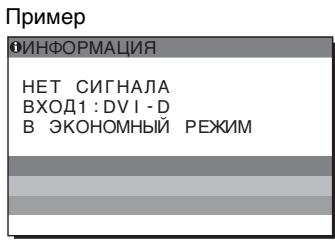
Ecn He ydaetc Hacptpmb BXoHcN CnHa
Повьлаятсо cooшениe“ВЗКOHOMHын PEXIM"(перховд ржим знeprocбержени).
Yepe3 5 cekynd BkJIIOHTcpejIM 3HeproScbepejEHa.
EcnHa 3KpaHe OTo6paKaeTcCoO6uHne "KABELb HE IPOKJIIOUCH"
3TO yKa3bIbaeT Ha TO, UTo Ka6eJIb BnIdeOcHraHa OTKIHOH OT BB6paHHOrO B HactoUIM MOMENT pa3bema.
KordaI npaMeTpa PACnO3H BXODA (cTp.15) yctaHOBHeo 3NaeHne BKL, nCnIe HaxoJIT dpyroB BXoHOr CnHaJn aBTOMaTnueckn NepeKJIuOaET BXoJ.
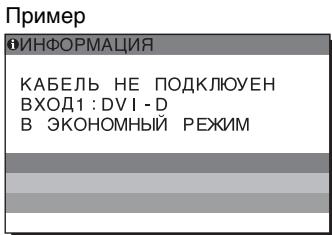
Ecn He ydaetc HAcTpOHTb BXoHOn CnHAn
IorBraTc coo6eHne "B 3KOHOMbI PEXM"
TCO'99 Eco-document (for the black model)

Congratulations!
You have just purchased a TCO'99 approved and labelled product! Your choice has provided you with a product developed for professional use. Your purchase has also contributed to reducing the burden on the environment and also to the further development of environmentally adapted electronics products.
Why do we have environmentally labelled computers?
In many countries, environmental labelling has become an established method for encouraging the adaptation of goods and services to the environment. The main problem, as far as computers and other electronics equipment are concerned, is that environmentally harmful substances are used both in the products and during their manufacture. Since it is not so far possible to satisfactorily recycle the majority of electronics equipment, most of these potentially damaging substances sooner or later enter nature.
There are also other characteristics of a computer, such as energy consumption levels, that are important from the viewpoints of both the work (internal) and natural (external) environments. Since all methods of electricity generation have a negative effect on the environment (e.g. acidic and climate-influencing emissions, radioactive waste), it is vital to save energy. Electronics equipment in offices is often left running continuously and thereby consumes a lot of energy.
What does labelling involve?
This product meets the requirements for the TCO'99 scheme which provides for international and environmental labelling of personal computers. The labelling scheme was developed as a joint effort by the TCO (The Swedish Confederation of Professional Employees), Svenska Naturskyddsforeningen (The Swedish Society for Nature Conservation) and Statens Energimyndighet (The Swedish National Energy Administration).
Approval requirements cover a wide range of issues: environment, ergonomics, usability, emission of electric and magnetic fields, energy consumption and electrical and fire safety.
The environmental demands impose restrictions on the presence and use of heavy metals, brominated and chlorinated flame retardants, CFCs (freons) and chlorinated solvents, among other things. The product must be prepared for recycling and the manufacturer is obliged to have an environmental policy which must be adhered to in each country where the company implements its operational policy.
The energy requirements include a demand that the computer and/or display, after a certain period of inactivity, shall reduce its power consumption to a lower level in one or more stages. The length of time to reactivate the computer shall be reasonable for the user.
Labelled products must meet strict environmental demands, for example, in respect of the reduction of electric and magnetic fields, physical and visual ergonomics and good usability.
Below you will find a brief summary of the environmental requirements met by this product. The complete environmental criteria document may be ordered from:
TCO Development
SE-114 94 Stockholm, Sweden
Fax: +46 8 782 92 07
Email (Internet): development@tco.se
Current information regarding TCO'99 approved and labelled products may also be obtained via the Internet, using the address: http://www.tco-info.com/
Environmental requirements
Flame retardants
Flame retardants are present in printed circuit boards, cables, wires, casings and housings. Their purpose is to prevent, or at least to delay the spread of fire. Up to 30% of the plastic in a computer casing can consist of flame retardant substances. Most flame retardants contain bromine or chloride, and those flame retardants are chemically related to another group of environmental toxins, PCBs. Both the flame retardants containing bromine or chloride and the PCBs are suspected of giving rise to severe health effects, including reproductive damage in fish-eating birds and mammals, due to the bio-accumulative* processes. Flame retardants have been found in human blood and researchers fear that disturbances in foetus development may occur.
The relevant TCO'99 demand requires that plastic components weighing more than 25 grams must not contain flame retardants with organically bound bromine or chlorine. Flame retardants are allowed in the printed circuit boards since no substitutes are available.
Cadmium**
Cadmium is present in rechargeable batteries and in the colour-generating layers of certain computer displays. Cadmium damages the nervous system and is toxic in high doses. The relevant TCO'99 requirement states that batteries, the colour-generating layers of display screens and the electrical or electronics components must not contain any cadmium.
Mercury**
Mercury is sometimes found in batteries, relays and switches. It damages the nervous system and is toxic in high doses. The relevant TCO'99 requirement states that batteries may not contain any mercury. It also demands that mercury is not present in any of the electrical or electronics components associated with the labelled unit.
CFCs (freons)
The relevant TCO'99 requirement states that neither CFCs nor HCFCs may be used during the manufacture and assembly of the product. CFCs (freons) are sometimes used for washing printed circuit boards. CFCs break down ozone and thereby damage the ozone layer in the stratosphere, causing increased reception on earth of ultraviolet light with e.g. increased risks of skin cancer (malignant melanoma) as a consequence.
Lead**
Lead can be found in picture tubes, display screens, solders and capacitors. Lead damages the nervous system and in higher doses, causes lead poisoning. The relevant TCO'99 requirement permits the inclusion of lead since no replacement has yet been developed.
- Bio-accumulative is defined as substances which accumulate within living organisms.
** Lead, Cadmium and Mercury are heavy metals which are Bio-accumulative.
TCO’03 Eco-document (for the silver model)
TCDDevelopment
Tc0'03
DISPLAYS
www.tcodevelopment.com
Congratulations!
The display you have just purchased carries the TCO'03 Displays label. This means that your display is designed, manufactured and tested according to some of the strictest quality and environmental requirements in the world. This makes for a high performance product, designed with the user in focus that also minimizes the impact on our natural environment.
■ Ergonomics
- Good visual ergonomics and image quality in order to improve the working environment for the user and to reduce sight and strain problems. Important parameters are luminance, contrast, resolution, reflectance, colour rendition and image stability.
Energy
- Energy-saving mode after a certain time - beneficial both for the user and the environment
- Electrical safety
Emissions
- Electromagnetic fields
- Noise emissions
Ecology
- The product must be prepared for recycling and the manufacturer must have a certified environmental management system such as EMAS or ISO 14 001
-
Restrictions on
-
chlorinated and brominated flame retardants and polymers
- heavy metals such as cadmium, mercury and lead.
The requirements included in this label have been developed by TCO Development in co-operation with scientists, experts, users as well as manufacturers all over the world. Since the end of the 1980s TCO has been
involved in influencing the development of IT equipment in a more user-friendly direction. Our labelling system started with displays in 1992 and is now requested by users and IT-manufacturers all over the world.
For more information, please visit www.tcodevelopment.com
Recycling Information
Customer in Europe
The collection and recycling of this product has been planned according to your country's relevant legislation. To ensure that this product will be collected and recycled in way that minimizes the impact on the environment, please do the following:
-
If you purchased this product for private use, contact your municipality or the waste collection system and bring the product to this collection point / have the product be picked up by the waste collection system. Alternatively, your retailer might take back this if you purchase new equivalent equipment; please check with your retailer whether he will take back this product before bringing it. For information on your country's recycling arrangements, please contact the Sony representation in your country (contact details at: www.sony-europe.com). Further details on specific recycling systems can be found at the following addresses:
-
Belgium: www-recupel.be
- Netherlands: www.nvmp.nl (consumer electronics) www.ictmilieu.nl (IT equipment)
- Norway: www.elretur.no
- Sweden: www.el-kretsen.se
-
Switzerland: www.swico.ch
-
If you use this product professionally, check the product's delivery contract for take back / recycling arrangements and follow the procedures described therein. Alternatively, follow the procedures described under point 1.
Customer in USA
We Sony as a member of EIA recommends to visit URL below http://www.eiae.org/
Customer in Asia
http://www.sony.co.jp/SonyInfo/Environment/recycle/3R.html
TFTLCD Color Computer Display
SDM-S75*
SDM-S95***
Owner's Record
The model and serial numbers are located at the rear of the unit. Record these numbers in the spaces provided below. Refer to them whenever you call upon your dealer regarding this product. Model No. __ Serial No. ____
WARNING
To reduce the risk of fire or electric shock, do not expose this apparatus to rain or moisture.
Dangerously high voltages are present inside the unit. Do not open the cabinet. Refer servicing to qualified personnel only.
FCC Notice
This equipment has been tested and found to comply with the limits for a Class B digital device, pursuant to Part 15 of the FCC Rules. These limits are designed to provide reasonable protection against harmful interference in a residential installation. This equipment generates, uses, and can radiate radio frequency energy and, if not installed and used in accordance with the instructions, may cause harmful interference to radio communications. However, there is no guarantee that interference will not occur in a particular installation. If this equipment does cause harmful interference to radio or television reception, which can be determined by turning the equipment off and on, the user is encouraged to try to correct the interference by one or more of the following measures:
- Reorient or relocate the receiving antenna.
- Increase the separation between the equipment and receiver.
- Connect the equipment into an outlet on a circuit different from that to which the receiver is connected.
- Consult the dealer or an experienced radio/TV technician for help. You are cautioned that any changes or modifications not expressly approved in this manual could void your authority to operate this equipment.
IMPORTANT
If you have any questions about this product, you may call; Sony Customer Information Services Center 1-800-222-7669 or http://www.sony.com/
Declaration of Conformity
Trade Name :SONY
Model : SDM-S75/S95*
Note : *means any number or alphanumeric character.
Responsible Party : Sony Electronics Inc.
Address : 16530 Via Esprillo, San Diego, CA 92127 U.S.A.
Telephone Number : 858-942-2230
This device complies with part 15 of the FCC rules. Operation is subject to the following two conditions: (1) This device may not cause harmful interference, and (2) this device must accept any interference received, including interference that may cause undesired operation.
This notice is applicable for USA/Canada only. If shipped to USA/Canada, install only a UL LISTED/CSA LABELLED power supply cord meeting the following specifications:
SPECIFICATIONS
Plug Type Nema-Plug 5-15p
Cord Type SVT or SJT, minimum 3× 18 AWG
Length Maximum 15 feet
Rating Minimum 7 A, 125 V
NOTICE
As an ENERGY STAR Partner, Sony Corporation has determined that this product meets the ENERGY STAR guidelines for energy efficiency.

This monitor complies with the TCO'99 guidelines.
(for the black model)

This monitor complies with the TCO'03 guidelines.
(for the silver model)
TCO'03 Eco-document (for the silver model) .ii
Försiktighetsåtgård
Installation 1: Montera stativet
TCO'99 Eco-document (for the black model)

Congratulations!
You have just purchased a TCO'99 approved and labelled product! Your choice has provided you with a product developed for professional use. Your purchase has also contributed to reducing the burden on the environment and also to the further development of environmentally adapted electronics products.
Why do we have environmentally labelled computers?
In many countries, environmental labelling has become an established method for encouraging the adaptation of goods and services to the environment. The main problem, as far as computers and other electronics equipment are concerned, is that environmentally harmful substances are used both in the products and during their manufacture. Since it is not so far possible to satisfactorily recycle the majority of electronics equipment, most of these potentially damaging substances sooner or later enter nature.
There are also other characteristics of a computer, such as energy consumption levels, that are important from the viewpoints of both the work (internal) and natural (external) environments. Since all methods of electricity generation have a negative effect on the environment (e.g. acidic and climate-influencing emissions, radioactive waste), it is vital to save energy. Electronics equipment in offices is often left running continuously and thereby consumes a lot of energy.
What does labelling involve?
This product meets the requirements for the TCO'99 scheme which provides for international and environmental labelling of personal computers. The labelling scheme was developed as a joint effort by the TCO (The Swedish Confederation of Professional Employees), Svenska Naturskyddsforeningen (The Swedish Society for Nature Conservation) and Statens Energimyndighet (The Swedish National Energy Administration).
Approval requirements cover a wide range of issues: environment, ergonomics, usability, emission of electric and magnetic fields, energy consumption and electrical and fire safety.
The environmental demands impose restrictions on the presence and use of heavy metals, brominated and chlorinated flame retardants, CFCs (freons) and chlorinated solvents, among other things. The product must be prepared for recycling and the manufacturer is obliged to have an environmental policy which must be adhered to in each country where the company implements its operational policy.
The energy requirements include a demand that the computer and/or display, after a certain period of inactivity, shall reduce its power consumption to a lower level in one or more stages. The length of time to reactivate the computer shall be reasonable for the user.
Labelled products must meet strict environmental demands, for example, in respect of the reduction of electric and magnetic fields, physical and visual ergonomics and good usability.
Below you will find a brief summary of the environmental requirements met by this product. The complete environmental criteria document may be ordered from:
TCO Development
SE-114 94 Stockholm, Sweden
Fax: +46 8 782 92 07
Email (Internet): development@tco.se
Current information regarding TCO'99 approved and labelled products may also be obtained via the Internet, using the address: http://www.tco-info.com/
Environmental requirements
Flame retardants
Flame retardants are present in printed circuit boards, cables, wires, casings and housings. Their purpose is to prevent, or at least to delay the spread of fire. Up to 30% of the plastic in a computer casing can consist of flame retardant substances. Most flame retardants contain bromine or chloride, and those flame retardants are chemically related to another group of environmental toxins, PCBs. Both the flame retardants containing bromine or chloride and the PCBs are suspected of giving rise to severe health effects, including reproductive damage in fish-eating birds and mammals, due to the bio-accumulative* processes. Flame retardants have been found in human blood and researchers fear that disturbances in foetus development may occur.
The relevant TCO'99 demand requires that plastic components weighing more than 25 grams must not contain flame retardants with organically bound bromine or chlorine. Flame retardants are allowed in the printed circuit boards since no substitutes are available.
Cadmium**
Cadmium is present in rechargeable batteries and in the colour-generating layers of certain computer displays. Cadmium damages the nervous system and is toxic in high doses. The relevant TCO'99 requirement states that batteries, the colour-generating layers of display screens and the electrical or electronics components must not contain any cadmium.
Mercury**
Mercury is sometimes found in batteries, relays and switches. It damages the nervous system and is toxic in high doses. The relevant TCO'99 requirement states that batteries may not contain any mercury. It also demands that mercury is not present in any of the electrical or electronics components associated with the labelled unit.
CFCs (freons)
The relevant TCO'99 requirement states that neither CFCs nor HCFCs may be used during the manufacture and assembly of the product. CFCs (freons) are sometimes used for washing printed circuit boards. CFCs break down ozone and thereby damage the ozone layer in the stratosphere, causing increased reception on earth of ultraviolet light with e.g. increased risks of skin cancer (malignant melanoma) as a consequence.
Lead**
Lead can be found in picture tubes, display screens, solders and capacitors. Lead damages the nervous system and in higher doses, causes lead poisoning. The relevant TCO'99 requirement permits the inclusion of lead since no replacement has yet been developed.
- Bio-accumulative is defined as substances which accumulate within living organisms.
** Lead, Cadmium and Mercury are heavy metals which are Bio-accumulative.
TCO’03 Eco-document (for the silver model)
TCDDevelopment
Tc0'03
DISPLAYS
www.tcodevelopment.com
Congratulations!
The display you have just purchased carries the TCO'03 Displays label. This means that your display is designed, manufactured and tested according to some of the strictest quality and environmental requirements in the world. This makes for a high performance product, designed with the user in focus that also minimizes the impact on our natural environment.
Ergonomics
- Good visual ergonomics and image quality in order to improve the working environment for the user and to reduce sight and strain problems. Important parameters are luminance, contrast, resolution, reflectance, colour rendition and image stability.
Energy
- Energy-saving mode after a certain time - beneficial both for the user and the environment
- Electrical safety
Emissions
- Electromagnetic fields
- Noise emissions
Ecology
- The product must be prepared for recycling and the manufacturer must have a certified environmental management system such as EMAS or ISO 14 001
-
Restrictions on
-
chlorinated and brominated flame retardants and polymers
-
heavy metals such as cadmium, mercury and lead.
The requirements included in this label have been developed by TCO Development in co-operation with scientists, experts, users as well as manufacturers all over the world. Since the end of the 1980s TCO has been
involved in influencing the development of IT equipment in a more user-friendly direction. Our labelling system started with displays in 1992 and is now requested by users and IT-manufacturers all over the world.
For more information, please visit www.tcodevelopment.com
Recycling Information
Customer in Europe
The collection and recycling of this product has been planned according to your country's relevant legislation. To ensure that this product will be collected and recycled in way that minimizes the impact on the environment, please do the following:
-
If you purchased this product for private use, contact your municipality or the waste collection system and bring the product to this collection point / have the product be picked up by the waste collection system. Alternatively, your retailer might take back this if you purchase new equivalent equipment; please check with your retailer whether he will take back this product before bringing it. For information on your country's recycling arrangements, please contact the Sony representation in your country (contact details at: www.sony-europe.com). Further details on specific recycling systems can be found at the following addresses:
-
Belgium: www-recupel.be
- Netherlands: www.nvmp.nl (consumer electronics) www.ictmilieu.nl (IT equipment)
- Norway: www.elretur.no
- Sweden: www.el-kretsen.se
-
Switzerland: www.swico.ch
-
If you use this product professionally, check the product's delivery contract for take back / recycling arrangements and follow the procedures described therein. Alternatively, follow the procedures described under point 1.
Customer in USA
We Sony as a member of EIA recommends to visit URL below http://www.eiae.org/
Customer in Asia
http://www.sony.co.jp/SonyInfo/Environment/recycle/3R.html
TFTLCD Color Computer Display
SDM-S75*
SDM-S95 **
Owner's Record
The model and serial numbers are located at the rear of the unit. Record these numbers in the spaces provided below. Refer to them whenever you call upon your dealer regarding this product. Model No. __ Serial No. ____
WARNING
To reduce the risk of fire or electric shock, do not expose this apparatus to rain or moisture.
Dangerously high voltages are present inside the unit. Do not open the cabinet. Refer servicing to qualified personnel only.
FCC Notice
This equipment has been tested and found to comply with the limits for a Class B digital device, pursuant to Part 15 of the FCC Rules. These limits are designed to provide reasonable protection against harmful interference in a residential installation. This equipment generates, uses, and can radiate radio frequency energy and, if not installed and used in accordance with the instructions, may cause harmful interference to radio communications. However, there is no guarantee that interference will not occur in a particular installation. If this equipment does cause harmful interference to radio or television reception, which can be determined by turning the equipment off and on, the user is encouraged to try to correct the interference by one or more of the following measures:
- Reorient or relocate the receiving antenna.
- Increase the separation between the equipment and receiver.
- Connect the equipment into an outlet on a circuit different from that to which the receiver is connected.
- Consult the dealer or an experienced radio/TV technician for help. You are cautioned that any changes or modifications not expressly approved in this manual could void your authority to operate this equipment.
IMPORTANT
If you have any questions about this product, you may call; Sony Customer Information Services Center 1-800-222-7669 or http://www.sony.com/
Declaration of Conformity
Trade Name :SONY
Model : SDM-S75/S95*
Note : *means any number or alphanumeric character.
Responsible Party : Sony Electronics Inc.
Address : 16530 Via Esprillo, San Diego, CA 92127 U.S.A.
Telephone Number : 858-942-2230
This device complies with part 15 of the FCC rules. Operation is subject to the following two conditions: (1) This device may not cause harmful interference, and (2) this device must accept any interference received, including interference that may cause undesired operation.
This notice is applicable for USA/Canada only. If shipped to USA/Canada, install only a UL LISTED/CSA LABELLED power supply cord meeting the following specifications:
SPECIFICATIONS
Plug Type Nema-Plug 5-15p
Cord Type SVT or SJT, minimum 3× 18 AWG
Length Maximum 15 feet
Rating Minimum 7 A, 125 V
NOTICE
As an ENERGY STAR Partner, Sony Corporation has determined that this product meets the ENERGY STAR guidelines for energy efficiency.

This monitor complies with the TCO'99 guidelines.
(for the black model)

This monitor complies with the TCO'03 guidelines.
(for the silver model)
Inhoudsopgave
TCO'99 Eco-document (for the black model)
TCO'03 Eco-document (for the silver model) .ii
| Analoog RGB | Digital RGB | |
| Horizontalale frequently | 28 – 80 kHz | 28 – 64 kHz |
| Verticalale frequently | 48 – 75 Hz | 60 Hz |
| Resolutie | 1280 × 1024 of minder | |
1 Open [Utility] en selecteer [Mac].
2 Start [Mac_Untity.exe]
TCO'99 Eco-document (for the black model)

Congratulations!
You have just purchased a TCO'99 approved and labelled product! Your choice has provided you with a product developed for professional use. Your purchase has also contributed to reducing the burden on the environment and also to the further development of environmentally adapted electronics products.
Why do we have environmentally labelled computers?
In many countries, environmental labelling has become an established method for encouraging the adaptation of goods and services to the environment. The main problem, as far as computers and other electronics equipment are concerned, is that environmentally harmful substances are used both in the products and during their manufacture. Since it is not so far possible to satisfactorily recycle the majority of electronics equipment, most of these potentially damaging substances sooner or later enter nature.
There are also other characteristics of a computer, such as energy consumption levels, that are important from the viewpoints of both the work (internal) and natural (external) environments. Since all methods of electricity generation have a negative effect on the environment (e.g. acidic and climate-influencing emissions, radioactive waste), it is vital to save energy. Electronics equipment in offices is often left running continuously and thereby consumes a lot of energy.
What does labelling involve?
This product meets the requirements for the TCO'99 scheme which provides for international and environmental labelling of personal computers. The labelling scheme was developed as a joint effort by the TCO (The Swedish Confederation of Professional Employees), Svenska Naturskyddsforeningen (The Swedish Society for Nature Conservation) and Statens Energimyndighet (The Swedish National Energy Administration).
Approval requirements cover a wide range of issues: environment, ergonomics, usability, emission of electric and magnetic fields, energy consumption and electrical and fire safety.
The environmental demands impose restrictions on the presence and use of heavy metals, brominated and chlorinated flame retardants, CFCs (freons) and chlorinated solvents, among other things. The product must be prepared for recycling and the manufacturer is obliged to have an environmental policy which must be adhered to in each country where the company implements its operational policy.
The energy requirements include a demand that the computer and/or display, after a certain period of inactivity, shall reduce its power consumption to a lower level in one or more stages. The length of time to reactivate the computer shall be reasonable for the user.
Labelled products must meet strict environmental demands, for example, in respect of the reduction of electric and magnetic fields, physical and visual ergonomics and good usability.
Below you will find a brief summary of the environmental requirements met by this product. The complete environmental criteria document may be ordered from:
TCO Development
SE-114 94 Stockholm, Sweden
Fax: +46 8 782 92 07
Email (Internet): development@tco.se
Current information regarding TCO'99 approved and labelled products may also be obtained via the Internet, using the address: http://www.tco-info.com/
Environmental requirements
Flame retardants
Flame retardants are present in printed circuit boards, cables, wires, casings and housings. Their purpose is to prevent, or at least to delay the spread of fire. Up to 30% of the plastic in a computer casing can consist of flame retardant substances. Most flame retardants contain bromine or chloride, and those flame retardants are chemically related to another group of environmental toxins, PCBs. Both the flame retardants containing bromine or chloride and the PCBs are suspected of giving rise to severe health effects, including reproductive damage in fish-eating birds and mammals, due to the bio-accumulative* processes. Flame retardants have been found in human blood and researchers fear that disturbances in foetus development may occur.
The relevant TCO'99 demand requires that plastic components weighing more than 25 grams must not contain flame retardants with organically bound bromine or chlorine. Flame retardants are allowed in the printed circuit boards since no substitutes are available.
Cadmium**
Cadmium is present in rechargeable batteries and in the colour-generating layers of certain computer displays. Cadmium damages the nervous system and is toxic in high doses. The relevant TCO'99 requirement states that batteries, the colour-generating layers of display screens and the electrical or electronics components must not contain any cadmium.
Mercury**
Mercury is sometimes found in batteries, relays and switches. It damages the nervous system and is toxic in high doses. The relevant TCO'99 requirement states that batteries may not contain any mercury. It also demands that mercury is not present in any of the electrical or electronics components associated with the labelled unit.
CFCs (freons)
The relevant TCO'99 requirement states that neither CFCs nor HCFCs may be used during the manufacture and assembly of the product. CFCs (freons) are sometimes used for washing printed circuit boards. CFCs break down ozone and thereby damage the ozone layer in the stratosphere, causing increased reception on earth of ultraviolet light with e.g. increased risks of skin cancer (malignant melanoma) as a consequence.
Lead**
Lead can be found in picture tubes, display screens, solders and capacitors. Lead damages the nervous system and in higher doses, causes lead poisoning. The relevant TCO'99 requirement permits the inclusion of lead since no replacement has yet been developed.
- Bio-accumulative is defined as substances which accumulate within living organisms.
** Lead, Cadmium and Mercury are heavy metals which are Bio-accumulative.
TCO’03 Eco-document (for the silver model)
TCDDevelopment
Tc0'03
DISPLAYS
www.tcodevelopment.com
Congratulations!
The display you have just purchased carries the TCO'03 Displays label. This means that your display is designed, manufactured and tested according to some of the strictest quality and environmental requirements in the world. This makes for a high performance product, designed with the user in focus that also minimizes the impact on our natural environment.
Ergonomics
- Good visual ergonomics and image quality in order to improve the working environment for the user and to reduce sight and strain problems. Important parameters are luminance, contrast, resolution, reflectance, colour rendition and image stability.
Energy
- Energy-saving mode after a certain time - beneficial both for the user and the environment
- Electrical safety
Emissions
- Electromagnetic fields
- Noise emissions
Ecology
- The product must be prepared for recycling and the manufacturer must have a certified environmental management system such as EMAS or ISO 14 001
-
Restrictions on
-
chlorinated and brominated flame retardants and polymers
-
heavy metals such as cadmium, mercury and lead.
The requirements included in this label have been developed by TCO Development in co-operation with scientists, experts, users as well as manufacturers all over the world. Since the end of the 1980s TCO has been
involved in influencing the development of IT equipment in a more user-friendly direction. Our labelling system started with displays in 1992 and is now requested by users and IT-manufacturers all over the world.
For more information, please visit www.tcodevelopment.com
Recycling Information
Customer in Europe
The collection and recycling of this product has been planned according to your country's relevant legislation. To ensure that this product will be collected and recycled in a way that minimizes the impact on the environment, please do the following:
-
If you purchased this product for private use, contact your municipality or the waste collection system and bring the product to this collection point / have the product be picked up by the waste collection system. Alternatively, your retailer might take back this if you purchase new equivalent equipment; please check with your retailer whether he will take back this product before bringing it. For information on your country's recycling arrangements, please contact the Sony representation in your country (contact details at: www.sony-europe.com). Further details on specific recycling systems can be found at the following addresses:
-
Belgium: www-recupel.be
- Netherlands: www.nvmp.nl (consumer electronics) www.ictmilieu.nl (IT equipment)
- Norway: www.elretur.no
- Sweden: www.el-kretsen.se
-
Switzerland: www.swico.ch
-
If you use this product professionally, check the product's delivery contract for take back / recycling arrangements and follow the procedures described therein. Alternatively, follow the procedures described under point 1.
Customer in USA
We Sony as a member of EIA recommends to visit URL below http://www.eiae.org/
Customer in Asia
http://www.sony.co.jp/SonyInfo/Environment/recycle/3R.html
TFTLCD Color Computer Display
SDM-S75*
SDM-S95***
Owner's Record
The model and serial numbers are located at the rear of the unit. Record these numbers in the spaces provided below. Refer to them whenever you call upon your dealer regarding this product. Model No. __ Serial No. ____
WARNING
To reduce the risk of fire or electric shock, do not expose this apparatus to rain or moisture.
Dangerously high voltages are present inside the unit. Do not open the cabinet. Refer servicing to qualified personnel only.
FCC Notice
This equipment has been tested and found to comply with the limits for a Class B digital device, pursuant to Part 15 of the FCC Rules. These limits are designed to provide reasonable protection against harmful interference in a residential installation. This equipment generates, uses, and can radiate radio frequency energy and, if not installed and used in accordance with the instructions, may cause harmful interference to radio communications. However, there is no guarantee that interference will not occur in a particular installation. If this equipment does cause harmful interference to radio or television reception, which can be determined by turning the equipment off and on, the user is encouraged to try to correct the interference by one or more of the following measures:
- Reorient or relocate the receiving antenna.
- Increase the separation between the equipment and receiver.
- Connect the equipment into an outlet on a circuit different from that to which the receiver is connected.
- Consult the dealer or an experienced radio/TV technician for help. You are cautioned that any changes or modifications not expressly approved in this manual could void your authority to operate this equipment.
IMPORTANT
If you have any questions about this product, you may call; Sony Customer Information Services Center 1-800-222-7669 or http:// www.sony.com/
Declaration of Conformity
Trade Name :SONY
Model : SDM-S75/S95*
Note : *means any number or alphanumeric character.
Responsible Party : Sony Electronics Inc.
Address : 16530 Via Esprillo, San Diego, CA 92127 U.S.A.
Telephone Number : 858-942-2230
This device complies with part 15 of the FCC rules. Operation is subject to the following two conditions: (1) This device may not cause harmful interference, and (2) this device must accept any interference received, including interference that may cause undesired operation.
This notice is applicable for USA/Canada only. If shipped to USA/Canada, install only a UL LISTED/CSA LABELLED power supply cord meeting the following specifications:
SPECIFICATIONS
Plug Type Nema-Plug 5-15p
Cord Type SVT or SJT, minimum 3× 18 AWG
Length Maximum 15 feet
Rating Minimum 7 A, 125 V
NOTICE
As an ENERGY STAR Partner, Sony Corporation has determined that this product meets the ENERGY STAR guidelines for energy efficiency.

This monitor complies with the TCO'99 guidelines.
(for the black model)

This monitor complies with the TCO'03 guidelines.
(for the silver model)
目录
使用前注意事项 4
检查显示器的型号名称 5
识别部件和控制钮 5
安装 6
步骤1:底座装配 6
步骤2:连接视频信号电缆 7
步骤3:连接音频线 8
步骤4:连接电源线 9
步骤5:牢固连接电线 9
步骤6:打开显示器和计算机 9
步骤7:调节倾斜度和高度 10
TCO'99 Eco-document (for the black model)
TCO'03 Eco-document (for the silver model) .ii
使用前注意事项
有关电源连接的警告事项
TCO'99 Eco-document (for the black model)

Congratulations!
You have just purchased a TCO'99 approved and labelled product! Your choice has provided you with a product developed for professional use. Your purchase has also contributed to reducing the burden on the environment and also to the further development of environmentally adapted electronics products.
Why do we have environmentally labelled computers?
In many countries, environmental labelling has become an established method for encouraging the adaptation of goods and services to the environment. The main problem, as far as computers and other electronics equipment are concerned, is that environmentally harmful substances are used both in the products and during their manufacture. Since it is not so far possible to satisfactorily recycle the majority of electronics equipment, most of these potentially damaging substances sooner or later enter nature.
There are also other characteristics of a computer, such as energy consumption levels, that are important from the viewpoints of both the work (internal) and natural (external) environments. Since all methods of electricity generation have a negative effect on the environment (e.g. acidic and climate-influencing emissions, radioactive waste), it is vital to save energy. Electronics equipment in offices is often left running continuously and thereby consumes a lot of energy.
What does labelling involve?
This product meets the requirements for the TCO'99 scheme which provides for international and environmental labelling of personal computers. The labelling scheme was developed as a joint effort by the TCO (The Swedish Confederation of Professional Employees), Svenska Naturskyddsforeningen (The Swedish Society for Nature Conservation) and Statens Energimyndighet (The Swedish National Energy Administration).
Approval requirements cover a wide range of issues: environment, ergonomics, usability, emission of electric and magnetic fields, energy consumption and electrical and fire safety.
The environmental demands impose restrictions on the presence and use of heavy metals, brominated and chlorinated flame retardants, CFCs (freons) and chlorinated solvents, among other things. The product must be prepared for recycling and the manufacturer is obliged to have an environmental policy which must be adhered to in each country where the company implements its operational policy.
The energy requirements include a demand that the computer and/or display, after a certain period of inactivity, shall reduce its power consumption to a lower level in one or more stages. The length of time to reactivate the computer shall be reasonable for the user.
Labelled products must meet strict environmental demands, for example, in respect of the reduction of electric and magnetic fields, physical and visual ergonomics and good usability.
Below you will find a brief summary of the environmental requirements met by this product. The complete environmental criteria document may be ordered from:
TCO Development
SE-114 94 Stockholm, Sweden
Fax: +46 8 782 92 07
Email (Internet): development@tco.se
Current information regarding TCO'99 approved and labelled products may also be obtained via the Internet, using the address: http://www.tco-info.com/
Environmental requirements
Flame retardants
Flame retardants are present in printed circuit boards, cables, wires, casings and housings. Their purpose is to prevent, or at least to delay the spread of fire. Up to 30% of the plastic in a computer casing can consist of flame retardant substances. Most flame retardants contain bromine or chloride, and those flame retardants are chemically related to another group of environmental toxins, PCBs. Both the flame retardants containing bromine or chloride and the PCBs are suspected of giving rise to severe health effects, including reproductive damage in fish-eating birds and mammals, due to the bio-accumulative* processes. Flame retardants have been found in human blood and researchers fear that disturbances in foetus development may occur.
The relevant TCO'99 demand requires that plastic components weighing more than 25 grams must not contain flame retardants with organically bound bromine or chlorine. Flame retardants are allowed in the printed circuit boards since no substitutes are available.
Cadmium**
Cadmium is present in rechargeable batteries and in the colour-generating layers of certain computer displays. Cadmium damages the nervous system and is toxic in high doses. The relevant TCO'99 requirement states that batteries, the colour-generating layers of display screens and the electrical or electronics components must not contain any cadmium.
Mercury**
Mercury is sometimes found in batteries, relays and switches. It damages the nervous system and is toxic in high doses. The relevant TCO'99 requirement states that batteries may not contain any mercury. It also demands that mercury is not present in any of the electrical or electronics components associated with the labelled unit.
CFCs (freons)
The relevant TCO'99 requirement states that neither CFCs nor HCFCs may be used during the manufacture and assembly of the product. CFCs (freons) are sometimes used for washing printed circuit boards. CFCs break down ozone and thereby damage the ozone layer in the stratosphere, causing increased reception on earth of ultraviolet light with e.g. increased risks of skin cancer (malignant melanoma) as a consequence.
Lead**
Lead can be found in picture tubes, display screens, solders and capacitors. Lead damages the nervous system and in higher doses, causes lead poisoning. The relevant TCO'99 requirement permits the inclusion of lead since no replacement has yet been developed.
- Bio-accumulative is defined as substances which accumulate within living organisms.
** Lead, Cadmium and Mercury are heavy metals which are Bio-accumulative.
TCO'03 Eco-document (for the silver model)
TCDDevelopment
Tc0'03
DISPLAYS
www.tcodevelopment.com
Congratulations!
The display you have just purchased carries the TCO'03 Displays label. This means that your display is designed, manufactured and tested according to some of the strictest quality and environmental requirements in the world. This makes for a high performance product, designed with the user in focus that also minimizes the impact on our natural environment.
■ Ergonomics
- Good visual ergonomics and image quality in order to improve the working environment for the user and to reduce sight and strain problems. Important parameters are luminance, contrast, resolution, reflectance, colour rendition and image stability.
Energy
- Energy-saving mode after a certain time - beneficial both for the user and the environment
- Electrical safety
Emissions
- Electromagnetic fields
- Noise emissions
Ecology
- The product must be prepared for recycling and the manufacturer must have a certified environmental management system such as EMAS or ISO 14 001
-
Restrictions on
-
chlorinated and brominated flame retardants and polymers
-
heavy metals such as cadmium, mercury and lead.
The requirements included in this label have been developed by TCO Development in co-operation with scientists, experts, users as well as manufacturers all over the world. Since the end of the 1980s TCO has been
involved in influencing the development of IT equipment in a more user-friendly direction. Our labelling system started with displays in 1992 and is now requested by users and IT-manufacturers all over the world.
For more information, please visit www.tcodevelopment.com
Recycling Information
Customer in Europe
The collection and recycling of this product has been planned according to your country's relevant legislation. To ensure that this product will be collected and recycled in way that minimizes the impact on the environment, please do the following:
-
If you purchased this product for private use, contact your municipality or the waste collection system and bring the product to this collection point / have the product be picked up by the waste collection system. Alternatively, your retailer might take back this if you purchase new equivalent equipment; please check with your retailer whether he will take back this product before bringing it. For information on your country's recycling arrangements, please contact the Sony representation in your country (contact details at: www.sony-europe.com). Further details on specific recycling systems can be found at the following addresses:
-
Belgium: www-recupel.be
- Netherlands: www.nvmp.nl (consumer electronics) www.ictmilieu.nl (IT equipment)
- Norway: www.elretur.no
- Sweden: www.el-kretsen.se
-
Switzerland: www.swico.ch
-
If you use this product professionally, check the product's delivery contract for take back / recycling arrangements and follow the procedures described therein. Alternatively, follow the procedures described under point 1.
Customer in USA
We Sony as a member of EIA recommends to visit URL below http://www.eiae.org/
Customer in Asia
http://www.sony.co.jp/SonyInfo/Environment/recycle/3R.html
TFTLCD Color Computer Display
SDM-S75*
SDM-S95***
Owner's Record
The model and serial numbers are located at the rear of the unit. Record these numbers in the spaces provided below. Refer to them whenever you call upon your dealer regarding this product. Model No. __ Serial No. ____
WARNING
To reduce the risk of fire or electric shock, do not expose this apparatus to rain or moisture.
Dangerously high voltages are present inside the unit. Do not open the cabinet. Refer servicing to qualified personnel only.
FCC Notice
This equipment has been tested and found to comply with the limits for a Class B digital device, pursuant to Part 15 of the FCC Rules. These limits are designed to provide reasonable protection against harmful interference in a residential installation. This equipment generates, uses, and can radiate radio frequency energy and, if not installed and used in accordance with the instructions, may cause harmful interference to radio communications. However, there is no guarantee that interference will not occur in a particular installation. If this equipment does cause harmful interference to radio or television reception, which can be determined by turning the equipment off and on, the user is encouraged to try to correct the interference by one or more of the following measures:
- Reorient or relocate the receiving antenna.
- Increase the separation between the equipment and receiver.
- Connect the equipment into an outlet on a circuit different from that to which the receiver is connected.
- Consult the dealer or an experienced radio/TV technician for help. You are cautioned that any changes or modifications not expressly approved in this manual could void your authority to operate this equipment.
IMPORTANT
If you have any questions about this product, you may call; Sony Customer Information Services Center 1-800-222-7669 or http://www.sony.com/
Declaration of Conformity
Trade Name :SONY
Model :SDM-S75/S95*
Note : *means any number or alphanumeric character.
Responsible Party : Sony Electronics Inc.
Address : 16530 Via Esprillo, San Diego, CA
92127 U.S.A.
Telephone Number : 858-942-2230
This device complies with part 15 of the FCC rules. Operation is subject to the following two conditions: (1) This device may not cause harmful interference, and (2) this device must accept any interference received, including interference that may cause undesired operation.
This notice is applicable for USA/Canada only.
If shipped to USA/Canada, install only a UL LISTED/CSA
LABELLED power supply cord meeting the following
specifications:
SPECIFICATIONS
Plug Type Nema-Plug 5-15p
Cord Type SVT or SJT, minimum 3× 18 AWG
Length Maximum 15 feet
Rating Minimum 7 A, 125 V
NOTICE
As an ENERGY STAR Partner, Sony Corporation has determined that this product meets the ENERGY STAR guidelines for energy efficiency.

This monitor complies with the TCO'99 guidelines.
(for the black model)

This monitor complies with the TCO'03 guidelines.
(for the silver model)
Obsah
TCO'99 Eco-document (for the black model)..
TCO'03 Eco-document (for the silver model) .ii
TCO'99 Eco-document (for the black model)

Congratulations!
You have just purchased a TCO'99 approved and labelled product! Your choice has provided you with a product developed for professional use. Your purchase has also contributed to reducing the burden on the environment and also to the further development of environmentally adapted electronics products.
Why do we have environmentally labelled computers?
In many countries, environmental labelling has become an established method for encouraging the adaptation of goods and services to the environment. The main problem, as far as computers and other electronics equipment are concerned, is that environmentally harmful substances are used both in the products and during their manufacture. Since it is not so far possible to satisfactorily recycle the majority of electronics equipment, most of these potentially damaging substances sooner or later enter nature.
There are also other characteristics of a computer, such as energy consumption levels, that are important from the viewpoints of both the work (internal) and natural (external) environments. Since all methods of electricity generation have a negative effect on the environment (e.g. acidic and climate-influencing emissions, radioactive waste), it is vital to save energy. Electronics equipment in offices is often left running continuously and thereby consumes a lot of energy.
What does labelling involve?
This product meets the requirements for the TCO'99 scheme which provides for international and environmental labelling of personal computers. The labelling scheme was developed as a joint effort by the TCO (The Swedish Confederation of Professional Employees), Svenska Naturskyddsforeningen (The Swedish Society for Nature Conservation) and Statens Energimyndighet (The Swedish National Energy Administration).
Approval requirements cover a wide range of issues: environment, ergonomics, usability, emission of electric and magnetic fields, energy consumption and electrical and fire safety.
The environmental demands impose restrictions on the presence and use of heavy metals, brominated and chlorinated flame retardants, CFCs (freons) and chlorinated solvents, among other things. The product must be prepared for recycling and the manufacturer is obliged to have an environmental policy which must be adhered to in each country where the company implements its operational policy.
The energy requirements include a demand that the computer and/or display, after a certain period of inactivity, shall reduce its power consumption to a lower level in one or more stages. The length of time to reactivate the computer shall be reasonable for the user.
Labelled products must meet strict environmental demands, for example, in respect of the reduction of electric and magnetic fields, physical and visual ergonomics and good usability.
Below you will find a brief summary of the environmental requirements met by this product. The complete environmental criteria document may be ordered from:
TCO Development
SE-114 94 Stockholm, Sweden
Fax: +46 8 782 92 07
Email (Internet): development@tco.se
Current information regarding TCO'99 approved and labelled products may also be obtained via the Internet, using the address: http://www.tco-info.com/
Environmental requirements
Flame retardants
Flame retardants are present in printed circuit boards, cables, wires, casings and housings. Their purpose is to prevent, or at least to delay the spread of fire. Up to 30% of the plastic in a computer casing can consist of flame retardant substances. Most flame retardants contain bromine or chloride, and those flame retardants are chemically related to another group of environmental toxins, PCBs. Both the flame retardants containing bromine or chloride and the PCBs are suspected of giving rise to severe health effects, including reproductive damage in fish-eating birds and mammals, due to the bio-accumulative* processes. Flame retardants have been found in human blood and researchers fear that disturbances in foetus development may occur.
The relevant TCO'99 demand requires that plastic components weighing more than 25 grams must not contain flame retardants with organically bound bromine or chlorine. Flame retardants are allowed in the printed circuit boards since no substitutes are available.
Cadmium**
Cadmium is present in rechargeable batteries and in the colour-generating layers of certain computer displays. Cadmium damages the nervous system and is toxic in high doses. The relevant TCO'99 requirement states that batteries, the colour-generating layers of display screens and the electrical or electronics components must not contain any cadmium.
Mercury**
Mercury is sometimes found in batteries, relays and switches. It damages the nervous system and is toxic in high doses. The relevant TCO'99 requirement states that batteries may not contain any mercury. It also demands that mercury is not present in any of the electrical or electronics components associated with the labelled unit.
CFCs (freons)
The relevant TCO'99 requirement states that neither CFCs nor HCFCs may be used during the manufacture and assembly of the product. CFCs (freons) are sometimes used for washing printed circuit boards. CFCs break down ozone and thereby damage the ozone layer in the stratosphere, causing increased reception on earth of ultraviolet light with e.g. increased risks of skin cancer (malignant melanoma) as a consequence.
Lead**
Lead can be found in picture tubes, display screens, solders and capacitors. Lead damages the nervous system and in higher doses, causes lead poisoning. The relevant TCO'99 requirement permits the inclusion of lead since no replacement has yet been developed.
- Bio-accumulative is defined as substances which accumulate within living organisms.
** Lead, Cadmium and Mercury are heavy metals which are Bio-accumulative.
TCO'03 Eco-document (for the silver model)
TCODevelopment
Tc0'03
DISPLAYS
www.tcodevelopment.com
Congratulations!
The display you have just purchased carries the TCO'03 Displays label. This means that your display is designed, manufactured and tested according to some of the strictest quality and environmental requirements in the world. This makes for a high performance product, designed with the user in focus that also minimizes the impact on our natural environment.
■ Ergonomics
- Good visual ergonomics and image quality in order to improve the working environment for the user and to reduce sight and strain problems. Important parameters are luminance, contrast, resolution, reflectance, colour rendition and image stability.
Energy
- Energy-saving mode after a certain time - beneficial both for the user and the environment
- Electrical safety
Emissions
- Electromagnetic fields
- Noise emissions
Ecology
- The product must be prepared for recycling and the manufacturer must have a certified environmental management system such as EMAS or ISO 14 001
-
Restrictions on
-
chlorinated and brominated flame retardants and polymers
- heavy metals such as cadmium, mercury and lead.
The requirements included in this label have been developed by TCO Development in co-operation with scientists, experts, users as well as manufacturers all over the world. Since the end of the 1980s TCO has been
involved in influencing the development of IT equipment in a more user-friendly direction. Our labelling system started with displays in 1992 and is now requested by users and IT-manufacturers all over the world.
For more information, please visit
www.tcodevelopment.com
Recycling Information
Customer in Europe
The collection and recycling of this product has been planned according to your country's relevant legislation. To ensure that this product will be collected and recycled in way that minimizes the impact on the environment, please do the following:
- If you purchased this product for private use, contact your municipality or the waste collection system and bring the product to this collection point / have the product be picked up by the waste collection system. Alternatively, your retailer might take back this if you purchase new equivalent equipment; please check with your retailer whether he will take back this product before bringing it. For information on your country's recycling arrangements, please contact the Sony representation in your country (contact details at: www.sony-europe.com).
Further details on specific recycling systems can be found at the following addresses:
- Belgium: www-recupel.be
- Netherlands: www.nvmp.nl (consumer electronics) www.ictmilieu.nl (IT equipment)
- Norway: www.elretur.no
- Sweden: www.el-kretsen.se
-
Switzerland: www.swico.ch
-
If you use this product professionally, check the product's delivery contract for take back / recycling arrangements and follow the procedures described therein. Alternatively, follow the procedures described under point 1.
Customer in USA
We Sony as a member of EIA recommends to visit URL below http://www.eiae.org/
Customer in Asia
http://www.sony.co.jp/SonyInfo/Environment/recycle/3R.html
TFTLCD Color Computer Display
SDM-S75*
SDM-S95***
Owner's Record
The model and serial numbers are located at the rear of the unit. Record these numbers in the spaces provided below. Refer to them whenever you call upon your dealer regarding this product. Model No. _ Serial No. _
WARNING
To reduce the risk of fire or electric shock, do not expose this apparatus to rain or moisture.
Dangerously high voltages are present inside the unit. Do not open the cabinet. Refer servicing to qualified personnel only.
FCC Notice
This equipment has been tested and found to comply with the limits for a Class B digital device, pursuant to Part 15 of the FCC Rules. These limits are designed to provide reasonable protection against harmful interference in a residential installation. This equipment generates, uses, and can radiate radio frequency energy and, if not installed and used in accordance with the instructions, may cause harmful interference to radio communications. However, there is no guarantee that interference will not occur in a particular installation. If this equipment does cause harmful interference to radio or television reception, which can be determined by turning the equipment off and on, the user is encouraged to try to correct the interference by one or more of the following measures:
- Reorient or relocate the receiving antenna.
- Increase the separation between the equipment and receiver.
- Connect the equipment into an outlet on a circuit different from that to which the receiver is connected.
- Consult the dealer or an experienced radio/TV technician for help.
You are cautioned that any changes or modifications not expressly approved in this manual could void your authority to operate this equipment.
IMPORTANT
If you have any questions about this product, you may call; Sony Customer Information Services Center 1-800-222-7669 or http://www.sony.com/
Declaration of Conformity
Trade Name :SONY
Model : SDM-S75/S95*
Note
Responsible Party
Address
: *means any number or alphanumeric character.
: Sony Electronics Inc.
: 16530 Via Esprillo, San Diego, CA 92127 U.S.A.
Telephone Number : 858-942-2230
This device complies with part 15 of the FCC rules. Operation is subject to the following two conditions: (1) This device may not cause harmful interference, and (2) this device must accept any interference received, including interference that may cause undesired operation.
This notice is applicable for USA/Canada only. If shipped to USA/Canada, install only a UL LISTED/CSA LABELLED power supply cord meeting the following specifications:
SPECIFICATIONS
Plug Type Nema-Plug 5-15p
Cord Type SVT or SJT, minimum 3× 18 AWG
Length Maximum 15 feet
Rating Minimum 7 A, 125 V
NOTICE
As an ENERGY STAR Partner, Sony Corporation has determined that this product meets the ENERGY STAR guidelines for energy efficiency.

This monitor complies with the TCO'99 guidelines.
(for the black model)

This monitor complies with the TCO'03 guidelines.
(for the silver model)
Tartalomjegyzék
Ovintézkedesek 4
TCO'99 Eco-document (for the black model)..
TCO'03 Eco-document (for the silver model) .ii
TCO'99 Eco-document (for the black model)

Congratulations!
You have just purchased a TCO'99 approved and labelled product! Your choice has provided you with a product developed for professional use. Your purchase has also contributed to reducing the burden on the environment and also to the further development of environmentally adapted electronics products.
Why do we have environmentally labelled computers?
In many countries, environmental labelling has become an established method for encouraging the adaptation of goods and services to the environment. The main problem, as far as computers and other electronics equipment are concerned, is that environmentally harmful substances are used both in the products and during their manufacture. Since it is not so far possible to satisfactorily recycle the majority of electronics equipment, most of these potentially damaging substances sooner or later enter nature.
There are also other characteristics of a computer, such as energy consumption levels, that are important from the viewpoints of both the work (internal) and natural (external) environments. Since all methods of electricity generation have a negative effect on the environment (e.g. acidic and climate-influencing emissions, radioactive waste), it is vital to save energy. Electronics equipment in offices is often left running continuously and thereby consumes a lot of energy.
What does labelling involve?
This product meets the requirements for the TCO'99 scheme which provides for international and environmental labelling of personal computers. The labelling scheme was developed as a joint effort by the TCO (The Swedish Confederation of Professional Employees), Svenska Naturskyddsforeningen (The Swedish Society for Nature Conservation) and Statens Energimyndighet (The Swedish National Energy Administration).
Approval requirements cover a wide range of issues: environment, ergonomics, usability, emission of electric and magnetic fields, energy consumption and electrical and fire safety.
The environmental demands impose restrictions on the presence and use of heavy metals, brominated and chlorinated flame retardants, CFCs (freons) and chlorinated solvents, among other things. The product must be prepared for recycling and the manufacturer is obliged to have an environmental policy which must be adhered to in each country where the company implements its operational policy.
The energy requirements include a demand that the computer and/or display, after a certain period of inactivity, shall reduce its power consumption to a lower level in one or more stages. The length of time to reactivate the computer shall be reasonable for the user.
Labelled products must meet strict environmental demands, for example, in respect of the reduction of electric and magnetic fields, physical and visual ergonomics and good usability.
Below you will find a brief summary of the environmental requirements met by this product. The complete environmental criteria document may be ordered from:
TCO Development
SE-114 94 Stockholm, Sweden
Fax: +46 8 782 92 07
Email (Internet): development@tco.se
Current information regarding TCO'99 approved and labelled products may also be obtained via the Internet, using the address: http://www.tco-info.com/
Environmental requirements
Flame retardants
Flame retardants are present in printed circuit boards, cables, wires, casings and housings. Their purpose is to prevent, or at least to delay the spread of fire. Up to 30% of the plastic in a computer casing can consist of flame retardant substances. Most flame retardants contain bromine or chloride, and those flame retardants are chemically related to another group of environmental toxins, PCBs. Both the flame retardants containing bromine or chloride and the PCBs are suspected of giving rise to severe health effects, including reproductive damage in fish-eating birds and mammals, due to the bio-accumulative* processes. Flame retardants have been found in human blood and researchers fear that disturbances in foetus development may occur.
The relevant TCO'99 demand requires that plastic components weighing more than 25 grams must not contain flame retardants with organically bound bromine or chlorine. Flame retardants are allowed in the printed circuit boards since no substitutes are available.
Cadmium**
Cadmium is present in rechargeable batteries and in the colour-generating layers of certain computer displays. Cadmium damages the nervous system and is toxic in high doses. The relevant TCO'99 requirement states that batteries, the colour-generating layers of display screens and the electrical or electronics components must not contain any cadmium.
Mercury**
Mercury is sometimes found in batteries, relays and switches. It damages the nervous system and is toxic in high doses. The relevant TCO'99 requirement states that batteries may not contain any mercury. It also demands that mercury is not present in any of the electrical or electronics components associated with the labelled unit.
CFCs (freons)
The relevant TCO'99 requirement states that neither CFCs nor HCFCs may be used during the manufacture and assembly of the product. CFCs (freons) are sometimes used for washing printed circuit boards. CFCs break down ozone and thereby damage the ozone layer in the stratosphere, causing increased reception on earth of ultraviolet light with e.g. increased risks of skin cancer (malignant melanoma) as a consequence.
Lead**
Lead can be found in picture tubes, display screens, solders and capacitors. Lead damages the nervous system and in higher doses, causes lead poisoning. The relevant TCO'99 requirement permits the inclusion of lead since no replacement has yet been developed.
- Bio-accumulative is defined as substances which accumulate within living organisms.
** Lead, Cadmium and Mercury are heavy metals which are Bioaccumulative.
TCO'03 Eco-document (for the silver model)
TCDDevelopment
Tc0'03
DISPLAYS
www.tcodevelopment.com
Congratulations!
The display you have just purchased carries the TCO'03 Displays label. This means that your display is designed, manufactured and tested according to some of the strictest quality and environmental requirements in the world. This makes for a high performance product, designed with the user in focus that also minimizes the impact on our natural environment.
Ergonomics
- Good visual ergonomics and image quality in order to improve the working environment for the user and to reduce sight and strain problems. Important parameters are luminance, contrast, resolution, reflectance, colour rendition and image stability.
Energy
- Energy-saving mode after a certain time - beneficial both for the user and the environment
- Electrical safety
Emissions
- Electromagnetic fields
- Noise emissions
Ecology
- The product must be prepared for recycling and the manufacturer must have a certified environmental management system such as EMAS or ISO 14001
-
Restrictions on
-
chlorinated and brominated flame retardants and polymers
- heavy metals such as cadmium, mercury and lead.
The requirements included in this label have been developed by TCO Development in co-operation with scientists, experts, users as well as manufacturers all
over the world. Since the end of the 1980s TCO has been involved in influencing the development of IT equipment in a more user-friendly direction. Our labelling system started with displays in 1992 and is now requested by users and IT-manufacturers all over the world.
For more information, please visit
www.tcodevelopment.com
Recycling Information
Customer in Europe
The collection and recycling of this product has been planned according to your country's relevant legislation. To ensure that this product will be collected and recycled in way that minimizes the impact on the environment, please do the following:
-
If you purchased this product for private use, contact your municipality or the waste collection system and bring the product to this collection point / have the product be picked up by the waste collection system. Alternatively, your retailer might take back this if you purchase new equivalent equipment; please check with your retailer whether he will take back this product before bringing it. For information on your country's recycling arrangements, please contact the Sony representation in your country (contact details at: www.sony-europe.com). Further details on specific recycling systems can be found at the following addresses:
-
Belgium: www-recupel.be
- Netherlands: www.nvmp.nl (consumer electronics) www.ictmilieu.nl (IT equipment)
- Norway: www.elretur.no
- Sweden: www.el-kretsen.se
-
Switzerland: www.swico.ch
-
If you use this product professionally, check the product's delivery contract for take back / recycling arrangements and follow the procedures described therein.
Alternatively, follow the procedures described under point 1.
Customer in USA
We Sony as a member of EIA recommends to visit URL below
http://www.eiae.org/
Customer in Asia
http://www.sony.co.jp/SonyInfo/Environment/recycle/3R.html
TFTLCD Color Computer Display
SDM-S75*
SDM-S95***
Owner's Record
The model and serial numbers are located at the rear of the unit. Record these numbers in the spaces provided below. Refer to them whenever you call upon your dealer regarding this product. Model No. __ Serial No. ____
WARNING
To reduce the risk of fire or electric shock, do not expose this apparatus to rain or moisture.
Dangerously high voltages are present inside the unit. Do not open the cabinet. Refer servicing to qualified personnel only.
FCC Notice
This equipment has been tested and found to comply with the limits for a Class B digital device, pursuant to Part 15 of the FCC Rules. These limits are designed to provide reasonable protection against harmful interference in a residential installation. This equipment generates, uses, and can radiate radio frequency energy and, if not installed and used in accordance with the instructions, may cause harmful interference to radio communications. However, there is no guarantee that interference will not occur in a particular installation. If this equipment does cause harmful interference to radio or television reception, which can be determined by turning the equipment off and on, the user is encouraged to try to correct the interference by one or more of the following measures:
- Reorient or relocate the receiving antenna.
- Increase the separation between the equipment and receiver.
- Connect the equipment into an outlet on a circuit different from that to which the receiver is connected.
- Consult the dealer or an experienced radio/TV technician for help. You are cautioned that any changes or modifications not expressly approved in this manual could void your authority to operate this equipment.
IMPORTANT
If you have any questions about this product, you may call; Sony Customer Information Services Center 1-800-222-7669 or http://www.sony.com/
Declaration of Conformity
Trade Name
:SONY
Model
:SDM-S75/S95*
Note
: *means any number or alphanumeric character.
Responsible Party Address
: Sony Electronics Inc.
: 16530 Via Esprillo, San Diego, CA 92127 U.S.A.
Telephone Number
:858-942-2230
This device complies with part 15 of the FCC rules. Operation is subject to the following two conditions: (1) This device may not cause harmful interference, and (2) this device must accept any interference received, including interference that may cause undesired operation.
This notice is applicable for USA/Canada only. If shipped to USA/Canada, install only a UL LISTED/CSA LABELLED power supply cord meeting the following specifications:
SPECIFICATIONS
Plug Type
Nema-Plug 5-15p
Cord
Type SVT or SJT, minimum 3 × 18 AWG
Length
Maximum 15 feet
Ra
Minimum 7 A, 125 V
NOTICE
As an ENERGY STAR Partner, Sony Corporation has determined that this product meets the ENERGY STAR guidelines for energy efficiency.

This monitor complies with the TCO'99 guidelines.
(for the black model)

This monitor complies with the TCO'03 guidelines.
(for the silver model)
Spis tresci
TCO'03 Eco-document (for the silver model) .ii
W systemie operacynym Macintosh
1 Otworz [Utility], a nastepnie wybierz [Mac].
2 Uruchom [Mac_Utility.exe].
TCO'99 Eco-document (for the black model)

Congratulations!
You have just purchased a TCO'99 approved and labelled product! Your choice has provided you with a product developed for professional use. Your purchase has also contributed to reducing the burden on the environment and also to the further development of environmentally adapted electronics products.
Why do we have environmentally labelled computers?
In many countries, environmental labelling has become an established method for encouraging the adaptation of goods and services to the environment. The main problem, as far as computers and other electronics equipment are concerned, is that environmentally harmful substances are used both in the products and during their manufacture. Since it is not so far possible to satisfactorily recycle the majority of electronics equipment, most of these potentially damaging substances sooner or later enter nature.
There are also other characteristics of a computer, such as energy consumption levels, that are important from the viewpoints of both the work (internal) and natural (external) environments. Since all methods of electricity generation have a negative effect on the environment (e.g. acidic and climate-influencing emissions, radioactive waste), it is vital to save energy. Electronics equipment in offices is often left running continuously and thereby consumes a lot of energy.
What does labelling involve?
This product meets the requirements for the TCO'99 scheme which provides for international and environmental labelling of personal computers. The labelling scheme was developed as a joint effort by the TCO (The Swedish Confederation of Professional Employees), Svenska Naturskyddsforeningen (The Swedish Society for Nature Conservation) and Statens Energimyndighet (The Swedish National Energy Administration).
Approval requirements cover a wide range of issues: environment, ergonomics, usability, emission of electric and magnetic fields, energy consumption and electrical and fire safety.
The environmental demands impose restrictions on the presence and use of heavy metals, brominated and chlorinated flame retardants, CFCs (freons) and chlorinated solvents, among other things. The product must be prepared for recycling and the manufacturer is obliged to have an environmental policy which must be adhered to in each country where the company implements its operational policy.
The energy requirements include a demand that the computer and/or display, after a certain period of inactivity, shall reduce its power consumption to a lower level in one or more stages. The length of time to reactivate the computer shall be reasonable for the user.
Labelled products must meet strict environmental demands, for example, in respect of the reduction of electric and magnetic fields, physical and visual ergonomics and good usability.
Below you will find a brief summary of the environmental requirements met by this product. The complete environmental criteria document may be ordered from:
TCO Development
SE-114 94 Stockholm, Sweden
Fax: +46 8 782 92 07
Email (Internet): development@tco.se
Current information regarding TCO'99 approved and labelled products may also be obtained via the Internet, using the address: http://www.tco-info.com/
Environmental requirements
Flame retardants
Flame retardants are present in printed circuit boards, cables, wires, casings and housings. Their purpose is to prevent, or at least to delay the spread of fire. Up to 30% of the plastic in a computer casing can consist of flame retardant substances. Most flame retardants contain bromine or chloride, and those flame retardants are chemically related to another group of environmental toxins, PCBs. Both the flame retardants containing bromine or chloride and the PCBs are suspected of giving rise to severe health effects, including reproductive damage in fish-eating birds and mammals, due to the bio-accumulative* processes. Flame retardants have been found in human blood and researchers fear that disturbances in foetus development may occur.
The relevant TCO'99 demand requires that plastic components weighing more than 25 grams must not contain flame retardants with organically bound bromine or chlorine. Flame retardants are allowed in the printed circuit boards since no substitutes are available.
Cadmium**
Cadmium is present in rechargeable batteries and in the colour-generating layers of certain computer displays. Cadmium damages the nervous system and is toxic in high doses. The relevant TCO'99 requirement states that batteries, the colour-generating layers of display screens and the electrical or electronics components must not contain any cadmium.
Mercury**
Mercury is sometimes found in batteries, relays and switches. It damages the nervous system and is toxic in high doses. The relevant TCO'99 requirement states that batteries may not contain any mercury. It also demands that mercury is not present in any of the electrical or electronics components associated with the labelled unit.
CFCs (freons)
The relevant TCO'99 requirement states that neither CFCs nor HCFCs may be used during the manufacture and assembly of the product. CFCs (freons) are sometimes used for washing printed circuit boards. CFCs break down ozone and thereby damage the ozone layer in the stratosphere, causing increased reception on earth of ultraviolet light with e.g. increased risks of skin cancer (malignant melanoma) as a consequence.
Lead**
Lead can be found in picture tubes, display screens, solders and capacitors. Lead damages the nervous system and in higher doses, causes lead poisoning. The relevant TCO'99 requirement permits the inclusion of lead since no replacement has yet been developed.
- Bio-accumulative is defined as substances which accumulate within living organisms.
** Lead, Cadmium and Mercury are heavy metals which are Bio-accumulative.
TCO’03 Eco-document (for the silver model)
TCDDevelopment
Tc0'03
DISPLAYS
www.tcodevelopment.com
Congratulations!
The display you have just purchased carries the TCO'03 Displays label. This means that your display is designed, manufactured and tested according to some of the strictest quality and environmental requirements in the world. This makes for a high performance product, designed with the user in focus that also minimizes the impact on our natural environment.
■ Ergonomics
- Good visual ergonomics and image quality in order to improve the working environment for the user and to reduce sight and strain problems. Important parameters are luminance, contrast, resolution, reflectance, colour rendition and image stability.
Energy
- Energy-saving mode after a certain time - beneficial both for the user and the environment
- Electrical safety
Emissions
- Electromagnetic fields
- Noise emissions
Ecology
- The product must be prepared for recycling and the manufacturer must have a certified environmental management system such as EMAS or ISO 14001
-
Restrictions on
-
chlorinated and brominated flame retardants and polymers
-
heavy metals such as cadmium, mercury and lead.
The requirements included in this label have been developed by TCO Development in co-operation with scientists, experts, users as well as manufacturers all over the world. Since the end of the 1980s TCO has been
involved in influencing the development of IT equipment in a more user-friendly direction. Our labelling system started with displays in 1992 and is now requested by users and IT-manufacturers all over the world.
For more information, please visit www.tcodevelopment.com
Recycling Information
Customer in Europe
The collection and recycling of this product has been planned according to your country's relevant legislation. To ensure that this product will be collected and recycled in a way that minimizes the impact on the environment, please do the following:
-
If you purchased this product for private use, contact your municipality or the waste collection system and bring the product to this collection point / have the product be picked up by the waste collection system. Alternatively, your retailer might take back this if you purchase new equivalent equipment; please check with your retailer whether he will take back this product before bringing it. For information on your country's recycling arrangements, please contact the Sony representation in your country (contact details at: www.sony-europe.com). Further details on specific recycling systems can be found at the following addresses:
-
Belgium: www-recupel.be
- Netherlands: www.nvmp.nl (consumer electronics) www.ictmilieu.nl (IT equipment)
- Norway: www.elretur.no
- Sweden: www.el-kretsen.se
-
Switzerland: www.swico.ch
-
If you use this product professionally, check the product's delivery contract for take back / recycling arrangements and follow the procedures described therein. Alternatively, follow the procedures described under point 1.
Customer in USA
We Sony as a member of EIA recommends to visit URL below http://www.eiae.org/
Customer in Asia
http://www.sony.co.jp/SonyInfo/Environment/recycle/3R.html
TFTLCD Color Computer Display
SDM-S75*
SDM-S95***
Owner's Record
The model and serial numbers are located at the rear of the unit. Record these numbers in the spaces provided below. Refer to them whenever you call upon your dealer regarding this product. Model No. __ Serial No. ____
WARNING
To reduce the risk of fire or electric shock, do not expose this apparatus to rain or moisture.
Dangerously high voltages are present inside the unit. Do not open the cabinet. Refer servicing to qualified personnel only.
FCC Notice
This equipment has been tested and found to comply with the limits for a Class B digital device, pursuant to Part 15 of the FCC Rules. These limits are designed to provide reasonable protection against harmful interference in a residential installation. This equipment generates, uses, and can radiate radio frequency energy and, if not installed and used in accordance with the instructions, may cause harmful interference to radio communications. However, there is no guarantee that interference will not occur in a particular installation. If this equipment does cause harmful interference to radio or television reception, which can be determined by turning the equipment off and on, the user is encouraged to try to correct the interference by one or more of the following measures:
- Reorient or relocate the receiving antenna.
- Increase the separation between the equipment and receiver.
- Connect the equipment into an outlet on a circuit different from that to which the receiver is connected.
- Consult the dealer or an experienced radio/TV technician for help. You are cautioned that any changes or modifications not expressly approved in this manual could void your authority to operate this equipment.
IMPORTANT
If you have any questions about this product, you may call; Sony Customer Information Services Center 1-800-222-7669 or http://www.sony.com/
Declaration of Conformity
Trade Name :SONY
Model :SDM-S75/S95*
Note : *means any number or alphanumeric character.
Responsible Party : Sony Electronics Inc.
Address : 16530 Via Esprillo, San Diego, CA 92127 U.S.A.
Telephone Number : 858-942-2230
This device complies with part 15 of the FCC rules. Operation is subject to the following two conditions: (1) This device may not cause harmful interference, and (2) this device must accept any interference received, including interference that may cause undesired operation.
This notice is applicable for USA/Canada only. If shipped to USA/Canada, install only a UL LISTED/CSA LABELLED power supply cord meeting the following specifications:
SPECIFICATIONS
Plug Type Nema-Plug 5-15p
Cord Type SVT or SJT, minimum 3× 18 AWG
Length Maximum 15 feet
Rating Minimum 7 A, 125 V
NOTICE
As an ENERGY STAR Partner, Sony Corporation has determined that this product meets the ENERGY STAR guidelines for energy efficiency.

This monitor complies with the TCO'99 guidelines.
(for the black model)

This monitor complies with the TCO'03 guidelines.
(for the silver model)
Kazalo
Varnostni napotki 4
TCO'99 Eco-document (for the black model)..
TCO'03 Eco-document (for the silver model) .ii
TCO'99 Eco-document (for the black model)

Congratulations!
You have just purchased a TCO'99 approved and labelled product! Your choice has provided you with a product developed for professional use. Your purchase has also contributed to reducing the burden on the environment and also to the further development of environmentally adapted electronics products.
Why do we have environmentally labelled computers?
In many countries, environmental labelling has become an established method for encouraging the adaptation of goods and services to the environment. The main problem, as far as computers and other electronics equipment are concerned, is that environmentally harmful substances are used both in the products and during their manufacture. Since it is not so far possible to satisfactorily recycle the majority of electronics equipment, most of these potentially damaging substances sooner or later enter nature.
There are also other characteristics of a computer, such as energy consumption levels, that are important from the viewpoints of both the work (internal) and natural (external) environments. Since all methods of electricity generation have a negative effect on the environment (e.g. acidic and climate-influencing emissions, radioactive waste), it is vital to save energy. Electronics equipment in offices is often left running continuously and thereby consumes a lot of energy.
What does labelling involve?
This product meets the requirements for the TCO'99 scheme which provides for international and environmental labelling of personal computers. The labelling scheme was developed as a joint effort by the TCO (The Swedish Confederation of Professional Employees), Svenska Naturskyddsforeningen (The Swedish Society for Nature Conservation) and Statens Energimyndighet (The Swedish National Energy Administration).
Approval requirements cover a wide range of issues: environment, ergonomics, usability, emission of electric and magnetic fields, energy consumption and electrical and fire safety.
The environmental demands impose restrictions on the presence and use of heavy metals, brominated and chlorinated flame retardants, CFCs (freons) and chlorinated solvents, among other things. The product must be prepared for recycling and the manufacturer is obliged to have an environmental policy which must be adhered to in each country where the company implements its operational policy.
The energy requirements include a demand that the computer and/or display, after a certain period of inactivity, shall reduce its power consumption to a lower level in one or more stages. The length of time to reactivate the computer shall be reasonable for the user.
Labelled products must meet strict environmental demands, for example, in respect of the reduction of electric and magnetic fields, physical and visual ergonomics and good usability.
Below you will find a brief summary of the environmental requirements met by this product. The complete environmental criteria document may be ordered from:
TCO Development
SE-114 94 Stockholm, Sweden
Fax: +46 8 782 92 07
Email (Internet): development@tco.se
Current information regarding TCO'99 approved and labelled products may also be obtained via the Internet, using the address: http://www.tco-info.com/
Environmental requirements
Flame retardants
Flame retardants are present in printed circuit boards, cables, wires, casings and housings. Their purpose is to prevent, or at least to delay the spread of fire. Up to 30% of the plastic in a computer casing can consist of flame retardant substances. Most flame retardants contain bromine or chloride, and those flame retardants are chemically related to another group of environmental toxins, PCBs. Both the flame retardants containing bromine or chloride and the PCBs are suspected of giving rise to severe health effects, including reproductive damage in fish-eating birds and mammals, due to the bio-accumulative* processes. Flame retardants have been found in human blood and researchers fear that disturbances in foetus development may occur.
The relevant TCO'99 demand requires that plastic components weighing more than 25 grams must not contain flame retardants with organically bound bromine or chlorine. Flame retardants are allowed in the printed circuit boards since no substitutes are available.
Cadmium**
Cadmium is present in rechargeable batteries and in the colour-generating layers of certain computer displays. Cadmium damages the nervous system and is toxic in high doses. The relevant TCO'99 requirement states that batteries, the colour-generating layers of display screens and the electrical or electronics components must not contain any cadmium.
Mercury**
Mercury is sometimes found in batteries, relays and switches. It damages the nervous system and is toxic in high doses. The relevant TCO'99 requirement states that batteries may not contain any mercury. It also demands that mercury is not present in any of the electrical or electronics components associated with the labelled unit.
CFCs (freons)
The relevant TCO'99 requirement states that neither CFCs nor HCFCs may be used during the manufacture and assembly of the product. CFCs (freons) are sometimes used for washing printed circuit boards. CFCs break down ozone and thereby damage the ozone layer in the stratosphere, causing increased reception on earth of ultraviolet light with e.g. increased risks of skin cancer (malignant melanoma) as a consequence.
Lead**
Lead can be found in picture tubes, display screens, solders and capacitors. Lead damages the nervous system and in higher doses, causes lead poisoning. The relevant TCO'99 requirement permits the inclusion of lead since no replacement has yet been developed.
- Bio-accumulative is defined as substances which accumulate within living organisms.
** Lead, Cadmium and Mercury are heavy metals which are Bio-accumulative.
TCO’03 Eco-document (for the silver model)
TCDDevelopment
Tc0'03
DISPLAYS
www.tcodevelopment.com
Congratulations!
The display you have just purchased carries the TCO'03 Displays label. This means that your display is designed, manufactured and tested according to some of the strictest quality and environmental requirements in the world. This makes for a high performance product, designed with the user in focus that also minimizes the impact on our natural environment.
■ Ergonomics
- Good visual ergonomics and image quality in order to improve the working environment for the user and to reduce sight and strain problems. Important parameters are luminance, contrast, resolution, reflectance, colour rendition and image stability.
Energy
- Energy-saving mode after a certain time - beneficial both for the user and the environment
- Electrical safety
Emissions
- Electromagnetic fields
- Noise emissions
Ecology
- The product must be prepared for recycling and the manufacturer must have a certified environmental management system such as EMAS or ISO 14 001
-
Restrictions on
-
chlorinated and brominated flame retardants and polymers
- heavy metals such as cadmium, mercury and lead.
The requirements included in this label have been developed by TCO Development in co-operation with scientists, experts, users as well as manufacturers all over the world. Since the end of the 1980s TCO has been
involved in influencing the development of IT equipment in a more user-friendly direction. Our labelling system started with displays in 1992 and is now requested by users and IT-manufacturers all over the world.
For more information, please visit www.tcodevelopment.com
Recycling Information
Customer in Europe
The collection and recycling of this product has been planned according to your country's relevant legislation. To ensure that this product will be collected and recycled in way that minimizes the impact on the environment, please do the following:
-
If you purchased this product for private use, contact your municipality or the waste collection system and bring the product to this collection point / have the product be picked up by the waste collection system. Alternatively, your retailer might take back this if you purchase new equivalent equipment; please check with your retailer whether he will take back this product before bringing it. For information on your country's recycling arrangements, please contact the Sony representation in your country (contact details at: www.sony-europe.com). Further details on specific recycling systems can be found at the following addresses:
-
Belgium: www-recupel.be
- Netherlands: www.nvmp.nl (consumer electronics)
www.ictmilieu.nl (IT equipment) - Norway: www.elretur.no
- Sweden: www.el-kretsen.se
-
Switzerland: www.swico.ch
-
If you use this product professionally, check the product's delivery contract for take back / recycling arrangements and follow the procedures described therein. Alternatively, follow the procedures described under point 1.
Customer in USA
We Sony as a member of EIA recommends to visit URL below http://www.eiae.org/
Customer in Asia
http://www.sony.co.jp/SonyInfo/Environment/recycle/3R.html
TFTLCD Color Computer Display
SDM-S75*
SDM-S95***
Owner's Record
The model and serial numbers are located at the rear of the unit. Record these numbers in the spaces provided below. Refer to them whenever you call upon your dealer regarding this product. Model No. __ Serial No. ____
WARNING
To reduce the risk of fire or electric shock, do not expose this apparatus to rain or moisture.
Dangerously high voltages are present inside the unit. Do not open the cabinet. Refer servicing to qualified personnel only.
FCC Notice
This equipment has been tested and found to comply with the limits for a Class B digital device, pursuant to Part 15 of the FCC Rules. These limits are designed to provide reasonable protection against harmful interference in a residential installation. This equipment generates, uses, and can radiate radio frequency energy and, if not installed and used in accordance with the instructions, may cause harmful interference to radio communications. However, there is no guarantee that interference will not occur in a particular installation. If this equipment does cause harmful interference to radio or television reception, which can be determined by turning the equipment off and on, the user is encouraged to try to correct the interference by one or more of the following measures:
- Reorient or relocate the receiving antenna.
- Increase the separation between the equipment and receiver.
- Connect the equipment into an outlet on a circuit different from that to which the receiver is connected.
- Consult the dealer or an experienced radio/TV technician for help. You are cautioned that any changes or modifications not expressly approved in this manual could void your authority to operate this equipment.
IMPORTANT
If you have any questions about this product, you may call; Sony Customer Information Services Center 1-800-222-7669 or http://www.sony.com/
Declaration of Conformity
Trade Name
:SONY
Model
:SDM-S75/S95*
Note
: *means any number or alphanumeric character.
Responsible Party Address
: Sony Electronics Inc.
: 16530 Via Esprillo, San Diego, CA 92127 U.S.A.
Telephone Number
:858-942-2230
This device complies with part 15 of the FCC rules. Operation is subject to the following two conditions: (1) This device may not cause harmful interference, and (2) this device must accept any interference received, including interference that may cause undesired operation.
This notice is applicable for USA/Canada only. If shipped to USA/Canada, install only a UL LISTED/CSA LABELLED power supply cord meeting the following specifications:
SPECIFICATIONS
Plug Type
Nema-Plug 5-15p
Cord
Type SVT or SJT, minimum 3 × 18 AWG
Length
Maximum 15 feet
Ra
Minimum 7 A, 125 V
NOTICE
As an ENERGY STAR Partner, Sony Corporation has determined that this product meets the ENERGY STAR guidelines for energy efficiency.

This monitor complies with the TCO'99 guidelines.
(for the black model)

This monitor complies with the TCO'03 guidelines.
(for the silver model)
Içindekiler
Uyarilar 4
PICTUREADJUSTmenusu 14
COLORmenusu 14
SHARPNESSmenusu. 14
MODE RESETmenusu
(sadece PICTURE ADJUST menusù) 14
A SCREEN menusù (sadece analog RGB sinyal). 14
-MENU POSITIONmenusu 15
INPUT SENSINGmenusu 15
LANGUAGEmenusu 15
RESETmenu (varsaylan ayarlara geridondurme) 15
一 _ 一 MENU LOCK menusu 15
TCO'03 Eco-document (for the silver model) .ii
Uyarilar
PICTURE ADJUST menusu*
TCO'99 Eco-document (for the black model)

Congratulations!
You have just purchased a TCO'99 approved and labelled product! Your choice has provided you with a product developed for professional use. Your purchase has also contributed to reducing the burden on the environment and also to the further development of environmentally adapted electronics products.
Why do we have environmentally labelled computers?
In many countries, environmental labelling has become an established method for encouraging the adaptation of goods and services to the environment. The main problem, as far as computers and other electronics equipment are concerned, is that environmentally harmful substances are used both in the products and during their manufacture. Since it is not so far possible to satisfactorily recycle the majority of electronics equipment, most of these potentially damaging substances sooner or later enter nature.
There are also other characteristics of a computer, such as energy consumption levels, that are important from the viewpoints of both the work (internal) and natural (external) environments. Since all methods of electricity generation have a negative effect on the environment (e.g. acidic and climate-influencing emissions, radioactive waste), it is vital to save energy. Electronics equipment in offices is often left running continuously and thereby consumes a lot of energy.
What does labelling involve?
This product meets the requirements for the TCO'99 scheme which provides for international and environmental labelling of personal computers. The labelling scheme was developed as a joint effort by the TCO (The Swedish Confederation of Professional Employees), Svenska Naturskyddsforeningen (The Swedish Society for Nature Conservation) and Statens Energimyndighet (The Swedish National Energy Administration).
Approval requirements cover a wide range of issues: environment, ergonomics, usability, emission of electric and magnetic fields, energy consumption and electrical and fire safety.
The environmental demands impose restrictions on the presence and use of heavy metals, brominated and chlorinated flame retardants, CFCs (freons) and chlorinated solvents, among other things. The product must be prepared for recycling and the manufacturer is obliged to have an environmental policy which must be adhered to in each country where the company implements its operational policy.
The energy requirements include a demand that the computer and/or display, after a certain period of inactivity, shall reduce its power consumption to a lower level in one or more stages. The length of time to reactivate the computer shall be reasonable for the user.
Labelled products must meet strict environmental demands, for example, in respect of the reduction of electric and magnetic fields, physical and visual ergonomics and good usability.
Below you will find a brief summary of the environmental requirements met by this product. The complete environmental criteria document may be ordered from:
TCO Development
SE-114 94 Stockholm, Sweden
Fax: +46 8 782 92 07
Email (Internet): development@tco.se
Current information regarding TCO'99 approved and labelled products may also be obtained via the Internet, using the address: http://www.tco-info.com/
Environmental requirements
Flame retardants
Flame retardants are present in printed circuit boards, cables, wires, casings and housings. Their purpose is to prevent, or at least to delay the spread of fire. Up to 30% of the plastic in a computer casing can consist of flame retardant substances. Most flame retardants contain bromine or chloride, and those flame retardants are chemically related to another group of environmental toxins, PCBs. Both the flame retardants containing bromine or chloride and the PCBs are suspected of giving rise to severe health effects, including reproductive damage in fish-eating birds and mammals, due to the bio-accumulative* processes. Flame retardants have been found in human blood and researchers fear that disturbances in foetus development may occur.
The relevant TCO'99 demand requires that plastic components weighing more than 25 grams must not contain flame retardants with organically bound bromine or chlorine. Flame retardants are allowed in the printed circuit boards since no substitutes are available.
Cadmium**
Cadmium is present in rechargeable batteries and in the colour-generating layers of certain computer displays. Cadmium damages the nervous system and is toxic in high doses. The relevant TCO'99 requirement states that batteries, the colour-generating layers of display screens and the electrical or electronics components must not contain any cadmium.
Mercury**
Mercury is sometimes found in batteries, relays and switches. It damages the nervous system and is toxic in high doses. The relevant TCO'99 requirement states that batteries may not contain any mercury. It also demands that mercury is not present in any of the electrical or electronics components associated with the labelled unit.
CFCs (freons)
The relevant TCO'99 requirement states that neither CFCs nor HCFCs may be used during the manufacture and assembly of the product. CFCs (freons) are sometimes used for washing printed circuit boards. CFCs break down ozone and thereby damage the ozone layer in the stratosphere, causing increased reception on earth of ultraviolet light with e.g. increased risks of skin cancer (malignant melanoma) as a consequence.
Lead**
Lead can be found in picture tubes, display screens, solders and capacitors. Lead damages the nervous system and in higher doses, causes lead poisoning. The relevant TCO'99 requirement permits the inclusion of lead since no replacement has yet been developed.
- Bio-accumulative is defined as substances which accumulate within living organisms.
** Lead, Cadmium and Mercury are heavy metals which are Bio-accumulative.
TCO'03 Eco-document (for the silver model)
TCDDevelopment
Tio’03
DISPLAYS
www.tcodevelopment.com
Congratulations!
The display you have just purchased carries the TCO'03 Displays label. This means that your display is designed, manufactured and tested according to some of the strictest quality and environmental requirements in the world. This makes for a high performance product, designed with the user in focus that also minimizes the impact on our natural environment.
Ergonomics
- Good visual ergonomics and image quality in order to improve the working environment for the user and to reduce sight and strain problems. Important parameters are luminance, contrast, resolution, reflectance, colour rendition and image stability.
Energy
- Energy-saving mode after a certain time - beneficial both for the user and the environment
- Electrical safety
Emissions
- Electromagnetic fields
- Noise emissions
Ecology
- The product must be prepared for recycling and the manufacturer must have a certified environmental management system such as EMAS or ISO 14 001
-
Restrictions on
-
chlorinated and brominated flame retardants and polymers
-
heavy metals such as cadmium, mercury and lead.
The requirements included in this label have been developed by TCO Development in co-operation with scientists, experts, users as well as manufacturers all over the world. Since the end of the 1980s TCO has been
involved in influencing the development of IT equipment in a more user-friendly direction. Our labelling system started with displays in 1992 and is now requested by users and IT-manufacturers all over the world.
For more information, please visit
www.tcodevelopment.com
Recycling Information
Customer in Europe
The collection and recycling of this product has been planned according to your country's relevant legislation. To ensure that this product will be collected and recycled in way that minimizes the impact on the environment, please do the following:
- If you purchased this product for private use, contact your municipality or the waste collection system and bring the product to this collection point / have the product be picked up by the waste collection system. Alternatively, your retailer might take back this if you purchase new equivalent equipment; please check with your retailer whether he will take back this product before bringing it. For information on your country's recycling arrangements, please contact the Sony representation in your country (contact details at: www.sony-europe.com).
Further details on specific recycling systems can be found at the following addresses:
- Belgium: www-recupel.be
- Netherlands: www.nvmp.nl (consumer electronics) www.ictmilieu.nl (IT equipment)
- Norway: www.elretur.no
- Sweden: www.el-kretsen.se
-
Switzerland: www.swico.ch
-
If you use this product professionally, check the product's delivery contract for take back / recycling arrangements and follow the procedures described therein. Alternatively, follow the procedures described under point 1.
Customer in USA
We Sony as a member of EIA recommends to visit URL below http://www.eiae.org/
Customer in Asia
http://www.sony.co.jp/SonyInfo/Environment/recycle/3R.html