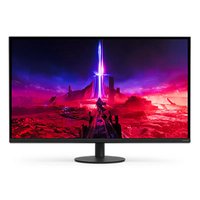
INZONE M9 II - Monitor SONY - Free user manual and instructions
Find the device manual for free INZONE M9 II SONY in PDF.


| Product Type | 27-inch LCD Monitor |
| Screen Size (Diagonal) | 68.4 cm / 27 inches |
| Display Resolution | 3840 x 2160 pixels (4K UHD) |
| Display Type | LCD with LED backlight |
| Audio Output | 2 W + 2 W |
| Video Connectivity | 2 HDMI 2.1 inputs (HDCP 2.3), 1 DisplayPort 2.1 input |
| Audio Jack | Stereo mini jack (headphones) |
| Power Supply | 19.5 V DC adapter (100-240 V AC input) |
| Dimensions with Stand | 61.5 × 52.8 × 21.1 cm (W × H × D) |
| Dimensions without Stand | 61.5 × 36.3 × 7.3 cm |
| Stand Width | 17.7 cm |
| Weight with Stand | 6.4 kg |
| Weight without Stand | 4.4 kg |
| Operating Temperature | 0 °C to 40 °C |
| Operating Humidity | 10% – 80% RH (non-condensing) |
| VESA Mount Standard | 100 × 100 mm |
| Monitor Care | Clean with a dry microfiber cloth; do not spray liquid directly. |
| Safety | Do not block ventilation; use only the supplied Sony power cord. |
| Repair | Contact Sony after-sales service for any repairs; spare parts available through authorized service center. |
| General Information | Brand: Sony; Model: INZONE M9 II; Category: Monitor; Manual available for download at notice-facile.com. |
Frequently Asked Questions - INZONE M9 II SONY
User questions about INZONE M9 II SONY
0 question about this device. Answer the ones you know or ask your own.
Ask a new question about this device
Download the instructions for your Monitor in PDF format for free! Find your manual INZONE M9 II - SONY and take your electronic device back in hand. On this page are published all the documents necessary for the use of your device. INZONE M9 II by SONY.
USER MANUAL INZONE M9 II SONY
This LCD Monitor comes with the following manuals. Please retain the manuals for future reference.
Setup Guide
Operating Instructions (This manual)
Help Guide (Web manual)
Provides information including advanced usage.

https://rd1.sony.net/help/tv/27u9m2/h_zz/
Note
- Images and illustrations used in the Setup Guide and this manual are for reference only and may differ from the actual product.
Location of the identification label
Labels for the LCD Monitor Model No., Production Date (year/month) and Power Supply rating are located on the rear of the LCD Monitor or package.
For models with supplied mains adaptor: Labels for mains adaptor Model No. and Serial No. are located on the bottom of mains adaptor.


NOTICE FOR CUSTOMERS IN THE UNITED KINGDOM
A moulded plug complying with BS1363 is fitted to this equipment for your safety and convenience.
Should the fuse in the plug supplied need to be replaced with the same rating of fuse approved by ASTA or BSI to BS 1362 (i.e., marked with ⚙ or ⚙ must be used.
If the plug supplied with this equipment has a detachable fuse cover, be sure to attach the fuse cover after you change the fuse. Never use the plug without the fuse cover. If you should lose the fuse cover, please contact your nearest Sony service station.
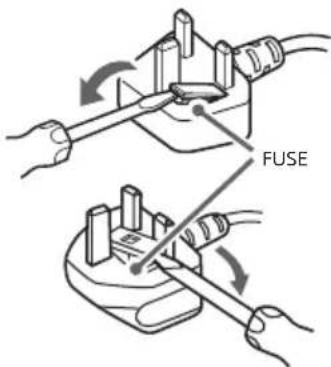
How to replace the fuse
Open the fuse compartment with a blade screwdriver, and replace the fuse. Please refer to the illustration that actually equipped with the product.
IMPORTANT NOTICE
This product has been manufactured by or on behalf of Sony Corporation.
EU and UK Importer: Sony Europe B.V.
Inquiries to the EU Importer or related to product compliance in Europe should be sent to the manufacturer's authorized representative, Sony Belgium, bijkantoor van Sony Europe B.V., Da Vincilaan 7-D1, 1930 Zaventem, Belgium.
Inquiries to the UK Importer or related to product compliance in the UK should be sent to the manufacturer's authorized representative, Sony Europe B.V., The Heights, Brooklands, Weybridge, Surrey KT13 0XW, United Kingdom.
Energy consumption and other information for the power supply, as required by Commission Regulation (EU) 2019/1782, is available at the following website: https://compliance.sony.eu and https://compliance.sony.co.uk for the United Kingdom
Safety Information
WARNING
Ventilation
- Never cover the ventilation holes or insert anything into the cabinet.
- Leave space around the LCD Monitor as shown below.
Installed on the wall
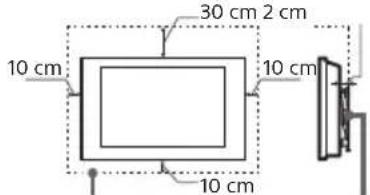
Leave at least this space around the set.
Installed with stand
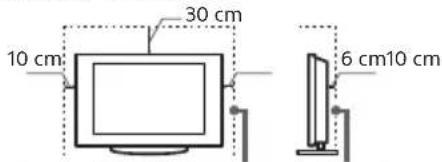
Leave at least this space around the set.
• To ensure proper ventilation and prevent the collection of dirt or dust:
- Do not lay the LCD Monitor flat, install upside down, backwards, or sideways.
- Do not place the LCD Monitor on a shelf, rug, bed or in a closet.
- Do not cover the LCD Monitor with a cloth, such as curtains, or items such as newspapers, etc.
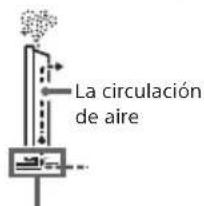
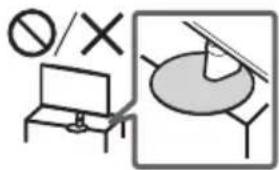
- Do not install the LCD Monitor as shown below.
Air circulation is blocked.
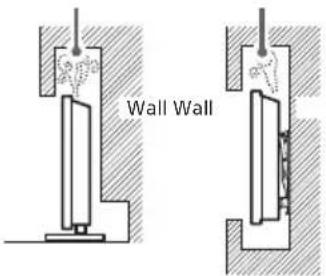
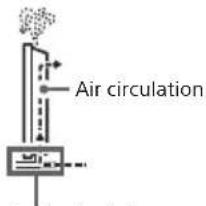
Do not block the air circulation area.
Mains lead
Handle the mains lead and socket as follows in order to avoid any risk of fire, electric shock or damage and/or injuries:
- Use only mains leads supplied by Sony, not other suppliers.
- Insert the plug fully into the mains socket.
- Operate the LCD Monitor on a 100 V – 240 V AC supply only.
- When wiring cables, be sure to unplug the mains lead for your safety and take care not to catch your feet on the cables.
- Disconnect the mains lead from the mains socket before working on or moving the LCD Monitor.
- Keep the mains lead away from heat sources.
- Unplug the mains plug and clean it regularly. If the plug is covered with dust and it picks up moisture, its insulation may deteriorate, which could result in a fire.
Note
- Do not use the supplied mains lead on any other equipment.
- Do not pinch, bend, or twist the mains lead excessively. The core conductors may be exposed or broken.
- Do not modify the mains lead.
- Do not put anything heavy on the mains lead.
- Do not pull on the mains lead itself when disconnecting the mains lead.
- Do not connect too many appliances to the same mains socket.
- Do not use a poor fitting mains socket.
(A)(B)
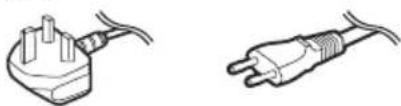
Notice for customers in United Kingdom, Ireland, Malta, Gibraltar, and Cyprus
Be sure to use the supplied mains lead (A). For safety reasons, use specified supplied mains lead mentioned.
Notice for customers in Other countries
Be sure to use the supplied mains lead (B). For safety reasons, use specified supplied mains lead mentioned.
NOTE ON MAINS ADAPTOR
Warning
To reduce the risk of fire or electric shock, do not expose this apparatus to rain or moisture.
To prevent fire or shock hazard, do not place objects filled with liquids, such as vases, on the apparatus. Do not install this equipment in a confined space, such as a bookshelf or similar unit.
- Please ensure that the mains socket is installed near the equipment and shall be easily accessible.
- Be sure to use the supplied mains adaptor and mains lead. Otherwise it may cause a malfunction.
- Connect the mains adaptor to an easily accessible mains socket.
- Do not coil the mains lead around the mains adaptor. The core wire may be cut and/or it may cause a
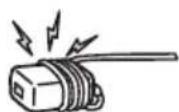
malfunction of the media receiver.
- Do not touch the mains adaptor with wet hands.
- If you notice an abnormality in the mains adaptor, disconnect it from the mains socket immediately.
- The set is not disconnected from the mains source as long as it is connected to the mains socket, even if the set itself has been turned off.
- As the mains adaptor will become warm when it is used for a long time, it may feel hot when touching it with your hand.
Prohibited Usage
Do not install/use the LCD Monitor in locations, environments or situations such as those listed below, or the LCD Monitor may malfunction and cause a fire, electric shock, damage and/or injuries.
Locations:
- Outdoors (in direct sunlight), at the seashore, on a ship or other vessel, inside a vehicle, unstable locations, near water, rain, moisture or smoke.
Environments:
- Places that are hot, humid, or excessively dusty; where insects may enter; where it might be exposed to mechanical vibration, near the source of naked flame, such as lighted candle, which is placed on the LCD Monitor. The LCD Monitor shall not be exposed to dripping or splashing and no objects filled with liquids, such as vases, shall be placed on the LCD Monitor.
Situations:
- Use when your hands are wet, with the cabinet removed, or with attachments not recommended by the manufacturer. Disconnect the LCD Monitor from mains socket during lightning storms.
• Install the LCD Monitor so that it sticks out into an open space. Injury or damage from a person or object bumping into the LCD Monitor may result. - Place the LCD Monitor in a humid or dusty space, or in a room with oily smoke or steam (near cooking tables or humidifiers). Fire, electric shock, or warping may result.
• Install the LCD Monitor in places subject to extreme temperature such as in direct sunlight, near a radiator or a heating vent. The LCD Monitor may overheat in such condition which can cause deformation of the enclosure and/or LCD Monitor malfunction.
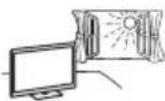
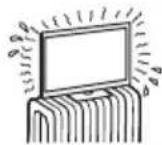
- If the LCD Monitor is placed in the changing room of a public bath or hot spring, the LCD Monitor may be
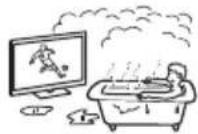
damaged by airborne sulfur, etc.
- For best picture quality, do not expose the screen to direct illumination or sunlight.
- Avoid moving the LCD Monitor from a cold area to a warm area. Sudden room temperature changes may cause moisture condensation. This may cause the LCD Monitor to show poor picture and/or poor colour. Should this occur, allow moisture to evaporate completely before powering the LCD Monitor on.
Broken pieces:
- Do not throw anything at the LCD Monitor. The screen glass may break by the impact and cause serious injury.
- If the surface of the LCD Monitor cracks, do not touch it until you have unplugged the mains lead. Otherwise this may cause an electric shock.
When not in use
- If you will not be using the LCD Monitor for several days, the LCD Monitor should be disconnected from the mains for environmental and safety reasons.
- As the LCD Monitor is not disconnected from the mains when the LCD Monitor is just turned off, pull the plug from the mains socket to disconnect the LCD Monitor completely.
For children
- ALWAYS keep small accessories out of the reach of children, so that they are not mistakenly swallowed.
If the following problems occur...
Turn off the LCD Monitor and unplug the mains lead immediately if any of the following problems occur.
Ask your dealer or Sony service centre to have it checked by qualified service personnel.
When:
- Mains lead is damaged.
- Poor fitting of mains socket.
- LCD Monitor is damaged by being dropped, hit or having something thrown at it.
- Any liquid or solid object falls through openings in the cabinet.
About LCD Monitor Temperature
When the LCD Monitor is used for an extended period, the panel surrounds become warm. It may feel hot when touching it with your hand.
Medical Institutions
This product cannot be used as a medical device. It may cause a medical equipment malfunction.
Do not place this product close to medical devices
This product (including accessories) has magnet(s) which may interfere with pacemakers, programmable shunt valves for hydrocephalus treatment, or other medical devices. Do not place this product close to persons who use such medical devices. Consult your doctor before using this product if you use any such medical device.
Keep out of the reach of children or the supervised individuals
This product (including accessories) has magnet(s). Swallowing magnet(s) could cause serious harm, such as choking hazard or intestinal injuries. If magnets (or a magnet) were swallowed, consult a doctor immediately.
Magnetic influence
This product (including accessories such as covers) uses magnets. Do not place magnetically sensitive objects (cash cards, credit cards with magnetic coding, etc.) near this product.
Precautions
• View the LCD Monitor in moderate light, as viewing the LCD Monitor in poor light or during long period of time, strains your eyes.
- When using headphones, adjust the volume so as to avoid excessive levels, as hearing damage may result.
Screen:
- Although the screen is made with high-precision technology and 99.99% or more of the pixels are effective, black dots may appear or bright points of light (red, blue, or green) may appear constantly on the screen. This is a structural property of the screen and is not a malfunction.
- Do not push or scratch the front filter, or place objects on top of this LCD Monitor. The image may be uneven or the screen may be damaged.
- If this LCD Monitor is used in a cold place, a smear may occur in the picture or the picture may become dark. This does not indicate a failure. These phenomena disappear as the temperature rises.
- Ghosting may occur when still pictures are displayed continuously. It may disappear after a few moments.
- The screen and cabinet get warm when this LCD Monitor is in use. This is not a malfunction.
- The screen contains a small amount of liquid crystal. Follow your local ordinances and regulations for disposal.
Handling and cleaning the screen surface/cabinet of the LCD Monitor
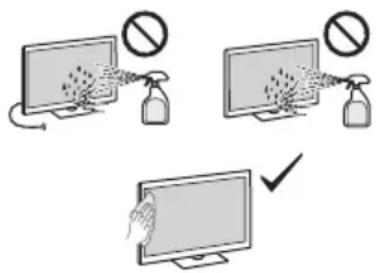
Precautions:
- Avoid touching the screen.
- To remove dust from the screen surface/cabinet, wipe gently with a microfiber cloth.
- Never spray water or detergent directly on the LCD Monitor. It may drip to the bottom of the screen or exterior parts, and enter the LCD Monitor, and may cause damage to the LCD Monitor.
Optional Equipment
- Keep optional components or any equipment emitting electromagnetic radiation away from the LCD Monitor. Otherwise picture distortion and/or noisy sound may occur.
- This equipment has been tested and found to comply with the limits set out in the EMC Standards using a connection signal cable shorter than 3 meters.
Disposal of the LCD Monitor
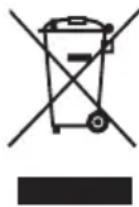
Disposal of old electrical & electronic equipment (applicable in the European Union and other countries with separate collection systems)
This symbol on the product or on its packaging indicates that this product shall not be treated as household waste. Instead it shall be handed over to the appropriate collection point for the recycling of electrical and electronic equipment. By ensuring that this product is disposed of correctly, you will help to prevent potential negative consequences for the environment and human health, which could be caused by inappropriate waste handling of this product. The recycling of materials will help to conserve natural resources. For more detailed information about recycling of this product, please contact your local Civic Office, your household waste disposal service or the shop where you purchased the product.
Installation/Set-up
• Install and use the LCD Monitor in accordance with the instructions below in order to avoid any risk of fire, electric shock or damage and/or injuries.
Installation
- The LCD Monitor should be installed near an easily accessible mains socket.
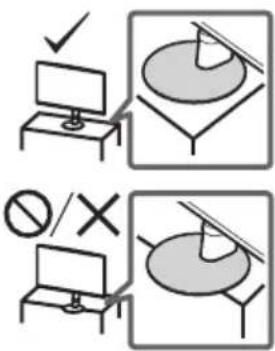
- Place the LCD Monitor on a stable, level surface to prevent it from falling over and causing personal injury or property damage.
• Install the LCD Monitor where it cannot be pulled, pushed, or knocked over. - Install the LCD Monitor so that the LCD Monitor's Table-Top Stand does not protrude out from the LCD Monitor stand (not supplied). If the Table-Top Stand protrudes out from the LCD Monitor stand, it may cause LCD Monitor to topple over, fall down, and cause personal injury or damage to the LCD Monitor.
Transporting
- Before transporting the LCD Monitor, disconnect all cables.
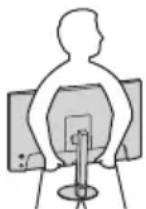
- When transporting the LCD Monitor by hand, hold it as shown below. Do not put stress on the LCD panel and the frame around the screen.

- When lifting or moving the LCD Monitor, hold it firmly from the bottom.
- When transporting the LCD Monitor, do not subject it to jolts or excessive vibration.
- When transporting the LCD Monitor for repairs or when moving, pack it using the original carton and packing material.
Installing the LCD Monitor to the Wall
This LCD Monitor's instruction manual only provides the steps to prepare the LCD Monitor for Wall-Mount installation before it is installed on the wall.
Your LCD Monitor can be mounted to a wall using a suitable Wall-Mount Bracket (not supplied). If the Table-Top Stand is attached to the LCD Monitor, the LCD Monitor may require detaching the Table-Top Stand. Prepare the LCD Monitor for the Wall-Mount Bracket before making cable connections.
For product protection and safety reasons, Sony strongly recommends that installation of your LCD Monitor on the wall be performed by qualified professionals. Do not attempt to install it yourself.
- Follow the instruction guide provided with the Wall-Mount Bracket for your model. Sufficient expertise is required in installing this LCD Monitor, especially to determine the strength of the wall for withstanding the LCD Monitor's weight.
- The screws for installing the Wall-Mount Bracket to the LCD Monitor are not supplied.
- The length of the screw for Wall-Mount Bracket differs depending on the Wall-Mount Bracket thickness. Please refer to below illustration.
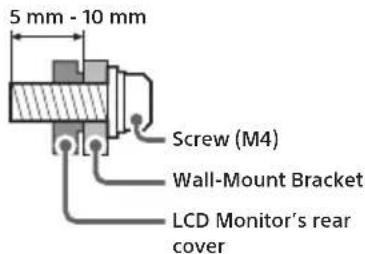
- Refer to the following table for the wall-mount hole pattern.
| Model Name | Wall-mount hole pattern |
| a × b |
SDM-27U9M2 100 × 100 mm
![graph TD a["a"] --> b["b"] a --> c1["•"] a --> c2["•"] c1 --> d1["•"] c2 --> d2["•"]](/content/2026/04/716004/images/91dd98be4415d5239ad0739fc465539132019fcb4e6da7b70623190ca867c2e3.jpg)
Specifications
System
Panel system LCD (Liquid Crystal Display) Panel, LED Backlight Sound output (W) 2 + 2
Input/Output jacks
HDMI IN 1/2 (HDMI 2.1, HDCP 2.3)
(Stereo mini jack)
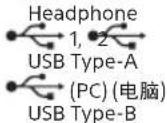
UPDATE (This terminal is for software update only.) DP
DisplayPort (Ver. 2.1) - C + 19.5 V Mains adaptor input
Power, Product Fiche and others
Power requirements 19.5 V DC with AC adapter Rating: Input 100 V - 240 V AC, 50/60 Hz Screen size (measured diagonally) (Approx.) (cm/inches) 68.4 / 27 Display resolution (horizontal × vertical) (pixels) 3 840 × 2 160
Dimensions (Approx.) (w × h × d) (cm)
with Table-Top Stand 61.5 × 52.8 × 21.1 without Table-Top Stand 61.5 × 36.3 × 7.3
Stand width (Approx.) (cm) 17.7
Mass (Approx.) (kg)
with Table-Top Stand 6.4
without Table-Top Stand 4.4
Others
Operating temperature 0 °C – 40 °C
Operating humidity 10 % - 80 % RH (non-condensing)
Note
- Design and specifications are subject to change without notice.
- Some of the on-screen instructions may not apply to your LCD Monitor model.
- Product fiche in this manual is for COMMISSION DELEGATED REGULATION (EU) 1062/2010. Refer to its website for (EU) 2019/2013 information.
Product registration number (COMMISSION DELEGATED REGULATION (EU) 2019/2013)
SDM-27U9M2 (1930205)
Trademark Information
• The terms HDMI, HDMI High-Definition Multimedia Interface, and the HDMI Logo are trademarks or registered trademarks of HDMI Licensing Administrator, Inc.
- DisplayPort™, the DisplayPort™ logo, the DisplayHDR™ logo and the AdaptiveSync™ logo are trademarks owned by the Video Electronics Standards Association (VESA®) in the United States and other countries.
• © 2021 NVIDIA, the NVIDIA logo, and NVIDIA G-SYNC Compatible are trademarks and/or registered trademarks of NVIDIA Corporation in the U.S. and other countries.
Précautions :
Transport
Precauciones:
Transporte
Transport
Specifications
Systeem
Beeldschermsysteem LCD-scherm (Liquid Crystal Display), LED-achtergrondverlichting Geluidsuitgang (W) 2 + 2
Afmetingen (ong.) (b × h × d) (cm)
Transport
Precauções:
Transporte
Precauzioni:
Trasporto
Transport
Forholdsregler:
Transport
Mål (Ca.) (b × h × d) (cm)
Inkl. LCD-skærmfod
61,5 × 52,8 × 21,1
Uden LCD-skærmfod
61,5 × 36,3 × 7,3
Stativets bredde (Ca.) (cm)
17,7
Vægt (Ca.) (kg)
Inkl. LCD-skærmfod
6,4
Uden LCD-skærmfod
4,4
Andre
Driftstemperatur
0 °C til 40 °C
Driftsfugtighed
Varotoimenpiteet:
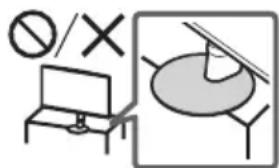
Forholdsregler:
Bæring
Mål (ca.) (b × h × d) (cm)
med bordstativ
61,5 × 52,8 × 21,1
uten bordstativ 61,5 × 36,3 × 7
Stativbredde (ca.) (cm) 17,7
Vekt (ca.) (kg)
med bordstativ 6,4
uten bordstativ 4,4
Annet
Środki ostrożności:
Upozornění:
Přeprava
Upozornenia:
Preprava
Óvintézkedések:
Szállítás
INFORMATIE IMPORTANTĂ
Transportul
Предпазни мерки:
Пренасяне
Προφυλάξεις:
Μεταφορά
Ettevaatusabinõud:
Transportimine
Transportēšana
Gabenimas
Mjere opreza:
Prijevoz
Previdnostni ukrepi:
Prenašanje
Prenošenje
- Pre prenošenja LCD monitora, odspojite sve kablove.
- Prilikom ručnog prenošenja LCD monitora, držite ga kako je prikazano ispod. Ne izlažite pritisku LCD panel i okvir oko ekrana.
- Prilikom podizanja ili pomeranja LCD monitora, čvrsto ga držite odozdo.
- Prilikom prenošenja LCD monitora, ne izlažite ga drmanju ili prekomernim vibracijama.
- Prilikom prenošenja LCD monitora zbog popravke ili prilikom preseljenja, zapakujte ga koristeći originalni karton i ambalažu za pakovanje.
Postavljanje LCD monitora na zid
Uputstvo za upotebu ovog LCD monitora sadrži samo korake za pripremu LCD monitora za montiranje na zid.
Vaš LCD monitor se može montirati na nosač za postavljanje na zid (nije isporučen). Ako je LCD monitor pričvršćen na postolje za sto, uklonite postolje za sto. Pre povezivanja kablova, pripremite LCD monitor za nosač za postavljanje na zid.
,הכלה,הכלההוּרָה,הכלההוּרָה,הכלההוּרָה,הכלההוּרָה,הכלההוּרָה,הכלההוּרָה,הכלההוּרָה,הכלההוּרָה,הכלההוּרָה,הכ怆
.הכלה (A)
.LCD -הכלההוּרָהוּרָהוּרָהוּרָהוּרָהוּרָהוּרָהוּרָהוּרָהוּרָהוּרָהוּרָהוּרָהוּרָהוּרָה
: כְּרָאַתְבָה
https://compliance.sony.co.uk
תְרַעָה
• כְרִי בְּבָה

- Setup Guide
- Operating Instructions (This manual)
- Help Guide (Web manual)
- Note
- Location of the identification label
- NOTICE FOR CUSTOMERS IN THE UNITED KINGDOM
- How to replace the fuse
- IMPORTANT NOTICE
- Safety Information
- WARNING
- Ventilation
- Mains lead
- Notice for customers in United Kingdom, Ireland, Malta, Gibraltar, and Cyprus
- Notice for customers in Other countries
- NOTE ON MAINS ADAPTOR
- Prohibited Usage
- Locations:
- Environments:
- Situations:
- Broken pieces:
- When not in use
- For children
- If the following problems occur...
- When:
- About LCD Monitor Temperature
- Medical Institutions
- Do not place this product close to medical devices
- Keep out of the reach of children or the supervised individuals
- Magnetic influence
- Precautions
- Screen:
- Handling and cleaning the screen surface/cabinet of the LCD Monitor
- Precautions:
- Optional Equipment
- Disposal of the LCD Monitor
- Installation/Set-up
- Installation
- Transporting
- Installing the LCD Monitor to the Wall
- For product protection and safety reasons, Sony strongly recommends that installation of your LCD Monitor on the wall be performed by qualified professionals. Do not attempt to install it yourself.
- Specifications
- System
- Input/Output jacks
- Power, Product Fiche and others
- Dimensions (Approx.) (w × h × d) (cm)
- Mass (Approx.) (kg)
- Others
- Product registration number (COMMISSION DELEGATED REGULATION (EU) 2019/2013)
- Trademark Information
- Précautions :
- Transport
- Precauciones:
- Transporte
- Systeem
- Precauções:
- Precauzioni:
- Trasporto
- Forholdsregler:
- Mål (Ca.) (b × h × d) (cm)
- Stativets bredde (Ca.) (cm)
- Vægt (Ca.) (kg)
- Andre
- Varotoimenpiteet:
- Bæring
- Stativbredde (ca.) (cm) 17,7
- Vekt (ca.) (kg)
- Annet
- Środki ostrożności:
- Upozornění:
- Přeprava
- Upozornenia:
- Preprava
- Óvintézkedések:
- Szállítás
- INFORMATIE IMPORTANTĂ
- Transportul
- Предпазни мерки:
- Пренасяне
- Προφυλάξεις:
- Μεταφορά
- Ettevaatusabinõud:
- Transportimine
- Transportēšana
- Gabenimas
- Mjere opreza:
- Prijevoz
- Previdnostni ukrepi:
- Prenašanje
- Prenošenje
- Postavljanje LCD monitora na zid
- ,הכלה,הכלההוּרָה,הכלההוּרָה,הכלההוּרָה,הכלההוּרָה,הכלההוּרָה,הכלההוּרָה,הכלההוּרָה,הכלההוּרָה,הכלההוּרָה,הכ怆
Brand : SONY
Model : INZONE M9 II
Category : Monitor