
HMS-3000MT - Monitor SONY - Free user manual and instructions
Find the device manual for free HMS-3000MT SONY in PDF.
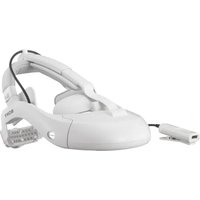


| Brand | Sony |
| Model | HMS-3000MT |
| Category | Medical monitor |
| Product type | 3D/2D head-mounted display system for minimally invasive surgery |
| Image processor dimensions | Approx. 306 × 56.5 × 358 mm (without protruding parts) |
| Weight | Approx. 3.3 kg (without power cord) |
| Power supply | 24 V DC, 1.5 A via AC-80MD AC adapter |
| Supported video resolutions (2D) | 720/50p, 720/60p, 1080/50i, 1080/60i, 1080/50p, 1080/60p |
| Supported video resolutions (3D) | 720/50p, 720/60p, 1080/50i, 1080/60i (side-by-side, dual stream) |
| Input connectors | 2 × DVI-D, 2 × BNC SDI, 1 × DC IN, 2 × REMOTE (stereo mini-jack) |
| Output connectors | 2 × DVI-D, 2 × BNC SDI, 2 × HMM (dedicated 20-pin) |
| Main functions | Real-time HD 3D/2D color display for endoscopy/laparoscopy |
| Operating conditions | Temperature: 5 °C to 35 °C, humidity: 25% to 80% (without condensation), pressure: 700-1060 hPa |
| Storage conditions | Temperature: -20 °C to +60 °C, humidity: 20% to 80% (without condensation), pressure: 700-1060 hPa |
| Image processor cleaning | Isopropyl alcohol 50-70% V/V or ethanol 76.9-81.4% V/V; do not use abrasive solvents |
| Head-mounted display cleaning | Isopropyl alcohol 50-70% V/V or ethanol 76.9-81.4% V/V for surfaces except lens; lens: special dry cloth |
| Rear cushion cleaning | Remove and wash with water, then dry and reattach |
| Safety | Standards IEC60601-1, equipotential terminal, not used in presence of flammable anesthetics |
| Included accessories | HMI-3000MT processor, HMM-3000MT head-mounted display, HMO-CA50M cable, AC-80MD adapter, CD-ROM |
| Warranty | Sony limited warranty - see terms on website |
| Spare parts and repairability | Parts available from Sony; repair by qualified personnel only |
Frequently Asked Questions - HMS-3000MT SONY
User questions about HMS-3000MT SONY
0 question about this device. Answer the ones you know or ask your own.
Ask a new question about this device
Download the instructions for your Monitor in PDF format for free! Find your manual HMS-3000MT - SONY and take your electronic device back in hand. On this page are published all the documents necessary for the use of your device. HMS-3000MT by SONY.
USER MANUAL HMS-3000MT SONY
Head Mounted Image Processor Unit
Printed on recycled paper
© 2013 Sony Corporation

Japanese
How to use the CD-ROM manual
About care and maintenance
How to attach the rear pad
Portions of this software are copyright (C) 2006 The
FreeType Project (www.freetype.org).
All rights reserved.
English
Before operating the unit, please read this manual thoroughly and retain it for future reference.
For details on operation, refer to the Instructions for Use in the supplied CD-ROM.
Using the CD-ROM manual
The manual can be read on a computer with Adobe Reader installed.
You can download Adobe Reader free from the Adobe website.
1 Open the index.html file in the CD-ROM.
2 Select and click on the manual that you want to read.
Note
If you have lost or damaged the CD-ROM, you can purchase a new one from your Sony dealer or Sony service counter.
Indications for Use/Intended Use
The Sony HMS-3000MT is intended to provide 3D and 2D color video displays of images from surgical endoscopic/laparoscopic camera systems and other compatible medical imaging systems. The HMS-3000MT is a high-definition, medical grade monitor for real-time use during minimally invasive surgical procedures and is suitable for use in hospital operating rooms, surgical centers, clinics, doctors' offices and similar medical environments.
Owner's Record
The model and serial numbers are located at the rear. Record these numbers in the space provided below. Refer to these numbers whenever you call upon your Sony dealer regarding this product.
Model No. ____ Serial No. ____
WARNING
To reduce the risk of fire or electric shock, do not expose this apparatus to rain or moisture.
To avoid electrical shock, do not open the cabinet. Refer servicing to qualified personnel only.
No modification of this equipment is allowed.
Symbols on the products

This symbol indicates the equipotential terminal which brings the various parts of a system to the same potential.

Consult the Instructions for Use
Follow the directions in the Instructions for Use for parts of the unit on which this mark appears.

This symbol indicates the manufacturer, and appears next to the manufacturer's name and address.
For the customers in the U.S.A.
This equipment has been tested and found to comply with the limits for a Class B digital device, pursuant to part 15 of the FCC Rules. These limits are designed to provide reasonable protection against harmful interference in a residential installation. This equipment generates, uses and can radiate radio frequency energy and, if not installed and used in accordance with the instructions, may cause harmful interference to radio communications. However, there is no guarantee that interference will not occur in a particular installation. If this equipment does cause harmful interference to radio or television reception, which can be determined by turning the equipment off and on, the user is encouraged to try to correct the interference by one or more of the following measures:
– Reorient or relocate the receiving antenna. - Increase the separation between the equipment and receiver. - Connect the equipment into an outlet on a circuit different from that to which the receiver is connected. - Consult the dealer or an experienced radio/TV technician for help.
You are cautioned that any changes or modifications not expressly approved in this manual could void your authority to operate this equipment.
All interface cables used to connect peripherals must be shielded in order to comply with the limits for a digital device pursuant to Subpart B of part 15 of FCC Rules.
If you have any questions about this product, you may call;
Sony Customer Information Service Center 1-800-222-7669 or http://www.sony.com/
Declaration of Conformity
Trade Name : SONY
Model : HMI-3000MT
Responsible party: Sony Electronics Inc.
Address: 16535 Via Esprillo, San Diego,
CA 92127 U.S.A.
Telephone Number: 858-942-2230
This device complies with part 15 of the FCC Rules.
Operation is subject to the following two conditions: (1)
This device may not cause harmful interference, and (2) this device must accept any interference received, including interference that may cause undesired operation.
For the customers in Canada
CAN ICES-3 (B)/NMB-3(B)
This unit has been certified according to Standard CAN/CSA-C22.2 No.60601-1.
Important safeguards/notices for use in the medical environments
- All the equipment connected to this unit shall be certified according to Standard IEC60601-1, IEC60950-1, IEC60065 or other IEC/ISO Standards applicable to the equipment.
- Furthermore, all configurations shall comply with the system standard IEC60601-1-1. Everybody who connects additional equipment to the signal input part or signal output part configures a medical system, and is therefore responsible that the system complies with the requirements of the system standard IEC60601-1-1. If in doubt, consult the qualified service personnel.
- The leakage current could increase when connected to other equipment.
- For this particular equipment, all accessory equipment connected as noted above must be connected to mains via an additional isolation transformer conforming with the construction requirements of IEC60601-1 and providing at least Basic Insulation.
- This equipment generates, uses, and can radiate radio frequency energy. If it is not installed and used in accordance with the instruction manual, it may cause interference to other equipment. If this unit causes interference (which can be determined by unplugging the power cord from the unit), try these measures: Relocate the unit with respect to the susceptible equipment. Plug this unit and the susceptible equipment into different branch circuits.
Consult your dealer. (According to standard IEC60601-1-
2 and CISPR11, Class B, Group 1)
Important EMC notices for use in medical environments
- The HMI-3000MT needs special precautions regarding EMC and needs to be installed and put into service according to the EMC information provided in the instructions for use.
- Portable and mobile RF communications equipment, such as cellular phones, can affect the HMI-3000MT.
Warning
The use of accessories and cables other than those specified, with the exception of replacement parts sold by Sony Corporation, may result in increased emissions or decreased immunity of the HMI-3000MT.
| List of cables used for EMC test | |
| Type of cable Specifications | |
| HMO-CA50M : Head Mounted Display Cable 5 m, Shield cable | |
| Guidance and manufacturer's declaration-electromagnetic emissions | ||
| The HMI-3000MT is intended for use in the electromagnetic environment specified below.The customer or the user of the HMI-3000MT should assure that it is used in such an environment. | ||
| Emission test Compliance Electromagnetic environment-guidance | ||
| RF emissionsCISPR 11 | Group 1 | The HMI-3000MT uses RF energy only for its internal function.Therefore, its RF emissions are very low and are not likely to cause any interference in nearby electronic equipment. |
| RF emissionsCISPR 11 | Class B | The HMI-3000MT is suitable for use in all establishments,including domestic establishments and those directly connected to the public low-voltage power supply network that supplies buildings used for domestic purposes. |
| Harmonic emissionsIEC 61000-3-2 | Not applicable | |
| Voltage fluctuations/flicker emissionsIEC 61000-3-3 | Not applicable | |
Warning
If the HMI-3000MT is used adjacent to or stacked with other equipment, it should be observed to verify normal operation in the configuration in which it will be used.
| Guidance and manufacturer's declaration - electromagnetic immunity | |||
| The HMI-3000MT is intended for use in the electromagnetic environment specified below. The customer or the user of the HMI-3000MT should assure that it is used in such as environment. | |||
| Immunity test | IEC 60601 test level | Compliance level E | Electromagnetic environment-guidance |
| Electrostatic discharge (ESD) | ±6 kV contact | ±6 kV contact | Floors should be wood, concrete or ceramic tile. If floors are covered with synthetic material, the relative humidity should be at least 30%. |
| IEC 61000-4-2 | ±8 kV air | ±8 kV air | |
| Electrical fast transient/burst | ±2 kV for power supply lines | ±1 kV for input/output lines | Mains power quality should be that of a typical commercial or hospital environment. |
| IEC 61000-4-4 | ±1 kV for input/output lines | ||
| Surge | ±1 kV line(s) to line(s) | Not applicable Mains | power quality should be that of a typical commercial or hospital environment. |
| IEC 61000-4-5 | ±2 kV line(s) to earth | ||
| Voltage dips, short interruptions and voltage variations on power supply input lines | < 5% UT(>95% dip in UT) for 0.5 cycle | Not applicable Mains | power quality should be that of a typical commercial or hospital environment. If the user of the HMI-3000MT requires continued operation during power mains interruptions, it is recommended that the HMI-3000MT be powered from an uninterruptible power supply or a battery. |
| IEC 61000-4-11 | 40% UT(60% dip in UT) for 5 cycles | ||
| 70% UT(30% dip in UT) for 25 cycles | |||
| < 5% UT(>95% dip in UT) for 5 sec | |||
| Power frequency (50/60 Hz) magnetic field | 3 A/m 3 A/m Power frequency magnetic fields should be at levels characteristic of a typical location in a typical commercial or hospital environment. | ||
| IEC 61000-4-8 | |||
| NOTE: UT is the a.c. mains voltage prior to application of the test level. | |||
| Conducted RF | 3 Vrms | 3 Vrms | Portable and mobile RF communications equipment should be used no closer to any part of the HMI-3000MT, including cables, than the recommended separation distance calculated from the equation appliance to the frequency of the transmitter.Recommended separation distance d = 1.2 |
| IEC 61000-4-6 | 150 kHz to 80 MHz | ||
| Radiated RF | 3 V/m | 3 V/m | d = 1.2 80 MHz to 800 MHz |
| IEC 61000-4-3 | 80 MHz to 2.5 GHz | d = 2.3 800 MHz to 2.5 GHzWhere P is the maximum output power rating of the transmitter in watts (W) according to the transmitter manufacturer and d is the recommended separation distance in meters (m).Field strengths from fixed RF transmitters, as determined by an electromagnetic site survey, a should be less than the compliance level in each frequency range. b Interference may occur in the vicinity of equipment marked with following symbol: | |
| NOTE 1: At 80 MHz and 800 MHz, the higher frequency range applies.NOTE 2: These guidelines may not apply in all situations. Electromagnetic propagation is affected by absorption and reflection from structures, objects and people. | |||
| a Field strengths from fixed transmitters, such as base stations for radio (cellular/cordless) telephones and land mobile radios, amateur radio, AM and FM radio broadcast and TV broadcast cannot be predicted theoretically with accuracy.To assess the electromagnetic environment due to fixed RF transmitters, an electromagnetic site survey should be considered. If the measured field strength in the location in which the HMI-3000MT is used exceeds the applicable RF compliance level above, the HMI-3000MT should be observed to verify normal operation. If abnormal performance is observed, additional measures may be necessary, such as reorienting or relocating the HMI-3000MT.b Over the frequency range 150 kHz to 80 MHz, field strengths should be less than 3 V/m.Recommended separation distances between portable and mobile RF communications equipment and the HMI-3000MT | |||
| The HMI-3000MT is intended for use in an electromagnetic environment in which radiated RF disturbances are controlled. The customer or the user of the HMI-3000MT can help prevent electromagnetic interference by maintaining a minimum distance between portable and mobile RF communications equipment (transmitters) and the HMI-3000MT as recommended below, according to the maximum output power of the communications equipment. | |||
| Rated maximum output power of transmitter W | Separation distance according to frequency of transmitter m | ||
| 150 kHz to 80 MHz d = 1.2 √P | 80 MHz to 800 MHz d = 1.2 √P | 800 MHz to 2.5 GHz d = 2.3 √P | |
| 0.01 0.12 0.12 0.23 | |||
| 0.1 0.38 0.38 0.73 | |||
| 1 | 1 | ||
| 10 3.8 3.8 7.3 | |||
| 100 12 12 23 | |||
| For transmitters rated a maximum output power not listed above, the recommended separation distance d in meters (m) can be estimated using the equation applicable to the frequency of the transmitter, where P is the maximum output power rating of the transmitter in watts (W) according to the transmitter manufacturer.NOTE 1: At 80 MHz and 800 MHz, the separation distance for the higher frequency range applies.NOTE 2: These guidelines may not apply in all situations. Electromagnetic propagation is affected by absorption and reflection from structures, objects and people. | |||
Caution
When disposing of the unit or accessories, you must obey the laws in the relevant area or country and the regulations in the relevant hospital regarding environmental pollution.
When installing, leave at least 4 cm (15/8 in.) of space on the left and right sides of the unit and 10 cm (4 in.) of space on the rear of the unit to provide adequate ventilation and prevent the unit from overheating.
For customers in Europe
This product has been manufactured by or on behalf of Sony Corporation, 1-7-1 Konan Minato-ku Tokyo, 108-0075 Japan. Inquiries related to product compliance based on European Union legislation shall be addressed to the authorized representative, Sony Deutschland GmbH, Hedelfinger Strasse 61, 70327 Stuttgart, Germany. For any service or guarantee matters, please refer to the addresses provided in the separate service or guarantee documents.

For the customers in the U.S.A.
Caution
Federal law (United States of America) restricts this device to sale by or on the order of a licensed healthcare practitioner.

Caution
Connect the DC connector to the equipment, and then connect the AC power cord of the AC adaptor. When disconnecting the DC connector, disconnect the AC power cord of the AC adaptor before disconnecting the DC connector. Do not touch the patient and the pin of the DC connector at the same time. The pin of the DC connector applies a voltage of 24 V, which may harm the patient.

Caution
Do not touch the patient while touching the center pin of the SDI connector. If there is a fault with the unit or the AC adapter, a voltage may be generated that may harm the patient.
Caution
Use only the dedicated HMO-CA50M connection cable to connect the HMI-3000MT and HMM-3000MT.
The use of a different cable or extension cable may cause the unit to operate incorrectly.
For the customers in the U.S.A.
SONY LIMITED WARRANTY - Please visit
http://www.sony.com/psa/warrantyfor important information and complete terms and conditions of Sony's limited warranty applicable to this product.
For the customers in Canada
SONY LIMITED WARRANTY - Please visit
http://www.sonybiz.ca/pro/lang/en/ca/article/resources-warranty-product-registration for important information and complete terms and conditions of Sony's limited warranty applicable to this product.
For the customers in Europe
Sony Professional Solutions Europe - Standard Warranty and Exceptions on Standard Warranty.
Please visit http://www.pro.sony.eu/warranty for important information and complete terms and conditions.
For the customers in Korea
SONY LIMITED WARRANTY - Please visit
http://bpeng.sony.co.kr/handler/BPAS-Start for important information and complete terms and conditions of Sony's limited warranty applicable to this product.
Precautions
This device is designed and manufactured for use in medical purposes. Do not use the device for any other purpose.
Precautions for safe operation
- Some people may experience discomfort (such as eye strain, fatigue, or nausea) while watching video images. Sony recommends that all viewers take regular breaks while watching video images. The length and frequency of necessary breaks will vary from person to person. You must decide what works best. If you experience any discomfort, you should stop watching the video images until the discomfort ends; consult a doctor if you believe necessary.
- Avoid wearing the unit in environments where your head may shake, or while you are walking or performing exercise, because there is a higher possibility that you experience discomfort.
- If you intend to connect the unit to other medical equipment, be sure to read the “Precautions when connected to other medical equipment” section.
Precautions when connected to other medical equipment
– Before you utilize this device and/or connect this device to any other medical device, please be aware of and abide by the following precautions:
(a) Before actually using this device for medical practice, please check and confirm that you do not experience any discomfort in your use that could be disruptive or impeditive in conducting your intended activity or medical practice. (b) If you experience or are likely to experience such discomfort, please refrain from using this device. (c) Generally, discomfort (such as eye strain, fatigue, nausea, or motion sickness) can be provoked by such factors as quick movements or shakiness of video picture, focal position of video pictures, distance between objects and image capturing modules, user's point of gaze in video pictures, other varying conditions of video pictures to be input to this device, and individual user's health conditions.
Preparing for unforeseen circumstances
Be prepared for unforeseen circumstances by using a stationary monitor, for example, in conjunction with this unit. In addition, prepare a backup unit if necessary.
Attaching the head mounted monitor before use
Before using the unit in an actual medical procedure, attach the head mounted monitor in the same time frame envisioned for the medical procedure and check that none of the following problems occur.
- Check that there is no discomfort (fatigue due to head pain, pressure, or weight) that interferes with the medical procedure. Any head discomfort may be alleviated if the head mounted monitor is attached correctly. For details read the Instructions for Use when attaching the unit. If you experience any discomfort that interferes with the medical procedure, cease using the unit.
- Check that the head mounted monitor does not shift positions repeatedly. This may be alleviated if the head mounted monitor is attached correctly. For details read the Instructions for Use when attaching the unit. If the position of the head mounted monitor shifts during a medical procedure, correct the error by referring to Instructions for Use. If the head mounted monitor shifts repeatedly, cease using the unit.
- Check before use that there is no rash or itching due to allergies or other problem caused by contact with the pads on the head mounted monitor. If you experience any rash or itching that interferes with the medical procedure, cease using the unit.
- Make sure to finish all setup before using the unit in a medical procedure.
- If the head mounted monitor does not match your head size, do not use the unit.
Use with electrosurgical knives and similar devices
If this unit is used together with an electrosurgical knife, etc., the picture may be disturbed, warped or otherwise abnormal as a result of strong radio waves or voltages from the device. This is not a malfunction.
When you use this unit simultaneously with a device from which strong radio waves or voltages are emitted, confirm the effect of this before using such devices, and install this unit in a way that minimizes the effect of radio wave interference.
Preliminary connection testing
Connect the unit to any medical devices you intend to use and verify correct operation before using the unit and the devices in an actual medical procedure.
Storage location
Store the unit in a sanitary location, and do not operate or store the unit in the following kinds of locations.
- Locations subject to constant vibration
- Locations exposed to direct sunlight
- Locations with high humidity
- Locations subject to extreme cold
The unit is not splash proof. Avoid splashing the unit with water, cleaning or disinfecting solutions, or any other liquids, and do not immerse the unit in liquid.
Comfortable operation
The head mounted monitor is designed for viewing images at a distance.
Individuals that use spectacles or contact lenses in daily life should wear them when using the unit (excludes reading glasses etc. for seeing nearby objects).
Wearers of bifocal spectacles and contact lenses may have difficulty operating the unit comfortably.
Using the head mounted monitor
- Use only when mounted correctly.
- For details about mounting, refer to Instructions for Use.
- Confirm that there is no position offset between the left and right displays as described in Instructions for Use before use.
- A left-right position offset may occur if the unit is dropped or otherwise subject to vibrations.
- The supported interpupillary distance (between eyes) range is 53 mm to 76.7 mm (2 1/8 in. to 3 1/8 in.). Individuals outside this range will be unable to operate the head mounted monitor.
Contact with the head mounted monitor during a medical procedure
The head mounted monitor cannot be sterilized. Do not touch the head mounted monitor with scrubbed hands during a medical procedure. If the head mounted monitor shifts during a medical procedure, correct the error by referring to Instructions for Use.
Cables
- Use the unit with the head mounted monitor connection cables secured in the correct position. If the connection cables are not secured, they may interfere with the medical procedure. If the connection cables become loose, reposition the cables in the cable clamper.
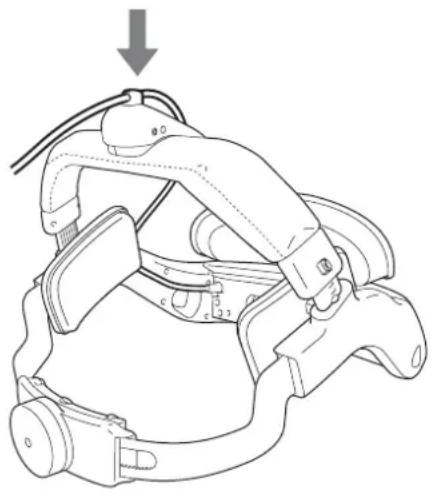
- Make sure that the HMO-CA50M head mounted display cable (hereinafter called the display cable) does not become caught around feet and legs. If the display cable is caught and jerked, there is a risk that the head of the wearer will also be jerked.
Carrying the unit
Hold the unit firmly when moving around with the head mounted monitor or HMI-3000MT head mounted image processor unit (hereinafter called the image processor unit) to avoid dropping the unit. Dropping the unit may cause an injury. Also, the unit contains high-precision components that may be damaged if the unit is dropped. If the unit is dropped, contact your local Sony distributor or sales representative.
FS-24 foot switch (not supplied)
The FS-24 has an Ingress Protection Rating of IPX3. Therefore, it cannot be used in locations subject to splashing liquids (e.g., operating rooms). For safety, use a product with a rating of IPX6 or higher in such environments.
In addition, if a malfunction occurs with the foot switch during operation, disconnect it from the image processor unit, and perform operations from the front panel.
Condensation
If the unit is suddenly taken from a cold to a warm location, or if ambient temperature suddenly rises, moisture may form on the outer surface of the unit and/or inside of the unit. This is known as condensation. If condensation occurs, turn off the unit and wait until the condensation clears before operating the unit. Operating the unit while condensation is present may damage the unit.
Deterioration of contact pad surface
If the surface of the pads (front pad, side pad, top pad) or headband deteriorates, starts to peel off, or looks like it will peel off, cease using the unit in medical procedures and contact your local Sony distributor or service representative.
Storage of packaging materials
If you need to transport the unit for repair or any other reason, use the same box and cushion materials provided when the unit was purchased.
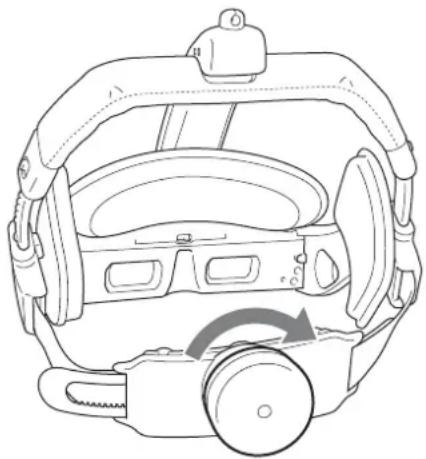
Before storing the head mounted monitor in the box, adjust the headband and rear band so that they are as short as possible, and set the headband lock switch to the locked position.
If the unit is not used for an extended period of time
- Turn off the power supply to the head mounted monitor and image processor unit, in that order, and disconnect the AC power supply cord of the AC adapter.
- Adjust the rear band of the head mounted monitor so that it is as short as possible.
Cleaning
Before cleaning, always remove the power supply plug from the power outlet.
Do not sterilize or use an autoclave on the unit.
Cleaning the image processor unit
The image processor unit is manufactured with materials that can be disinfected. However, depending on the disinfectant used, performance may be impaired or the surface finish may be damaged. Observe the following points to protect the unit.
- Wipe the surfaces of the unit with 50% to 70% v/v concentration isopropyl alcohol or 76.9% to 81.4% v/v ethanol.
- To remove stubborn dirt, wipe with a soft cleaning cloth using mild detergent diluted in water, and then clean using the chemical solutions above.
- Do not use benzine or thinners, acidic cleaning solutions, alkaline cleaning solutions, abrasive cleaning agents, or chemically-treated wipes that may damage the surfaces for cleaning or disinfection.
- Do not wipe with force using a cloth that may have dust or other particles adhering to it. Doing so may scratch the surfaces.
- Do not place rubber or plastic objects on the unit for an extended period of time. Doing so may cause surface deterioration or cause the surface to peel.
Cleaning the head mounted monitor
The head mounted monitor, excluding the lens, is manufactured with materials that can be disinfected. However, depending on the disinfectant used, performance may be impaired or the surface finish may be damaged. Observe the following points to protect the unit.
- Wipe the surfaces of the unit with 50% to 70% v/v concentration isopropyl alcohol or 76.9% to 81.4% v/v ethanol.
- To remove stubborn dirt, wipe with a soft cleaning cloth using mild detergent diluted in water, and then clean using the chemical solutions above.
- Do not use benzine or thinners, acidic cleaning solutions, alkaline cleaning solutions, abrasive cleaning agents, or chemically-treated wipes that may damage the surfaces for cleaning or disinfection.
- Do not wipe with force using a cloth that may have dust or other particles adhering to it. Doing so may scratch the surfaces.
- Do not place rubber or plastic objects on the unit for an extended period of time. Doing so may cause surface deterioration or cause the surface to peel.
Cleaning the lens
If the lens becomes cloudy or dusty, clean using the following method.
- Wipe lightly with a soft, lens cloth.
- Do not use lens cleaning fluid, alcohol, water, or other solutions.
Cleaning the rear pad
If dirt is difficult to remove from the surface of the rear pad, remove the rear pad and wash it separately. After washing, wipe off any moisture with a dry cloth and then reattach it to the head mounted monitor.
- Removing the rear pad
The rear pad is attached using six clasps. Stretch the pad upwards and remove it from the upper clasps, then remove it from the lower clasps.
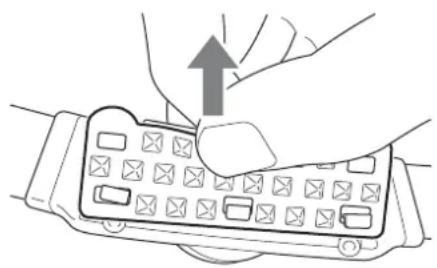
- Attaching the rear pad
Attach the pad using the lower clasps, then stretch the pad upwards and attach it using the upper clasps.
Note
Check that the holes in the rear pad fit over all six clasps. The pad may come off if it is not secured by all the clasps.
If unsanitary matter adheres to the unit
Follow the cleaning instructions above, and wipe it off.
Device Components
The HMI-3000MT Head Mounted Image Processor Unit is supplied with the HMS-3000MT Head Mounted Display System. In addition to the HMI-3000MT, the HMS-3000MT system also includes the HMM-3000MT Head Mounted Monitor and the HMO-CA50M Head Mounted Display Cable.
The units and accessories supplied with the HMS-3000MT system are as follows.
HMI-3000MT Head Mounted Image Processor Unit
• Image processor unit • Before Using this Unit • CD-ROM (Instructions for Use) • AC-80MD AC adapter • AC-80MD Instructions for Use • Service Contact List
HMM-3000MT Head Mounted Monitor
Head mounted monitor - Instructions for Use • Service Contact List
HMO-CA50M Head Mounted Display Cable
- Cable
- Instructions for Use • Service Contact List
Specifications
General
Power requirement
24 V DC (supplied from AC-80MD AC adapter)
Input current 1.5 A
Operating conditions
Temperature: 5 °C to 35 °C (41 °F to 95 °F)
Relative humidity: 25% to 80% (no condensation)
Atmospheric pressure: 700 hPa to 1060 hPa
Storage/transportation conditions
Temperature: -20 °C to +60 °C (-4 °F to +140 °F)
Relative humidity: 20% to 80% (no condensation)
Atmospheric pressure: 700 hPa to 1060 hPa
Dimensions (width / height / depth, excluding maximum protrusions)
Approx. 306 mm × 56.5 mm × 358 mm (12 1/8 in. × 2 1/4 in. × 14 1/8 in.)
Mass: Approx. 3.3 kg (7 lb. 4.4 oz.) (excluding power cord)
Input/output connectors
DVI input connectors
DVI-D connectors (2)
TMDS single link
SDI input connectors
BNC type (2)
SMPTE 292M standard compliance
DC IN connector
3-pin DIN, 24 V
AC adapter (AC-80MD)
REMOTE connectors
DVI-D connectors (2)
TMDS single link
SDI output connectors
BNC type (2)
SMPTE 292M standard compliance
HMM output connector
Dedicated 20-pin (2)
(connects to HMO-CA50M)
Input/output supported signals
Video input (2D)
720/50p, 720/60p, 1080/50i, 1080/60i, 1080/50p, 1080/60p
Video input (3D)
Side-by-side, Dual stream
720/50p, 720/60p, 1080/50i, 1080/60i
Output signal Input signal is output as-is. Note that the following signals are not supported.
DVI signals:
- Signals with HDCP (also not output to the HMM-3000MT)
• Signals with HDMI functions
• Signals with resolution higher than Full HD
SDI signals:
• Audio signals
• 3G-SDI signals or higher
Supplied accessories
Before Using this Unit (1)
CD-ROM (Instructions for Use) (1)
AC-80MD AC adapter (1)
AC-80MD Instructions for Use (1)
Service Contact List (1)
Optional accessories
HMM-3000MT head mounted monitor
HMO-CA50M head mounted display cable
FS-24 foot switch
Note: The FS-24 has only an IPX3 splash proof rating, and should not be used in locations where it may be exposed to fluids (e.g., operating rooms). For safety, products with IPX6 or higher rating should be used in such instances.
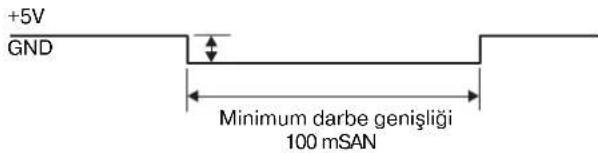
Remote control using REMOTE connector
Sending the remote control pulse signal, illustrated below, via the REMOTE connector performs the same operations as pressing the INPUT button.
Timing pulse for REMOTE connector REMOTE pin assignment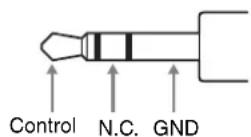
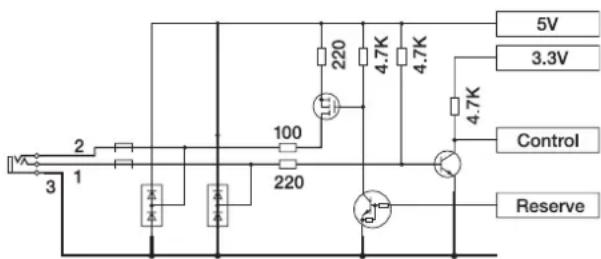
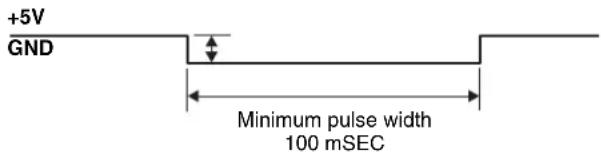
Specifications and external appearance are subject to change without notice for product improvement.
Medical Specifications
Protection against harmful ingress of water:
Ordinary
Degree of safety in the presence of a flammable anesthetic mixture with air or with oxygen or nitrous oxide:
Not suitable for use in the presence of a flammable anesthetic mixture with air or with oxygen or nitrous oxide
Mode of operation:
Continuous
Notes
- Always verify that the unit is operating properly before use. SONY WILL NOT BE LIABLE FOR DAMAGES OF ANY KIND INCLUDING, BUT NOT LIMITED TO, COMPENSATION OR REIMBURSEMENT ON ACCOUNT OF THE LOSS OF PRESENT OR PROSPECTIVE PROFITS DUE TO FAILURE OF THIS UNIT, EITHER DURING THE WARRANTY PERIOD OR AFTER EXPIRATION OF THE WARRANTY, OR FOR ANY OTHER REASON WHATSOEVER.
- SONY WILL NOT BE LIABLE FOR CLAIMS OF ANY KIND MADE BY USERS OF THIS UNIT OR MADE BY THIRD PARTIES.
- SONY WILL NOT BE LIABLE FOR THE TERMINATION OR DISCONTINUATION OF ANY SERVICES RELATED TO THIS UNIT THAT MAY RESULT DUE TO CIRCUMSTANCES OF ANY KIND.
License and Trademark Notice
Trademarks
System and product names are generally trademarks or registered trademarks of the manufacturers. TM and marks are not indicated in this document.
Notice for Software Programs
Reverse engineering, reverse assembly, reverse compilation, and other analysis procedures in regard to the source code of the software included in this product are prohibited.
Notices and Licenses for Software Used in this Product
Portions of the software in this product are licensed under the FreeType Project License.
Portions of this software are copyright © 2006 The FreeType Project (www.freetype.org). All rights reserved.
French
Cleaning
Cleaning
HMM-3000MT Head Mounted Monitor
Side-by-Side, Dual Stream
720/50p, 720/60p, 1080/50i, 1080/60i
Output signal
HMM-3000MT Head Mounted Monitor
Cleaning
Head Mounted Monitor (monitor indossato in testa) HMM-3000MT
Side-by-side, dual stream
720/50p, 720/60p, 1080/50i, 1080/60i
Output signal
Head Mounted Monitor (monitor indossato in testa) HMM-3000MT
Cleaning
DVI-D connectors (2)
Single link TMDS
SDI input connectors
BNC type (2)
DVI-D connectors (2)
Single-link TMDS
SDI output connectors
BNC type (2)
Cleaning
1080/60i, 1080/50p, 1080/60p
Video input (3D)
Side-by-side, Dual stream
720/50p, 720/60p, 1080/50i, 1080/60i
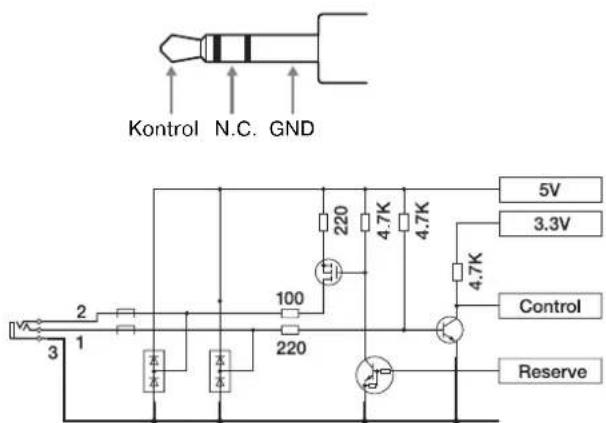
REMOTE pin assignment


- HEAD MOUNTED IMAGE PROCESSOR UNIT
- JAPANESE
- HOW TO USE THE CD-ROM MANUAL
- ABOUT CARE AND MAINTENANCE
- ENGLISH
- FOR DETAILS ON OPERATION, REFER TO THE INSTRUCTIONS FOR USE IN THE SUPPLIED CD-ROM
- USING THE CD-ROM MANUAL
- NOTE
- INDICATIONS FOR USE/INTENDED USE
- OWNER'S RECORD
- WARNING
- SYMBOLS ON THE PRODUCTS
- CONSULT THE INSTRUCTIONS FOR USE
- FOR THE CUSTOMERS IN THE U.S.A
- DECLARATION OF CONFORMITY
- FOR THE CUSTOMERS IN CANADA
- IMPORTANT SAFEGUARDS/NOTICES FOR USE IN THE MEDICAL ENVIRONMENTS
- IMPORTANT EMC NOTICES FOR USE IN MEDICAL ENVIRONMENTS
- CAUTION
- FOR CUSTOMERS IN EUROPE
- FOR THE CUSTOMERS IN EUROPE
- FOR THE CUSTOMERS IN KOREA
- PRECAUTIONS
- PRECAUTIONS FOR SAFE OPERATION
- PRECAUTIONS WHEN CONNECTED TO OTHER MEDICAL EQUIPMENT
- PREPARING FOR UNFORESEEN CIRCUMSTANCES
- ATTACHING THE HEAD MOUNTED MONITOR BEFORE USE
- USE WITH ELECTROSURGICAL KNIVES AND SIMILAR DEVICES
- PRELIMINARY CONNECTION TESTING
- STORAGE LOCATION
- COMFORTABLE OPERATION
- USING THE HEAD MOUNTED MONITOR
- CONTACT WITH THE HEAD MOUNTED MONITOR DURING A MEDICAL PROCEDURE
- CABLES
- CARRYING THE UNIT
- FS-24 FOOT SWITCH (NOT SUPPLIED)
- CONDENSATION
- DETERIORATION OF CONTACT PAD SURFACE
- STORAGE OF PACKAGING MATERIALS
- IF THE UNIT IS NOT USED FOR AN EXTENDED PERIOD OF TIME
- CLEANING
- CLEANING THE IMAGE PROCESSOR UNIT
- CLEANING THE HEAD MOUNTED MONITOR
- CLEANING THE LENS
- CLEANING THE REAR PAD
- IF UNSANITARY MATTER ADHERES TO THE UNIT
- DEVICE COMPONENTS
- HMI-3000MT HEAD MOUNTED IMAGE PROCESSOR UNIT
- HMM-3000MT HEAD MOUNTED MONITOR
- HMO-CA50M HEAD MOUNTED DISPLAY CABLE
- SPECIFICATIONS
- GENERAL
- INPUT/OUTPUT CONNECTORS
- INPUT/OUTPUT SUPPORTED SIGNALS
- SUPPLIED ACCESSORIES
- OPTIONAL ACCESSORIES
- REMOTE CONTROL USING REMOTE CONNECTOR
- MEDICAL SPECIFICATIONS
- NOTES
- LICENSE AND TRADEMARK NOTICE
- TRADEMARKS
- NOTICE FOR SOFTWARE PROGRAMS
- NOTICES AND LICENSES FOR SOFTWARE USED IN THIS PRODUCT
- FRENCH
- HEAD MOUNTED MONITOR (MONITOR INDOSSATO IN TESTA) HMM-3000MT
Brand : SONY
Model : HMS-3000MT
Category : Monitor