Power X-Twincharger 4A - Battery charger EINHELL - Free user manual and instructions
Find the device manual for free Power X-Twincharger 4A EINHELL in PDF.


| Product Type | Battery Charger |
| Brand | Einhell |
| Model | Power X-Twincharger 4A |
| Power Supply | 220-240 V ~50-60 Hz, 190 W |
| Output Voltage | 18 V DC (per channel) |
| Output Current | 4000 mA (per channel) |
| Number of Channels | 2 |
| Compatible Battery Types | Li-Ion Power X-Change (18 V) |
| Dimensions (approx.) | 20 x 15 x 5 cm |
| Weight (approx.) | 0.5 kg |
| Housing Material | Plastic |
| Protection Class | II |
| LED Indicators | Red and green indicators (ready, charging, error, etc.) |
| Simultaneous Charging Function | Yes, independent charging of 2 batteries |
| Adaptation Charging | Yes, for deeply discharged batteries or out-of-temperature range |
| Wall Mounting | Possible (screws not included) |
| Cleaning | Dry cloth, disconnect before |
| Maintenance | No user-serviceable parts |
| Safety | Do not expose to water, do not charge non-rechargeable batteries |
| Operating Temperature | 0°C to 40°C (recommended) |
| Included Accessories | Power cable |
| Certifications | CE |
Frequently Asked Questions - Power X-Twincharger 4A EINHELL
User questions about Power X-Twincharger 4A EINHELL
0 question about this device. Answer the ones you know or ask your own.
Ask a new question about this device
Download the instructions for your Battery charger in PDF format for free! Find your manual Power X-Twincharger 4A - EINHELL and take your electronic device back in hand. On this page are published all the documents necessary for the use of your device. Power X-Twincharger 4A by EINHELL.
USER MANUAL Power X-Twincharger 4A EINHELL
GB Original operating instructions Charger
natural_image
Black electronic device with two labeled ports and a cable, shown against a plain background (no text or symbols visible)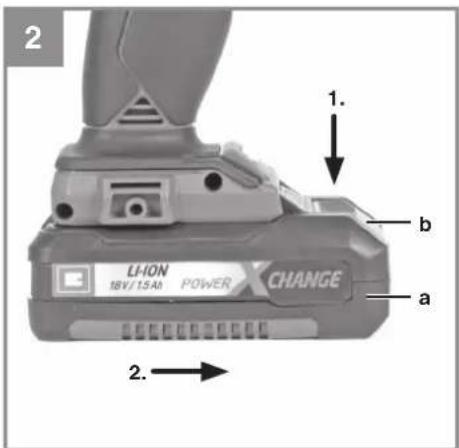
natural_image
Three black-and-white icons: a house outline, a square with concentric rings, and an open book inside a circle (no text or symbols)-4-
D
Gefahr!
When using the equipment, a few safety precautions must be observed to avoid injuries and damage. Please read the complete operating instructions and safety regulations with due care. Keep this manual in a safe place, so that the information is available at all times. If you give the equipment to any other person, hand over these operating instructions and safety regulations as well. We cannot accept any liability for damage or accidents which arise due to a failure to follow these instructions and the safety instructions.
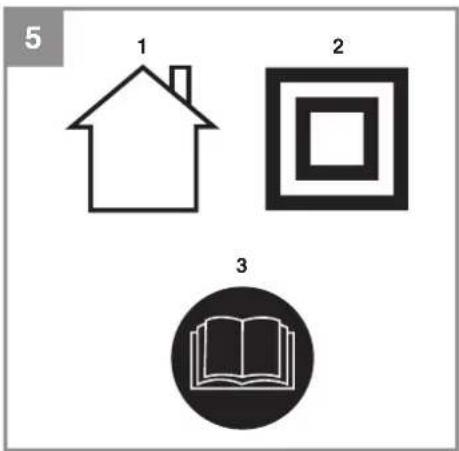
Explanation of the symbols used (see Fig. 5)
- For use in dry rooms only.
- Safety class II
- Danger! - Read the operating instructions to reduce the risk of injury.
1. Safety regulations
Danger!
Read all safety regulations and instructions. Any errors made in following the safety regulations and instructions may result in an electric shock, fi re and/or serious injury.
Keep all safety regulations and instructions in a safe place for future use.
This appliance can be used by children aged from 8 years and above and persons with reduced physical, sensory or mental capabilities or lack of experience and knowledge if they have been given supervision or instruction concerning use of the appliance in a safe way and understand the hazards involved. Children shall not play with the appliance. Cleaning and user maintenance shall not be made by children without supervision.
Replacing the power cable If the power cable for this equipment is damaged, it must be replaced by the manufacturer or OEM after-sales service or by similarly trained personnel to prevent hazards.
a) The charging unit is not allowed to be used for non-rechargeable, normal batteries.
b) Sufficient ventilation is required.
c) The current and voltage information on the battery pack must be the same as that on the charging unit.
d) Do not expose the charging unit to splashwater or rain.
e) Do not throw old or damaged batteries into water or fire. Follow the environmental protection directives.
f) A defective or no longer chargeable battery must be treated as special waste. Dispose of it at a special collection point. Do not dispose of it with your normal household waste or throw it into water or fi re.
g) Place the charging unit away from all sources of heat.
h) To reduce the risk of electric shock, pull the power plug out of the socket outlet by the plug itself and not by the cable when you want to disconnect the charging unit from the power supply.
i) Do not take the charging unit apart. Take it to an authorized repair center if servicing or repairs are needed. Incorrect assembly can result in an electric shock and even death or fi re.
j) Children must always be supervised in order to ensure that they do not play with the equipment.
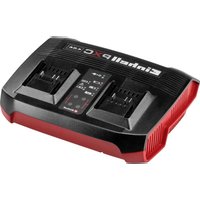
2. Layout (Fig. 1)
- Charger
- Power cable
GB
3. Technical data
Charger
Input 220-240V\~50-60Hz, 190 W
Output 1 18 V d.c., 4000 mA
Output 2 18 V d.c., 4000 mA
Caution!
The charging unit is allowed to be used only for the lithium-ion batteries of the Power-X-Change series!
4. Operation (Fig. 2-3)
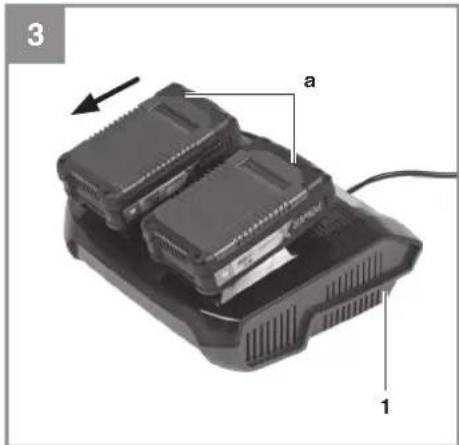
The battery charger can be used to charge either 1 or 2 rechargeable batteries. By charging independently you can also charge different batteries (e.g.: 2.0 Ah and 4.0 Ah) simultaneously for the charging times stated on the charger.
- Pull the battery pack (a) out of the equipment, pressing the pushlock button (b) to do so.
- Check that your mains voltage is the same as that marked on the rating plate of the battery charger. Insert the power plug of the charger (1) into the socket outlet. The green LEDs will then begin to flash.
- Insert the battery pack or packs (a) into the battery charger (1).
- In section 7 „Charger indicator“ you will find a table with an explanation of the LED indicator on the charger.
If the battery fails to charge, please check
• whether there is voltage at the socket outlet
- whether there is good contact at the charging contacts of the charging unit
If the battery still fails to charge, send
• the charging unit
• and the rechargeable battery to our customer service center.
To ensure that items are properly packaged and delivered when you send them to us, please contact our customer service or the point of sale at which the equipment was purchased.
When shipping or disposing of batteries and cordless tools, always ensure that they are packed individually in plastic bags to prevent short circuits and fi res.
To ensure that the battery pack provides long service, you should take care to recharge it promptly. You must recharge the battery pack when you notice that the performance of the device drops. Never allow the battery pack to become fully discharged. This will cause it to develop a defect.
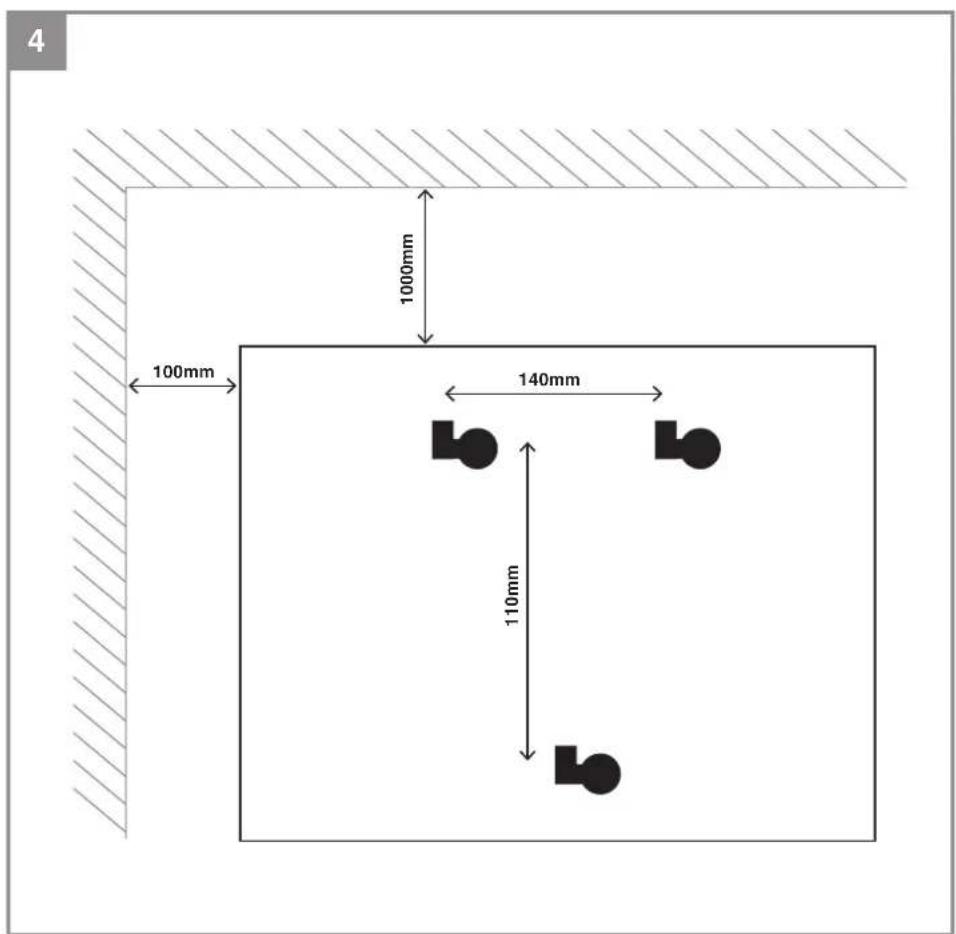
Mounting the charging unit on a wall (Fig. 4) The charging unit can also be mounted on a wall. The correct dimensions for drilling holes in the wall can be found on the back of the charging unit.
Spacing distances
≥ 10 cm from the wall (right + left)
≥ 100 cm from the ceiling
Caution!
When mounting on a wall you must use suitable screws, e.g. 3.5 mm pan-head screws, in order to prevent damage to the housing and risk of falling.
5. Cleaning and maintenance
Always pull out the power plug before starting any cleaning work.
The equipment is not allowed to be stored in a damp location or where there are caustic gases. Keep it in a dry place out of the reach of children.
5.1 Cleaning
Keep the surface of the equipment clean and wipe it only with a dry cloth.
GB
5.2 Maintenance
There are no other parts inside the equipment which require maintenance.
The equipment is not allowed to be taken apart. If the equipment is damaged, contact your supplier or the manufacturer.
6. Disposal and recycling
The equipment is supplied in packaging to prevent it from being damaged in transit. The raw materials in this packaging can be reused or recycled. The equipment and its accessories are made of various types of material, such as metal and plastic. Defective components must be disposed of as special waste. Ask your dealer or your local council.
GB
7. Charger indicator
| Indicator status Explanations and actions | ||
| Red LED Green LED | ||
| Off | Flashing | Ready for useThe charger is connected to the mains and is ready for use; there is no battery pack in the charger |
| On Off Charging | The charger is charging the battery pack in quick charge mode. The charging times are shown directly on the charger.Important! The actual charging times may vary slightly from the stated charging times depending on the existing battery charge. | |
| Off | On | The battery is charged and ready for use. (READY TO GO)The unit then changes over to gentle charging mode until the battery is fully charged.To do this, leave the rechargeable battery on the charger for approx. 15 minutes longer.Action:Take the battery pack out of the charger. Disconnect the charger from the mains supply. |
| Flashing Off | Adapted charging | The charger is in gentle charging mode.For safety reasons the charging is performed less quickly and takes more time. The reasons can be:- The rechargeable battery has not been used for a very long time.- The battery temperature is outside the ideal range.Action:Wait for the charging to be completed; you can still continue to charge the battery pack. |
| Flashing Flashing Fault | Charging is no longer possible. The battery pack is defective.Action:Never charge a defective battery pack.Take the battery pack out of the charger. | |
| On On Temperature fault | The battery pack is too hot (e.g. due to direct sunshine) or too cold (below 0^ ).Action:Remove the battery pack and keep it at room temperature (approx. 20^ ) for one day . | |
GB
Disposal

Power tools, rechargeable batteries, accessories and packaging should be sorted for environmental-friendly recycling.
Do not dispose of power tools and batteries/rechargeable batteries into household waste!
Only for EU countries:
According to the Directive 2012/19/EU on waste electrical and electronic equipment and its transposition into national law, power tools that are no longer usable, and, according to the Directive 2006/66/EC, defective or drained batteries must be collected separately and disposed of in an environmentally correct manner.
If disposed incorrectly, waste electrical and electronic equipment may have harmful effects on the environment and human health, due to the potential presence of hazardous substances.
Only for United Kingdom:
According to The Waste Electrical and Electronic Equipment Regulations 2013 (SI 2013/3113) (as amended) and the Waste Batteries and Accumulators Regulations 2009 (SI 2009/890) (as amended), products that are no longer usable must be collected separately and disposed of in an environmentally friendly manner.
The reprinting or reproduction by any other means, in whole or in part, of documentation and papers accompanying products is permitted only with the express consent of the Einhell Germany AG.
Subject to technical changes