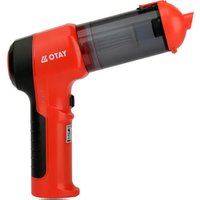
YT-85686 - Vacuum Cleaner Yato - Free user manual and instructions
Find the device manual for free YT-85686 Yato in PDF.


| Brand | Yato |
| Model | YT-85686 |
| Product type | Cordless car vacuum |
| Weight | 0.49 kg |
| Power supply | Li-ion battery 11.1V, 2.0 Ah; charges via USB 5V/2A |
| Rated power | 100 W |
| Dust bin capacity | Not specified (estimated: approx 0.5 L) |
| Main functions | Suction, blower, pumping (inflation) |
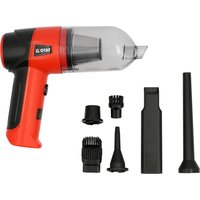
| Included accessories | Blower nozzle, pump nozzle, crevice tool, wide nozzle, brush, charging cable |
| Battery life | Not specified (estimated: 15-20 min depending on mode) |
| Charging time | About 3 hours (first charge) |
| Filter type | Washable filter (with compressed air or lukewarm water) |
| Maintenance | Clean filter regularly and empty bin; do not immerse |
| Safety | Indoor use only; do not vacuum liquids, hot ashes, or glowing objects; do not direct airflow at people or animals |
| Repairability | Replaceable filter; built-in battery not user-replaceable; contact customer service for any malfunction |
| Warranty | Not specified (refer to seller) |
Frequently Asked Questions - YT-85686 Yato
User questions about YT-85686 Yato
0 question about this device. Answer the ones you know or ask your own.
Ask a new question about this device
Download the instructions for your Vacuum Cleaner in PDF format for free! Find your manual YT-85686 - Yato and take your electronic device back in hand. On this page are published all the documents necessary for the use of your device. YT-85686 by Yato.
USER MANUAL YT-85686 Yato
natural_image
Technical line drawing of a handheld device with an arrow indicating direction (no text or symbols)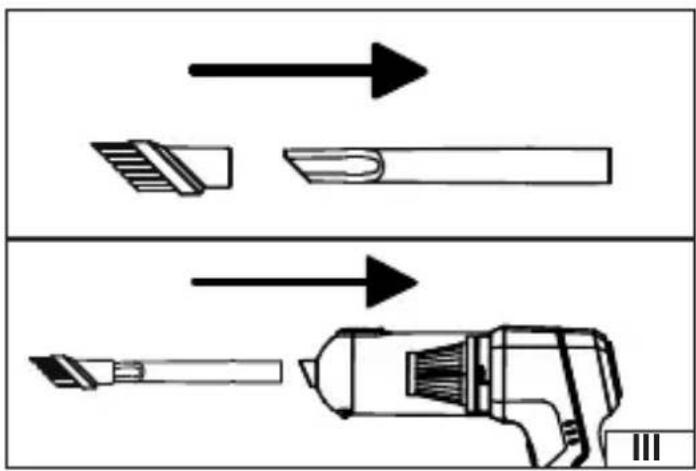
natural_image
Diagram showing two mechanical components with arrows indicating direction, no text or symbols present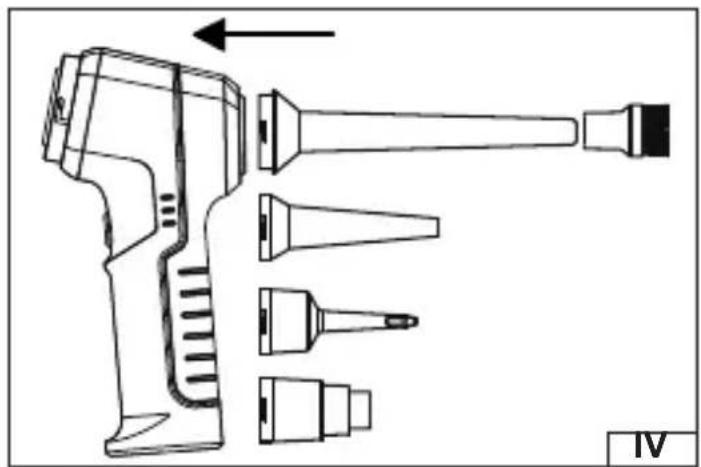
natural_image
Technical line drawing of a handheld device with multiple ports and an arrow indicating direction (no text or symbols)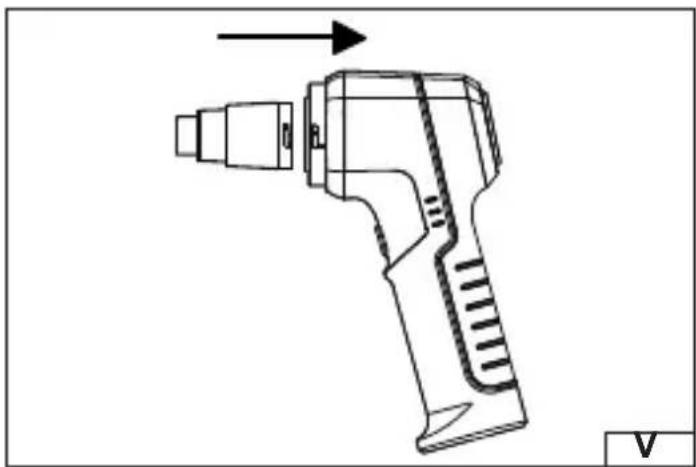
natural_image
Technical line drawing of a handheld device with an arrow indicating direction (no text or symbols)PL
- vacuum cleaner
- dust container
- switch
- blower nozzle
- blower brush
- pumping nozzle
- crevice nozzle
- wide nozzle
- vacuum cleaner brush
- charging socket
- charging cable
DE
Read the operating instruction
This symbol indicates that waste electrical and electronic equipment (including batteries and storage cells) cannot be disposed of with other types of waste. Waste equipment should be collected and handed over separately to a collection point for recycling and recovery, in order to reduce the amount of waste and the use of natural resources. Uncontrolled release of hazardous components contained in electrical and electronic equipment may pose a risk to human health and have adverse effects for the environment. The household plays an important role in contributing to reuse and recovery, including recycling of waste equipment. For more information about the appropriate recycling methods, contact your local authority or retailer.
WYPOSAŻENIE PRODUKTU
PRODUCT CHARACTERISTICS
A car vacuum cleaner designed for cleaning the interior of vehicles, trailers, boats, and other small spaces. Equipped with a blower function for blowing dirt out of hard-to-reach places or inflating small items like water toys. Battery power allows for operation without the need for a power outlet. Proper, reliable, and safe operation of the tool depends on proper use, therefore:
Before using the tool, read the entire manual and keep it.
The supplier is not liable for any damage resulting from failure to comply with the safety regulations and recommendations of this manual.
PRODUCT EQUIPMENT
The product is delivered complete and requires no assembly. The vacuum cleaner comes with nozzles and a charging cable. A charger is not included.
TECHNICAL DATA
| Parameter Unit of measurement Value | ||
| Catalog number YT-85686 | ||
| Nominal input voltage [V d.c.] 5 | ||
| Charging current [A] 2 | ||
| Rated power [W] 100 | ||
| Mass [kg] 0.49 | ||
| Battery | ||
| - type Li-ion | ||
| - capacity [Ah] 2.0 | ||
| - rated voltage | [V d.c.] | 11.1 |
SAFETY INSTRUCTIONS
WARNING! Before use, carefully read all instructions below. Following these instructions will reduce the risk of electric shock, personal injury, fire, and damage to the device or other property.
This device is intended for indoor use only. Do not use it for purposes other than its intended use.
Do not use the product as an artificial respiration device, for spraying any substance or for any other use not described in the instructions.
The vacuum cleaner is designed for dry use. Do not vacuum up water, wet ash, or other wet waste. This may result in electric shock, which could pose a threat to the health and life of the user and others.
Never vacuum up hot, glowing, or burning objects. This could result in fire or explosion, and could result in serious injury or death. The maximum temperature of the vacuumed waste must not exceed 40^ C.
Never direct the air flow towards yourself or other people or animals.
It is forbidden to insert fingers or other objects into the inlet and outlet openings while the device is operating.
Do not use the device near liquids, flammable gases or explosive materials.
Do not use the device in high humidity or near water (e.g., in bathrooms, kitchens, near bathtubs, sinks, or other bodies of water). Do not expose the device to precipitation. Do not immerse the device in water or other liquids.
EN
Using the device with wet hands is prohibited.
The filter should be cleaned or replaced regularly according to the manufacturer's recommendations. Using a vacuum cleaner with a dirty or damaged filter can result in reduced cleaning efficiency, overheating of the device, or the release of contaminants into the environment.
Always inspect the device before use. Pay particular attention to the condition of the power cord and plug. If you notice any damage, do not use the device. Damaged components, such as cables and cords, must be replaced by an authorized manufacturer's service center.
Before carrying out any maintenance or cleaning, disconnect the power cord plug from the mains socket.
Do not cover the ventilation openings, even when the appliance is not in use. Keep them clear and clean them regularly to prevent overheating. Covered or blocked ventilation openings can cause overheating, which can result in fire or electric shock.
Do not leave the device switched on unattended.
If you notice any unusual symptoms, such as a burning smell, smoke, no response to being turned on, or the housing overheating, discontinue use immediately.
This product is not a toy. Keep out of the reach of children and pets.
Hair, loose clothing or other objects should not be placed near the air inlet to avoid accidental suction.
Do not use alcohol, solvents, or sharp objects to clean the product. This may damage it or discolor the casing.
Before first use, make sure that all accessories – including the switch and charging cable – are in good working condition.
Do not disassemble the device yourself. For repairs, contact an authorized manufacturer's service center.
Before first use, please fully charge the battery as the device may only be partially charged.
The dust container should be emptied regularly.
Do not use the device in high-temperature or high-pressure environments. The permissible operating temperature range is -20^ to +50^ .
Battery Charging Safety Instructions
Warning! Before charging, make sure the charger body, cord, and plug are not cracked or damaged. Do not use a faulty or damaged charger! Only use the charger and accessories included in the kit to charge batteries. Using a different charger may cause a fire or damage the tool. Charging the battery should only take place in a closed, dry room, protected from unauthorized access, especially children. Do not use the charger without constant adult supervision! If you need to leave the charging room, disconnect the charger from the power supply by unplugging the charger from the power outlet. If you notice smoke, a suspicious odor, etc., coming from the charger, immediately unplug the charger from the power outlet! The product is shipped with an uncharged battery, so before use, charge it according to the procedure described in the manual. Li-ion batteries do not exhibit the „memory effect,” allowing them to be recharged at any time. However, it is recommended to discharge the battery during normal operation and then charge it to full capacity. If the nature of the operation makes this treatment impossible every time, it should be done at least every few or a dozen cycles. Under no circumstances should batteries be discharged by shorting the battery contacts, as this causes irreversible damage! Also, do not check the battery charge by shorting the contacts and checking for sparks.
Battery storage
If possible, it is recommended to disconnect the battery from the product during storage. Proper storage conditions will extend the battery's lifespan. The battery can withstand approximately 500 charge-discharge cycles. The battery should be stored in a temperature range of 0 to 30 degrees Celsius, with a relative humidity of 50% . To store the battery for extended periods, charge it to approximately 70% capacity. For longer storage, periodically charge the battery once a year. Do not over-discharge the battery, as this will shorten its lifespan and may cause irreversible damage. During storage, the battery will gradually discharge due to leakage. The self-discharge process depends on the storage temperature; the higher the temperature, the faster the discharge. Improper storage of batteries may result in electrolyte leakage. In the event of a leak, seal the leak with a neutralizing agent. If the electrolyte comes into contact with eyes, rinse thoroughly with water and seek
EN
immediate medical attention. It is forbidden to use a tool with a damaged battery. If the battery is completely worn out, it should be taken to a specialized waste disposal facility.
Battery transportation
Lithium -ion batteries are legally considered hazardous materials. The user of the tool can transport the product with the battery, or the batteries themselves, by road. No additional requirements are required. If transport is outsourced to third parties (e.g., by courier), regulations regarding the transport of hazardous materials must be followed. Before shipping, contact a qualified person. Damaged batteries must not be transported. During transport, removed batteries must be removed from the product and exposed contacts must be protected, e.g., with insulating tape. Secure the batteries in the packaging so that they do not shift within the packaging during transport. National regulations regarding the transport of hazardous materials must also be observed.
NOTE! During all assembly and disassembly activities, turn off the device and disconnect the charging cable.
Device assembly and disassembly (II)
Remove the vacuum cleaner, dust container, and accessories from the packaging and remove all packaging components. Proceed to assemble the dust container.
Before first use, make sure the tank contains all components and is properly assembled.
If the dust container is mounted on the vacuum cleaner, remove it. Hold the vacuum cleaner with one hand and with the other, grasp the dust container and rotate it clockwise. Then, remove the dust container from the vacuum cleaner.
Inside the dust container, there's a filter that protects the vacuum cleaner from dirt entering the dust container. To remove the filter, grasp it by the inner edge and then slide it out of the container. After emptying the container and cleaning the filter, insert it into the container so that its flange rests on the guides inside the container. The filter flange should be flush against the container wall along its entire circumference and parallel to the container edge. Otherwise, proper separation between the vacuum cleaner and the dust container will not be ensured, and the filter will not function properly.
Install the dust container onto the vacuum cleaner. During installation, ensure the protrusions on the edge of the vacuum cleaner fit into the recesses on the edge of the dust container. Once the two edges are flush, hold the vacuum cleaner and turn the dust container counterclockwise as far as it will go.
A properly installed container fits flush against the vacuum cleaner. A properly installed container cannot be removed except by rotating it relative to the vacuum cleaner.
Accessories installation
Depending on the type of work being performed, the product must be prepared appropriately.
To prepare the product for use as a vacuum cleaner, insert the appropriate vacuum cleaner nozzle (III) into the opening at the front of the dust container. An additional brush can be attached to the crevice nozzle. To remove vacuuming accessories, simply slide them out of the dust container's inlet opening.
To prepare the product for use as a blower or pump, attach the blower nozzle or inflator nozzle (IV) to the outlet port on the rear of the vacuum cleaner. When installing the nozzle, ensure that the protrusions on the edge of the vacuum cleaner fit into the recesses on the nozzle. Once the two edges are flush, hold the vacuum cleaner and rotate the nozzle clockwise as far as it will go. An additional brush can be attached to the long blower nozzle. To remove the blower nozzle, hold the vacuum cleaner and rotate the nozzle counterclockwise as far as it will go.
The inflating nozzle can also be used to pump air out of an inflated object. To do this, completely remove the dust container from the vacuum cleaner and then install the inflating nozzle into the inlet opening at the front of the vacuum cleaner (V). During installation, ensure that the protrusions on the edge of the vacuum cleaner fit into the corresponding recesses in the nozzle. Once both edges are perfectly aligned, hold the vacuum
EN
cleaner and turn the nozzle clockwise as far as it will go. This installation allows the vacuum cleaner to suck air out of the inflated object.
Charging the battery
Note: Before using the vacuum cleaner for the first time or after long periods of storage, fully charge it. It is recommended to charge the device for at least 3 hours before first use. Before long-term storage, also fully charge the battery. Leaving the battery in a deeply discharged state may prevent it from recharging or cause problems with the device's proper operation.
To charge the device, connect the charging cable plug to the charging port on the vacuum cleaner. The other plug should be connected to the USB port on the charger or another device with a standard USB port with the current output specified in the technical data table. The charging process is indicated by a red light. Charging is complete when the green light is lit. The vacuum cleaner should be supervised throughout the charging process. Do not turn on the device while charging. Once charging is complete, the product is ready for use. Immediately disconnect the cable from the USB port and then from the device.
WARNING! Leaving the vacuum cleaner with a fully charged battery connected to the charger may cause irreversible damage to the battery and may also cause a fire or electric shock.
Preparing for work
Check the dust container and empty it if necessary. If the vacuum cleaner filter is dirty, clean it dry using a compressed air jet at a pressure of no more than 0.3 MPa or wet under a stream of lukewarm running water. If dirt persists, replace the filter with a new one. Check the condition of the filter seals; if any damage is present, replace the filter with a new one.
NOTE: After washing the filter, it must be completely dry before using it again.
WARNING! Never operate the vacuum cleaner without a properly installed air filter. This can result in damage to the vacuum cleaner and electric shock.
Working with a vacuum cleaner
WARNING! It is prohibited to use a vacuum cleaner with hot ash. The temperature of the waste vacuumed must not exceed 40 degrees Celsius.
Make sure all preparations have been completed and the battery is fully charged.
To turn on the vacuum cleaner, press and hold the power button for approximately 3 seconds. The device will start in low suction mode.
By briefly pressing the switch, you can switch the device to medium suction power mode and then to high suction power mode.
Another short press will turn the vacuum cleaner off. After turning it off, wait until the motor has completely stopped before proceeding with maintenance.
Note: When using the vacuum cleaner as a blower or pump, for maximum efficiency, it is recommended to completely remove the dust container. This reduces airflow resistance and improves efficiency.
Note! If you notice any suspicious vibrations, a drop in suction power, or hear the motor running louder during operation, it may indicate that the tank is full or the suction nozzle is clogged. In this case, immediately turn off the vacuum cleaner using the switch. Then, empty the tank and check the air intake and suction nozzle for obstructions. Unclog them if necessary. If the suction nozzle cannot be unclogged, replace it with a new one before continuing work.
Quick emptying of the dust container
A button on the top of the container allows you to open the lid and empty the container without having to remove it from the vacuum cleaner body. To empty the container, press the button, open the lid, and remove the debris. Once emptying is complete, close the lid, ensuring it is securely locked.
EN
Warning! Do not open the dust container lid while the vacuum cleaner is running. Before emptying the dust container, turn the device off using the power switch and wait until the vacuum cleaner motor has completely stopped.
Vacuum cleaner maintenance
Note: Before starting any maintenance, ensure that the charging cable plug has been disconnected from the power outlet.
After each use of the vacuum cleaner, check the dust container, cover seal and air filter as described in the section: „Preparing for operation”.
Clean the exterior of the vacuum cleaner and the filter with a jet of compressed air at a pressure of no more than 0.3 MPa. Pay particular attention to the airflow openings, both inlet and outlet, being unobstructed. Check the vacuum cleaner nozzles for obstructions. If necessary, clean with a jet of compressed air at a pressure of no more than 0.3 MPa. Do not use sharp metal objects to clean the airflow openings and accessories. Do not immerse the vacuum cleaner in water to clean it. Remove any larger dirt from the housing with a soft cloth.
Troubleshooting
| Problem Probable cause How to fix | the problem | |
| The vacuum cleaner doesn't work | Insufficient battery current | Charge the battery |
| The vacuum cleaner has not been turned on Turn on the vacuum cleaner | ||
| No charging possible Check if the power supply has a voltage of 5 V Select a 5V power supply | ||
| Reduced suction power | Clogged filter or filter cover | Clean the filter |
| Low battery charge Charge the battery | ||
| Clogged air intake Clean the air intake | ||
| Excessive noise | Full dust container | Empty the dust container |
| Clogged air intake Clean the air intake | ||
| Clogged air outlet | Clean the filter | |
| No filter assembly installed | Install the filter assembly | |