AD 1914 - Turntable ADLER - Free user manual and instructions
Find the device manual for free AD 1914 ADLER in PDF.

 FR
FR
 AZ
AZ
 BG
BG
 CS
CS
 DA
DA
 DE
DE
 EL
EL
 EN
EN
 ES
ES
 ET
ET
 FI
FI
 HU
HU
 IT
IT
 KA
KA
 LT
LT
 LV
LV
 MK
MK
 NL
NL
 PL
PL
 PT
PT
 RO
RO
 RU
RU
 SK
SK
 SL
SL
 SQ
SQ
 SR
SR
 SV
SV
 UK
UK
User questions about AD 1914 ADLER
0 question about this device. Answer the ones you know or ask your own.
Ask a new question about this device
Download the instructions for your Turntable in PDF format for free! Find your manual AD 1914 - ADLER and take your electronic device back in hand. On this page are published all the documents necessary for the use of your device. AD 1914 by ADLER.
USER MANUAL AD 1914 ADLER
natural_image
White portable radio with open lid and black tab, placed on a white base (no visible text or symbols)| AD 1914 | |||||
| EN | User Manual | 4 | PL | Instrukcja obsługi | 75 |
| DE | Bedienungsanleitung | 8 | IT | Manuale d'uso | 80 |
| FR | Mode d'emploi | 13 | SV | Bruksanvisning | 84 |
| ES | Manual de usuario | 17 | BG | Ръководство за употреба | 88 |
| PT | Manual de Instruções | 22 | DA | Brugsanvisning | 92 |
| LT | Naudojimo instrukcija | 27 | SK | Používatel'ská príručka | 97 |
| LV | Lietošanas instrukcija | 31 | BS | Korisnički priručnik | 102 |
| ET | Kasutusjuhend | 35 | MK | Упатство за употреба | 106 |
| HU | Használati útmutató | 39 | HR | Korisnički priručnik | 111 |
| RO | Manual de utilizare | 44 | UK | Керівництво користувача | 115 |
| CS | Návod k použití | 48 | SR | Упутство за употребу | 119 |
| RU | Руководство пользователя | 52 | AR | دليل المستخدم | 124 |
| EL | Еүхειρίδιο хрήσης | 57 | AZ | İstifadəçi tõlimatı | 126 |
| NL | Gebruikershandleiding | 62 | SQ | Manuali i përdorimit | 130 |
| SL | Navodila za uporabo | 67 | KA | Общегزطلاوي | 135 |
| FI | Käyttöohje | 71 | |||
text_image
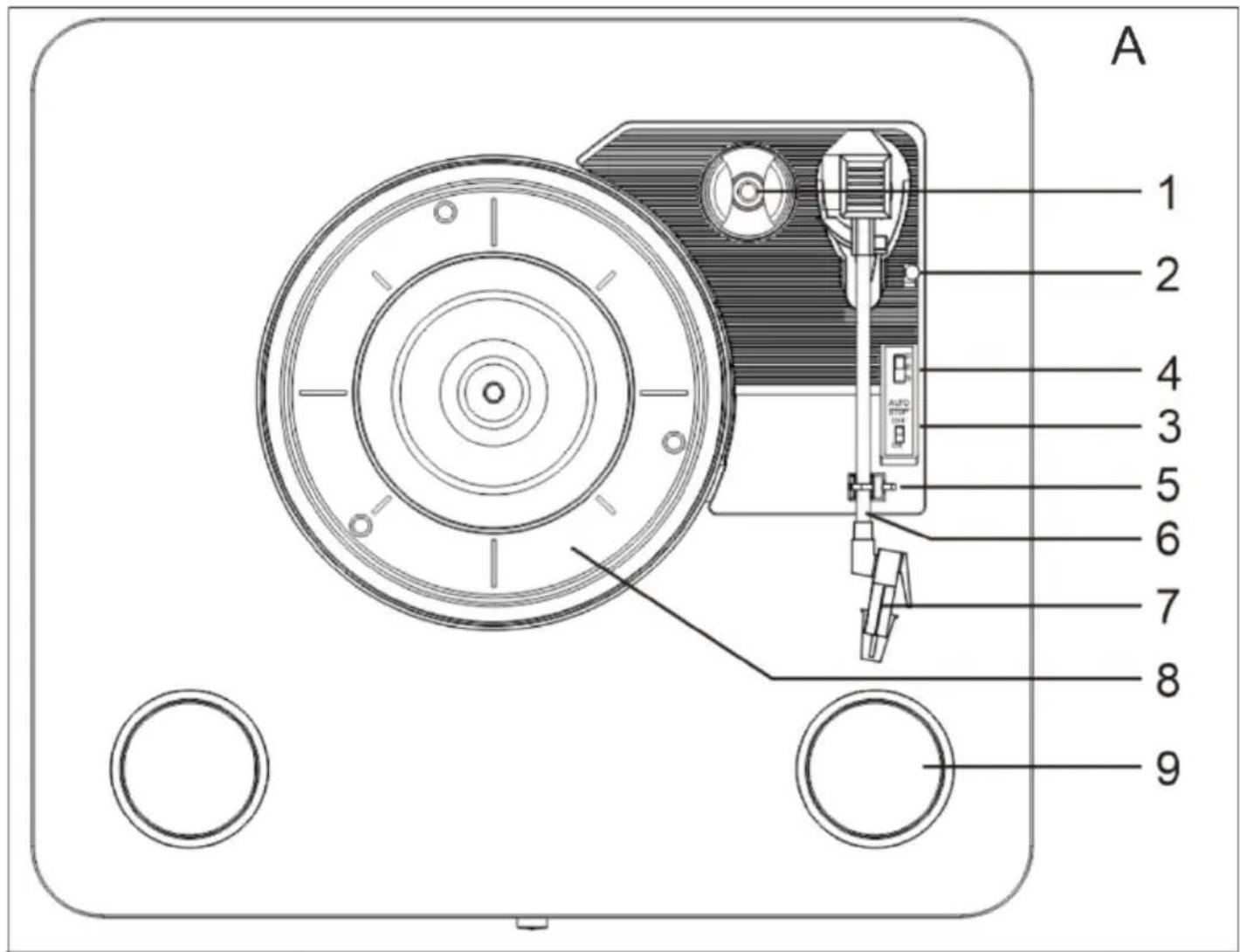
A 1 2 4 3 5 6 7 8 9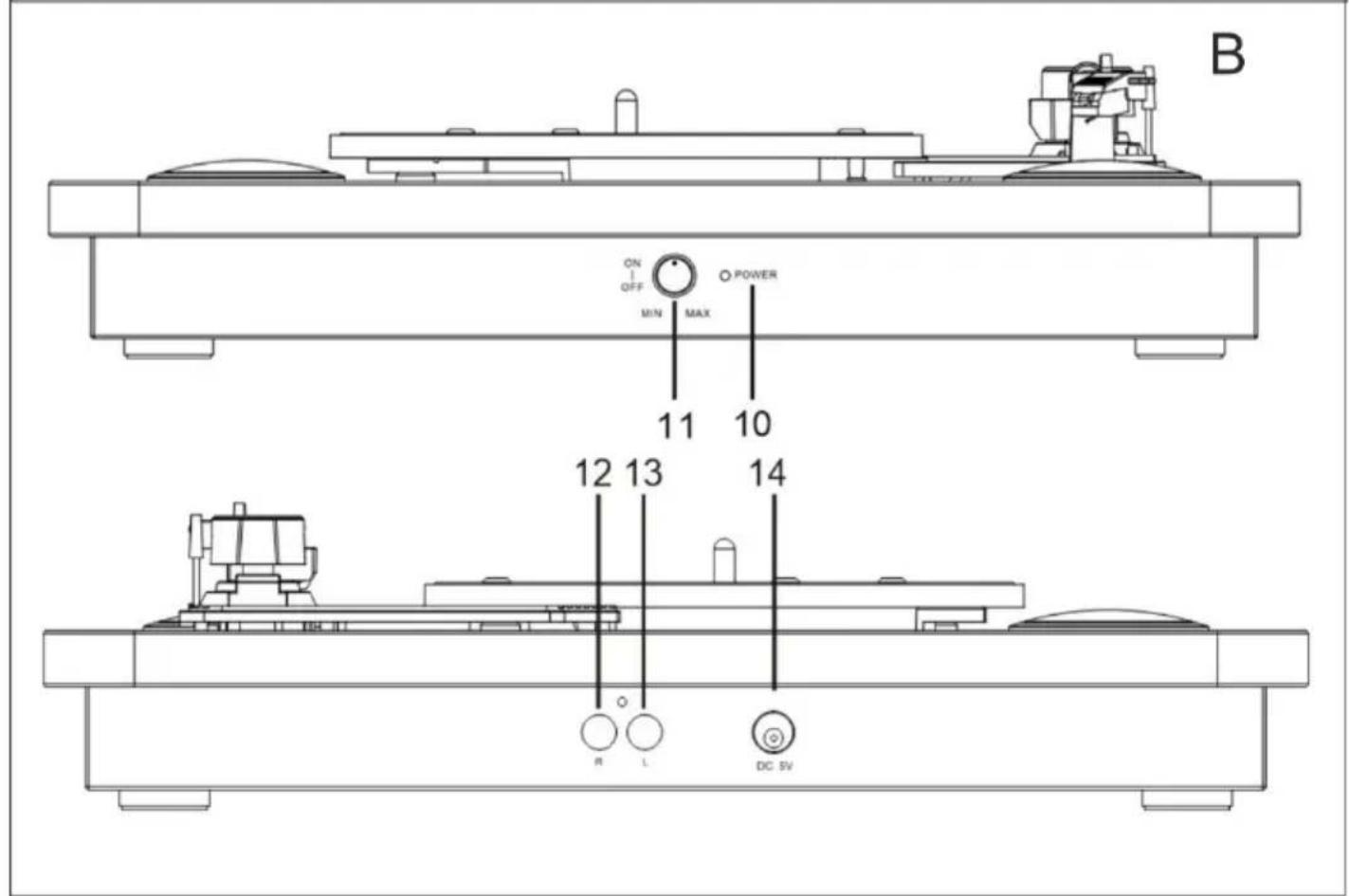
text_image
ON OFF MIN MAX POWER 11 10 12 13 14 R L DC SV B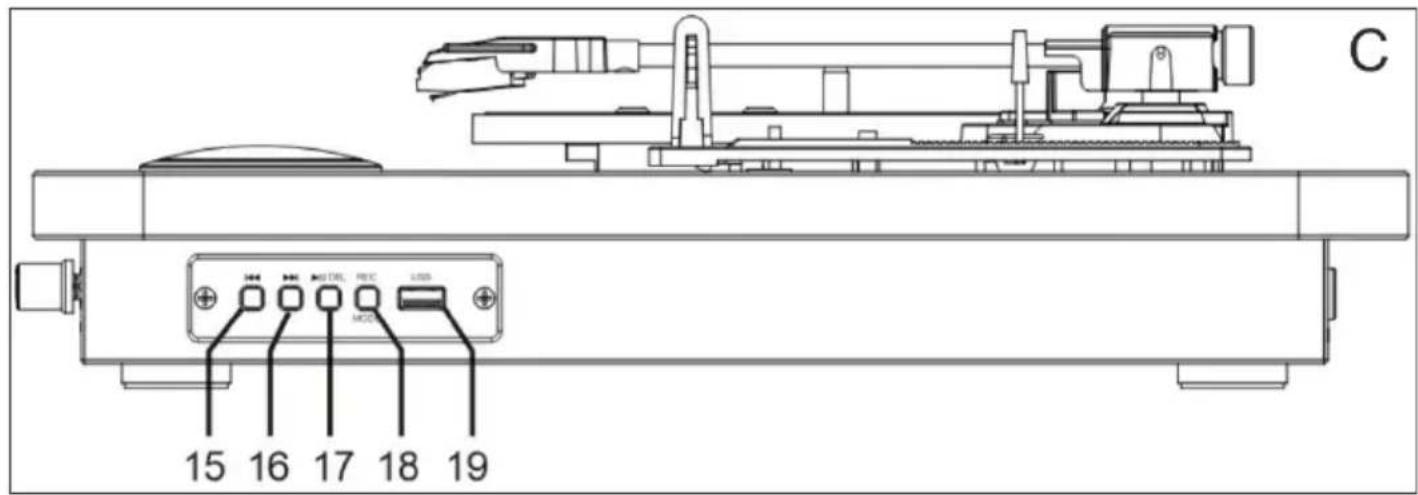
text_image
C 15 16 17 18 19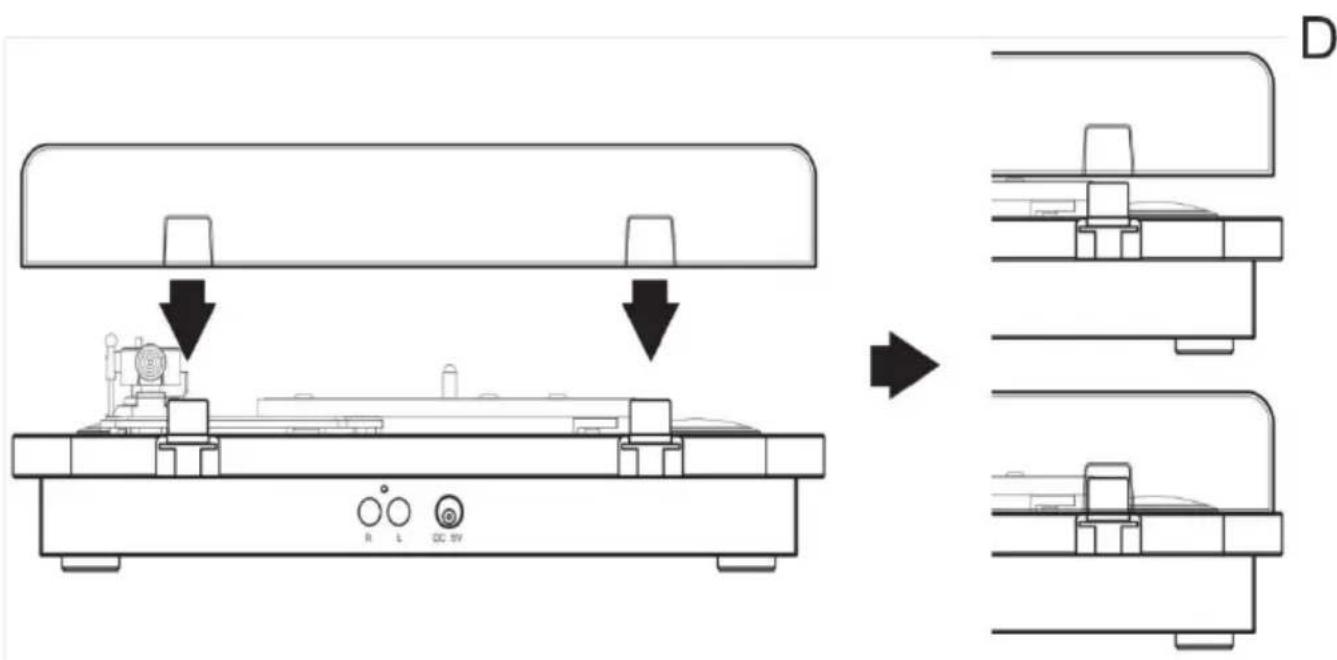
text_image
R L DC 5V D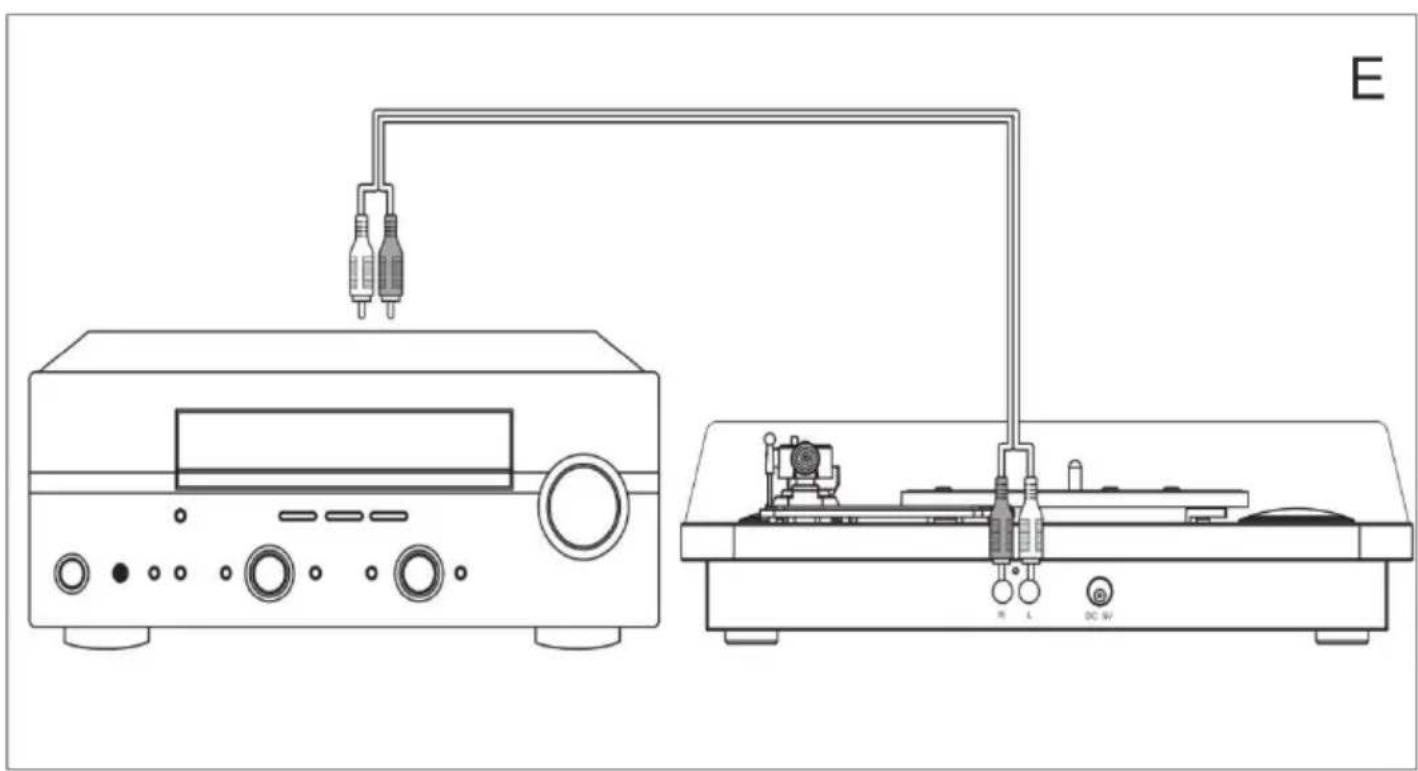
natural_image
Line drawing of a laboratory instrument setup with two connected components and a monitor, labeled E (no text or symbols on the device itself)User Manual (EN)
GENERAL SAFETY CONDITIONS IMPORTANT SAFETY INSTRUCTIONS FOR USE READ CAREFULLY AND KEEP FOR FUTURE REFERENCE
- Before using the device, read the instruction manual and follow the instructions contained therein. The manufacturer is not responsible for damages caused by using the device contrary to its intended use or improper operation.
- The device is for domestic use only. Do not use for other purposes incompatible with its intended use.
- Connect the device only to a grounded outlet 100-240 V \~ 50/60 Hz.
In order to increase the safety of use, multiple electrical appliances should not be plugged into a single circuit at the same time. - Be especially careful when using the device when children are around. Do not allow children to play with the appliance do not allow children or persons unfamiliar with the appliance to use it
- WARNING: This equipment may be used by children over 8 years of age and persons with limited physical, sensory or mental abilities, or persons without experience or familiarity with the equipment, if this is done under the supervision of a person responsible for their safety or they have been given instructions on the safe use of the equipment and are aware of the dangers associated with its use. Children should not play with the equipment. Cleaning and maintenance of the equipment should not be performed by children unless they are over 8 years of age and these activities are performed under supervision.
- Always remove the plug from the power outlet after use by holding the outlet with your hand. DO NOT pull on the power cord.
- Do not immerse the cord, plug and the entire device in water or other liquid. Do not expose the unit to weather conditions (rain,
sun, etc.) or use in high humidity conditions (bathrooms, damp camping houses).
-
Periodically check the condition of the power cord. If the power cord is damaged, it should be replaced by a specialized repair facility to avoid danger.
-
Do not use the device with a damaged power cord or if it has been dropped or damaged in any other way or malfunctions. Do not repair the device yourself, as there is a risk of electrocution. Return a damaged device to a competent service center for inspection or repair. Any repairs may be made only by authorized service centers. Improper repair may cause serious danger to the user.
-
Place the appliance on a cool stable, level surface, away from hot kitchen appliances such as an electric stove, gas burner, etc.
-
Do not use the device near flammable materials.
-
The power cord must not hang over the edge of the table or touch hot surfaces.
-
Before cleaning or after use, unplug the power cord from the power outlet by holding the outlet with your hand. DO NOT pull on the power cord.
-
Do not use the device near water e.g.: in the shower, in the bathtub or over a sink with water.
-
Do not let the device or the power adapter get wet. If the device falls into water, immediately pull the plug or power adapter from the power outlet. Do not put your hands in the water while the device is plugged in. Before using it again, it must be checked by a qualified electrician.
-
Do not grab the device or power adapter with wet hands.
-
Turn off the device each time you put it away.
-
Do not leave the device or power adapter plugged into an outlet unattended.
-
To provide additional protection, it is advisable to install in the electrical circuit, a residual current device (RCD) with a rated residual current of not more than 30 mA. In this regard, please
consult an electrical specialist.
21. If the device uses a power supply, do not cover it, as this could lead to a dangerous rise in temperature and damage to the device.
Always, first insert the plug into the power socket on the device and then the power adapter into the power socket.
Device Description:
| 1. 45 rpm adapter | 2. Turntable arm lifter | 3. Speed selection - three speeds to choose from: 33 1/3, 45, 78 rpm | 4. Automatic stop | 5. Turntable arm support/lock |
| 6. Turntable arm | 7. Cartridge | 8. Turntable platter | 9. Speaker | 10. Power indicator |
| 11. Power switch/volume control | 12. R channel | 13. L channel | 14. DC power socket (5 V DC 1 A) | 15. Previous track |
| 16. Next track | 17.Play/Pause/DEL button | 18. Mode selection button: REC/Bluetooth/USB | 19. USB port |
Before first use:
- Remove any popping materials.
- If it is not attached then put the cover on the turntable. To do this, attach the cover As shown on page 3 graphic D. CAUTION. When installing, do not press too hard on the hinges and cover because it may break.
Playing a vinyl record:
Before playing, make sure the packing materials have been removed. The arm lock and needle protection have been removed.
- Connect the power supply to the power socket (14).
- Plug the power supply into a wall outlet.
- Place the vinyl record gently on the platters (8).
- Select the appropriate speed with the speed selection lever (3).
- Raise the turntable arm using the arm lifter (2).
- Position the arm on the outer edge of the vinyl record.
- Turn the power / volume control switch (11) to the ON position and then set the desired volume of the unit.
- The platter will begin to rotate.
- When the disc is finished, the unit will automatically turn off if the auto stop switch (4) is in the ON position. If you want the platter to rotate when finished, set the switch to the OFF position.
- To flip the record to the other side, first move the turntable arm from to the rest position.
- After flipping the record, proceed from step 3 of the above instructions.
- When you have finished listening, move the turntable arm to the rest position.
- Turn the unit off with the power knob and turn it to the OFF position (11).
Playback and save to USB media:
For playback from USB media, the turntable arm must be in the rest position.
- Connect the power supply to the power socket (14).
- Plug the power supply into a wall outlet.
- Insert the USB flash drive into the USB socket (19).
-
Turn the power / volume control switch (11) to the ON position and then set the desired volume of the device.
-
Using the Play / Pause / Del buttons (17), start or stop playback.
- Using the Next Track / Previous Track buttons (15,16), select the track to be played.
NOTE: the device only plays files in MP3 format.
Recording to USB media:
- Start playing a vinyl disc as described in the "Playing a Vinyl Disc" section of the manual.
- Make sure the USB media is correctly installed in the USB socket (19).
- Press and hold the USB/REC/Bluetooth button (18) for 2 seconds.
- You will hear a short beep indicating that recording has started.
- To stop recording, press and hold the USB/REC/Bluetooth button (18) for 2 seconds.
- You will hear 2 short beeps indicating that recording has ended.
- A RECORD0 folder will be created in the USB media and the file will be saved as mp3 at 128 kbps.
Deleting saved files:
- After finished recording, put the tonearm on the rest position. It will play the song in the USB drive automatically.
- Press and hold the REC/Bluetooth/USB button(18) for 2 seconds to enter the RECORD folder, it will play the recorded song.
- Press and hold the Play/Pause/DEL button(17) for 2 seconds to delete the recorded song. You will hear 2 short beeps indicating that the recorded song has been deleted.
Playback via Bluetooth connection:
- Using the USB/REC/Bluetooth button (18), select the Bluetooth function.
- On the transmitting device, search for "AD 1914" and pair the devices.
- When paired correctly, the device will beep.
When using this function, vinyl playback will be stopped. Track selection is made from the transmitting device. Volume can be controlled with the transmitting device and the volume knob.
Maintenance:
Replacement of the phono needle:
- Lift the turntable arm up, taking care not to pull the arm out.
- Gently pull the red needle cap down.
- To install the new needle, insert the back of the needle case into the trough at the end of the arm.
- A click should sound when installed correctly.
Caring for vinyl records:
For best sound quality, replace needles regularly. One needle lasts about 250 hours of playback.
Wipe vinyl records with an anti-static cloth before and immediately after use.
From time to time, wipe the needle with a very soft brush that will be moistened with alcohol to remove dust and dirt.
Do this in the direction from the back to the front of the needle.
When handling, don't forget to protect the needle and arm from unnecessary movement.
Technical data:
Input voltage: 5V = 1A
Power consumption: 5W
Maximum supported USB memory capacity: 32GB
USB memory format: FAT32
Bluetooth version: 5.4
Transmitting frequency: 2.4 GHz
BT channel emission power: 3.98mW
Adler Sp. z o.o., Ordona 2a, 01-237 Warsaw, Poland hereby declares that the AD 1914 is in compliance with Directive 2014/53/EU. The full text of the EU Declaration of Conformity is available at the following internet address: https://www.adler.com.pl/dane/deklaracje/CE/ad_1914.pdf
For the sake of the environment. Dispose of cardboard packaging and polyethylene (PE) bags in the appropriate containers for separate collection of municipal waste according to their description. If there are batteries in the device, remove them and separately return them to the collection and storage facility. Return the used device to a suitable collection and storage facility, as the hazardous substances in it may pose a threat to health and the environment. The marking on the product indicates that the device should not be disposed of in the container with municipal waste. Waste electrical equipment, is waste that contains substances harmful to humans, animals and the environment. These substances can lead to contamination of the soil, water or air, and through this they can enter the human body and lead to numerous health ailments, such as vision, hearing, speech disorders, they can also damage the kidneys, liver and heart, and cause skin diseases. Harmful substances can also have adverse effects on the respiratory and reproductive systems and lead to cancerous changes. Consumption of plants growing on the complained of soils, and products made from them may risk the above-mentioned health effects. Do not dispose of the device in the municipal waste container!!!
Service If you wish to purchase spare parts or report any complaints, please contact directly with the seller who issued the receipt.
Sisendpinge: 1 V = 1A
Voolutarbimine: 5W
Consum de curent: 5W 5W
OPĆI USLOVI SIGURNOSTI
VAŽNE SIGURNOSNE UPUTSTVA PAŽLJIVO PROČITAJTE I SAČUVATE ZA BUDUĆU REFERENCU
- Prije korištenja uređaja, pročitajte korisnički priručnik i slijedite upute sadržane u njemu. Proizvođač nije odgovoran za štetu uzrokovanu upotrebom uređaja suprotno njegovoj namjeni ili nepravilnim radom.
- Uređaj je samo za kućnu upotrebu. Nemojte koristiti u bilo koje druge svrhe koje nisu u skladu s njegovom namjenom.
- Uređaj treba da bude povezan samo na uzemljenu utičnicu od 100-240 V \~ 50/60 Hz.
3 USB/REC/Bluetooth. (18)
.1USB/REC/Bluetooth (18) Bluetooth.
النص Capital Leaside Management Policy for the United States, Canada. AD 1914/53/2014 EU يتropical Region of the United States.
bān bān bān bān bān bān bān bān bān bān bān bān bān bān bān bān bān bān bān bān bān bān bān bān bān bān bān bān bān bān bān bān bān bān bī
zs#dobogon zobomou hsb#jngdo sb#ol#s#o#zyno glmzomoo zs#mygbdsdoy qos qssymzbjdmoz. q6mqsgfmm zs#dobogon bgdlu l3o#n ooslszgnydwno dsmosb bdoomo gzybxom, bsms dmsgomom od#zyno qos f#y#o. 8sszgom oju bgdlou yzboqsb fobs dbshg.
zsqssqzogndolsl zsblmzqgon, 6md bjdlo qos d3w3o qosfomgon salsyfoim dmdksmdolgsb.
∂g93s60b ∂s83s: 5V = 1A
g6g6g00b dm6ds6g8s: 5 W
USB ∂gblugmgdou ∂sfloudsmŋmo ∂bsmqsfjmoo ∂mgsmmds: 32 GB
USB ∂gblɒŋɡŋðʊl ɡɒm̄dʒɔː: FAT32
Bluetooth 39660s: 5.4
850539405106706:2.4833
4: -5,0 V 5: 1,0 A 6: 5,0 W
7: 76,85 % 8: -- % 9: 0,07 W
GB
1: Model identifier
2:Input voltage
3:Input AC frequency
4:Output voltage
5:Output current
6:Output power
7:Average active efficiency
8:Efficiency at low load (10 %)
9:No-load power consumption
DE
1: Modellkennung
2: Eingangsspannung
1: identificator model
9: 05830600000000000000000000000000000000000
MK
1: Идентификатор на моделот
2:напон на влез