BLT-2 - Measuring equipment MSW - Free user manual and instructions
Find the device manual for free BLT-2 MSW in PDF.


| Product Type | Battery Tester |
| Brand | MSW |
| Model | MSW-BLT-2 |
| Voltage Range | 8 - 30 V |
| Supported Battery Standards | CCA, BCI, CA, MCA, EN, SAE, CEI, DIN, JIS, GB |
| Testable Battery Types | Flooded Lead-Acid, Lithium-ion (scooter), Flat Plate AGM, Spiral AGM, Gel, EFB |
| Display | LCD Screen |
| Dimensions (L x W x H) | 75 x 20 x 150 mm |
| Weight | 0.25 kg |
| Power Supply | Via battery under test (alligator clips) |
| Connectivity | USB (for printing and data transfer) |
| Test Functions | Battery test, start test, charge test (alternator), ripple test, discharge test |
| Built-in Voltmeter | Yes, real-time voltage display |
| Data Recording | Yes, viewable result history |
| Printing | Via software on computer and USB cable |
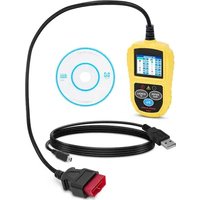
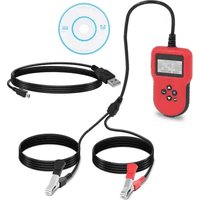
| Included Accessories | Alligator clips (red/black), USB cable, CD with software |
| Safety | Symbols: read instructions, wear goggles, caution for toxic substances |
| Maintenance | Clean with a soft cloth; do not immerse |
| Operating Conditions | Max ambient temperature 40°C, max relative humidity 85% |
| Application Areas | Cars, motorcycles, scooters (12V/24V) |
Frequently Asked Questions - BLT-2 MSW
User questions about BLT-2 MSW
0 question about this device. Answer the ones you know or ask your own.
Ask a new question about this device
Download the instructions for your Measuring equipment in PDF format for free! Find your manual BLT-2 - MSW and take your electronic device back in hand. On this page are published all the documents necessary for the use of your device. BLT-2 by MSW.
USER MANUAL BLT-2 MSW
BCI: Norm des Battery Council International
| Health: 96% | 490A |
| Charge: 97% | 12.64V |
| Internal R=6.1mΩ | |
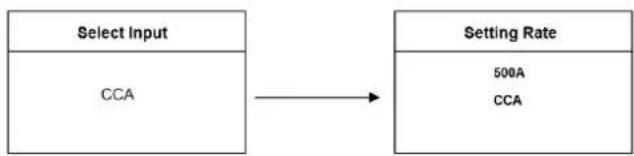
| Rated: 500A | CCA |
| GOOD BATTERY | |
- Gut, Aufladen
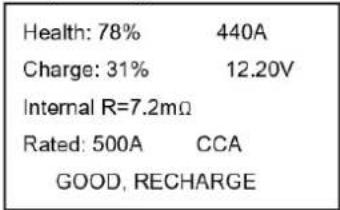
| Health: 78% | 440A |
| Charge: 31% | 12.20V |
| Internal R=7.2mΩ | |
| Rated: 500A | CCA |
| GOOD, RECHARGE | |
- Auswechseln.
| Health: 8% | 144A |
| Charge: 99% | 12.68V |
| Internal R=18.1mΩ | |
| Rated: 500A | CCA |
| REPLACE | |
- Schlechte Zelle
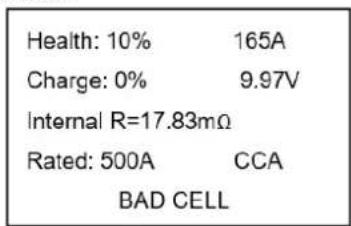
| Health: 10% | 165A |
| Charge: 0% | 9.97V |
| Internal R=17.83mΩ | |
| Rated: 500A | CCA |
| BAD CELL | |
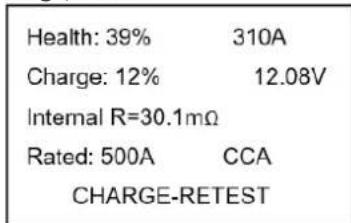
| Health: 39% | 310A |
| Charge: 12% | 12.08V |
| Internal R=30.1mΩ | |
| Rated: 500A | CCA |
| CHARGE-RETEST | |
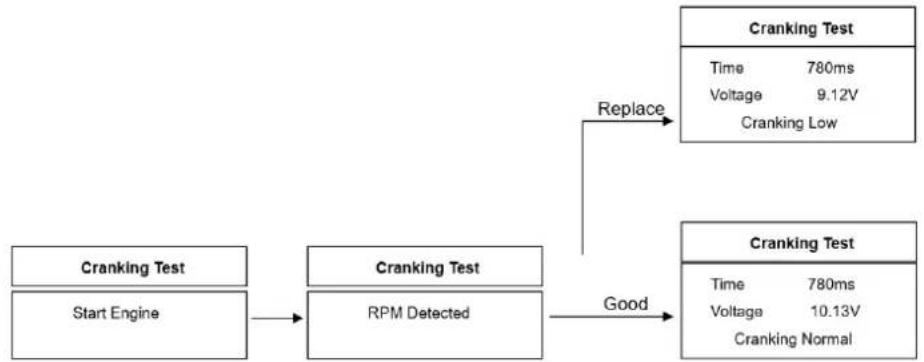
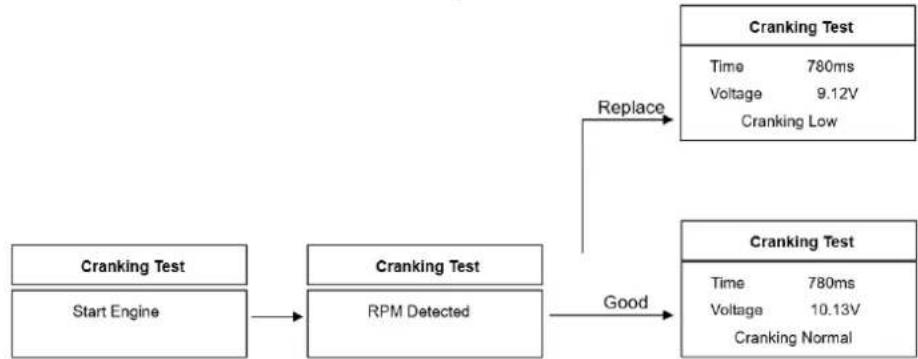
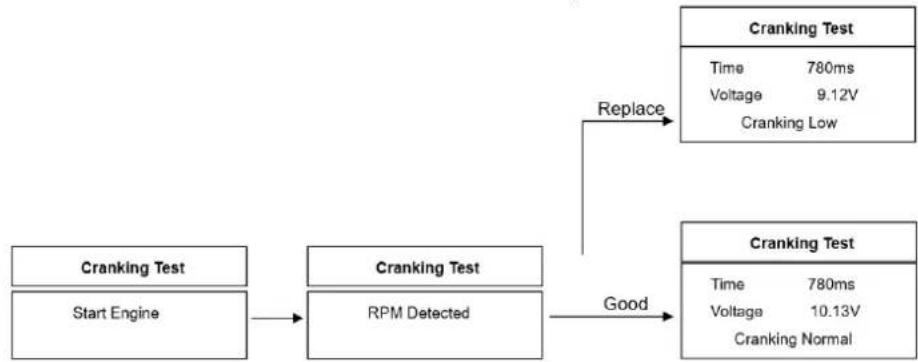
Kurbeltest
Motor starten -> RPM Detected -> GOOD -> Cranking Normal
OR
Motor starten RPM Detected REPLACE Anlassen normal
Ladetest (Lichtmaschinentest)
| Charging Test | |
| UnLoaded | 14.39V |
| Loaded | 14.16V |
| Ripple | 15mV |
| Voltage Normal | |
| Main Menu |
| 1. Battery Test |
| 2. Cranking Test |
| 3. Charging Test |
| 4. Review Data |
| 5. Print |
| Print Data |
| 1. Print Battery 2. Print Cranking 3. Print Charging 4. Print All |
This User Manual has been translated for your convenience using machine translation. Reasonable efforts have been made to provide an accurate translation; however, no automated translation is perfect nor is it intended to replace human translators. The official User Manual is the English version. Any discrepancies or differences created in the translation are not binding and have no legal effect for compliance or enforcement purposes. If any questions arise related to the accuracy of the information contained in the User Manual, please refer to the English version of those contents which is the official version.
Technical data
| Parameter description | Parameter value |
| Product name | Battery Tester |
| Model | MSW-BLT-2 |
| Voltage Range [V] | 8 – 30 |
| Optional battery standards | CCA / BCI / CA / MCA / EN / SAE / IEC / DIN / JIS / GB |
| Dimensions [width x depth x height; mm] | 75 x 20 x 150 |
| Weight [kg] | 0.25 |
1. General description
The user manual is designed to assist in the safe and trouble-free use of the device. The product is designed and manufactured in accordance with strict technical guidelines, using state-of-the-art technologies and components. Additionally, it is produced in compliance with the most stringent quality standards.
DO NOT USE THE DEVICE UNLESS YOU HAVE THOROUGHLY READ AND UNDERSTOOD THIS USER MANUAL.
To increase the product life of the device and to ensure trouble-free operation, use it in accordance with this user manual and regularly perform maintenance tasks. The technical data and specifications in this user manual are up to date. The manufacturer reserves the right to make changes associated with quality improvement. The device is designed to reduce noise emission risks to a minimum, taking into account technological progress and noise reduction opportunities.
Legend




The product satisfies the relevant safety standards.
Read instructions before use.
The product must be recycled.
WARNING! or CAUTION! or REMEMBER! Applicable to the given situation. (general warning sign)
Wear protective goggles.
WARNING! Toxic substances, danger of poisoning!

PLEASE NOTE! Drawings in this manual are for illustration purposes only and in some details may differ from the actual product.
2. Usage safety

ATTENTION! Read all safety warnings and all instructions. Failure to follow the warnings and instructions may result in electric shock, fire and/or serious injury or even death.
The terms "device" or "product" are used in the warnings and instructions to refer to:
Battery Tester
2.1. Electrical safety
a) Do not touch the device with wet or damp hands.
b) ATTENTION! DANGER TO LIFE! While cleaning, never immerse the device in water or other liquids.
c) Do not use in very humid environments or in the direct vicinity of water tanks.
d) Prevent the device from getting wet.
2.2. Safety in the workplace
a) Make sure the workplace is clean and well lit. A messy or poorly lit workplace may lead to accidents. Try to think ahead, observe what is going on and use common sense when working with the device.
b) Do not use the device in a potentially explosive environment, for example in the presence of flammable liquids, gases or dust. The device generates sparks which may ignite dust or fumes.
c) If there are any doubts as to the correct operation of the device, contact the manufacturer's support service.
d) Only the manufacturer's service point may repair the device. Do not attempt any repairs independently!
e) In case of fire, use a powder or carbon dioxide (CO2) fire extinguisher (one intended for use on live electrical devices) to put it out.
f) Children or unauthorised persons are forbidden to enter a work station. (A distraction may result in loss of control over the device).
g) Please keep this manual available for future reference. If this device is passed on to a third party, the manual must be passed on with it.
h) Keep packaging elements and small assembly parts in a place not available to children.
i) Keep the device away from children and animals.
j) If this device is used together with another equipment, the remaining instructions for use shall also be followed.

Remember! When using the device, protect children and other bystanders.
2.3. Personal safety
a) Do not use the device when tired, ill or under the influence of alcohol, narcotics or medication which can significantly impair the ability to operate the device.
b) The device is not designed to be handled by persons (including children) with limited mental and sensory functions or persons lacking relevant experience and/or knowledge unless they are supervised by a person responsible for their safety or they have received instruction on how to operate the device.
c) When working with the device, use common sense and stay alert. Temporary loss of concentration while using the device may lead to serious injuries.
d) Do not overestimate your abilities. When using the device, keep your balance and remain stable at all times. This will ensure better control over the device in unexpected situations.
e) The device is not a toy. Children must be supervised to ensure that they do not play with the device.
2.4. Safe device use
a) Do not overload the device. Use the appropriate tools for the given task. A correctly-selected device will perform the task for which it was designed better and in a safer manner.
b) Do not use the device if the ON/OFF switch does not function properly (does not switch the device on and off). Devices which cannot be switched on and off using the ON/OFF switch are hazardous, should not be operated and must be repaired.
c) Disconnect the device from the power supply before commencement of adjustment, cleaning and maintenance. Such a preventive measure reduces the risk of accidental activation.
d) When not in use, store in a safe place, away from children and people not familiar with the device who have not read the user manual. The device may pose a hazard in the hands of inexperienced users.
e) Keep the device in perfect technical condition. Before each use check for general damage and especially check for cracked parts or elements and for any other conditions which may impact the safe operation of the device. If damage is discovered, hand over the device for repair before use.
f) Keep the device out of the reach of children.
g) Device repair or maintenance should be carried out by qualified persons, only using original spare parts. This will ensure safe use.
h) To ensure the operational integrity of the device, do not remove factory-fitted guards and do not loosen any screws.
i) Do not leave this appliance unattended while it is in use.
j) Clean the device regularly to prevent stubborn grime from accumulating.
k) The device is not a toy. Cleaning and maintenance may not be carried out by children without supervision by an adult person.
It is forbidden to interfere with the structure of the device in order to change its parameters or construction.
m) Keep the device away from sources of fire and heat.
n) Do not overload the device.
o) Do not cover the ventilation openings!
p) Do not allow metal objects to come into contact with the battery poles or clamps of the device connected to the battery—risk of short circuit and damage to the electrical system.

ATTENTION! Despite the safe design of the device and its protective features, and despite the use of additional elements protecting the operator, there is still a slight risk of accident or injury when using the device. Stay alert and use common sense when using the device.
3. Use guidelines
The device is designed for testing the condition of 12/24V batteries of cars, motorbikes, scooters.
The product is intended for home use only.
The user is liable for any damage resulting from unintended use of the device.
3.1. Device description
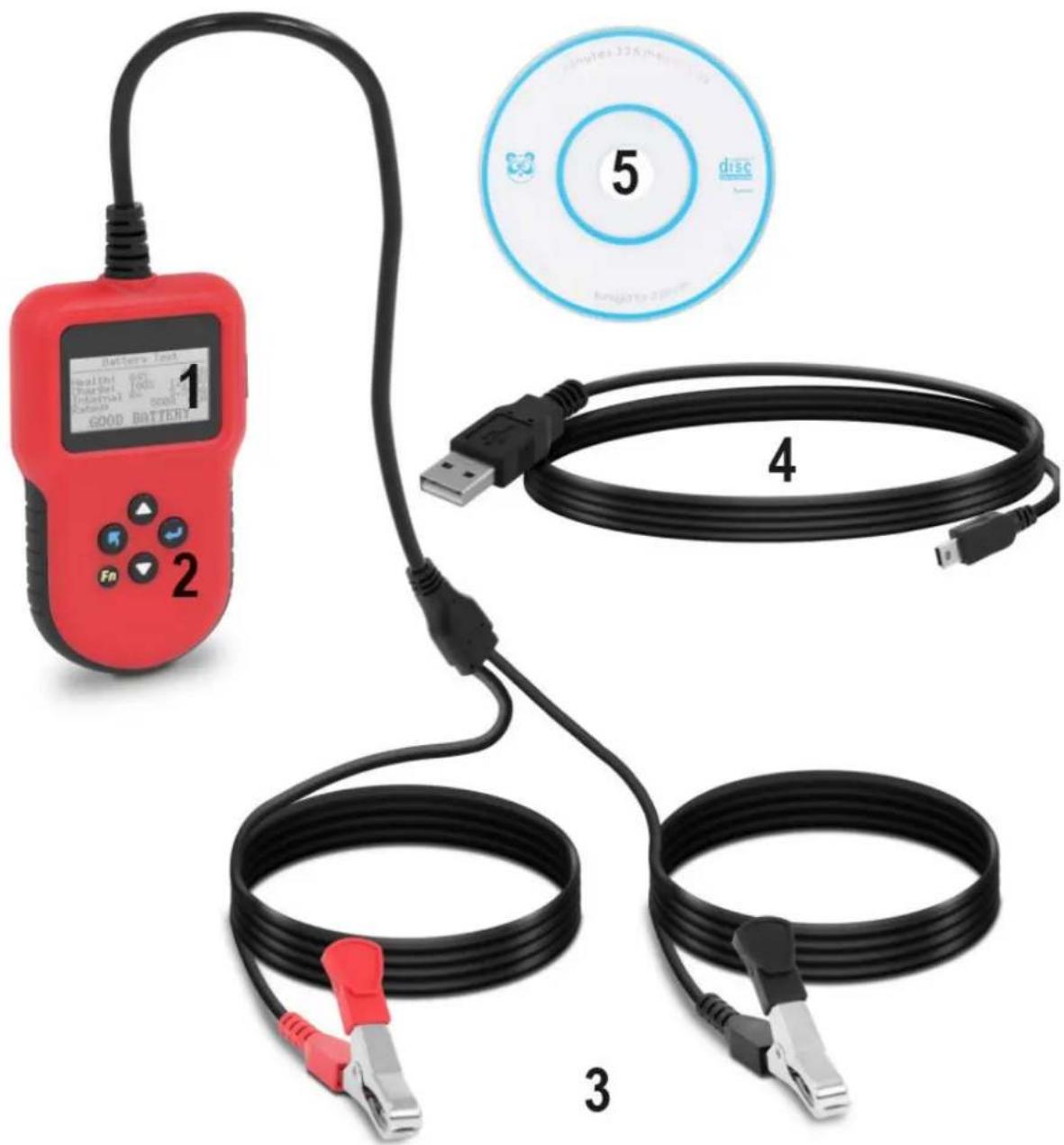
- Display
- Function buttons:
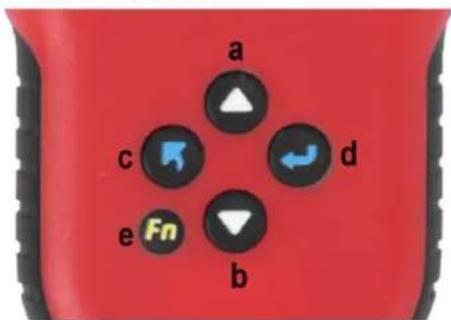
a. Swipe up
b. Swipe down
c.Exit
d. Enter
e. Multifunction
3. Clamps
- red clamp - connected to the positive pole
- black clamp - connected to the negative pole
4. USB cable
5. Software
3.2. Device use
Positioning the device:
The ambient temperature must not exceed 40^ and ambient humidity should not exceed 85% . Place the unit in a way that ensures good air circulation. Place the device in a way that ensures good air circulation. Keep the device away from any hot surfaces, flammable materials and electromagnetic fields. Always operate the unit on a level, stable, clean, fireproof and dry surface and out of the reach of children and persons of impaired mental, sensory and intellectual functions.
Before starting work, check the insulation and the general condition of the terminals. Using damaged terminals can lead to serious accidents!
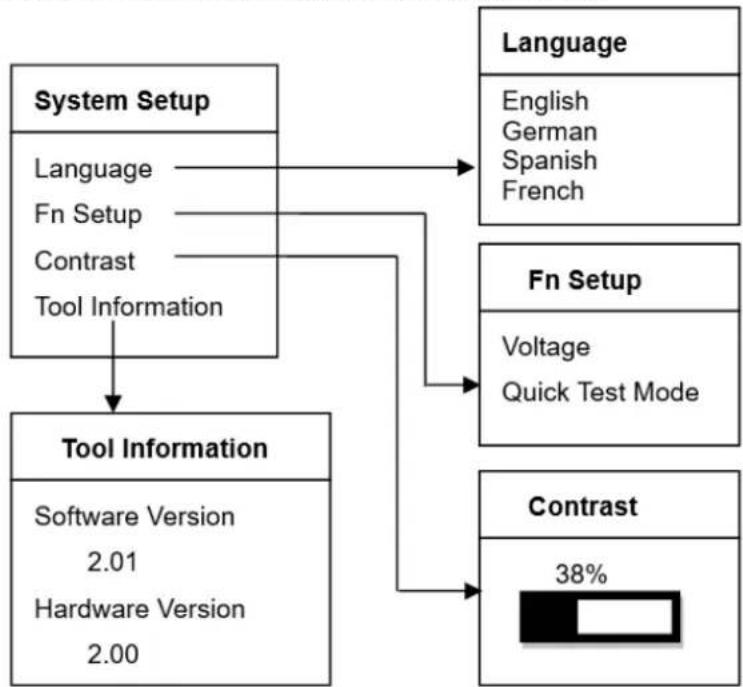
From main menu, select the System Setup and press ENTER.:
1) Language: Selects desired language.
2) Fn Setup: Set the One-Click-Key function: Voltage / Quick Test.
3) Contrast adjustment: Adjusts the contrast of the LCD display.
4) Tool information: The tool shows the software / hardware version.
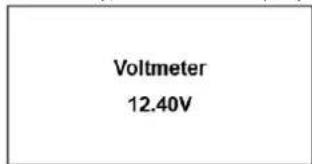
Once the tool is connected to the vehicle battery, the tester displays the battery voltage in real time.
The tester will display the following content when any button is pressed.
Battery test
When the tester detects that the surface charge has been eliminated, switch off the lights as prompted and then press ENTER. The tester will restore the automatic test.
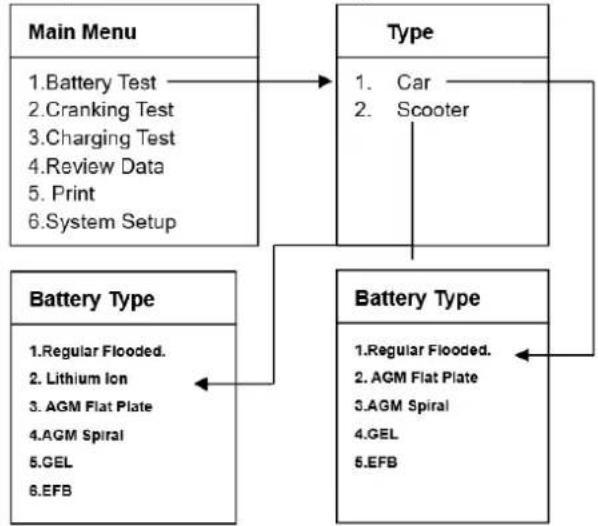
Battery selection for car / scooter
Once the battery test has been selected, the tester will prompt you to select the batteries for your car / scooter. Press the UP/DOWN button to select Car / Scooter and then press the ENTER button to confirm.
Battery type selection
After selecting Car / Scooter, the tester will prompt you to select the battery type, i.e. Regular flooded, lithium-ion, AGM Flat Plate or AGM Spiral, gel and EFB. Press the UP/DOWN button to select the battery type and then press the ENTER button to confirm.
Note: Lithium-ion battery is only found in scooter battery types, not car batteries.
Battery system standard and rating
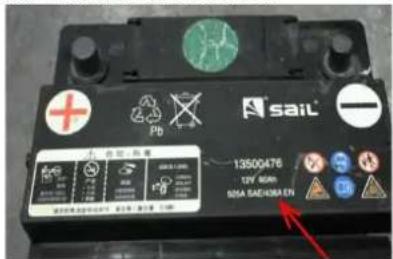
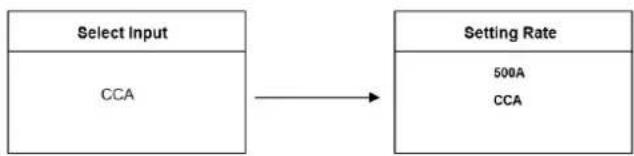
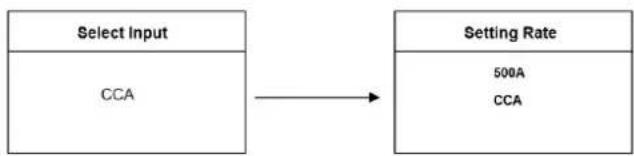
The battery tester will test each battery according to the selected system and rating. Use the UP/DOWN button to select according to the current system standard and rating marked on the battery. In the figure below, the arrow indicates the location.
CCA: Cold Cranking Amps, specified by SAE&BCI, most frequently used value for starting battery at 0^ (-18°C).
BCI: Battery Council International standard
CA: Cranking Amps standard, effective starting current value at 0^
MCA: Marine Cranking Amps standard, effective starting current value at 0^
JIS: Japan Industrial Standard, displayed on the battery as combination of the numbers and letters, e.g. 55D23,80D26.
DIN: German Auto Industry Committee Standard
IEC: Internal Electro technical Commission Standard
EN: European Automobile Industry Association Standard
SAE: Society of Automotive Engineers Standard
GB: China National Standard
It takes approximately 5 seconds for the battery test result to be displayed.
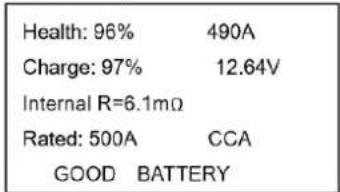
Battery test results:
The battery test result includes the following 5 types:
- Good Battery
- Good, Recharge
- Replace

- Bad Cell
- Charge, Retest
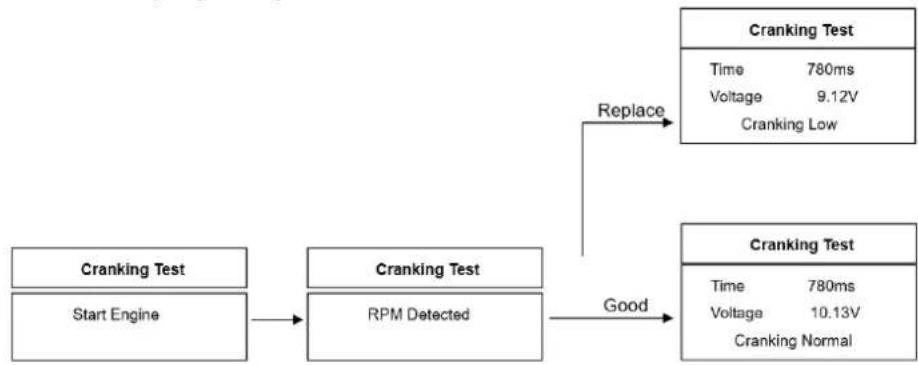
Cramking Test
Tester prompts as following:
Start engine -> RPM Detected -> GOOD -> Cranking Normal
OR
Start engine -> RPM Detected -> REPLACE -> Cranking Normal
Charging Test (Alternator Test)
Tester prompts as following:
Select "Charge test" and press the Enter key to start the charge test.
Note: Do not switch off the engine during the test. Follow the steps in the instructions below.
Ripple Test
Turn off headlights and air conditioning, keep for 10 seconds
Press ENTER to continue
Unloaded Test
Turn off all devices, increase RPM to 2500-3000r/min and keep for 10 seconds
Press ENTER to continue
Loaded Test
Turn on headlights and air conditioning to the max flow, keep RPM idle for 10 seconds
Press ENTER to continue
Once the test is complete, the tester will display the charging voltage at load and no load, the ripple voltage and the result of the charging test.
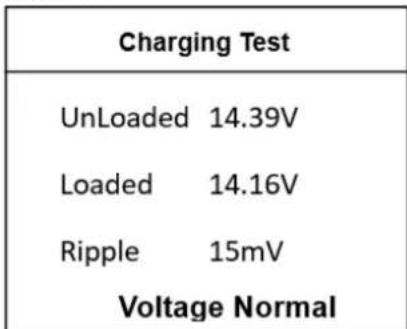
Note: "NO OUTPUT" means the charging system is not working. The vehicle will stop working when the battery runs out. Check the alternator or contact a service center immediately.
Review Data
Select the Review Data function and view the history of the battery test results.
Print Data
Select the Print function and press ENTER.
Before selecting the data print function, it is necessary to connect the device to the computer using the USB cable. When everything is available, insert the CD into the computer.
1) First install the USB driver.
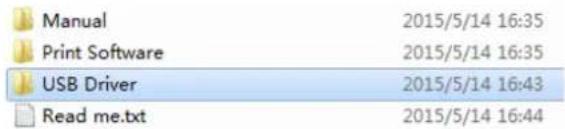
- Select "English" from the available languages.
2) Open the Print software
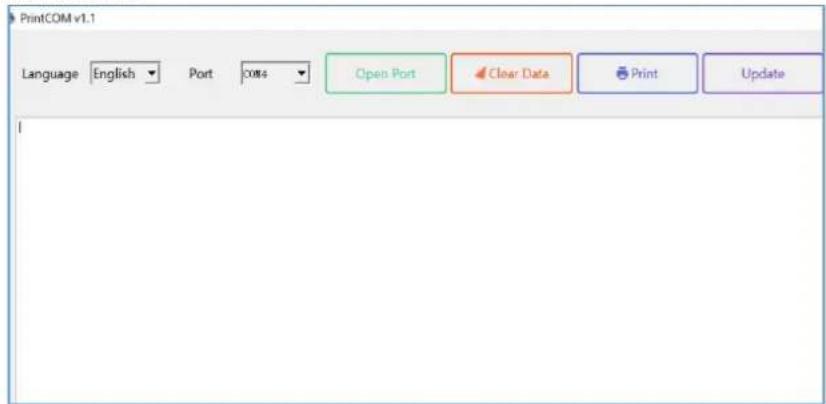
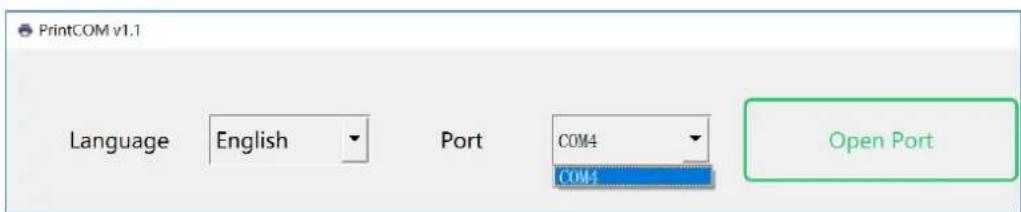
Be sure to select the supported COM port and then select the desired language. The printing software supports multiple languages.
When all settings are complete, click the "Open Port" button.
Note: If you do not click the "Open Port" button, the print software will not display the test result when you press the "Print Data" button on the device.
You will not be able to change the language after clicking the "Open Port" button. The language can only be selected again after clicking the "Close Port" button.
Note: If the printing software has an updated version, when the user opens it, a message will be displayed that an update is possible. Simply click the "Update" button to update the online printing software directly.
3) Select the Print function in the device:
Main Menu
- Battery Test
- Cranking Test
- Charging Test
- Review Data
5.Print
A submenu will then appear, as follows:
Print Data
- Print Battery
- Print Cranking
- Print Charging
- Print All
4) Select the information to be printed.
Once the data has been transferred to the computer, the printing software will display the latest test result information.
The data can be printed using a computer printer.
3.3. Cleaning and maintenance
a) Use only non-corrosive cleaners to clean the surface.
b) After cleaning the device, all parts should be dried completely before using it again.
c) Store the unit in a dry, cool place, free from moisture and direct exposure to sunlight.
d) Do not spray the device with a water jet or submerge it in water.
e) Do not allow water to get inside the device through vents in the housing of the device.
f) The device must be regularly inspected to check its technical efficiency and spot any damage.
g) Use a soft cloth for cleaning.
h) Do not use sharp and/or metal objects for cleaning (e.g. a wire brush or a metal spatula) because they may damage the surface material of the appliance.
i) Do not clean the device with an acidic substance, agents of medical purposes, thinners, fuel, oils or other chemical substances because it may damage the device.
DISPOSING OF USED DEVICES:
Do not dispose of this device in municipal waste systems. Hand it over to an electric and electrical device recycling and collection point. Check the symbol on the product, instruction manual and packaging. The plastics used to construct the device can be recycled in accordance with their markings. By choosing to recycle you are making a significant contribution to the protection of our environment.
Contact local authorities for information on your local recycling facility.

| Ripple Test |
| Turn off headlights and air conditioning, keep for 10 seconds |
| Press ENTER to continue |
| Unloaded Test |
| Turn off all devices, increase RPM to 2500-3000r/min and keep for 10 seconds |
| Press ENTER to continue |
| Loaded Test |
| Turn on headlights and air conditioning to the max flow, keep RPM idle for 10 seconds |
| Press ENTER to continue |
| Charging Test | |
| UnLoaded | 14.39V |
| Loaded | 14.16V |
| Ripple | 15mV |
| Voltage Normal | |
| Main Menu |
| 1. Battery Test |
| 2. Cranking Test |
| 3. Charging Test |
| 4. Review Data |
| 5. Print |
Pojawi sie nastepujuce podmenu:
| Print Data |
| 1. Print Battery 2. Print Cranking 3. Print Charging 4. Print All |
BCI: Mezinarodni standard Battery Council
CA: Standardni startovaci ampery, efektivn hodnota startovacho proudu pri 0^
MCA: Marine Cranking Amps standard, efektivni hodnota startovaciho proudu pri 0^
JIS: Japan Industrial Standard, zobrañén y na baterii jako kombinace cisel a pismen, napr. 55D23,80D26.
SAE: Standard Society of Automotive Engineers
- Battery Test
- Cranking Test
- Charging Test
- Review Data
5.Print
- Print Battery
- Print Cranking
- Print Charging
- Print All
| Charging Test | |
| UnLoaded | 14.39V |
| Loaded | 14.16V |
| Ripple | 15mV |
| Voltage Normal | |
| Main Menu |
| 1. Battery Test |
| 2. Cranking Test |
| 3. Charging Test |
| 4. Review Data |
| 5. Print |
| Print Data |
| 1. Print Battery 2. Print Cranking 3. Print Charging 4. Print All |
| Health: 96% | 490A |
| Charge: 97% | 12.64V |
| Internal R=6.1mΩ | |
| Rated: 500A | CCA |
| GOOD BATTERY | |
- Bien, recarga
| Health: 78% | 440A |
| Charge: 31% | 12.20V |
| Internal R=7.2mΩ | |
| Rated: 500A | CCA |
| GOOD, RECHARGE | |
- Reemplazar.
| Health: 8% | 144A |
| Charge: 99% | 12.68V |
| Internal R=18.1mΩ | |
| Rated: 500A | CCA |
| REPLACE | |
- cellular malo
| Health: 10% | 165A |
| Charge: 0% | 9.97V |
| Internal R=17.83mΩ | |
| Rated: 500A | CCA |
| BAD CELL | |
- Cargar, volver a probar
| Health: 39% | 310A |
| Charge: 12% | 12.08V |
| Internal R=30.1mΩ | |
| Rated: 500A | CCA |
| CHARGE-RETEST | |
Prueba de arranque
El probador indica lo suiviente:
Arrancar el motor -> RPM detectadas -> BUENO -> Arranque normal
0
Arrancar el motor -> RPM detectadas -> REEMPLAZAR -> Arranque normal
| Charging Test | |
| UnLoaded | 14.39V |
| Loaded | 14.16V |
| Ripple | 15mV |
| Voltage Normal | |
| Main Menu |
| 1. Battery Test |
| 2. Cranking Test |
| 3. Charging Test |
| 4. Review Data |
| 5. Print |
| Print Data |
| 1. Print Battery 2. Print Cranking 3. Print Charging 4. Print All |
SAE: Society of Automotive Engineers szabvány
| Charging Test | |
| UnLoaded | 14.39V |
| Loaded | 14.16V |
| Ripple | 15mV |
| Voltage Normal | |
| Main Menu |
| 1. Battery Test |
| 2. Cranking Test |
| 3. Charging Test |
| 4. Review Data |
| 5. Print |
| Print Data |
| 1. Print Battery 2. Print Cranking 3. Print Charging 4. Print All |
OBS! Giftige stoffer, fare for forgiving!

BCI: Battery Council International standard
SAE: Society of Automotive Engineers Standard
GB: Kinas nationale standard
| Health: 96% | 490A |
| Charge: 97% | 12.64V |
| Internal R=6.1mΩ | |
| Rated: 500A | CCA |
| GOOD BATTERY | |
- Godt, genoplad
| Health: 78% | 440A |
| Charge: 31% | 12.20V |
| Internal R=7.2mΩ | |
| Rated: 500A | CCA |
| GOOD, RECHARGE | |
- Udskift.
| Health: 8% | 144A |
| Charge: 99% | 12.68V |
| Internal R=18.1mΩ | |
| Rated: 500A | CCA |
| REPLACE | |
- Darlig celle
| Health: 10% | 165A |
| Charge: 0% | 9.97V |
| Internal R=17.83mΩ | |
| Rated: 500A | CCA |
| BAD CELL | |
- Oplad, testigen
| Health: 39% | 310A |
| Charge: 12% | 12.08V |
| Internal R=30.1mΩ | |
| Rated: 500A | CCA |
| CHARGE-RETEST | |
Starttest
Testeren sporger som folger: Start motoren Omdrejningstal registraret GOD Start normal
ELLER
Start motoren -> Omdrejningstal registreret -> Udskift -> Start normal
- Battery Test
- Cranking Test
- Charging Test
- Review Data
5.Print
Derefter vises en undermenu som fIgler:
Print Data
- Print Battery
- Print Cranking
- Print Charging
- Print All
IEC: Internal Electro Technical Commission Standard
FI: European Automobile Industry Association -standardi
SAE: Automotive Engineers Standard -yhdistys
| Health: 96% | 490A |
| Charge: 97% | 12.64V |
| Internal R=6.1mΩ | |
| Rated: 500A | CCA |
| GOOD BATTERY | |
- Hyvä, lataa
| Health: 78% | 440A |
| Charge: 31% | 12.20V |
| Internal R=7.2mΩ | |
| Rated: 500A | CCA |
| GOOD, RECHARGE | |
- Korvata
| Health: 8% | 144A |
| Charge: 99% | 12.68V |
| Internal R=18.1mΩ | |
| Rated: 500A | CCA |
| REPLACE | |
- Huono solu
| Health: 10% | 165A |
| Charge: 0% | 9.97V |
| Internal R=17.83mΩ | |
| Rated: 500A | CCA |
| BAD CELL | |
| Health: 39% | 310A |
| Charge: 12% | 12.08V |
| Internal R=30.1mΩ | |
| Rated: 500A | CCA |
| CHARGE-RETEST | |
Kännistystesti
- Battery Test
- Cranking Test
- Charging Test
- Review Data
5.Print
- Print Battery
- Print Cranking
- Print Charging
- Print All
SAE: standard della Society of Automotive Engineers
| Charging Test | |
| UnLoaded | 14.39V |
| Loaded | 14.16V |
| Ripple | 15mV |
| Voltage Normal | |
| Main Menu |
| 1. Battery Test |
| 2. Cranking Test |
| 3. Charging Test |
| 4. Review Data |
| 5. Print |
| Print Data |
| 1. Print Battery 2. Print Cranking 3. Print Charging 4. Print All |
| Charging Test | |
| UnLoaded | 14.39V |
| Loaded | 14.16V |
| Ripple | 15mV |
| Voltage Normal | |
| Main Menu |
| 1. Battery Test |
| 2. Cranking Test |
| 3. Charging Test |
| 4. Review Data |
| 5. Print |
| Print Data |
| 1. Print Battery 2. Print Cranking 3. Print Charging 4. Print All |
ADVARSEL! Giftige stoffer, fare for forgiving!

BCI: Battery Council International standard
CA: Cranking Amps standard, effektiv startströmverdi ved 0^
MCA: Marine Cranking Amps standard, effektiv startstrømverdi ved 0^ .
IEC: Internal Electro technical Commission Standard
EN: European Automobile Industry Association Standard
SAE: Society of Automotive Engineers Standard
Ladetest (generatortest)
| Charging Test | |
| UnLoaded | 14.39V |
| Loaded | 14.16V |
| Ripple | 15mV |
| Voltage Normal | |
Merk: "INGEN OUTPUT" betyr at ladesystemet ikke fungerer. Kjøretøyet slutter ø fungere nr batteriet gå tomt. Sjekk dynamoen eller kontakt et servicesenter umiddelbart.
Gjennomgå data
- Battery Test
- Cranking Test
- Charging Test
- Review Data
5.Print
- Print Battery
- Print Cranking
- Print Charging
- Print All
WARNING! Giffiga ämn, risk for forgiving!

BCI: Battery Council International standard
DIN: German Auto Industry Committee Standard
IEC: Internal Electro technical Commission Standard
EN: European Automobile Industry Association Standard
SAE: Society of Automotive Engineers Standard
GB: Kinas nationella standard
| Charging Test | |
| UnLoaded | 14.39V |
| Loaded | 14.16V |
| Ripple | 15mV |
| Voltage Normal | |
BCI: Padrao internaciondo Battery Council
| Health: 96% | 490A |
| Charge: 97% | 12.64V |
| Internal R=6.1mΩ | |
| Rated: 500A | CCA |
| GOOD BATTERY | |
- Bom, recarregue
| Health: 78% | 440A |
| Charge: 31% | 12.20V |
| Internal R=7.2mΩ | |
| Rated: 500A | CCA |
| GOOD, RECHARGE | |
- SubstituiR
| Health: 8% | 144A |
| Charge: 99% | 12.68V |
| Internal R=18.1mΩ | |
| Rated: 500A | CCA |
| REPLACE | |
- Celula ruim
| Health: 10% | 165A |
| Charge: 0% | 9.97V |
| Internal R=17.83mΩ | |
| Rated: 500A | CCA |
| BAD CELL | |
| Health: 39% | 310A |
| Charge: 12% | 12.08V |
| Internal R=30.1mΩ | |
| Rated: 500A | CCA |
| CHARGE-RETEST | |
Testedepartida
| Charging Test | |
| UnLoaded | 14.39V |
| Loaded | 14.16V |
| Ripple | 15mV |
| Voltage Normal | |
| Main Menu |
| 1. Battery Test |
| 2. Cranking Test |
| 3. Charging Test |
| 4. Review Data |
| 5. Print |
| Print Data |
| 1. Print Battery 2. Print Cranking 3. Print Charging 4. Print All |
| Charging Test | |
| UnLoaded | 14.39V |
| Loaded | 14.16V |
| Ripple | 15mV |
| Voltage Normal | |
Poznamka: "ZIADNY VYSTUP" znamená, ze systém nabijania nefunguje. Vozidlo prestane fungovat, ked' sa vybije bateria. Skontrolujte alternator alebo okamžite kontaktujte servisné stredisko.
Skontrolujte udaje
Zvolte funkciu Review Data a zobrazte historiu vysledkov testov baterie.
Tlač udajov
Vyberte funkciu tlac a stlacte ENTER.
- Battery Test
- Cranking Test
- Charging Test
- Review Data
5.Print
- Print Battery
- Print Cranking
- Print Charging
- Print All
For the disposal of the device please consider and act according to the national and local rules and regulations.
CONTACT
expondo Polska sp. z o.o. sp. k.