
JSP 12-EC C - Saw Flex - Free user manual and instructions
Find the device manual for free JSP 12-EC C Flex in PDF.


| Product Type | Cordless Jigsaw |
| Brand | Flex |
| Model | JSP 12-EC C |
| Rated Voltage | 12 Vdc |
| No-load Speed | 800-3000 spm |
| Blade Stroke | 23 mm |
| Cutting Angle (Bevel) | 0° to 45° (left/right) |
| Max. Cutting Capacity (wood/steel/aluminum) | 90 mm / 10 mm / 20 mm |
| Weight (without battery) | 1.46 kg |
| Compatible Battery | Li-Ion 12 V (AP 12/2.5, AP 12/4.0, AP 12/5.0) |
| Compatible Charger | CA 12/18, CA 12 |
| Orbital Action | 4 positions (0-3) |
| LED Work Light | Yes, with memory function |
| Dust Extraction | Yes, with adapter tube for vacuum cleaner |
| Anti-splinter Guard | Yes, removable |
| Blade Type | T-shank |
| Sound Pressure Level LpA | 85 dB(A) |
| Sound Power Level LWA | 93 dB(A) |
| Vibrations (wood) | 4.0 m/s² |
| Vibrations (sheet metal) | 3.0 m/s² |
| Operating Temperature | -10 to 40 °C |
| Storage Temperature | < 50 °C |
| Overload Safety Shutdown | Yes (internal sensor) |
| Spare Parts and Repairability | Available at www.flex-tools.com |
Frequently Asked Questions - JSP 12-EC C Flex
User questions about JSP 12-EC C Flex
0 question about this device. Answer the ones you know or ask your own.
Ask a new question about this device
Download the instructions for your Saw in PDF format for free! Find your manual JSP 12-EC C - Flex and take your electronic device back in hand. On this page are published all the documents necessary for the use of your device. JSP 12-EC C by Flex.
USER MANUAL JSP 12-EC C Flex
en Original operating instructions....15
natural_image
Technical line drawing of a vehicle chassis with 12V power input and directional arrow (no text or symbols)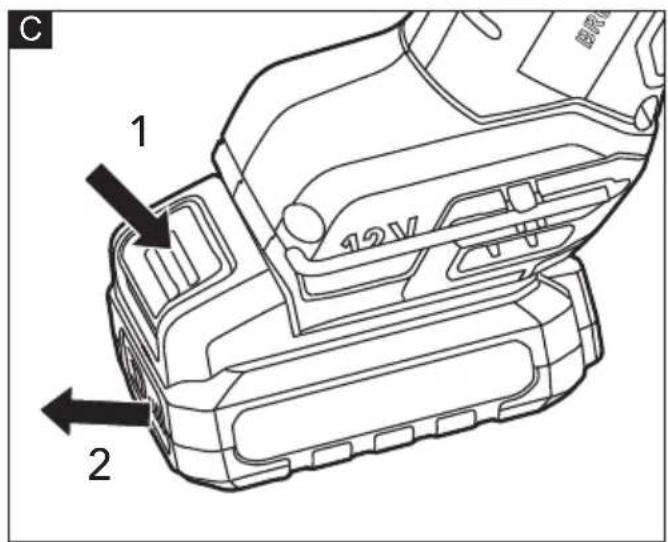
natural_image
Technical line drawing of a Flexible tool with no visible text or symbols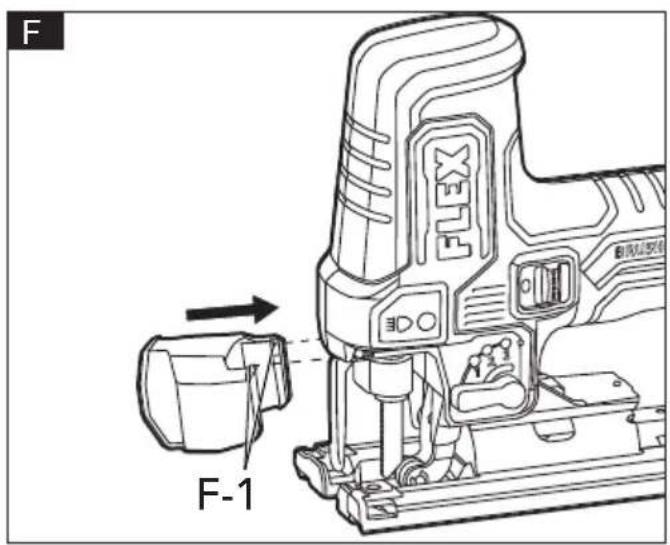
natural_image
Technical line drawing of a mechanical assembly with no visible text or symbols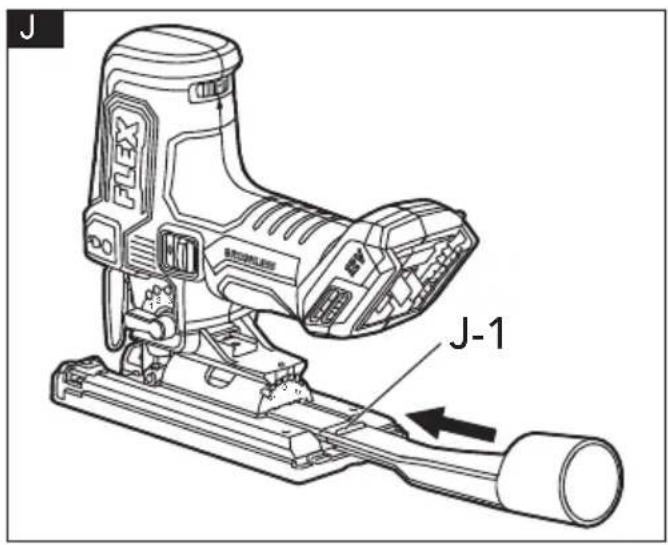
natural_image
Technical line drawing of a mechanical assembly with no visible text or symbols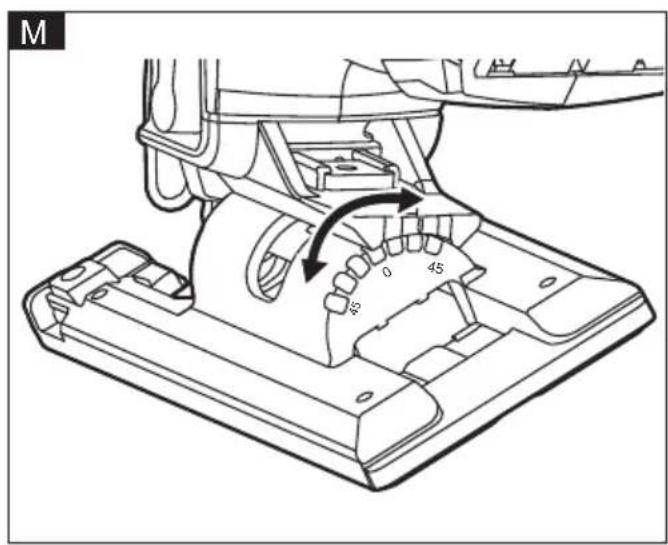
natural_image
Technical line drawing of a mechanical assembly with no visible text or symbols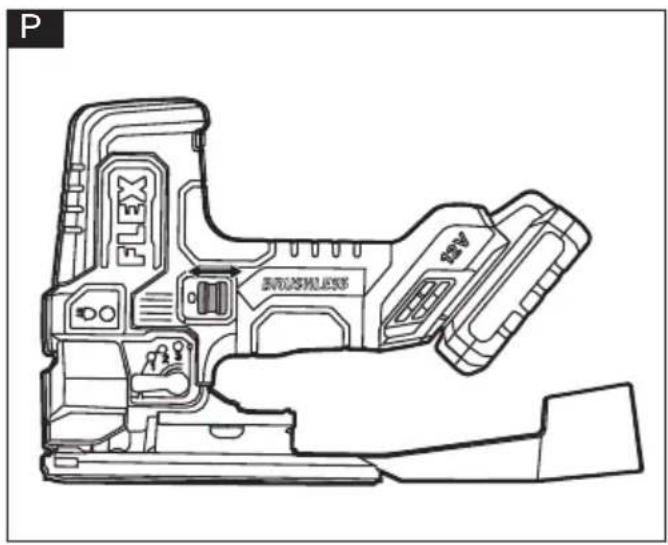
natural_image
Technical line drawing of a mechanical assembly with no visible text or symbols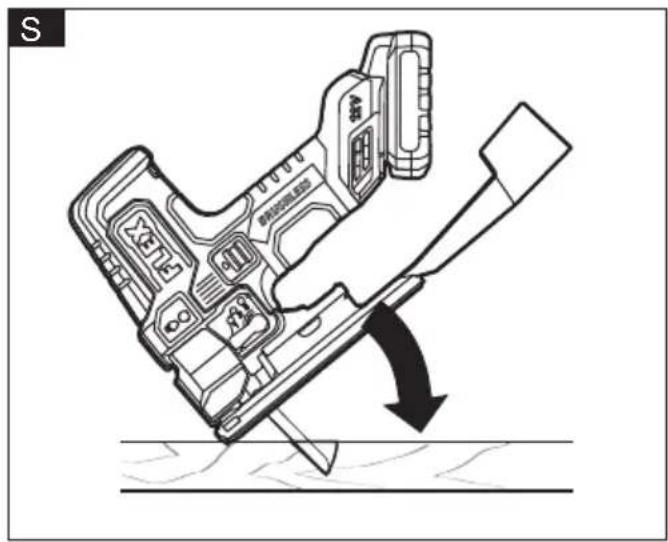
Symbols used in this manual

WARNING!
Denotes impending danger. Non-observance of this warning may result in death or extremely severe injuries.

CAUTION!
Denotes a possibly dangerous situation. Non-observance of this warning may result in slight injury or damage to property.

NOTE
Denotes application tips and important information.
Symbols on the power tool
V Volts

Wear eye protection
/min Rotation rate

Read the instructions
Disposal information for the old machine (see page 20)!
For your safety

WARNING!
Before using the power tool, please read the follow:
– these operating instructions,
- the "General safety instructions" on the handling of power tools in the enclosed booklet (leaflet-no.: 315.915),
– the currently valid site rules and the regulations for the prevention of accidents.
This power tool is state of the art and has been constructed in accordance with the acknowledged safety regulations.
Nevertheless, when in use, the power tool
may be a danger to life and limb of the user or a third party, or the power tool or other property may be damaged.
The cordless jig saw may be used only
-asintended,
- in perfect working order.
Faults which impair safety must be repaired immediately.
Intended use
The cordless jig saw is intended
– for commercial use in industry and trade,
- for making cutting in wood, plastic, metal and is suitable for straight and curved cuts.
Safety instructions for jig saw

WARNING!
Read all safety warnings, instructions, illustrations and specifications provided with this power tool. Failure to follow all instructions listed below may result in electric shock, fire and/or serious injury. Save all warnings and instructions for future reference.
- Hold the power tool by insulated gripping surfaces, when performing an operation where the cutting accessory may contact hidden wiring. Cutting accessory contacting a "live" wire may make exposed metal parts of the power tool "live" and could give the operator an electric shock.
■ Use clamps or another practical way to secure and support the workpiece to a stable platform. Holding the workpiece by hand or against your body leaves it unstable and may lead to loss of control. - Keep hands away from cutting area. Do not reach under the material being cut.
The proximity of the blade to your hand is hidden from your sight.
■ Do not use dull or damaged blades. Bent blade can break easily or cause kickback.
■ Always wait until the power tool has come to a complete stop before placing it down. The application tool can jam and cause you to lose control of the power tool.
■ When removing the blade from the tool avoid contact with skin and use proper protective gloves when grasping the blade or accessory. Accessories may be hot after prolonged use.
Noise and vibration
The noise and vibration values have been determined in accordance with EN 62841.
The A evaluated noise level of the power tool is typically:
- Sound pressure level L_pA : 85 dB(A)
- Sound power level L_WA : 93 dB(A)
- Uncertainty: K = 5 dB
Total vibration value:
- Emission value a_h (cutting boards): 4.0 m/s
- Emission value a_h (cutting sheet metal): 3.0 m/s
- Uncertainty: K = 1.5 m/s ^2

CAUTION!
The indicated measurements refer to new power tools. Daily use causes the noise and vibration values to change.

NOTE
The declared vibration total value(s) and the declared noise emission level given in this information sheet has been measured in accordance with a measurement method standardized in EN 62841 and may be used to compare one tool with another.
It may be used for a preliminary assessment of exposure. The specified vibration emission level represents the main applications of the tool.
However, if the tool is used for different applications, with different cutting accessories or poorly maintained, the vibration emission level may differ.
This may significantly increase the exposure level over the total working period.
To make an accurate estimation of the vibration exposure level, it is also necessary to take into account the times when the tool is switched off or running but not actually in use.
This may significantly decrease the exposure level over the total working period.
Identify additional safety measures to protect the operator from the effects of vibration such as: maintain the tool and the cutting accessories, keep the hands warm, organization of work patterns.

WARNING:
The vibration and noise emissions during actual use of the power tool can differ from
the declared value in which the tool is used; In order to protect the operator, user should wear gloves and ear protectors in the actual conditions of use.

CAUTION!
Wear ear defenders at a sound pressure above 85 dB(A).
Technical data
| Tool JSP 12-EC | |||
| Type Jig Saw | |||
| Rated voltage Vdc 12 | |||
| Speed spm 800-3000 | |||
| Stroke length mm 23 | |||
| Cutting angle (left/right) | ° | 0°-45° | |
| Max.sawing capacity in wood in aluminium in metal | mm | 902010 | |
| Weight according to"EPTA Procedure 01/2003" (without battery) | kg | 1.46 | |
| Battery | 12V | AP 12/2.5AP 12/4.0AP 12/5.0 | |
| Weight of battery | kg | AP 12/2.5AP 12/4.0AP 12/5.0 | 0.30.40.4 |
| Working temperature | -10-40°C | ||
| Storage temperature | < 50°C | ||
| Charging temperature | 4-40°C | ||
| Charger | CA 12/18, CA 12 | ||
Overview (see figure A)
The numbering of the product features refers to the illustration of the machine on the graphics page.
- LED worklight switch
- Blade holder
- LED worklight
- Guide roller
- Base
- Orbital control lever
- On/off switch
- Speed adjusting dial
- Handle
- Hex key
- Dust extraction tube
- Transparent cover
- Anti-splinter guard
- Cover plate
Operating instructions

WARNING!
Remove the battery before carrying out any work on the power tool.
Before switching on the power tool
Unpack the cordless jig saw and check that here are no missing or damaged parts.

NOTE
The batteries are not fully charged on delivery. Prior to initial operation, charge the batteries fully. Refer to the charger operating manual.
Inserting/replacing the battery
■ Press the charged battery into the power tool until it clicks into place (see figure B).
■ To remove, press the release button (1.) and pull out the battery (2.) (see figure C).

CAUTION!
When the device is not in use, protect the battery contacts. Loose metal parts may short circuit the contacts, explosion and fire hazard!
Install and remove the saw blade (see figure D&E)

CAUTION!
Always turn the tool off and remove the battery pack before making any adjustments or assembling parts.

NOTE
This jig saw uses only T-shank jig saw blade.
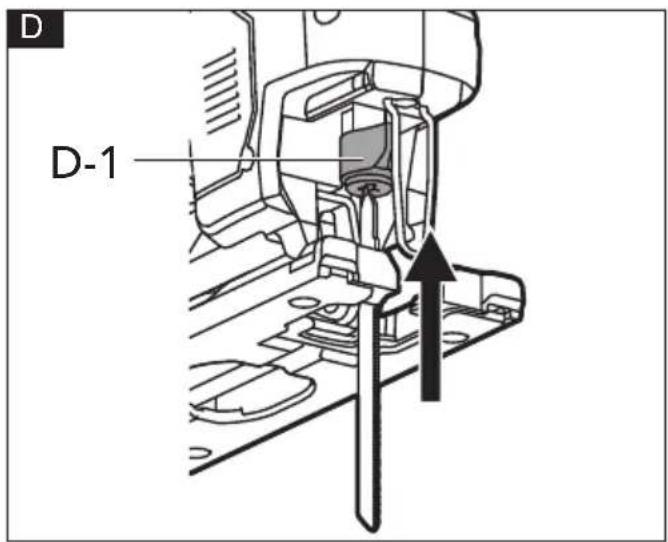
Before installing the jig saw blade, make sure that the blade clamp lever (D-1) is in the released position.
To install the saw blade
■ Insert the blade (with its teeth facing the cutting direction) into the slot of the blade holder (2) as far as it can go (see figure D).
■ The lever moves to the fixed postion and the blade is locked. Make sure that the back edge of the blade fits into the guide roller (4).
■ Pull down the blade lightly to make sure that the blade is securely locked in place.
To remove the saw blade
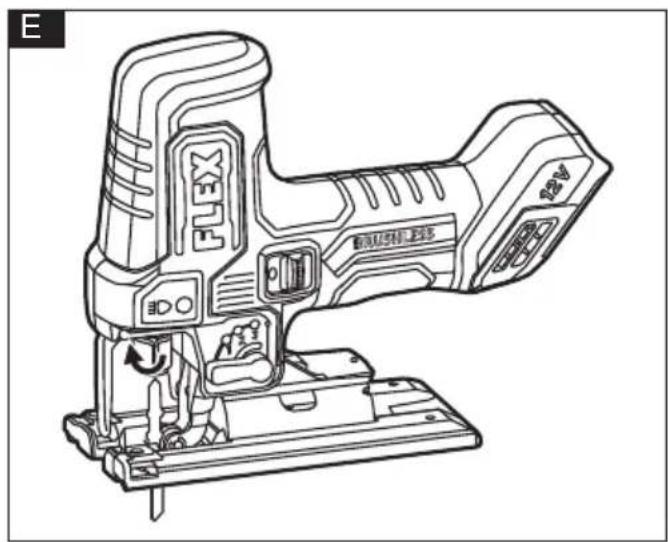
■ Rotating the blade clamp lever (D-1) clockwise and remove the saw blade (see figure E).
■ Release the blade clamp lever.
■ If the transparent cover is installed, flip the cover upward or remove it before removing the saw blade.

WARNING
Do not touch used blade, it may be hot. Personal injury may result.
Transparent cover (see figure F)
To install the cover
■ Remove the battery.
■ Place the transparent cover (12) in front of the saw until the guard tabs (F-1) snap into the holes on the jig saw.
To remove the cover
■ Pull the transparent cover (12) outwards and disengage it from the holes on the jig saw to remove it.
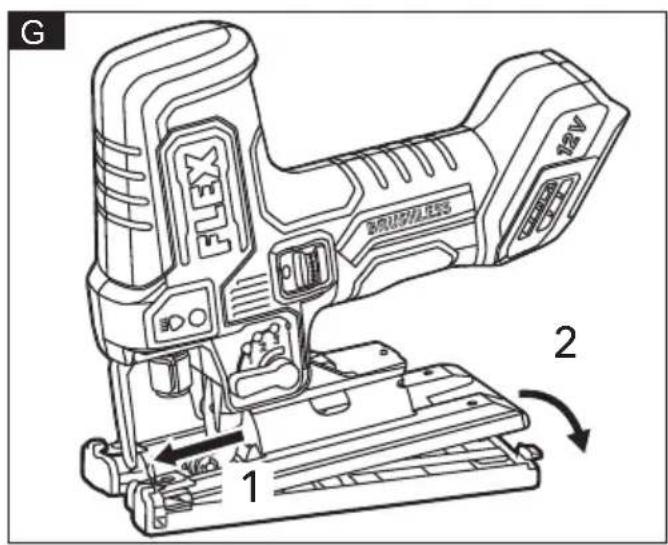
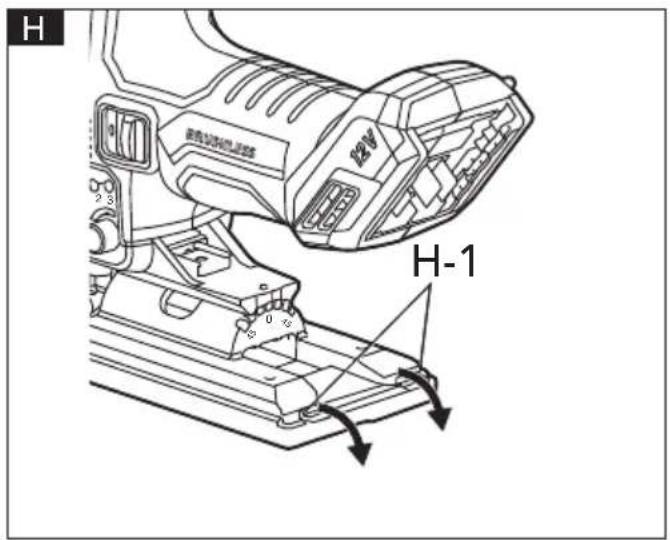
Install and remove the cover plate (see figure G&H)
To install the cover plate
■ Remove the battery.
■ Hook the cover plate (14) to the front of the base (see figure G).
■ Push the cover plate (14) down at the back and allow it to click into place.
To remove the cover plate
■ Press the tabs (H-1) on the back of cover
plate (14) down and remove the cover plate (see figure G).
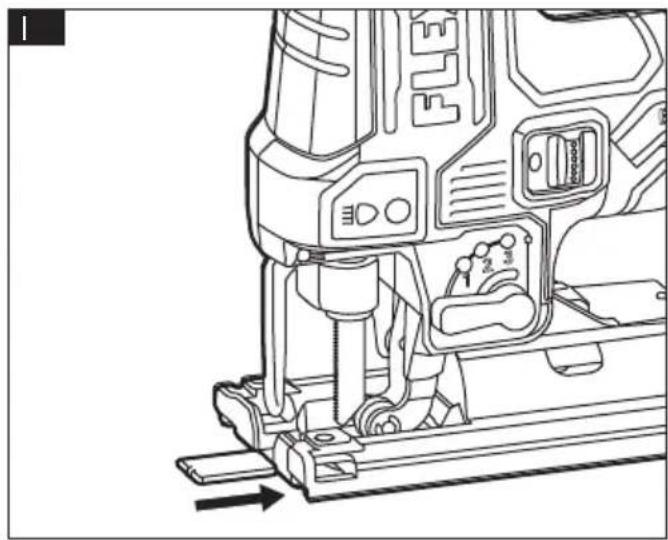
Anti-splinter guard (see figure I) i NOTE
Do not use the anti-splinter guard (13) when making bevel/angle cuts.
To install the anti-splinter guard
■ Remove the battery.
■ Insert the anti-splinter guard (13) into the cover plate (14) from the front, but not far enough to touch the blade.
■ Attach the battery pack.
■ Turn the saw on and press the front of the anti-splinter guard (13) against a workbench to allow the saw blade to cut into the guard (13) as it slides the rest of the way into the cover plate (14).
To remove the anti-splinter guard
■ Turn off the jig saw and remove the battery.
■ Remove the saw blade and pull out the anti-splinter guard (13) directly.
Dust extraction tube (see figure J)
To install the dust extraction tube
■ Remove the battery.
■ Insert the dust extraction tube (11) into the opening at the rear of the jig saw until the rib (J-1) on the tube hits the jig saw.
To remove the dust extraction tube
■ Lift the end of the dust extraction tube (11) upwards and pull out to remove it.
■ The dust extraction tube (11) can be connected to a vacuum adapter (sold separately).
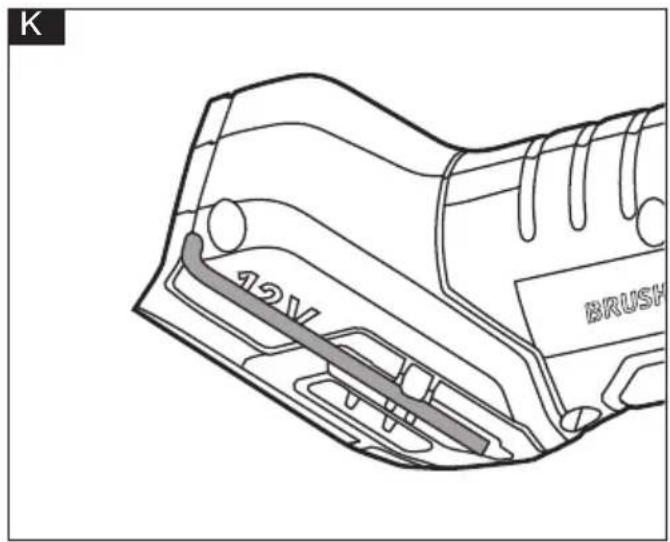
Hex key storage (see figure K)
■ When not in use, store the hex key (10) as shown in the figure K to keep it from being loss.
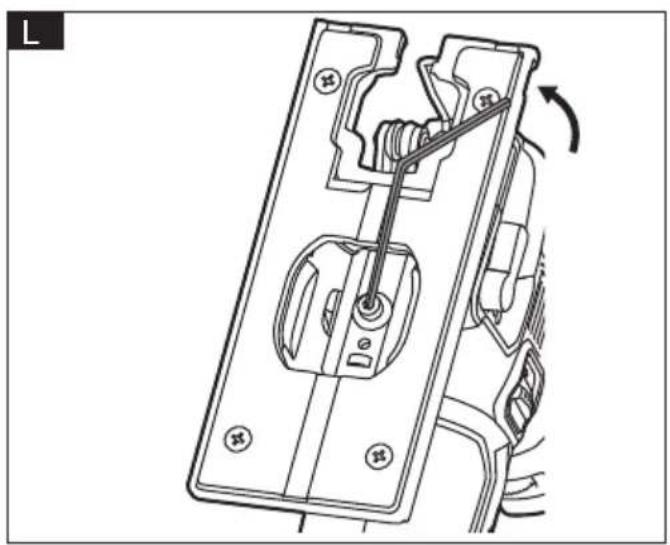
Adjust the bevel angle (see figure L&M)
Before adjusting the bevel angle of the base, remove dust extraction tube (11) and anti-splinter guard (13) if used.
The base can be tilted at 0^ to 45^ (left or right) for bevel setting.
i NOTE
To set the bevel angle
■ Remove the battery.
■ Turn the tool upside down and use the hex key(10) to loosen hex screw (L-1) by turning it counterclockwise.
■ Push the base (5) slightly towards the front of the tool and tilt it to the desired angle ( 0^ - 45^ ) by using the scale that is marked on the bracket. Then push the base slightly towards the back of the tool and tighten the hex screw (L-1) by turning it clockwise.
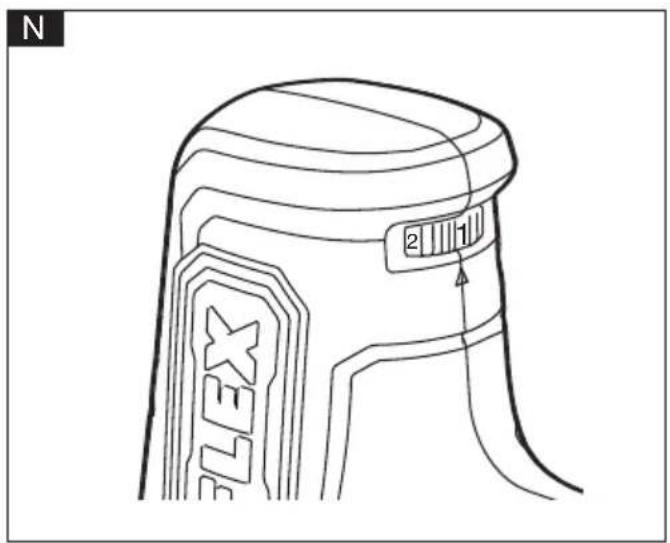
Speed adjusting dial (see figure N)
The tool speed can be adjusted by turing the speed adjusting dial (8). You can get the highest speed at 5 and the lowest speed at 1. Refer to the table to select the proper speed for the work piece to be cut. However, the appropriate speed may differ with the type or thickness of the workpiece. In general, higher speeds will allow you to cut workpieces faster but the service life of the blade will be reduced.
When the speed adjusting dial (8) is in the position A, the tool automatically reduces the no-load speed to reduce the vibration under no-load. Once the tool gets load, the tool speed reaches the highest value.
| Workpiece Number | |
| Wood | 4-5 |
| Mild steel 3-5 | |
| Stainless steel 3-4 | |
| Aluminum 3-5 | |
| Plastics 1-4 |
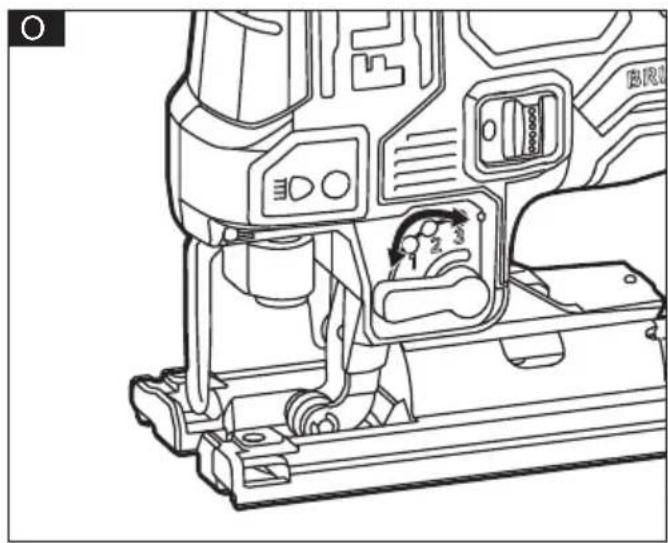
Orbital action settings (see figure O)
The tool is equipped with four orbital-action settings for optimal adaptation to the cutting speed, cutting capacity, cutting pattern, and the material being sawed.
The orbital action can be adjusted with the orbital control lever (6).
The optimal orbital action setting for the respective application can be determined through practical testing. The following recommendations apply:
| Position Cutting action Application | ||
| 0 Straight line | cutting action For cutting mild | steel, stainless steel and plastics. For clean cuts in wood and plywood. |
| 1 Low orbital | action For cutting mild steel, aluminum and hard wood. | |
| 2 Medium orbital | action For cutting wood and plywood. For fast cutting in aluminum and mild steel. | |
| 3 Maximum orbital | action For fast cutting in wood and plywood. | |
Switch on and off (see figure P)
Switching ON: push the on/off switch (7) forward and release.
Switching OFF: push the on/off switch(7) backward and release.
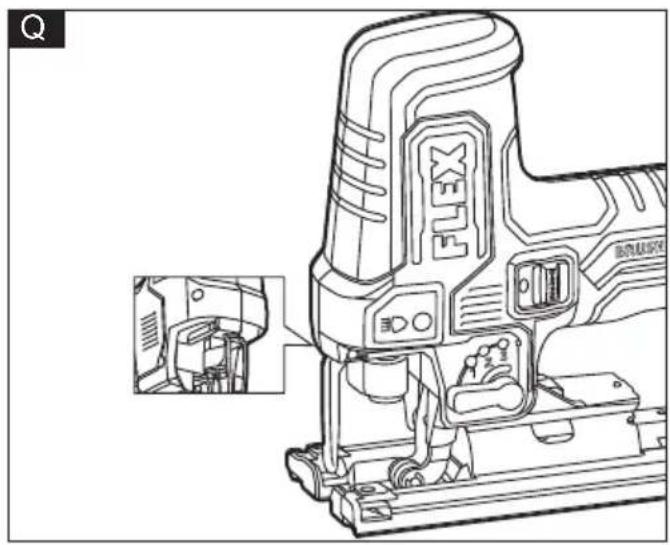
LED worklight (see figure Q)
Your tool is equipped with a LED worklight (3) located on the front of the tool.
Install the battery, switch the jig saw on and press the LED worklight switch (1) to turn on the LED worklight (3).
It will turn off approximately 2 seconds after the on/off switch (7) is turned off.
The LED worklight (3) features a memory function with saving the last setting.
The LED worklight (3) will rapidly flash when the tool and/or battery pack becomes overloaded or too hot, and the internal sensors will turn the tool off. Rest the tool for a while or place the tool and battery pack separately under air flow to cool them.
The LED worklight (3) will flash more slowly to indicate that the battery is at low-battery capacity. Recharge the battery pack.
If the LED worklight (3) fails to light up when you switch on the tool, or it turns off suddenly during your operation, it may be caused by the internal communication error. Please contact customer service or an authorized service center for assistance.
Cutting tips

WARNING!
Before attaching the battery onto the tool, always check to determine that the switch performs properly and returns to the "OFF" position when released.

WARNING!
Always wear safety goggles or safety glasses with side shields during power tool operation
or when blowing dust. If operation is dusty, also wear a dust mask.

WARNING!
To avoid loss of control and serious injury, make sure that the blade reaches the full desired speed before touching it to the workpiece.
Face the good side of the material down and secure it in a bench vise, or clamp it down.
Draw cutting lines or designs on the side of the material facing towards you. Place the front edge of the saw base on the workpiece and align the blade with the line to be cut.
Hold the jigsaw firmly, turn it on, and press down to keep the saw base flat against the work as you slowly push the saw into the workpiece in the direction of the cut.
Gradually increase the cutting speed, cutting close to the line (unless you want to leave stock for finish sanding). You may have to adjust or relocate the vise or clamps as you cut to keep the work stable. Do not force the saw, or the blade teeth may rub and wear without cutting and the blade may break. Let the saw do most of the work. When following curves, cut slowly so that the blade can cut across the grain. This will give you an accurate cut and will prevent the blade from wandering.
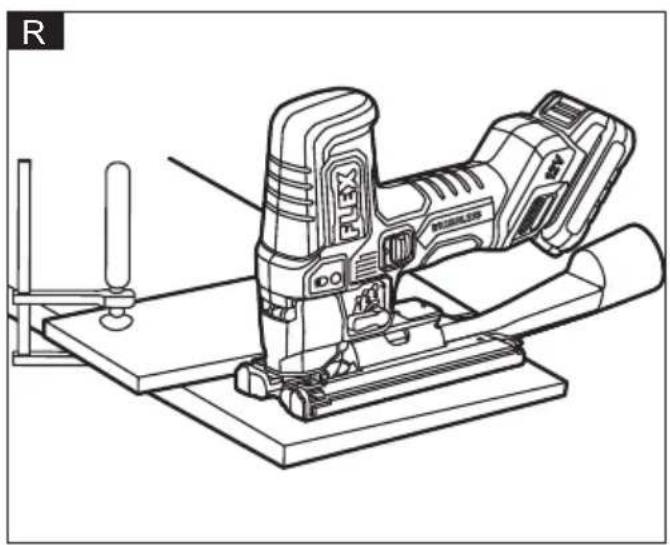
Cutting with a straightedge (see figure R)
Always use a rough-cut blade when possible. Clamp a straightedge onto the workpiece parallel to the line of cut and flush with the side of the base.
First mark the line of cut and then position the straightedge parallel and at the same distance as between the blade and the side edge of the base or first mark the side edge of the base and then clamp the straightedge on the mark and parallel to the cut line.
As you cut, keep the base edge flush against the straightedge and flat on the workpiece.
Plunge cutting(see figure S)
NOTE
We do not recommend plunge cutting with a scroll blade.
WARNING!
Do not plunge cut into metal surfaces.
Plunge cutting is useful and time-saving in making rough openings in softer materials. It is not necessary to drill a hole for an inside or pocket cut.
Draw lines for the opening.
Hold the saw firmly and tilt it forward so that the toe of the saw base rests on the work, but with the blade remains well clear of the work. Start the motor, and then very gradually lower the blade while keeping the toe on the workpiece. When the blade touches the work, continue pressing down on the toe of the saw base and slowly pivot the saw like a hinge until the blade cuts through and the base rests flat on the work.
Saw ahead on the line of cut line.
To make sharp corners, cut up to the corner, then stop the saw and back up slightly before rounding the corner. After the opening is complete, go back to each corner and cut it from the opposite direction to square it off.
Metal cutting
WARNING!
Never use the wood-cutting blade for cutting metals. Failure to do so could result in serious personal injury.
Clamp the material when cutting metal. Be sure to move the saw along slowly.
Use lower speeds.
Do not twist, bend, or force the blade. If the saw jumps or bounces, use a blade with finer teeth.
If the blade seems clogged when cutting soft metal, use a blade with coarser teeth.
For easier cutting, lubricate the blade with a stick of cutting wax, if available, or with cutting oil when cutting steel.
Thin metal should be sandwiched between two pieces of wood or tightly clamped onto a single piece of wood (wood on top of the metal). Draw the cut lines or design on the upper piece of wood.
When cutting aluminum extrusion or angle iron, clamp the work in a bench vise and saw close to the vise jaws.
When sawing tubing and the diameter is larger than the blade is deep, cut through the wall of the tubing and then insert the blade into the cut, rotating the tube as you saw.
Maintenance and care
WARNING!
Remove the battery before carrying out any work on the power tool.
Cleaning
■ Clean the power tool and grille in front of the vent slots regularly. Frequency of cleaning is dependent on the material and duration of use.
■ Regularly blow out the housing interior and motor with dry compressed air.
Spare parts and accessories
For other accessories, in particular tools and polishing aids, see the manufacturer's catalogues.
Exploded drawings and spare-part lists can be found on our homepage:
www.flex-tools.com
Disposal information
WARNING!
Render redundant power tools unusable:
- battery operated power tool by removing the battery.
EU countries only Do not throw electric power tools into the household waste!
In accordance with the European Directive 2012/19/EU on Waste Electrical and Electronic Equipment and transposition into national law used electric power tools must be collected separately and recycled in an environmentally friendly manner.
Raw material recovery instead of waste disposal.
Device, accessories and packaging should be recycled in an environmentally friendly manner. Plastic parts are identified for recycling according to material type.

WARNING!
Do not throw batteries into the household waste, fire or water. Do not open used batteries.
EU countries only:
In accordance with Directive 2006/66/EC defective or used batteries must be recycled.

NOTE
Please ask your dealer about disposal options!
C €-Declaration of conformity
We declare on our sole responsibility that the product described in "Technical specifications" conforms to the following standards or normative documents:
EN 62841 in accordance with the regulations of the directives 2014/30/EU, 2006/42/EC, 2011/65/EU.
Responsible for technical documents:
Technical Director Head of Quality
Department (QD)
Declaration of Conformity
We as the manufacturer: FLEX
declare under our sole responsibility, that the product(s) described under „Technical specifications“ fulfills all the relevant provisions of The Supply of Machinery
(Safety) Regulations S.I. 2008/1597 and also fulfills all the relevant provisions of the following UK Regulations:
Electromagnetic Compatibility Regulations S.I. 2016/1091, The Restriction of the Use of Certain Hazardous Substances in Electrical and Electronic Equipment Regulations
S.I. 2012/3032 and are manufactured in accordance with the following designated Standards:
BS EN 62841-1:2015+A11:2022
BS EN 62841-2-11:2016+A1:2018
BS EN IEC 55014-1:2021
BS EN IEC 55014-2:2021
Place of declaration: Steinheim, Germany.
Responsible person: Peter Lameli, Technical Director - FLEX-Elektrowerkzeuge GmbH
Contact details for Great Britain: FLEX Power Tools Limited, Unit 8 Anglo Office Park, Lincoln Road, HP 12, 3RH Buckinghamshire, United Kingdom.
Peter Lameli Klaus Peter Weinper
Technical Director Head of Quality
Department (QD)
1.11.2023
Exemption from liability
The manufacturer and his representative are not liable for any damage and lost profit due to interruption in business caused by the product or by an unusable product.
The manufacturer and his representative are not liable for any damage which was caused by improper use of the product or by use of the product with products from other manufacturers.
Quality Department (QD)
| Workpiece Number | |
| Wood | 4-5 |
| Mild steel 3-5 | |
| Stainless steel 3-4 | |
| Aluminum 3-5 | |
| Plastics 1-4 |
Technical Director Head of Quality
Department (QD)

- Symbols used in this manual
- WARNING!
- CAUTION!
- NOTE
- Symbols on the power tool
- For your safety
- Intended use
- Safety instructions for jig saw
- Noise and vibration
- WARNING:
- Overview (see figure A)
- Operating instructions
- Before switching on the power tool
- Inserting/replacing the battery
- Install and remove the saw blade (see figure D&E)
- To install the saw blade
- To remove the saw blade
- WARNING
- Transparent cover (see figure F)
- To install the cover
- To remove the cover
- Install and remove the cover plate (see figure G&H)
- To install the cover plate
- To remove the cover plate
- Anti-splinter guard (see figure I) i NOTE
- To install the anti-splinter guard
- To remove the anti-splinter guard
- Dust extraction tube (see figure J)
- To install the dust extraction tube
- To remove the dust extraction tube
- Hex key storage (see figure K)
- Adjust the bevel angle (see figure L&M)
- i NOTE
- To set the bevel angle
- Speed adjusting dial (see figure N)
- Orbital action settings (see figure O)
- Switch on and off (see figure P)
- LED worklight (see figure Q)
- Cutting tips
- Cutting with a straightedge (see figure R)
- Plunge cutting(see figure S)
- Do not plunge cut into metal surfaces.
- Metal cutting
- Maintenance and care
- Cleaning
- Spare parts and accessories
- Disposal information
- C €-Declaration of conformity
- Declaration of Conformity
- Exemption from liability
Brand : Flex
Model : JSP 12-EC C
Category : Saw