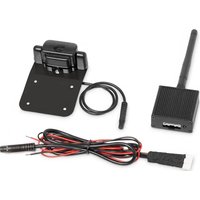
PerfectView VT 50WiFi - Rear Camera DOMETIC - Free user manual and instructions
Find the device manual for free PerfectView VT 50WiFi DOMETIC in PDF.


| Product type | WiFi rear view camera |
| Brand | Dometic |
| Model | PerfectView VT 50WiFi |
| Article number | 9600003262 |
| Dimensions (camera) | 62 x 27 x 26 mm |
| Dimensions (transmitter) | 45 x 47 x 20 mm |
| Total weight | 150 g (camera and transmitter) |
| Power supply | 9 – 16 V=, via reverse light |
| Power consumption | 200 mA |
| Resolution | 640 x 480 pixels |
| Sensor | CMOS 300,000 pixels |
| Light sensitivity | < 1 Lux (night vision) |
| Transmission delay | 200 ms |
| Transmission range | > 15 m (direct line of sight) |
| WiFi frequency | 2.4 GHz (2412 – 2483.5 MHz) |
| WiFi standard | 802.11 g/n |
| Compatible app | VT50 RearCam on iOS and Android |
| Operating temperature | -20 °C to +70 °C |
| Package contents | Camera with bracket, WiFi transmitter, connection cable, double-sided adhesive tape |
| Safety | Disconnect the battery before any intervention; use insulated terminals; do not use wire nuts; follow the vehicle manufacturer's instructions. |
| Maintenance and cleaning | Check the tightness of connections; clean the camera with a soft cloth. |
| Spare parts and repairability | Non-separable assembly; no spare parts available separately. |
| Warranty | Legal warranty; contact your dealer or the Dometic subsidiary. |
Frequently Asked Questions - PerfectView VT 50WiFi DOMETIC
User questions about PerfectView VT 50WiFi DOMETIC
0 question about this device. Answer the ones you know or ask your own.
Ask a new question about this device
Download the instructions for your Rear Camera in PDF format for free! Find your manual PerfectView VT 50WiFi - DOMETIC and take your electronic device back in hand. On this page are published all the documents necessary for the use of your device. PerfectView VT 50WiFi by DOMETIC.
USER MANUAL PerfectView VT 50WiFi DOMETIC
WiFi rear view system with smartphone app
Installation and Operating Manual 8
DE
Please read this instruction manual carefully before installation and first use, and store it in a safe place. If you pass on the product to another person, hand over this instruction manual along with it.
Table of contents
1 Explanation of symbols. 8
2 Safety and installation instructions 9
3 Scope of delivery 11
4 Intended use. 11
5 Technical description 11
6 Mounting the camera and transmitter 12
7 Connecting the transmitter electrically 14
8 Using VT50WiFi 15
9 Troubleshooting 16
10 Warranty 16
11 Disposal. 17
12 Technical data. 17
1 Explanation of symbols

WARNING!
Safety instruction: Failure to observe this instruction can cause death or serious injury.

CAUTION!
Safety instruction: Failure to observe this instruction can lead to injury.

NOTICE!
Failure to observe this instruction can cause material damage and impair the function of the product.

NOTE
Supplementary information for operating the product.
2 Safety and installation instructions
The manufacturer accepts no liability for damage in the following cases:
- Damage to the product resulting from mechanical influences and incorrect connection voltage
- Alterations to the product without express permission from the manufacturer
- Use for purposes other than those described in the operating manual
Please observe the prescribed safety instructions and stipulations from the vehicle manufacturer and service workshops.

WARNING!
Inadequate supply cable connections could result in short circuits, which could have as a consequence that:
- Cable fires occur
- The airbag is triggered
- Electronic control devices are damaged
Electric functions fail (indicators, brake light, horn, ignition, lights)

NOTICE!
To prevent the risk of short circuits, always disconnect the negative terminal of the vehicle's electrical system before working on it.
If the vehicle has an additional battery, its negative terminal should also be disconnected.
Please observe the following instructions:
-
When working on the following cables, only use insulated cable lugs, plugs and flat push-on receptacles:
-
30 (direct supply from positive battery terminal)
- 15 (connected positive terminal, behind the battery)
- 31 (return line from the battery, earth)
-L (indicator lights left) - R (indicator lights right)
Do not use terminal strips.
-
When connecting to cable 31 (earth), screw the cable
-
Use a crimping tool to connect the cables.
– to the vehicle ' s earth bolt with a cable lug and a gear disc or
- to the sheet-metal bodywork with a cable lug and a self-tapping screw.
Ensure that there is a good earth connection.
If you disconnect the negative terminal of the battery, all data stored in the volatile memories will be lost.
-
The following data must be set again, depending on the vehicle equipment options:
-
Rädio c code
- Vehicle clock
- T i m e r
- On-board computer
- Seat position
You can find instructions for making these settings in the appropriate operating instructions.
Observe the following installation instructions:

CAUTION!
- Secure the parts installed in the vehicle in such a way that they cannot become loose under any circumstances (sudden braking, accidents) and cause injuries to the occupants of the vehicle.
- Secure any parts of the system covered by the bodywork in such a manner that they cannot be come loose or damage other parts and cables or impair vehicle functions (steering, pedals, etc).
- Always follow the safety instructions of the vehicle manufacturer. Some work (e.g. on retention systems such as the AIRBAG etc.) may only be performed by qualified specialists.

NOTICE!
- To prevent damage when drilling, make sure there is sufficient space on the other side for the drill head to come out.
- Deburr all drill holes and treat them with a rust-protection agent.
Observe the following instructions when working with electrical parts:

NOTICE!
- When testing the voltage in electrical cables, only use a diode test lamp or a voltmeter.
Test lamps with an illuminant take up voltages which are too high and which can damage the vehicle's electronic system.
-
When making electrical connections, ensure that:
-
they are not kinked or twisted
- they do not rub on edges
- they are not laid in sharp edged ducts without protection.
Insulate all connections.
- Secure the cables against mechanical wear with cable binders or insulating tape, for example to existing cables.
3 S C O P E O F D E I
Quantity Label
1 Camera with number plate fastening
| 1 | T | r | a | n | s | m |
| - | F | a | s | t | e | n |
| 1 | I | n | s | t | r | u |
4 I n t e n d e d u s
PerfectView VT50WiFi (ref. no. 9600003262) is a rear view video camera with a WiFi transmitter. The transmitter wirelessly transmits the signals between the rear view video camera and a smartphone or tablet with an iOS™ or Android™ operating system. PerfectView VT50Wi-Fi is suitable for use in cars, caravan trailers and mobile homes (fig. 1, page 3).
5 Technical description
5.1 Function description
PerfectView VT50WiFi comprises a rear view video camera with a number plate fastening, a WiFi transmitter and an app for mobile end devices such as smartphones or tablets.
The transmitter is mounted in the vehicle. It establishes a wireless radio network and transmits the image over it to a smartphone or tablet.
The transmitter is connected to the reversing light and is also used to supply the camera with power. The transmitter must re-establish the wireless connection every time the car is shifted into reverse gear. This requires about six seconds.
The wireless signals are transmitted in the 2.4 GHz range.
As the system is only designed as an additional aid for reversing, it does not relieve you of the duty to exercise due care especially when driving with a trailer.

NOTICE!
The transmitter sends digital data. The camera image is displayed on the monitor with a delay of 0.2 seconds. It is therefore essential that you drive slowly.
5.2 Control elements


1 Antenna connection
2 Camera connection
| No. in fig. 2, page 3 | Meaning |
| 3 Red cable (DC INPUT): Connection to the positive terminal (+) of the power supply | |
| 4 Black cable (GND): Connection to the negative terminal (-) of the power supply or earth terminal | |
| 5 Operating display; lights up as soon as voltage is applied | |
6 Mounting the camera and transmitter
6.1 Tools required (fig. 3, page 4)
For installation and assembly you will need the following tools:
- Drill head set (1)
- Drill (2)
Screwdriver (3) - Set of ring or open-ended spanners (4)
- Tape measure (5)
Hammer (6) - Centre punch (7)
To establish and test the electrical connection, the following tools are required:
- Diode test lamp (8) or voltmeter (9)
Crimping tool (10)
Insulating tape (11) - Cable bushing sleeves (optional)
To secure the camera, transmitter and the cable, you may require additional screws, cable binders and double-sided tape.
6.2 Preparing the camera for installation
Observe the following mounting instructions:
- Place the camera in the centre over or under the number plate. The camera requires a free space of 30mm above or below the number plate.
- Fasten the camera in a way that does not cover the number plate.
Mounting the camera under the number plate (fig. 4, page 5)
Unscrew the camera (1) from the assembly plate (2).
Turn the camera by 180^
Reattach the camera to the assembly plate.
Adjusting the installation position on the rear of the vehicle (fig. 5, page 5)
The camera is attached to the upper part of the assembly plate. The upper part of the assembly plate is bent at an angle of approximately 5^ . You can fit the camera to the rear of the assembly plate to adjust the assembly position to the shape of the vehicle rear.
Unscrew the camera (1) from the assembly plate (2).
Turn the assembly plate by 180^
Reattach the camera to the assembly plate.
6.3 Fastening the camera
Remove the rear number plate holder from the vehicle.
Attach the camera assembly plate to the rear of the number plate holder with double-sided tape.
Reattach the number plate holder to the vehicle. In doing so, press the double-sided tape onto the bodywork.
The camera is now attached to the vehicle.
6.4 Preparing the transmitter for installation

CAUTION!
Select the location of the transmitter so that it cannot injure the passengers in the vehicle under any circumstances (e.g. sudden braking, road traffic accidents).
Observe the following mounting instructions:
- Install the transmitter so that as few objects as possible are situated between the transmitter and receiving device. Moving the transmitter can help if there is a poor connection.
- The installation location should be flat.
- Before drilling each hole, ensure there is sufficient space on the other side for the drill head to emerge (fig. 6, page 6).
- Make sure you can lay the connection cable from the transmitter to the camera.

NOTE
The image is sent from the transmitter to the receiving device. To ensure flawless functioning, you need to check whether the wireless transmission is stable before final installation.
6.5 Attaching the transmitter
Attach the transmitter temporarily to the planned installation location.
Put the transmitter into operation.
Activate the app on your receiving device (see chapter "Using VT50WiFi" on page 15).
If a fault occurs, e.g. there are flickering images:
Adjust the location of the transmitter slightly.
Retest the transmission.
If the camera image transmission is stable (no flickering images):
Secure the transmitter with double-sided tape.
7 Connecting the transmitter electrically
7.1 General notes on laying cables

NOTE
- As far as possible, use original ducts for laying the cables, or other suitable options such as panelling edges, ventilation grilles or dummy plugs. If no openings are available, you must drill holes for the cables. Check beforehand that there is sufficient space on the other side for the drill head to emerge.
- Cables and connections that are not properly installed will cause malfunctions or damage to components. Correct installation of cables and connections ensures lasting and trouble-free operation of the retrofitted components.
Therefore, please observe the following instructions:
- Wherever possible, lay cables inside the vehicle, as they are better protected there than outside.
If you do need to lay a cable outside the vehicle, ensure that it is well fastened (use additional cable ties, insulating tape etc.).
- To prevent damage to the cables when laying them, ensure that they are far enough away from hot or moving vehicle components (exhaust pipes, drive shafts, light systems, fans, heaters, etc.).
- Use adhesive insulating tape to prevent water from penetrating the plug connection (fig. 7, page 6).
-
When laying the cables (fig. 8, page 6), make sure:
-
they are not kinked or twisted
- they do not rub on edges
-
they are not laid in sharp-edged ducts without protection.
-
Protect every through-hole made in the bodywork against water penetration, e.g. by using a cable with a sealant and by spraying the cable and the cable sleeve with sealant.

NOTE
Only start sealing through-holes when you have completed all installation work on the camera and have laid the required cable lengths.
7.2 Connecting the transmitter electrically

NOTICE!
Make sure the polarity is correct.

NOTE
The transmitter creates a wireless network that does not permit access to the Internet. Therefore internet services cannot be used once the transmitter is being supplied with power.
The use of telephony and text messages is also restricted.
Connecting the transmitter to the reversing light

NOTE
On some vehicles, the reversing light only works when the ignition is switched on. In this case, you must switch on the ignition to identify the positive and earth cables.
Proceed as follows (fig. 2, page 3):
Connect the red cable of the transmitter (3) to the positive cable of the reversing light.
Connect the black cable of the transmitter (4) to the earth wire (-) on the reversing light or to the earth terminal on the bodywork.
Connect the transmitter to the camera (fig. 9, page 7):
- Plug the connection cable (1) together.
- Insert the plug (2) into the transmitter's camera connection (3).
After a few seconds, the VT50WiFi establishes the digital wireless connection.
8 U S i n g V T 5 0 V
8.1 Installing the VT50 RearCam app
To be able to use the system, you need to install the manufacturer's free app on your receiving device before initial use.
You can find the app in Google Play Store™ (Android™) and in the App Store™ (iOS™) under the name VT50 RearCam.
8.2 Putting VT50WiFi into operation
Activate the wireless reception of your receiving device.
Switch the vehicle ignition on.
Engage the reverse gear of the vehicle.
The transmitter is operational about six seconds after putting the vehicle into reverse gear. The operating display (fig. 2 5page 3) lights up permanently in red on the transmitter.
Connect your receiving device to the wireless network of the transmitter.

NOTE
The name and the password of the wireless network can be found on the transmitter.
Start the app on your receiving device.
The receiving device displays the camera image.
9 Troubleshooting
| Fault Cause Suggested remedy | ||
| The receiving device can-not find the transmitter's wireless network. | The transmitter does not work. | Check the power supply. |
| The transmitter's operat-ing display does not light up. | ||
| The app on the receiving device has a black screen. | The transmitter does not work. | Check whether the app responds: Open the menu. |
| Check the transmitter connection and function. | ||
| The receiving device cuts off during image play-back. | The connection between transmitter and receiving device is too weak. | Adjust the location of the transmitter by a few centimetres. |
10 Warranty
The statutory warranty period applies. If the product is defective, please contact the manufacturer's branch in your country (see the back of the instruction manual for the addresses) or your retailer.
For repair and warranty processing, please include the following documents when you send in the device:
- A copy of the receipt with purchasing date
- A reason for the claim or description of the fault
11 Disposal
Place the packaging material in the appropriate recycling waste bins wherever possible.
If you wish to finally dispose of the product, ask your local recycling centre or specialist dealer for details about how to do this in accordance with the applicable disposal regulations.
12 Technical data
| VT50WiFi | |
| Ref. no.: 9600003262 | |
| Image sensor: CMOS | |
| Pixels: 300000 pixels | |
| Sensitivity: < 1 lux | |
| Delay: 200 ms | |
| Time needed to establish connection: < 10 s | |
| Resolution: 640 x 480 pixels | |
| WLAN frequency: 2412 - 2483.5 MHz | |
| WLAN standard: | WIFI 802.11 g/n (QPSK, 16QAM) |
| Transmission distance (direct vision): | >15 m |
| Operating voltage: | 9 - 16 V== |
| Amperage: | 200 mA |
| Operating temperature: | -20 °C to +70 °C |
| Camera dimensions (without assembly plate): | 62 x 27 x 26 mm |
| Transmitter dimensions (without antenna): | 45 x 47 x 20 mm |
| Weight (camera and transmitter): | 150 g |
5 Description technique
8.1 Installation of appen VT50 RearCam
For at kinne anvende systemet skal du for den forste brug installere producentens gratis app'a dit modtageapparat.
I3rOToBHTen He HecET HnKaKoI OTBeTCTBeHHOCTHa yUepe6 B CneDyUOuNX CnyaX:
- Поврждени поюкту n3-3a мexанческIx BO3deiCTBn I HeBepHOrO HanpJxHnIЯптаня
- I3MeHeHnB pOdyKTe, BbIOnHHeHHbIe 6e3 OdHO3HaUHOro pa3peSeHnN 13rTOBNTen
- IcnoIb3OBAHnE B cenX, OTnNHyBIX OT yKa3aHHbIX B daHHoIN HCTpyKuIN
Co6nIouaTe yka3aHnNo TeXnKe 6e3OnaChOCTn N Tpe6oBaHn, npedncaHHbIe n3ROTOBtEnem aBTOMo6nJI n aBTomactepckoI!

PPEyPExkEHeI
HeydOBnTbOpntbHoe npncOeDnHeHne npOBoOB MoKeT npNBecT N TOMy, yTO BCNECTBnE KOpOTKOrO 3aMbIKAHn
- BO3HnKaeT Bo3rOpaHne Ka6eJeN,
- cpa6aTbIbaeT NaIyBna IOnyuSha 6e3OnaCHOCTN,
- Понуают поржденья заентpoнные усточь вларпенья,
- BbIXOJrN3 CTrPO8 3IeKTPnueCKNe 6yHKuIN (yKa3aTeEN NOBOPoTa, CNrHaT TOPMOXeHnRA, 3ByKOBoN CnIHaN, 3axnraHne, OcBeUeHne).

BHIMAHHE!
BcneidCTBnE onaacnoCTN KOpOTKOrO 3aMbIkaHnI nepei pa6oTaMn Ha 3NeKTpueckoCNCTeMe aBTOMO6nIg BCErda OTCoeDINHryte KInEMMy OTpuCaTeNbHO rNOJocA.
B aBTOMo6nIax c do6aBOUHOJ aKKyMnyTopHOJ 6aTapeeJ Bb I Ha HeJdoJXHbI OTcoEHNHT b KJIeMMy OTPucaTeNbHOrO nonIOca.
TOMy co6IpaTe cpeDyUOune yKa3aHn:
IpepaTcK CO3daet 6ecnpoBOnHyO CeTb, KOTopaH He PO3BOJraET BbIXOAnTb B INHTepHeT. EcnnpepaTcK BKIOUeyH, NOpb3OBaTeJIb He CMOXeT NCnONb3OBaTb INHTepHeT-Cnyx6bl n cepBncbl.
Pn 3OM OH MoXeT nCnoB3OBaTb CMC n TepeOHHyIO CBra3b 6e3 orpaHnueHn.
9 YctpaHHe HeNCnPaBHOCTeI
HencnpabHoctb PnunHa BapnaHT yctpaHeHHa
YcTpoIcTBO-mpnEMHnK He moXeT haHTn 6ecnpoBODHyIO cTeb nepeDaT-UKa.
HnDnKaTOp COCTOHNHa nepeDaTUnke He rOpNT.
B npnnoxehnn Ha yctpoiCTBe-npneMHnKe BBIOANTc YepHbI 3KpaH.
IpeepaTnK He pa6oTaet. IpoBepbTe NODKnIOueHne IpeepaTynKa K nCTOuHNky NiTaHnY.
IpepaTnK He pa6oTaet. IpoBepbTe, peaHpyeT nI npInOxHe H a DeiCTBna NOnb3OBa- TeIa: OTKpOHTe MeHIO.
IpoBepbTe PoiKNoUeHne N cyHKuO-HnpOBaHne nepedaTUnKa.
HencnpabHoctb PnUHa BapnaHT yctpaHeHHa
YCTPOIcTBO-IPnEMHNIK 《3aBnCaET》PnTpaHCnUuNnN3o6paxeHHJ.
IIOXoe NOdknUoyeHne Mekdy nepeDaTChKOM N UcToPOnCTBOM-PrnEmHNKOM.
IpeMeCTIte IpePaTUnK Ha HeCKoJIbKO CaHTIMeTPOB.
10 TapaHTn
IeJCTBUNTeH yCTaHOBNHbI 3aKOHOM cPOK rapaHTn. Ecnn npOdyKT HeNCnPpaBeH, o6paTNTecB InpedCTaBUNbCTBO n3rOToBtEn B BaSei CTpaHe (adpeca cm. Ha o6opOTHOI CTOpOHe IHCTpyKuIN) INN B TOPOBYIO opraHN3auNIO.
B uejx npoBeHnpeMOHTa nnn rapaHTnHoro o6cnyKbAHn BbldoJXhbl taKxe nocnab cneDyIouiNe DOkymeHTbl:
KoNIO CyeTa C DaToI NOKyPKNI,
-Прочины peкламаши пли ONИСАне HeINcпраВно.
11ytnn3aun
I0 BO3MOXHOCTN, BbIKnIbIBaIte ynaKOBOUHbIM MaTePnAIN B MyCOp, NOIeXaIIM BTOpNUHOI nepepa6oTKe.
EcnBbOkoHyaTeNbHO BbIBoNDte npOdyKT n3 3KcPiIyatauIN,TO NOyUHTe INHOpMaUNB6nJaIWeM ueHTpe N0 BTOpHNoI nepepa6OTke IIN B TOpROBO CETN O COOTBeTCTBYIOx PpeDnscAHnx No yTnIN3aun.
12 TexHnueckne xapaKTepeNCTnKn
dometic.com/sales-offices


