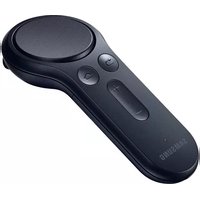
ET-YO324 - Controller SAMSUNG - Free user manual and instructions
Find the device manual for free ET-YO324 SAMSUNG in PDF.
User questions about ET-YO324 SAMSUNG
0 question about this device. Answer the ones you know or ask your own.
Ask a new question about this device
Download the instructions for your Controller in PDF format for free! Find your manual ET-YO324 - SAMSUNG and take your electronic device back in hand. On this page are published all the documents necessary for the use of your device. ET-YO324 by SAMSUNG.
USER MANUAL ET-YO324 SAMSUNG
Please read this manual before using the device to ensure safe and proper use.
- Images may differ in appearance from the actual product. Content is subject to change without prior notice.
- Before using the controller, make sure it is compatible with your device.
• To view the open source licence for the controller, refer to opensource.samsung.com.
Instructional icons

Warning: situations that could cause injury to yourself or others

Caution: situations that could cause damage to your device or other equipment

Notice: notes, usage tips, or additional information
About the Gear VR controller
You can connect the controller to a mobile device connected with a Gear VR via Bluetooth. Control various Gear VR features with the controller keys and touchpad.
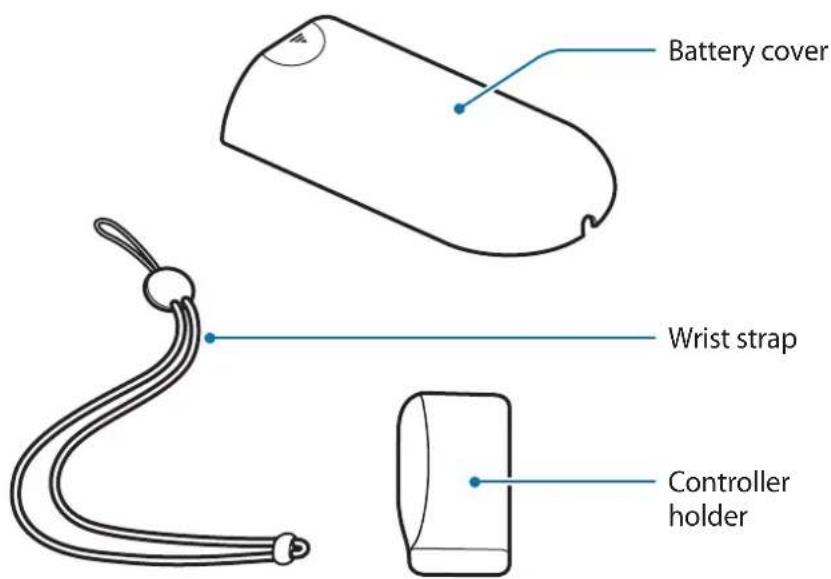
Package contents
Check the product box for the following items:
- Controller
- Quick start guide
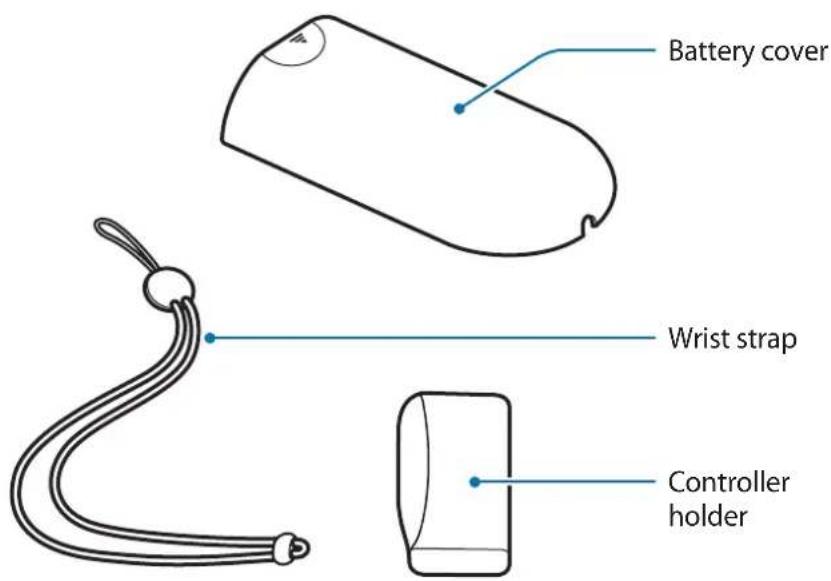
- Wrist strap
- Controller holder
- Two AAA batteries

- The items supplied with the device and any available accessories may vary depending on the region or service provider.
- The supplied items are designed only for this device and may not be compatible with other devices.
- Appearances and specifications are subject to change without prior notice.
- You can purchase additional accessories from your local Samsung retailer. Make sure they are compatible with the device before purchase.
- Use only Samsung-approved accessories. Using unapproved accessories may cause the performance problems and malfunctions that are not covered by the warranty.
- Availability of all accessories is subject to change depending entirely on manufacturing companies. For more information about available accessories, refer to the Samsung website.
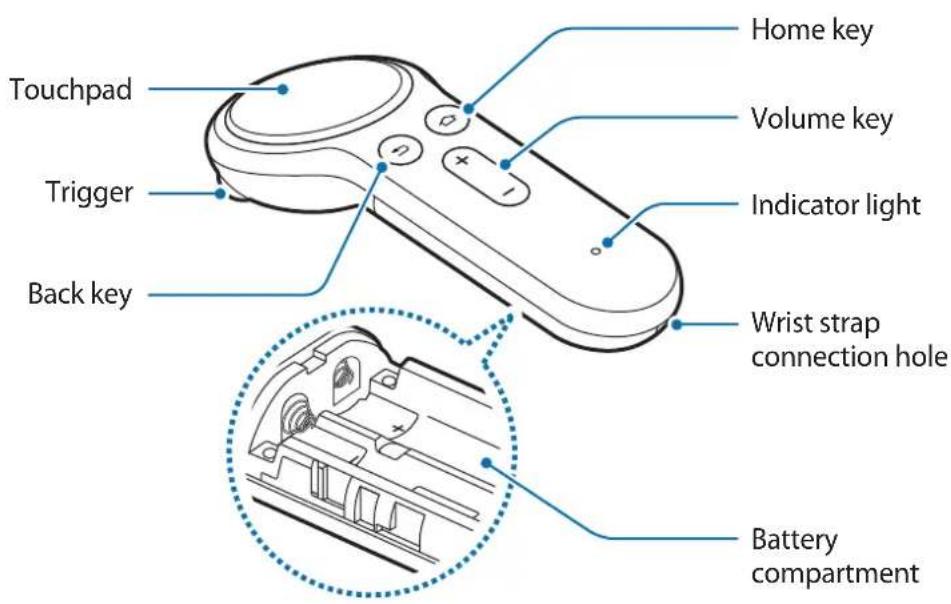
Device layout
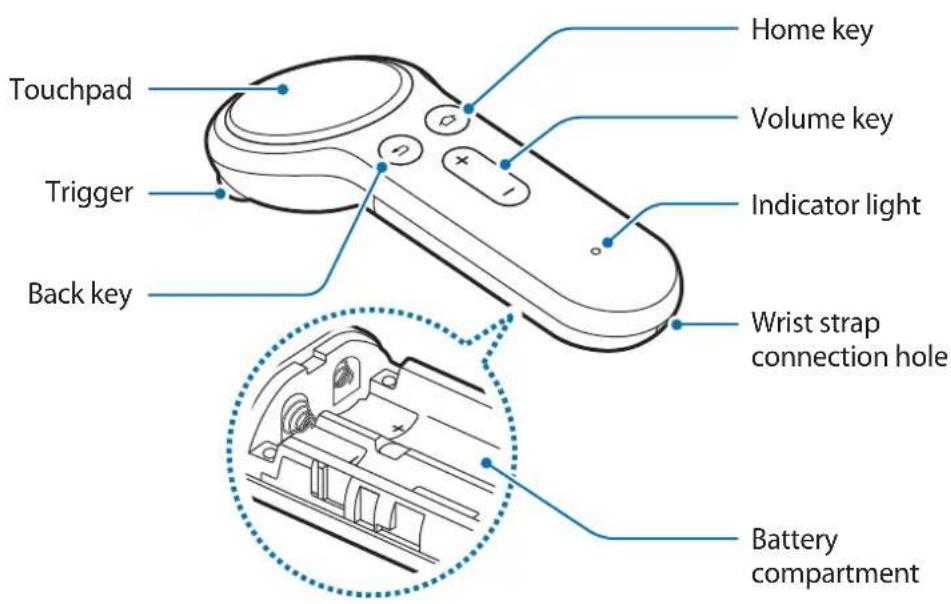
text_image
Touchpad Trigger Back key Home key Volume key Indicator light Wrist strap connection hole Battery compartment
text_image
Battery cover Wrist strap Controller holderButtons
| Name Function | |
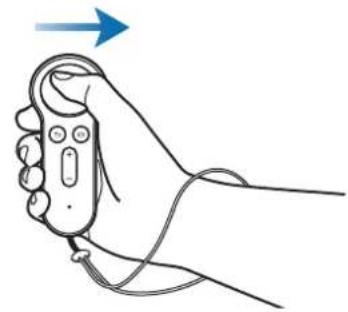
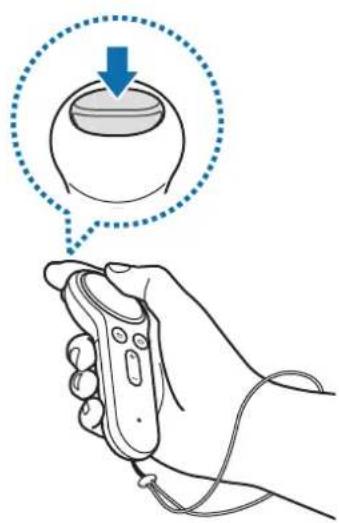
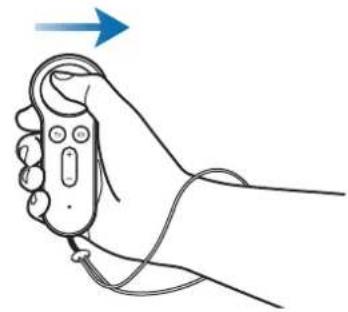
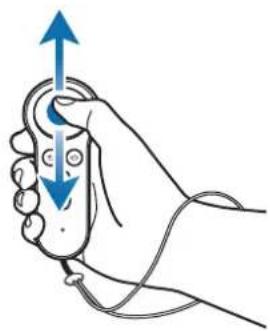
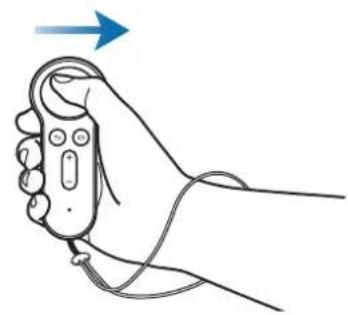
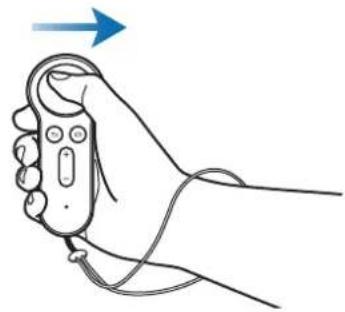
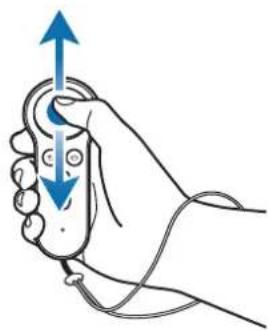
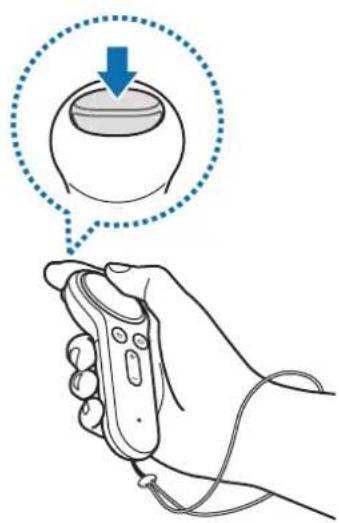
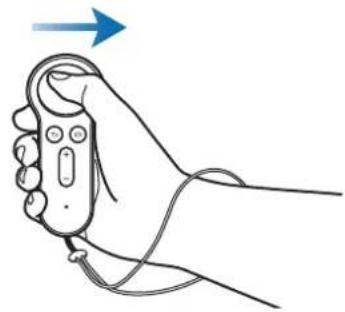
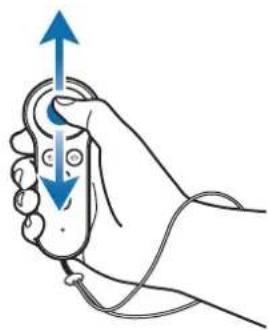
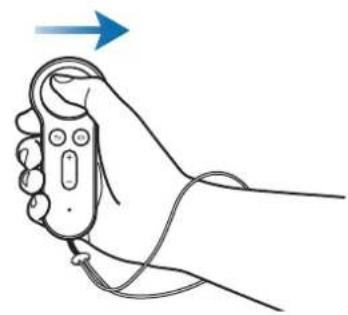
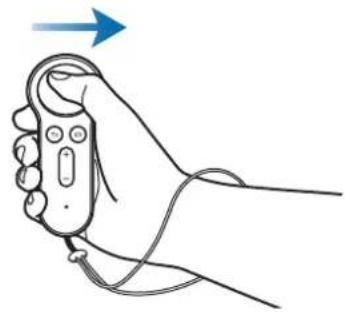
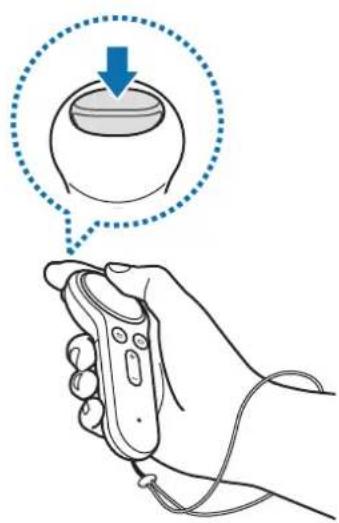
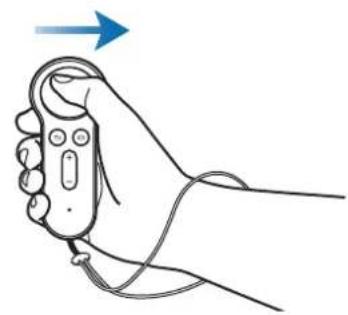
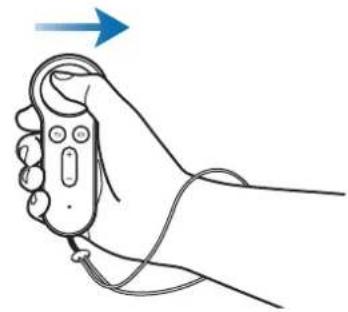
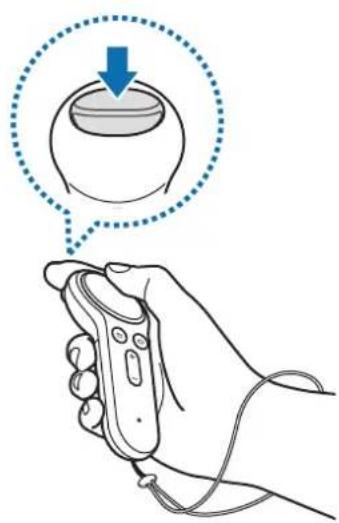
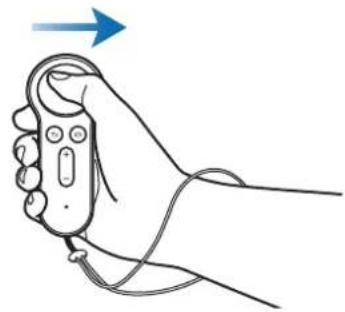
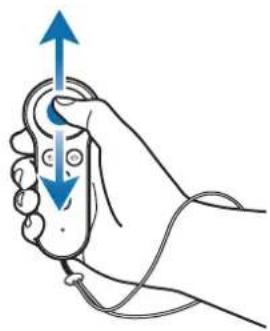
| Touchpad | Press to select an item. You can move to the next or previous item by swiping to the left or right. |
| Home key | When the controller is not connected with a Gear VR:Press and hold to enter Bluetooth pairing mode.When the controller is connected with a Gear VR:Press to return to the Gear VR's Oculus Home screen.Press and hold to reorient the pointer direction when it is off-centre. |
| Back key | Press to return to the Gear VR's previous screen.Press and hold to open the Gear VR's Universal menu. You can view the status of the Gear VR and configure Gear VR's settings. |
| Volume key | Press to adjust the Gear VR volume. |
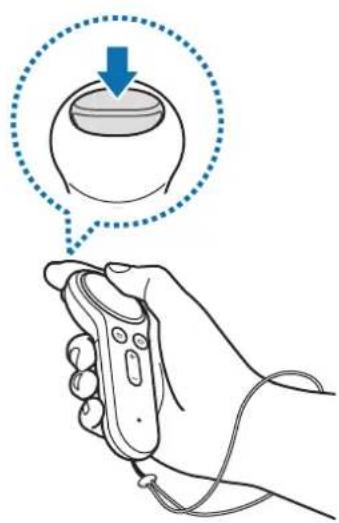
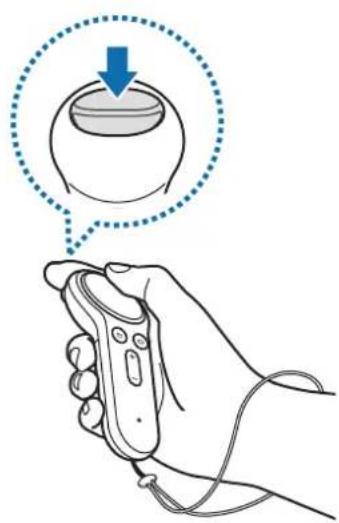
| Trigger | Press to select an item or use it as a trigger when playing certain games. Its function may vary depending on the launched apps. |
Indicator light
The indicator light alerts you to the controller's status.
| Colour Status | |
| Flashes red, green, and blue | The controller is in Bluetooth pairing mode. |
| Flashes blue three times | Bluetooth is connected. |
| Flashes blue one time | Sleep mode is deactivated. |
Connecting the wrist strap
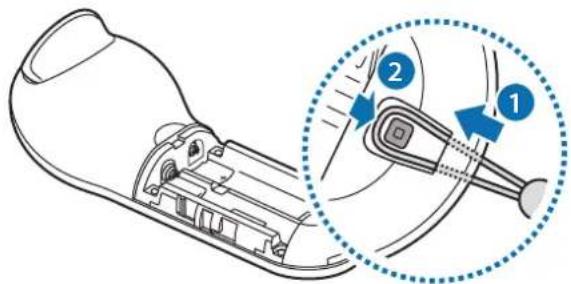
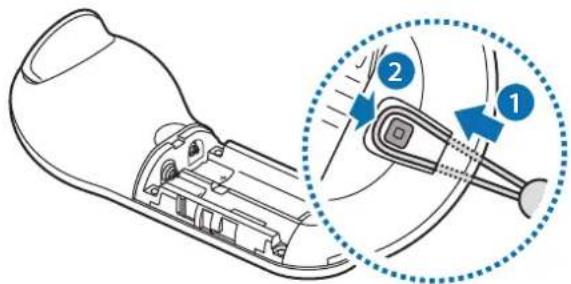
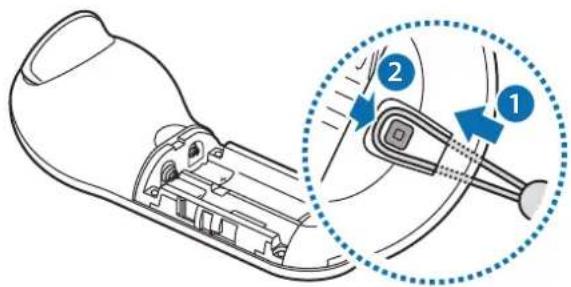
When you connect the wrist strap to your controller, you can use the controller safely without dropping it.
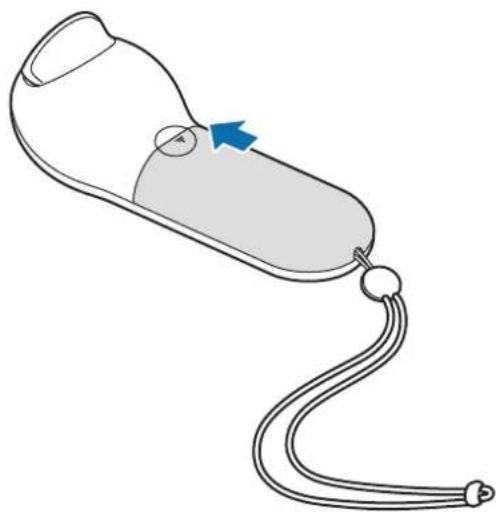
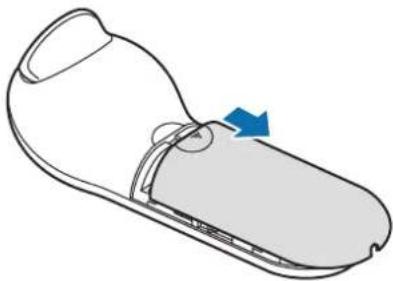
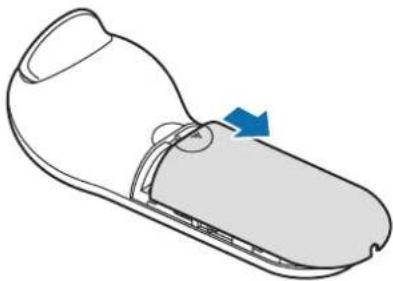
1 While pressing on the backside of the controller, slide the battery cover towards the top of the triangle to open it.

Do not bend or twist the battery cover excessively. Doing so may damage the battery cover.
natural_image
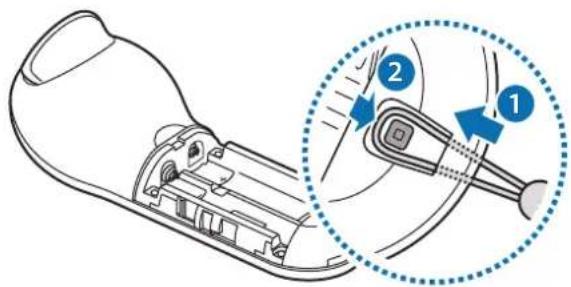
Line drawing of a shoe with a blue arrow indicating motion or change (no text or symbols)2 Insert the wrist strap loop into the wrist strap connection hole and attach it to the hook to secure it.
text_image
Diagram showing a device's internal structure with labeled parts and a magnified inset highlighting the component being inserted.Installing the batteries
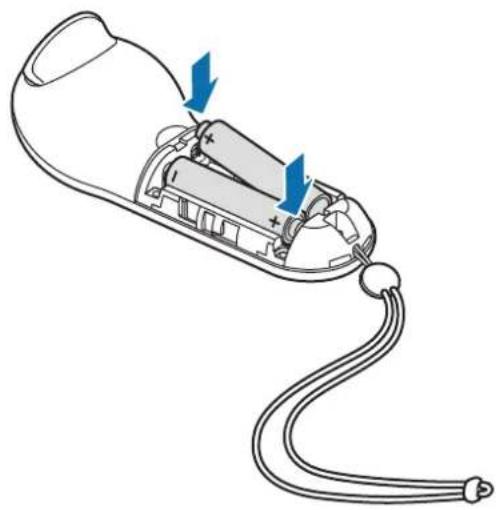
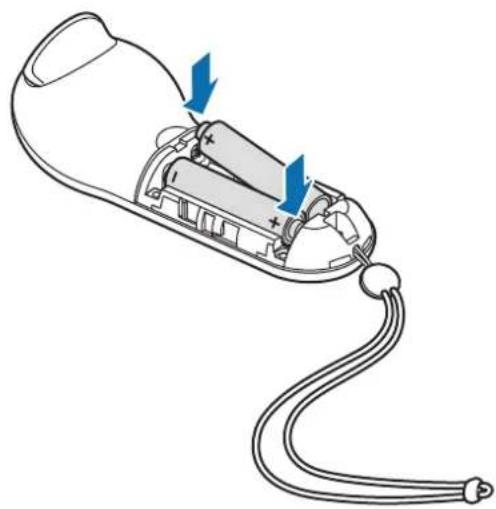
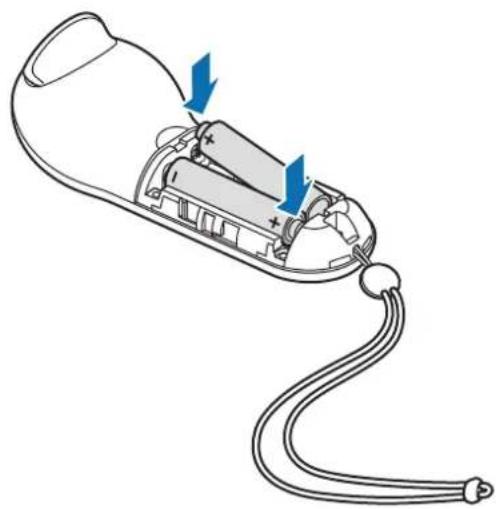
1 Insert batteries with the positive and negative terminals properly aligned with the + and - symbols on the controller.
natural_image
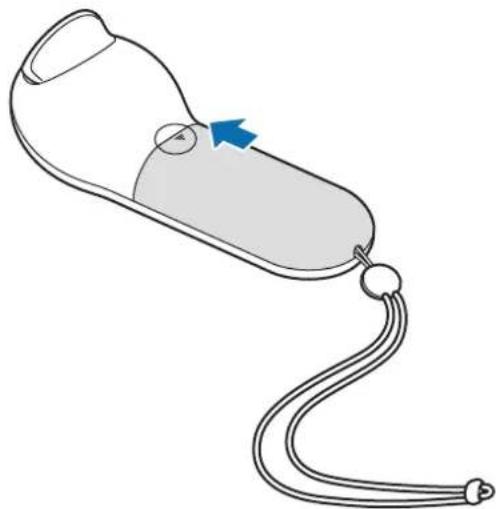
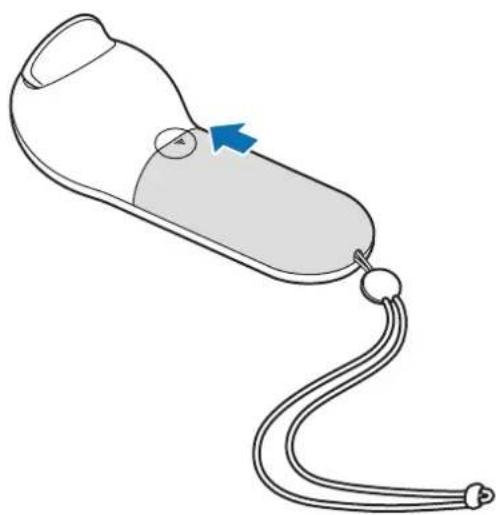
Diagram of a handheld device with internal components and cable, showing no text or symbols2 Place the battery cover on the controller and slide the battery cover back until it clicks back into place.
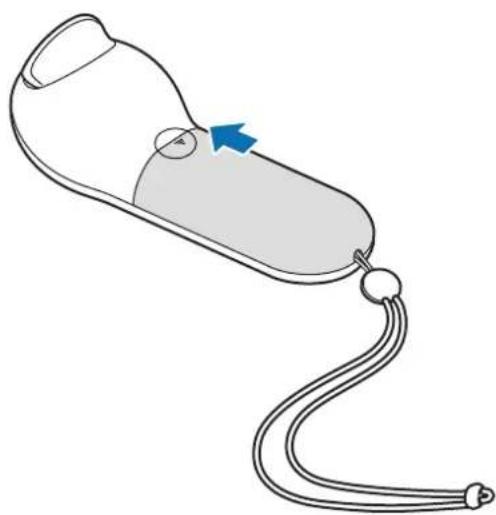
natural_image
Line drawing of a medical device with a blue arrow pointing to a circular component (no text or symbols)
- If the indicator light flashes red while using the controller, replace the batteries.
- Do not recharge the provided batteries (AAA batteries).
Using the controller
Connecting to mobile device
Notices for using Bluetooth
Bluetooth is a wireless technology standard that uses a 2.4 GHz frequency to connect to various devices over short distances. It can connect and exchange data with other Bluetooth enabled devices, such as mobile devices, computers, printers, and other digital home appliances, without connecting via cables.
- To avoid problems when connecting your controller to another device, place the devices close to each other.
- Ensure that your controller and the other Bluetooth device are within the maximum Bluetooth range. The distance may vary depending on the environment the devices are used in.
- Ensure that there are no obstacles between the controller and a connected device, including human bodies, walls, corners, or fences.
- Do not touch the Bluetooth antenna of a connected device.
- Bluetooth uses the same frequency as some industrial, scientific, medical, and low power products and interference may occur when making connections near these types of products.
- Some devices, especially those that are not tested or approved by the Bluetooth SIG, may be incompatible with your controller.
- Do not use the Bluetooth feature for illegal purposes (for example, pirating copies of files or illegally tapping communications for commercial purposes).
Connecting the controller with the Gear VR app (Oculus)
Connect the controller to the mobile device that is connected to the Gear VR to control the Gear VR with the controller.

Install the Gear VR app (Oculus) on your mobile device to connect it with the controller. Connect the mobile device to the Gear VR and remove the mobile device when you hear a voice prompt that requests you to separate the mobile device. The Gear VR app (Oculus) installation screen will appear on the mobile device.
1 Controller Press and hold the Home key to enter Bluetooth pairing mode.
The indicator light will flash red, green, and blue.
2 Mobile device On the Gear VR app (Oculus), tap More → Controllers to connect the controller.
The indicator light will flash blue three times.
3 Choose the hand you will use the controller with.
4 Connect your mobile device to the Gear VR and control the Gear VR with the controller's keys and touchpad.

The way for connecting the controller can be changed depending on the Oculus service.
Connecting the controller via Bluetooth

You can connect the controller via Bluetooth only on mobile devices running Android 6.0 or higher. If you cannot connect the controller via Bluetooth, connect it with the Gear VR app (Oculus).
1 Controller Press and hold the controller's Home key to enter Bluetooth pairing mode. The indicator light will flash red, green, and blue.
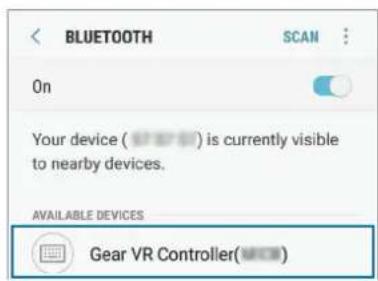
2 Mobile device Activate the Bluetooth feature and search for Bluetooth devices. For more information, refer to the mobile device's user manual.
3 Mobile device Tap Gear VR Controller(0000) on the list of available devices to complete Bluetooth pairing.
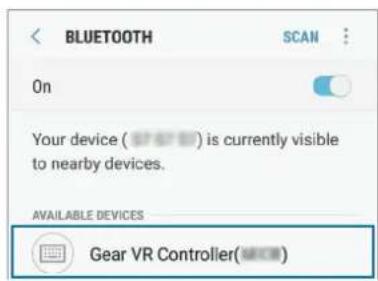
text_image
BLUETOOTH SCAN On Your device ( * * *) is currently visible to nearby devices. AVAILABLE DEVICES Gear VR Controller(###)The indicator light will flash blue three times.
4 Connect your mobile device to the Gear VR and place the Gear VR on your head. Control the Gear VR with the controller's keys and touchpad.

- The PIN for the controller is the four-digit number in parenthesis displayed on the mobile device's Bluetooth settings screen. The number differs depending on the controller.
- If the Bluetooth connection fails or the mobile device cannot locate the controller, remove the device's information from the mobile device's list. Then, try to connect again.
Disconnecting or reconnecting devices
If you remove the Gear VR from your head or the current connection ends, the controller enters sleep mode. Press the controller's trigger, touchpad, or any keys to deactivate sleep mode and re-enter Bluetooth pairing mode.
The controller will be reconnected to the previous mobile device automatically.

- If the controller and the mobile device are not kept within the Bluetooth connection range, the controller will be disconnected.
- If the batteries are removed from the controller or the Bluetooth feature is deactivated in the mobile device, the controller will be disconnected.
- If the Bluetooth connection is lost due to a problem with the connected mobile device, access the Bluetooth menu on the mobile device to pair the devices again.
- If your controller is not functioning properly, take it and the Gear VR to a Samsung Service Centre.
Using the controller
Connect the controller with the mobile device, attach the mobile device to the Gear VR, and then place the Gear VR on your head. Control the Gear VR with the controller's keys and touchpad.

- The controller does not have a power on/off function. If the controller is not used for a specified period or if the Gear VR is removed from your head, it will enter sleep mode.
• The Gear VRs are sold separately.
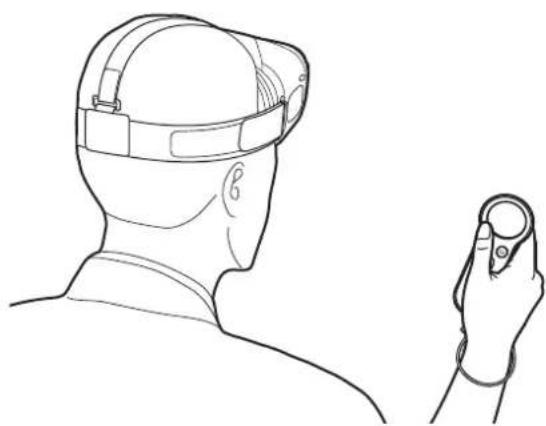
natural_image
Line drawing of a person wearing a head-mounted device, viewed from the side with a hand holding a small object nearby (no text or symbols)Controlling the Gear VR with the controller
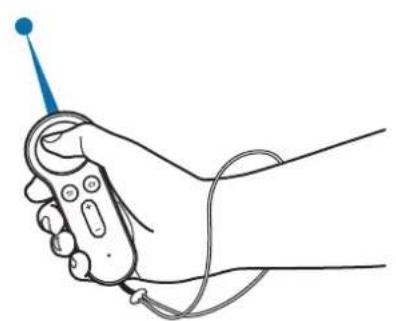
Control the Gear VR by moving your wrist in any direction to move the pointer on the Gear VR's screen and use the touchpad to select items.

To avoid damaging the controller's touchpad, do not tap it with anything sharp.

• To use the controller, connect it to your mobile device.
• The controller functions may vary by app.
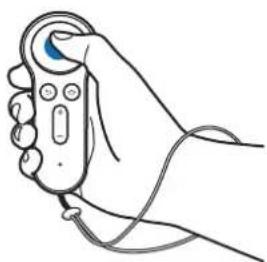
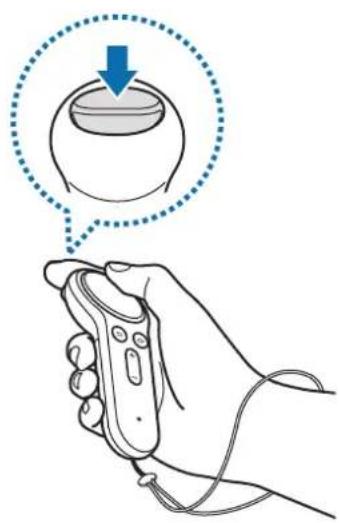
natural_image
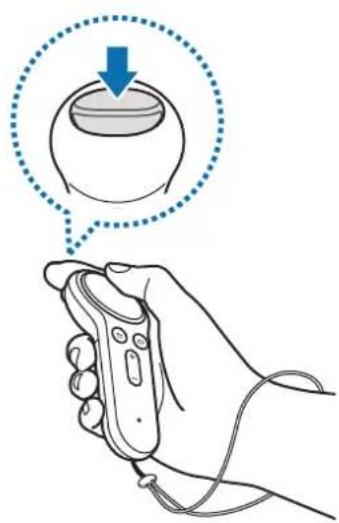
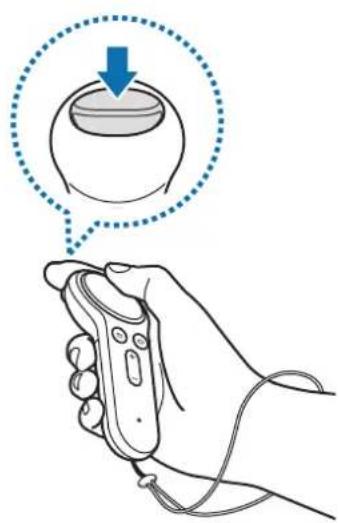
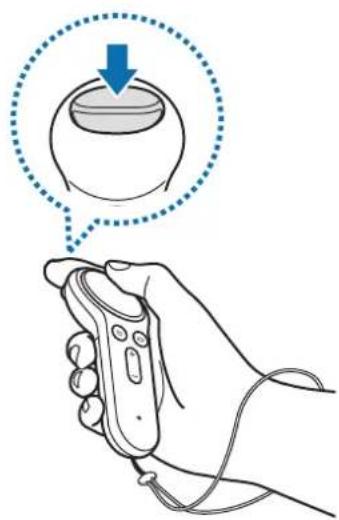
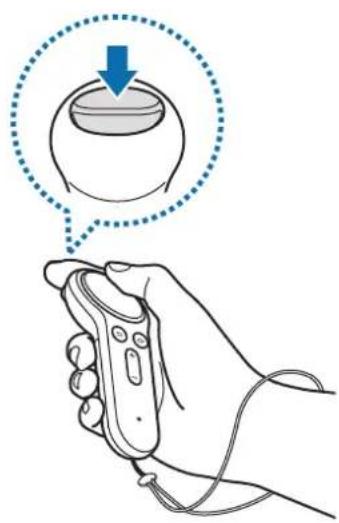
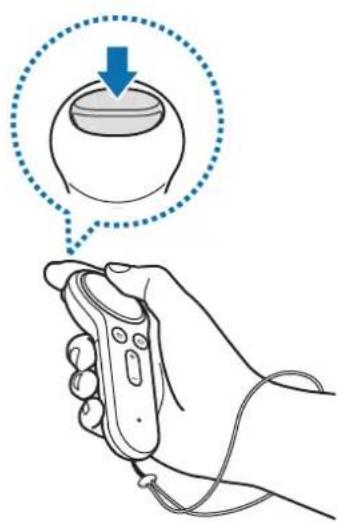
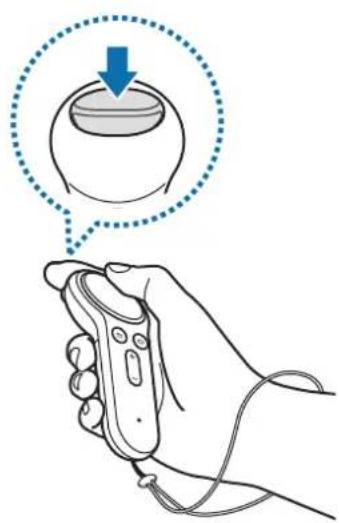
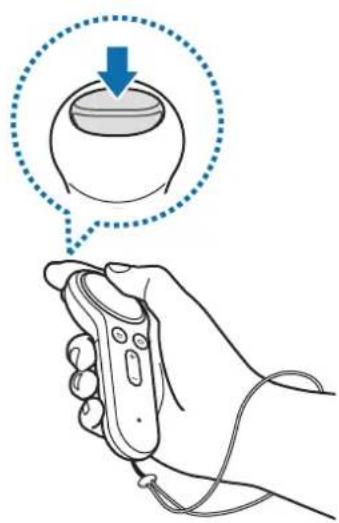
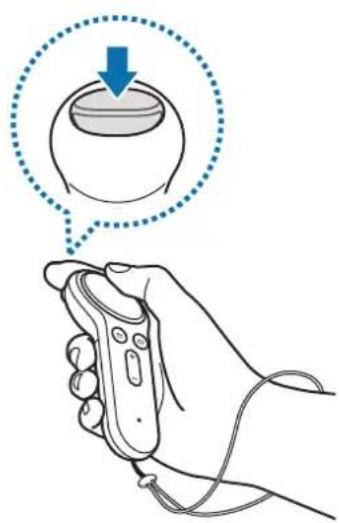
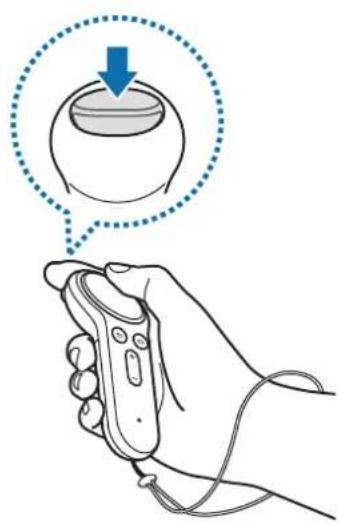
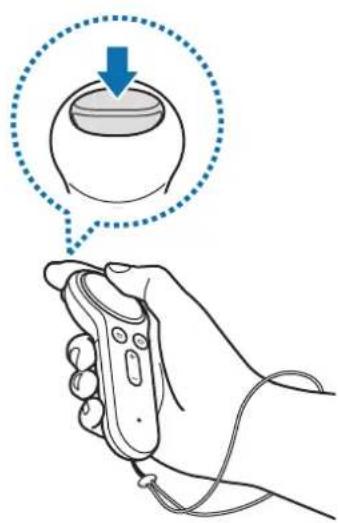
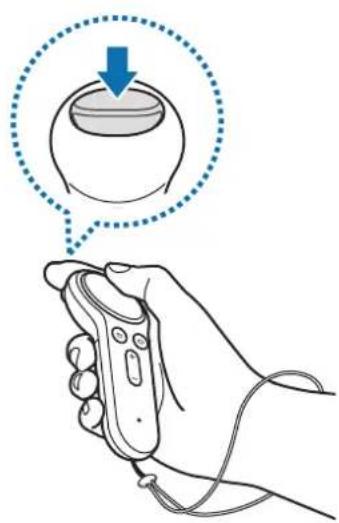
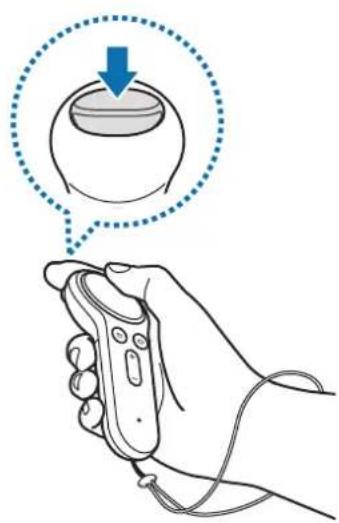
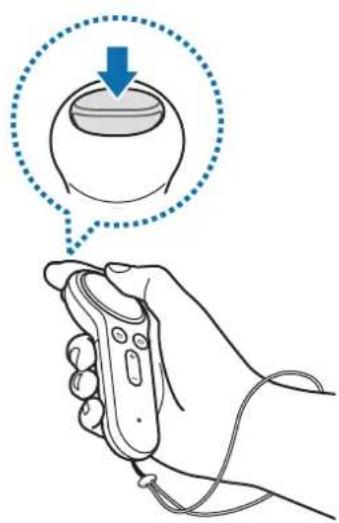
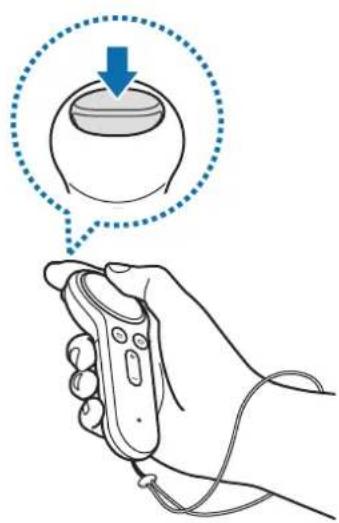
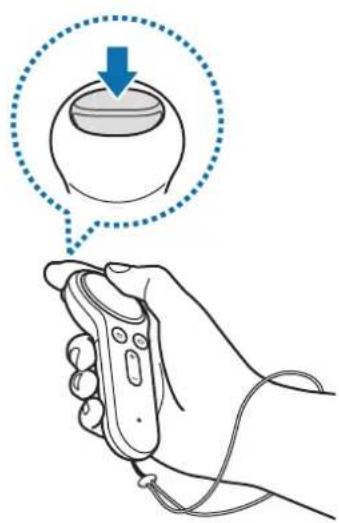
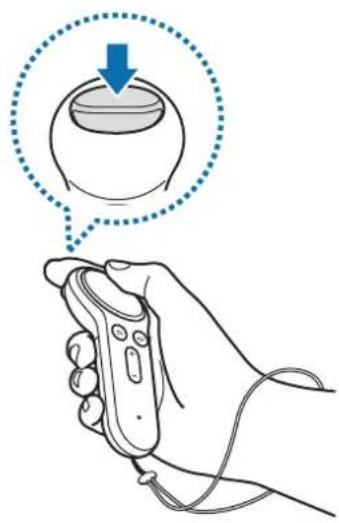
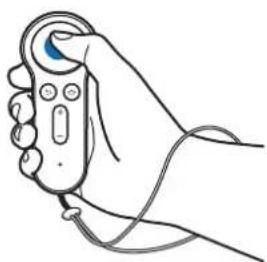
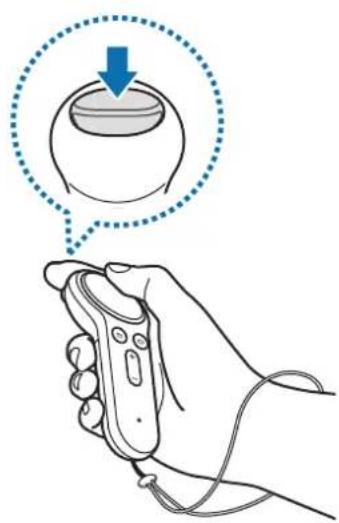
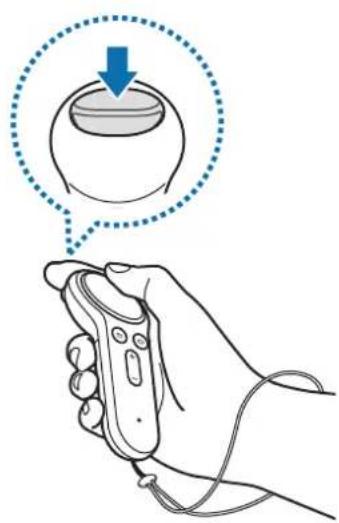
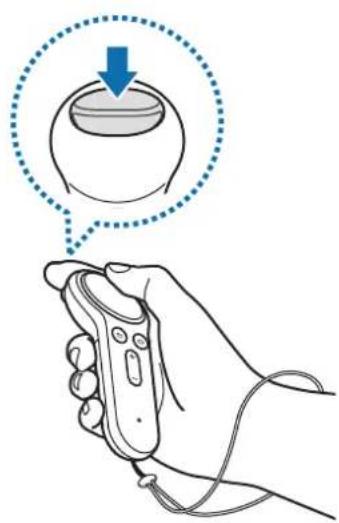
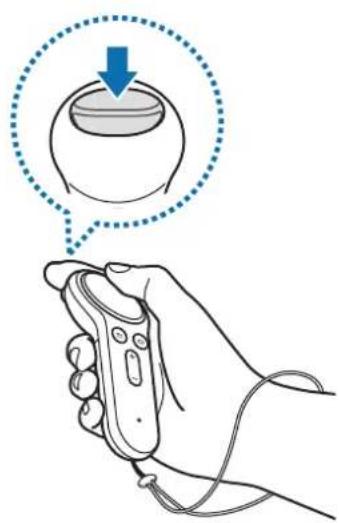
Line drawing of a hand holding a remote control with a blue scroll wheel (no text or symbols)Pressing
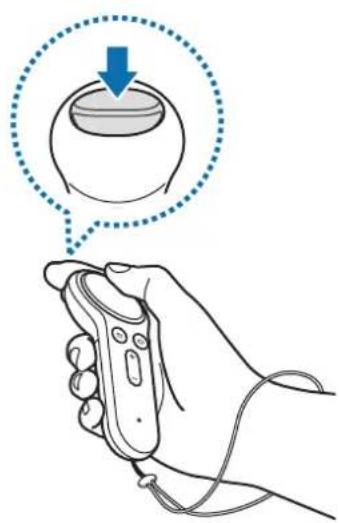
- Select an item.
• While playing a video, show available features.
natural_image
Line drawing of a hand holding a handheld device with a blue probe and cable (no text or symbols)
natural_image
Line drawing of a hand holding a remote control with a blue arrow indicating direction (no text or symbols)
natural_image
Illustration of a hand holding a remote control with blue arrows indicating upward and downward motion (no text or symbols)
natural_image
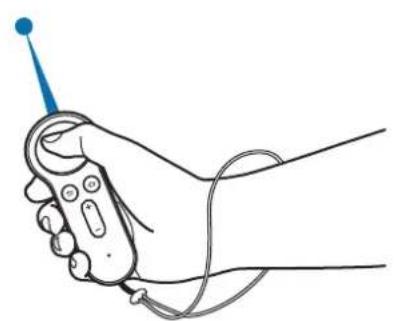
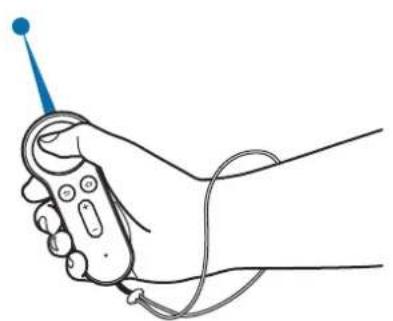
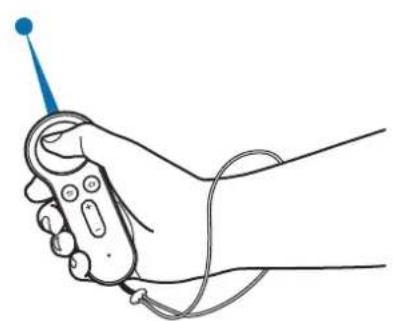
Illustration of a hand holding a remote control with a circular button and pointer, no text or symbols presentMoving
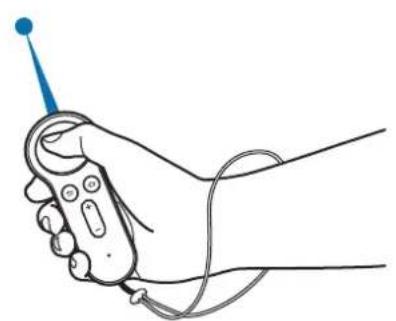
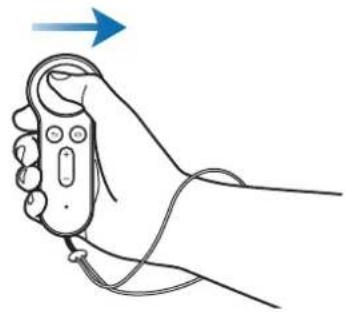
- Move your wrist to move the pointer left, right, up, and down on the screen.
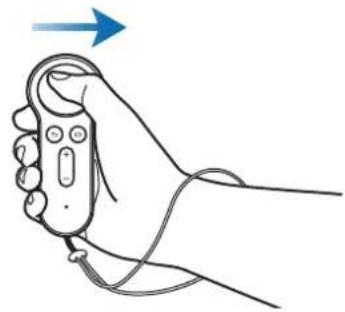
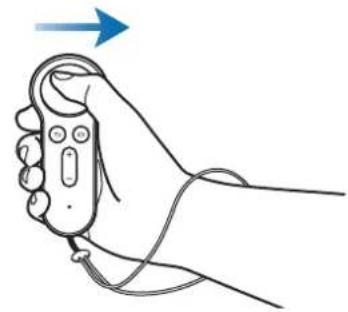
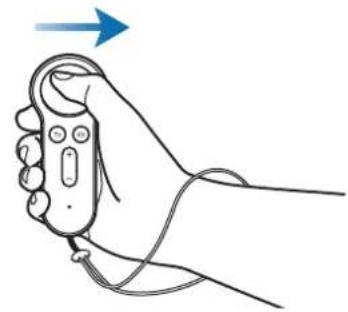
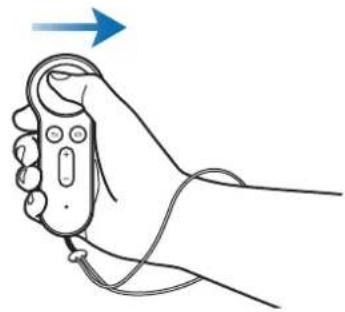
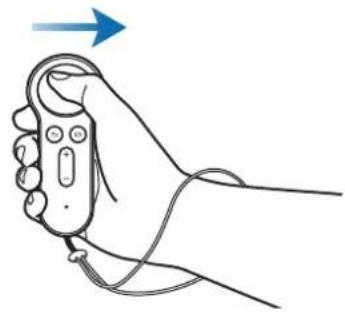
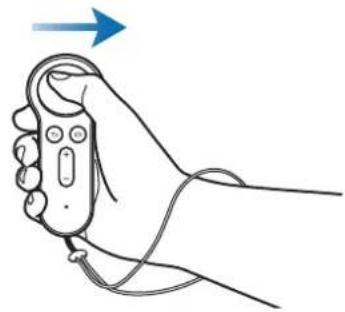
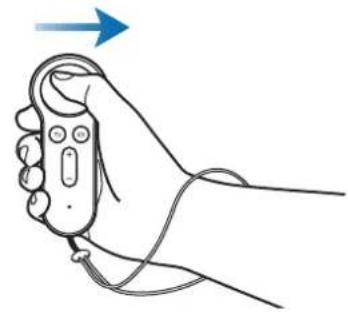
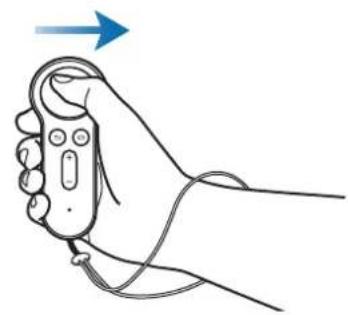
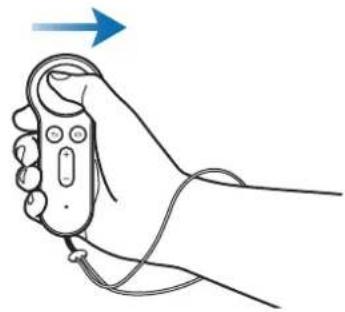
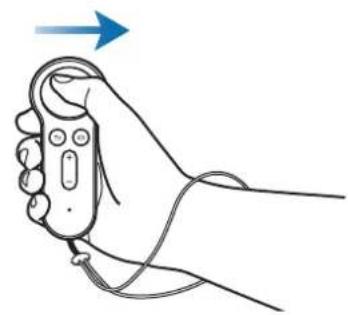
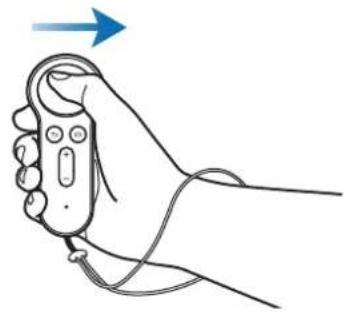
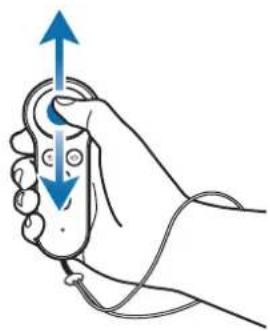
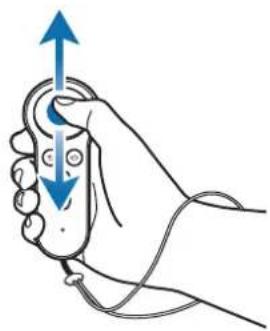
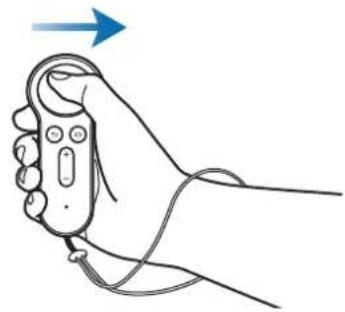
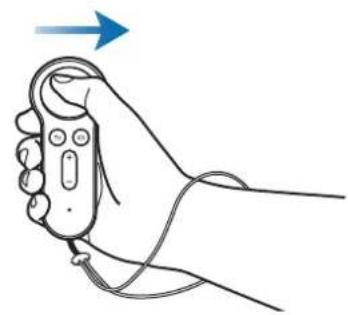
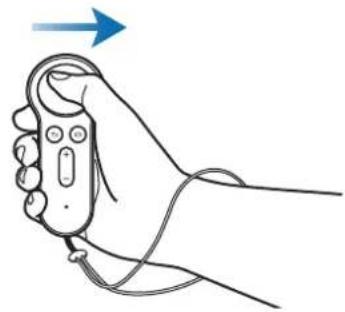
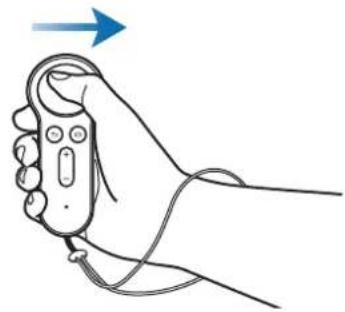
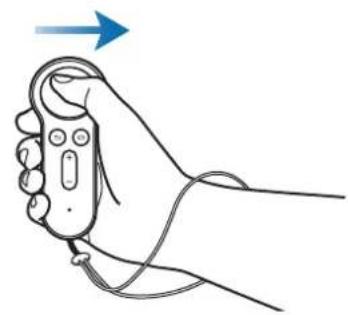
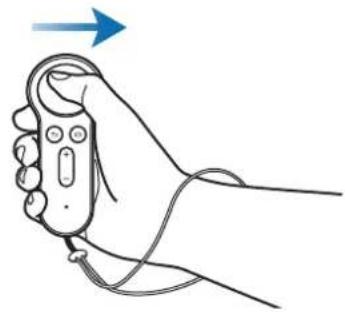
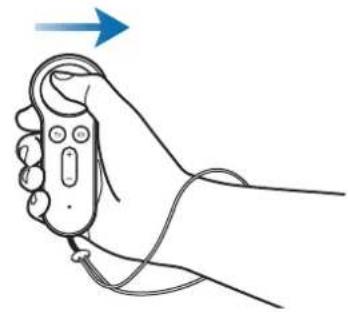
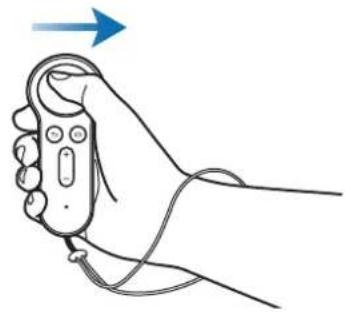
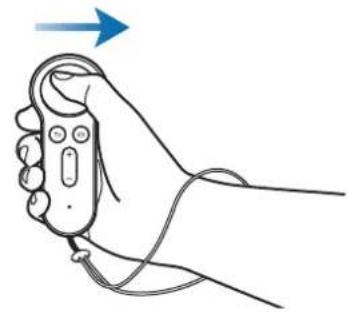
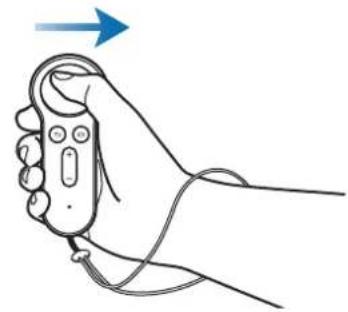
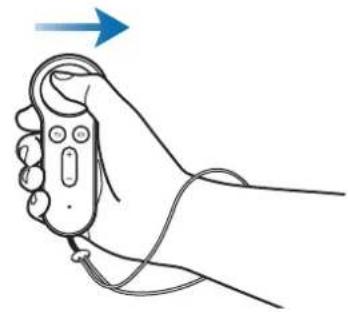
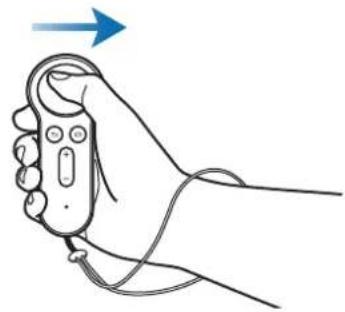
Swiping to the left or right
- Move to the next or previous item.
- Scroll right or left on a list.
- Reject an incoming call.
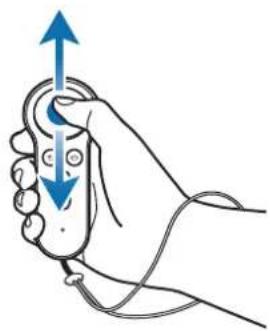
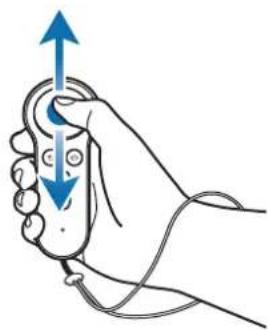
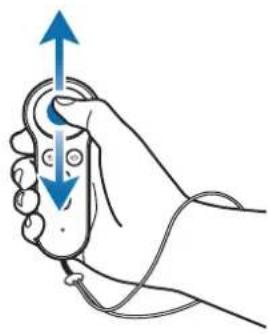
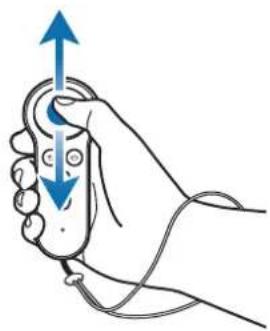
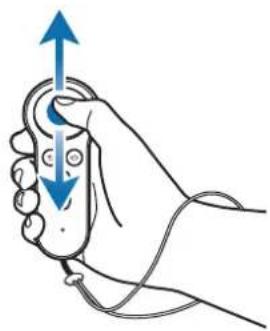
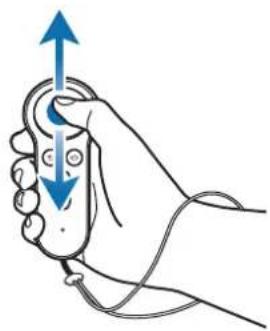
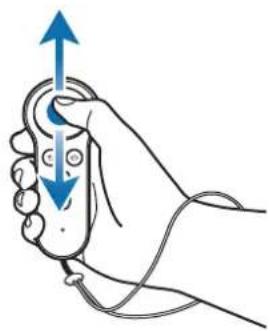
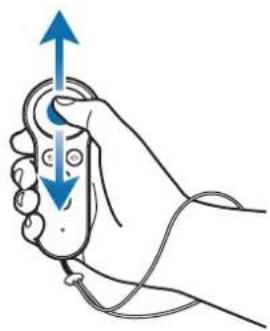
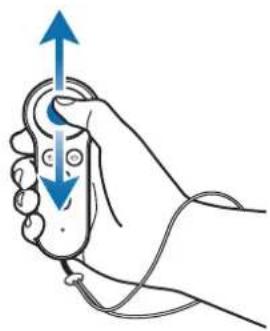
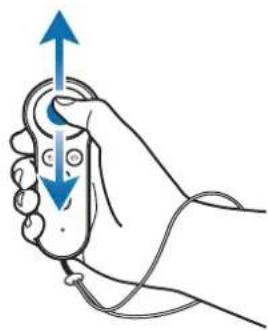
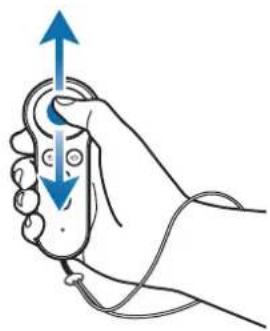
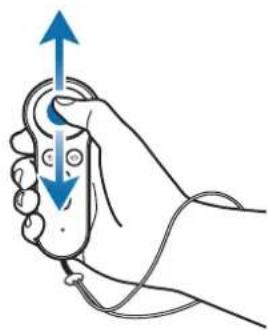
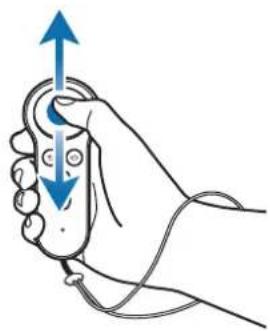
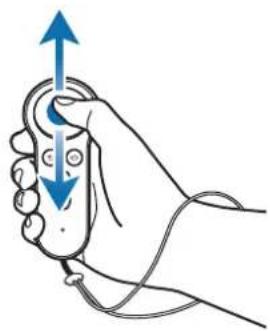
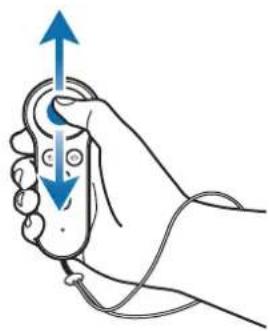
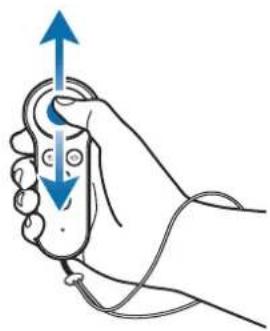
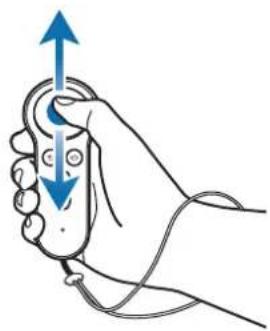
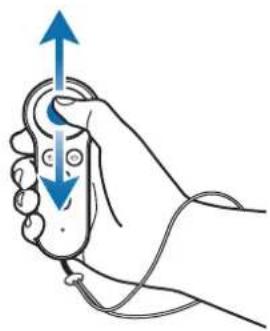
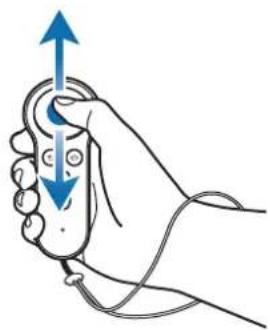
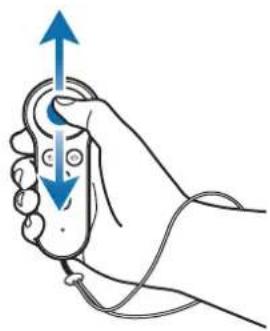
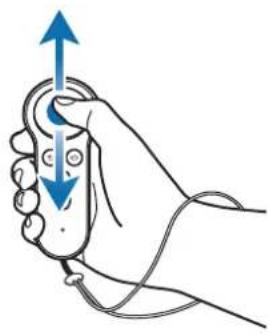
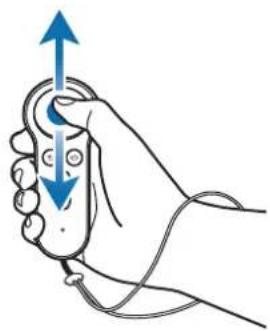
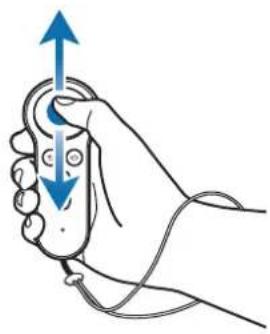
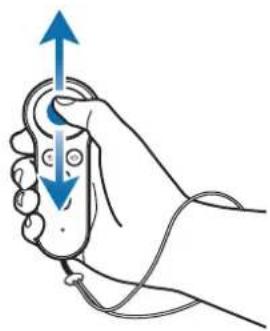
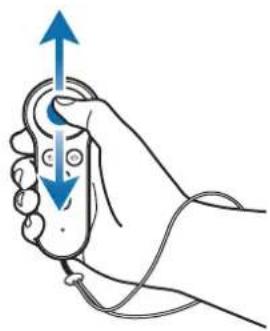
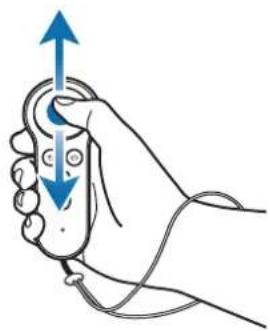
Swiping upwards or downwards
- Scroll up or down on a webpage or list.
• While viewing an image, enlarge or reduce its size.

Some apps may not allow you to use the swipe function.
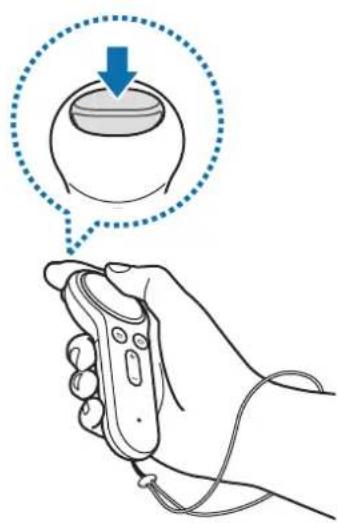
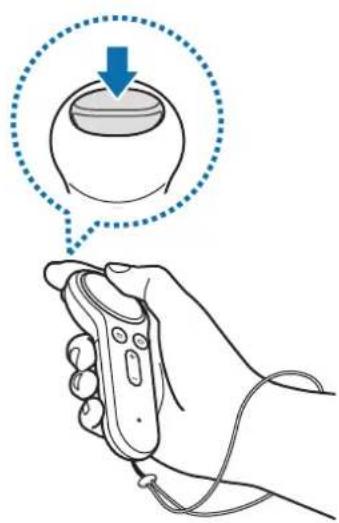
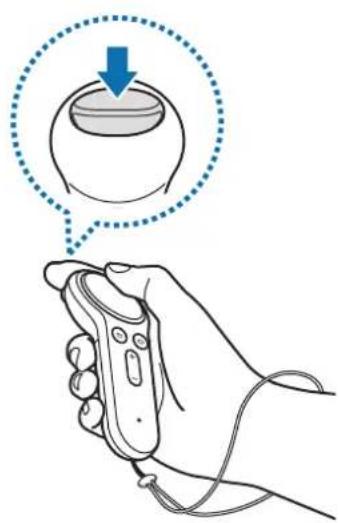
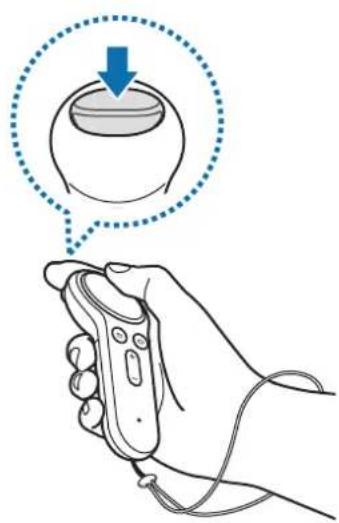
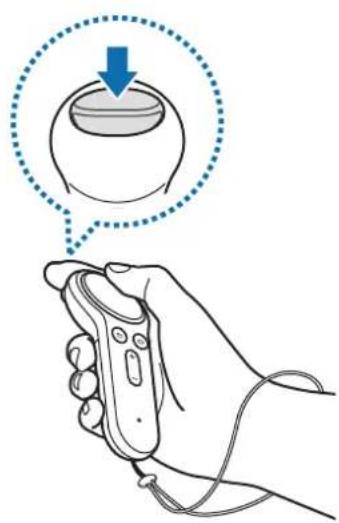
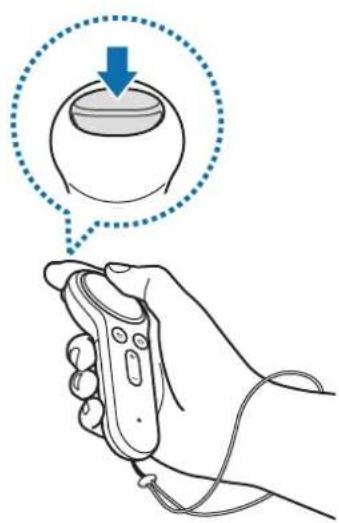
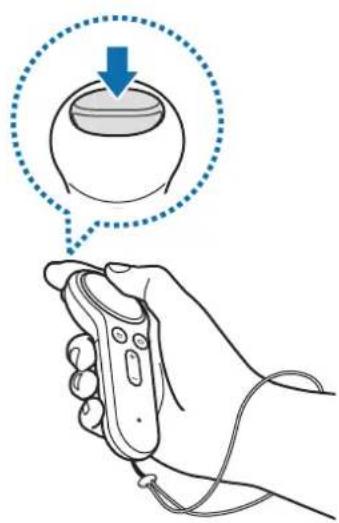
Using the trigger
- Press to select an item or use it as a trigger when playing certain games. Its function may vary depending on the launched apps.
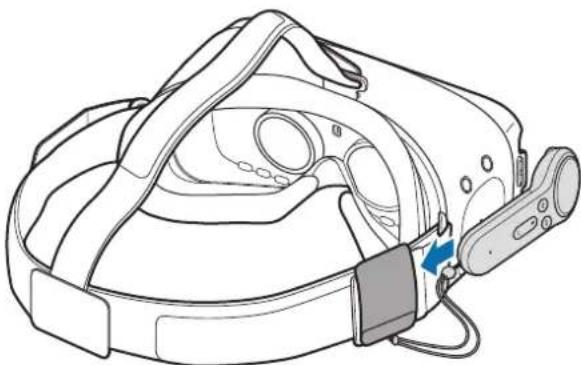
Storing the controller
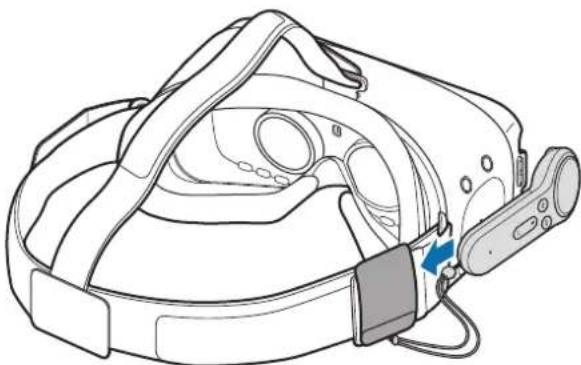
Attach the controller holder to the Gear VR and put your controller in it for storage.

natural_image
Line drawing of a VR headset with attached sensor and cable (no text or symbols)
Insert the controller into the controller holder properly. If it is not securely inserted, the controller may accidentally separate from the controller holder and become damaged.

If you do not use the controller for an extended period, store the controller after removing the batteries.
Appendix
Troubleshooting
Before contacting a Samsung Service Centre, please attempt the following solutions.
Your controller cannot be used
When the batteries are completely discharged, your controller cannot be used. Replace the batteries.
Your controller freezes
Press and hold the Home button to enter Bluetooth pairing mode. When the controller enters Bluetooth pairing mode, connect the devices again.
If the problem is still not resolved, contact a Samsung Service Centre.
Another Bluetooth device cannot locate your controller
- Ensure that your controller is in Bluetooth pairing mode.
- Ensure that your controller and the other Bluetooth device are within the maximum Bluetooth range.
If the problem is still not resolved, contact a Samsung Service Centre.
Your controller cannot connect to another Bluetooth device
- Ensure that your controller and the other Bluetooth device are within the maximum Bluetooth range.
- On the device you want to connect with, disconnect all paired devices and try to connect again.
The pointer moves randomly on the screen while using the controller
The pointer may move randomly due to the magnetic field when you use the controller near computers, monitors, TVs, or walls that cables pass through. If this occurs, change your location and try using the controller again.
Bluetooth connection is often disconnected
- If there are obstacles between the devices, the operating distance may be reduced.
- Ensure that your controller and the other Bluetooth device are within the maximum Bluetooth range.
- When using the controller with other Bluetooth devices, the connection may be affected by electromagnetic waves. Use the controller in environments with fewer wireless devices present.
The controller works differently as described in the manual
Available functions may differ depending on the connected device.
Copyright
Copyright © 2017 Samsung Electronics
This manual is protected under international copyright laws.
No part of this manual may be reproduced, distributed, translated, or transmitted in any form or by any means, electronic or mechanical, including photocopying, recording, or storing in any information storage and retrieval system, without the prior written permission of Samsung Electronics.
Trademarks
• SAMSUNG and the SAMSUNG logo are registered trademarks of Samsung Electronics.
- Bluetooth ^ is a registered trademark of Bluetooth SIG, Inc. worldwide.
• All other trademarks and copyrights are the property of their respective owners.
Démarrage
natural_image
Line drawing of a shoe with a blue arrow indicating a specific part (no text or symbols present)text_image
Diagram showing a device's internal structure with labeled parts and a magnified inset highlighting component 1.Installer les piles
natural_image
Diagram of a handheld device with internal components and cable, showing no text or symbolsnatural_image
Line drawing of a medical device with a blue arrow indicating a point on its side (no text or symbols present)
natural_image
Line drawing of a person wearing a head-mounted device, viewed from the side with a hand holding a small object nearby (no text or symbols)natural_image
Line drawing of a hand holding a remote control with a blue scroll wheel (no text or symbols)Appuyer
natural_image
Line drawing of a hand holding a handheld device with a blue probe and cable (no text or symbols)
natural_image
Line drawing of a hand holding a remote control with a blue arrow indicating direction (no text or symbols)
natural_image
Illustration of a hand holding a remote control with blue arrows indicating upward and downward motion (no text or symbols)
natural_image
Illustration of a hand holding a remote control with a circular button and pointer (no text or symbols)Déplacer
natural_image
Line drawing of a VR headset with attached sensor module (no text or symbols)
Copyright © 2017 Samsung Electronics
natural_image
Line drawing of a shoe with a blue arrow indicating direction (no text or symbols)text_image
Diagram showing a device's internal structure with labeled parts and a magnified inset highlighting the connector mechanism.Batterien einsetzen
natural_image
Diagram of a handheld device with internal components and cable, showing no text or symbolsnatural_image
Line drawing of a medical device with a blue arrow pointing to a circular component (no text or symbols)
natural_image
Line drawing of a person wearing a head-mounted device, viewed from the side with a hand holding a small object nearby (no text or symbols)natural_image
Line drawing of a hand holding a remote control with a blue scroll wheel (no text or symbols)Drücken
natural_image
Line drawing of a hand holding a handheld device with a blue probe and cord (no text or symbols)
natural_image
Line drawing of a hand holding a remote control device with a blue arrow indicating direction (no text or symbols)
natural_image
Illustration of a hand holding a remote control with blue arrows indicating upward and downward motion (no text or symbols)
natural_image
Illustration of a hand holding a remote control with a circular button and a blue arrow pointing to it (no text or symbols)Bewegen
natural_image
Line drawing of a VR headset with attached cable and sensor (no text or symbols)
Copyright © 2017 Samsung Electronics
natural_image
Line drawing of a scooter's side panel with a blue arrow indicating motion direction (no text or symbols)text_image
Diagram showing a device's internal structure with labeled parts and a magnified inset highlighting the component being inserted.natural_image
Diagram of a handheld device with internal components and cable, showing no text or symbolsnatural_image
Line drawing of a medical device with a blue arrow indicating a point on its side (no text or symbols present)
natural_image
Line drawing of a person wearing a head-mounted device and holding a magnifying glass (no text or symbols)natural_image
Line drawing of a hand holding a remote control device (no text or symbols)Premere
natural_image
Line drawing of a hand holding a handheld device with a blue probe and cable (no text or symbols)
natural_image
Line drawing of a hand holding a remote control device with a blue arrow indicating direction (no text or symbols)
natural_image
Illustration of a hand holding a remote control with blue arrows indicating upward and downward motion (no text or symbols)
natural_image
Illustration of a hand holding a remote control device with a circular button and blue arrow indicating direction (no text or symbols)Muovere
natural_image
Line drawing of a VR headset with attached sensor module (no text or symbols)
Copyright © 2017 Samsung Electronics
natural_image
Line drawing of a shoe with a blue arrow indicating direction (no text or symbols)text_image
Diagram showing a device's internal structure with labeled parts and a magnified inset highlighting the component being inserted.Colocar las pilas
natural_image
Diagram of a handheld device with internal components and cable, showing no text or symbolsnatural_image
Line drawing of a medical device with a blue arrow pointing to a circular component (no text or symbols)
natural_image
Line drawing of a person wearing a head-mounted device and holding a handheld device (no text or symbols)natural_image
Line drawing of a hand holding a remote control with a blue scroll wheel (no text or symbols)Pulsar
natural_image
Line drawing of a hand holding a handheld device with a blue probe and cable (no text or symbols)
natural_image
Line drawing of a hand holding a remote control with a blue arrow indicating direction (no text or symbols)
natural_image
Illustration of a hand holding a remote control with blue arrows indicating upward and downward motion (no text or symbols)
natural_image
Illustration of a hand holding a remote control with a circular button and pointer, no text or symbols presentMover
natural_image
Line drawing of a VR headset with attached sensor and cable (no text or symbols)
Copyright © 2017 Samsung Electronics
natural_image
Line drawing of a shoe with a blue arrow indicating direction (no text or symbols)text_image
Diagram showing a device's internal structure with labeled parts and a magnified view highlighting two numbered components.natural_image
Diagram of a handheld device with internal components and cable, showing no text or symbolsnatural_image
Line drawing of a medical device with a blue arrow pointing to a circular component (no text or symbols)
natural_image
Line drawing of a person wearing a headlamp and holding a small object, viewed from the side (no text or symbols)natural_image
Line drawing of a hand holding a remote control with a blue scroll wheel (no text or symbols)Megnyomás
natural_image
Line drawing of a hand holding a handheld device with a blue probe and cable (no text or symbols)
natural_image
Line drawing of a hand holding a remote control device with a blue arrow indicating direction (no text or symbols)
natural_image
Illustration of a hand holding a remote control with blue arrows indicating upward and downward motion (no text or symbols)
natural_image
Illustration of a hand holding a remote control with a circular button and pointer, no text or symbols presentMozgás
natural_image
Line drawing of a VR headset with attached sensor module (no text or symbols)
Copyright © 2017 Samsung Electronics
natural_image
Line drawing of a shoe with a blue arrow indicating direction (no text or symbols)text_image
Diagram showing a device's internal structure with labeled parts and a magnified inset highlighting the connector mechanism.natural_image
Diagram of a handheld device with internal battery and cord, showing no text or symbolsnatural_image
Line drawing of a medical device with a blue arrow pointing to a point on its side (no text or symbols)
natural_image
Line drawing of a person wearing a helmet and pointing at a finger (no text or symbols)natural_image
Line drawing of a hand holding a remote control with a blue scroll wheel (no text or symbols)Wciśnięcie
- Wybierz element.
natural_image
Line drawing of a hand holding a handheld device with a blue probe and cord (no text or symbols)
natural_image
Line drawing of a hand holding a remote control with a blue arrow indicating direction (no text or symbols)
natural_image
Illustration of a hand holding a remote control with blue arrows indicating upward and downward motion (no text or symbols)
natural_image
Illustration of a hand holding a remote control with a circular button and pointer, no text or symbols presentPrzesuwanie
natural_image
Line drawing of a VR headset with attached sensor device (no text or symbols)
Copyright © 2017 Samsung Electronics
natural_image
Line drawing of a shoe with a blue arrow indicating a specific part (no text or symbols present)text_image
Diagram showing a device's internal structure with labeled parts and a magnified inset highlighting two numbered components.Instalarea bateriilor
natural_image
Diagram of a handheld device with internal components and cable, showing no text or symbolsnatural_image
Line drawing of a medical device with a blue arrow indicating a point on its side (no text or symbols present)
natural_image
Line drawing of a person wearing a helmet and pointing at a finger (no text or symbols)natural_image
Line drawing of a hand holding a remote control with a blue clip (no text or symbols)Apăsare
natural_image
Line drawing of a hand holding a handheld device with a blue probe and cord (no text or symbols)
natural_image
Line drawing of a hand holding a remote control device with a blue arrow indicating direction (no text or symbols)
natural_image
Illustration of a hand holding a remote control with blue arrows indicating upward and downward motion (no text or symbols)
natural_image
Illustration of a hand holding a remote control with a circular button and a blue arrow pointing to it (no text or symbols)Mutare
natural_image
Line drawing of a VR headset with attached sensor module (no text or symbols)
natural_image
Line drawing of a shoe handle with a blue arrow indicating direction (no text or symbols)text_image
Diagram showing a device's internal structure with labeled parts and a magnified inset highlighting component 1.natural_image
Diagram of a handheld device with internal battery and cable, showing no text or symbolsnatural_image
Line drawing of a medical device with a blue arrow pointing to a point on its side (no text or symbols)
natural_image
Line drawing of a person wearing a head-mounted device, viewed from the side with a hand holding a small object nearby (no text or symbols)natural_image
Line drawing of a hand holding a remote control with a blue scroll wheel (no text or symbols)Натискане
natural_image
Line drawing of a hand holding a handheld device with a blue probe and cord (no text or symbols)
natural_image
Line drawing of a hand holding a remote control device with a blue arrow indicating direction (no text or symbols)
natural_image
Illustration of a hand holding a remote control with blue arrows indicating upward and downward motion (no text or symbols)
natural_image
Illustration of a hand holding a remote control with a circular button and pointer, no text or symbols presentДвижение
natural_image
Line drawing of a VR headset with attached cable and sensor (no text or symbols)
Copyright © 2017 Samsung Electronics
natural_image
Line drawing of a shoe with a blue arrow indicating direction (no text or symbols)2 Umetnite petlju remena za zglobove u otvor za spajanje remena za ruku i pričvrstite ju na kukicu kako biste ju osigurali.

text_image
Diagram showing a device's internal structure with labeled parts and a magnified inset highlighting the connector mechanism.Ugradnja baterija
natural_image
Diagram of a handheld device with internal components and cable, showing no text or symbolsnatural_image
Line drawing of a handheld device with a blue arrow pointing to the left side (no text or symbols)
natural_image
Line drawing of a person wearing a headlamp and holding a device, viewed from the side (no text or symbols)natural_image
Line drawing of a hand holding a remote control with a blue scroll wheel (no text or symbols)Pritiskanje
• Odaberite stavku.
natural_image
Line drawing of a hand holding a handheld device with a blue probe and cable (no text or symbols)
natural_image
Line drawing of a hand holding a remote control device with a blue arrow indicating direction (no text or symbols)
natural_image
Illustration of a hand holding a remote control with blue directional arrows indicating movement (no text or symbols)
natural_image
Illustration of a hand holding a remote control with a circular button and pointer, no text or symbols presentPomicanje
natural_image
Line drawing of a VR headset with attached sensor and cable (no text or symbols)
Copyright © 2017 Samsung Electronics
natural_image
Line drawing of a shoe with a blue arrow indicating motion or change (no text or symbols)2 Stavite omču trake za zglob u rupicu za povezivanje trake za zglob i spojite kukicu da pričvrstite.

text_image
Diagram showing a device's internal structure with labeled parts and a magnified inset highlighting component 1.Instaliranje baterija
natural_image
Diagram of a handheld device with internal components and cable, showing no text or symbolsnatural_image
Line drawing of a medical device with a blue arrow pointing to a point on its side (no text or symbols)
- Ako indikatorska lampica treperi crvenom bojom dok koristite upravljač, zamenite baterije.
• Nemojte ponovo da punite priložene baterije (AAA baterije).
natural_image
Line drawing of a person wearing a headlamp and holding a handheld device (no text or symbols)Upravljanje uređajem „Gear VR“ pomoću upravljača
natural_image
Line drawing of a hand holding a remote control with a blue scroll wheel (no text or symbols)Pritiskanje
- Izaberite jednu stavku.
- Tokom reprodukovanja video zapisa, prikazuju se dostupne funkcije.

natural_image
Line drawing of a hand holding a handheld device with a blue probe and cable (no text or symbols)
natural_image
Line drawing of a hand holding a remote control device with a blue arrow indicating direction (no text or symbols)
natural_image
Illustration of a hand holding a remote control with blue arrows indicating upward and downward motion (no text or symbols)
natural_image
Illustration of a hand holding a remote control with a circular button and pointer, no text or symbols presentPomeranje
- Pomerajte zglob za pomeranje pokazivača levo, desno, gore i dole na ekranu.
natural_image
Line drawing of a VR headset with attached sensor and cable (no text or symbols)
Copyright © 2017 Samsung Electronics
Ovaj priručnik je zaštićen međunarodnim zakonima o autorskim pravima.
Nijedan deo ovog priručnika se ne sme reprodukovati, distribuirati, prevoditi niti prenositi ni u jednom obliku niti bilo kojim putem, elektronskim niti mehaničkim, što podrazumeva fotokopiranje, snimanje i skladištenje u okviru bilo kog skladišta informacija i sistema za preuzimanje, bez prethodne dozvole kompanije Samsung Electronics u pisanom obliku.
Trgovačke marke
- SAMSUNG i SAMSUNG logotip su registrovane trgovačke marke kompanije Samsung Electronics.
- Bluetooth® je registrovana trgovačka marka kompanije „Bluetooth SIG, Inc.“ širom sveta.
- Sve ostale trgovačke marke i autorska prava su vlasništvo njihovih vlasnika.
Começar
Leia primeiro
natural_image
Line drawing of a shoe with a blue arrow indicating direction (no text or symbols)text_image
Diagram showing a device's internal structure with labeled parts and a magnified inset highlighting the component being twisted.Colocar as pilhas
natural_image
Diagram of a handheld device with internal components and cable, showing no text or symbolsnatural_image
Line drawing of a medical device with a blue arrow indicating a point on its side (no text or symbols present)
natural_image
Line drawing of a person wearing a head-mounted device, viewed from the side with a hand holding a small object nearby (no text or symbols)natural_image
Line drawing of a hand holding a remote control with a blue scroll wheel (no text or symbols)Premir
natural_image
Line drawing of a hand holding a handheld device with a blue probe and cord (no text or symbols)
natural_image
Line drawing of a hand holding a remote control device with a blue arrow indicating direction (no text or symbols)
natural_image
Illustration of a hand holding a remote control with blue arrows indicating upward and downward motion (no text or symbols)
natural_image
Illustration of a hand holding a remote control device with a circular button and blue arrow indicating direction (no text or symbols)Mover
natural_image
Line drawing of a VR headset with attached sensor and cable (no text or symbols)
Copyright © 2017 Samsung Electronics
Este manual está protegido pelas leis internacionais de copyright.
natural_image
Line drawing of a shoe with a blue arrow indicating direction (no text or symbols)text_image
Diagram showing a device's internal structure with labeled parts and a magnified inset highlighting two numbered components.natural_image
Diagram of a handheld device with internal components and cable, showing no text or symbolsnatural_image
Line drawing of a handheld device with a blue arrow pointing to the left side (no text or symbols)
natural_image
Line drawing of a person wearing a headlamp and holding a magnifying glass (no text or symbols)natural_image
Line drawing of a hand holding a remote control device (no text or symbols)Nospiežot
- Atlasiet vienumu.
natural_image
Line drawing of a hand holding a handheld device with a blue probe and cable (no text or symbols)
natural_image
Line drawing of a hand holding a remote control device with a blue arrow indicating direction (no text or symbols)
natural_image
Illustration of a hand holding a remote control with blue arrows indicating upward and downward motion (no text or symbols)
natural_image
Illustration of a hand holding a remote control with a circular button and a blue arrow pointing to it (no text or symbols)Pārvietojot
natural_image
Line drawing of a VR headset with attached sensor and cable (no text or symbols)
natural_image
Line drawing of a shoe with a blue arrow indicating direction (no text or symbols)text_image
Diagram showing a device's internal structure with labeled parts and a magnified inset highlighting two numbered components.natural_image
Diagram of a handheld device with internal components and cable, showing no text or symbolsnatural_image
Line drawing of a handheld device with a blue arrow pointing to the left side (no text or symbols)
natural_image
Line drawing of a person wearing a head-mounted device, viewed from the side with a hand holding a small object nearby (no text or symbols)„Gear VR“ valdymas valdikliu
natural_image
Line drawing of a hand holding a remote control with a blue scroll wheel (no text or symbols)Spaudimas
• Pasirinkite elementa.
natural_image
Line drawing of a hand holding a handheld device with a blue probe and cable (no text or symbols)
natural_image
Line drawing of a hand holding a remote control device with a blue arrow indicating direction (no text or symbols)
natural_image
Illustration of a hand holding a remote control with blue arrows indicating upward and downward motion (no text or symbols)
natural_image
Illustration of a hand holding a remote control with a circular button and a blue arrow pointing to it (no text or symbols)Judėjimas
natural_image
Line drawing of a VR headset with attached sensor and cable (no text or symbols)
natural_image
Line drawing of a shoe with a blue arrow indicating direction (no text or symbols)text_image
Diagram showing a device's internal structure with labeled parts and a magnified inset highlighting two numbered components.Patareide paigaldamine
natural_image
Diagram of a handheld device with internal components and cable, showing no text or symbolsnatural_image
Line drawing of a medical device with a blue arrow pointing to a circular component (no text or symbols)
natural_image
Line drawing of a person wearing a headlamp and holding a small object, viewed from the side (no text or symbols)natural_image
Line drawing of a hand holding a remote control device with a blue scroll wheel (no text or symbols)Vajutamine
- Valige üksus.
natural_image
Line drawing of a hand holding a handheld device with a blue probe and cord (no text or symbols)
natural_image
Line drawing of a hand holding a remote control with a blue arrow indicating direction (no text or symbols)
natural_image
Illustration of a hand holding a remote control with blue arrows indicating upward and downward motion (no text or symbols)
natural_image
Illustration of a hand holding a remote control with a circular button and pointer, no text or symbols presentLiikumine
natural_image
Line drawing of a VR headset with attached cable and sensor (no text or symbols)
Copyright © 2017 Samsung Electronics
natural_image
Line drawing of a shoe with a blue arrow indicating a specific part (no text or symbols present)text_image
Diagram showing a device's internal structure with labeled parts and a magnified inset highlighting the component being inserted.natural_image
Diagram of a handheld device with internal components and cable, showing no text or symbolsnatural_image
Line drawing of a medical device with a blue arrow indicating direction (no text or symbols)
text_image
Gear VR Controller(MCCR)natural_image
Line drawing of a person wearing a hard hat and pointing at a small object (no text or symbols)natural_image
Line drawing of a hand holding a remote control with a blue scroll wheel (no text or symbols)Indrukken
natural_image
Line drawing of a hand holding a handheld device with a blue probe and cord (no text or symbols)
natural_image
Line drawing of a hand holding a remote control device with a blue arrow indicating direction (no text or symbols)
natural_image
Illustration of a hand holding a remote control with blue arrows indicating upward and downward motion (no text or symbols)
natural_image
Illustration of a hand holding a remote control with a circular button and pointer, no text or symbols presentBewegen
natural_image
Line drawing of a VR headset with attached cable and sensor (no text or symbols)
Copyright © 2017 Samsung Electronics
natural_image
Line drawing of a shoe with a blue arrow indicating a specific part (no text or symbols present)text_image
Diagram showing a device's internal structure with labeled parts and a magnified inset highlighting two numbered components.Installera batterierna
natural_image
Diagram of a handheld device with internal components and cable, showing no text or symbolsnatural_image
Line drawing of a medical device with a blue arrow pointing to a point on its side (no text or symbols)
natural_image
Line drawing of a person wearing a headlamp and holding a device, viewed from the side (no text or symbols)Styra din Gear VR med handkontrollen
natural_image
Line drawing of a hand holding a remote control with a blue scroll wheel (no text or symbols)Trycka
• Välj ett objekt.
natural_image
Line drawing of a hand holding a handheld device with a blue probe and cable (no text or symbols)
natural_image
Line drawing of a hand holding a remote control device with a blue arrow indicating direction (no text or symbols)
natural_image
Illustration of a hand holding a remote control with blue arrows indicating upward and downward motion (no text or symbols)
natural_image
Illustration of a hand holding a remote control with a circular button and a blue arrow pointing to it (no text or symbols)Flytta
natural_image
Line drawing of a VR headset with attached cable and sensor (no text or symbols)
Copyright © 2017 Samsung Electronics
natural_image
Line drawing of a shoe with a blue arrow indicating direction (no text or symbols)text_image
Diagram showing a device's internal structure with labeled parts and a magnified inset highlighting the connector mechanism.natural_image
Diagram of a handheld device with internal components and cable, showing no text or symbolsnatural_image
Line drawing of a handheld device with a blue arrow pointing to the left side (no text or symbols)
- Hvis indikatorlyset blinker rødt mens du bruker kontrolleren, bytter du batteriene.
- Ikke lad opp de medfølgende batteriene (AAA-batterier).
Bruke kontrolleren
Koble til en mobilenhet
natural_image
Line drawing of a person wearing a head-mounted device, viewed from the side with a hand holding a small object nearby (no text or symbols)Kontrollere Gear VR med kontrolleren
natural_image
Line drawing of a hand holding a remote control with a blue scroll wheel (no text or symbols)Trykke
- Velge et element.
natural_image
Line drawing of a hand holding a handheld device with a blue probe and cable (no text or symbols)
natural_image
Line drawing of a hand holding a remote control with a blue arrow indicating direction (no text or symbols)
natural_image
Illustration of a hand holding a remote control with blue arrows indicating upward and downward motion (no text or symbols)
natural_image
Illustration of a hand holding a remote control with a circular button and pointer (no text or symbols)Flytte
natural_image
Line drawing of a VR headset with attached cable and sensor (no text or symbols)
Copyright © 2017 Samsung Electronics
natural_image
Line drawing of a shoe with a blue arrow indicating direction (no text or symbols)text_image
Diagram showing a device's internal structure with labeled parts and a magnified inset highlighting the connector mechanism.natural_image
Diagram of a handheld device with internal components and cable, showing no text or symbolsnatural_image
Line drawing of a handheld device with a blue arrow pointing to the left side (no text or symbols)
natural_image
Line drawing of a person wearing a head-mounted device, viewed from the side with a hand holding a small object nearby (no text or symbols)natural_image
Line drawing of a hand holding a remote control with a blue scroll wheel (no text or symbols)Painaminen
- Valitse kohde.
natural_image
Line drawing of a hand holding a handheld device with a blue probe and cable (no text or symbols)
natural_image
Line drawing of a hand holding a remote control device with a blue arrow indicating direction (no text or symbols)
natural_image
Illustration of a hand holding a remote control with blue arrows indicating upward and downward motion (no text or symbols)
natural_image
Illustration of a hand holding a remote control with a circular button and a blue arrow pointing to it (no text or symbols)Liikuttaminen
natural_image
Line drawing of a VR headset with attached cable and sensor (no text or symbols)
Copyright © 2017 Samsung Electronics
natural_image
Line drawing of a shoe with a blue arrow indicating a specific point on the side (no text or symbols present)text_image
Diagram showing a device's internal structure with labeled parts and a magnified inset highlighting the component being inserted.natural_image
Diagram of a handheld device with internal components and cable, showing no text or symbolsnatural_image
Line drawing of a medical device with a blue arrow pointing to a circular component (no text or symbols)
natural_image
Line drawing of a person wearing a head-mounted device, viewed from the side with a hand holding a small object nearby (no text or symbols)Styre Gear VR med controlleren
natural_image
Line drawing of a hand holding a remote control with a blue scroll wheel (no text or symbols)Trykke
• Vælg et element.
natural_image
Line drawing of a hand holding a handheld device with a blue probe and cable (no text or symbols)
natural_image
Line drawing of a hand holding a remote control with a blue arrow indicating direction (no text or symbols)
natural_image
Illustration of a hand holding a remote control with blue arrows indicating upward and downward motion (no text or symbols)
natural_image
Illustration of a hand holding a remote control with a circular button and a blue arrow pointing to it (no text or symbols)Flytte
natural_image
Line drawing of a VR headset with attached sensor and cable (no text or symbols)
natural_image
Line drawing of a shoe with a blue arrow indicating rotation (no text or symbols)text_image
Diagram showing a device's internal structure with labeled parts and a magnified inset highlighting two components.natural_image
Diagram of a handheld device with internal components and cable, showing no text or symbolsnatural_image
Line drawing of a medical device with a blue arrow pointing to a circular component (no text or symbols)
natural_image
Line drawing of a person wearing a head-mounted device, viewed from the side with a hand holding a small object nearby (no text or symbols)natural_image
Line drawing of a hand holding a remote control with a blue scroll wheel (no text or symbols)Πίεση
natural_image
Line drawing of a hand holding a handheld device with a blue probe and cable (no text or symbols)
natural_image
Line drawing of a hand holding a remote control device with a blue arrow indicating direction (no text or symbols)
natural_image
Illustration of a hand holding a remote control with blue arrows indicating upward and downward motion (no text or symbols)
natural_image
Illustration of a hand holding a remote control with a circular button and pointer, no text or symbols presentKivnon
natural_image
Line drawing of a VR headset with attached sensor module (no text or symbols)
natural_image
Line drawing of a shoe with a blue arrow indicating a specific part (no text or symbols present)text_image
Diagram showing a device's internal structure with labeled parts and a magnified inset highlighting component 1.Namestitev baterija
1 Vstavite baterije s pozitivnim in negativnim priključkom poravnanim s simboloma + in – na krmilniku.

natural_image
Diagram of a handheld device with internal components and cable, showing no text or symbols2 Namestite pokrov baterije na krmilnik in ga potisnite nazaj, dokler se ne zaskoči nazaj na mesto.

natural_image
Line drawing of a handheld device with a blue arrow pointing to the left side (no text or symbols)
natural_image
Line drawing of a person wearing a headlamp and holding a remote control device (no text or symbols)Upravljanje naprave Gear VR z upravljalnikom
natural_image
Line drawing of a hand holding a remote control device (no text or symbols)Pritiskanje
- Izbira elementa.
natural_image
Line drawing of a hand holding a handheld device with a blue probe and cord (no text or symbols)
natural_image
Line drawing of a hand holding a remote control device with a blue arrow indicating direction (no text or symbols)
natural_image
Illustration of a hand holding a remote control with blue arrows indicating upward and downward motion (no text or symbols)
natural_image
Illustration of a hand holding a remote control with a circular button and pointer, no text or symbols presentPremikanje
- Premaknite zapestje za premik kazalca levo, desno, navzgor in navzdol po zaslonu.
natural_image
Line drawing of a VR headset with attached sensor and cable (no text or symbols)
natural_image
Line drawing of a shoe with a blue arrow indicating direction (no text or symbols)text_image
Diagram showing a device's internal structure with labeled parts and a magnified inset highlighting two components.Inštalácia batérií
natural_image
Diagram of a handheld device with internal components and cable, showing no text or symbols2 Položte kryt batérie na ovládač a zasuňte kryt batérie spät tak, aby zacvakol spät na miesto.

natural_image
Line drawing of a medical device with a blue arrow pointing to a circular component (no text or symbols)
natural_image
Line drawing of a person wearing a head-mounted device and holding a handheld device (no text or symbols)natural_image
Line drawing of a hand holding a remote control with a blue scroll wheel (no text or symbols)Stlačenie
• Výber položky.
natural_image
Line drawing of a hand holding a handheld device with a blue probe and cord (no text or symbols)
natural_image
Line drawing of a hand holding a remote control with a blue arrow indicating direction (no text or symbols)
natural_image
Illustration of a hand holding a remote control with blue arrows indicating upward and downward motion (no text or symbols)
natural_image
Illustration of a hand holding a remote control device with a circular button and blue arrow indicating direction (no text or symbols)Pohyb
natural_image
Line drawing of a VR headset with attached cable and sensor (no text or symbols)
Copyright © 2017 Samsung Electronics
natural_image
Line drawing of a shoe with a blue arrow indicating direction (no text or symbols)text_image
Diagram showing a device's internal structure with labeled parts and a magnified inset highlighting the connector mechanism.Vložení baterií
natural_image
Diagram of a handheld device with internal components and cable, showing no text or symbolsnatural_image
Line drawing of a medical device with a blue arrow pointing to a point on its side (no text or symbols)
natural_image
Line drawing of a person wearing a helmet and pointing at a finger (no text or symbols)natural_image
Line drawing of a hand holding a remote control with a blue scroll wheel (no text or symbols)Stisknutí
natural_image
Line drawing of a hand holding a handheld device with a blue probe and cable (no text or symbols)
natural_image
Line drawing of a hand holding a remote control with a blue arrow indicating direction (no text or symbols)
natural_image
Illustration of a hand holding a remote control with blue directional arrows indicating movement (no text or symbols)
natural_image
Illustration of a hand holding a remote control device with a circular button and blue arrow indicating direction (no text or symbols)Pohyb
natural_image
Line drawing of a VR headset with attached sensor module (no text or symbols)
Copyright © 2017 Samsung Electronics
natural_image
Line drawing of a shoe with a blue arrow indicating a specific part (no text or symbols present)text_image
Diagram showing a device's internal structure with labeled parts and a magnified inset highlighting the component being inserted.Pilleri takma
natural_image
Diagram of a handheld device with internal components and cable, showing no text or symbolsnatural_image
Line drawing of a handheld device with a blue arrow pointing to the left side (no text or symbols)
natural_image
Line drawing of a person wearing a helmet and pointing at a finger (no text or symbols)natural_image
Line drawing of a hand holding a remote control with a blue scroll wheel (no text or symbols)Basma
- Bir öğe seçin.
natural_image
Line drawing of a hand holding a handheld device with a blue probe and cord (no text or symbols)
natural_image
Line drawing of a hand holding a remote control device with a blue arrow indicating direction (no text or symbols)
natural_image
Illustration of a hand holding a remote control with blue arrows indicating upward and downward motion (no text or symbols)
natural_image
Illustration of a hand holding a remote control with a circular button and pointer, no text or symbols presentHaraket Ettirme
natural_image
Line drawing of a VR headset with attached sensor and cable (no text or symbols)
Telif hakkı © 2017 Samsung Electronics
natural_image
Line drawing of a shoe with a blue arrow indicating motion or force (no text or symbols)natural_image
Diagram of a device's internal structure and cable assembly, showing a close-up of the cable being inserted into a device (no text or symbols present)تركيب البطاريات
natural_image
Diagram of a handheld device with internal components and cable, showing no text or symbolsnatural_image
Line drawing of a medical device with a blue arrow pointing to a curved tube (no text or symbols)natural_image
Line drawing of a person wearing a head-mounted device and holding a handheld device (no text or symbols)natural_image
Line drawing of a hand holding a remote control device (no text or symbols)التحريك والنقل
natural_image
Line drawing of a hand holding a handheld device with a blue probe and cord (no text or symbols)natural_image
Line drawing of a hand holding a remote control device with a blue arrow indicating direction (no text or symbols)natural_image
Illustration of a hand holding a remote control with blue arrows indicating upward and downward motion (no text or symbols)استخدام المشفل
natural_image
Illustration of a hand holding a remote control device with a speech bubble containing a circular button (no text or symbols)tangzǐn وحدة التحكم
natural_image
Line drawing of a VR headset with attached cable and sensor (no text or symbols)natural_image
Line drawing of a shoe sole with a blue arrow indicating motion (no text or symbols)natural_image
Diagram of a device's internal structure and cable assembly, showing a close-up of the cable being inserted into a plastic housing (no text or symbols present)نصب باتری ها
natural_image
Diagram of a handheld device with internal components and cable, showing no text or symbolsnatural_image
Line drawing of a medical device with a blue arrow pointing to a point on its side (no text or symbols)natural_image
Line drawing of a person wearing a head-mounted device and holding a handheld device (no text or symbols)natural_image
Line drawing of a hand holding a remote control device (no text or symbols)حركت دادن
natural_image
Line drawing of a hand holding a remote control with a blue probe and cord (no text or symbols)کشیدن به چپ یا راست
natural_image
Line drawing of a hand holding a remote control with a blue arrow indicating direction (no text or symbols)natural_image
Illustration of a hand holding a remote control with blue arrows indicating upward and downward motion (no text or symbols)natural_image
Illustration of a hand holding a remote control with a circular button and blue arrow indicating action (no text or symbols)نگهداری از کنترل
natural_image
Line drawing of a VR headset with attached sensor and cable (no text or symbols)Copyright © 2017 Samsung Electronics
olerance that is in the
natural_image
Line drawing of a shoe handle with a blue arrow indicating direction (no text or symbols)text_image
Diagram showing a device's internal structure with labeled parts and a magnified inset highlighting two numbered components.natural_image
Diagram of a handheld device with internal battery and cable, showing no text or symbolsnatural_image
Line drawing of a medical device with a blue arrow pointing to a specific area (no text or symbols)
natural_image
Line drawing of a person wearing a head-mounted device, viewed from the side with a hand holding a small object nearby (no text or symbols)natural_image
Line drawing of a hand holding a remote control with a blue scroll wheel (no text or symbols)Нажатие
- Выбор элемента.
natural_image
Line drawing of a hand holding a handheld device with a blue probe and cord (no text or symbols)
natural_image
Line drawing of a hand holding a remote control with a blue arrow indicating direction (no text or symbols)
natural_image
Illustration of a hand holding a remote control with blue arrows indicating upward and downward motion (no text or symbols)
natural_image
Illustration of a hand holding a remote control with a circular button and pointer, no text or symbols presentПеремещение
natural_image
Line drawing of a VR headset with attached sensor module (no text or symbols)
© Samsung Electronics, 2017.
natural_image
Line drawing of a shoe with a blue arrow indicating direction (no text or symbols)text_image
Diagram showing a device's internal structure with labeled parts and a magnified inset highlighting two components.natural_image
Diagram of a handheld device with internal components and cable, showing no text or symbolsnatural_image
Line drawing of a medical device with a blue arrow pointing to a circular component (no text or symbols)
natural_image
Line drawing of a person wearing a head-mounted device, viewed from the side profile with a hand holding a small object nearby (no text or symbols)natural_image
Line drawing of a hand holding a remote control with a blue scroll wheel (no text or symbols)Натискання
• Вибір об'єкта.
natural_image
Line drawing of a hand holding a handheld device with a blue probe and cord (no text or symbols)
natural_image
Line drawing of a hand holding a remote control device with a blue arrow indicating direction (no text or symbols)
natural_image
Illustration of a hand holding a remote control with blue arrows indicating upward and downward motion (no text or symbols)
natural_image
Illustration of a hand holding a remote control with a circular button and a blue arrow pointing to it (no text or symbols)Pyx
natural_image
Line drawing of a VR headset with attached sensor and cable (no text or symbols)
© Samsung Electronics, 2017
natural_image
Line drawing of a shoe with a blue arrow indicating a motion or change (no text or symbols)text_image
Diagram showing a device's internal structure with labeled parts and a magnified inset highlighting two numbered components.Батареяларды орнату
natural_image
Diagram of a handheld device with internal components and cable, showing no text or symbolsnatural_image
Line drawing of a medical device with a blue arrow pointing to a point on its side (no text or symbols)
natural_image
Line drawing of a person wearing a head-mounted device, viewed from the side with a hand holding a small object nearby (no text or symbols)natural_image
Line drawing of a hand holding a remote control with a blue scroll wheel (no text or symbols)Басу
• Элементті тандау.
natural_image
Line drawing of a hand holding a handheld device with a blue probe and cord (no text or symbols)
natural_image
Line drawing of a hand holding a remote control with a blue arrow indicating direction (no text or symbols)
natural_image
Illustration of a hand holding a remote control with blue arrows indicating upward and downward motion (no text or symbols)
natural_image
Illustration of a hand holding a remote control device with a blue arrow pointing to a circular component (no text or symbols)Жылжыту
natural_image
Line drawing of a VR headset with attached cable and sensor (no text or symbols)
Copyright © 2017 Samsung Electronics
Please read this manual before using the device to ensure safe and proper use.
- Images may differ in appearance from the actual product. Content is subject to change without prior notice.
- Before using the controller, make sure it is compatible with your device.
• To view the open source license for the controller, refer to opensource.samsung.com.
Instructional icons

Warning: situations that could cause injury to yourself or others

Caution: situations that could cause damage to your device or other equipment

Notice: notes, usage tips, or additional information
About the Gear VR controller
You can connect the controller to a mobile device connected with a Gear VR via Bluetooth. Control various Gear VR features with the controller keys and touchpad.
Package contents
Check the product box for the following items:
- Controller
- Quick start guide
- Wrist strap
- Controller holder
- Two AAA batteries

- The items supplied with the device and any available accessories may vary depending on the region or service provider.
- The supplied items are designed only for this device and may not be compatible with other devices.
- Appearances and specifications are subject to change without prior notice.
- You can purchase additional accessories from your local Samsung retailer. Make sure they are compatible with the device before purchase.
- Use only Samsung-approved accessories. Using unapproved accessories may cause the performance problems and malfunctions that are not covered by the warranty.
- Availability of all accessories is subject to change depending entirely on manufacturing companies. For more information about available accessories, refer to the Samsung website.
Device layout

text_image
Touchpad Trigger Back key Home key Volume key Indicator light Wrist strap connection hole Battery compartment
text_image
Battery cover Wrist strap Controller holderButtons
| Name Function | |
| Touchpad | Press to select an item. You can move to the next or previous item by swiping to the left or right. |
| Home key | When the controller is not connected with a Gear VR:Press and hold to enter Bluetooth pairing mode.When the controller is connected with a Gear VR:Press to return to the Gear VR's Oculus Home screen.Press and hold to reorient the pointer direction when it is off-center. |
| Back key | Press to return to the Gear VR's previous screen.Press and hold to open the Gear VR's Universal menu. You can view the status of the Gear VR and configure Gear VR's settings. |
| Volume key | Press to adjust the Gear VR volume. |
| Trigger | Press to select an item or use it as a trigger when playing certain games. Its function may vary depending on the launched apps. |
Indicator light
The indicator light alerts you to the controller's status.
| Color Status | |
| Flashes red, green, and blue | The controller is in Bluetooth pairing mode. |
| Flashes blue three times | Bluetooth is connected. |
| Flashes blue one time | Sleep mode is deactivated. |
Connecting the wrist strap
When you connect the wrist strap to your controller, you can use the controller safely without dropping it.
1 While pressing on the backside of the controller, slide the battery cover towards the top of the triangle to open it.

Do not bend or twist the battery cover excessively. Doing so may damage the battery cover.

natural_image
Line drawing of a shoe with a blue arrow indicating motion or change (no text or symbols)2 Insert the wrist strap loop into the wrist strap connection hole and attach it to the hook to secure it.

text_image
Diagram showing a device's internal structure with labeled parts and a magnified inset highlighting the component being inserted.Installing the batteries
1 Insert batteries with the positive and negative terminals properly aligned with the + and - symbols on the controller.

natural_image
Diagram of a handheld device with internal components and cable, showing no text or symbols2 Place the battery cover on the controller and slide the battery cover back until it clicks back into place.

natural_image
Line drawing of a medical device with a blue arrow pointing to a circular component (no text or symbols)
- If the indicator light flashes red while using the controller, replace the batteries.
- Do not recharge the provided batteries (AAA batteries).
Using the controller
Connecting to mobile device
Notices for using Bluetooth
Bluetooth is a wireless technology standard that uses a 2.4 GHz frequency to connect to various devices over short distances. It can connect and exchange data with other Bluetooth enabled devices, such as mobile devices, computers, printers, and other digital home appliances, without connecting via cables.
- To avoid problems when connecting your controller to another device, place the devices close to each other.
- Ensure that your controller and the other Bluetooth device are within the maximum Bluetooth range. The distance may vary depending on the environment the devices are used in.
- Ensure that there are no obstacles between the controller and a connected device, including human bodies, walls, corners, or fences.
- Do not touch the Bluetooth antenna of a connected device.
- Bluetooth uses the same frequency as some industrial, scientific, medical, and low power products and interference may occur when making connections near these types of products.
- Some devices, especially those that are not tested or approved by the Bluetooth SIG, may be incompatible with your controller.
- Do not use the Bluetooth feature for illegal purposes (for example, pirating copies of files or illegally tapping communications for commercial purposes).
Connecting the controller with the Gear VR app (Oculus)
Connect the controller to the mobile device that is connected to the Gear VR to control the Gear VR with the controller.

Install the Gear VR app (Oculus) on your mobile device to connect it with the controller. Connect the mobile device to the Gear VR and remove the mobile device when you hear a voice prompt that requests you to separate the mobile device. The Gear VR app (Oculus) installation screen will appear on the mobile device.
1 Controller Press and hold the Home key to enter Bluetooth pairing mode.
The indicator light will flash red, green, and blue.
2 Mobile device On the Gear VR app (Oculus), tap More → Controllers to connect the controller.
The indicator light will flash blue three times.
3 Choose the hand you will use the controller with.
4 Connect your mobile device to the Gear VR and control the Gear VR with the controller's keys and touchpad.

The way for connecting the controller can be changed depending on the Oculus service.
Connecting the controller via Bluetooth

You can connect the controller via Bluetooth only on mobile devices running Android 6.0 or higher. If you cannot connect the controller via Bluetooth, connect it with the Gear VR app (Oculus).
1 Controller Press and hold the controller's Home key to enter Bluetooth pairing mode. The indicator light will flash red, green, and blue.
2 Mobile device Activate the Bluetooth feature and search for Bluetooth devices. For more information, refer to the mobile device's user manual.
3 Mobile device Tap Gear VR Controller(0000) on the list of available devices to complete Bluetooth pairing.

text_image
BLUETOOTH SCAN On Your device ( ) is currently visible to nearby devices. AVAILABLE DEVICES Gear VR Controller( )The indicator light will flash blue three times.
4 Connect your mobile device to the Gear VR and place the Gear VR on your head. Control the Gear VR with the controller's keys and touchpad.

- The PIN for the controller is the four-digit number in parenthesis displayed on the mobile device's Bluetooth settings screen. The number differs depending on the controller.
- If the Bluetooth connection fails or the mobile device cannot locate the controller, remove the device's information from the mobile device's list. Then, try to connect again.
Disconnecting or reconnecting devices
If you remove the Gear VR from your head or the current connection ends, the controller enters sleep mode. Press the controller's trigger, touchpad, or any keys to deactivate sleep mode and re-enter Bluetooth pairing mode.
The controller will be reconnected to the previous mobile device automatically.

- If the controller and the mobile device are not kept within the Bluetooth connection range, the controller will be disconnected.
- If the batteries are removed from the controller or the Bluetooth feature is deactivated in the mobile device, the controller will be disconnected.
- If the Bluetooth connection is lost due to a problem with the connected mobile device, access the Bluetooth menu on the mobile device to pair the devices again.
- If your controller is not functioning properly, take it and the Gear VR to a Samsung Service Center.
Using the controller
Connect the controller with the mobile device, attach the mobile device to the Gear VR, and then place the Gear VR on your head. Control the Gear VR with the controller's keys and touchpad.

- The controller does not have a power on/off function. If the controller is not used for a specified period or if the Gear VR is removed from your head, it will enter sleep mode.
• The Gear VRs are sold separately.

natural_image
Line drawing of a person wearing a head-mounted device, with a hand holding a small object nearby (no text or symbols)Controlling the Gear VR with the controller
Control the Gear VR by moving your wrist in any direction to move the pointer on the Gear VR's screen and use the touchpad to select items.

To avoid damaging the controller's touchpad, do not tap it with anything sharp.

• To use the controller, connect it to your mobile device.
• The controller functions may vary by app.

natural_image
Line drawing of a hand holding a remote control with a blue scroll wheel (no text or symbols)Pressing
- Select an item.
• While playing a video, show available features.
natural_image
Line drawing of a hand holding a handheld device with a blue probe and cable (no text or symbols)
natural_image
Line drawing of a hand holding a remote control with a blue arrow indicating direction (no text or symbols)
natural_image
Illustration of a hand holding a remote control with blue arrows indicating upward and downward motion (no text or symbols)
natural_image
Illustration of a hand holding a remote control with a circular button and pointer, no text or symbols presentMoving
- Move your wrist to move the pointer left, right, up, and down on the screen.
Swiping to the left or right
- Move to the next or previous item.
- Scroll right or left on a list.
- Reject an incoming call.
Swiping upwards or downwards
- Scroll up or down on a webpage or list.
• While viewing an image, enlarge or reduce its size.

Some apps may not allow you to use the swipe function.
Using the trigger
- Press to select an item or use it as a trigger when playing certain games. Its function may vary depending on the launched apps.
Storing the controller
Attach the controller holder to the Gear VR and put your controller in it for storage.
natural_image
Line drawing of a VR headset with attached sensor and cable (no text or symbols)
Insert the controller into the controller holder properly. If it is not securely inserted, the controller may accidentally separate from the controller holder and become damaged.

If you do not use the controller for an extended period, store the controller after removing the batteries.
Appendix
Troubleshooting
Before contacting a Samsung Service Center, please attempt the following solutions.
Your controller cannot be used
When the batteries are completely discharged, your controller cannot be used. Replace the batteries.
Your controller freezes
Press and hold the Home button to enter Bluetooth pairing mode. When the controller enters Bluetooth pairing mode, connect the devices again.
If the problem is still not resolved, contact a Samsung Service Center.
Another Bluetooth device cannot locate your controller
- Ensure that your controller is in Bluetooth pairing mode.
- Ensure that your controller and the other Bluetooth device are within the maximum Bluetooth range.
If the problem is still not resolved, contact a Samsung Service Center.
Your controller cannot connect to another Bluetooth device
- Ensure that your controller and the other Bluetooth device are within the maximum Bluetooth range.
- On the device you want to connect with, disconnect all paired devices and try to connect again.
The pointer moves randomly on the screen while using the controller
The pointer may move randomly due to the magnetic field when you use the controller near computers, monitors, TVs, or walls that cables pass through. If this occurs, change your location and try using the controller again.
Bluetooth connection is often disconnected
- If there are obstacles between the devices, the operating distance may be reduced.
- Ensure that your controller and the other Bluetooth device are within the maximum Bluetooth range.
- When using the controller with other Bluetooth devices, the connection may be affected by electromagnetic waves. Use the controller in environments with fewer wireless devices present.
The controller works differently as described in the manual
Available functions may differ depending on the connected device.
Copyright
Copyright © 2017 Samsung Electronics
This manual is protected under international copyright laws.
No part of this manual may be reproduced, distributed, translated, or transmitted in any form or by any means, electronic or mechanical, including photocopying, recording, or storing in any information storage and retrieval system, without the prior written permission of Samsung Electronics.
Trademarks
• SAMSUNG and the SAMSUNG logo are registered trademarks of Samsung Electronics.
- Bluetooth ^ is a registered trademark of Bluetooth SIG, Inc. worldwide.
- All other trademarks and copyrights are the property of their respective owners.
Para comenzar
natural_image
Line drawing of a shoe sole with a blue arrow indicating direction (no text or symbols)text_image
Diagram showing a device's internal structure with labeled parts and a magnified inset highlighting two numbered components.natural_image
Diagram of a handheld device with internal components and cable, showing no text or symbolsnatural_image
Line drawing of a medical device with a blue arrow indicating a point on its side (no text or symbols present)
natural_image
Line drawing of a person wearing a headlamp and holding a remote-controlled device (no text or symbols)natural_image
Line drawing of a hand holding a remote control with a blue scroll wheel (no text or symbols)Presionar
natural_image
Line drawing of a hand holding a handheld device with a blue probe and cable (no text or symbols)
natural_image
Line drawing of a hand holding a remote control device with a blue arrow indicating direction (no text or symbols)
natural_image
Illustration of a hand holding a remote control with blue arrows indicating upward and downward motion (no text or symbols)
natural_image
Illustration of a hand holding a remote control with a circular button and blue arrow indicating direction (no text or symbols)Mover
natural_image
Line drawing of a VR headset with attached sensor and cable (no text or symbols)
Copyright © 2017 Samsung Electronics
natural_image
Line drawing of a shoe with a blue arrow indicating direction (no text or symbols)text_image
Diagram showing a device's internal structure with labeled parts and a magnified inset highlighting two components.安装电池
natural_image
Diagram of a handheld device with internal components and cable, showing no text or symbolsnatural_image
Line drawing of a medical device with a blue arrow pointing to a point on its side (no text or symbols)
natural_image
Line drawing of a person wearing a headlamp and holding a small object, viewed from the side (no text or symbols)使用控制器控制 Gear VR
natural_image
Line drawing of a hand holding a remote control with a blue scroll wheel (no text or symbols)按下
- 选择项目。
- 播放视频时,显示可用功能。

natural_image
Line drawing of a hand holding a handheld device with a blue probe and cable (no text or symbols)
natural_image
Line drawing of a hand holding a remote control with a blue arrow indicating direction (no text or symbols)
natural_image
Illustration of a hand holding a remote control with blue arrows indicating upward and downward motion (no text or symbols)
natural_image
Illustration of a hand holding a remote control with a circular button and a blue arrow pointing to it (no text or symbols)移动
natural_image
Line drawing of a VR headset with attached sensor module (no text or symbols)
natural_image
Line drawing of a shoe with a blue arrow indicating direction (no text or symbols)text_image
Diagram showing a device's internal structure with labeled parts and a magnified inset highlighting two numbered components.安装電池
natural_image
Diagram of a handheld device with internal components and cable, showing no text or symbolsnatural_image
Line drawing of a medical device with a blue arrow pointing to a circular opening (no text or symbols)
natural_image
Line drawing of a person wearing a head-mounted device, with a hand holding a small object nearby (no text or symbols)使用控制器控制 Gear VR
natural_image
Line drawing of a hand holding a remote control with a blue scroll wheel (no text or symbols)按下
- 選取項目。
- 播放影片時顯示可用功能。

natural_image
Line drawing of a hand holding a handheld device with a blue probe and cable (no text or symbols)
natural_image
Line drawing of a hand holding a remote control device with a blue arrow indicating direction (no text or symbols)
natural_image
Illustration of a hand holding a remote control with blue arrows indicating upward and downward motion (no text or symbols)
natural_image
Illustration of a hand holding a remote control with a circular button and a blue arrow pointing to it (no text or symbols)移動
natural_image
Line drawing of a VR headset with attached cable and sensor (no text or symbols)
Copyright © 2017 Samsung Electronics
本手册受國際版權法保護。
natural_image
Line drawing of a shoe with a blue arrow indicating motion or change (no text or symbols)text_image
Diagram showing a device's internal structure with labeled parts and a magnified inset highlighting the component being inserted.Insertion des piles
natural_image
Diagram of a handheld device with internal components and cable, showing no text or symbolsnatural_image
Line drawing of a medical device with a blue arrow indicating a point on its side (no text or symbols present)
text_image
Gear VR Controller(100%)natural_image
Line drawing of a person wearing a head-mounted device and holding a handheld device (no text or symbols)natural_image
Line drawing of a hand holding a remote control with a blue scroll wheel (no text or symbols)Appuyer
natural_image
Line drawing of a hand holding a handheld device with a blue probe and cord (no text or symbols)
natural_image
Line drawing of a hand holding a remote control device with a blue arrow indicating direction (no text or symbols)
natural_image
Illustration of a hand holding a remote control with blue arrows indicating upward and downward motion (no text or symbols)
natural_image
Illustration of a hand holding a remote control with a circular button and a blue arrow pointing to it (no text or symbols)Déplacer
natural_image
Line drawing of a VR headset with attached cable and sensor (no text or symbols)
© Samsung Electronics, 2017.
natural_image
Line drawing of a shoe with a blue arrow indicating direction (no text or symbols)text_image
Diagram showing a device's internal structure with labeled parts and a magnified inset highlighting the component being processed.Colocar as baterias
natural_image
Diagram of a handheld device with internal components and cable, showing no text or symbolsnatural_image
Line drawing of a handheld device with a blue arrow pointing to the left side (no text or symbols)
natural_image
Line drawing of a person wearing a head-mounted device, viewed from the side with a hand holding a small object nearby (no text or symbols)natural_image
Line drawing of a hand holding a remote control with a blue scroll wheel (no text or symbols)Pressionando
natural_image
Line drawing of a hand holding a handheld device with a blue probe and cord (no text or symbols)
natural_image
Line drawing of a hand holding a remote control device with a blue arrow indicating direction (no text or symbols)
natural_image
Illustration of a hand holding a remote control with blue arrows indicating upward and downward motion (no text or symbols)
natural_image
Illustration of a hand holding a remote control with a circular button and pointer, no text or symbols presentMovendo
natural_image
Line drawing of a VR headset with attached cable and sensor (no text or symbols)
natural_image
Line drawing of a shoe with a blue arrow indicating a specific part (no text or symbols present)text_image
Diagram showing a device's internal structure with labeled parts and a magnified inset highlighting two numbered components.건전지 삽입하기
natural_image
Diagram of a handheld device with internal components and cable, showing no text or symbolsnatural_image
Line drawing of a medical device with a blue arrow pointing to a point on its side (no text or symbols)
natural_image
Line drawing of a person wearing a headlamp and holding a small object, viewed from the side (no text or symbols)제품으로 Gear VR 조작하기
natural_image
Line drawing of a hand holding a remote control with a blue scroll wheel (no text or symbols)한 번 누르기
- 원하는 항목을 선택합니다.
natural_image
Line drawing of a hand holding a handheld device with a blue probe and cord (no text or symbols)
natural_image
Line drawing of a hand holding a remote control device with a blue arrow indicating direction (no text or symbols)
natural_image
Illustration of a hand holding a remote control with blue arrows indicating upward and downward motion (no text or symbols)
natural_image
Illustration of a hand holding a remote control with a circular button and a blue arrow pointing to it (no text or symbols)이동하기
natural_image
Line drawing of a VR headset with attached cable and sensor (no text or symbols)