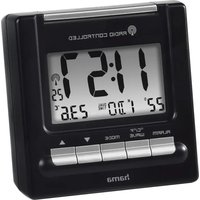
RC200 - Alarm clock radio HAMA - Free user manual and instructions
Find the device manual for free RC200 HAMA in PDF.


| Product Type | Clock radio |
| Brand | Hama |
| Model | RC200 |
| Power supply | 2 LR03/AAA batteries, 3.0 V |
| Radio reception | DCF 77.5 kHz (time signal) |
| Display | Time, date, temperature, alarm, dual time |
| Temperature measurement range | 0 °C to +50 °C / 32 °F to 122 °F |
| Time format | 12h or 24h, adjustable |
| Time zones | Dual time (second time zone), adjustable offset |
| Alarms | 2 independent alarms with snooze (4 min) and automatic stop after 4 min |
| Backlight | Yes, via LIGHT-SNOOZE button, duration 5 seconds |
| Day display | In German, English, Italian, Spanish, or French |
| Material | Not specified, likely plastic |
| Dimensions | Not specified |
| Weight | Not specified |
| Care and cleaning | Slightly damp, lint-free cloth, avoid harsh detergents |
| Safety | Use in dry indoor environment, avoid interference fields, do not open, keep batteries away from children |
| Spare parts / repairability | Not user-repairable, contact a qualified technician |
| General information | Instructions available in multiple languages, EU compliance 2014/53/EU |
Frequently Asked Questions - RC200 HAMA
User questions about RC200 HAMA
0 question about this device. Answer the ones you know or ask your own.
Ask a new question about this device
Download the instructions for your Alarm clock radio in PDF format for free! Find your manual RC200 - HAMA and take your electronic device back in hand. On this page are published all the documents necessary for the use of your device. RC200 by HAMA.
USER MANUAL RC200 HAMA
OperatingInstructions
Bedienungsanleitung
Moded'emploi
Instruccionesdeuso
Gebruiksaanwijzing
Istruzioniperl'uso
Instrukcjaobsfugi
Használatiútmutató
Manualdeutilizare
Návodkpoužití
Návodnapoužitie
Manualdeinstruções
Bruksanvisning
PykoBOIDCTB0NO3KcNlyaTaUH
Pa6oTHaHHcTpyKcH
O8nyiecxpno
Käytöohje
GB
D
F
E
NL
1
PL
H
RO
CZ
SK
P
S
RUS
BG
GR
FIN
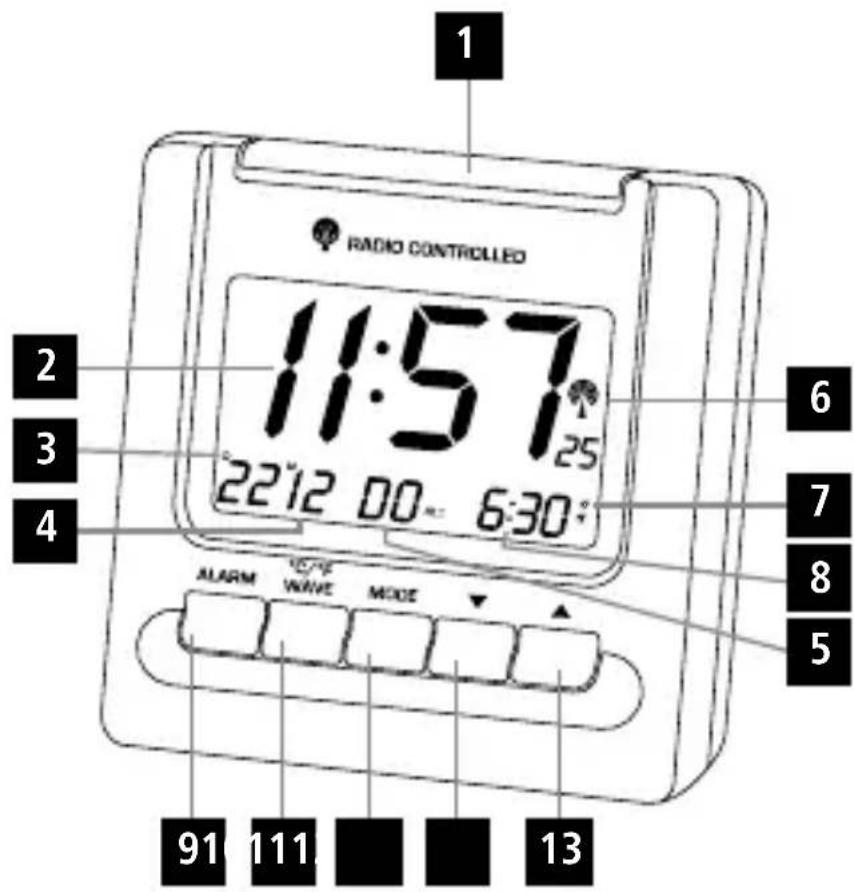
ControlsandDisplays
1.LIGHT-SNOOZEButton = activatethebacklight(approx.5seconds)/stophealarmfor4minutes
2.Time
3.Day
4.Month
5.Weekday
6.Wirelesssymbol
7.Alarmsymbol
8. AlarmTime/Temperature/DualTime
9.ALARMbutton
=activate/deactivatethealarm
- ^ C / ^ / W AVEbutton =activate/deactivatemanualradiosignalreception/switcbetween ^ C and
11.MODebutton = settings/confirmthesetting/swi:chthedisplaymode - button = decrease the current set time/set weekday
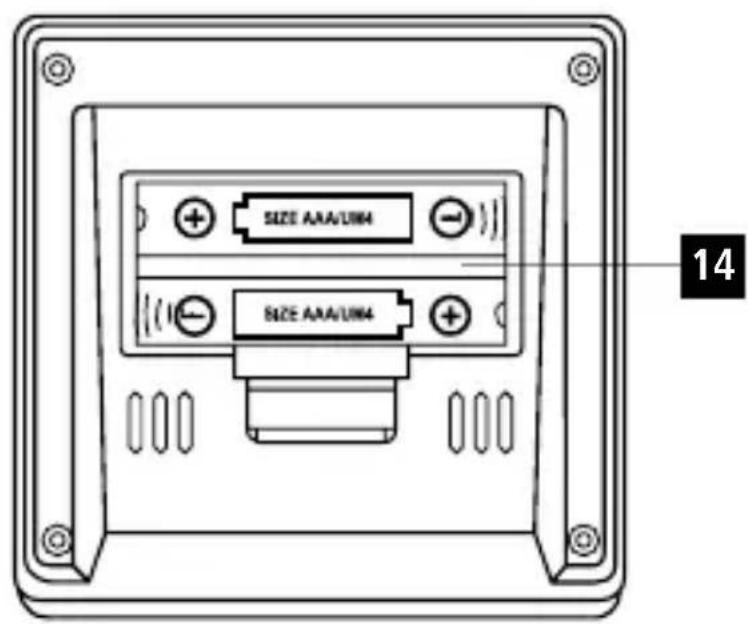
13.▲button =increaseathecurrentsettime/displayandsettimemezone/toggle12/24-hourformat - Batterycompartment
| DisplayMeaningDisplayMeaning | |||
| Radiosignal | DUALTIME | Secondtime | |
| Weakradiosignal | Alarm1time | ||
| PM | 12:00-23:59 (12-hourtime) | Alarm2time | |
| AM | 0:00-11:59 (12-hourtime) | Z² | Snoozefunction |
| D | Day | S | Summertime |
| M | Month | F | Timezone-shiftedtime |
1.ExplanationofWarningSymbolsandNotes
Warning

Thissymbolisusedtoindicatesafetyinstructions ortodrawyourattentionospecific hazards andrisks.
Note

Thissymbolisusedtoindicateadditional informationorimportantnotes.
2.PackageContents
- RC200radio-controlledalarmclock
-2xAAAbatteries
Theseoperatinginstructions
3.SafetyNotes
The product is intended for private, non-commercial use only.
- Protect the product from dirt, moisture and overheating, and only use it in dry environment.
- Donotusetheproductinareaswheretheuseof electronicdevicesisnot permitted.
Onlyconnecttheproducttoasocketthathas beenapprovedforthedevicethesocketmustbe installedclosetotheproductandeadasilyaccessible.
- Donotdroptheproductanddonotexposeitto anymajorshocks.
- Donotattemptoserviceorrepairtheproduct yourself.Leaveanyandallserviceworkto qualifiedexperts.
- Donotmodifytheproductinyway.Doingsovidthewarranty.
- Keepthepackagingmaterialoutofthereachof childrenrenduetotheriskofsuffocation.
- Disposeofpackagingmaterialimmediately accordingtolocallyapplicableleregulations.
Warning-Batteries

- When inserting batteries, notethe correct polarity (+and-markings) and insert the batteries accordingly. Failure to do so could result in the batteriesleakingore exploding.
- Onlyusebatteries(orrechargeablebatteries)that matchthespecifiedtype.
- Beforeyouinsertthebatteries,cleanthebattery contactsandthepolarcontacts.
- Donotallowchildrentochangebatterieswithout supervision.
- Donotmixoldandnewbatteriesorbatteriesofadifferenttypeormake.
- Removethebatteriesfromproductsthatarenot beingusedforanextendedperiod(unlessthes arebeingkeptreadyforanemergency).
- Donotshort-circuitbatteries.
- Donotchargebatteries.
- Donotthrowbatteriesinafire.
- Keepbatteriesoutofthereachofchildren.
- Neveropen,damageorswallowbatteriesorallow themtoentertheenvironment.Theycancontain toxic,environmentallyharmfulheavymetals.
- Immediatelyremoveanddisposeofdeadbatteries fromtheproduct.
- Avoidstoring, charging or using the device inextremetemperatures and extremely low atmospheric pressure (forexample, at high altitudes).
4. Getting Started
4.1.Insertingthebatteries
- Openthebatterycompartment(14)and remove the contact breaker. Replace the battery compartment cover.
4.2.Replacingthebatteries
- Openthebatterycompartment(14),removeand properlydisposeofthedeadbatteriesandinsert twonewAAAbatterieswiththecorrectpolarity. Replatzhebatterycompartmentcover.
5.0Operation

Note
Holddownthe button(13)ortho button (12)toselectthevaluesfaster.
-
PresstheMODEbutton(11)repeatedlytoswitch betweenthefollowingdisplays:
-
Temperature
- Alarmmode1(ALM1)
- Alarmmode2(ALM2)
-DualTime
5.1.Automaticdate/timessettingusingthe DCFsignal
- Once you have inserted the batteries, the display isswitched on, an acousticsignalsounds and the alarmclock automatically starts searching for DCFradiosignal. During these search, theradioicon (6) will flash. This process can take 3 to 5 minutes.
- Whenthewirelesssignalisreceived,thedateand timeareautomaticallyset.
Display
Searchingforthe DCFsignal

Displayflashing
Active

Displaysteady
Successful signalreception
Notdisplayed
Inactive-nosignalreception
Press and hold the ^ C / F / W A V E button (10) for approx.3secondstostartamanualsearchforthe DCFradiosignal.
Note-Timesettings
- If, during initial setup of the device, no DCF radiosignal is received within the first few minutes, these searchisaborted. Theradioicon (6) will goout.

Note-Timesettings

- Ifthereareceptionproblems, werecommend leavingtheclocktositovernight, since interferenceisgenerallylessatnight.
Inthemeantime,youcanstartamanualsearch fortheDCFradiosignalatanotherlocation or youcanmanuallysetthetimeanddate.
The clock automatically continuestosearch forthe DCFsignaleveryhour. Ifthesignalis received successfully, themeanuallysettimeand dateareoverwritten.
Note-Manualsearch

- Themanualsearchisautomaticallyaborted after3-5minutes.
- Usingthewave°C/°F/WAVE(10)frequently will drain the battery. Werecommendonly using this function to seek out an optimal location for the device.
Note-Summertime

Theclockautomaticallyswitchestosummertime. S appearsonthedisplayaslongassummer timeisactivated.
5.2.Manuallysettingthedate/time
- PressandholdthetMODEbutton(11)forapprox. 3secondsuntilthehoursdisplaybeginstoflash.
- Setthefollowinginformationintheorderlisted:
-
Hours(2)
-
Minutes(2)
Year(5)
Month(4)
Day(3)
- Toselecttheindividualvalues, pressthe button (13) or the button(12) and confirm each selection by pressing the MODE button(11).
- PresstheMODEbutton(11)immediatelytoadopt thesetvalue displayedandskipahead.
- If youdonotmakeanentryfor30seconds, you automaticallyexitthesetupmode.
Weekday
- Tochangethelanguageinwhichever weekday isdisplayed(5),pressthe button(12)for3 seconds.Thecurrentlanguageewillbedisplayed.
- Holddownthe button(12)tochangetothe otherlanguages.

Note-DayofthewEEK
You can choose German (GE), English (EN), Italian (IT), Spanish (SP) or French (FR) for the weekday display.
Settingthetimezone
Note-Timezone
The DCFsignal canbereceived overlong distances, butalwaytransmits the current Central European Time in Germany. Makes sure you accountforthetimedifferencein countries withanothertimezone.
- IfyouareinMoscow, the time is 3 hours laterthanin Germany. This meansthat you should set +3 forthetimezone. The clock then automatically setsthetimeto3 hours after the DCF signal received relative to the manually set time.
- Pressandholdthe▲ button(13) for approx. 3secondsuntilthetimezonesymbol F is displayed.
- PressandholdtheMODEbutton(11)forapprox. 3secondstosettherequiredtimezonedifference.
- Toselecttheindividualvalues,pressthe▲button (13)orthe▼ button(12)andconfirmeach selectionbypressingthetMODEbutton(11).
- Pressandholdthe button(13)for3seconds to switch the display between local and time zone-shiftedtime.
Selecting12or24-hourformat
Pressthe button(13)toswitchbetweenthe12 and24-hourforms.
5.3.Temperaturesdisplay
Pressthe / WAVEbutton(10)tochoose between ^o C a n d^o F forthetemperaturedisplay(8).
5.4.Alarm
Note-Alarm

Thealarmtimealwaysdependsonthetime displayed,thatis,thelocalortimezone-shifted time(F).
Settingthealarmtime
- RepeatedlypresstheMODEbutton(11)toaccess alarmmode1(ALM1)or2(ALM2).
- PressandholdtheMODEbutton(11)tosetthe alarmtime(8)forthealarmdisplayed.Thehours displaybeginstoflash.
- Press the button (13) or the button (12) to selectthehourforthealarmtimeandconfirmyour selectionbypressingtheMODEbutton(11).The minutesdisplaybeginstoflash.
- Repeat the processstosettheminutes for the alarmtime.
PresstheMODEbutton(11)repeatedlytoalsoset theotheralarmmodeorreturntothetemperature display.
Activating/deactivatingthealarm
PresstheALARMbutton(9)repeatedlyto activate/deactivatealarm1 oralarm2.
Ifanalarmiactivated,thecorrespondingsymbol 1/2 willbedisplayed.
Stoppingthealarm/snoozefunction
Ifthealarmistriggered, thealarmsymbol willbegintoflashandanalarmwillsound.
- PresstheALARMbutton(9)tostopthealarm. Otherwise, it will stop automatically after 4 minutes.

Note-Snoozefunction
While the alarms signalissounding, pressthe LIGHT-SNOOZEButton(1)toactivatethe
snoozefunction.Thealarmssymbol(7)
and Z willbegintoflash.Thealarmsignal willbestoppedfor4minutes,afterwhichtwill soundagain.

5.5.DualTimesettingsanddisplay
- DualTimeallowsyoutosetanddisplayasecond, completelyindependenttime(8).
PresstheMODEbutton(11)repeatedlyuntil DUALTIMEisdisplayed. - PressandholdtheMODEbutton(11)for approximately3seconds.Thehoursdisplay beginstoflash.
- Press the button (13) or the button (12) toselectthehourandconfirmyourselectionby pressingtheMODEbutton(11).Theminutes displaybeginstoflash.
- Repeattheprocessstosettheminutes.
- Toselecttheindividualvalues, presthe button (13) or the button(12) and confirm each selection by pressing the MODE button(11).
5.6.Backlight
IfyoupresstheLIGHT-SNOOZEButton(1),the displaywilllightupforapprox.5seconds.
6.CareandMaintenance
Onlycleanthisproductwithaslightlydamp,lint-free clothanddonotuseaggressivecleaningagents. Makesurethatwaterdoesnotgetintotheproduct.
7.WarrantyDisclaimer
HamaGmbH&CoKGassumesnoliabilityand providesnowwarrantyfordamagersulingfrom improperinstallation/mounting,improperuseof theproductorfromfailureoobservetheoperating instructionsand/orsafetynotes.
8. Technical Data
RC200radio-controlledalarmclock

Powersupply3.0V
2xAAAbatteries
Measuringrange
0^ - + 50^
Temperature
32^ - 122^
9.DeclarationofConformity

Hereby, HamaGmbH&CoKG
declaresthattheradioequipment
type[00186331,00092630]isin
compliancewithDirective2014/53/
EU.ThefulltextoftheEUdeclarationofconformityis availableatthefollowinginternetaddress:
www.hama.com->00186331,
00092630->Downloads.
Frequencyband(s)77.5kHz
8.Heurederéveil/Temperature/DualTime(secondfusehouraire)
9.ToucheALARM
=activation/désactivationdureveil
10.Touche°C/°F/WAVE
=Activation/Désactivationdelaréceptionmanuelledusignalradio/Commutationentre°Cet°F
11.ToucheMODE
Activation/désactivationdureveil
Activeren/deactiverenwekker
00092630->Downloads.
- Temperature
Larmlage1(ALM1)
Larmlage2(ALM2) - DualTime
OprahbIypnbIeHnHdkaun
1.KhonkaLIGHT-SNOOZE
= BKJIIOUeHHe NOcBETKn (ok .5 cekyHd) / aBToNobTOp CnHaJa 6yDnIbHnKa (nay3a 4 MInHyTbI)
2.Bpem
3.Иислomecяца
4.Mecu
5.Дeньнд
6.3haokpaadiocnHaana
7.3HaQoK6yDnJIbHnKa
8.ByDnIbHnK/Tempeatypa/DBoeacob
9.KhonkaALARM
=BKJIIOUeHHeNIOTKJIIOUeHHeN6yIINJIbHnKa
10.Khonka°C/F/WAVE
= Bb6op eHnHcbl n3MepeHnra ^ C n ^o F / BkIIOUeHne / BbIKIOUeHne pInHyDITeBHO rO pPneMa paHIOCNrHaJa
11.KhonkaMODE
=HaCtpoiKU/NoTBePxJdeHHe HaCTpoiKU/BbI6OppeXUMa INHnKaU
12. KhoNka
=ymeHbWeHneHaCTpaNBAeMOrO3HaueHnra/HaCtpoKaIaNHeJeJIi
13.▲KhoKa
= yBéniueHne HactpaNBaEMO 3HaueHn / nHdNkaun HaCTpoNk aCoBOr o nOra / BbI6Op φOpMaTa nHdNkaunBpeMeHH(12/24)
14.0tcekbaTapen
00092630->Downloads.
ДиаэзOH/ДиаэзOBiHacToT77,5kHz
KoHTpoHHeJeMeMeHTnHHdNkaaun
1.ByToHLIGHT-SNOOZE
=akTbVpaHe HaΦoHOBOOCBtJIeHHe (okOIO 5ceKyHn)/IpeKbCBAHe Ha aJapMaTa 3a cb6yJaHe 3a 4MHyTu
2.4ac
3.Дeн
4.Meceu
5.DeHOTceDMnUaTa
6.Cmbol,Paio
7.CmboJ,AnapMa"
8.Часьбухданe/tempepatypa/DualTime
9.6yToHALARM
=aKTNBbnpaHe/ДeakTnBbnpaHeHa6yIuHnKa
- ByToH°C/°F/WAVE
=akTbBupaHe/JeakTbBupaHe Ha pbyHTo npneMaHe Ha paAnocnHaI/cmHa MeKny ^ C n ^ F
11.ByToHMODE
=HaCTpoNk/NOTBbPjDeHHe Ha HAcTpoEHaTa CToHOCr/CMraHa Ha INDnKaunTe
12.BytoH
=HaMaJIaBaHe Ha aKTyaJIHaTa HAcTpOeHa CToHOC/THaCTpOJa Ha DeH OT CeIIMUcaTa
- ByToH
=YBénluabaHe Ha aKtyaJIHaTa HAcTpoEHa CToHocT/INHdNkaUaNHa HAcTpoiKa Ha YacOba 30Ha/cmHa Mexdy12-ycobn24-ycobΦopMaT
14.OTdJIeHHeN3aTePnn
3a6eJexKa-pbHOTbpcHe

PbHOTOBpceHeceu3KJIOyBaaBTOMaTHHO CneI3-5MNHyTN.
- YecToOn3NoJ3BaHeHa6yToH°C/F/WAVE (10)n3ToUaBa6aTepuNte.IpeOpbUba ceTa3nФyHKuJaIaceu3nOJ3BaCaM03a yCTaHOBBAHeTOHaONTMaJIHOMrCTO3a IIOCTABJHe.
3a6eJexKa-JIaTHoacyoBO BpeMe
YacbTaBtOMaTHUHOCeNpeHaCTpOuBaHaJIaTHO
yacOBoBpeMe.OKaToJIaTHOTOaocOBoBpeMee
aKtyaJIHo,HaIINcIIeRcNoka3BaCmMBOJIbT

5.2.PbUHHaCTpoKHaTa/Yac
- HatncheTeH3aIpbXTeHaTnchAt6yToHaMODE (11) 3a okoJIO 3 cekyHn, IOKaTO Mna e3NKbT 3a noka3BaHeHaJeHrOTcEMucaTa.
-
HactpoTEnocneIOBateJIHOCNeIHaTa HOpMaun:
-
yacobbe(2)
- MHHyTN(2)
-ToDnHa(5)
Meceu(4)
-Дeн(3)
3aana36epeTeOTdHnHTeTOHocTn, HATNCHeTe 6yToHa (13) nn 6yToHa - (12)nOTBbPdTeTCbOTBETnna36Oppe3 HATNCKaHeHa6yToHaMODE(11),3a da npneMeTeENpceKoHTeNOka3aHaTaCTOHOCTHa HAcTPOkata.
- AkobnpoDbjxkeHnHeHa30cekyHnHHeNoCleJaBbBExJaHe,peXmbl3aHaCTpoBaHeCeHanycka aBTOMATUHO.
DeHOTceMnuaTa
3aIapomeHHTe3nka3anok3BaHeToHaJeH 0TceMnUata(5),HaTnche6ytoH (12)3a 3cekyHn--NoBRAbaceakTyajHnraTe3nK.
-Ak03aIbpxKnteHaTnchaT6yToHXX(12), npemHHaBaTeKbMdpyTne3u.

3a6eJekka-deHOTcEMnuaTa
3aNoka3BaHeHaJeHcTeMnUcaTaMOxKeTe
daN36bnpaTeMeJxDye3uNTeHemCKn(GE),
aHrIiNCKn (EN), nTaNnAhCKn (IT), nCnAhCKn (SP)
nInΦpehCKn(FR).
HactpoikKaHaayacOba30Ha

3a6eJexKa-YacOba30Ha
-DCFcHHaJIbTMOXeJaCaePnEmeHa OTdJIaHeHIMMeCTa,HOBuHaIcBcOTBeTCTBaHa UeHTpaJIHOEBrPOneIKoTO BpeMe3aFepMaHn. 3aTOBaBDbpxaBnBpa3JIuHaUacOBA30Ha mMaTIpeDvNduacOBAtapa3JnKa.
-AkocehamnpaTeBMockBa,TambpeMeToe c3yacaHanpeDBCpaBHeHecFepMaHn. 3atobapnuacOBata3oHaHacTpoiTe+3. TorabacePnpeMaHaDCFCuHn,pecn. cnprMopbUHOHaCTpoEHnYac,YacOBHKbT abTomTuHOCen3MeCTBa3yacaHanpei.
·HaTnCHTeEN3aIpbXTeHaTnCHaToH▲(13) 3aOKoJIO3ceKHyN,IOKaTOCeNOKaXeCnMBOJIbT "YacobazOHa" F
- HaTnCHeTeu3aDpBxTeHaTnCHaT6yToHMODE (11)3aOKoJIo3cekyHn,3aJaHaCTpOnte XeJaHaTaUacOBapa3Jnka.
3aun36ophaOTdHHTeTOHOCHTHaTnCHete 6ytoh (13) nnn 6byoH (12) nnotBbpeTe CbOTBeTHnAn36Oppe3HaTnCKaHeHa6yToH MODE(11).
3aDpbjXTe HaTnchat 6yToH (13) 3a 3cekyHn, 3aDanpeMInHeTeOTnHnKaunTaHaJIOkaJIHHaCKbMnHnKauYtaHaayacacnpoeUacOBata 30Ha.
N36npaheHa12-ycobnIn24-ycobΦopMaT
·HaTnchete6yToH▲(13),3aJaCmHeHITemExMy 12-ycobu24-ycobΦopMaT.
5.3.NHДиKaциЯЗаTeMnepepatypata
HaTnchTe6yToH° C/F(5),3aIaIpeBkIouHtEmxdy°Cn°FnpuHHkaunTa3aTemnepaTypata..
5.4.6yudnHnK

3a6eJexKa-6ydnHnK
YacbT3acb6yXdaHeBnHaIncEOTHacra3a noka3BaHnueac,TOeCT3aJOKaJIHnIIN3aUaca cnopeuacOBaTa30Ha F
HactpoikkaHaac3ac6yKdaHe
- HATINCHETeOTHO6yToHMODE(11),3aJa npemHHeBpeKmHaanapMa1(ALM1)nJn 2(ALM2).
-HaTnCHeTeu3aIpbXkTeHaTnCha7bToHMODE (11),3aHaNactpOnTeBpeMeTo3acb6yJaHe(8) HanoKa3aHaTaaJapMa.IHdIkauYTaHaayaca 3aNoVBaDAMrA.
HaTnchete6yToH▲(13)nn6yToH▼(12),3a Daun36epeTeueacab6yXdaHeuNTBbpDeTe n36opacnUpe3HaTnCKaHeHa6yToHMODE(11). HnDnKaunraTaamHyTnte3anOvBaadamira.
-IOBTOpeTeCbIuTEcTbIKN3aHaCTpOuBaHeToHa MNHyTuTeHaCb6yXdaHe.
-HaTnCHeTeoTHOB6yToHMODE(11),3aJa NaCTPOnTeuPyrIpyEpxMHaanapMaTa,INN 3aDaceBbpeTeo6paTHOKbMnHnKaunTaHa Temnepaypata.
AknBpuHa/daeknBpuhaHeHa6ydnHnka
HaTnCHTeoTHOB06yToHALARM(9),3aJa aKTNBnpuTe/JeakTNBnpateuaca3acb6yXdAHe 1n/nnn2.
-ПраNTиВиранчac3a6b6yЖдаHeceNoKa3Ba CBOTBETHNATCIMBOJ 1/2.
CnnpaHa6ydnHnKa/ΦyHKun,Дрмka"
Ako6yDnHnKbTce3aJeCTBa,CIMBOJbT "AnapMa" / 2 3anOuBaamrAunCeuyBa CnHaJI3ac6yXJaHe.
HaTnCHTe6yToHALARM(9),3aJaacnpete aIapMaTa.BnpoTnBeHcJyuAaTjaecnpe abTomTuHocJe4MHyTu.
3a6eJexKa-ФyHKcIg "Дрмka"

IobpeMeHacnHaJana3acb6yXdaHeHaTncHete 6yToHaLIGHT-SNOOZE(1),3aJaakTNBupate yHKu,Дрмka".HaicnpeJeaNoUbaJa Mura / /CnHaJIbT3acb6yXdaHe npekbcBa3a4MnHyTmncJeTObanpo3ByaBA OTHOBO.
5.5.HaCTpoiKmHnKaunHaDuaITime [dBOHOBpeMe]
DualTimepeIarab3MoXHocTdaceHaCTpon IdaCeN3BnKBaNoKa3BaHeTOHaBTOpN,HaNbHo He3aBnCmMuc8).
- HatncheTenoBtopHObyToH MODE(11),doKaTo cenokkxeDUALTIME.
·HaTnChTeu3aApbXTe6yToHMODE(11)3a OKoJIo3cekyHdN.IHdNkaunTaHaUacaca3anOvBa daMnra.
HaTnCHete 6yToH (13) nIi 6yToH (12), 3a daN36epeTeueacOBete, INOTBbPdTeu36bopa cnUpe3HaTnCKaHeHa6yToH MODE(11). HnDnKaunraTa3amHyTuTE3aNoOvBaJaMaIrA.
-ПОВTOPETeCbIuNTecTbIKN3aMHyTUte.
HaTnchTe 6yToH (13) nnn 6yToH (12) 3a n36OpHaOTeJIHHTeCToHOCTHINOTBbPDeTe CbOTBeTHnI36OpUpe3HaTnCKaHeHa6yToH MODE(11).
5.6.ФОHOBOOCBETJIeHHe
-AKoHaTnucHeTe6yToHaLIGHT-SNOOZE(1), INcPJIeTceOCBETa0koNo5cekyHnI.
6.TexHnueckoo6cnyXbaHeuNoIpbXka
IOnuNCTBaHTeTo3nnpOdyKTCamocNekoHaBlaJxHeHa Kbpna,KoTOnHEnyckAcbLnHKn,IHeN3No3BaHTe arpeCnBHNIOChTbaUnpenapatn.BHmAbaTeJa HeNoNaDaBOdABnpOdyKta.
7.N3KJIIOUcBaHeHaRaHapauHua
XamaΓm6X&KoKΓHeNoeMaHnKaKBAOTROBOPHOCT UInrapaHnIa3anOBpeDnBpe3yIITaTHa HEnpaBnHaHnHCTaJaIaI,MOHTaxnHeNpBaBnHa yNoTpe6aHapOdykTaunHecnA3BaHeHa ynTBaHET03a06cJyKbAHen/nnHCTpyKUnTe3a 6e3OnacHOCT.
8.TexHnuecknDaHHN
PapnooeCTOteHdnaana3oH/ PapnooeCTOTnDnaana3oHn
77,5kHz
Ttoixxiayxepipouokaevdeltaic
00092630->Downloads.
86652Monheim/Germany
Service&Support

www.hama.com

+499091502-0

C E


PAP RaccoltaCarta