USER MANUAL Robolinho 350 W AL-KO
AL-KO KOBER GROUP Kottz, Germany
This documentation or excerpts therefrom may not be reproduced or disclosed to third parties without the express permission of the AL-KO KOBER GROUP.
15 *: see technical data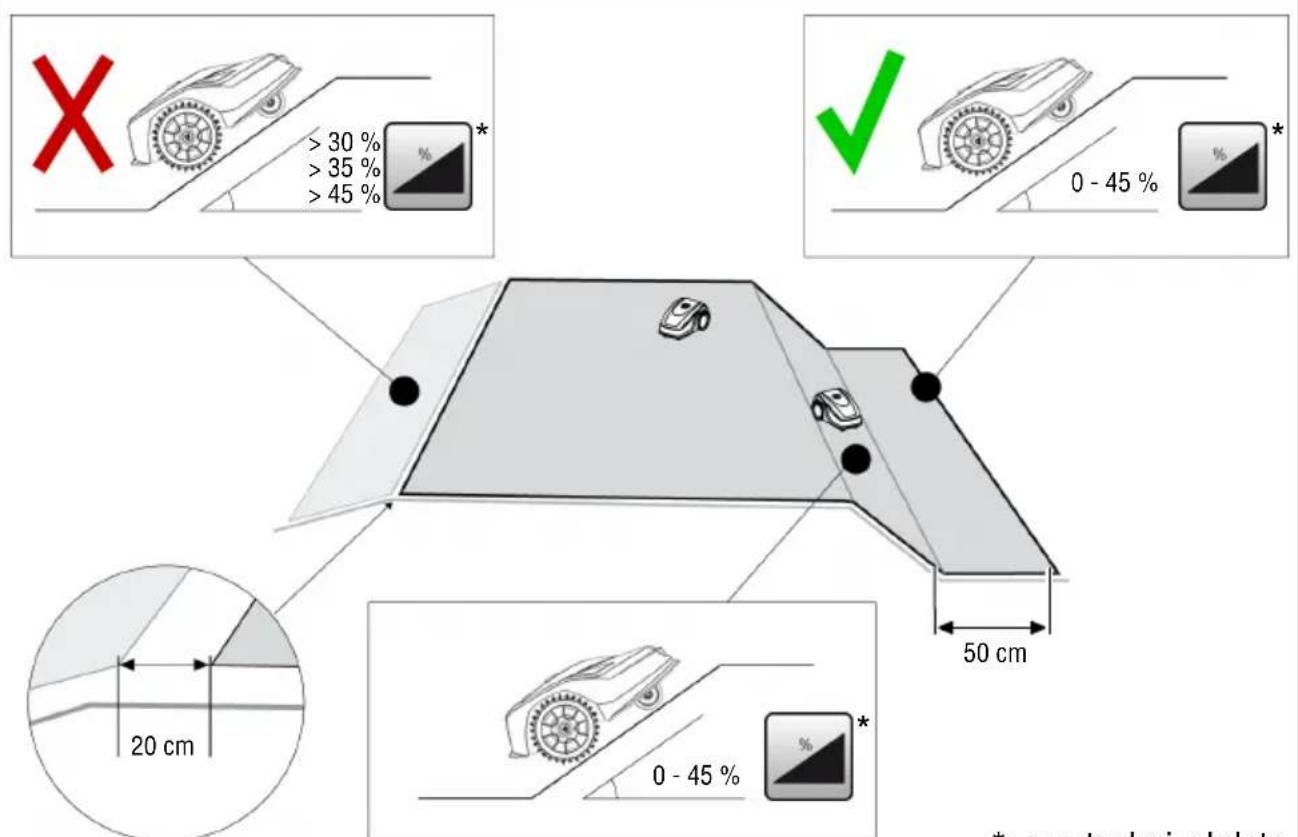
| Robolinho
350 W | Robolinho
550 W | Robolinho
1300 W | Robolinho
520 W | Robolinho
822 W | Robolinho
1423 W | Robolinho
2323 W |
| 123032 123033 123034 127695 127696 127697 127698 |
| 630 x 430 x
270 mm | 630 x 430 x
270 mm | 630 x 430 x
270 mm | 630 x 430 x
270 mm | 630 x 430 x
270 mm | 630 x 430 x
270 mm | 630 x 430 x
270 mm |
| max. 350 m² | max. 550 m² | max. 1300 m² | max. 500 m² | max. 800 m² | max. 1400 m² | max. 2300 m² |
| 30 % (17°) 45 % (24°) 45 % (24°) 35 % (19°) 45 % (24°) |
| 30 % (17°) 45 % (24°) 45 % (24°) 30 % (17°) 45 % (24°) |
| 0-55 °C |
| 200 mm 200 mm 220 mm 200 mm 220 mm 230 mm 230 mm |
| 25-55 mm |
| IPX1 |
| 6,4 kHz |
| 8,55 kHz |
| 10 m: < 70 dBμA/m |
| max. 3400 min-1 | Standard: 3400 min-1
Eco-Mode: 3200 min-1 |
| max. 60 dB(A) |
| Oi | Robolinho
350 W | Robolinho
550 W | Robolinho
1300 W | Robolinho
520 W | Robolinho
822 W | Robolinho
1423 W | Robolinho
2323 W |
| kg | 8,0 kg 8,5 kg | 8,9 kg 8,0 kg | 8,5 kg 8,9 kg | kg | | | |
| 90 90 180 | | | - - - - | | | |
| 100 m 130 m | 150 m | | - - - - | | | |
| * | -X-X | | | |
| - | X |
| HOME on Base | - | X |
| Start | 1369 | | | |
x: included, not included
| Oo i | Robolinho
350 W | Robolinho
550 W | Robolinho
1300 W | Robolinho
520 W | Robolinho
822 W | Robolinho
1423 W | Robolinho
2323 W |
| Li-Ion
18 V /
2,2 Ah /
39,6 Wh | Li-Ion
20 V /
2,5 Ah /
50 Wh | Li-Ion
25,2 V /
5 Ah /
126 Wh | Li-Ion
18 V /
2,2 Ah /
39,6 Wh | Li-Ion
20 V /
2,5 Ah /
50 Wh | Li-Ion
25,2 V /
5,0 Ah /
126 Wh | |
| IN: 230 V AC /
50 Hz
OUT:
24 V DC /
1,0 A / 24 W | IN: 230 V AC / 50 Hz
OUT: 36 V DC / 1,67 A / 60 W | IN: 230 V AC /
50 Hz
OUT:
24 V DC /
1,0 A / 24 W | IN: 230 V AC / 50 Hz
OUT: 36 V DC / 1,67 A / 60 W |
| WiFi | 100 mW
2400 MHz - 2483,5 MHz |
1 About these operating instructions. 35
1.1 Symbols on the title page 35 1.2 Legends and signal words 35
2 Product description 35
2.1 Scope of supply (01) 35 2.2 Automatic lawn mower (02) 36 2.3 Symbols on the appliance 36 2.4 Control panel (03) 36 2.5 Display 37 2.6 Menu structure 37 2.7 Base station (04) 38 2.8 Rechargeable battery 38 2.9 Functional description 39 2.10 WiFi radio module and AL-KO in-TOUCH Smart Garden app 39
3 Safety. 40
3.1 Intended use 40 3.2 Possible misuse 40 3.3 Safety and protective devices 40
3.3.1 PIN and PUK input 40 3.3.2 Sensors 40
3.4 Safety instructions 40
3.4.1 Operator 40 3.4.2 Personal protective equipment.... 41 3.4.3 Safety of persons and animals.... 41 3.4.4 Appliance safety 41 3.4.5 Electrical safety 41
4 Assembly 41
4.1 Unpacking the machine 41 4.2 Planning the mowing areas (05) 41 4.3 Preparing the mowing areas 42 4.4 Setting up the base station (07/a, 17) 42 4.5 Installing the boundary cable 42
4.5.1 Connecting the boundary cable to the base station (07/b) 42
4.5.2 Routing the boundary cable (05). 42 4.5.3 Excluding obstacles 43
4.5.4 Enclosing corridors (05/h) 43 4.5.5 Excluding downward slopes (15). 43 4.5.6 Creating loops of cable (11) 43 4.5.7 Typical faults in cable routing (06) 44
4.6 Connecting the base station to the power source (08) 44 4.7 Checking the connections on the base station (08) 44
4.8 Installing the Quick Homing kit 44
5 Start-up 44
5.1 Charging the rechargeable battery (12) 44 5.2 Making the basic settings 44 5.3 Setting the cutting height (14) 45 5.4 Carrying out an automatic calibration movement 45
6 Operation 46
6.1 Starting the appliance manually 46 6.2 Cancelling mowing 46 6.3 Mowing the secondary area (05/NF).. 46
7 Settings. 46
7.1 Calling up the setting - General 46 7.2 Activating/deactivating the button tones 46 7.3 Activating/deactivating Eco mode 46 7.4 Setting the rain sensor 46 7.5 Setting the mowing program 47
7.5.1 Setting the mowing program - General 47 7.5.2 Setting the start points 47 7.5.3 Setting the mowing times.. 47 7.5.4 Passage mode 48
7.6 inTOUCH 48 7.7 Edge mowing with a manual start 48 7.8 Setting the secondary area mowing... 48 7.9 Setting the display contrast 48 7.10 Setting lock. 48 7.11 Recalibrating 48
7.12 Restoring factory settings 49
8 Displaying information 49
9 Maintenance and care. 49
9.1 Cleaning 49 9.2 Regular checks 49 9.3 Replacing the cutting blades.. 50
10 Help in case of malfunction. 50
10.1 Correcting appliance and handling faults 50 10.2 Fault codes and troubleshooting.... 52
11 Transport 55
12 Storage 55
12.1 Storing the automatic lawn mower.... 55 12.2 Dismantling and storing the charging pole (18, 19) 55 12.3 Winter storage of the boundary cable 55
13 Disposal 55 14 After-Sales/Service 56 15 Information on the Declaration of Conformity 56 16 Warranty. 56
1 ABOUT THESE OPERATING INSTRUCTIONS
The German version is the original operating instructions. All additional language versions are translations of the original operating instructions. - Keep these operating instructions in a safe place at all times so that they can be consulted if you need any information about the appliance. Only pass on the appliance to other persons together with these operating instructions. Comply with the safety and warning information in these operating instructions.
1.1 Symbols on the title page
Symbol Meaning

It is essential to read through these operating instructions carefully before start-up. This is essential for safe working and trouble-free handling.
Symbol Meaning

Operating instructions
Handle Li-Ion rechargeable batteries with care! In particular, observe the notes on transport, storage and disposal in these operating instructions!
1.2 Legends and signal words
DANGER! Denotes an imminently dangerous situation which will result in fatal or serious injury if not avoided. WARNING! Denotes a potentially dangerous situation which can result in fatal or serious injury if not avoided. CAUTION! Denotes a potentially dangerous situation which can result in minor or moderate injury if not avoided.
IMPORTANT! Denotes a situation which can result in material damage if not avoided.
NOTE Special instructions for ease of understanding and handling.
2 PRODUCT DESCRIPTION
This document describes a fully automatic, battery operated automatic lawn mower which moves freely on a grass surface. The cutting height can be adjusted.
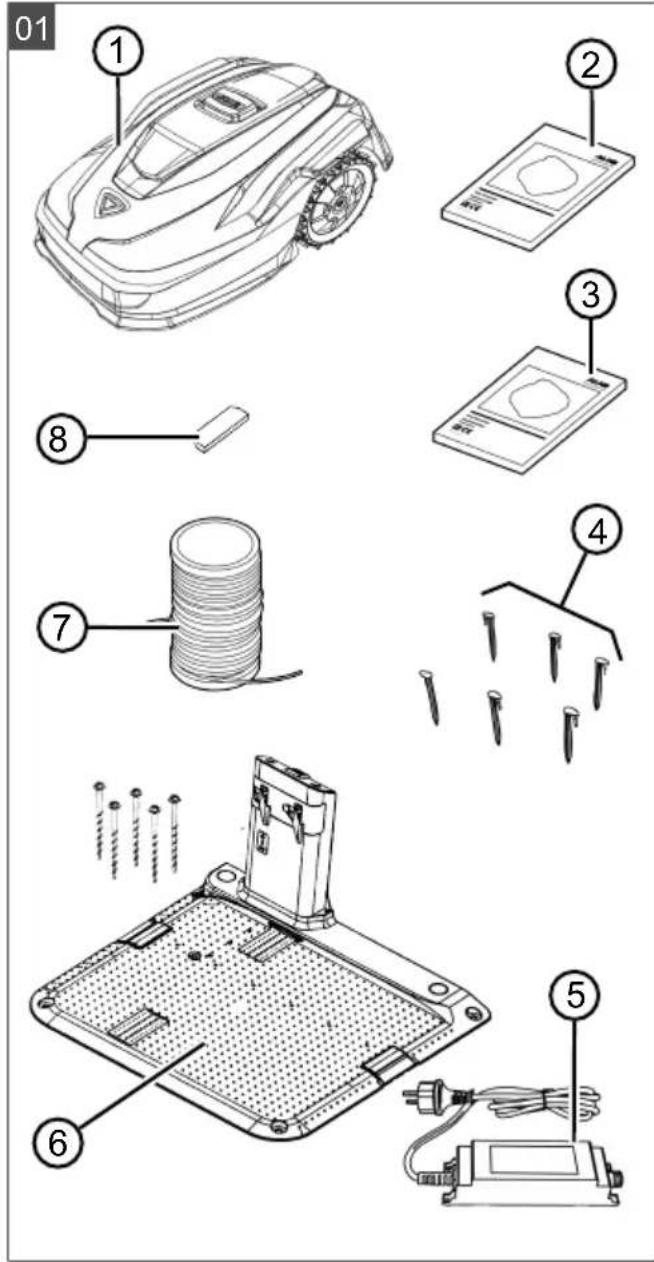
2.1 Scope of supply (01)
The items listed here are included in the standard scope of supply. Check that all items are included:
No. Component
1 Robot lawn mower 2 Quick-start guide 3 Operating instructions 4 Lawn pegs * 5 Power supply unit 6 Base station incl. ground screws (5x) 7 Boundary cable *
No. Component
8 Winter cover *
- model-dependent (see technical data)
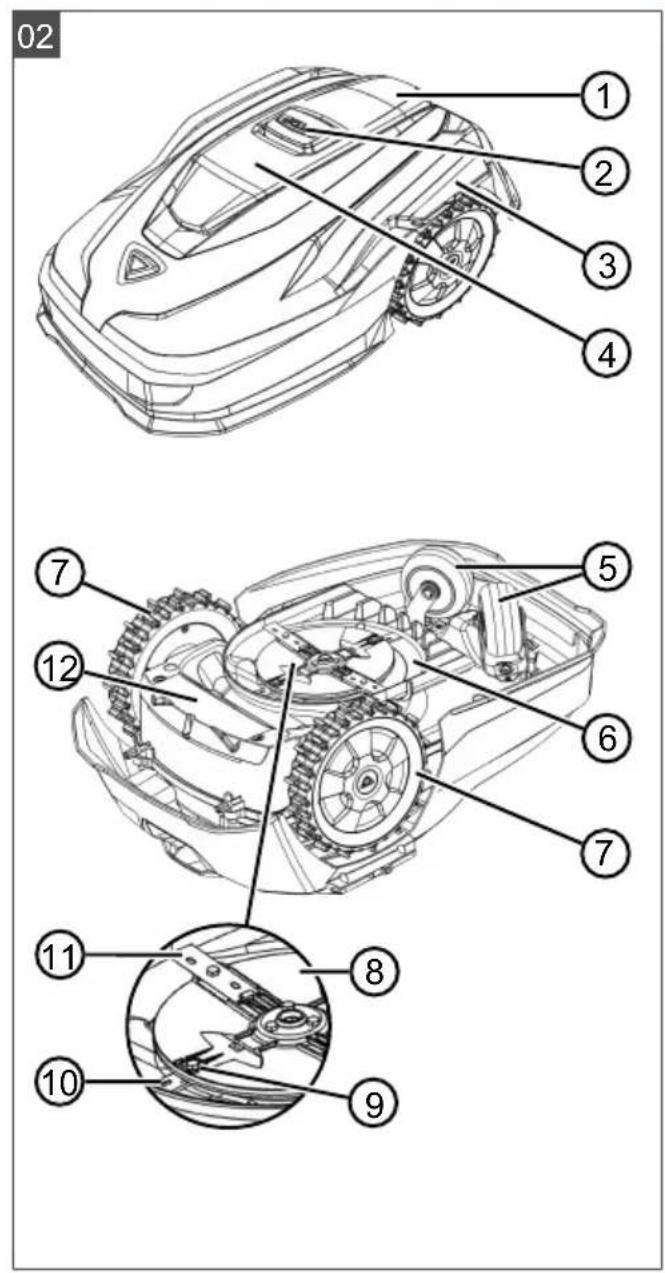
2.2 Automatic lawn mower (02)
No. Component
1 Control panel with display (interior) 2 STOP key (stops the appliance immediately and the cutting blade within 2 s) 3 Charging contacts 4 Height adjustment (interior) 5 Front rollers (steering) 6 Mower deck 7 Drive wheel 8 Blade plate 9 Fastening screw 10 Clearer blade 11 Cutting blade 12 Rechargeable battery compartment
2.3 Symbols on the appliance
Symbol Meaning

Risk of injury and risk of material damage due to objects being discharged!

Pay special attention when handling this appliance!
Keep your hands and feet away from the blade system!
Maintain a safety distance!

Read the operating instructions before starting operation!
Symbol Meaning
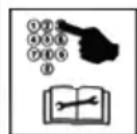
Enter the PIN in order to start the appliance.
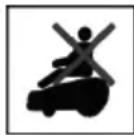
Do not ride on the appliance!
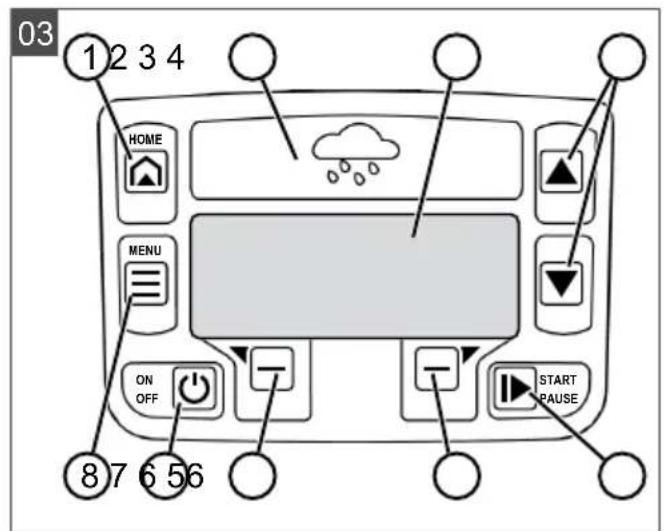
2.4 Control panel (03)
No. Component
1
(home button): Cancel mowing, the appliance returns to its base station. It starts on the next day automatically again at the set mowing time.
2 Rain sensor: Registers if it rains (see chapter 7.4 "Setting the rain sensor", page 46).
3 Display: Shows the current operating status of the appliance, the name of the selected menu, its menu items and the functions to be selected. (see chapter 2.5 "Display", page 37).
4
arrow keys): Select menu items, increase and decrease numerical values, select between settings.
5
Press 1x: Start and interrupt mowing manually. Press 2x: Immediately recommence mowing after pressing the Home button.
6
function keys): Call up the function displayed directly above the button on the display.
7
On/Off button): Switch the appliance on and off.
8
(menu button): Call up the main menu.
2.5 Display
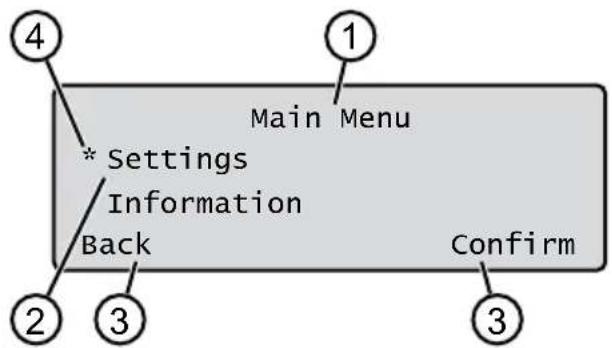
No. Display
1 Name of the selected menu (here: Main Menu)
No. Display
2 Menu items in the menu: Only two menu items are ever displayed (here: Settings and Information). Further menu items can be displayed with and 3 Functions for the selected menu item (here: Settings). Further functions can be called up with and 4 Asterisk for marking the displayed menu item (here: Settings)
Main Menu
Programs
Weekly Program see chapter 7.5 "Setting the mowing program", page 47
Entry Point see chapter 7.5.2 "Setting the start points", page 47
Program Info see chapter 8 "Displaying information", page 49
Settings
Time see chapter 5.2 "Making the basic settings", page 44
Date see chapter 5.2 "Making the basic settings", page 44
Language see chapter 5.2 "Making the basic settings", page 44
PIN-Code see chapter 5.2 "Making the basic settings", page 44
Key clicks see chapter 7.2 "Activating/deactivating the button tones", page 46
EcoMode see chapter 7.3 "Activating/deactivating Eco mode", page 46
Quick Homing Kit see chapter 4.8 "Installing the Quick Homing kit", page 44
Rain sensor see chapter 7.4 "Setting the rain sensor", page 46
After rain delay see chapter 7.4 "Setting the rain sensor", page 46
Rain sensitive see chapter 7.4 "Setting the rain sensor", page 46
inTOUCH see chapter 7.6 "inTOUCH", page 48
Margin mowing see chapter 7.7 "Edge mowing with a manual start", page 48
Sub zone active/disabled see chapter 7.8 "Setting the secondary area mowing", page 48
Display contrast see chapter 7.9 "Setting the display contrast", page 48
Safety settings see chapter 7.10 "Setting lock", page 48
Reset calibration see chapter 7.11 "Recalibrating", page 48
Factory reset see chapter 7.12 "Restoring factory settings", page 49
Blades service see chapter 8 "Displaying information", page 49
Hardware see chapter 8 "Displaying information", page 49
Software: see chapter 8 "Displaying information", page 49.
Program Info: see chapter 8 "Displaying information", page 49.
Failures: see chapter 8 "Displaying information", page 49.
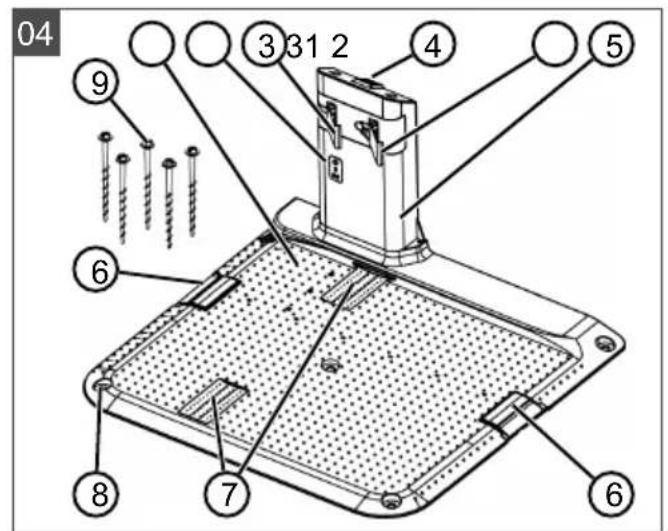
2.7 Base station (04)
| No. Component |
| 1 Base plate |
| 2 LED for status display |
| 3 Charging contact |
| 4 | Home button |
| 5 Charging station |
| 6 Cable shaft |
| 7 Wheel recess |
| 8 Hole for ground screws (9) |
| 9 Ground screws |
- Model-dependent (see technical data).
2.8 Rechargeable battery
The rechargeable battery can be changed by the user.
NOTE: Fully charge the rechargeable battery before using it for the first time. The rechargeable battery can be charged in any charge status. Interrupting charging does not damage the rechargeable battery. The rechargeable battery can only be charged after the appliance has been switched on.
The rechargeable battery is partially charged on delivery. The rechargeable battery is regularly recharged during normal operation. The appliance returns to its base station for this. The integrated electronic control unit with a monitoring function terminates the charging procedure when a 100% charge status is reached.
The charging process only functions with perfect contact of the charging contacts on the base station with the contact surfaces of the appliance. The built-in protection circuit prevents the rechargeable battery from being charged at temperatures above 45°C. This prevents irreparable damage to the rechargeable battery. If the operating time of the rechargeable battery becomes shorter despite being fully charged, replace the battery. If the battery charge level has dropped below the threshold set by the manufacturer as a result of ageing or excessively long storage, this means it can no longer be recharged. Have the battery and the monitoring electronic control unit checked by an AL-KO dealer, technician or service partner, and replace them if necessary. The rechargeable battery status is shown on the display. Check the rechargeable battery status after about 3 months in storage. To do so, switch on the appliance and read off the rechargeable battery status. If the rechargeable battery is now only charged to approx. 30% or less, place the appliance in the base station and switch it on so the rechargeable battery is charged. If the charging station was removed to store the base station (see chapter 12.2 "Dismantling and storing the charging pole (18, 19)", page 55), first mount it again in reverse order and connect the base station to the mains supply again. If electrolyte has escaped into the battery compartment: Have the appliance repaired by an AL-KO service centre.
If the rechargeable battery has been removed from the appliance: If the eyes or hands have come into contact with escaped electrolyte, flush them immediately with water. Immediately consult a doctor.
2.9 Functional description
Moving on the grass surface
The appliance moves freely in a mowing area delimited by a boundary cable. The appliance is oriented by means of the sensors that detect the electromagnetic field of the boundary cable.
If the appliance encounters an obstacle, it stops and then continues in another direction. If the appliance gets into a situation where it cannot operate, this is indicated by a message on the display.
If the appliance detects moisture when the rain sensor is switched on, it automatically returns to the base station.
Mowing and charging
The mowing phases alternate constantly with the charging phases. If the charge of the rechargeable battery drops to a specific value (display: 0% ) during mowing, the appliance returns to the base station along the boundary cable.
Mowing programs are preset and can be customised on the appliance or in the app.
Each time the mowing motor is started, its direction of rotation is changed which doubles the service life of the cutting blades.
2.10 WiFi radio module and AL-KO inTOUCH Smart Garden app
The robot lawn mower is equipped with a WiFi radio module. This allows convenient control, setting and monitoring via app from a mobile device (smartphone, tablet, etc.).
NOTE The mobile device being used requires an Internet connection in order to use the AL-KO inTOUCH Smart Garden app.
NOTE In order to ensure that the latest software version is always installed on the robot lawn mower, it must be connected to the Internet via a WiFi network. The AL-KO inTOUCH Smart Garden app notifies you when there are new software updates for the robot lawnmower. They are downloaded automatically.
AL-KO inTOUCH Smart Garden app
The AL-KO inTOUCH Smart Garden app can be downloaded for Android-based devices from the
Google Play Store and for iOS-based devices from the Apple App Store:

Scan this QR code to find out how to install the AL-KO inTOUCH Smart Garden app on your smartphone and obtain further information on your appliance. You can also use the app to connect your smart-connected appliance to the Internet.
NOTE The robot lawnmower connects to a 2.4 GHz WLAN only. 5 GHz WLAN networks are not supported.
In order to connect your WiFi-enabled robot lawnmower to the AL-KO inTOUCH Smart Garden app, the robot lawnmower and smartphone must be within range of a WiFi router with sufficient signal strength (recommendation: min. 50%).
- Start the AL-KO inTOUCH Smart Garden app.
- Create a user account once:
Press "Login / Register" > "Register". Enter your e-mail address and password. Check the "Read and agreed..." check-box. Press the "Register" button.
- Log in with the previously created user account.
- Start the connection wizard by pressing "Add new device".
- Follow the further instructions.
NOTE: If the robot lawnmower moves into an area of the garden with a poor or no WiFi signal, the settings of the AL-KO inTOUCH Smart Garden app will only be carried out when the robot lawnmower returns to an area with a good signal. If the WiFi signal from the router is too weak over the whole garden, its range can be extended with a commercially available repeater.
In the event of malfunctions, a dealer with the AL-KO inTOUCH Smart Garden app installed can help you. The robot lawnmower must be enabled for the dealer via the AL-KO inTOUCH Smart Garden app.
In addition to remote access to connected robot lawn mowers, the AL-KO inTOUCH Smart Garden app offers other functions such as links to other AL-KO appliances or push notifications in the event of a fault.
In addition to remote access to connected robot lawn mowers, the AL-KO inTOUCH Smart Garden app offers other functions such as links to other AL-KO appliances or push notifications in the event of a fault.
3 SAFETY
3.1 Intended use
This appliance is intended solely for use in non-commercial applications. Any other use as well as unauthorised conversions or modifications are regarded as contrary to the intended use and will result in voiding of the warranty as well as loss of conformity; the manufacturer will thus decline any responsibility for damage and/or injury suffered by the user or third parties.
The application limits of the appliance are: see technical data.
3.2 Possible misuse
This machine is not suitable for use in public gardens, parks, sports stadiums, and in agriculture and forestry.
3.3 Safety and protective devices
WARNING! Risk of injury. Defective and disabled safety and protective devices can result in serious injury.
Have any defective safety and protective devices repaired. Never disable safety and protective devices.
The appliance can only be started by entering a PIN (Personal Identification Number). This prevents the appliance from being switched on by unauthorized persons. The factory setting of the PIN is 0000. The PIN can be changed, see chapter 5.2 "Making the basic settings", page 44.
If the PIN is entered incorrectly 3 times, the PUK (Personal Unlocking Key) must be entered. If this is also entered incorrectly, the user must wait 24 hours until entering it again.
- Keep the PIN and PUK so that they are inaccessible to unauthorized persons.
3.3.2 Sensors
The appliance is provided with several safety sensors. It does not restart automatically after being switched off by a safety sensor. The error message is shown on the display and must be acknowledged. The reason for the triggering of the sensor must be resolved.
Lifting sensor
If the appliance is raised by the housing during operation, the travel drive switches off and the cutting blades are stopped.
Bump sensors for obstacle detection
The appliance is equipped with sensors that ensure it changes its direction of travel if it encounters obstacles. When it encounters an obstacle, the top part of the deck is shifted slightly and the shock sensor triggered.
Tilt sensor in direction of travel/sideways
If an upward or downward slope or a laterally inclined angle that is larger than the value set for the model is reached in the direction of travel, the appliance is turned or the appliance changes its direction of travel.
Rain sensor
Depending on the model, the appliance is equipped with a rain sensor that (when activated) interrupts the mowing procedure in case of rain and ensures that the appliance returns to the base station (see technical data).
Frost sensor
The appliance is equipped with a frost sensor which, at low temperatures, displays a message on the appliance or transmits a push message to the AL-KO inTOUCH Smart Garden app (see Technical data). The temperature for the message is variable.
Electromagnetic emissions

The appliance can be operated reliably in the immediate vicinity of other robot lawn mowers (distance 0.5 m).
The signal used in the boundary cable complies with the standard defined by the European Garden Machinery Industry Federation (EGMF) with regard to electromagnetic emissions.
3.4 Safety instructions
3.4.1 Operator
- Young people under 16 years of age, persons with limited physical, sensory or mental abilities or with a lack of experience and knowledge and persons who do not know the operating instructions must not use the device. Heed any country-specific safety regulations concerning the minimum age of the user.
- Do not operate the appliance if you are under the influence of alcohol, drugs or medication.
3.4.2 Personal protective equipment
Wear clothing and protective equipment in accordance with the regulations in order to avoid injury. The personal protective equipment comprises: Long trousers and sturdy shoes. During maintenance and care: Protective gloves.
3.4.3 Safety of persons and animals
In areas accessible to the public, post warning signs with the following content around the mowing area:
IMPORTANT! Automatic lawn mower in operation! Do not approach the appliance! Supervise children!
Make sure that persons, in particular children, and animals are not in the vicinity of the appliance, do not climb onto and do not play with the appliance when it is in operation. Sitting on the appliance and reaching into the cutting blades is forbidden! - Keep limbs and clothing away from the cutting unit.
3.4.4 Appliance safety
Before working, make sure that there are no objects (e.g. branches, glass or metal pieces, and items of clothing, stones, garden furniture, garden utensils or toys) in the work area of the appliance. They can damage the cutting blade of the appliance or can be damaged by the appliance. Only use the appliance under the following conditions:
The appliance is not soiled. The appliance shows no damage or wear. All controls function properly. The base station and power supply as well as their electrical supply cables are undamaged and function properly.
Always replace defective parts with original spare parts from the manufacturer. Have the appliance repaired if it has been damaged. The user of the appliance is responsible for accidents of the appliance involving other persons or their property.
3.4.5 Electrical safety
- Never operate the appliance when a lawn sprinkler is operating on the mowing area at the same time. Do not spray the appliance with water. Do not open the appliance.
4 ASSEMBLY
4.1 Unpacking the machine
- Open the packaging carefully.
- Carefully remove all components from the packaging and check for transport damage.
Note: Notify your AL-KO dealer or service partner immediately if any transport damage is discovered.
- Check the scope of supply, see chapter 2.1 "Scope of supply (01)", page 35.
If the appliance is going to be sent on, retain the original packaging and accompanying documents. They will also be required for return shipment.
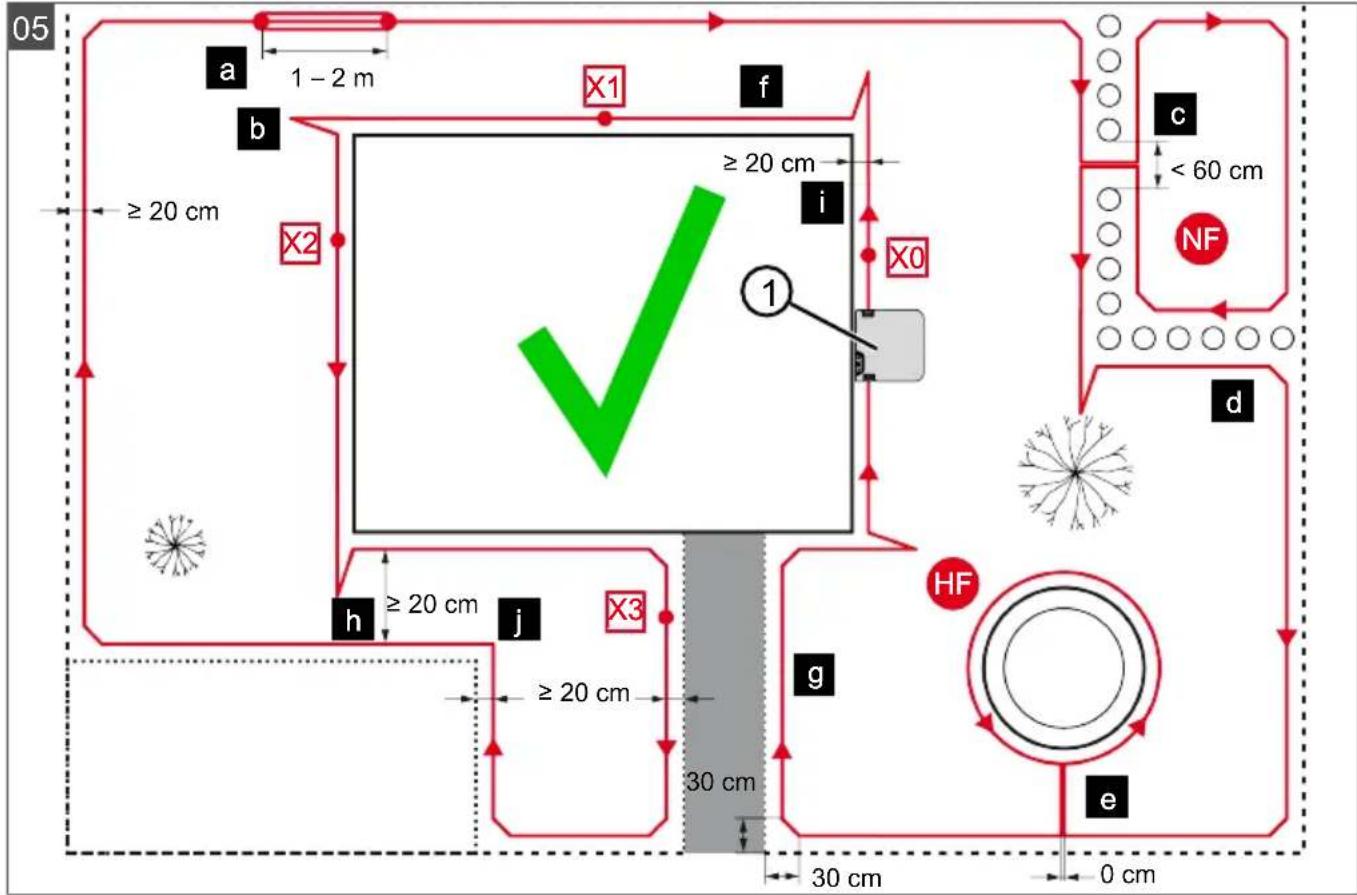
4.2 Planning the mowing areas (05)
Location of the base station (05/1)
Shortest possible distance to the largest mowing area. Level surface. Protected against direct sunlight and harsh weather conditions. Connection option for power source. Free accessibility to the robot lawn mower.
Routing the boundary cable (05)
The boundary cable must be laid in a continuous loop in a clockwise direction.
Corridors between mowing areas (05/h)
A corridor is a narrow section in the grass surface and can be used to connect two mowing areas.
Main area and secondary area(s) (05)
Main area (05/HF): This is the grass surface on which the base station is located and whose entire surface can be mowed automatically by the appliance. Secondary area (05/NF): If a grass surface cannot be reached by the appliance from the main area, carry the appliance to the secondary area by hand if necessary. Secondary areas can be processed using manual operation.
The main area and secondary areas are bounded by the same continuous boundary cable, however.
Location of start points (05/X0 - 05/X3)
At the specified mowing time, the appliance moves along the boundary cable to the specified start point and begins to mow there.
The start points can be used to specify which areas of the mowing area are to be mowed several times.
4.3 Preparing the mowing areas
- Check that the grass surface is larger than the area covered by the appliance. If the grass surface is too large, an irregularly mown lawn will result. Reduce the size of the grass surface to be mowed if necessary.
- Before installation of the base station and boundary cable or start-up of the appliance: Use a lawn mower to mow the grass surface to a low cutting height.
- Remove any obstacles on the grass surface or exclude them with the boundary cable (see chapter 4.5.3 "Excluding obstacles", page 43):
Flat obstacles that will be run over and could damage the cutting blade (e.g. flat stones, transitions from the grass surface to the terrace or paths, plates, kerbs, stones, etc.) Holes and protrusions in the grass surface (e.g. molehills, burrowing holes, pine cones, fallen fruit, etc.) - Steep upward or downward slopes that are larger than the values specified in the technical data - Bodies of water (e.g. ponds, streams, swimming pools, etc.) and their demarcation to the grass surface Shrubs and hedges that can become broader
4.4 Setting up the base station (07/a, 17)
- Place the base station (05/1) at right angles to the planned location of the boundary cable as described below:
Level (check with spirit level) Straight and level entrance and exit Not arched (the charging pole must not bend or tilt during subsequent tightening of the ground screws)
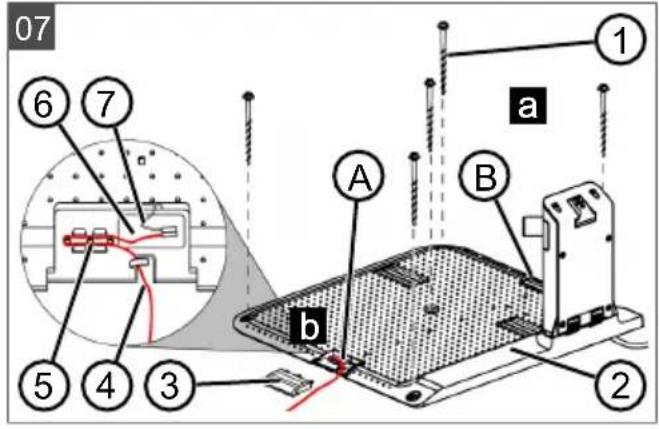
- Fix the base station (07/2) to the ground with four ground screws (07/1).
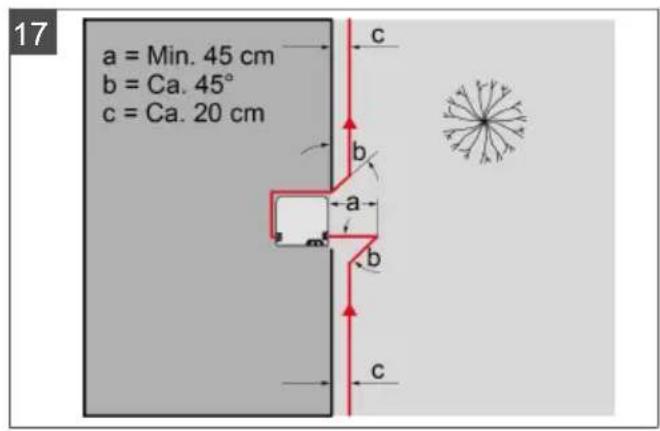
The base station can also be located outside the lawn area (17). In this case the boundary cable has to be routed as shown in the figure.
4.5 Installing the boundary cable
NOTE If the supplied boundary cable delivered with the model is too short, an extension cable can be obtained from your AL-KO dealer or service partner.
4.5.1 Connecting the boundary cable to the base station (07/b)
- Pull the boundary cable (07/4) out of the packaging.
- Remove the cover of the cable shaft (07/3) on the connection (07/A).
- Insulate the end of the boundary cable (07/6) and insert it into the terminal (07/7).
- Close the terminal.
- Lead the boundary cable through the strain relief (07/5) out of the cable shaft with cable reserve.
NOTE: The cable reserve allows smaller corrections to be carried out on the cable guide later.
- Place the cover on the cable shaft.
4.5.2 Routing the boundary cable (05)
The boundary cable can be laid on the lawn and as much as 10 cm under the turf. The laying under the turf can be carried out by the dealer.
Both variants can be combined with one another.
IMPORTANT! Danger of damaging the boundary cable. If the boundary cable is damaged or cut, the transmission of the control signals to the appliance is no longer possible. In this case, the boundary cable must be repaired or replaced. The boundary cables are available from AL-KO.
Always route the boundary cable directly on the ground. If necessary, secure with an additional lawn peg. - When laying the boundary cable and during operation, protect the boundary cable from damage. Do not dig or scarify in the vicinity of the boundary cable. 1. Attach the boundary cable at regular intervals with lawn pegs or route it underground (at a max. depth of 10 cm).
- Route the boundary cable around obstacles: see chapter 4.5.3 "Excluding obstacles", page 43.
- Create corridors between individual mowing areas: see chapter 4.5.4 "Enclosing corridors (05/h)", page 43.
- Exclude excessive upward or downward slopes: see chapter 4.5.5 "Excluding downward slopes (15)", page 43.
- Create loops of cable: see chapter 4.5.6 "Creating loops of cable (11)", page 43.
- After completing the routing of the boundary cable, connect to the connector (07/B) of the base station: see chapter 4.5.1 "Connecting the boundary cable to the base station (07/b)", page 42.
4.5.3 Excluding obstacles
Depending on the surroundings of the working area, the boundary cable must be routed at different distances from obstacles. Use the ruler that can be removed from the packaging to determine the correct distance.
NOTE: Exclusions are only necessary if they cannot be detected by the bump sensors of the appliance. Avoid too many or unnecessary exclusions. Recesses that are smaller than 6 cm must be excluded, otherwise the appliance may cause damage.
Distance from walls, fences, beds: min. 20 cm (05)
The appliance moves along the boundary cable with an offset of 20 cm to the outside. Therefore, route the boundary cable at a distance of at least 20 cm from walls, fences, beds, etc.
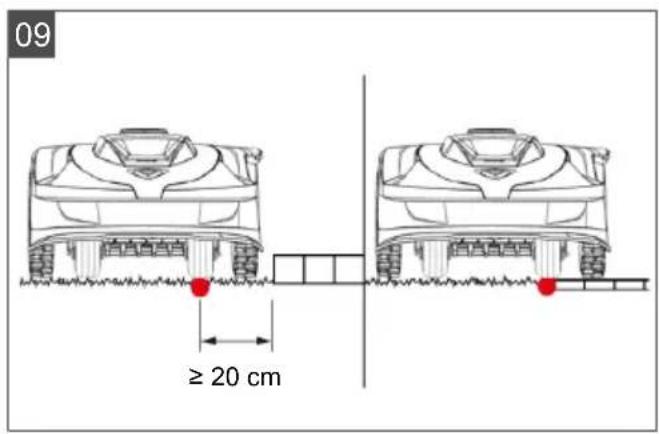
Distance from terrace edges and paved paths (09)
If the terrace or path edge is higher than the grass surface, a distance of at least 20 cm must be complied with. If the edge of the terrace or path is at the same height as the grass surface, the cable can be routed exactly along the edge.
Distance of obstacles from the boundary cable (05)
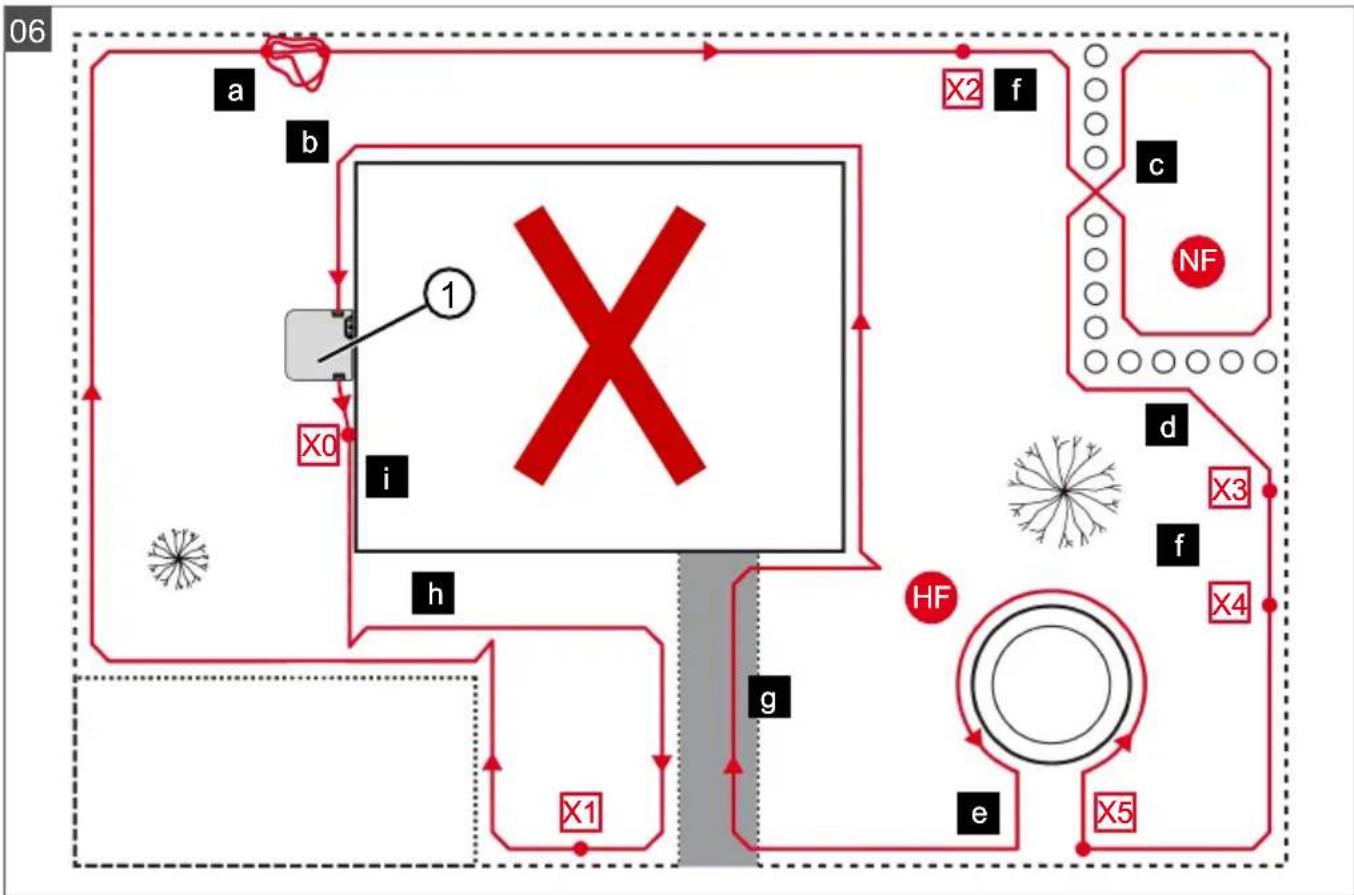
If the boundary cables are precisely folded up away from the obstacle or towards the obstacle, i.e. distance 0 cm, the appliance moves beyond the boundary cable. Do not cross the boundary cables (06/c), but lay them parallel (05/e).
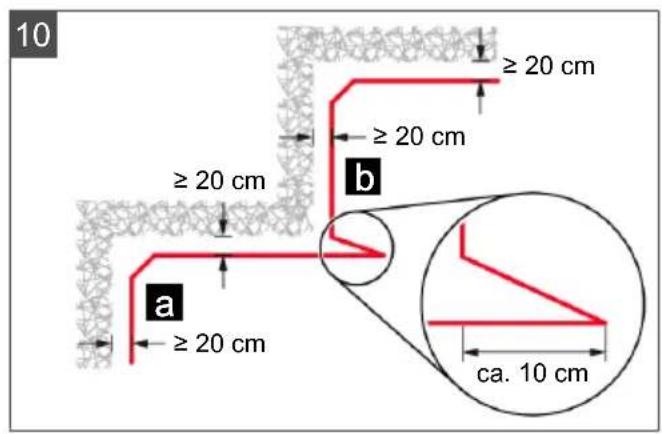
Routing the boundary cable around corners (05, 10)
For inwards going corners (10/a): Route the boundary cable diagonally to avoid the appliance becoming caught in the corner. For outside corners with obstacles (10/b): Route the boundary cable in a point in order to avoid a collision of the appliance with the corner. For outside corners without obstacles (05/j): Route the boundary cable at an angle of 90°.
4.5.4 Enclosing corridors (05/h)
In the corridor the following distances must be complied with:
Total width: min. 60 cm. Distance of the boundary cable to the edge: 20 cm. Distance between the boundary cables: min. 20 cm.
4.5.5 Excluding downward slopes (15)
Downward slopes that are greater than the values specified in the technical data must be excluded with the boundary cable (45% = 45 cm downward slopes per 1 m horizontally) (see technical data).
The boundary cable must not be laid over a gradient of more than 20%. In order to avoid problems when turning, maintain a distance of 50 cm to the 20% gradient. If the gradient at the outer edge of the working area is more than 20% at any point, lay the boundary cable on the flat ground at a distance of 20 cm from the start of the gradient.
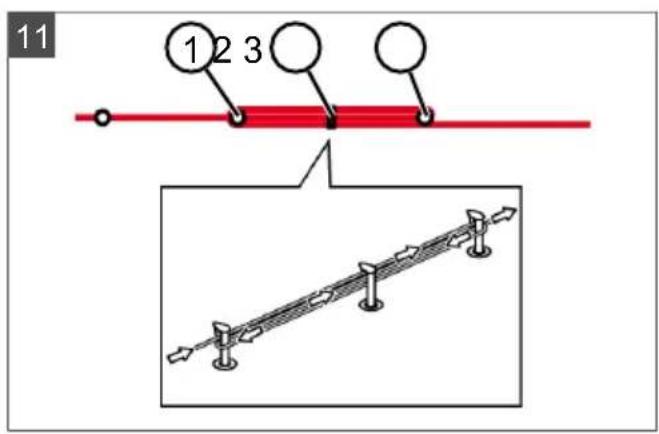
4.5.6 Creating loops of cable (11)
Spare loops of cable should be incorporated at regular intervals in order to reposition the base station or to extend the mowing area even after the mowing area has been laid out.
Select the number of spare cable loops according to your own judgement.
- Lead the boundary cable around the current lawn peg (11/1) and then back to the previous lawn peg (11/3).
- Then lead the boundary cable to the current lawn peg again. This creates a loop. The cables must be close together.
- If necessary, attach the loop to the ground in the middle with an additional lawn peg (11/2).
4.5.7 Typical faults in cable routing (06)
- Spare cable loops of the boundary cable are not laid in an even, elongated loop (06/a). The boundary cable is not routed properly around corners (06/b). The boundary cable is crossed over or not routed clockwise (06/c). The boundary cable is routed too imprecisely so that edge areas of the grass surface cannot be mowed (06/d). The boundary cable is not routed lying directly next to itself when guided towards and back from the edge to an obstacle inside the lawn (06/e). The start points are set too far away from the base station (06/f). The boundary cable is routed beyond the edge of the grass surface (06/g).
- When routing the boundary cable, the minimum distance for corridors of 20 cm is undercut (06/h). The boundary cable is routed too close (i.e. at a distance of less than 20 cm) to obstacles that cannot be driven over (06/i).
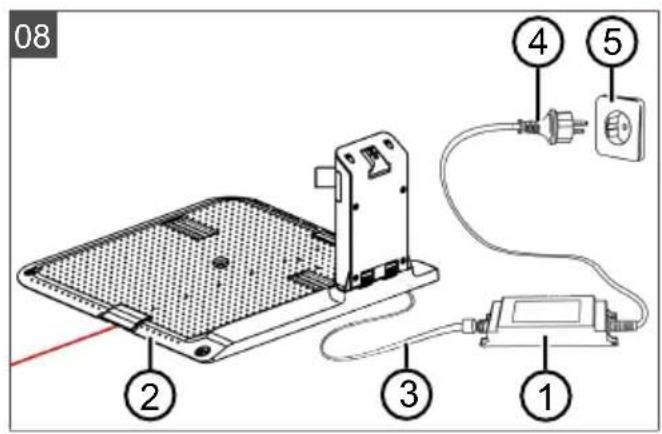
4.6 Connecting the base station to the power source (08)
- Place the power supply unit (08/1) in a dry location that is protected against direct sunlight and sufficiently close to the base station (08/2).
- Screw cable (08/3) firmly onto the power supply unit.
- Plug the mains plug (08/4) of the power supply unit into a power socket (08/5) protected from rain.
NOTE: We recommend connecting the power supply to the mains supply via an earth leakage circuit breaker (ELCB) with a rated leakage current < 30 mA.
4.7 Checking the connections on the base station (08)
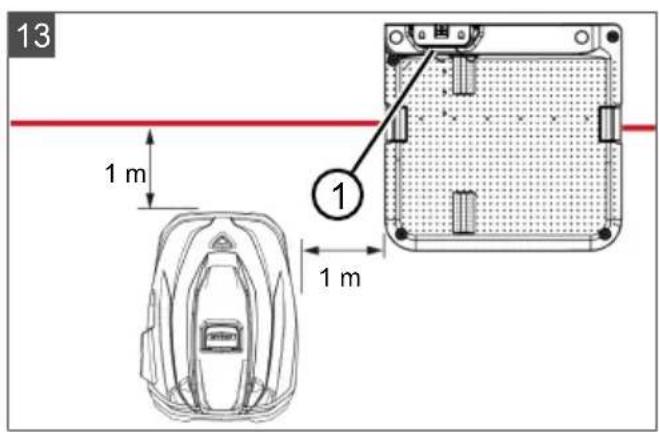
- Check whether the LED on the front side of the charging station (13/1) is lit. If not:
Disconnect the mains plug. - Check that all plug connectors of the power source and the boundary cable are positioned correctly and check for damage.
Status indications of the LEDs
LED Operating states
Yellow
Lights up if the power source is intact.
4.8 Installing the Quick Homing kit
Scan this QR code to find out how to install the Quick Homing kit. See also installation instructions 443565 "Quick Homing Kit - Installation".
5 START-UP
This chapter describes the activities and settings that are necessary to put the appliance into operation for the first time. For all further settings, refer to chapter 7 "Settings", page 46.
5.1 Charging the rechargeable battery (12)
During normal operation, the battery of the appliance is regularly charged automatically.
NOTE: Fully charge the rechargeable battery before using it for the first time. The rechargeable battery can be charged in any charge status. Interrupting charging does not damage the rechargeable battery. The rechargeable battery can only be charged after the appliance has been switched on.
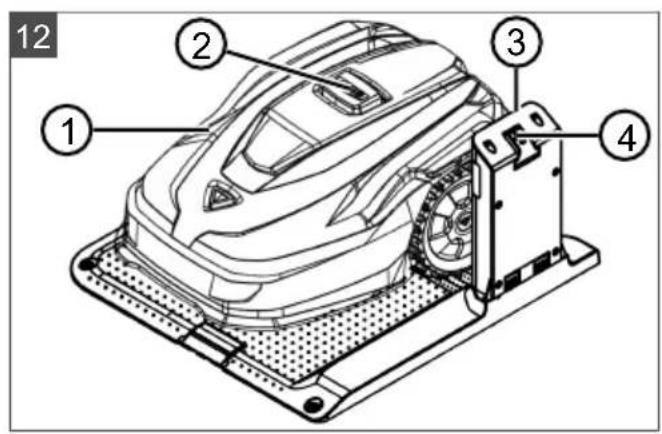
- Place the appliance (12/1) in the base station (12/3) so the contact surfaces of the appliance touch the charging contacts of the base station.
- Switch on the appliance with
- The display on the appliance shows "Battery is being recharged." If not: see chapter 10 "Help in case of malfunction", page 50.
5.2 Making the basic settings
- Open the cover flap.
- Switch on the appliance with .mware, code and type are displayed.
- In the menu for language selection, select the language with and accept with
- In the Login > Enter PIN menu, enter the preset PIN 0000. To do so, select the digit 0 with in sequence and always accept with After entering the PIN, access is enabled.
- In the Change PIN menu:
Under Enter new PIN, enter a self-selected new four-digit PIN. To do so, select one digit in sequence with and respectively confirm with Under Reenter new PIN, enter the new PIN again. If both entries are identical, PIN changed is displayed.
- In the Enter date menu, set the current date (format: DD.MM.20YY). To do so, select one digit in sequence with a respectively confirm with
- In the Enter time > HH:MM menu, set the current time (format: HH:MM). To do so, select one digit in sequence with and respectively confirm with
The basic settings have been completed. The "Not calibrated" status is displayed. Press the Start key.
5.3 Setting the cutting height (14)
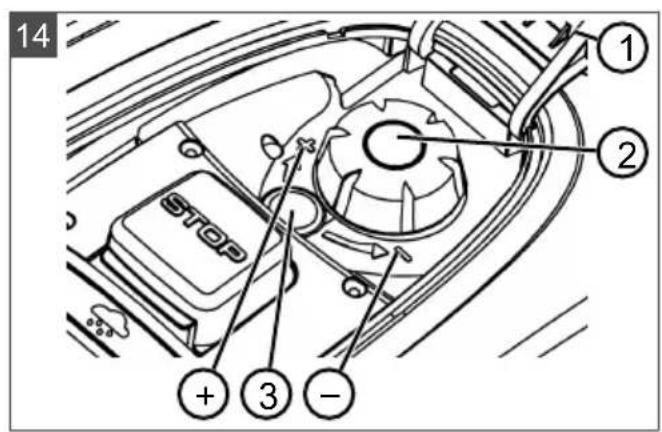
The cutting height can be manually adjusted continuously between 25 and 55 mm.
NOTE: A cutting height of 55 mm is recommended for the calibration movement (see chapter 5.4 "Carrying out an automatic calibration movement", page 45) and for teaching-in the starting points (see chapter 7.5.2 "Setting the start points", page 47).
- Open the cover (14/1).
- Set the cutting height (the current cutting height is displayed in the window (14/3) in millimetres):
- Increase the cutting height (i.e. lawn height): Turn the rotary knob (14/2) clockwise (14/+). Decrease the cutting height (i.e. lawn height): Turn the rotary knob (14/2) anticlockwise (14/-).
- Close the cover.
5.4 Carrying out an automatic calibration movement
NOTE: Before commissioning, carry out the calibration movement (see chapter 5.4 "Carrying out an automatic calibration movement", page 45) or teaching-in of the starting points (see chapter 7.5.2 "Setting the start points", page 47).
Place the appliance at the starting position (13)
- Place the appliance at the starting position inside the mowing area:
At least 1 m left and 1 m in front of the base station - Aligned with the front side to the boundary cable
Starting the calibration movement
- Check that there are no obstacles in the expected movement area of the appliance. The appliance must be able to move over the boundary cable with both front wheels at the same time. If necessary, remove obstacles or lay the cable temporarily inwards (min. 35 cm required).
- Start the appliance with .the following is shown on the display:
!Caution ! Starting Motors ■ Calibration, Phase [1]
During the calibration movement
To determine the signal strength inside the boundary cable, the appliance first moves twice straight beyond the boundary cable and then into the base station and comes to a stop there.
The Calibration completed message is shown on the display. The rechargeable battery is being charged.
NOTE The appliance must come to a stop when it moves into the base station. If the appliance does not touch the contacts when it moves into the base station, it moves further along the boundary cable. If the appliance moves through the base station, the calibration procedure has failed. In this case, the base station must be better aligned and the calibration procedure repeated.
After the calibration movement
The preset current mowing duration is displayed. For all further settings, refer to see chapter 7 "Settings", page 46.
Robolinho
NOTE To ensure proper operation and reduce error messages, the loop length must be measured using the "Learn entry points" function.
6 OPERATION
6.1 Starting the appliance manually
- Switch on the appliance with For unscheduled edge mowing: see chapter 7.7 "Edge mowing with a manual start", page 48.
- Start the appliance manually with
6.2 Cancelling mowing
Press the base station (12/4) or on the appliance.
The appliance moves automatically into the base station. It deletes the mowing plan of the current day and starts again the next day at the set time.
Press the appliance. Mowing is interrupted for half an hour.
Press the appliance. The appliance is switched off.
NOTE In dangerous situations, the appliance can be stopped with the STOP button (12/2).
6.3 Mowing the secondary area (05/NF)
- Lift the appliance and place in the secondary area by hand.
- Switch on the appliance with
- Call up the main menu with
- o* settings
- o* zone mowing
- Select the mowing time with
- Start the appliance manually with
Depending on the setting: The appliance mows for the set time period and then switches off or mows until the rechargeable battery is flat.
After mowing the secondary area, place the appliance in the base station again by hand.
7 SETTINGS
7.1 Calling up the setting - General
- Call up the main menu with. Note: The asterisk * in front of the menu item indicates that it has just been selected.
- o* settings
- Select the required menu item with and accept with
- Make the settings.
Note: The menu items are described in the following sections.
- Return to the main menu with
NOTE Further menu items: see chapter 5.2 "Making the basic settings", page 44.
- o* kcy clicks
- Activating/deactivating the button tones:
orActivate:Activate the button tones. or Deactivate: Deactivate the button tones.
7.3 Activating/deactivating Eco mode
In Eco mode, the appliance switches to energy-saving mode. This reduces the energy consumption and noise emissions.
NOTE With high and thick grass and for thick rolled turf, this is not recommended or may not be possible.
- o* Mode
- Activating/deactivating Eco mode:
Activate Activate Eco mode. Deactivate Deactivate Eco mode.
7.4 Setting the rain sensor
NOTE Mowing when the grass is dry reduces soiling. By activating the rain sensor and setting a delay time, it is possible to prevent the appliance mowing when the grass is wet.
If the rain sensor is activated, the appliance moves back into the base station when the rain begins. It remains there until the rain sensor has dried. Then it waits for the time period that is set as the delay before it continues mowing. The sensitivity of the rain sensor is adjustable.
- on* Rn sensor
- Activating/deactivating the rain sensor:
Activate: Activate the rain sensor. Deactivate: Deactivate the rain sensor.
- Setting the delay of the rain sensor:
After rain delay xx hours xx minutes. Select the required value for the delay with the arrow keys and accept with OK.
- Setting the sensitivity of the rain sensor:
Rain sensitive. Select the required value for the sensitivity with the arrow keys and accept with OK.
7.5 Setting the mowing program
7.5.1 Setting the mowing program - General
- Call up the main menu with the OK button.
- Programs
- Select the menu item with the arrow keys and accept with OK.
- Carry out the settings. Note: The menu items are described in the following sections.
7.5.2 Setting the start points
Teaching-in start points
- Place the appliance in the base station.
- Switch on the appliance with
- Call up the main menu with
- Programs
- Entry Point
- o * interactive teach
- Start interactive entry point teaching
or start . The appliance moves along the boundary cable. or set when the appliance has reached the required start point. The start point is stored.
- Set entry point 1 if no start point has been specified during the teaching-in movement. If no start point has been specified here, the start points are automatically specified.
- Entry point x: XXm if the last start point has been reached.
Manually specifying start points (05)
The first start point (05/X0) is pre-set and is 1 m to the right of the base station. Other start points can be defined after this point (see technical data).
When specifying the start points, heed the following:
- Do not set start points too far from the base station or too close to one another (06/f). Only use as many start points as necessary.
- o* Entry Point
- Point x1 at [020m]
Select one digit in sequence with and always accept with
- Print x2 at [075m]
Select one digit in sequence with and always accept with
- If necessary, specify further start points.
- Return to the main menu with
7.5.3 Setting the mowing times
NOTE There must be at least 30 min. between programming the mowing times and the mowing start. If not, the appliance starts 30 min after the last press of the button at the earliest. In the weekly Program menu item, the days of the week and time periods when the appliance should mow are set. Adapt these settings to the size of your garden if necessary. If unmown areas are still visible after approx. one week, increase the mowing periods.
- or* Weekly Program
or A11 Days [X]: The appliance mows every day at the set times. If A11 Days [] is shown, the appliance only mows on the set days of the week. or Monday [X]...* Sunday [X]: The appliance mows for the set time periods on the set day of the week. If Monday [ ] is shown, for example, the appliance does not mow on the respective day. or change:Activate the respective day [X] or deactivate it [ ], and set the time periods, type of mowing and the start points.
- Make the settings for every day or the respective day:
e.g. [M] 07:00-10:00 [?] Normal mowing [M] from 07:00 - 10:00 am with automatically changing start point 0 - 9 [?]. e.g. *[R] 16:00-18:00 [1]: The appliance starts with edge mowing [R] at 4 pm and moves along the entire boundary cable. The area mowing then begins at start point 1 [1]. At 6 pm or as soon as the rechargeable battery is discharged, the appliance moves back to the base station. or change : Change the selected setting. or continue: Confirm the changes setting and continue to the next setting.
- Save: Save all changed settings of the menu item.
7.5.4 Passage mode
Passage mode provides for a better mowing result in narrow passages.
- Set the start point in the narrow passage (see section "Setting the start points").
- Start from the set start point in passage mode (see section "Setting the mowing program").
e.g. *[P] 16:00 - 18:00 [3]: The appliance starts at 16:00 h (4.00 p.m.) in passage mode [P] and starts mowing at start point 3 [3]. At 18:00 h (6.00 p.m.) or as soon as the rechargeable battery is discharged, the appliance returns to the base station.
7.6 inTOUCH
An existing connection to a gateway can be disconnected. This means the appliance is ready to establish a new connection for 30 minutes.
NOTE To establish a connection later, the connection must first be disconnected again, even if the appliance was not previously connected with a gateway.

- Reset connection Appliance reports: Done.
- Confirm with and return to the menu.
7.7 Edge mowing with a manual start
For a manual start, the setting can be made here that the appliance begins with edge mowing.
Carrying out the edge mowing at the programmed mowing time periods: see chapter 7.5.3 "Setting the mowing times", page 47.
- o* Margin mowing
- o* a manual start
7.8 Setting the secondary area mowing
- Zone mowing
- Setting the mowing time periods:
or inactive: Secondary area mowing is switched off. - or active: - The appliance mows until the rechargeable battery is flat. or mowing time in min: The appliance mows the secondary area for the set time period. The following mowing time periods can be set: 30/60/90/120/until rechargeable battery flat.
7.9 Setting the display contrast
If the display is difficult to read, e.g. in sunlight, the display can be improved by changing the display contrast.
- Display contrast
- Increase/decrease the display contrast with
or and accept with .
7.10 Setting lock
If the setting lock is deactivated, the PIN must only be entered when acknowledging safety-relevant faults.
- Safety settings
- Activating/deactivating the setting lock:
or Activate: Activate the setting lock. or Deactivate: Deactivate the setting lock.
7.11 Recalibrating
If the position or length of the boundary cable has been changed or the appliance no longer finds the boundary cable, recalibration is necessary.
- Reset calibration
- Reset loop calibration data?
- Carrying out a calibration movement: see chapter 5.4 "Carrying out an automatic calibration movement", page 45.
7.12 Restoring factory settings
The factory settings of the appliance can be restored, e.g. before selling the appliance. 1. Factory reset Appliance reports: Factory reset completed
The Information menu is used for displaying machine data. No settings can be made in this menu.
- Call up the main menu with
- on formation
- Select the menu item with and accept with Note: The menu items are described in the following sections.
- Return to the main menu with
Blades service
Shows in how many operating hours a blade service is required. The counter can be reset manually. Have the blade service carried out by an ALKO dealer, technician or service partner.
Reset the counter for blade service:
Hardware
Shows information on the appliance, such as type, year of manufacture, operating hours, serial number, number of mowing operations, total mowing time, number of charging cycles, total charging time, length of the loop of the boundary cable.
Software
Shows the software version.
NOTE Keep the software of the Robolinho automatic lawn mower up to date at all times. Check the firmware version at regular intervals and update it as necessary. The Robolinho updater software can be found on the Internet at: www.al-ko.com/shop/de/robolinho-autoupdater
Program Info
Shows current settings such as the total weekly mowing time.
Failures
Shows the fault messages that last occurred with date, time and fault code.
9 MAINTENANCE AND CARE
CAUTION! Risk of injury. Sharp-edged and moving appliance parts can lead to injury.
Always wear protective gloves during maintenance, care and cleaning work!
9.1 Cleaning
IMPORTANT! Danger from water. Water in the automatic lawn mower and in the base station leads to damage on electrical components.
- Do not spray the automatic lawn mower and base station with water.
Clean the automatic lawn mower
CAUTION! Danger of injury due to the
cutting blade. The cutting blades are very sharp and can cause cutting injuries.
Wear protective gloves. Make sure that parts of the body do not get into the cutting blade.
Once a week, carry out the following:
- Switch off the appliance with
- Wipe off the surface of the housing with a broom, a brush, a damp cloth or a fine sponge.
- Brush off the underside, mower deck and cutting blade with a brush.
- Check the cutting blade for damage. If necessary, replace the following: see chapter 9.3 "Replacing the cutting blades", page 50.
Cleaning the base station
- Regularly remove grass residues and leaves or other objects out of the base station.
- Wipe off the surface of the base station with a damp cloth or a fine sponge.
9.2 Regular checks
General check
- Once a week, check the whole installation for damage:
Device Base station
Boundary cable Power supply unit
- Replace defective parts with original spare parts from the manufacturer or have them replaced by one of the manufacturer's service centres.
Check the rollers can move freely
Once a week, carry out the following:
- Carefully remove grass residues and soiling from the areas around the rollers using a hand brush and cloth.
- Check that the rollers run freely and that they can be steered.
Note: If the rollers do not move freely or cannot be steered, have them replaced by one of the manufacturer's service centres.
- Use a cloth to remove soiling and then lightly grease with contact grease.
- Disconnect the mains plug.
- Press the charging contacts in the direction of the base station and release them. The charging contacts must spring back into the initial position.
Note: If the charging contacts do not spring back, have them replaced by one of the manufacturer's service centres.
9.3 Replacing the cutting blades
CAUTION! Danger of injury due to the cutting blade. The cutting blades are very sharp and can cause cutting injuries.
Wear protective gloves. Make sure that parts of the body do not get into the cutting blade.
IMPORTANT! Damage to the appliance due to incorrect repair. The blade plate can be damaged by the alignment of a bent, built-in cutting blade.
Do not straighten bent cutting blades. Replace bent cutting blades with original spare parts from the manufacturer.
Worn or bent cutting blades must be replaced.
- Switch off the appliance with
- Set down the appliance with the cutting blades facing upwards.
- Unscrew the fastening screws.
- Take the cutting blade out of the blade seat.
- Clean the blade seat with a soft brush.
Note: The cutting blades are sharpened over the entire length and can therefore also be mounted rotated by 180°, which doubles their service life.
- Replacing the cutting blades:
If the cutting blades have not been rotated since the initial mounting: Rotate the cutting blades by 180° and insert them into the blade seat again with the sharpened side pointing towards the appliance, and tighten the fastening screws again by hand. If the cutting blades have already been rotated once since the initial mounting: Insert new cutting blades into the blade seat with the sharpened side pointing towards the appliance, and tighten the new fastening screws by hand.
Note: Only original spare parts from the manufacturer may be used.
In case of stubborn dirt that cannot be removed with a brush, the blade plate must be replaced because an imbalance can lead to higher noise levels, increased wear, and malfunctions.
As a rule, the clearer blades do not need to be replaced.
10 HELP IN CASE OF MALFUNCTION
10.1 Correcting appliance and handling faults
CAUTION! Risk of injury. Sharp-edged and moving appliance parts can lead to injury. Always wear protective gloves during maintenance, care, and cleaning work!
NOTE: For malfunctions that are not listed in this table or that you cannot resolve yourself, please contact our customer service.
Appliance does not start.
Battery is flat. Charge the appliance in the base station.
| Malfunc-tion | Cause Remedy | |
| The appliance gets stuck and has dug itself in. The wheels continue to turn. |
| ■Bump sensors do not trip. Contact one of the manufacturer's service cen-tres. |
| ■The grass is too high. | ■Increase the cutting height, then lower in steps to the required height.Mow the grass short with a lawn mower. |
| ■The appliance snags on an un-evenness of the grass surface. | Eliminate the unevenness. |
| The appliance mows at the wrong time. |
| ■The appliance has the wrong time. | Set the correct time. |
| ■The mowing duration is incorrectly set. | Set the mowing times correctly. |
| ■The appliance loses the time set-tings. | Battery is defective. Contact one of the manu-facturer's service centres. |
| Motor stops during mowing. |
| ■Motor is overloaded. Switch off the appliance, set down on level ground or shorter grass and restart. |
| ■Battery is flat. Charge the battery. |
| ■The cutting blades are blunt. Turn over or replace cutting blades if necessary. |
| Mowing result is uneven. |
| ■Mowing time is too short. Program longer mowing times. |
| ■Mowing area is too large. Reduce the mowing area. |
| ■Cutting height is set too low. Increase the cutting height, then lower in steps to the required height. |
| ■The cutting blades are blunt. Turn over or replace cutting blades if necessary. |
| Battery operating time drops significantly. |
| ■Cutting height is set too low. Increase the cutting height, then lower in steps to the required height. |
| ■Grass is too long or too wet. | ■Allow the grass to dry.Set the cutting height to a higher level. |
| Appliance vibrates or the volume is too high. |
| Imbalance on the cutting blade or in the cutting blade drive | ■Clean the mower deck.Contact one of the manufacturer's service centres. |
| Rechargeable battery cannot be charged or low battery voltage |
| The charging contacts of the base station are soiled.The contact surfaces on the appli-ance are soiled. | Clean the charging contacts and contact surfac-es. |
| Base station has no power. Connect the base station to the power source. | |
| The appliance does not touch the charging contacts. | Place the appliance in the base station and check that the charging contacts make con-tact.Contact one of the manufacturer's service centres. |
| The service life of the battery has expired. | Contact one of the manufacturer's service cen-tres. |
| The charging electronics are faulty. | Contact one of the manufacturer's service cen-tres. |
10.2 Fault codes and troubleshooting
NOTE: For malfunctions that are not listed in this table or that you cannot resolve yourself, please contact our customer service.
| Error code Cause Remedy | | |
| CN001: Tilt sensor The tilt sensor has tripped:Max. tilt angle exceededThe appliance has been carriedSlope too steep | Place the appliance on a flat surface and cancel the fault. | |
| CN002: Lift sensor The lift sensor has tripped:The appliance cover has been deflected upwards by lifting or by an obsta-cle. | Remove the obstacle. | |
| CN005: Bumper de-flictedThe appliance has collided with an obstacle and cannot free itself (e.g. collision close to the base station). | Place the appliance on the free, de-marcated lawn surface.Correct the position of the boundary cable. | |
| CN007: No loop sig-nalThe boundary cable is defective.Loop signal is too weak. | Check the LED on the base station.Check the power supply to the base station. Disconnect and reconnect the power supply unit.Check the boundary cable for dam-age. Repair the defective cable. | |
| Error code Cause Remedy | |
| CN008: Loop signal weak | Loop signal too weakBoundary cable buried too deep | Check the LED on the base station. Check the power supply to the base station. Disconnect and reconnect the power supply unitRaise the boundary cable to the prescribed height; attach directly to the lawn, if necessary. |
| CN010: Bad position | The appliance is outside the demarcated lawn surface.The boundary cable has been routed in a criss-cross pattern. | Place the appliance on the free, demarcated lawn surface.Correct the position of the boundary cable around curves and obstacles Eliminate the criss-crossing of the cable. |
| CN011: Escaped robot | The appliance is outside the demarcated lawn surface. | Correct the position of the boundary cable around curves and obstacles. |
| CN012: Cal: no loop | Error during calibration:The appliance cannot find the boundary cable. | Check the power supply to the base station. Disconnect and reconnect the power supply unit. Place the appliance in the pre-scribed calibrating position; align precisely at right angles. Appliance must be able to drive over the boundary cable. |
| CN015: Cal: outside |
| CN017: Cal: signal weak | Error during calibration:Loop signal too weakNo loop signalThe boundary cable is defective. | Place the appliance in the pre-scribed calibrating position; align precisely at right angles. Check the power supply to the base station. Disconnect and reconnect the power supply unit. Check the boundary cable for damage. |
| CN018: Cal: collision | Error during calibration:The appliance has collied with an obstacle. | Remove the obstacle. |
| CN038: Battery The battery is flat: | |
| Loop of the boundary cable is too long, too many islands. | Correct the position of the boundary cable. |
| No contact with the charging contacts during charging | Clean the charging contacts. Place the appliance in the base station and check that the charging contacts make contact.Have the charging contacts checked and replaced by one of the manufacturer's service centres. |
| Error code Cause Remedy | | |
| ■ Obstacles close to the base station | Remove the obstacles. |
| ■ The appliance has got stuck. | Place the appliance on the free, demarcated lawn surface. |
| ■ The appliance does not find the base station. | ■ Check the boundary cable for damage.
■ Have the boundary cable repaired by one of the manufacturer's service centres. |
| ■ The battery is flat. Have the battery replaced by one of the manufacturer's service centres. | |
| ■ The charging electronics are faulty. | Have the charging electronics checked by one of the manufacturer's service centres. |
| CN099: Recov escape | Automatic fault rectification not possible | ■ Manually acknowledge the error message.
■ If the fault occurs again: Have the appliance checked by one of the manufacturer's service centres. |
| CN104: Battery overheating | ■ Battery has overheated (more than 60°C). Dis-charging is not possible.
■ Emergency switch-off by monitoring electronics | ■ Switch off the appliance and allow the battery to cool down.
■ Do not place the appliance on the base station. |
| CN110: Blade motor over heating | Mowing motor has overheated (more than 80°C). | ■ Switch off the appliance and allow it to cool down.
■ If the fault occurs again: Have the appliance checked by one of the manufacturer's service centres. |
| CN119: R-Bumper deflected | The appliance has collided with an obstacle and cannot free itself. | Remove the obstacle. |
| CN120: L-Bumper deflected | | |
| CN128: Recov Impossible | ■ The appliance has collided with an obstacle and cannot free itself. | Remove the obstacle. |
| ■ The appliance is outside the demarcated lawn surface. | ■ Place the appliance on the free, demarcated lawn surface.
■ Correct the position of the boundary cable. |
| CN129: Locked WL Left wheel motor is blocked. Remove the blockage. |
| CN130: Locked WR Right wheel motor is blocked. | Remove the blockage. |
The description of other error codes can be found on the AL-KO homepage.
11 TRANSPORT
To transport the appliance, proceed as follows:
- Stop the appliance with the stop button.
the stop but
- Switch off the appliance with the on/off switch.

- Lift the appliance with both hands on the housing.
Do not touch the cutting blades. The cutting blades must always point away from the body.
12 STORAGE
12.1 Storing the automatic lawn mower
The appliance must be stored over winter or when it is to be taken out of service for an expected duration of longer than 30 days.
- Fully charge the rechargeable battery (see "Charging the rechargeable battery" (08)).
- Thoroughly clean the spreader (see chapter 9.1 "Cleaning", page 49).
- Store the appliance:
upright on all wheels in a dry, lockable location protected from frost and out of the reach of children.
12.2 Dismantling and storing the charging pole (18, 19)
Dismantle and store the charging pole over the winter or when it is expected to be out of service for a period of more than 30 days.
- Disconnect the power supply unit from the mains supply and unplug from the base station.
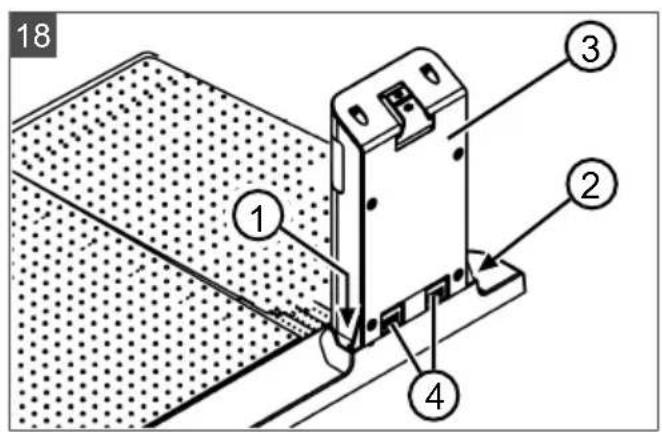
- Removing the charging pole:
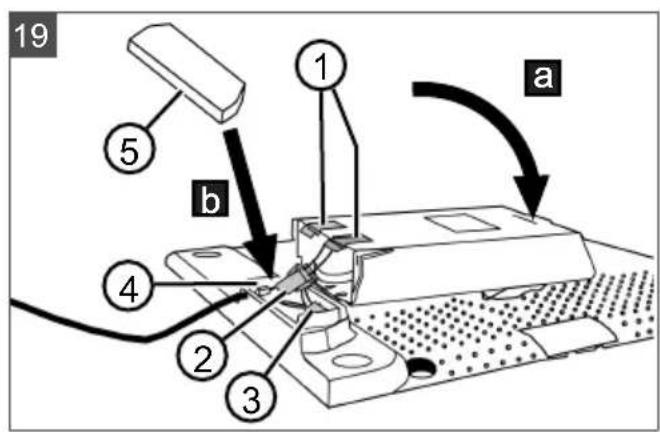
Unscrew the two screws (18/1) and (18/2) of the charging pole (18/3). Press the two buttons (18/4, 19/1) at the same time to release the charging pole. Tilt the charging pole (19/a). Disconnect plug connectors (19/2) and (19/3). Close (19/b) the opening in the base (19/4) with the winter cover (19/5), see Technical data.
- Storing the charging pole:
in a dry, lockable location protected from frost out of the reach of children
12.3 Winter storage of the boundary cable
The boundary cable can remain in the ground and does not need to be removed.
13 DISPOSAL

Electrical and electronic appliances do not belong in household waste, but should be collected and disposed of separately!
Used batteries or rechargeable batteries that are not installed permanently in the old appliance must be removed before disposal. Their disposal is regulated by the battery law. Owners or users of electrical and electronic appliances are obliged by law to return them after use. The end user bears personal responsibility for deleting his personal data from the old appliance to be disposed of.
The symbol of the crossed-through rubbish bin means that electrical and electronic appliances may not be disposed of in the household rubbish. Electrical and electronic appliances can be handed in at the following places at no charge:
Public service disposal or collection points (e.g. municipal building yards) Points of sale of electrical appliances (stationary and online) if dealers are obliged to take them back or offer this voluntarily.
These statements only apply to appliances that are installed and sold in the countries of the European Union and are subject to European Directive 2012/19/EU. Different provisions may apply to the disposal of electrical and electronic appliances in countries outside the European Union.

Used batteries and rechargeable batteries do not belong in household waste, but should be collected and disposed of separately.
For safe removal of batteries or rechargeable batteries from the electrical appliance and for
information on their type or chemical system, follow the further information within the operating or installation instructions.
- Owners or users of batteries and rechargeable batteries are obliged by law to return them after use. Return is limited to the handover of customary household quantities.
Used batteries can contain harmful substances or heavy metals that can cause damage to the environment and human health. Reuse of the used batteries and use of the resources contained therein contributes to the protection of these two essential commodities.
The symbol of the crossed-through rubbish bin means that batteries and rechargeable batteries may not be disposed of in household rubbish.
In addition, if the symbol Hg, Cd or Pb appears under the rubbish bin, this stands for the following:
Hg: Battery contains more than 0.0005% mercury Cd: Battery contains more than 0.002% cadmium Pb: Battery contains more than 0.004% lead
Rechargeable batteries and batteries can be handed in at the following places at no charge:
Public service disposal or collection points (e.g. municipal building yards) Points of sale of batteries and rechargeable batteries Disposal points of the common take-back system for the used batteries of appliances - Disposal point of the manufacturer (if not a member of the common take-back system)
We hereby declare, as the exclusively responsible party, that this product in its marketed form
These statements apply only to rechargeable batteries and batteries that are sold in the countries of the European Union and that are subject to European Directive 2006/66/EU. Different provisions can apply to the disposal of rechargeable batteries and batteries in countries outside the European Union.
The packaging materials are recyclable. Please dispose of packaging in an environmentally friendly manner.
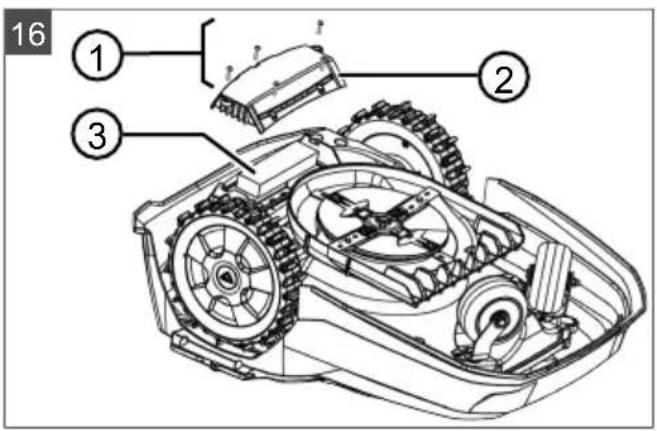
Removing the rechargeable battery before disposing of the appliance (16)
The integrated rechargeable battery must be removed before disposal of the appliance and disposed of separately in an environmentally friendly manner.
- Undo the screws (16/1).
- Take off the cover of the rechargeable battery compartment (16/2).
- Unplug the rechargeable battery (16/3) and take it out.
- Put the cover back on and fasten the screws.
14 AFTER-SALES/SERVICE
In the event of questions of warranty, repair or spare parts, please contact your nearest AL-KO Service Centre. These can be found on the Internet at: www.alko-garden.com/service-contacts
Further information on spare parts can be found at:
www.alko-garden.com/spareparts
meets the requirements of the harmonised EU Directives, EU safety standards and the product-specific standards. The Declaration of Conformity forms part of the operating instructions and is included with the machine.
16 WARRANTY
We will remedy any material or manufacturing defects discovered in the device during the statutory period of limitation for claims for defects by repair or replacement at our discretion. The period of limitation is determined in each case by the law of the country in which the device was purchased.
Our warranty promise applies only if:
These operating instructions are observed. The device is handled correctly. Original spare parts have been used.
The warranty becomes void in the case of:
Unauthorised repair attempts, unauthorised technical modifications, use for other than the intended purpose.
The warranty does not include:
Paint damage attributable to normal wear, wear parts that are marked with a box xxxxx (x) on the spare parts card.
The warranty period commences with the purchase by the first end user. The date on the proof of purchase is decisive. In the event of a warranty claim, please contact your dealer or the nearest authorised customer service centre with this declaration and the original proof of purchase. This declaration does not affect the purchaser's statutory claims for defects against the vendor.
TRANSLATION OF THE ORIGINAL USER MANUAL
Table of contents
2 PRODUCT DESCRIPTION
2.2 Robot lawnmower (02)
No. Component
Cleaning the robot lawnmower
- Entry Point
- Point x1 at [020m]
Using the arrow keys, select the number and confirm using
- Point x2 at [075m] Using the arrow keys, select the number and confirm using
- If necessary, define additional starting points.
- Return to the main menu using.
- Margin mowing
- Manual start
Do not enter!
2.4 Command field (03)
No. Component
1
(Master Home): When the mowing time is reached, the device returns to the base station. After that, it automatically starts again at the set mowing time.
2 Rain sensor: Detects whether it is raining (see section 7.4 "Setting the rain sensor", page 194). 3 Display: Shows the current operating status of the device, the name of the selected menu, its menu settings, as well as the function selection (see section 2.5 "Display", page 183).
4
(Taster ca strelicama): Brave stavke menija, pomeranje i smanjivanje brojčanih vrednosti, brave izmenu podešavanja.
Br. SatVndeo
5

(Taster start/pauza):
Pritisnite jednom: Ručno pokretanje i prekidanje režima košenja. Pritisnite dva puta: Odmah nastavite režim košenja posle pritiskanja tastera Home.
6

(Funkcija tastera N):
Pozvati funkciju, koja se upravo prikazuje iznad tastera na displeju.
7

(Taster On/Off): Uključivanje i isključivanje uređaja.
8

(Taster za meni): Pomicanje u više menija.
2.5 Displej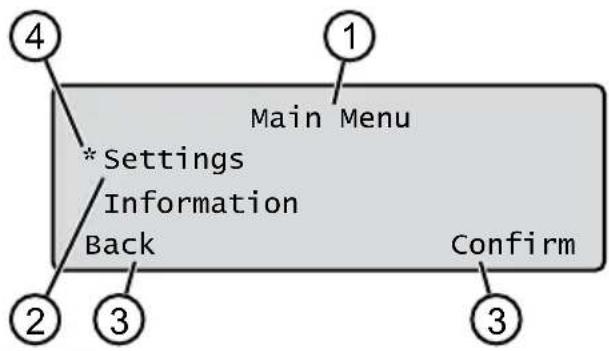
Br. Indikator
1 Naziv izabranog menija (ovde: Main Menu) 2 Stavke menija u meniju: Uvek se prikazuju samo dve stavke menija (ovde: Settings i Information).

It is possible to change
the displayed station.
3 Functions for selecting the station change
(see: Settings).

It is possible to call functions.
4 Asterisks for marking the displayed station change (see: Settings)
2.6 Menu Structure
Main Menu
Programs
Weekly Program see 7.5 "Program selection", page 194
Entry Point see 7.5.2 "Selecting entry points", page 194
Program Info see 8 "Displaying information", page 196
Settings
Time see 5.2 "Setting basic parameters", page 191
Date see 5.2 "Setting basic parameters", page 191
See section 5.2 "Summary of basic settings", page 191
PIN code: see section 5.2 "Summary of basic settings", page 191
Key clicks: see section 7.2 "Activating/deactivating key sounds", page 193
EcoMode: see section 7.3 "Activating/deactivating Eco mode", page 193
Quick Homing Kit: see section 4.8 "Installing the Quick Homing Kit", page 191
Rain sensor: see section 7.4 "Setting the rain sensor", page 194
After rain delay: see section 7.4 "Delay after rain sensor", page 194
Rain sensitive: see section 7.4 "Rain sensor sensitivity", page 194
inTOUCH: see section 7.6 "inTOUCH", page 195
Margin mowing: see section 7.7 "Mowing edges when manually moving", page 195
Sub zone active/disabled: see section 7.8 "Setting sub-zones", page 196
Display contrast: see section 7.9 "Adjusting display contrast", page 196
Safety settings: see section 7.10 "Safety settings", page 196
Reset calibration: see section 7.11 "Calibration reset", page 196
Factory reset: see section 7.12 "Factory reset", page 196
Blades service: see "Order Information", page 196
Hardware: see "Order Information", page 196
Software: see "Order Information", page 196
Program Info: see "Order Information", page 196
Failures: see "Order Information", page 196
2.7 Base station (04)
| Бр. Састовни.Deо |
| 1 Дова пioча |
| 2 Лев за п riпka3 статуca |
| 3 Контакл за пьveиbe |
| 4 Тасер Home |
| 5 Стуб за пуьeиbe |
| 6 Кабловско okно |
Bp. Components Deo
Deepening for the device in the device for land (9) device
- Depending on the model (see Technical Data)
2.8 Battery
The device can be operated with a battery.
NOTE: Before first use, charge
the battery. The battery can be purchased at any level of charge. Discharging does not damage the battery. The battery can only be charged when the device is switched on.
The battery is fully charged at delivery. In normal operation, the battery is regularly charged. For this purpose, the device is placed in the base station. The integrated electronics for monitoring automatically stop charging when the charging status of 100% is reached. The charging process functions only if the contacts for charging the base station are in uninterrupted contact with the good surfaces of the device. At temperatures above 45 °C, the built-in protection circuit prevents charging of the battery. In this way, the battery is protected from damage. If the battery operating time is significantly reduced despite maximum charging, only the battery should be replaced. If the battery, due to aging or a defective storage, is discharged below the limit specified by the manufacturer, it can no longer be charged. Check the battery and the monitoring electronics at the distributor, technician, or service partner of the company AL-KO and replace them if necessary. The battery status is shown on the display. Check the battery status after about 3 months of storage. For this purpose, switch on the device and read the battery status. If the battery is only about 30% charged, place the device in the base station and leave it there to charge the battery. If the storage for the device is removed from the base station (see Chapter 12.2 "Removal and storage of the device (18, 19)," page 203), first remount it in reverse order and then connect the base station to the power supply. If there is a short circuit in the battery circuit: Take the device to the AL-KO service workshop! If the battery is removed from the device: If the contacts have come into contact with
Electric shock, do not touch with water. Do not immerse in water!
2.9 Description of operation
Movement on grassy surfaces
The device moves freely over the area defined by the boundary cable.
Orientation of the device is performed via sensors that detect the electromagnetic field of the boundary cable.
If the device hits an obstacle, it stops and continues in another direction. If the device gets into a situation where work is not possible, a message is shown on the display.
If the device, with the loop sensor enabled, recognizes the charging station, it automatically returns to the base station.
Mowing mode and charging mode
Mowing phases constantly alternate with charging phases. If the battery charge level drops to a certain value during mowing (e.g., 0%), the device returns to the base station at the boundary wire.
The mowing programs are pre-set and can be additionally adjusted on the device or in the app.
Every time the mower motor is started, the direction of rotation changes, which doubles the service life of the blades.
2.10 Module that connects via WiFi - Smart application AL-KO inTOUCH Smart Garden
The robotic mower is equipped with a module that connects via WiFi. This module enables easy control, monitoring, and adjustment via an application on a mobile device (smartphone, tablet).
NOTE for use: To use the mobile device via the AL-KO inTOUCH Smart Garden application, an internet connection is required.
NOTE: To ensure that the software for the robotic mower is always updated to the latest version, it must be connected to the internet via a WiFi network. The AL-KO inTOUCH Smart Garden application notifies when new versions of the software for the robotic mower are available. They are automatically downloaded from the internet.
AL-KO inTOUCH Smart Garden app
The AL-KO inTOUCH Smart Garden app is available for Android devices in the Google Play Store and for iOS devices in the Apple App Store:


Available on the
App Store

GET IT ON
Google Play
Scan this QR code to be informed about how to install the AL-KO inTOUCH Smart Garden app on your mobile device and get more information about your device. With it, you can also connect your smart-connected device to the internet.
The robotic mower
exclusively works with WiFi via
2.4 GHz. WiFi networks with
5 GHz are not supported.
To connect your robotic mower, which can be connected via Wi-Fi, to the AL-KO inTOUCH Smart Garden app, the robotic mower and the smartphone must be within the range of the Wi-Fi router with sufficient signal strength (recommendation: min. 50%).
- Start the AL-KO inTOUCH Smart Garden app.
- Creating a user account once:
Click on "Registration / Registration">"Registration". Enter your name, address and postal code. Activate the button "Front page and agree..." Then click on "Registration".
- By registering, the income tax user is created. 4. Click "Add new user" to activate the assistant for connection. 5. Enter the required data.
NOTE: How the mowing works
The mower starts mowing in your yard with or without a WiFi connection. The AL-KO inTOUCH Smart Garden app is only used after the mower has returned to the base station with a good WiFi signal. If the WiFi signal in the entire yard is not strong enough, its range can be extended with a repeater.
In case of functional problems, your dealer can help. They have the AL-KO inTOUCH Smart Garden app installed.
The dealer must enable the basic access to the robotic mower via the AL-KO inTOUCH Smart Garden app.
In addition to basic access to all connected robotic mowers, the smart app AL-KO inTOUCH Smart Garden offers other functions, such as connecting with other AL-KO devices, and notifications in case of malfunctions.
SAFETY
3.1 Intended use
This device is intended exclusively for private use. Any other use, as well as unauthorized modifications or extensions, is considered improper use and leads to the loss of the warranty, the loss of conformity with regulations, and the manufacturer disclaims all liability for damage to the user or third parties.
The following are not covered by the device: See technical data
3.2 Possible improper use
This device for grass is not suitable for use in public facilities, parks, sports grounds, or in agriculture or forestry.
3.3 Safety and protective devices
WARNING! Danger of injury.
Improper repair and deactivation of safety devices can lead to serious injuries.
Have faulty safety devices repaired. Never deactivate safety devices.
3.3.1 Entering the PIN and PUK
The device can only be operated by entering the PIN (Personal Identification Number). This prevents unauthorized persons from using it. The factory default for the PIN is 0000. The PIN can be changed, see Section 5.2
"Changing basic settings", page 191.
If the PIN is entered incorrectly three times, the PUK (Personal Unlocking Key) must be entered. If this is entered incorrectly, you must wait 24 hours before the next entry.
Keep the PIN and PUK so that unauthorized persons do not have access to them.
3.3.2 Sensors
The device is equipped with several safety sensors. It can only be restarted automatically after a shutdown using a safety sensor. The error message is displayed on the display and must be confirmed. The cause of the sensor triggering must be eliminated.
Tilt sensor
If the device tilts during operation on a slope, the drive motor switches off and the blades for cutting stop.
Impact sensors for obstacle detection
The device is equipped with sensors that, when they come into contact with obstacles, ensure a change in the direction of movement. When it hits an obstacle, the upper part of the housing tilts slightly and the impact sensor is activated.
Sensor for bending in the direction of travel/floor
If the movement direction reaches the condition for the limit switch or the bumper switch, which is greater than what is set for that model, turn the device around or change the direction of movement.
Limit switch sensor
The movement is determined by the limit switch sensor, which in the activated state detects the boundary wire and sends the movement signal to the base station (see technical data).
Frost sensor
The movement is determined by the frost sensor, which at low temperatures sends a command to the device or sends a command to the AL-KO inTOUCH Smart Garden app (see technical data). The temperature for the command can be set.
! Caution ! Starting Motors ■ Calibration, Phase [1]
During the calibration process
To determine the signal length at the boundary wire, first drive the device twice straight across the boundary wire, then to the base station and stop there.
The display shows the message "Calibration completed". The battery is charging.
NOTE: The device must stop when docking into the base station. If the device does not make contact when docking into the base station, it will continue mowing along the boundary wire. If the device moves through the base station, the calibration procedure was not successful. In that case, the base station must be properly adjusted and the calibration process must be repeated.
After the calibration process
The current mowing time is displayed.
For all settings, see Chapter 7 "Settings", page 193.
Robolinho
NOTE: To ensure proper operation of the device and a constant number of mowing cycles, the lawn area must be measured with the "Measuring entrance points" function.
6.1 Adjusting the cutting height
- Adjust the cutting height.
For instructions on adjusting the cutting height, see section 7.7 "Adjusting the cutting height manually", page 195.
- Adjust the cutting height.
6.2 Cutting blade brake
Press the cutting height lever to the base station (12/4).
The cutting height is automatically lowered to the base station. It is used as a cutting blade brake for the current cutting cycle or is renewed at a specific time.
Press the cutting height lever.
The cutting blade brake is applied to the cutting deck.
Press the cutting height lever.
The cutting height lever is released.
NOTE: In dangerous situations, the cutting height lever can be stopped with the stop button (12/2).
6.3 Cutting with the edge trimmer (05/HΦ)
1. Press the cutting height lever to set the edge trimmer. 2. Adjust the cutting height. 3. Press the main switch. 4. ν * settings 5. w * zone mowing 6. Press the cutting time. 7. Adjust the cutting height.
3. Setting the device: Set the device time, and the setting is saved exclusively until the accumulator is not repaired.
After the end of the dispute surface, return the device manually to the base station.
7 SETTINGS
7.1 Setting the device - Description
1. Press the main menu button. Note: The asterisk * next to the setting indicates that the setting is currently selected. 2. Use the settings. 3. Use the left/right button to change the setting and confirm with. 4. Execute the setting. Note: The setting options are described in the following sections. 5. Return to the main menu.
NOTE: Other setting options: See Chapter 5.2 "Changing basic settings", page 191.
7.2 Activating/Deactivating the acoustic signal
- w * k y clicks
- Activating/Deactivating the acoustic signal:
Activate:
Activate the acoustic signal.
Deactivate the acoustic signal.
7.3 Activating/Deactivating Eco mode
When the device is in Eco mode, it switches to a working mode that saves energy. In this way, energy consumption and paper emissions are reduced.
NOTE: Do not use the device in high or dense grass, or in dense wet grass. It may not be possible to use the device.
- Eco-Mode
- Activating/Deactivating Eco-Mode:
Activate
Activate Eco-Mode.
Deactivate
Deactivate Eco-Mode.
7.4 Rain Sensor Settings
NOTE: Wet grass reduces the device's performance. By activating the rain sensor and setting the delay time, you can prevent the device from mowing wet grass.
When the rain sensor is activated, the device returns to the base station or stops when it starts to rain. It stays there until the rain sensor dries. After that, the device will continue mowing after the time set as the delay. The sensitivity of the rain sensor can be adjusted.
- Rain sensor
- Activating/Deactivating the rain sensor:
- nnnn: -
Activate rain sensor.
Deactivate:
Deactivate rain sensor.
- Set rain delay:
After rain delay
xx hours xx minutes
Select irrigation
Delay time for irrigation
Save
- Rain sensitivity of rain sensor:
Rain sensitive
Set rain sensitivity and save
7.5 Program editing
7.5.1 Program editing - Options
1. Save the main menu.
- Programs
3. To change the exchange rate, select
4. EXECUTE EDITING. Note: Exchange rates are described in the following sections.
7.5.2 Editing current flows
Programming current flows
- Set the exchange rate base station.
- With the exchange rate.
3. Save the main menu.
- Programs
- Entry Point
- interactive teach
- *start interactive entry point teaching
I nnn start. Type the value of the boundary cable.
An example: when you reach the desired entry point, it is memorized.
- Set entry point 1,
if during operation the program has a defined entry point. If it does not define an entry point, the entry point will be automatically defined.
- Entry point x: XXm,
when the last entry point is reached.
Manual definition of entry points (05)
The first entry point (05/X0) is previously defined and is located 1 m to the right of the base station. From this point, additional entry points can be defined (see Technical points).
When defining entry points, you should have the following in mind:
He noted that the pump should be positioned at a distance from the base station. The pressure of the other (06/Φ) is adjusted.
Use only as much pump as needed.
- Entry Point
- int x1 at [020m] With the option to select one number and take each with
- Point x2 at [075m] With the option to select one number and take each with
- If necessary, adjust the pump settings. 5. Return to the main menu.
7.5.3 Setting the Mowing Time
NOTE: The interval between programming the mowing time and the mowing start must be at least 30 MIN. Otherwise, set the start with work at least 30 MIN after the last activation of the sensor.
In the Weekly Program menu, set the days and times when the mowing should occur. If necessary, adjust these settings to the battery size. If after several days no mowing area is visible, increase the mowing time.
- Weekly Program
A11 Days [X]: Set the mowing to occur every day at the specified time. If A11 Days [ ] is displayed, set the mowing to occur only on specific days of the week.
Monday [x]...* Sunday [x]: Set the mowing to occur on specific days of the week at the specified time. If e.g. Monday [ ] is displayed, set the mowing not to occur on that day.
Change: Activate [X] or deactivate [ ] the specified day, the start time, the mowing mode, and the pump settings.
2. DELIVERY SCHEDULE FOR ALL DAYS OR FOR A SPECIFIC DAY:
E.g., *[M] 07:00-10:00[?]: Normal mowing [M] from 07:00 to 10:00 hours with automatic change of the mowing height by 0-9 [?] E.g., *[R] 16:00-18:00 [1]: Scheduled at 16:00 hours, mowing starts with the edge of the blade [R] and continues with the surface mowing
of the boundary cable. After that, surface mowing continues in the mowing height 1 [1]. At 18:00 hours, the battery is fully charged, and the device returns to the base station.
Ann change: Change the scheduled delivery. Ann continue: Confirm the changed delivery and proceed to the next delivery.
- Save: Save all changed deliveries and the delivery menu.
7.5.4 Sales mode
Sales mode in the sales area ensures a better mowing result.
- Set the mowing height in the sales area (see section "Setting the mowing heights").
- Set the mowing height in the sales mode (see section "Mowing program settings").
E.g., *[P] 16:00-18:00 [3]: Scheduled at 16:00 hours with sales mode [P], mowing in the mowing height 3 [3]. At 18:00 hours, the battery is fully charged, and the device returns to the base station.
7.6 inTOUCH
An existing connection to the smartphone can be interrupted. In this way, the scheduled 30 minutes will be open for establishing a new connection.
NOTE: To establish a connection, the connection must first be interrupted again, even if the schedule was previously connected to the sales mode.
u*inouch 2. Before the connection - Set the date: To do so.
- IOTBpNTn ca TbpaNTn ce y MeHn.
7.7 When the mower is not used for manual mowing, you can set the mower to mow with the mower blade. The mower blade is programmed at the set mowing time: see section 7.5.3 "Setting the mowing time", page 195.
- A * Margin mowing
- manual start
7.8 Mowing of steep slopes
- zone mowing
Inactive: Mowing of steep slopes is disabled.
Active: Set the mower to mow until the battery is empty.
Set the mowing time in minutes. During the set time, the mower mows the selected area. It is possible to set the following mowing times: 30/60/90/120/until the battery is empty.
7.9 Adjusting the display contrast
If the display, e.g. 360° sun, is weakly lit, the display can be improved by changing the display contrast.
- play contrast 2. Increase/decrease the display contrast, and confirm with OK.
7.10 Protection of the mower
If the safety device is activated, it can only be reset after the error has been corrected for safety.
- Activating/deactivating the safety device:
Activate: activate the safety device.
Deactivate: deactivate the safety device.
7.11 Recalibration
If the position of the limit switch has been changed or the device no longer finds the limit switch, recalibration is required.
- Reset calibration
- Reset loop calibration data?
- Calibration procedure: see section 5.4 "Performing automatic calibration procedure", page 192.
7.12 Resetting the device
The factory settings can be restored, e.g. before selling.
- Settings: Factory reset completed
8 DISPLAY INFORMATION
The Information menu is used to display data settings. No settings can be changed in this menu.
1. Press the main menu button. 2. Select Information. 3. Press the menu button to confirm. The menu items are described in the following sections. 4. Press to return to the main menu.
Blade service
Shows how many hours of operation are needed before blade service is required. The counter can be reset manually. Blade service must be performed by an AL-KO distributor, technician, or service partner.
Resetting the blade service counter:
- Confirm
Hardware
Shows normal data, e.g. type, year of manufacture, hours of operation, serial number, number of cuts, total cutting time, number of mowing cycles, total mowing time, length of boundary wire loop.
Software
Shows the software version.
NOTE Always keep the software of the Robolinho robotic mower up to date. Regularly check the version and update it if necessary. The software for updating, Robolinho Updater, can be found on the Internet at: www.al-ko.com/shop/de/robolinho-autoupdater
Program Info
Display the current program, e.g. the remaining time.
Failures
Display the latest error messages with date, time and error code.
9 MAINTENANCE AND CARE
DANGER! Risk of injury. Moving parts can cause injury.
When performing maintenance, always wear protective gloves!
9.1 Cleaning
CAUTION! Risk of injury. Before cleaning the robot base station, disconnect the power supply from the electrical components.
Do not spray the robot base station with water.
Cleaning the robot
DANGER! Risk of injury due to blades. The blades are very sharp and can cause cuts.
Wear protective gloves! Make sure that body parts do not come into contact with the blades.
Perform weekly:
- Clean the device.
- 06pniuTe NOBpuHny KyhnuTa MeTnucom, yeKOM, BnaXHom KpNOM nIN qHHm cyHjepom.
- YeTkom OuNCTnTE DoHy CtpaHy ypehaja, NIOuy 3a KOUHeBe KOCNJInCe HOK.
- Поверпн HOжеву ngл endy ouTeheBa. ПоNotpe6n 3amehntn: BmDn POnaebbe 9.3 "3ameha HOxega", cmpaHa 197.
Ushene6a3He cTaHnue
- Peobho ykaHajte TpaBy nIiWhe nn npyre npedMeTe u3 6a3He cTaHnue. 2.ObpHInTe NOBpHInHy 6a3He cTaHnCe BJaXHOM KpNOM NIN ΦHnM cyHepom.
9.2 PeoBHO nCnTnBaHbE
OnwTe nCnNTuBaBe
CtojeHn Ha CBM TOyKOBUMa
Ha cybom mecy koje ce moxe 3aKbuyatn n 3austnheHo je od mpa3a BanhDomawaja deue
12.2ДeMoHTaKa n cKlaIaIuTeHbe cTy6a 3a nyHeBe (18,19)
Демонтураjetи уckладиштinte CTуб 3a nyньеbetOKOM 3IMe,ODH.Када ќ Вероватнода he 6ntuВан уnotpebe дуcke od 30 daHa.
!Caution ! Starting Motors Calibration, Phase [1]
- al do * Entry Point
- a#o * print X1 at [020m]
Tlacidlami verte za seabou pozadované cislice a každu potvrde tlacidlom
- or * Weekly Program
or A11 Days [X]: The device mows every day at set times. If A11 Days [ ] is displayed, then the device mows only on set days of the week. or Monday [X]...* Sunday [X]: The device mows on the set day of the week at set times. If, for example, Monday [ ] is displayed, then the device does not mow on that day. or change: Activate the corresponding day [X] or deactivate [, set times, mowing method, and starting points.
4.8 Installation of Quick Homing Kit

Scan the QR code to see how the Quick Homing Kit is installed. Also see the assembly instructions 443565 "Quick Homing Kit - installation".
5 START-UP
- Open the main menu with.
- e * Information

4.8 Install Quick Homing Kit

Scan the QR code for more information on how to install the Quick Homing Kit. Also see the assembly instructions 443565 "Quick Homing Kit - Installation".
5 START
(Start/Pause button):
!Caution ! Starting Motors ■ Calibration, Phase [1]
During the calibration run
If the device encounters an obstacle, it stops and continues moving in another direction. If the device gets into a situation where operation is impossible, a message appears on the display.
If the device, with the rain sensor enabled, detects moisture, it automatically returns to the base station.
Operation in mowing and charging mode
The mowing stages constantly change according to the charging stages. If the battery charge drops below a certain value during mowing (indicator: 0%), the device returns to the base station along the boundary cable.
Mowing programs - preset, but can be adjusted on the device or via the app.
At each start of the mower blade motor, its direction of rotation changes, which extends the service life of the blades.
Obstacle collision sensors
The device is equipped with sensors that, upon contact with an obstacle, detect a change in the direction of movement. When colliding with an obstacle, the upper part of the housing
slightly shifts, and the collision sensor is triggered.
Sensor on the slope
If the direction of movement reaches a slope up or down or a lateral tilt exceeding the value set for the model, the device turns or changes the direction of movement.
Rain sensor
The device is equipped with a rain sensor (depending on the model), which, when activated, interrupts the mowing process during rain and ensures the return of the device to the base station (see Technical Specifications).
Freeze sensor
The device is equipped with a freeze sensor that sends a message to the device or a push notification in the AL-KO inTOUCH Smart Garden app in case of low temperatures (see Technical Specifications). The temperature threshold for the notification can be configured.
Electromagnetic radiation

The device can be operated safely in the immediate vicinity of robotic lawnmowers (distance 0.5 m) and gas-powered equipment.
The cable used in the limiting cable complies with the electromagnetic radiation standard defined by EGMF (European Garden Machinery Federation).
3.4 Safety instructions
3.4.1 Operators
Persons under 16 years of age, persons with limited physical, sensory or mental abilities, or with a lack of experience and knowledge, as well as persons who do not know the operating instructions, are prohibited from using the device. Observe all local safety regulations regarding the minimum age of the operator. Do not work with the device under the influence of alcohol, narcotics or medication.
3.4.2 Personal protective equipment
To avoid injury, wear appropriate clothing and protective equipment. Personal protective equipment includes:
Long trousers and sturdy footwear. For maintenance and care: protective gloves.
3.4.3 Safety of people and animals
When using the device in publicly accessible areas, caution must be exercised and bystanders must be warned about the device's operation:
WARNING! Automatic lawnmower is working! Do not approach the device! Watch out for children!
During operation, keep people, especially children, and animals away from the device or the device's operating area. It is forbidden to touch the device with your hands! Keep body parts and clothing away from the cutting blade.
3.4.4 Device safety
Use this device only under the following conditions:
Before starting work, make sure that there are no objects in the working area of the device (for example, branches, pieces of glass, metal, fabric, stones, garden furniture, garden tools, or toys). They could damage the device blade or the device itself.
if the device is not dirty; if the device is not damaged and not worn; if all control elements work. If the base station, power supply unit, and electrical cables are not damaged and are functional.
Always replace all defective parts with original spare parts from the manufacturer. In case of device damage, repair it.
The device user bears full responsibility for accidents involving other people or their property.
3.4.5 Electrical safety
Never operate the device if a fuel-powered unit is working at the same time. Do not pour water on the device; do not open the device.
4 Installation
4.1 Unpacking the device
- Carefully remove the packaging. 2. Carefully remove all components from the packaging and check for damage during transport. Note: In case of damage during transport, immediately inform your specialist or the AL-KO service partner.
- Check the delivery contents, see section 2.1 "Delivery contents (01) Page 398."
If you will send the device further, keep the original packaging and the accompanying documents. They are also necessary for returning the shipment.
4.4 Mounting the base station (07/a, 17)
- Place the base station (05/1) according to the planned position of the boundary cable as follows:
At ground level (check with a spirit level), screw the base station to the ground using the screws provided. Make sure that they do not bend or deform.
2.3 Place the base station (07/2) with the four-way screw (07/1) to the ground.
The base station can also be placed outside the radio range (17). The limiting cable must be laid as shown in the figure.
4.5 Installation of the limiting cable
NOTE: If the limiting cable from the delivery kit is too short, you can purchase an extension cable from the dealer or AL-KO service partner.
4.5.1 Laying the limiting cable to the base station (07/b)
- Remove the limiting cable (07/4) from the packaging.
- Remove the rubber grommet (07/3) from the connector (07/A).
- Remove the insulation from the end of the limiting cable (07/6) and insert it into the terminal (07/7).
- Close the terminal.
- Guide the limiting cable through the cable duct (07/5) and then through the cable duct opening.
NOTE: The cable reserve can be used for subsequent minor corrections in the cable layout.
- Install the rubber grommet of the cable duct.
4.5.2 Laying the limiting cable (05)
The limiting cable can be installed on the ground or at a distance of up to 10 cm below the turf. Installation below the turf must be carried out by a specialist.
Both variants can be combined.
WARNING! Check the boundary cable for damage. If the boundary cable is damaged or broken, the device will no longer be able to receive control signals. In this case, the boundary cable must be repaired or replaced. The boundary cable is available from AL-KO.
Always lay the boundary cable directly on the ground. If necessary, ensure safety with additional cable clips for securing the boundary cable. Protect the boundary cable from damage during installation and operation. Do not dig or perform vertical work near the boundary cable.
- Secure the boundary cable at regular intervals using cable clips for securing the boundary cable in the ground (maximum 10 cm). 2. Lay the boundary cable around obstacles: see section 4.5.3 "Insulating obstacles", page 406.
- Create passages between individual surfaces to be mowed: see section 4.5.4 "Narrowing passages (05/h)", page 407.
- To avoid large loops or bends: see section 4.5.5 "Avoiding loops (15)", page 407. 5. Lay cable slack: see section 4.5.6 "Laying cable slack (11)", page 407. 6. After completing the installation, connect the boundary cable to the base station terminal (07/B): see section 4.5.1 "Connecting the boundary cable to the base station (07/b)", page 405.
4.5.3 Insulating obstacles
Depending on the surrounding environment in the working area, the boundary cable must be laid at different distances from obstacles. To determine the correct distance, use the template included in the packaging.
Exceptions are only necessary if they cannot be detected by the collision sensors of the device. Avoid too many exceptions for unnecessary exceptions. Bumps smaller than 6 cm must be insulated, otherwise the device may cause damage.
Distance to walls, fences, flower beds: min. 20 cm (05)
The device moves with a lateral offset of 20 cm along the boundary cable. Therefore, lay the boundary cable at a distance of no less than 20 cm from walls, fences, flower beds, and similar.
Distance to edges of terraces and paved paths (09)
If the terrace or the distance from the edge to the lawn is higher, a distance of no less than 20 cm must be ensured. If the terrace or edge is at the same height as the lawn, the cable can be laid exactly at the edge.
Distance between boundary cable and obstacle M (05)
If the boundary cable is laid directly next to obstacles or on them, i.e., at a distance of 0 cm, the device will drive over the boundary cable. Do not cross the boundary cable (06/c), but lay it parallel (05/e).
Laying the boundary cable in curves (05,10)
For inside corners (10/a): Lay the boundary cable diagonally to avoid movement of the device. For outside corners with obstacles (10/b): Lay the boundary cable with a sharp bend to avoid collision of the device with the corner. For outside corners without obstacles (05/j): Lay the boundary cable at a 90° angle.
4.5.4 Narrow passages (05/h)
Observe the following distances in passages:
60 cm Distance from boundary cable to edge: 20 cm Distance between boundary cables: min. 20 cm
4.5.5 Excluding slopes (15)
Slopes exceeding those specified in the technical data must be excluded with the boundary cable (45% = 45 cm rise per 1 m horizontally (see technical specifications)).
The boundary cable must not be laid on a slope with an incline greater than 20%. To avoid problems at turns, maintain a distance of 50 cm up to 20% incline. If the incline at the outer edge of the working area exceeds 20% at one point, the boundary cable must be laid at a distance of 20 cm from the level surface to the start of the slope.
4.5.6 Laying cable slack (11)
To allow repositioning of the base station or expansion of the mowing area after installation, regularly lay cable slack in the boundary cable.
The amount of cable slack can be set at your own discretion.
Avoid open loops in case of cable slack.
1. Lay the boundary cable around the current fixator for securing the boundary cable (11/1), then return to the previous fixator for securing the boundary cable (11/3). 2. Then lay the boundary cable back in the direction of the current fixator for securing the boundary cable. This creates a loop. The cable should lie flat. 3. If necessary, correct the loop in the middle with an additional fixator for securing the boundary cable (11/2) on the ground.
4.5.7 Typical errors when laying cables (06)
Cable slack not installed in an evenly extended loop (06/a). Boundary cable not installed correctly around corners (06/b). Boundary cable crosses itself or is not laid in the direction of the clock (06/c). Boundary cable installed too unevenly for the mowing zone (06/d). At transitions from edge to obstacle on the lawn, the boundary cable is not laid directly next to the obstacle (06/e). Starting points installed too far from the base station (06/f). Boundary cable laid beyond the edge of the lawn (06/g). When laying the boundary cable, the minimum distance for passages of 20 cm is exceeded (06/h). Boundary cable is too close, i.e., at a distance of less than 20 cm, to obstacles that can be driven over (06/i).
4.6 Connecting the base station to the power supply (08)
- Place the power supply unit (08/1) in a dry place away from direct sunlight, sufficiently close to the base station (08/2). 2. Tightly screw the cable (08/3) to the power supply unit.
- Insert the plug (08/4) of the power supply unit into the socket (08/5).
NOTE: We recommend connecting the power supply unit to the electrical network through a residual current device that trips at a nominal leakage current < 30 mA.
4.7 Checking the connection on the base station (08)
7.11 Recalibration
If the method for the limiting cable has been changed or if the device can no longer detect the limiting cable, recalibration is required.
- Recalibration
- Return to previous state?
- Performing calibration: see Chapter 5.4 "Performing automatic calibration", p. 409.
7.12 Restoring factory settings
The factory settings of the device can be restored, for example, before selling.
- w * factory settings
Device message: Settings successfully restored
8 VIEWING INFORMATION
The Information menu is used to display data about the device. In this menu, settings cannot be changed.
- Call up the main menu using
- Select the menu item using 1 and confirm using
Note: The menu items are described in the following paragraphs.
- Return to the main menu using
Blade service
Displays the hours of operation that require service for the blade. The counter can be reset manually. Have the blade serviced by a specialist, technician, or AL-KO service partner.
Reset the service counter:
- Confirm
Hardware
Displays information about the device, such as: type, year of manufacture, hours of operation, serial number, number of blades in the set, total cutting time, number of charging cycles, total charging time, length of the limiting cable.
Software
Worn or bent blades must be replaced.
- Switch off the device using
- Place the device with the blades facing up.
- Tighten the clamping screws.
- Clean the blade of the knife with the positioning tool.
- Clean the positioning tool with a soft brush.
Note: The knife is sharpened on both sides and therefore can be installed at an angle of 180°, which increases the service life.
6. Replacing the knife:
If the knife has not been used after the first assembly: Turn the knife 180° and insert it back into the positioning tool with the sharpened side facing the device, then tighten the clamping screws firmly. If the knife has already been used after the first assembly: Insert a new knife with the sharpened side facing the device into the positioning tool and tighten the new clamping screws.
Note: Only original spare parts from the manufacturer may be used.
In case of heavy contamination that cannot be removed with a brush, the blade of the knife must be replaced, as imbalance can lead to increased noise, increased wear, and malfunction.
The blade should be replaced regularly.
10 TROUBLESHOOTING
10.1 Historical online processing website
CAUTION! Risk of injury. Moving parts and sharp edges can cause injury.
Always wear protective gloves during maintenance, care, and cleaning.
NOTE: In case of malfunctions that are not listed in this table or that you cannot resolve yourself, contact the customer service.
- The device may stop.

- Turn off the device with

- Insert the device into both sides of the housing:
Avoid contact with the knife. Always avoid contact of the knife with body parts.
12 STORAGE
12.1 Storing the robotic mower
Store the device for the winter period if it will not be used for more than 30 days.
1. Fully charge the battery (charger (08)). 2. Clean the device thoroughly (see Chapter 9.1 "Cleaning", page 414).
- Storing the device:
Stand on all wheels in a dry, frost-free, and inaccessible place.
12.2 Dismantling and storing the charging station (18, 19)
Dismantle and store the charging station for the winter period or for a period when it will not be used for more than 30 days.
- Disconnect the AC adapter from the base station's power supply.
- Remove the charging station:
Unscrew both screws (18/1) and (18/2) of the charging station (18/3). Press both buttons (18/4, 19/1) simultaneously to unlock the charging station. Tilt (19/a) the charging station. Loosen the cable connections (19/2) and (19/3). Close (19/b) the opening of the base (19/4) of the radiator valve (19/5) (see technical specifications).
3. Storage of the charging station:
In a dry, locked and frost-protected place, inaccessible to children.
12.3 Storage of the limiting cable in winter period
The limiting cable can remain in the ground; it does not need to be removed.
13 DISPOSAL
Applicable to the law on electrical and electronic equipment.

Electrical and electronic equipment must not be disposed of with household waste. It must be collected and disposed of separately!
Used batteries or accumulators that are not permanently installed in the device must be removed before disposal! Their disposal is regulated by the law on batteries. Owners or users of electrical and electronic equipment are obliged by law to return them after use. The end user is responsible for deleting personal data from the old device before disposal!
The symbol of the crossed-out waste bin indicates that used electrical and electronic equipment must not be thrown away with household waste.
Used electrical and electronic equipment can be handed in free of charge at the following places:
Public collection points for recycling and waste treatment in accordance with national legislation (e.g., municipal collection points), and points of sale of electrical appliances (stationary and online), insofar as dealers are obliged to take them back or offer them voluntarily.
Do not step on the device!
2.4 Control panel (03)
| Ho-
Mep | KOMnoHenta |
| 1 | (Khonka Home): ckacvbaHnry po6otn
В ржимi skoшуBaHnry, пис triй nobep-
Taetbces do 6a30Boi CTanüi. Прис triiy
aBTomatuHNo noUHe B HacTyHnry qac
СКошУBaHnry HabTynHOrO Дня. |
| 2Датукdoшу: peectrpye, чи падас doш
(dINB.po3di n 7.4 "BcmaHOBlenny
damuuka doшу", cmopinka 437). |
| 3Диспл徳: BiDobpaJcaETbcяnotochnii
po6ochn CTan prioctroю, habBa Вибра-
Horo MeHIO, pyHKTI MeHIO i BИбpani
Функцii (dINB. po3di n 2.5 "ДUCPneu",
cmopinka 426). |
| 4 | (Honkn 3i CTpiKamN): Bn6ip
ПункTiB MeHIO, 3bIbSeHnry i 3MeHseH-
нячесьнх 3HaueHb, Bn6ip habaSTy-
BaHb. |
| 5 | (Khonka Start/Pause (3anuck/прizhu-
Пинka)): 1НатSCaHnry: Рочak i 3уПинka
po6OTn B ржимi kocinHry bpyHy.
2НатSCaHnry: BiDHOblenHry po6otn
В ржимi kocinHry BIDpa3y niCЯ Na-
ТиSCaHnry Khonki Home (ДODOMy). |
| 6 | (ФункциOnaJIbHi KONkn): Bn-
Клиk Функцi, яka BiDobpaJcaETbcs NaD
КонkoToH Na dinCpnei. |
| 7 | (Khonka On/Off (YВIMK./ВIMK.)): yВIMKHeHnry Ta BImKHeHnry prioctroю. |
2.5 Display
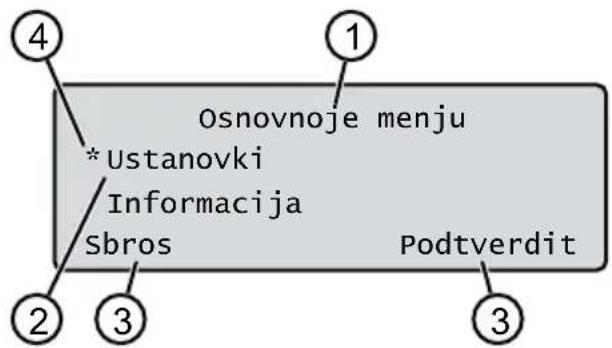
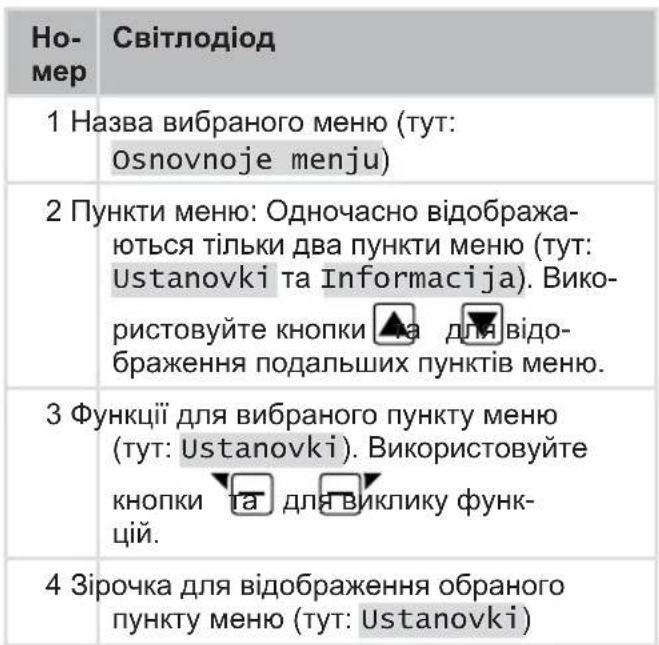
2.6 Menu structure
Basics++,
Programs
Weekly program see section 7.5 "Programming mowing schedules", page 438
Start point see section 7.5.2 "Setting start points", page 438
Program Info see section 8 "Information", page 440
Settings
Time see section 5.2 "Setting basic parameters", page 435 Time see section 5.2 "Setting basic parameters", page 435 Language see section 5.2 "Setting basic parameters", page 435 PIN code see section 5.2 "Setting basic parameters", page 435 Key sound see section 7.2 "Enabling/disabling key press signals", page 437 EcoMode see section 7.3 "Enabling/disabling Eco mode", page 437 Quick Homing Kit see section 4.8 "Installing the quick homing kit", page 435 Rain sensor see section 7.4 "Installing the rain sensor", page 437 Rain delay see section 7.4 "Installing the rain sensor", page 437 Sensor sensitivity see section 7.4 "Installing the rain sensor", page 437 inTOUCH see section 7.6 "iNTOUCH", page 439 Edge mowing see section 7.7 "Mowing edges during start", page 439 Additional area active/inactive see section 7.8 "Setting mowing of additional area", page 439 Display contrast see section 7.9 "Setting display contrast", page 439 Settings protection see section 7.10 "Protecting settings", page 439 New calibration see section 7.11 "Reviewing calibration", page 440 Factory settings see section 7.12 "Restoring factory settings", page 440
Information
Blade service see section 8 "Information", page 440
Hardware see section 8 "Information", page 440
Software see section 8 "Information", page 440
Program Info see section 8 "Information", page 440
Faults see section 8 "Information", page 440
2.7 Base station (04)
| Ho-
Mep | Компонец
КOMПОЕNTа |
| 1 Базова пл actина | |
| 2 Ид с у | |
| 3 Зapor к о k | |
| 4 | К Home (Д o o o |
| 5 Зapor Sta n i | |
| 6 К Sta x x | |
| 7 З Sta n n | |
| 8标明 Sta n n | |
| 9标明 Sta n n | |
* Depending on model (see Technical data)
2.8 Battery
Battery replacement.
NOTE: The battery is fully charged before first use. The battery can be charged at any charge level. Interrupting charging does not affect the battery condition. The battery can be charged only when the device is switched on.
The battery is included in the delivery set. Under normal operation, the battery is charged automatically. When the device is placed on the base station, the built-in smart electronics automatically starts the charging process until the charge level reaches 100%. The charging process occurs only when the charging contacts of the base station are in perfect contact with the contact surfaces of the device. At temperatures above 45 °C, the built-in protection circuit prevents charging of the battery. This prevents movement of the battery. If the battery is deeply discharged, despite a full charge, the battery must be replaced independently. If the battery is discharged below the manufacturer's specification due to age or long storage, it cannot be recharged.
Have the battery and the smart electronics checked by qualified technicians or an AL-KO service partner and replace them if necessary.
The battery status is shown on the display. Check the battery status after prolonged storage. To do this, switch on the device and read the battery status. If the battery is charged to approximately 30% or less, place the device in the base station and switch it on to charge the battery. If the charging station has been removed from the base station (see section 12.2 "Removing and storing the charging station (18, 19), page 446), insert it in reverse order and plug it into the base station again. If the battery is damaged, contact the AL-KO service center for repair! If the battery is removed from the device: If hands have come into contact with the battery acid, rinse them immediately with water. Contact a doctor immediately!
2.9 Description of functions
Lawn mower
The device moves freely within the mowing area, which is defined by the boundary cable. The device is oriented with the help of sensors that detect the magnetic field of the boundary cable.
If the device encounters an obstacle, it stops and tries to move in another direction. If the device gets into a situation where the operating mechanism is blocked, a message appears on the display.
If the device detects water with the rain sensor, it automatically returns to the base station.
Operation in charging mode
The charging process is identical to the charging stages. When the battery reaches a certain value during mowing (indicator: 0%), the device returns to the base station along the boundary cable. The mowing programs previously set can be adjusted on the device or via the app.
At each start of the mower motor, the direction of rotation changes, which extends the service life of the blades.
2.10 Troubleshooting and AL-KO inTOUCH Smart Garden support
The robotic lawnmower is equipped with wireless communication. This module ensures convenient control, programming, and monitoring via an additional device (smartphone, tablet).
NOTE: The mobile device must be connected to the Internet to use the AL-KO inTOUCH Smart Garden app.
NOTE: For regular software updates of the robotic lawnmower, the mower must be connected to the Internet via a wireless network. The AL-KO inTOUCH Smart Garden app is used when software updates for the robotic lawnmower are available. These updates are downloaded automatically.
AL-KO inTOUCH Smart Garden app
The AL-KO inTOUCH Smart Garden app is available for Android devices in the Google Play Store, and for iOS devices in the Apple App Store:


Scan the QR code to install the AL-KO inTOUCH Smart Garden app on your smartphone and get initial information about your device. You can also connect your smartphone to the Internet.
NOTE: The robotic lawnmower communicates only via a wireless network at 2.4 GHz. Wireless networks at 5 GHz are not supported.
To connect to the AL-KO inTOUCH Smart Garden app, the wireless robotic lawnmower and the smartphone must be within the range of the wireless router with sufficient signal strength (recommended: minimum 50%
- Start the AL-KO inTOUCH Smart Garden app.
- Create a unique user account:
Press the "Login/Register" button > "Register". Enter your email address and password. Check the box in the "Terms and Conditions..." field. Press the "Register" button.
- Log in with the previously created user account.
- Start the device pairing by pressing the "Add device" button.
- Additional instructions.
NOTE: If the robotic lawnmower is moved to a zone with poor or insufficient connection to the wireless network, charging via the AL-KO inTOUCH Smart Garden app will only be carried out after the robotic lawnmower returns to a zone with a good signal level. If the signal of the wireless network router is insufficient throughout the entire garden, its range can be extended with the help of a commercially available repeater.
In the event of a malfunction, the AL-KO inTOUCH Smart Garden app can help you. The robotic lawnmower must be disconnected for the app via the AL-KO inTOUCH Smart Garden app.
In addition to the aforementioned access to the connected robotic lawnmower, the AL-KO inTOUCH Smart Garden app offers additional functions, the scope of which depends on other AL-KO devices or push notifications in case of errors.
SAFETY
3.1 Intended use
This device is intended for private use. Any other use or unauthorized modifications and additions to the design are considered use not in accordance with the intended purpose and lead to the exclusion of liability, as well as the loss of liability and warranty claims against the manufacturer for damage caused to the user or third parties.
Operating limits of the device: see Technical Data.
3.2 Foreseeable misuse
This device is not suitable for use in parks, squares, sports fields, as well as in agriculture and forestry.
3.3 Safety and protective elements

The device must not be used if it is not in perfect condition, if it is damaged or worn, or if all control elements do not function properly. The blade bar and the lifting block, as well as the electrical cables, must not be damaged and must be in proper condition.
Always replace all defective parts with original spare parts from the manufacturer. If the device is damaged, repair it immediately. The owner of the device bears sole responsibility for accidents involving other people or their property.
3.4.5 Electrical safety
Never use the device if it is located on a lawn where a mains-powered device is operating. Avoid splashing water on the device. Do not open the device.
4.1 Getting to Know the Device
- 1. Remove the packaging. 2. Carefully remove all components from the packaging and check for any damage during transport.
Note: In case of damage during transport, do not use the device and contact the ALKO service partner. 3. Before commissioning, see section 2.1 "Scope of Delivery (01)", page 425.
If you are going to send the device for repair, keep the original packaging and accompanying documents. They are also needed for returns.
4.2 Panel Overview (05)
Positioning the Base Station (05/1)
Shortest distance to the large-area application: The level surface must be protected from direct sunlight and adverse weather conditions. The connection of the device block is possible and free access for the work of the gas hose is guaranteed.
Laying the Perimeter Cable (05)
The perimeter cable must be laid with the connector strip in a continuous loop.
Passing through Application Areas (05/h)
The passage is a narrow gas area that can serve to connect two application surfaces.
Main and Additional Area (n) (05)
Main area (05/HF): This is the area on which the base station is located, which can be automatically mowed with the device over the entire area. Additional area (05/NF): This is the area that the device cannot reach from the main area. The device must be manually moved to the additional area. Additional areas can be processed in manual mode.
Both main and additional areas are limited by the same perimeter cable.
Postavlennya boksiv (05/X0-05/X3)
Pryntsyp peremishchennya z'yednannya obmezhuvachnoho kabeliu z fiksovanoyu chastynoyu skovzuvannya do fiksovanoyi vykhidnoyi tochky pochynaye tam skovzuvannya.
Pochatkovi tochky dozvolyayut vkazaty, yaki dilnyky skovzuvannya budut skovzheni.
4.3 Pidhotuvannya obmezhuvachnoho skovzuvannya
- Perekonaytesya, shcho ploshcha hazonu bilya nykh potuzhnist na odynlyu poverkhni prystroi. Yakshcho hazon zanadto velykyi, to travu bude zrizano nerivnomirno. Za potreby zminit ploshchu hazonu, yakyi pidlyahaye skovzuvannyu.
- Perevstanovlennyam bazovoyi stantsiyi i obmezhuvachnoho kabeliu i vvedennyam prystroyu v ekspluatatsiyu: skovzuyte hazon hazonokosarkoyu na nyzkiy vysoti.
- Vydalni pereshkody na hazoni abo obmezhte yikh za dopomohoyu obmezhuvachnoho kabeliu (dyv. rozdil 4.5.3 "Izonhi pereshkod", storinka 433):
Plaski perekhody, yaki pid chas pereyizdu mozhut buty poshkodzheni (napryklad, plaski kameni, perekhid z hazonu na terasu abo dorizhky, rynty, bordyury, otvory ta pidnesennya hazonu (napryklad, yorky kropy, rozryti otvory, osnovy shchykiv, palantry) khruti pidomy abo spusky, shcho perevyshchuyut znachennya, vkazani v tekhnichnykh kharakterystykakh voda (napryklad, stavky, strumky, baseyny) ta yikh demarkatsiya na hazoni kushchi ta kylvonoty, shcho mozhut rozshyryuvatys
4.4 Montazh bazovoyi stantsiyi (07/a, 17)
1. Dodayte bazovu stantsiyu (05/1) zhidno z zaplanovanym polozhennyam obmezhuvachnoho kabeliu takym chynom:
Na rivni zemli (perevirte za dopomohoyu rivnya) prymityvny spusky pidnyom
Ne poshkodzhenyi (pid chas prykrutyvannya hazonnykh tvynitiv zarjadna stantsiya ne povynna znimatysya abo rozshyryuvatysya)
2. Zakriyte bazovu stantsiyu (07/2) utrymuyuchy hazonnymy tvynitamy (07/1) do zemli.
Bazovu stantsiyu mozhna takozh rozmityty poza trav'yanym pokryttyam (17). Obmezhuvachnyi kabel potribno proklasty tak, yak zobrazheno na skhemi.
4.5 Vstanovlennya obmezhuvachnoho kabeliu
The patch cable is short, so you can extend it using an extension cord from the dealer or an AL-KO service partner.
4.5.1 Connecting the patch cable to the base station (07/b)
- Plug the patch cable (07/4) into the socket.
- Remove the cable duct cover (07/3) from the socket (07/A).
- Pull the connector from the patch cable (07/6) and insert it into the socket (07/7). 4. Close the socket.
- Route the patch cable through the cable duct (07/5) with a cable reserve from the cable duct.
The cable reserve can also be used for making small adjustments in the cable routing. 6. Install the cable duct cover.
4.5.2 Laying the patch cable (05)
The patch cable can be installed on the lawn, as well as at a distance of 10 cm from the boundary wire. Installation under the boundary wire must be done carefully.
5.2 Setting the basic parameters
- Open the cover.
- Switch on the device using the main switch. The software version, serial number, and PIN will be displayed.
- In the language selection menu, use
Select the language and confirm with
4. In the Registration menu, enter the PIN code using the default 0000.
Enter the code using the arrow keys and confirm with the .ficna key. Entering the PIN code is blocked.
5. In the menu, change PIN:
Enter the new PIN and confirm it. Choose the option using the arrow keys or confirm with the key. Enter the new PIN again. If the entries match, a message will appear: PIN successfully changed.
- In the menu, enter the date. Set the current date (format: DD.MM.YYYY). Choose
the option using the arrow keys or confirm with the key.
- In the menu, set the time > 24h. Format: set the exact time (format: HH:MM). Choose the option using the arrow keys and confirm with the key.
Basic settings are set. The display shows "Not calibrated". Press the START button.
5.3 Setting the cutting height (14)
The cutting height is continuously adjustable from 25 to 55 mm manually.
NOTE: For calibration (see section
5.4 "Performing automatic calibration", page 436) and programming the output currents (see section 7.5.2 "Setting output currents", page 438), a cutting height of 55 mm is recommended.
- Open the cover (14/1).
- Adjust the cutting height (the current height in millimeters is shown in the display window (14/3)):
To increase the cutting height (i.e., the cutting height): turn the rotary knob (14/2) clockwise (14/+). To decrease the cutting height (i.e., the cutting height): turn the rotary knob (14/2) counterclockwise (14/-).
- Close the cover.
5.4 Performing automatic calibration
NOTE: Perform automatic calibration (see section 5.4 "Performing automatic calibration", page 436) or set the starting point (see section 7.5.2 "Setting the starting point", page 438) before starting operation.
Setting the initial position of the device (13)
- Set the device's movement area limit switches to the initial position:
Min. 1 m from the switch and 1 m from the base station in the forward part of the 6-meter cable
Starting calibration
- Check that there are no obstacles in the device's movement range. The device must be able to move freely along the 6-meter cable between the two limit switches. If necessary, remove obstacles or lay the cable inside (at least 35 cm from the wall).
- Start the device using the display. The following is displayed:
!Attention! Start drive Calibration, Phase
During calibration.
To determine the signal level in the 6-meter cable, the device first moves straight along the 6-meter cable, then to the base station and stops there.
The display shows "Calibration complete. Battery is charging."
NOTE: At the entrance to the base station, the device must stop. If the device does not make contact at the entrance to the base station, it will continue moving along the 6-meter cable. If the device moves past the base station, this means the calibration process was not completed. In this case, the base station should be moved to the correct position and the calibration process repeated.
End of calibration
The current position is displayed.
See section "Programming", page 437.
NOTE: To ensure reliable operation and reduce the number of failures, it is necessary to fully charge the battery using the "Battery Check" function.
6 OPERATION
6.1 Starting the device
- Connect the device using the USB cable: see section 7 "Connecting the device during startup", page 439.
- Start the device using
6.2 Canceling scheduled shutdown
Press the base or the stand (12/4) or on the device.
The device automatically returns to the base station. It will perform scheduled charging and restart the next day at the set time.
Press the device button. Operation in charging mode is interrupted for 2 hours. Press the button and the device. The device turns off.
NOTE: In unsafe situations, the device can be stopped using the STOP button (12/2).
6.3 Charging the battery (05/NF)
1. Place the device and set it on the battery. 2. Connect the device using
- Turn on the main menu using
4.a * settings 5. a * additional area setting
- Select the scanning area using the

- or start the interrupter using the
Depending on the setting: the interrupter performs scanning for a set time, then turns off or continues scanning until the accumulator is discharged.
After scanning the final area, set the interrupter back to the base station.
7 SETTINGS
7.1 General settings
- Open the main menu using the knob: turn * before the menu item indicates that it is selected. 2.a * settings 3. Select the desired menu item using the knob and confirm with
- Set the settings. Note: The menu items are described in the following sections. 5. Return to the main menu using the
R NOTE Other menu items: see section 5.2 "Setting the main parameters", page 435.
7.2 Enabling/disabling the signal when pressing buttons
1.a * keys 2. Enable/disable the signal when pressing buttons:
or confirm: enable the signal when pressing buttons. or deactivate: disable the signal when pressing buttons.
7.3 Enabling/disabling Eco mode
In Eco mode, the device switches to energy-saving mode. This reduces the power consumption level.
NOTE: It is not recommended to mow wet or very tall grass, as well as very dense turf.
- Mode
- Humidifier mode:
Start humidifier mode. Deactivate humidifier mode.
7.4 Setting the rain sensor
NOTE: Mowing dry grass reduces the amount of clogging. If the rain sensor is active, the mower will stop mowing during the set delay time. You can avoid mowing by using the mower's cover.
When the rain sensor is activated, the device returns to the base station when it rains. It stays there until the rain sensor dries out. Then it will continue mowing after the set delay time. The sensitivity of the rain sensor is adjustable.
1. Rain sensor 2. Humidifier rain sensor:
or start: humidifier rain sensor. or deactivate: humidifier rain sensor.
- Setting the rain sensor delay:
or Delay rain. sen xx hours xx minutes Select the delay value using the buttons, confirm with OK.
- Setting the sensitivity of the rain sensor:
or sensitivity of the sensor Select the sensitivity value using the buttons, confirm with OK.
7.5 Programming the mowing schedule
7.5.1 Programming the mowing schedule - General
- Turn on the device using the button.
- a * Program. Select the menu item using the button and confirm using the button.
- Set the settings: The menu items are described in the following sections.
7.5.2 Setting the output current
Setting the output current
- Set the device to the base state.
- Turn off the device using the button.
- Turn on the main menu using the button.
- a * Program
- a * Start work item
- a * Path definition
- a * Start introductory ride by start points
or start. The device moves along the guide cable. Or here, the device has reached the desired output point. The output current is maintained.
- a Enter the start point 1, if the output point is not set during setup and later. If the start point is not set, the start point will be set automatically.
- a Start point x: XXm, - the point reached by the last output point.
Setting the flushing time (05)
The first flushing point (05/X0) is set and located 1 m to the right of the base station. Using this point, you can program the flushing outputs (see Technical Characteristics).
7.5.3 Setting the flushing cycle
The interval between the programmed flushing cycle and the start of flushing must be at least 30 minutes. Otherwise, the device will start no earlier than 30 minutes after the last key press.
The menu item "Programma nedeli" is used to set the flushing days and times. If necessary, set the settings according to the size of the garden. If you need more frequent watering approximately every week, increase the flushing time.
- a * Programma nedeli
or Vse dni [X]: The device performs flushing at the set time. If Vse dni [ ] is selected, the device will perform flushing only on the set days. or Ponedel'nik [X]... Voskresenje [X]: The device performs flushing on the set days of the week. For example, if Ponedel'nik [ ] is selected, the device will not perform flushing on Monday. or zmenit': Turn on [X] or turn off [ ] in the corresponding
day, set the time for flushing and output points.
- Setting the flushing for all days or a specific day:
Example: *[M]07:00-10:00[?]: The flushing schedule [M] from 07:00 to 10:00 automatically changes the output point to 9[?]. Example: *[R]16:00-18:00[1]: The device starts at 16:00 during the flushing cycle, moves [R] and moves to the next boundary tab. After that, the flushing starts from the output point 1 [1]. At 18:00 or when the accumulator is discharged, the device returns to the base station. or zmenit': Remove the selected flushing. or 而ed:Confirm the changes to the settings until the next.
- a SoHanite: Save the changed settings in the menu item.
7.5.4 Passage mode
Passage mode allows you to achieve better flushing results in narrow passages.
- Set the starting point of flushing in the narrow passage (see section "Setting the starting point of flushing").
- Start the work in passage mode from the set flushing point (see section "Setting the flushing program")
The device will start operation in standby mode at 16:00 with the initial fuel ignition from [3]. At 18:00 or when the accumulator is fully discharged, the device will return to the base station.
7.6 inTOUCH
The connection with the charger may be interrupted. This will cause the device to be open for a new connection within 30 minutes.
8 To install the connection, the connection must first be turned off, even if the device was not previously connected to the charger.
- a *inouch
2. Enabling the connection - the device will report: Ready. 3. Confirm with the confirmation button.
7.10 Power protection
If power protection is enabled, the PIN code must be entered only in case of an emergency related to safety.
- a* protection of installations
- Enable/disable power protection:
or allow: - Enable power protection. or disable: Disable power protection.
7.11 Recalibration
If the location of the cable has been changed or the device cannot detect the cable, recalibration is necessary.
- new calibration
- Return to previous state?
- Execution: see section 5.4 "Performing manual calibration", page 436.
7.12 Performing device reset
The device can be reset, for example, before sale.
8 INFORMATION MENU
The information menu is used to display information about the device. The following can be set in this menu.
- Open the main menu using .
- Select a menu item using and confirm with
Note: The menu items are described in the following sections.
4. Return to the main menu using
Service menu
Displays the work steps that are necessary for servicing the device. The indicator can be reset manually. Have the device serviced by qualified technicians or an AL-KO service partner.
The following service steps are displayed:
- Confirm
Hardware
Display of information about the device, type, year of manufacture, operating hours, serial number, number of blades in the kit, total mowing time, number of charging cycles, total charging time, full length of the boundary cable.
Software
Displays the version of the software.
IMPORTANT: Always update the software of the Robolinho robotic lawnmower. Regularly check the version of the microcontroller, update it if necessary. You can find software updates for Robolinho on the Internet at: www.al-ko.com/shop/de/robolinho-autoupater
Program Info
Displays the designation of the type and the total mowing time in hours.
Errors
Displays the latest messages about errors with the code, date, time and error code.
9 TECHNICAL MAINTENANCE AND CARE
DANGER! Risk of injury.
Moving parts and parts with sharp edges can cause injury.
Wear protective gloves during technical and service maintenance and cleaning!
9.1 Cleaning
WARNING! Danger due to spraying. Spraying the robotic lawnmower and the base station can cause damage to electrical components.
Do not spray the robotic lawnmower and the base station with water.
Cleaning the gas trimmer
WARNING! Danger of injury from the blade. It is very sharp and can cause injury.
Wear protective gloves! Make sure that the blade does not come into contact with your body.
Perform once a week:
- 1. Remove the spark plug with a spark plug wrench. 2. Wipe the surface of the housing with a damp cloth or a soft brush.
- Clean the blade, the guard, and the shaft.
- Check the blade for damage. Replace if necessary: see section 9.3 "Replacing the blade", page 44.
Cleaning the base station
- Regularly remove grass and leaves from the base station.
- Clean the surface of the base station with a damp cloth or a soft brush.
9.2 Regular testing
General testing
- Check the entire unit once a week for damage:
Base station, housing, connecting cable, power supply
- Replace damaged parts with original spare parts from the manufacturer or contact the manufacturer's service center.
Check the free movement of the rollers.
Perform this once a day:
- Thoroughly clean the rollers and the area around them from grass and dirt. Use a brush and a cloth.
- Make sure that the rollers rotate freely and are easy to operate.
Note: If the rollers do not rotate freely and are difficult to operate, contact the manufacturer's service center.
Check the contact surfaces on the gas cylinder valve.
- Clean the valve with a cloth and lightly lubricate it with a suitable grease.
Check the charging contacts on the base station.
- Remove the plug.
- Insert and release the charging contacts into the base station socket. The charging contacts must return to their original position.
Note: If the charging contacts do not return to their original position, contact the manufacturer's service center.
9.3 Replacing the blade
WARNING! Risk of injury.
The blade is very sharp and can cause injury.
Wear protective gloves when handling the blade.
BukopncToByTe 3axnChi pykabuCi! IpekehauTeCByTOMy,0u cactnH Tina He KOHTaKTuOTh 3 HOxEM.
YBAI! NpOxKOJxHn npNcTpoU che3 HnpaBnbln peMOHT. BnpiBnHOBaHHn BnHyTOB6ydoBaHOro HOJa MOKe NOxKOJNTn HiK.
He BupibHIOIte 3irHyTuN HIX. 3amHItb 3irHyTn HIX opurHaIbHmN 3anacHmN qactnHAMn Bnpo6Hnka.
3HOeHn a6o BNHyTNI HIX cJIi3aMiHHTN.
- BumkHiTb npncptpi 3a donomoroio . 2.Пokладіть ппсстрий Нжами Вcropу.
- BiDkpyTiB kpiINbHi rBNHTN. 4.3HIMITb HIX 3 N03nii HOxa. 5.OuHCTIbNo3NIOHOXaM'AKOIOUITKOIO.
Ipumimka:HixeidwniioeaHn no eciu doeKuni, imomy uo2o moXHa ecmaohumu nid kymom 180° ,uo nodeoue cac pobomu.
- 3amHa Hoxa:
KIO HIX He BIDnpaIOBab NICJnepwoi 36ipKn: NOBepHIb HIX Nk KyTom 180° i BCTABTe Ioro Ha3ad y No3uIIO HOka BiDUnioPobAHm 6OKOM, 3BepHeHm Do npNcTPOO, i 3HOBy 3aTARHITb KpINNBHi TBnHTn BpyHy. KIOHIXBXE BIDnpaIOBAB NICNApeI 36ipKn: BCTABTe HOBN HIX BIDNIΦOBAHUM 6OKOM, 3BepHeHM Do npICTOPO, B NO3NIO HOKa i 3akpyTITb HOBI KpINJIbHi TBnHTN.
Ipumimka: Oo360neHO buKOpucmo6yaMu minbku opuziHaJIbHi 3anachi yacmuHu bupobHuka.
Y pa3i cInbHoro 3a6pydHeHHraKe He MoXHa BnDaIHTN 3a DOnOMOrO uTKn, Ne3o HOka Heo6XiHO 3aMIHTN, OckJIbKn DnC6BaJNaHC MOKe np3BecTN Do 36IbSeHHra UMy, NiDBrUeHoro 3HOcy Ta HecnpaBHOctI.
Ie3o po3iipobaua 3a3BnuaH He nOpTe6ye 3amHN.
10 YCYEHHRA HECNPABHOCTEIN
10.1 BnnpaBneHnI NOMIOK npncTpoTo Ta 6pO6kn
OBEPEXHO! He6e3neka TpaBmyBaHHa.
Pyxomi Detani Ta Detani 3 roctpumn KpaMn MoKyTb npu3BecTN Do TpaBM.
3abxdi Hocitb 3axnchi pykabuizi nd yac TexHicHoro i cepbicHoro o6cnyroByBaHHra TaOunueHHa!
H PnIMtKA y pa3i BnHKHeHH NOxKO- DKeHb, kI He 3a3HaueHi B cII Ta6Nci, a6o no- WKoDKeHb, 3 KIMN KOpNCyBauch He MoXe BnopaTncsca Cam, cnId 3BepHyTncsdo HaOoi CnyK6n NiIDTPmMkn.
Imported by: AL-KO Gardentech UK Ltd, Murray way, Wincanton, Somerset, BA9 9RS / UK | +44 (0) 1963 828055
shop.uk@al-ko.com | www.alko-garden.uk