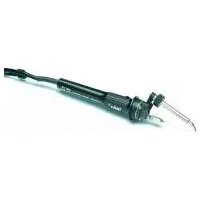
WSFP 5 - Welding machine Weller - Free user manual and instructions
Find the device manual for free WSFP 5 Weller in PDF.



| Product type | Professional soldering station with automatic wire feed |
| Brand | Weller |
| Model | WSFP 5 |
| Power supply | 230 V / 50 Hz |
| Power | 90 W |
| Fuse | T800 mA |
| Output voltage (heating) | 24 V AC |
| Output voltage (feed) | 24 V DC |
| Temperature range | 50 °C to 450 °C |
| Temperature accuracy | ± 9 °C |
| Display | Digital (LED) |
| Wire feed modes | SFA (sequential) and SFC (continuous) |
| Compatible wire diameter | 0.5 mm to 0.8 mm |
| Automatic temperature reduction | Yes, after 20 min at 150 °C, shutdown after 60 min |
| Potential-free contact | Yes, 24 V / 20 mA |
| Potential equalization | Hard grounding |
| Options | Foot switch, input device WCB1/WCB2 |
| Drive roller maintenance | Clean with brass brush |
| Tip maintenance | Tin before storage, use activators |
| Compatible tips | LT A, LT B, LT C, LT H, LT F, etc. |
| Supplied accessories | Soldering iron WSF P, holder, power cord, manual |
Frequently Asked Questions - WSFP 5 Weller
User questions about WSFP 5 Weller
0 question about this device. Answer the ones you know or ask your own.
Ask a new question about this device
Download the instructions for your Welding machine in PDF format for free! Find your manual WSFP 5 - Weller and take your electronic device back in hand. On this page are published all the documents necessary for the use of your device. WSFP 5 by Weller.
USER MANUAL WSFP 5 Weller
Modus SFA automatic:
Modus SFC continuous:
Dimensions (L X P X H): 120 X 217 X 199 mm
Modus SFA automatic:
Modus SFC continuous:
Potentiallyvrij contact
Soldeertinrol monteren
Dimensioni (Largh. X Prof. X Alt.): 120 X 217 X 199 mm
Tensione di rete: 230V / 50Hz
Thank you for placing your trust in our company by purchasing the WELLER soldering station WSF 81 D5/D8. Production was based on stringent quality requirements which guarantee the perfect operation of the device.

1. Caution!
Please read these Operating Instructions and the attached safety information carefully prior to initial operation. Failure to observe the safety regulations results in a risk to life and limb.
The manufacturer shall not be liable for damage resulting from misuse of the machine or unauthorised alterations.
The WELLER soldering station WSF 81 D5/D8 corresponds to the EC Declaration of Conformity in accordance with the basic safety requirements of Directives 2004/108/EC, 2006/95/EC and 2011/65/EU (RoHS).
2.Description
The soldering station WSF 81 D5/D8 is part of a family of units developed for industrial production technology, repair work and laboratory applications.
The soldering station contains an automatic filler wire feed system. The diameters of filler wire that can be used are divided into two ranges and are determined by the type of soldering iron used (0.5 mm - 0.8 mm for the WSF P5 soldering iron and 0.8 mm - 1.5 mm for the WSF P8 soldering iron). The feed unit and control unit can be stacked to save space.
The control unit contains digital electronics for controlling the soldering iron control unit (Channel 1) and the feed control unit (Channel 2). A microprocessor is used to obtain the best possible temperature control response with different soldering tools and precise feed control of the solder wire.
The temperature at the tip of the soldering iron (Channel 1) is displayed digitally and can be smoothly adjusted within a range of 50°C - 450°C . A blinking red LED in the display is used as a visual control check to signal that the preselected temperature has been reached. A continuous signal indicates that the system is heating.
An integrated temperature monitoring circuit is used to evaluate various temperature states via a floating contact.
The feed unit contains the mechanical drive for the solder feed and the soldering iron connection for the wire lead. A wire holder that holds up to 1kg of filler wire (max.) is also included in the feed unit.
The mechanical drive adjusts automatically to the diameter of the wire.
The WSF soldering iron features an ergonomic design and a movable heating element. The very powerful 80W heating element ensures that the soldering temperature is reached quickly and precisely. The angle of the movable heating element can be adjusted at approximately 40° after loosening the locking bolt (20).
A general distinction is made between two types of solder feed system:
Mode SFA - automatic:
In the operation mode SFA, the preset quantity of solder is fed by the activation of the finger switch (optional: pedal switch or external contact). The required amount of solder can be smoothly adjusted from approx. 1 - 10mm .The feed interval (Channel 2) is shown digitally.
Mode SFC - continuous:
In the operating mode SFC, the solder feed is activated for as long as the finger switch (optional: pedal switch or external contact) is activated. The speed of the feed rate can be smoothly adjusted and is shown digitally on Channel 2.
Various equipotential bonding possibilities for the soldering tip, zero voltage, and the antistatic design of the soldering station complete the high standard of quality of this unit.
Additional functions and settings are possible at the soldering station using the optional input devices WCB1 and WCB2. An integrated temperature gauge and PC interface are included in the expanded scope of function of the input device WCB2.
3. Operation and settings Channel selection
The digital display can be set to Channel 1 (temperature control) or Channel 2 (feed) by pressing the channel selection key (7). The channel that is currently displayed is marked by a red/orange LED above the socket (6) or (9).
If no keys have been activated, the unit will switch automatically to Channel 1 after approx. 10 sec and show the actual temperature.
Temperature setting (Channel 1)
If no keys have been pressed, the digital display (2) will show the actual temperature. Pressing the "Up" or "Down" key (3) (4) will switch the digital display (2) to the current setpoint value. The setpoint value (blinking display) can be changed in the desired direction by touching or continuously pressing the "Up" or "Down" key (3) (4).
Technical specifications
Dimensions (I x w x h): 120 X 217 X 199 mm
Supply voltage: 230V / 50Hz
Output voltage: 24 VAC (Channel 1); 24 VDC (Channel 2)
Power: 90 W
Fuse: T800 mA
Temperature control:
Accuracy:
stepless 50°C - 450°C
- -9°C
Equipotential bonding:
Initial state: hard grounded
If the key is pressed continuously, the setpoint value will change rapidly. The digital display (2) will automatically return to the actual value approximately 2 seconds after the key is released.
Standard setback
If the soldering tool is not used within a period of 20 minutes the temperature will be automatically reduced to a standby temperature of 150°C (300°F) . After three setback periods (60 min.) the "AUTO OFF" function will be activated and the soldering iron will be switched off.
Activating the standard setback function: When switching on the unit press the "UP" button until "ON" appears in the display. Use the same process to switch the unit off. "OFF" will appear in the display (state upon delivery).
The use of very fine soldering tips may have a negative effect on reliable function.
Feed setting (Channel 2)
After switching to Channel 2, the digital display (2) will show the speed in the SFC mode or the feed period in the SFA mode. This value can be changed in the desired direction by touching or continuously pressing the "Up" or "Down" key (3) (4). If the key is pressed continuously, the setpoint value will change rapidly. If no keys are pressed, the unit will automatically switch to Channel 1 after approximately 10 seconds and show the actual temperature.
Setting range:
SFA mode - feed period (solder)
1 - 300 (10ms intervals)
SFC mode - speed
10% - 100%
Rapid feed:
Simultaneous pressing of the "UP" and "DOWN" keys advances the solder wire at max. speed (100%). Recommended for advancing the filler wire after the solder roll is replaced.
SFA / SFC mode switch:
Press the channel selection key (7) continuously and set the desired mode with the "UP" key (3). The new operating mode will appear on the display.
Adjusting the temperature window
Press the channel selection key (7) and "Down" (4) simultaneously. The blinking value (in ° C / °F ) of the current temperature window will appear on the display (factory-set to "000").
The factory setting "000" means:
Temperature monitor circuit has been switched off and the unpowered contact (16) is always low-resistant.
°C display
The setting " 001 - 099 " corresponds to the following: Size of the temperature window + - 1°C to + - 99°C
F display
The setting " 001 - 178 "corresponds to the following: Size of the temperature window + - 1°F to + - 178°F
Unpowered contact (potential independence)
If the actual temperature of the soldering tool is within the temperature window (tolerance width), the contact (16) will be low-resistant. If the temperature is outside the temperature window, this will be indicated on the display (2) as "HI" (temperature too high) or "LO" (temperature too low) at 2 second intervals. The contact (16) is high-resistant.
The transistor output of an optocoupler functions as the unpowered contact of the unit. Care must therefore be taken to note the polarity of the voltage to be applied.
PLUS (+) at Pin 2
MINUS (-) at Pin 3
This contact can be loaded with max. 24V / 20mA
External input device WCB 2 (optional)
The following functions are available when using an external input device:
Offset:
The actual temperature of the soldering tip can be changed by + - 40°C by entering a temperature offset
Setback:
Reduction of the setpoint temperature to 150°C / 300°F (standby). The setback period, after which the soldering station switches to the standby mode, can be adjusted from 0 - 99 minutes. The setback state is indicated by a blinking display of the actual value. After three setbacks, the AUTO OFF function will be activated and the soldering tool will switch off (blinking dash on the display). The setback state or AUTO OFF ends after pressing a key or the finger switch. At this time the setpoint will be displayed briefly.
Lock:
Locking of the setpoint temperature and temperature window. No changes can be made to the soldering station settings after locking.
C/°F:
Switching the temperature display from ° C to °F and vice versa. Pressing the "Down" key when switching the unit on will show the current temperature version.
Window:
Limitation of the temperature range to max. ± 99°C based on a locked temperature resulting from the "LOCK" function. The locked temperature represents the median point of the adjustable temperature range.
For units with a floating contact (optocoupler output) the "WINDOW" function is used to adjust a temperature window. If the actual temperature is within the temperature window the floating contact will be enabled (optocoupler output).
Cal:
Factory setting FSE (reset of all adjusted values to 0, temperature setpoint value: 350°C / 660°F
PC interface:
RS232 (WCB 2 only)
Temp.gauge:
Integrated temperature gauge for thermocouple Type K (WCB 2 only)
Maintenance and care
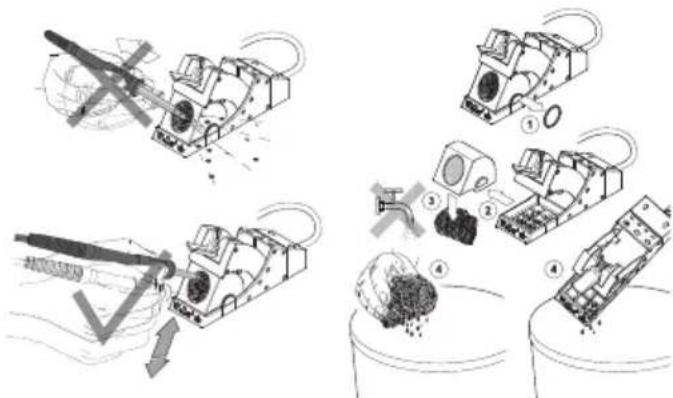
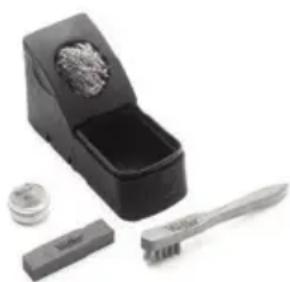
If the feed rate is irregular, the drive wheel can be cleaned with a brass brush. First remove the control unit from the feed unit. Push back the cover of the feed unit to access the feed unit. Lift the drive wheel and clean.
Instructions for care of the WSF P5/P8 / WP / WSP
soldering gun (heating element, tip receptacle and soldering tip)
Please clean the heating element depending on how much you use the soldering gun.
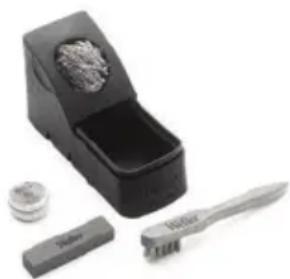
Cleaning the heating element:
Remove any dirt and old solder from the tip of the gun. Remove the tip receptacle by undoing the knurled nut/tip receptacle. Take care not to crush the tip receptacles during removal (in order to avoid damaging the heating elements).
Use wire brush T0051382799 for cleaning
Cleaning set WDC 2 T0051512699
Cleaning set WDC T0051512799.
Care of the soldering tip:
After lead-free soldering we recommend that you always rewet the soldering tip with tin solder before putting the soldering gun back into the stand. Always use our steel wool for WDC 2 T0051512599 and WDC T0051512499 to clean the soldering tip. We recommend using Tip Activator (T0051303199) for non-wettable soldering tips.

4. Start-up
Establish the electrical connection between the feed unit and the control unit. Insert plug (12) into socket (6).
Connect the soldering iron connections to the control unit and feed unit. Insert the electrical connecting plug for the soldering iron into the 7-pin socket (9) of the control unit, and lock into place. Fully insert the wire lead into the connection element (13) of the feed unit and fasten with the clamping screw (17).
Place the soldering iron in the storage tray.
Verify the correct system voltage and connect the control unit to the mains (14). Switch on the unit (1).
Install solder roll.
Remove knurled nut (19) on the solder roll holder. Place the solder roll on the shaft so that the wire unrolls downwards. Secure the roll with the knurled nut and push the end of the wire into the inlet port (18).
Pressing the "UP" and "DOWN" keys simultaneously will cause the drive to catch the solder wire and transport the wire at maximum speed. Continue to advance the solder wire until it appears at the soldering iron nozzle (22).
In the event that the solder wire is not caught by the drive, the cover of the feed unit can be pushed back to access the drive unit. Therefore turn both locking pins (10) counter clock wise (ccw) approx. 90° until release.
Carry out adjustments to the units as described in the section "Operation and settings".
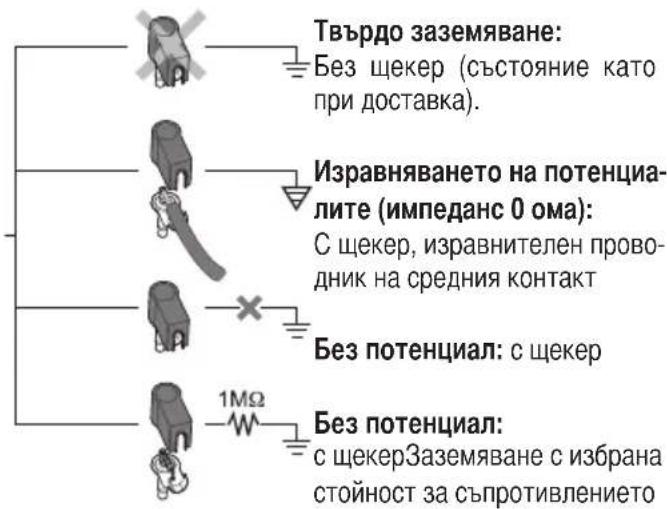
5. Equipotential bonding
Four different versions can be obtained by different wiring of the 3.5mm jack bushing (8).

6. Soldering instructions
For initial heating coat the soldering tip (tip can be coated selectively) with solder. This removes oxide deposits and impurities from the soldering tip that occur during storage. During soldering breaks and before storing the soldering iron, always ensure that the soldering tip is well coated with solder. When using very low activated flux agents (no clean), the use of "Tip Activator" is recommended to maintain the coating. Dirt, foreign material or damage may not affect the transition between the heating element/sensor and the soldering tip.
This will compromise the precision of the temperature control.
Important: always ensure the soldering tip fits properly.
Keep the heat-conducting surfaces of the heating element and soldering tip clean.
The hot soldering tip may not come in contact with the cleaning sponge or plastic surfaces.
These soldering units have been adjusted for use with a medium-sized soldering nozzle or jet. Deviations can occur as a result of changing the tip or using other tip shapes.
7. Accessories
| 005 13 120 99 | Pedal switch |
| 005 13 031 99 | Tip Aktivator |
| 005 28 126 99 | FE-attachment |
Soldering tips:
| 005 44 403 99 LT A | 1.6 mm chisel |
| 005 44 405 99 LT B | 2.4 mm chisel |
| 005 44 407 99 LT C | 3.2 mm chisel |
| 005 44 443 99 LT ALX | 1.6 mm bent |
| 005 44 442 99 LT BX | 2.4 mm bent |
| 005 44 412 99 LT H | 0.8 mm chisel |
| 005 44 420 99 LT HX | 0.8 mm bent |
| 005 44 408 99 LT F | 1.2 mm round, slanted |
| 005 44 444 99 LT BB | 2.4 mm round, slanted |
| 005 44 445 99 LT CC | 3.2 mm round, slanted |
8. Scope of supply
Soldering station WSF 81 D5/D8
| Control unit |
| Feed unit |
| WSF P soldering iron |
| Small tool |
| Soldering iron storage |
| Power cord |
| Operating instructions |
| Safety Information |
Subject to technical change without notice!
See the updated operating instructions at www.weller-tools.com.
Modus SFA automatic:
Modus SFC continuous:
Modus SFA automatic:
I driftsmodus SFA skubbes den forud indstillede lodde-maengde frem, när man kort trykker pa fingerkontakten (som option fodkontakt eller ekstern kontakt). De onskede lodde-maengde kan indstilles trinløst fra ca. 1 - 10 mm. Fremfaringstiden (kanal 2) vises digitalt.
Modus SFC continuous:
I driftsmodus SFC er tinfremforgen aktiveret, sa lange der trykkes pa fingerkontakten (som option fodkontakt aller ekstern Kontakt). Fremforgenings omdrejningstal (hastighed) kan indstilles trinlost, den vises digitalt pa kanal 2.
Mäl (B X T X H): 120 X 217 X 199 mm
Netspanding: 230V / 50Hz
Udgangsspanding: 24 VAC (kanal1); 24VDC (kanal2)
Effekt: 90 W
Sikring:T800mA
Temperaturregulering: trinl0s 50°C - 450°C
Nogtagtighed +-9°C
Potentialudligning: grundtilstandHardt jordet
Standardsetback
Nar loddevaerktojet icke er i brug, bliver temperaturen after 20 min. automatisk sanken til standby-vardien pa 150°C (300°F) . After den tredobbelte setbacktid (60 min.) aktiveres "AUTO OFF"-funktionen. Sa slukkes der for loddekolben.
Loddestation WSF 81 D5/D8
Styreenhed
fremf.orgingsenhed
WSF P loddekolbe
små stykker værktj
loddekolbeholder
Netkabel
Driftsvejledning
Modo SFC continuous:
SFC continuous-tila:
Iaotaaic (IaTOc x BaOoc YoC): 120x217x199mm
Ovoaotikn taon: 230 V/50 Hz
Táon εξóδou: 24 VAC (kaváλι 1), 24 VDC (kaváλι 2)
Ioxuc: 90W
AeioykoC Tpo mSFA/SFC:
KpatnoTe natnevo to nknpto kavaio (7) kalpuoioTe uTo nnktpo "Up" (3) mV avaykaia mtappuOion o vTo Aotopyko TpOIO. TmV evdeIeTNC OUKeUNc EpaVcEtaI aokouthetao EKAOTe puoioucAitoupykoc TpOIOc.
Pueon ta npaoBpuo ums eepokpaiaac
PataoToTaoXpoVaTo PAnKToPO EInIooyn Kavaiaou (7) Ka to PAnKToPO "Down" (4). Tnv EvdeIeN Tc OaokEunC ePavizTei Toe avalamouoa n Tu n (oe ° C / °F) Tou ekaoTote puOmuEvou npapuOpou eepokpaiaac (to epyo-otao kataokEunC exei puOmuTei kat' apxny n Tu n autn oe "000").
H apxikn autn puoiion oTo epyoTaoio kataokuenc ,000" onmaivei: H ouvdoaoloyon tou eayxou mc eepokpaia c exei teoic ktoic aeitoupyiac, kai n eauθepn duvaikou eapn (16) diaeTei navote μkpn nektpkn taon.
Evδεξη°C
Hpuθμion 001-099avntotixeiε:
Meyeog tou npapauoou eepokpaia+ -1°C μexpl-99°C
Ev 85n F
HpuθμoI ψ001-178aVtioIxεi oε:
Méyéθoc tou napaθúpuou θερμokpαiaç + - 1°F μéxρi + - 178°F
EeUepn dwaakou anapn
Oeepo-Kpaota Opyavo mEtpnonc;
Evowatwuevo opyavo etpnnc tsn eepokpaiaacyia 0epoioxio toun K (movo WCB 2)
Sigma non
6. TeWkEc oyniec yia nV eKTe λe on ouykoAaNtkwv epyaotw
Eπiotpωte kata tv apxik θερμavon tnc ouokun, με ouykoλntiko uλiko tv ouykαλntikn aixμn, n otoia μπopεi va επiotpωθει τημatika με kaσοitepo.
H eioiopwn autn apapei ano tv oukyoanntk aixun oEioWtka otpwata kai akapoeic, nou mnopei va 0nioupynoov kata nvo anoohkeuon tnc ouokeuuc. Kata tn diapkeia diaaeemuatw v kata nvy oukyoanntk epyaia kai npiv ano tv evanooen Tou oukyoanntkou eboau npoexye Tavote, etai wote va eival navtote ka auykoanmeyn n oukyoanntk aixm. ZepinTwn epapoync uikow ponc, ta onoi EAituyxavouv nia evyponoin (no clean), oac ouviotae yia tv mnnon ts eioiopwn ts xpnounoin nevepyoantkou uikou Tip Aktivator.
H anostraon eTaTuou 0epauvtikou oomega / ao0nnpa kai Tnc oukyoanntknc aixu ncs dev enitpeetai va unooTei duovn enippaon loyaw akabapoiac, evwv owpatidow n loywo bao, etieon otic nepiTTwoic autc npokunTouv duovveic enipopaesic eti Tnc akpiBiaac Tns puOmuoc Tnc 0epoukpaiaac.
Poo0x
PooeTe navote otnykavovikn eop on Tc ouykoanTKnc axin
AiaTpEeTE KaTapeC TIG EINPaveies EETADoONs EEPoNTaTc Tou eepavTKOU OwauTO KAI TNS MUTNG TOKoAAntpioU. Mny aIOtheTe TIV KAUTN MUTN TOU KOAAntpioU OTo OPOuyyapi KaTapIOoun OE NaaOTKEc EINPaveies.
Ta opyava oukyoalnoev ovu pvthetai yia maoukyoalntikn aixm kai yia eva akpoquo io eoaio ueyeouc. Zepintwn aallaync ts oukyoalntikns aixmc npoutoinons aalns oopn c oukyoalntikwv aixuw npoei va npokouov puthetaic anoklaosic.
SFC Modu devir sayisi (hiz)
10% - 100%
Hizibedesem:
Aynianda "UP"ve "DOWN"tuşlarinabasarakazami hizla (%100)lehim telisbesmesesi yapilir.
WSF P5/P8 / WP / WSP
(Isitici,uc yuvasi ve lehim kalemi ucu) lehim kalemi icin bakim talimatlari
Rezim SFA automatic:
Rezim SFC continuous:
Tryb SFC continuous:
Wymiary (SZER. X GL. X WYS.): 120 × 217 × 199 mm
Napi cié sieciowe: 230V / 50Hz
Napi ciè wyjsciowe: 24 VAC (kanaf 1); 24 VDC (kanaf 2)
Moc: 90 W
Bezpiecznik: T800mA
Rezim SFA automatic:
Rezim SFC continuous:
Naacin SFA automatic:
Nacin SFC continuous:
Mootmed (L X S X K): 120 X 217 X 199 mm
Vorgupinge: 230V / 50Hz
RS232 (ainult WCB 2)
Sildenafila tirishana
Likvidejiet netirumu atliekas uz uzgala apvalka.
Nonemiet uzgala apvalku, atbrivojot uzgieznus/uzgala apvalku. Uzmanieties, lai nesaspiestu uzgala apvalku (lai izvairitos no sildelementa sabojasanas).
Tirišanai izmantojiet stiepes sukuro051382799
Tirisanas komplekts WDC 2 T0051512699
Tirišanas komplekts WDC T0051512799.
Lodesanas uzgalu apkope
Ja lodejat bez svina, pirms lodamura noliksanas glabasanai vienm erieicams no jauna noklat lodestanas uzgali ar svinu. Lodestanas uzgalu tirisanai vienm izmantojiet musu spirales vilnu WDC 2 T0051512599 un WDC T0051512499. Ar cinku neparklatiem lodestanas uzgajem ieteicams izmantot uzgala aktivatoru (T0051303199).
4. Lietošana
Padeves vienibu un vadibas ieriei savienot elektriski.
Spraudni (12) ievieto bukse (6).
Lodamura pieslegumu savieno ar padeves vienibu un vadibas iekartu. Lodamura elektriska piesleguma spraudni ivieto vadibs iekartas septinpoligajiesplesguma bukse (9) un nostiprina. Stieples vadotni ivieto padeves vienibas savienojuma elementa (13) lidz atdurei unnofikse ar fiksacijas skruvi (17).
Virzuli ivietot drośibas apvalka.
HacpoKaTa Ha Mex. 3aDnBxKBaHe 3a DnAmEtbpa Ha XnCa-Ta CTaba ABTomATNuHO.
IoiHHKbT WSF ce OTnuaBAT c eproHOMnHa KOHCTpyKu. Ic eINn IOBxKeH HArpeBaTeJeEeMeHT. Oco6eHO MoHnRT HaPeBaTeJeEeMeHT 80 W doCTnra npeun3Ho n 6bp3o Tempepatypata 3a CnoBaHe. bblbT Ha NOBxHnH HArpeBaTeJeEeMeHT moKe da ce npomeH cnEd pa3BnHTBaHe Ha fKnCnpaun BnHT (20) Ha np6n. 40°
Pn pa60tn CbC cnCTema 3a noDaBaHe Ha KaJaH npInoN no npInuN ce pa3nUaBAt Dba Bnda:
Pekm SFA automatic:
B pa6oTeH pexm SFA c KpaTko 3aJeIcTBaHe Ha 6yToHa (OIIIOHO HA NeJaHnI PpeKbCBaU IN HA BbHNHnKoHTAKT) Ce noDABa HApPeI PpeDbapITeHNO 3aJaDeHOTOKoJIYeCTBO npInOn. Heo6xOJIMOTO KOINueCTBO npInOn MoKeTe da ce perynipa 6e3TeENHn npIn6I. ot 1-10 MM. BpemTo 3a noDaBaHe (KaHJI 2) ce noka3Ba uΦpOBo.
Pexim SFC continuous:
B pa6oTeH peXIM SFC noJaBaHe Ha KaJau e aKTbUpaHo, DOKaTo e 3aJeIcTBaH 6yToHa (OnuHOJIHO neJaHHn IpeKbCBaH IN BbHUN HA KOHT). O6OpOTte (CKOPoCT) Ha noDaBaHe HAnPeM MoKe Da ce perynipa 6e3TeENHO n Ce NOKa3BaT UΦpOBO Ha KaHn 2.
Texnueckn daHHN
Pa3mepn(BXTXH):120X217X199MM
MpeXoBO HanpeXeHne: 230 V/50 Xu
Изхоно Hanpeхене: 24 VAC (kaHан 1); 24 VDC (kaHaN 2)
Mouhnoct: 90 W
Ipei3nTeJ: T800 mA
PerynipaHa TemnepaTypa:6e3TepeHHo 50°C - 450°C
ToHOCt: +/ -9°C
U3paBnBaHe Ha NOTeHuaJIte: OCHOBHO CbCTOaHne e TBbpDO 3a3EmBaHe
Pa3JIuHnTe Bb3MOxHOCTH 3a n3paBHBaHe Ha notEHcnaJi cnPraMo HakpauHnKa Ha noJInHka, HynEbnIpeKbcBaU, KaT0 I aHTncTaTuHOTo KOHCTpyKtNBHO n3IbJIHeHne Ha CTaHcYrTa 3a 3aNoRaHe DOnbJBat BWCOKnI CTAHdApT Ha KaueCTBOTO.
C OIQUHOJIHO NOJUyABAHNTe yCTPOINCTBa 3a BbBExJaHe WCB1 n WCB2 mOrat da ce HAnpaBRT DoNBJHnTeJIHN fynKcIMn N HAcTPOIKn Ha CTaHcIraTa 3a 3aNoRAbe. EINH BrpaIeH ypeD 3a N3MepBaHe Ha TempePaTypata N eEINH INHTepFe-ic PC BIn3aT B pa3WIpEnHa Obem Ha yCTPOINCTBOTo 3a BbBExJaHe WCB2.
3.ObcnyXBaHe n HaCTpoiKn
1360pHaKaHai
C haTnCKaHe Ha 6yToHa 3a n36Op Ha KaHAn (7) MoXe Ja ce perynipa uncpoBata Hndkaun Ha KaHAn 1 (perynpahe Ha Temnepatypata) nn Ha KaHAn 2 (noDaBaHe Hanpei). CbOTBeTHO nOKa3BaHnnr Ta KaHAn e 0603HaueH c cepBcH/opaHxKEB CBETODNOHd CbeEINHTeHnTa 6ykca (6) nn (9).
Ako Hama HaTnCHaT 6yToH, ypeBt CneI np6JI. 10 cek. ce npeBkJIIOUBA aBTOMaTHUHO Ha KaHaJI 1 N Oka3Ba DeIcTBNTeJHATA CTOHOCHT Ha TEMNepaTypata.
PerynnpaHe Ha TemnepaTypata (KaHAn 1)
6e3 haTnCHa 6yToHa uΦpOBa HnDnKaun (2) noka3Ba DeiCTBnTEHnHata cToHocHT Ha TemnepaTypaTa. Cbc HATnCKaHe Ha 6yToHa "UP" nn "DOWN" (3) (4) uΦpOBa HnDnKau (2) ce npEbkIooBa Ha MOMeHTHa T aDaJeHa cToHocCT. Cera 3aJaDeHata cToHocT (MraaHa NnDnKaun) MoKe da 6bJe npomeHa c HATnCKaHe Ha INTePbaJn nn C noCToRAnHO HATnCKaHe Ha 6yToHa "UP" nn "DOWN" (3) (4) B cbO TBeTHaT aNoCoka. C NoCToRnHo HATnCKaHe Ha 6yToHa 3aJaDeHata cToHocCT ce npomeHa c 6bp30 npelnCTBaHe. Pnp6n. 2 cek. cNeI OTnyckahe uΦpOBa HnDnKaun (2) ABtOMaTHNO OTHOBO Ce npEbkJIooBa Ha DeiCTBnTeHnata cToHocCT.
CTaHapTeH peceT
AKe He n3no3BaTe Ha noHnHn HNCTpyMeHT TempeaTpa Cne 20 Mm. ABToMaTHNo Cnada Do cToHocT 150°C (300°F) . CneTpKpaTHo BpeMe 3a pecet (60 MN.) ce aKTbNbpa fynkuaTa "AUTO OFF". NoHnKbT ce n3KnIOyBa.
BknHcbHe Ha yHKnTa 3a cTaNdApTepeet: HATnche TNO Bpeme HA BKnHcBaHe Ha ypeHa 6yToHa,UP" nTO 3aDpbKTe,doKaTO B INNkauNaTa ce NOBN,ON". N3KnHcBaHo CTaba NO CbUHa HauH. B INNkaunTa ce noRaBA,OFF"(cbCToHne npu DoCTabKa).
Pn n3no3BaHe Ha MHOrO fHnBbpxOBe 3a NOHnKa MoKe Da Ce BLOuNfYHKUHOHaHInaTa 6e30nacHOCT.
HacpoKa Ha noDaBaHeTo Hanpei (KaHaJ 2)
CneI npEbkHIOBaHe Ha KaHaJ 2 UnpoBaTa HnDkaUa (2)
noka3Ba 6obopHTe nppejxIM SFC nIIN BpeMeTO 3a NOdaBAHe nppejxIM SFA.Cera 3aadaenHATA cToHocT MoKe da6bDe npomeheHa C HATNCKAHe Ha INTEpBaII NnC NOCTOHNHO HATNCKAHe Ha 6byToHa "UP" nn "DOWN"(3)(4)B cBoTBETHa TPOcKa.C NOCToRHHo HATNCKAHe Ha 6byToHa 3aJaDEHATA cToHOCCT Ce npomeHa C 6bp30 ppeInCTBaHe.AKO HAma HATNCHAT 6yToH, ypeBt CneD np6JI.10 cek. Ce npebKIOUBA ABTomAtuHO Ha KaHAI 1 n Noka3Ba DeiCTBNTeHHaTa cToHOC HA TEMpepaTypata.
Dnana3oHa Ha perylnupaHe:
PeknM SFA, BpeMe 3a noDaBaHe (KoJInueCTBO npinioi)
1-300(CTbπKnno10MC)
Pexim SFC, oboptn (ckopocT) 10% - 100%
Бьрз подаинанped:
C eɪnHOBpeMeHHo haTnCKaHe Ha 6yToHa "UP" n "DOWN" da CTaba IIOdaBaHe Ha npInoI-KuIa HAppeD C MaKc. CKOpOCT (100%).
Ppeopbya ce 3a don36yTbahe Ha npinno-Jnua cIeD CMHa Ha Makapata KaJaeH npinno.
SFA / SFC Pekm 3a npeBknouBaHe:
(HarpeBaTeJIeH eIeMeHT, BTyJka Ha HAcpaHnKa N HaKpaHnKa Ha NoJIHnKa)
NoIcTBaIte HarpeBaTeJIHnIe IeMeHT cnopeI nHTeH3NBHOCTTa Ha n3NoJ3BaHe Ha noJIHnKa
NoctBaHe Ha HarpeBaTeJIHn eIeMeHT:
PpemaxheTe octaTbCHTe OT 3AmbpcaHnO T BTyIkata Ha HApaiHnka. CbaTe BTyIkata Ha HApaiHnka, KaTO 3a Ta3n ceN pa3BnHTeTe raKaTc H3b6Ka/BTyIkata Ha HApaiHnka. PpTuBa
BHMaBaTe Da He CMaUkaTe BTuIkaTa Ha HauKpaHnHa (3a Da He Ce NOBpei
HarpeBaTeHnHa eJeMeHT).
3a nouCTBaHe n3noJ3BaTte
TeHeHa YeTKa T0051382799
KomJIeKT 3a nouCTBaHe WDC 2 T0051512699
KomJIeKT 3a nouCTBaHe WDC T0051512799.
IodbpxKaHe Ha HkpaHnKa Ha noJHnKa:
Cne630OBHO 3aONBAHe e 3a npenopbUbaHe BnHa npei cIarane Ha NaKpaHnKa Ha NOJHnKa B NODCTabKaTa TOI OTHO BO Da 6bDe KaJaNcaH. 3a NoNCTBaHe Ha NaKpaHnKa Ha NOJHnKa N3NOJ3BaTe BnHaRn HauNTe CnpaHn KOHc 3a WDC 2 T0051512599 n WDC T0051512499. 3a NaKpaHnCu 3a NOJHnK, Ha KOnTO He MoKe da 6bDe KaJaNcaH, e 3a npenopbUbaHe N3NOJ3BaHeTo Ha Tip-Activator (T0051303199).
6bIraPckn

4. 3anoybahe ha pa6ota
Cbpxte eektpueckn noabaun 6nok c anapata 3a ynpablenhe. Ukeep (12) B 6ykcata (6).
Cbpxte CbeHHTeHNTe eemeHTn Ha noHNHa c anapata 3a ynpabJeHne n noDaBaun6Jok. NocTabeTe eektpnweckna CbeHHTeHnE huekep Ha noHNka B 7-nOIOCHATA CbeHHTeHa 6yKca (9) Ha anapata 3a ynpabJeHne n ro fHKcupaTe. BkapaTe do ynop TeIIOBOHeTo B cBeHHTEHnEeMeHT (13) Ha noDaBaun6NOK n fHKcupaTe cbc 3ateraTeHnBnT (17).
IocTabeTe noJHnKa B npEJa3HaTa noCTaBka.
Pn npabHNO MpeKoBO HnpeKeHne CBpKeTe anapaTa 3a ynpabJIeHne c mpeKaTa (14). BkIOueTe ypeDa (1).
MOnTupaHe Ha MaKapaTa KaJaEn npInoI
DemOHnpaTe raiKaTa CHa3b6ka (19) Ha IbpxKaaHa MaKapata KanaeH npnoi. NocTabete MakapaT KanaeH npnoi Bbpy BaTaka, Ye npnoT-Knua Da ce pa3BnBa HADony. Ocnypte Makapata KanaeH npnoi C raiKaTa C Ha3b6ka IN BkapaTe Haanoto Ha KnuaTa BB BXODnO TBP0p (18).
C eHOBpemHo HaTnCKaHe Ha 6yToHa "UP" n "DOWN" npnnoT- Xnua Ce 3axBaUa OT 3aDnKBaHeTo n Ce TpaHCnpTu pa C MaKc. CKopocT. TpaHCnpTuPaTe npnNo- Xnua Do noBBAhe Ha NoDaBaUaTa IIO3a Ha NoJInka (22).
KanaBt Ha IodBaAun 6IOK MOKe Da Ce OTMeTHe Ha3aI, 3a Da NMa DoCTbN DO 3aDnBXBaUn 6Iok 3a B CnyaN, Ye npnoT-Jnua OTe He CE 3axBaHcOT 3aDnBXBaHcTo. Dbata 6Ioknpaun eneMeHTn Ha Kanaka Ce OTbaprT Cbc 3aBbPtaHe Ha np6n. 90° HAnBO.
Cnei TOBa HnnpaBeTe HAcTpoKnTe Ha ypeHa, KaKTo TOBa e onuCaHO B pa3dEn "O6cnykBaHe n HAcTpoKn".
5.Изравнане наnotehцmaNTe
Cpa3nueHMOHTaXHaKaK6yKcTa3,5MM(8)caBb3Mo-KHN4pa3nUHHBapnaHTN:
6. Texnuecknyka3aHna 3a 3aNoBaHe
Pn PbBO HaPRABaHe HaHecTe N36npaTeJHO eINH TbHBK CNo npnoB Bbpxy KaanDnCBAeMn BpBx Ha noHNHa. TAKB HauHc CBaTn HatpynaHnTe npn CbXpaHnBaHe n HApKaHnKa Ha NoJHnKa OKCNn CNOeBn 3AmpcBaHn. BHmAbai Te BnHar npn Nay3n npn CNoBaHe n npn CnaAhe Ha NoJHnKa HAcTpaHa HerOBnT HApKaHnDa e Do6pe KaanDnCaH. Pnp MHOr MeKn AKTNBpuHn φJIIOCOBe (no clean) 3a 3ana3BaHe Ha KaanDnCBaHeTo Ha BbpxHa NoJHnKa ce npenOpbYBa N3NoJ3BaHe Ha Tip Aktivator.
PpexoBt MExdy HaraeBaTeHnna enemeHT /ceH3opa nHaKpaHnka Ha NpOaHnka He Tp6Ba Da 6bDe npenrTCTbaH OT 3AmbpcaBaHn, YxN TeNa nn NoBpeDa, Tb KaTO BnHHe Ha ToUHOCTTa Ha peryInpaH e Tempeatypata.
BHHMaHHe:
BHHMaBaIe BnHaR 3a npaBnHn MaHTaK Ha HApaHnKa Ha NoJHnKa.
IopbpxkaTe YnCTN TOnlnonpeadaaunte NOBbpxHOCTNa HArpeBaTeJHnE JemEnT Ha HApaiHnKa Ha NoJIHnKa.
He cIaraiTe ropeuHa kpaHnK Ha noJIHnKa Bbpxy Tb6a-Ta 3a NoCHCTBaHe IINBbpxy IIaCTMaCOBn IOBbpxHOCTN.
IopHnnte ca perynpaHn 3a cpehen HakpaHnk, pecn. IIO3a. Pn CmHa Ha Bbpxa NIN Pn N3NOJ3BaHe Ha BbpxoBe C npyrr opMn MOrat Da Bb3HKnHAT OKJIOHEHn.
7.Приинадлжностn
005 13 120 99 Педален пекьсвау
005 13 031 99 Tip Aktivator
005 28 126 99 KomnJIeKr 3a dOooBOpyDaBaHe FE
HaKaPaiHnCz 3a noaIIHK:
0054440399LTA1,6MMJNeTo
0054440599LTB2,4MMJJeTO
0054440799LTCC,2MMJJeTO
005 44 443 99 LT ALX 1,6 MM OgbHaT
005 44 442 99 LT BX 2,4 MM orbhat
0054441299LTHO8MMJJeTO
005 44 420 99 LT HX 0,8 MM OβhA T
0054440899LTF1,2MMKpbIaCKoCeHaΦopMa
005 44 444 99 LT BB 2,4 MM Kpbfla ckoceha φ opma
005 44 445 99 LT CC 3,2 MM Kpbfla ckoceha fopma
8.ObemHa doCTaBkata
Yka3aHn3a6e3oNaChpa6oTa
IpaBoTo 3a npaBeHe Ha TexHnueckn N3MeHeHnOcTaBa 3ana3eHo!
AkyannnpaHnTe pBkoBODCTBa 3a pa6oTa Bne ue Hamepnte Ha aDpec www.weller-tools.com.
Modul SFC continuous:
CE mark of conformity British Conformity Mark

Disposal
Waste light sources have to be removed from equipment. Check with your local authority or retailer for recycling advice and collection point. According to local regulations retailers may have an obligation to take back waste electrical and electronic equipment free of charge. Your contribution to re-use and recycling of waste electrical and electronic equipment helps to reduce the demand of raw materials. Waste electrical and electronic equipment contain valuable, recyclable materials, which can adversely impact the environment and the human health, if not disposed of in an environmentally compatible manner. Delete personal data from waste equipment, if any.
Contaminated filters must be treated as special waste. Dispos of replaced equipment parts, filters or old devices in accordance with the rules and regulations applicable in your country.

Símbolos

ENC declaration of conformity
We hereby declare that the products described herein comply with the following guidelines:
UK declaration of conformity
We hereby declare that the products described herein comply with the following guidelines:
2014/35/EU, 2014/30/EU, 2011/65/EU SI 2008 No.1597, SI 2016 No.1091, SI 2012 No.3032

Besigheim, 2024-08-01
Philippe Budin
Managing director
Authorised to compile technical documentation.
Authorised to compile technical documentation.
Apex Tool Group UK Ltd Registered in England,
Company Number 14127816
Registered Office: C/O TMF Group 13th Floor,
One Angel Court, London, EC2R 7HJ,
United Kingdom
GERMANY
Weller Tools GmbH
Carl-Benz-Str.2
74354 Besigheim
Phone: +49 (0) 7143 580-0
Fax: +49 (0) 7143 580-108
ITALY
Apex Tool S.r.l.
Viale Europa 80
20090 Cusago (MI)
Phone: +39 (02) 9033101
Fax: +39 (02) 90394231
AUSTRALIA
Apex Tools - Australia
P.O.Box 366
519 Nurigong Street
Albury, N. S. W. 2640
Phone: +61 (2) 6058-0300
Fax: +61 (2) 6021-7403
GREAT BRITAIN
Apex Tool Group
(UK Operations) Ltd
4th Floor Pennine House
Washington, Tyne & Wear
NE371LY
Phone: +44 (0) 191 419 7700
Fax: +44 (0) 191 417 9421
SWITZERLAND
Apex Tool Switzerland Sarl
Apex Tool France S.N.C.
25 Av. Maurice Chevalier BP 46
77832 Ozoir-la-Ferriere, Cedex
Phone:+33 (0) 1.64.43.22.00
Fax: +33 (0) 1.64.43.21.62
CHINA
Apex Tool Group
2nd Floor, Area C, 177 Bi Bo Road
Pudong New Area
Shanghai 201203
Phone: +86 (21) 60 88 03 20
USA
Apex Tool Group, LLC
1000 Lufkin Road
Apex, NC 27539
Fax: +1 (919) 387-2639
T005 56 706 08 / 06.2016
T005 56 706 07 / 10.2013
Product Registration
www.weller-tools.com/registration
GERMANY
Weller Tools GmbH
Carl-Benz-Straße 2
74354 Besigheim
Tel: +49 (0) 7143 580-0
CHINA
Apex Tool Group
Room 302A,
NO 177 Bibo Road
Shanghai, 201202
Tel: +86 (21) 60880288
info@weller-tools.com
www.weller-tools.com
THE NETHERLANDS
Apex Tool Group B.V.
Apex Tool Group UK Ltd
Registered in England,
Company Number 14127816
Registered Office:
C/O TMF Group 13th Floor,
One Angel Court, London,
EC2R 7HJ, United Kingdom
Tel: +44 740 8836 404
USA
Apex Tool Group, LLC.
Weller Professional Tools Division
1000 Lufkin Road
Apex, NC 27539
Tel: +866 -498- 0484


- MODUS SFA AUTOMATIC
- MODUS SFC CONTINUOUS
- POTENTIALLYVRIJ CONTACT
- SOLDEERTINROL MONTEREN
- CAUTION
- 2.DESCRIPTION
- MODE SFA - AUTOMATIC
- MODE SFC - CONTINUOUS
- OPERATION AND SETTINGS CHANNEL SELECTION
- TEMPERATURE SETTING (CHANNEL 1)
- TECHNICAL SPECIFICATIONS
- STANDARD SETBACK
- FEED SETTING (CHANNEL 2)
- SETTING RANGE
- RAPID FEED
- SFA / SFC MODE SWITCH
- ADJUSTING THE TEMPERATURE WINDOW
- °C DISPLAY
- F DISPLAY
- UNPOWERED CONTACT (POTENTIAL INDEPENDENCE)
- EXTERNAL INPUT DEVICE WCB 2 (OPTIONAL)
- OFFSET
- SETBACK
- LOCK
- C/°F
- WINDOW
- CAL
- PC INTERFACE
- TEMP.GAUGE
- MAINTENANCE AND CARE
- INSTRUCTIONS FOR CARE OF THE WSF P5/P8 / WP / WSP
- CLEANING THE HEATING ELEMENT
- CARE OF THE SOLDERING TIP
- START-UP
- INSTALL SOLDER ROLL
- EQUIPOTENTIAL BONDING
- SOLDERING INSTRUCTIONS
- IMPORTANT: ALWAYS ENSURE THE SOLDERING TIP FITS PROPERLY
- ACCESSORIES
- SOLDERING TIPS
- SCOPE OF SUPPLY
- SUBJECT TO TECHNICAL CHANGE WITHOUT NOTICE
- STANDARDSETBACK
- MODO SFC CONTINUOUS
- SFC CONTINUOUS-TILA
- AEIOYKOC TPO MSFA/SFC
- PUEON TA NPAOBPUO UMS EEPOKPAIAAC
- EVΔΕΞΗ°C
- EV 85N F
- EEUEPN DWAAKOU ANAPN
- SIGMA NON
- TEWKEC OYNIEC YIA NV EKTE ΛE ON OUYKOAANTKWV EPYAOTW
- POO0X
- HIZIBEDESEM
- WSF P5/P8 / WP / WSP
- REZIM SFA AUTOMATIC
- REZIM SFC CONTINUOUS
- TRYB SFC CONTINUOUS
- NAACIN SFA AUTOMATIC
- NACIN SFC CONTINUOUS
- SILDENAFILA TIRISHANA
- LODESANAS UZGALU APKOPE
- LIETOŠANA
- PEKM SFA AUTOMATIC
- PEXIM SFC CONTINUOUS
- TEXNUECKN DAHHN
- 3.OBCNYXBAHE N HACTPOIKN
- PERYNNPAHE HA TEMNEPATYPATA (KAHAN 1)
- CTAHAPTEH PECET
- HACPOKA HA NODABAHETO HANPEI (KAHAJ 2)
- DNANA3OHA HA PERYLNUPAHE
- БЬРЗ ПОДАИНАНPED
- SFA / SFC PEKM 3A NPEBKNOUBAHE
- NOCTBAHE HA HARPEBATEJIHN EIEMEHT
- IODBPXKAHE HA HKPAHNKA HA NOJHNKA
- 6BIRAPCKN
- 3ANOYBAHE HA PA6OTA
- MONTUPAHE HA MAKAPATA KAJAEN NPINOI
- 5.ИЗРАВНАНЕ НАNOTEHЦMANTE
- TEXNUECKNYKA3AHNA 3A 3ANOBAHE
- BHHMAHHE
- 7.ПРИИНАДЛЖНОСТN
- HAKAPAIHNCZ 3A NOAIIHK
- 8.OBEMHA DOCTABKATA
- MODUL SFC CONTINUOUS
- DISPOSAL
- SÍMBOLOS
- ENC DECLARATION OF CONFORMITY
- UK DECLARATION OF CONFORMITY
- GERMANY
- WELLER TOOLS GMBH
- ITALY
- AUSTRALIA
- APEX TOOLS - AUSTRALIA
- GREAT BRITAIN
- SWITZERLAND
- CHINA
- USA
- APEX TOOL GROUP, LLC
- PRODUCT REGISTRATION
- THE NETHERLANDS
Brand : Weller
Model : WSFP 5
Category : Welding machine